

Power Your Software Testing with AI Agents and Cloud
The Native AI-Agentic Cloud Platform to Supercharge Quality Engineering. Test Intelligently and Ship Faster.


- TestMu AI (Formerly LambdaTest)
- /
- Learning Hub
- /
- What Is a Test Tool? Types, Benefits, and How to Choose
What Is a Test Tool? Types, Benefits, and How to Choose
A test tool is software that supports planning, running, or analyzing tests. Learn the types of testing tools, their benefits and limits, and how to choose one.
Last Updated on:
OVERVIEW
A team that ships every week cannot re-run four hundred regression checks by hand before each release, so it adopts a test tool: software that plans, runs, or analyzes tests on the team's behalf. The catch is that "test tool" covers everything from a unit testing runner to a cloud browser grid, and picking the wrong category costs more than picking the wrong vendor inside the right one.
This guide defines what a test tool is, compares the main types with examples, lists the benefits and limits with sources, and ends with a selection checklist and a real Playwright run on TestMu AI's cloud so you can see the output a test tool produces.
Overview
A test tool is any software that supports one or more testing activities: planning, designing, executing, or analyzing tests. Unit runners, automation frameworks such as Selenium and Playwright, test management systems, and cloud grids such as TestMu AI's Automation Cloud are all test tools; they differ in which testing activity they take off your hands.
What Are the Main Types of Test Tools?
- AI testing tools: Generate and maintain tests from natural-language input and heal broken locators automatically; KaneAI from TestMu AI is one example. They cut authoring and maintenance effort rather than replacing the execution layer.
- Test management tools: Store test cases, group them into plans and cycles, record results, and trace each case to a requirement and a defect ticket. They organize testing but do not execute code themselves.
- Test execution tools: Run scripted or recorded tests against a build and report pass or fail. Selenium, Playwright, Cypress, and Appium sit here, along with unit runners such as JUnit and pytest.
- Static analysis tools: Check source code without running it, flagging complexity, style violations, and known vulnerability patterns before any test executes.
- Performance testing tools: Generate load against an application and measure response time, throughput, and error rate under that load. JMeter and k6 are common examples.
- Cloud test infrastructure: Provides the browsers, operating systems, and devices that execution tools run on, so one suite can cover 3,000+ browser and OS combinations without a local device lab.
How Do You Choose a Test Tool?
Match the tool category to the testing activity that is slowest today, then compare candidates on language support, CI integration, reporting detail, and browser or device reach. The selection checklist later in this guide scores each candidate on those four criteria.
What Is a Test Tool?
A test tool is a software product that supports one or more test activities, such as planning, test case design, test data generation, execution, defect logging, and result analysis. The term covers tools that automate a task fully, like a test runner, and tools that assist a person, like a test coverage analyzer that shows which code branches no test has reached.
The ISTQB glossary defines test automation as "the conversion of test activities to automated operation", and a test tool is what performs that converted activity. Not every test tool automates, though: a test management tool records results a person produced, and a defect tracker stores what a person found.
Three terms get used interchangeably and should not be:
- Test tool - a single product that does one testing job, such as running tests, generating load, or tracking defects.
- Test framework - a library plus conventions for writing tests in a language, such as JUnit for Java or pytest for Python. The best test automation frameworks run inside a tool or a CI job rather than replacing one.
- Test platform - a hosted service that combines execution infrastructure, reporting, and integrations so several tools work together. TestMu AI's cloud runs Selenium, Cypress, and Playwright suites on the same grid and stores the artifacts from each run in one dashboard.
Why Do Teams Use Test Tools?
Teams adopt test tools when manual checking stops fitting inside the release cycle, and the harder problem is usually operating the tool rather than deciding to test. Capgemini's World Quality Report 2025-26 found that 58% of organizations cite challenges in adopting AI-powered tools, which is why the selection criteria later in this guide weigh integration and skills as heavily as features.
The benefits that justify the adoption effort are specific:
- Repeatability - a scripted test runs the same steps every time, so a failure means the application changed, not that the tester's attention drifted on the fortieth pass.
- Coverage a person cannot reach - a cross-browser tool runs one suite on Chrome, Firefox, Safari, and Edge across Windows, macOS, Android, and iOS in one job; a manual tester covers one combination at a time.
- Earlier feedback - a unit runner wired into a pull-request check reports a broken function in minutes, before the change reaches QA or a regression testing cycle.
- Evidence for release decisions - a test management tool turns raw results into a pass rate per requirement, which is what a release manager needs before sign-off.
- Lower cost per run - the first automated pass costs more than a manual one because someone has to write it; every later run costs machine time only.
The scale of that last point shows in the run documented later in this guide: a Playwright script opened a form on the Selenium Playground, typed a value, clicked the button, and asserted the echoed text in 18.4 seconds end to end on a cloud Chrome 153 session, including the time to provision the browser. A person repeating that check across every browser and OS a customer might use would never finish.
What Are the Types of Test Tools?
Test tools are grouped by the testing activity they support. The four tables below cover AI, functional, non-functional, and supporting tools; each row maps a type to its job, to widely used examples, and to the ranked roundup for that category.
AI Testing Tools
AI tools are listed first because they now sit on top of every other category: they author, heal, and triage tests that the functional and non-functional tools below still execute. KaneAI is TestMu AI's entry here; the roundups compare it against the rest of the field.
| Type of test tool | What it does | Examples | Tool roundup |
|---|---|---|---|
| AI testing | Generates, runs, and maintains tests from natural-language or requirement input, heals broken locators, and triages failures with an AI agent instead of hand-written scripts. | KaneAI, Kane CLI | AI testing tools, AI-powered software testing tools |
| Agentic AI testing | Autonomous agents plan the test, execute it, and decide the next step from what they observe, rather than replaying a fixed script. | KaneAI, Kane CLI | agentic AI testing tools, agentic QA tools |
| AI test case generation | Turns a user story, requirement document, or ticket into structured test cases with steps, expected results, and priority. | TestMu AI Test Manager | AI test case generation tools |
| AI test management | Adds AI authoring, deduplication, and coverage analysis on top of test case and cycle management. | TestMu AI Test Manager | AI test management tools, agentic test management tools |
| Open-source AI testing | Community-maintained libraries that add AI assistance to existing frameworks, typically for locator repair or test generation. | EvoMaster, Schemathesis, PITest | open-source AI testing tools |
| AI agent and LLM evaluation | Tests AI applications themselves: scores chat, voice, and phone agents for hallucination, bias, completeness, and context awareness. | TestMu AI Agent Testing, DeepEval, TruLens | AI agent evaluation tools, LLM evaluation tools, RAG evaluation tools |
| Chatbot and voice agent testing | Runs scripted and generated conversations against a chatbot, voice assistant, or IVR and checks each turn against expected intent. | TestMu AI Agent Testing | chatbot testing tools, AI voice agent testing tools |
| AI red teaming | Probes an LLM application with adversarial prompts to find jailbreaks, data leakage, and unsafe outputs before release. | Promptfoo, Garak, PyRIT | AI red teaming tools |
| Vibe testing | Natural-language test creation with self-healing, aimed at teams that build with AI coding tools and want tests written the same way. | KaneAI | vibe testing tools |
Functional Testing Tools
Functional types check that the application does what the requirements say, from a single function up to a full user journey on a real device.
| Type of test tool | What it does | Examples | Tool roundup |
|---|---|---|---|
| Test management | Stores test cases, plans, and cycles; records manual and automated results; links cases to requirements and defects. | TestMu AI Test Manager | test management tools, free test management tools, Jira test management tools |
| Requirements management | Captures and versions requirements so each one can be traced to the test cases that verify it. | Jira, Azure DevOps Boards | requirements management tools |
| Unit testing | Runs tests against a single function or class in isolation; the fastest feedback loop a developer has. | JUnit, pytest, Jest, NUnit | unit testing frameworks, JavaScript unit testing frameworks |
| Integration testing | Checks how modules behave once combined, including database and message-queue boundaries. See integration testing. | Testcontainers, Pact | integration testing tools |
| API testing | Sends requests to REST, GraphQL, or SOAP services and checks status codes, payloads, schemas, and contracts. | Postman, REST Assured, Karate | API testing tools |
| Functional testing | Verifies each feature against its requirement through the interface a user would use. | Selenium, Playwright, Cypress | functional testing tools |
| UI and GUI automation | Drives a browser or app through user flows and asserts on what appears on screen. See UI testing. | Selenium, Playwright, Cypress, Appium | automation testing tools, GUI testing tools, UI testing tools |
| End-to-end testing | Exercises a complete user journey across front end, APIs, and data stores in one scenario. | Playwright, Cypress, WebdriverIO | end-to-end testing tools |
| Regression testing | Re-runs an existing suite after every change to confirm nothing that worked has broken. | Selenium, Playwright, HyperExecute | regression testing tools |
| Web and front-end testing | Covers websites and web apps on desktop and mobile browsers, from component checks to full-page flows. | Playwright, Cypress, Jest | website testing tools, front end testing tools, web automation tools |
| Cross-browser and cloud testing | Supplies the browser and OS matrix that UI tools run on, as a hosted grid instead of a local lab. | TestMu AI Automation Cloud, Selenium Grid | cross browser testing tools, cloud testing tools |
| Mobile app testing | Runs native, hybrid, and mobile-web tests on real Android and iOS devices or emulators and simulators. | Appium, Espresso, XCUITest, TestMu AI Real Device Cloud | mobile app testing tools, mobile automation testing tools, Android testing tools, iOS testing tools |
| Desktop automation | Automates native Windows and macOS applications through their accessibility trees or screen coordinates. | WinAppDriver, Pywinauto | desktop automation tools |
| Manual and exploratory testing | Supports human-driven sessions with note-taking, screen capture, and live access to browsers and devices. | TestMu AI Real-Time Testing | manual testing tools, exploratory testing tools |
| User acceptance testing | Lets business users run and sign off scenarios against a release candidate without writing code. | TestMu AI Test Manager | UAT testing tools |
| Usability testing | Records real users completing tasks and measures completion rate, time, and confusion points. | Maze, Hotjar | usability testing tools |
| Visual testing | Captures screenshots of each page state and diffs them against a baseline to catch layout shifts functional assertions miss. | TestMu AI SmartUI, BackstopJS | visual testing tools |
| Accessibility testing | Checks pages against WCAG and Section 508 criteria for issues such as missing alt text, low contrast, and keyboard traps. | axe-core, TestMu AI Accessibility Testing | accessibility testing tools, automated accessibility testing tools, Section 508 compliance testing tools |
| Codeless and low-code automation | Builds tests through recording or drag-and-drop steps so non-programmers can automate common flows. | KaneAI, Selenium IDE | low code test automation tools |
Non-Functional Testing Tools
Non-functional types measure how well the application behaves under load, attack, or inspection, and what the tests actually covered.
| Type of test tool | What it does | Examples | Tool roundup |
|---|---|---|---|
| Performance testing | Measures response time, throughput, and resource use under realistic traffic. See performance testing. | Apache JMeter, k6, Gatling | performance testing tools |
| Load and stress testing | Generates concurrent virtual users to find the point where response time degrades or the system fails. | k6, Locust, JMeter | load testing tools |
| Security and penetration testing | Scans a running application or its dependencies for exploitable weaknesses. See security testing. | OWASP ZAP, Burp Suite, Snyk | penetration testing tools |
| Static analysis and code review | Evaluates code without executing it, reporting complexity, style, and vulnerability patterns. See static testing. | SonarQube, ESLint, Checkstyle | code review tools |
| Code coverage | Reports which lines, branches, and functions the test suite executed, so untested code is visible. | JaCoCo, Istanbul, Coverage.py | code coverage tools, Java code coverage tools |
| Test data management | Generates, masks, and provisions the data sets tests need without exposing production records. | Faker, Mockaroo | test data management tools |
Supporting and Specialized Test Tools
These do not run tests themselves but decide whether the results are trusted, acted on, and repeatable in a pipeline, or cover a platform with its own testing rules.
| Type of test tool | What it does | Examples | Tool roundup |
|---|---|---|---|
| Defect tracking | Records each failure with steps, environment, and evidence, and tracks it to closure. See bug tracking. | Jira, Azure DevOps, GitHub Issues | bug tracking tools |
| Debugging | Inspects the DOM, network, console, and device state while a test or a person reproduces a failure. | Chrome DevTools, Safari Web Inspector | debugging tools |
| Test reporting | Turns raw run results into dashboards, trends, and shareable reports with logs and screenshots attached. | Allure, ExtentReports, TestMu AI Test Insights | reporting tools for Selenium |
| CI/CD and continuous testing | Triggers the suite on every commit or merge and blocks the pipeline when it fails. | Jenkins, GitHub Actions, GitLab CI, HyperExecute | continuous testing tools, CI/CD tools, DevOps testing tools |
| Language-specific testing frameworks | The runner and assertion library for one language, used inside most of the tools above. | JUnit, pytest, Jest, RSpec, NUnit | JavaScript testing frameworks, Java testing frameworks, Python testing frameworks, Ruby testing frameworks, C# testing frameworks, PHP testing frameworks |
| Enterprise application testing | Purpose-built tools for packaged platforms whose UIs and data models change with every vendor release. | Tricentis Tosca, Worksoft | SAP testing tools, ERP testing tools, ServiceNow testing tools, Salesforce test automation tools, mainframe testing tools |
| SaaS and specialized testing | Tools for a specific surface: multi-tenant SaaS releases, PDF output, and IVR or contact-center call flows. | TestMu AI Agent Testing, pdf.js | SaaS testing tools, PDF testing tools, IVR testing tools, contact center testing tools |
| Utility tools for testers | Small single-purpose helpers: JSON formatters, regex testers, hash generators, and screenshot tools. | TestMu AI free online tools | free online tools, utility tools for testers |
Popularity within a type is measurable. On GitHub, Playwright has more than 96,000 stars and Cypress more than 51,000 as of September 2026, which is a reasonable proxy for how easy it will be to hire for and find answers about each one. The roundup column links to a ranked comparison for each category; for a single cross-category shortlist, start with the guides to the best software testing tools and QA testing tools.

What Are the Limitations of Test Tools?
A test tool removes repetitive work; it does not remove judgment, and it adds its own maintenance. The limits below are the ones that show up in the first quarter after adoption.
- Upfront authoring cost - scripts have to be written and reviewed before the first automated run pays back anything. For a feature scheduled for redesign next sprint, manual testing is cheaper than a script that will be thrown away.
- Maintenance when the UI changes - locator-based tools break when an element's id or DOM position changes. Auto-healing locators reduce the breakage rate; they do not remove the need to review what healed.
- Flaky results - timing-dependent steps fail intermittently on slow environments, and every flaky test has to be triaged before anyone trusts the suite's red or green.
- Blind spots - a functional tool cannot judge whether a layout looks right or a checkout flow feels confusing. Exploratory testing and usability review still need a person.
- Skill requirement - most execution tools expect working Java, Python, JavaScript, or C#. Natural-language tools such as KaneAI lower that bar for common flows, but someone still has to read the failures.
Where Do Test Tools Fit in the SDLC?
A different test tool takes over at each phase of the software testing life cycle, and a common mistake is buying an execution tool first when the bottleneck is planning or reporting. The diagram contrasts testing as a single phase with testing as a process that runs from requirement validation through to automated smoke tests in production; the list maps a tool category to each stage of that process.
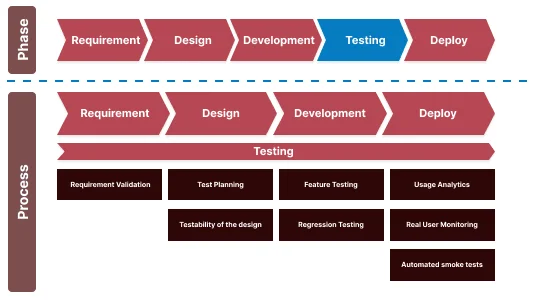
- Requirements analysis - a test management tool captures acceptance criteria as test cases and links each one to the user story it covers, so coverage gaps are visible before code exists. Static analysis tools start here too, on the first commit.
- Test design and environment setup - test data generators produce the accounts, orders, or records the cases need, and a cloud grid or container setup provides the test environment the tests will run against. Deciding this late is a common cause of a suite that only passes on one laptop.
- Test execution - unit runners fire on every commit, API and integration tools on every merge, and UI automation across browsers and devices before each release candidate. Performance and security tools run on a schedule against a stable build rather than on every change.
- Reporting and defect tracking - results feed test reports that answer whether the build can ship, and each failure becomes a ticket carrying the log, screenshot, and video from the run so the developer does not have to reproduce it from scratch.
How Do You Choose a Test Tool?
Choose the tool category before the vendor: name the testing activity that costs the most hours each sprint, pick the type from the table above that removes it, and only then compare products. Score each candidate on the four criteria below during a two-week pilot on a real suite, because a demo on the vendor's sample app proves nothing about your locators or your CI.
| Criterion | What to check | Why it decides the outcome |
|---|---|---|
| Language and framework support | Does it run the language your developers already write and the framework your existing tests use? | A tool that forces a rewrite into a proprietary format loses the tests you already have and the people who can maintain them. |
| CI/CD integration | Can a pull request trigger a run and block a merge on failure without custom glue code? | A tool that only runs when someone clicks a button gets skipped the week the release is late. |
| Reporting detail | Does a failure show the exact step, the console and network logs, and a video or screenshot of the moment it failed? | "Test failed" without evidence sends a developer back to reproduce the bug by hand, which is the work the tool was meant to save. |
| Browser and device reach | How many browser versions, operating systems, and real devices can one run cover, and can it reach an app behind your firewall? | Coverage gaps are where production bugs come from; a grid limited to one Chrome build on one OS only tests what a developer already tested. |
Mapping a common situation to a starting point:
- A regression pass takes days by hand - start with UI automation in Playwright or Selenium, then move execution to a cloud grid so the same suite runs in parallel instead of sequentially.
- Cases live in spreadsheets and nobody can say what a requirement covers - start with a test management tool that syncs two-way with Jira, before adding more automation you cannot trace.
- Most of the logic is in APIs - start with an API testing tool in CI; it is faster to write and far less brittle than driving the UI to reach the same endpoint.
- A mobile app must work on devices you do not own - start with a real device cloud that offers 10,000+ real Android and iOS devices rather than a shelf of phones that go out of date.
- QA has no automation engineers - start with a natural-language or codeless testing tool for the highest-traffic flows, and budget for one engineer to own the failures it surfaces.
How Do You Run a Test Tool in the Cloud?
A UI test tool runs the same whether the browser is on your laptop or on a cloud machine; the difference is how many browsers you can reach and what evidence you get back. To show the output, I ran a Playwright script on TestMu AI's Automation Cloud, the zero-infrastructure grid that runs existing Selenium, Cypress, Playwright, and Puppeteer scripts across 3,000+ real browser and OS combinations and captures network logs, console logs, video, and screenshots for every session without extra configuration. The script connects over a CDP websocket, fills the Simple Form Demo on the Selenium Playground, and asserts the echoed message:
const { chromium } = require('playwright');

const capabilities = {
  browserName: 'Chrome',
  browserVersion: 'latest',
  'LT:Options': {
    platform: 'Windows 11',
    build: 'Test Tool Explainer Demo',
    name: 'Simple Form Demo on Selenium Playground',
    user: process.env.LT_USERNAME,
    accessKey: process.env.LT_ACCESS_KEY,
    network: true,
    video: true,
    console: true,
  },
};

(async () => {
  const browser = await chromium.connect(
    'wss://cdp.lambdatest.com/playwright?capabilities=' +
      encodeURIComponent(JSON.stringify(capabilities))
  );
  const page = await browser.newPage();
  await page.goto('https://www.testmuai.com/selenium-playground/simple-form-demo');
  await page.fill('#user-message', 'Test tool demo run');
  await page.click('#showInput');
  const shown = await page.textContent('#message');
  const ok = shown.trim() === 'Test tool demo run';
  console.log('Entered text echoed back: "' + shown + '"');
  await page.evaluate(_ => {}, 'lambdatest_action: ' + JSON.stringify({
    action: 'setTestStatus',
    arguments: { status: ok ? 'passed' : 'failed', remark: ok ? 'Form echoed input' : 'Mismatch' },
  }));
  await browser.close();
})();
The console output from that run on 12 September 2026, with the session details the platform returns:
Entered text echoed back: "Test tool demo run"
Session: test_id DA-WIN-17458-1789208243090621866ESB | build_id 104689545
         browser chrome 153.0 | platform win11 | resolution 1920x1080
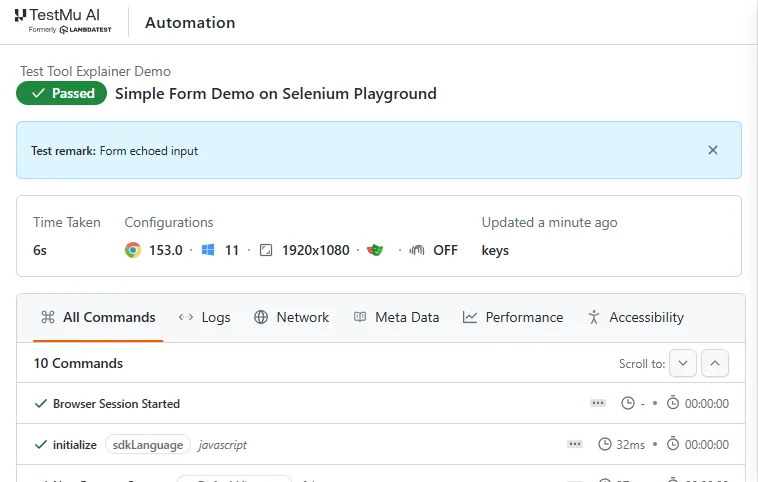
Assertion PASSED in 18.4s
The same session on the TestMu AI Automation dashboard shows the pass status, the 6-second in-browser execution time, the Chrome 153 on Windows 11 configuration, and the ten commands the script issued, each with its own timing and a tab for logs, network, and video:
To run your own suite, generate the capability block for your framework and language with the capabilities generator, then follow the Playwright testing docs for the parallel configuration that fans one test out across several browser and OS combinations in the same run.

Note: Run your existing Selenium, Playwright, or Cypress suite on TestMu AI's cloud grid and get logs, video, and screenshots for every session. Start testing for free
How Do You Get More From a Test Tool?
Most of a test tool's value comes from what it is connected to, not from the tool alone. Four changes raise the return on a tool you already own:
- Trigger runs from CI, not from a person - wire the suite into the pull-request check so it runs on every change and blocks the merge on failure. The CI/CD integration docs cover Jenkins, GitLab CI, CircleCI, Azure Pipelines, and 16 other CI tools.
- Write the acceptance test before the code - in acceptance test-driven development the test fails first, the developer writes only enough code to pass it, and the story ships when it is green. The tool becomes the specification rather than an afterthought.
- Send results to one place - TestMu AI's Test Manager pulls manual outcomes and automated pipeline results into the same cycle view, traces each requirement to its test cases, runs, and defects in one matrix, and syncs two-way with Jira and Azure DevOps so a failed run becomes a ticket without copy-paste.
- Parallelize the slow suite - a sequential browser suite is the merge-gate bottleneck once builds take minutes. HyperExecute splits and shards the suite across cloud machines and auto-retries transient failures, which TestMu AI reports as up to 70% faster execution than a standard grid.
If the team is learning a tool from scratch, the free certifications for Selenium, Playwright, and Appium give a structured path through the same setup shown above.

Conclusion
Start by writing down the one testing activity that costs your team the most hours each sprint, then pick the tool category from the types table that removes it. If that activity is running a browser suite, connect your existing scripts to the cloud with the getting started guide and run them on the combinations you cannot cover locally.
If nobody on the team writes automation code yet, KaneAI turns a plain-English description of a flow into a runnable test on the same grid, so the first week of the pilot produces results rather than setup.
Author

Sakshi John


Sakshi John is an experienced technical content writer with over 5 years of expertise in automation, AI-driven testing, and cross-browser testing. She has contributed to prominent platforms like TestMu AI and worked as a Communications Consultant at the United Nations APCTT. Sakshi holds a Master's degree in International Relations and has authored numerous technical blogs, enhancing her credibility in the software testing industry.


Test Tool FAQs
Did you find this page helpful?
More Related Learning Hubs
TestMu AI forEnterprise
Get access to solutions built on Enterprise
grade security, privacy, & compliance
- Advanced access controls
- Advanced data retention rules
- Advanced Local Testing
- Premium Support options
- Early access to beta features
- Private Slack Channel
- Unlimited Manual Accessibility DevTools Tests