
Playwright Testing
Playwright testing in the cloud, in parallel.
Playwright testing on TestMu AI runs your Playwright tests in parallel on Chromium, Chrome, Edge, Firefox and WebKit across Windows and macOS. You connect with a WebSocket endpoint in playwright.config, keep your tests, and get traces, videos and logs for every run.
Free plan: 100 lifetime minutes, 2 parallel sessions.
- Built for
- Developers
- SDETs
- Front-end teams
- DevOps
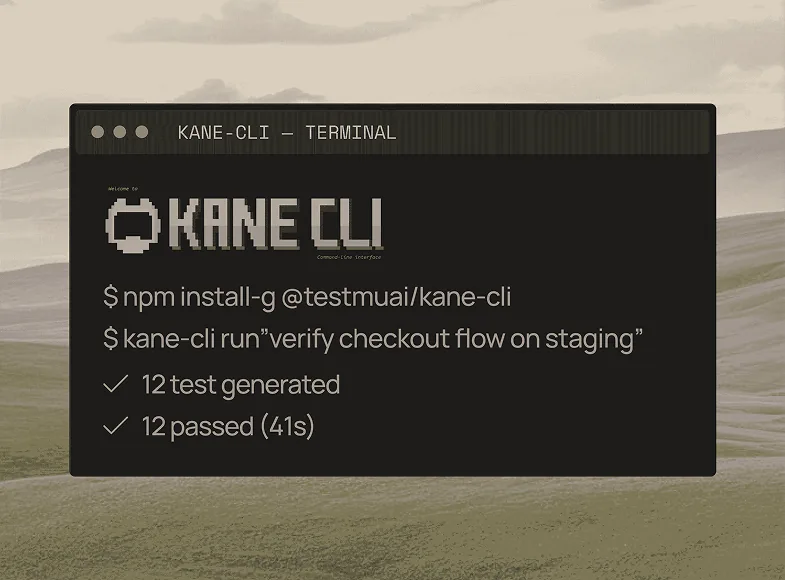
- ›connectwss endpoint · 20 workersDONE
- ›chromiumcart.spec.ts · Windows 11PASS
- ›webkitcart.spec.ts · macOS SequoiaPASS
- ›firefoxauth.spec.ts · timeoutFAIL
Trusted by 3M+ users globally at




"We have tripled our tests and are now executing tests in less than 2 hours with 78% Faster Test Execution"


"We figured out a more efficient way to monitor system health and resolve failures earlier in lower environments."





"TestMu AI has significantly boosted our testing speed, is easy to implement, and provides exceptional support."


"With 70% faster test execution, TestMu AI helped us achieve faster time-to-market and enhanced CX."



Playwright browsers, parallels and plans
Free plan: 100 lifetime minutes of web and mobile automation, 2 parallel sessions · Web Automation on Desktop from $79/month, billed annually
- What it is
- Playwright tests run on TestMu AI cloud browsers
- Browsers
- Chromium, Chrome, Edge, Firefox, WebKit
- Languages
- JavaScript, TypeScript, Python, Java, C#
- Connect
- connectOptions WebSocket endpoint in playwright.config
- Pricing
- Free: 100 lifetime minutes, 2 parallel; Web Automation from $79/month
- Per test
- Trace, video, console and network
Connect your Playwright config and run on real browsers
Add the endpoint
Set connectOptions to the TestMu AI WebSocket URL with capabilities.
Run with more workers
Workers map to parallel cloud sessions across browsers and OS.
Open the trace
Each test keeps the Playwright trace, video and logs.
Traces, videos and logs from every Playwright run
Real browsers on real OS
WebKit on macOS and Chrome on Windows, not only Linux containers.
All Playwright languages
JavaScript, TypeScript, Python, Java and C#.
Parallel workers
Scale workers without adding CI runners.
Traces kept
Playwright traces and videos stored per test.
Local apps
UnderPass tunnel reaches localhost and staging.
Plain-English option
Kane CLI runs checks without writing Playwright code.
Bundled browsers in CI vs real Windows and macOS browsers
const browser = await chromium.connect({
  wsEndpoint: `wss://cdp.lambdatest.com/playwright?capabilities=${encodeURIComponent(JSON.stringify(capabilities))}`
});
Connection lines from the TestMu AI Playwright docs (/support/docs/playwright-testing/); the endpoint keeps its LambdaTest hostname.
| What matters | Playwright on CI runners | Playwright on TestMu AI |
|---|---|---|
| WebKit coverage | Linux WebKit build | WebKit on macOS |
| Raising parallel workers | Bigger runners | More cloud sessions |
| Browser and OS matrix | Whatever the image has | Windows and macOS versions |
| Trace storage | Upload artifacts yourself | Kept per test |
Selenium, Cypress and Puppeteer on the same cloud
- Cypress TestingRun Cypress specs in parallel
- Automation CloudRun Selenium, Playwright and Cypress in one cloud
- Kane CLIA test gate inside coding agents
- HyperExecuteSplit suites across just-in-time VMs
- Puppeteer TestingPuppeteer on cloud Chrome
Downloads and installs
Docs and guides
Customer stories
Integrations
More Reasons to Love TestMu AI
TestMu AI is a leading agentic AI quality engineering platform, trusted globally, that assures your AI deployments work as intended, safely and securely, across enterprise and real-world conditions.
Users
3M+
Tests
1.5B+
Enterprises
18K+
Countries
132
TestMu AI positioned as a Leader in the 2026 Gartner® Magic Quadrant™
Read Report
TestMu AI recognized in The Forrester Wave™: Autonomous Testing Platforms, Q4 2025
Read ReportWall of Fame
TestMu AI is the #1 choice for SMBs and enterprises across the globe.
Enterprise-Grade Security
We safeguard your data and AI systems with global security, privacy, responsible AI, and ESG standards.

Integrations
Works where you work, 120+ integrations with the tools your team relies on.



As Seen On
Playwright on real browsers: your questions
How do I run Playwright tests in the cloud?
Add the TestMu AI WebSocket endpoint to connectOptions in playwright.config with your credentials and capabilities, then run as usual.
Which browsers can I run Playwright tests on?
Chromium, Chrome, Edge, Firefox and WebKit on Windows and macOS versions.
Can I run Playwright tests in parallel?
Yes. Raise workers; each worker uses a parallel session on your plan.
Is there a free plan for Playwright testing?
Yes. The automation free plan gives 100 lifetime minutes with 2 parallel sessions.
Kane CLI or Playwright?
Keep Playwright for coded suites. Use Kane CLI when you want plain-English checks with evidence; see the Kane CLI vs Playwright comparison.
Run Playwright on real browsers
Free plan: 100 lifetime minutes, 2 parallel sessions.