
Assure your AI deployment - across enterprise and real world
We assure that your AI works as intended. Safely and securely.

What Is Software Testing? Types, Process & Tools
Software testing checks that software works as intended and finds defects before users do. Learn its types, process, tools, and best practices.
Last Updated on:
On This Page
- What is Software Testing?
- Why is Software Testing Important?
- Software Testing vs Debugging
- Core Concepts of Software Testing
- When to Perform Software Testing?
- Phases of Software Testing
- Types of Software Testing
- Approaches to Software Testing
- Software Testing Metrics
- Software Testing Strategies
- Software Testing Tools
- Where to Test Software Applications?
- How to Perform Software Testing on the Cloud?
- Software Testing Challenges and Solutions
- Best Practices for Software Testing
Software testing is the process of verifying that a software system or application works as intended. It confirms the application meets its technical and user requirements through manual and automated checks, from unit tests to acceptance tests, and it covers usability, accuracy, and efficiency rather than defect-hunting alone.
Testing runs alongside the Software Development Life Cycle (SDLC) rather than after it, since checking code against requirements and performance is continuous work rather than a final gate. This guide covers software testing from the fundamentals through the advanced material, including most of what turns up in software testing interview questions.
TL;DR
- Software testing verifies that an application meets its technical and user requirements, and it covers usability, accuracy, and efficiency rather than defect-hunting alone.
- Testing splits into manual and automated approaches, and into functional and non-functional types, with unit, integration, system, and acceptance forming the standard progression from smallest scope to broadest.
- The Software Testing Life Cycle runs from requirement analysis through planning, case development, environment setup, execution, and closure, and it runs alongside the SDLC rather than after it.
- Defects found late cost far more to fix than defects found early, which is the entire economic argument for shifting testing left into development.
- Infrastructure is a real tax on testing time. TestMu AI's own Future of Quality Assurance Survey found teams spend 10.4% of their time setting up and maintaining test environments, and a further 7.8% fixing flaky tests.
- Running suites on a cloud grid removes that maintenance burden, which is what TestMu AI's test automation cloud provides across 3,000+ browser and OS combinations and 50,000+ real devices.
What is Software Testing?
Software testing is the process of checking that an application does what its requirements say and finding the defects that stop it. Testers run the software, or parts of it, against expected results and judge it on quality attributes such as these:
- Reliability
- Scalability
- Portability
- Reusability
- Security
- Usability
Testing can target a single function, a block of code, or the finished application, so it runs through the whole development life cycle instead of waiting for a final release gate.
Demand for testing keeps growing. Global Market Insights valued the software testing market at USD 60.5 billion in 2025 and expects it to grow at a 7.7% CAGR from 2026 to 2035, reaching about USD 127.5 billion.
The objectives of software testing are to:
- Find defects and confirm the product performs to its specification.
- Confirm the product meets the standards its market expects.
- Catch problems before production, where they are hardest to trace and most expensive to fix.
- Lower the risk of the product failing after release.
Why is Software Testing Important?
Not every defect is serious, but the serious ones delay releases, cost money and, in safety-critical systems, cost lives. A defect found late is harder to trace and more expensive to fix, so testing early lowers the overall cost of development. These incidents show what happens when defects reach production:
- Facebook outage - On October 4, 2021, Facebook, Instagram, WhatsApp, and other services experienced a major outage after a faulty configuration change to the backbone routers that coordinate traffic between Facebook's data centers. Changes to critical infrastructure need the same testing as application code.
- Citibank's $900 million mistake - In 2020, Citibank accidentally transferred $900 million to Revlon's creditors after staff working in a confusing payment interface sent the loan principal instead of an interest payment. Testing the user interface (UI) with real payment scenarios would have exposed the problem.
- Boeing 737 MAX - Problems with the Maneuvering Characteristics Augmentation System (MCAS) led to two fatal crashes in 2018 and 2019. Investigations found flaws in the system's design and inadequate testing of how it handled specific scenarios.
- Bloomberg terminal outage - On April 17, 2015, a global outage took Bloomberg terminals offline for about two hours from 8:20 a.m. London time. The Irish Times put Bloomberg's subscriber base at more than 315,000 worldwide, and the UK Debt Management Office had to delay a £3 billion Treasury bill sale. Bloomberg blamed a combination of hardware and software failures in its network that caused an excessive volume of network traffic, the kind of failure that load and resilience testing is designed to catch.
Each of these failures had to be traced back to its cause after the damage was done. Building prevention into every phase of delivery, rather than only into a test phase, is the job of quality engineering.
Beyond preventing failures, testing pays off in several ways:
- Product quality - Testing raises software quality by checking the product against its requirements on the browsers, real devices and operating systems users rely on, which is why cross-browser compatibility checks belong in every web release.
- Customer trust - A product that works as promised earns the user's confidence and protects the company's reputation.
- Faster development - With quality assurance running alongside development, testers reproduce errors quickly and developers fix them sooner.
- Safer changes - Parts of a codebase depend on each other, so a change in one place can break another. Tests show where a change caused a problem, so developers can add features with confidence.
- Security - Poorly tested applications are easier to attack. Testing for vulnerabilities protects user data and avoids the losses that follow a breach.
- Lower cost - Bugs found early, through manual checks or test tools, take far less effort to fix than bugs found after release.
KaneAI by TestMu AI is a GenAI-native test agent that automates test creation and management, which helps teams find and address issues earlier. You can start by integrating KaneAI into your existing testing workflow.

Software Testing vs Debugging
Software testing and debugging both deal with bugs, so people new to testing often confuse them. They are separate activities with different owners:
- Software testing - Finds and reports defects by checking the software against its requirements.
- Debugging - Finds the cause of a reported defect and fixes it in the code, often with debugging tools.
The table below shows the main differences.
| Software Testing | Debugging |
|---|---|
| Runs throughout the software development life cycle, from the first build to release. | Starts whenever a test or a user reports a failure, and happens while testing continues. |
| Reveals defects and reports them. | Locates the cause of a defect and removes it. |
| Done by testers, developers and automated test suites. | Done by developers, as part of development work, not as part of testing. |
| Checks the software through verification and validation. | Changes the code to fix the root cause of a defect. |
| Can be planned and automated in advance. | Cannot be planned in advance, because it depends on which defects are found. |
The two meet after a fix: the failed tests run again to confirm the defect is gone.

Note: Identify bugs, fix them effectively, and deliver bug-free software that meets quality standards. Try TestMu AI Now!
Core Concepts of Software Testing
These concepts underpin almost every testing effort:
- Test strategy - A test strategy sets the overall approach: which types of testing suit the application, which tests to run, and the time and effort they need. Start with the features that matter most to users.
- Test plan - A test plan is the working document for a project, covering scope, objectives, schedule, resources, dependencies, and who tests what. It turns the strategy into the testing process for a release and should be updated as new defects change priorities.
- Test cases - Test cases are the actions run against the system to check a requirement, each with an expected result. For example, a login test case checks that a valid sign-in always opens the dashboard. Write cases for the most critical features first.
- Test data - Test data is the input tests run on, such as product orders or sets of names. Dedicated test data keeps real user records safe from changes, and it is best prepared alongside the test cases.
- Test environment - The test environment is the hardware, software, browsers, devices and operating systems the tests run on. Set it up before testing starts and include the devices your users have, since performance and usability results depend on them.
When to Perform Software Testing?
Start testing as early as possible. Testing late delays the release and costs more, because changes and bugs are hard to trace once the software nears its final release.
Most teams test in every phase of development and move on only when the current phase passes. Each module is tested on its own before it is integrated, so problems in the design surface while they are still cheap to fix. How often to test depends on how much the product's quality and security matter to the business.
Phases of Software Testing
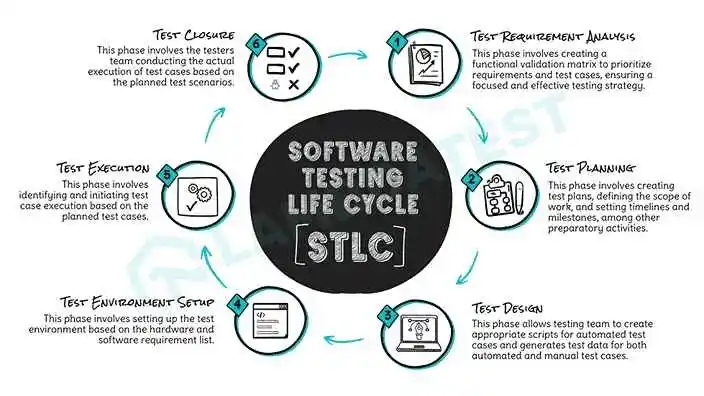
Every release goes through the phases of the Software Testing Life Cycle (STLC), the sequence of activities a team follows to meet the quality bar for the software.
By Sathwik Prabhu
The phases of the STLC are:
- Requirement analysis - The team identifies what to test and checks that each functional and non-functional requirement is testable. The outputs are test priorities, a Requirement Traceability Matrix (RTM), the target test environments and an automation feasibility check.
- Test planning - The team sets the scope, schedule, cost and effort, selects testing tools and plans any training.
- Test case design - Testers write and review test cases and create the test data they need.
- Test environment setup - The team prepares the hardware, software and test data, often while test cases are still being written, and runs smoke tests on the build to confirm the environment works.
- Test execution - Testers run the tests in the plan, record the results, log the failures and retest them once they are fixed.
- Test closure - The team reports on test completion and product quality, collects metrics, analyzes the results and records lessons for the next cycle.
Types of Software Testing
Testers validate software at several levels, using many different types of software testing. Broadly, every type is either functional or non-functional.

Functional Testing
Functional testing checks what the system does. Testers give it input and compare the actual output with the expected output, using test cases built from user requirements. Good functional tests cover every scenario, use the correct test data and record each result against the expected output.
Unit Testing
Unit testing checks individual units of code, such as a function, method or component, in isolation. Developers write unit tests early in development and run them with automation testing tools. For example, a unit test can check that a login handler routes the user to the correct page.

Two techniques are common at this level:
- White box testing - Also called glass box or transparent testing, it tests the internal structure of the code with techniques such as data flow testing, path testing, decision coverage and control flow testing.
- Gorilla testing - Testers apply input to one module over and over until it fails, to check how well it tolerates faults.
Integration Testing
Integration testing combines two or more units and tests them together, looking for bugs in the interfaces, data flow and interaction between them. Unit testing checks each unit alone; integration testing checks how the units behave once they are connected. The main approaches are:
- Big bang - All modules are combined at once and tested as a complete system.
- Top-down - The top-level modules are tested first, then the lower-level modules are added and tested in turn.
- Bottom-up - The lowest-level modules are tested first, then the higher-level modules are added step by step.

System Testing
System testing tests the complete, integrated system against its technical and functional requirements, in an environment close to production. It checks the output for given input, the performance and the overall user experience.

System testing includes:
- End-to-end (E2E) testing - Verifies a complete user workflow from start to finish, including dependencies, communication between components, data integrity and interfaces.
- Black box testing - Tests functionality from the requirements, without knowledge of the internal code. Testers give a function input and pass or fail it based on its output.
- Smoke testing - Also called build verification testing, it checks that the main functions of a new build work and that the build is stable enough for further testing.
- Sanity testing - A subset of regression testing that checks recent code changes and bug fixes work as expected and have not broken the build.
- Happy path testing - Also called golden path or sunny day testing, it checks the main positive flow with valid input and leaves out error cases.
- Monkey testing - Testers feed the application random input, without test cases, to find crashes and unexpected behavior.


Acceptance Testing
Acceptance testing follows unit, integration and system testing. It checks that the whole system meets the business, contractual and legal requirements the client defined, before release.
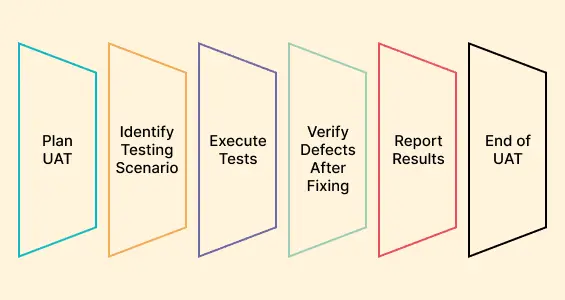
Acceptance testing includes:
- Alpha testing - Internal testing of the product against its business requirements before it reaches outside users.
- Beta testing - Testing by real users in a real environment after alpha testing, just before release.
- User acceptance testing - Also called end-user testing, it has users confirm that the software meets their requirements before deployment.
- Operational acceptance testing - Checks operational readiness: recovery, reliability, maintainability and compatibility.
- Regulation acceptance testing - Also called compliance acceptance testing, it checks the software against the laws and regulations that apply to it.
Regression Testing
Regression testing reruns previously passed tests after a change to confirm the new code has not broken existing features. Because the same suite runs after every change, it suits automation tools such as Selenium, Playwright and Cypress.

Non-Functional Testing
Non-functional testing checks how well the system works rather than what it does: performance, usability, reliability, portability, efficiency, security and the end-user experience. Its results are mostly measurable, which helps lower production risk.

Performance Testing
Performance testing checks response time, throughput and stability under load, and reveals what limits them, such as network latency, database transaction processing, data rendering and load balancing between servers. Teams run it with performance testing tools such as LoadRunner and JMeter.

Performance testing includes:
- Load testing - Checks behavior at or below the expected number of users. For example, if an application should serve 250 users with a three-second response time, load testing applies up to 250 users and confirms the three seconds hold.
- Stress testing - Applies more load than the system was designed for, such as more than 5,000 users on an application built for 5,000, and watches stability and response time.
- Scalability testing - Raises the load step by step to find the point where the application fails, and checks that it scales up and down as demand changes.
- Flood testing - Sends large volumes of data to the database to check its stability and response time.
- Endurance testing - Checks that the system handles a continuous load over a long period.
Usability Testing
Usability testing checks how easy the application is to use, from the user's point of view. For a gaming app, that can mean checking one-handed and two-handed play, background colors and vertical scrolling. Usability testing includes:
- Cross-browser testing - Checks that the application works on different browsers, operating systems and mobile devices.
- Accessibility testing - Checks that people with disabilities can use the application, for example with font sizes and colors that work for people with low vision or color blindness.
- Exploratory testing - Informal, unscripted testing in which testers use their domain knowledge to explore the application and find defects.
Security Testing
Security testing finds the risks, threats and vulnerabilities that attackers could exploit, with a focus on authentication and authorization, and checks how the application protects confidential data under attack. Common types include:
- Penetration testing - An authorized, simulated cyberattack that probes for weaknesses through SQL injection, privilege escalation, session expiry and URL manipulation. Penetration testing tools simulate the attack scenarios that real attackers use.
- Vulnerability scanning - Automated scans that check the system against known vulnerability signatures.
- Security auditing - An internal inspection of the application, operating system and code for security gaps.
- Security scanning - Finds weaknesses in the system and network and suggests ways to lower the risk.
- Ethical hacking - Authorized hacking of the organization's own systems to uncover security flaws.
Portability Testing
Portability testing checks how well the software works when its environment changes, such as a different operating system, browser version or hardware, and how easily it installs and moves between them. Teams run it when customers will use the software on several platforms, usually as part of system testing after integration testing.
Note: Run various testing types to ensure your software works as expected. Try TestMu AI free.
Other Types of Software Testing
Graphical User Interface (GUI) Testing
GUI testing checks that the graphical interface works as required and meets quality standards, covering layout, labels, captions, icons, links, content, buttons and lists.
Non-Graphical User Interface Testing
Non-GUI testing covers everything other than the graphical interface, such as command-line interfaces, batch processes and other events that trigger specific use cases.
Mutation Testing
Mutation testing is a white box technique that makes small changes to the source code and checks whether the existing test cases catch them. This guide to mutation testing covers its approaches.

By Sathwik Prabhu
Risk-Based Testing
Risk-based testing tests functionality in order of business priority and likelihood of failure: high-priority test cases first, then medium and low.
Approaches to Software Testing
Each type of testing can be run manually, with automation, or both, and most teams combine the two.
Manual Software Testing
In manual testing, testers run test cases by hand, from the end user's point of view, without automation tools. It finds visible and hidden bugs and human-facing problems such as confusing interfaces, but it takes time and effort and is prone to human error. Manual testers use white box, black box and gray box techniques.
Steps to perform manual testing
- Review the project requirements and documentation.
- Create the test plan.
- Write test cases for the specified requirements.
- Review the test cases.
- Run the test cases and log the bugs you find.
- Report the bugs to developers, then rerun the failed test cases once the bugs are fixed.
Some checks always need human judgment, so manual testing stays part of the process even in Agile teams that rely heavily on automation.
Automated Software Testing
Automation testing runs web and mobile app tests with tools and scripts that follow a predefined pattern. It increases test coverage and speed, removes human error from repetitive checks and saves time. Regression testing is the classic case: rerunning a full suite by hand after every change is slow, while a tool repeats it at the same speed every time.
Not every test can be automated, but these usually are:
- Smoke testing
- Data-driven testing
- Performance testing
- Functional testing
- Regression testing
- Unit testing
- Security testing
Steps to perform automation testing
By Sathwik Prabhu
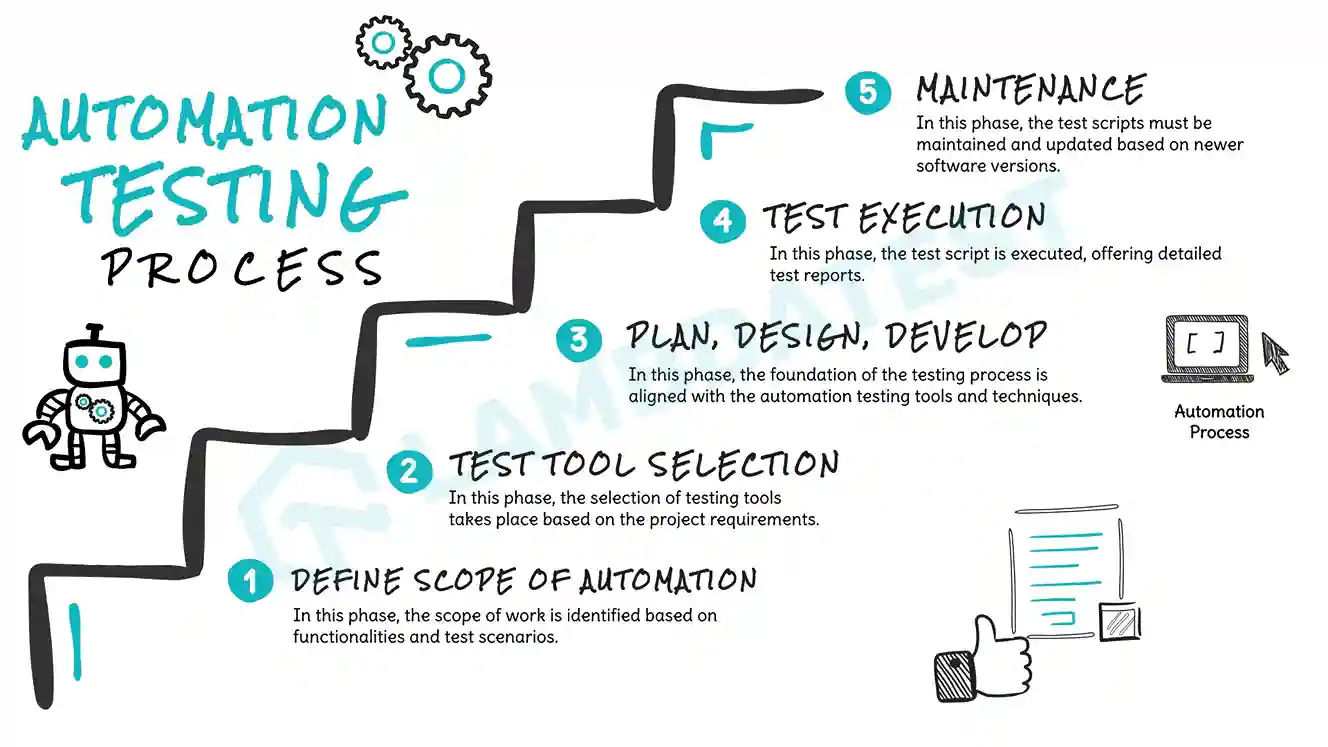
When moving from manual to automation testing, set realistic goals: start with small test cases and leave out what does not need automating. The main stages, which run alongside the development life cycle, are:
- Define the scope - Pick the features and areas that gain the most from automation.
- Choose the right tool - Match the tool to the application's technology, your platforms and the testing types you need, and weigh ease of use and scalability.
- Create test scripts - Write scripts that mimic user actions and verify the software's behavior.
- Set up the test environment - Prepare the software, hardware and data the tests need.
- Run the tests - Execute the suite across the defined scope and monitor the runs.
- Maintain the scripts - Investigate failed runs, fix broken test scripts and update them as the application changes. Defects found in the application itself go to developers to debug.
- Integrate with CI/CD - Run the tests automatically in a Continuous Integration/Continuous Deployment (CI/CD) pipeline.
- QA metrics and reporting - Track how the automation performs and where the testing strategy needs to improve.
Software Testing Metrics
Software testing metrics measure the testing process and the quality of the software it produces. Common metrics include:
- Test coverage - How much of the requirements and features the tests cover, which shows the areas no test checks. It is often confused with code coverage, the share of source code the tests execute; this comparison of test coverage vs code coverage explains the difference.
- Base metrics - The raw data the QA team collects while writing and running tests, such as the total number of test cases and how many are complete.
- Calculated metrics - Metrics derived from base metrics to track the progress of testing.
- Defect metrics - Measures of quality such as functionality, usability, compatibility and installation stability.
- Defect severity - How much each defect affects the quality of the software.
- Test case efficiency - How well the test cases find bugs.
- Defect density - The number of defects found divided by the size of the software.
Tracked over time, these metrics show where testing needs to improve and where to put resources. They also show where time goes, since running and maintaining tests often takes longer than test authoring. The Future of Quality Assurance Survey found that teams spend 10.4% of their time setting up and maintaining test environments, and a further 7.8% fixing flaky tests.

For more on measuring testing, read this guide to software testing metrics.
Software Testing Strategies
A testing strategy sets which techniques and tools a project uses. Common strategies include:
- Static testing - Reviews code and documents without running the software, for example a code review before a merge, so bugs are caught early.
- Structural testing - White box testing of the code's components and interfaces to find defects in data flows, usually done by developers at the unit level.
- Behavioral testing - Black box testing of the system's behavior, such as performance, configuration and workflows, from the user's point of view, run manually or with automation.
Testing on real devices and browsers finds the bugs users would hit, and the most effective strategies use automated testing to complement manual testing.
Software Testing Tools
Testing tools support planning, building, running and analyzing tests. AI-driven tools and the providers that run them are compared in this guide to AI testing services. These are some of the most popular software testing tools:
TestMu AI
TestMu AI is an AI-native test orchestration and execution platform for running manual and automated tests at scale across 3,000+ browser and OS combinations and 50,000+ real devices. It covers cross-browser and real-time testing for web applications and real device cloud testing for mobile apps.
It integrates with popular automation testing frameworks for web and app automation, such as Selenium, Cypress, Playwright, Puppeteer, Taiko, Appium, Espresso and XCUITest.
Selenium
Selenium is an open-source tool that automates browsers to test web applications across browsers and operating systems. It is one of the leading frameworks for web application testing.

Cypress
Cypress is a JavaScript end-to-end testing tool for modern web applications. It runs in the browser alongside the application, works directly with the DOM, and supports end-to-end, component and integration tests. Cypress waits for elements to become actionable and retries queries and assertions until they pass or time out (4 seconds by default, according to the Cypress documentation), so most tests need no hard-coded waits. Slow operations still need a longer timeout on that command or a wait on an aliased network request.

Playwright
Playwright is a Node.js-based automation library that drives Chromium, WebKit and Firefox through a single API and supports several languages, including C#, Java, Python and Node.js.

Puppeteer
Puppeteer is a Node.js library for headless browser testing that controls Chrome or Chromium through a high-level API over the DevTools Protocol.
Appium
Appium is an open-source tool for automating mobile app testing on native and hybrid apps, mainly for functional tests.

Choose tools based on your application's technology and your business requirements.
Where to Test Software Applications?
Software can be tested on-premise or in the cloud.
On-premise testing runs tests on local machines and devices in the office. The team has to buy, maintain, monitor and upgrade the hardware and software, which makes it expensive and slow to scale.
Cloud testing runs tests on infrastructure a third party provides, which makes it easier to test scalability, performance, security and reliability across many environments. Platforms such as TestMu AI let teams scale both manual and automated testing this way.
How to Perform Software Testing on the Cloud?
Cloud testing removes the need for local test infrastructure for web and mobile application testing, and gives you the browsers, devices and operating systems your users have. The steps below use TestMu AI.
Manual Testing using TestMu AI
TestMu AI runs manual tests on web and mobile apps through its Real Time feature:
- Create an account on TestMu AI, or log in to the TestMu AI dashboard.
- From the dashboard's left menu, click Real Time.
- Click Desktop under the Web Browser Testing option in the left menu.
- Enter the URL, select the operating system, browser, browser version and resolution, and click Start.


A virtual machine opens with the chosen configuration. Use Mark as Bug to report bugs to your team, Record Session to record the session, and Switch to change the browser version, operating system or resolution.

You can test mobile apps the same way on the TestMu AI real device cloud.

For the latest tutorials on Selenium testing, Espresso, XCUITest and more, subscribe to the TestMu AI YouTube Channel.
Automation Testing using TestMu AI
To run web automation tests on TestMu AI:
- Sign in to your TestMu AI account.
- From the dashboard, click Automation in the left menu.
- Click Configure Test Suite and select your framework from the list of automation testing frameworks.
- Copy your TestMu AI credentials and paste them into your test scripts.
- Use the TestMu AI Capabilities Generator to select the browser, browser version, operating system and build name for your project, then paste the capabilities into your test script.


Software Testing Challenges and Solutions
Frequent releases under Agile methodologies bring their own testing challenges.
Challenge 1: Inadequate communication. Testers cannot write the right test cases without knowing the business and technical requirements.
Solution: Keep the testing and development teams working together from the start.
Challenge 2: Differences between test environments. Users run thousands of device and browser combinations, and emulators and simulators cannot confirm how an application behaves in real-world conditions.
Solution: Test on a real device cloud such as TestMu AI, which also integrates with automation testing tools and frameworks.
Best Practices for Software Testing
- Plan before you test by defining the scope, the test objectives and the tools.
- Write clear test cases that cover every part of the software, and tie each one to a test objective.
- Automate repetitive, time-consuming tests.
- Start testing early and keep testing through the whole development life cycle.
- Test on the platforms and devices your users have.
- Combine techniques such as unit, functional, integration and performance testing.
- Work closely with the development team so testing fits into development and bugs are fixed on time.
Conclusion
Software testing confirms that software works as intended, from a single unit to the full system, and keeps confirming it as the code changes. Combining manual and automated testing, and testing early and often, finds defects while they are still cheap to fix. Testing is one of the tools used to achieve quality assurance, but software testing and quality assurance are not the same: QA is the wider effort to build confidence that the finished product meets both business goals and user expectations.
Testing web or mobile apps without writing code? KaneAI by TestMu AI turns plain-English instructions into tests.
Author

Nazneen Ahmad
Blogs: 37


Nazneen Ahmad is a freelance Technical Content SEO Writer with over 6 years of experience in crafting high ranking content on software testing, web development, and medical case studies. She has written 60+ technical blogs, including 50+ top-ranking articles focused on software testing and web development. Certified in Automation Basic and Advanced Training - XO 10, she blends subject knowledge with SEO strategies to create user focused, authoritative content. Over time, she has shifted from quick, keyword-heavy drafts to producing content that prioritizes user intent, readability, and topical authority to deliver lasting value.
Reviewer

Himanshu Sheth
Reviewer
Himanshu Sheth is the Director of Marketing (Technical Content) at TestMu AI, with over 8 years of hands-on experience in Selenium, Cypress, and other test automation frameworks. He has authored more than 130 technical blogs for TestMu AI, covering software testing, automation strategy, and CI/CD. At TestMu AI, he leads the technical content efforts across blogs, YouTube, and social media, while closely collaborating with contributors to enhance content quality and product feedback loops. He has done his graduation with a B.E. in Computer Engineering from Mumbai University. Before TestMu AI, Himanshu led engineering teams in embedded software domains at companies like Samsung Research, Motorola, and NXP Semiconductors. He is a core member of DZone and has been a speaker at several unconferences focused on technical writing and software quality.


Software Testing FAQs
Did you find this page helpful?
More Related Learning Hubs








TestMu AI forEnterprise
Get access to solutions built on Enterprise
grade security, privacy, & compliance
- Advanced access controls
- Advanced data retention rules
- Advanced Local Testing
- Premium Support options
- Early access to beta features
- Private Slack Channel
- Unlimited Manual Accessibility DevTools Tests