
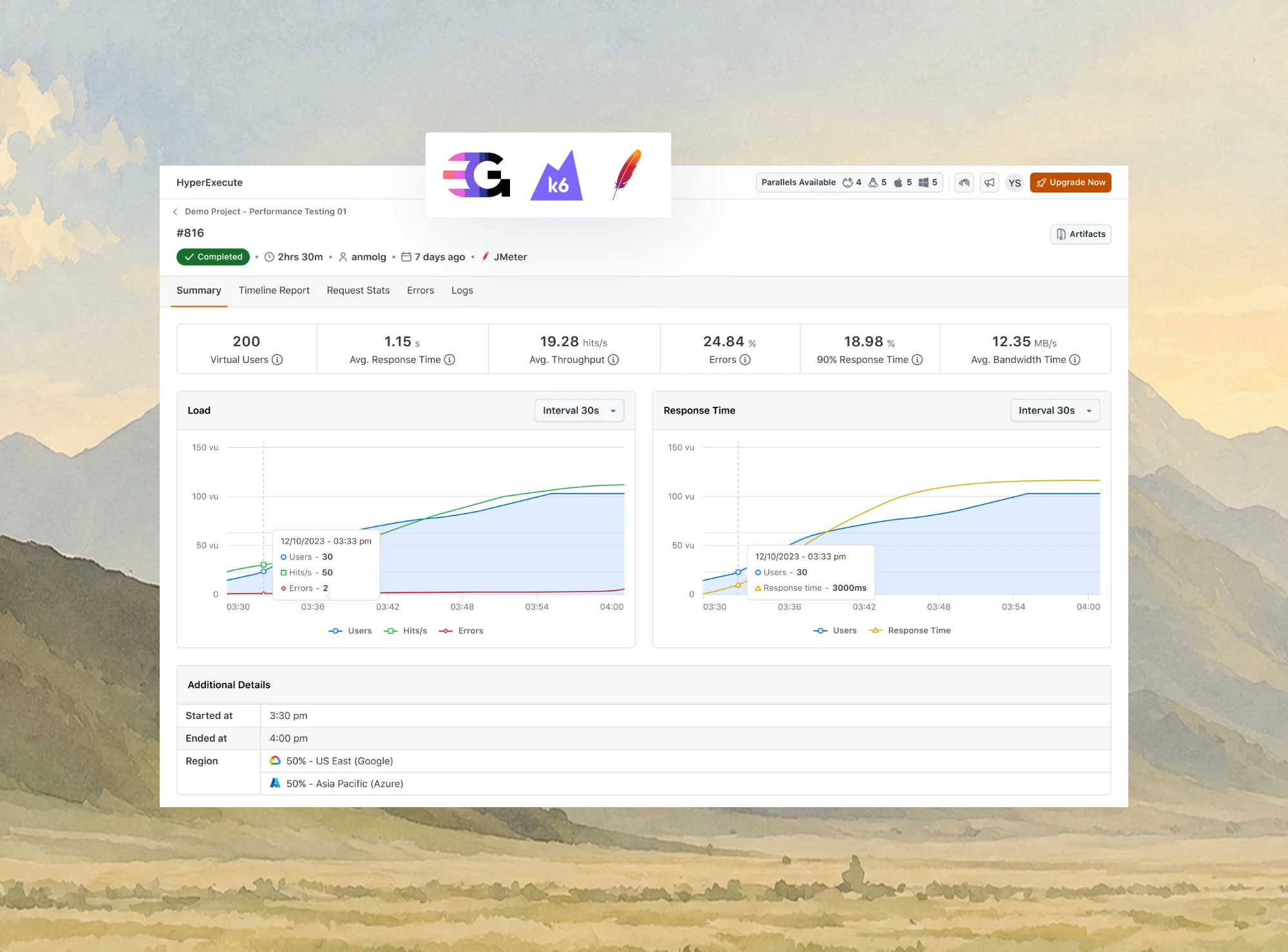
Run JMeter and Gatling Load Tests in the Cloud
Test How Your Website Handles Heavy Traffic. Simulate Up to 8,000 Users at Once and See Response Times and Errors Live.

What Is Load Testing? Types, Steps, Metrics and Tools
Part of: Performance Testing
What is load testing? A plain definition, the main types, an 8-step process, a real k6 run with its output, which metrics to read and how to choose a tool.
Last Updated on:
On This Page
- What Is Load Testing?
- Why Load Testing Matters
- Load Testing Example
- How Load Testing Works
- Load Testing Architecture
- Types of Load Testing
- Load vs Stress Testing
- Functional vs Load Testing
- How to Run a Load Test
- Metrics to Track
- Load Testing Best Practices
- Types of Load Testing Tools
- How to Choose a Tool
- Load Testing Tools
- Running Tests at Scale
- Limitations of Load Testing
- Conclusion
Load testing answers one question: how many concurrent users can this system carry before it slows down or falls over? You find that out by simulating the traffic deliberately, in an environment you control, rather than discovering it on a launch day when real users supply the load for you. Replaying one user's journey on a schedule to check availability is a different practice, covered in this guide to synthetic testing.
It is the performance test most teams run first, because capacity is usually the constraint that shows up soonest in production.
TL;DR
Load testing is a type of performance testing that simulates the users, requests or transactions a system expects at normal and peak traffic, then measures response time, throughput and error rate. Its result is the load level at which those metrics start to degrade, which is the capacity you can promise to users.
- Load vs stress testing: Load testing stays within the traffic a system is expected to serve. Stress testing deliberately pushes past that traffic to find the breaking point and watch the recovery.
- Test environment: A load test is only as trustworthy as the environment it runs in. Results from a test rig that does not resemble production mostly describe the rig.
- Core metrics: Response time percentiles, throughput, error rate and concurrency, read alongside CPU, memory, disk I/O and network I/O to see which resource saturates first.
- Open source load generators: Free tools such as JMeter and k6 give full control over the test plan, while your team provisions and maintains the machines that generate the load.
- Distributed load generation: One machine cannot simulate ten thousand users, so load tests at real scale run from many machines or cloud VMs at the same time.
- Managed cloud load: TestMu AI runs existing JMeter and Gatling plans on HyperExecute across parallel cloud VMs, so the generating side scales without a lab to maintain.
What Is Load Testing?
Load testing is a type of performance testing that applies the traffic a system expects, at normal and peak levels, and measures how response time, throughput and error rate hold up as that traffic arrives. It is a core practice within performance engineering, because it turns capacity from a guess into a measured number.
The load can be concurrent users clicking through a web app, requests per second against an API, messages on a queue or calls into a phone system. Each simulated user follows a scripted journey with think time between steps, so the test reproduces realistic traffic rather than one endpoint hit in a tight loop.
For a public site, the browser-facing version is website load testing, which requests pages and their assets the way visitors' browsers do. A website speed test is a different check: it times one page load for one visitor and says nothing about behavior under concurrent traffic.
Who Does Load Testing?
Performance engineers and site reliability engineers usually own capacity tests before major launches, seasonal peaks and infrastructure changes. Developers and SDETs increasingly run smaller load tests in CI, so a change that halves throughput fails the build instead of reaching production.
Product and business owners supply the targets: expected peak users, campaign traffic, and the response time a checkout or search must hold. Without those numbers, a load test has nothing to pass or fail against.
Why Is Load Testing Important?
Load testing tells you, before your users do, where performance breaks and how much traffic the current setup absorbs.
- A capacity you can state - A load test replaces "the site should cope" with a measured concurrency level and response time that product and infrastructure teams can plan around.
- Bottlenecks before customers find them - Saturation shows up first in one component, such as a connection pool, a slow query, a lock or a third-party API, and a controlled run makes that weak point visible.
- Headroom for growth and campaigns - Testing above today's peak shows how much growth, or how large a sale or launch, the current setup absorbs before it needs more instances.
- Performance regression checks - A small load test in the pipeline catches a release that cuts throughput while it is still in the build, not at the next traffic peak.
- Cheaper fixes - A capacity problem found before release is a configuration or code change. Found in production, it is an incident with customers watching.

Load Testing Example: A Real k6 Run
This k6 script ran on 26 October 2026 against the Simple Form Demo page of the TestMu AI Selenium Playground. Five virtual users ramp up over 10 seconds, hold for 20 seconds and ramp down, each loading the page once per second, with two thresholds as the pass or fail gate.
import http from 'k6/http';
import { check, sleep } from 'k6';

export const options = {
  stages: [
    { duration: '10s', target: 5 }, // ramp up to 5 virtual users
    { duration: '20s', target: 5 }, // hold the load
    { duration: '5s', target: 0 },  // ramp down
  ],
  thresholds: {
    http_req_failed: ['rate<0.01'],    // under 1% of requests may fail
    http_req_duration: ['p(95)<2000'], // 95% of requests finish under 2 s
  },
};

export default function () {
  const res = http.get('https://www.testmuai.com/selenium-playground/simple-form-demo/');
  check(res, { 'status is 200': (r) => r.status === 200 });
  sleep(1); // think time between page views
}
Running k6 run load-test.js with k6 v2.3.0 printed this summary at the end of the run, copied without edits:
  █ THRESHOLDS
    http_req_duration
    ✓ 'p(95)<2000' p(95)=37.88ms
    http_req_failed
    ✓ 'rate<0.01' rate=0.00%
  █ TOTAL RESULTS
    checks_total.......: 139     3.863724/s
    checks_succeeded...: 100.00% 139 out of 139
    checks_failed......: 0.00%   0 out of 139
    ✓ status is 200
    HTTP
    http_req_duration..............: avg=25.36ms min=16.9ms med=24.01ms max=56.19ms p(90)=32.04ms p(95)=37.88ms
      { expected_response:true }...: avg=25.36ms min=16.9ms med=24.01ms max=56.19ms p(90)=32.04ms p(95)=37.88ms
    http_req_failed................: 0.00% 0 out of 139
    http_reqs......................: 139   3.863724/s
    EXECUTION
    iteration_duration.............: avg=1.02s   min=1.01s  med=1.02s   max=1.14s   p(90)=1.03s   p(95)=1.03s
    iterations.....................: 139   3.863724/s
    vus............................: 1     min=1        max=5
    vus_max........................: 5     min=5        max=5
    NETWORK
    data_received..................: 14 MB 377 kB/s
data_sent......................: 45 kB 1.2 kB/s- Thresholds - Both gates passed: the p95 response time was 37.88 ms against a 2,000 ms limit, and 0.00% of requests failed against a 1% limit, so k6 exited with code 0.
- Throughput - 139 requests completed at 3.86 per second, a rate set by the one-second think time each virtual user waits between page views.
- Latency spread - The median was 24.01 ms, p90 was 32.04 ms, p95 was 37.88 ms and the slowest request took 56.19 ms.
- What it does not prove - The page is served from a CDN edge, so five users barely register. The run shows that the script, the check and the gates work; a capacity test keeps raising the target until a threshold breaks.
Thresholds are what make a load test usable in CI, because a pipeline step stops on a non-zero exit code.
The k6 thresholds documentation states that when a threshold fails, k6 considers the whole test a fail and exits with a non-zero exit code.
The same script shape applies wherever traffic arrives in bursts:
- Retail peaks - Sale-day traffic against search, cart and checkout, where a slow payment step turns directly into abandoned orders.
- Streaming launches - Thousands of viewers pressing play in the same minute, which loads login and playback services before the CDN takes over.
- Banking month-end - Batch jobs and interactive users arriving together on the same databases and payment services.
- Public APIs - Mobile and partner clients calling the same endpoints, where the test drives requests per second rather than page views, as in API load testing on managed cloud generators.
- Contact centers - Concurrent calls, chats and agent sessions held at the forecast peak, which the guide to contact center load testing sizes from your own call data.
- Multi-tenant SaaS - One heavy tenant slowing every other tenant on shared infrastructure, an effect the guide to load testing SaaS applications measures with real runs.
How Does Load Testing Work?
Load testing replaces real users with simulated ones. A tool opens many concurrent virtual users, each running a scripted journey through the system, while recording response time, throughput, and error rate at every step. The load ramps up on a schedule rather than arriving all at once, so you can see the exact concurrency level at which a metric starts to degrade.
That degradation point is the output, not a pass or fail result. A load test does not tell you the system works. It tells you the system holds up to roughly N concurrent users, and that response time doubles somewhere past that.
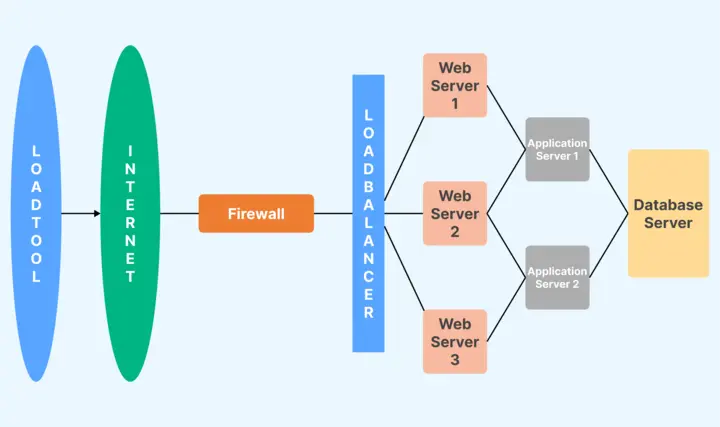
Because the load is generated outside the system under test, the machine generating it becomes a variable in its own right. One laptop cannot produce the traffic of ten thousand users, which is why load tests at any real scale run from distributed machines or cloud VMs rather than a developer workstation.
Load Testing Architecture
A typical web request passes through a firewall, a load balancer, a pool of web servers, an application server and a database. A load test drives traffic through that whole chain, so the bottleneck can sit in any layer, not only in the code that changed.
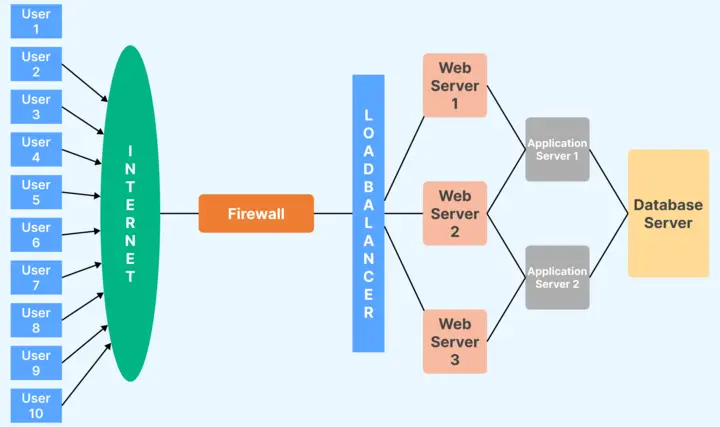
A run answers the same questions about every layer:
- The maximum number of users the system handles before response time degrades.
- The response time of each transaction under that load.
- How each component, from web server to database, behaves as the load rises.
- Which server configuration handles the load best.
- Whether the current hardware is enough or more is needed.
- Which resource saturates first, whether CPU, memory, disk or network.
Run the test in a dedicated environment that mirrors production as closely as you can, and replace third-party systems you do not control with stubs. Configuration tools such as Puppet and containers such as Docker help keep that environment identical between runs.
Types of Load Testing
Load tests differ by the shape of the load they apply. The Grafana Labs guide to types of load testing names smoke, average-load, stress, spike, breakpoint and soak tests.
Peak load and scalability tests are the other two most teams plan for.
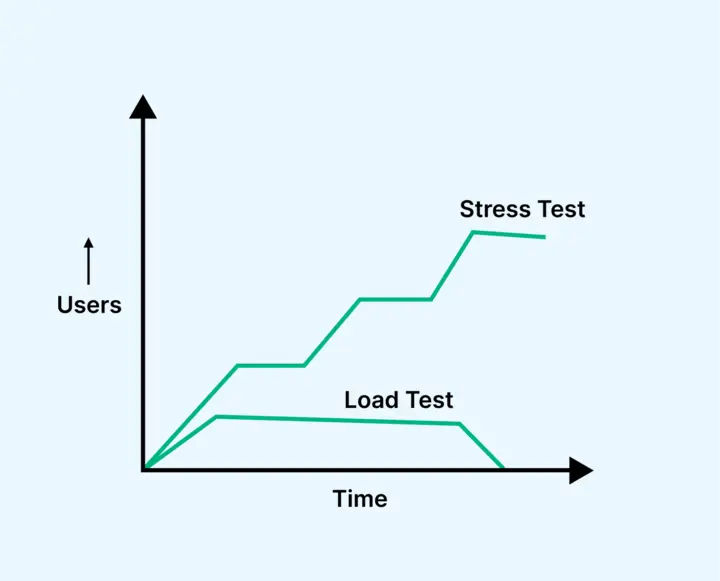
- Smoke test - Minimal load that confirms the script works and records baseline numbers before anything heavier runs.
- Average-load test - The traffic of a typical day, to confirm the system meets its targets under normal conditions.
- Peak load test - The busiest hour you expect, such as a sale or a launch, held long enough for the system to reach a steady state.
- Stress test - Load beyond the expected peak, to find the breaking point and watch how the system recovers once the load drops.
- Spike test - A sudden jump in traffic, to see whether autoscaling and queues absorb it or requests fail while capacity catches up.
- Breakpoint test - A ramp that keeps increasing until something fails, to find the absolute limit of the current setup.
- Soak test - Normal load held for hours to surface memory leaks, connection exhaustion and slow degradation. On a phone system, a soak run can also surface port exhaustion, as the guide to IVR performance testing explains.
- Scalability test - Load added in steps while resources are added, to check whether capacity grows in proportion to the extra servers.
Difference Between Load and Stress Testing
Both sit under performance testing, but they answer different questions. Load testing asks whether the system meets its targets at the traffic it expects, while stress testing asks where and how it breaks beyond that traffic.
| Load Testing | Stress Testing |
|---|---|
| Determine how the system behaves under expected and peak loads. | Understand the system's behavior and identify its breaking point under extreme conditions. |
| Ensures the system can handle expected user load and helps identify bottlenecks that can impact performance. | Pushes the system beyond its capacity to show how it fails and whether it recovers once the load drops. |
| Simulates normal to peak load conditions. | Applies loads that go beyond peak, pushing to the system's breaking point. |
| Simulates a high number of users accessing the application simultaneously during peak usage times. | Simulates a situation where the system is stressed with extreme loads, potentially causing it to fail. |
| Helps to identify performance bottlenecks, establish a performance baseline, and validate that the system can handle high load. | Helps to identify how the system handles failure, its recovery process, and its maximum capacity. |
Difference Between Functional and Load Testing
Functional testing confirms that each feature returns the right result for one user, while load testing measures whether the system keeps doing that, fast enough, for many users at once. A feature can pass every functional test and still time out under load.
| Functional Testing | Load Testing |
|---|---|
| To verify that the functionality of an application or system operates as expected. | To check how the system behaves under a specific expected load. |
| Focuses on verifying the functionalities of the system such as user interfaces, APIs, database, security, client/server applications, etc. | Simulates real users' load and measures the response times, throughput rates, resource utilization to identify the system's performance under varying loads. |
| Inputs are provided, and outputs are compared against the expected results. Test cases are developed based on the system's functional requirements. | A load is applied to the system, and its performance and behavior under this load are observed and analyzed. |
| Involves executing the features of the system with appropriate inputs and validating the output against expected results. | Simulates a high number of users accessing the application simultaneously, testing the system's capacity and response times. |
| Ensures that the system behaves as expected, improves the quality of the product, reduces risks and fixing costs. | Helps to identify performance bottlenecks, ensure system can handle high load, and improve user experience. |
How to Run a Load Test: Step by Step
Load testing is a methodical process rather than an impulsive one, and skipping the preparation is what produces numbers nobody trusts. These eight steps cover a full cycle.
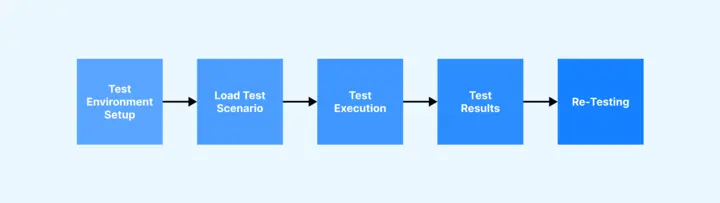
- Understand the system - Know the architecture, the technologies in play, and how data moves between components. You cannot design a realistic load without this, and every later step depends on it.
- Set goals and acceptance criteria - Decide whether you are measuring maximum capacity or behavior under everyday load, then fix the KPIs you will judge it by: response time limits, throughput expectations, concurrent user counts, and an acceptable error rate.
- Choose the scenarios - Pick the journeys that are business-critical or expected to carry high traffic. For an application already in production, server logs are the most honest source for which flows actually matter.
- Model the workload - Set the number of virtual users, data volumes, and think times, then shape the run into ramp-up, steady-state, and ramp-down phases. Ramping lets the system adjust gradually and shows you where degradation begins; steady state is the load you expect it to sustain.
- Prepare the test data - Generate enough login details, product records, and other inputs that scenarios do not keep reusing the same rows, which would otherwise let caching hide a real problem.
- Set up the test environment - Mirror production as closely as you can across hardware, software, network configuration, and databases. Third-party systems you do not control can be replaced with stubs. The closer the test environment sits to production, the more the results are worth.
- Execute and monitor - Run the scenarios with a tool that generates the load, using automated tools to simulate concurrent users. Watch CPU, memory, disk I/O, and network I/O live rather than reading them afterwards, so you can see which resource saturates first.
- Analyze, fix, and retest - Compare the results against the benchmarks from step two, find the bottleneck behind any miss, fix it, and run again. This loop usually repeats several times before the numbers settle.
Load testing works best as a standing part of the development cycle rather than a gate at the end, so performance stays visible as features land and user load shifts.
Metrics of Load Testing
Read the client-side metrics from the load tool and the server-side metrics from your monitoring together. Either set alone shows that a slowdown happened but not which component caused it.
- Response time - The time from sending a request to receiving the full response, including network latency. Report percentiles such as p95 and p99 rather than the average, because an average hides the slow tail that users notice.
- Throughput - Requests, transactions or data processed per second. Throughput that stops rising while virtual users keep increasing marks the saturation point.
- Error rate - The share of requests that fail or time out. A rising error rate at a steady load usually means a resource such as a connection pool ran out.
- Concurrency - The number of users or requests in flight at the same time, the load level every other metric is read against.
- CPU utilization - The share of CPU capacity in use. Sustained high CPU on one tier points to that tier as the bottleneck.
- Memory utilization - Memory in use over time. Memory that keeps growing at a constant load suggests a leak, which a soak test confirms.
- Disk I/O - Read and write rates on storage. A saturated disk slows database-heavy requests first.
- Network I/O - Data moved over the network. A saturated link or bandwidth cap makes every response slower, which can look like an application problem.
- Load vs response time - Response time plotted against load, which shows the concurrency level where the curve bends upward.
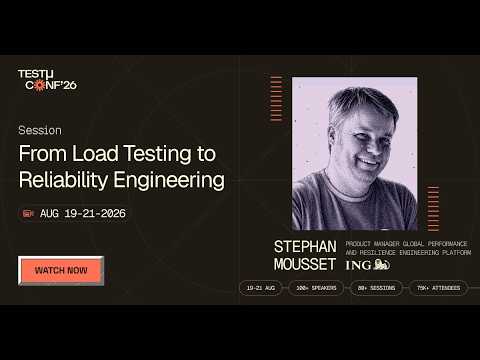
Collecting these metrics is the easy part; deciding what they say about the next release is harder. In this TestMu Conf 2026 session, Stephan Mousset covers that gap in From Load Testing to Reliability Engineering: Making Performance Testing Predict Production Behavior, on why teams run load tests, collect huge amounts of data, and generate detailed reports, yet still struggle to answer whether a change is safe in production.
Load Testing Best Practices
Match the workload model to the traffic you expect. Public sites and APIs receive requests whether or not earlier ones have finished, so drive them with an arrival rate.
The k6 documentation on open and closed models explains that in a closed model, iterations start only when the last one finishes, so a system that slows down receives less load.
This benchmark of open and closed workload models measures that effect in k6, Artillery and JMeter.
- Gate on percentiles in CI - Thresholds on p95 or p99 response time and on error rate turn a load test into a pass or fail step that a pipeline can act on.
- Exclude warm-up from the verdict - Caches, connection pools and autoscaling need time to settle, so judge the targets on the steady-state window rather than the ramp.
- Watch the load generator - If the generator's own CPU or network saturates, its latency numbers describe the generator rather than the system under test.
- Use production-sized data - A database with a few thousand rows answers from memory, while one at production volume shows the query plans real users will hit.
- Record the setup with the results - Versions, instance sizes, data volume and test duration belong next to the numbers, or the next run cannot be compared with this one.

Types of Load Testing Tools
Load testing tools split by licence and by who runs the machines that generate the load:
- Open source tools - Free to use and maintained by their communities, such as JMeter, Gatling, Locust and k6. You write the test plans and run the load generators yourself.
- Commercial tools - Licensed products with vendor support, built-in reporting and protocol coverage beyond HTTP. Examples include LoadRunner, which OpenText now owns and sells under a new name.
- Cloud-based load testing tools - Services that generate distributed load on demand, so you do not maintain generator machines. Examples include BlazeMeter, LoadView, and TestMu AI's cloud load testing, which runs existing JMeter and Gatling plans on managed load generators. For a side-by-side on price, virtual users and test duration, see the BlazeMeter alternative comparison.
- Specialized tools - Tools built for one kind of system, such as HammerDB for databases. Phone systems have their own tools too, and the roundup of IVR testing tools covers the ones that simulate high call volumes.
How to Choose a Load Testing Tool
Start from the system you test and the team that will maintain the scripts, then check the rest:
- Protocol coverage - HTTP alone, or also WebSockets, gRPC, JDBC or message queues. A tool that cannot speak the protocol cannot generate the load.
- Scripting model - GUI test plans in JMeter, or tests kept as code in the repository with k6 (JavaScript), Gatling (Java, JavaScript or TypeScript) or Locust (Python). This k6 vs JMeter comparison sets the two most common picks side by side.
- Load generation capacity - Whether your team can run enough generator machines itself, or needs a managed cloud to supply them on demand.
- Test creation - Some tools offer a graphical interface for building tests, while others need scripting. A generator such as Thunder can write the first JMeter or k6 script from a recording or an API spec.
- CI integration - Pass or fail thresholds and exit codes a pipeline can act on, plus result files your CI can store and compare.
- Reporting - Percentile charts and per-request breakdowns that you can compare from one run to the next.
- Support and community - Documentation, forums and an active release history, which matter most when you pick an open-source tool.
- Total cost - Open source tools cost engineering time and generator infrastructure, while commercial tools trade licence fees for support and extra features.
Load Testing Tools
The tools below are a starting shortlist, in no particular order. For a wider comparison of scripting, CI gating and resource use, see the full roundup of load testing tools.
- Apache JMeter - A pure Java application from the Apache Software Foundation that load tests web applications, SOAP and REST web services, databases over JDBC, LDAP and other protocols, with a test IDE for recording and building test plans.
- WebLOAD - A commercial load testing tool from RadView with an engine that automatically manages dynamic data, analytics with real-time execution comparisons, and scripts you can extend in JavaScript or Java.
- LoadRunner - A long-established commercial load testing tool, now owned by OpenText. OpenText's product page states that LoadRunner Professional is now called OpenText Professional Performance Engineering.
- Gatling - A load testing tool for writing tests as code, with a Java SDK you run from Maven or Gradle and a JavaScript and TypeScript SDK with its own CLI.
- k6 - An open source performance testing tool from Grafana Labs that integrates with CI/CD and automation tools.
- Locust - An open source tool where the whole test is described in Python code, with support for running load tests distributed over multiple machines.
To try two of them hands-on, the JMeter load testing tutorial installs JMeter and runs a first test, and the guide to Python Locust load testing does the same for Locust.
Running JMeter and Gatling Tests at Scale
The part teams underestimate is the generator. A test plan that works fine against a hundred virtual users hits a wall when the target is ten thousand, because a single machine runs out of CPU and open sockets long before the system under test does. At that point you are running distributed load generation, which means provisioning machines, keeping them identically configured, and stitching results back together from all of them.
TestMu AI orchestrates JMeter load testing and Gatling load testing runs on HyperExecute across just-in-time cloud VMs, so the generating side scales with the test instead of capping it. Because the test script and its execution components sit together in a single isolated environment rather than round-tripping between a hub and separate nodes, runs complete up to 70% faster than on a traditional grid, and results come back as unified logs and reports with AI root cause analysis on failures.
The practical effect is that the load test stops being a special event that needs its own infrastructure booked in advance, and becomes something a pipeline can trigger. The JMeter on HyperExecute documentation covers the YAML configuration for a first run.

Note: Run your JMeter and Gatling load tests across parallel cloud VMs. Get started free
Disadvantages of Load Testing
Load testing has real costs and blind spots to plan for:
- Time - Planning, scripting, running and analyzing a load test adds days to a release cycle, and more when the test environment has to be built first.
- Infrastructure cost - Heavy load needs generator machines and a production-like environment, which cost money whether you own them or rent them.
- Specialist skills - Designing a realistic workload and reading the results takes experience with both the tool and the architecture of the system under test.
- Partial coverage - Load testing finds capacity problems but does not replace functional or security testing, so it belongs inside a wider testing strategy.
- Imperfect realism - Real users vary their timing, devices and networks in ways a script only approximates, so the results estimate production behavior rather than guarantee it.
Conclusion
Start with one business-critical journey: script it, run it at today's peak with p95 and error-rate thresholds, and keep that run in your pipeline so every release is measured against it.
When the target outgrows a single machine, run the same JMeter or Gatling plan on HyperExecute. The HyperExecute performance testing docs cover the setup for a first run.
Testing from the terminal? Kane CLI by TestMu AI lets SDETs and developers plan, write, run and debug tests from the command line.
Author

Swapnil Biswas
Blogs: 8


Swapnil Biswas is a Product Marketing Manager at TestMu AI, leading product marketing for KaneAI and HyperExecute while orchestrating GTM campaigns and product launches. With 5+ years of experience in product marketing and growth strategy, he specializes in AI, SEO, and content marketing. Certified in Selenium, Cypress, Playwright, Appium, KaneAI, and Automation Testing, Swapnil brings hands-on expertise across web and mobile automation. He has authored 20+ technical blogs and 10+ high-ranking articles on CI/CD, API testing, and defect management, enabling 70K+ testers to improve automation maturity. His work earned him multiple awards, including Top Performer, Value of Agility, and Wall of Fame. Swapnil holds a PG Certificate in Digital Marketing & Growth Strategy from IIM Visakhapatnam and a BBA in Marketing from Amity University.
Reviewer

Harish Rajora
Reviewer
Harish Rajora is a software developer at TestMu AI with over 6 years of hands-on experience in Python and cross-platform application development across Windows, macOS, and Linux. He has authored 800+ technical articles and worked on large-scale projects, including GenAI applications and core engineering features used by millions. Harish has led DevOps initiatives building CI/CD pipelines with Jenkins, AWS, GitLab, and GitHub, and holds an M.Tech in Software Engineering from IIIT Allahabad.


Load Testing FAQs
Did you find this page helpful?
More Related Learning Hubs






TestMu AI forEnterprise
Get access to solutions built on Enterprise
grade security, privacy, & compliance
- Advanced access controls
- Advanced data retention rules
- Advanced Local Testing
- Premium Support options
- Early access to beta features
- Private Slack Channel
- Unlimited Manual Accessibility DevTools Tests