

Power Your Software Testing with AI Agents and Cloud
The Native AI-Agentic Cloud Platform to Supercharge Quality Engineering. Test Intelligently and Ship Faster.


- TestMu AI (Formerly LambdaTest)
- /
- Blog
- /
- 15 Best GUI Testing Tools
15 Best GUI Testing Tools
Explore the 15 best GUI testing tools of 2026 for flawless UI, cross-platform consistency, and reliable user experiences.
Last Updated on:
Creating a flawless user experience goes beyond writing clean code it requires ensuring that every click, scroll, and interaction works exactly as intended. GUI testing tools make this possible by validating the visual and functional integrity of software applications across platforms. They help teams catch UI defects earlier, reduce risks, and deliver interfaces users can truly trust.
Overview
To validate user interfaces, use TestMu AI SmartUI for AI-driven visual regression testing across devices, or Selenium for open-source, multi-language browser automation. These tools simulate real user interactions to ensure visual elements and workflows function correctly across different browsers and environments.
- Best for visual regression testing: TestMu AI SmartUI - An AI-native platform that automates pixel-level and DOM-aware screenshot comparisons across browsers, devices, PDFs, Figma designs, and Storybook builds to reduce false positives.
- Best for multi-language browser automation: Selenium - An open-source framework that allows developers to programmatically interact with web applications across major browsers using languages like Java, Python, C#, Ruby, and JavaScript.
- Best for developer-friendly web testing: Cypress - A modern end-to-end testing framework that runs directly in the browser to provide real-time validation, automatic waiting, and time-travel debugging.
- Best for modern web applications: Playwright - A Microsoft-developed automation framework that supports Chromium, Firefox, and WebKit, with built-in capabilities for handling shadow DOMs, iframes, and mobile emulation.
- Best for Chromium browser control: Puppeteer - A Google-developed JavaScript library providing a high-level API to control Chrome or Chromium in headless or full-browser modes for web scraping and visual validation.
- Best for mobile app testing: Appium - An open-source framework for automating native, hybrid, and mobile web applications on Android and iOS using a single test script across real devices and emulators.
- Best for RPA-driven workflow testing: UiPath - A platform that automates business processes and GUI testing across web, desktop, and legacy systems by mimicking user interactions through visual workflows.
- Best for Node.js-based automation: WebdriverIO - An automation framework built on WebDriver and Chrome DevTools that supports cross-browser testing and integrates with Mocha, Jasmine, and Cucumber.
- Best for enterprise SAP and model-based testing: Tricentis Tosca - A model-based automation tool that simplifies GUI testing across web, mobile, desktop, and SAP applications using pre-built modules to reduce maintenance.
- Best for low-code GUI automation: Ranorex Studio - A tool specializing in GUI automation with reliable object recognition, low-code test creation, and data-driven testing across web, desktop, and mobile platforms.
- Best for Qt-based applications: Squish GUI Tester - A cross-platform tool by Qt Group that automates GUI testing for Qt, Java, .NET, and web applications with reliable object recognition.
- Best for lightweight Windows scripting: AutoIt - A free, open-source tool that uses a BASIC-like scripting language to automate keyboard, mouse, and window operations on Windows desktop apps.
- Best for enterprise desktop and web GUI testing: QF-Test - A low-code automation tool covering desktop, web, and mobile applications with stable component recognition and reusable test cases.
- Best for AI-driven self-healing tests: Functionize - An AI-powered platform that lets testers write cases in plain English and automatically adapts scripts when UI elements change.
- Best for unifying web, mobile, API, and desktop testing: Katalon Studio - A Selenium and Appium-based platform offering no-code, low-code, and full-code authoring in one project, with a free tier for individual testers.
What Are GUI Testing Tools?
GUI testing tools help teams ensure that applications provide a smooth and intuitive user experience. They validate whether visual elements such as buttons, menus, and forms behave correctly by simulating real user actions across platforms. This way, potential issues that could disrupt usability are caught before release.
Key Capabilities:
- GUI Testing: It allows you to automatically test that UI features work identically on different browsers, mobile devices, and operating systems, helping catch environment-specific bugs before release.
- Visual Testing: It helps you compare UI layouts against expected designs to detect misalignments, broken elements, or rendering inconsistencies.
- Regression Testing: You can reruns existing test scripts on new code changes to ensure updates don't introduce new bugs or break previous functionality.
- Accessibility Testing: It ensures that users with impairments can fully interact with the interface by testing for screen reader compatibility, keyboard navigation, and color contrast

Note: Test your UI across 3,000+ browser and OS combinations. Try TestMu AI Now!
List of Best GUI Testing Tools
Exploring the best GUI testing tools gives you a clear view of the options available for interface validation. These tools help you compare features, strengths, and use cases so you can choose the one that best supports your UI testing goals.
| Tool | Platform coverage | License | Best for |
|---|---|---|---|
| TestMu AI SmartUI | Web, mobile, PDFs, Figma, Storybook | Free plan; paid tiers | AI-native visual regression testing |
| Selenium | Web (all major browsers) | Free, open source | Multi-language browser automation |
| Cypress | Web | Free, open source (Cypress Cloud paid) | Developer-friendly, in-browser testing |
| Playwright | Web (Chromium, Firefox, WebKit) | Free, open source | Modern web apps with complex DOM |
| Puppeteer | Web (Chrome/Chromium) | Free, open source | Chromium browser control and scraping |
| Appium | Mobile (Android, iOS) | Free, open source | Native, hybrid, and mobile web apps |
| UiPath | Web, desktop, legacy systems | Free Community edition; paid tiers | RPA-driven workflow testing |
| WebdriverIO | Web | Free, open source | Node.js-based cross-browser testing |
| Tricentis Tosca | Web, mobile, desktop, SAP | Commercial | Enterprise SAP and model-based testing |
| Ranorex Studio | Web, desktop, mobile | Commercial | Low-code GUI automation |
| Squish GUI Tester | Qt, Java, .NET, web, mobile | Commercial | Qt-based desktop applications |
| AutoIt | Windows desktop | Free, open source | Lightweight Windows scripting |
| QF-Test | Web, desktop, mobile | Commercial | Enterprise desktop and web GUI testing |
| Functionize | Web | Commercial (free trial) | AI-driven self-healing tests |
| Katalon Studio | Web, mobile, API, desktop | Free tier; paid Enterprise tiers | Unifying web, mobile, API, and desktop testing |
1. TestMu AI SmartUI
TestMu AI SmartUI is an AI-native platform for visual regression testing that automates pixel-level and DOM-aware comparisons of screenshots across browsers, devices, PDFs, Figma designs, and Storybook builds.
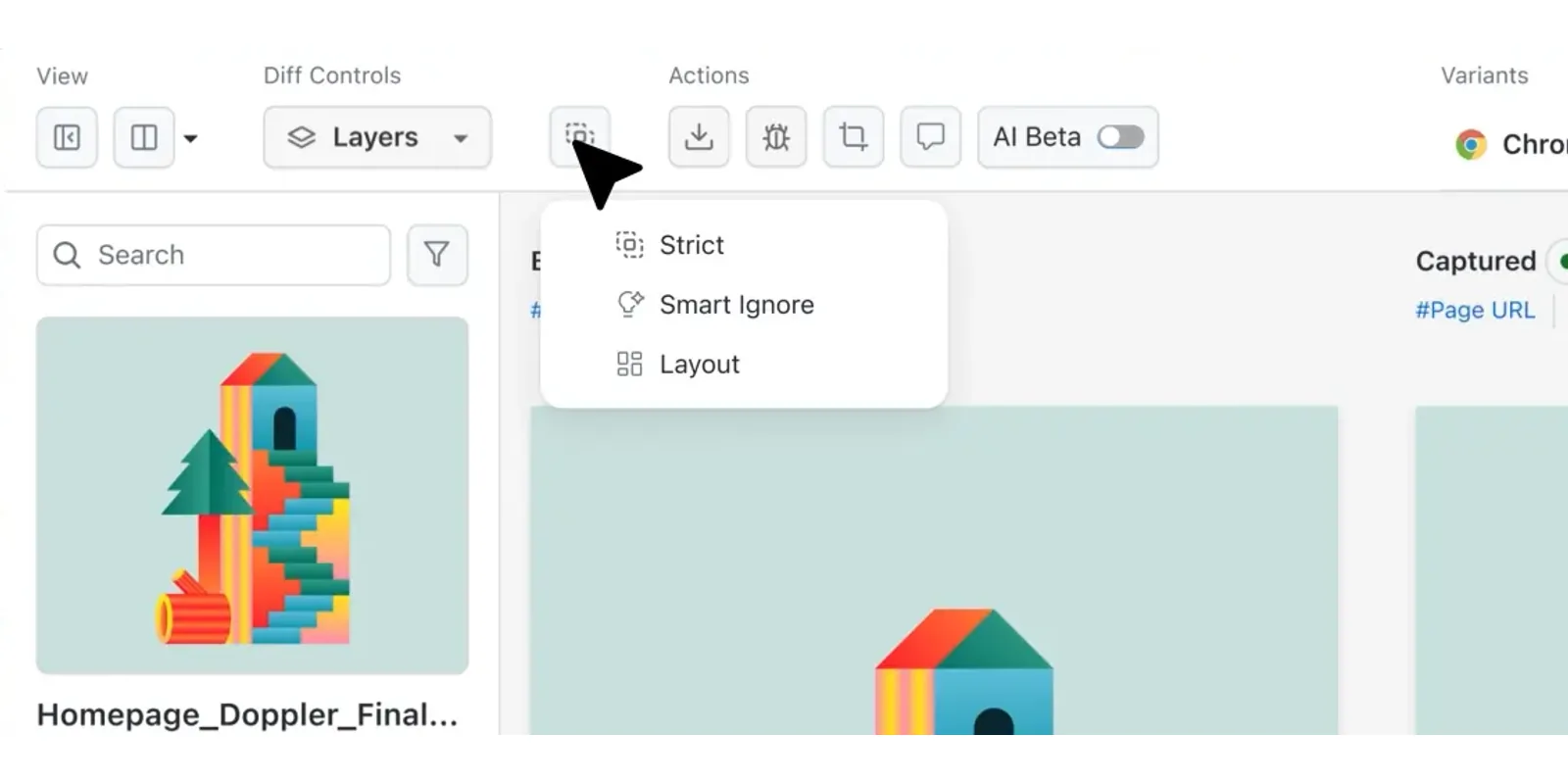
It reduces false positives via the Smart Ignore feature, OCR text stabilization, layout analysis, and defined ignore-regions. Integrated into CI/CD pipelines, the TestMu AI visual comparison tool offers versioned baselines, and a rich review UI for efficient GUI testing.Features:
- SmartIgnore via APIs and Annotations: Define ignore or select regions manually, via DOM, or in code; available through SmartUI public APIs.
- Pre-Snapshot JavaScript Execution: Run custom JavaScript on target pages through the CLI before capturing snapshots to stabilize or control dynamic states.
- Multi-Framework CLI and SDK Support: Integrates with Selenium, Playwright, Puppeteer, TestCafe, Storybook, Figma CLI, Appium, Espresso, and XCUITest.
- PDF Baseline Control: Use entire PDFs or individual pages as baselines, allowing more granular visual validation.
- Layout Comparison Mode: Detect layout shifts and element misplacements, especially helpful for responsive and localized testing.
- Coded Region Overlay: Display regions defined in code as overlays on the dashboard alongside manual annotations.
- Smart Crop for Mobile: Automatically crops status and navigation bars in screenshots taken from mobile apps with Appium or Espresso.
To get started, check out this TestMu AI SmartUI guide.
2. Selenium
Selenium is one of the best automated GUI testing tools for automating web browsers. It allows developers and testers to programmatically interact with web applications, simulating user actions like clicking, typing, and navigating.
It supports multiple programming languages and browsers, making it widely used for functional testing, regression testing, and automating repetitive web tasks. Its core component, WebDriver, provides a standardized way to control browsers with precision across different platforms.
Features:
- Cross Browser Testing Support: Supports cross browser testing allowing you to run test across major browsers like Chrome, Firefox, Safari, and Edge.
- Multi-Language Support: Supports Java, Python, C#, Ruby, JavaScript, and more.
- Platform Independence: Can run tests on Windows, macOS, Linux, and cloud environments.
- Framework Integration: Easily integrates with testing frameworks like TestNG, JUnit, and pytest.
- Parallel Testing: Supports parallel testing across multiple test environment simultaneously to save time.
- Record and Playback (Selenium IDE): Offers a simple tool for beginners to record tests without coding.
Check out this blog to know how to automate UI testing with Selenium.
3. Cypress
Cypress is a modern end-to-end testing framework designed for fast and developer-friendly GUI testing. It runs directly in the browser, allowing real-time validation of user interactions and easy debugging. With its intuitive interface, automatic reloading, and rich debugging capabilities, Cypress speeds up front-end testing and shortens development workflows.
Features:
- Real-time Execution: Watch GUI tests execute instantly in the browser for immediate feedback.
- Automatic Waiting: Automatically handles asynchronous UI changes, eliminating manual sleep or wait commands.
- Time-Travel Debugging: Captures snapshots of application state, allowing step-by-step inspection during tests.
- Cross-Browser Support: Compatible with Chrome, Firefox, Edge, and WebKit browsers for thorough testing.
- CI/CD Integration: Integrates easily into pipelines, enabling automation testing within continuous deployment workflows.
4. Playwright
Playwright is an automation framework developed by Microsoft, designed for reliable end-to-end GUI testing across multiple browsers. It handles complex web elements, including shadow DOMs and iframes, making it ideal for modern web applications. Playwright supports advanced automation scenarios and offers tools for fast, cross-platform testing.
Features:
- Multi-Browser Support: Automates Chromium, Firefox, and WebKit browsers for comprehensive cross-browser testing.
- Shadow DOM and iFrame Handling: Tests modern UI components, including shadow DOMs and embedded iframes, reliably.
- Cross-Platform Testing: Executes on Windows, macOS, and Linux environments for versatility.
- Mobile Emulation: Simulates mobile devices to validate responsive designs across multiple screen sizes.
- Parallel Execution: Runs multiple test sessions concurrently, significantly speeding up GUI test automation.
5. Puppeteer
Puppeteer is a JavaScript library developed by Google that provides a high-level API to control Chrome or Chromium browsers. It is widely used for GUI testing, web scraping, and automation tasks, offering full access to the browser's rendering engine and developer tools. With headless and full-browser modes, Puppeteer ensures reliable validation of UI behavior across environments.
Features:
- Headless and Full-Browser Modes: Run tests in background headless mode or visible browser mode for debugging.
- Rich Browser Automation: Interact with pages by simulating clicks, typing, navigation, and form submissions.
- Advanced DOM and Network Control: Capture requests, block resources, and manipulate page states for precise testing.
- Screenshot and PDF Generation: Validate visual layouts by exporting page snapshots or full-page PDFs.
- Integration with CI/CD: Easily integrates with pipelines for automated UI regression testing.
6. Appium
Appium is an open-source framework for automating mobile UI testing on Android and iOS. It allows writing a single test script for both platforms, supports multiple programming languages, real devices, and emulators, and integrates with CI/CD pipelines, enabling reliable, scalable, and maintainable mobile GUI testing across diverse environments.
Features:
- Multi-Language Support: Allows tests in Java, Python, Ruby, JavaScript, and more.
- Real Device and Emulator Support: Test mobile applications on physical devices or simulators.
- Native, Hybrid, and Web App Testing: Supports testing across all types of mobile applications.
- No App Modification Needed: Tests run without altering the application code.
- CI/CD Integration: Automates mobile GUI testing within continuous integration and deployment pipelines.
- Usability Testing: Allows you to the perform usability testing to checks how real users interact with interfaces to ensure UX quality.
- CI/CD Support: Integrates GUI testing into agile pipelines for automated continuous delivery.
7. UiPath
UiPath, known for Robotic Process Automation, extends capabilities to GUI testing by automating workflows. It mimics user interactions, supports multiple technologies including web, desktop, and legacy systems, and enables building visual workflows. Reusable components and enterprise-grade orchestration allow scalable, maintainable, and efficient GUI test automation.
Features:
- RPA-Driven GUI Testing: Automates business processes while validating UI elements accurately and efficiently.
- Cross-Technology Support: Works across web, desktop, and legacy system interfaces.
- Visual Workflow Design: Enables creation of GUI tests without extensive coding requirements.
- Reusable Components: Allows storing, sharing, and reusing GUI testing assets across projects.
- Enterprise Scalability: Supports managing and orchestrating large-scale GUI testing operations efficiently.
8. WebdriverIO
WebdriverIO is a Node.js-based automation framework designed for modern web GUI testing. Built on WebDriver and Chrome DevTools, it supports cross-browser testing, integrates with Mocha, Jasmine, and Cucumber, and enables parallel execution. Its cloud compatibility and developer-centric design make it ideal for JavaScript-driven web application testing.
Features:
- Browser Automation: Automates interactions using WebDriver and Chrome DevTools for reliable browser automation.
- Cross-Browser GUI Testing: Validates web applications consistently across multiple browsers.
- Integration Support: Works with Mocha, Jasmine, and Cucumber frameworks.
- Parallel Execution: Runs multiple GUI tests simultaneously for faster feedback.
- Cloud Grid Compatibility: Integrates with Selenium Grid and cloud testing services easily.

9. Tricentis Tosca
Tricentis Tosca is an enterprise-grade, model-based GUI testing tool that emphasizes efficiency and risk-based testing. It simplifies creating, maintaining, and executing automated tests across web, mobile, SAP, and desktop applications. By focusing on business-critical areas, it reduces maintenance effort and improves test coverage and reliability at scale. For teams whose stack is centered on SAP testing, Tosca's pre-built SAP modules eliminate most of the custom locator work.
Features:
- Model-Based Testing: Reduces maintenance by abstracting test logic into reusable models for GUI testing.
- Cross-Technology Support: Supports testing across web, mobile, SAP, and desktop applications efficiently.
- Risk-Based Approach: Prioritizes testing of high-impact GUI components for business-critical validation.
- Reusable Modules: Build flexible, modular GUI test components for efficiency.
- Enterprise Reporting: Provides detailed insights into GUI test coverage, results, and execution.
10. Ranorex Studio
Ranorex Studio specializes in GUI automation with reliable object recognition and low-code automation. It supports web, desktop, and mobile platforms, making it suitable for complex interfaces. Data-driven testing, reporting, and debugging tools speed up automation workflows, while its interface lets testers build reliable, maintainable tests without deep programming knowledge.
Features:
- GUI Object Recognition: Identifies UI elements reliably across technologies for accurate automation.
- Low-Code Automation: Build tests without extensive programming knowledge efficiently.
- Cross-Platform GUI Testing: Automates web, desktop, and mobile application interfaces.
- Data-Driven Testing: Validates UI behavior using multiple datasets for thorough testing.
- Reporting and Debugging: Built-in logs and video recordings speed up issue resolution.
11. Squish GUI Tester
Squish GUI Tester, by Qt Group, automates GUI testing across platforms and frameworks. It is particularly effective for Qt-based applications but supports Java, .NET, and web. Squish offers reliable object recognition, BDD syntax support, and CI/CD integration, enabling reliable, scalable, and maintainable automation of complex GUI workflows across desktop, mobile, and web applications.
Features:
- Cross-Platform Support: Works on Windows, macOS, Linux, and mobile platforms reliably.
- Technology Coverage: Supports Qt, Java, .NET, web, and other UI technologies.
- Reliable Object Recognition: Handles dynamic GUI components accurately during automation.
- BDD Support: Enables GUI tests using Gherkin syntax for behavior-driven development.
- CI/CD Integration: Integrates automated GUI testing into pipelines.
12. AutoIt
AutoIt is a lightweight Windows automation tool designed for GUI testing of desktop applications. Using a BASIC-like scripting language, it simulates keyboard, mouse, and window operations. Its small footprint, simplicity, and open-source nature make it ideal for automating repetitive tasks and validating Windows GUIs quickly and efficiently.
Features:
- Free and Open-Source: Budget-friendly solution for Windows GUI testing.
- Windows Automation: Tailored for GUI testing of Windows desktop applications.
- Simple Scripting: BASIC-like syntax simplifies writing automation scripts.
- Keyboard and Mouse Simulation: Mimics real user interactions reliably.
- Small Footprint: Lightweight and fast execution for desktop automation.
13. QF-Test
QF-Test is a stable and versatile automation tool for GUI testing across desktop, web, and mobile applications. It provides low-code scripting, broad technology coverage, reusable test cases, and detailed reporting. Its reliability and maintainability make it suitable for large-scale GUI test automation in enterprise environments, ensuring consistent quality across platforms.
Features:
- Broad Technology Coverage: Supports Java, web, desktop, and mobile GUI testing.
- Stable Component Recognition: Handles complex and dynamic UI structures effectively.
- Low-Code Scripting: Enables easy creation of GUI tests with minimal coding.
- Reusable Test Cases: Reduces effort by reusing GUI testing assets efficiently.
- Detailed Reporting: Provides insights into test execution, results, and GUI issues.
14. Functionize
Functionize is an AI-powered testing platform designed to make GUI automation more resilient and scalable. It combines natural language processing with cloud execution, allowing both testers and non-technical users to create, manage, and run tests at scale. Its self-healing automation minimizes script breakage and speeds up continuous testing.Features:
- AI-Powered Self-Healing: Adapts tests automatically when UI elements change, reducing maintenance.
- Natural Language Test Creation: Write test cases in plain English without complex coding.
- Cloud-Native Execution: Run massive test suites in parallel across browsers and devices.
- Visual Testing: Validates layouts and rendering to ensure pixel-perfect user experiences.
- CI/CD Integration: Fits into existing pipelines for continuous delivery.
15. Katalon Studio
Katalon Studio covers web, mobile, API, and desktop GUI testing in one project, built on the Selenium and Appium foundations so existing scripts carry over. Its mixed-skill approach, a visual recorder for non-coders, keyword-driven steps for less technical testers, and full Groovy or Java scripting for engineers, lets product, QA, and dev teams work in the same test suite without switching tools.
Features:
- Multi-Authoring Modes: No-code recorder, low-code keywords, and full-code scripting in a single project.
- Cross-Technology Coverage: Web, mobile (native, hybrid, and mobile web), REST/SOAP/GraphQL APIs, and Windows desktop apps.
- AI-Assisted Testing: Generates tests from requirements, self-heals broken locators, and analyzes failures.
- Flexible Execution: Runs locally, on-premises via the Runtime Engine, or in the cloud with parallel execution on TestCloud.
- Selenium and Appium Compatible: Reuses existing WebDriver-based scripts instead of starting from scratch.
Selecting the Right GUI Testing Tool
You need a tool that aligns with your tech stack, scales with your testing needs, and integrates cleanly into your CI/CD pipeline. Prioritize ease of use, adaptability to dynamic UIs, and reliable community or vendor support.
- Technology Stack: Ensure the tool supports your platform (web, mobile, desktop) and required frameworks.
- Skill Availability: Opt for no-code or low-code test automation tools if developer skills are limited.
- Ease of Maintenance: Prioritize self-healing or model-based tools to avoid brittle tests.
- CI/CD Compatibility: Choose UI testing tools that integrate smoothly with pipelines (e.g., CLI or Docker).
- Cost and License Model: Balance budget against required features, considering open-source vs. enterprise tools.
- Scalability and Parallelism: Select tools that support concurrent execution to accelerate testing cycles.
- Reporting and Analytics: Favor tools that provide clear, actionable insights for faster debugging.
Future of GUI Testing Tools
The future of GUI testing is evolving toward more intelligent, adaptive, and integrated solutions. AI and machine learning will increasingly enable self-healing tests, reducing maintenance when UI elements change. Cloud-native platforms will support massive parallel execution across browsers, devices, and operating systems, ensuring faster test cycles.
- AI-Powered Self-Healing: Tests adapt automatically to UI changes, reducing maintenance.
- Cloud-Native and Parallel Execution: Run large-scale tests across browsers, devices, and platforms simultaneously.
- Natural Language and Low-Code Testing: Enables test creation without deep coding skills.
- Advanced Visual Validation: Pixel-level and DOM-aware comparisons detect layout shifts and dynamic content issues.
- CI/CD and DevOps Integration: Continuous validation of GUIs in agile and DevOps pipelines.
- Cross-Platform and Emerging Tech Support: Extends to web, mobile, desktop, and future interfaces like AR/VR.
- Faster and Smarter Automation: Optimized workflows, analytics, and AI insights speed up GUI test processes.
Conclusion
GUI testing plays a vital role in quality assurance by connecting the developer's logic with the user's experience. It helps uncover interface issues that other testing layers may miss, ensures consistency across platforms, and protects the overall usability of your product.
To make GUI testing more effective, it's important to balance manual and automated efforts while embedding tests into CI/CD pipelines for faster feedback and earlier issue detection. Choosing the right tools also makes UI testing more effective.
You can also take a look at these top UI automated testing tools to explore the best options available.
Author

Nandini Pawar
Blogs: 7


Nandini Pawar is a Tech Marketing Specialist at TestMu AI, where she creates educational content and certification programs around automation testing and AI. With certifications in Selenium, Cypress, Appium, Playwright, KaneAI, and Automation Testing, she combines technical understanding with content strategy to support the QA community. Nandini has played an active role in shaping TestMu AI’s learning ecosystem, helping thousands of testers upskill through structured, accessible resources. Her data-informed approach to content blends creativity with long-term impact, making her a valuable contributor to TestMu AI’s mission of advancing software testing education.
Reviewer

Himanshu Sheth
Reviewer
Himanshu Sheth is the Director of Marketing (Technical Content) at TestMu AI, with over 8 years of hands-on experience in Selenium, Cypress, and other test automation frameworks. He has authored more than 130 technical blogs for TestMu AI, covering software testing, automation strategy, and CI/CD. At TestMu AI, he leads the technical content efforts across blogs, YouTube, and social media, while closely collaborating with contributors to enhance content quality and product feedback loops. He has done his graduation with a B.E. in Computer Engineering from Mumbai University. Before TestMu AI, Himanshu led engineering teams in embedded software domains at companies like Samsung Research, Motorola, and NXP Semiconductors. He is a core member of DZone and has been a speaker at several unconferences focused on technical writing and software quality.


GUI Testing Tools FAQs
Did you find this page helpful?
More Related Blogs
TestMu AI forEnterprise
Get access to solutions built on Enterprise
grade security, privacy, & compliance
- Advanced access controls
- Advanced data retention rules
- Advanced Local Testing
- Premium Support options
- Early access to beta features
- Private Slack Channel
- Unlimited Manual Accessibility DevTools Tests