
AI Visual Testing With SmartUI Visual AI
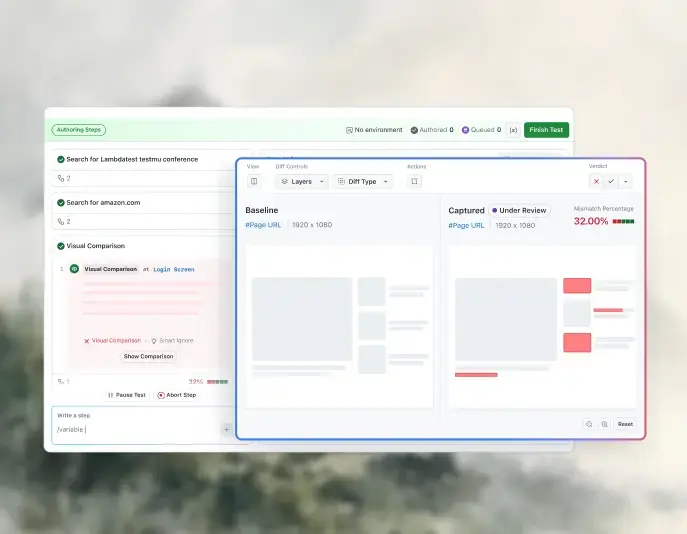
Visual AI testing is visual testing where AI, not a raw pixel diff, decides which UI changes matter. SmartUI Visual AI compares each screenshot with its baseline, flags real regressions such as moved or missing elements, and filters out anti-aliasing and rendering noise.


Trusted by 3M+ users globally at


"We have tripled our tests and are now executing tests in less than 2 hours with 78% Faster Test Execution"


"We figured out a more efficient way to monitor system health and resolve failures earlier in lower environments."


"TestMu AI has significantly boosted our testing speed, is easy to implement, and provides exceptional support."


"With 70% faster test execution, TestMu AI helped us achieve faster time-to-market and enhanced CX."


Everything You Need for Visual AI Testing
Visual AI flags the changes that matter, Smart Ignore drops displacement noise, and Smart RCA shows the DOM and CSS cause.
 How It Works
What Is Visual AI Testing?
Visual AI testing is automated visual testing where AI compares each new screenshot with an approved baseline and decides which differences matter. Real UI defects are flagged, and rendering noise such as anti-aliasing is ignored.
- Step 1: The first approved run becomes the baseline.
- Step 2: Every later run captures the same screens.
- Step 3: AI keeps only changes a person would notice.
- Step 4: You approve the change or reject it.

SmartUI Visual AI
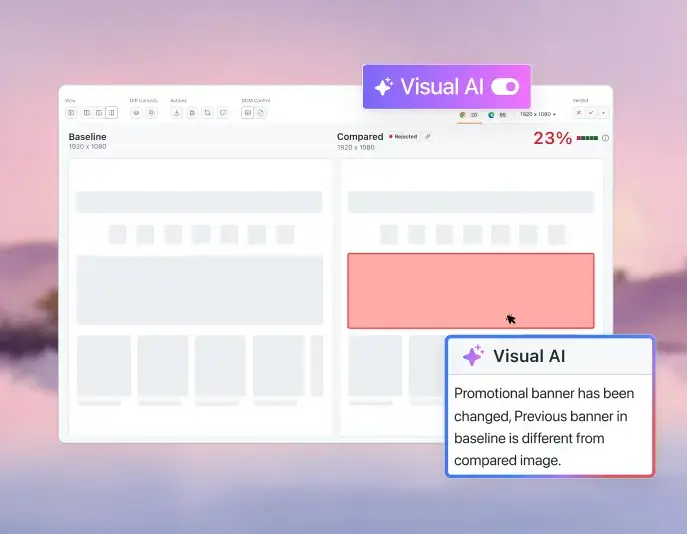
Visual AI Flags the Changes a Person Would Notice
Switch on the Visual AI toggle in any SmartUI comparison. The agent draws a box around each meaningful change and explains it in plain English.
Get Started For Free
Why AI understands UI better than a pixel diff
 Smart Ignore
Eliminate False Positives. Review Only What's Real.
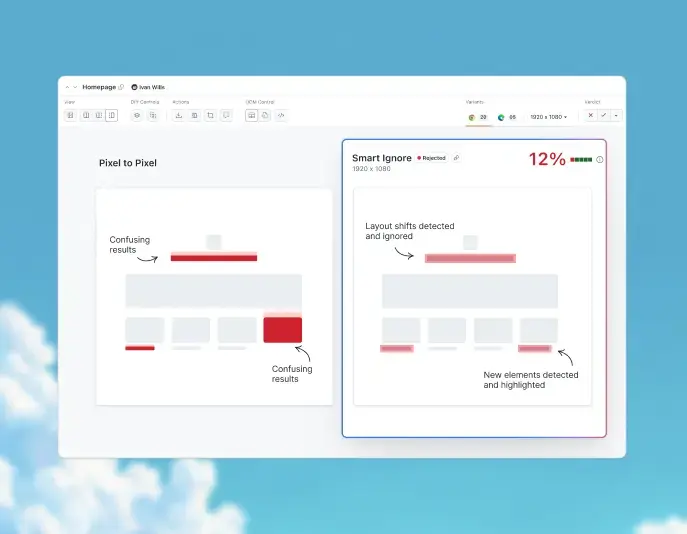
Smart Ignore separates moved content from changed content and cuts false positives compared with an unfiltered pixel to pixel comparison.
Get Started For Free- Hides diffs from elements that shifted but did not change.
- Highlights only the areas where content really changed.
- Turn it on per project, per screenshot, or in test capabilities.
 Smart RCA
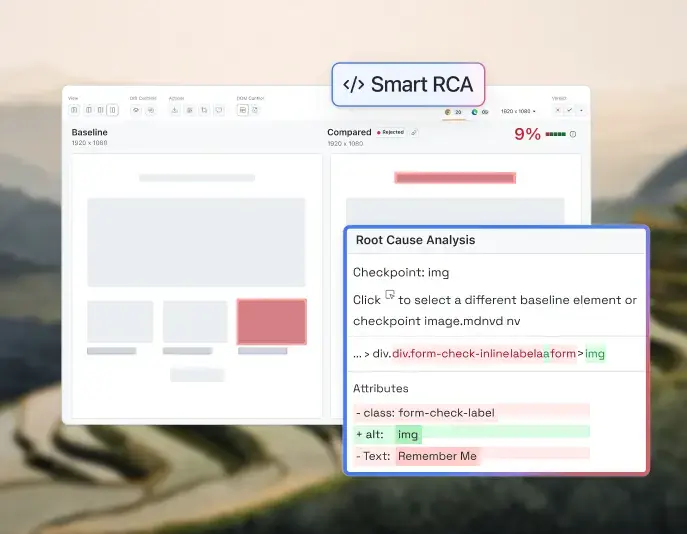
Trace a Visual Bug to Its Root Cause
Smart RCA compares the DOM behind both screenshots and shows the exact HTML, CSS, or text change behind a diff.

From a value perspective, the cost difference compared to our previous visual testing platform is substantial, offering the same functionality with better ROI.

Kareem Shammout
Senior Test Automation Engineer, Atypon
Visual AI Testing vs. Pixel to Pixel Comparison

Top Choice
Features
SmartUI Visual AI
Pixel to Pixel Comparison
How it compares screenshots
Anti-aliasing and rendering glitches
What gets highlighted
Explanation of a change
Review effort
Best fit
Turn On Smart Ignore From Your Test Code
One capability applies Smart Ignore to every screenshot in the session. The first build sets the baseline, and comparison starts on the next build.
Project, screenshot, and hooks setup for Smart Ignore is in the Smart Ignore guide. Check out our documentation
Key Features for Accurate Visual AI Testing

Page Shift Detection
Pinpoint the exact pixels causing a page shift, avoiding the need to mark the entire page content as a diff.

Addressing Anti-Aliasing Noise
An anti-aliasing algorithm removes the false positives that font and edge smoothing cause.

Advanced Text Stabilization
Neutralize subtle text shifts in rendering to maintain consistency and ensure accurate results.

Smart PDF Comparison
Effortlessly compare PDF documents with SmartUI, ensuring precise visual consistency and fast, reliable results.

Inspect UI Without Status & Footer
Excludes status bars and footers to focus on core UI, ensuring accurate validation and minimizing discrepancies.

Ignore Regions
Annotate screenshots by drawing and defining regions to ignore or select for comparisons.


Run Your First Visual Regression Test!
Check out our documentation to run your first Visual Regression test and deliver pixel-perfect websites and apps.
View SmartUI Docs

Success Stories of TestMu AI (Formerly LambdaTest)

50%
reduction in test execution time
“HyperExecute is a highly reliable test execution platform and has excellent customer support.”
Sagar Uday Kumar
Sr. Engineering Manager
Frequently asked questions
TestMu AI for Enterprise
Get access to solutions built on enterprise-grade
security, privacy, & compliance
- Advanced access controls
- Advanced data retention rules
- Advanced Local Testing
- Premium Support options
- Early access to beta features
- Private Slack Channel
- Unlimited Manual Accessibility DevTools Tests