

Power Your Software Testing with AI Agents and Cloud
The Native AI-Agentic Cloud Platform to Supercharge Quality Engineering. Test Intelligently and Ship Faster.


- TestMu AI (Formerly LambdaTest)
- /
- Blog
- /
- 13 Best Website Testing Tools in 2026 (Free and Paid)
13 Best Website Testing Tools in 2026 (Free and Paid)
Compare 13 website testing tools for 2026, from free Playwright, Selenium, and Lighthouse to paid platforms, plus the website bugs each tool catches and misses.
Last Updated on:
A website can pass every functional test in its suite and still load slowly on phones, trap keyboard users inside a modal, or render its headings differently in Safari. Each of those failures needs a different kind of website testing tool, which is why a complete testing setup combines several of them.
More than half of the tools below are free or open source at their core, and the comparison table marks the cost model for each one. If browser coverage is your main concern, see the dedicated guide to cross browser testing tools.
Key Takeaways
- A complete website testing setup combines several tool types, because functional frameworks, execution platforms, performance tools, accessibility and security scanners, and monitors or human testers each catch different website failures.
- The HTTP Archive's 2025 Web Almanac found good Core Web Vitals on 48% of mobile websites and 56% of desktop websites, and functional tests measure none of the Core Web Vitals thresholds.
- The State of JavaScript 2025 survey found that 50% of developers who answered the testing question had used Playwright, compared with 47% for Cypress and 37% for Selenium.
- Playwright drives Chromium, Firefox, and WebKit through one API but cannot drive branded Safari, so Playwright's WebKit results approximate Safari without reproducing Safari exactly.
- The TestMu AI automation cloud runs existing Selenium, Cypress, Playwright, and Puppeteer tests in parallel across 3,000+ browser and OS combinations, and the TestMu AI real device cloud adds 10,000+ real Android and iOS devices.
- In TestMu AI build 104469557, Chrome and WebKit both passed the functional check and reported a heading font-weight of 700, yet WebKit drew the headings visibly lighter, which only a screenshot on the real engine exposed.
- Playwright, Lighthouse CI, axe-core, and ZAP together cost nothing in licenses and cover functional, performance, accessibility, and security checks for a team with a zero testing budget.
- A clean axe DevTools report means no automatically detectable accessibility violations, which is a narrower claim than WCAG conformance, so manual testing is still needed for more complex accessibility issues.
What Are Website Testing Tools?
Website testing tools are software that checks whether a website works, performs, and stays usable and secure across the browsers, devices, and network conditions its visitors use. For the step-by-step process of testing a site, see the guide to website testing.
Field data shows why one category is not enough. In the HTTP Archive's 2025 Web Almanac, 48% of mobile websites and 56% of desktop websites had good Core Web Vitals, which leaves about half of mobile sites short of Google's thresholds for loading, responsiveness, and layout stability. Functional tests measure none of those thresholds.
- Functional frameworks - scripts that click, type, and assert on behavior, such as Playwright, Selenium, and Cypress.
- Execution platforms - hosted grids that run those scripts on many real browsers and devices in parallel.
- Performance tools - lab auditors and load generators that measure speed and behavior under traffic.
- Accessibility and security scanners - automated checks against WCAG success criteria and known classes of web vulnerability.
- Monitors and human testers - scheduled checks against production, and people who explore the site the way customers do.
How These Tools Were Selected
Each tool had to catch a class of website defect the others miss, fit a release process as a pipeline step, a scheduled job, or a pre-release cycle, and show a release or documentation update dated 2025 or 2026. The list follows the layers of a website testing stack, starting with the functional frameworks most teams adopt first, so the numbers describe sequence and carry no quality score.
The framework order follows adoption data from the State of JavaScript 2025 survey, where 50% of developers who answered the testing question had used Playwright, compared with 47% for Cypress and 37% for Selenium.
- Defect coverage - the bug class a tool catches that the rest of the list does not.
- Pipeline fit - whether it runs headless in CI, on a schedule, or only by hand.
- Cost model - whether the core is free or open source and what a free tier includes, with prices left to each vendor's own site.
- Verification - every capability below was checked against the vendor's own documentation in September 2026.
TestMu AI publishes this blog and appears at number four on the same criteria, as the execution layer that runs the frameworks listed before it.
Website Testing Tools Compared
| Tool | Testing type | Free or paid | Code needed | What it catches |
|---|---|---|---|---|
| Playwright | Functional, end-to-end | Free, open source (Apache-2.0) | Yes | Broken flows across Chromium, Firefox, and WebKit |
| Cypress | Functional, component | Free app (MIT), Cypress Cloud with free and paid plans | Yes | Front-end logic and UI regressions |
| Selenium | Functional, cross-browser | Free, open source (Apache-2.0) | Yes | Broken flows in branded Chrome, Edge, Firefox, and Safari |
| TestMu AI | Cross-browser and real-device execution | Paid, with a free plan of 100 lifetime minutes | Runs your existing scripts | Browser-, OS-, and device-specific failures |
| Ghost Inspector | No-code automation | Paid, 14-day free trial | No | Broken recorded flows and visual changes in Chrome and Firefox |
| Autify | No-code and AI automation | Paid, free tier for Autify Nexus | No | Regressions in recorded flows after UI changes |
| Lighthouse | Performance, accessibility, SEO audit | Free, open source (Apache-2.0) | No | Slow loads, layout shifts, and basic accessibility gaps |
| WebPageTest | Performance | Free test, paid plans for API and scheduling | No | Slow resources and render-blocking requests |
| k6 | Load | Free, open source (AGPL-3.0), and Grafana Cloud k6 has free and paid plans | Yes | Latency and errors under traffic |
| axe DevTools | Accessibility | Free axe-core (MPL-2.0) and extension, paid DevTools plans | Optional | Automatically detectable WCAG violations |
| ZAP | Security | Free, open source (Apache-2.0) | No, for the automated scan | Known classes of web vulnerability |
| Checkly | Synthetic monitoring | Paid, free Hobby plan | Yes | Production outages and slow user journeys |
| Test IO | Crowdtesting | Paid, trial through sales | No | Usability problems and device-specific bugs |
13 Best Website Testing Tools
Version numbers and dates below come from each project's release page as of September 2026.
1. Playwright
Playwright is Microsoft's open-source end-to-end testing framework, licensed under Apache-2.0, and it drives Chromium, Firefox, and WebKit through one API. Tests can be written in TypeScript, JavaScript, Python, .NET, or Java, and version 1.63.0 shipped on September 4, 2026.
- Auto-waiting - before an action, Playwright waits for the checks relevant to it, such as whether the element is visible, stable, able to receive events, enabled, or editable, which replaces hand-written sleeps.
- Trace Viewer - a recorded trace shows each action with DOM snapshots, console logs, and network requests, so a CI failure can be explored after the run, and the docs recommend recording traces on the first retry of a failed test.
- Parallel runs - test files run in parallel by default across every configured browser, and each test gets a fresh browser context.
Playwright cannot drive branded Safari, because it relies on patched browser builds, so its WebKit results approximate Safari without reproducing it. The project's own documentation recommends running WebKit on macOS for the closest match.
2. Cypress
Cypress is an MIT-licensed JavaScript and TypeScript test runner built for front-end teams. Its companion service, Cypress Cloud, records test runs and adds analytics on free and paid plans. Version 16.0.0 shipped on September 1, 2026, and it runs tests in Chrome-family browsers and Firefox, with WebKit support still marked experimental.
- Time-travel snapshots - hovering over a command in the Command Log shows the page as it looked at that step.
- Automatic waiting - Cypress waits for commands and assertions before moving on, and queries and assertions retry until they pass or time out, so tests need no manual sleeps.
- Component testing - React, Angular, Vue, and Svelte components can be mounted and tested in isolation from the full app.
- Network control - requests can be stubbed to test error states without touching the server.
Cypress cannot control more than one open browser at a time and has no native or mobile event support, so touch gestures are out of reach and multi-tab flows need the @cypress/puppeteer plugin. Cypress 16 also deprecated Electron as a test browser.
3. Selenium
Selenium is the Apache-2.0 browser automation project that provides the infrastructure for the W3C WebDriver specification, with official bindings for Java, Python, C#, Ruby, and JavaScript. It drives Chrome, Edge, Firefox, and Safari, and after official support for standalone Internet Explorer ended in June 2022, its IE driver runs Edge in Internet Explorer compatibility mode. Release 4.49.0 arrived on September 9, 2026.
- Selenium Grid - routes WebDriver commands to remote browser instances, so a suite can run in parallel across machines, browser versions, and operating systems.
- WebDriver BiDi - the bidirectional W3C protocol that the Selenium project created with the browser vendors, used for events such as console and network logs.
- Selenium Manager - bundled with every release since version 4.6, it downloads matching browser drivers automatically.
Selenium does not wait for elements by default, since its implicit wait starts at zero, so a stable suite needs an implicit wait or explicit waits added to it, and the documentation warns against mixing the two. The project also advises against using Selenium for performance testing.
4. TestMu AI (Formerly LambdaTest)
TestMu AI runs scripts written in the three frameworks above on hosted browsers, so a team does not have to maintain its own grid. Its automation cloud executes Selenium, Cypress, Playwright, and Puppeteer tests in parallel across 3,000+ browser and OS combinations, and its real device cloud adds 10,000+ real Android and iOS devices.
- Session artifacts - video and command logs are recorded for every run by default, and network logs, console logs, and step-by-step screenshots switch on through the network, console, and visual capabilities.
- TestMu AI Tunnel - tests reach localhost, staging, or privately hosted sites through an encrypted tunnel, with no public URL required.
- No rewrite - existing tests keep their framework and language, and only the driver endpoint and capabilities change.
The free plan covers 100 lifetime minutes of browser automation with two parallel sessions and limits real devices to five two-minute sessions a month, which makes it suited to evaluation rather than a nightly suite. Its optional Auto Healing setting is heuristic and can match a similar but wrong element, so strict regression suites are safer with it turned off.
5. Ghost Inspector
Ghost Inspector is a no-code browser testing platform, launched in 2014 and now part of SureSwift Capital's software portfolio, that records user actions and replays them as automated tests. Plans start with a 14-day free trial, and there is no permanent free tier.
- Test recorder - an extension for Chrome and Firefox captures clicks and typing and turns them into editable test steps.
- Screenshot comparison - each run can compare its final screenshot pixel by pixel against the last passing one to flag visual changes.
- Scheduling and CI - tests can run as often as every minute, and integrations with GitHub Actions, Jenkins, and CircleCI can run tests on every deploy and block broken builds.
Tests run only on Chrome and Firefox, with Firefox limited to headless mode, and Safari, WebKit, and Edge are missing from its supported browser list. A team with meaningful Safari traffic needs a second tool for that engine.
6. Autify
Autify sells several AI testing products, and the one built on Playwright for web testing is Autify Nexus, which records tests and runs them on that framework. Nexus has a free tier for individual testers and a full two-week trial for companies, while the older Autify NoCode Web product remains available.
- Playwright export - on paid plans, Nexus scenarios can be exported as editable Playwright scripts, so tests are not tied to the platform.
- Fix with AI - when a locator changes, Nexus proposes a repaired one so the scenario can recover.
- Browser coverage - Nexus runs on Chrome, Edge, Firefox, and WebKit.
Recording scenarios in Autify NoCode Web is officially supported in Chrome only, because its recorder is a Chrome extension. Trial terms also differ between Autify's pricing page and its Nexus product page, so confirm them with Autify before planning a pilot.
7. Lighthouse
Lighthouse is Google's open-source page auditor, licensed under Apache-2.0, and it runs from Chrome DevTools, the command line, a Node module, or PageSpeed Insights. Version 13.4.1 was released on July 20, 2026.
- Audit categories - each report scores Performance, Accessibility, Best Practices, and SEO, version 13.3 added an experimental Agentic Browsing category to the default run, and version 12 removed the PWA category.
- Lighthouse CI - a suite of tools for continuously running, saving, and asserting against Lighthouse results, with a report alongside every pull request.
- Performance budgets - Lighthouse CI can fail a build when scripts or images grow past a set size.
Lighthouse audits with Chrome or Chromium only, so its scores say nothing about Safari or Firefox performance. Pair it with a cross-browser tool when those browsers carry meaningful traffic.
8. WebPageTest
WebPageTest measures how a page loads in real browsers from locations around the world, and it is run by Catchpoint, which is now part of LogicMonitor. Its code is source-available under the Polyform Shield license, and a single speed test is free with no account.
- Filmstrip and video - keyframes of each load show what a visitor sees at every moment, next to metrics such as Largest Contentful Paint and Cumulative Layout Shift.
- Request waterfall - every request and connection is charted in order, which exposes render-blocking scripts and slow third-party calls.
- Free starter plan - a free account unlocks 30 global test locations along with filmstrip and video.
Scheduled testing and API access belong to the paid Professional tier, so wiring the hosted WebPageTest service into CI means a paid plan unless you run your own private instance. For a free pipeline check, Lighthouse CI covers similar lab metrics.
9. k6
k6 is Grafana Labs' open-source load testing tool, licensed under AGPL-3.0, and its test scripts are written in JavaScript or TypeScript. Version 2.2.0 shipped on August 10, 2026, and Grafana Cloud k6 adds managed infrastructure for running tests from multiple locations.
- Thresholds - pass and fail criteria on metrics such as request latency, and a failed threshold makes k6 exit with a non-zero code, which fails the CI step that runs it.
- Flexible runners - the same script runs from the command line, inside a CI job, or across a Kubernetes cluster.
k6 uses its own JavaScript runtime in place of Node.js, so some npm modules may not work inside a test script. More load testing options are compared in the roundup of load testing tools.
10. axe DevTools
axe DevTools is Deque's accessibility testing product, built on axe-core, the open-source rules engine released under MPL 2.0 that also powers Deque's Axe Auditor and Axe Monitor. The free browser extension is limited to automated checks on one page at a time.
- WCAG rules - axe-core covers WCAG 2.0, 2.1, and 2.2 at levels A, AA, and AAA plus best-practice rules, with its WCAG 2.2 and AAA rules disabled by default.
- False positives - Deque states a commitment to zero false positives and treats any it finds as bugs to fix.
- Needs-review results - where axe-core cannot be certain, it returns elements as incomplete and flags them for manual review.
Deque's own guidance is that automated testing complements manual testing, which covers the more complex issues automation alone cannot detect. A clean axe report means no automatically detectable violations, which is a narrower claim than WCAG conformance. The roundup of accessibility testing tools includes options for the manual side.
11. ZAP (Formerly OWASP ZAP)
ZAP is a free, Apache-2.0 web application security scanner that left OWASP in 2023 and has been branded ZAP by Checkmarx since 2024, while remaining an independent open-source project. Version 2.17.0 was released in December 2025, with weekly pre-release builds continuing through 2026.
The risk it targets is documented in the OWASP Top 10:2025, which keeps Broken Access Control at number one and reports that 100% of the applications tested had some form of it.
- Automated scan - a single action crawls the site with a spider, passively scans each page it finds, and then uses the active scanner to attack every discovered page.
- Passive and active scanning - passive scans read responses without changing them, while active scans are a real attack using known techniques, so run them only against targets you have permission to test.
- CI automation - packaged Docker scans and GitHub Actions run ZAP inside a pipeline.
Pages behind a login stay invisible to a scan until ZAP's authentication is configured, and its traditional spider struggles with sites that build pages in JavaScript. Business-logic flaws, such as one user opening another user's order, still need deliberate manual testing, which the guide to security testing explains.
12. Checkly
Checkly is a synthetic monitoring platform that runs Playwright against production to catch outages and slow journeys between deployments. Its free Hobby plan includes 1,000 browser check runs a month, 10 uptime monitors, and one user.
- Playwright Check Suites - existing Playwright end-to-end tests become production monitors without a rewrite.
- Global locations - monitors deploy to 20+ locations worldwide on Team and Enterprise plans, which separates a regional outage from a global one.
- API and browser checks - REST endpoints and full browser journeys are monitored from the same account.
Classic browser checks run on Chromium or Chrome only, while Playwright Check Suites can run other Playwright browser projects, including WebKit. Browser check runs are capped at 240 seconds and Playwright Check Suite runs at 30 minutes.
13. Test IO
Test IO is a crowdtesting service, owned by EPAM since 2019, that sends a website URL to professional testers who use their own devices, browsers, and networks. Trials are arranged through its sales team, and there is no self-serve free plan.
- Fast turnaround - Test IO says the first results of a test run arrive within an hour.
- Real-world conditions - testers work on their own hardware and connections, which surfaces problems a lab configuration hides.
- Exploratory coverage - people follow unscripted paths and report usability problems that automated assertions do not judge.
Test IO's help center notes that not every requested device may be covered in a test run. It fits best as a pre-release sweep on top of automation, with regression gating left to the frameworks above.

Website Bug Types and the Tools That Catch Them
A run on the TestMu AI cloud, build 104469557, loaded the Simple Form Demo page of the Selenium Playground in Chrome 152 on Windows 11 and in Playwright's WebKit build, which reports the Safari 26.5 engine. The functional check passed in both, and each engine reported the heading's computed font-weight as 700 with the matching Manrope font face loaded.
The screenshots still disagree: WebKit drew the heading and form labels in a visibly lighter weight than Chrome, and the difference held after the test waited for every font to finish loading, so only a screenshot taken on the real engine exposed it.
An excerpt of the probe output from that build, with the long list of loaded font faces trimmed:
[chrome-win11] rendered = "cross-engine check"
[webkit-macos] rendered = "cross-engine check"
[chrome-win11] {"h1":"Simple Form Demo","fontFamily":"Manrope, \"Manrope Fallback\"","fontWeight":"700", ... "check700":true}
[webkit-macos] {"h1":"Simple Form Demo","fontFamily":"Manrope, Manrope Fallback","fontWeight":"700", ... "check700":true}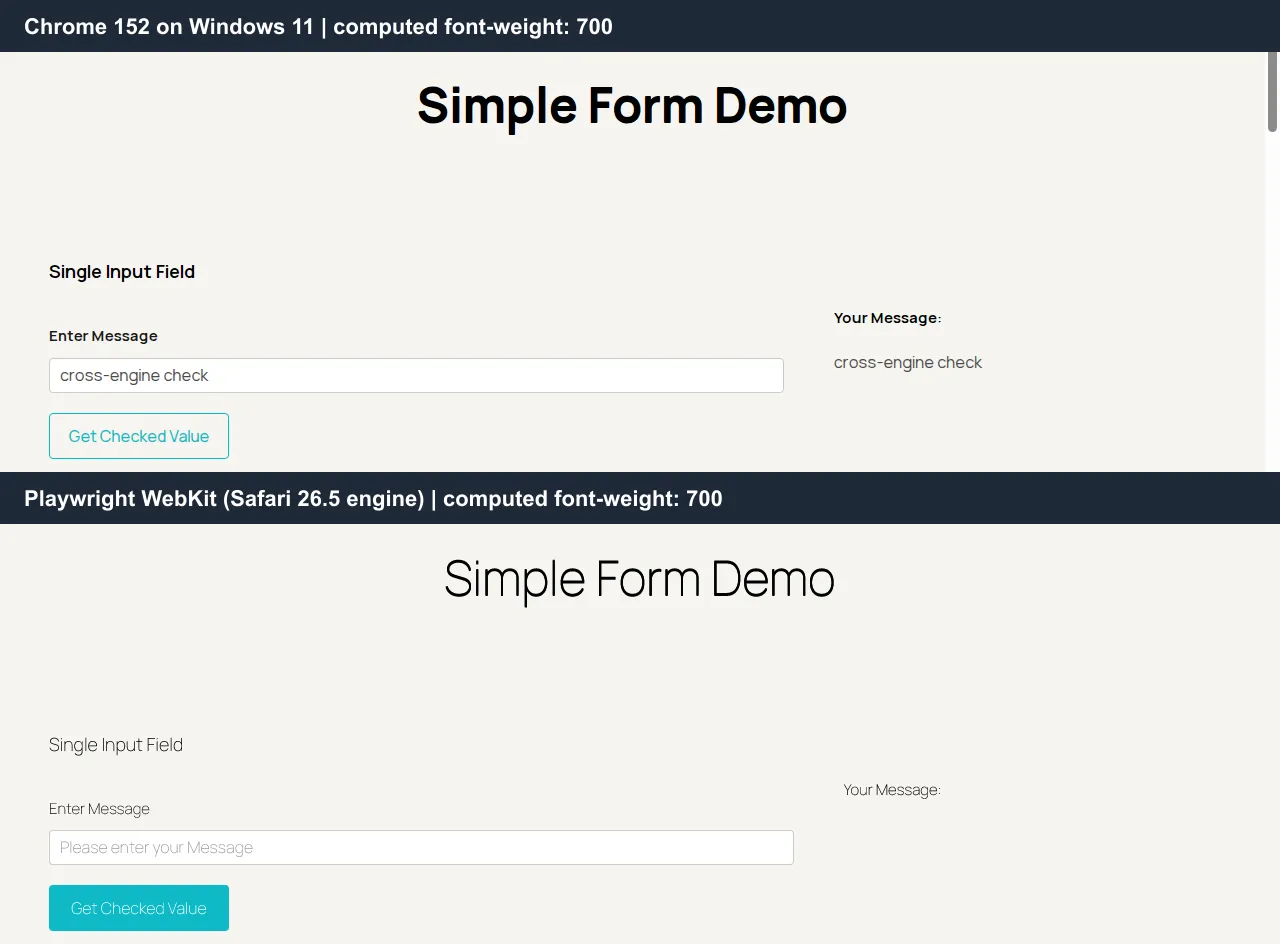
Visual testing covers this class of bug: SmartUI, TestMu AI's visual regression tool, captures screenshots across browsers and resolutions, compares each new capture with an approved baseline, and flags meaningful differences for an approve-or-reject review, where a reviewer can reject a WebKit heading drawn this light before it ships.
| Bug type | Example | Tool that catches it | Where it is missed |
|---|---|---|---|
| Broken user flow | A checkout button stops responding after a script change | Playwright, Selenium, or Cypress in CI | Auditors and scanners, which never click through a flow |
| Engine-specific rendering | Headings drawn lighter in WebKit, as in the run above | Screenshots on the real engine, reviewed in a visual tool | DOM assertions, plus tools that skip WebKit, such as Lighthouse and Ghost Inspector |
| Slow page load | Largest Contentful Paint regresses after a new hero image | Lighthouse CI and WebPageTest | Functional tests, which pass on slow pages |
| Failure under traffic | Error rate climbs at peak checkout load | k6 | Any single-user test |
| Accessibility violation | A form input with no programmatic label | axe DevTools and Lighthouse | Visual review, which cannot see a missing label |
| Security exposure | Changing an ID in a URL opens another account's data | ZAP for known classes, deliberate manual tests for logic flaws | Functional suites, which test intended paths only |
| Production outage | Checkout fails overnight after a CDN change | Checkly | Pre-release suites, which finished before the change |
| Usability confusion | Visitors cannot find a collapsed mobile menu | Test IO | Every automated tool on this list |

Note: Run the same Playwright, Selenium, or Cypress test on Chrome, Firefox, Edge, and WebKit in one parallel job, with video and command logs saved for every session. Try TestMu AI free.
How to Choose a Website Testing Tool
Start from the language your team already writes and the engines your visitors use. Satisfaction is a useful tiebreaker between frameworks: in the same State of JavaScript 2025 results, 94% of Playwright users who expressed a sentiment were positive, against 57% for Cypress and 24% for Selenium.
- Your team writes TypeScript or JavaScript - start with Playwright for cross-engine coverage, or Cypress if most tests target individual components.
- Your suite is already in Java, Python, or C# - Selenium keeps the existing code, and a hosted grid removes the work of maintaining browsers and drivers.
- Nobody on the team writes code - Ghost Inspector or Autify record tests, and Autify Nexus's Playwright export on paid plans leaves a path to code later.
- Safari and iPhone traffic matters - run on WebKit and real iOS devices, since some tools on this list skip WebKit entirely.
- The budget is zero - Playwright, Lighthouse CI, axe-core, and ZAP together cost nothing in licenses and cover functional, performance, accessibility, and security checks.
- The site is live and busy - add k6 ahead of a known traffic peak and Checkly for monitoring after each release.
How to Test a Website on Mobile Devices
Mobile website testing covers behavior a resized desktop browser does not reproduce, including WebKit rendering, touch input, on-screen keyboards, and weaker network connections. Touch targets are a frequent failure: Apple's Human Interface Guidelines say a button needs a hit region of at least 44x44 pt, and Android's accessibility guidance recommends touch targets of at least 48x48dp.
- Responsive layout - check the breakpoints at the viewport widths your analytics report, in both portrait and landscape.
- Touch targets - measure tappable elements against the Apple and Android guidance above and against WCAG 2.2's Target Size (Minimum) criterion, including the spacing between adjacent links.
- Safari rendering - test WebKit explicitly, since the heading-weight run above passed every DOM check while rendering differently, and Chrome DevTools device emulation still uses Chromium.
- Form inputs - confirm that email, phone, and number fields open the matching on-screen keyboard and that autofill fills the right fields.
- Network conditions - throttle to slower connections to see how images, fonts, and scripts behave when bandwidth is limited.
Real hardware closes the remaining gap between emulation and a customer's phone. The real device browser testing documentation covers configuring a first mobile browser run on TestMu AI.
Best Practices for Website Testing
- Gate merges on a fast smoke suite - run the critical flows on every pull request and the full regression suite nightly or before a release, so developer feedback stays quick.
- Build the browser matrix from analytics - cover the browser, OS, and device combinations that carry most of your traffic, include at least one non-Chromium engine, and revisit the list each quarter.
- Judge performance on medians - Lighthouse's own documentation warns that performance scores change between runs even without a code change, so compare the median of several runs instead of trusting one.
- Load test at realistic peaks - set k6 thresholds on 95th-percentile latency at the traffic you expect, because an average hides the slowest requests.
- Test accessibility against WCAG 2.2 - W3C published it as a Recommendation in October 2023, so scanners and manual audits should target 2.2 rather than 2.1.
- Isolate test data - give each parallel run its own accounts and records so tests do not overwrite each other's state.
Conclusion
Pick the one user flow that earns the most revenue, write it in Playwright or Selenium, and run it on Chrome and on Safari or WebKit before adding any other tool. The guide to running Playwright tests on TestMu AI and the Selenium getting started guide show how to point that test at TestMu AI's grid by changing the endpoint and capabilities, with the test logic left as it is.

Author

Himanshu Sheth
Blogs: 141


Himanshu Sheth is the Director of Marketing (Technical Content) at TestMu AI, with over 8 years of hands-on experience in Selenium, Cypress, and other test automation frameworks. He has authored more than 130 technical blogs for TestMu AI, covering software testing, automation strategy, and CI/CD. At TestMu AI, he leads the technical content efforts across blogs, YouTube, and social media, while closely collaborating with contributors to enhance content quality and product feedback loops. He has done his graduation with a B.E. in Computer Engineering from Mumbai University. Before TestMu AI, Himanshu led engineering teams in embedded software domains at companies like Samsung Research, Motorola, and NXP Semiconductors. He is a core member of DZone and has been a speaker at several unconferences focused on technical writing and software quality.
Reviewer

Abhishek Mishra
Reviewer
Abhishek Mishra is a Technical Product Manager at TestMu AI, where he owns Test Manager, the test management product. He has over 8 years of experience in product management and market analysis. His expertise spans across AI-native software testing, product strategy, and analytics. Previously, Abhishek served as the Product Lead at IndiaClan and co-founded Gartley618 Technologies, where he led innovative projects in quantitative trading and blockchain. He holds a B.Tech degree.


Website Testing Tools FAQs
Did you find this page helpful?
More Related Blogs
TestMu AI forEnterprise
Get access to solutions built on Enterprise
grade security, privacy, & compliance
- Advanced access controls
- Advanced data retention rules
- Advanced Local Testing
- Premium Support options
- Early access to beta features
- Private Slack Channel
- Unlimited Manual Accessibility DevTools Tests