

Power Your Software Testing with AI Agents and Cloud
The Native AI-Agentic Cloud Platform to Supercharge Quality Engineering. Test Intelligently and Ship Faster.


- TestMu AI (Formerly LambdaTest)
- /
- Learning Hub
- /
- Manual Testing in 2026: What Still Needs a Human
Manual Testing in 2026: What Still Needs a Human
Manual testing in 2026: which checks still need human judgment, which to automate, plus the process step by step, types, techniques, and a worked example.
Last Updated on:
On This Page
- What Is Manual Testing?
- Why Is Manual Testing Important?
- What Still Needs a Human in 2026, and What Doesn't?
- What Manual Testing Concepts Should You Know?
- What Are the Advantages and Shortcomings of Manual Testing?
- How Does Manual Testing Compare to Automation Testing?
- What Are the Core Manual Testing Techniques?
- What Are the Types of Manual Testing?
- What Is the Manual Testing Process?
- What Does a Manual Testing Example Look Like?
- How to Perform Manual Testing on the Cloud?
- What Are the Common Myths About Manual Testing?
- What Are the Challenges of Manual Testing?
- What Are the Best Practices for Manual Testing?
- How Is AI Changing Manual Testing?
- Is Manual Testing Still Worth Learning in 2026?
Manual testing is the practice of testing a software application manually without using any testing framework or tool, and comparing the actual results with the expected results. No script executes the steps. A person does, and that person decides whether the result is acceptable.
It remains the most widely used testing method, and usually the first one a team reaches for, because there is no framework to install and no code to write. It also holds ground that automation cannot take: exploratory work, usability judgment, retesting a fix before release, and the one-off edge cases nobody will ever build a test automation framework around.
TL;DR
- Manual testing means a person executes the test cases and judges the outcome, rather than a script. That is the whole distinction, and everything else follows from it.
- The process runs in six stages, from planning through test case design, environment setup, execution, and reporting to closure. Skipping the design stage is what makes results unrepeatable between testers.
- Black box, white box, and grey box describe how much of the code the tester can see. Unit, integration, system, UI, and acceptance describe what is being checked. The two axes are independent.
- Manual testing wins on exploratory work, usability, accessibility, and one-off edge cases. Automation wins on regression at scale. Teams that pick one and drop the other pay for it either in escaped bugs or in wasted hours.
- Coding is not required to start. Testers who can read code, write SQL, and use browser DevTools file better bugs and reproduce them faster.
- The recurring challenges are repetition, test data management, environment drift, and device fragmentation. Only the last one has a clean solution.
- That solution is the cloud. TestMu AI offers live testing across 3,000+ browser and OS combinations, with in-session DevTools, network throttling, and one-click bug logging.
What Is Manual Testing?
Manual testing involves a QA engineer testing a software application manually to find bugs. They follow a written test plan with specific test scenarios and analyze the website or app's performance from a user's point of view. QAs check if the software behaves as expected, and any differences are noted as bugs.
It's particularly important in exploratory testing or cases executed a few times, helping QAs find bugs early in the Software Development Life Cycle (SDLC).
This approach is suitable for testing smaller software projects. Manual testing is still necessary in larger projects with thousands or millions of test cases, to see if it's feasible to automate certain test cases.
Manual testing is important because it helps developers understand how their application behaves, its usability, and overall user experience. It's also helpful in finding issues that might be missed in automated tests.
Why Is Manual Testing Important?
Every day, loads of new software applications hit the market. To make sure these software applications work flawlessly, it's crucial to use both manual testing along with automated testing. Here are four reasons why manual testing is super important:
- Humans play a significant role in checking how easy and user-friendly an app is. Automation tools are improving, but they can't beat human intuition. Humans are creative when performing testing and can test software in ways that automated testing might miss. So, if a software application is built for people, it makes sense for a human to test it before releasing it to everyone.
- Test scripts are efficient but can run into unexpected issues, causing nightmares for developers. False positives are part of automation, leading to inaccurate test results. Human input adds an extra layer of digital confidence and ensures the app is reliable.
- Automated testing is suitable for certain tasks, but they can't go beyond their set scenarios. That's where manual exploratory testing comes in. Skilled human testers use their creativity and experience to perform quality testing in a systematic manner. This method often uncovers bugs at least expected places.
- Agile development works alongside testing, and test automation is crucial for efficiency. But manual testing is fast and helps with cases that aren't automated. In busy development cycles, there might not be time to automate everything, so manual testing is a smart move. Also, there's no need to spend time automating tests done only once, like edge cases.
- There are situations where test automation isn't the best fit or isn't feasible. This might be because of certain limitations in the technologies itself, dealing with highly complex processes that are challenging to automate effectively, or when considering the balance between the efforts invested and the expected return on investment (ROI). In such cases, relying on manual processes remains a feasible approach to ensure the accuracy and effectiveness of the testing process.
Manual testing is a hands-on, time-consuming process with the potential for human errors, yet it offers the freedom to explore and doesn't require technical programming skills or predefined frameworks. However, its reliance on human judgment can lead to slightly less accurate results compared to automated methods.

What Still Needs a Human in 2026, and What Doesn't?
The useful question is not whether manual testing is dying. It is which specific checks still repay a person's time, and which have no business being run by hand at all. The split is sharper than most teams treat it.
Work That Still Needs a Human
- Exploratory testing - Deciding what to try next based on what just happened. A script only ever checks what somebody already thought to assert, which means it cannot find the bug nobody predicted.
- Usability judgment - Whether a flow is confusing, whether an error message actually tells the user what to do. There is no assertion for "this label is ambiguous".
- Accessibility review - Automated scanners catch the machine-checkable WCAG criteria. Screen reader navigation order, focus behavior, and whether alt text is meaningful rather than merely present are all judgment calls.
- Content correctness - A heading that renders perfectly but says the wrong thing passes every functional assertion ever written.
- The first pass on a new feature - Before the UI stabilizes, an automated test costs more in maintenance than the bugs it catches. Automate it once the selectors stop moving.
- Reproducing a customer bug - The report is almost always incomplete. Finding the real trigger is investigation, not execution.
- Verifying a single fix before release - Checking one patched path by hand is faster than waiting on a pipeline.
- One-off edge cases - A scenario that will run once does not earn a script.
Work That Does Not
- Regression suites - Same steps, same expected result, every build. Running these by hand is where manual effort turns into pure waste, and where attention drifts far enough to miss the failure.
- Cross-browser and cross-device coverage - The same test against dozens of configurations is a parallelization problem, not a testing problem.
- Smoke tests on every commit - These have to run unattended in minutes, before any human looks at the build.
- Data-driven permutations - One form, fifty input combinations. A person will lose focus somewhere around the twelfth.
- Repetitive setup - Seeding accounts, creating fixture state, and resetting environments between runs.
- Performance and load testing - Humans cannot generate concurrency, so this was never a manual activity to begin with.
- API and contract checks - There is no interface to look at, so there is no human judgment to apply.
A rule of thumb that survives contact with real projects: if you can write down the expected result before you run the test, it is an automation candidate. If the value lies in noticing something you did not anticipate, it needs a person. Teams get into trouble by automating the second category, where tests are expensive to maintain and catch nothing, and by hand-running the first, where they burn hours confirming what a machine could have confirmed on every commit.
What Manual Testing Concepts Should You Know?
The manual testing basics come down to a handful of terms, and most confusion in a QA handover comes from them being used loosely. Getting them straight is what makes a test case another person can actually run.
- Test scenario - A high-level description of what to verify, such as "a registered user can complete checkout". One scenario usually breaks down into several test cases.
- Test case - The executable unit, carrying preconditions, the exact steps, the test data to use, and the expected result. If two testers can run it and disagree about whether it passed, it is not finished.
- Test data - The inputs a case needs, including the invalid and boundary values. Weak test data is the most common reason a suite passes while production breaks.
- Test environment - The hardware, software, network, and data configuration the tests run against. The closer it sits to production, the more a passing result is worth.
- Defect - A difference between actual and expected behavior. A defect report is only useful if someone else can reproduce it from what you wrote.
- Defect life cycle - The states a bug moves through: new, assigned, open, fixed, retested, and either closed or reopened. Reopened counts are a better quality signal than raw defect counts.
- Severity and priority - Severity is how badly the defect breaks the product; priority is how soon it needs fixing. They are set by different people and often disagree, and that disagreement is the useful part.
- Verification and validation - Verification asks whether the product was built according to the specification. Validation asks whether the specification was the right thing to build. Manual testing is where validation problems usually surface first.
- Entry and exit criteria - The conditions that must hold before testing starts and before it can be declared complete. Without an exit criterion, testing ends when the deadline arrives rather than when coverage is adequate.
What Are the Advantages and Shortcomings of Manual Testing?
Manual testing is helpful, particularly for its flexibility, human insight, and cost-effectiveness in specific situations. However, its limitations in speed, scalability, and consistency highlight the need for a balanced approach, often combined with automated testing for a comprehensive quality assurance strategy.
Advantages of Manual Testing
- Human Intelligence - Testers can leverage their creativity to think outside the box, uncovering bugs that might escape during automated testing. They can explore scenarios beyond pre-defined test cases and detect usability issues.
- Flexibility - Manual testing adapts to dynamic interfaces and changing requirements. It's perfect for testing early prototypes or features under development.
- Usability and Accessibility - Testers can effectively evaluate user experience, interface intuitiveness, and accessibility compliance. They can provide valuable insights on how real users might interact with the software.
- Cost-effectiveness - For small software projects with limited budgets, manual testing can be cheaper than setting up and maintaining automation frameworks.
- No programming barrier - Testers use the software the way a user would, so domain knowledge matters more than knowing a language.
- No framework dependency - There is no tooling to install, configure, or keep current before the first test can run.
Shortcomings of Manual Testing
- Subjectivity - Results can be subjective and prone to human error. Different testers might reach different conclusions about the same test case.
- Time-Consuming - Manually testing large and complex software applications can be tedious, especially for repetitive tasks. This can delay deadlines and increase project costs.
- Inconsistency - Manual testing might not be consistent across multiple test runs, making it challenging to track regressions and ensure reliable results.
- Limited Scope - Testers can only explore a limited number of scenarios compared to automated scripts that can run hundreds or thousands of tests simultaneously.
- Reliance on Tester expertise - The quality of testing heavily depends on the skill and experience of the manual QA tester which can introduce potential bottlenecks.
Choosing between manual and automation testing can depend on your project requirements, budget constraints, and the nature of the software being developed. A blended approach that uses each method where it is strongest is usually the practical answer.
How Does Manual Testing Compare to Automation Testing?
The table below sets out the difference between manual and automation testing across the dimensions that actually drive the choice.
| Feature | Manual Testing | Automation Testing |
|---|---|---|
| Execution | Test cases are executed manually by human testers. | Test cases are executed using automated tools or frameworks. |
| Speed and efficiency | Typically slower and less efficient. | Faster and more efficient, especially for repetitive tasks. |
| Human Involvement | Relies on human testers for test execution and analysis. | Involves minimal human intervention once test scripts are created. |
| Adaptability | Flexible and adaptable to changes. | Less adaptable to frequent changes in requirements. |
| Exploratory Testing | Ideal for exploratory testing. | Less effective for exploratory testing as it follows predefined test scripts. |
| Cost | More cost-effective for small-scale projects. | Initial setup and tool costs may be high but cost-effective in the long run for repetitive testing. |
| Test Coverage | Depends on the tester's expertise. | Can provide comprehensive coverage, especially for extensive scenarios. |
| Regression Testing | Prone to human error in repetitive scenarios. | Well-suited for regression testing, ensuring stability after changes. |
| Skill Requirement | Manual testing skills, and domain knowledge are required. | Requires programming and scripting skills and testing expertise. |
| Early Detection of Defects | Defects may be identified later in the lifecycle | Enables early defect detection, especially in continuous integration pipelines. |
Which method you use for a given check depends on how much of the internal code you can see, and that is what the techniques below describe.
What Are the Core Manual Testing Techniques?
Manual testing comes in various forms, each designed for specific purposes and types of software. Here, we'll look at some of the common types:
- Black Box Testing - It is a method where the internal workings of a software application are ignored, and the emphasis is placed on evaluating the system's external behavior. Testers interact with the software through inputs and examine the outputs to ensure they align with expected results.
This approach allows for a comprehensive testing in terms of functionality, performance, and user experience without requiring knowledge of the internal code structure. It is particularly valuable for validating that the software meets specified requirements and behaves as intended from the user's perspective.
- White Box Testing - In contrast to black-box testing, white-box testing is a method that examines the internal structure of a software application. Testers validate the code, logic, and architecture to check the security, functionality, and overall quality of the software.
Typically performed by developers or quality assurance professionals with a deep understanding of the internal workings, white box testing aims to identify issues such as coding errors, and security vulnerabilities. It provides a more detailed testing of the software's internal components, ensuring a thorough evaluation of its reliability and adherence to coding standards.
- Grey Box Testing - It is a testing technique that combines aspects of both black-box and white-box testing. It emphasizes the testing of some internal components while leaving others untouched. The tester has partial knowledge of the system's internal details. Grey box testing is often used in system integration testing, where assessing the interaction of various components is crucial for detailed testing.
What Are the Types of Manual Testing?
Manual testing comprises various stages, such as unit testing, integration testing, system testing, user interface (UI) testing, and acceptance testing. However, these stages may not follow a sequential order. Depending on your software project requirements, there can be overlap or a different sequence of these stages.
- Unit Testing - It is a testing approach where individual units or components of a software application are isolated and tested independently. The objective is to verify that each unit functions as intended, ensuring that the minor testable parts of the code meet specified requirements.
Typically conducted by developers during the development phase, unit testing helps identify errors early in the process, promoting code reliability and maintainability. It is an integral part of the Software Development Life Cycle, contributing to the development of robust and modular code.
- System Testing - It provides a comprehensive evaluation of the entire software system to ensure that all integrated components function as a complete entity. It follows unit and integration testing and checks the system's compliance with specified requirements.
This testing phase involves testing the software in a holistic manner, validating its performance, security, and overall functionality. System testing aims to identify issues that may arise from the interaction of integrated components, providing a thorough validation of the software's capabilities before it is released to end-users.
- Integration Testing - This testing phase focuses on checking the interaction between different components or modules of a software application. Integration testing ensures that the various components of the software work together seamlessly, ensuring that data is exchanged correctly and that the integrated system functions as expected. It helps detect interface defects, communication issues, and inconsistencies that may arise during the integration process, contributing to the overall reliability of the software.
- UI Testing - It checks the look and feel of the software's user interface, covering things like layout, design, responsiveness, and how easy it is to use. UI testing also ensures the user interface stays consistent whether you're using it on different devices or web browsers.
- Acceptance Testing - It is the final phase in the testing process before software is deployed. This testing is conducted to validate that the software meets the specified requirements and is acceptable for delivery to end-users.
Typically performed by end-users or stakeholders, acceptance testing aims to ensure that the software fulfills its intended purpose and aligns with user expectations. This phase includes confirming that all features work as intended, addressing any outstanding issues, and obtaining final approval for the software release. Acceptance testing provides a crucial validation step to ensure that the software is ready for deployment and meets the needs of its intended users.
No matter how testers decide to perform manual testing, they all need to stick to the Software Testing Life Cycle (STLC). The difference is only in how the testing is carried out.
What Is the Manual Testing Process?
The manual test process takes time, and that human attention is what makes it effective at catching the problems a script would walk past. It also asks less of you technically than automation does, since there is no framework to learn or maintain, though manual testing tools still help with test case management and bug reporting.
However, testers still need to be familiar with various manual testing methods. Like any software testing, the main goal of manual testing is to check the system against the specified requirements or user stories, find bugs, and help the development team create software applications without defects.
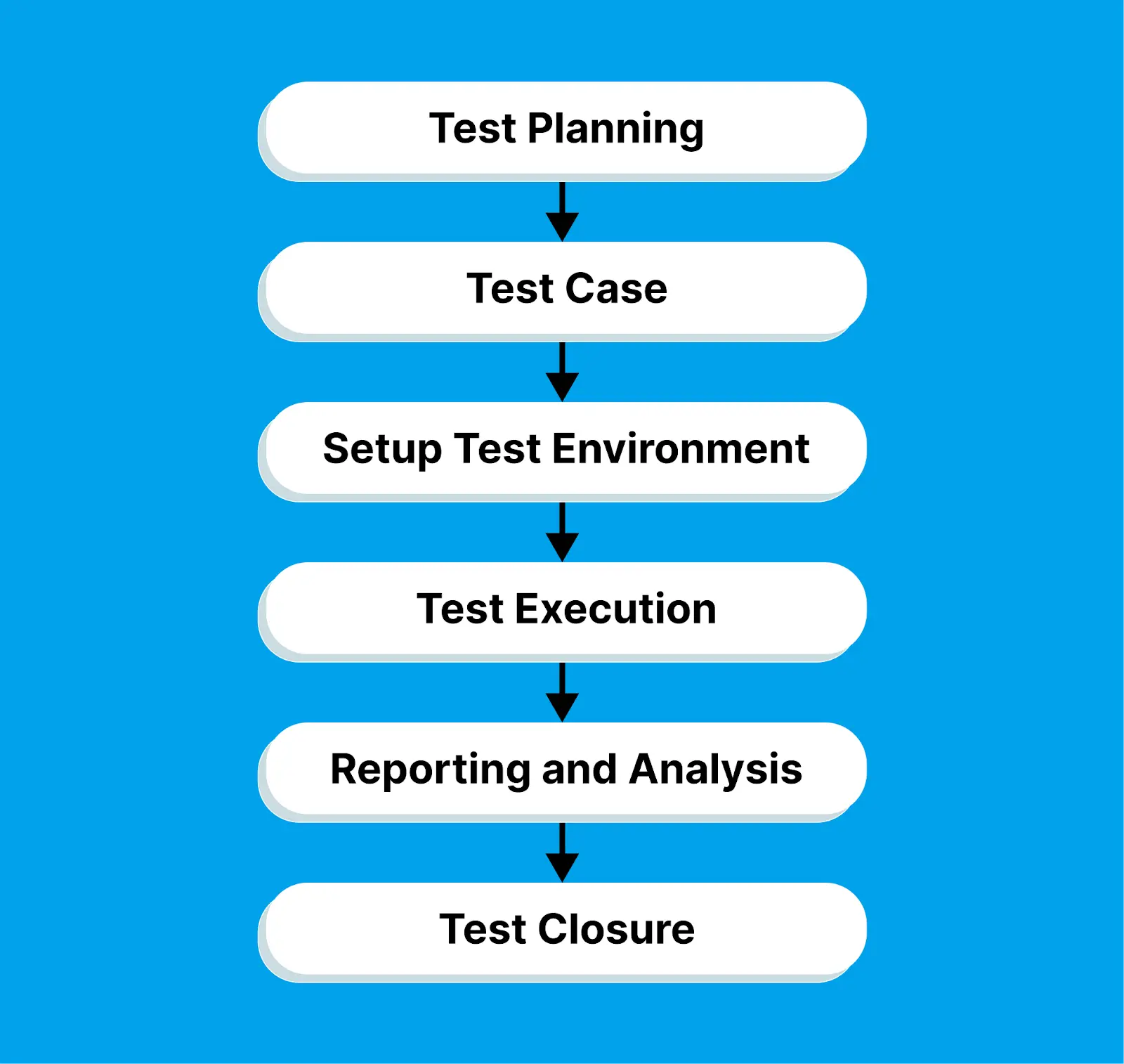
Here are the steps involved in the manual testing process:
- Test Planning - The starting point in manual testing is test planning. Testers get familiar with user requirements and design documents, figuring out how to identify test goals, define the testing strategy, and create a comprehensive test plan. This plan lays out the testing approach, along with necessary resources and timelines.
- Test Case - Next up is creating the test cases. Manual test case development involves detailing the steps to follow, the expected results, and any prerequisites or test data requirements.
- Set up the test environment - Following test case design, it's time to set up the test environment. This includes configuring hardware, software, and network settings necessary for the tests. It also involves installing applications, databases, web servers, or any other components needed for running the tests.
- Test execution - With all the planning and setup done, testers then execute the test cases. They interact with the software application's user interface, checking if its behavior aligns with the expected outcomes outlined in the user specification documents.
- Reporting and Analysis - Any defects or issues discovered during testing are documented and reported to the relevant teams for resolution. Reports include screenshots, testing conditions, and details of the faults. Developers analyze the assigned issues and determine the best approach for resolving them as quickly as possible.
- Test Closure - In the final stage, testers review the test execution results, assessing if the testing objectives have been achieved. They re-evaluate defects fixed by developers and close the issues if the faults are resolved. Test summary reports are generated, highlighting test coverage, the number of defects found, and other relevant metrics for stakeholders. In some cases, test closure may also involve documenting best practices and preparing for future testing cycles.
What Does a Manual Testing Example Look Like?
Consider a scenario involving manual testing for an eCommerce website. This real-life example demonstrates how manual testing is essential to ensure a seamless and user-friendly experience on an eCommerce website, covering critical processes like user registration and the checkout journey.
Test Scenario - User Registration and Checkout Process
Test Planning
- Ensure smooth user registration and checkout process.
- Manually validate each step of the registration and checkout process to identify any issues that might hinder a user from successfully registering and completing a purchase.
- Outline specific test cases, including scenarios for successful registration, failed registration, and various checkout scenarios.
Test Case Designing
- Test Case 1 - Successful Registration
Steps - Navigate to the registration page, fill in valid user details, and submit the form.
Expected Result - User receives a confirmation message and can log in. - Test Case 2 - Failed Registration
Steps - Attempt registration with invalid or incomplete information.
Expected Result - Appropriate error messages are displayed. - Test Case 3 - Checkout Process
Steps - Add items to the cart, proceed to checkout, and complete the purchase.
Expected Result - Successful order placement, confirmation email received.
Test environment Setup
- Set up the test environment for testing, including hardware, software, networking configuration, and more.
Test execution
- Execute each test case.
- Interact with the website's user interface to ensure the expected outcomes are met.
Reporting and Analysis
- Document any issues encountered during the registration and checkout process.
- Include screenshots, error messages, and detailed descriptions of the issues.
Defect Fix & Re-Verification
- Developers address reported issues.
- Testers re-verify the fixed issues to ensure they are resolved.
Test Closure
- Review overall test results and confirm that the user registration and checkout processes meet the defined objectives.
- Generate a test summary report with insights into the testing coverage and any outstanding issues.
When it comes to testing software applications manually, you get two options: test on the local machine or the cloud. Most organizations prefer to test on a cloud as it offers scalability and reliability and eliminates the hassle of setting up an in-house infrastructure. This helps testers validate their websites and mobile applications across different real browsers, devices, and operating systems.
AI-Native test orchestration and execution platforms like TestMu AI let you perform manual web and mobile app testing on an online grid of different browsers, devices, and operating systems combinations.

Note: Run your manual test cases across 3000+ desktop and mobile browsers. Try TestMu AI Now!
How to Perform Manual Testing on the Cloud?
Cloud testing platforms like TestMu AI let you manually test websites on real operating systems (Windows and macOS) and mobile apps on virtual and real device cloud (Android and iOS).
Manual Browser Testing
TestMu AI lets you perform manual web testing on desktop and mobile environments. Here is how to test a website manually on the desktop.
- Log in to your TestMu AI account, or create one for free if you do not have one yet.
- Open Real Time Testing and select Desktop under Web Browser Testing.
- Enter the site address in the URL field, then choose the operating system, the browser and its version, and a screen resolution.
- Click Start. A cloud virtual machine launches with exactly that configuration, and you test the site inside it the way you would in a local browser.
If the site is not publicly reachable, enable Tunnel from the top panel before starting the session. Chrome extensions can be added from the same panel.
Manual App Testing
The steps to test mobile apps manually follow the same shape.
- Open Real Time Testing and select Virtual Mobile under App Testing, then pick the device type (Android, iOS, or ChromeOS) and its version. Use the Switch to Real Devices link if you need to test on iPhone or Android hardware rather than an emulator or simulator.
- Upload the build. Choose Upload from Local System for an APK or IPA on your machine, or Provide a URL if the build is already hosted.
- Click Start beside the URL field. The session opens on the selected device and you drive the app by hand, the way a user would.
For a staging or internally hosted build that is not publicly reachable, configure Tunnel before starting.
For more information, check out the tutorial below on how to perform real-time testing on TestMu AI.

For more walkthroughs like this one, subscribe to the TestMu AI YouTube Channel.
The same platform runs automation at scale, which matters once a manual case has stabilized enough to be worth scripting. If the barrier to that has always been the framework rather than the testing, KaneAI lets you describe a test in plain English and exports it as Selenium, Playwright, Cypress, or Appium code, so a manual tester can hand over a running script without learning a language first. It is a practical way to move from manual to automation testing one case at a time.
Cloud execution removes the hardware problem, but it does not touch the assumptions people still carry about this kind of work.
What Are the Common Myths About Manual Testing?
Four of these come up often enough to be worth addressing directly.
- Myth 1 - Testing is easy
One common misconception in the testing world is that manual testing is easy. It's a natural tendency for people to label things as easy when they have some knowledge about them. However, the truth is, we often find things difficult when we lack knowledge about them.
- Myth 2 - Anyone can do testing
Building on the first myth, there's a belief that anyone can do testing. This is not the case. Testing requires passion. While it may sound appealing at first, real testing involves thinking outside the box and attempting to break systems. It takes something special to be a tester.
- Myth 3 - Manual testing is obsolete
A prevalent myth is that manual testing is obsolete and automation has taken its place. This is not true. Manual testing is the backbone of the testing phase, and automation comes after the product has achieved stability. Manual testing ensures a stable product is delivered to customers, and automation enhances that stability for end users.
- Myth 4 - Testers have weak coding skills
Another common misconception is that testers have weak coding skills. In reality, testing often involves coding. Testers create complex SQL queries for data validation, modify code for database migration testing, and write scripts in languages like Java or Python for automation testing. Testing requires a strong understanding of coding principles. If you are moving into the role, these manual testing interview questions are a reasonable place to check where you stand.
Testing software manually is a crucial part of the software development journey, allowing testers to replicate real-world user experiences and pinpoint flaws in software products. Despite its importance, manual testing presents testers with a set of challenges that they must navigate to uphold product quality.
What Are the Challenges of Manual Testing?
With software releases becoming a common thing, it's imperative that the testing process initiates early, right from the requirements specification and planning phase. However, manual testing encounters several challenges that need to be addressed before streamlining the testing cycle.
- Repetitive Testing Tasks - Manual testers often grapple with the repetitiveness of their tasks, particularly in regression testing where the same test cases are executed repeatedly. At times, this can result in oversight due to a lack of engagement.
- Test Data Management - Handling test data becomes a formidable challenge, especially with large and complex software applications. Testers must ensure that test data remains accurate, consistent, and relevant to various test scenarios. The manual creation and maintaining of test data sets can be both time-consuming and error-prone.
- Test Environment Setup - Creating test environments that mimic the production environment can pose challenges. Discrepancies between the test and production environments may yield false positives or negatives in testing results.
- Test Case Documentation - The creation and maintenance of comprehensive test cases are pivotal for effective manual testing. Testers need to keep up-to-date test cases, cover all relevant scenarios, and ensure they are easily understandable by the testing team.
- Time Constraints - Balancing project deadlines with thorough testing can be stressful. Testers frequently face time constraints that may result in insufficient test coverage thereby impacting the software quality.
- Communication and Collaboration - Successful testing relies on effective communication with developers, product managers, and other team members. Miscommunication or a lack of collaboration can lead to misunderstandings, incorrect expectations, and complications in defect resolution.
- Adaptation to Frequent Changes - In agile development environments, product requirements and features undergo rapid changes. Testers must be adaptable and prepared to modify test cases and plans at short notice to accommodate these changes.
- Test Data Privacy and Security - Protecting sensitive test data poses a significant concern, especially for applications handling personal or financial information. Testers must ensure data privacy and security while testing the product, a task that can be challenging in some instances.
- Browser and Device Fragmentation - Testing across various devices, operating systems, and browsers for cross-compatibility can be a substantial challenge. each combination may necessitate separate testing, escalating the workload for manual testers.
- Test Reporting and Documentation - Generating and maintaining test reports and documentation takes considerable amount of time. Clear and well-documented reports are crucial for tracking defects and ensuring all stakeholders have a clear understanding of the testing progress and results.
To ensure a good web and mobile experience, detailed software testing is crucial. However, it can become complex and costly if not properly planned. Therefore, software teams need to approach manual testing in a systematic and planned manner.
What Are the Best Practices for Manual Testing?
Testers should follow some of the best practices while performing manual testing.
- Thoroughly understand the project's specifications and create documents before starting the testing process. It ensures that your testing is aligned with the intended functionality.
- Clearly outline the scope of testing, along with specific objectives and a defined approach, helps set expectations and provides a roadmap for the testing process.
- Integrate risk analysis into the testing process. Understanding the business impact of potential defects and focusing on critical functionalities ensures that testing efforts are prioritized effectively.
- Follow an incremental testing approach and break down the testing process into different components. This can enhance efficiency, allow for early defect detection, and make it easier to track progress.
- Create test cases that are easy to understand, scalable for future changes, and concise for efficient execution and maintenance. Also, write test cases with reusability in mind contributes to efficiency and consistency across different testing phases and iterations.
- Exploratory and ad hoc testing can identify unexpected defects and help ensure thorough test coverage.
- Effective communication with the development team, stakeholders, and other project members fosters collaboration, helps address issues quickly, and ensures everyone is on the same page.
- Perform UI testing to identify issues related to layout, design, responsiveness, and usability, which can significantly impact user satisfaction.
- Stay informed about the product and testing methodologies contributes to professional development and improved testing practices.
How Is AI Changing Manual Testing?
AI is changing manual testing by drafting test cases from requirements, suggesting exploratory charters, summarizing bug reports, and turning a tester's recorded steps into automated scripts.
The work that stays manual is shifting toward judgment: deciding what matters to users, spotting confusing flows, and checking whether AI-generated tests actually verify the right behavior. Manual testers who learn to review and steer AI output become more valuable, not less.
A practical start is to let AI handle test documentation and repetitive checks while you spend the saved time on exploratory sessions. Compare options in our roundup of ai testing tools.
Is Manual Testing Still Worth Learning in 2026?
Yes. Manual testing is still worth learning in 2026 because exploratory, usability, and judgment-based testing need people, even as AI automates repetitive checks.
In this manual testing tutorial, we discussed the characteristics of manual testing, its pros and cons, core techniques, types of manual testing, and how to perform manual testing by leveraging the potential of cloud testing platforms.
The work rewards patience and curiosity more than tooling. Software is used by people, so the tester who thinks like an end user finds the problems that matter, and the one who documents them clearly gets them fixed.
The part worth outsourcing is the infrastructure. Rather than maintaining a bank of devices and browser versions, run your manual sessions against a cloud grid, log bugs from inside the session, and keep your attention on the testing itself. The real-time testing documentation covers the setup, and the free plan is enough to work through the example in this guide.
Author

Salman Khan
Blogs: 138


Salman is a Test Automation Evangelist and Community Contributor at TestMu AI, with over 6 years of hands-on experience in software testing and automation. He has completed his Master of Technology in Computer Science and Engineering, demonstrating strong technical expertise in software development, testing, AI agents and LLMs. He is certified in KaneAI, Automation Testing, Selenium, Cypress, Playwright, and Appium, with deep experience in CI/CD pipelines, cross-browser testing, AI in testing, and mobile automation. Salman works closely with engineering teams to convert complex testing concepts into actionable, developer-first content. Salman has authored 120+ technical tutorials, guides, and documentation on test automation, web development, and related domains, making him a strong voice in the QA and testing community.
Reviewer

Harish Rajora
Reviewer
Harish Rajora is a software developer at TestMu AI with over 6 years of hands-on experience in Python and cross-platform application development across Windows, macOS, and Linux. He has authored 800+ technical articles and worked on large-scale projects, including GenAI applications and core engineering features used by millions. Harish has led DevOps initiatives building CI/CD pipelines with Jenkins, AWS, GitLab, and GitHub, and holds an M.Tech in Software Engineering from IIIT Allahabad.


Manual Testing FAQs
Did you find this page helpful?
More Related Learning Hubs
TestMu AI forEnterprise
Get access to solutions built on Enterprise
grade security, privacy, & compliance
- Advanced access controls
- Advanced data retention rules
- Advanced Local Testing
- Premium Support options
- Early access to beta features
- Private Slack Channel
- Unlimited Manual Accessibility DevTools Tests