
Run Web Automation Tests at Scale with Agentic AI
Generate tests with AI agents or automate test suites with Selenium, Playwright and other frameworks. Run tests in parallel on TestMu AI scalable cloud grid.

15 Best Code Coverage Tools for Java, Python, JS and C++
Compare 15 code coverage tools for Java, JavaScript, Python, C/C++ and .NET, checked against official docs, plus a cross-browser E2E coverage run.
Last Updated on:
Code coverage tools record which lines, branches and functions run while your tests execute, then report the code that never ran. The right one depends mostly on your language: JaCoCo for Java, Coverage.py for Python, Istanbul or c8 for JavaScript, gcov or llvm-cov for C and C++, and Coverlet for .NET.
The browser matters too. I ran one checkout test against an Istanbul-instrumented page in Chrome, Firefox and WebKit on the TestMu AI cloud grid: each browser alone executed 5 of the page's 12 branches, though not the same 5, and merging the three reports raised branch coverage to 7 of 12.
Each tool below was checked against its official documentation and latest release, including two details that are easy to get wrong: JaCoCo writes HTML, XML and CSV reports but no LCOV, and BullseyeCoverage measures condition/decision coverage, not MC/DC.
Overview
Pick a code coverage tool by language first: every major language has a free tool that measures line and branch coverage, such as JaCoCo for Java and Coverage.py for Python. Commercial C and C++ tools add MC/DC for safety standards, and hosted platforms only aggregate the reports these tools produce.
Which Code Coverage Tools Fit Each Language?
- Best for Java builds: JaCoCo - An open-source Java agent that instruments bytecode as classes load and reports instruction, branch, line, method and complexity counters in HTML, XML and CSV.
- Best for per-test Java coverage: OpenClover - Open-source (Apache 2.0) source instrumentation for Java and Groovy that records which test covered each line and can run only the tests affected by a change.
- Best for AI test generation on Java: Parasoft Jtest - A commercial Java tool that reports line coverage and uses AI to generate JUnit tests aimed at uncovered lines, alongside static analysis.
- Best for browser JavaScript: Istanbul (nyc) - Open-source source instrumentation that records statements, branches, functions and lines in any JavaScript engine, including Chrome, Firefox and WebKit.
- Best for Python: Coverage.py - Open-source line and branch coverage for Python 3.10 through 3.15, with text, HTML, XML, LCOV and JSON reports and a --fail-under gate.
- Best for GCC builds: gcov with lcov or gcovr - Ships with GCC; the --coverage flag instruments the build, and lcov or gcovr turn the results into HTML, Cobertura, SonarQube or LCOV reports.
- Best for Clang builds: llvm-cov - LLVM's free source-based coverage, with branch coverage and, from LLVM 18, MC/DC through the -fcoverage-mcdc flag.
- Best for embedded C and C++ with MC/DC: RKTracer - A commercial tool from RKValidate that lists 10 languages and measures MC/DC for C and C++; TestMu AI documents an RKTracer integration for coverage from App Automation runs.
- Best for .NET CI: Coverlet - Open-source (MIT) line, branch and method coverage for .NET, run through dotnet test, with a Threshold property that fails the build.
- Best for Rider and Visual Studio users: dotCover - A commercial JetBrains tool that shows statement coverage inside Rider and Visual Studio and reruns the tests affected by a change.
- Best for pull request feedback: Codecov - A hosted service that ingests reports from other tools and comments coverage changes on GitHub, GitLab and Bitbucket pull requests; it does not measure coverage itself.
How Do You Choose a Code Coverage Tool?
- Runtime support: A tool counts only code it can instrument, so JaCoCo covers JVM bytecode, Istanbul covers JavaScript in any engine, and V8-based tools such as c8 work only in Node.js and Chromium.
- Required metrics: Line and branch coverage serve most projects, while safety standards that ask for MC/DC narrow the choice to gcov (GCC 14+), llvm-cov (LLVM 18+), Testwell CTC++ and RKTracer.
- Report formats: Codecov and Coveralls both accept Cobertura XML, JaCoCo XML and LCOV, so a tool that writes one of those plugs into either service.
- Measuring versus reporting: Codecov and Coveralls do not measure coverage; they need a report from a measuring tool that runs in your CI job.
How Do You Enforce a Coverage Threshold in CI?
- nyc and c8: These JavaScript coverage tools exit with code 1 from check-coverage below a threshold, and both apply a lines threshold of 90 by default even when you pass only --branches.
- Coverage.py: coverage report --fail-under=80 exits with code 2 when the total is lower, and --source keeps test files out of that total.
- Cross-browser end-to-end tests: Merge the Istanbul files from every browser before checking the threshold; on TestMu AI's cloud grid, merging Chrome, Firefox and WebKit raised branch coverage from 5 to 7 of 12 branches.
What Are Code Coverage Tools?
A code coverage tool adds counters to your code, or reads counters the runtime already keeps, and reports which lines, branches, functions and statements a test run executed. How it collects that data decides where it can run:
- Source instrumentation - The tool rewrites the source before it runs. Istanbul adds counters to JavaScript through Babel, OpenClover instruments Java source before compiling it, and BullseyeCoverage, Testwell CTC++ and RKTracer instrument the preprocessed C or C++ source by wrapping your compiler.
- Bytecode and IL instrumentation - JaCoCo instruments Java classes through a Java agent as they load, and Coverlet instruments .NET assemblies before the tests run and restores the originals afterwards.
- Compiler flags - GCC's --coverage flag and Clang's -fprofile-instr-generate -fcoverage-mapping flags compile counters into the binary, and gcov or llvm-cov read the counts after the run.
- Runtime hooks - c8 reads the coverage data the V8 engine already collects, and Coverage.py hooks Python's tracing through sys.settrace or sys.monitoring.
Codecov and Coveralls sit after these tools. They ingest the reports and track coverage across commits and pull requests, but they cannot produce coverage on their own. For the metrics themselves, from statement and branch coverage to MC/DC, see the code coverage tutorial; for how line counts differ from scenario and requirement tracking, see code coverage vs test coverage.

Note: Run the same end-to-end flow in Chrome, Firefox and WebKit to see browser-specific coverage, on TestMu AI's cloud grid of 3,000+ browser and OS combinations. Sign up for TestMu AI
Code Coverage Tools Compared
The table takes each tool's languages, metrics, report formats and license from its official documentation, and the last column gives the latest release available when this guide was updated.
| Tool | Languages | Metrics | Reports | License | Latest release |
|---|---|---|---|---|---|
| JaCoCo | Java and other JVM bytecode | Instructions, branches, lines, methods, complexity | HTML, XML, CSV | Open source (EPL 2.0) | 0.8.15 (June 2026) |
| OpenClover | Java, Groovy | Statements, branches, methods, per-test coverage | HTML, XML, JSON, PDF, text | Open source (Apache 2.0) | 5.1.1 (October 2026) |
| Parasoft Jtest | Java | Lines | HTML, XML, PDF, CSV, SARIF | Commercial | 2026.1 (May 2026) |
| Istanbul (nyc) | JavaScript, TypeScript through source maps | Statements, branches, functions, lines | HTML, LCOV, Cobertura, JSON, Clover, text | Open source (ISC, BSD-3-Clause) | nyc 18.0.0 (February 2026) |
| c8 | JavaScript on Node.js (V8) | Statements, branches, functions, lines | Any Istanbul reporter | Open source (ISC) | 12.0.0 (July 2026) |
| Coverage.py | Python 3.10 to 3.15 | Lines (statements), branches | Text, HTML, XML, LCOV, JSON | Open source (Apache 2.0) | 7.16.2 (September 2026) |
| gcov with lcov or gcovr | C, C++ and other GCC languages | Lines, functions, branches, conditions (MC/DC from GCC 14) | gcov text and JSON; HTML from lcov; Cobertura, SonarQube and LCOV from gcovr | Open source (GPL; gcovr BSD-3-Clause) | GCC 16.2, lcov 2.6, gcovr 8.7 |
| llvm-cov | C, C++, Objective-C and other Clang languages | Functions, lines, regions, branches, MC/DC (LLVM 18+) | Text, HTML, JSON, LCOV | Open source (Apache 2.0 with LLVM exceptions) | LLVM 23.1.3 (October 2026) |
| BullseyeCoverage | C, C++ | Functions, condition/decision | HTML, XML, Cobertura XML, CSV | Commercial | 9.26.4 (October 2026) |
| Testwell CTC++ | C, C++ (Java through an add-on) | Function, statement, decision, condition, MC/DC, multicondition | HTML; XML, CSV and Markdown templates | Commercial | 10.4 (August 2026) |
| RKTracer | 10 languages, including C, C++, Java, Python and Go | Function to MC/DC (MC/DC for C and C++) | HTML, XML | Commercial | No public version history |
| Coverlet | .NET Framework (Windows), .NET Core | Lines, branches, methods | JSON, LCOV, OpenCover, Cobertura, TeamCity | Open source (MIT) | 10.1.0 (September 2026) |
| dotCover | .NET Framework, .NET Core | Statements | XML, JSON (HTML from the IDE) | Commercial | 2026.2.3.1 (October 2026) |
| Codecov | Any language that has a supported report format | Hits, partials and misses from uploaded reports | Ingests Cobertura, JaCoCo, LCOV, gcov, Go and more | Free Developer plan, paid plans | Hosted service (codecov-action 7.1.1) |
| Coveralls | Any language that has a supported report format | Coverage from uploaded reports, per commit and pull request | Ingests LCOV, Cobertura, JaCoCo, gcov, SimpleCov, Go and more | Free for open source, paid plans | Hosted service (reporter 0.6.22) |
15 Best Code Coverage Tools by Language
A tool made this list if it measures coverage itself or is a hosted service built to report it, and if it shipped a release in 2026 (RKTracer publishes no version history, so it is included on its documented TestMu AI integration). The tools are grouped by language rather than ranked, and each group starts with its free, open-source default.
1. JaCoCo (Java)
JaCoCo is a free code coverage library for Java, created by the EclEmma team.
- Instrumentation - A Java agent instruments classes on the fly as they load, so source files stay untouched, and an offline mode pre-instruments classes where an agent cannot attach.
- License - Eclipse Public License 2.0.
- Metrics - Instructions (C0), branches (C1), lines, methods, classes, and cyclomatic complexity for each non-abstract method.
- Reports - HTML, XML and CSV. There is no native LCOV output, so a dashboard that needs LCOV has to convert the XML first.
- Build gate - The Maven check goal compares results with your rules, and haltOnFailure stops the build when a rule fails.
- Latest release - 0.8.15, which added official support for Java 26.
For a Maven walkthrough, see JaCoCo coverage reports with Maven; more JVM options are compared in code coverage Java tools.
2. OpenClover (Java, Groovy)
OpenClover Core and its Ant, Eclipse and IntelliJ IDEA integrations are open source under the Apache 2.0 license.
- Origin - Based on the open-sourced version of Atlassian Clover.
- Per-test coverage - Instruments Java and Groovy source before compilation, which lets it record which individual test executed each line.
- Test optimization - Runs only the tests relevant to changed code, which shortens CI runs on large suites.
- Reports - HTML (current and historical), XML, JSON, PDF and text.
- Builds - First-party Ant and Maven integration; Gradle support comes from a third-party plugin.
- Latest release - 5.1.1 on Maven Central, after the 5.0 release that the project calls its first major release since 2014.
3. Parasoft Jtest (Java)
Parasoft Jtest is a commercial Java testing tool that combines coverage with static analysis and unit test generation. Its documentation describes line coverage, rolled up to method, class, file and project level, collected from unit tests or by attaching a coverage agent to the running application.
- AI test generation - Generates JUnit tests aimed at uncovered lines from inside the IDE, and the 2026.1 release lets AI coding agents create unit tests that raise coverage while keeping the build passing.
- Application coverage - The coverage agent measures what manual or automated functional tests execute on Java 1.8 to 25.
- Reports - XML, HTML, PDF, CSV and SARIF, plus team dashboards in Parasoft DTP.
- Latest release - 2026.1, released in May 2026.
4. Istanbul / nyc (JavaScript, TypeScript)
Istanbul instruments ES5 and ES2015+ JavaScript code with line counters, and nyc is its command-line interface.
Because the counters live in the code itself, an instrumented build reports coverage in any JavaScript engine, which the cross-browser run later in this guide relies on.
- Metrics - Statements, branches, functions and lines, added to the code through Babel.
- Reports - html, lcov, cobertura, json, text, clover and teamcity reporters, among others.
- TypeScript - Covered through source maps, with the @istanbuljs/nyc-config-typescript preset.
- When to skip nyc - Jest and tap collect Istanbul coverage on their own; nyc suits Mocha, AVA or instrumenting a front-end build. The same window.__coverage__ object drives Cypress code coverage.
- Downloads - npm counted 354,096,204 downloads of istanbul-lib-instrument, the package that does the rewriting, in September 2026.
- Latest release - nyc 18.0.0 (February 2026), a dependency update that requires Node.js 20 or 22 and later.
5. c8 (Node.js)
c8 provides code coverage through Node.js' built-in functionality, native V8 coverage, and its output is compatible with Istanbul's reporters.
- No rewriting - V8 collects the counts itself, so the code under test runs unmodified.
- Engine limit - V8 coverage exists only in V8 engines. In the cloud run below, Playwright's V8 coverage worked in Chrome and returned null in Firefox and WebKit.
- Threshold gate - c8 --check-coverage fails the run below your limits and applies --lines 90 when you do not set it.
- Node.js built-in - node --test --experimental-test-coverage reports coverage without c8, but the flag is still experimental.
- Downloads - npm counted 17,786,257 downloads of c8 in September 2026.
- Latest release - 12.0.0 (July 2026), which requires Node.js ^20.19.0, ^22.12.0 or 23 and later.
6. Coverage.py (Python)
Coverage.py measures line (statement) coverage by default and can also measure branch coverage.
- Tracing - Hooks Python through sys.settrace, or through sys.monitoring, the default core from Python 3.14; the --branch option turns on branch measurement.
- Reports - Text, HTML, XML, LCOV and JSON, plus a Markdown table through report --format.
- Contexts - Dynamic contexts record which test ran each line; pytest-cov exposes them as --cov-context=test.
- Gate - coverage report --fail-under exits with code 2 when the total is lower, as the CI section below shows.
- Latest release - 7.16.2 (September 27, 2026), which supports Python 3.10 through the 3.15 release candidates and PyPy 3.10 and 3.11.
For HTML and XML report setup with pytest, see pytest code coverage reports.
7. gcov With lcov or gcovr (C, C++)
gcov ships with GCC, and GCC's --coverage option is a synonym for -fprofile-arcs -ftest-coverage when compiling and -lgcov when linking.
- Data files - The build writes a .gcno notes file and the program writes a .gcda counts file when it runs; gcov turns them into annotated .gcov files or JSON.
- Metrics - Lines, functions and branches; from GCC 14, -fcondition-coverage adds condition coverage in its masking MC/DC form.
- lcov - A front end that collects line, function and branch data and renders HTML through genhtml; version 2.6 shipped in October 2026.
- gcovr - A Python front end that writes text, HTML, Cobertura, SonarQube, JaCoCo, LCOV, Markdown and JSON from the same data; version 8.7 shipped in October 2026.
- Cross targets - The GCOV_PREFIX and GCOV_PREFIX_STRIP variables relocate .gcda files when the program runs on a different machine than the one that built it.
8. llvm-cov (C, C++ With Clang)
Clang's source-based code coverage works on the compiler's AST and preprocessor information. You compile with -fprofile-instr-generate -fcoverage-mapping, merge the raw profiles with llvm-profdata, and read them with llvm-cov show, report or export.
- Metrics - Function, instantiation, line, region, branch and MC/DC coverage.
- MC/DC - Enabled with -fcoverage-mcdc from LLVM 18, which Clang's documentation describes as most applicable to the embedded space.
- Reports - Text and HTML from llvm-cov show, and JSON or LCOV from llvm-cov export.
- Embedded - The profiling runtime supports freestanding environments that have no file system.
- Latest release - LLVM 23.1.3 (October 2026).
9. BullseyeCoverage (C, C++)
BullseyeCoverage is a C and C++ coverage analyzer that intercepts compiler invocations to instrument your code, then compiles the instrumented code with your own compiler. It measures function coverage and condition/decision coverage.
- No MC/DC - Projects that must show MC/DC need Testwell CTC++, RKTracer, gcov or llvm-cov instead.
- License - Commercial, with a free trial.
- Reports - HTML through covhtml, XML (including Cobertura) through covxml, and CSV export.
- Embedded - Supports GCC and Clang cross toolchains for ARM, RISC-V and other targets, plus vendor IDEs such as TI Code Composer Studio and Microchip MPLAB.
- Exclusions - Libraries, subsystems or single functions can be excluded from measurement.
- Latest release - 9.26.4 (October 2026).
10. Testwell CTC++ (C, C++)
Testwell CTC++, sold by Verifysoft, instruments the already preprocessed C or C++ code and measures coverage up to MC/DC. Verifysoft states it is certified by TÜV Süd for functional safety in accordance with IEC 61508 and ISO 26262, among other standards.
- Java - An add-on extends coverage to Java.
- Metrics - Function, statement, decision or branch, condition, MC/DC and multicondition coverage.
- Embedded - The HOTA (host-target) runtime is compiled with your cross-compiler, so coverage is collected on the target and reported on the host.
- Reports - A structured HTML report, plus XML, CSV and Markdown through the templates it ships.
- Latest release - 10.4 (August 2026), which received its TÜV certificate in September 2026.
11. RKTracer (C, C++, Embedded)
RKTracer, from RKValidate, instruments your code at compile time when you prefix your build command, for example rktracer make. Its features page lists C, C++, CUDA, Rust, C#, Java, JavaScript, TypeScript, Go and Python, and MC/DC for C and C++.
- Embedded - Collects coverage on Cortex-M, DSP, RTOS and bare-metal targets, with or without a file system.
- CI - Documented publishing steps for Jenkins, Azure DevOps and SonarQube.
- Reports - HTML and XML through the rkresults command.
RKTracer is the coverage tool TestMu AI documents an integration for. For web tests, you prefix the TestNG build with rktracer (rktracer mvn test -D suite=single.xml). For mobile apps, you build the app with RKTracer embedded, run it on App Automation, which runs Appium, Espresso, XCUITest and Detox suites on 50,000+ real Android and iOS devices, then download the device log, convert it with json2rk and run rkresults. The RKTracer integration guide covers both flows.
12. Coverlet (.NET)
Coverlet is an MIT-licensed .NET coverage tool that instruments assemblies before the tests run and restores the originals afterwards. It works with .NET Framework on Windows and .NET Core on every supported platform, and its README calls it the default coverage tool for .NET Core and .NET 8+ applications.
- Metrics - Line, branch and method coverage.
- Drivers - coverlet.collector for VSTest, coverlet.msbuild, the coverlet.console global tool, and coverlet.MTP for Microsoft Testing Platform.
- Reports - JSON (the default), LCOV, OpenCover, Cobertura and TeamCity.
- Gate - dotnet test /p:CollectCoverage=true /p:Threshold=80 fails the build below the threshold.
- Latest release - 10.1.0 (September 2026).
13. dotCover (.NET)
dotCover is JetBrains' commercial .NET coverage tool, sold as part of dotUltimate. It reports statement-level coverage inside Visual Studio and Rider and can rerun only the unit tests affected by your latest change.
- Command line - Runs as a .NET global or local tool and writes XML or JSON reports; HTML export is available from the IDE.
- Thresholds - Failing a build on low coverage is a TeamCity build failure condition, not a dotCover option.
- Runtimes - .NET Framework and .NET Core; Mono and Unity support was removed in version 2025.2.
- Latest release - 2026.2.3.1 (October 2026).
14. Codecov (Reporting)
Codecov works by ingesting the coverage reports your testing tools produce, so it does not measure coverage itself.
- Ownership - Harness acquired Codecov from Sentry in June 2026 and said it would keep the brand and free access for open-source projects.
- Formats - Cobertura XML, JaCoCo XML, LCOV, gcov and Go text, among others; Xcode .xccov files, Python .coverage files and HTML reports have to be converted first.
- Pull requests - Comments the coverage change on GitHub, GitLab and Bitbucket pull requests, and status checks can block a pull request that misses a threshold.
- Plans - A free Developer plan for one user, free use for open-source projects, and paid team plans.
15. Coveralls (Reporting)
Coveralls is a hosted coverage service: you add code to your CI build script to run your tests and upload the coverage reports to it.
- History - Tracks coverage for each commit and pull request, with a coverage badge for the README.
- Parallel builds - Keeps reports from parallel CI jobs open until you close the build, then merges them into one total.
- Inputs - The Universal Coverage Reporter reads LCOV, SimpleCov, Cobertura, JaCoCo, gcov, Go, Python and Clover formats.
- CI - An official GitHub Action and CircleCI orb, plus reporter support for Jenkins, GitLab, Buildkite and others.
- Plans - Free for open-source repositories; private repositories need a paid plan.

Austin Siewert
Co-Founder, Steadfast Systems
Discovered @TestMu AI yesterday. Best browser testing tool I've found for my use case. Great pricing model for the limited testing I do 👏
3M+ Devs and QAs rely on TestMu AI
Deliver immersive digital experiences with Next-Generation Mobile Apps and Cross Browser Testing Cloud

How to Choose a Code Coverage Tool
Match the tool to the runtime first, because a tool can only count code it can instrument. Then check the metric you have to report and the format your CI dashboard reads.
| If you need | Use | Why |
|---|---|---|
| Java coverage in Maven or Gradle builds | JaCoCo | Free, agent-based, and the Maven check goal fails the build on your rules |
| Java coverage per test, or test selection | OpenClover | Records which test covered each line and runs only the tests a change affects |
| JavaScript unit tests in Mocha or AVA | Istanbul (nyc) | Jest and tap already collect Istanbul coverage, so nyc is only needed for other runners |
| Node.js code with no build step | c8 | Reads V8's own data, so the code runs unmodified |
| Front-end coverage in several browsers | Istanbul-instrumented build | V8 coverage is Chromium-only; counters in the code also work in Firefox and WebKit |
| Python | Coverage.py (with pytest-cov under pytest) | Line and branch coverage, five report formats and a --fail-under gate |
| C or C++ built with GCC | gcov with gcovr | Ships with the compiler, and gcovr writes Cobertura and SonarQube XML for CI |
| C or C++ built with Clang | llvm-cov | Branch coverage, and MC/DC from LLVM 18, straight from the compiler |
| MC/DC evidence for safety-critical embedded code | Testwell CTC++ or RKTracer | Both measure MC/DC on C and C++ and collect coverage on embedded targets |
| .NET coverage in CI | Coverlet | MIT-licensed, runs through dotnet test, with a Threshold property for the build gate |
| .NET coverage inside Rider or Visual Studio | dotCover | Shows statement coverage in the editor and reruns the tests a change affects |
| Coverage trends on pull requests | Codecov or Coveralls | Both ingest reports from the tools above and comment on each pull request |
How to Measure E2E Code Coverage Across Browsers
Unit-test coverage tools measure code running in Node.js, the JVM or the Python interpreter. Code that runs in the browser needs its coverage collected inside the browser, and there are two ways to do it: ship an Istanbul-instrumented build and read window.__coverage__ after each test, or ask the engine for its own V8 coverage.
To see how much the browser changes the result, I ran one Playwright flow against a small cart page in three engines, the same browser matrix used in cross-browser testing. The page shows a search shortcut hint, and the function behind it branches on navigator.userAgentData, which only Chromium exposes, and on the platform name (lines 3 to 11 of cart.js):
function shortcutHint() {
  let platform;
  if (navigator.userAgentData) {
    platform = navigator.userAgentData.platform;
  } else {
    platform = navigator.platform;
  }
  return /mac/i.test(platform) ? 'Cmd+K' : 'Ctrl+K';
}
The rest of cart.js applies a coupon and adds shipping below a minimum order. I installed Playwright, nyc and c8 on Node.js 24.14, skipping the local browser download because the browsers run in the cloud, and wrote an instrumented copy of the app to dist/:
$ PLAYWRIGHT_SKIP_BROWSER_DOWNLOAD=1 npm install --save-dev \
    playwright@1.64.1 nyc@18.0.0 c8@12.0.0
$ npx nyc instrument --complete-copy src dist
The script connects to TestMu AI's Playwright endpoint once per browser, with WebKit on macOS Sequoia because the grid rejects Playwright 1.58+ WebKit sessions on macOS Ventura or earlier:
// e2e-coverage.mjs, part 1 of 3: target browsers and the cloud connection
import { chromium } from 'playwright';
import { mkdirSync, writeFileSync } from 'node:fs';
const BROWSERS = [
  { browserName: 'Chrome', platform: 'Windows 11' },
  { browserName: 'pw-firefox', platform: 'Windows 11' },
  { browserName: 'pw-webkit', platform: 'macOS Sequoia' },
];
const APP = 'https://cart-demo.test';

function connect({ browserName, platform }) {
  const caps = { browserName, browserVersion: 'latest', 'LT:Options': {
    platform, build: 'Cart Coverage E2E', name: browserName,
    user: process.env.LT_USERNAME, accessKey: process.env.LT_ACCESS_KEY,
    playwrightClientVersion: '1.64.1' } };
  return chromium.connect('wss://cdp.lambdatest.com/playwright' +
    '?capabilities=' + encodeURIComponent(JSON.stringify(caps)));
}
page.route serves dist/ from disk, so the cloud browsers load the instrumented page without a tunnel. The flow adds two items and applies the SAVE10 coupon:
// e2e-coverage.mjs, part 2 of 3: serve the instrumented build, run the flow
async function runFlow(page) {
  await page.route(APP + '/**', (route) => {
    const path = new URL(route.request().url()).pathname;
    route.fulfill({ path: 'dist' + (path === '/' ? '/index.html' : path) });
  });
  await page.goto(APP + '/');
  await page.click('#add');
  await page.click('#add');
  await page.fill('#code', 'SAVE10');
  await page.click('#apply');
  return {
    total: await page.textContent('#total'),
    hint: await page.textContent('#hint'),
  };
}
After the flow, the script saves each browser's window.__coverage__ object into .nyc_output, where nyc looks for coverage files, and marks the session passed or failed:
// e2e-coverage.mjs, part 3 of 3: save window.__coverage__ per browser
mkdirSync('.nyc_output', { recursive: true });
for (const target of BROWSERS) {
  const browser = await connect(target);
  const page = await browser.newPage();
  const { total, hint } = await runFlow(page);
  const coverage = await page.evaluate(() => window.__coverage__);
  writeFileSync(`.nyc_output/${target.browserName}.json`,
    JSON.stringify(coverage));
  const status = total === 'Total: $54.00' ? 'passed' : 'failed';
  await page.evaluate(() => {}, 'lambdatest_action: ' + JSON.stringify({
    action: 'setTestStatus', arguments: { status, remark: total } }));
  console.log(`${target.browserName}: ${total}, hint ${hint}, ${status}`);
  await browser.close();
}
With LT_USERNAME and LT_ACCESS_KEY exported, all three sessions passed in build 109027319, with Chrome 155 on Windows 11, and nyc merged the three files into one report:
$ node e2e-coverage.mjs
Chrome: Total: $54.00, hint Ctrl+K, passed
pw-firefox: Total: $54.00, hint Ctrl+K, passed
pw-webkit: Total: $54.00, hint Cmd+K, passed
$ npx nyc report --reporter=text
----------|---------|----------|---------|---------|-------------------
File      | % Stmts | % Branch | % Funcs | % Lines | Uncovered Line #s
----------|---------|----------|---------|---------|-------------------
All files |      84 |    58.33 |     100 |   86.36 |
 cart.js  |      84 |    58.33 |     100 |   86.36 | 19-20,31
----------|---------|----------|---------|---------|-------------------
Reporting each browser's file on its own shows where the merged numbers come from:
| Browser | Platform | Shortcut hint | Branches covered | Branch coverage | Uncovered lines |
|---|---|---|---|---|---|
| Chrome | Windows 11 | Ctrl+K | 5 of 12 | 41.66% | 8, 19-20, 31 |
| Firefox | Windows 11 | Ctrl+K | 5 of 12 | 41.66% | 6, 19-20, 31 |
| WebKit | macOS Sequoia | Cmd+K | 5 of 12 | 41.66% | 6, 19-20, 31 |
| Merged | All three | Both | 7 of 12 | 58.33% | 19-20, 31 |
Chrome took the userAgentData branch and never ran the navigator.platform fallback on line 8. Firefox and WebKit did the opposite, and only WebKit on macOS reached the Cmd+K side of the platform check, so a report from any single browser marks one of those paths as untested. The lines still uncovered after merging, 19-20 and 31, are the FREESHIP coupon and the invalid-coupon error path, which no browser can reach without another test.
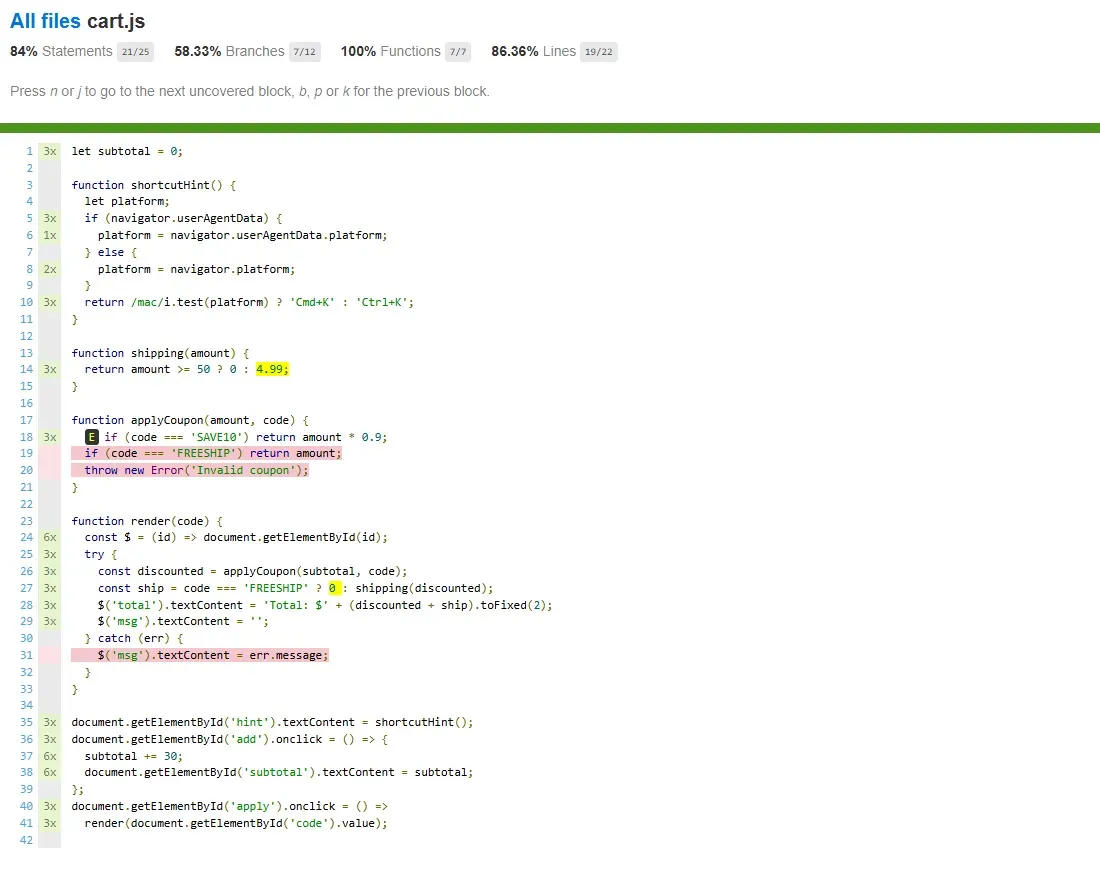
In the merged HTML report, line 6 ran once (Chrome) and line 8 ran twice (Firefox and WebKit). Swapping Istanbul for V8 coverage is not an option outside Chromium: a probe that called Playwright's page.coverage.startJSCoverage() on the same three browsers printed this:
$ node v8-probe.mjs
Chrome: V8 coverage OK, 1 script(s), cart.js functions=7
pw-firefox: coverage.startJSCoverage: Cannot read properties of null (reading 'startJSCoverage')
pw-webkit: coverage.startJSCoverage: Cannot read properties of null (reading 'startJSCoverage')
In Firefox and WebKit, page.coverage is null, so an end-to-end coverage setup that has to include those engines needs an instrumented build. Running one flow per browser is what TestMu AI's Automation Cloud is built for: it runs existing Playwright, Selenium, Cypress and Puppeteer scripts across 3,000+ browser and OS combinations in parallel, and LT Tunnel reaches a local or staging build when serving files through page.route is not practical.
Let Claude Code write Playwright tests that actually pass.

How to Fail a CI Build on Low Coverage
To block a merge on coverage, the CI step has to exit non-zero below a threshold. Each command below ran against code with untested branches. First, nyc on the merged data from the cross-browser run:
$ npx nyc check-coverage --branches 80
ERROR: Coverage for lines (86.36%) does not meet global threshold (90%)
ERROR: Coverage for branches (58.33%) does not meet global threshold (80%)
exit code: 1
The lines error appears although only --branches was passed, because nyc and c8 both default --lines to 90. Set every threshold you mean to enforce. c8 behaves the same way on a node:test suite whose one test covers only the SAVE10 path of the same coupon logic (node's summary lines are removed below):
$ npx c8 --check-coverage --branches 80 node --test
✔ SAVE10 order over $50 ships free (0.8838ms)
-------------|---------|----------|---------|---------|-------------------
File         | % Stmts | % Branch | % Funcs | % Lines | Uncovered Line #s
-------------|---------|----------|---------|---------|-------------------
All files    |   77.77 |       60 |     100 |   77.77 |
 pricing.mjs |   77.77 |       60 |     100 |   77.77 | 3-4
-------------|---------|----------|---------|---------|-------------------
ERROR: Coverage for lines (77.77%) does not meet global threshold (90%)
ERROR: Coverage for branches (60%) does not meet global threshold (80%)
exit code: 1
Coverage.py, on the same logic ported to Python 3.14.8 with Coverage.py 7.16.2, exits with code 2:
$ coverage run --branch --source=pricing -m pytest -q
.                                                                        [100%]
1 passed in 0.01s
$ coverage report -m --fail-under=80
Name         Stmts   Miss Branch BrPart  Cover   Missing
--------------------------------------------------------
pricing.py       8      3      4      1    50%   4-6
--------------------------------------------------------
TOTAL            8      3      4      1    50%
Coverage failure: total of 50 is less than fail-under=80
exit code: 2
The --source=pricing option keeps the test file out of the total. Without it, the same run reported a total of 65, because the fully covered test file counted toward it. The other tools in this guide gate the same way, according to their documentation (these were not run here):
- JaCoCo - The Maven check goal with haltOnFailure stops the build when a coverage rule fails.
- Coverlet - dotnet test /p:CollectCoverage=true /p:Threshold=80 fails the build below the threshold.
- Codecov - Status checks block a pull request that misses the coverage target you configure.
AI-Generated Tests and Code Coverage
Coverage reports are also the input for AI test generators, which aim new tests at the lines a report marks unexecuted. Parasoft Jtest, covered above, does this with AI-generated JUnit tests inside the IDE.
Diffblue Cover writes JUnit or TestNG tests for Java using reinforcement learning rather than an LLM, and its Cover Reports show coverage levels and testability across a codebase.
Check that a generator is still maintained before building on it. Qodo, formerly CodiumAI, deprecated its test command on September 1, 2026 with no direct replacement.
A generated test can execute every branch of a function and assert nothing, which raises the percentage without checking a single result. Review generated assertions the way you review human ones, and use mutation testing to check whether the tests would catch a bug in the covered lines. The guide to AI unit test generation compares the generators in more depth.
Conclusion
Pick the tool for your runtime from the comparison table, then add its threshold check to CI with every metric set explicitly. If your front end has browser- or OS-specific branches, run the same instrumented flow in Chrome, Firefox and WebKit with Playwright testing on TestMu AI and gate on the merged report; the Playwright JavaScript setup guide covers the connection.
Testing from the terminal? Kane CLI by TestMu AI lets SDETs and developers plan, write, run and debug tests from the command line.
Author

Saurabh Prakash
Blogs: 21

Saurabh Prakash is an Engineering Manager at TestMu AI, where he leads engineering on agentic AI development and scalable system architecture for the quality engineering platform. He has also contributed to Test at Scale, the company's open-source test intelligence platform. He brings over 9 years of experience across Node.js, Java, Spring, MVC, data structures, algorithms, and scalable system design, with earlier roles as SDE 2 at Zomato, Senior Software Engineer at LogicHub, and Software Development Engineer at Directi. Saurabh holds a B.Tech in Computer Science and Engineering from Delhi Technological University.
Reviewer

Sandeep Yadav
Reviewer
Sandeep Yadav is a Senior Software Engineer at TestMu AI, where he builds the platform's test intelligence and AI-native engineering systems. He has architected autonomous GitHub Apps, vector-search code intelligence, and self-diagnosing QA workflows, and designed distributed platforms that process 2M+ daily test executions and 1B+ events, turning high-volume test, log, and code data into intelligent, self-optimizing systems. He works on embedding reasoning models into production infrastructure to power autonomous review, root-cause analysis, and analytics workflows. He brings over four years of engineering experience with deep expertise in the Elastic Stack, Apache Kafka, and Redis. Earlier he engineered a GDPR-compliant, end-to-end-encrypted secure web-chat application at Mithi. A Facebook Hackercup 2021 Round 2 qualifier and merit-scholarship recipient, Sandeep holds a B.Tech in Electrical Engineering from Delhi Technological University.


Code Coverage Tools FAQs
Did you find this page helpful?
More Related Learning Hubs







TestMu AI forEnterprise
Get access to solutions built on Enterprise
grade security, privacy, & compliance
- Advanced access controls
- Advanced data retention rules
- Advanced Local Testing
- Premium Support options
- Early access to beta features
- Private Slack Channel
- Unlimited Manual Accessibility DevTools Tests