
Power Your Software Testing with AI Agents and Cloud
The Native AI-Agentic Cloud Platform to Supercharge Quality Engineering. Test Intelligently and Ship Faster.


- TestMu AI (Formerly LambdaTest)
- /
- Blog
- /
- 9 Best Salesforce Test Automation Tools for 2026
9 Best Salesforce Test Automation Tools for 2026
Compare the 9 best Salesforce test automation tools in 2026, KaneAI, Provar, Copado, Opkey, Tricentis Tosca, Worksoft, Testim, Selenium, and Leapwork. Pros, cons, pricing, and which to choose.
Last Updated on:
Salesforce test automation tools matter most to teams running a live org. The decision comes down to one question: how much maintenance can your team absorb after each seasonal release?
Salesforce ships three platform releases a year. Manual regression after each one slows every deployment, and the wrong tool replaces that with weeks of script repair instead.
This comparison covers 9 tools across different team profiles and skill levels, with the pros, cons, and where each one falls short.
A tool is only part of the picture. Sandbox setup, Apex unit testing, and UAT sit around it, and Salesforce testing covers that wider strategy.
One layer down, Selenium, Playwright, Provar, and AI-native tooling behave very differently inside a Lightning org, which is what Salesforce test automation frameworks compares.
Overview
To automate Salesforce testing in 2026, deploy KaneAI for AI-native, natural-language test authoring and self-healing execution, or use Provar for metadata-driven testing that provides deep compliance and audit trails for regulated enterprise environments. These platforms eliminate manual regression bottlenecks across seasonal releases.
What are Salesforce testing tools?
Salesforce testing tools run test cases automatically against Salesforce orgs, confirming that workflows, integrations, and customizations behave reliably across every release cycle.
Which Salesforce testing tools lead in 2026?
- Best for Salesforce-native authoring - Provar uses metadata-driven locators instead of brittle XPath, and Opkey adds codeless authoring built specifically for Salesforce orgs.
- Best for AI-native automation - KaneAI by TestMu AI authors tests from natural language and uses auto-healing to adapt to UI changes, paired with a dedicated Salesforce testing service.
- Best for DevOps-embedded testing - Copado builds automated testing directly into the Salesforce release pipeline rather than bolting it on afterwards.
- Best for cross-system coverage - Tricentis Tosca, Worksoft, and Testim handle testing that spans Salesforce and the systems around it, including Selenium migration.
- Best for engineering-led or visual teams - Selenium gives full architectural control at no licence cost, while Leapwork offers a visual flowchart interface for non-coders.
What Are Salesforce Test Automation Tools?
Salesforce testing tools automatically execute test cases against Salesforce apps, checking that customizations, integrations, workflows, and data still behave correctly after every change.
Release cadence is what forces automation here. Salesforce ships three major platform releases a year, listed on its Salesforce releases page as Spring, Summer, and Winter.
Every one of them can change page layouts and validation rules, so a manual regression pass has to run three times a year regardless of your own release schedule.
Unlike general web automation frameworks, the best Salesforce test automation tools handle the platform's unique challenges natively, including Shadow DOM, dynamic element IDs, metadata driven components, and tri annual seasonal releases.
Choosing the right tool determines how much time your team spends on maintenance versus coverage. A team spending 40 hours per release updating broken test scripts spends 120 hours per year on maintenance alone before writing a single new test. Multiply those hours by a loaded engineer rate and Salesforce test maintenance cost becomes a recurring line item rather than a one-off project. To model that spend against the payback of automating, work through this test automation ROI calculator. The right Salesforce test automation tool, particularly one with auto healing and metadata driven locators, eliminates most of that overhead.
That maintenance load is the reason salesforce automation testing has moved away from recorded scripts and toward agents that author and repair tests themselves, which is the dividing line the ten tools below are measured against.
Salesforce Testing Tools Comparison Table 2026
Choosing among the best Salesforce testing tools is easier when you can compare them across the same criteria in one place. The following covers the ten tools against the five capabilities that matter most for Salesforce specific testing.
Catch What Your Automation Tools Miss Before A Salesforce Release

The 9 Best Salesforce Testing Tools in 2026
The strongest Salesforce testing tools in 2026 are Provar, KaneAI, Copado, Opkey, Tricentis Tosca, Worksoft, Testim, Selenium, and Leapwork.
They represent the strongest options across different team profiles, skill levels, and testing requirements. Each entry covers what the tool does, its key features, honest pros and cons, who it suits best, and pricing.
1. Provar
Provar is a Salesforce native test automation tool built exclusively for the platform, using Salesforce metadata to drive element identification instead of DOM based locators. It has the longest track record of any Salesforce specific testing tool and is the default choice for enterprise teams in regulated industries needing governance, compliance, and audit trail workflows. Provar claims tests can be built 90% faster and maintained 80% less compared to script based approaches. Teams blocked by its Salesforce-only scope or its licensing model usually end up evaluating a Provar alternative that meets the same governance bar at a different price point.
Key features -
- Metadata driven element identification - Locates Salesforce components using object and field metadata rather than generated DOM attributes.
- Lightning and Classic support - Covers both Salesforce Lightning Experience and Classic UI in a single test framework.
- End to end business process testing - Validates workflows spanning Salesforce, APIs, databases, emails, and connected applications.
- Permission based test flows - Simulates different Salesforce user roles and permission sets to validate access control behavior.
- Point and click test authoring - Low code interface accessible to Salesforce admins without scripting.
| Pros | Cons |
|---|---|
|
|
Best for - Enterprise Salesforce teams with testing scope entirely within Salesforce who need deep platform integration, compliance tracking, and mature test management.
Pricing - Subscription based, quote driven. Pricing varies by team size and environment count. Contact Provar for a quote.
2. KaneAI by TestMu AI
KaneAI by TestMu AI (formerly LambdaTest) is an agentic end-to-end testing platform for Salesforce. It does not stop at turning a prompt into a script. It decides the steps a Salesforce workflow actually needs, authors them, executes them against a live org, reads what happened, and adapts the test when Lightning or your metadata shifts underneath it. A QA engineer or Salesforce admin describes the outcome in natural language and the agent carries the whole cycle, from planning through execution to self-healing.
Teams using TestMu AI platform have reported up to 78% faster test execution and 70% reduction in regression cycle time. The Boomi case study shows how Boomi reduced test execution time by 78% using TestMu AI HyperExecute, AI Native Test Analytics, and AI Native Test Intelligence.
Service Cloud is where that model pays off fastest. Salesforce case management automation spans case creation, email-to-case, web-to-case, assignment rules, and status changes, all of which KaneAI drives from natural-language steps.
The quote-generation layer is harder still. Salesforce CPQ testing has to hold pricing rules, discount governance, bundle configuration, and the downstream billing handoff together in a single run.
Key features -
- NLP based test authoring - Describe Salesforce workflows in natural language, KaneAI generates complete test cases without scripting.
- Shadow DOM and dynamic ID handling - Uses Salesforce metadata to locate Lightning components natively, eliminating locator fragility.
- AI native auto healing - Detects and corrects broken locators automatically after Lightning UI changes and seasonal releases.
- Parallel test execution - Runs Salesforce regression suites through HyperExecute across 3,000+ browser and OS combinations and 10,000+ real devices simultaneously.
- Salesforce API testing - Validates REST and SOAP API endpoints alongside UI tests in one unified flow.
- AI powered root cause analysis - Surfaces the exact component, flow, or integration responsible for every failure with screenshots and logs.
- CI/CD pipeline integration - Connects natively with Jenkins, GitHub Actions, and Azure DevOps.
| Pros | Cons |
|---|---|
|
|
Best for - Teams modernizing Salesforce QA with AI test automation, teams that want zero maintenance regression suites, and enterprise teams running parallel execution at scale.
Pricing - KaneAI Web, $249 per agent per month billed monthly or $199 billed annually. KaneAI Mobile + Web, $349 per agent per month billed monthly or $299 billed annually. Enterprise, custom pricing with enterprise grade security, privacy, and compliance. See the current TestMu AI pricing page.
3. Copado
Copado is a Salesforce DevOps platform with automated testing built directly into the release pipeline, combining CI/CD, version control, compliance management, and test execution in one Salesforce native environment. Teams already using Copado for release management gain testing without adopting a separate tool. Testing is delivered through Copado Robotic Testing (formerly Qentinel), which is purchased as a separate module. Teams that want testing decoupled from their release-management vendor typically weigh a Copado alternative instead.
Key features -
- Native Salesforce CI/CD - Embeds test execution directly into the Salesforce deployment workflow, triggering test runs automatically with every release.
- Low code test creation - Drag and drop Flow Editor and Visual Recorder let business testers build automated tests without scripting.
- Parallel test execution - Cloneable robot architecture runs tests simultaneously for faster feedback.
- AI powered flaky test detection - Identifies and predicts unstable tests before they disrupt release confidence.
- Compliance and audit trail - Maintains a complete record of test runs, deployments, and approvals for regulated environments.
| Pros | Cons |
|---|---|
|
|
Best for - Salesforce DevOps teams that need release management, compliance tracking, and automated testing in one platform from one vendor.
Pricing - Quote based. Enterprise pricing on request. Implementation typically requires a Copado certified partner, adding professional services fees.
4. Opkey
Opkey is a no code, AI powered continuous test automation platform that covers Salesforce alongside more than 12 enterprise applications. Its defining strength for Salesforce teams is AI driven change impact analysis: before every seasonal release, Opkey compares the current and updated org to flag exactly which configurations, transactions, and custom screens changed, then recommends the precise test cases to run. It supports Sales Cloud, Service Cloud, Marketing Cloud, CPQ, and Billing across both Lightning and Classic.
Backed by a $47M Series B round, Opkey targets enterprises that want to certify Salesforce updates quickly without standing up a scripting practice, and that test Salesforce as part of a broader landscape of packaged applications.
Key features -
- No code test authoring - Build and run Salesforce tests through a codeless interface with no scripting required.
- AI powered change impact analysis - Compares the current and updated Salesforce org to highlight changed configurations, transactions, and custom screens, then recommends the impacted test cases.
- Self healing tests - Detects Salesforce application changes and updates affected scripts automatically to cut post release maintenance.
- Lightning and Classic support - Tests both Salesforce Lightning and Classic from a single suite without separate test sets.
- Pre built test libraries - Ships thousands of pre built tests across packaged applications to stand up automation in weeks.
- End to end integration testing - Validates Salesforce alongside connected ERP and CRM systems across 150+ technologies.
| Pros | Cons |
|---|---|
|
|
Best for - Enterprises that want to certify every Salesforce release quickly with no code authoring and AI driven change impact analysis, especially when Salesforce is tested alongside ERP and other packaged applications.
Pricing - Quote based. Enterprise pricing on request, scaled to application scope and team size.
5. Tricentis Tosca
Tricentis Tosca is an enterprise grade test automation platform using a model based approach that creates reusable test logic working simultaneously across Salesforce and other enterprise systems including SAP, Oracle, and MuleSoft. For organizations where Salesforce is one of several connected enterprise platforms, Tosca provides unified cross system coverage that no Salesforce only tool can match. When SAP is the other half of that landscape, SAP testing follows a different shape again, because the ERP backend and the Fiori web layer need separate validation approaches.
Key features -
- Model based test automation - Creates reusable test models that adapt to Salesforce version changes without rewriting individual test cases.
- Dynamic ID capture - Intelligently identifies and manages Salesforce runtime generated element identifiers for stable locator strategies.
- Risk based regression optimization - Shrinks regression suite size while maintaining coverage by prioritizing tests based on business risk.
- Cross system end to end testing - Validates workflows spanning Salesforce, ERP systems, APIs, and third party integrations in a single test execution.
- Enterprise test management - Compliance, audit trail, and governance for regulated industries managing complex multi system environments.
| Pros | Cons |
|---|---|
|
|
Best for - Large enterprises testing Salesforce alongside SAP, Oracle, or MuleSoft where unified cross system test coverage is the primary requirement.
Pricing - Enterprise focused. Contact Tricentis for a quote.
6. Worksoft
Worksoft Certify is a codeless, enterprise grade automation platform built for end to end testing across business processes that span Salesforce, SAP, Oracle, and Workday. Like Tricentis Tosca, its value is cross system coverage rather than Salesforce only depth: a single automated process can move from Salesforce into an ERP system and back in one test. Certify uses a patented model based Object Action Framework that captures real world workflows in the UI instead of scripts.
Recent releases added AI driven self healing for SaaS applications including Salesforce, reducing the manual maintenance that codeless enterprise suites traditionally carried. Worksoft remains most established in large SAP centric enterprises, though its overall test automation mindshare has softened over the past year.
Key features -
- Model based codeless automation - Captures Salesforce and enterprise workflows as reusable business process models with no scripting.
- Cross system end to end testing - Validates processes spanning Salesforce, SAP, Oracle, Workday, and connected systems in one execution.
- AI self healing - Automatically updates automation as Salesforce and other SaaS applications change to keep tests stable.
- Business process discovery - Captures and documents real world processes directly from user activity for faster test creation.
- Enterprise governance - Provides the audit trail and scale controls large regulated enterprises require.
| Pros | Cons |
|---|---|
|
|
Best for - Large enterprises that test Salesforce as part of broader cross system business processes spanning SAP, Oracle, or Workday, particularly those already invested in Worksoft for enterprise automation.
Pricing - Quote based. Enterprise focused pricing, contact Worksoft for a quote.
7. Testim by Tricentis
Testim is Tricentis's AI powered testing platform built specifically for Salesforce Lightning, using Salesforce metadata to power its AI locator engine for significantly more stable test execution than DOM based automation tools. Teams migrating from Selenium who need Salesforce specific locator stability without a full enterprise platform investment will find Testim the most practical upgrade path. Buyers who do not want roadmap decisions made at portfolio level usually shortlist a Tricentis Testim Salesforce alternative alongside it.
Key features -
- AI locators powered by Salesforce metadata - Identifies Lightning components through metadata relationships rather than fragile DOM selectors.
- Native Shadow DOM traversal - Accesses Lightning Web Component internals without custom scripting or workarounds.
- Pre built Salesforce test steps - Covers common Salesforce operations including record creation, approval workflows, and permission testing.
- Self healing test maintenance - Adapts tests automatically when UI or metadata changes occur after seasonal releases.
- Integrated API testing - Validates API calls alongside UI tests in a single execution flow.
| Pros | Cons |
|---|---|
|
|
Best for - Teams migrating from Selenium who need Salesforce specific locator stability without a full enterprise platform investment.
Pricing - Contact Tricentis for pricing.
8. Selenium
Selenium is the most widely used open source browser automation framework and remains a valid foundation for Salesforce UI testing for teams with engineering resources willing to build and maintain Salesforce specific framework components. It has no licensing cost, supports all major programming languages, and integrates with every CI/CD pipeline. Teams combining Selenium with TestMu AI's cloud execution layer can add parallel Salesforce test execution without abandoning their existing framework. Teams that want the same coverage without the maintenance bill usually land on a Selenium Salesforce alternative.
Staying on Selenium is workable once the Lightning-specific patterns are in place. Salesforce Selenium testing sets out the stable locator strategies for Lightning, Shadow DOM handling in LWC, MFA workarounds, and a working lead creation example those patterns depend on.
Key features -
- Multi language support - Supports Java, Python, JavaScript, C#, and Ruby for test script development.
- Cross browser compatibility - Executes tests across Chrome, Firefox, Safari, and Edge.
- WebDriver protocol integration - Connects to any remote execution environment through the standard WebDriver API.
- Open source and free - No licensing cost with a large community ecosystem.
- CI/CD pipeline compatibility - Integrates with Jenkins, GitHub Actions, and Azure DevOps through standard WebDriver configuration.
| Pros | Cons |
|---|---|
|
|
Best for - Teams with dedicated automation engineers who need full control over test architecture and are prepared to invest in Salesforce specific framework maintenance.
Pricing - Free and open source.
9. Leapwork
Leapwork uses a visual flowchart based approach where users build test flows by connecting visual blocks rather than writing scripts, making it the most accessible Salesforce test automation tool for non technical contributors. It handles Salesforce's complex DOM structure reliably and supports end to end testing across Salesforce and connected systems.
Key features -
- Visual flowchart test authoring - Builds Salesforce test automation by connecting visual blocks in a flowchart editor with no code required.
- Complex DOM and dynamic UI handling - Manages Salesforce's heavy DOM structure and dynamically rendered components across test runs.
- End to end cross system testing - Validates workflows extending from Salesforce into connected systems and APIs.
- CI/CD pipeline integration - Connects to standard build and deployment pipelines for continuous Salesforce regression testing.
- Code and no code flexibility - Supports both visual no code authoring and scripted test creation for teams with mixed technical skill levels.
| Pros | Cons |
|---|---|
|
|
Best for - Organizations where Salesforce admins need to own automation visually and a no code environment is the priority over AI healing capabilities.
Pricing - Contact Leapwork for pricing.
How KaneAI Is Transforming Salesforce Testing with AI
KaneAI is an agentic end-to-end testing platform, so instead of recording steps and repairing locators you describe the outcome and the agent plans the steps, authors them, executes against a live org, and heals the test as Salesforce changes.
The shift toward AI testing in Salesforce is not incremental, it changes the economics of the entire QA function. Legacy Salesforce testing tools ask teams to record interactions, maintain locators, and manually update scripts after every seasonal release. KaneAI works from the opposite direction. As an agentic end-to-end platform it takes the objective, works out the steps a Salesforce flow requires, authors them, runs them against a live org, inspects the result, and repairs the test on the next run instead of handing back a one-shot script for someone else to maintain.
The scenario below shows a basic Salesforce login test authored and executed through KaneAI's natural language interface:
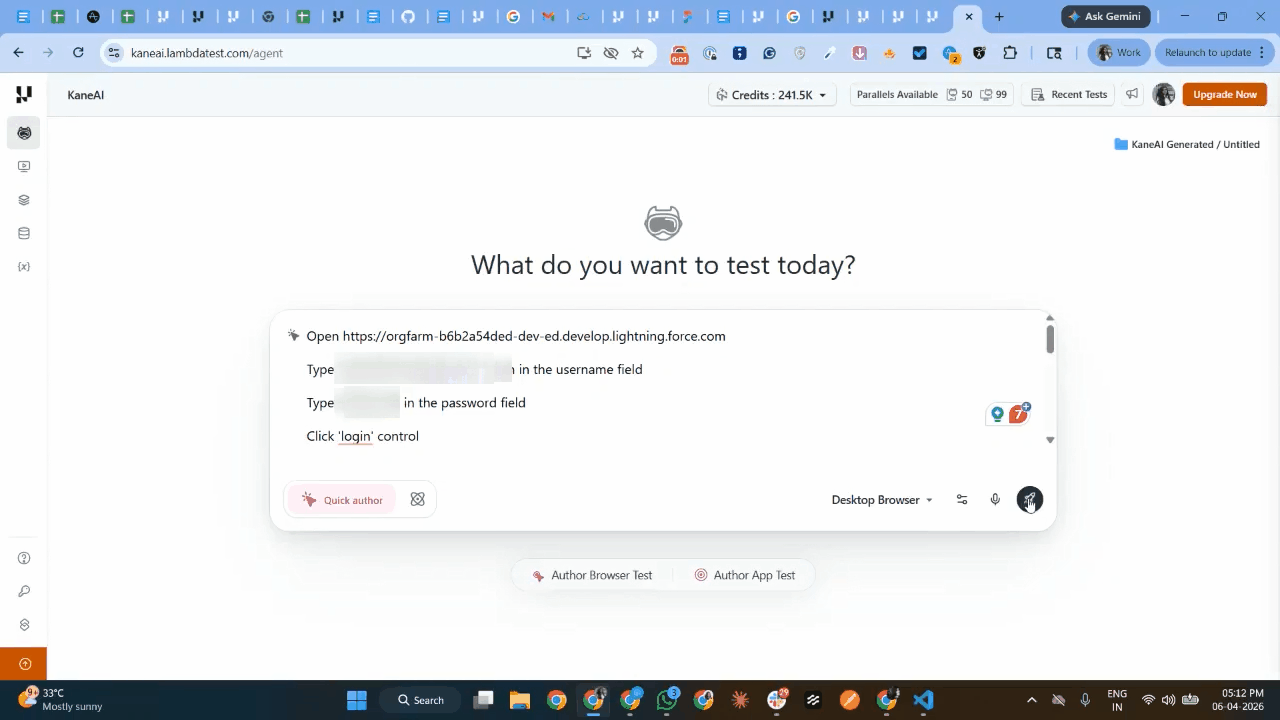
For teams dealing with Salesforce's tri-annual release cycle, this difference is measurable. A team spending 40 hours per release updating broken Salesforce test scripts spends 120 hours per year on maintenance alone before writing a single new test. KaneAI's AI-native auto-healing eliminates most of that overhead.
Its AI-powered root cause analysis means every failure surfaces with full context, the exact component, flow, or API call that broke, with screenshots, logs, and network traces attached automatically rather than a red result that needs a developer to investigate manually.
For teams adopting agentic software testing practices, KaneAI also supports the broader movement toward AI QA agents that plan, author, and evolve tests autonomously.

To get started with KaneAI Salesforce testing, follow the support documentation on why teams use KaneAI for Salesforce.
Beyond workflow automation, TestMu AI additionally offers Agent Testing capabilities for validating Salesforce AI agents across chat, voice, and phone-based interactions. However, Agent Testing is designed specifically for conversational agent validation and does not replace AI workflow validation, UI testing, API testing, or broader Salesforce regression automation workflows.

Note: Run Salesforce regression across every seasonal release without rebuilding locators. Start testing free
What Makes Salesforce Testing Tools Different From Web Automation Tools?
Salesforce testing tools are built for Shadow DOM, dynamically generated element IDs, and three mandatory platform releases a year, which is what breaks standard web automation frameworks.
Standard web automation tools work against predictable DOM structures. Salesforce is different in three ways that break most general purpose tools without a Salesforce specific adaptation.
- Shadow DOM in Lightning components - Salesforce Lightning renders components inside a Shadow DOM, which means standard CSS selectors and XPath expressions cannot access the elements inside Lightning components without traversing the shadow root boundary. Most automation testing tools were not built to handle this and require workarounds that are brittle and hard to maintain.
- Dynamically generated element IDs - Salesforce generates element IDs dynamically at runtime, so a locator built on a generated ID that works today will likely fail after the next metadata push or seasonal release. Teams using ID based locators spend significant time after every release manually updating broken selectors instead of building new coverage.
- Three mandatory platform updates per year - Salesforce delivers Spring, Summer, and Winter releases annually, each of which changes UI behavior, deprecates APIs, or alters how Lightning components render. A test suite without auto healing or metadata driven locators requires manual intervention after every one of these releases, which is why regression cadence has to be planned around the three release windows rather than around your own sprints.
How to Evaluate Salesforce Testing Tools?
Score Salesforce testing tools on five weighted criteria: Lightning and Shadow DOM handling, metadata driven locator stability, auto healing, authoring accessibility, and CI/CD with parallel execution.
These 10 tools were evaluated against five criteria that have the most direct impact on Salesforce test suite stability and long term maintenance overhead. Each criterion was assessed by reviewing vendor documentation, published case studies, user reviews on G2 and Gartner Peer Insights, and hands on testing against Salesforce Lightning environments.
- Shadow DOM and Lightning component handling (25%) - Salesforce Lightning renders components inside a Shadow DOM. Tools were evaluated by testing element location against Lightning Web Components to confirm native shadow root traversal without JavaScript workarounds. This criterion carries the highest weight because no other feature compensates for a tool that cannot reliably locate Lightning elements.
- Metadata awareness and locator stability (20%) - Salesforce generates element IDs dynamically. Tools were evaluated on whether they use metadata driven locators instead of DOM based selectors. Stability was assessed by reviewing how each tool handles element identification when the underlying DOM changes after a metadata push.
- Auto healing and release resilience (20%) - Salesforce delivers three major platform updates per year. Tools were evaluated on whether they can detect and correct broken locators automatically after seasonal releases without human intervention, based on vendor documentation and user reviews confirming post release behavior.
- Test authoring accessibility (20%) - Salesforce testing is not owned exclusively by QA engineers. Admins and business analysts understand workflows best. Tools were evaluated on whether non technical contributors can author, run, and maintain tests without scripting expertise.
- CI/CD integration and parallel execution (15%) - Automated tests that run sequentially outside a deployment pipeline add no value to continuous delivery. Tools were evaluated on native pipeline integration and whether they support parallel execution across multiple environments simultaneously.
Many of these Salesforce testing tools are commonly used across User Acceptance Testing (UAT), regression, and pre production validation workflows. For teams managing Salesforce UAT environments, capabilities such as masked data handling, integration configuration, and release validation become equally important.
Teams adopting AI-driven Salesforce testing workflows may also use Kane CLI to validate Salesforce flows locally, automate browser-based workflows, and run release verification tests across staging and production environments using natural language commands.
The run screenshot example below demonstrates how Kane CLI executes Salesforce Lead creation and validation workflows using natural language instructions.
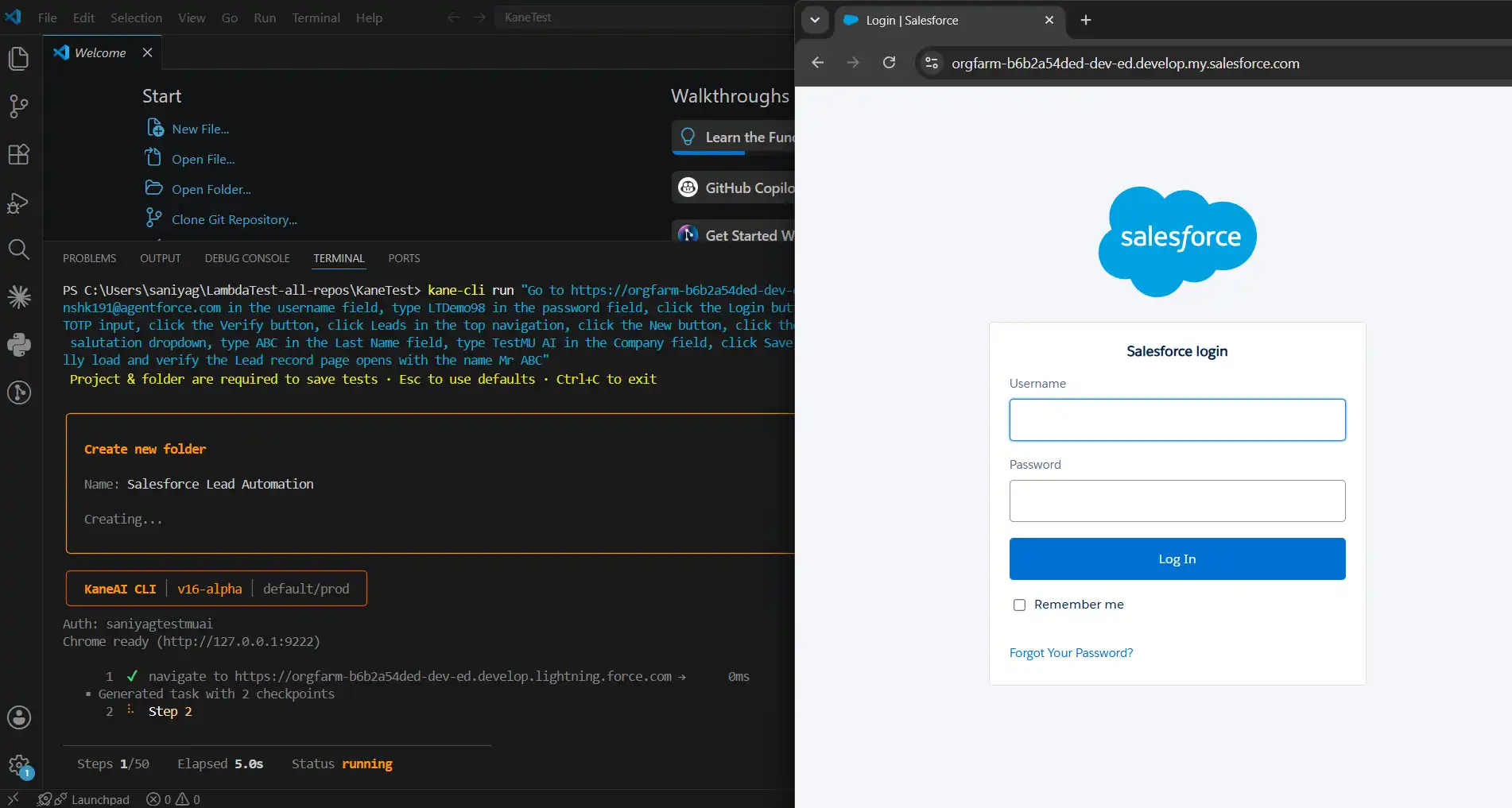
With Kane CLI, you simply describe the intended workflow in natural language while Kane CLI handles the end-to-end browser automation and execution. To get started follow the support documention on Installing Kane CLI.

How to Choose the Right Salesforce Testing Tool?
Match the Salesforce testing tool to three things: your team's technical skill level, whether testing stays inside Salesforce or spans connected systems, and how much maintenance you can sustain.
Use this decision guide to match your situation to the right tool:
- Choose Provar - When testing scope is entirely within Salesforce, and governance, compliance, and audit trail requirements are non negotiable. Best for regulated enterprises with a mature Salesforce testing programme.
- Choose KaneAI by TestMu AI - For AI native test authoring, zero maintenance regression, and enterprise parallel execution without scripting investment. Strongest choice for teams who want to eliminate post release maintenance cycles entirely.
- Choose Copado - When you already use Copado for Salesforce DevOps and want testing embedded directly in the deployment pipeline without a separate tool contract.
- Choose Opkey - When you need to certify Salesforce releases fast with no code authoring and AI driven change impact analysis, especially when Salesforce is tested alongside ERP and other packaged applications.
- Choose Tricentis Tosca - When testing Salesforce alongside SAP, Oracle, or MuleSoft and unified cross system coverage from one platform is required.
- Choose Worksoft - When Salesforce testing is part of broader cross system business processes spanning SAP, Oracle, or Workday, particularly if you already run Worksoft for enterprise automation.
- Choose Testim - When migrating from Selenium and needing Salesforce specific locator stability without committing to a full enterprise platform investment.
- Choose Selenium - When you have dedicated automation engineers, need full architectural control, and are prepared to invest in maintaining Salesforce specific framework components including Shadow DOM traversal and MFA handling.
- Choose Leapwork - When Salesforce admins need to own automation visually and simplicity of adoption matters more than AI healing capabilities.
Conclusion
The Salesforce test automation tools market in 2026 has split into two clear categories. The first is legacy tools requiring scripting, locator maintenance, and manual updates after every seasonal release. The second is AI native platforms that author, execute, and maintain tests with minimal human input. Teams evaluating tools today are not choosing between features, they are choosing how much maintenance overhead they are willing to sustain long term.
For most Salesforce teams, the highest use decision is adopting a tool with AI powered auto healing and metadata driven locators before the next seasonal release arrives. The cost of maintaining brittle test suites compounds with every Spring, Summer, and Winter update. Provar leads on platform maturity, metadata driven locator stability, and the compliance and audit trail depth that regulated Salesforce enterprises depend on. For teams prioritizing AI native test authoring and zero maintenance regression, KaneAI by TestMu AI is the strongest choice, it eliminates post release overhead through natural language test authoring, automatic locator healing, and parallel execution across real environments. Opkey and Copado are strong alternatives for teams with specific no code or DevOps requirements, while Selenium remains the right choice when engineering control matters more than maintenance efficiency.
The same seasonal release problem applies to the other enterprise SaaS platforms your business processes touch. If Workday is one of them, see how to approach Workday testing across HCM, Payroll, and Financial Management. For the layer-by-layer tooling picture beyond any single platform, compare the leading SaaS testing tools.
Author

Saniya Gazala
Blogs: 44


Saniya Gazala is a Product Marketing Manager and Community Evangelist at TestMu AI with 2+ years of experience in software QA, manual testing, and automation adoption. She holds a B.Tech in Computer Science Engineering. At TestMu AI, she leads content strategy, community growth, and test automation initiatives, having managed a 5-member team and contributed to certification programs using Selenium, Cypress, Playwright, Appium, and KaneAI. Saniya has authored 15+ articles on QA and holds certifications in Automation Testing, Six Sigma Yellow Belt, Microsoft Power BI, and multiple automation tools. She also crafted hands-on problem statements for Appium and Espresso. Her work blends detailed execution with a strategic focus on impact, learning, and long-term community value.
Reviewer

Srinivasan Sekar
Reviewer
Srinivasan Sekar is Director of Engineering at TestMu AI, where he leads engineering and open-source initiatives behind the Selenium and Appium automation grid and owns TestMu AI's MCP Server. A committer to Appium and a contributor to Selenium, WebdriverIO, Taiko, and AppiumTestDistribution, he brings over 15 years of experience in quality engineering and open-source technologies. He is the author of the Apress book 'The MCP Standard: A Developer's Guide to Building Universal AI Tools with the Model Context Protocol,' a Certified Kubernetes and Cloud Native Associate, and an international conference speaker. Before TestMu AI he spent over eight years at Thoughtworks as a Principal Consultant and Quality Architect. Srinivasan holds a B.Tech in Information Technology from Anna University.
Salesforce Testing Tools FAQs
Did you find this page helpful?
More Related Blogs

TestMu AI forEnterprise
Get access to solutions built on Enterprise
grade security, privacy, & compliance
- Advanced access controls
- Advanced data retention rules
- Advanced Local Testing
- Premium Support options
- Early access to beta features
- Private Slack Channel
- Unlimited Manual Accessibility DevTools Tests