

Power Your Software Testing with AI Agents and Cloud
The Native AI-Agentic Cloud Platform to Supercharge Quality Engineering. Test Intelligently and Ship Faster.


- TestMu AI (Formerly LambdaTest)
- /
- Blog
- /
- Top 19 Test Management Tools & Software in September 2026
Top 19 Test Management Tools & Software in September 2026
Compare the top 19 test management tools in 2026 by features, integrations, and team fit to organize test cases, track defects, and report coverage.
Last Updated on:
Many QA teams still rely on spreadsheets and disconnected tools for test tracking. The result: scattered test cases, defects that slip through manual handoffs, and release delays caused by poor visibility into test progress.
Test management tools solve this by providing a single system to create test cases, execute test runs, track defects, and generate coverage reports. The automation testing market grew to $20.60 billion in 2025 and is projected to reach $84.22 billion by 2034 at 16.84% CAGR, making structured test management tools essential for turning raw execution data into release decisions.
Use this list of the best test management tools to shortlist by free tier, integrations, automation support, and team fit: all 19 platforms were checked against their live vendor sites in August 2026. For a deeper look at test management fundamentals, start with our learning hub.
TL;DR
To streamline your QA workflow, use Test Manager by TestMu AI for scalable cloud execution across real devices, or choose TestRail for deeply integrated, dashboard-driven test case management. These tools replace spreadsheets with a single system to plan tests, track runs, log defects, and prove release readiness.
- Best for cloud execution: Test Manager by TestMu AI - This cloud platform manages manual and automated tests at scale across 10,000+ real devices and 3,000+ browser/OS combinations, featuring customizable workflows and CI/CD integration.
- Best for enterprise system of record: TestRail - This widely adopted test case management tool provides real-time dashboards, deep Jira integration, and framework-agnostic automation support via its API for mid-size to enterprise teams.
- Best for agile teams: Qase - This agile-focused tool features a modern user interface, built-in bug tracking, and a REST API to simplify test management for small, fast-moving teams.
- Best for hybrid testing: Testmo - This unified platform integrates exploratory, manual, and automated testing into a single workspace, supporting results from any CI/CD pipeline.
- Best for Jira-native management: Zephyr Scale - This Jira-native test management tool offers cross-project test case reuse, 360-degree traceability, and no-code automation features directly inside Jira.
- Best for lightweight manual testing: Testpad - This lightweight, checklist-style tool is designed for fast manual and exploratory testing by both QA and non-QA teams using shareable links.
- Best for user acceptance testing: TestMonitor - This simple, code-free platform focuses on manual user acceptance testing (UAT) and risk-based testing, allowing teams to map multiple requirements to test cases.
- Core capabilities to expect: Standard tools provide centralized control of test assets, execution tracking, real-time dashboards, requirement-to-defect traceability, and integrations with bug trackers and CI/CD pipelines.
- How to choose: Match tools to your team based on size, testing type (manual, automated, or hybrid), integration needs, reporting depth, ease of use, and scalability.
What are Test Management Tools?
A test management tool is a platform that stores test cases, tracks test execution status, logs defects, and generates coverage reports. It replaces the spreadsheets, emails, and disconnected issue trackers that most teams start with.
The core value is traceability: linking requirements to test cases to defects so you can answer "is this feature fully tested?" at any point in the release cycle. Whether you call it test management software, a test case management system, or a test tracking tool, the job is the same: give every test a home, a status, and an owner.
What They Do
A typical test management workflow looks like this:
- Create test cases in a centralized repository, organized by module, feature, or sprint. Most tools support reusable test steps so you write common flows once.
- Link test cases to requirements (Jira stories, GitHub issues) for traceability. This lets you answer "which requirements have no tests?" before a release. See our guide on defect management for the defect side of this flow.
- Execute test runs manually or trigger automated runs via CI/CD integration (Jenkins, GitHub Actions, GitLab CI). The tool records pass/fail status, duration, and evidence (screenshots, logs).
- Log defects directly from failed test steps, auto-linked to the test case and requirement. Most tools sync bidirectionally with Jira or Azure DevOps, and our Jira test management guide walks through configuring that two-way sync end to end.
- Track coverage and progress via dashboards that show: tests planned vs executed, pass rate by module, defects by severity, and blocked tests.
Once a suite grows past a few hundred cases, teams move from spreadsheets to cloud test management solutions that keep execution history, evidence, and reporting in one place.
How Did We Evaluate These Test Management Tools?
We scored each test management tool on integration depth, automation support, free tier or trial availability, reporting depth, and scalability from small QA teams to enterprise rollouts.
We scored software test management tools on five criteria: integration depth (Jira, Azure DevOps, GitHub, CI/CD), automation support (can it run or ingest automated results?), free tier or trial availability, reporting depth, and scalability from a 3-person QA team to an enterprise rollout. Every free-tier and capability claim below was checked against the vendor's live site in August 2026; where a claim could not be verified, we describe the capability qualitatively rather than quote a number.
One disclosure up front: Test Manager is TestMu AI's own platform. It appears first because this is our blog, and we label it as ours. The same criteria and the same honest limitations apply to it as to the other 18 tools.
What Are the Top Test Management Tools in 2026?
Top test management tools in 2026 include Test Manager by TestMu AI, TestRail, Qase, Testmo, Zephyr Scale, and Xray for organizing tests and improving quality.
The best test management tools separate on deployment model and integration depth more than on features, so the table below compares all 19 at a glance by best fit, deployment, free tier, automation support, and key integrations. Detailed reviews of each follow.
| Tool | Best For | Deployment | Free Tier | Automation Support | Key Integrations |
|---|---|---|---|---|---|
| 1. Test Manager by TestMu AI | Management plus cloud execution in one platform | Cloud | Free plan, unlimited projects | Yes, CI/CD and 10,000+ real devices | Jira, GitHub, CI/CD |
| 2. TestLodge | Small to mid manual QA teams | Cloud | 30-day trial | No | Popular issue trackers |
| 3. Tuskr | Agile teams wanting AI-assisted authoring | Cloud | Free plan, 5 users | Imports automated results | Jira, GitHub, Slack |
| 4. QA Touch | Startups needing affordable agile TM | Cloud | Free plan, 3 projects | Imports manual and automated results | Jira, Jenkins, Slack |
| 5. TestMonitor | UAT and business users | Cloud | 14-day trial | Limited | Jira, Azure DevOps, Slack |
| 6. TestFLO | Jira-centric teams | Jira app | 30-day trial | Via plugin (JUnit, TestNG, NUnit, Cucumber) | Native Jira, Bamboo, Jenkins |
| 7. Qase | Agile teams wanting a modern UI and API | Cloud | Free plan, 4 users | Yes, REST API | Jira, GitLab, CI |
| 8. Test Collab | Startups and small collaborative teams | Cloud | 14-day trial | Via CI | GitHub, Jira |
| 9. TestRail | Mid-size to enterprise system of record | Cloud or self-hosted | Free trial | Framework-agnostic via API | Jira, Azure DevOps, CI/CD |
| 10. Azure Test Plans | Microsoft-stack teams inside Azure DevOps | Cloud (Azure DevOps) | Paid per user | Via Azure Pipelines | Azure Boards, Azure Pipelines |
| 11. Kualitee | Teams wanting all-in-one TM and defects | Cloud or on-premise | Free plan, 3 users | Imports automated results | Jira, Trello, Asana |
| 12. SpiraTest | Regulated industries needing traceability | Cloud or on-premise | 30-day trial | Yes | Jira and wider ALM stack |
| 13. Testiny | Small teams needing lightweight TM | Cloud | Free plan, 3 users | Limited | Jira |
| 14. Testpad | Exploratory and manual, non-QA teams | Cloud | 30-day trial | No | Shareable links |
| 15. Testmo | Teams mixing manual and automated testing | Cloud | Free trial | Yes, any CI | GitHub, GitLab, Jira |
| 16. Zephyr Scale | Jira teams needing scalable TM | Jira app | Free trial | No-code plus Halo AI | Native Jira, BDD tools |
| 17. Xray | Jira teams needing BDD and automation | Jira app | Free trial | Yes, frameworks and CI | Native Jira, Cucumber |
| 18. Aqua ALM | Enterprises needing compliant ALM | Cloud or enterprise | Free trial | Yes | Customizable, GDPR-ready |
| 19. PractiTest | Enterprise QA wanting live quality intelligence | Cloud | Free trial | Yes | Jira, CI/CD, BDD tools |
1. Test Manager by TestMu AI
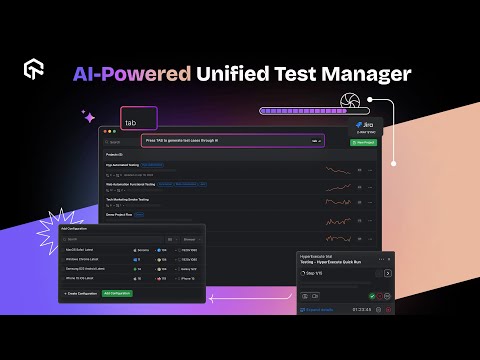
TestMu AI's Test Management Platform uses AI to generate structured test cases, with steps, expected results, preconditions, and priority, from a plain-English description, user story, or requirement document. Manual outcomes and automated results from CI/CD land in the same test cycle view, and a traceability matrix connects requirements to tests, runs, and defects.
Features:
- AI test case generation from natural language, user stories, Gherkin scenarios, PRDs, Jira tickets, and even Figma flows.
- Two-way Jira and Azure DevOps sync - defects log with full context, and status changes flow back to the linked test case automatically.
- Pulls automated results from Jenkins, GitHub Actions, GitLab CI, CircleCI, and Bitbucket Pipelines into active test cycles.
- One-click migration from TestRail, Zephyr, Xray, or CSV, with AI-assisted bulk cleanup of imported legacy cases.
- The Test Deduplication Agent runs a semantic scan over case titles, steps, and descriptions and scores each near-duplicate pair from 0 to 100 percent match.
- Step-by-step execution with screenshots, videos, and notes attached as evidence, plus requirement-to-defect traceability reports.
Pros:
- Scalable testing across 10,000+ real devices and 3,000+ browser/OS combinations.
- AI-enhanced test optimization for increased accuracy and reduced manual effort.
- Real-time collaboration with detailed test history, live updates, and automated test evidence.
- Seamless workflow integration with popular tools like Jira, GitHub, and CI/CD pipelines.
- Customizable workflows to match specific team requirements.
Cons:
- Initial learning curve due to the platform's wide range of features and integrations.
Why It's Important: TestMu AI is the only tool on this list that combines test case management with its own execution infrastructure, so planning, running, and reporting happen in one platform instead of three.
Pricing: Free plan at $0 with unlimited projects; Test Manager Premium at $49 per month per seat (billed annually) includes 2,000 AI credits per month. Verify current figures on the TestMu AI pricing page.
Why Choose TestMu AI Over Other Tools?
The AI here is part of the authoring workflow rather than a separate add-on, so generating a case from a user story and bulk-cleaning imported legacy cases happen in the same place you organize them. A single traceability matrix runs requirements through tests and runs to defects, which is what makes a coverage gap visible before a release rather than after it. One-click migration from TestRail, Zephyr or Xray also means an evaluation does not have to start with a CSV export.

Note: Manage your test cases, plans, and runs at scale across 10,000+ real devices with AI-powered insights. Try Test Manager by TestMu AI for free!
2. TestLodge
TestLodge (testlodge.com) is an online test case management tool that simplifies managing test plans, test cases, and test runs. It offers flexibility with the ability to create unlimited test suites and users, and allows easy updates to test documents as needed. TestLodge integrates with your existing issue-tracking tools to automate defect creation, making it a great fit for teams focused on manual testing.
Features:
- End-to-end manual test management solution.
- Integrates with popular issue trackers to log defects automatically.
- Supports test plan creation, execution tracking, and requirement management.
Pros:
- Simple, clean UI designed for manual testing.
- Affordable and scalable for growing teams, with no per-user charges.
- Every plan supports unlimited users.
Cons:
- Lacks support for test automation.
- Limited advanced analytics and reporting features.
Why It's Important: TestLodge is ideal for small to mid-sized QA teams that focus on manual testing and need structured test management.
Pricing: Offers four pricing plans with unlimited users and test suites, each starting with a 30-day free trial; current pricing is listed on the vendor's site.
3. Tuskr
Tuskr (tuskr.app) is a cloud-based test case management tool designed to bridge the gap between manual testing and automated results. It uses AI to auto-generate test cases and build smart test runs based on priority and recent edits, cutting administrative overhead. Tuskr also highlights risks, anomalies, and coverage gaps with AI, making it a strong choice for agile teams that want modern test management software without enterprise pricing.
Features:
- Unified dashboard for centralizing manual test cases and automated execution results.
- AI-powered test case generation and automatic workload balancing to prevent bottlenecks.
- Out-of-the-box integrations with Jira, GitHub, and Slack.
Pros:
- Cost-effective, with a free plan for up to 5 users and 20 test plans per project.
- Modern, intuitive UI with rich text editing and reporting.
- AI test generation and workload distribution accelerate both planning and execution.
Cons:
- Offers fewer out-of-the-box integrations compared to older, massive enterprise suites.
- Advanced capabilities and larger storage sit in paid per-user tiers.
Why It's Important: Tuskr is perfect for agile QA teams wanting to optimize their testing resources with AI-driven efficiency and a unified, modern interface.
Pricing: Offers a free plan for small teams, with paid Team plans priced per user; current pricing is listed on the vendor's site.
4. QA Touch
QA Touch (qatouch.com) is a cloud-based test management tool that streamlines the testing process for software development. It offers test case management, bug tracking, and integrates seamlessly with tools like Jira and Slack. The platform supports Agile and Waterfall methodologies, making it ideal for teams of all sizes.
Features:
- Cloud-based test management tailored for agile teams.
- Manages requirements, test cases, and defect tracking.
- Ready-to-use integrations with Jira, Jenkins, GitHub, and Slack.
Pros:
- Simple, user-friendly interface with a smooth onboarding experience.
- Supports importing both manual and automated test results.
- Budget-friendly and quick to get started.
Cons:
- Reporting capabilities aren't as advanced as some enterprise tools.
- Limited customization for larger, complex environments.
Why It's Important: QA Touch is perfect for small QA teams or startups that need an agile, collaborative, and affordable test management solution.
Pricing: Budget-friendly pricing with flexible options for small teams and startups.
5. TestMonitor
TestMonitor (testmonitor.com) is a user-friendly test management platform designed for manual testing, offering features like requirement and risk management, test case management, milestone planning, and reporting. Its unique strength is the ability to assign multiple requirements to one or more test cases, ensuring comprehensive test coverage. With version 7.1, TestMonitor now includes Okta single sign-on for enhanced security.
Features:
- End-to-end test management focused on manual testing.
- Tracks requirements, plans tests, and manages issues.
- Simple, clean, and intuitive interface for easy use.
Pros:
- No coding required, making it ideal for non-technical users.
- Customizable dashboards and reporting.
- Integrates with Jira, Azure DevOps, and Slack for smooth workflows.
Cons:
- Limited support for automated testing.
- Advanced features come at a higher pricing tier.
Why It's Important: TestMonitor is perfect for UAT, QA teams, and business users who need structured manual test management with an intuitive interface.
Pricing: TestMonitor offers a 14-day free trial. Pricing increases for advanced features and larger teams.
6. TestFLO
TestFLO (deviniti.com) is a test management tool designed to seamlessly integrate with Jira, making it ideal for large-scale software testing. Its Test Repository allows users to quickly create test cases, test plans, and add preconditions. TestFLO supports CI/CD pipeline integrations, ensuring that testing is embedded within the DevOps cycle for continuous delivery. For automating test execution, users can install the Test Execution plugin to run JUnit, TestNG, NUnit, or Cucumber tests on Bamboo or Jenkins.
Features:
- Full test management within Jira, eliminating the need to switch between platforms.
- Custom workflows aligned with your team's testing, execution, and bug processes.
- Traceability and comprehensive coverage reports to track progress effectively.
Pros:
- Native Jira integration simplifies the workflow.
- Highly customizable to fit various team structures.
- Suitable for regulated industries like ISO and FDA compliance.
Cons:
- Limited to Jira users; cannot be used as a standalone tool.
- Configuration has a steeper learning curve.
Why It's Important: TestFLO is perfect for teams already using Jira and needing integrated, scalable test management without switching platforms.
Pricing: Pricing details are available upon request, depending on team size and deployment requirements.
7. Qase
Qase (qase.io) is a cloud-based test case management software designed to help teams organize, plan, and track their testing efforts. It integrates with popular tools like Jira and GitLab, making it a flexible and modern solution for agile teams.
Features:
- Cloud-based platform for managing all testing activities.
- Includes test case management, execution tracking, and reporting.
- Integrates with CI tools and bug trackers.
Pros:
- Sleek, modern UI for quick onboarding.
- REST API for automation and CI/CD workflows.
- Free plan available for small teams.
Cons:
- Limited customization on lower-tier plans.
- Growing adoption compared to more established tools.
Why It's Important: Ideal for agile teams seeking a fast, flexible, and modern test management solution.
Pricing: Offers a free plan, with paid tiers for startups, businesses, and enterprises.

Austin Siewert
Co-Founder, Steadfast Systems
Discovered @TestMu AI yesterday. Best browser testing tool I've found for my use case. Great pricing model for the limited testing I do 👏
2M+ Devs and QAs rely on TestMu AI
Deliver immersive digital experiences with Next-Generation Mobile Apps and Cross Browser Testing Cloud

8. Test Collab
TestCollab (testcollab.com) is a test management tool that centralizes your team's work in one shared space. It offers easy test case management, real-time collaboration, and integration with tools like GitHub and Jira, making it a great choice for teams focused on efficiency and communication.
Features:
- Centralized test repository for managing test cases, plans, and conversations.
- One-click test execution with time tracking for each case.
- Integrates seamlessly with GitHub, Jira, and CI pipelines.
Pros:
- Quick setup and easy to use.
- 14-day free trial with no credit card required.
- Real-time comments and status updates for enhanced collaboration.
Cons:
- Lacks advanced features found in enterprise-level tools.
- Limited integrations for large-scale enterprise environments.
Why It's Important: TestCollab is perfect for startups and small QA teams looking for an easy-to-use, collaborative tool for fast delivery and efficient testing. Teams that outgrow it and want bundled execution infrastructure often compare Test Collab alternatives.
Pricing: Offers Premium, Elite, and Enterprise plans with a 14-day free trial; current pricing is listed on the vendor's site.
9. TestRail
TestRail (testrail.com), part of the Sembi quality suite, is a widely adopted test case management platform built around organized test repositories, milestones, and detailed dashboards. It links requirements, test cases, and defects for traceability and integrates with Jira, Azure DevOps, and CI/CD pipelines through a broad REST API. Recent releases add AI assistance that drafts test cases and BDD scenarios from requirements while keeping testers in control of what is accepted.
Features:
- Structured test repositories with milestones, test plans, and reusable cases.
- Customizable dashboards and reports for coverage, progress, and quality metrics.
- Deep integration with Jira, Azure DevOps, and CI/CD tools via a full REST API.
Pros:
- Mature, widely used platform with extensive documentation and community.
- Strong reporting and traceability for audits and release sign-off.
- Automation results from any framework can be pushed in through the API.
Cons:
- Test execution infrastructure is not included; you bring your own automation and device grid.
- Advanced reporting and enterprise controls sit in higher tiers.
Why It's Important: TestRail suits mid-size to enterprise QA teams that want a proven, framework-agnostic system of record for both manual and automated testing.
That system-of-record role holds up for automated runs too: when your suites execute on the TestMu AI grid, the TestRail integration with the Selenium grid feeds cloud results straight back into your TestRail cases so pass and fail status stays current without manual updates.
Pricing: Offers tiered subscription plans for cloud and self-hosted deployments with a free trial; current pricing is listed on the vendor's site.
10. Azure Test Plans
Azure Test Plans (azure.microsoft.com) is the test management service inside Microsoft's Azure DevOps suite, positioned as an exploratory test toolkit for shipping with confidence. It covers planned manual testing with scripted tests, exploratory testing sessions, and rich scenario data capture, with end-to-end traceability from work items to test results. For teams already planning in Azure Boards and building with Azure Pipelines, testing stays in the same platform.
Features:
- Planned manual testing - plan, run, and track scripted tests with actionable defects and end-to-end traceability.
- Exploratory testing that lets teams design and run tests simultaneously.
- Rich data capture during test runs so discovered defects arrive actionable.
Pros:
- No extra platform to buy or integrate for teams already on Azure DevOps.
- Traceability ties test results directly to work items and pipeline runs.
- Tests desktop and web applications across platforms.
Cons:
- Tied to Azure DevOps; not a fit for teams on other stacks.
- No permanent free tier; licensed per user through Azure DevOps.
Why It's Important: It settles the common question "is Azure DevOps a test management tool": yes, through Test Plans, which makes it the default choice for Microsoft-stack teams that want testing next to their boards and pipelines.
Pricing: Licensed per user as part of Azure DevOps; current pricing is listed on Microsoft's site.
11. Kualitee
Kualitee (kualitee.com) is an all-in-one test management tool that supports manual and automated testing, offering features like test case management, defect tracking, and real-time reporting. It integrates with project management tools such as JIRA, Trello, and Asana, and even provides mobile access for on-the-go testing.
Features:
- End-to-end test management including requirements, test cases, and defects.
- Real-time team collaboration with user-friendly dashboards.
- Supports importing results from automated test tools.
Pros:
- Intuitive interface with mobile support.
- Strong traceability and audit logs.
- Integrates with Jira and popular automation tools.
Cons:
- Performance may decrease with large projects.
- Limited analytics on lower-tier plans.
Why It's Important: Kualitee offers a complete solution for managing testing, with strong collaboration, traceability, and integration support.
Pricing: Available with both cloud-based and on-premise options. Pricing varies based on deployment and team size.
12. SpiraTest
SpiraTest (inflectra.com) is a test management tool that helps QA teams manage requirements, tests, bugs, and issues in a single platform, offering complete traceability. It provides customizable workflows, reporting, and support for both manual and automated testing, making it ideal for teams needing full coverage and compliance.
Features:
- End-to-end QA management for requirements, test cases, and bug tracking.
- Custom workflows and dashboards tailored to team needs.
- Supports automated test execution and clear progress reporting.
Pros:
- Full traceability across the QA lifecycle.
- Suitable for regulated industries like HIPAA and FDA.
- Available for both on-premise and cloud deployments.
Cons:
- User interface feels slightly outdated.
- Better suited for waterfall or hybrid models rather than fully agile teams.
Why It's Important: SpiraTest is crucial for QA teams in regulated environments, helping maintain compliance and ensuring comprehensive test coverage.
Pricing: Pricing is based on the number of concurrent users, offering scalability for teams of all sizes.
13. Testiny
Testiny (testiny.io) is a fast, responsive test management tool built as a single-page JavaScript web app. It offers intuitive features like test case management, test run tracking, and Jira integration, making it an excellent option for teams needing a simple yet effective solution for test case organization.
Features:
- Manage test cases, execute tests, and track results on one platform.
- Quick test creation using keyboard shortcuts and reusable steps.
- Seamless integration with Jira and other issue tracking tools.
Pros:
- Modern, user-friendly interface.
- Quick test case creation and easy organization.
- Flexible test cycle planning.
Cons:
- Limited integration with automation tools.
- Not ideal for large enterprise-level teams.
Why It's Important: Testiny is a lightweight, efficient choice for teams that need simple, streamlined test case management without unnecessary complexity.
Pricing: Offers a free plan for up to 3 users, a paid Advanced plan, and a custom-priced Enterprise plan for larger teams; current pricing is listed on the vendor's site.
14. Testpad
Testpad (testpad.com) is a lightweight, agile test management tool designed to support various testing approaches like Exploratory, Ad Hoc, Regression, and BDD. It uses free-form checklists and syntax highlighting, providing teams with flexibility in their testing process without the complexity of traditional test case management tools.
Features:
- Simple checklist approach for manual testing.
- Fast, keyboard-driven test editing.
- Test plans can be shared via links, no login required.
Pros:
- Ideal for exploratory and user acceptance testing.
- Extremely intuitive and easy to use.
- Great for teams without dedicated QA engineers.
Cons:
- Lacks advanced analytics and detailed reporting.
- Does not support automation or version control for test cases.
Why It's Important: Testpad is a perfect fit for startups or small teams seeking a straightforward, no-frills manual testing tool for quick test execution.
Pricing: Offers four plans: Essential for individuals/small teams, Team for 10-25 testers, Department for larger teams, and Custom for enterprise needs.
15. Testmo
Testmo (testmo.com) is a modern test management tool that combines manual, exploratory, and automated testing into one unified platform. It supports test automation across any tool, platform, or CI pipeline and provides rich reporting and real-time charts for tracking testing progress.
Features:
- Unified platform for manual, automated, and exploratory testing.
- Tracks test runs and results directly from CI pipelines.
- Integrates with popular tools like GitHub, GitLab, Jira, and more.
Pros:
- Modern user interface with an intuitive, clean design.
- Ideal for teams using a mix of testing strategies.
- Provides detailed insights and real-time status tracking.
Cons:
- A newer tool with a smaller market presence.
- Limited third-party content and community support compared to legacy tools.
Why It's Important: Testmo is perfect for teams combining manual and automated testing who need a unified platform to manage all testing efforts.
Pricing: Offers three plans: Team, Business, and Enterprise, tailored to the needs of different organizations.
16. Zephyr Scale
Zephyr Scale (smartbear.com), by SmartBear, is a Jira-native test management app that keeps planning, authoring, execution, and reporting inside Jira. It organizes test cases in hierarchical folders, links them to stories and requirements for 360-degree traceability, and reuses cases across projects, releases, and sprints. Built-in no-code automation and SmartBear Halo AI assist with test-step suggestions and record-and-playback.
Features:
- Native Jira test management with hierarchical folders and cross-project reuse.
- 360-degree traceability across requirements, test cases, cycles, and executions.
- Over 70 cross-project reports plus BDD support and no-code automation.
Pros:
- Everything stays inside Jira, so dev and QA share one workflow.
- Strong reporting and reusable test assets for regression cycles.
- Scales well for large, multi-project Jira instances.
Cons:
- Tied to Jira; not a fit for teams that do not use it.
- Deep configuration and permissions add a learning curve.
Why It's Important: Zephyr Scale is a strong pick for Jira-centric teams that want mature, scalable test management without leaving Atlassian. Teams that need execution infrastructure bundled in often evaluate Zephyr alternatives.
Pricing: Sold through the Atlassian Marketplace with tiers scaling by Jira user count; current pricing is listed on the vendor's site.
17. Xray
Xray (getxray.app), sold on the Atlassian Marketplace by Xblend, is a Jira-native test management app used by teams that want testing to live directly inside their development workflow. It supports manual and BDD/Cucumber test design, links every requirement to its tests for coverage, and integrates with automation frameworks and CI/CD. AI features can draft manual or BDD tests and generate automation scripts from manual steps.
Features:
- Jira-native test case management with requirement-to-test traceability.
- First-class BDD/Cucumber support for behavior-driven teams.
- Automation and CI/CD integrations with execution results reported in Jira.
Pros:
- Deep Jira integration keeps testing and development in one place.
- Handles large test estates; the vendor reports around 100 million test cases managed globally.
- Strong fit for BDD and automation-heavy workflows.
Cons:
- Requires Jira; not usable as a standalone tool.
- Rich feature set can feel heavy for small manual-only teams.
Why It's Important: Xray is a leading choice for Jira teams that need traceable, automation-friendly test management at scale across many projects. If your team is moving off Jira or wants execution included, compare Xray alternatives.
Pricing: Available on the Atlassian Marketplace with cloud and data-center tiers priced by user count; current pricing is listed on the vendor's site.
18. Aqua ALM
Aqua ALM (aqua-cloud.io) is a comprehensive tool that integrates product management, project tracking, and test management. With Aqua's AI assistant, teams can generate test cases while reviewing requirements and automate the identification of impactful tests, saving time on flaky test executions.
Features:
- End-to-end tool for managing projects and test cases.
- Supports both manual and automated test execution with clear reporting.
- GDPR-compliant with customizable workflows.
Pros:
- Combines manual and automated testing support.
- Advanced reporting and user permission controls.
- Well-suited for enterprise-scale testing environments.
Cons:
- Less recognized in global markets.
- User interface could be more modern.
Why It's Important: Aqua is ideal for enterprises needing secure, compliant, and efficient test lifecycle management.
Pricing: License-based pricing with a free trial; current details are listed on the vendor's site.
19. PractiTest
PractiTest (practitest.com) is a cloud-based test management platform aimed at enterprise QA teams that want live quality intelligence rather than just execution tracking. Its dynamic data structure and hierarchical filters let you slice test assets across many dimensions, while the SmartFox AI assistant drafts tests from real requirements and prioritizes them by risk, history, and change. It connects to ticketing systems, automation frameworks, BDD tools, and CI/CD pipelines with real-time sync.
Features:
- Dynamic data structure with hierarchical filters for traceability at scale.
- SmartFox AI for test generation, risk-based prioritization, and duplicate detection.
- Release-readiness dashboards built on real execution data.
Pros:
- Flexible filtering makes large, cross-team test estates manageable.
- Integrates broadly with ticketing, automation, BDD, and CI/CD tools.
- Reporting is aligned to business priorities for stakeholder sign-off.
Cons:
- The flexibility and filter model take time to configure well.
- Geared to enterprise QA; heavier than small teams usually need.
Why It's Important: PractiTest fits enterprise QA teams that need one system of record and want AI-assisted, business-aligned reporting on release readiness. Teams that also need built-in execution infrastructure often shortlist PractiTest alternatives.
Pricing: Offers Team and Corporate subscription tiers billed per user; current pricing is listed on the vendor's site.
Why Do You Need Test Management Tools?
You need test management tools to streamline testing, enhance collaboration, improve software quality, track progress in real-time, and ensure traceability and compliance.
The short answer: spreadsheets break down after about 200 test cases. Here are the specific pain points that test management tools solve, with the business impact of each:
- Traceability gaps cause escaped defects: Without requirement-to-test linking, teams cannot prove which features are tested and which are not. Test management tools create this mapping automatically. Organizations with structured QA processes and requirement-to-test traceability catch defects earlier, reducing the volume of bugs that escape to production.
- Manual reporting wastes QA time: Building test status reports from spreadsheets takes hours. Dashboards in tools like Test Manager by TestMu AI generate real-time pass/fail rates, coverage by module, and defect trends without manual effort.
- Disconnected tools slow feedback loops: When test cases live in Excel, defects in Jira, and automation results in Jenkins, no one has a unified view. Integrated test automation with test management closes this gap by syncing results into one system.
- Compliance audits require evidence: Regulated industries (healthcare, finance, automotive) need audit trails showing who tested what, when, and with what result. Tools like SpiraTest generate these logs automatically, supporting HIPAA, FDA, and ISO compliance.
- Scaling beyond a small team is impossible without structure: A 3-person QA team can share a spreadsheet. A 20-person team across time zones cannot. Role-based access, custom workflows, and centralized repositories become essential, and centralizing results in a single test management system keeps a growing, distributed team aligned.
What Are the Types of Test Management Tools?
Types of test management tools include manual, automated, hybrid, cloud-based, open-source, and enterprise-level tools designed for different testing needs and team sizes.
Choosing the right category narrows your shortlist. Here are the main types, with examples from this list and who they fit best:
| Type | Best For | Examples from This List | Typical Pricing |
|---|---|---|---|
| Jira-Native | Teams already using Jira who want test management inside Jira, not a separate tool | TestFLO, Xray, Zephyr Scale | Priced per Jira user via the Atlassian Marketplace |
| Standalone Cloud | Teams that need full test lifecycle management independent of any project management tool | Qase, Testmo, TestRail | Per-user subscription tiers |
| Unified Platform | Teams that want test management, execution, and cloud infrastructure in one product | Test Manager by TestMu AI | Flexible plans with free trial |
| Lightweight/Manual | Small teams or non-technical testers who need simple checklist-style test tracking | Testpad, TestLodge, Testiny, Tuskr | Free tier or low per-user pricing |
| Enterprise ALM | Large organizations needing compliance, audit trails, and multi-project governance | SpiraTest, Aqua ALM, PractiTest | Custom enterprise pricing |
| Freemium/Free Tier | Small teams that want to start at $0 and upgrade as they grow | Tuskr, Qase, Testiny, QA Touch, Kualitee | Free plan with user or project caps |
For a dedicated look at no-cost options, see our free test management tools roundup. If Jira is what you are replacing, our comparison of Jira alternatives for test management covers whether to replace it or sync with it.
How Do You Choose the Right Test Management Tool?
Choose a test management tool by answering three questions: does your team live in Jira, do you run automated tests in CI/CD, and what per-user budget can you support?
Start with these three questions. Your answers immediately eliminate most options:
- Does your team live in Jira? If yes, start with Jira-native tools like TestFLO, Xray, or Zephyr Scale. They eliminate context-switching and are priced per Jira user through the Atlassian Marketplace. If your team uses GitHub, Azure DevOps, or no PM tool, standalone options like Qase or Test Manager by TestMu AI give you more flexibility.
- Do you run automated tests in CI/CD pipelines? If yes, the tool must accept test results via API or CLI from Jenkins, GitHub Actions, or GitLab CI. Test Manager by TestMu AI, TestRail, and Testmo handle this natively. If your testing is purely manual, lighter tools like Testpad or TestLodge are sufficient and cheaper.
- What is your per-user budget? Pricing ranges are wide: Tuskr, Qase, Testiny, QA Touch, and Kualitee all offer permanent free plans with user or project caps, Test Manager by TestMu AI's free plan has unlimited projects, standalone cloud tools sit in the low-to-mid per-user range, and enterprise ALMs require custom quotes. Across a 10-person team, the gap between a free tier and an enterprise contract adds up quickly, so match the tier to what you will actually use.
Note: Need help deciding? Test Manager by TestMu AI combines test case management, cloud execution, and CI/CD integration in a single platform, starting at $0. Compare Test Manager plans and pricing
What Are the Benefits of Integrating Test Management Tools?
Integrating test management tools streamlines workflows, provides real-time updates, improves collaboration, automates reporting, centralizes data, and enhances test coverage.
The value of a test management tool depends on what it connects to. Here are the three integrations that deliver the most impact, with concrete examples:
- Jira / Azure DevOps (defect sync): When a test fails, the tester clicks "Create Bug" and a Jira ticket is auto-created with the test case ID, steps to reproduce, environment details, and screenshots attached. When the developer marks the bug as fixed, the test case status updates automatically. Tools with bidirectional sync include TestMu AI and Qase.
- CI/CD pipelines (automation results): After every build, Jenkins, GitHub Actions, or Bitbucket Pipelines runs your automated test suite and pushes results back into the test management tool via API. This gives you a single dashboard showing both manual and automated test results per release. Tools with strong CI/CD integration: TestMu AI and Testmo.
- Slack / Teams (notifications): Critical test failures trigger instant Slack alerts to the relevant team channel, with a direct link to the failed test run. This cuts the feedback loop from "next standup" to "within minutes." Most modern tools support this, including Qase, QA Touch, and TestMu AI.
For globally distributed teams, these integrations are non-optional: they keep manual and automated results in a single view so QA, developers, and release managers stay aligned across time zones.
Enterprises standardized on an ALM suite can keep that single view as well, pushing defects and run results from TestMu AI into OpenText ALM Octane through the ALM Octane integration so nothing lives outside the governed toolchain.
How Is AI Changing Test Management Tools?
AI is turning test management tools from record-keeping into assistants: they draft test cases from requirements, flag duplicate and outdated cases, and summarize run results for release decisions.
The shift is still early. The World Quality Report 2025-26 found 89% of organizations piloting or deploying Gen AI-augmented quality workflows, yet only 15% scaled them enterprise-wide, with integration complexity (64%) among the top barriers.
When you compare tools, test the AI features on your own suite: generate cases for one real feature, check how many need rewriting, and confirm every generated case links to a requirement. The same checks apply to standalone AI test case generation tools.
What Is the Future of Test Management Tools?
The future of test management tools includes AI-driven automation, deeper DevOps integration, cloud-based solutions, codeless testing, and predictive testing capabilities.
Three shifts are already underway in 2026, backed by data:
- AI for test creation and maintenance, not just execution: Teams are increasingly adopting generative AI across quality engineering, using it to author and maintain tests rather than only run them. TestMu AI's KaneAI is leading this shift by generating test cases from requirements and auto-healing broken locators.
- Agentic testing is emerging: Unlike traditional AI-assisted tools that help humans write tests faster, agentic testing tools attempt to build, run, and maintain tests with minimal human input. The distinction matters: AI-assisted saves time on authoring; agentic aims to reduce headcount on maintenance.
- Consolidation into unified platforms: Teams are moving away from stitching together separate tools for test management, execution, and cloud infrastructure toward unified platforms that handle all three. Test Manager by TestMu AI is an example: test cases, cloud execution across 10,000+ real devices, CI/CD integration, and AI-driven insights in a single platform.

Which Test Management Tool Should You Start With?
Start with a two-week pilot of one shortlisted test management tool on your real test cases, integrations, and CI pipeline, and keep it only if the team uses it daily.
Shortlisting the best test management tools on paper only gets you so far. Pick one tool from this list and run a 2-week pilot with your actual test cases. Import 50-100 existing test cases, connect your Jira instance, run one full test cycle, and evaluate: Did the team actually use it? Could you generate a release readiness report in under 5 minutes? Did defect turnaround time improve?
If you want a tool that handles test case management, cloud execution on 10,000+ real devices, and CI/CD integration without stitching together multiple products, start with Test Manager by TestMu AI. The Test Manager documentation walks you through importing test cases and running your first test plan in under 10 minutes. Already standardized on a dedicated ALM like SpiraTeam? You can sync it with your cross-browser runs through the SpiraTeam integration.
Author

Divyasshree N
Blogs: 3


Divyasshree N is a community contributor with 4+ years of experience in developer relations, technical writing, and data-driven platform advocacy. She specializes in creating developer-facing content and documentation around APIs, data streams, and distributed systems, with hands-on experience supporting gRPC, GraphQL, Kafka Streams, and TradingView integrations. Currently a Lead DevRel Engineer at Bitquery, Divyasshree builds demos, code samples, and guides for blockchain analytics and on-chain research platforms. She holds a Bachelor’s degree in Computer Science and an MS in Business Management.
Reviewer

Abhishek Mishra
Reviewer
Abhishek Mishra is a Technical Product Manager at TestMu AI, where he owns Test Manager, the test management product. He has over 8 years of experience in product management and market analysis. His expertise spans across AI-native software testing, product strategy, and analytics. Previously, Abhishek served as the Product Lead at IndiaClan and co-founded Gartley618 Technologies, where he led innovative projects in quantitative trading and blockchain. He holds a B.Tech degree.
On This Page
- What are Test Management Tools?
- How Did We Evaluate These Test Management Tools?
- What Are the Top Test Management Tools in 2026?
- Why Do You Need Test Management Tools?
- What Are the Types of Test Management Tools?
- How Do You Choose the Right Test Management Tool?
- What Are the Benefits of Integrating Test Management Tools?
- How Is AI Changing Test Management Tools?
- What Is the Future of Test Management Tools?
- Which Test Management Tool Should You Start With?
Test Management Tools FAQs
Did you find this page helpful?
More Related Blogs
TestMu AI forEnterprise
Get access to solutions built on Enterprise
grade security, privacy, & compliance
- Advanced access controls
- Advanced data retention rules
- Advanced Local Testing
- Premium Support options
- Early access to beta features
- Private Slack Channel
- Unlimited Manual Accessibility DevTools Tests