

Power Your Software Testing with AI Agents and Cloud
The Native AI-Agentic Cloud Platform to Supercharge Quality Engineering. Test Intelligently and Ship Faster.


- TestMu AI (Formerly LambdaTest)
- /
- Learning Hub
- /
- What Is Functional Testing? Types, Techniques, and Examples
What Is Functional Testing? Types, Techniques, and Examples
Functional testing checks that each feature works as its requirements say. Learn the types, techniques, process, tools, and examples, and how AI helps.
Last Updated on:
On This Page
- What is Functional Testing?
- Why Run a Functional Test?
- What Are the Key Features of Functional Testing?
- What Aspects Are Analyzed in a Functional Test?
- What Is the Difference Between Functional and Non-Functional Testing?
- What Is the Difference Between Functional Testing and Unit Testing?
- What Are the Advantages of Functional Testing?
- What Are the Limitations of Functional Testing?
- What Are the Types of Functional Testing?
- What Does a Functional Test Look Like?
- What Are the Main Functional Testing Techniques?
- What Is the Functional Testing Process?
- Why Automate Your Functional Tests?
- What Are the Best Functional Testing Tools?
- How Is AI Changing Functional Testing?
- How To Select The Right Automation Testing Tool?
- How To Perform Functional Testing Over The Cloud?
- What Are the Best Practices for Functional Testing?
- Where Should You Start With Functional Testing?
Functional testing is a type of testing that validates the functionality of a given application. The output of each function is compared with the corresponding requirement to determine whether it meets the end user's expectations.
However, failures can be risky if you don't test each application properly. For example, problems with application functionality or security issues can significantly impact users' experience. The development and QA teams are under constant pressure to ensure smooth operation, making functional testing critical.
In this guide on functional testing, we will learn about various features, aspects, advantages, limitations, types, and some examples of functional testing to understand its concept better. For functional coverage of a specific enterprise low-code platform, see our guide to Pega testing.
TL;DR
Functional testing verifies that each feature of an application behaves the way its requirements specify, by supplying inputs and comparing the actual output against the expected one. It is black box testing: the tester works from the requirements, not the source code, and checks results rather than performance or internal quality.
- Functional vs non-functional testing - Functional testing verifies what the application does against customer requirements. Non-functional testing verifies how it behaves, covering performance, usability, security, and reliability, and runs after functional testing.
- Functional vs unit testing - Functional tests are written from the user's perspective by QA teams and are black box. Unit tests are written from the programmer's perspective by developers and are white box, running in 0.01 to 0.001 seconds against a functional test's roughly 10 seconds.
- Types of functional testing - Unit testing, integration testing, system testing, user acceptance testing, and regression testing. Smoke and sanity testing sit inside system testing as build-verification gates.
- Test design techniques - Equivalence class partitioning, boundary value analysis, decision-based testing, and state transition testing. For a password field accepting 8 to 14 characters, boundary value analysis tests 7, 8, 14, and 15.
- Source code access needed - No. Functional testing works from the requirement specification, which is what separates it from white box techniques and lets QA run it without reading the implementation.
- Running functional tests on the cloud - TestMu AI's automation cloud runs Selenium, Cypress, and Playwright functional suites in parallel across 3,000+ browser and OS combinations, and supports live manual testing on the same configurations.
What is Functional Testing?
Functional testing validates if application features adhere to software requirements, ensuring consistent outputs aligned with end-user expectations for optimal performance and user experience. It involves providing samples of inputs, capturing the outputs, and verifying that the actual outputs match the expected ones.
Unlike non-functional tests, functional testing is not concerned with identifying the underlying code's quality, security, or performance. Instead, it focuses on the processing results and determines whether the application meets the basic end-user requirements.
A functional test evaluates functionalities like user interface, database, APIs, client/server communication, security, and other components. The software testers are not required to know the internal code structure or the application's source code. The tests are solely based on requirements and functionality, and the internal system design is not considered.
Preparing for a functional testing interview? Check out these functional testing interview questions and answers to get familiar with the most commonly asked questions and sharpen your testing knowledge.
Why Run a Functional Test?
Functional tests ensure that your website or application delivers a good user experience. Regardless of size, enterprises working on Agile development methodologies aim to provide the best user experience possible. However, testing teams face challenges in achieving this goal. Running multiple tests at the last minute can lead to human errors, so functional tests are used to identify software bugs and improve customer experience.
To stay competitive, businesses need cost-effective and scalable strategies. Running your API, website, or web app through functional tests ensures that it displays the expected outcomes. Adding tools to your plan can streamline the process and help teams maintain momentum.
In the below section, we will look into functional testing features in detail.
What Are the Key Features of Functional Testing?
Functional testing targets one feature or flow at a time, can run informally as exploratory testing or formally from test cases, and lends itself to automating many use cases.
A functional test is usually conducted on a specific feature or functionality within a software application. The tester may have access to these features in the form of specifications, or they may be fully implemented to try them before designing and performing a test.
The complexity of functional tests increases when you test multiple related functions at once. However, this is also when it penetrates deeper into the code, exposing more profound defects.
Below are a few features of functional testing.
- It can become more complex when used in conjunction with other functions.
- It can automate many of the use cases.
- It can be informal, like exploratory testing, or using formal test design techniques and comprehensive test cases and procedures.
- Functional tests can be done thoroughly using boundary value analysis and state transition testing techniques.
What Aspects Are Analyzed in a Functional Test?
In the functional test, the main objective is to verify the software's functionality. The following aspects are analyzed during functionality testing.
- Usability: It involves testing the user's ability to navigate freely through screens without difficulty.
- Accessibility: It tests the accessibility of the specific features to ensure they are usable to people with impairments.
- Mainline Functions: It tests the primary function or feature of the software application.
- Error Conditions: It checks for the error condition if an error message appears.
As we have learned about functional tests, their features, and why running functional tests is important, we will learn the difference between functional and non-functional tests in the below section.
What Is the Difference Between Functional and Non-Functional Testing?
Functional testing checks what the software does against requirements, while non-functional testing checks how well it does it, such as performance, security, and usability. For a full comparison, see this guide on functional and non-functional testing.
Functional testing and non-functional testing are two aspects of software testing; each serves a unique purpose in ensuring the software quality and reliability of a software application.
- Functional Testing: Focuses on verifying that software functions work as expected to meet specified requirements.
- Non-Functional Testing: Focuses on the performance, usability, reliability, and other non-functional aspects of the software. It is mainly aligned with software's behaviors under different conditions and ensures it meets the desired quality standards.
| Functional Testing | Non-Functional Testing |
|---|---|
| It verifies the actions and operations of the software application. | It verifies how the application behaves. |
| This type of testing relies heavily on customer requirements. | In this type of testing, customer expectations play an essential role. |
| It is easy to enhance the behavior of an application. | It is easy to enhance the application performance. |
| It is performed before non-functional testing. | It is performed after functional testing. |
What Is the Difference Between Functional Testing and Unit Testing?
Unit testing checks one code unit in isolation from the developer's view, while functional testing checks a whole feature against requirements from the user's view.
Unit and functional tests have different but complementary roles in software testing.
- Functional Testing: It focuses on testing the entire software application to ensure that the software works as expected and meets the user requirement/business requirements.
- Unit Testing: It checks individual parts of an application to ensure they work correctly.
Below are details of the differences highlighted between functional testing and unit testing.
| Criteria | Functional Testing | Unit Testing |
|---|---|---|
| Objectives | Written from users' perspectives to verify the system’s functionality. | Written from the programmer's perspective to ensure a class unit performs specific tasks. |
| Performer | Dedicated QA teams | Developers perform unit testing |
| Scope | Broader scope, covering the interactions and integrations of various components. | Limited, focused on isolated code units. |
| Technique | Functionalities are tested without access to code structure but against user/business requirements. (Black-box testing) | Involves testing internal details of code. (White-box testing) |
| Dependencies | Tests the application's dependencies, including databases, APIs, and external systems. | Often requires the use of mocks or stubs to mock out external dependencies. |
| Speed | A smaller number of test cases, but takes longer to run (10s). | Execute a higher number of test cases at a faster pace (0.01 - 0.001s). |
In the below section, we will learn some of the advantages of functional testing.
What Are the Advantages of Functional Testing?
Functional testing helps validate if the software application works as intended. It helps identify bugs early in the Software Development Life Cycle (SDLC).
- It focuses on the requirements of the guidelines for end-users to test the various models of the applications.
- It helps to reduce the gap between the defects and ensures that the results are accurate as desired.
- It indicates the flaws essential for decision-making; it prioritizes the demands of features upon the risk and allows focusing on creating functions that work efficiently.
- It ensures that all the minute bugs and errors are detected and removed once the software's functionality is tested, resulting in an application accessible from all types of glitches.
Now that we have learned about the advantages of functional testing, let's learn some of the limitations of the functional testing approach.
What Are the Limitations of Functional Testing?
Functional testing misses non-functional issues such as performance and security, can overlook logic errors, risks redundant tests, and ignores how the code is implemented.
The primary goal of functional tests is to ensure the product aligns with customer requirements. Yet, it overlooks crucial factors such as performance, throughput time, and responsiveness, which are essential for evaluating the overall quality of software applications.
Moreover, more than functional testing is needed to confirm an application's readiness for real-world usage despite its importance. It often needs to pay more attention to specific functions, app security, and other crucial elements.
Some of the other limitations include the following:
- It fails to detect various logical errors in the software during testing.
- It carries a risk of redundant testing, which can increase testing costs and efforts.
- It disregards the developer's source code implementation, focusing solely on the code's outcomes.
In the below section, we will learn the various functional testing types in detail.
What Are the Types of Functional Testing?
The main types of functional testing are unit, integration, system, smoke, sanity, regression, and user acceptance testing, run with white-box and black-box approaches.
There are numerous types of functional tests. Here is a quick breakdown.
- Unit Testing: This type of testing involves testing individual software units to ensure that each block of code/unit performs as intended. Developers (the ones who have written the unit code) usually execute the test. It also provides additional assurance to functional tests by identifying the components that can cause an app outage.
- White-Box Testing: This type of testing, also known as clear-box or structural testing, analyzes a software application's internal code. Testers conducting white-box testing deeply understand the code's internal workings, including the programming language, algorithms, and data structures. This approach effectively uncovers code defects such as syntax errors, boundary conditions, and control flow errors and identifies performance bottlenecks and scalability issues.
- Gorilla Testing: In this type of testing, the inputs are systematically applied to a module to ensure proper functioning and identify bugs. This method involves testing every part of the code using various input scenarios until the application crashes. It is focused on checking the robustness of the application by extensively testing each module. Due to its exhaustive nature, it is also called fault tolerance testing.
- Integration Testing: This type of testing involves combining and testing different components of software applications to ensure they work effectively. It connects modules as expected, allowing operational commands and data to act as a whole system rather than individual components. Integration testing aims to uncover faults in the interaction between integrated units. Both developers and testers can execute integration testing.
- System Testing: This type of testing is a crucial process where a complete and integrated software system is tested to ensure it meets specified requirements. It is conducted within a System Requirement Specification (SRS) framework and a Functional Requirement Specification (FRS).
- End-to-End (E2E) Testing: This type of testing involves verifying and validating the complete workflow of software applications, from initiation to completion. This form of testing seeks to replicate real user scenarios to ensure the system maintains data integrity.
- Black-Box Testing: This type of testing involves evaluating software applications without prior knowledge of their internal workings of the code. Testers focus solely on the code's external behavior, inputting data and observing the output generated by the system under test. This approach tests the software from a user's perspective, evaluating response time, usability, and reliability issues.
- Smoke Testing: This type of testing involves performing a subset of test cases known as build verification or smoke testing on any new release. It aims to test the basic functionalities of the web application and ensure that it works well enough to move on to additional tests. For example, smoke testing verifies that the application launches successfully and checks that the GUI is responsive. However, if the test fails, the current release is unstable and needs fixing.
- Sanity Testing: This type of testing ensures that the modification in the new build has resolved the bug without introducing additional bugs. It verifies that all functions are running correctly, both combined and individually. Sanity testing is often confused with smoke testing, executed to verify a web app's end-to-end functionalities. However, sanity testing specifically focuses on verifying new functionalities of a software application.
- User Acceptance Testing: This type of testing involves the final phase, known as user acceptance testing (UAT). It verifies if the software can run smoothly and manage required tasks in real-world scenarios according to specifications.
- Regression Testing: This type of testing ensures that new code, enhancements, or features do not affect the existing code and that the system's functionality is not disrupted. It can be time-consuming and exhausting, as testers must perform it every time a new feature is added to the application. However, this issue can be easily overcome by switching to test automation. Test automation helps automate repetitive tests and scale them to increase test coverage with features like Selenium Grid.
As software development progresses, it becomes harder to identify failed tests. Thus, developers often write unit tests to ensure individual units function correctly before integrating them with other parts of the code. Testing early during the software development process allows you to deliver your product faster with better software quality.
Unit testing includes two types of testing that are:
This testing phase occurs after integration testing and precedes acceptance testing. Its primary focus is identifying issues within a system's integrated units. It verifies whether the overall system design and behavior align with the end user’s needs. As a result, it helps understand how end users will interact with the software applications and anticipate potential issues they might encounter.
System testing involves various other testing types, including:
The functional testing types mentioned above provide an overall view, but many other testing types contribute to the better functionality of a software application. To learn more about various testing types, follow this guide on different types of software testing to gain detailed insights into each testing type.

Note: Run every type of functional test across 3,000+ browser and OS combinations on TestMu AI. Try TestMu AI Now!
What Does a Functional Test Look Like?
A functional test feeds a feature defined inputs and compares the actual output with the expected result from the requirement, as the HRMS portal example below shows step by step.
In this section, we will explore how functional tests verify that software applications work as expected with an example of the HRMS portal.
Example: Imagine logging in to an HR Management System (HRMS) portal. The login page has two text fields, one for the username and another for the password, plus a Login button.
Scenario To Execute: To log in, enter your username and password and click the Login button. If successful, you're redirected to the HRMS home screen.
We will use the DemoLogin site from OrangeHRM to demonstrate the above scenario.
Here are the specifications for the login process:
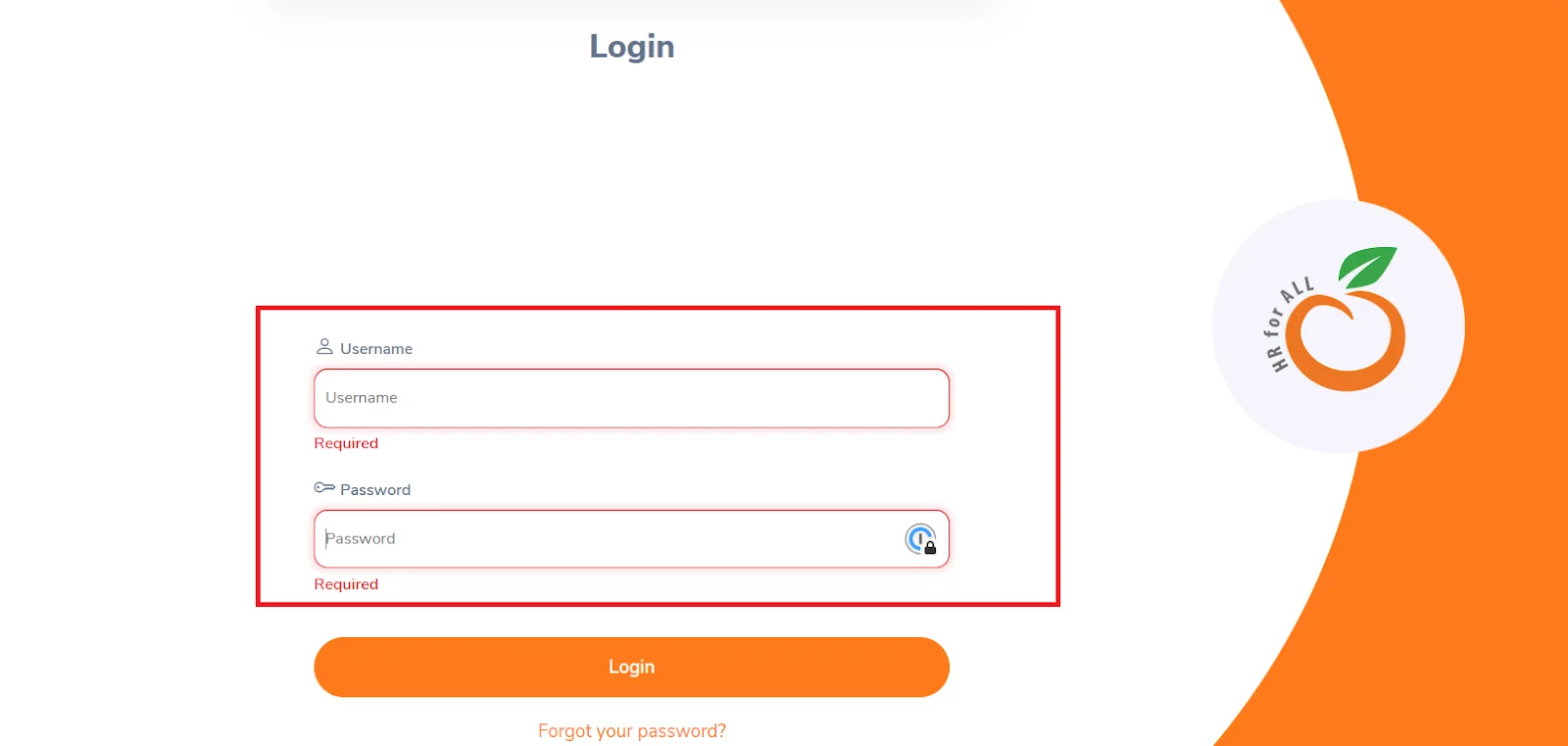
Functional Test Case 1: Field Required Message
- Description: Leave the fields blank and verify that the message "Required" is displayed.
- Expected Result: The message "Required" should be displayed.
The above-executed demonstration of Functional Test Case 1 is shown in the image below.
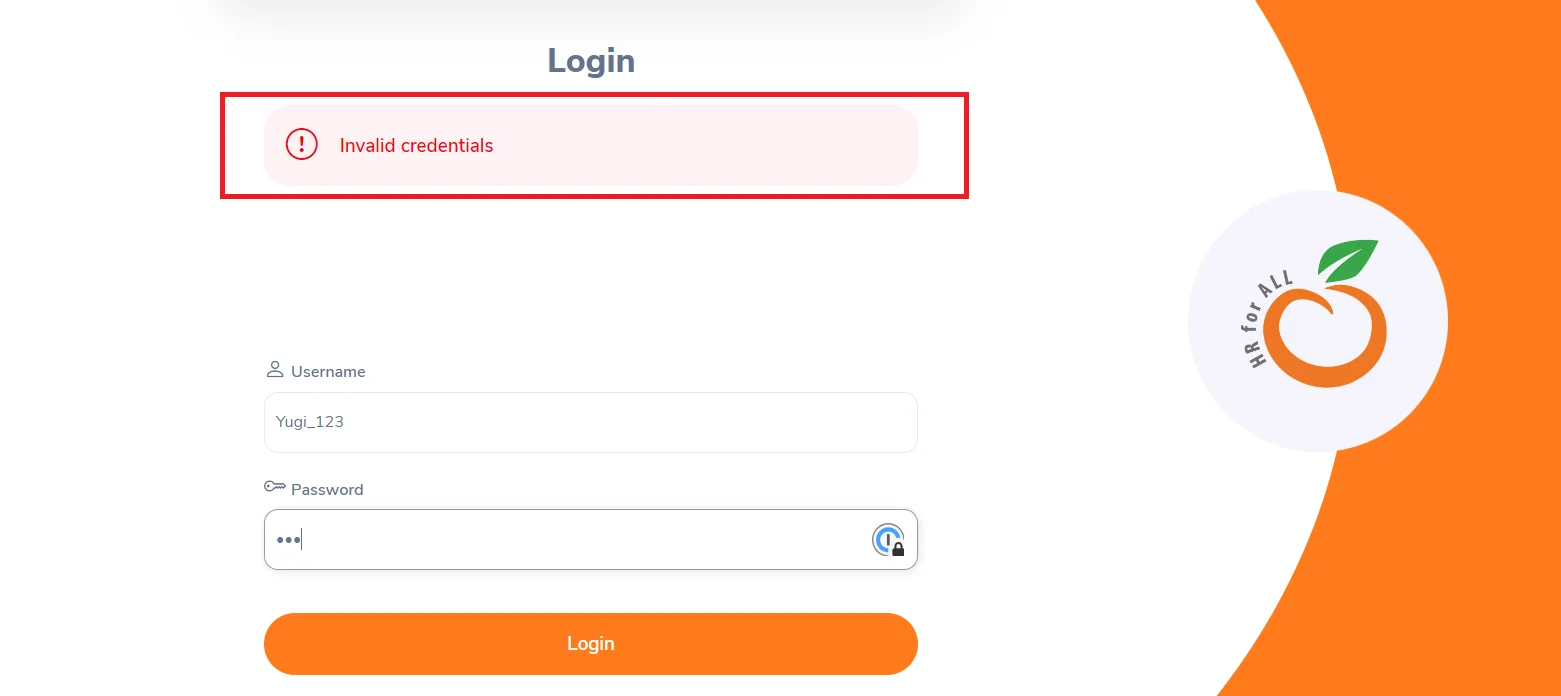
Functional Test Case 2: Invalid Credentials
- Description: Enter the incorrect username and password and verify that you receive an "Invalid credentials" message.
- Expected Result: The message "Invalid credentials" should be displayed on the login page.
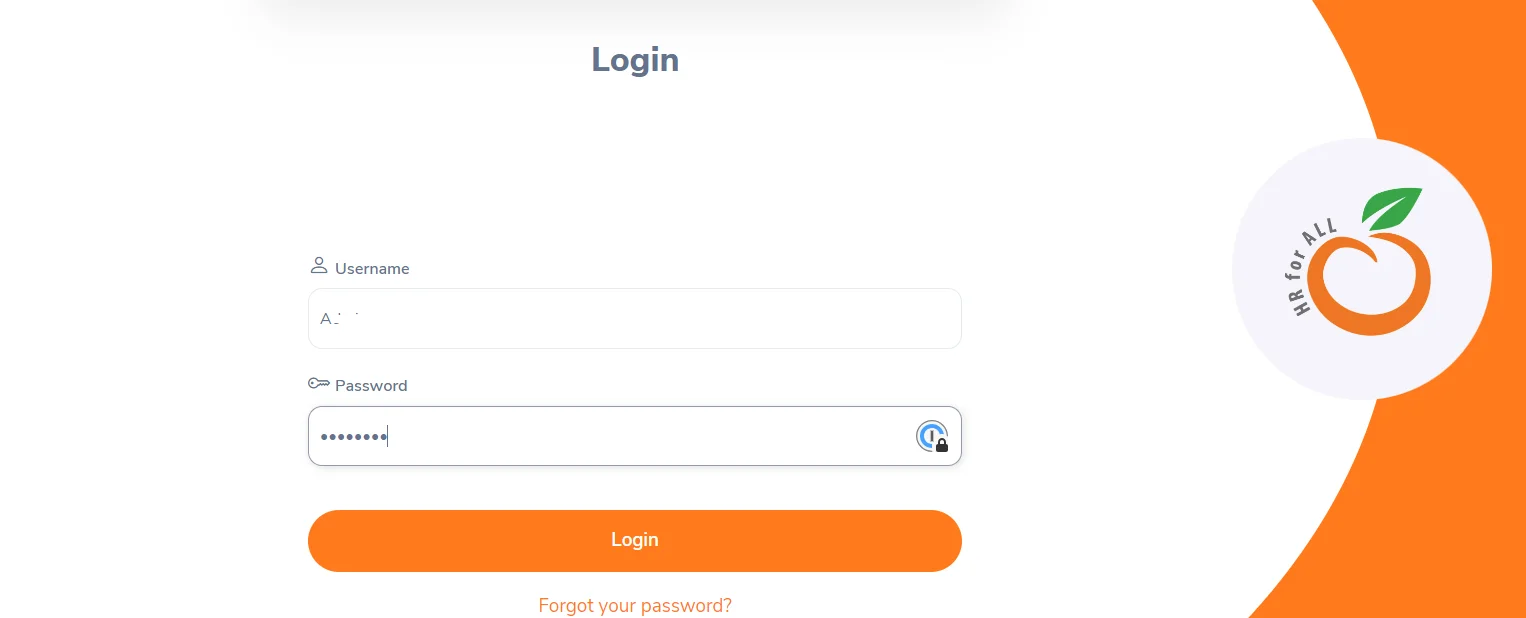
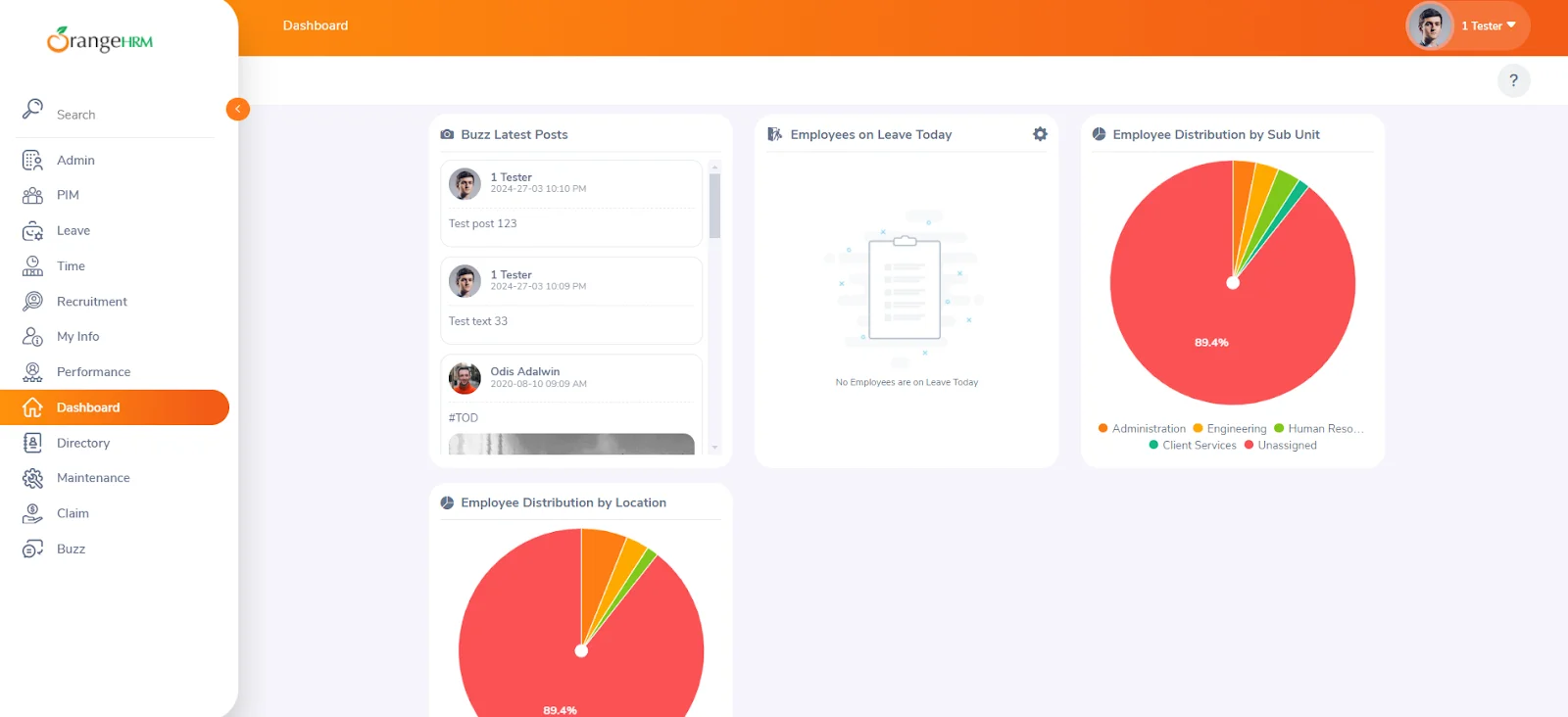
Functional Test Case 3: Successful Login
- Description: Enter the correct username and password and verify that you can access the HRM portal.
- Expected Result: Successfully logged in to the HRM portal.
The above-executed demonstration of Functional Test Case 3 is shown in the image below.
Now that we have understood functional testing with an example, we will learn the various functional testing techniques in the below section.
What Are the Main Functional Testing Techniques?
The main functional testing techniques are equivalence class partitioning, boundary value analysis, decision-based testing, state transition testing, and end-user or system tests.
Here are some techniques you might consider using to create a functional test suite.
- Equivalence Class Partitioning: It divides inputs into classes or groups expected to produce similar results, reducing the number of test cases while maintaining high test coverage.
- Boundary Value Analysis: It tests boundary values between equivalence classes, including minimum and maximum values and values inside these boundaries.
- Decision-Based Testing: It involves creating test cases based on decision points or conditions in the code, covering all user conditions.
- State Transition Testing: It tests systems in different states that transition based on certain conditions.
- End-user/System Tests: It tests the entire application to ensure it behaves as expected from the end-user's perspective.
- Ad-hoc Test: An unplanned test performed without specific test cases, relying on domain knowledge, intuition, and experience to find bugs.
Example: For an application accepting numerical inputs from 1 to 10, test cases might cover values less than 1, between 1 and 10, and greater than 10.
Example: For passwords with lengths ranging from 8 to 14 characters, test with values like 7, 8, 14, and 15.
Example: Testing login functionality, where entering wrong credentials should result in an error, and entering correct credentials should redirect the user to the home page.
Example: Testing an ATM, which can be in states like "idle," "card inserted," and "PIN entered," ensuring proper transitions between these states.
Example: Testing an eCommerce site by browsing, adding products to the cart, checking out, and reviewing orders to evaluate usability.
Example: A tester notices that sending a message with some combination of emojis causes the app to crash. This issue might have yet to be discovered through planned test cases.
Now that we have learned the various testing techniques. In the below section, we will learn the functional testing process in detail.
What Is the Functional Testing Process?
The functional testing process has five steps: identify and define the functions to test, compute expected outcomes, determine test inputs, execute the tests, and compare actual with expected results.
In this section, we will learn the functional testing process in detail before we get into how to perform functional tests.
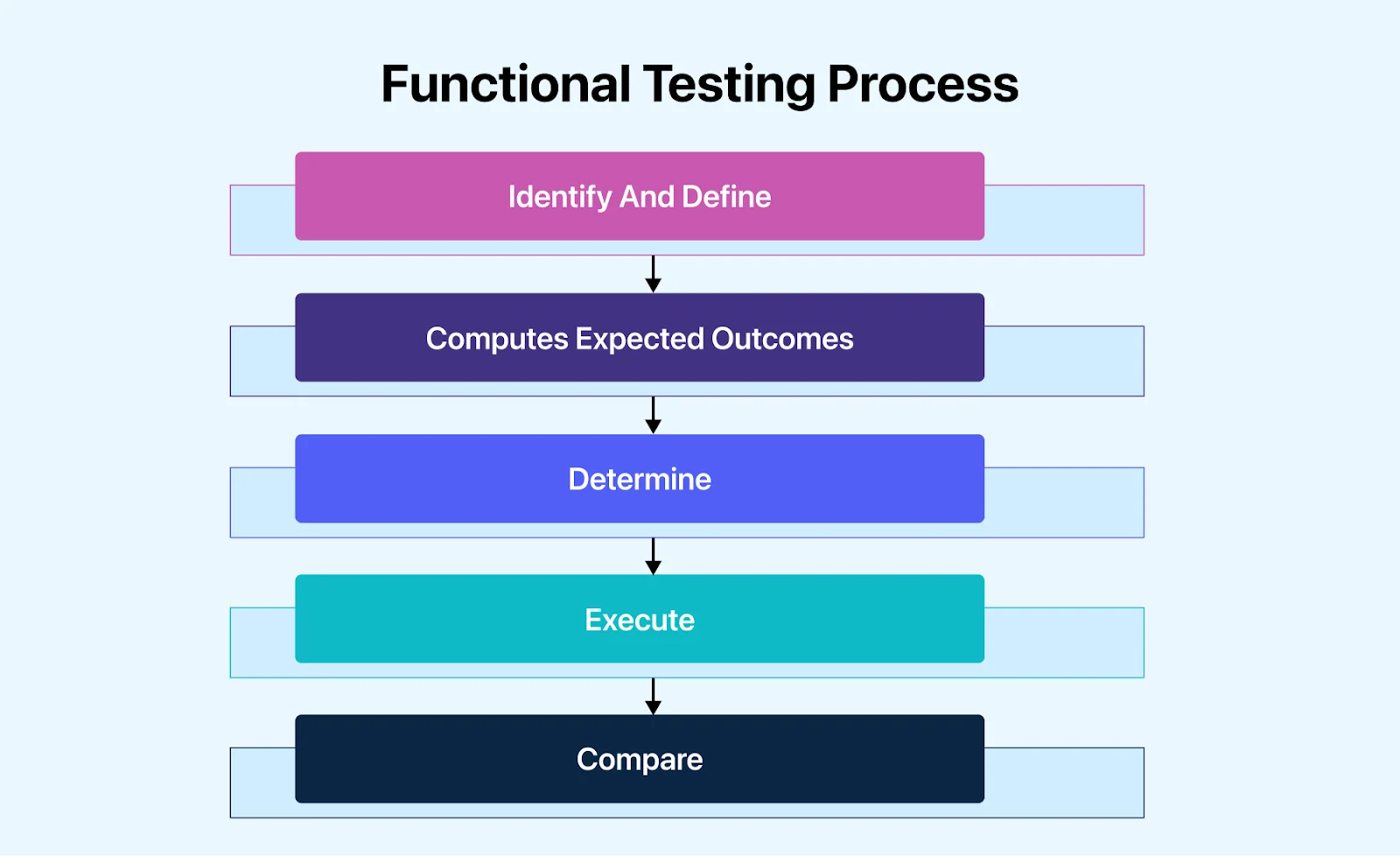
- Identify And Define: This step involves understanding the purpose of building the application. Start by defining your broader goals and then strategically narrow your focus on what you expect from the application. Testing goals should aim for successful test execution and efficient handling of errors and unexpected scenarios.
- Computes Expected Outcomes: This step involves computing expected outcomes by creating input data scenarios based on a predefined functional specification that needs to be tested in the main component of the testing. Ensure the data simulates normal use conditions based on your identified test scenarios.
- Determine: This step involves determining the expected outcome (both negative and positive) based on the functional parameter you want from the test.
- Execute: This step involves writing and running the test cases to gather the test data.
- Compare: This step involves comparing the actual and expected results once the test results are generated.
Now that we have learned the functional testing process, in the below section, we will understand why it is essential to automate your functional tests in detail.
Why Automate Your Functional Tests?
Automate functional tests to run the same regression checks on every build in minutes, cut repetitive manual effort, and catch broken features before they reach a release.
test automation architecture offers a streamlined approach to tasks, especially in Agile development. Automating functional tests, which are guided by strict internal processes, leads to more precise results. Automated functional tests can operate 24/7 without human intervention, making them significantly faster than manual tests. This speed reduces the likelihood of errors, such as skipping tests or entering inaccurate data.
Moreover, test automation allows for easy test modification by simply adjusting the test data. This flexibility enables efficient execution of sequential tests with slightly different data to compare results. Software quality assurance is critical before product release, impacting revenue and competitive advantage. Accelerating the process is crucial, but not at the expense of software quality.
With the market's demand for faster releases of more complex software, test automation becomes essential to maintaining confidence in quality while meeting tight release schedules. Automation markedly reduces the costs of errors. Teams that embrace test automation can test earlier, fail faster, and are less likely to discover a bug late in the development process.
Automated functional testing enhances productivity, collaboration, and visibility among stakeholders and quality engineers. Utilizing a software quality management platform that automatically generates reports, dashboards, and notifications and integrates with project management tools informs all parties about the product's latest status, facilitating rapid and data-driven decision-making.
By automating repetitive and time-consuming test cases, quality engineers have more time to develop insightful test scenarios, thoroughly test the product, and explore it under various conditions, including edge cases and exploratory testing.
You can rely on cloud testing platforms to leverage automation capabilities for functional testing. A cloud testing platform allows you to scale your tests and ensures extreme security for testing data. The cloud platform will enable you to run tests across diverse testing environments while managing the test infrastructure. One such cloud testing platform is TestMu AI.

We have learned the importance of implementing automation when performing functional testing, but it is only possible by utilizing automation testing tools.
In the below section, we will explore some automation testing tools to help us perform functional testing efficiently and save time.
What Are the Best Functional Testing Tools?
Popular functional testing tools include TestMu AI, Selenium, JUnit, QTP (now UFT One), SoapUI, and Avo Assure, covering web, unit, API, and codeless testing.
Numerous software testing tools are available to perform automated functional tests, but choosing one can be confusing. In this section, we list down some of the best tools that can help you perform functional tests and save manual efforts and time.
TestMu AI
TestMu AI is an AI-Native test orchestration and execution platform that lets you run manual and automated tests at scale across 3,000+ browser and OS combinations and 10,000+ real devices. This platform allows you to perform parallel testing to ensure your application is consistent and works as expected across various browsers, devices, and OS.
With TestMu AI, you can run manual and automated functional tests of websites and mobile apps on an online device farm. You can leverage other features of the TestMu AI platform, like visual regression testing, responsive testing, HyperExecute, LT Browser, and more.
Highlighted key features of TestMu AI include:
- It allows you to test cross-browser across a wide range of desktop and mobile browsers to ensure compatibility and consistency.
- It allows you to perform live interactive testing on browsers and devices to identify and fix issues quickly.
- It allows you to run your tests using various automation testing frameworks such as Selenium, Cypress, Playwright, and more.
- It allows you to perform visual testing to help you identify and fix inconsistencies by comparing screenshots of your web pages across different browsers and viewports.
- It ensures the security of your testing environment with secure tunnels, encrypted data transmission, and secure authentication methods.

Selenium
Selenium is the most popular and widely used automation testing tool. It is a suite of tools and libraries used to test various web applications. It is highly favored by quality analysts worldwide because of its customizable test automation capabilities in different languages and browsers.

JUnit
JUnit is a popular choice among developers for automating unit testing. Developed by Erich Gamma and Kent Beck, it is primarily used for scripting and automating repetitive test scenarios. While it is mainly used for unit testing, it can also be utilized to automate the functional testing of web applications using WebDriver.

QTP
This tool, formerly known as UFT, is designed for automated functional testing. It eliminates the need for manual monitoring of the system at intervals. It can effectively test web, desktop, and client-server applications. It is built on the VB scripting language, making it accessible to many users. UFT is among the most widely used automation tools in the testing industry.
SOAP UI
It is one of the leading tools for SOAP and web service testing, enabling the easy and rapid creation and execution of functional, regression, and load tests. Its user-friendly graphical interface provides a code-free test environment, allowing users to create and execute complex test cases using drag-and-drop options. Additionally, it allows for dynamic analysis of how well the functional tests cover SOAP and REST service contracts.
Avo Assure
Avo Assure helps automate various functionalities and features of a web application. It verifies that the software application works as expected and meets the specified requirements. Its test script generation and test case management capabilities can help teams efficiently conduct functional testing by automating the execution of test cases and ensuring that the application's functionalities work as intended.
Many other functional testing tools are available, including some mentioned above. You can explore more tools in this blog on the best functional testing tools and choose a tool that fits right based on your project needs.
How Is AI Changing Functional Testing?
AI speeds up functional testing by generating test cases and data from requirements, healing broken locators, and spotting edge cases, while testers still decide what correct behavior is.
Artificial Intelligence (AI) is the most talked about topic in today's era of software technology. Nowadays, it is being integrated into every testing method to ease the test process and maintain the accuracy of the software application. Its role in functional testing is no exception.
In software testing, Artificial Intelligence, with its machine learning ability, accelerates the test process and reshapes how to perform tests. It uses machine learning algorithms to improve test precision, productivity, and potency.
Particularly in functional tests, AI transforms it in different ways:
- AI-driven tests utilize machine learning models to create test scripts automatically. This script is mainly based on user interaction, eventually making the process faster and more accurate.
- AI helps create test cases by quickly identifying edge cases, key issues, and crucial test scenarios.
- AI can also create synthetic data sets that can easily replicate real-world scenarios.
- AI app testing tools can recognize and adjust to alterations in the user interface of an application, thereby minimizing the need for maintenance.
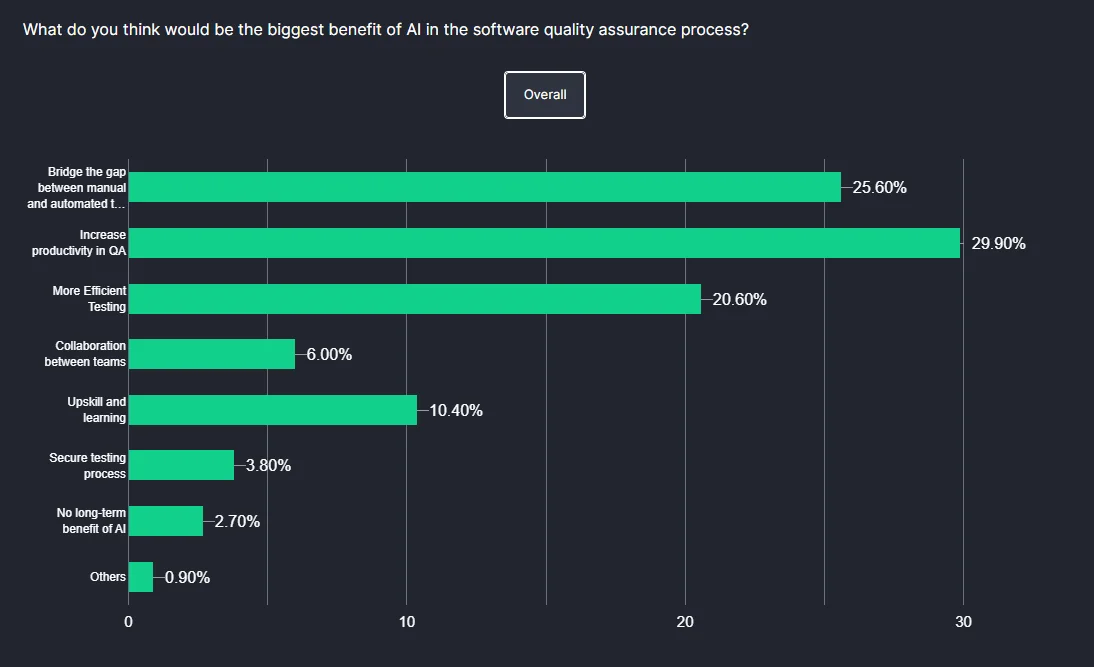
In TestMu AI's Future of Quality Assurance survey, 25.60% of respondents see AI as a means to bridge the gap between manual and automated testing, and 29.90% believe AI can enhance productivity in software quality assurance.
The newest shift is agents that own the whole loop. Playwright's test agents, for example, split the work into a planner that explores the app and produces a Markdown test plan, a generator that turns the plan into test files, and a healer that repairs failing tests. See how this applies to agent functional testing.
Review what the agents produce: a generated test is only useful if it asserts the requirement, and a healed step can hide a real defect if nobody checks why the original locator failed.
In the section below, we will learn about the various criteria for selecting the right automation testing tool to perform functional testing effectively.
How To Select The Right Automation Testing Tool?
Before starting with functional test automation, you must decide which tests to automate. Once the test definition is ready, select the right tools to help you perform the tests.
Below are some criteria to consider when selecting the right automation testing tool.
- Skill Requirement: Consider the technical skills required to use the tool effectively. Some tools may require programming knowledge, while others offer a codeless approach, which can benefit teams with limited IT backgrounds.
- Budget: Evaluate your team's budget for test automation. While automation can be costly initially, it often leads to a positive return on investment in the long term. Consider whether an open-source or commercial tool is more suitable based on your budget.
- Key Features: Look for key features that align with your team's requirements, such as supported platforms, compatibility with your applications, programming language support, integration with CI/CD pipelines, and reporting capabilities.
- Script Maintenance and Reusability: Consider the ease of script maintenance and reusability. The ideal tool should minimize the effort required for script maintenance and enable the reuse of test scripts for similar test cases.
- Integration Capabilities: Ensure the selected tool can integrate seamlessly with your existing CI/CD pipelines and external platforms. It ensures continuity in testing and improves test management and team collaboration.
- Technical Support: Evaluate the technical support available for the tool. For commercial tools, prompt customer support for technical issues is essential. A large and active user community can provide valuable support for open-source tools.
By considering these criteria, you can select an automation testing tool that best fits your team's needs and budget, ultimately improving the efficiency and effectiveness of your functional testing efforts.
The section below will leverage the cloud platform to demonstrate functional testing for better understanding.
How To Perform Functional Testing Over The Cloud?
Run functional tests on the cloud by testing manually on real browsers and devices from a cloud grid, or by pointing Selenium or Playwright scripts at the grid.
In this section, we will learn how to start with your first manual (or Real-Time) and automated functional test.
Real-Time Testing With TestMu AI
TestMu AI offers live testing, which will help you deliver error-free software applications as you perform tests to check the intended functionality of features on your website.
Here are the steps to run a manual functional test on the TestMu AI platform.
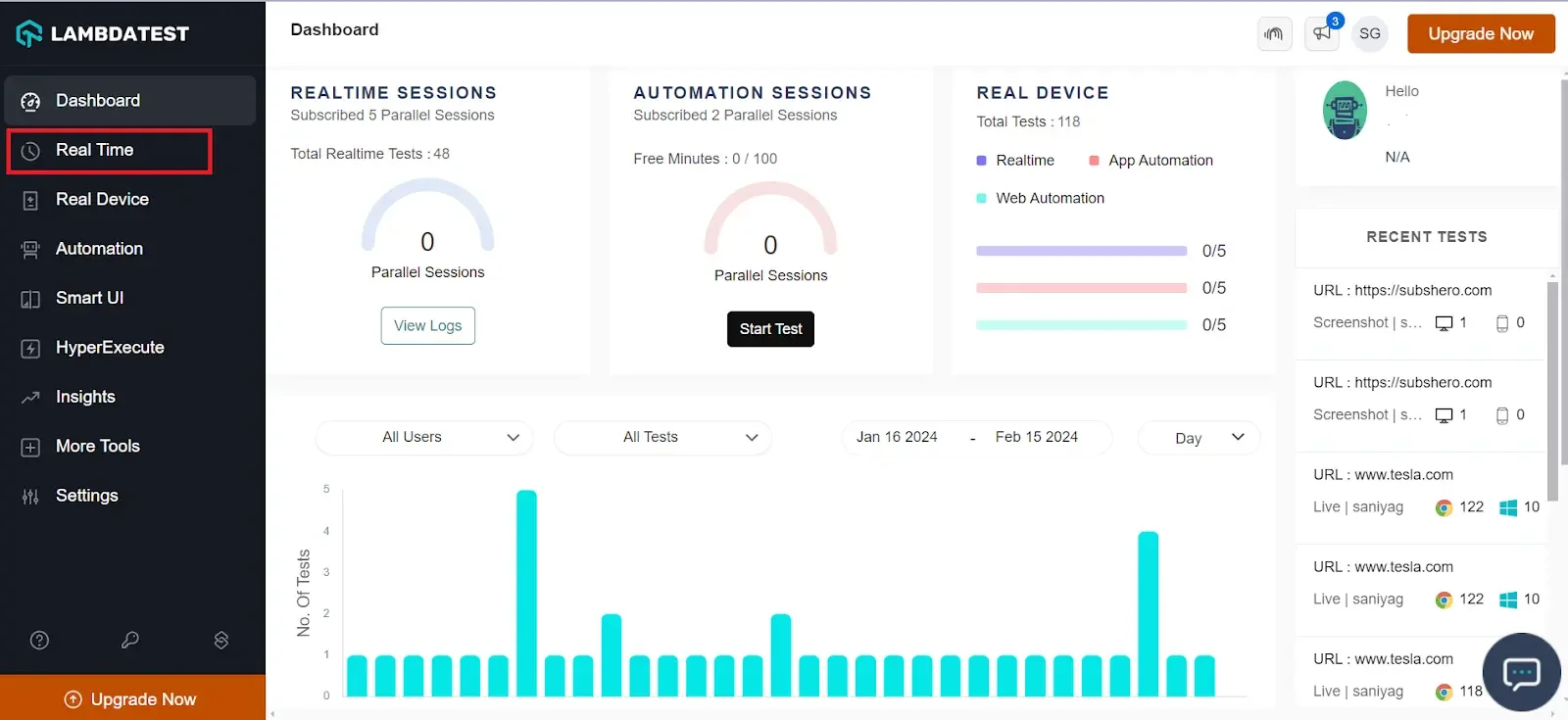
- Create a free account on TestMu AI.
- From the dashboard left menu, click on Real Time.
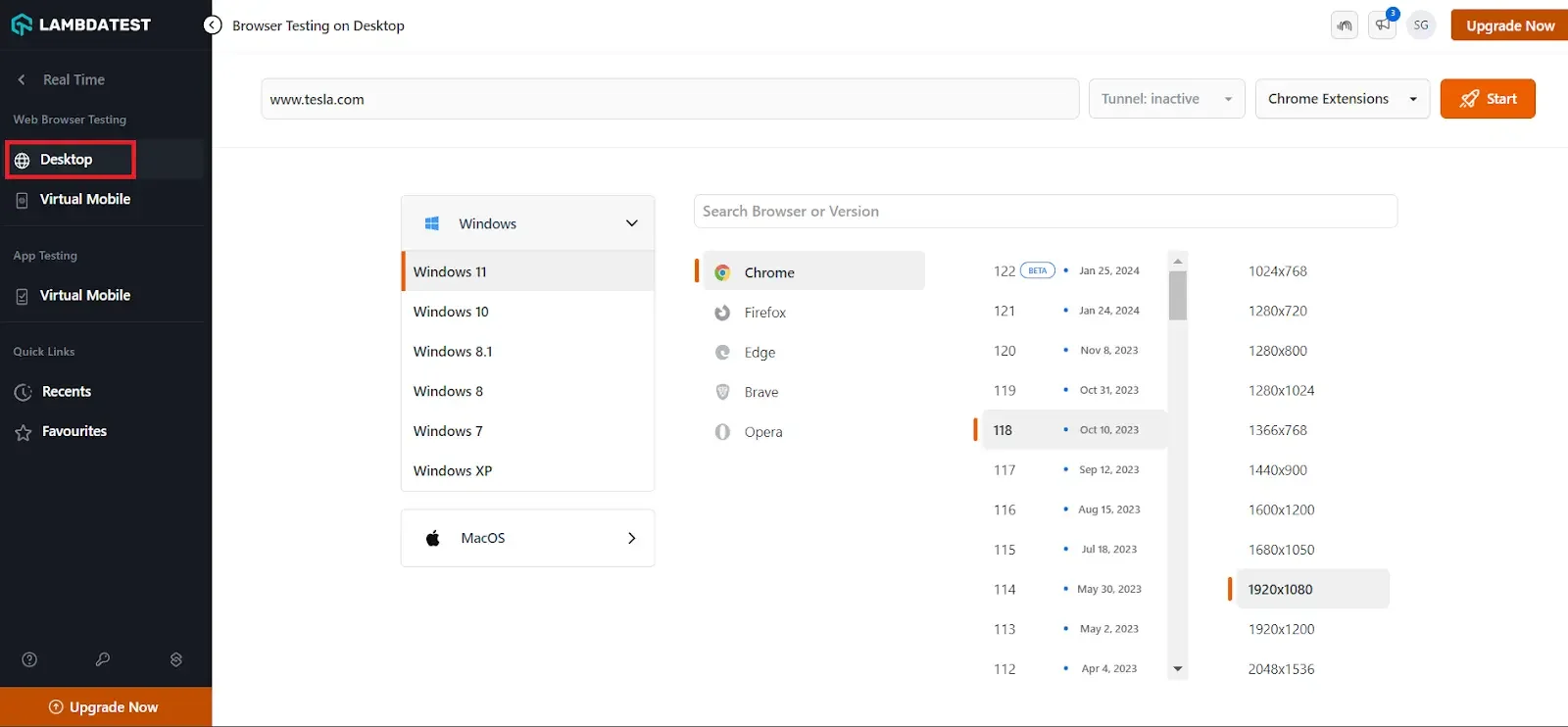
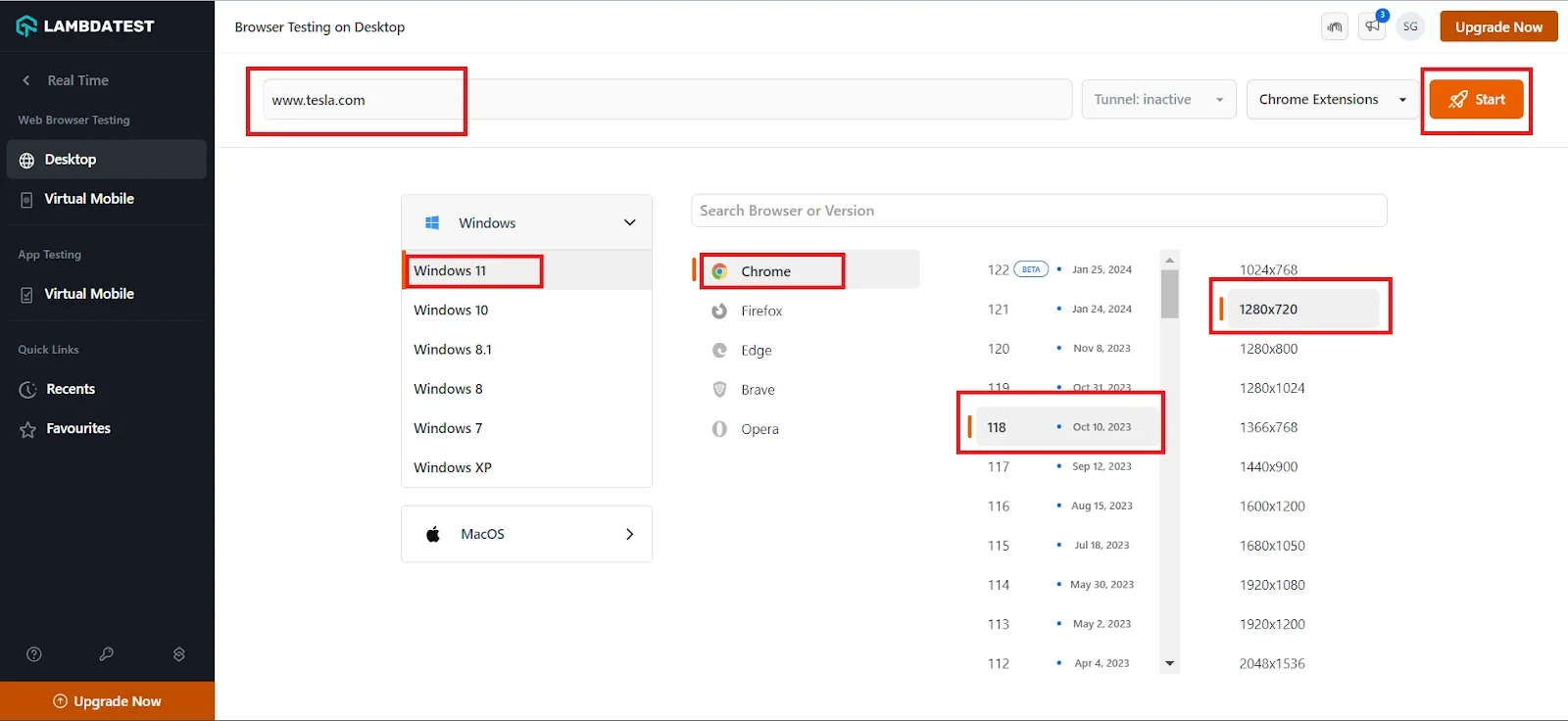
- Click on Desktop under the Web Browser Testing option from the left menu.
- Enter the URL, select the operating system, browser, browser version, and resolution, and click Start.
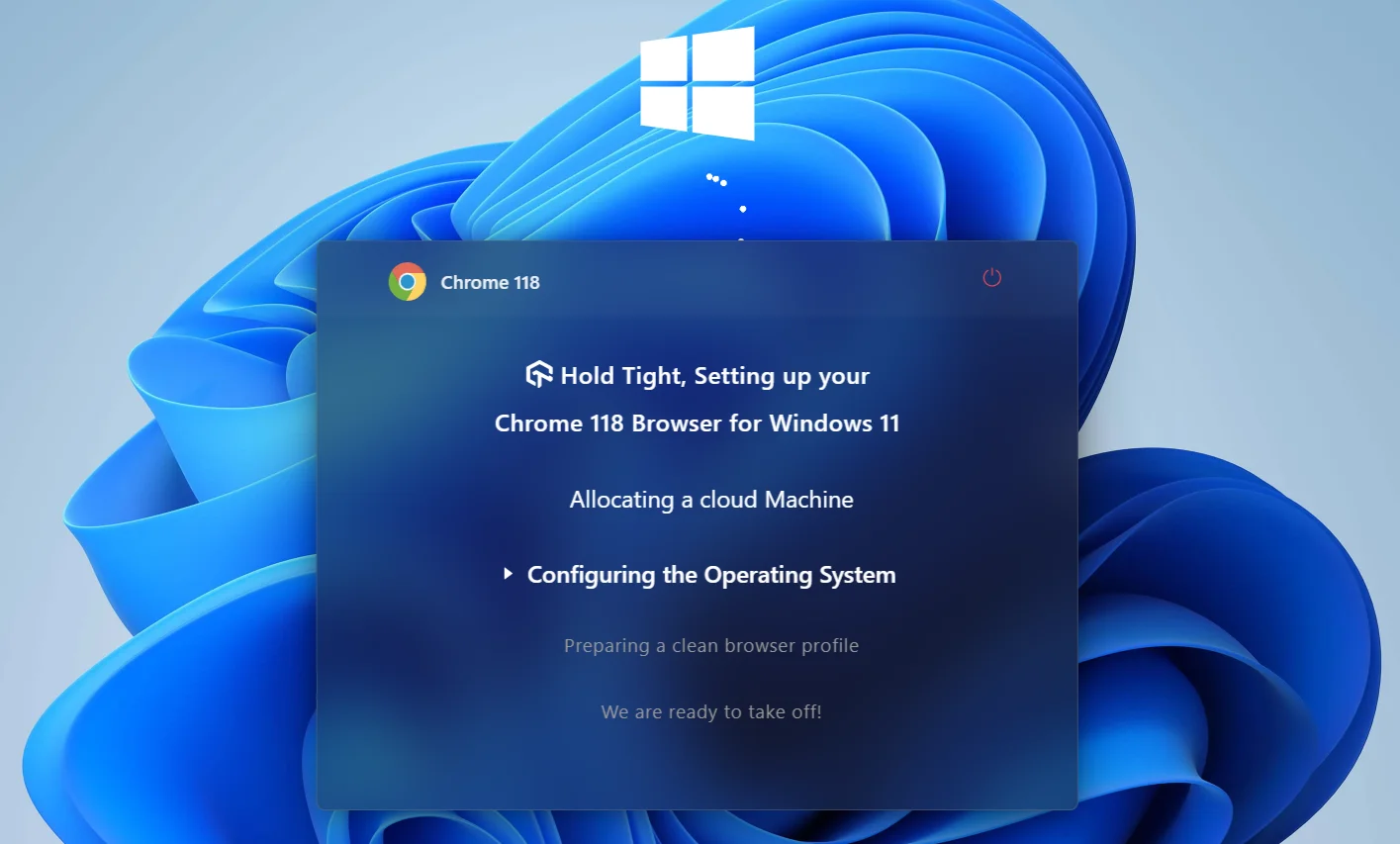
A virtual machine will be activated upon selecting your desired browser-OS combinations, allowing you to conduct manual testing for your software application.
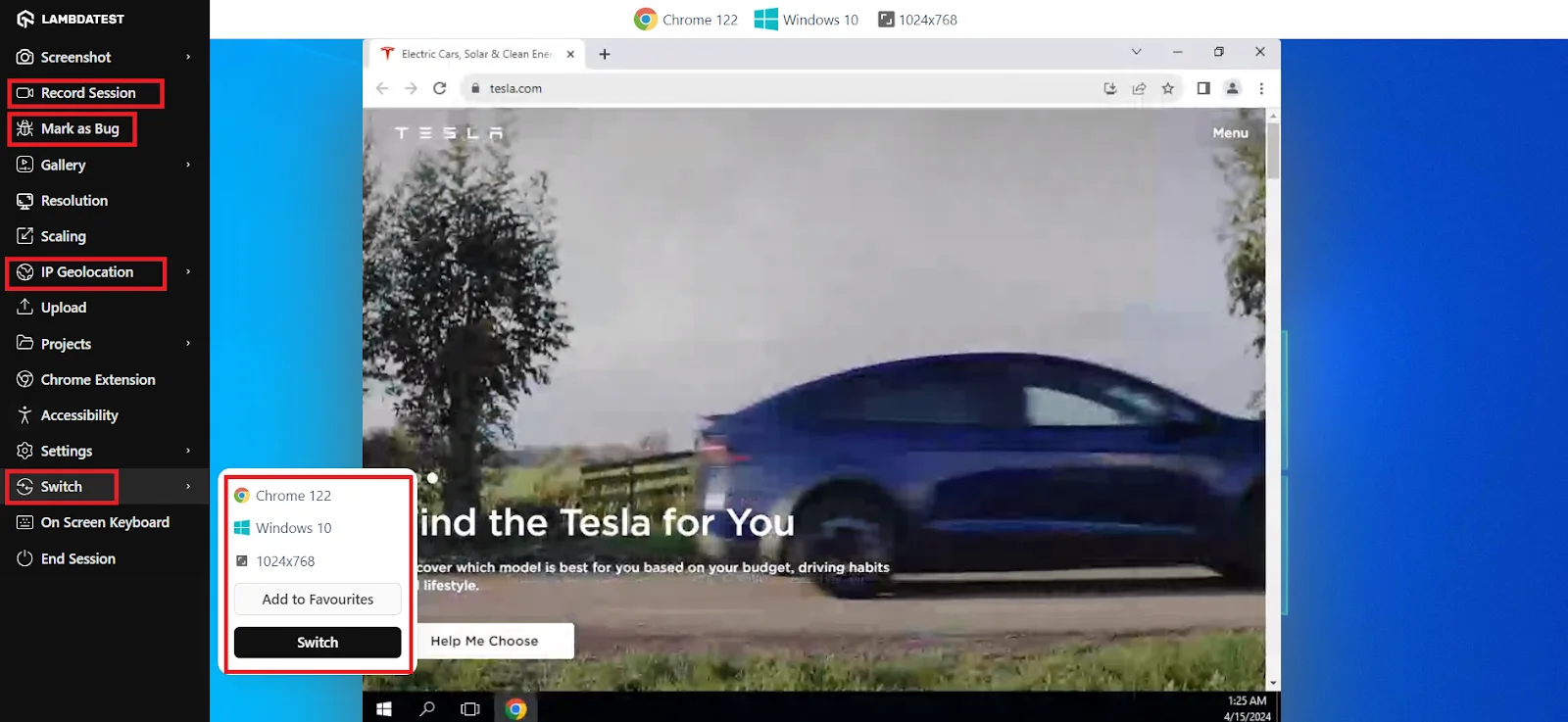
You will find various options in the menu on the left during manual testing. You can use Mark as Bug to capture and report any bugs you encounter to your team. The Record Session option lets you document all activities on the website. You can also use the IP Geolocation option to test your application from various locations. Additionally, you can simulate different testing using the Switch option to change the browser version, operating system, and resolution.
Automation Testing With TestMu AI
To enhance your automation testing and streamline the process, follow these steps to execute automated tests on TestMu AI. This demonstration focuses on running web automation tests.
Follow the steps to get started with your first automated functional test.
- Sign in to the TestMu AI account.
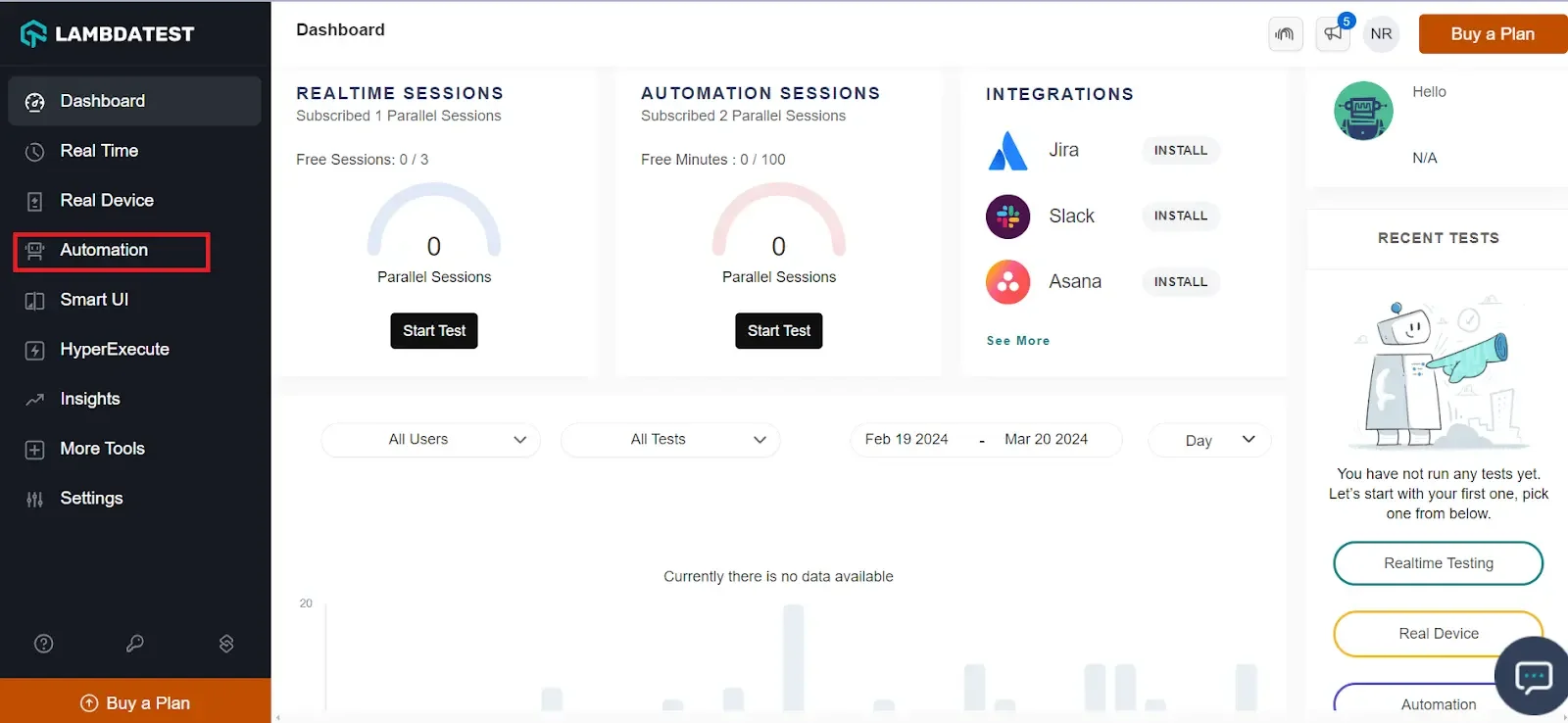
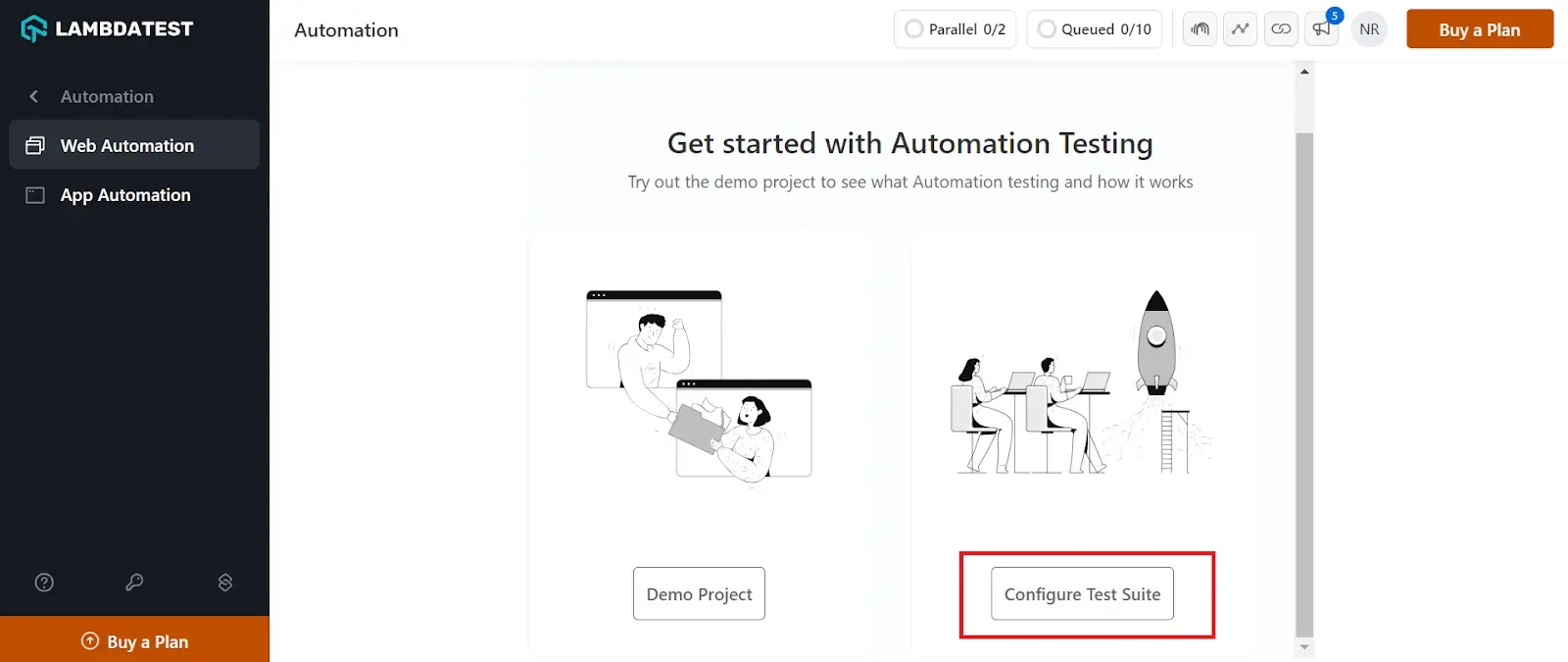
- From the dashboard, click on the Automation option from the left menu.
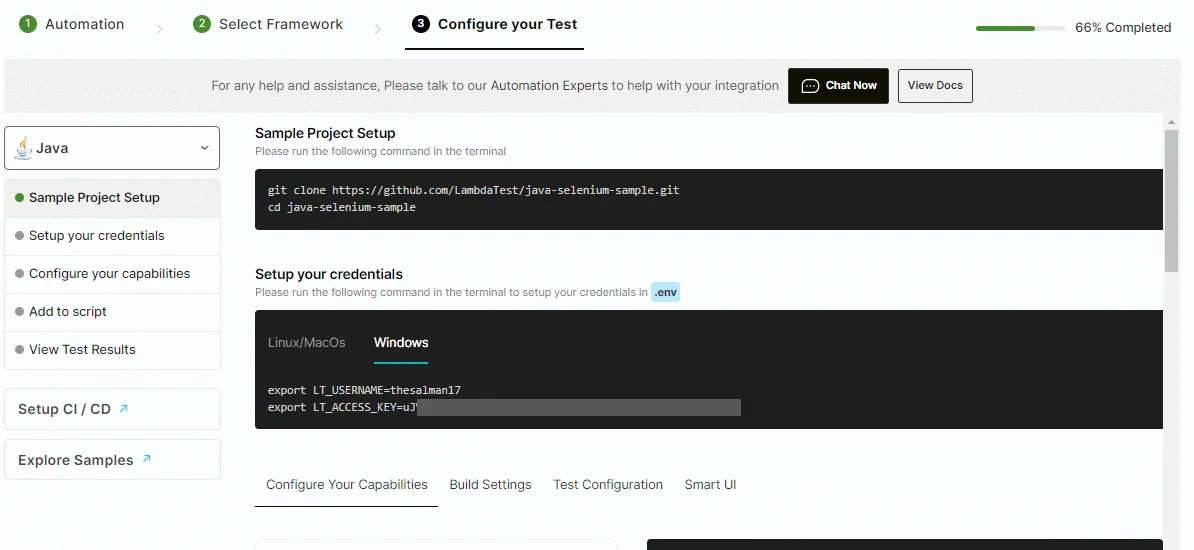
- Click the Configure Test Suite option and then select framework from the list of automation testing frameworks.
- Follow the on-screen instructions to complete the setup and configuration of your test.
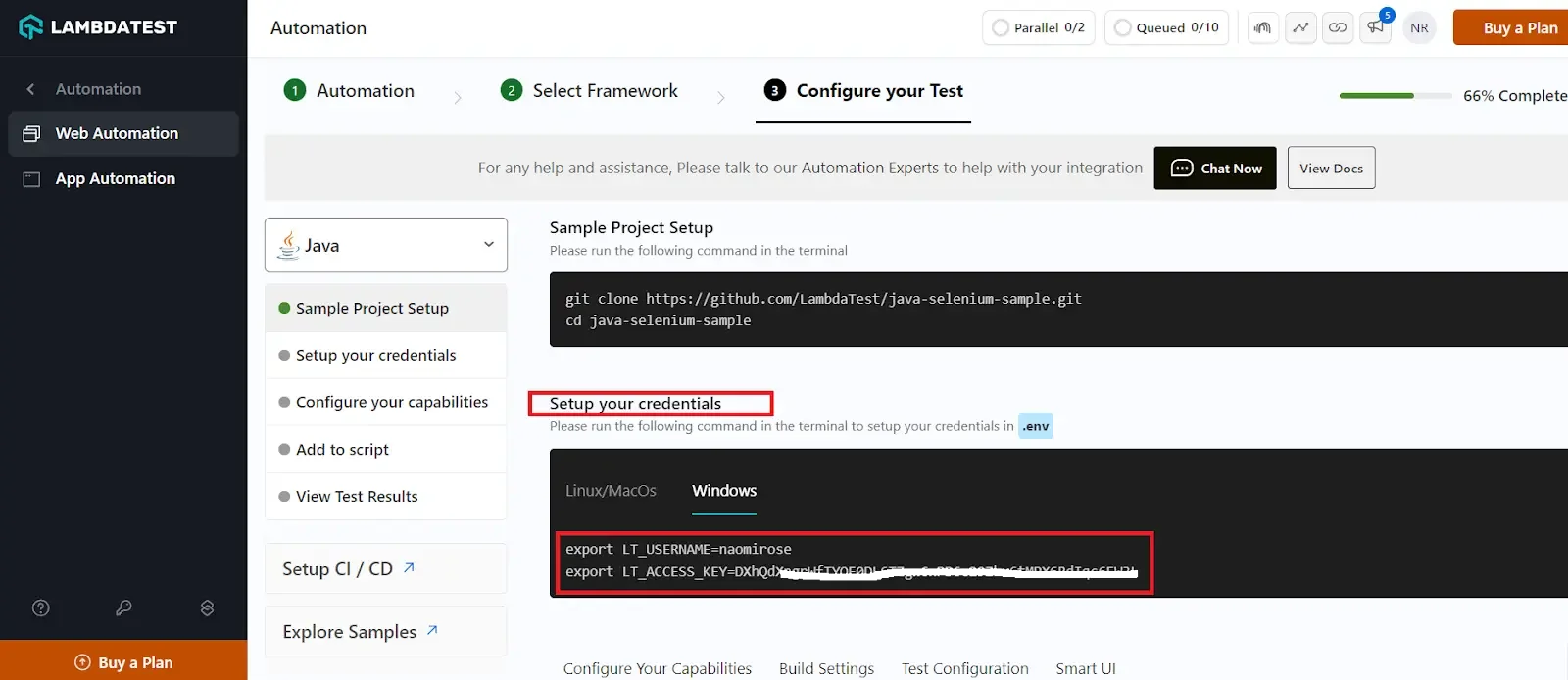
- Copy the TestMu AI credentials and paste them into the test scripts.
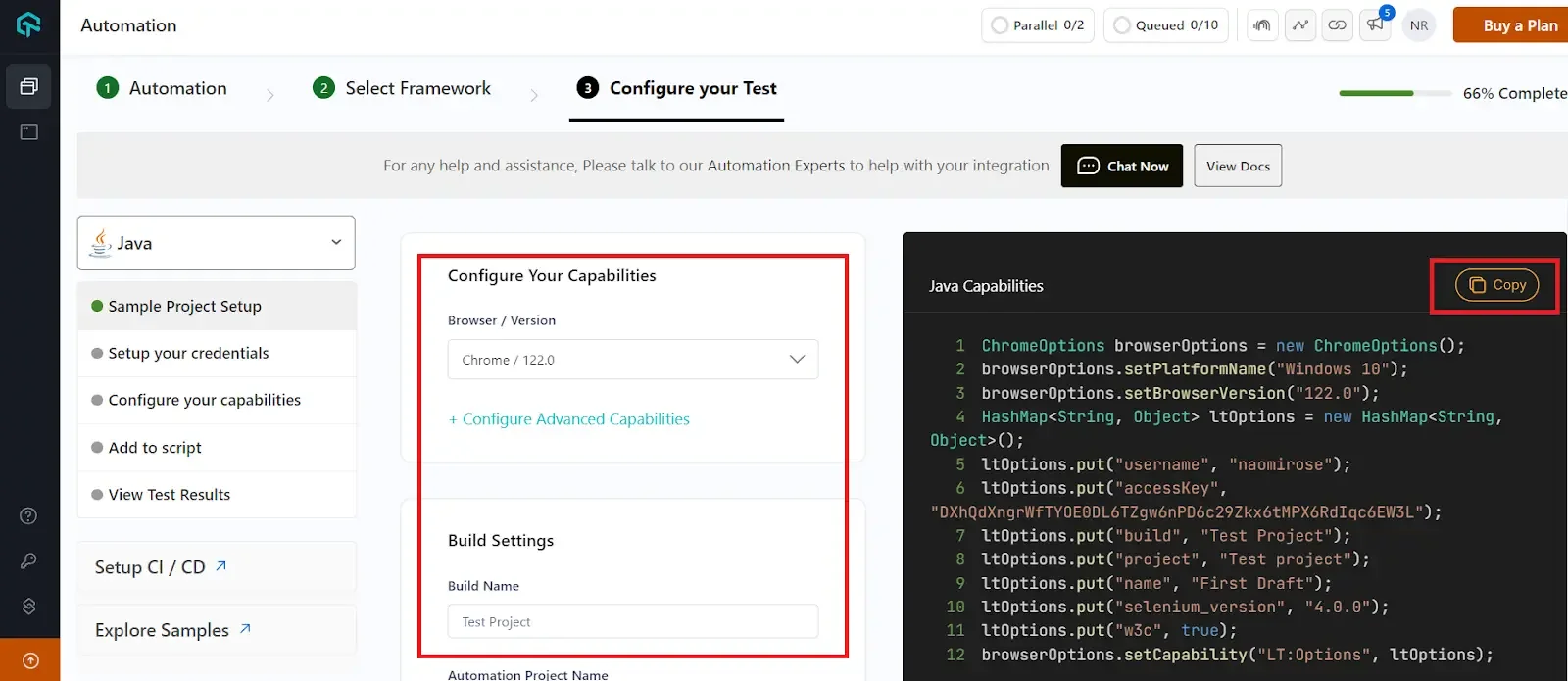
- Use the TestMu AI Capabilities Generator to choose the browser, browser version, operating system, and build name for your project. Then, insert these capabilities into the test script.
Watch this video tutorial to start your automation journey and get valuable insights.

To learn more about automation and other testing techniques, Subscribe to the TestMu AI YouTube Channel to catch up with the latest tutorials on Selenium testing, Cypress testing, and more.
What Are the Best Practices for Functional Testing?
Functional testing best practices are shifting left to test early, thinking like the end user, prioritizing critical features, and reducing and reusing test cases.
Running a functional test is an eminent way to ensure the excellent quality of your application. Here are some tips and tricks that will help you do it efficiently.
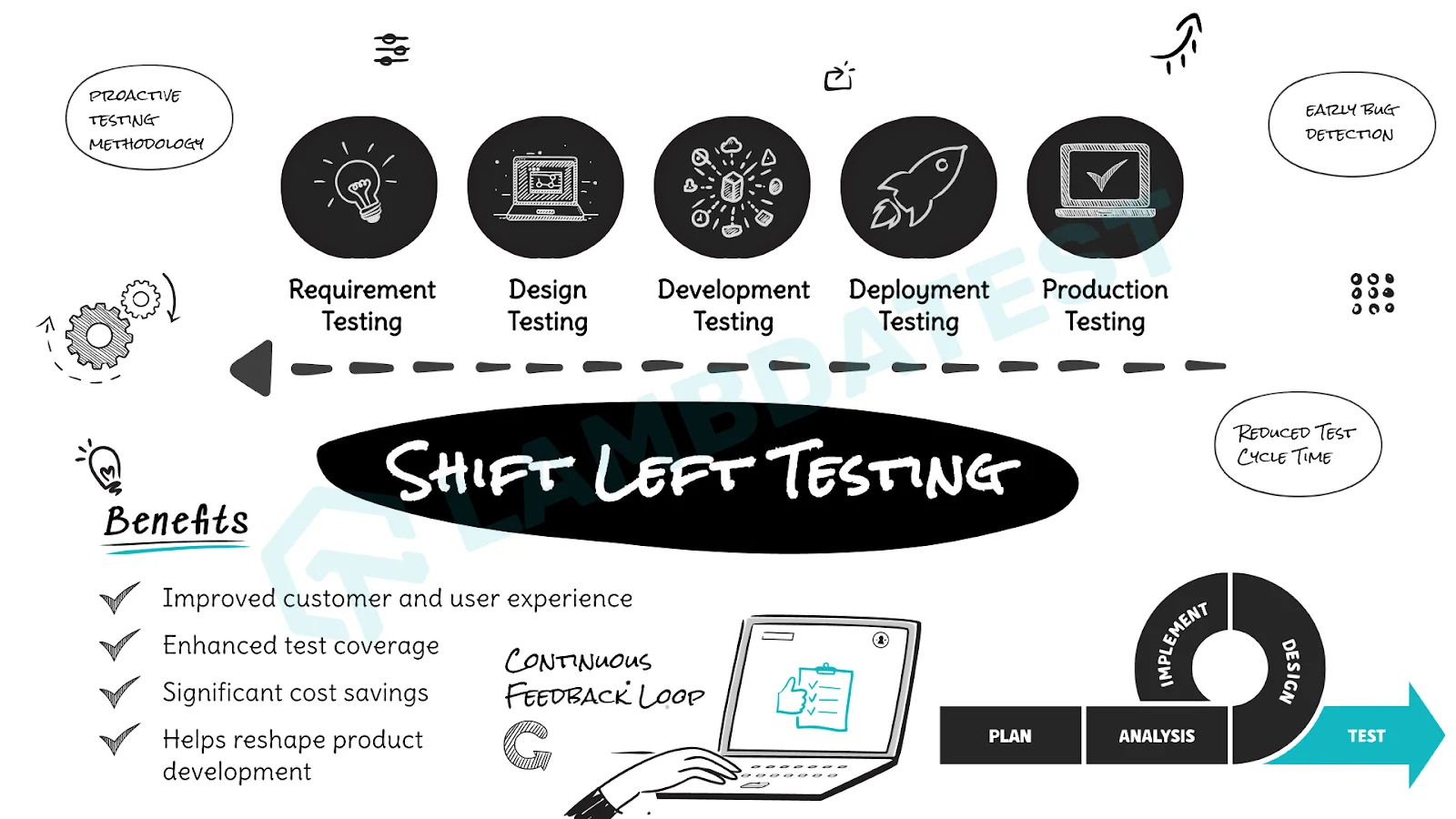
- Shift-Left And Test Early: Want to ship faster without any hurdles? It is time to adopt the shift-left testing approach. Detect issues with functions on your app or website early in the software development life cycle and prevent them from having a real impact. By testing functionality early, you can save money by identifying design issues with specific functions before they become too costly and delay the launch process.
- Understand the End-User's Perspective: Ensure the end user's thought process is included when executing functional tests. Defining the scenarios per your target audience can enable you to determine the cases, thus saving time precisely. Furthermore, each type of user has a different utilization; plan the navigation of the application post considering the audience.
- Prioritize: Remember, testers have limited time and resources; thus, proceeding vaguely can skip some of the features. Mark the application features on high priority and take their testing precedence over lower priority features.
- Reduce and Reuse: Developing new & unique test cases is time-consuming; instead, adopt the approach of reducing and reusing. Reuse the prepared test cases by writing them in simple languages and further modify them according to the need. This way, instead of creating new test cases every time, you will reduce your time & focus on other tasks than this.
Where Should You Start With Functional Testing?
Start functional testing with your most critical user flows: write requirement-based test cases, automate the stable ones in CI, and expand coverage wherever production defects appear.
As a developer, tester, or product manager, you aim to prevent failures and setbacks entirely. The key is to frame strategies that test every function or requirement. However, remember to focus on the "big picture" and resolve the higher priority task, preferably by automation testing before release. The aim is to build a product that embraces your user with a great experience. The rest of the bugs can be fixed based on the importance of the functionality you are testing.
Author

Nazneen Ahmad
Blogs: 39


Nazneen Ahmad is a freelance Technical Content SEO Writer with over 6 years of experience in crafting high ranking content on software testing, web development, and medical case studies. She has written 60+ technical blogs, including 50+ top-ranking articles focused on software testing and web development. Certified in Automation Basic and Advanced Training - XO 10, she blends subject knowledge with SEO strategies to create user focused, authoritative content. Over time, she has shifted from quick, keyword-heavy drafts to producing content that prioritizes user intent, readability, and topical authority to deliver lasting value.
Reviewer

Anmol Gupta
Reviewer
Anmol Gupta is Vice President of Product Management at TestMu AI (formerly LambdaTest), driving HyperExecute, the test orchestration cloud that runs and accelerates automated test execution. He led the development of the Unified Test Execution Cloud Platform and now leads a 30-member cross-functional product organization across product lines contributing $7M+ in revenue. He brings over nine years of experience and previously co-founded the SaaS company Timble as CTO, where he grew the team from 5 to 40 and launched an AI KYC platform that processed 600K+ applications in five months while cutting verification time from 12 minutes to under 30 seconds. Anmol holds an MTech and BTech from IIT Delhi.


Functional Testing FAQs
Did you find this page helpful?
More Related Learning Hubs
TestMu AI forEnterprise
Get access to solutions built on Enterprise
grade security, privacy, & compliance
- Advanced access controls
- Advanced data retention rules
- Advanced Local Testing
- Premium Support options
- Early access to beta features
- Private Slack Channel
- Unlimited Manual Accessibility DevTools Tests