

Power Your Software Testing with AI Agents and Cloud
The Native AI-Agentic Cloud Platform to Supercharge Quality Engineering. Test Intelligently and Ship Faster.


- TestMu AI (Formerly LambdaTest)
- /
- Learning Hub
- /
- Cross Browser Compatibility: Comprehensive Guide for Web Developers
Cross Browser Compatibility: Comprehensive Guide for Web Developers
Cross browser compatibility explained: why engines differ, the benefits, fixes for common issues, and results from testing Chrome, Edge, Firefox, and Safari.
Last Updated on:
Cross browser compatibility is whether a website looks and works the same in every browser your visitors use. When it fails, the page still loads, but a form control changes size, a layout wraps early, or a script calls an API that one browser never shipped.
I loaded the same unstyled page in Chrome, Edge, Firefox, and Safari on TestMu AI cloud to show where those differences still appear in 2026. To check your own pages, open them in the TestMu AI browser compatibility testing tool on 3,000+ real browser and OS combinations.
TL;DR
Cross browser compatibility is a website's ability to work correctly in every browser its visitors use. You get there by resetting default styles, detecting features instead of browsers, checking support on caniuse or Baseline, and testing one browser from each engine: Blink, Gecko, and WebKit.
- Blink (Chrome and Edge): Reserves 15px of layout width for scrollbars and supported all 41 newer features tested, so covering both browsers still tests one engine.
- Gecko (Firefox): Overlay scrollbars take no layout width, default form controls render narrower than Blink, and scroll-driven animations are missing.
- WebKit (Safari): Overlay scrollbars, the narrowest default controls, and no Temporal or requestIdleCallback. Every browser on iPhone and iPad uses this engine.
- Fix and test: Reset defaults, guard newer features with @supports, add fallbacks for missing APIs, and run one browser per engine on TestMu AI's 3,000+ browser and OS combinations.
14 of the 41 newer features tested were missing in at least one engine, so verify newer CSS and JavaScript in Firefox and Safari before release.
What Is Cross Browser Compatibility?
Cross browser compatibility is a website's ability to work correctly in every browser its visitors use. The page should display properly in Chrome, Safari, Firefox, and Edge, and fall back to a working version when a browser lacks a feature.
A typical failure looks like this: a checkout page renders correctly in Chrome, but in Safari the date field draws narrower, the layout reflows, and the payment button drops below the fold. No browser is wrong here; each one applied its own defaults to markup the developer never styled.

Note: Run manual and automated cross browser tests on 3,000+ browser and OS combinations with TestMu AI. Try TestMu AI free!
Why Do Browsers Render Websites Differently?
Every browser is built on a rendering engine that turns HTML and CSS into pixels, plus a JavaScript engine that runs your code. Different rendering engines implement web standards at different speeds and with different defaults, so the same page can look or behave differently from one browser to the next.
| Browser | Rendering Engine | JavaScript Engine |
|---|---|---|
| Chrome, Edge, Opera, Samsung Internet | Blink | V8 |
| Firefox | Gecko | SpiderMonkey |
| Safari | WebKit | JavaScriptCore |
Browsers that share Blink can still differ, because they ship features on their own release schedules and inherit OS-level differences in fonts, scrollbars, and native form controls. On iPhone and iPad, Apple's App Review Guideline 2.5.6 requires apps that browse the web to use WebKit, so Chrome and Firefox on iOS generally render pages with Safari's engine.
The engines are converging. WebKit's Interop 2025 review reports that the share of selected Interop tests passing in every browser rose from 29% at the start of 2025 to 97% by the end of the year. The test below shows where they still differ.
I Tested Cross Browser Compatibility in 4 Browsers
Testing only in Chrome tells you little about your Firefox and Safari visitors. I ran the same unstyled page in Chrome, Edge, Firefox, and Safari on TestMu AI cloud to see where the engines still split.
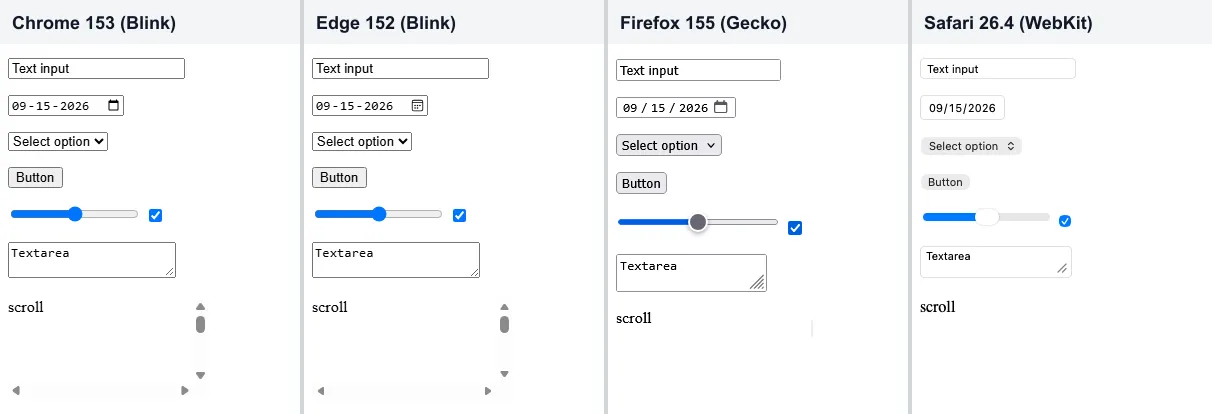
| Browser | Engine | Text input width | Scrollbar width | Notable gaps |
|---|---|---|---|---|
| Chrome 153 | Blink | 177px | 15px | None of the 41 features tested |
| Edge 152 | Blink | 177px | 15px | None of the 41 features tested |
| Firefox 155 | Gecko | 164.7px | 0px | Scroll-driven animations, text-wrap: pretty |
| Safari 26.4 | WebKit | 155.9px | 0px | Temporal, requestIdleCallback |
- Chrome and Edge matched exactly - Every control came out the same size and both supported all 41 features, so testing the pair covers one engine.
- Firefox and Safari split from Blink on layout - Control widths differed by up to 21px, and their overlay scrollbars took no layout width where Chrome and Edge reserved 15px.
- 14 of the 41 features were missing in at least one engine - Seven of those are Chromium-only device APIs such as WebUSB and Web Bluetooth that most sites never call; the ones a typical site would reach for are in the table above.
Takeaway: test at least one browser per engine, and treat any newer CSS or JavaScript feature as unverified until it passes in Firefox and Safari.
Benefits of Cross Browser Compatibility
- Every visitor completes the same tasks - Sign-up, search, and checkout behave the same in Safari and Firefox as they do in Chrome, so no slice of your traffic hits a dead end.
- Broken flows stop costing you orders - A checkout button that does not respond in Safari throws no error on your server, so catching it in testing is the difference between a fixed bug and an unexplained conversion dip.
- One WebKit fix covers iPhone and iPad traffic - Because iOS browsers generally use Safari's engine, a WebKit fix reaches most iPhone visitors whichever browser app they open.
- Accessibility holds up in every engine - Native controls, focus styles, and the accessibility tree differ between engines, so checking each one keeps keyboard and screen reader journeys working.
Common Cross Browser Compatibility Issues and Solutions
Each fix below targets a difference measured in the test above or documented for current browsers. For deeper dives, see the guides to CSS browser compatibility issues and JavaScript cross browser compatibility issues.
CSS Defaults and the Box Model
Each engine ships its own user-agent stylesheet, so margins, headings, and form controls start from different values. A reset or a normalizing stylesheet such as Normalize.css gives every browser the same baseline, and a global border-box rule keeps width math identical once padding is added:
*, *::before, *::after {
  box-sizing: border-box;
}
Form Controls
Form controls are drawn with native OS widgets, which is why the text input, date picker, and select measured differently in every engine I tested. Remove the native appearance and set the font, size, and border yourself so every browser starts from the same blank slate:
button, input, select, textarea {
  appearance: none;
  -webkit-appearance: none;
  font: inherit;
  border: 1px solid #ccc;
  border-radius: 4px;
}
The newer customizable select (appearance: base-select) worked only in Chrome and Edge, so ship it as an enhancement rather than a baseline. More input-type differences are covered in this guide to form input type compatibility issues.
Scrollbar Width
Classic scrollbars take layout space and overlay scrollbars do not, which is the 15px versus 0px split from the test. Reserve the gutter explicitly so content does not shift or wrap when a scrollbar appears; scrollbar-gutter was supported in all four browsers:
html {
  scrollbar-gutter: stable;
}
Mobile Viewport Height
On mobile browsers, 100vh is measured as if the address bar were collapsed, so a full-height hero section can hide its bottom edge behind the toolbar until the user scrolls. The dynamic viewport units fix this, and dvh was supported in all four engines I tested:
.hero {
  min-height: 100vh;  /* fallback for older browsers */
  min-height: 100dvh; /* tracks the visible viewport as toolbars show and hide */
}
JavaScript APIs
Newer APIs usually land in Chromium first, and Safari 26.4 still lacked requestIdleCallback, Temporal, and scheduler.yield() in the test. Detect the feature, not the browser, and provide a fallback; transpilers like Babel convert new syntax, but missing APIs need a polyfill or a fallback path:
// Safari 26.4 has no requestIdleCallback, so fall back to setTimeout
const whenIdle = 'requestIdleCallback' in window
  ? (task) => requestIdleCallback(task)
  : (task) => setTimeout(task, 1);

whenIdle(() => loadRecommendations());
Vendor Prefixes
Some properties still need a prefix in shipping browsers. caniuse lists Safari's user-select support as prefixed, so -webkit-user-select stays in the stylesheet:
.product-card {
  -webkit-user-select: none; /* Safari */
  user-select: none;
}
Do not maintain prefixes by hand. Run Autoprefixer in your build so it adds exactly the prefixes your target browsers need and drops them when they are no longer required.
Fonts and Text Rendering
Default fonts differ before any web font loads. Chrome reported Times New Roman as the default body font, Firefox reported the generic serif family, and Safari reported -webkit-standard, while form controls used Arial, MS Shell Dlg 2, and system-ui. Declare a full font stack on the body and add font: inherit to controls, as in the form reset above, so text metrics match across engines.

Test for Cross Browser Compatibility: Top Strategies to Follow
To ensure cross browser compatibility, work through these strategies in order.
- Build your browser matrix from analytics - List the browsers and versions your users actually run, and cover at least one browser per engine. This guide to a browser compatibility matrix walks through the template.
- Check support before adopting a feature - Look up newer CSS and JavaScript on caniuse and check its Baseline status, as covered in the next section.
- Reset defaults and style controls explicitly - Apply the border-box, form control, and font fixes above so each engine starts from the same baseline.
- Enhance progressively - Build a layout every browser understands, then add newer features inside @supports so unsupported browsers keep a working page.
- Automate the matrix in CI - Run your existing Selenium or Playwright suite on TestMu AI's Automation Cloud, which executes it in parallel across 3,000+ browser and OS combinations and records network logs, console logs, video, and a command log for every run. Trigger it from your CI/CD pipeline on each pull request.
- Check responsive layouts side by side - LT Browser shows several device viewports at once while you build, so breakpoint bugs surface before a full test run.
- Monitor production errors by browser - Log uncaught JavaScript errors with the user agent attached, so a Safari-only failure appears as a cluster in your error tracker instead of a support ticket weeks later.
How to Check If a CSS or JavaScript Feature Is Supported
Look the feature up on caniuse.com before you use it, and read its Baseline label. According to web.dev's Baseline definition, "Newly available" means every core browser supports the feature, and "Widely available" means 30 months have passed since that point.
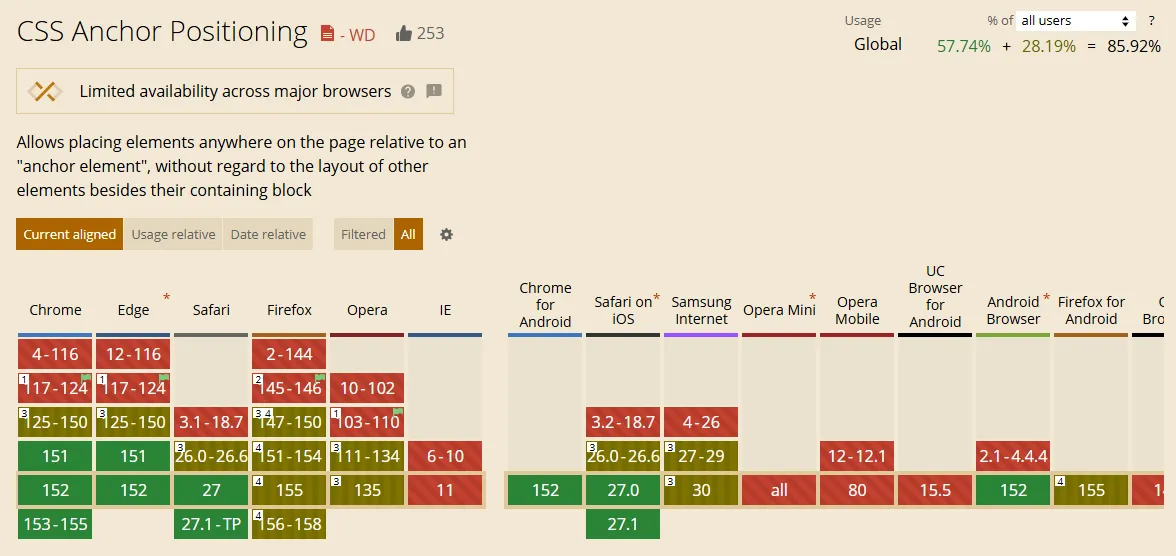
Support tables can disagree with a quick feature check. CSS anchor positioning passed CSS.supports() in all four browsers I tested, yet caniuse labels it "Limited availability across major browsers" and marks Firefox 155 and Safari 26 as partial support:
In code, guard the feature with an @supports rule so unsupported browsers get a working page instead of a broken one. Scroll-driven animations were missing in Firefox 155, so this reading-progress bar only appears where they run:
/* Every browser: no progress bar */
.reading-progress { display: none; }

/* Enhancement: only where scroll-driven animations are supported */
@supports (animation-timeline: scroll()) {
  .reading-progress {
    display: block;
    transform-origin: left;
    animation: grow linear;
    animation-timeline: scroll();
  }
}

@keyframes grow {
  from { transform: scaleX(0); }
  to { transform: scaleX(1); }
}
How to Check Cross Browser Compatibility of a Website
Cross browser compatibility testing means running your pages in real browsers to find rendering and feature differences before your users do. It is one part of broader compatibility testing, which also covers devices, networks, and operating systems.
The fastest check is a live session. TestMu AI Real-Time Testing opens your URL on any of 3,000+ browser, OS, and virtual device configurations in the cloud, with the browser's own DevTools, geolocation across 180+ countries, network throttling, session recording, and one-click bug logging to 65+ trackers.
- Open the page in one browser per engine, such as Chrome, Firefox, and Safari, and walk the critical flows: sign-up, search, and checkout.
- Inspect any difference with that browser's own DevTools, including Safari Web Inspector, inside the same session.
- Repeat the flows on physical Android and iOS hardware from the real device cloud, which has 10,000+ real devices.
- Catch visual regressions automatically with SmartUI visual testing, which compares screenshots across browsers and filters rendering noise such as anti-aliasing.
- Automate every flow that broke, so each release re-checks it on the full matrix.
For the full process, follow this cross browser testing tutorial, or compare platforms in this roundup of cross browser testing tools.

Conclusion
Start with one live session per engine: open your highest-traffic page in Chrome, Firefox, and Safari on TestMu AI and walk its main flow before your next release. The Real-Time Testing documentation covers launching that first session, and any bug you find there becomes a test case for your automated matrix.
Author

Shantanu Wali
Blogs: 8

Shantanu Wali is Vice President of Product Management at TestMu AI (formerly LambdaTest), where he owns several product lines across the testing platform, including the Real Device Cloud and the Digital Experience Testing Cloud. He has also contributed significantly to the development and scaling of KaneAI, TestMu AI's flagship GenAI-native testing agent that uses natural language to make software testing faster and more reliable in this AI era. He brings 7+ years of experience across software development and product management, starting as a backend developer at Infosys building solutions for Fortune 500 clients. Shantanu holds an MBA from IIM Calcutta and a B.Tech in Mechanical Engineering.
Reviewer

Shahzeb Hoda
Reviewer
Shahzeb Hoda is the Associate Director of Marketing and a Community Contributor at TestMu AI, leading strategic initiatives in developer marketing, content, and community growth. With 10+ years of experience in quality engineering, software testing, automation testing, and e-learning, he has authored and reviewed 70+ technical articles on software testing and automation. Shahzeb holds an M.Tech in Computer Science from BIT, Mesra, and is certified in Selenium, Cypress, Playwright, Appium, and KaneAI. He brings deep expertise in CI/CD pipeline automation, cross-browser testing, AI-driven testing practices, and framework documentation. On LinkedIn, he is followed by 3,700+ engineers, developers, DevOps professionals, tech leaders, and enthusiasts.


Cross Browser Compatibility FAQs
Did you find this page helpful?
More Related Learning Hubs
TestMu AI forEnterprise
Get access to solutions built on Enterprise
grade security, privacy, & compliance
- Advanced access controls
- Advanced data retention rules
- Advanced Local Testing
- Premium Support options
- Early access to beta features
- Private Slack Channel
- Unlimited Manual Accessibility DevTools Tests