

Power Your Software Testing with AI Agents and Cloud
The Native AI-Agentic Cloud Platform to Supercharge Quality Engineering. Test Intelligently and Ship Faster.


- TestMu AI (Formerly LambdaTest)
- /
- Learning Hub
- /
- Unit Testing: Types, Techniques, and Best Practices
Unit Testing: Types, Techniques, and Best Practices
Unit testing tutorial covering what it is, its types and techniques, frameworks, life cycle, how to write unit tests with examples, and best practices.
Last Updated on:
On This Page
- What is Unit testing?
- What Are the Types of Unit Testing?
- Why Do You Need Unit Testing?
- Who Performs Unit Testing?
- What Are the Benefits of Unit Testing?
- What Is the Unit Testing Life Cycle?
- What Role Does Unit Testing Play in a QA Strategy?
- What Are the Different Techniques of Unit Testing?
- How Does Unit Testing Differ From Integration Testing?
- What Are the Popular Unit Testing Frameworks?
- How Do You Perform Unit Testing?
- What Does a Unit Testing Example Look Like?
- What Are Mocking and Test Doubles in Unit Testing?
- What Are the Limitations of Unit Testing?
- What Are the Best Practices for Unit Testing?
- How Is AI Changing Unit Testing?
- Where Should You Start With Unit Testing?
Unit testing is a software testing method where individual components of the software are tested independently to verify each part functions correctly. It's a fundamental practice in software development, aimed at ensuring code quality and reliability by isolating each unit and validating its performance.
The objective is to isolate a section of code and test its correctness in the absence of everything around it. Doing that surfaces logic errors while they are still cheap, rather than in the later stages of the software testing life cycle (STLC) where the same defect takes a hotfix to remove.
TL;DR
Unit testing is the practice of testing one function or method in isolation, with its dependencies replaced by test doubles, so a failing test names a single piece of code. Developers write unit tests alongside the code, using Jest for JavaScript, pytest for Python, and JUnit 5 for Java, and run them on every commit.
What Should You Know Before Writing Unit Tests?
- Arrange-Act-Assert: The three-block structure of a unit test. Arrange the inputs, act by calling the function once, assert on the result. A second Act block means the test covers two behaviours and should be split.
- Test doubles: Stubs return canned values, mocks additionally record how they were called. Replacing a database or HTTP client with a double is what keeps a unit test fast and deterministic.
- Branch coverage: The share of conditional paths a suite executes. It is a more honest target than line coverage, which trivial getters inflate while untested branches stay hidden.
- Manual vs automated: Manual unit testing is flexible but does not repeat reliably. Automated unit tests are what make a regression suite viable, because they run unattended on every commit.
- White box testing: The test author reads the implementation and writes cases against its internal structure, covering each branch, loop, and early return. Most unit testing is white box.
- Black box testing: The test author works only from the unit's signature and documented behaviour, deriving cases from inputs and expected outputs. These tests survive a rewrite of the internals unchanged.
- Gray box testing: The test author knows the data structures and interfaces but not the full implementation, which suits testing a module through its public API.
- Coverage limits: A green unit suite says nothing about whether two modules agree or whether the page renders in a browser, because unit tests never load the application.
How Do You Run a Large Unit Suite Quickly?
Split a large unit test suite across machines rather than running it end to end on one. TestMu AI's HyperExecute discovers the test entities in a suite and distributes them over parallel just-in-time VMs, so wall-clock time falls to roughly the slowest single task instead of the sum of all of them.
What is Unit testing?
Unit testing is a software development practice where individual components of a program are tested in isolation to confirm they behave correctly. It is performed mainly by developers against the smallest units of code, such as a single function or method, so that a defect is caught at the point it was written rather than after it has been wired into a feature.
The Jest test below checks a multiplication function against one known input pair and one expected result. The three comments mark the Arrange, Act, and Assert blocks that every unit test is built from.
// Function to test
function multiplication(a, b) {
  return a * b;
}

// Unit test for multiplication
test('multiplies two positive numbers', () => {
  // Arrange
  const a = 5;
  const b = 10;
  // Act
  const result = multiplication(a, b);
  // Assert
  expect(result).toBe(50);
});
Unit tests are designed to run quickly and often, one at a time or all together. Keep them simple and readable even when the code under test is not, because a test nobody can read is a test nobody will maintain. Unit tests run before integration testing, which is what makes them the cheapest place to catch a logic error. They can be written by hand or generated with automated testing tools.
What Are the Types of Unit Testing?
The two types of unit testing are manual unit testing, where a developer runs and checks each unit by hand, and automated unit testing, where a framework runs the tests.
Manual
In manual unit testing a developer writes the test steps in a document and walks the code through them by hand, usually in a debugger or a REPL. It gives a close reading of the code and needs no tooling, which is why it survives on small codebases and one-off spikes. It does not repeat reliably: the same check run twice by two people produces two slightly different results, and nothing runs it on the next commit.
Automated
Automated unit testing encodes the same checks as code that a test runner executes on demand. The runner reports pass or fail per test, so the result is identical on a laptop and in CI. This is what makes a regression suite possible: a suite of a few thousand automated unit tests can run on every push, while the same coverage checked by hand would take days.
Why Do You Need Unit Testing?
Unit testing is the first level of web application testing, and the argument for it is economic rather than moral. The same defect costs progressively more to fix at each stage it survives: caught by a unit test, it is a one-line change in code the author is still looking at; caught in integration, someone has to work out which of several modules is wrong; caught in production, it costs a hotfix, a release, and whatever the failure did to users in the meantime.
Unit tests compress that curve by moving detection to the earliest possible point. They also change what the rest of the pipeline is for: when the logic is already covered, integration and end-to-end tests can concentrate on the seams between components instead of re-checking arithmetic that a unit test settled in milliseconds.

Who Performs Unit Testing?
Developers write unit tests, because writing one requires knowing what a function is supposed to return for a given input, and that knowledge lives with whoever wrote it. QA engineers and SDETs review the suite, spot the missing edge cases, and own the layers above it. Anyone with access to the source can run the tests, which matters in code review.
The tests are written in the same commit as the code, not handed over afterwards. That timing is the whole point: the author still has the edge cases in their head, and a failure surfaces before the code reaches anyone else.
You can even develop new features rather than worrying about the existing code. Unit testing can also be used to shorten the debugging time and assist developers in identifying bugs and flaws in the application before releasing it to the general public.
What Are the Benefits of Unit Testing?
Unit testing catches bugs early, makes refactoring safer, documents how code behaves, and cuts debugging time by pointing to the exact function that broke.
What a maintained unit suite buys a team:
- Precise failure location - a failing unit test names one function, so debugging starts at a line number instead of a stack trace through four modules.
- Cheap regression checks - the suite reruns on every commit at no marginal cost, which is what makes regression testing affordable at all.
- Safe refactoring - changing the internals of a function is only safe if something asserts the behaviour stayed the same. Without unit tests, every refactor is a guess.
- Executable documentation - a test names the input, the call, and the expected output, so it stays accurate in a way a comment does not. When the behaviour changes, the test fails and gets updated.
- Better interfaces - code that is hard to unit test is usually code with hidden dependencies. Writing the test first exposes that and pushes you toward dependency injection.
- Measurable coverage - a coverage report shows which branches no test has ever executed, turning a vague sense of risk into a specific list of untested paths.
What Is the Unit Testing Life Cycle?
The unit testing life cycle has four stages: plan the tests, write the test cases, run them, and review the results before fixing defects and rerunning.
Unit testing is usually the first stage in the software development life cycle. Here are the five phases a unit test moves through:
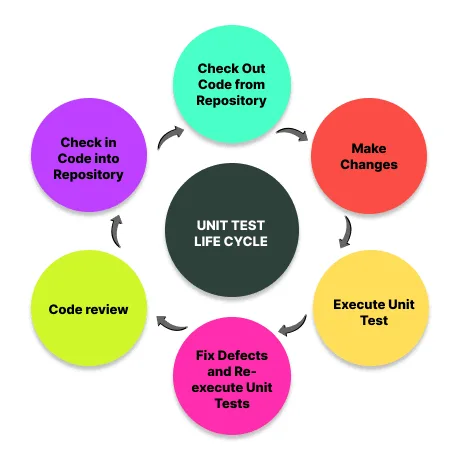
- Plan the cases - list the behaviours the unit has to satisfy: the expected path, the boundary values, and the inputs that should raise an error. Each one becomes a separate test.
- Write the test - create the test object, set the input values, and state the expected result. Under test-driven development this happens before the implementation exists, so the first run fails by design.
- Execute and compare - run the suite and let the runner compare actual against expected. The runner decides pass or fail, which is what removes the developer's optimism from the verdict.
- Fix what failed - a failure means either the code is wrong or the expectation was. Work out which before changing anything, because editing the assertion to match a bug is how a suite stops being worth running.
- Re-run and maintain - re-run the full suite after each change so a fix in one unit does not silently break another. Delete tests whose behaviour no longer exists instead of leaving them permanently skipped.
What Role Does Unit Testing Play in a QA Strategy?
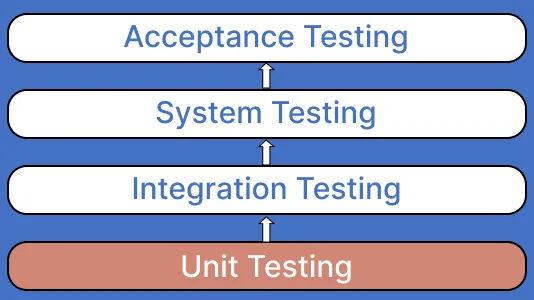
Unit testing is the base of a QA strategy: fast, developer-owned tests catch logic bugs before integration, system, and acceptance testing begin.
Unit tests occupy a specific slot in a QA strategy: they are the fastest tests you have and the most precise about where a defect lives. When one fails, the fault is almost always inside the function it names, which is why they belong at the bottom of the stack and run first.
What they cannot do is verify that units work together, because each one runs with its collaborators replaced. End-to-end tests drive the application the way a real user does and give the most realistic feedback, at the cost of being slow and vague about the cause. Integration tests sit between the two. The layers are complementary, not competing: unit tests tell you which function is wrong, end-to-end tests tell you the product is broken.
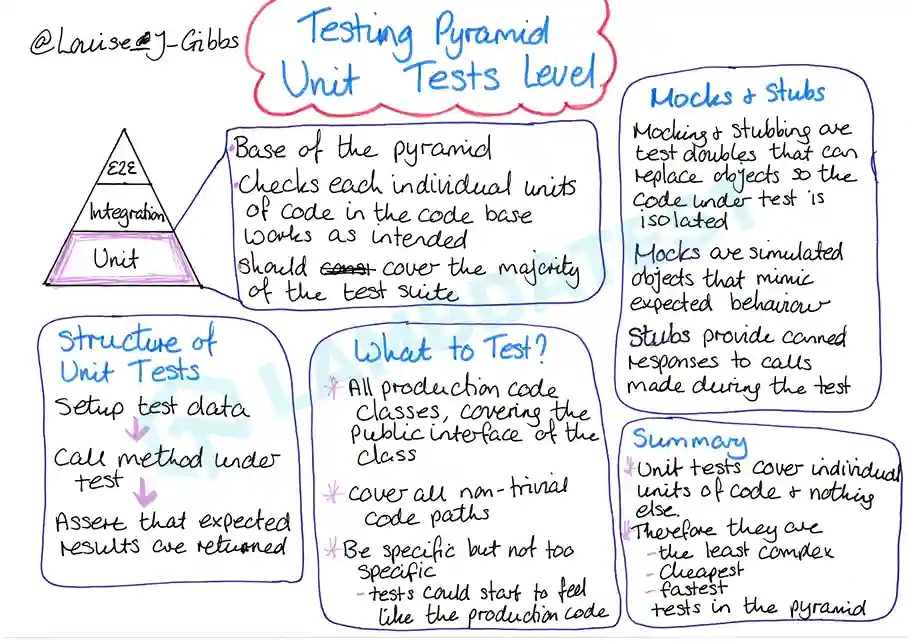
The test pyramid is the usual way to express that balance: many unit tests at the base, fewer integration tests above them, and a small set of end-to-end tests at the top. The shape follows from cost. Unit tests are cheap to write and fast to run, so you can afford thousands; end-to-end tests are slow and fragile, so you keep them to the handful of journeys that actually earn revenue.
What Are the Different Techniques of Unit Testing?
The main unit testing techniques are white box testing of internal logic, black box testing of inputs and outputs, and gray box testing, which combines the two.
Unit testing techniques are grouped by how much of the code's internals the person writing the test can see. The three categories below describe that visibility; code coverage then measures how much of the code the resulting tests actually execute.
- White box testing - also called glass box or transparent testing. The test author can read the implementation and writes cases against its internal structure, deliberately covering each branch, loop, and early return. Most unit testing is white box, because the developer writing the test also wrote the function.
- Black box testing - the test author works only from the unit's signature and its documented behaviour, with no view of the implementation. Cases are derived from inputs and expected outputs, so the tests survive a rewrite of the internals unchanged.
- Gray box testing - a blend of the two, also called semi-transparent testing. The author knows the data structures and interfaces but not the full implementation, which suits testing a module through its public API while knowing which edge cases the internals are likely to mishandle.
Within those categories, four checks account for most of the cases worth writing:
- Logic checks - does the unit compute the right result for the inputs it is expected to receive on the normal path.
- Boundary checks - what happens at the edges of the valid range: zero, one, the maximum, an empty list, a single-element list. Off-by-one defects live here.
- Error handling - does the unit raise the right error for invalid input instead of returning a wrong answer quietly. Assert on the error type, not just that something was thrown.
- Object-oriented checks - for methods that mutate state, assert the object is left in the expected state afterwards, not only that the return value is correct.
Code coverage reports which lines and branches the suite executed. Statement coverage counts the lines run, while decision and branch coverage count the conditional paths taken. Branch coverage is the more honest target of the two, and the reason is easy to see: a function containing a single if can reach full statement coverage from one test that never once exercises the false path. The lines all ran; half the behaviour was never checked.
How Does Unit Testing Differ From Integration Testing?
Unit testing checks one function or class in isolation with its dependencies replaced, while integration testing checks that several units work together correctly.
Unit testing forms the foundation for the testing process, preceding integration testing. While integration tests assess the overall functionality of the end product, unit tests concentrate on validating individual components within the software system. Although unit tests may not cover every aspect of the software's functionality, they serve as a swift and efficient method for identifying errors. This rapid execution allows for an increased volume of tests in a shorter span. These tests are typically scripted within a separate testing framework, ensuring their independence from the application itself.
Integration testing is ideal to ensure that all application pieces work together correctly. It involves running your entire application under realistic conditions and ensuring that all components work as expected. This type of testing is often used to ensure that no bugs are introduced when integrating new features into existing applications.
Integration testing covers both the behaviour of individual components and the contracts between them, which is why it catches the class of defect a unit test structurally cannot.
Here's a detailed comparison between Unit and integration testing.
| Unit testing | Integration testing |
|---|---|
| Unit testing focuses on the individual modules of the application. | Integration testing focuses on the combined modules of the application. |
| It is usually the first level of testing but can be performed at any time. | It is performed after Unit testing and before System testing. |
| Written by the developer who wrote the unit. | Written by developers, SDETs, or QA engineers who own the contract between modules. |
| Usually white box: the author tests against the implementation's branches. | Usually gray or black box: the author tests against the interface between components. |
| Dependencies are replaced with stubs or mocks. | Real collaborators are used, often including a database or an HTTP service. |
| It can be carried out without the completion of all the parts of the software. | Only be carried out after the completion of all the parts of the software. |
| It is easy to maintain, run and debug. | It's comparatively high maintenance and slower to run. |
| The issues are easy to find and can be instantly fixed. | The cost of fixing issues is higher and takes longer to resolve. |
| It is limited in scope and may not catch integration errors. | It has a wider scope and may detect system-wide issues. |
| It focuses on module specification. | It focuses on interface specification. |
What Are the Popular Unit Testing Frameworks?
Popular unit testing frameworks include Jest, Vitest, Mocha, and Jasmine for JavaScript, JUnit 5 and TestNG for Java, and pytest for Python.
A unit testing framework gives you three things: a way to declare a test, an assertion library to state the expectation, and a runner that reports pass or fail. Pick the one that is idiomatic for your language, because the ecosystem support matters more than the feature list. These are the most widely used Unit testing frameworks by language.
| Framework | Language | What it is good at |
|---|---|---|
| Jest | JavaScript, TypeScript | Zero-config setup, built-in mocking and snapshot testing. The default for testing React applications. |
| Vitest | JavaScript, TypeScript | Jest-compatible API with native ES module support. The faster choice on Vite-based projects. |
| Mocha | JavaScript | Minimal runner that leaves the assertion library to you, usually Chai. Strong async support. |
| Jasmine | JavaScript | Batteries-included BDD syntax with no external dependencies and no DOM requirement. |
| JUnit 5 | Java | The Java standard. Nested tests, parameterised tests, and extensions; integrates with Maven and Gradle. |
| TestNG | Java | Annotation-driven grouping, dependency between tests, data-driven runs, and built-in parallel execution. |
| pytest | Python | Plain assert statements, fixtures instead of setup methods, and a large plugin ecosystem. |
| unittest (PyUnit) | Python | Ships with the standard library, so there is nothing to install. xUnit-style classes and setUp methods. |
| NUnit | C#, .NET | Attribute-driven tests with a fluent constraint model and strong Visual Studio integration. |
For Vite-based JavaScript projects the Jest-or-Vitest decision is the one worth spending time on, and our Vitest vs Jest comparison covers the trade-offs. On the Java side, this walkthrough covers unit testing with JUnit end to end.

How Do You Perform Unit Testing?
Perform unit testing by isolating one unit, writing cases for normal, boundary, and error inputs, running them with a framework, and fixing failures before merging.
Every unit test, in every language, follows the same three-block shape known as Arrange-Act-Assert. Arrange the inputs and any test doubles the code needs, act by calling the unit once, then assert on what came back. If you find yourself writing a second Act block, the test is covering two behaviours and should be split.
- Pick the unit - one function or method with a return value or an observable state change. If you cannot describe what it does in a sentence, it is too big to unit test as it stands.
- List the cases before writing any - the normal path, the boundaries, and the invalid inputs. Writing the list first is what stops a suite from testing the happy path three times and nothing else.
- Name the test after the behaviour - "applies a standard percentage discount" tells you what broke from the runner output alone. "test1" does not.
- Arrange - set up the inputs and replace real dependencies with stubs or mocks so the test does not touch a network or a database.
- Act - call the unit exactly once and capture the result.
- Assert - compare against a hardcoded expected value. Never compute the expectation with the same logic the function uses, because a bug in that logic then passes its own test.
- Run it and watch it fail first - a test that has never failed has not been shown to detect anything. Under test-driven development this is automatic; otherwise, break the code briefly and confirm the test catches it.
- Wire it into CI - a suite that only runs when someone remembers to run it is a suite that silently rots.
Manual unit testing walks the same steps by hand in a debugger, which is workable once and unworkable on every commit. Everything below is automated, which is why this article shows real runner output rather than describing it. If you are coming to unit testing from scripted manual testing, the biggest change is that the runner, not the tester, decides whether a check passed.
What Does a Unit Testing Example Look Like?
The same unit is implemented and tested below in JavaScript, Python, and Java. The function applies a percentage discount to a price and rejects a percentage outside 0 to 100, which gives it a normal path, a boundary, and an error case: enough to need three tests rather than one.
JavaScript unit testing example
The code under test, in discount.js:
function applyDiscount(price, percent) {
  if (typeof price !== "number" || typeof percent !== "number") {
    throw new TypeError("price and percent must be numbers");
  }
  if (percent < 0 || percent > 100) {
    throw new RangeError("percent must be between 0 and 100");
  }
  return Math.round(price * (1 - percent / 100) * 100) / 100;
}

module.exports = { applyDiscount };
The node:test module facilitates the creation of JavaScript tests. The tests below live in discount.test.js and use that built-in runner, so there is nothing to install, and they translate almost line for line to Jest or Vitest.
const test = require("node:test");
const assert = require("node:assert/strict");
const { applyDiscount } = require("./discount");

test("applies a standard percentage discount", () => {
  // Arrange + Act
  const result = applyDiscount(200, 25);
  // Assert
  assert.equal(result, 150);
});

test("returns the full price when the discount is zero", () => {
  assert.equal(applyDiscount(49.99, 0), 49.99);
});

test("rejects a percentage above 100", () => {
  assert.throws(() => applyDiscount(200, 120), RangeError);
});
Running node --test on Node.js v24.13.0 produces this output:
$ node --test

- applies a standard percentage discount (0.8479ms)
- returns the full price when the discount is zero (0.1199ms)
- rejects a percentage above 100 (0.8447ms)
tests 3
suites 0
pass 3
fail 0
cancelled 0
skipped 0
todo 0
duration_ms 100.5207
The failing output is the one that actually matters, because that is what you read when a build breaks. Changing the last assertion to expect 6.7000001 from applyDiscount(10, 33) gives:
X keeps full precision on a repeating decimal (2.3806ms)
tests 1
pass 0
fail 1

failing tests:

test at fail.test.js:5:1
X keeps full precision on a repeating decimal (2.3806ms)
  AssertionError [ERR_ASSERTION]: Expected values to be strictly equal:

  6.7 !== 6.7000001

    code: 'ERR_ASSERTION',
    actual: 6.7,
    expected: 6.7000001,
    operator: 'strictEqual'
The runner names the test, the file, the line, and both values. That is the payoff of keeping one behaviour per test: the failure report is already the diagnosis.
Python unit testing example
pytest uses plain assert statements and a context manager for the error case, which keeps the three blocks visible. For the standard-library alternative, our Python unittest guide covers the same ground with unittest.
# discount.py
def apply_discount(price, percent):
    if not 0 <= percent <= 100:
        raise ValueError("percent must be between 0 and 100")
    return round(price * (1 - percent / 100), 2)


# test_discount.py
import pytest
from discount import apply_discount


def test_applies_a_standard_percentage_discount():
    assert apply_discount(200, 25) == 150


def test_returns_full_price_when_discount_is_zero():
    assert apply_discount(49.99, 0) == 49.99


def test_rejects_a_percentage_above_100():
    with pytest.raises(ValueError):
        apply_discount(200, 120)
Run the file with pytest test_discount.py. pytest discovers any function whose name starts with test_, so there is nothing to register by hand.
Java unit testing example
JUnit 5 marks each test with @Test and supplies assertEquals and assertThrows from org.junit.jupiter.api.Assertions. The @DisplayName annotation is what puts a readable sentence in the report instead of a method name.
import static org.junit.jupiter.api.Assertions.assertEquals;
import static org.junit.jupiter.api.Assertions.assertThrows;

import org.junit.jupiter.api.DisplayName;
import org.junit.jupiter.api.Test;

class DiscountTest {

    @Test
    @DisplayName("applies a standard percentage discount")
    void appliesStandardDiscount() {
        assertEquals(150.0, Discount.apply(200.0, 25), 0.001);
    }

    @Test
    @DisplayName("returns the full price when the discount is zero")
    void returnsFullPriceOnZeroDiscount() {
        assertEquals(49.99, Discount.apply(49.99, 0), 0.001);
    }

    @Test
    @DisplayName("rejects a percentage above 100")
    void rejectsPercentageAbove100() {
        assertThrows(IllegalArgumentException.class,
                () -> Discount.apply(200.0, 120));
    }
}
That overload exists because comparing floating-point values for exact equality is unreliable. Every language has an equivalent, and forgetting it is a common cause of a test that passes on one machine and fails on another. Our JUnit tutorial covers annotations, assertions, and parameterised tests in depth.
What Are Mocking and Test Doubles in Unit Testing?
Mocks and other test doubles are stand-in objects that replace real dependencies such as databases, APIs, and clocks, so a unit test runs fast and in isolation.
Real code calls databases, HTTP APIs, clocks, and file systems. A test that reaches any of those is slow, needs network access, and can fail for reasons unrelated to the code you wrote. A test double is a stand-in you pass in instead, so the unit under test stays the only thing being tested.
- Stub - returns a canned value so the code has something to work with. You assert on what the unit returned, not on the stub itself.
- Mock - a stub that also records how it was called, so the test can assert the unit called it once with the right arguments.
- Fake - a working but simplified implementation, such as an in-memory store standing in for a database.
- Spy - wraps the real dependency and records the calls, useful when you want genuine behaviour plus a record of what happened.
The example below replaces a payment gateway with a mock. The test asserts on the order status the unit produced and on the fact that the gateway was charged exactly once, which is the interaction a stub alone could not verify.
const test = require("node:test");
const assert = require("node:assert/strict");

function checkout(order, gateway) {
  const receipt = gateway.charge(order.total);
  return { status: receipt.ok ? "paid" : "failed", id: receipt.id };
}

test("marks the order paid and charges the gateway once", () => {
  // Arrange: a mock that records the calls it receives
  const calls = [];
  const gateway = {
    charge(amount) {
      calls.push(amount);
      return { ok: true, id: "rcpt_001" };
    }
  };

  // Act
  const result = checkout({ total: 4200 }, gateway);

  // Assert on the result AND on the interaction
  assert.equal(result.status, "paid");
  assert.deepEqual(calls, [4200]);
});
What Are the Limitations of Unit Testing?
Unit testing cannot catch integration, UI, performance, or configuration bugs, and a passing suite only proves the cases someone thought to write.
A unit suite is worth having, and it is worth being precise about what it does not tell you:
- It never opens a browser - unit tests exercise functions, not rendered pages, so a suite can be entirely green while the page is blank in Safari.
- It cannot catch integration defects - two units that each pass their own tests can still disagree about the shape of the data they exchange. Only running them together finds that.
- Test doubles can drift from reality - a mocked API that returns a shape the real API stopped returning will keep the suite green while production breaks. This is the cost of isolation.
- Coverage is not correctness - executing a line proves nothing about whether the assertion on it was meaningful. A suite can reach high coverage while asserting almost nothing.
- It says nothing about non-functional behaviour - performance under load, accessibility, and security are outside what a unit test can observe.
- The suite is code you have to maintain - brittle tests coupled to implementation details get deleted the first time they block a refactor, which is how coverage quietly decays.
The first limitation is the one that bites in CI. A suite can be entirely green while the page fails to render, because unit tests never open a browser. Closing that gap without writing a full end-to-end suite is what Kane CLI is for: a deterministic browser agent that validates the rendered UI in a real Chrome browser from a natural language objective, and runs the same command on a developer laptop, inside an AI coding agent, and headless in a pipeline.

Note: Unit tests catch logic errors early, but they cannot tell you whether the feature works in a real browser. TestMu AI runs that layer across 3,000+ browser and OS combinations on its test automation cloud.
What Are the Best Practices for Unit Testing?
The best unit testing practices are fast, isolated, deterministic tests, one behavior per test, clear test names, and running the suite on every commit in CI.
These are the practices that decide whether a suite still gets run in a year, or gets skipped in CI because nobody trusts it:
- One behaviour per test - a test with four assertions about four different things reports one failure and hides the other three, because most runners stop at the first failed assertion. Split it.
- Name tests as sentences - "rejects a percentage above 100" identifies the defect from the CI log alone. Method names like testDiscount2 force you to open the file to learn anything.
- Keep the AAA blocks visible - arrange, act, assert, in that order, with the Act step as a single call. A second Act block is the clearest signal that a test has grown into two.
- Never put logic in a test - no loops, no conditionals, no arithmetic that mirrors the implementation. A test containing an if statement has branches of its own, and nothing tests the test.
- Hardcode the expected value - write assert.equal(result, 150), not a computation of what 25% off 200 should be. Deriving the expectation with the code's own formula means a wrong formula passes.
- Use fixed inputs, never random ones or the system clock - a test that calls Date.now() or a random generator fails on a date boundary or one run in a thousand. Inject the clock and pass a fixed timestamp.
- Assert on the error type, not just that one was thrown - catching any exception passes even when the code failed for the wrong reason, such as a typo raising a TypeError where you expected a validation error.
- Watch every test fail once - a test that has never gone red has not been shown to detect anything. Break the code deliberately, confirm the test catches it, then restore.
- Keep tests independent and order-agnostic - shared mutable state between tests produces a suite that passes in sequence and fails in parallel, which is exactly what happens the day you speed it up.
- Mock the boundary, not the internals - replace the database or HTTP client. Once you are mocking the unit's own collaborating logic, the test mostly asserts that your mocks were set up correctly.
- Target branch coverage, not a headline percentage - chasing a line-coverage number rewards testing trivial getters. Branch coverage points at the conditional paths nothing has ever executed.
- Fix or delete a flaky test the day it appears - one test that fails intermittently teaches the whole team to re-run the build instead of reading it, which costs more than the test was ever worth.
The practice that gets abandoned first is running the full suite on every commit, because a suite that takes 40 minutes stops being run on every commit no matter what the policy says. Splitting the run across machines is what keeps it viable: TestMu AI's HyperExecute test orchestration cloud discovers the test entities in a suite and distributes them across parallel just-in-time VMs, so wall-clock time falls to roughly the slowest single task rather than the sum of all of them. It runs JUnit, TestNG, pytest, PyUnit, Jest, Mocha, and NUnit through the same YAML config, caches dependencies between runs against a lockfile hash, and retries only the commands that genuinely failed. The HyperExecute documentation covers the config file and the CLI.

How Is AI Changing Unit Testing?
AI coding assistants now write a large share of unit tests, generating cases for a function from its code, a docstring, or a prompt in seconds.
Generated tests need review. AI tends to assert on whatever the code currently does, including its bugs, and often skips boundary and error cases, so a suite can pass while proving little. Check each generated test against the intended behavior, not the implementation.
AI works best inside a test-first loop: write or approve the test that states the requirement, then let the assistant help with the code. Our guide to test driven development covers that workflow.
Where Should You Start With Unit Testing?
Start with the single function in your codebase that has broken twice. Write the three tests from the examples above against it, the normal path, the boundary, and the invalid input, and wire the runner into your CI step. That is a working unit suite, and it takes an afternoon. Grow it by adding tests to the same file every time a bug is reported, so coverage accumulates where defects actually occur rather than where it is easy to write.
Once the suite is large enough that its runtime becomes the argument against running it, move the execution off one machine. TestMu AI runs JUnit, pytest, Jest, and NUnit suites on cloud infrastructure with parallel distribution and unified reporting, and the free tier is enough to see what your suite's wall-clock time looks like split across VMs. Create a free account to run your first suite.
For the layer above, these 11 testing patterns cover unit test designs like Arrange-Act-Assert alongside the anti-patterns that make suites brittle.
Preparing for an interview? Work through our Unit Testing Interview Questions guide, which covers everything from syntax to advanced techniques with detailed answers.
Author

Salman Khan
Blogs: 138


Salman is a Test Automation Evangelist and Community Contributor at TestMu AI, with over 6 years of hands-on experience in software testing and automation. He has completed his Master of Technology in Computer Science and Engineering, demonstrating strong technical expertise in software development, testing, AI agents and LLMs. He is certified in KaneAI, Automation Testing, Selenium, Cypress, Playwright, and Appium, with deep experience in CI/CD pipelines, cross-browser testing, AI in testing, and mobile automation. Salman works closely with engineering teams to convert complex testing concepts into actionable, developer-first content. Salman has authored 120+ technical tutorials, guides, and documentation on test automation, web development, and related domains, making him a strong voice in the QA and testing community.
Reviewer

Srinivasan Sekar
Reviewer
Srinivasan Sekar is Director of Engineering at TestMu AI (formerly LambdaTest), where he leads engineering and open-source initiatives behind the Selenium and Appium automation grid and owns TestMu AI's MCP Server. A committer to Appium and a contributor to Selenium, WebdriverIO, Taiko, and AppiumTestDistribution, he brings over 15 years of experience in quality engineering and open-source technologies. He is the author of the Apress book 'The MCP Standard: A Developer's Guide to Building Universal AI Tools with the Model Context Protocol,' a Certified Kubernetes and Cloud Native Associate, and an international conference speaker. Before TestMu AI he spent over eight years at Thoughtworks as a Principal Consultant and Quality Architect. Srinivasan holds a B.Tech in Information Technology from Anna University.


Unit Testing FAQs
Did you find this page helpful?
More Related Learning Hubs
TestMu AI forEnterprise
Get access to solutions built on Enterprise
grade security, privacy, & compliance
- Advanced access controls
- Advanced data retention rules
- Advanced Local Testing
- Premium Support options
- Early access to beta features
- Private Slack Channel
- Unlimited Manual Accessibility DevTools Tests