

Power Your Software Testing with AI Agents and Cloud
The Native AI-Agentic Cloud Platform to Supercharge Quality Engineering. Test Intelligently and Ship Faster.


- TestMu AI (Formerly LambdaTest)
- /
- Learning Hub
- /
- Test Reports in Software Testing: Types & Best Practices
Test Reports in Software Testing: Types & Best Practices
Learn how to create effective test reports in software testing: report types, key components, real examples, metrics, and best practices for QA teams.
Last Updated on:
According to McKinsey's State of AI 2025 survey, 88% of organizations use AI automation in at least one function, yet most QA teams still track activity metrics (tests executed, bugs found) rather than outcomes (defect escape rate, release quality). The disconnect is clear: teams generate test data but struggle to turn it into decisions. That is what test reports solve.
A test report is a structured document that records what was tested, how it was tested, what passed, what failed, and what defects were found. It feeds into release decisions throughout the Software Development Life Cycle (SDLC) and serves as the evidence trail for quality assurance compliance.
Key Takeaways
- A test report records what was tested, how it was tested, what passed, what failed, and which defects were found, and it feeds the go/no-go release decision for a build.
- A complete test report carries five core parts: a test execution summary with pass rate, a defect summary by severity, coverage mapping, environment details, and a risk assessment of untested areas.
- Test report types include daily reports, test cycle reports, test summary reports, defect reports, performance test reports, and compliance reports, each covering a different testing stage and audience.
- McKinsey's State of AI 2025 survey found that 88% of organizations use AI automation in at least one function, while most QA teams still track activity metrics rather than outcomes.
- Writing a test summary report follows eight steps: define the testing scope, record test metrics, list the testing types performed, document the environment and tools, capture learnings, add recommendations, state exit criteria, and sign off.
- Regulated industries in healthcare, finance, and automotive require test reports as documented proof of testing, supplying the audit trail that maps requirements to test cases to results for HIPAA, PCI-DSS, SOX, and ISO 27001.
- TestMu AI Test Intelligence explains why tests fail through flaky test detection and AI-driven root cause analysis, while Test Analytics shows what happened through interactive dashboards and build-over-build trends.
- Defect escape rate, the count of production bugs in modules marked passed, is the single best metric for judging whether test reports actually predict release quality.
What are Test Reports?
A test report captures every artifact from a test cycle: which test cases were executed, pass/fail results per module, defects logged with severity, environment configurations, and a release readiness recommendation. It answers the stakeholder question: "Can we ship this?"
A well-structured test report includes these core components:
- Test execution summary - total test cases planned vs. executed vs. passed vs. failed vs. blocked, with pass rate percentage.
- Defect summary - open vs. closed defects, grouped by severity (critical, major, minor) and module, with resolution status.
- Coverage mapping - which requirements have test cases, which were tested, and which have gaps. Links to test coverage metrics.
- Environment details - OS, browser, device, build version, database, and API endpoints used during testing.
- Risk assessment - untested areas, known open defects, and their potential impact on release.

Note: Generate real-time test reports with TestMu AI's native analytics, dashboards, and flaky test detection. Try TestMu AI free!
What are the Types of Test Reports?
Types of Test Reports provide different levels of detail depending on the testing stage and purpose:
- Daily Test Report - summarizes testing activities, results, and defects identified during a single day's work.
- Test Cycle Report - covers the results of a complete testing cycle or sprint, showing progress, pass/fail rates, and defect trends.
- Test Summary Report - high-level overview prepared at the end of a testing phase or project, often used for release decisions.
- Defect Report - focuses specifically on bugs found, including severity, priority, status, and resolution progress.
- Performance Test Report - details how the application behaves under various load and stress conditions, highlighting performance bottlenecks.
- Compliance/Regulatory Test Report - documents testing evidence required to meet industry standards, regulations, or contractual obligations.
What are the Benefits of Software Test Reports?
Most QA teams measure activity (tests executed, bugs found) rather than outcomes. With McKinsey reporting 62% of enterprises actively experimenting with AI agents, many still lack structured reporting to translate AI-generated insights into release decisions. Well-structured test reports bridge that gap in four specific ways:
- Go/no-go release decisions - a test summary report with pass rates, open critical defects, and untested areas gives product managers the data to decide whether to ship or hold. Without it, the decision is based on gut feel.
- Defect root cause analysis - grouping defects by module, severity, and origin stage (requirements vs. code vs. environment) reveals where quality breaks down. Teams that track defect origins in reports can reduce defect leakage by focusing prevention efforts on the highest-defect modules.
- Compliance and audit evidence - regulated industries (healthcare, finance, automotive) require documented proof that software was tested. Test reports provide the audit trail mapping requirements to test cases to results, essential for HIPAA, PCI-DSS, SOX, and ISO 27001 compliance.
- Sprint-over-sprint trend analysis - comparing pass rates, defect counts, and automation coverage across sprints reveals whether quality is improving or degrading. This is how QA leads justify headcount and tooling investments to management.

When To Create a Test Report?
A test report should be created at key stages of the testing lifecycle to provide timely insights, with timing based on the development approach, testing type, and release plan.
- End of a Test Cycle or Sprint - summarizes results at the end of each sprint or cycle in Agile/iterative development to evaluate progress and readiness for the next phase.
- After Major Milestones - generates a report once a significant feature or module is completed to confirm it meets acceptance criteria.
- Before a Release or Deployment - prepares a final test summary report to validate release readiness, including go/no-go recommendations.
- Post-Release Monitoring - creates reports after deployment to track performance, detect early defects, and maintain compliance records.
- Continuous Testing in CI/CD - automates report generation after every build to quickly detect regressions and maintain code quality.
How to Write a Good Test Summary Report?
A Test Summary Report provides a concise assessment of all testing activities completed in a phase or cycle. It highlights key results, test coverage, product quality, identified defects, and overall release readiness, giving stakeholders a clear snapshot for informed decision-making.
To understand how to create a solid test summary report, consider an example: AB is an online travel agency for which an organization is developing the ABC application. While preparing the report, the testing team documents all activities performed during testing and provides an overview of the application.
The ABC application offers services such as bus and railway ticket bookings, hotel reservations, domestic and international holiday packages, and flight bookings. These functionalities are divided into modules like Registration, Booking, and Payment, all of which are included in the report.
Here are the steps to create a test summary report for an online travel agency.
Step 1: Create a Testing Scope
The team mentions those modules or areas that are in scope, out of scope, and untested owing to dependencies or constraints.
- In scope - we completed the functional testing of the following modules:
- User registration
- Registration confirmation
- Ticket booking
- Hotel package booking
- Payment
- Out of scope
- Multi-tenant user testing
- Concurrency
- Untested modules
- The User Registration page that has the field values in mixed cases
Step 2: Test Metrics
Test metrics include the following:
- The count of planned test cases
- The count of executed test cases
- The count of passed test cases
- The count of failed test cases
The usage of test metrics is to analyze test execution results, the status of the cases, and the status of the defects, among others. The testing team can also generate charts or graphs to represent the distribution of defects: function-wise, severity-wise, or module-wise.
Step 3: Implemented Testing Type
The team includes all the types of testing it has implemented on the ABC application. The motive for doing so is to convey to the readers that the team has tested the application properly.
- Smoke testing - when the QA team receives the build, the team implements smoke testing to confirm whether the crucial functionalities are working as expected. The team accepts the build and commences testing. After the software application passes the smoke testing, the testing team gets the confirmation to continue with the next type of testing.
- Regression testing - the team conducts testing not on a particular feature or defect fix but on the entire software application. It consists of defect fixes and new enhancements. This testing confirms that after these defect fixes and new enhancements exist in the software application, the application has rich functionality. The team adds and executes new test cases to the new features.
- System Integration testing - the team performs system integration testing to ensure that the software application is functioning as per the requirements.
Step 4: Test Environment and Tools
The team notes all the details of the test environment used for the testing activities (such as Application URL, Database version, and the tools used).
The team can create tables in the following format.
Step 5: Learnings during the Testing Process
The team includes information such as the critical issues they faced while testing the application and the solutions devised to overcome these issues. The intention of documenting this information is for the team to leverage it in future testing activities.
The team can represent this information in the following format.
Step 6: Suggestions or Recommendations
The team notes suggestions or recommendations while keeping the pertinent stakeholders in mind. These suggestions and recommendations serve as guidance during the next testing cycle.
Step 7: Exit Criteria
When the team defines the exit criteria, it indicates test completion on the fulfillment of specific conditions, such as the following:
- The team has successfully executed all its planned test cases.
- The team has closed all the critical issues.
- The team has planned the actions for all open issues, which it will address in the next release cycle.
Step 8: Sign-off
If the team has fulfilled the exit criteria, the team can provide the go-ahead for the application to 'go live.' If the team has not fulfilled the exit criteria, the team should highlight the specific areas of concern. Further, the team should leave the decision about the application going live with the senior management and other top-level stakeholders.
Key Takeaway: A test summary report is built in eight steps, starting with the testing scope and the counts of planned, executed, passed, and failed test cases. The middle steps record the testing types performed, the environment and tools used, and the learnings captured during the cycle. The closing steps add recommendations, state the exit criteria, and record the sign-off that clears the application to go live.
Note: We have provided a free and easy-to-use Test Report Template. Check it out now!
Who Needs Test Reporting?
Test reports serve as a critical communication tool for various stakeholders involved in the software development lifecycle:
- Product Managers & Business Analysts - evaluate release readiness, track progress, and ensure alignment with business objectives.
- Developers - gain visibility into defect patterns, root causes, and areas requiring corrective action.
- Testers & QA Leads - analyze execution outcomes, identify gaps, and refine the overall testing strategy.
- Senior Management - use clear quality metrics to make informed go/no-go decisions for product releases.
Each audience needs a different view of the same data. Modern test management tools solve this with role-based dashboards rather than one-size-fits-all PDF reports.
AI Dashboards for Smart Test Reporting
Static test reports no longer meet the needs of Agile and DevOps teams. With only 39% of organizations reporting measurable EBIT impact from AI per McKinsey, the gap between AI adoption and AI-driven decision-making is clear. AI-powered dashboards are replacing static PDF reports with real-time, interactive quality views that close this gap.
- Automated analysis - AI scans through massive test data, identifying defect patterns and root causes faster than manual reviews.
- Predictive insights - machine learning models can forecast areas likely to fail, helping teams focus testing where risk is highest.
- Noise reduction - AI filters out flaky or irrelevant test results, ensuring stakeholders see only actionable data.
- Real-time dashboards - interactive, visual reports allow stakeholders to track test health continuously and make quicker release decisions.
- Business impact - AI dashboards align with Agile and DevOps by offering instant, reliable insights. This reduces delays, cuts down defect leakage, and enables faster, higher-quality releases.
Agentic analysis adds another layer on top of a reporting dashboard. Test Insights, the analytics layer in TestMu AI, aggregates the execution records left by every run across builds, browsers, devices, teams, and projects, then generates an agentic Root Cause Analysis on demand that correlates network, console, and framework logs to localize the likely cause of a failure. The output is a fast lead for an engineer to verify, not a final verdict, so the report shortens triage without replacing the confirmation step. This guide to AI root cause analysis for failed tests walks through generating one, reading it, and confirming it before you act.
In this TestMu Conf 2026 session, Anubhav Singhmaar covers Evidence-Based QA: Proving Quality with Agentic Test Runs, showing how every agentic run emits structured execution logs and screenshots that trace what was tested, against which build, and with what result, which is the level of evidence regulated teams need from a report.

Create & Analyze Effective Test Reports with TestMu AI Native Analytics
TestMu AI provides two powerful, native solutions to help teams create, analyze, and share test reports effectively, and for orchestrated runs you can drill into results visually by querying HyperExecute jobs from the GUI instead of parsing raw logs:
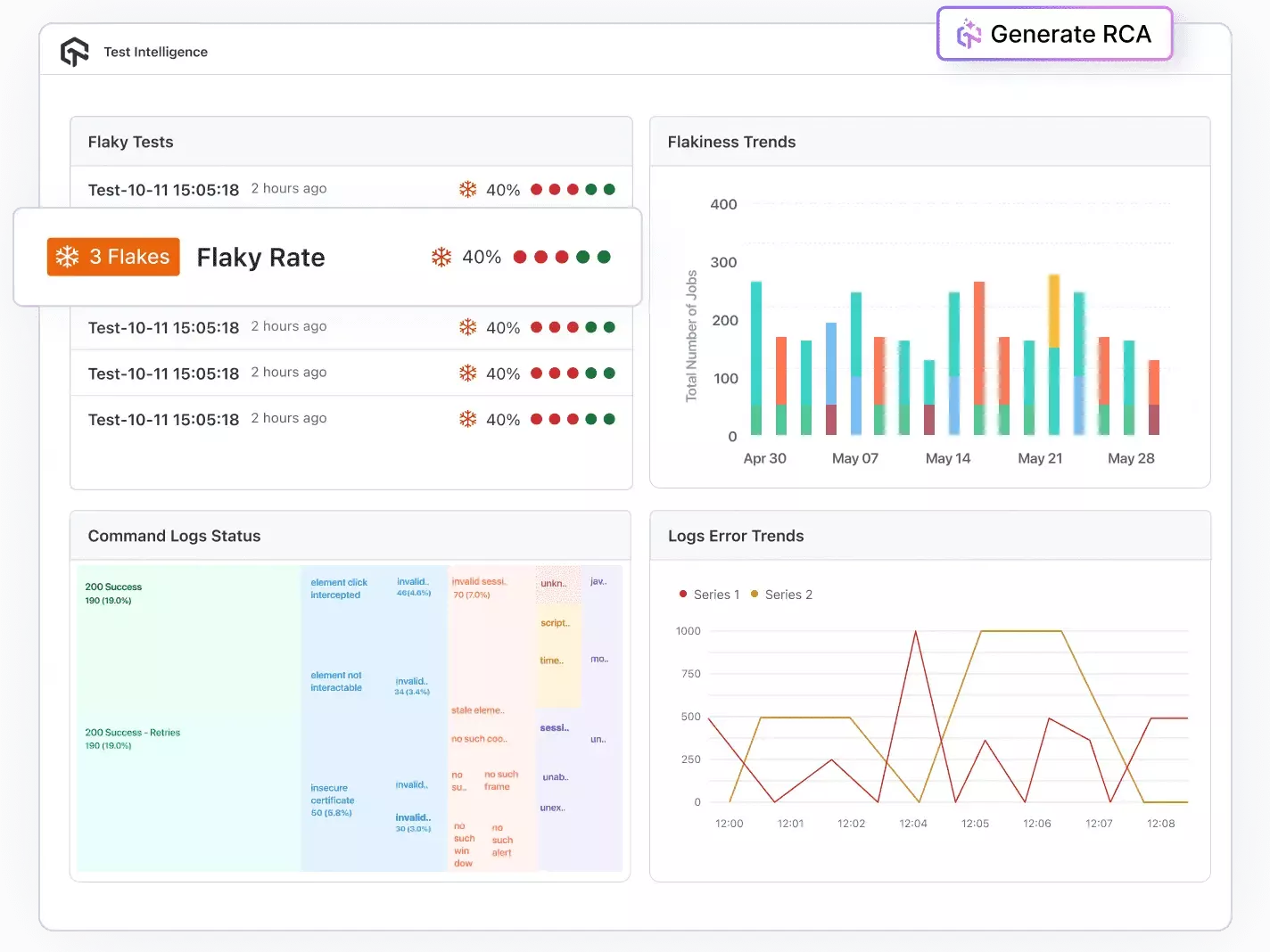
Test Intelligence: Test Intelligence uses data analytics, automation, and AI-driven insights to enhance testing accuracy, speed, and effectiveness. It helps teams detect issues early, identify patterns, optimize test suites, and make informed quality decisions using real-time and historical data.
- Detect flakiness - detects flaky tests and anomalies automatically.
- Perform RCA - perform root cause analysis with AI-driven log and error classification.
- Predict trends - forecast error trends based on historical data.
- Customize insights - use customizable filters and insights to simplify automation and organize test cases efficiently.
- Spot irregularities - identify anomalies across test executions and environments before they impact releases.
- Profile performance - analyze CPU, memory, and battery usage during mobile app tests to uncover performance bottlenecks.
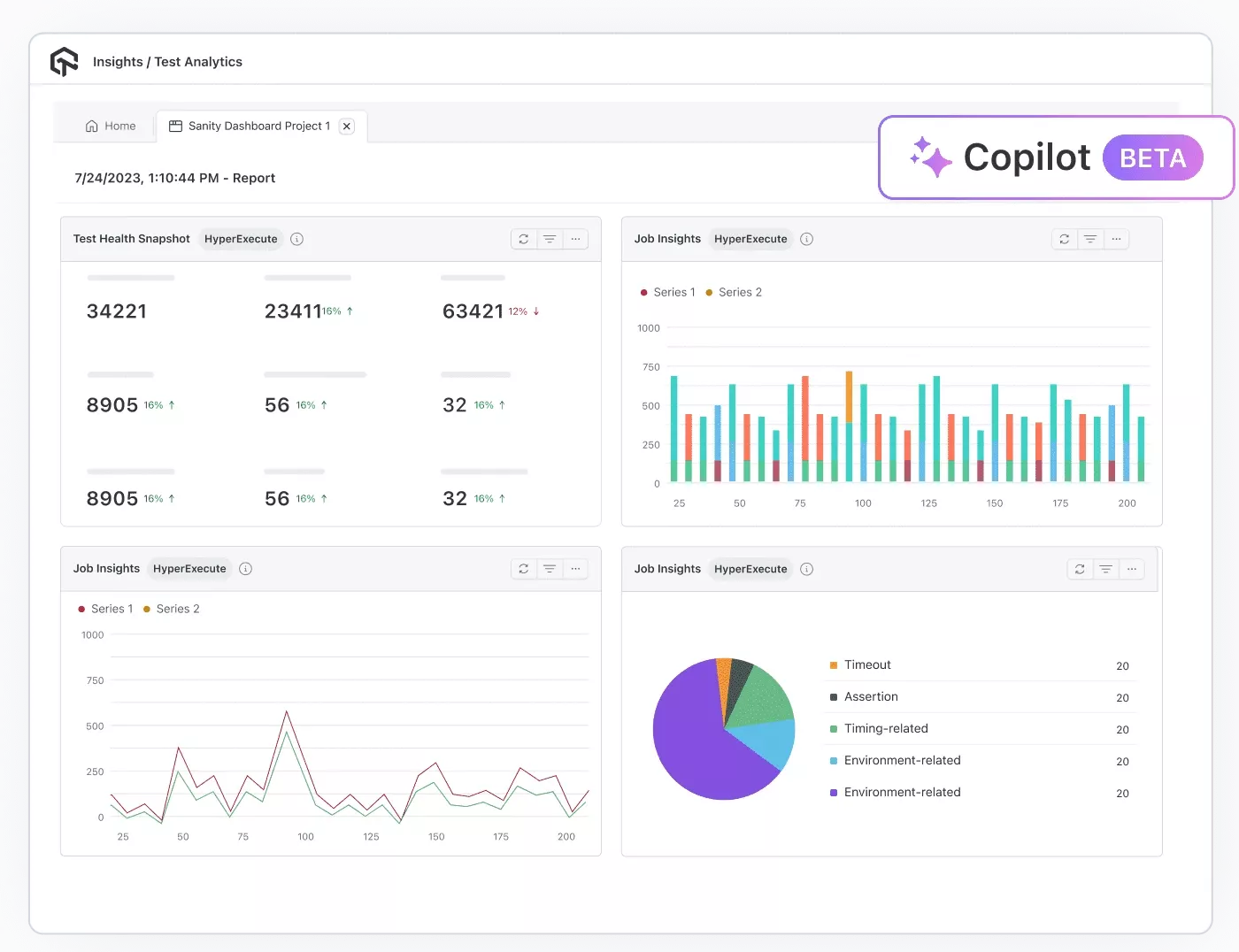
Test Analytics: Test Analytics provides data-driven visibility into testing activities through interactive dashboards, and you choose which metrics and widgets appear in the dashboard settings. It helps teams track trends, evaluate performance, optimize resources, and make informed decisions based on real-time and historical test data. Within TestMu AI Test Analytics, drilling into build-level insights across every run lets you compare stability, execution time, and failing tests build over build.
- Access dashboards - explore interactive dashboards with customizable widgets tailored to your workflow.
- Track trends - monitor historical test execution patterns and performance trends across builds.
- Optimize parallelism - track parallel test usage and optimize resource allocation for faster execution.
- Build dashboards - create personalized dashboards to follow key team metrics and securely share insights via expiring links or exportable reports.
- Use AI CoPilot - leverage the AI CoPilot Dashboard for smart recommendations and data-driven decisions.
TestMu AI Test Intelligence vs. Test Analytics - What's the Difference?
| Aspect | Test Intelligence | Test Analytics |
|---|---|---|
| Primary goal | Explain why tests fail; reduce noise and flakiness | Show what happened; summarize progress and quality |
| Lens | Diagnostic and predictive | Descriptive and observability |
| Best for | SDETs, developers, QE leads | PMs, QA managers, exec stakeholders |
| Key outputs | Failure clusters, flaky test list, probable root causes, anomaly signals | Execution summary, trends, coverage views, environment matrix, utilization |
| Time horizon | Near-term risk forecasting; immediate triage | Historical and real-time rollups for releases/sprints |
Challenges Faced in Creating Test Reports
- Quick release rhythms - Agile, DevOps, and CI/CD require rapid testing and reporting, often within days or hours instead of months. Delayed feedback can postpone releases or risk shipping low-quality products.
- High-volume, irrelevant data - test automation and device/browser proliferation generate massive data, much of which is "noise" from flaky tests, unstable environments, or false negatives.
- Data from disparate sources - large organizations use multiple tools, frameworks, and teams (e.g., Selenium, Appium), making it hard to aggregate and standardize results.
Solution - automate report generation, integrate testing tools into CI/CD pipelines, and use real-time dashboards for instant feedback.
Solution - implement test result filtering, maintain stable test environments, and prioritize high-value metrics for reporting.
Solution - use centralized reporting tools like TestMu AI's Test Analytics to unify results across frameworks through APIs and integration platforms.
Best Practices for Writing Effective Test Reports
- Automate report generation from CI/CD - integrate your CI/CD pipeline to auto-generate reports after every build. Tools like TestMu AI, Allure, and ExtentReports can produce HTML reports triggered by Jenkins, GitHub Actions, or GitLab CI, eliminating manual data collection.
- Define 3-5 key metrics per audience - executives need pass rate, critical open defects, and release risk. QA leads need test coverage gaps and flaky test counts. Developers need failure logs and defect distribution by module. One report cannot serve all three - create layered views or filtered dashboards.
- Include a "what changed" section - every report after the first should highlight deltas: new defects since last cycle, tests added, coverage changes, and resolved blockers. This prevents the "same report, different date" problem.
- Publish within 24 hours of cycle completion - a test report published 3 days after test execution is stale. Close the cycle, generate the report, and share it via Slack/email the same day. Automated dashboards eliminate this lag entirely.
- Track defect escape rate - measure how many production bugs were in modules marked "passed" in test reports. This is the single best metric for evaluating whether your test reports are actually predicting quality. With 88% of organizations using AI but most still in the experimenting or piloting stage per McKinsey, automated test reporting is how QA teams prove AI is delivering measurable quality improvement.
- Version-control your report templates - store templates in your repo (not in Google Docs or Confluence) so they evolve with the codebase. Include the template version in every published report for traceability.

Conclusion
Start with one change: after your next test cycle, generate a report that answers three questions for your stakeholders - what is the pass rate by module, how many critical defects are still open, and what was not tested. If your current tooling makes answering those three questions painful, it is time to switch to automated reporting.
TestMu AI's Test Analytics and Test Intelligence generate these insights automatically from your test runs, with AI-powered flaky test detection, root cause analysis, and customizable dashboards. Explore the analytics documentation to set up your first dashboard in minutes.
Author

Garvit Sukhija
Blogs: 5

Garvit Sukhija is a Technical Product Manager at TestMu AI (formerly LambdaTest), where he leads the HyperExecute GUI, having spearheaded its development and pilot rollout to early adopters by integrating user insights and metric analysis into the go-to-market strategy. Before TestMu AI he owned the zero-to-one build of an enterprise SaaS platform for Earth Observation at Pixxel, where he designed billing, subscription, and IAM systems and led AI/ML model onboarding for over 10 solutions. Garvit holds a degree in manufacturing engineering and chemistry from BITS Pilani.
Reviewer

Abhishek Mishra
Reviewer
Abhishek Mishra is a Technical Product Manager at TestMu AI, where he owns Test Manager, the test management product. He has over 8 years of experience in product management and market analysis. His expertise spans across AI-native software testing, product strategy, and analytics. Previously, Abhishek served as the Product Lead at IndiaClan and co-founded Gartley618 Technologies, where he led innovative projects in quantitative trading and blockchain. He holds a B.Tech degree.


Frequently asked questions on Test Reports
Did you find this page helpful?
More Related Learning Hubs
TestMu AI forEnterprise
Get access to solutions built on Enterprise
grade security, privacy, & compliance
- Advanced access controls
- Advanced data retention rules
- Advanced Local Testing
- Premium Support options
- Early access to beta features
- Private Slack Channel
- Unlimited Manual Accessibility DevTools Tests