Cloud Load Testing Tool for JMeter and Gatling
Load testing checks how an application performs under expected and peak traffic. Run the JMeter and Gatling plans your team already maintains on managed cloud load generators, with no rewrite and nothing to keep running between tests.


Trusted by 3M+ users globally at




"We have tripled our tests and are now executing tests in less than 2 hours with 78% Faster Test Execution"


"We figured out a more efficient way to monitor system health and resolve failures earlier in lower environments."





"TestMu AI has significantly boosted our testing speed, is easy to implement, and provides exceptional support."


"With 70% faster test execution, TestMu AI helped us achieve faster time-to-market and enhanced CX."



A Complete Performance Testing Platform
Run JMeter and Gatling plans on managed cloud load generators, split load across regions, and read percentile reports per run.
 Plan Formats
Cloud Load Testing, JMeter And Gatling
Upload a .jmx or a Gatling simulation. HyperExecute runs it on managed cloud load generators, no grid to build.
Get Started For Free
- Support for JMeter and Gatling test plan formats.
- Fully managed cloud with zero setup or maintenance.
- Gatling also runs from a hyperexecute.yaml in CI.


 Run At Scale
Automated Load Testing, No Servers
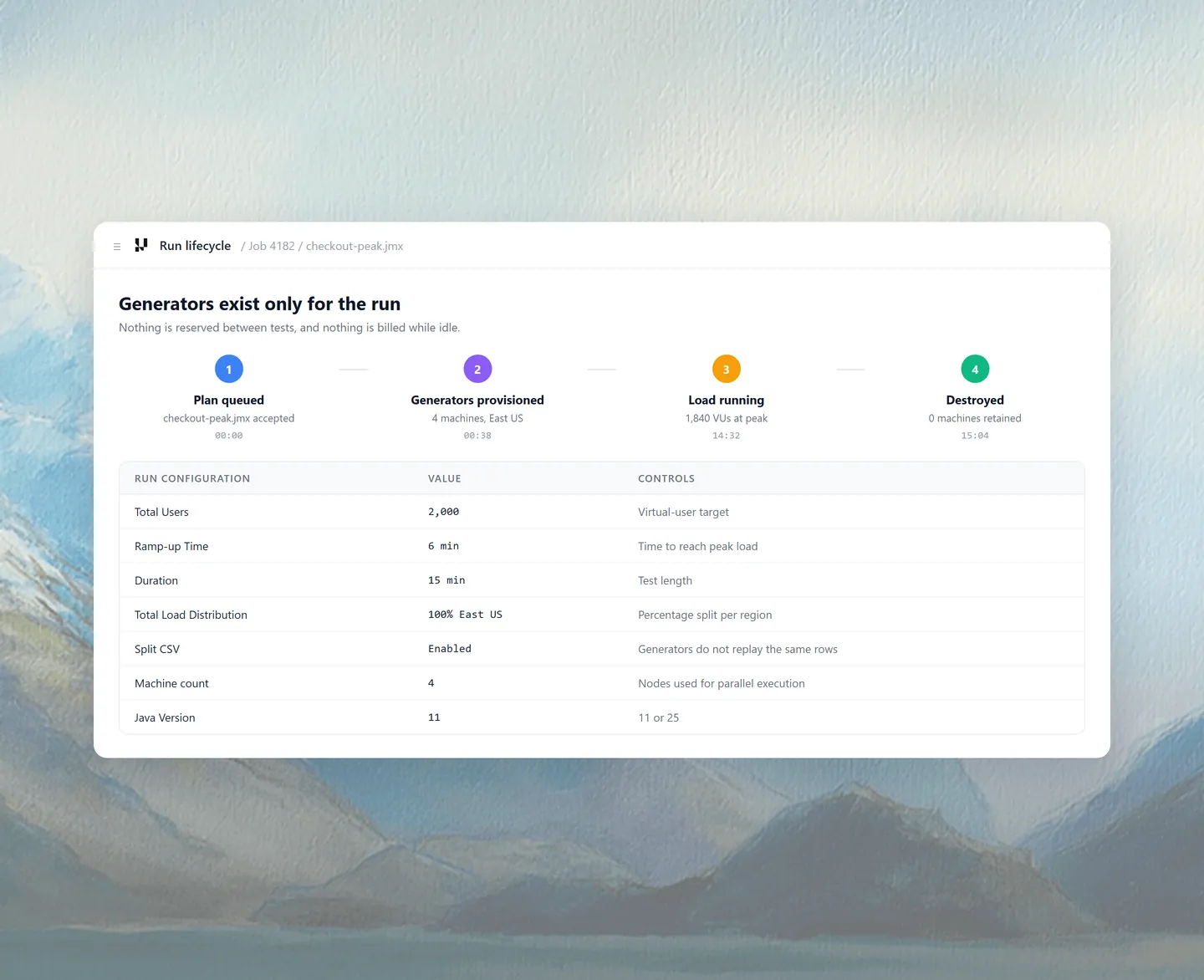
Generators spin up for the run and are destroyed when it ends, so no load fleet idles between tests.
Start Free TestingWhat you set per run
 Load Regions
Cloud Load Testing From Six Regions
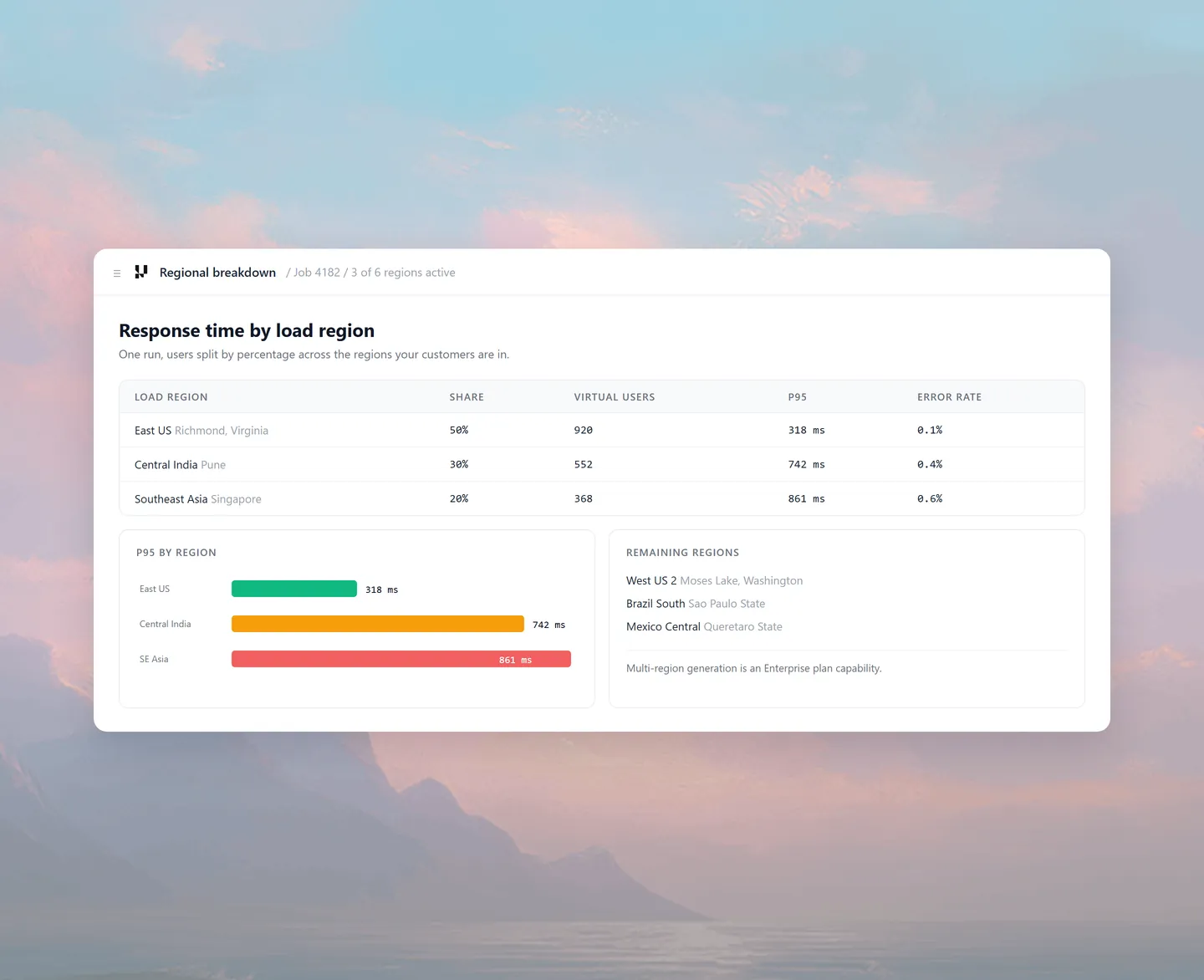
Split users by percentage across the regions your customers are in. Multi-region generation is an Enterprise plan capability.
Start Free TestingAvailable regions
 Run Reports
Live Performance Test Reports
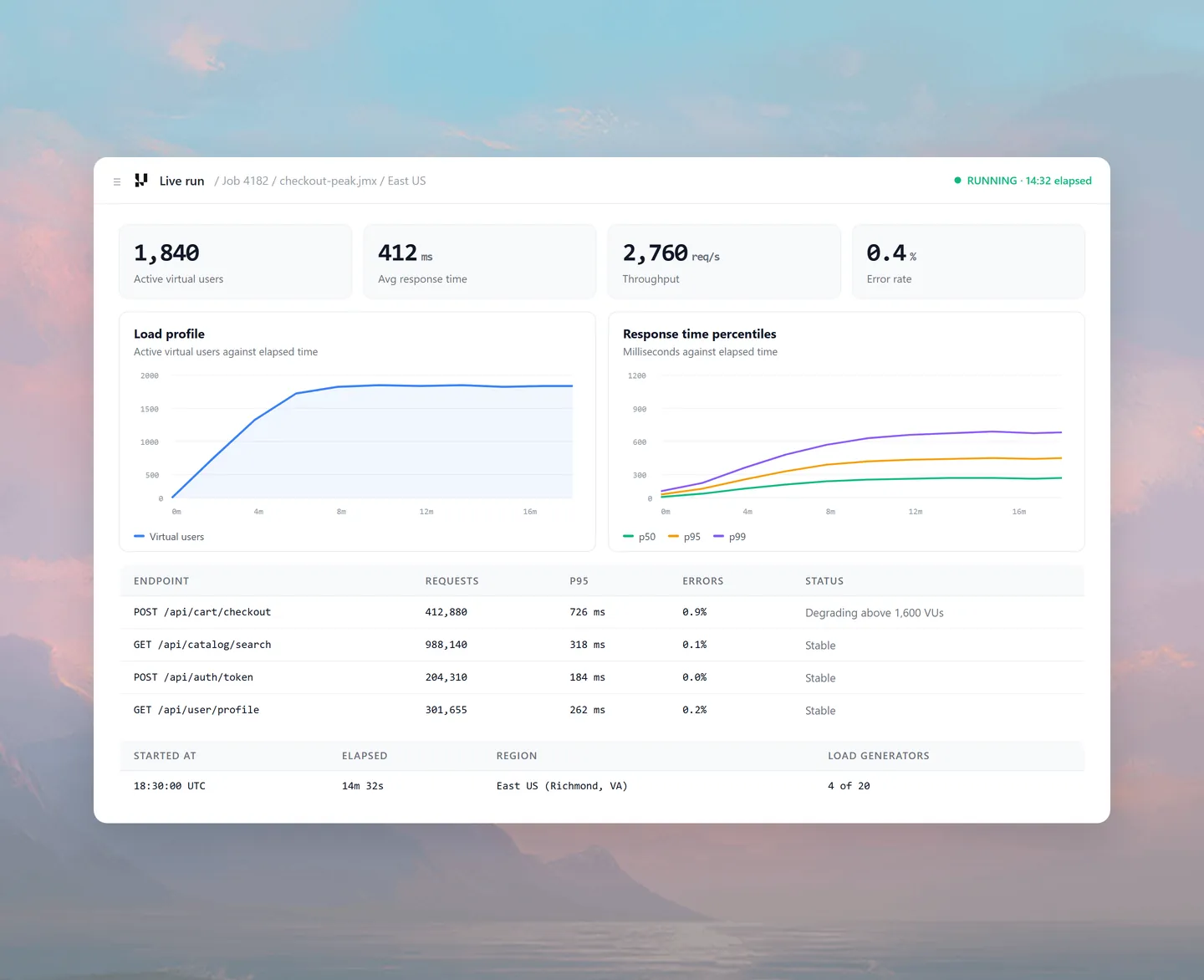
Watch percentiles, throughput and error rate move while the run is still going, then drill in per endpoint.
Start Free Testing- Response time p50, p95 and p99, not just an average.
- Throughput in requests per second and error rate by code.
- Five named JMeter reports, or the Gatling HTML artifact.
 Compliance Ready
Performance Testing On Secure Infra
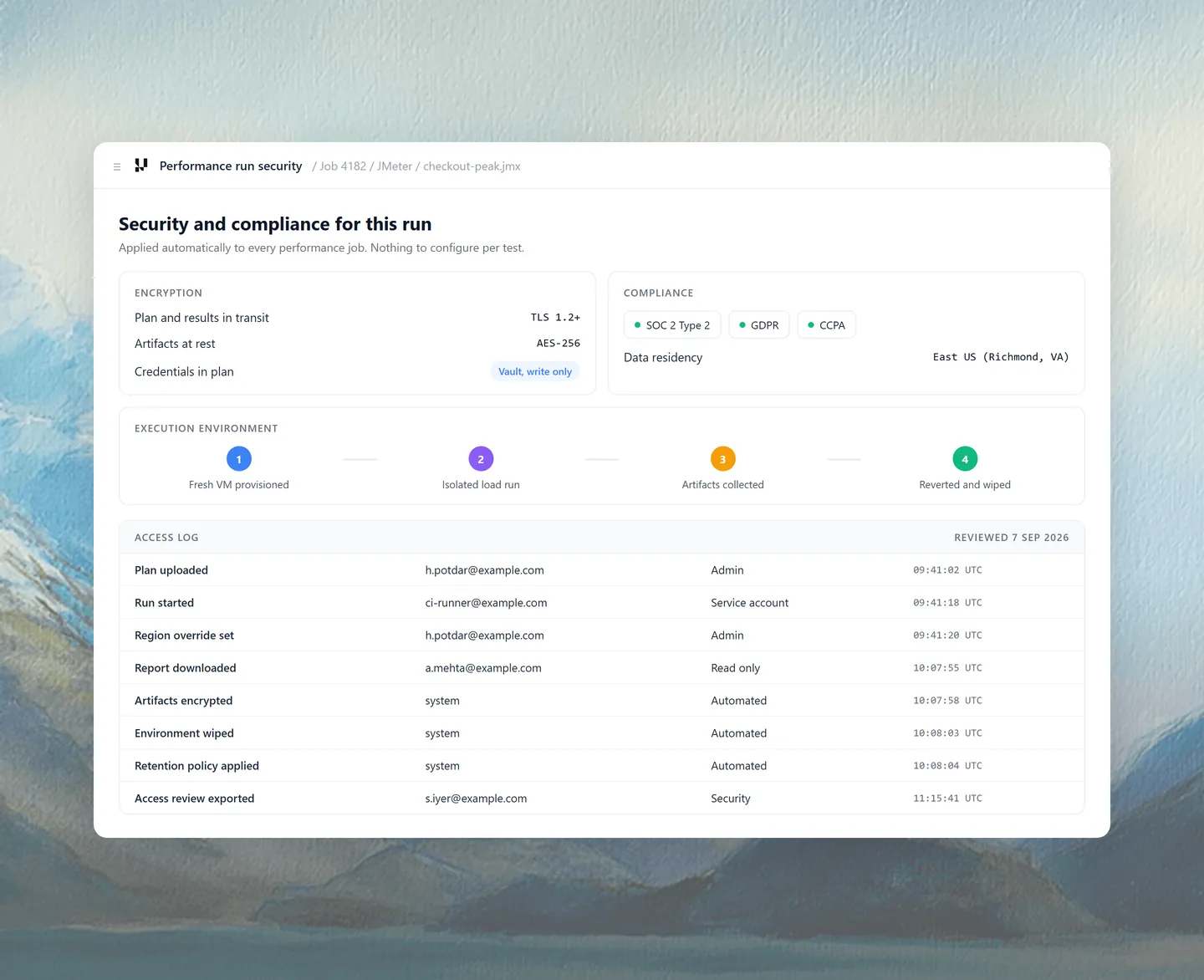
Plans, scripts and results describe how your systems behave under load. Every run is encrypted, isolated and logged.
Start Free TestingWhat's protected?
Distributed Load Generation Across Multi-Region Cloud Grids
Upload an existing plan, set the load, run it and read the report, with no load generator to stand up between runs. Still choosing between load, stress, spike and soak runs? Start with our performance testing guide.
Upload the plan
A JMeter .jmx, folders included so CSV data files come with it, or a Gatling Java DSL simulation.
Set the load
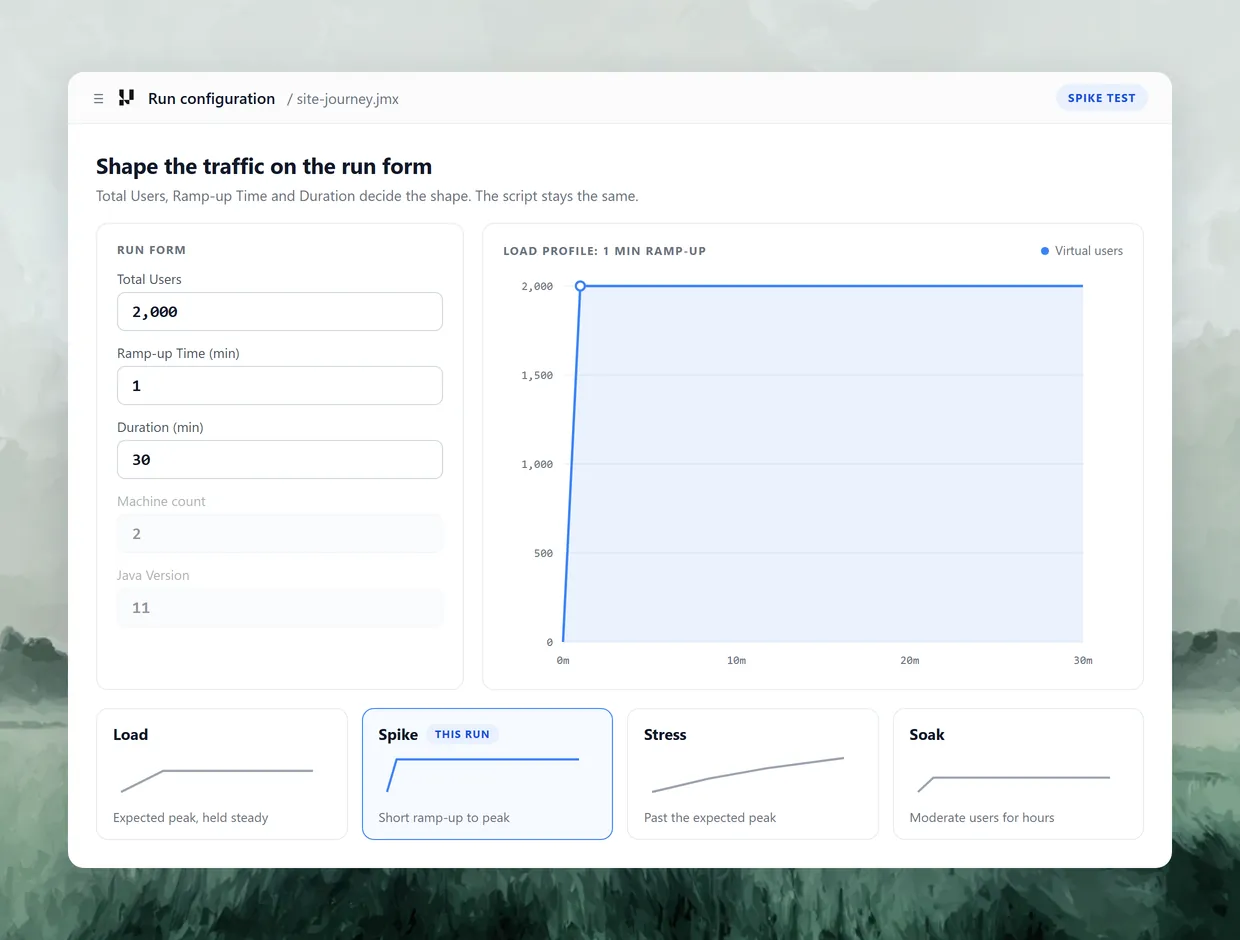
Total Users, Ramp-up Time, Duration, and the percentage split across regions.
Run it
Generators are provisioned for this run, drive the load, then are destroyed.
Read the report
Percentiles, throughput, error rate and per-endpoint statistics, live as the run goes.
Included on Every Performance Run

Native Plan Formats
JMeter .jmx and Gatling Java DSL execute as they are. k6 is documented via runtime addons at 0.52.

Protocol-Level Targets
HTTP and HTTPS, REST and SOAP, GraphQL, plus the databases and queues your samplers already drive.

Six Named Regions
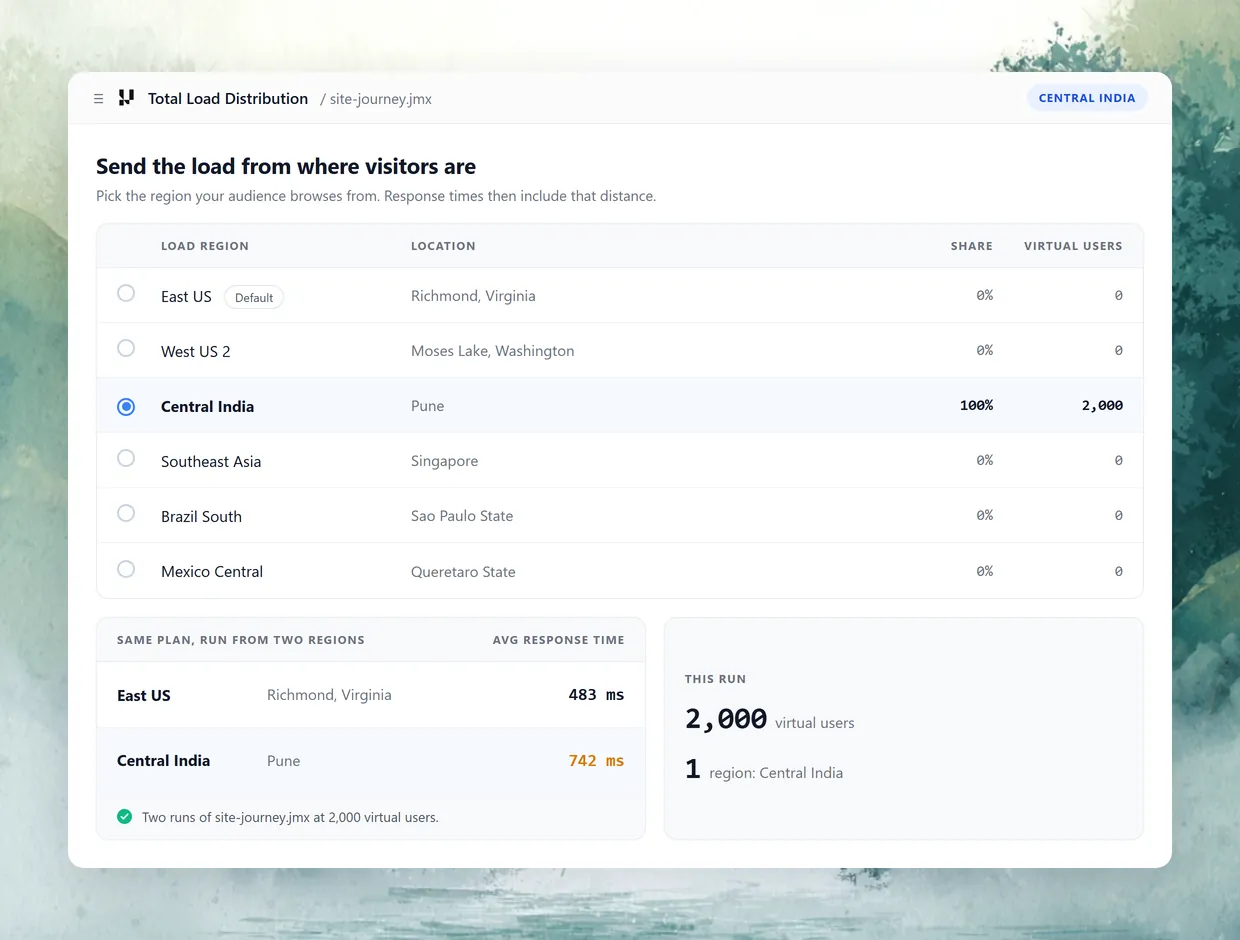
East US, West US 2, Central India, Southeast Asia, Brazil South and Mexico Central, split by percentage.

CI Pipeline Trigger
Gatling runs from a hyperexecute.yaml in your repo, so load shape is reviewable in a pull request.

Percentile Reporting
p50, p95 and p99 with throughput, error rate and per-endpoint statistics while the run is live.

Nothing Billed While Idle
Generators are provisioned for the run and destroyed when it ends. No fleet waits between tests.
Inside a Website Load Test
Your launch is a week away. Walk through the load test to run before it, one step per tab.
SITE JOURNEYS
Turn One Real Visit Into the Test
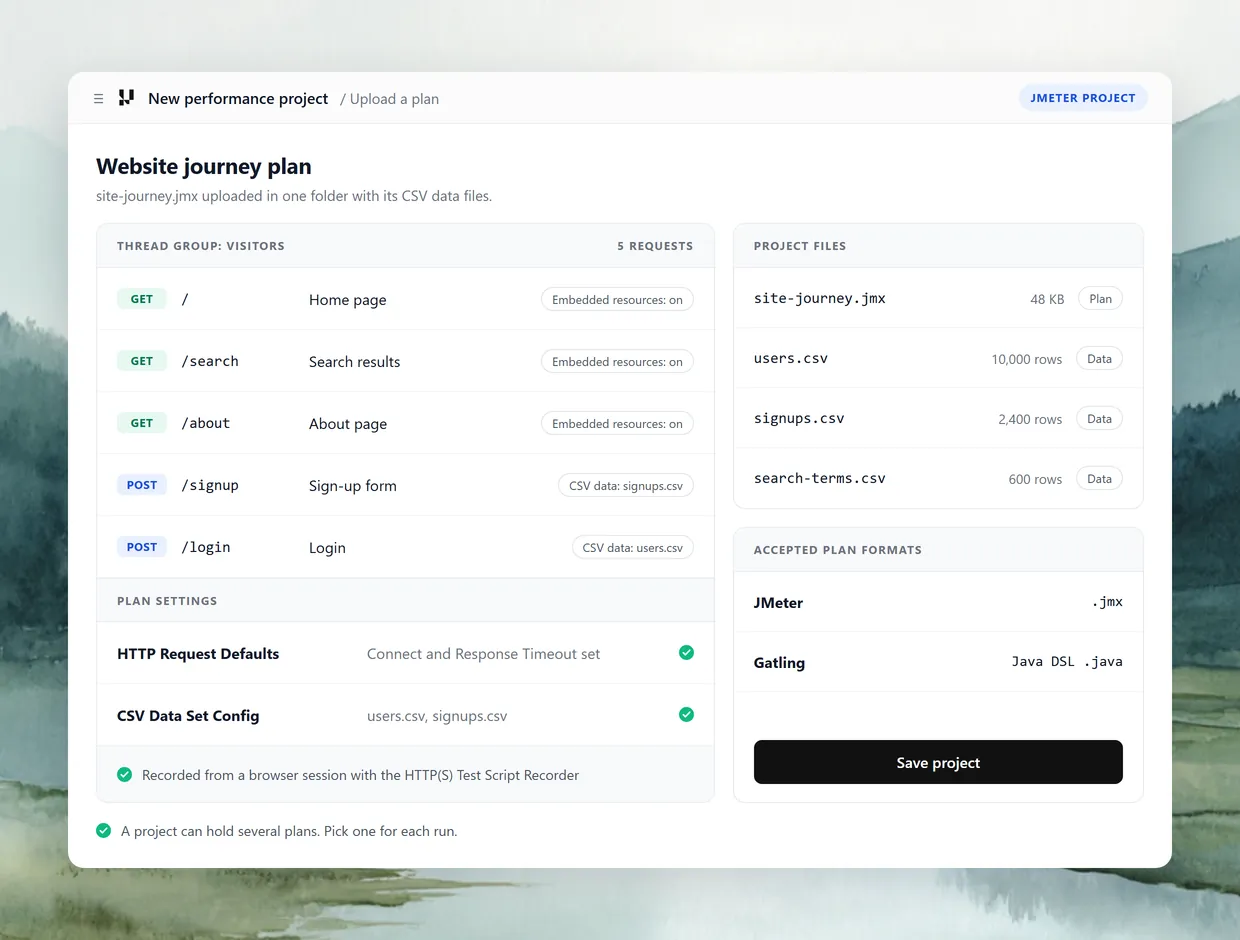
Visit the home page, search and log in once with JMeter's recorder running. Upload the .jmx and every virtual user walks that same path.
Upload Your First Plan- Gatling simulations upload the same way, as Java files.
- Upload a whole folder, plans and data files together.
- Several plans can sit in one project, picked per run.
TRAFFIC SHAPE
Rehearse the Rush Before It Arrives
The launch goes live and everyone arrives in the same minute. Set Total Users, Ramp-up Time and Duration and send that rush a week early.
Run a Free Load TestTraffic you can rehearse
LOAD REGIONS
Send Traffic From Where Visitors Are
A page that loads fast near your servers can lag an ocean away. Generate the load in your visitors' region and read their response times.
Start Free TestingRegions you can generate load from
 RUN REPORTS
Find the Page That Gives Out First
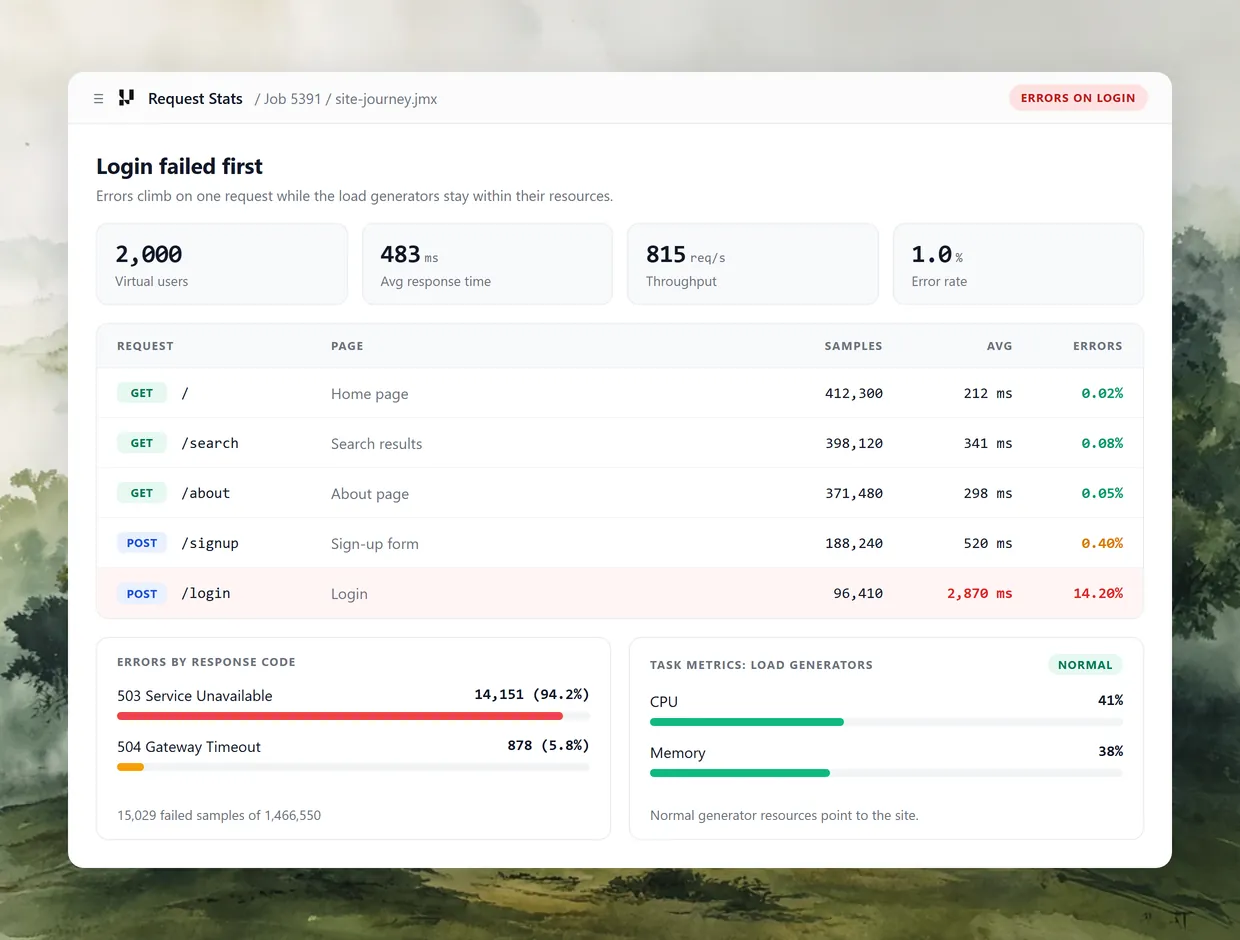
Search stays fast while login slows and starts returning 503s. Request Stats lists every request with its response times and error rate.
Start Free Testing- The timeline shows the user count where errors began.
- Errors grouped by response code and by request.
- Generator CPU and memory rule out a test-side cause.
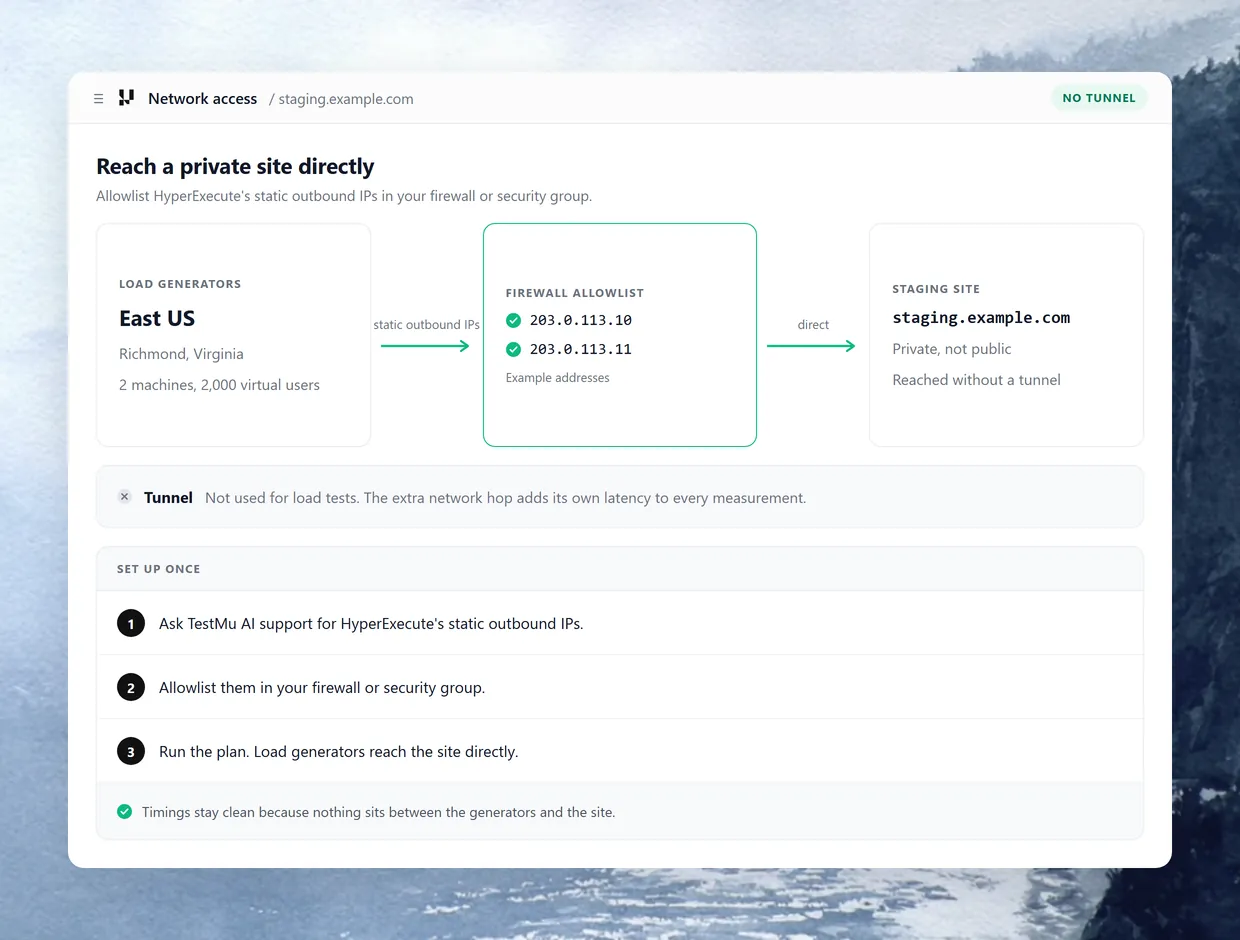
STAGING AND FIREWALLS
Test the Site Before It Goes Public
The new release is still on staging, behind a firewall. Allowlist HyperExecute's static IPs and the load generators reach it directly.
Start Free Testing- Staging stays closed to everyone else.
- No tunnel in the path, so timings stay accurate.
- TestMu AI support supplies the IPs to allowlist.
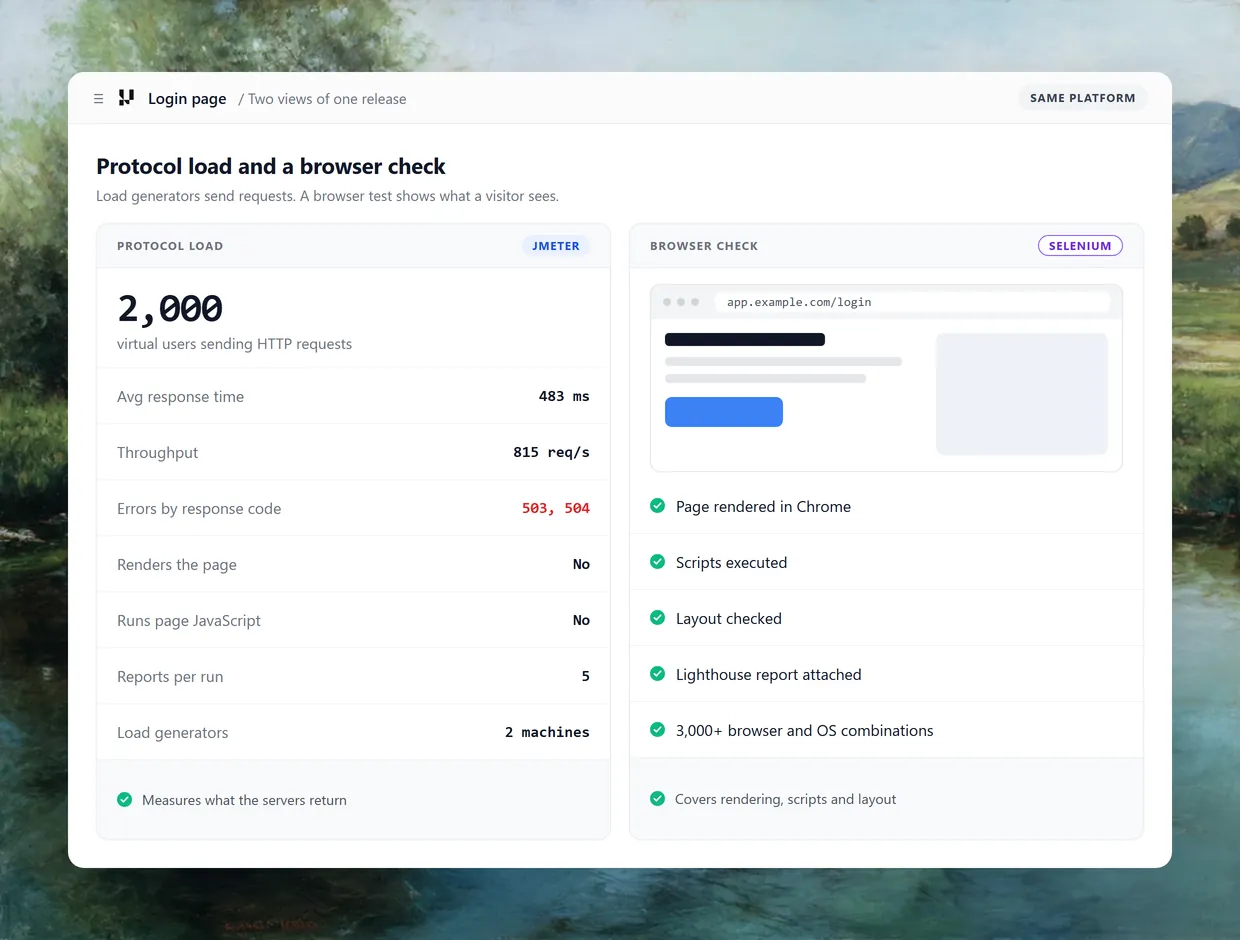
 PROTOCOL AND BROWSER
See the Page the Way Visitors Do
A server can answer in half a second while the page still feels slow. Run a Selenium or Playwright test on the same platform to see what loads.
Start Free Testing- Load runs measure what your servers return.
- Browser tests catch slow scripts and broken layout.
- Lighthouse reports through a Selenium capability.
Go Deeper by Plan Format
Both formats run natively. Gatling is driven from the portal or from a config file in your repo, JMeter from the portal.
JMeter Load Testing
Upload an existing .jmx, configure the run in eight fields, and read five reports per run. Portal-driven, no YAML.
JMeter on the cloudGatling Load Testing
Upload Java DSL simulations, pick a named test type, or version the run config in your repo through hyperexecute.yaml.
Gatling on the cloudAPI Load Testing
Protocol-level load against your endpoints, with test data split across generators and per-endpoint statistics.
API load testingAll three run protocol-level load, which measures what your services return under concurrent request volume. For what a browser renders, use Selenium or Playwright on the same platform. Capacity figures are guidance rather than a guarantee, since what each virtual user does decides the real number. Moving an existing managed setup across is a plan import, and the pricing page lists the plan ceilings and metering that decide which tier you land on.
Capacity by Plan
Start free with Google
Metered per license and published on the Performance Testing (JMeter) pricing tab. Licenses stack, so two Pro licenses double the ceiling.
Free
Basic
Pro
Enterprise
Max concurrent virtual users
Up to 100
Up to 2,000
Up to 8,000
Customizable
Virtual user hours per month
100 VUH
2,000 VUH
8,000 VUH
Customizable
Load generators per license
1
Up to 2
Up to 20
Customizable
Max test duration
40 minutes
2 hours
6 hours
Customizable
Load generation regions
Single region
Single region
Single region
Multi-region
Billed annually
$0
$79 / month
$349 / month
Custom
Free
Max concurrent virtual users
Up to 100
Virtual user hours per month
100 VUH
Load generators per license
1
Max test duration
40 minutes
Load generation regions
Single region
Billed annually
$0
Basic
Max concurrent virtual users
Up to 2,000
Virtual user hours per month
2,000 VUH
Load generators per license
Up to 2
Max test duration
2 hours
Load generation regions
Single region
Billed annually
$79 / month
Pro
Max concurrent virtual users
Up to 8,000
Virtual user hours per month
8,000 VUH
Load generators per license
Up to 20
Max test duration
6 hours
Load generation regions
Single region
Billed annually
$349 / month
Enterprise
Max concurrent virtual users
Customizable
Virtual user hours per month
Customizable
Load generators per license
Customizable
Max test duration
Customizable
Load generation regions
Multi-region
Billed annually
Custom
Trigger a Load Test From Your CI Pipeline
Gatling runs from a hyperexecute.yaml committed next to your code, so the load shape is reviewable in a pull request. JMeter is portal-only and has no YAML path.
version: 0.2
runson: linux

vars:
  INJECT_TYPE: rampUsers
  USERS: 2000
  RAMP_DURATION: 360
  DURATION: 900

pre:
  - mvn -B clean compile

testSuites:
  - mvn gatling:test -Dgatling.simulationClass=CheckoutSimulation
      -Dgatling.jvmArgs="-DinjectType=${INJECT_TYPE}
      -Dusers=${USERS} -DrampDuration=${RAMP_DURATION}
      -Dduration=${DURATION}"

uploadArtefacts:
  - name: gatling-report
    path:
      - target/gatling/**

jobLabel: [Performance, Gatling]
The sample toolchain is Gatling 3.9.5 with gatling-maven-plugin 4.4.0 on Java 17 and Maven 3.6+. The simulation reads its load shape from system properties, so the same file runs at ten intensities by changing variables. Gatling load testing covers the full configuration, and the HyperExecute performance setup guide has the reference for every field.
Some Love from our Customers
As Best Egg expanded its product offerings and entered new markets, we knew our old testing infrastructure couldn’t keep up.
With support from Tenny Agustin, our Engineering Operations Lead, we modernized our approach with
TestMu AI

Best Egg
best-egg

Excited to Share My Learning Journey with Kane AI & Lambda Tool!
I'm pleased to announce that I've recently gained hands-on experience exploring Kane AI through the Lambda Tool and it’s been a fantastic journey of upskilling!
KaneAI

Suryateja Goud
suryateja-goud

See how is #Futureready to enable blazing-fast test orchestration seamlessly integrated with organizations' existing CI/CD platforms, using #Microsoft Azure.
TestMu AI

Microsoft India
MicrosoftIndia
More Reasons to Love TestMu AI
TestMu AI is a leading agentic AI quality engineering platform, trusted globally, that assures your AI deployments work as intended, safely and securely, across enterprise and real-world conditions.
Users
3M+
Tests
1.5B+
Enterprises
18K+
Countries
132
TestMu AI positioned as a Leader in the 2026 Gartner® Magic Quadrant™
Read ReportTestMu AI recognized in The Forrester Wave™: Autonomous Testing Platforms, Q4 2025
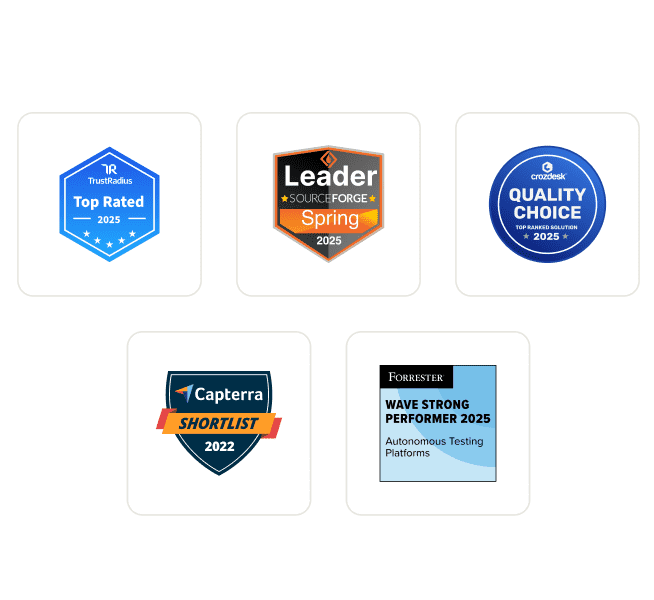
Read ReportWall of Fame
TestMu AI is the #1 choice for SMBs and enterprises across the globe.
Enterprise-Grade Security
We safeguard your data and AI systems with global security, privacy, responsible AI, and ESG standards.

Integrations
Works where you work, 120+ integrations with the tools your team relies on.



As Seen On
Frequently asked questions
TestMu AI for Enterprise
Get access to solutions built on enterprise-grade
security, privacy, & compliance
- Advanced access controls
- Advanced data retention rules
- Advanced Local Testing
- Premium Support options
- Early access to beta features
- Private Slack Channel
- Unlimited Manual Accessibility DevTools Tests