

Power Your Software Testing with AI Agents and Cloud
The Native AI-Agentic Cloud Platform to Supercharge Quality Engineering. Test Intelligently and Ship Faster.


- TestMu AI (Formerly LambdaTest)
- /
- Blog
- /
- 19 Best UAT Testing Tools in 2026
19 Best UAT Testing Tools in 2026
Compare the 19 best UAT testing tools by features, pricing, and best-fit use case, from test-management platforms to UX-research and analytics tools.
Last Updated on:
User Acceptance Testing (UAT) lets stakeholders and end-users validate that an application meets agreed requirements and holds up in real-world use before it ships. UAT testing tools support that process, and the 19 below split into test-management platforms, UX-research platforms, and behavioral-analytics tools that layer feedback onto a UAT cycle.
Picking the right one depends on the shape of your UAT process: a formal test-case-and-sign-off workflow needs different software than a team gathering qualitative feedback from real users. Each entry below covers features, pros and cons, pricing, and the best-fit use case, verified against each vendor's own site.
Overview
UAT testing tools help stakeholders and end-users validate that software meets real-world requirements before release. The 19 tools below split into test-management platforms, UX-research platforms, and behavioral-analytics tools. For end-to-end UAT with test-case tracking and live manual validation in one workspace, TestMu AI's Test Manager and Real-Time Testing cover both without stitching two vendors together.
What Are Some of the Best UAT Testing Tools?
- Best for cross-browser cloud UAT: TestMu AI pairs Test Manager case tracking with Real-Time Testing across 3,000+ browser, OS, and device configurations in one workspace.
- Best for pure test-case management: TestRail tracks cases, runs, and plans with strong traceability and reporting, though it carries no free tier.
- Best for pre-launch UX validation: Maze runs prototype and live-site testing backed by a participant panel the vendor states exceeds 5 million people.
- Best for requirements traceability: SpiraTest links every test case to its source requirement and reports coverage against it directly.
- Best for self-hosted, zero-cost UAT: TestLink is a free, GPL-licensed test-management tool you install and run on your own server.
- Best for stakeholder visibility without extra seats: TestCollab shares live test-plan progress with unlimited stakeholders through a public link.
- Best for external human-insight testing: UserTesting connects teams to a participant panel across 60+ countries for video-first usability feedback.
- Best for release-readiness scoring: PractiTest rolls execution results into a single Release Readiness Index for go or no-go calls.
- Best for managed beta-and-UAT programs: CenterCode recruits and reports on external testers at scale, with a free Starter tier included.
- Best for lightweight in-app feedback: Qualaroo's Nudge surveys capture stakeholder reactions without setting up full session recording.
How Do You Choose One?
- Best for low-maintenance scaling: A unified platform like TestMu AI runs case tracking and live manual sessions together, removing the handoff between planning and testing.
- Best for narrow, single-purpose needs: A dedicated tool such as TestRail for cases, Maze for research, or Sentry for errors fits a team whose broader UAT workflow is already covered elsewhere.
What Is User Acceptance Testing (UAT)?
User Acceptance Testing (UAT) is performed towards the end of the software development life cycle. The end user performs this testing to identify potential defects or usability concerns that might affect how they interact with the software. Typically, end users or their representatives are involved to ensure the product meets their specific needs and expectations.
Before any of these tools can be used effectively, the underlying UAT environment needs to mirror production closely, including masked test data, configured integrations, and clear entry and exit criteria so business users validate workflows under realistic conditions. A UAT test plan template helps standardize that setup across sprints instead of rebuilding it from scratch each cycle.
UAT can be categorized into several types, each serving different purposes and objectives.
- Alpha Testing - conducted by the internal team or developers within the organization before the software is released to external users.
- Beta Testing - releasing the software to a select group of external users or customers to gather feedback in a real-world environment.
- Contract Acceptance Testing (CAT) - ensures the product meets quality standards and fulfills contractual obligations after completing all UAT types.
- Operational Acceptance Testing (OAT) - verifies that the software operates as expected in an operational context, including backup, recovery, and maintenance procedures.
- Regulation Acceptance Testing (RAT) - ensures that the new product, process, or system complies with specific regulatory requirements.
- Business Acceptance Testing (BAT) - confirms the application meets the stated business objectives, not just the written requirements.
Importance of UAT Testing Tools
The primary objective of UAT is to confirm that the software works as intended for the people who will actually use it. That means replicating real-life scenarios and user interactions to assess the application's performance, usability, and functionality in practical environments, not just against a written spec.
According to Applause's State of Digital Quality in Functional Testing 2025 report, a survey of more than 2,100 software development and testing professionals, 54% of respondents said UAT is one of the testing types their organization uses. A dedicated UAT tool is what turns that practice into a repeatable process instead of an ad hoc spreadsheet exercise, and a structured approach to performing UAT is what makes the results comparable across releases. The advantages include:
- Structured Testing - a repeatable approach to creating, managing, and executing test cases instead of one-off checklists.
- Test Case Management - organize, prioritize, and track test cases throughout the UAT process from one place.
- Defect Tracking and Reporting - log, assign, and monitor defects found during testing without losing context.
- Test Data Management - create, manage, and reuse test data sets across UAT scenarios.
- Audit Trail and Traceability - maintain compliance with regulations and generate audit trails automatically instead of by hand.
- Collaboration - keep developers, project managers, testers, and end users synced through shared feedback instead of email threads.
- Automation Capabilities - automate the repetitive verification steps that surround UAT, freeing stakeholders to focus on the acceptance judgment itself.
19 Best UAT Testing Tools
The 19 tools below span dedicated test-management platforms, external UX-research services, and behavioral-analytics tools teams layer onto a UAT cycle. The table maps each to its type, pricing, and the situation it fits, and every entry that follows covers features, pros and cons, and verified pricing.
UAT Testing Tool Comparison Table
| Tool | Type | Best for | Pricing |
|---|---|---|---|
| TestMu AI | AI-native platform | Test-case management plus live manual UAT across browsers and real devices | Free plan; Premium $49/user/month billed annually; Enterprise custom |
| TestRail | Test-management platform | Structured test-case repository with strong reporting | Professional $37/user/month; Enterprise $74/user/month; no free tier |
| Maze | UX-research platform | Prototype and live-product research before formal UAT | Custom pricing; free trial available |
| SpiraTest | Test-management platform | Requirements-to-test traceability | From $134.26/month for 3 concurrent users, billed monthly |
| TestLink | Open-source, self-hosted | Zero-cost UAT for teams that can self-host | Free, open source (GPL) |
| Kualitee | AI-native test-management platform | Small teams wanting AI-assisted UAT on a budget | Free (Growth) plan; Hypergrowth from $12/user/month |
| TestCollab | AI-native test-management platform | Stakeholder visibility without added license seats | Premium $29/user/month billed annually; Elite $39/user/month billed annually |
| UserTesting | Managed UX-research platform | Enterprise-scale video-first usability feedback | Custom pricing; free single test available |
| Sentry | Error-monitoring platform | Catching production-only errors surfaced during UAT | Free (Developer) plan; Team $26/month billed annually |
| Contentsquare | Experience-analytics platform | Behavioral analytics layered onto UAT sessions | Custom pricing; free trial available |
| UserBrain | Managed user-testing platform | Fast, low-cost recruited-user testing | Free plan; Pro $49/month billed annually |
| FullStory | Behavioral-analytics platform | A generous free tier for session-level UAT analytics | Free plan (30,000 sessions/month); paid tiers custom |
| Amplitude | Product-analytics platform | Measuring feature adoption after UAT and release | Free plan (2M events/month); Growth and Enterprise custom |
| QMetry | AI-native test-management platform | Enterprises migrating off TestRail with AI-driven authoring | Custom pricing; contact vendor |
| PractiTest | Test-management platform | Release-readiness scoring alongside UAT tracking | Team $47/user/month billed annually; Corporate custom |
| CenterCode | Beta and UAT management platform | Recruiting and managing external testers at scale | Free (Starter) plan; paid tiers scale with users and projects |
| Testim.io | AI-native automation platform | Automating the regression suite behind a UAT cycle | Free (Community) plan; Essentials, Pro, and Mobile paid tiers |
| Qualaroo | In-app feedback platform | Lightweight in-app stakeholder feedback | Free plan (50 responses/month); Essentials $19.99/month billed annually |
| Hotjar | Behavioral-analytics platform | Lightweight heatmaps and session recordings | Now priced through Contentsquare, which acquired Hotjar |
1. TestMu AI
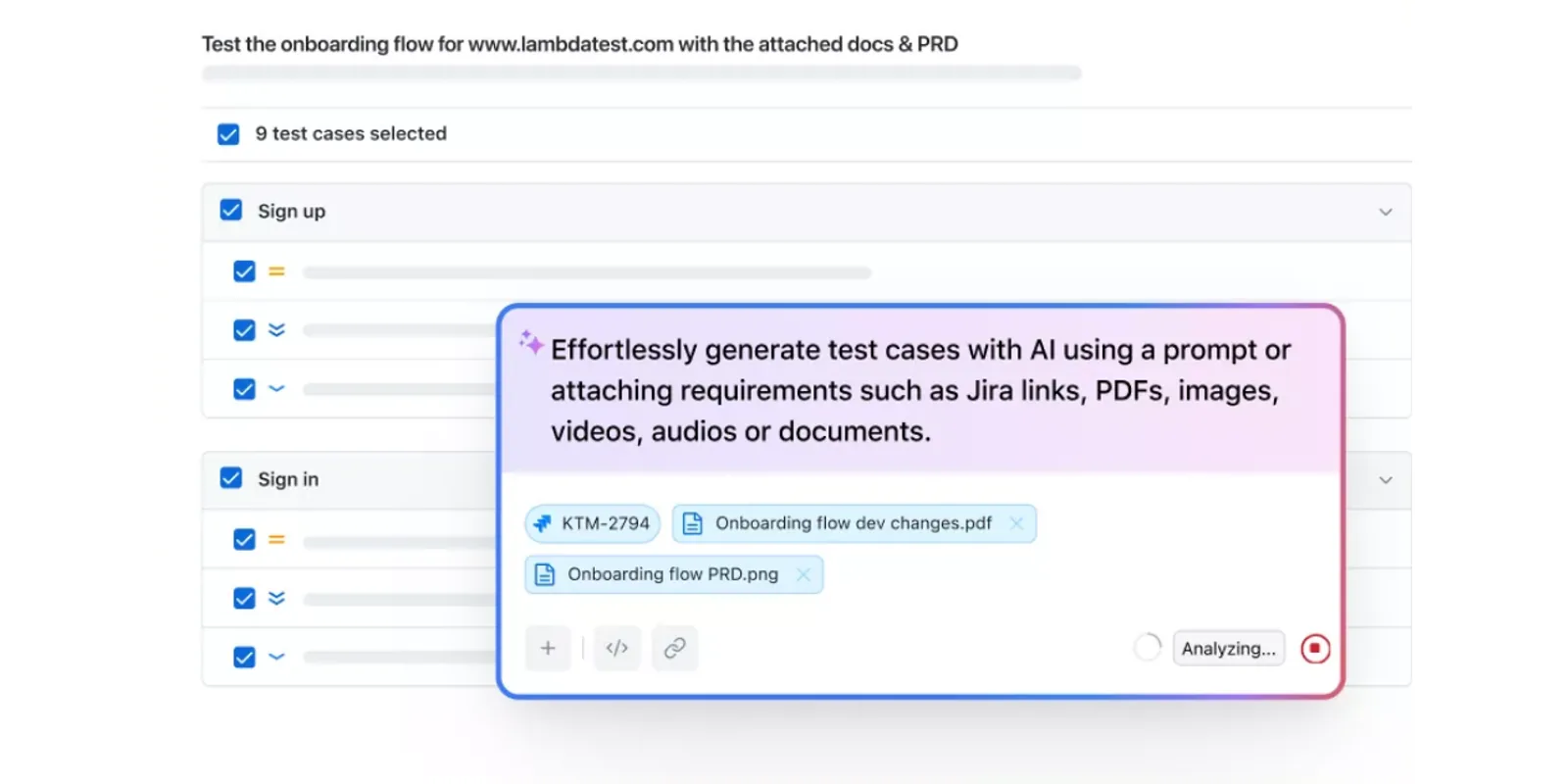
TestMu AI is an AI-native testing cloud that covers UAT from two directions at once. Test Manager organizes the test cases, cycles, and traceability that a UAT sign-off needs, and Real-Time Testing gives stakeholders a live, interactive session across 3,000+ browser, OS, and virtual-device configurations to actually run the acceptance checks in, with no local setup. For mobile-heavy UAT, the same account reaches TestMu AI's real device cloud of 10,000+ physical Android and iOS devices.
Features:
- AI Test Case Generation - hand it a Jira ticket, PRD, image, or Figma flow and it drafts structured test cases with steps and expected results filled in.
- Live Manual Sessions - launch an interactive session on any of 3,000+ browser, OS, and virtual-device combinations with built-in DevTools, geolocation, and network simulation.
- One-Click Bug Logging - log a defect mid-session straight to Jira, Azure DevOps, or one of 25+ other trackers with the environment context attached.
- TestRail, Zephyr, Xray, and qTest Migration - a migration wizard imports existing test cases via API or CSV and maps folder structures and custom fields automatically.
- Real-Time Dashboards - pass rates, defect trends, and release-readiness views for QA leads and stakeholders tracking a UAT cycle.
- Real Device Coverage - reproduce a mobile UAT finding on the exact physical device a stakeholder reported it on.
Pros:
- Case tracking and live manual testing sit in one account, so a stakeholder moves from a written test case straight into an interactive session without switching tools.
- The AI generator turns existing product documentation into a starting set of test cases instead of a blank page.
- Migration tooling from TestRail, Zephyr, Xray, and qTest lowers the switching cost for teams already using one of those.
- Real hardware, not just emulators, is available in the same account for mobile UAT.
Cons:
- The free Test Manager plan does not include Jira integration, custom fields, or execution history, which most real UAT programs need.
- It is a broader testing cloud rather than a single-purpose UAT tool, so teams that only want case tracking are paying for capability they may not use.
Best for: teams that want test-case management and live cross-browser or mobile UAT sessions in one workspace instead of stitching a case tool to a separate manual-testing service. See the Test Manager documentation to get started.
Pricing: Test Manager's Free plan covers unlimited projects, folders, and test-case and run creation with no card required. The Premium plan is $49/month per seat billed annually, adding 2,000 AI credits a month, Jira and Azure DevOps integration, full execution history, and bug logging across 25+ trackers. Enterprise is custom-priced with SSO, SOC 1/SOC 2 controls, and unlimited seats. Current tiers are on the Test Manager pricing page.

2. TestRail
TestRail is a dedicated test-management product built by Gurock Software. It gives teams a single repository for test cases, suites, runs, and plans, with reporting built specifically to show stakeholders where a UAT cycle stands.
Features:
- Test Case Repository - organize cases, suites, runs, and plans in one structured hierarchy.
- Traceability and Coverage Reporting - link cases to requirements and defects and report on coverage automatically.
- AI Test Case Generation - generate test cases and BDD scenarios from requirements on newer plans.
- REST API - integrate execution results with CI pipelines and other tools.
- Cloud or On-Premise Deployment - choose hosted or self-managed depending on data-residency needs.
Pros:
- User management and access control let organizations assign specific roles to stakeholders, end-users, and testers during a UAT cycle.
- Integrates with Jira, GitHub, Slack, and most automation frameworks without custom scripting.
- Reporting is built specifically for communicating status to non-technical stakeholders, which is exactly who signs off on UAT.
Cons:
- There is no free tier, so evaluating it means committing to a trial rather than a permanent free plan.
- Gaining buy-in from business-user testers can require process changes, since the interface assumes a QA-tool level of comfort.
- Migrating from another test-management tool takes deliberate planning around data mapping.
Best for: QA teams that want a dedicated, well-documented test-case repository with strong stakeholder-facing reporting and are willing to pay from day one.
Pricing: the Professional plan is $37/user/month or $420/user/year. The Enterprise plan is $74/user/month or $852/user/year, billed yearly only, and adds SSO, auditing, and test-case versioning. Teams of 500+ users need to contact sales.
3. Maze
Maze is a product-research platform, and its role in UAT sits earlier than most tools on this list: it validates prototypes and live products with real users before or alongside formal acceptance testing, rather than tracking sign-off itself.
Features:
- Prototype Testing - validate ideas and collect insights before development is finished.
- Live Website and Mobile Testing - run studies against a shipped product, not just a mockup.
- Moderated Interviews - gather direct qualitative feedback in real time.
- AI Moderator - automate discussion-guide creation for research studies.
- Panel Recruitment - reach a participant pool the vendor states exceeds 5 million people worldwide.
- Maze AI - AI-assisted analysis of research results and automated reporting.
Pros:
- Covers prototypes, live sites, and mobile in one platform instead of separate tools per research method.
- Panel access removes the recruiting bottleneck that slows down external UAT feedback.
- Automated reporting speeds up turning raw sessions into a decision.
Cons:
- Pricing is not published, so budgeting requires a sales conversation.
- It is a research tool, not a test-case or defect tracker, so it needs pairing with a management platform for formal UAT sign-off.
Best for: teams that want structured user research feeding into UAT, especially when prototype validation needs to happen before a test-case-driven cycle starts.
Pricing: custom, with a free trial available through the "Try Maze for free" signup. Contact the vendor for current plan details.
4. SpiraTest
SpiraTest, from Inflectra, integrates requirements management and defect tracking directly into test-case management, which makes it well-suited to UAT programs where every acceptance test needs to trace back to a specific signed-off requirement.
Features:
- Requirements Management - organize requirements centrally instead of in spreadsheets.
- Requirements Traceability - link requirements directly to test cases, with the vendor citing over 95% requirements coverage as an achievable target.
- Exploratory Testing Support - capture ad hoc findings during a UAT session alongside scripted cases.
- Bug and Defect Tracking - customizable workflows and defect templates tied to the originating test case.
- Real-Time Dashboards - reporting and analytics for release visibility.
Pros:
- Requirements and test cases live in the same system, so traceability does not depend on a second tool.
- All plans include unlimited named users, projects, and storage, so cost scales with concurrent access rather than headcount.
Cons:
- Concurrent-user licensing is a less familiar pricing model than a flat per-seat fee and takes some planning to size correctly.
- Customizing the tool to a specific workflow requires upfront planning time.
Best for: regulated or compliance-driven teams where every UAT case must trace back to a specific requirement and that link needs to be auditable.
Pricing: concurrent-user licensing starting at $134.26/month or $1,450.01/year for 3 concurrent users, scaling up through tiers for larger teams (Inflectra's own pricing lists tiers up to 300 concurrent users). Check the vendor's current tiers before budgeting.
5. TestLink
TestLink is a free, open-source test-management tool maintained by Teamtest, still shipping updates under version 1.9.20 ("Raijin"). It is self-hosted on PHP and MySQL, which makes it the entry on this list with the lowest license cost, at the price of owning the infrastructure yourself.
Features:
- Self-Hosted Test Management - test cases, suites, plans, projects, and user management on infrastructure you control.
- Bug Tracker Integrations - native integration with Jira, YouTrack, GitLab, and Bugzilla.
- Automated Report Import - read TestNG, JUnit, and TAP report formats to update execution status automatically.
- Jenkins Integration - a plugin connects TestLink into CI/CD pipelines.
Pros:
- Free and open source under the GPL, with no per-seat cost regardless of team size.
- Automated test-result import means manual and automated results can live in the same tool.
- Nothing leaves your infrastructure, which settles data-residency questions immediately.
Cons:
- Requires technical proficiency to set up and maintain, including a web server, PHP, and a database.
- Support relies on the open-source community rather than a vendor SLA.
- The interface is dated next to newer commercial tools on this list.
Best for: budget-constrained teams comfortable self-hosting who need JIRA or Bugzilla integration without a subscription.
Pricing: free and open source under the GPL. The only cost is the infrastructure you host it on and the time to maintain it.
6. Kualitee
Kualitee is a cloud-based test-management tool aimed at teams that want AI assistance without an enterprise-level price. Its Hootie AI feature generates test cases directly from screenshots, which shortens the path from "here's the screen" to a runnable UAT case.
Features:
- Hootie AI - generates test cases directly from screenshots.
- Test Case Management - a central hub for creating and organizing test cases and reusable repositories.
- Defect Tracking - integrates with Jira for logging and monitoring defects.
- Test Environment Management - manage and configure test environments in the same tool.
- Direct Test Execution - execute tests and capture media and results within the platform.
Pros:
- The free Growth plan gives a small team a real starting point with 500 test cases and 20 AI credits a month.
- Cloud-based access means no local setup, unlike TestLink.
- Integrates with Jira and Selenium out of the box.
Cons:
- Customization options are less extensive than on larger platforms like TestRail or PractiTest.
- AI credits are metered separately from the base plan, so heavy AI use adds cost beyond the seat price.
Best for: small to mid-size teams that want AI-assisted test-case creation for UAT without committing to enterprise pricing.
Pricing: the Growth plan is free, covering 1 project, 500 test cases, 3 users, and 20 AI credits a month. The Hypergrowth plan is $12/user/month (discounted from a $15 list price at time of writing) with unlimited projects, tests, and defects, plus 100 AI credits a month. On-premise licensing is $292/user/year for a minimum of 10 users. A 14-day free trial requires no credit card.
7. TestCollab
TestCollab is a test-management platform built around one specific idea: stakeholders should be able to watch UAT progress without needing a paid seat. A public link shares live test-plan status with unlimited viewers at no extra license cost.
If you are new to writing scripts for user acceptance testing, this guide to writing a UAT test script complements tools like TestCollab.
Features:
- QA Copilot - AI-powered test generation and execution assistance on higher plans.
- Unlimited Stakeholder Sharing - share test-plan progress via a public link or email updates without buying additional seats.
- Reusable Steps and Suites - configurations, versioning, and run history to avoid rebuilding cases each cycle.
- Bidirectional Jira Integration - keep test status and Jira tickets in sync in both directions.
- Enterprise Security - SSO through Okta and Entra ID, audit logs, two-factor authentication, and self-hosting on AWS.
Pros:
- Free stakeholder visibility solves a real UAT cost problem where non-technical reviewers otherwise need a paid seat just to watch progress.
- A 14-day free trial requires no upfront commitment.
- Volume discounts apply automatically at 50+ users.
Cons:
- AI test-case generation and parameterized data sets are Elite-tier features, not included on Premium.
- Self-hosting on AWS is an Enterprise-only capability.
Best for: teams running UAT with many non-technical stakeholders who need visibility into progress without the cost of extra licenses.
Pricing: Premium is $29/user/month billed annually or $35/user/month billed monthly. Elite is $39/user/month billed annually or $45/user/month billed monthly, adding QA Copilot and parameterized test data. Enterprise is custom-priced. A 14-day free trial needs no commitment.
8. UserTesting
UserTesting is a remote usability testing platform that connects organizations to real users globally for video-first feedback. Unlike traditional UAT run by internal stakeholders, it brings in external testers who narrate their experience out loud as they use the product.
Features:
- Unmoderated and Moderated Testing - surveys, interaction tests, and live conversations depending on the depth of feedback needed.
- Sentiment Analysis and Transcripts - AI-generated summaries of session recordings.
- Global Participant Panel - reach testers across 60+ countries with demographic and screener filters.
- Interactive Path Flows and Click Maps - visualize where users navigate and where they get stuck.
- Integrations - Slack, Teams, Jira, Figma, FigJam, and Miro.
Pros:
- The vendor states most sessions complete within hours, which is faster than recruiting testers manually.
- Global panel reach surfaces usability issues an internal UAT team would never encounter.
- A free single test is available before committing to a subscription.
Cons:
- Pricing is fully custom, so cost estimation requires a sales conversation.
- Well-designed test scenarios take planning; a poorly scoped study wastes participant sessions.
Best for: enterprises that want external, real-user validation of usability alongside internal, stakeholder-driven UAT.
Pricing: custom, varying by user count, plan type, and features. A free test is available immediately, and trial access to the full platform can be requested before an annual commitment.
9. Sentry
Sentry is not a UAT tool in the traditional sense. It is an error-monitoring and observability platform, and it earns a place here because UAT participants routinely surface production-only errors that never showed up in a developer's local environment, and Sentry is what catches those in real time.
Features:
- Error Monitoring - tracks application errors across web, mobile, and backend stacks.
- Performance Tracing - captures spans and session replay to reconstruct what a user did before a failure.
- Seer AI - an AI agent for root-cause analysis and fix generation on paid subscriptions.
- Uptime and Cron Monitoring - watches scheduled jobs and endpoint availability alongside error data.
Pros:
- A perpetual free Developer plan covers basic error monitoring with no time limit.
- Pay-as-you-grow usage pricing scales cleanly beyond the base plan's event allowance.
- Catches issues a UAT script would never think to check for, since it observes the running application directly.
Cons:
- It has no test-case management or acceptance sign-off workflow, so it complements a UAT tool rather than replacing one.
- The free tier's single-user limit means real UAT team usage needs a paid plan quickly.
Best for: teams that want production-grade error visibility running alongside a UAT cycle, not a case-tracking replacement.
Pricing: the Developer plan is free for one user. Team is $26/month billed annually, Business is $80/month billed annually, and Enterprise is custom with dedicated support. All paid plans add usage-based pricing beyond their included event volume.
10. Contentsquare
Contentsquare is an experience-analytics platform that layers heatmaps, session replay, and journey mapping onto real usage data. In a UAT context, it shows where users actually struggle during a session rather than relying only on what they self-report.
Features:
- Session Replay - visual recordings of individual user interactions.
- Heatmaps - visualize where users click, scroll, and hover.
- Journey Mapping - trace paths across a flow to spot drop-off points.
- Error Analysis and Feedback Surveys - combine behavioral data with direct user comments.
Pros:
- Combines analytics, session replay, and feedback in one platform instead of three separate tools.
- A free "CS Lite" entry point exists for teams that want to try it before a full contract.
- Now includes Hotjar's product line under the same company, so smaller teams have an on-ramp before an enterprise deal.
Cons:
- Full pricing is not published and requires a demo call.
- It has no test-case tracking, so it is an analytics layer on top of UAT, not a replacement for a test-management tool.
Best for: enterprise teams that want behavioral evidence of where a UAT session broke down, not just a stakeholder's written notes.
Pricing: custom, with a free "CS Lite" tier and a free trial available through sign-up. Contact the vendor for current plan details.
11. UserBrain
UserBrain provides remote user testing with recorded sessions from a large tester panel, aimed at teams that want fast feedback without running their own recruiting process.
Features:
- Recruited Tester Panel - draw testers from a pool the vendor states exceeds 170,000 people, or invite your own users.
- Screen Recordings - review navigation and behavior on video.
- Task-Based Testing - script specific flows for testers to complete.
- AI-Powered Analysis and Automated Reports - summarize findings without manual review of every recording.
Pros:
- A free plan with no credit card gives small teams a real starting point.
- Per-session tester pricing ($45/session from the panel) makes ad hoc UAT-adjacent testing affordable without a subscription.
Cons:
- The free plan is capped at 3 test setups and 5 testers a month, which is thin for an ongoing UAT program.
- It has no test-case or defect-tracking workflow of its own.
Best for: teams that want fast, recruited-user feedback on specific flows without building a full test-management process around it.
Pricing: the free plan covers 3 test setups and 5 testers a month on 1 seat. Pro is $49/month billed annually at $588/year, or $59/month billed monthly, with 100 testers a month and 15 seats. Enterprise is custom. Panel testers cost $45 per session outside a plan's included allowance.
12. FullStory
FullStory captures detailed session recordings and behavioral analytics automatically, which helps teams see exactly how a UAT participant navigated an application rather than relying on their written summary afterward.
Features:
- Fullcapture - automatically records user interactions and errors without manual event tagging.
- Session Replay and Heatmaps - scroll, click, and conversion maps alongside raw session video.
- Funnels and Journey Mapping - trace conversion and identify where users drop off.
- StoryAI - AI-powered insight generation, available as an add-on.
Pros:
- The permanent free tier covers 30,000 sessions a month with 12 months of retention and no credit card required.
- Autocapture means no engineering work is needed to start recording UAT sessions.
Cons:
- Paid tiers require a sales conversation, so exact pricing above the free plan is not public.
- Mobile analytics is a separate add-on rather than included by default.
Best for: teams that want a generous, genuinely free tier for behavioral UAT analytics before considering a paid analytics platform.
Pricing: the free tier covers 30,000 sessions a month with 12 months of retention. Business, Advanced, and Enterprise plans are priced through a demo request.
13. Amplitude
Amplitude specializes in product analytics and experimentation. Its role in UAT is downstream of most tools on this list: after a feature clears acceptance testing and ships, Amplitude shows whether users actually adopt it the way stakeholders expected.
Features:
- Product Analytics - track user behavior and engagement metrics across a feature or flow.
- Feature Experimentation - run and validate A/B tests directly in the platform.
- Session Replay - included on all plans alongside behavioral data.
- Amplitude AI - AI agents that surface trends and connect features to outcomes.
Pros:
- The free plan covers 2 million events a month forever, with no credit card required.
- Unlimited seats on every plan mean adding team members does not change the bill.
Cons:
- It measures behavior after release, so it does not replace a pre-release UAT sign-off process.
- Growth and Enterprise pricing scale with event volume and require contacting sales.
Best for: teams that want to verify, after release, that a feature validated in UAT is actually being adopted the way stakeholders expected.
Pricing: the Free plan covers 2 million events a month. Plus starts free and scales with usage up to 70 million events. Growth and Enterprise are custom-priced based on event volume and requirements.

Note: Run manual UAT sessions across 3,000+ browser and OS combinations with TestMu AI's Real-Time Testing. Try TestMu AI now!
14. QMetry
QMetry is a cloud-based test-management tool now operated under SmartBear, and it markets itself directly at teams migrating off TestRail, with dedicated migration tooling for that move. Its recent releases lean heavily on AI-driven test authoring and defect triage.
Features:
- AI-Driven Test Authoring - generate test cases from user stories, requirements, and acceptance criteria.
- Flaky Test Detection - AI-powered identification of unstable tests.
- AI-Powered Defect Triage - connects failed tests to past defects and groups related issues.
- TestRail, ALM, and Zephyr Migration - dedicated tooling to move existing test data over.
- CI/CD Integrations - Jira, Azure DevOps, Jenkins, CircleCI, and Bitbucket.
Pros:
- SmartBear's backing brings enterprise-grade support and a scalability claim of 10 to 10,000+ users.
- Migration tooling from three major competitors lowers the switching cost for teams leaving them.
- Data can be hosted in the European Union for teams with regional compliance needs.
Cons:
- No pricing is published anywhere on the site, so every evaluation starts with a sales call.
- The AI features are the headline differentiator, which matters less to teams that just want a straightforward case repository.
Best for: enterprises actively migrating off TestRail or Zephyr who want AI-driven test authoring as part of the switch.
Pricing: custom; contact the vendor. No tier pricing is published on QMetry's own site.
15. PractiTest
PractiTest is a test-management platform covering the full testing lifecycle, with a Release Readiness Index that rolls execution results into a single score stakeholders can use for a go or no-go call at the end of UAT.
Features:
- Centralized Test Management - manage plans, cases, requirements, and results in one place.
- Map Tests to User Stories - link tests to user stories for visibility into coverage.
- Release Readiness Index - a single score summarizing whether a release is ready to ship.
- SmartFox AI Assistant - AI support for test creation and prioritization.
- Hierarchical Filters - organize tests by feature, priority, and severity.
Pros:
- The Release Readiness Index gives non-technical stakeholders a single number instead of a raw pass/fail count to interpret.
- The Team plan includes unlimited projects, which keeps cost predictable as UAT scope grows.
Cons:
- The Team plan bills yearly, so a 10-person team is committing to roughly $5,640 upfront for the year.
- Corporate pricing requires a minimum of 10 licenses and a sales conversation.
Best for: complex QA organizations that want a single release-readiness signal derived from UAT and other test-cycle results together.
Pricing: the Team plan is $47/user/month billed annually, for example around $5,640/year for 10 testers. Corporate is custom-priced, billed yearly, with a minimum of 10 licenses. A free trial is available.
16. CenterCode
CenterCode is built for the version of UAT that involves recruiting and managing external testers at scale, from tester recruitment through feedback collection and reporting, in one platform.
Features:
- Phase Scoping - select specific features and activities for testers to focus on.
- Tester Replenishment - automatically add fresh testers to meet demand and offset attrition.
- Feedback Prioritization - collaborative feedback ranked by an Impact Score.
- TED AI - AI-powered generation of test plans and reports.
- App Store Integrations - direct connections to TestFlight and Google Play for mobile UAT programs.
Pros:
- The free Starter tier supports up to 20 users and 1 concurrent project with no time limit.
- Purpose-built for recruiting and managing external testers, which most test-management tools do not handle at all.
Cons:
- It is built around recruited-tester programs, so a team running UAT with existing internal stakeholders may not need most of its features.
- Fully managed test services and enterprise support are separate add-ons.
Best for: structured beta-and-UAT programs that need to recruit, engage, and report on external testers at scale.
Pricing: the Starter plan is free for up to 20 users and 1 concurrent project. Pro, Team, and Enterprise plans scale up user counts and concurrent projects, with premium support and fully managed test add-ons available.
17. Testim.io
Testim.io, now part of Tricentis, automates the regression checks that typically run alongside a UAT cycle. AI-powered locators keep automated tests stable as the UI changes, which cuts the maintenance burden that usually makes teams abandon UI automation.
Features:
- AI-Powered Locators - keep test scripts stable through minor UI changes without manual fixes.
- Low-Code Test Authoring - record user flows to build tests without writing code line by line.
- Root-Cause Analysis - visualize why a test failed instead of just that it failed.
- Web, Mobile, and Salesforce Support - covers iOS, Android, and Salesforce testing alongside web.
- Parallel Test Execution - run multiple tests at once for faster feedback.
Pros:
- A Community free plan is available after any trial ends, with unlimited runs included.
- Reduces the manual regression testing that would otherwise compete with UAT for QA team time.
Cons:
- It automates functional regression, not the acceptance judgment that defines UAT, so it complements a UAT tool rather than replacing one.
- Additional parallel test capacity beyond the plan allowance is purchased separately.
Best for: teams that want to automate the regression suite around a UAT cycle so manual testers focus on acceptance judgment, not repeat checks. See how it compares on the Testim alternatives page.
Pricing: a Community plan is free, available to any organization after a trial completes. Essentials, Pro, and Mobile are paid tiers, and Enterprise is custom through sales.
18. Qualaroo
Qualaroo captures real-time feedback through in-app surveys and polls, which gives UAT stakeholders a lightweight way to react to a specific screen without a full session-recording setup.
Features:
- Nudge Surveys - in-app engagement widgets, polls, and chat prompts triggered during use.
- Targeted Segmentation - filter feedback by location, device, or referral source.
- Sentiment Analysis - IBM Watson-powered classification of open-text responses.
- Real-Time Analytics - monitor feedback trends as they come in rather than after the fact.
Pros:
- The free plan covers 50 responses a month forever, with all premium features included at that scale.
- In-context prompts capture feedback while the experience is fresh, instead of relying on a UAT participant to remember details later.
Cons:
- High response volumes can produce more feedback than a small team can realistically triage.
- It has no test-case or defect-tracking workflow of its own.
Best for: teams that want lightweight, in-context stakeholder feedback during UAT without standing up session recording.
Pricing: the Free plan covers 50 responses a month. Essentials is $19.99/month billed annually ($239.88/year). Business is $49.99/month billed annually ($599.88/year). Enterprise starts at $149.99/month, billed annually only. A 15-day money-back guarantee applies to paid plans.
19. Hotjar
Hotjar is now owned and operated by Contentsquare; its own homepage and pricing page both redirect there as of this writing. The product itself is unchanged in spirit: heatmaps, session recordings, and feedback polls that show how users actually move through an interface during UAT.
Features:
- Heatmaps - visualize clicks, scrolls, and hovers to spot usability issues.
- Session Recordings - review individual sessions to see where users hesitated or backtracked.
- Funnels - track drop-off points across a multi-step flow.
- Feedback Polls - collect direct user comments in the app, on higher tiers.
Pros:
- A lightweight, well-known interface that smaller teams can pick up quickly.
- Now backed by Contentsquare's broader analytics platform for teams that outgrow the standalone product.
Cons:
- Standalone pricing pages no longer exist independently of Contentsquare, which adds a step for teams evaluating it.
- It lacks core UAT functions such as test-case management and defect tracking, similar to the other analytics tools on this list.
- Extensive tracking scripts can affect page performance if not scoped carefully.
Best for: smaller teams that want Hotjar's familiar heatmap and recording workflow, now with Contentsquare's infrastructure behind it.
Pricing: priced through Contentsquare following the acquisition; the vendor's pricing page redirects there for current plans.
Using the tools above for user-centric testing helps organizations understand user behavior and preferences, which leads to informed decisions that improve product quality and customer satisfaction. To learn more about why user-centric testing matters, watch the video below.

Which UAT Testing Tools Are Free?
One tool on this list is fully free and open source, and eight more offer a genuine free tier with no time limit, though the usage caps vary widely. Test-management platforms built for larger teams, like TestRail, SpiraTest, and PractiTest, are paid from the first seat and only offer a free trial.
Free tier, no time limit:
- TestMu AI - unlimited projects, folders, and test-case and run creation on the Free Test Manager plan, no card required.
- Kualitee - the Growth plan covers 1 project, 500 test cases, 3 users, and 20 AI credits a month.
- Sentry - the Developer plan covers basic error monitoring for 1 user.
- FullStory - 30,000 sessions a month with 12 months of retention.
- Amplitude - 2 million events a month forever.
- Qualaroo - 50 responses a month with all premium features included.
- CenterCode - the Starter plan covers 20 users and 1 concurrent project.
- UserBrain - 3 test setups and 5 testers a month on 1 seat.
- Testim.io - the Community plan, available after any trial ends, includes unlimited runs.
Fully free, open source, no paid tier at all:
- TestLink - GPL license, self-hosted.
A generous free tier is not the same as a tool built for a full UAT program. Most of the free plans above cap out at a handful of users or a fixed volume of test cases, sessions, or responses, so treat them as a real starting point for a small team or a single UAT cycle, and revisit pricing once the program becomes ongoing.
How We Evaluated These UAT Testing Tools
UAT tooling spans several very different categories, from test-case repositories to UX-research platforms to behavioral analytics, so no single feature checklist fits all 19. Each tool above was assessed against the criteria below, and the pros, cons, and best-for calls in every entry come from that assessment. Feature claims come from each vendor's own product and pricing pages, verified live as of September 2026.
- Fit for the UAT workflow - whether the tool tracks test cases and sign-off, gathers external feedback, or observes behavior, and how directly that maps to a real UAT step.
- Stakeholder accessibility - whether non-technical business users can participate without a steep learning curve or an extra paid seat.
- Traceability and reporting - whether results roll up into a clear, auditable record of what was tested and accepted.
- Current ownership and maintenance - active development, and whether an acquisition (Hotjar into Contentsquare, Testim.io into Tricentis, QMetry into SmartBear) changed pricing or positioning.
- Pricing transparency - whether current pricing is public or requires a sales conversation, verified directly against each vendor's site rather than third-party aggregators.
One caveat worth stating plainly: the list is ordered by category rather than as a ranking, so weigh each entry against your own UAT process rather than treating position one as a universal verdict.
How to Choose the Right UAT Testing Tool
Choose a UAT testing tool by matching it to what your UAT process is actually missing: a place to track cases and sign-off, a way to gather external feedback, or visibility into how people behaved during a session. The table below maps common situations to a starting point.
| Your situation | Start with | Why |
|---|---|---|
| Case tracking plus live cross-browser or mobile UAT | TestMu AI | Test Manager and Real-Time Testing share one account, so planning and live sessions do not require two vendors. |
| You already run TestRail, Zephyr, or qTest and want to switch | TestMu AI Test Manager or QMetry | Both offer dedicated migration tooling that imports existing test data automatically. |
| Requirements must trace to every test case for compliance | SpiraTest | Requirements and test cases live in the same system, so the audit trail does not depend on a second tool. |
| Many non-technical stakeholders need visibility, on a budget | TestCollab | Shares live progress with unlimited stakeholders via a public link at no extra license cost. |
| Zero budget for licensing | TestLink | Free and open source under the GPL, at the cost of self-hosting and maintaining it yourself. |
| Need external, real-world usability feedback | UserTesting or Maze | Both connect to large participant panels for video-first or research-driven feedback beyond internal stakeholders. |
| Recruiting and managing a structured beta-and-UAT tester program | CenterCode | Purpose-built for tester recruitment, engagement, and reporting at scale, with a free Starter tier. |
| Want to see where a UAT session actually broke down | Contentsquare, FullStory, or Hotjar | Session replay and heatmaps show real behavior instead of relying on a stakeholder's written notes. |
| Need a single release-readiness signal at the end of UAT | PractiTest | Its Release Readiness Index rolls execution results into one score for a go or no-go call. |
Whatever you shortlist, run a short trial against a real release before committing. Confirm that stakeholders can actually use the tool without training, that results trace cleanly back to requirements, and that pricing holds up once your team and test-case count grow past the free tier.

Conclusion
Start by identifying what your UAT process is actually missing: test-case tracking, external user feedback, or behavioral visibility into a session. Shortlist two tools for that specific gap, run a real UAT cycle through each, and confirm stakeholders can use it without hand-holding before committing budget.
For teams that want case management and live manual testing in one place, TestMu AI's Test Manager documentation covers setup, migration from tools like TestRail, and how to run a UAT cycle end to end. Wire the results into your release checklist so a failed UAT sign-off blocks the deploy, not just the ticket.
Author

Piyusha Podutwar
Blogs: 4


Piyusha Podutwar is a Senior Software Engineer at DPS with over 12 years of experience in mainframe application and system programming. She has authored 20+ technical tutorials for TestMu AI on API testing, Agile, DevOps automation, software testing, automation testing, and digital transformation. She is skilled in Assembler, COBOL, DB2, and JCL, and has led large-scale modernization and migration projects across banking, finance, retail, and insurance domains. A Certified Scrum Master, Piyusha previously worked with IBM, TCS, BMC Software, and T-Systems.
Reviewer

Abhishek Mishra
Reviewer
Abhishek Mishra is a Technical Product Manager at TestMu AI, where he owns Test Manager, the test management product. He has over 8 years of experience in product management and market analysis. His expertise spans across AI-native software testing, product strategy, and analytics. Previously, Abhishek served as the Product Lead at IndiaClan and co-founded Gartley618 Technologies, where he led innovative projects in quantitative trading and blockchain. He holds a B.Tech degree.


UAT Testing Tools FAQs
Did you find this page helpful?
More Related Blogs
TestMu AI forEnterprise
Get access to solutions built on Enterprise
grade security, privacy, & compliance
- Advanced access controls
- Advanced data retention rules
- Advanced Local Testing
- Premium Support options
- Early access to beta features
- Private Slack Channel
- Unlimited Manual Accessibility DevTools Tests