
Fully Agentic Test Case Management Tool
Write, Track and Manage Every Manual or Automated Tests in One Agentic Test Management Platform with TestMu AI Test Manager.

- TestMu AI (Formerly LambdaTest)
- /
- Blog
- /
- 11 Best AI Test Case Generation Tools in 2026
11 Best AI Test Case Generation Tools in 2026
Eleven AI test case generation tools compared by the input they generate from, the output they produce, two-way Jira and Azure DevOps sync, and pricing model.
Last Updated on:
On This Page
AI test case generation tools turn a requirement, user story, Jira or Azure DevOps work item, or design file into structured test cases with steps, expected results, and priority, and keep each case linked to that source. Capgemini's World Quality Report 2025 found Gen AI use in quality engineering shifting from analyzing outputs to shaping inputs, "with test case design and requirements refinement now leading adoption."
This comparison covers what each of the 11 tools generates from, what it outputs, how it syncs with Jira and Azure DevOps, when a purpose-built generator beats a raw LLM, the limits to plan for, and how to choose one for your team.
How Do the 11 AI Test Case Generation Tools Compare?
Six tools generate into a repository and connect to a tracker; testRigor, mabl, Functionize, Virtuoso QA, and QA Wolf generate executable tests. TestMu AI Test Manager and UiPath sync two-way with Jira and Azure DevOps.
| Tool | Generates from | Output | Jira / Azure DevOps | Pricing model |
|---|---|---|---|---|
| TestMu AI Test Manager | Text, Jira/ADO/Linear links, PDFs, images, audio, video, spreadsheets, Markdown, Figma flows | Scenarios with manual steps or Gherkin; Create and Automate hands cases to KaneAI | Two-way sync with both; free Jira app; ADO extension generates cases inside a work item | Free plan; Premium per seat with 2,000 AI credits per user per month; Enterprise custom |
| Testsigma | User stories, Jira tickets, Figma designs, GitHub commits and PRs, prompts, session recordings, OpenAPI and Postman | Editable plain-English steps and automated scripts; four test plans per commit | Jira, Linear, and Azure DevOps integrations | Free trial; paid plans scale with parallel runs and seats; Enterprise custom |
| TestRail | Requirements and user stories | Test cases and BDD scenarios; automation code from a case via chat | Dedicated Jira integration; Azure DevOps listed among CI/CD platforms | Per user; free trial; AI features through an AI Beta Program |
| Tricentis qTest | Requirements and images, via AI Chat or any MCP-compatible assistant | De-duplicated test cases with human approval | Real-time ALM integrations | Free trial; enterprise licensing |
| UiPath Test Cloud | Requirement name, description, attachments, custom fields, labels, documents | Manual test cases; low-code and pro-code automation on one canvas | ADO work items sync as requirements, defects sync back; Jira connector | Enterprise pricing on request |
| Qase | Jira issues, GitHub issues, manual case descriptions | Structured cases with steps; conversion to Playwright, Cypress, or Selenium | Bidirectional Jira and GitHub; 35+ integrations | Free trial without a card; scales by team size and automation volume |
| testRigor | Requirements and specs in plain English, Claude Code via MCP, imported manual cases | Executable plain-English tests with self-healing | Jira, Azure DevOps, TestRail, Zephyr | Pricing on request |
| mabl | A described flow, Jira tickets via Atlassian Rovo, Postman collections | Runnable web, mobile, and API tests with mid-run recovery | Jira and Atlassian Rovo; GitHub, GitLab, Jenkins, CircleCI | Free trial; enterprise licensing through sales |
| Functionize | Plain-English prompts to EAI agents, flows recorded with the Architect Chrome plugin, observed live user behavior | Auto-healing web UI tests with Dynamic Diagnosis root-cause analysis | Integrations page listed as coming soon; connectors for Salesforce, ServiceNow, Workday, SAP | Free trial; Individual, Team, and Enterprise tiers |
| Virtuoso QA | Plain-English requirements, specs, tickets, process documents; Jira-triggered runs | Runnable, self-healing suites with reviewable diffs that trace back to the source | Jira, Azure DevOps, TestRail, Jenkins, GitHub | Free trial; pricing on request |
| QA Wolf | AI exploration of the app plus your domain knowledge | Playwright and Appium test code, exportable and yours to keep | CI/CD integration; Jira not detailed on the site | Not published; self-serve or Coverage-as-a-Service |
What Is AI Test Case Generation?
AI test case generation uses a model to turn a requirement, user story, ticket, design, or recorded session into structured test cases with steps, expected results, and priority that a tester approves before saving.
The saved case keeps a link back to the requirement it was generated from, and searches for automated test case generation tools usually mean this same category: the automation happens after approval, when a person or an agent executes the case. The tools differ in what they read and what they produce. Repository tools such as Test Manager, TestRail, and Qase write a structured test case that a person or an automation agent executes later; execution-first tools such as testRigor and mabl skip the manual case and produce a runnable test. The four-stage pipeline behind both, and how to run a first pilot with ChatGPT or Copilot, is covered in our guide to how AI test case generation works.
What Are the Best AI Test Case Generation Tools in 2026?
The best AI test case generation tools in 2026 are TestMu AI Test Manager, Testsigma, TestRail, Tricentis qTest, UiPath Test Cloud, Qase, testRigor, mabl, Functionize, Virtuoso QA, and QA Wolf, by workflow coverage.
Tools 1 through 6 generate into a test repository and connect to a tracker; tools 7 through 11 generate executable tests directly against the application.
1. TestMu AI Test Manager (Formerly LambdaTest)
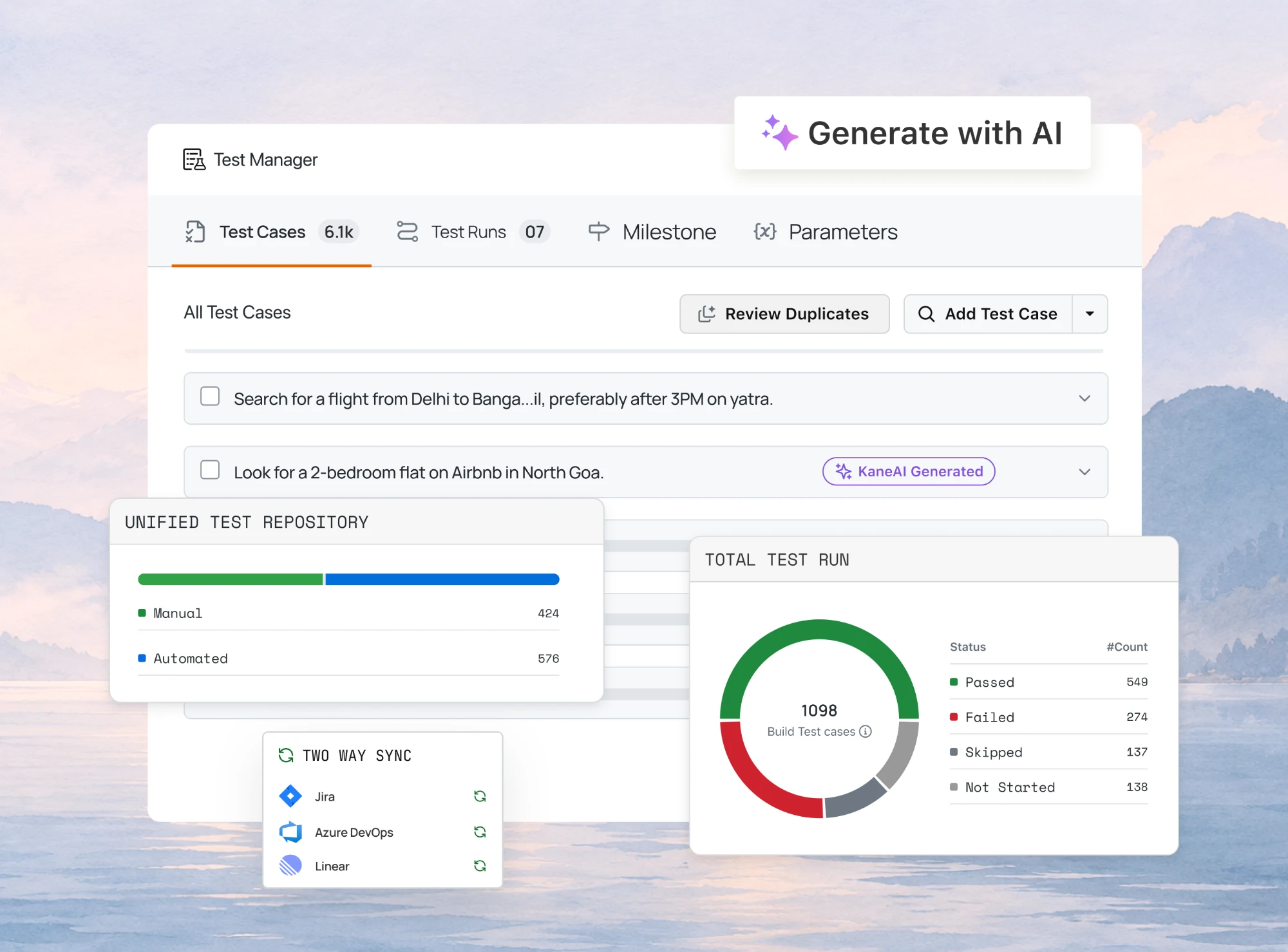
TestMu AI's test management platform generates test cases from a ticket or a document, keeps them in two-way sync with Jira and Azure DevOps, and hands approved cases to KaneAI for automation. It is the only tool in this list that does all three in one product.
- Generates from - a Jira, Azure DevOps, or Linear ticket, a PRD or PDF, an image, video, audio clip, spreadsheet, Markdown file, or Figma flow.
- Output - scenarios of test cases with title, pre-conditions, priority, numbered steps, and expected results, or Gherkin with the BDD toggle. It reads your existing repository first so new cases do not duplicate old ones. For duplicates already in the repository, the Test Deduplication Agent scans a project or folder and flags pairs by percentage match.
- Refine - edit one scenario or case in plain English (@S2, @S2.C4) and attach more files mid-session; settings and credit costs are in the Generate Test Cases with AI documentation.
- Automate - Create and Automate sends approved cases to KaneAI, which exports Selenium, Playwright, Cypress, or Appium code and runs it on HyperExecute.
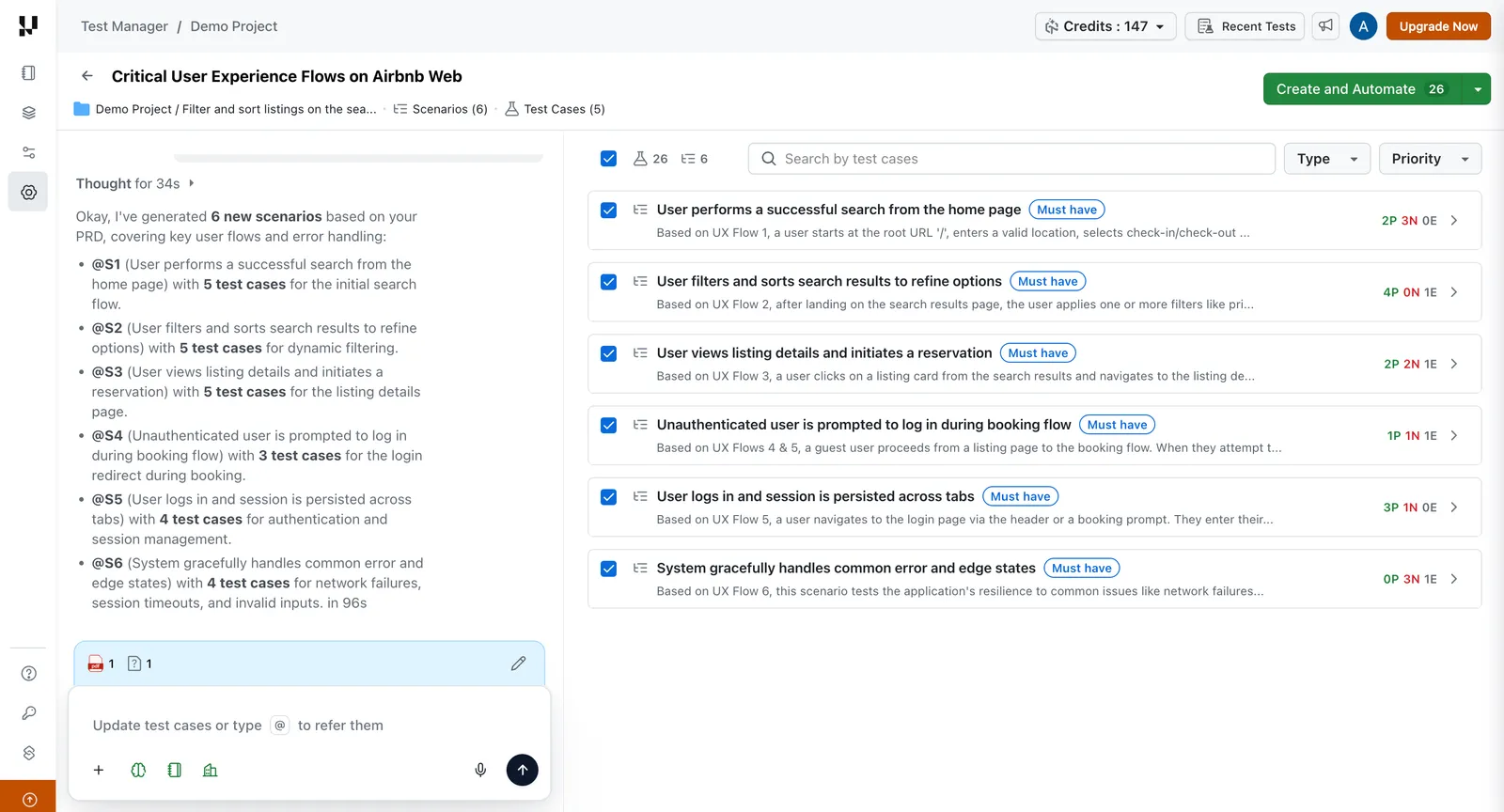
- Jira, two-way - a failed step logs a defect with steps, expected versus actual, environment, and attachments; the ticket status syncs back to the case. A free Jira app on the Atlassian Marketplace lets QA manage cases and results inside Jira.
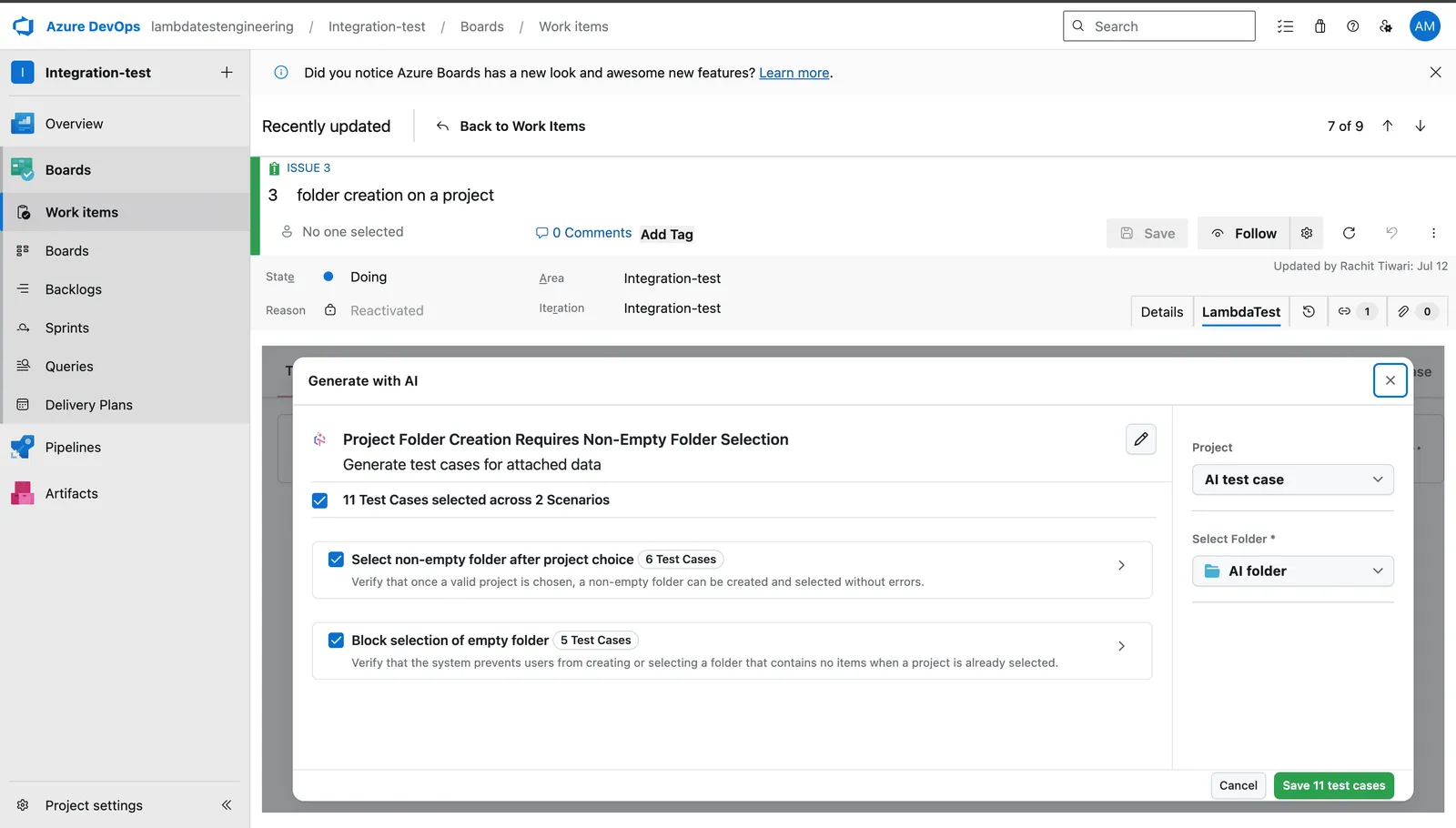
- Azure DevOps, two-way - the Azure DevOps extension adds a TestMu AI tab to each work item: generate cases from the item and its attachments, auto-link them, and see execution history without leaving ADO.
- Dashboard - Insights widgets such as Defects by Severity and Tester Assignment, with manual and CI results (Jenkins, GitHub Actions, GitLab CI) in one cycle view.
- Migration - one-click import from TestRail, Zephyr, qTest, Xray, and CSV; 120+ integrations.
- Pricing - Free: $0, unlimited projects, cases, and runs. Premium: $49 per seat per month billed annually, with 2,000 AI credits per user per month. Enterprise: custom quote.
- Limits - AI generation is Premium only, the generator reads public URLs only, and each edit costs credits (5 per scenario, 1 per case).
2. Testsigma
Testsigma's Atto agents generate plain-English test cases and automated scripts from the same inputs, then execute and maintain them.
- Generates from - user stories, Jira tickets and sprint context, Figma designs, GitHub commits and pull requests, plain-English prompts, session recordings, Postman collections, and OpenAPI specs.
- Output - editable plain-English steps plus automated scripts; four test plans per commit, labelled Smoke, Feature, Regression, and Deep.
- Coverage - web, iOS and Android, API, Salesforce, and desktop, with a Claude Code integration for developers.
- Integrations - Jira, Linear, and Azure DevOps; Jenkins, GitHub Actions, Azure DevOps, and CircleCI for CI.
- Pricing - free trial; paid plans scale with parallel runs and seats; Enterprise adds SSO, compliance, and a dedicated CSM.
- Fit - teams that want generation to start from the commit and run the output as automation immediately.
3. TestRail
TestRail adds generation to the repository most teams already have, with the tester approving every case before it ships.
- Generates from - requirements and user stories.
- Output - test cases and BDD scenarios; automation code from an existing case through a chat interface; run-history prioritization with the reasoning shown.
- Vendor claim - up to 90% faster requirement-to-case turnaround; treat it as a ceiling to test in a pilot, not a planning number.
- Integrations - a dedicated Jira integration; Azure DevOps among the supported CI/CD platforms.
- Pricing - per user, free trial; AI features through an AI Beta Program, and the site does not state which tiers include them.
- Fit - teams standardized on TestRail who want generation without migrating.
- Switching - teams ready to move off TestRail can compare TestRail alternatives that bundle generation with execution.
4. Tricentis qTest
qTest's Agentic Test Creation generates cases from requirements and images, and checks the repository for existing coverage before it writes new ones.
- Generates from - requirements and images, driven from AI Chat in qTest or any MCP-compatible AI assistant, informed by project history and risk signals.
- Output - de-duplicated test cases; every agent-generated asset waits for human approval.
- Reporting - 60+ built-in widgets and customizable dashboards for defect status, coverage, and release readiness across a portfolio.
- Integrations - real-time ALM integrations; a universal agent for any automation framework or CI/CD tool.
- Pricing - free trial; enterprise licensing on request.
- Fit - enterprises that need governance, audit trails, and de-duplication more than speed of first draft.
5. UiPath Test Cloud
UiPath Autopilot for Testers drafts manual test cases from a requirement's details, then runs them on the same platform across 190+ enterprise applications.
- Generates from - requirement name, description, attachments, custom fields, labels, and documents; review each case, regenerate with more detail, or create the tests.
- Output - manual test cases; low-code and pro-code automation on one canvas; a Healing Agent repairs selectors, flows, and timing during execution.
- Coverage - web, mobile, Windows and macOS desktop, API, mainframe, and 190+ enterprise apps including SAP, Salesforce, Oracle, Workday, and ServiceNow.
- Azure DevOps and Jira - ADO work items sync as requirements, defects sync back, and Orchestrator results push to Azure test plans; Jira requirements sync in and defects sync back.
- Pricing - enterprise pricing on request.
- Fit - SAP and packaged-application teams that already run UiPath.
6. Qase
Qase generates cases from issues and grades each one for automation readiness before converting it to code.
- Generates from - Jira issues, GitHub issues, and manual case descriptions.
- Output - structured cases with steps, labelled AI and held for review; approved manual cases convert to Playwright, Cypress, or Selenium after Qase analyzes the repository.
- Readiness grade - each manual case rated easy, medium, or difficult to automate before bulk conversion.
- Integrations - 35+ across CI/CD, frameworks (Pytest, Cypress, Playwright, JUnit, Newman, PHPUnit), and trackers, with bidirectional Jira and GitHub.
- Pricing - free trial with no credit card; plans scale by team size and automation volume.
- Fit - teams whose requirements already live as Jira or GitHub issues.

7. testRigor
testRigor skips the manual case and generates executable plain-English tests that self-heal.
- Generates from - requirements and specifications in plain English, a Claude Code integration through MCP and Skills, or imported manual test cases.
- Output - executable instructions such as "purchase a Kindle" that its parser runs exactly as written; self-healing groups affected cases for batch corrections.
- Coverage - web, native and hybrid iOS and Android, Windows desktop, API, mainframe, email, SMS, phone calls through Twilio, and two-factor flows.
- Integrations - Jira, Azure DevOps, TestRail, Zephyr, GitLab, GitHub Actions, Jenkins, CircleCI, and Spinnaker.
- Pricing - not published on the site; request a quote.
- Fit - teams that want the requirement to become a running end-to-end test with no repository step in between.
8. mabl
mabl goes from a described flow or a Jira ticket to a runnable test, then triages every failure automatically.
- Generates from - a described flow, or a Jira ticket through Atlassian Rovo.
- Output - runnable tests with Test Recovery for app changes, unexpected UI states, and environmental noise mid-run; each failure classified as regression, app change, or noise.
- Coverage - web, iOS and Android, API with Postman imports, and non-deterministic AI features.
- Integrations - GitHub and GitHub Actions, Jira, Atlassian Rovo, Slack, GitLab, Jenkins, CircleCI, and Claude Code.
- Pricing - free trial on registration; enterprise licensing through sales.
- Fit - web-first teams who value failure triage as much as generation.
9. Functionize
Functionize's EAI agents build web UI tests from a plain-English prompt, a recorded flow, or observed user behavior, then keep them green as the application changes.
- Generates from - plain-English prompts to EAI agents, flows recorded with the Architect Chrome plugin, and live user behavior observed through a JavaScript tag.
- Output - automated end-to-end tests that auto-heal, with Dynamic Diagnosis root-cause analysis on failures.
- Coverage - web and mobile web UI, APIs, databases, email, SMS, and PDF/CSV files; enterprise connectors for Salesforce, ServiceNow, Workday, and SAP.
- Integrations - the integrations page is listed as coming soon on the site.
- Pricing - free trial; Individual, Team, and Enterprise tiers.
- Fit - web-first teams that want recording and prompting in one tool without a framework specialist.
10. Virtuoso QA
Virtuoso QA turns specs, tickets, and process documents into runnable test journeys and shows a reviewable diff before anything is recorded.
- Generates from - plain-English requirements, specs, tickets, process documents, and manual test narratives, with runs triggered from Jira.
- Output - runnable, self-healing test suites; every artefact cites its source, and the log records each Proposed, Approved, and Recorded decision.
- Coverage - web journeys, API tests alone or inside end-to-end flows, any browser or device, and Dynamics 365, Salesforce, Guidewire, Oracle, Workday, and Coupa.
- Integrations - Jira, Azure DevOps, TestRail, Jenkins, GitHub, Microsoft Teams, and Slack.
- Pricing - free trial; pricing on request.
- Fit - enterprises on packaged applications that need generated tests to stay traceable to the document they came from.
11. QA Wolf
QA Wolf pairs an AI that maps your application with engineers who fill the gaps, and hands back Playwright and Appium tests you own.
- Generates from - the application itself: AI autonomously explores the app and documents its workflows, with your domain knowledge filling the gaps.
- Output - production-grade Playwright and Appium test code, open source, exportable, and yours to keep, run with 100% parallel execution.
- Coverage - web and Electron apps, iOS and Android phones and tablets, canvas apps, mobile media injection, and Salesforce workflows.
- Model - a self-serve platform or Coverage-as-a-Service with dedicated QA engineers embedded with your team.
- Pricing - not published.
- Fit - teams that want end-to-end coverage built and maintained for them rather than a tool to operate.
Why Choose an AI Test Case Generator Over a Raw LLM?
A purpose-built AI test case generator reads the ticket, checks the repository for duplicates, writes structured fields, links the case to its requirement, and holds it for approval. A chat LLM does none of that.
A chat model writes plausible test cases from whatever you paste into it, and for a one-off spec that is enough. The difference shows up on the second sprint, when the cases have to live somewhere, avoid duplicating what already exists, and stay linked to the ticket that changes next month. The purpose-built tools above add the plumbing around the model, and that plumbing is what you are paying for.
| Dimension | Raw LLM (ChatGPT, Claude, Copilot chat) | Purpose-built AI test case generator |
|---|---|---|
| Input | Whatever you paste or upload in the chat; you fetch the ticket, PRD, and screenshots yourself | Reads the Jira or Azure DevOps item, its attachments, PDFs, images, video, or Figma flow directly (Test Manager, UiPath, Virtuoso QA) |
| Repository context | None; it cannot see the 400 cases you already have, so duplicates are normal | Test Manager retrieves existing cases through its memory layer before generating; qTest flags tests that already cover the requirement |
| Structure | Free text or a table you reformat into fields by hand | Writes straight into title, preconditions, priority, steps, and expected results, or Gherkin, in the repository's template |
| Traceability | Lost at copy-paste; nothing links the case to the story | Case carries an AI label and a link to the originating requirement (Test Manager, Qase, Virtuoso QA), which feeds coverage reports |
| Review gate | Whatever discipline the individual tester applies | Built-in select, edit, approve step before anything is saved (TestRail, qTest, Virtuoso QA, Test Manager) |
| Refinement | Re-prompt and re-paste the whole set | Targeted edits to one scenario or case by reference, with the rest untouched (Test Manager's @S2.C4 references) |
| Execution handoff | Manual; someone still writes the automation | Create and Automate to KaneAI, Qase conversion to Playwright or Cypress, TestRail script generation, or direct execution in testRigor and mabl |
| Data handling | Depends on the chat product's data terms and whether the tester pasted customer data | A recorded Proposed, Approved, Recorded decision log (Virtuoso QA), enterprise SSO tiers, and audit trails and AI governance (qTest) |
| Cost model | A subscription per chat user, outside QA's budget line | Credits or seats inside the test management plan (Test Manager Premium includes 2,000 AI credits per user per month) |
A raw LLM is the right choice when the cases are disposable: a prototype nobody will regression-test, a spike to see whether a spec is testable at all, or a developer drafting unit tests next to the code. The moment a case needs an owner, a link to a ticket, and a place in a test run, the generator earns its seat.
Which Tools Generate Tests From Code?
Keploy, EvoMaster, Schemathesis, and Diffblue Cover generate tests from API traffic, schemas, or Java source for a developer pipeline; Kane CLI generates browser tests from the terminal and files them in Test Manager.
- Keploy - turns real API traffic into editable tests and mocks; core record-and-replay is open source (Apache 2.0).
- EvoMaster - open-source fuzzer that generates system-level test cases for REST, GraphQL, and RPC APIs.
- Schemathesis - generates inputs from an OpenAPI or GraphQL schema and chains operations into workflows; built on Hypothesis.
- Diffblue Cover - agent for regression unit test generation in Java, including legacy Java 8 and 11 codebases.
- Kane CLI - TestMu AI's terminal agent for developers, AI coding agents (Claude Code, Codex CLI, Cursor), and CI.
kane-cli context ingestreads a PRD, Jira ticket, spec, Figma frame, or demo video,kane-cli designderives scenarios and acceptance criteria, andkane-cli generatedrafts cases as plain-English test.md files. Every run executes in real Chrome and uploads to Test Manager by default, filed under the project and folder set withkane-cli config, with a share link for the PR and optional Playwright code export; see the Kane CLI documentation.
For unit-level coverage, see the comparison of AI unit test generation tools, frameworks, and strategies.
What Are the Known Limits of AI Test Case Generators?
Documented limits include public-URL-only input and metered edits in TestMu AI Test Manager, Beta status for TestRail's AI features, web-only recording in Functionize, and unpublished pricing at testRigor and QA Wolf.
- Input reach - TestMu AI's generator can only access publicly available URLs, so a link to a private wiki page must be pasted or attached instead; Functionize's Architect recorder is a Chrome plugin, so recorded flows are web only.
- Batch size - generation is probabilistic, which is why Test Manager exposes Max Test Scenarios and Max Test Cases per Scenario as settings; check the count before saving rather than assuming a fixed number per run.
- Maturity - TestRail's AI features run through an AI Beta Program and Functionize lists its integrations page as coming soon, so expect workflows and included tiers to change.
- Pricing opacity - testRigor and QA Wolf publish no price, and Tricentis, UiPath, and Virtuoso QA quote on request, so a pilot on those needs a sales conversation before a budget number exists.
- Credits - refinement is metered where generation is (Test Manager charges 5 credits per scenario edit and 1 per test case edit), so a team that iterates heavily should size the plan on edits, not on first drafts.
- Review load - every tool here keeps a human approval step, which means generation shifts effort from writing to reviewing rather than removing it. Budget reviewer time in the pilot, or the backlog moves from the blank page to the approval queue.
How Do You Choose an AI Test Case Generation Tool?
Choose by where requirements live: Jira or Azure DevOps tickets point to TestMu AI Test Manager, Qase, or Testsigma; PRDs and PDFs to Tricentis qTest or UiPath; a running app with no repository to testRigor or mabl.
| If your requirements live in | Shortlist | What to test in the pilot |
|---|---|---|
| Jira or Azure DevOps work items | TestMu AI Test Manager, Qase, Testsigma | Generate from one ticket with an attached screenshot and confirm the case links back and status syncs both ways |
| PRDs, PDFs, or design files | TestMu AI Test Manager, Tricentis qTest, UiPath Test Cloud, Virtuoso QA | Feed the same PRD to two tools and count duplicated cases against the existing repository |
| An existing TestRail repository | TestRail, or migrate into Test Manager with one-click import | Check whether the AI Beta Program covers your tier before planning around it |
| A regulated audit trail | Tricentis qTest, Virtuoso QA | Export the approval history for one generated case and hand it to compliance |
| A running app with no repository | testRigor, mabl, QA Wolf | Change one UI element after generation and measure how many tests self-heal without edits |
| Packaged apps such as SAP, Salesforce, or ServiceNow | UiPath Test Cloud, Functionize, Virtuoso QA | Run one packaged-app journey end to end and count the steps that needed a custom connector |
Whichever shortlist applies, run the pilot on your flakiest module rather than a demo app, keep the generated set separate from the main suite until review is done, and record how many generated cases were kept, edited, or rejected. That kept-edited-rejected ratio is the number that predicts whether the tool pays for itself.

Note: Generate test cases from a Jira ticket, PRD, or Figma flow, keep them in two-way sync with Jira and Azure DevOps, and automate the approved ones with KaneAI, all on the free Test Manager plan. Start with TestMu AI Test Manager for free.
How Was Each Tool in This Comparison Verified?
Every capability was checked on the vendor's live product or documentation pages in September 2026, the tools are ordered by workflow coverage rather than a score, and no third-party price is quoted in dollars.
Anything that could not be confirmed on a live page was left out or described qualitatively. TestMu AI (Formerly LambdaTest) builds Test Manager, so its entry lists its limits next to its features. Qodo and Symflower, both on the earlier version of this list, were dropped because their current product pages no longer position them around test generation; aqua cloud, Testmo, and Autosana were removed in the September 2026 update because they appear in few independent comparisons of this category.
Which AI Test Case Generation Tool Should You Pick?
Pick TestMu AI Test Manager or Qase when requirements live in Jira or Azure DevOps, Tricentis qTest or UiPath for document-heavy enterprise teams, and testRigor, mabl, or QA Wolf when there is no repository to feed.
How Do You Start With AI Test Case Generation?
Create a free Test Manager project, open Generate With AI, paste one Jira ticket or PRD, and compare the generated scenarios with the cases your team wrote by hand for the same story before automating.
The Test Manager documentation covers project setup, the generation settings, and the Jira and Azure DevOps connections. If the generated cases hold up, use Create and Automate to send the approved set to KaneAI and run it on HyperExecute.
Key Takeaways
- Generation input decides fit: A tool that reads the ticket or PRD directly removes the copy-paste step that a chat window reintroduces on every sprint.
- Two-way sync is the tracker test: A one-way push leaves the case stale the moment a developer closes the defect; status has to flow back to the case.
- Repository context prevents duplicates: Generators that read the existing suite before writing avoid the redundant cases a context-free model produces by default.
- Review load replaces writing load: Every generator keeps an approval gate, so pilot budgets belong on reviewer hours rather than authoring hours.
- Kept-to-rejected ratio: The share of generated cases kept without edits is the one number that predicts whether the tool pays for itself.
- Beta features shift under you: At least one generator on this list runs its AI through a Beta program, so plan tiers and workflows around what is generally available today.
Testing web or mobile apps without writing code? KaneAI by TestMu AI turns plain-English instructions into tests.
Author

Devansh Bhardwaj
Blogs: 77


Devansh Bhardwaj is a Community Evangelist at TestMu AI with 4+ years of experience in the tech industry. He has authored 30+ technical blogs on web development and automation testing and holds certifications in Automation Testing, KaneAI, Selenium, Appium, Playwright, and Cypress. Devansh has contributed to end-to-end testing of a major banking application, spanning UI, API, mobile, visual, and cross-browser testing, demonstrating hands-on expertise across modern testing workflows.
Reviewer

Saurabh Prakash
Reviewer
Saurabh Prakash is an Engineering Manager at TestMu AI, where he leads engineering on agentic AI development and scalable system architecture for the quality engineering platform. He has also contributed to Test at Scale, the company's open-source test intelligence platform. He brings over 9 years of experience across Node.js, Java, Spring, MVC, data structures, algorithms, and scalable system design, with earlier roles as SDE 2 at Zomato, Senior Software Engineer at LogicHub, and Software Development Engineer at Directi. Saurabh holds a B.Tech in Computer Science and Engineering from Delhi Technological University.


AI Test Case Generation Tools FAQs
Did you find this page helpful?
More Related Blogs

TestMu AI forEnterprise
Get access to solutions built on Enterprise
grade security, privacy, & compliance
- Advanced access controls
- Advanced data retention rules
- Advanced Local Testing
- Premium Support options
- Early access to beta features
- Private Slack Channel
- Unlimited Manual Accessibility DevTools Tests