
Power Your Software Testing with AI Agents and Cloud
The Native AI-Agentic Cloud Platform to Supercharge Quality Engineering. Test Intelligently and Ship Faster.


- TestMu AI (Formerly LambdaTest)
- /
- Blog
- /
- What is Regression Testing? Types, Process, Examples
What is Regression Testing: Definition, Process, Examples
Regression testing checks that code changes have not broken existing features. Learn its types and techniques, the step-by-step process, and worked examples.
Last Updated on:
On This Page
- What is Regression Testing?
- Why It Is Important
- When to Perform It
- Types of Regression Testing
- Techniques
- Regression Testing Example
- Step-by-Step Process
- Defining Test Cases
- How to Automate It
- Regression in CI/CD
- Regression vs Other Tests
- Retesting vs Regression
- Building a Strategy
- Challenges
- Role of AI Agents
- Best Practices
Regression testing is the practice of re-running tests that already passed after a code change, to confirm the change has not broken features that worked before. Teams run it after bug fixes, new features, refactoring, configuration updates, and dependency upgrades, using a reusable suite that is usually automated and runs in CI on every merge.
Every bug fix, feature, and refactor touches code paths other features depend on, so a flow that passed last week is not evidence that it passes today.
The cost of skipping it is asymmetric. A defect caught by the suite costs a rerun, while the same defect caught by a user costs a hotfix, a support queue, and the trust of everyone who hit it.
Key Takeaways
Regression testing is a type of change-related testing that checks whether a code change has introduced or uncovered defects in parts of the software that were not modified. Teams run it after bug fixes, new features, refactoring, and patches, using a reusable suite of test cases that covers existing behavior.
When Should You Run Regression Tests?
- After a bug fix: A fix changes shared code, so regression testing re-runs the tests around the defect and the tests for every feature that touches the same module, confirming the repair did not create a second defect elsewhere.
- After a new feature: Regression testing verifies that functionality shipped in earlier releases still behaves the same way once new code, new dependencies, and new database fields are added alongside it.
- During refactoring: Refactoring changes structure without changing behavior, so the regression suite is the only evidence that the rewrite preserved behavior. A failing test here means the refactor changed something it should not have.
- Before a production release: A complete regression run, the broadest of the regression testing types, across supported browsers, operating systems, and devices, catches environment-specific breakage that passed on a single developer machine. When time is short, a hybrid of test selection and prioritization runs the riskiest cases first.
How Do You Run a Regression Suite at Scale?
Write the suite in Selenium, Playwright, Cypress, or Appium, wire it into CI so it runs on every merge, and execute it in parallel on a cloud grid rather than sequentially on one machine. TestMu AI runs those suites across 3,000+ browser and OS combinations and 10,000+ real devices.
What is Regression Testing?
Regression testing is a type of change-related testing that detects whether defects have been introduced or uncovered in unchanged areas of the software, per the ISTQB Glossary. Change-related places it in the same family as confirmation testing, the formal name for retesting. Unchanged areas is the part teams forget: the target is code nobody touched.
That distinction explains why regression suites exist at all. Verifying the code you just wrote is ordinary development testing. Regression testing verifies the code you did not write this sprint, and it runs across the whole Software Development Life Cycle (SDLC) because the risk never goes away.

Why is Regression Testing Important?
A single change can break a feature three modules away, and nothing in the development workflow surfaces that automatically. Regression testing is the mechanism that does.
- Catches breakage in code nobody edited - A change to a shared session helper can break checkout while the login tests still pass. Regression testing covers the blast radius of a change, not just the diff. An AI agent can regress with no code edited at all, after a model upgrade or a prompt change, which is what agent regression testing is built to catch.
- Makes frequent releases safe - With a reliable regression test suite in CI, a team can merge several times a day and know within minutes whether existing behavior survived.
- Shortens the distance to the cause - Running the suite on every merge means a failure points at one small diff. Running it once a month means bisecting weeks of commits.
- Protects flows users notice first - Login, search, cart, and checkout are the flows that generate support tickets when they break. A regression suite keeps them under continuous assertion.
- Keeps quality steady as the codebase grows - Complexity compounds, and the number of ways a change can break something grows with it. The suite grows alongside the product as the record of what must keep working.
When to Perform Regression Testing?
Run regression tests whenever code that ships changes. These are the triggers that matter in practice:
- Bug fixes - A fix touches shared code. Re-run the tests around the defect and the tests for the modules that call into it.
- New features or enhancements - New code runs alongside old code and often shares state, routing, or database schema with it.
- Code refactoring - Behavior is supposed to stay identical, which makes the regression suite the only proof that it did.
- Dependency and platform updates - A framework bump, a security patch, or a new browser version can change behavior without a single line of your own code changing.
- Integration with new systems - A new payment provider or identity service changes the contracts existing flows rely on.
- Before a production release - A final run across the supported browser, OS, and device matrix catches environment-specific breakage.
What Are the Types of Regression Testing?
The types of regression testing are complete, partial, unit, corrective, selective, and retest-all regression. They differ in how much of the product a change forces you to retest, and in whether the existing test cases can be reused as they are.
Complete or Full Regression Testing
Choose complete regression when a change spans many modules and its effect on the rest of the product is unknown. The safe decision then is to retest the entire product, old features and altered ones alike.
A typical case is a second release that bundles four or five new features with fixes for defects from the first release. The team runs impact analysis, finds that the changes reach most of the product, and schedules a full pass. Upgrading the JDK or JVM version a Java application runs on is another example, because it changes the base every module depends on, so the whole application needs a full regression pass.
Partial Regression Testing
Partial regression tests the changed code together with the existing, unchanged code it integrates with, rather than the whole product. It fits small changes where impact analysis can name the affected modules with confidence.
Unit Regression Testing
Unit regression runs during the unit testing phase and tests the code of one unit in isolation. Dependencies of the unit under test are stubbed or mocked, so a failure points at the unit itself rather than at something it calls.
Corrective Regression Testing
Corrective regression applies when the product specification has not changed, so the existing test cases can be reused as they are. It needs the least preparation of the types, because no new cases have to be written before the run.
Selective Regression Testing
Selective regression runs only the subset of existing cases that impact analysis ties to the changed code and what depends on it, such as shared functions, variables, and modules. It trades some coverage for speed, so it is only as reliable as the impact analysis behind it. Regression test selection, covered in the next section, is the technique that picks those cases.
Retest-All Regression Testing
Retest-all regression re-runs every case in the existing suite as it stands, without selecting, reordering, or adding cases. That is where it differs from complete regression, which also covers the features the release altered. It matches the re-test all technique described in the next section, and it is one of the most time-consuming types, which is why teams automate it.
Despite the name, it is not retesting, which re-runs only the cases that failed.

Note: Some types share a name and an approach with a technique, such as retest-all and selective. Read a type as how much of the product you retest, and a technique as how you choose and order the cases that actually run.
What Are the Regression Testing Techniques?
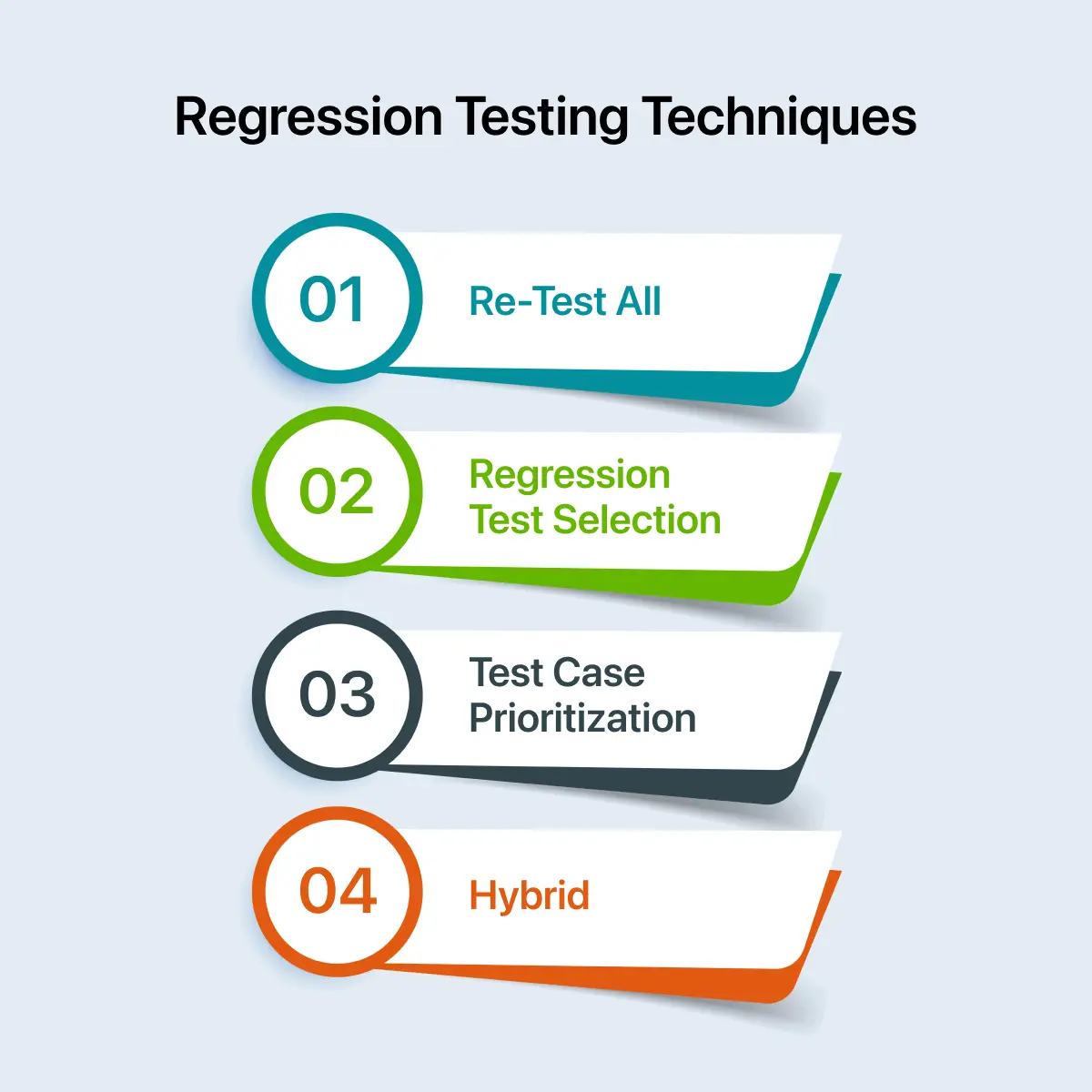
The regression testing techniques are re-test all, regression test selection, and test case prioritization, plus a hybrid that combines selection with prioritization to balance coverage against runtime.
Re-Test All Technique
Re-test all re-executes every test case in the suite to confirm the code change introduced no defects. It needs more time and resources than the other techniques, which makes it the most expensive.
It gives the widest coverage, though it only catches what the existing suite covers. Teams reach for it after a major operating system update, or when the application is ported to a new language or platform. ERP upgrades are a common example, where the difference between ERP configuration and customization decides whether a vendor update needs a targeted pass or a full re-test cycle.
Regression Test Selection
Regression test selection picks the test cases that cover the modified module and re-executes only those, instead of the entire suite. Running a limited set of relevant cases cuts the time and effort a regression pass costs.
Test Case Prioritization
Every test case gets a priority based on its criticality, its impact on the product, and how often users rely on the functionality. High-priority cases execute first, medium-priority cases follow, and low-priority cases run last.
Prioritization pays off most when the suite is longer than the CI window. Ordering by risk means the failures that would block a release surface in the first few minutes, not at the end of a two-hour run.
Hybrid Regression Testing Technique
The hybrid technique blends regression test selection with test case prioritization. The complete suite is not re-executed: you select the cases a change puts at risk, then run them in priority order.
Regression Testing Example
The first example below is a real suite run. The four after it each start from a specific change and list the regression test cases that change calls for.
A Stale Locator Failing an Ecommerce Regression Run
The Ecommerce Playground is an open demo storefront carrying the flows an ecommerce team would guard on every merge: login, search, registration, and cart. I ran a five-check regression suite against it on the TestMu AI cloud grid, and this is the real terminal output:
===== REGRESSION RUN =====
PASS  login form renders  (3008 ms)
PASS  product search returns results  (2305 ms)
PASS  register form reachable  (2089 ms)
PASS  cart page loads  (1406 ms)
FAIL  add-to-cart button present (legacy #button-cart locator)  (12867 ms)
        page.waitForSelector: Timeout 10000ms exceeded.

passed: 4/5   total: 21675 ms
Four checks passed and one failed. The failing check looked for an add-to-cart button with the id #button-cart, and the timeout says that element never appeared. Inspecting the live product page shows why: the button is still there, but the id was dropped when the markup changed, and the element is now selected by its button-cart CSS class instead.
That is the most common regression failure there is: the application is fine and the test is wrong. Treating every red result as a product defect wastes a morning on a bug that does not exist, and treating every red result as a stale test is how the real one ships.
Regression Test Cases for a Shared Order-Total Fix
Take an order management product. One function triggers the dispatch, acceptance, and confirmation emails when a user clicks the Dispatch, Accept, and Confirm buttons. During development the confirmation email starts showing the wrong order total, and a developer traces the bug to the order-total helper and patches it.
Retesting the confirmation email confirms the fix. That is where many teams stop, and that is where the regression escapes. The same helper is called by the dispatch email, the acceptance email, the order summary page, and the invoice PDF, so the regression scope is every consumer of the code that changed, not the confirmation email alone. Finding those consumers is the question impact analysis answers before a single test runs.
These are the resulting regression test cases for that one-line fix. Only the first row is retesting, and everything below it is regression testing.
| ID | Module | Test steps | Expected result | Priority |
|---|---|---|---|---|
| RT-01 | Confirmation email | Place an order for 3 items with a coupon, click Confirm, open the email | Email total matches the cart total, including discount | P1 (retest) |
| RT-02 | Dispatch email | Mark the same order as dispatched, open the dispatch email | Total is unchanged from the confirmed order | P1 |
| RT-03 | Acceptance email | Accept the order, open the acceptance email | Total renders and matches the order record | P1 |
| RT-04 | Order summary page | Open the order in the account area | Subtotal, tax, and grand total match the confirmation email | P1 |
| RT-05 | Invoice PDF | Download the invoice for the order | Grand total matches the order summary page | P2 |
| RT-06 | Zero-total edge case | Place a fully discounted order, confirm it | Total shows 0.00, not a blank or negative value | P2 |
RT-06 is a case teams often miss. A rounding or currency fix can break boundary values rather than the common path, so a suite covering only happy paths will pass while the defect ships.
Login Flow Regression Tests After an Auth Refactor
A team replaces server-side sessions with tokens issued by an identity provider. The login screen is untouched, so the diff looks small.
The blast radius is not. Password reset, session expiry, role checks, and deep links all read the credential that just changed shape.
| ID | Module | Test steps | Expected result | Priority |
|---|---|---|---|---|
| AUTH-01 | Standard sign-in | Sign in with valid credentials, then refresh the page | User lands on the dashboard and stays signed in after the refresh | P1 |
| AUTH-02 | Invalid credentials | Sign in with a valid email and a wrong password | Same generic error text as before the refactor, with no hint about which field was wrong | P1 |
| AUTH-03 | Session expiry | Sign in, wait past the token lifetime, then open a protected page | Redirect to the login page, not a blank screen or a server error | P1 |
| AUTH-04 | Password reset | Request a reset link, set a new password, sign in twice | The new password works and the old one is rejected | P1 |
| AUTH-05 | Role-based access | Sign in as a viewer and open an admin-only URL directly | Access is denied and no admin data is returned in the response body | P1 |
| AUTH-06 | Deep link after sign-in | Open a protected URL while signed out, then sign in | User arrives at the originally requested URL, not the default dashboard | P2 |
| AUTH-07 | Sign out everywhere | Sign in on two browsers, then choose Sign out of all sessions on one | The session in the other browser is rejected on its next request | P2 |
AUTH-05 is the row worth arguing about. Authorization usually reads the same credential the login flow issues, so changing how a user proves identity also changes how the app decides what they may see, with no visible change on the login screen.
These cases are less about the new auth code than about the features that consumed the old one.
Checkout Regression Tests After a Tax Calculation Change
The pricing service moves from a flat tax rate to region-based tax. Product pages and the cart page both render correctly in the first manual check, so the change looks contained.
The regression cases below target the systems that recompute the same number somewhere else in the flow.
- Cart totals - Add three items across different tax categories, then confirm subtotal, tax, and grand total agree with what the pricing service returned.
- Coupon stacking - Apply a percentage coupon and a fixed-amount coupon together, and confirm the order they are applied in has not changed.
- Free-shipping threshold - Order one cent below and one cent above the threshold, because a tax change moves the value the threshold is compared against.
- Currency rounding - Place an order in a currency with no minor units, such as JPY, and confirm no decimal places appear anywhere in the flow.
- Payment capture - Confirm the amount authorized at the gateway matches the amount shown at checkout rather than the pre-tax total.
- Refunds - Refund a discounted order and confirm the refunded amount matches what was charged, since refund logic often recomputes instead of replaying.
- Receipts and reports - Confirm the confirmation email, the invoice PDF, and the revenue export all show the same grand total for that order.
Pricing changes often break refunds, accounting exports, and reports rather than the checkout page itself. A wrong total in those places can go unnoticed for weeks while it costs money.
Regression Tests for a Dependency Upgrade With No Code Change
A bot raises a pull request bumping the date-handling library one minor version. No application code changes, so a diff of the source gives impact analysis nothing to trace.
That makes it the clearest case of behavioral regression scope: the risk comes from what the library now does, not from any line in the diff.
- Stored dates - Open a record created before the upgrade and confirm the displayed timestamp is byte-for-byte what it was.
- Timezone boundaries - Check a record created at 23:30 in a UTC+13 zone, where a parsing change shifts the calendar day.
- Daylight saving - Run a recurring job across a DST transition and confirm it fires once, rather than twice or not at all.
- Relative filters - Run a report for the last 30 days and compare the row count against the pre-upgrade baseline.
- Serialization - Confirm dates in API responses keep the same format, since the clients parsing them are outside your deploy.
Dependency and configuration updates are the case where diff-based selection has little to work from, so a scheduled full pass is what covers them.
How to Perform Regression Testing Step by Step?
To do regression testing, identify what changed, run impact analysis to find every module that consumes it, select and prioritize the already passing cases covering those modules, split them across manual and automated runs, set a time budget, execute in priority order, then triage failures and fold new cases back into the suite.
- Identify what changed - Pull the diff for the release, then add configuration edits and dependency bumps, which break behavior without appearing in application code.
- Run impact analysis - Map every module, service, job, and report that consumes the changed code. That map is the outer boundary of your scope.
- Select the cases - Take the already passing cases covering the impacted modules, add the failed case that triggered the fix, and drop cases for features that no longer exist.
- Prioritize them - Rank by revenue impact, usage volume, and defect history, so a run that gets cut short still covers what matters.
- Split manual from automated - Automate the stable and repeatable cases, and keep human effort for the areas that just changed and the exploratory checks around them.
- Set the time budget - Use test estimation to decide how long the pass may take at each pipeline stage before you schedule it, not after it overruns.
- Execute in priority order - Run the high-priority group first, so a blocking failure stops the run early.
- Triage and feed back - Fix or quarantine every failure, and add a regression case for each defect that reached production.
How Do You Define a Regression Test Case?
Define a regression test case with an ID, the module it covers, the test steps, the expected result, and a priority, and include it in the suite when it covers one of the areas below.
The order-total table above uses exactly these fields. Include these kinds of test cases in the regression suite:
- Frequently failing areas - Cases covering defects that recurred in the past, because those areas are where bugs resurface.
- Recently fixed defects - Cases for issues found in the most recent test phases, confirming the fixes held and caused nothing new.
- Priority 1 and Priority 2 cases - Cases that check the critical parts of the product, which need thorough coverage on every run.
- Core features - Cases for the functionality the product cannot work without.
- Integration points - Cases covering how different parts of the product work together, where a change in one module shows up as a failure in another.
- Edge cases and boundary values - Cases for unusual inputs and limits, like the zero-total order in RT-06, since fixes often break boundaries rather than the common path.
- Modified modules - Cases that target the parts of the product changed in this release.
- Frequently used functionality - Cases covering what users do most often, where any defect has the biggest effect on the user experience.
For turning these cases into a maintained suite, see how to prepare a regression test suite.
How to Perform Automated Regression Testing?
Automating the step-by-step process above adds framework, script, and grid decisions. The order of these steps matters, because each one narrows what the next has to handle.
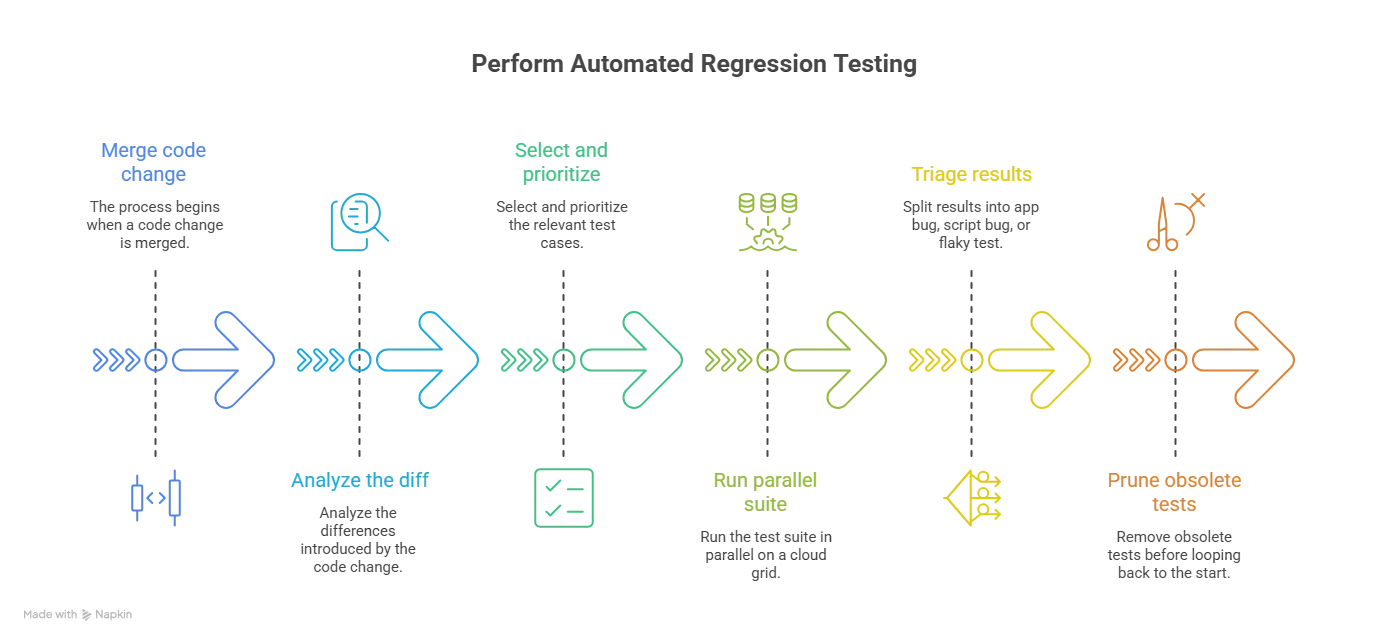
- Understand what changed - Read the diff before selecting tests. Split the existing test cases into those still valid for the new behavior and those the change made obsolete.
- Prioritize by risk - High priority covers core flows, code changed in this release, and modules with a history of defects. Medium covers field validation and negative cases. Low covers cosmetic elements such as logo placement and button copy.
- Pick a framework that matches the application - Selenium and Playwright for web, Appium for mobile, Cypress for front-end feedback loops. The deciding factor is which one your team can maintain, not which benchmarks fastest.
- Write scripts that survive change - Keep them modular, and prefer stable locators over ones tied to markup that designers move. The failing check in the example above is what happens when a script depends on an id that the front end owns, and it is the specific breakage AI agents now repair automatically.
- Run it in CI on a cloud grid - Wire the suite into CI/CD so it triggers on every commit, and run the cases in parallel across browsers and devices instead of sequentially on one machine.
- Triage results and prune the suite - Execute automated tests, then separate real defects from stale scripts and flaky tests. Delete tests that no longer describe current behavior rather than letting them accumulate.
No single tool covers a regression suite end to end. You pick a driver that matches the application type, then an execution layer that runs the suite fast enough to gate a release. For an AI agent built on Salesforce, the guide to Agentforce regression testing covers the tools that run its suite and the CI gate on each change.
On TestMu AI, Automation Cloud runs existing Selenium, Cypress, Playwright, and Puppeteer suites in parallel across 3,000+ browser and OS combinations, and SmartUI adds visual regression checks by comparing screenshots against an approved baseline. Test Insights ranks tests by how often they fail, so flaky and consistently failing tests stay visible. For a side-by-side comparison of the options, see the roundup of regression testing tools.
For framework-level setup, configuration, and CI examples, see the dedicated guide to automated regression testing.
How Does Regression Testing Fit Into CI/CD?
In a CI/CD pipeline, regression testing runs as a set of staged gates rather than one event: unit tests pre-commit, a prioritized subset on pull requests, the full suite after merge, and the browser matrix nightly. Each gate has its own time budget and its own tolerance for missing something.
| Stage | What runs | Typical target runtime | On failure |
|---|---|---|---|
| Pre-commit | Unit tests for the changed module | Under 2 minutes | Blocks the commit |
| Pull request | P1 regression group, selected by impact analysis | Under 10 minutes | Blocks the merge |
| Post-merge | Full regression suite, run in parallel | Under 30 minutes | Blocks the release candidate |
| Nightly | Full suite plus cross-browser and cross-device matrix | Hours, off the critical path | Raises a triage ticket |
| Pre-release | Full suite plus manual exploratory around changed areas | Scheduled | Blocks the release |
The runtimes matter more than the stage names. A common rule of thumb, the ten-minute build from Extreme Programming, holds that the build and its tests should finish in about ten minutes, which is why a pull request gate is usually held to that budget. Past that, developers switch to other work and the feedback loop weakens.
Selection reduces how many tests run, and parallel execution reduces how long a given set takes. Selection misses changes it cannot trace, such as the dependency upgrade example above, so teams pair it with parallel execution and a scheduled full run. Treating regression as a standing gate rather than a release-week event is the substance of continuous testing.
Regression Testing vs Other Testing Types
Regression testing is defined by its purpose, not by its scope, which is why it overlaps with test levels that are defined by scope. A unit test and an end-to-end test can both be regression tests, and the label depends on why they are being run.
| Type | Question it answers | When it runs |
|---|---|---|
| Regression testing | Did this change break something that already worked? | After every change to shipping code |
| Unit testing | Does this function return the right value in isolation? | As the code is written, on every build |
| Integration testing | Do these modules work correctly together? | After units are combined |
| Functional testing | Does the feature do what the specification says? | When a feature is built or changed |
| Smoke and sanity testing | Is this build stable enough to test further? | On a new build, before the full suite |
| User acceptance testing | Does the finished product meet the business need? | After features are complete and tested |
The practical consequence is that a regression suite is assembled from tests at several levels. Unit tests give speed, integration and functional tests give confidence in real user flows, and smoke tests decide whether running the rest is worth the compute.
Retesting and Regression Testing: Difference
ISTQB gives retesting a formal name, confirmation testing, and defines it as "a type of change-related testing performed after fixing a defect to confirm that a failure caused by that defect does not reoccur." Both sit under change-related testing, which is why they are confused. The split is what each one looks at: confirmation testing looks at the defect, regression testing looks at everything around it.
| Retesting (confirmation testing) | Regression testing |
|---|---|
| Confirms that a specific reported defect is actually fixed. | Confirms that unchanged functionality still behaves the same after the fix. |
| Runs the test cases that previously failed. | Runs test cases that previously passed. |
| Scope is the defect and its reproduction steps. | Scope is every area the change could have affected. |
| Rarely worth automating, because each case is run once against one fix. | Automated regression testing is the norm, because the same cases run on every release. |
| Planned, because the team knows exactly what to verify. | Generic, because the suite is reused regardless of what changed. |
| Takes priority, since regression results are meaningless until the fix is confirmed. | Can run in parallel with confirmation testing once priorities are set. |
| Finishes quickly, covering a handful of cases. | Takes longer, growing with the size of the suite. |
Teams run both, in that order. Confirm the fix, then check what the fix disturbed.
Developing Regression Testing Strategy
A regression strategy is mostly a set of decisions about what not to run. These are the ones worth making deliberately when you plan a testing strategy:
- Rank the suite by business impact - Order test cases by what a failure would cost, not by the order they were written. Checkout outranks a settings toggle, so checkout runs first and blocks the merge.
- Define what triggers a full run - Decide up front which changes justify the complete suite and which get a selective run. A dependency upgrade earns a full run, a copy change does not.
- Cover the complicated modules properly - The features with the most branching logic produce the most regressions, and they are usually the ones with the thinnest test coverage.
- Pair the suite with exploratory testing - A regression suite only asserts what someone thought to assert. Exploratory testing finds the cases the suite was never written to catch, and those become new regression tests.
- Decide what stays manual - Some checks are cheaper to run by hand than to automate and maintain. Manual testing is the right call for cases that change every release.
- Fix the environment matrix - Name the browsers, operating systems, and devices the suite must pass on, so a green run means the same thing to everyone reading it.
Challenges of Regression Testing
Regression suites degrade in predictable ways, and each has a specific remedy.
- Execution time grows with every release - The suite only ever gets longer, and once it blocks merges for an hour, developers start skipping it. Running cases in parallel testing across machines is what keeps wall-clock time flat as case count rises.
- Triage costs more than execution - A red suite raises one question: app bug, script bug, or environment. The example above was a script bug, and answering that by hand for dozens of failures is where the day goes.
- Maintenance debt accumulates - Tests written against markup that has since changed keep failing until someone deletes or rewrites them, and until then every run carries noise that trains the team to ignore red. Golden datasets used to score AI features go stale in a similar way and need re-review when policies, tools or models change.
TestMu AI addresses the first two directly. HyperExecute runs a suite up to 70% faster than a traditional hub-and-node grid, because the test script and its execution components sit in one isolated environment instead of crossing network hops, and its matrix strategy turns a cross-browser run into one parallel task per browser and OS combination.
Triage is handled by an AI pipeline that categorizes each failure as an app bug, a script bug, or an environment problem before an engineer opens it, then returns a root cause analysis with remediation steps. Setup and YAML configuration are covered in the HyperExecute documentation.
Note: Run your regression suite in parallel across 3,000+ browser and OS combinations and 10,000+ real devices on TestMu AI. Try it free!
Role of AI Agents in Regression Testing
Most of the cost in a regression suite is repetitive judgement work: deciding which cases a diff puts at risk, repairing steps after a UI change, and re-reading the same failure patterns. That is the part agents are now taking over, and it maps onto three specific jobs.
- Authoring cases from requirements - KaneAI turns a Jira ticket, a product spec, or a screen recording into executable steps written in plain English, then exports them to Selenium, Playwright, Cypress, or Appium so the suite stays in the framework the team already runs.
- Self-healing the steps that break - Smart element detection anchors a step to the intent of the element rather than a CSS or XPath selector. A dropped id like the one in the run above re-anchors instead of failing, which turns maintenance into reviewing a heal rather than rewriting a test.
- Propagating one fix everywhere - Common steps promoted into reusable modules mean a single repair reaches every test using that module, and version history on each test makes a bad heal reversible.
The limit is worth stating plainly. An agent that re-anchors a step cannot tell you whether the new behavior is correct, so a heal is a proposal a human still approves. Case selection and prioritization are covered in more depth in our guide to AI in regression testing.
Best Practices of Regression Testing
Faster infrastructure shortens a regression cycle and agents absorb much of the repair work, but neither decides what belongs in the suite. That judgement stays with the team, and these practices are where it gets made.
- Keep the suite shorter than the patience of the team - If a full run outlasts a coffee break, split it: a fast high-priority set gates the merge, the complete set runs nightly.
- Delete tests, not just add them - A case that no longer describes current behavior is worse than no case, because it fails for the wrong reason and teaches people to ignore failures.
- Write locators the front end will not break - Prefer test-specific attributes over ids and class names that belong to the markup, which is exactly the failure reproduced in the example above.
- Fix flaky tests the week they appear - A test that passes and fails on identical code costs more than it protects, because every future red result on it gets dismissed on sight.

Conclusion
Start by ranking your existing test cases by what a failure would cost the business, take the top tier, and wire that set into CI so it runs on every merge. That single change moves regression testing from a pre-release scramble to a continuous check.
From there, run the suite in parallel on the test automation cloud across the browsers and devices your users actually have, and hand the repetitive repair work to an agent once the suite is stable enough to trust. If you are still choosing a framework, compare the options in the roundup of regression testing tools.
Author

Devansh Bhardwaj
Blogs: 77


Devansh Bhardwaj is a Community Evangelist at TestMu AI with 4+ years of experience in the tech industry. He has authored 30+ technical blogs on web development and automation testing and holds certifications in Automation Testing, KaneAI, Selenium, Appium, Playwright, and Cypress. Devansh has contributed to end-to-end testing of a major banking application, spanning UI, API, mobile, visual, and cross-browser testing, demonstrating hands-on expertise across modern testing workflows.
Reviewer

Himanshu Sheth
Reviewer
Himanshu Sheth is the Director of Marketing (Technical Content) at TestMu AI, with over 8 years of hands-on experience in Selenium, Cypress, and other test automation frameworks. He has authored more than 130 technical blogs for TestMu AI, covering software testing, automation strategy, and CI/CD. At TestMu AI, he leads the technical content efforts across blogs, YouTube, and social media, while closely collaborating with contributors to enhance content quality and product feedback loops. He has done his graduation with a B.E. in Computer Engineering from Mumbai University. Before TestMu AI, Himanshu led engineering teams in embedded software domains at companies like Samsung Research, Motorola, and NXP Semiconductors. He is a core member of DZone and has been a speaker at several unconferences focused on technical writing and software quality.


Regression Testing FAQs
Did you find this page helpful?
More Related Blogs

TestMu AI forEnterprise
Get access to solutions built on Enterprise
grade security, privacy, & compliance
- Advanced access controls
- Advanced data retention rules
- Advanced Local Testing
- Premium Support options
- Early access to beta features
- Private Slack Channel
- Unlimited Manual Accessibility DevTools Tests