

Power Your Software Testing with AI Agents and Cloud
The Native AI-Agentic Cloud Platform to Supercharge Quality Engineering. Test Intelligently and Ship Faster.


- TestMu AI (Formerly LambdaTest)
- /
- Learning Hub
- /
- Playwright AI: Agents, MCP, and Self-Healing Tests
Playwright AI: Agents, MCP, and Self-Healing Tests
Playwright AI explained: the Planner, Generator, and Healer agents built into Playwright, the MCP server, and how AI generates and self-heals your tests.
Last Updated on:
Playwright now ships its own AI agents, so "using AI with Playwright" no longer means pasting prompts into a chatbot and cleaning up the output.
This guide covers the three layers that matter: the Planner, Generator, and Healer agents built into Playwright, the Playwright MCP server that gives an agent a real browser, and the external agents that author Playwright tests from plain language.
Key Takeaways
- Playwright ships three agents of its own: the Planner explores a running application and writes a Markdown test plan, the Generator turns that plan into Playwright Test files, and the Healer repairs failing tests.
- Playwright agents install with npx playwright init-agents plus a loop flag, and the supported editors are VS Code, Claude Code, Codex, and OpenCode, with VS Code needing version 1.105 or later.
- Playwright MCP is an open-source Microsoft server that drives pages through Playwright's accessibility tree rather than pixel input, so no vision model sits in the loop.
- Playwright and the OpenAI API solve different halves of the problem: Playwright drives a browser the same way every run, while the OpenAI API reasons and varies, which is why a regression suite keeps the model out of the execution path.
- The Playwright Healer repairs tests against the browsers on the local machine, so TestMu AI reruns the healed suite across 3,000+ browser and OS combinations to catch a repair that only holds in local Chromium.
- KaneAI authors tests from natural language, PRDs, Jira tickets, PDFs, spreadsheets, recordings, or a GitHub pull request diff, and exports the result as Playwright, Selenium, Cypress, or Appium code.
- The Stack Overflow Developer Survey 2025 found that 46% of developers distrust the accuracy of AI tools against 33% who trust it, and only 27.5% use AI even partially for testing.
- ZeroStep is discontinued: as of August 2026 the zerostep.com domain returns no DNS record at either the apex or the www host, so suites built on it need a replacement authoring layer.
Why Use AI With Playwright?
AI addresses the two costs that sink most Playwright automation suites: the hours spent authoring tests, and the larger ongoing bill for repairing them every time the UI shifts. The five capabilities below map to those costs.
- Self-healing detects changed UI elements and re-anchors selectors on its own. Using auto heal in Playwright turns a broken test from a rewrite into a review.
- Test generation produces tests, fixture data, and edge-case scenarios from a description, which is where the hours-to-minutes gain comes from.
- Code and test analysis inspects application code and existing flows to surface inconsistencies that a hand-written assertion set tends to skip.
- Scaffolding generation writes page objects, mocks, and API helpers, so setup work stops competing with exploratory testing for engineer time.
- Failure prediction reads historical runs and recent diffs to flag high-risk areas, letting a long suite run its most informative tests first.
You can also point an agent at Playwright Skills, a set of markdown guides that give coding agents the framework conventions to generate against.
Those five capabilities increasingly arrive as one agent rather than five separate plugins. KaneAI, the AI app testing agent from TestMu AI, covers the cycle end to end for a Playwright team: it plans and authors tests from natural language, takes PRDs, tickets, and recordings as the requirement instead of a blank spec file, re-anchors steps through smart element detection when the UI shifts, and runs the result on the TestMu AI grid.
Playwright vs OpenAI API: Which One Do You Actually Need?
They solve different halves of the problem and are not alternatives. Playwright is a deterministic browser automation library: it clicks, types, and asserts, and it does the same thing on every run. The OpenAI API is a reasoning layer: it decides what to do or interprets what happened, and its output varies between runs. Playwright cannot decide anything, and the OpenAI API cannot touch a browser.
The question comes up because AI agent demos blur the line. An agent that "browses the web" is almost always an LLM deciding the next action and a browser automation library carrying it out. Playwright MCP, covered below, is exactly that pairing with a defined protocol between the two halves.
| Consideration | Playwright | OpenAI API |
|---|---|---|
| What it does | Drives a real browser: navigation, input, waiting, assertions. | Generates and interprets text, including deciding what step to take next. |
| Determinism | The same script produces the same actions every run. | The same prompt can produce different output between runs. |
| Cost per run | Compute only. No per-action charge. | Billed per token, so a long run costs more than a short one. |
| Speed | Milliseconds per action. | A model call per decision, which dominates total runtime. |
| Fails when | The locator no longer matches the page. | The page is ambiguous, or the model reasons its way to the wrong action. |
| Right job | Regression suites and any check that must give the same verdict every time. | Authoring tests, triaging a failure, or handling a flow too variable to script. |
The practical rule follows from the determinism row. A regression suite exists to give the same answer every time, so putting a non-deterministic model in the execution path defeats its purpose. Use the model where variation is acceptable or useful, which is authoring and diagnosis, and keep Playwright in the path that has to be repeatable.
That is why the pairing is more common than the choice. The model writes or repairs the Playwright script; the Playwright script is what runs in CI. Playwright's own Generator and Healer agents, covered next, are built on exactly this division of labour.
Playwright Agents: Planner, Generator, and Healer
Playwright ships three agents of its own. Per the Playwright test agents documentation, the Planner explores the app and produces a Markdown test plan, the Generator turns that plan into Playwright Test files, and the Healer runs the suite and repairs failing tests.
The split matters because each stage produces a reviewable artifact. A human approves the Markdown plan before any code exists, which is a cheaper place to catch a wrong assumption than a generated spec file.
- Planner explores a running application and writes the test plan as Markdown. It first executes a seed test, which sets up the environment needed to interact with the app and acts as the template every generated test follows.
- Generator reads the approved plan and emits Playwright Test files, so the suite matches the plan a human signed off rather than a fresh interpretation of the requirement.
- Healer executes the suite and repairs failing tests automatically, covering the maintenance half of the problem that prompt-based generation leaves untouched.
Install them with a single command, passing the loop flag for your editor. Playwright supports VS Code, Claude Code, Codex, and OpenCode.
npx playwright init-agents --loop=vscode
npx playwright init-agents --loop=claude
npx playwright init-agents --loop=codex
npx playwright init-agents --loop=opencode
The VS Code path needs version 1.105 or later for the agentic experience to work. For the full walkthrough, including an end-to-end run from a Jira ticket to committed tests, see the guide to AI and Playwright MCP, or the deeper treatment of Playwright Agents.
One limitation worth planning around: the Healer repairs tests against the browsers on your machine. A locator that heals correctly in local Chromium can still fail on Safari or an older Edge build, so the healed suite needs a run across real browser and OS combinations before you trust the repair.
Playwright MCP (Model Context Protocol)
Playwright MCP is an open-source Microsoft server that exposes browser automation as tools any Model Context Protocol client can call, so an AI assistant can open pages, click, type, and read results through Playwright.
Its design decision is the important part. The Playwright MCP repository, at 35.9k stars and 3k forks, states that the server uses Playwright's accessibility tree rather than pixel-based input and operates purely on structured data.
That means no vision model in the loop. The agent reads a semantic description of the page instead of guessing at a screenshot, which is why MCP-driven runs are cheaper and more repeatable than screenshot-based browser agents.
TestMu AI runs an Automation MCP Server on the same protocol, connecting AI assistants to test sessions on the grid so an agent can pull execution data, analyze failures, and triage them without a human re-running the build. Start with the Automation MCP Server documentation, or compare hosted options in the MCP servers overview.
For worked examples, the guide to vibe testing with Playwright MCP covers running UX scenarios in natural language and turning them into reusable scripts. Teams on other stacks can apply the same pattern via vibe testing with Selenium. To build an agent loop yourself instead of using a pre-built server, Playwright LangChain covers wrapping Playwright actions as tools, plus the SSRF and recursion limits production agents need.
Using External AI Tools and Agents
Playwright's own agents handle plan, generate, and heal inside the repository. External agents cover the cases they do not: authoring from a Jira ticket or PRD, running the result across browsers you do not own, and letting a non-coder contribute coverage.
Natural Language Processing sits at the core of that authoring step. AI agents support NLP testing, interpreting prompts and converting them into working Playwright scripts.
Three tools cover most of this ground: KaneAI, ChatGPT, and Claude. The first is purpose-built for testing; the other two are general assistants pressed into the job.
TestMu AI KaneAI
KaneAI is a GenAI-native test agent that plans, authors, and evolves tests for web and mobile from natural language. The difference from a chatbot is that it resolves elements against the live application by intent rather than emitting a selector string it cannot verify.
Features:
- Describe a flow in plain English and KaneAI converts each line into an executable step with a proposed assertion.
- Multi-framework export writes the result out as Playwright, Selenium, Cypress, or Appium code, so adopting the agent does not mean surrendering the codebase.
- Two-way editing keeps the natural-language view and the code view synchronized, letting a manual tester and an SDET work on the same test.
- Self-healing re-anchors steps through smart element detection when the UI shifts, then surfaces the change for approval rather than applying it silently.
- Root-cause analysis returns the failing step, the probable cause, and the trace, and can auto-draft a bug ticket with that context attached.
- Beyond the browser, one flow can assert on an API response, a database write, a WCAG audit, and a visual diff in the same run.
- Requirements go in directly as PRDs, Jira tickets, PDFs, spreadsheets, recordings, or a GitHub pull request diff.
Example:
The screenshot below shows the KaneAI Web Agent interpreting user actions as test steps. Structured steps build on the left while the browser on the right shows the state each one produced.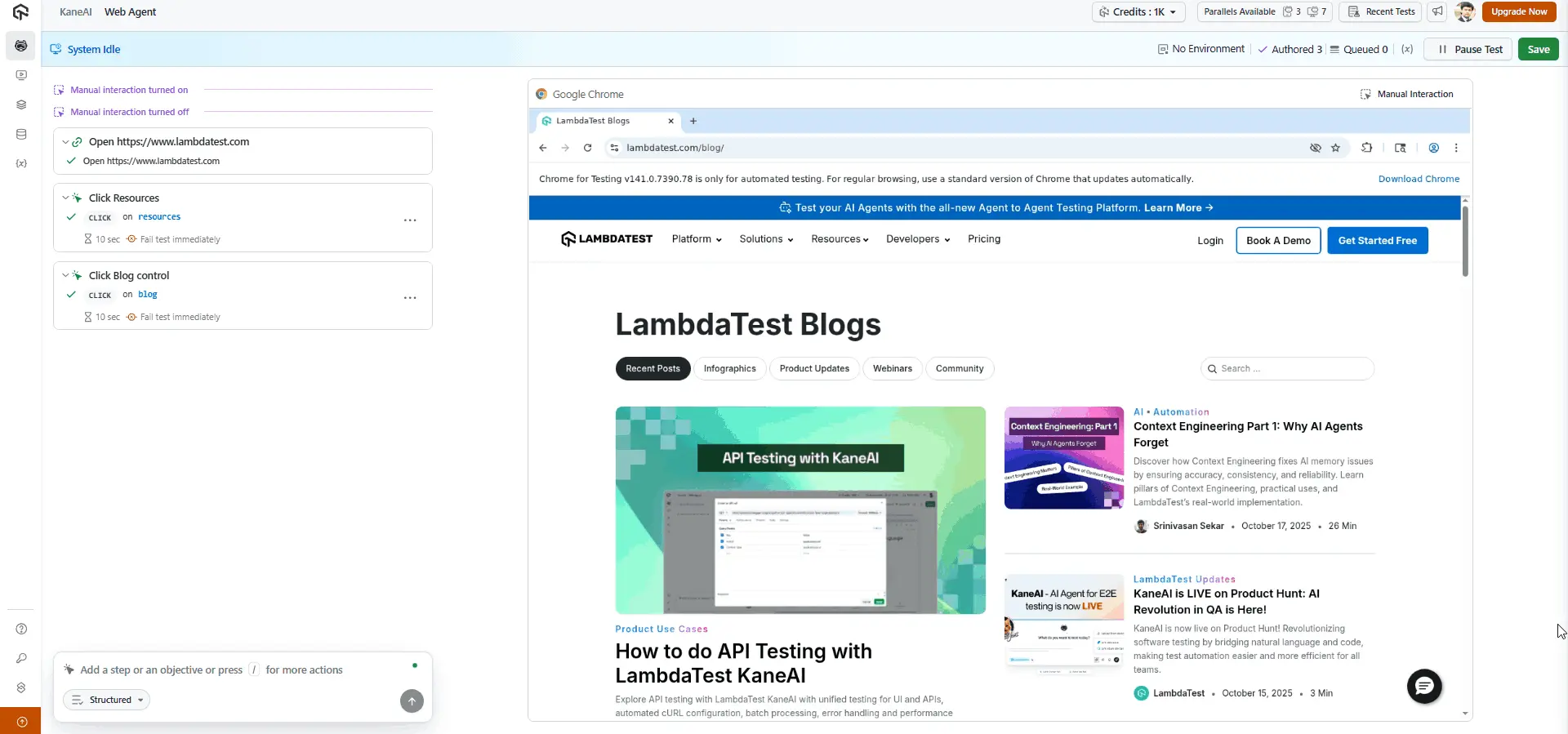
Saving the test generates the corresponding scripts, which you can export into your framework and language of choice and commit alongside hand-written specs.
To get started, refer to this guide on KaneAI.

Kane CLI
KaneAI authors the test. The gap it leaves, and the one every AI coding agent leaves, is verification: an agent reads and writes source code, and its checks (unit tests, type checkers, linters) all operate on that same closed surface. None of them render the page, so an agent can report "passed" on a button wired to the wrong endpoint.
Kane CLI closes that loop from the terminal. It drives real Chrome through the DevTools Protocol against a natural-language objective, and it is constrained to actions a real user could take, so it will not inject JavaScript to force a pass that a user could never reach.
Its agent mode emits NDJSON, one typed event per line, ending in a run_end object carrying status, duration, extracted values, and a link to the run. That is what makes it callable by Claude Code, Codex CLI, or Cursor as a verification step rather than something a human reads.
kane-cli run "log in, add the first product to the cart, assert the cart total updates" \
  --url https://ecommerce-playground.lambdatest.io/ \
  --agent --headless --timeout 300
Two details matter for a Playwright team specifically. Any completed run exports to native Playwright code, so the flow you described in English becomes a spec file you own. And its autoheal scores every element match, rejecting low-confidence ones up front rather than clicking the wrong element and passing quietly, which is the failure mode that makes self-healing hard to trust.
In CI it returns standard POSIX exit codes, 0 for pass, 1 for a failed assertion, 2 for an environment error, and 3 for a timeout, so no wrapper script is needed to gate a merge.

Note: Kane CLI returns POSIX exit codes for CI and exports any completed run to native Playwright code, so it can gate a merge and still leave you a spec file you own. Read the Kane CLI docs
ChatGPT
ChatGPT, developed by OpenAI, generates detailed Playwright scripts from a prompt despite never having been built for testing.
Its value is speed of drafting: a rough end-to-end test, an automation flow to experiment with, or a manual test case translated into code. The output still needs review before it enters a suite.
Because it neither executes code nor touches a live browser, it can invent unstable selectors or reach for deprecated Playwright methods. Run the script, validate every selector, and refine against the current UI before committing.
Example:
Prompt: Write a Playwright test in JavaScript to test user login and validate the success toast notification.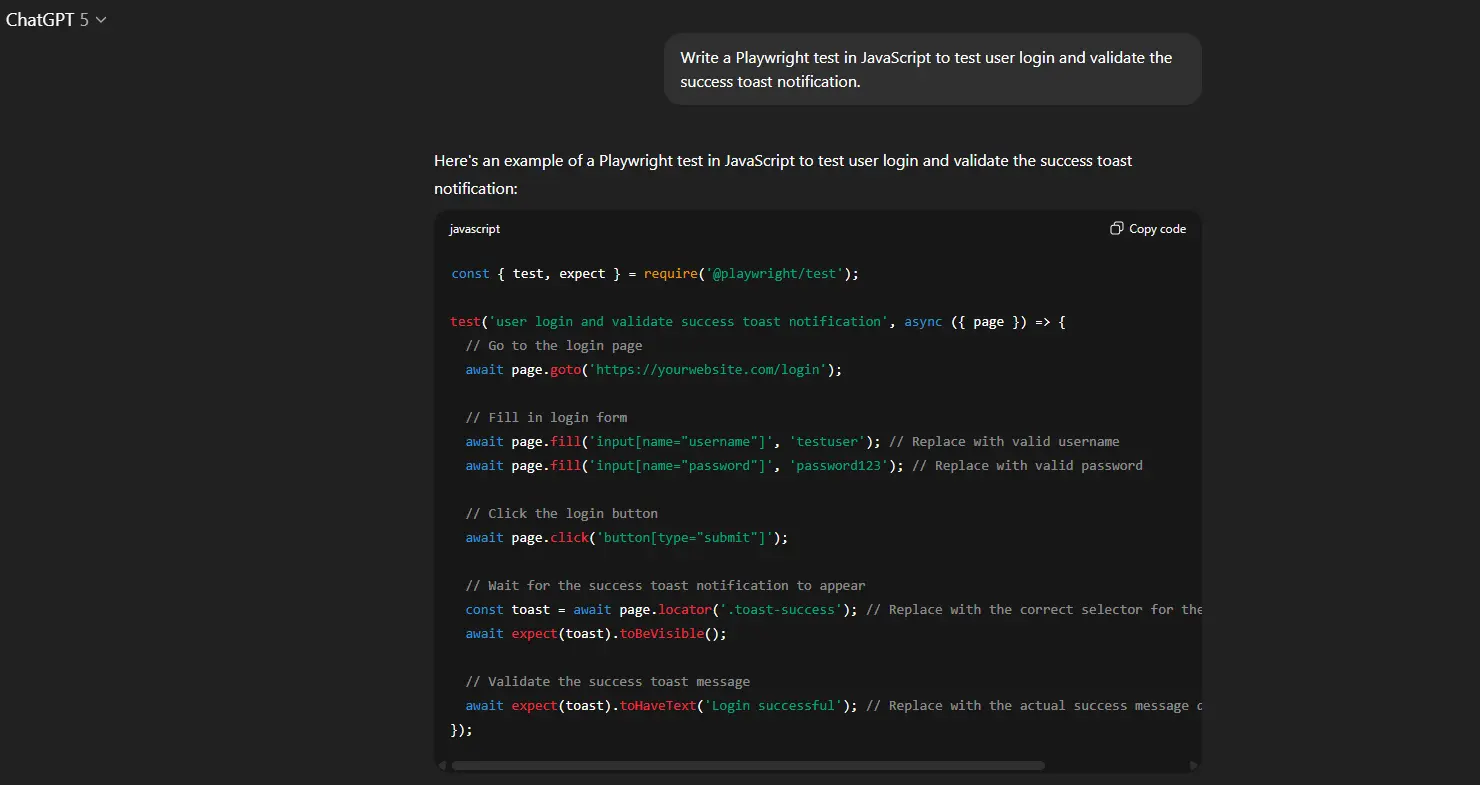
ChatGPT returns a complete script with page navigation, data entry, click actions, and toast visibility assertion, often with helpful comments.
Claude
Claude, built by Anthropic, understands natural language and writes code in many languages. It is not a dedicated testing tool, though it handles test automation well.
Ask it to write Playwright scripts, outline end-to-end flows, or convert manual test steps into runnable code. It suits prototyping a test quickly or describing an idea in plain English and getting usable code back.
The same caveat applies as with ChatGPT: no code runs and no browser is touched, so unstable selectors and outdated methods reach you unflagged. Run the script and check the selectors before adding it to a suite. Pairing Claude with Playwright MCP removes most of this gap, since the agent can then verify its own output against a live page.
Example:
Prompt: Write a test in TypeScript using Playwright that tests a multi-step checkout process, with data entry, payment mock, and confirmation.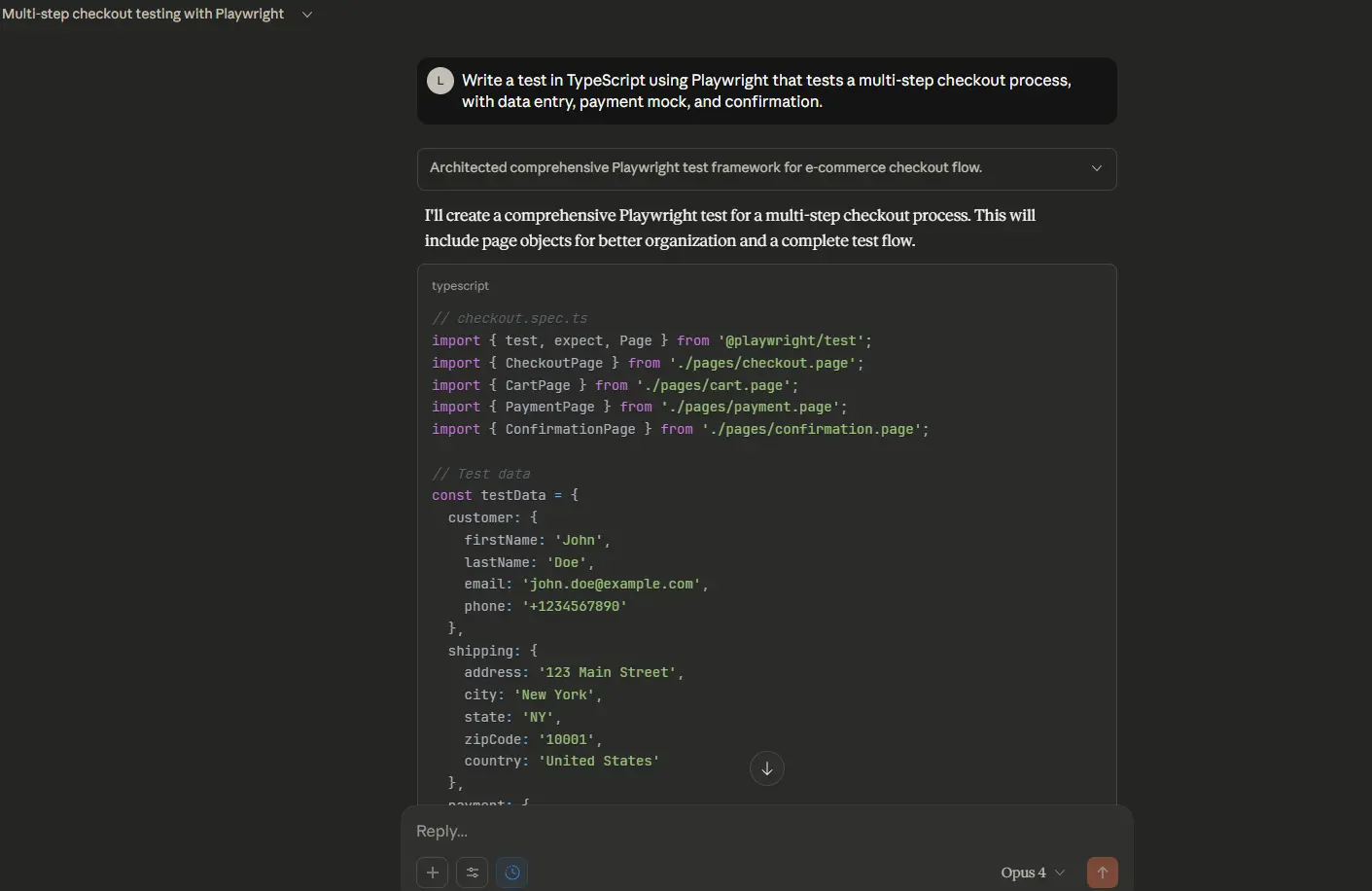
Claude generates a multi-part script with a logical structure and clear separation of steps.
Playwright Codegen
Playwright Codegen uses no AI at all, which is worth stating plainly in a guide about AI. It records interactions and translates them into executable Playwright scripts, deterministically.
That determinism is a feature. Codegen never invents a method that does not exist, which is the most common failure of prompt-generated tests. It also does not handle complex logic, loops, or conditional flows.
To use Codegen, run the following command:
npx playwright codegenCodegen opens a browser alongside the interactive Playwright Inspector. As you move through the application, it logs your actions and converts them into test scripts.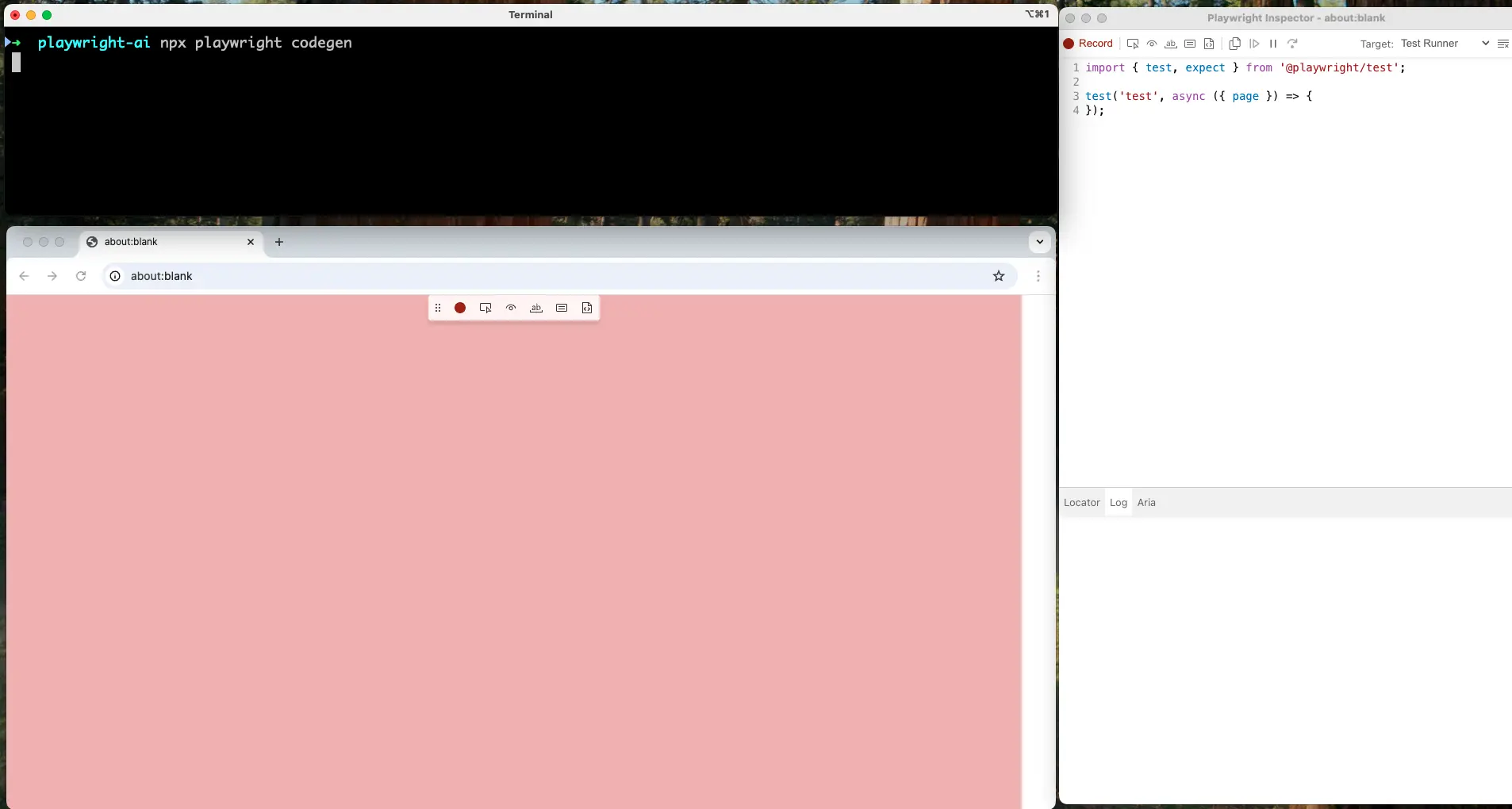
Recorded output carries auto-generated selectors and simple visibility assertions. Complex validations are yours to add, and because it records actions exactly as they happened, the selectors it picks are often more specific than they need to be.
Key Takeaway: External AI tools cover the authoring work that Playwright's built-in agents do not. KaneAI writes tests from natural language and requirement documents and exports them to Playwright, Selenium, Cypress, or Appium, while Kane CLI verifies a natural-language objective in real Chrome and returns POSIX exit codes for CI. ChatGPT and Claude draft scripts fast but execute nothing, so their selectors need checking, and Playwright Codegen records real interactions using no AI at all.
Managing AI-Generated Playwright Tests at Scale
Agents generate tests faster than teams can organize them, which turns a suite of a few hundred AI-authored specs into its own problem. TestMu AI's test management platform centralizes cases, tracks execution, and identifies semantically similar tests so an agent does not create a fourth version of the same login check.
Features:
- One repository holds every automated case, so coverage is countable rather than scattered across branches.
- AI generation converts requirements from text, Jira tickets, PDFs, or spreadsheets into structured cases, matching the input formats KaneAI accepts.
- CSV and API import and export keep existing cases portable in and out of another test management system.
- Linking automation scripts to cases gives traceability between what a manual tester wrote and what an agent generated from it.
- Jira and Azure DevOps integration ties runs back to the bug, feature, or task that motivated them.
- Dashboards report execution, coverage, and trends, which is how you notice an agent quietly generating tests that never assert anything.
To begin with, head over to this Test Manager support doc guide.
Third-Party AI Tools to Use With Playwright
The wider ecosystem of AI testing tools around Playwright churns faster than most guides admit, so check that a project is still maintained before you build on it.
Auto Playwright
Auto Playwright adds an auto() function that takes a plain-text description of a step and resolves it at runtime, so no selector is written by hand. The open-source repository carries 844 stars and integrates directly into an existing Playwright project.
Treat it as experimental rather than production tooling. Its own README steers production users to ZeroStep, and complex logic still needs manual implementation.
ZeroStep (discontinued)
ZeroStep generated Playwright tests from natural-language instructions and is still recommended by many guides published this year. It is no longer available: as of August 2026 the zerostep.com domain returns no DNS record at either the apex or the www host, so the hosted service cannot be reached.
If you inherited a suite built on it, the natural-language authoring layer is the piece to replace. Options are covered in this guide to ZeroStep alternatives.
Note: Playwright Agents heal tests against the browsers on your laptop. TestMu AI reruns the healed suite across 3,000+ browser and OS combinations, so a repair that only works in local Chromium is caught before it ships. Try TestMu AI Now!
Challenges and Limits of Playwright AI Testing
Developer sentiment has not caught up with the marketing. In the Stack Overflow Developer Survey 2025, more developers actively distrust the accuracy of AI tools (46%) than trust it (33%), and only 27.5% currently use AI even partially for testing.
That skepticism is earned. The limits below are the reasons behind it.
- Generated code can be fragile or simply wrong when a prompt is vague, so every script needs a real run before it counts as coverage.
- Tests authored entirely by AI tend to lean on unstable locators, which converts an authoring saving into a maintenance bill a quarter later.
- Context awareness stops at what the model can see. Business rules that live in someone's head, not the DOM, produce confident tests that assert the wrong thing.
- Sending application data to an external AI service raises privacy and compliance questions that a regulated team has to answer before adoption, not after.
- Effective use still demands prompt engineering and review. Agents shift QA effort from writing to verifying rather than removing it.
- Third-party dependencies carry cost, rate limits, and shutdown risk, as the teams who standardized on ZeroStep discovered.
In the video below, Andrew Knight, Senior Director of Product Management at Cycle Labs, works through advanced Playwright techniques and how AI fits into writing scalable tests.
Conclusion
Start with the agents you already have. Run npx playwright init-agents with the loop flag for your editor, point the Planner at one real flow in your application, and read the Markdown plan it produces before letting the Generator write a single spec file.
That first plan tells you most of what you need to know. If it captures the flow accurately, the Generator and Healer are worth wiring into your workflow. If it misreads the app, no amount of prompt tuning downstream will fix it.
Add MCP once you want the agent to verify its own output against a live page, and add an external agent such as KaneAI when authoring needs to start from a Jira ticket or include people who do not write code.
Whichever layer you adopt, run the result somewhere broader than one laptop before trusting it. TestMu AI executes Playwright suites in parallel across 3,000+ browser and OS combinations, which is where a locally healed selector proves whether it actually holds. The Playwright testing documentation covers the grid setup.
For a CLI-first take on the same idea, see how an autonomous agent stacks up in Kane CLI vs Playwright.
Advanced Web Testing with Playwright and AI covers the same ground from a practitioner’s side at Testμ 2026.
Citations
- Playwright Test Agents documentation, for the Planner, Generator, and Healer definitions, the init-agents command, the supported loops, and the seed test.
- Playwright MCP repository on GitHub, for the star and fork counts and the accessibility-tree design.
- Stack Overflow Developer Survey 2025, AI section, for the trust and testing-adoption figures.
- Playwright official documentation at playwright.dev/docs/intro
- Playwright Codegen guide at playwright.dev/docs/codegen
Author

Parth Mistry
Blogs: 2

Parth Mistry is a Member of Technical Staff at TestMu AI (formerly LambdaTest), building SmartUI, the visual regression testing product. He developed and owns the SmartUI CLI, a modular TypeScript tool built on Playwright for multi-browser automation, and built the Storybook CLI for visual regression of UI components. He maintains cross-language SDKs in Python, Java, Ruby, C#, and Node.js, and engineered a Node-based visual rendering service on Kafka, Redis, MySQL, and S3. His migration of that service to an event-driven, KEDA-autoscaled architecture improved execution speed by 60% and cut annual infrastructure cost by $9,600. He also built the end-to-end SmartUI integration with KaneAI. Parth is a Google Summer of Code 2024 contributor and an alumnus of IIT Jodhpur.
Reviewer

Sri Harsha
Reviewer
Sri Harsha is Engineering Manager of the Open Source Program Office at TestMu AI (formerly LambdaTest), where he leads open-source engineering behind the Selenium and Appium automation grid and builds agentic AI systems for quality engineering. He is a member of the Selenium Technical Leadership Committee and a committer to WebdriverIO and Appium, and was recognized with the LambdaTest Delta Award 2023 for Best Contributor in open-source testing. He brings over 10 years of experience in software testing and automation, with earlier roles at EPAM Systems and ZenQ. Sri Harsha holds a B.Tech in Computer Science from Jawaharlal Nehru Technological University.
Playwright AI FAQs
Did you find this page helpful?
More Related Learning Hubs
TestMu AI forEnterprise
Get access to solutions built on Enterprise
grade security, privacy, & compliance
- Advanced access controls
- Advanced data retention rules
- Advanced Local Testing
- Premium Support options
- Early access to beta features
- Private Slack Channel
- Unlimited Manual Accessibility DevTools Tests