

Power Your Software Testing with AI Agents and Cloud
The Native AI-Agentic Cloud Platform to Supercharge Quality Engineering. Test Intelligently and Ship Faster.


- TestMu AI (Formerly LambdaTest)
- /
- Learning Hub
- /
- Acceptance Testing: Types, Criteria, and Examples
Acceptance Testing: Types, Criteria, and Examples
Acceptance testing validates software against business requirements before release. Learn the types, acceptance criteria, entry and exit gates, and examples.
Last Updated on:
Software can pass every unit and integration test and still be wrong. Those tests confirm the code does what it was built to do, not that it does what the business actually needed.
That gap is widening as more code is generated rather than written. In the Stack Overflow Developer Survey 2025, the biggest single frustration, cited by 66% of developers, is dealing with AI solutions that are "almost right, but not quite". The same survey reports that more developers distrust the accuracy of AI tools (46%) than trust it (33%).
Acceptance testing is the stage built to catch that gap, because it judges a build against business requirements instead of against technical specifications.
It sits at the end of the Software Development Life Cycle, after system testing and before release. The people running it work from requirements rather than from the code, which is why acceptance testing is treated as a form of black box testing. What it produces is a go or no-go decision, not a defect count.
TL;DR
- Acceptance testing is the last gate before release, judging a build against business requirements rather than the technical specification.
- Seven recognized acceptance test types exist, from UAT to beta testing, and most releases need only two or three.
- Acceptance criteria only count when the outcome is observable enough that two people cannot disagree about whether it passed.
- A named approver signing off is what turns an acceptance test report into a release decision that remains auditable later.
- Automate the deterministic criteria that repeat every release, and keep exploratory judgment, usability opinion, and contract sign-off manual.
- Stakeholder availability, not tester time, constrains the acceptance phase, so book the participants when you book the environment.
What Is Acceptance Testing?
Acceptance testing is a formal process that checks whether a system meets user needs, business requirements, and agreed acceptance criteria, so that customers and users can decide whether to accept it. It is the last test level before release, and unlike earlier levels it is judged by the people who asked for the software rather than by the people who built it.
That difference in who judges is the whole point. System testing asks whether the product matches its specification. Acceptance testing asks whether the specification was right. A build can satisfy every written requirement and still be rejected because the requirement did not describe the work the user actually does.

Each level below acceptance testing is run by the team that built the software, against a document that team also worked from. Acceptance testing is the first point where someone outside that loop checks the result, which is why it is the last gate rather than simply another layer.
Acceptance tests are typically run twice: once when system testing exits, and once against a release candidate in an environment that mirrors production. The team running them includes end users and business stakeholders, with QA facilitating, and often business analysts, support staff, or a contract owner depending on which type of acceptance test is in play. Because the tests exercise functional testing behavior through the interface rather than the internals, no knowledge of the implementation is required.
Why It Matters
Defects that survive earlier test levels are the expensive ones, because they are defects of intent rather than of code.
Capgemini's World Quality Report 2025-26 states that although 94% of organizations review production data, nearly half struggle to turn insights into actionable strategies for quality enhancement.
So the quality signal often arrives only after real users have hit the problem, which is the position acceptance testing exists to avoid.
Concretely, acceptance testing earns its place by doing these things:
- Catches requirement defects - the gap between what was specified and what was needed, which no unit or integration test can see because both are written from the same specification.
- Produces a release decision - a documented go or no-go backed by named approvers, rather than a defect list somebody still has to interpret.
- Transfers ownership - once stakeholders have exercised the build themselves, the release stops being a QA opinion and becomes a business commitment.
- Proves compliance before the auditor does - regulated behavior is demonstrated and evidenced in a controlled environment instead of being assumed.
- Surfaces environment and integration gaps - third-party integrations, browser and device coverage, and configuration drift show up when the software runs the way users will actually run it.
Types of Acceptance Testing
There are seven recognized types. Most releases need two or three of them, and picking the wrong one is how teams end up running a second regression cycle and calling it acceptance.
1. User Acceptance Testing (UAT)
UAT puts representative end users in front of the build and asks them to complete real tasks against the agreed criteria. It answers whether the software supports the job the user actually does, which is a different question from whether each feature works. For the full process, participant selection, and UAT-specific exit criteria, see the guide to user acceptance testing.
2. Business Acceptance Testing (BAT)
BAT checks the release against business objectives rather than against user stories. A build can pass UAT and fail BAT: every screen behaves correctly, yet the workflow does not produce the commercial outcome the project was funded to deliver. Running it well needs someone who understands the domain and the revenue model, not just the specification.
3. Contract Acceptance Testing (CAT)
CAT validates delivered software against criteria written into a contract or a service level agreement, which typically fixes the testing window, the scope, and what counts as a defect after handover. Because payment or milestone acceptance often depends on the result, the evidence has to be dated and traceable rather than anecdotal.
4. Regulations Acceptance Testing (RAT)
RAT confirms the software complies with the laws and standards of every market it ships into, which vary by country. A payment page, for example, is checked against Payment Card Industry Data Security Standard requirements covering access control, storage of cardholder data, and encryption in transit. A release that passes everywhere else can still be blocked here.
5. Operational Acceptance Testing (OAT)
OAT is a form of non-functional testing that asks whether the system can be operated, not whether it is correct: backup and restore, failover, monitoring, recoverability, and maintainability. It is usually owned by operations rather than QA. The detail lives in the guide to operational testing.
6. Alpha Testing
Alpha testing happens inside the organization, in a development or test environment, with the build team close enough to reproduce and fix issues quickly. It targets overall performance, functionality, and usability under controlled conditions. Phases, entry gates, and tooling are covered in the alpha testing guide.
7. Beta Testing
Beta testing releases the build to external users on their own hardware, networks, and configurations. Its value is exactly what a controlled environment cannot give you: the combinations nobody thought to provision. See the beta testing guide for recruitment, lifecycle, and how to triage field feedback.
Rather than choosing by definition, choose by what changed in the release:
| What changed in this release | Acceptance test type | Who signs off | Evidence needed to exit |
|---|---|---|---|
| A user-facing journey such as checkout, onboarding, or search | UAT | Product owner and representative end users | Every in-scope acceptance criterion passing on the target browsers and devices |
| A new revenue or business workflow | BAT | Business stakeholder or process owner | The business outcome demonstrated end to end, not just the screens |
| A supplier deliverable or SLA milestone | CAT | Contract owner | Each contractual criterion evidenced, dated, and traceable to a test run |
| Payments, personal data, or accessibility behavior | RAT | Compliance or legal owner | The applicable standard verified separately for each target market |
| Infrastructure, backup, failover, or a runbook | OAT | Operations or site reliability | Recovery, monitoring, and maintainability checks passing in a production-like environment |
| A build going to an internal audience first | Alpha testing | QA and development | Controlled-environment defects triaged, fixed, and retested |
| A build going to external users before general availability | Beta testing | Product management | Field feedback triaged and every release blocker closed |

Acceptance Criteria
Acceptance criteria are the conditions a build must satisfy to be accepted. They are agreed before development starts, not written afterwards to match what was built, and each one has to be observable: if two people can disagree about whether a criterion passed, it is not a criterion yet.
Two formats cover most cases. Given/When/Then describes one scenario as a precondition, an action, and an expected outcome, which suits anything with a workflow. A rule-based list states conditions the feature must always meet, which suits constraints such as field validation or supported configurations. Criteria and the tests that prove them are related but distinct artifacts, a distinction worth reading up on in acceptance criteria vs acceptance tests, with worked samples in these acceptance criteria examples.
Whichever format you use, the criteria for a release usually span these categories:
- Functional - the application performs the specific tasks the requirement describes, with the stated inputs producing the stated outputs.
- Performance - named thresholds for response time, availability, and throughput, expressed as numbers rather than as "fast enough".
- Usability - the interface and navigation let a representative user finish the task without training or a support call.
- Security - data privacy and integrity requirements hold, including access control and how sensitive data is stored and transmitted.
- Compatibility - the agreed browsers, operating systems, and devices are covered, which is only meaningful if that matrix is written down.
- Regulatory - the rules that apply in each market the release ships to are satisfied and evidenced.
Entry and Exit Criteria
Entry and exit criteria keep the acceptance phase from starting too early or ending by exhaustion. They act as the gates on either side of the phase:
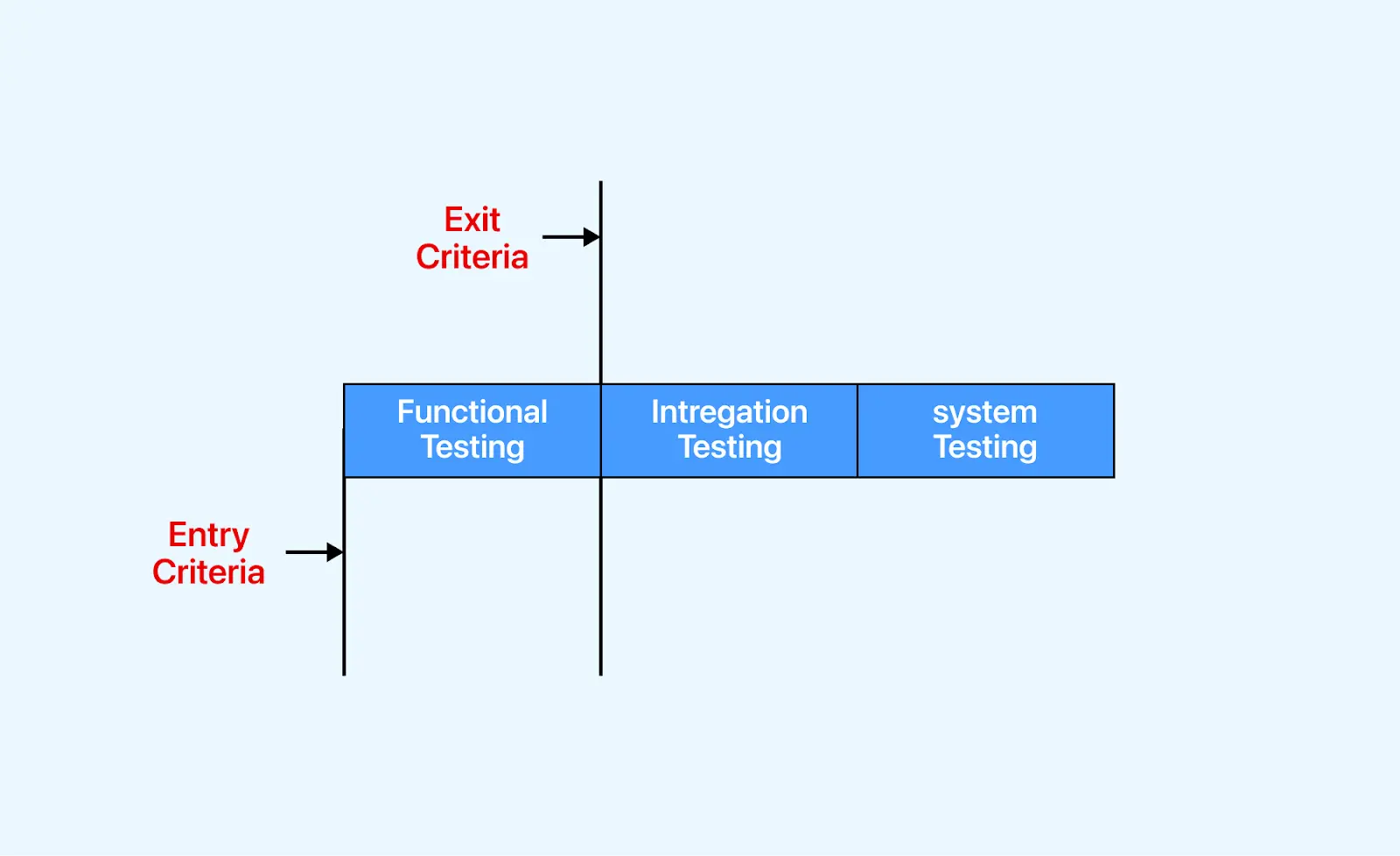
Start only when all of the following are true:
- System testing has formally exited and its major defects are fixed and retested.
- Acceptance criteria are approved and every one traces to a user story or requirement.
- The requirement traceability matrix is current, so it is clear which requirements have no test behind them.
- The environment matches production closely enough to be believable, including hardware, integrations, and network configuration. The UAT environment guide covers how close is close enough.
- Realistic test data is provisioned, with personal data masked or synthesized.
- Participants are named and briefed, so the phase does not stall waiting for the one person who knows the process.
Exit when the evidence supports a decision, not when the calendar runs out:
- Every in-scope acceptance test has been executed and its result recorded.
- Defects found during acceptance are fixed and retested, or explicitly deferred with a named owner.
- All agreed acceptance criteria are met, and any that are not are recorded as accepted exceptions.
- A named approver has signed off, which is what turns a test report into a release decision.
The hard part is usually evidence rather than execution. TestMu AI's Test Manager is built around that gap: it converts user stories and Gherkin scenarios into structured test cases, links each case back to the requirement it proves, and produces a requirements coverage report showing which requirements have linked tests and which have none.
Defects sync two-way with Jira or Azure DevOps carrying steps, expected versus actual, and environment, and reports export for stakeholder review and release sign-off. So the release meeting opens with coverage numbers instead of opinions.
The docs on test run creation and management walk through setting up a cycle. If you need a ready-made structure for recording results, use the user acceptance testing template.
How to Run Acceptance Tests
The sequence below is deliberately front-loaded. Most acceptance phases that go badly go badly in step one.
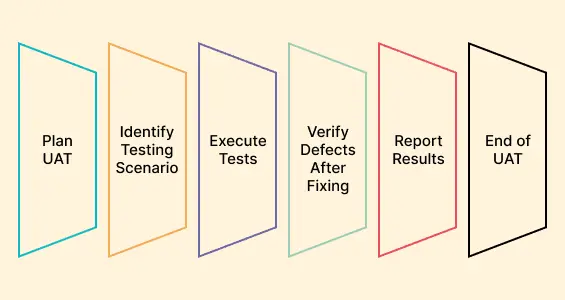
- Analyze the requirements - gather the requirement specification, business requirement document, use cases, and workflow diagrams, then break them into units small enough to be testable. Validate your reading back with the users before writing anything, because an assumption corrected here costs minutes rather than a release cycle.
- Write the acceptance test plan - define scope, entry and exit criteria, environment, participants, and schedule, and state what evidence sign-off will require. The test plan guide covers the document structure in full.
- Design the test cases - write one case per acceptance criterion, prioritized by business risk rather than by screen order, and review them with the people who will run them. The mechanics of writing a good case are covered in the test case guide.
- Execute against a production-like build - run each case, record the result as it happens rather than reconstructing it later, and raise failures with enough context that a developer can reproduce them without a meeting.
- Review results and retest - confirm fixes for defects raised in this cycle and any carried over from the previous one, then check the outcome against the exit criteria instead of against the remaining schedule.
- Get sign-off - record the approval with a named approver, the build identifier, and the environment it was tested on, so the decision remains auditable after everyone has moved on.
Acceptance Test Example
Take a single user story from a storefront backlog: as a returning shopper, I want to search the catalogue so that I can find a product without browsing categories. On its own that sentence is not testable. Turning it into acceptance criteria means naming the precondition, the action, and the outcome you can observe.
Written as a Gherkin feature file, the criteria for that story look like this:
Feature: Catalogue search

  Scenario: A shopper finds a product that exists in the catalogue
    Given the shopper is on the storefront home page
    When they search for "iPhone"
    Then at least one product result is shown
    And the first result title contains "iPhone"

  Scenario: A shopper searches for a product that does not exist
    Given the shopper is on the storefront home page
    When they search for "zzzznotaproduct"
    Then no product results are shown
    And a message explaining that nothing matched is displayed
Three things make this an acceptance test rather than a functional test that happens to use Gherkin. It is written in the language of the business, so a product owner can approve it without reading code. It asserts on what the shopper sees, not on which API returned what. And the second scenario exists because "search works" is not a requirement anyone can sign, whereas "a search that matches nothing tells the shopper so" is.
A failure here is also read differently. If the first scenario fails, that is a defect. If the product owner reads the second scenario and says the message should also suggest alternatives, that is a missing requirement discovered at the only stage designed to catch it.

Note: Run acceptance suites across 3,000+ browser and OS combinations, and validate mobile releases on 10,000+ real Android and iOS devices. Try TestMu AI for free!
Automating Acceptance Tests
Acceptance testing does not become automated testing, but the stable part of it should be. Once criteria are agreed and stop changing every sprint, they make an unusually good regression gate, because they are the assertions the business actually cares about. Deciding what belongs on each side of that line matters more than which framework runs it.
A workable split: automate criteria that are deterministic, repeat every release, and have an unambiguous pass condition. Keep exploratory judgment, usability opinion, first-time workflow validation, and contractual sign-off manual, because those need a person to render the verdict. Writing the criteria before the code, so they drive development rather than describe it, is the practice known as acceptance test driven development.
Each Gherkin step maps to a step definition. Using Cucumber with Playwright, the feature file above becomes:
// features/step_definitions/search.steps.js
const { Given, When, Then } = require('@cucumber/cucumber');
const { expect } = require('@playwright/test');

// The storefront renders more than one search box (desktop and mobile headers),
// so scope to the first or Playwright strict mode fails the step.
const searchBox = (page) => page.locator('input[name="search"]').first();

Given('the shopper is on the storefront home page', async function () {
  await this.page.goto('https://ecommerce-playground.lambdatest.io/');
});

When('they search for {string}', async function (term) {
  await searchBox(this.page).fill(term);
  await searchBox(this.page).press('Enter');
  await this.page.waitForLoadState('domcontentloaded');
});

Then('at least one product result is shown', async function () {
  await this.page.waitForSelector('.product-thumb');
  expect(await this.page.locator('.product-thumb').count()).toBeGreaterThan(0);
});

Then('the first result title contains {string}', async function (term) {
  const title = await this.page.locator('.product-thumb .title a').first().innerText();
  expect(title.toLowerCase()).toContain(term.toLowerCase());
});

Then('no product results are shown', async function () {
  await this.page.waitForSelector('.content-products');
  expect(await this.page.locator('.product-thumb').count()).toBe(0);
});

Then('a message explaining that nothing matched is displayed', async function () {
  const results = await this.page.locator('.content-products').innerText();
  expect(results).toContain('There is no product that matches the search criteria.');
});
Note what the assertions check: the count of results a shopper can see and the text of the first one. An assertion on an internal search endpoint would pass while the results list rendered empty, which is exactly the class of defect acceptance testing exists to stop.
Compatibility criteria are the reason this suite belongs on a grid rather than a laptop. The step definitions above never mention a browser, so moving them to the cloud is a change to the hooks alone. A Before hook connects to the grid and hands each scenario a page:
// features/support/hooks.js
const { Before, After, setDefaultTimeout } = require('@cucumber/cucumber');
const { chromium } = require('playwright');

setDefaultTimeout(60 * 1000);

const capabilities = {
  browserName: 'Chrome',
  browserVersion: 'latest',
  'LT:Options': {
    platform: 'Windows 10',
    build: 'Acceptance Suite',
    name: 'Catalogue search acceptance criteria',
    user: process.env.LT_USERNAME,
    accessKey: process.env.LT_ACCESS_KEY,
    network: true,
    video: true,
    console: true
  }
};

Before(async function () {
  this.browser = await chromium.connect({
    wsEndpoint:
      'wss://cdp.lambdatest.com/playwright?capabilities=' +
      encodeURIComponent(JSON.stringify(capabilities))
  });
  this.page = await this.browser.newPage();
});

After(async function () {
  await this.page.close();
  await this.browser.close();
});
TestMu AI's Automation Cloud runs existing Selenium, Cypress, Playwright, and Puppeteer suites across 3,000+ real browser and OS combinations in parallel. Every session captures network logs, console logs, video, and a command-by-command replay, which is the evidence an acceptance result needs to be auditable.
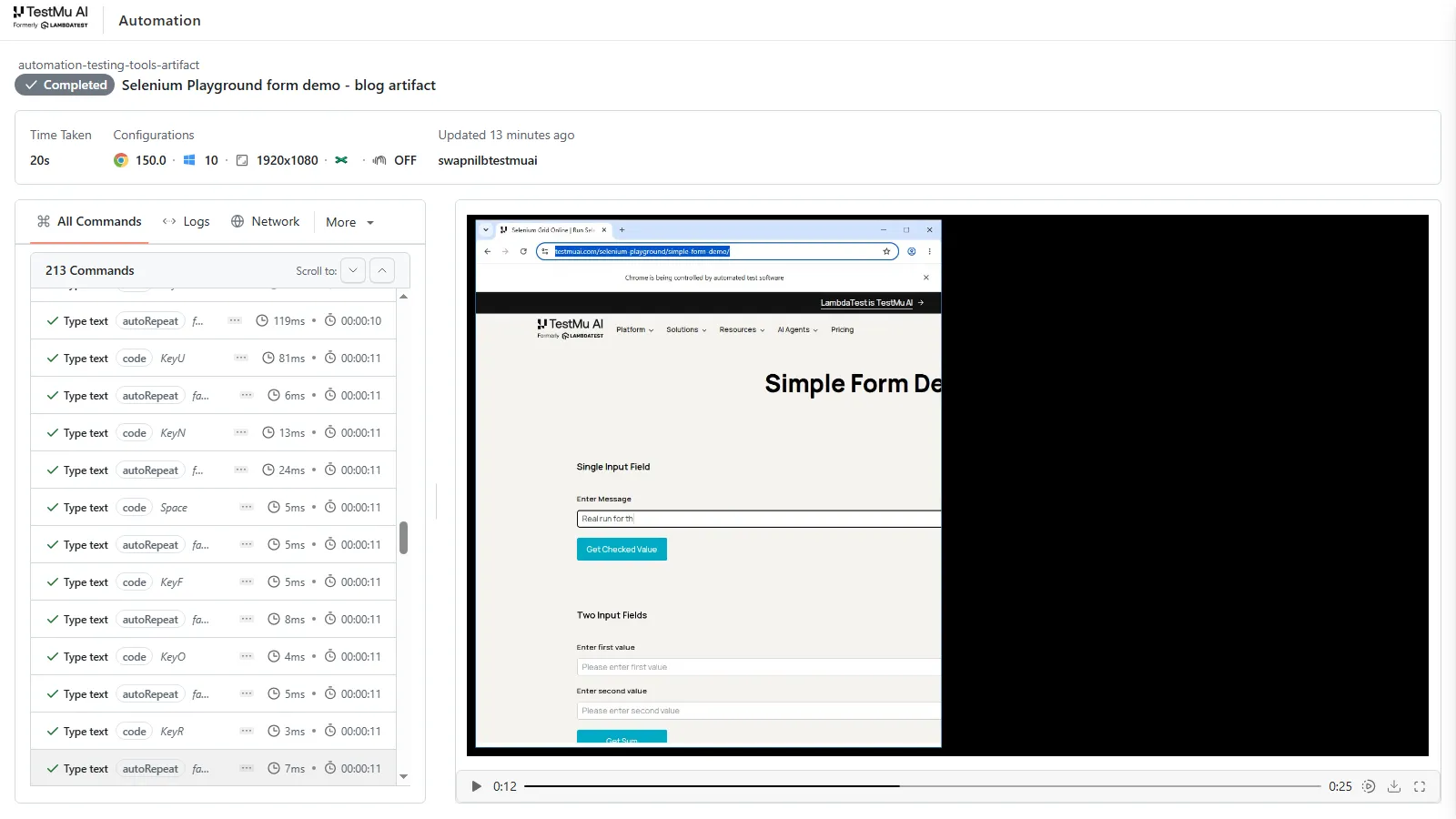
That record is what turns a green tick into something a stakeholder can audit later: the command that failed, the network call behind it, and the video of what the user would have seen.
One caveat worth respecting for acceptance work specifically: leave auto-healing off. It is heuristic, so on a strict acceptance suite it can heal onto a similar-but-wrong element and let a genuine regression through. Prefer stable selectors, and see automating acceptance tests for mobile apps for the mobile equivalent.
Running Tests on the Cloud
Not every acceptance test should be automated, and the manual half has an infrastructure problem of its own: a business analyst signing off a release needs the browser and device the customer actually uses, not the one on their desk.
TestMu AI's real-time testing is built for that walkthrough. A stakeholder opens the exact browser and operating system their users run, drives the flow by hand, and shares the live session so the sign-off conversation happens inside the environment rather than over a screenshot.
When something fails acceptance, one-click bug logging captures and annotates the screen and pushes it to any of 20+ trackers including Jira, Azure DevOps, GitHub Issues, and GitLab, with browser, operating system, resolution, and a session recording attached. That attachment is usually the difference between a fixed defect and a "cannot reproduce" reply. Sessions launch straight from a test case, and the manual outcome logs back into the test management cycle.
Mobile and ChromeOS browser coverage here can run on emulators and simulators. Hardware-dependent criteria such as biometrics or camera behavior belong on the real device cloud, which offers 10,000+ real Android and iOS devices.
Start by picking the exact device and operating system version your acceptance criteria name, rather than whatever hardware the reviewer happens to own:
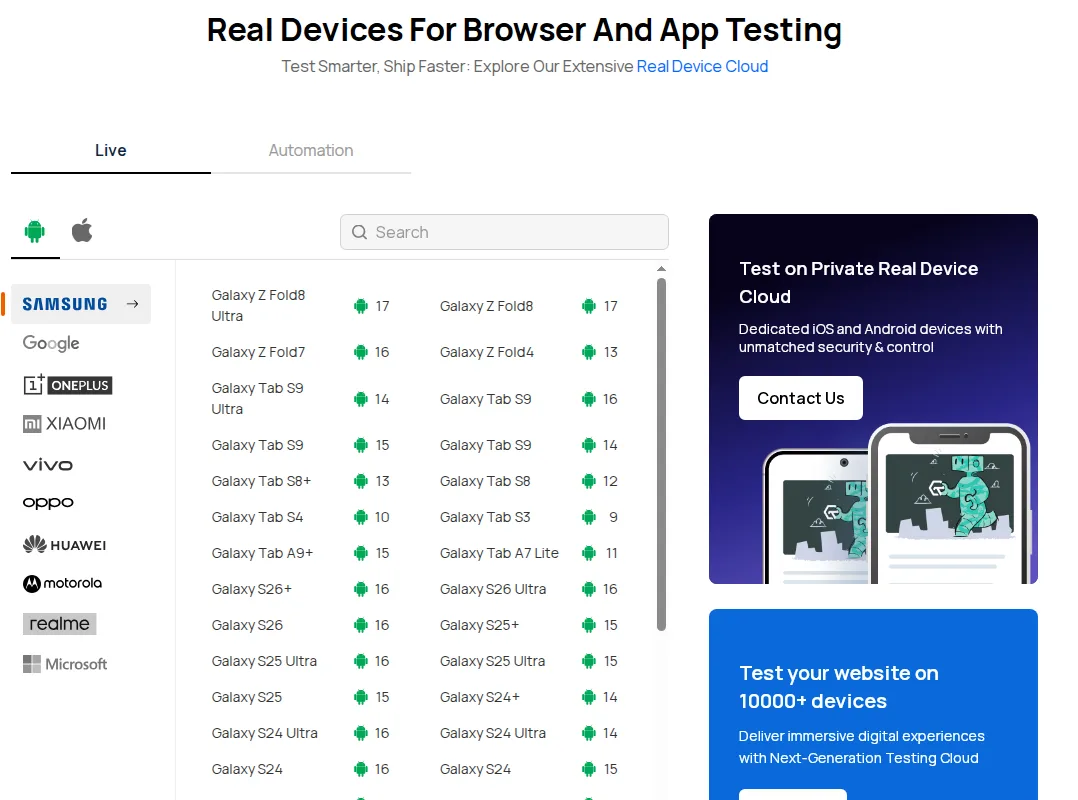
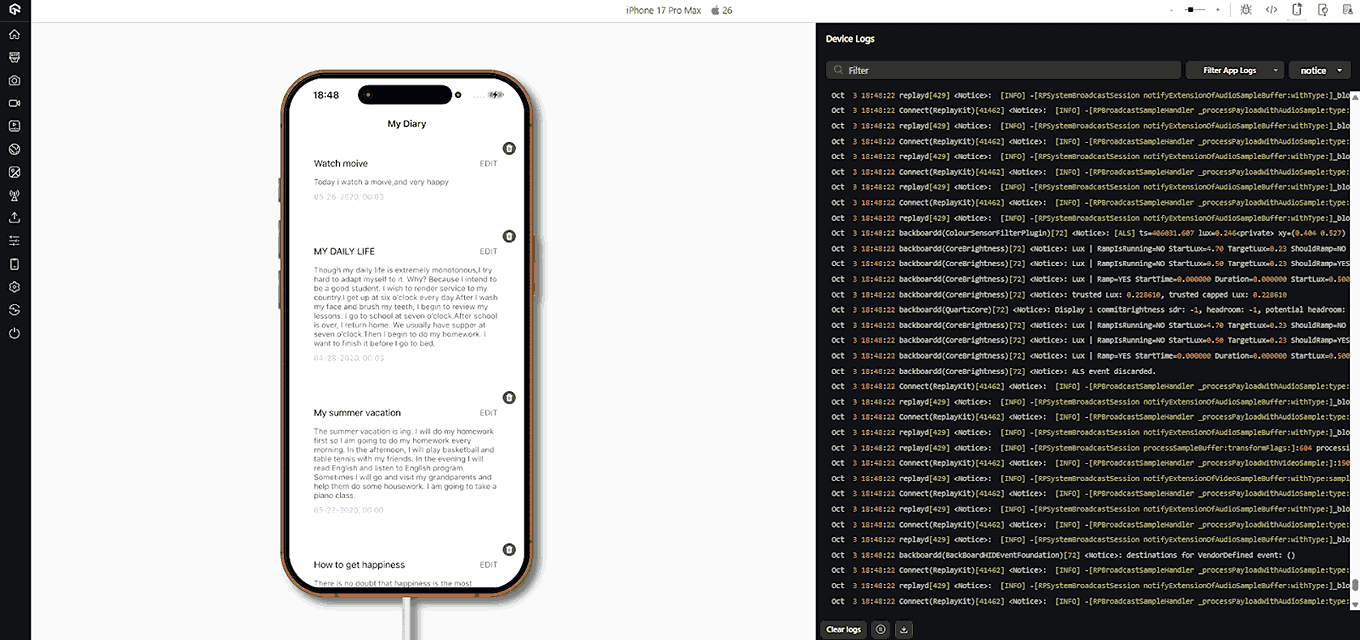
The session then runs on real hardware, with device logs, screenshots, developer tools, and geolocation testing on hand for criteria that are locale-specific:
This walkthrough covers getting started with real-time testing on real devices:
Subscribe to the TestMu AI YouTube channel for tutorials on Selenium testing, Playwright, and CI/CD.

Acceptance Test Tools
Tool choice follows the criteria, not the other way round. Four open-source options cover most of what acceptance suites need:
- Cucumber - executes Gherkin feature files directly, so the artifact the business approved is the artifact that runs. The natural fit when acceptance criteria are written as scenarios.
- Selenium - drives browsers from Java, Python, JavaScript, C#, and Ruby, and is the usual execution layer underneath a Cucumber suite for web acceptance criteria.
- JMeter - measures response time and throughput, which is how performance acceptance criteria get evidenced rather than asserted. Useful alongside load testing and performance testing work.
- SoapUI - tests REST and SOAP services, which matters when the acceptance criteria belong to an integration or a contract rather than a screen.
For a wider comparison, including how commercial platforms handle stakeholder participation and sign-off tracking, see the roundup of UAT testing tools.
Challenges and Solutions
Requirements that are not specific enough to test. If the requirement says the report should load quickly, acceptance becomes an argument. Fix it upstream by refusing to accept a criterion that has no observable outcome, and by writing the threshold into the criterion: the report renders within three seconds on the agreed configurations.
Stakeholder time, not tester time, is the constraint. Acceptance depends on people whose day job is not testing, and a phase scheduled without their availability slips or gets rubber-stamped. Book the participants when you book the environment, keep sessions short and scenario-led, and automate the repeat criteria so the human hours go to judgment rather than to regression.
Disagreement over what counts as a defect. Late in a release, the difference between a defect and a change request decides who pays for it. Agreeing that definition in the test plan, and tying each acceptance test to the criterion it proves, turns that conversation into a lookup instead of a negotiation.
Acceptance used as a second regression cycle. When the phase becomes a re-run of system testing, it consumes stakeholder goodwill and finds nothing new. Keep the scope tied to the acceptance criteria for what changed, and let test coverage reporting show that earlier levels already covered the rest.
Best Practices
- Write the criteria before the code - criteria authored after the build describe what was made rather than what was needed, which removes the only thing acceptance testing can detect that earlier levels cannot.
- Name an approver per criterion, not per release - a single sign-off at the end concentrates the decision on whoever is in the room, while per-criterion ownership puts each judgment with the person who understands it.
- Fix the environment matrix in writing - "works on modern browsers" cannot be signed off. Name the browsers, operating systems, and devices, and treat that list as an acceptance criterion in its own right.
- Record evidence as you go - a result reconstructed a week later is a recollection. Capture the build identifier, environment, and outcome at execution time so the sign-off stays auditable.
- Separate deferral from failure - an accepted exception with a named owner and a date is a decision, while an untriaged failure carried into production is an accident waiting to be explained.
- Promote stable criteria into the regression suite - once a criterion has passed unchanged for a few releases, it belongs in automation, freeing the acceptance session for what actually changed.
Conclusion
Start with your next release: take the user stories that changed, write one observable acceptance criterion for each, and use the decision table above to pick which acceptance test type each one needs. That single pass usually exposes two or three requirements that nobody can state precisely, which is the cheapest possible moment to find them.
From there, put the criteria somewhere they can be traced to results rather than in a spreadsheet that ages badly, automate the ones that stop changing, and run the manual walkthrough on the configurations your users actually have. The test case generation docs cover turning user stories and Gherkin scenarios into linked test cases, and KaneAI extracts acceptance criteria from a PRD or ticket into scenarios when you want the product owner authoring them rather than waiting on an automation engineer. If acceptance is a recurring part of your role, the TestMu AI certifications cover the testing foundations underneath it.
Author

Harshit Paul
Blogs: 93


Harshit Paul is Director of Product Marketing at TestMu AI (formerly LambdaTest), with over 8 years of experience in product and growth marketing for developer and QA tools, leading the Agentic AI in Quality Engineering space. He has authored 80+ technical articles for TestMu AI on software testing and automation, and hosted webinars on Selenium, automation testing, browser compatibility, DevOps, and continuous testing. He has led go-to-market and technical marketing initiatives across software testing products, contributing to SEO, content strategy, and developer marketing. He began his career as a certified Salesforce developer at Wipro Technologies, where he worked for 2 years before moving into marketing. Harshit holds a degree in computer programming from Vivekananda Institute of Professional Studies.
Reviewer

Shahzeb Hoda
Reviewer
Shahzeb Hoda is the Associate Director of Marketing and a Community Contributor at TestMu AI, leading strategic initiatives in developer marketing, content, and community growth. With 10+ years of experience in quality engineering, software testing, automation testing, and e-learning, he has authored and reviewed 70+ technical articles on software testing and automation. Shahzeb holds an M.Tech in Computer Science from BIT, Mesra, and is certified in Selenium, Cypress, Playwright, Appium, and KaneAI. He brings deep expertise in CI/CD pipeline automation, cross-browser testing, AI-driven testing practices, and framework documentation. On LinkedIn, he is followed by 3,700+ engineers, developers, DevOps professionals, tech leaders, and enthusiasts.


Acceptance Testing FAQs
Did you find this page helpful?
More Related Learning Hubs
TestMu AI forEnterprise
Get access to solutions built on Enterprise
grade security, privacy, & compliance
- Advanced access controls
- Advanced data retention rules
- Advanced Local Testing
- Premium Support options
- Early access to beta features
- Private Slack Channel
- Unlimited Manual Accessibility DevTools Tests