

Power Your Software Testing with AI Agents and Cloud
The Native AI-Agentic Cloud Platform to Supercharge Quality Engineering. Test Intelligently and Ship Faster.


- TestMu AI (Formerly LambdaTest)
- /
- Blog
- /
- What Is Test Orchestration? A Practical, Real-World Guide
What Is Test Orchestration? A Practical, Real-World Guide
Learn how test orchestration sequences automated tests for full CI/CD visibility, including its components, benefits, challenges, and best practices.
Last Updated on:
Test orchestration is the practice of arranging automated tests into a coordinated sequence and distributing them across environments, so they run in the right order, share test data, and report results as one continuous workflow. Automation gets a single test to run reliably; test orchestration coordinates hundreds of them at once, a job that grows as the World Quality Report 2025-26 finds generative AI now writes 25% of new test scripts.
This guide covers what test orchestration is, how it differs from automation, its components, use cases, benefits, challenges, best practices, and how to choose a tool.
Key Takeaways
Test orchestration is the practice of coordinating hundreds of automated tests into a single, ordered workflow across environments to manage execution order, parallel distribution, and unified reporting. While test automation runs individual scripts in isolation, test orchestration schedules and distributes them to deliver faster feedback and early defect detection.
- Test orchestration: Coordinates hundreds of automated tests into one workflow, managing execution order, test data, environment provisioning, parallel distribution, monitoring, and reporting.
- Test automation: Runs a single test repeatably on its own, managing only the inputs, steps, and assertions of one script without awareness of dependencies.
- End-to-end testing: Orchestrates complicated test scenarios involving sequential API combinations and services to produce a single, quantifiable result across the entire continuous testing cycle.
- Upgrade testing: Enables intelligent testing of software releases across multiple upgrade paths and running environments to ensure high quality during version transitions.
- Specialized testing: Streamlines security tests and other specialized evaluations intelligently through orchestration to identify software vulnerabilities in a measured, systematic manner.
- CI/CD integration: Hooks into pipeline events like commits and pull requests to run tests automatically and block or promote builds based on quality gates.
- Implementing test orchestration requires addressing challenges like isolating test data, preventing environment drift, taming flaky tests at scale, and debugging distributed runs.
Automated testing is now central to the continuous testing cycle. Its building blocks are test scripts, reliable test infrastructure, and clean test data, which together cut human intervention and error frequency.
On its own, though, automation testing runs tests asynchronously and gives little visibility across the cycle, especially during end to end testing. That gap is real: the World Quality Report 2025-26 found only 25% of organizations link quality metrics to business outcomes. Test orchestration closes it by giving teams a complete, ordered view of every test run.
Test orchestration groups and intelligently distributes those automated tests across environments, so the CI pipeline runs smoothly and software ships continuously.
What is test orchestration?
Test orchestration is the arrangement of automated tests into a sequence for execution to enable efficient monitoring and test execution. Automation alone is not sufficient for continuous testing to succeed. The automated tests must proceed streamlined while maintaining self-sufficiency and agility. With the aid of test orchestration, you can continuously execute your tests in many environments in a prepared and automated manner, providing you with a complete picture of the state of your tests.
The software is put through various tests after each development cycle. These include unit testing and many other automated tests for better test coverage. However, they still need the relevant input data and to be activated at the appropriate time. Test orchestration makes the testing cycle intelligent by integrating all of these independently automated tests into a sequential order for execution.

What is the difference between test orchestration and test automation?
Test automation and test orchestration solve different problems. Test automation makes a single test run itself reliably, without manual clicks. Test orchestration coordinates hundreds of those automated tests into one workflow: it sets the order they run in, splits them across machines, manages their data and environments, and reports the results as a single outcome. You automate first, then orchestrate.
Put simply, automation is the building block and orchestration is the layer that composes those blocks. A single Selenium or Playwright script is automation. Running 2,000 such scripts in the right sequence, in parallel, across browsers and operating systems, with isolated data and one merged report, is orchestration.
| Dimension | Test automation | Test orchestration |
|---|---|---|
| Unit of work | A single test executed repeatably in isolation. | An entire workflow of many tests coordinated end to end. |
| What it manages | The inputs, steps, and assertions of one script; it assumes the data and environment already exist. | Execution order, environment provisioning, test data, distribution, monitoring, and reporting. |
| Dependency handling | No awareness of inter-test dependencies; tests run independently. | Models dependencies and enforces the correct order so prerequisites run first. |
| Distribution | Runs on a single executor exactly as authored. | Splits and distributes the suite across many machines and OS or browser combinations. |
| Failure handling | Reports pass or fail and stops. | Applies policy: fail-fast, auto-retry of transient failures, quarantine of flaky tests, and reordering. |
| Output | A per-test result and a local log. | Aggregated dashboards with logs correlated across the whole run. |
| Takeaway | Makes one test run itself reliably. | Makes hundreds of tests run together in the right order with one coherent result. |
How does test orchestration fit into a CI/CD pipeline?
Test orchestration sits inside the CI/CD pipeline as the layer that runs and coordinates tests on every commit, build, or deploy. When a pipeline stage triggers, orchestration discovers the relevant tests, provisions environments, distributes them across machines, and returns a single pass or fail that gates the next stage.
A CI/CD tool decides when a stage runs; test orchestration decides how the tests inside that stage run. That split matters because a pipeline that runs a suite end to end serializes everything and slows every merge. Orchestration parallelizes the same suite, retries only transient failures, and fails fast on real ones, so feedback arrives in minutes instead of hours.
- Trigger on pipeline events: Orchestration hooks into commit, pull request, merge, and scheduled events so tests run automatically at the right stage instead of by hand.
- Gate promotions with quality gates: A run returns machine-readable results such as JUnit XML that the pipeline reads to block or promote a build, so a red suite stops a release.
- Stage tests by cost: Fast unit and smoke tests run on every commit, while heavier integration, performance, and end-to-end suites run before staging or production.
- Keep configuration as code: The orchestration definition lives in the repo beside the pipeline config, so runs are reproducible and every change is reviewed.
What are the components of an effective test orchestration system?

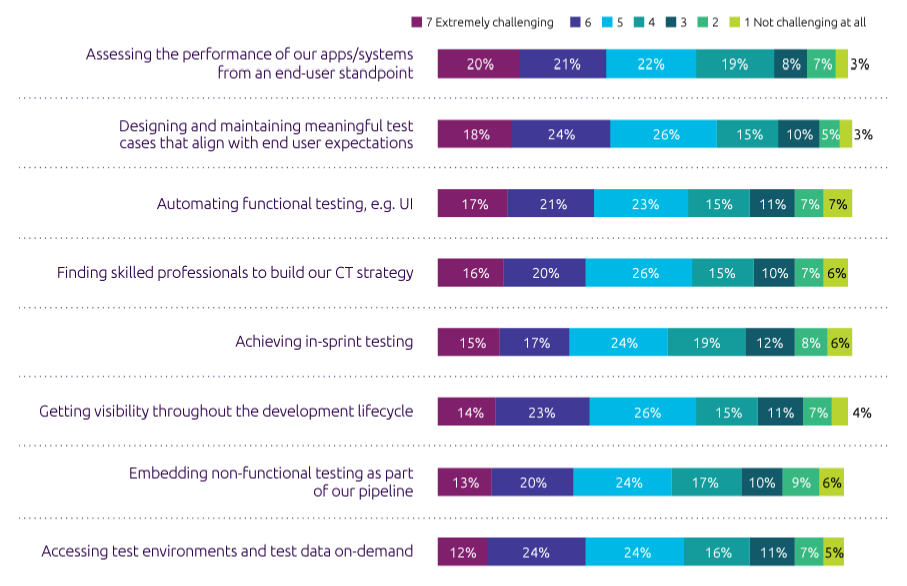
As orchestration practices improve, organizations will want to work towards a connected ecosystem that integrates release management, requirements, design, build, test, and deployment.
- Capgemini Continuous Testing report (Source)
Despite the fact that test orchestration is the cornerstone of an automation testing framework, it also contains components of its own. A thoroughly orchestrated pipeline will contain:
Super-optimized continuous delivery pipeline
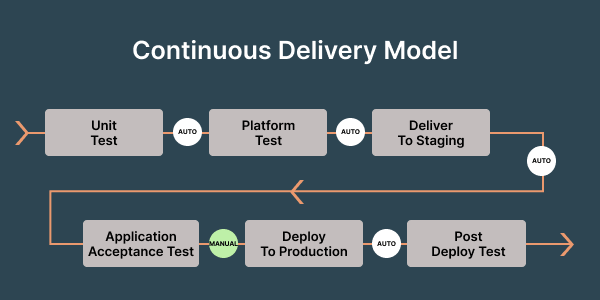
Deploying code to a production environment without manual intervention is known as continuous delivery (CD).
Before distributing software updates to the customer, developers use continuous delivery to automate numerous tests to validate various elements of the changes. API testing, user interface testing, and other testings relevant to the product are automatically run.
During CD, code is written into continuous integration (CI) pipeline, which is versioned into a repository as soon as the code passes specific tests. A continuous delivery pipeline with testing and monitoring integrated into a single ecosystem with 100% availability is a requirement for a test orchestration framework.
Adaptive test scripts
An enormous burden, especially for large-scale projects, is maintaining the test scripts for automated test cases. Each time a functionality change is implemented, the associated test cases might also undergo some (and/or major) changes. Finding the affected test cases, changing them, and then re-verifying them is a difficult and error-prone procedure.
The test scripts in the test orchestration pipeline must be adaptable to every change in functionality, tooling, or user interface (UI) because the goal of test orchestration is to tighten the grip on the test execution.
Real-time test data generation
The generation of test data presents a significant challenge for automated testing. Test script execution expects test data to be in a certain state. For instance, in end-to-end testing, the tests might be dependent, and multiple scripts representing different test scenarios may need to access the same data simultaneously. As each script accesses and modifies the data, the data might be affected, which may lead to the test failure of another script.
An effective test data generation technique can deliver compliant test data on demand, eliminating these possibilities. The tests are independently executed and progress as stand-alone scenarios with personalized data for each.
Automated code resiliency
Businesses often believe they have enough automation in place. In practice, the World Quality Report 2024-25 found that 57% of organizations cite the lack of a comprehensive test automation strategy, and 64% cite reliance on legacy systems, as the top barriers to advancing automation, which is exactly the coordination gap orchestration closes.
If the release candidate fails, the code base may be quickly restored to the prior version, thanks to the increased resilience of well-implemented automation. As a result, testing requires less time, covers more software, produces better problem identification, and there is faster feedback.
Continuous monitoring
Continuous monitoring is the technique of detecting risks to the standards of a software development cycle and architecture. It can be used to find discrepancies in software and is also known as continuous control monitoring or CCM. Continuous monitoring improves the SDLC’s performance, user experience, and transparency.
Information about an application is provided via continuous monitoring, including the application’s uptime, security, performance, and log time. To understand how effectively the program operates, the reports are primarily generated using statistics and graphs. A continuous monitoring pipeline with uninterrupted validation and health checks of services run uninterruptedly to detect issues in real-time is key to the success of the test orchestration framework.
What are the use cases of test orchestration?
Delivery teams can take a risk-based strategy by using test orchestration, which enables them to concentrate more on testing’s more complex components, such as test data management, continuous monitoring, and output analysis. Delivery teams can orchestrate tests in the following instances:
Upgrade testing
A certain software version may be upgraded (through several routes) from many earlier versions. For high quality, testing each of those upgrades is a must. Test orchestration allows for intelligent testing of the software release across different upgrade paths and multiple running environments.
Specialized testing
Test orchestration is a framework that delivery teams can use for specialized tests, such as security testing. When security tests are streamlined intelligently through orchestration, the software’s security vulnerabilities are discovered in a measured manner.
End-to-end testing
Using test orchestration, complicated test scenarios that include numerous API combinations and services executed one after another to produce a quantifiable result can be tested.
For a visual summary of how the mechanics fit together, this infographic on a blazing fast end-to-end test orchestration cloud maps auto-split, smart caching, auto-retry, and fail-fast onto Cypress, Playwright, and Selenium runs at scale.
What are the benefits of test orchestration?
Automated testing that occurs asynchronously causes entropy and other issues that raise TTM, slow development and demotivate developers. These issues are eliminated through test orchestration, which offers a variety of benefits:
Better visibility into release cycles
Test orchestration directly targets this visibility problem, and the stakes are high. The Consortium for Information & Software Quality (CISQ) estimates that poor software quality cost the US economy $2.41 trillion in 2022, much of it from defects caught too late in the release cycle.
Visibility into the software release cycle is essential because it enables you to identify and address bottlenecks early on, improving software quality and shortening time to market. The DevOps team can convert the input and output data obtained through test orchestration into key performance indicators (KPIs). The software team can then use these KPIs to allocate roles and determine their next course of action. For example, video reports can identify and address any bugs hindering a software’s quality rating.
You can use the reports and artefacts generated by test orchestration to support testing activities and the decisions that go along with them. These artefacts are also usable in establishing common benchmarks or criteria that can serve as quality gates in the continuous delivery pipeline.
Faster feedback loop
Asynchronous, tool-sprawled test execution results in many errors, testing failures, and sluggish feedback loops. It also fragments the toolchain: GitLab's 2024 Global DevSecOps Survey found that 74% of organizations already using AI for development want to consolidate their toolchain, and a single orchestration layer is how testing gets that consolidation and a faster feedback loop.
Test orchestration reduces manual intervention in the testing cycle, which lowers the likelihood of errors and accelerates feedback. These give the software testing life cycle self-sustainability, allowing for fewer execution failures.
Fail early, Fix easily
Early in the delivery cycle, when a test case fails, it is significantly simpler and less complex to fix the problems.
It increases shift-left adoption
New builds are shipped faster than ever, and the volume and load of automated tests keeps climbing with them, as AI now generates a growing share of new test scripts. While faster builds reflect a more flexible release cycle, they also point to a rising test load that orchestration is designed to absorb.
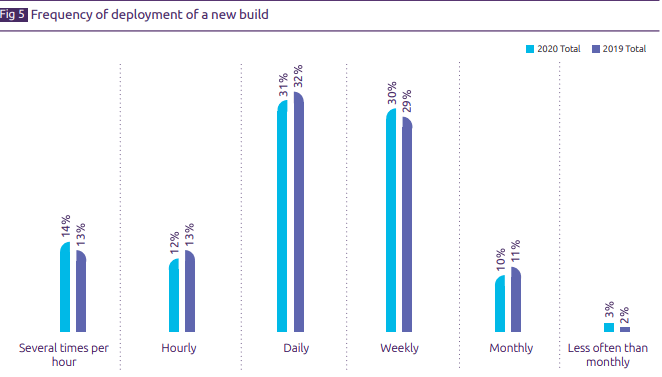
A “test as you build” approach to testing, which is the fundamental rationale behind the shift-left testing approach, is ultimately necessary given the anticipated increase in testing and error frequency. Testing proceeds more quickly, and the goal of the shift-left method of software development is achieved more quickly when the tests are orchestrated.
Test orchestration drives continuous delivery to maturity
Continuous delivery, the cornerstone of DevOps, is powered by automation. Automation facilitates the creation of a single source of truth for all parties involved in software development, which speeds up communication and teamwork.
Test orchestration spikes the benefits you can expect to reap from test automation. As a result, incorporating test orchestration into the CI/CD pipeline ensures that the primary objectives of CI/CD implementation are achieved.

Note: Enable continuous test orchestration and execution on cloud. Try TestMu AI Now!
What are the common challenges of test orchestration?
Test orchestration is powerful, but it introduces failure modes that individual automated tests never hit. The hardest are shared test data across parallel runs, environment drift, flaky tests at scale, mixed-framework tool integration, brittle locators, and debugging across distributed runs. Each one has a known mitigation, and most orchestration platforms exist largely to handle them.
| Challenge | Why it is hard | How to solve it |
|---|---|---|
| Test data management | Parallel tests contend for the same records, causing race conditions and failures that pass alone but fail together. | Give each test its own data through an API setup call and delete it on teardown, and give each parallel shard an isolated dataset or sandboxed database. |
| Environment provisioning and drift | Long-lived shared environments drift as people patch them, producing unreproducible "works in staging, fails in CI" failures. | Provision ephemeral environments per run from infrastructure-as-code and treat test environment management as code, then destroy them so every run starts clean. |
| Flaky tests at scale | Flakiness erodes trust in the whole pipeline, and blanket retries mask genuine regressions. | Detect flaky test patterns by watching for pass-then-fail flips, quarantine confirmed offenders into a non-blocking suite, and fix the root cause. |
| Tool and framework compatibility | Real suites mix UI, API, and unit tests in different languages and runners, each with its own output format. | Choose an orchestration layer that wraps existing runners rather than replacing them, and standardize every runner's output on a common format like JUnit XML. |
| Maintaining tests against a changing app | Brittle locators break when the DOM changes, so tests fail because the app changed, not because it broke. | Write intent-based locators using roles, labels, and test-ids, then add self-healing as a safety net that re-resolves a broken locator and logs the change. |
| Observability across distributed runs | In a 200-way parallel run, a red result in one shard gives you almost nothing to start debugging from. | Propagate a shared correlation ID from each test through the backend and centralize logs, metrics, and traces so any failure is searchable. |
How to prepare an effective test orchestration framework?
Despite the incredible advantages test orchestration offers, it is not without difficulties. Follow these tips when preparing your test orchestration framework:
Select the right tools
The first step in creating a framework for test orchestration is choosing the tools. There are particular tools suitable for each pipeline component that is efficiently orchestrated. The key to tool selection, like other parts of continuous testing, is to choose tools that are best suited for your orchestration goals and tools that will offer the data you need in the format you need to make decisions.
For instance, the orchestration goal of an e-commerce company may demand video analytics on the cart selection and ordering capabilities of the software. It will be challenging, and the company might not realize the tremendous ROI of test orchestration if it chooses an orchestration tool that exclusively offers test reports in the form of charts and quantitative data.
Without manual intervention, the right tools can affect the accuracy of the test results. The tools required to create synthetic or real-time data differ from those needed to generate and load data for the performance tests. You can also write and add adaptive test scripts to the test orchestration pipeline without tools that function in accordance with the needs of the pipeline.
Choose a tool compatible with your CI/CD pipeline, as it will bolster the release cycle by preventing integration problems. To reduce the time spent orchestrating the tests, it is essential to use a tool with smart workflow capabilities like automatic sequencing, status and dynamic test discovery, and intelligent test retries. A tool that can operate in several environments, such as Linux containers, macOS, etc., is also crucial.
Establish a measurable purpose
Clarity of purpose is fundamental to the success of any test orchestration framework. It makes it easier for all teams to work together to target every sequenced step towards a certain result. There are various benefits of test orchestration outside the better quality and speed of feedback that is the intended overall result.
For instance, a test orchestration pipeline can be configured to fire up before each product release and run UI testing under varied loads. The performance data and suggestions on how to configure the application for greater output are among the anticipated results. The test orchestration’s goal aids in determining the extent of test automation planned for and accomplished in that direction.
What are the best practices for test orchestration?
Effective test orchestration follows a few durable rules: automate before you orchestrate, run everything inside CI/CD, keep tests independent and idempotent, parallelize by historical timing, fail fast then retry only transient failures, centralize reporting, and version-control the configuration. These practices are what let a suite scale from dozens of tests to thousands without losing reliability.
- Automate before you orchestrate: Orchestration composes automated tests, so a shaky automation layer produces a shaky pipeline. Stabilize individual scripts first, then coordinate them.
- Choose CI/CD-native tooling: Pick orchestration that triggers on commit or pull request inside your existing pipeline and emits standard JUnit XML, so results can power quality gates and timing-based splitting.
- Design independent, idempotent tests: Every test should create the data it needs in setup, assert, then delete it in teardown, so it runs in any order and is safe to parallelize and retry.
- Parallelize by historical timing: Split the suite by measured per-test execution time, not by file count, so no single shard becomes the long pole. Done well, this cuts a long serial run to a fraction of its wall-clock time.
- Fail fast, then retry deliberately: Stop a broken build early, run previously failed tests first, and restrict auto-retry to genuinely transient failures. A test that only passes on retry is flaky and belongs in quarantine.
- Centralize logs and reporting: Aggregate every shard into one dashboard and tie logs, metrics, and traces together with a shared ID, so a failure anywhere in a distributed run is searchable.
- Define measurable quality gates: Encode objective thresholds, such as coverage at or above 80% or zero new critical vulnerabilities, that block promotion automatically rather than just warning.
- Version-control the configuration: Keep the orchestration and environment setup as code in the same repo, so runs are reproducible, changes are reviewable, and any environment can be rebuilt from source.
In the Reddit thread How much orchestration code / scripting is being developed and maintained by QA? on r/softwaretesting, testers debated how much custom orchestration a team should own. The poster described home-grown Python queueing logic so tightly coupled that extending it required deep, undocumented knowledge and blurred the line between test code and infrastructure. The top-voted reply advised decoupling the two, running the same command everywhere across local, Docker, and CI, and leaning on established frameworks and managed CI rather than custom glue, which is exactly the CI/CD-native, config-as-code case made above.
How do you choose a test orchestration tool?
The right test orchestration tool is the one that plugs into your CI/CD pipeline, distributes tests intelligently, and gives you a single view of results. Use the checklist below to evaluate any option on capability rather than marketing, then match the shortlist to your stack, suite size, and compliance needs.
- CI/CD integration: Look for first-class hooks that trigger on commit, pull request, or merge, expose status the pipeline can gate on, and emit standard JUnit XML so results feed dashboards without custom glue.
- Smart test distribution: The tool should balance shards using historical per-test timing rather than by-count splitting, keeping every executor near the same wall-clock time so one slow file does not gate the run.
- Dynamic discovery and auto-splitting: It should find tests at runtime and auto-shard them across many runners with no manual grouping, ideally with matrix builds that fan a suite across OS, browser, and version combinations.
- Intelligent retries and reordering: Retries should fire only for transient failures, confirmed flaky tests should be circuit-broken instead of blindly rerun, and previously failed tests should run first for faster feedback.
- Cross-platform and framework-agnostic support: The tool should run across Linux, macOS, and Windows and a real browser and device matrix, and support Selenium, Playwright, Cypress, pytest, and JUnit under one layer.
- Unified logging and reporting: Results from every shard should consolidate into one view with logs, metrics, and traces correlated by shared IDs, plus historical trends and flakiness scoring.
- Scalability: Executors should scale elastically to absorb concurrency spikes without queueing, handle very large suites and high daily volumes, and degrade gracefully instead of serializing under load.
- Artifact management: The tool should capture, version, and retain test evidence such as screenshots, videos, network logs, and coverage reports, with configurable retention so any run can be audited later.
- Security and compliance: Expect role-based access control, secure secrets injection, data isolation and masking for sensitive test data, audit trails, and the compliance certifications your industry requires.
The next section walks through how one such platform, TestMu AI's HyperExecute, delivers these capabilities end to end, and the HyperExecute pricing plan shows how execution concurrency is tiered.
How do you run end-to-end testing with test orchestration?
HyperExecute is an intelligent test orchestration platform by TestMu AI that allows for the fastest end-to-end Selenium testing. Through the provision of test infrastructure with the best possible speed, test orchestration, and unified execution logs, HyperExecute enables you to reduce your software’s TTM. Thus, you can test the code and address problems much more quickly. For a hands-on walkthrough, see our guide to test orchestration using HyperExecute.
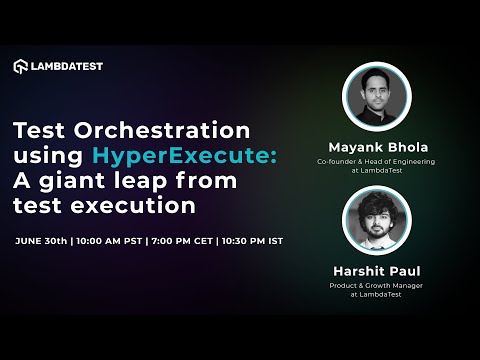
You can also Subscribe to the TestMu AI YouTube Channel and stay updated with the latest tutorials around Selenium testing, Cypress E2E testing, CI/CD, and more.

Austin Siewert
Co-Founder, Steadfast Systems
Discovered @TestMu AI yesterday. Best browser testing tool I've found for my use case. Great pricing model for the limited testing I do 👏
2M+ Devs and QAs rely on TestMu AI
Deliver immersive digital experiences with Next-Generation Mobile Apps and Cross Browser Testing Cloud

A YAML file is used to configure HyperExecute. By combining all the aforementioned orchestration components into a single execution environment, it streamlines the entire orchestration pipeline. There are four distinct things that particularise HyperExecute:
Support for multiple orchestration mechanisms
HyperExecute supports multiple orchestration mechanisms, including Matrix-based Build Multiplexing and Smart Auto Test Splitting. You can orchestrate and customize parallel tests using Smart Auto Test Splitting. The test discovery component of the YAML file allows you to instruct HyperExecute to discover certain tests in the pipeline and feed the output into specified tests. You can also modify the concurrent test execution builds.
By building a matrix of all the possible combinations, matrix-based build multiplexing enables users to run a single command over various scenarios, settings, and environments. Regression testing benefits the most because it improves coverage and results in a resilient codebase.
Automatic reordering of tests
In case of a test execution failure, synchronous test execution is interrupted in a conventional orchestration platform. This necessitates manual reordering and reconfiguration of the test sequence.
But HyperExecute detects test failures, automatically reorders the test, and logs the failure as soon as it happens. This provides proof of HyperExecute’s self-sustainability and quick feedback reporting, which were previously mentioned as crucial for efficient test orchestration.
The Command Line Interface
In addition to offering a variety of other helpful capabilities that speed up test execution, HyperExecute CLI is a command line client to communicate with and run tests on HyperExecute. You must obtain the HyperExecute CLI binary for the platform (or OS) on which the tests are run to trigger tests using the HyperExecute CLI.
You can personalize the HyperExecute experience by using the many command-line flags offered by the HyperExecute CLI. A number of features are available to you after installing the HyperExecute CLI on your computer. You can examine the various flags, for instance, by using the hyperexecute.exe --help command. You can also create and download artifacts using the CLI.
Support for frameworks and languages
You can orchestrate your Selenium tests with HyperExecute in many languages and frameworks. For instance, JUnit, Java, and many more languages allow you to create test scripts and sequence tests.
Unification of logs
Fusing terminal and test execution logs in legacy test clouds is an ETL headache. You receive a single automation dashboard view with HyperExecute that includes both terminal logs of test command execution and comprehensive test execution logs. A single user-friendly dashboard contains all test execution data, including terminal logs, test run videos, network logs, commands, exceptions, and more.
Automatic Report Generation
Because all test execution data is available in a single location, HyperExecute enables developers and testers to examine the quality of their builds on a single platform through insightful automatic reports created for each build run. This removes the need to develop intricate reporting frameworks and collect data from many sources.
Checkout TestMu AI HyperExecute on Microsoft Azure marketplace
Conclusion
Redundant, unfocused test suites are part of a much larger quality-cost problem: the Consortium for Information & Software Quality (CISQ) estimates that accumulated software technical debt in the US has reached roughly $1.52 trillion. Businesses that orchestrate their tests around real business needs, rather than generic vanity metrics, cut that redundancy, gain complete visibility into the continuous testing cycle, and base release decisions on evidence.
In this blog on test orchestration, we’ve gone over a walkthrough of the test orchestration pipeline’s finer points and looked at how the HyperExecute test orchestration grid helps reimagine the process.

Author

Sarafadeen Ibrahim Ayomide
Blogs: 2


Sarafadeen Ibrahim Ayomide is a community contributor with 5+ years of experience in developer-focused technical writing and documentation. He specializes in creating content around DevOps, CI/CD, cloud infrastructure, observability, and continuous testing, with hands-on experience documenting APIs, automation workflows, and developer tools. Sarafadeen has contributed technical content for platforms including TestMu AI, Last9, SigNoz, Gcore, and Middleware, producing code-heavy blogs, whitepapers, and guides for DevOps and testing audiences.
Reviewer

Japneet Singh Chawla
Reviewer
Japneet Singh Chawla is an Engineering Manager at TestMu AI (formerly LambdaTest), where he leads a team driving HyperExecute, the AI-native Test Orchestration Cloud Platform, and integrations with Cypress, Provar, Tosca, and Selenium, improving test execution efficiency and driving adoption across 500+ enterprise clients. He also spearheaded zero-downtime deployments that cut release-related downtime by 90%, and mentors new engineers into productive contributors. He brings 9+ years of experience building and scaling distributed systems, SaaS platforms, and developer tools, with deep hands-on backend engineering across Golang, Python, Node.js, Kafka, and Redis. Earlier at Sumo Logic he built award-winning developer tools, including a VS Code Parser Linter, and at Indus Valley Partners he was a founding member of the Sentiment Analyzer team, building ML-powered solutions for financial clients. Japneet holds an MCA in Computer Science from GGSIPU.


Test Orchestration FAQs
Did you find this page helpful?
More Related Blogs
TestMu AI forEnterprise
Get access to solutions built on Enterprise
grade security, privacy, & compliance
- Advanced access controls
- Advanced data retention rules
- Advanced Local Testing
- Premium Support options
- Early access to beta features
- Private Slack Channel
- Unlimited Manual Accessibility DevTools Tests