

Power Your Software Testing with AI Agents and Cloud
The Native AI-Agentic Cloud Platform to Supercharge Quality Engineering. Test Intelligently and Ship Faster.


- TestMu AI (Formerly LambdaTest)
- /
- Learning Hub
- /
- Puppeteer Tutorial: Complete Guide to Puppeteer Testing
Puppeteer Tutorial: Complete Guide to Puppeteer Testing
Dive into Puppeteer tutorial and uncover the advantages of this powerful Node.js library for browser automation.
Last Updated on:
OVERVIEW
Puppeteer is a powerful Node.js library developed by Google that automates and streamlines front-end development and testing. It provides a robust API to interact with web pages, perform automated actions, and execute browser tasks with high precision and control.
Maintained as an open-source project, Puppeteer enables seamless browser automation using a headless version of Chrome.
Overview
To perform fast and reliable browser automation, use Puppeteer for direct control over Chrome and Chromium via the DevTools Protocol. To scale these tests across over 40 real browser and operating system combinations, integrate your scripts with TestMu AI for cloud-based execution.
- Puppeteer: Puppeteer is a Node.js library developed by Google that controls Chrome and Chromium browsers directly via the DevTools Protocol for fast headless testing, scraping, and PDF generation.
- Selenium: Selenium is an automation tool that supports cross-browser legacy testing across all major browsers, though it requires a more complex setup and external drivers than Puppeteer.
- TestMu AI: TestMu AI is a cloud-based testing platform that scales Puppeteer test execution by running scripts across over 40 real browser and operating system combinations.
- waitForSelector(): The waitForSelector() method is a Puppeteer synchronization function that ensures page elements are fully loaded before executing test actions, which helps prevent flaky tests.
- Headless mode: Headless mode is a Puppeteer execution setting that runs tests in a GUI-free environment, reducing resource consumption to accelerate CI/CD pipelines and speed up execution.
- Parallel execution: Parallel execution is the practice of running multiple Puppeteer test scripts simultaneously to optimize resource usage and reduce overall test suite execution time.
What is Puppeteer?
Puppeteer is a new framework that allows testers to perform headless browser testing of Google Chrome. Puppeteer testing allows the tester to perform actions such as clicking links, filling out forms, and submitting buttons using JavaScript commands.
Built by Google, Puppeteer is a Node library for controlling headless Chrome over the DevTools Protocol. It also offers high-level APIs for performing automated tests, developing and debugging website features, inspecting elements on a page, and profiling performance.
Understanding what is Puppeteer and its capabilities is crucial for testers and developers alike.
What is a Headless Browser?
A headless browser is a regular browser, except that we cannot see anything on the screen. The program runs in the backend i.e., it's not visible, but it still has functionality. Thus, it's sometimes known as a "headless" or "headless browser."
A headless browser can perform all the functions of clicking links, uploading and downloading documents, and navigating pages by executing our program's instructions. This is where understanding what is Puppeteer becomes essential, as it leverages headless browsers for automation. When we use a normal browser, we see each step of the program in a GUI presentation. But when we use a headless browser, all steps of the program are carried out sequentially and correctly, and we can track it with the help of a console or command-line interface.
The Rise of Puppeteer Framework
Since its inception, The Puppeteer project has been widely adopted by developers as a simpler way to introduce automation into their development workflow. Many developers have authored extensive tutorials, and their feedback has been invaluable in improving Puppeteer's capabilities.
Puppeteer, which was initially released in January 2018, has quickly gained popularity as one of the leading open-source automation frameworks.
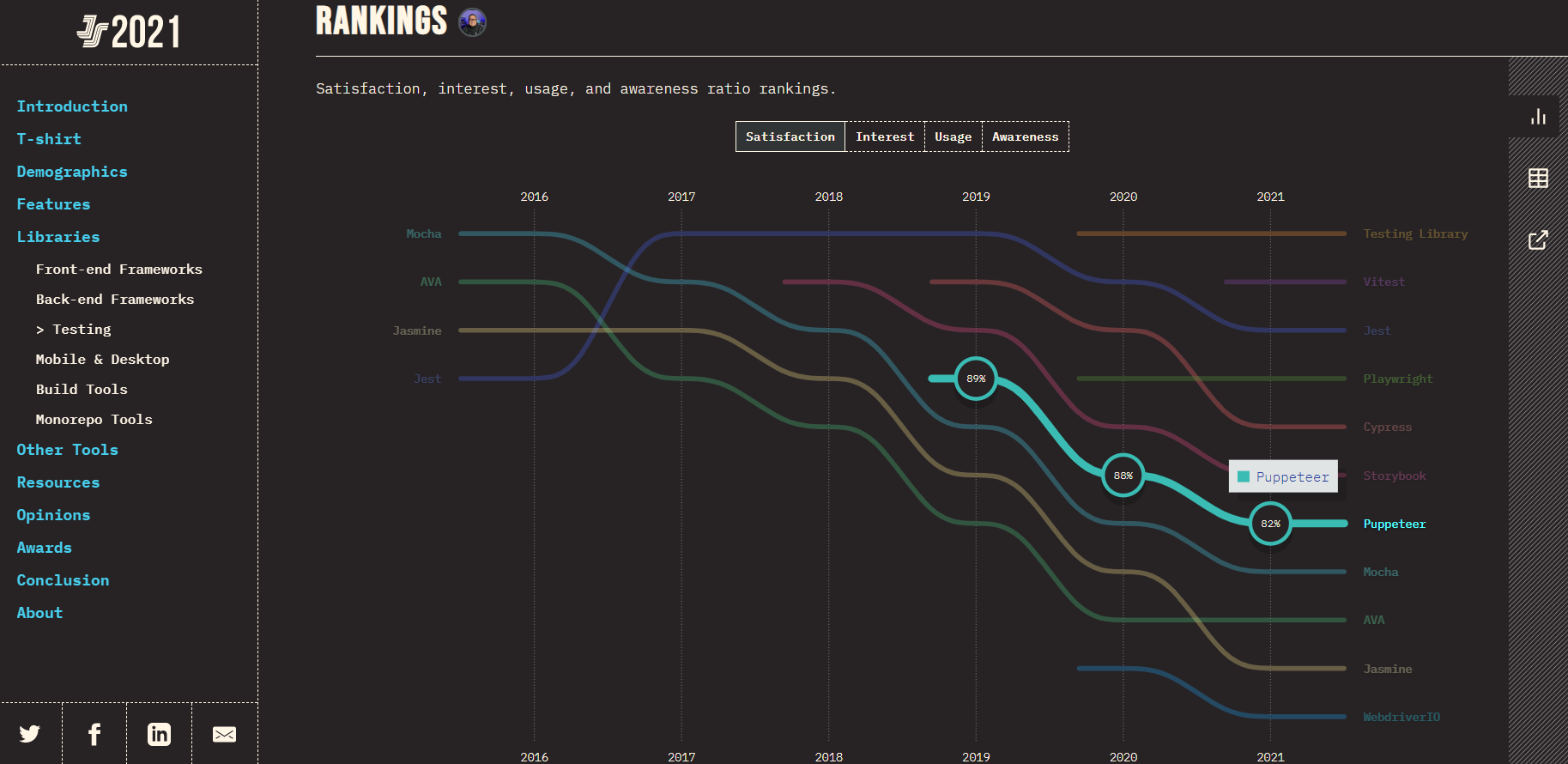
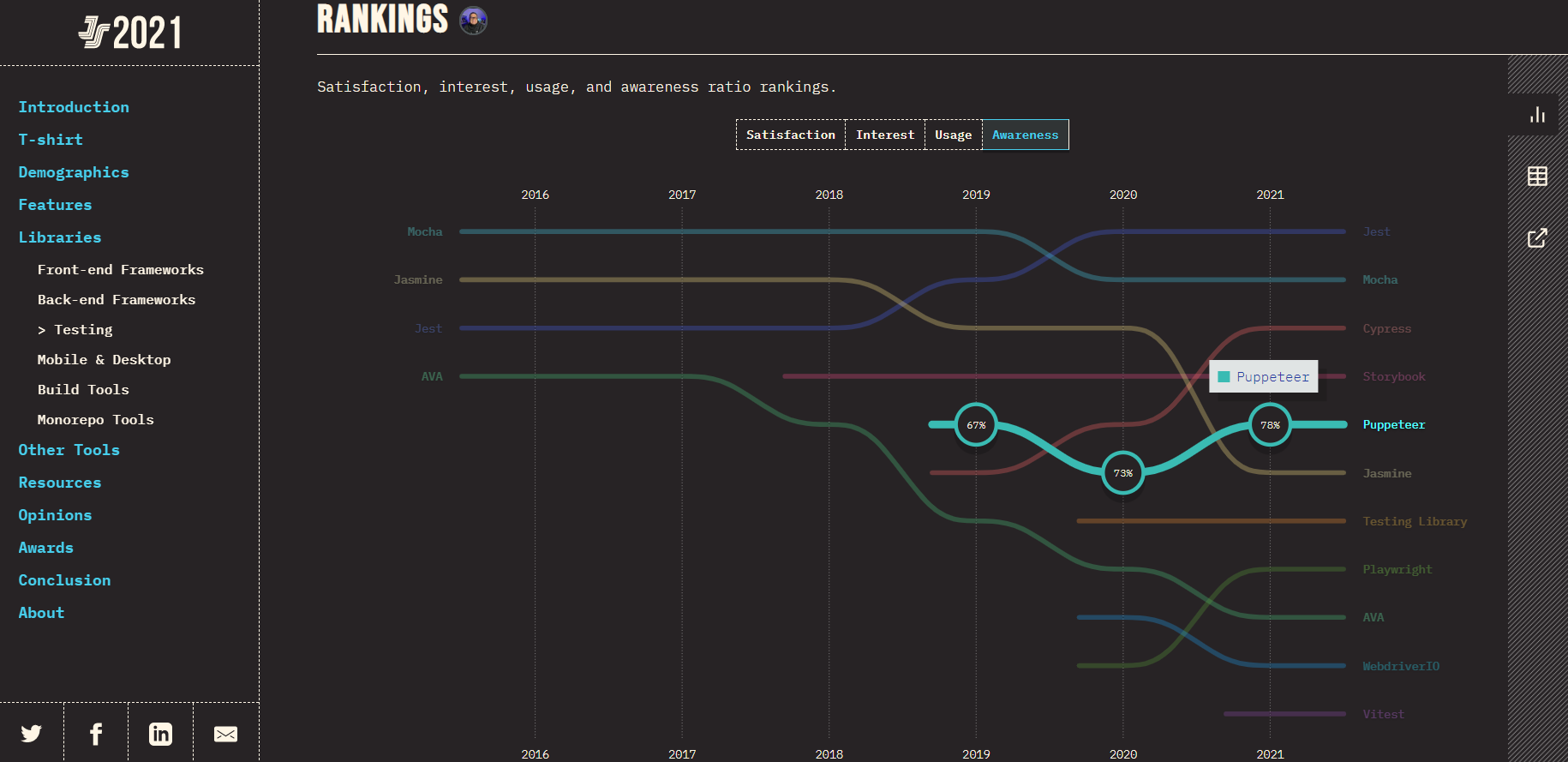
Check out The State of JS 2021 Puppeteer testing data on the basis of developer Satisfaction, Interest, Usage and Awareness, highlighting the growing need to understand what is Puppeteer in the developer community.
Satisfaction:
Since 2019, Puppeteer has shown a decrease in the level of satisfaction among developers and testers i.e., 89% in 2019 to 82% in 2021.
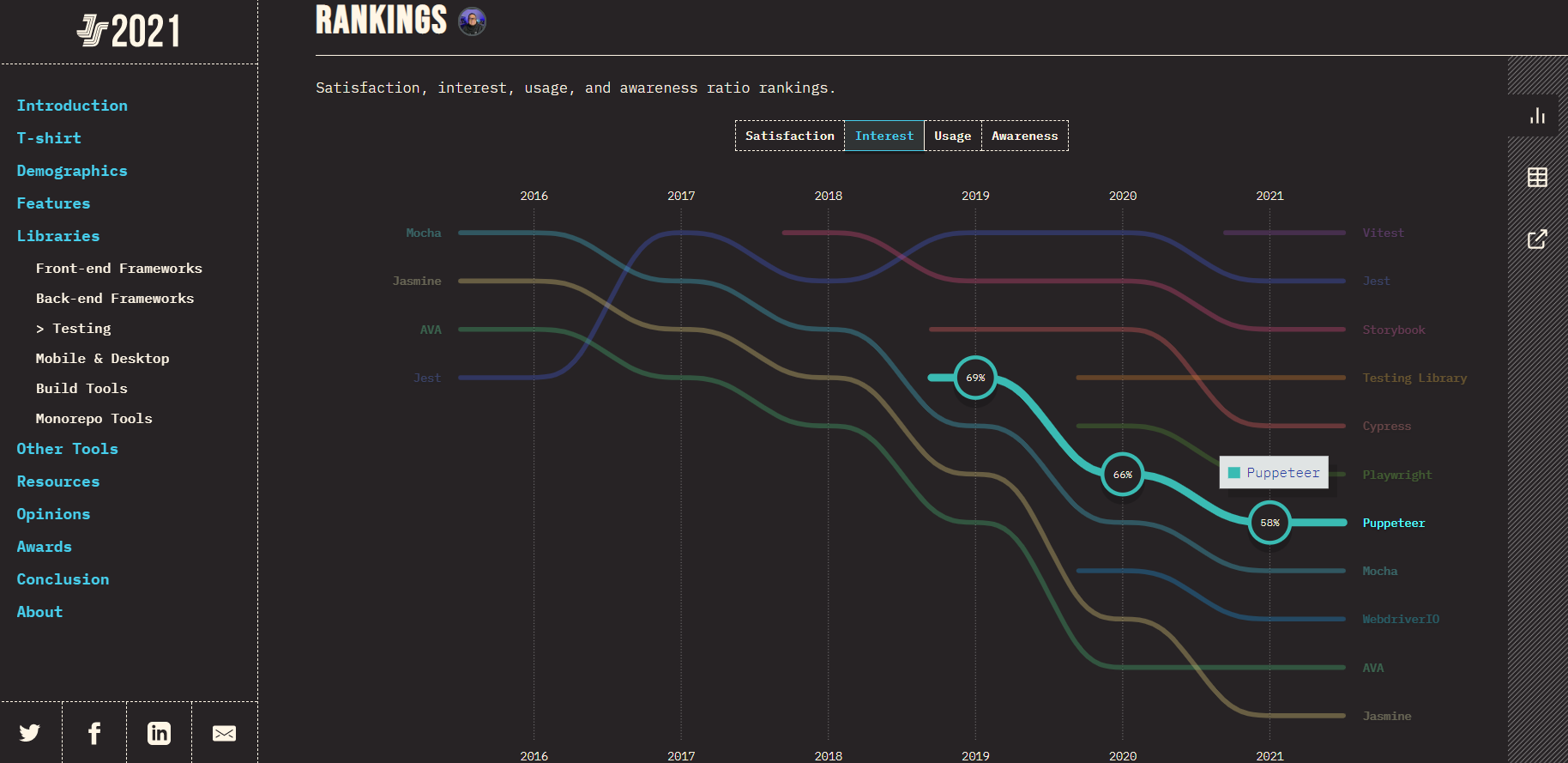
Interest:
The interest in using the Puppeteer testing tool by developers and QA testers has also shown a consistent decline i.e., 69% in 2019 to 58% in 2021.
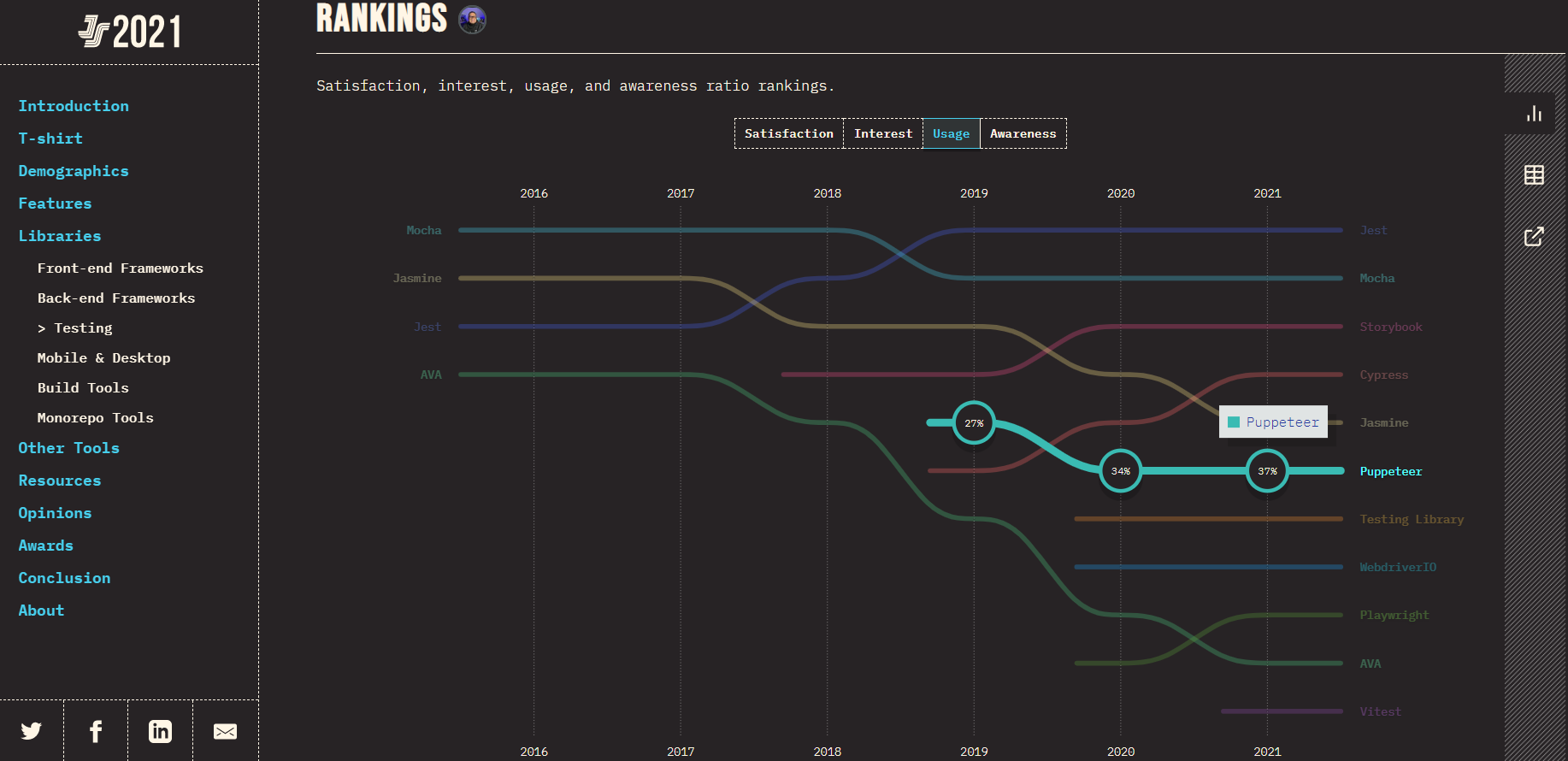
Usage:
Irrespective of the decline in the interest of using Puppeteer as the go-to testing framework, it shows a significant rise in its usage by developers and testers i.e., 27% in 2019 to 37% in 2021.
Awareness:
Puppeteer has shown a significant increase in its awareness among the developer and tester community. It risen from 67% in 2019 to 78% in 2021.
Under the Experience Over Time section of the State of JS 2021 survey, it also shows:
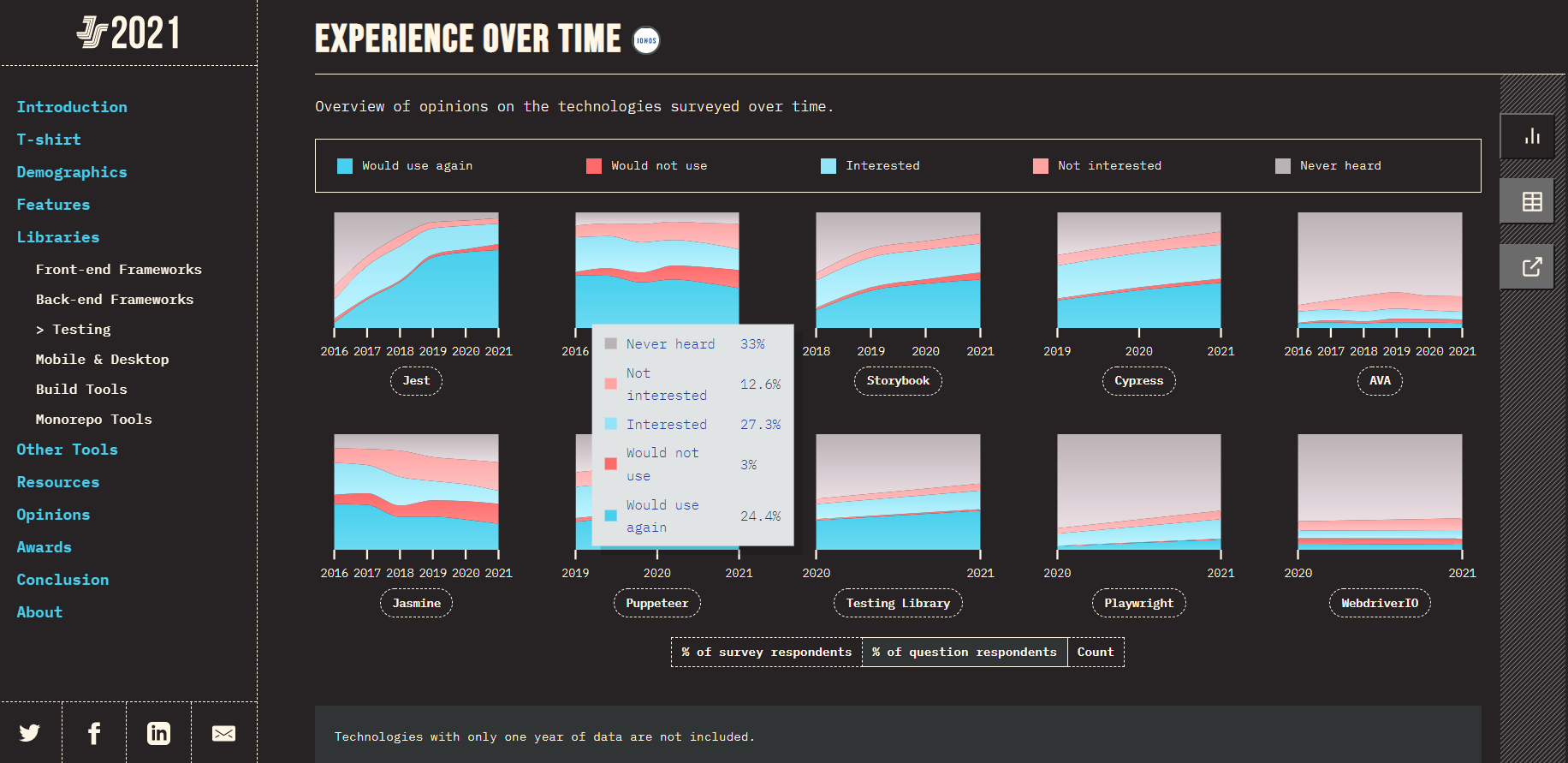
For 2019:
Around 27.3% of developers have shown interest in using Puppeteer for their testing needs. The lack of awareness of the Puppeteer framework is at an all-time high i.e., 33%, but considering its still a new testing framework, it is already gaining popularity. Along with this, only 24.4% of developers would like to use Puppeteer again in the future.
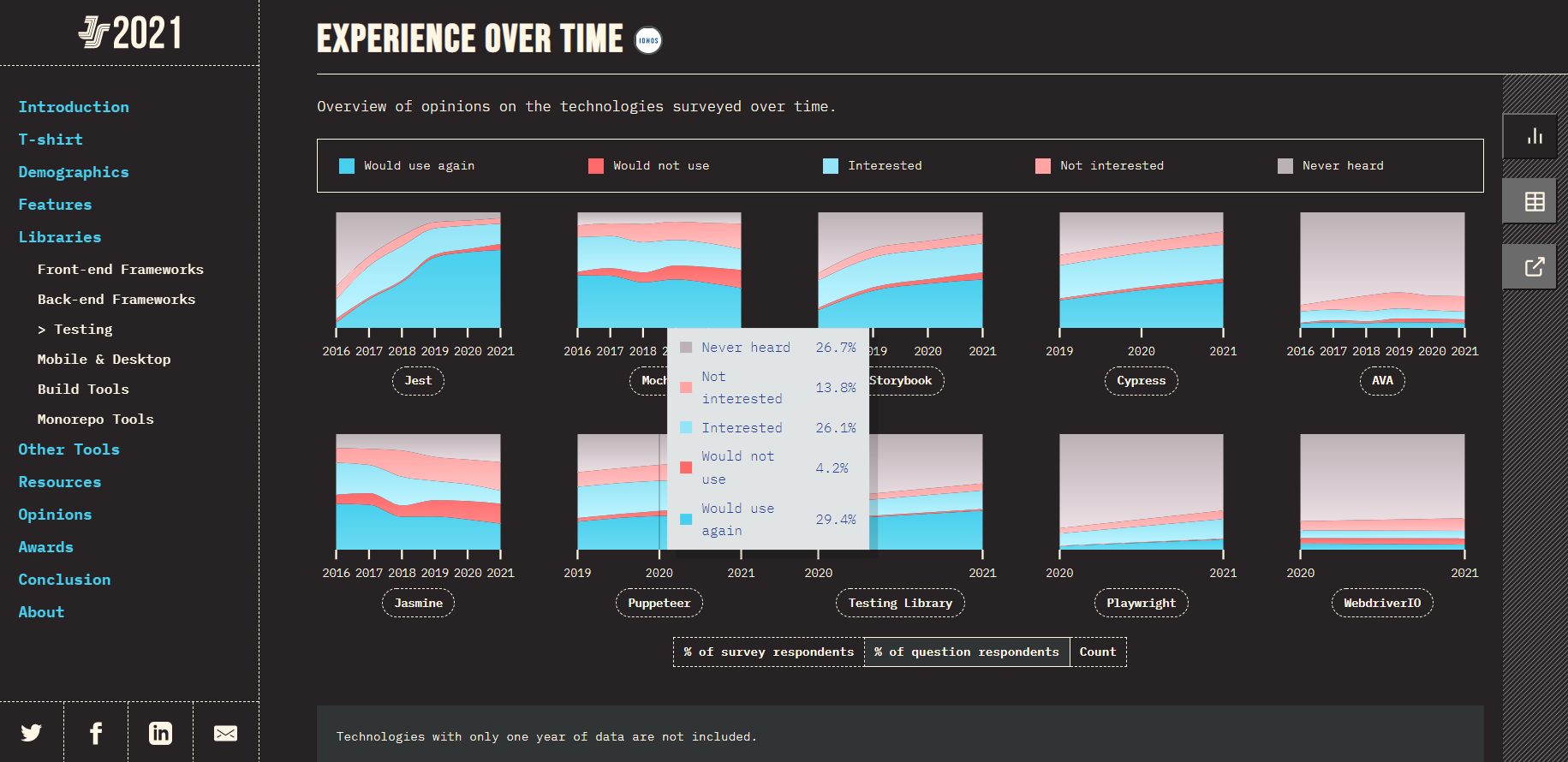
For 2020:
The interest among developers ad testers in using Puppeteer has not shown any significant change. The lack of awareness has dropped from 33% in 2019 to 26.7% in 2020. Along with this, the percentage of users who would like to use Puppeteer again has increased from 24.4% in 2019 to 29.4% in 2020.
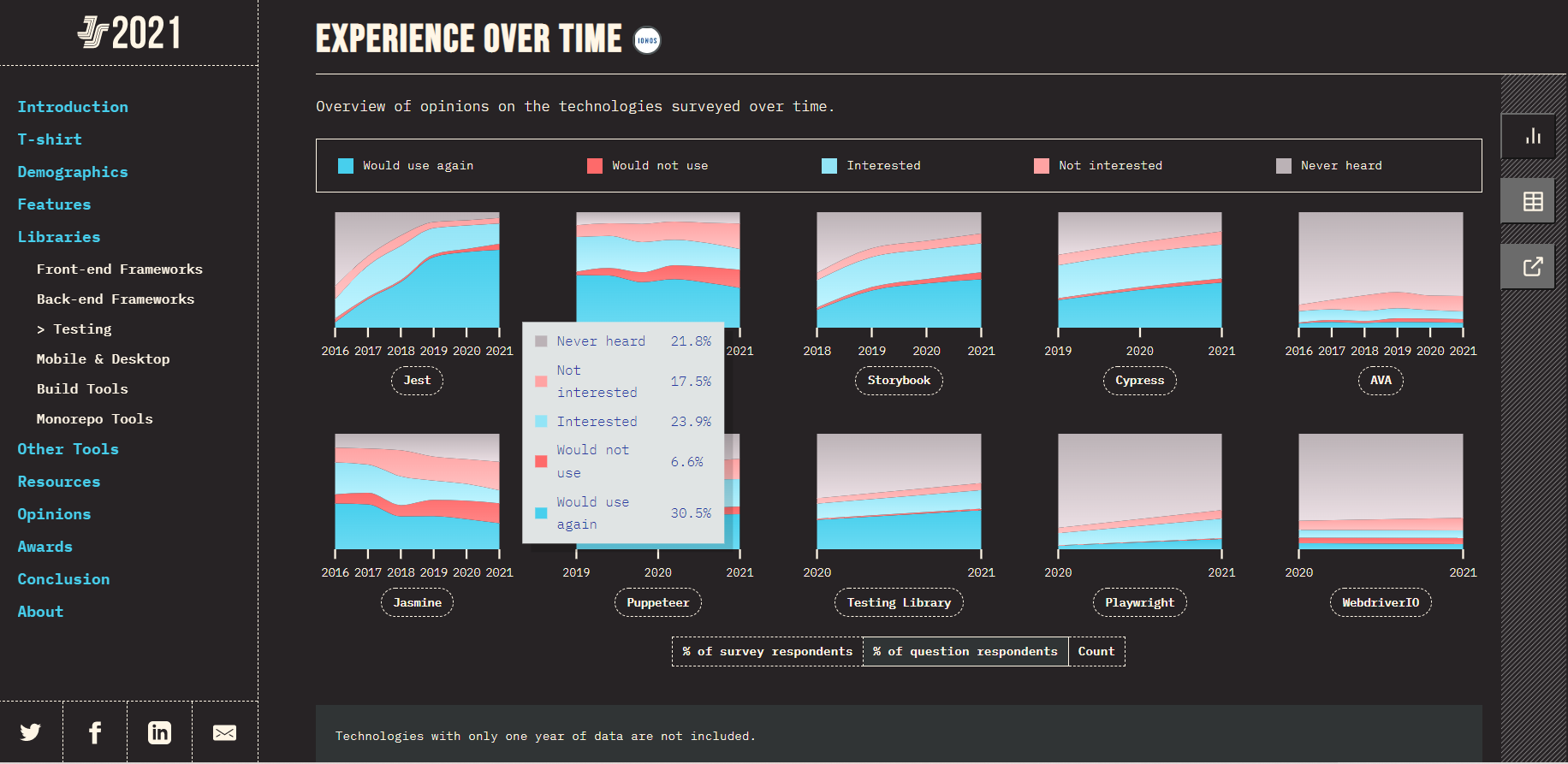
For 2021:
As per the data of the 2021 survey, the interest among the users has dropped down to 23.9%. The lack of awareness has also shown a decrease and is now at 21.8%. Along with this, the percentage of users who would like to use Puppeteer again has shown a slight increase from 29.4% in 2020 to 30.5% in 2021.
Why Puppeteer?
One of Puppeteer's main advantages is its ability to control the DevTools Protocol, a key aspect when discussing what is Puppeteer. It's a powerful tool for frontend development and testing automation, differentiating itself from other frameworks by focusing on Chromium's internal features.
Puppeteer is a tool for automating the process of frontend development and testing. It is a tool that automates browsers. It can be used for automating most UI tests, including keyboard and mouse movements, as well as web page crawling and scraping. It works with applications written in Angular and AngularJS.
Unlike Selenium, Cypress Protractor, and many other testing frameworks, Puppeteer is not considered a browser automation tool. Rather, it is used to manage the internal features of the Chromium browser. Puppeteer acts as a development tool that lets you run a headless browser in Node.js to perform a majority of tasks performed by a developer, such as handling requests and responses, locating elements, network traffic, performance and so on.
Features of Puppeteer Testing
Puppeteer's features are central to understanding what is Puppeteer. Puppeteer gives you the power to automate things you do manually in the browser. Here are some of those features:
- Create a testing environment that allows you to easily update your tests and run them in the latest version of Chrome, with all the latest JavaScript, browser features, and API's.
- Supports cross-browser and cross-platform testing and is compatible with a variety of operating systems and programming languages.
- Integrated with most of the popular CI and Agile tools such as Jenkins, TravisCI, and TeamCity.
- Allows you to generate automated screenshots.
- Let's you automate form submission, UI testing and other actions on your site.
- A growing community with updated library and extensions.
Puppeteer Testing Drawbacks
As the automation context changes daily, Puppeteer might not remain the go-to automation tool for long. One of the major drawbacks is that Puppeteer supports only the Chrome browser as of now, which is an important consideration when explaining what is Puppeteer to new users.
Puppeteer Architecture
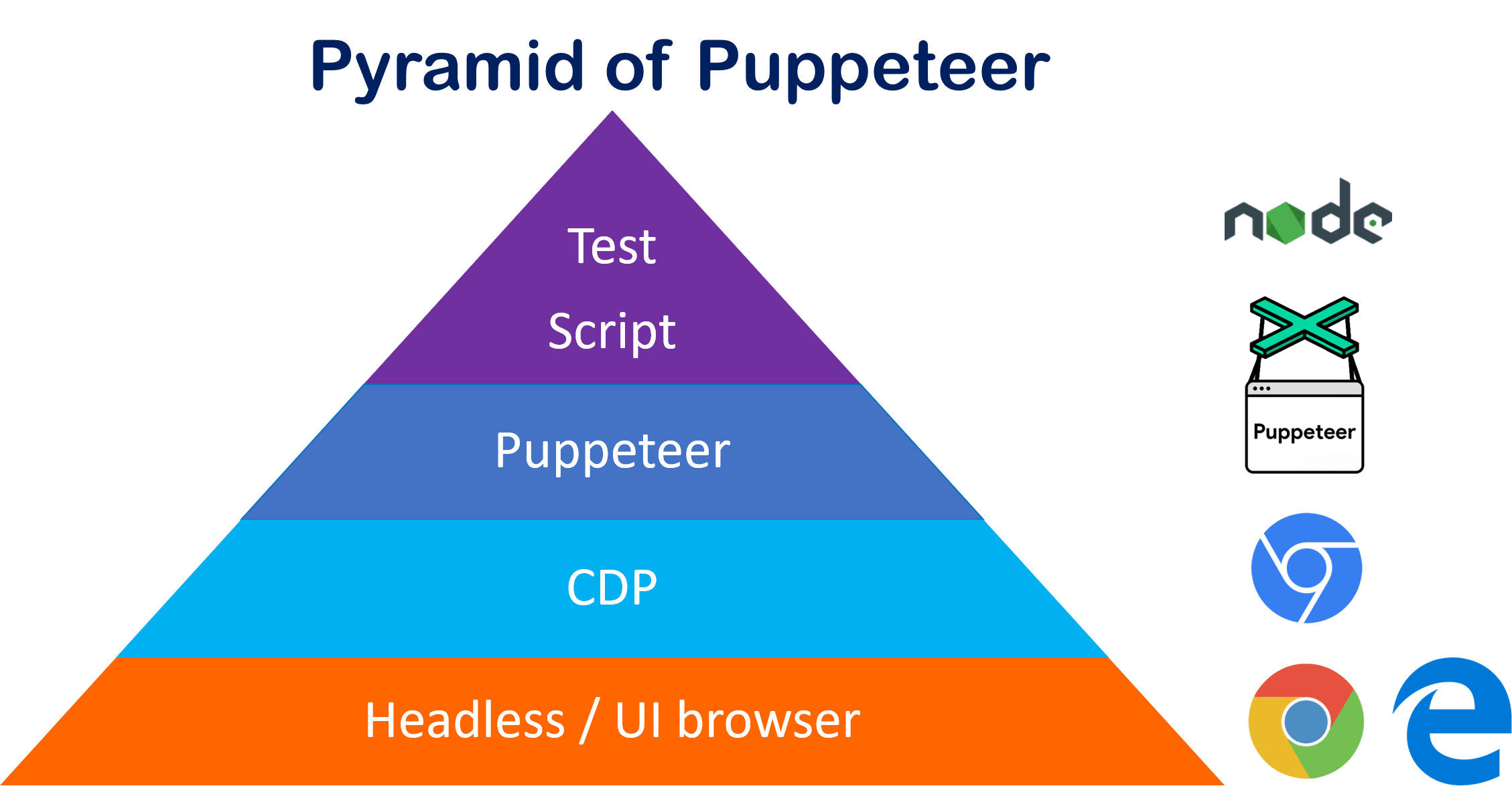
By following the protocols of DevTools, Puppeteer manages Chromium or Chrome browsers with the help of top-quality API provided by the Node library. Puppeteer testing follows the below process:
- The browser, with or without the headless mode, executes instructions on the browser engine.
- The Chromium repository is the place where all the operations are executed. The browsers Microsoft Edge and Chrome use Chromium as a browser engine.
- Puppeteer is actually a Node.js module based on the project code. The automation test code is also known as the JavaScript level. Here, the actual automation code is developed by the end-user using JavaScript.
History of Puppeteer
Before Puppeteer, the only way to test user flows within web applications was through an automated headful browser (Firefox with Selenium) or a Headless browser that was built on top of its own unique JavaScript engine. A headless browser, which presents no user interface, is different from a headful browser, the kind we use to interact with the internet.
To remove the trade-offs between speed and reliability, Puppeteer leverages the Chromium browser environment for running tests, giving developers the flexibility to use headless or headful browsers that run on the same underlying platform as their users.
Puppeteer was built to be easily integrated into any developer's workflow. This led to an increase in popularity amongst developers, who were then incentivized to build support for Puppeteer into popular testing frameworks such as Mocha.
Playwright vs Puppeteer vs Cypress vs Selenium: A Detailed Comparison
The architecture of Puppeteer, crucial to understanding what is Puppeteer, involves managing Chromium or Chrome browsers through high-quality APIs provided by the Node library.
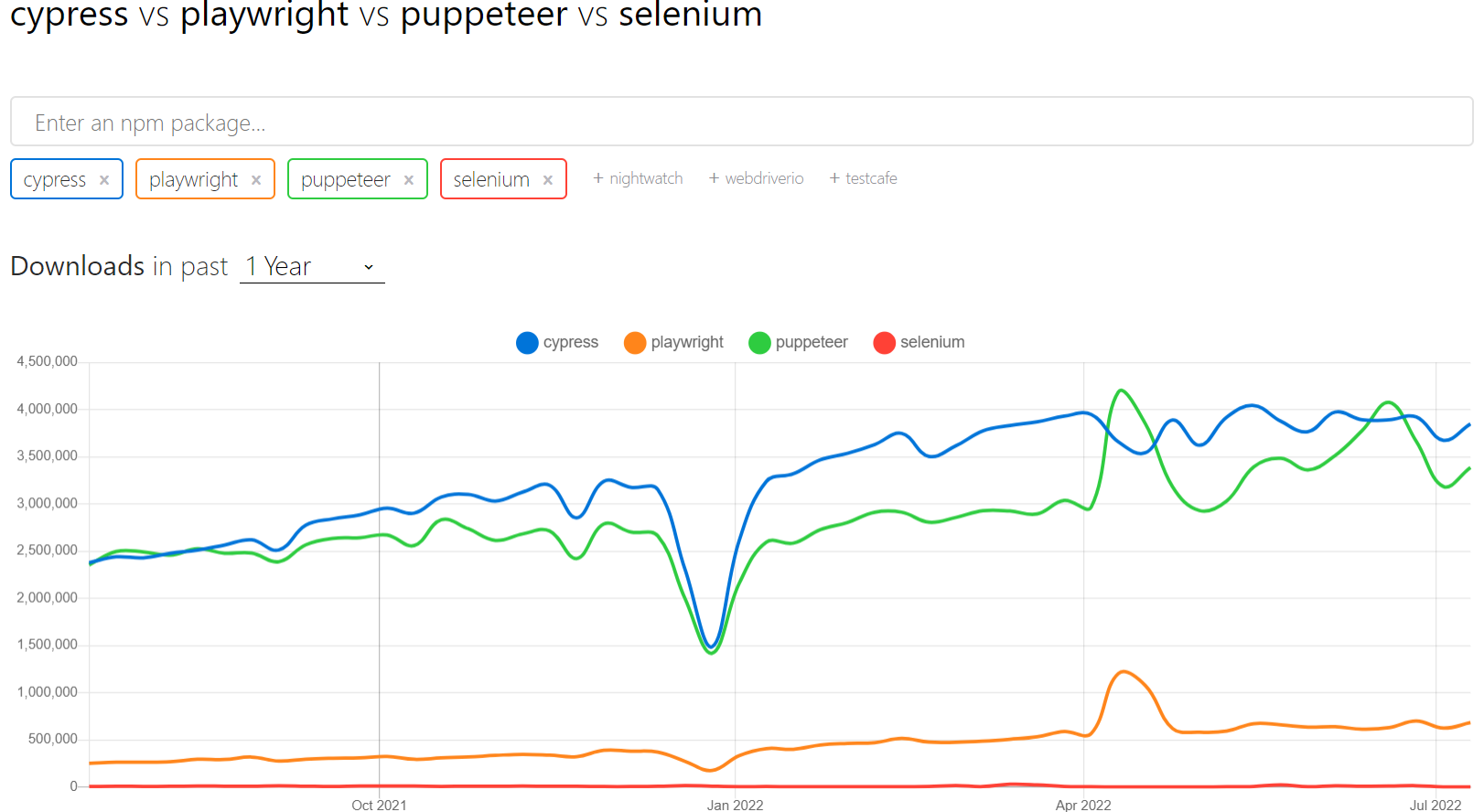
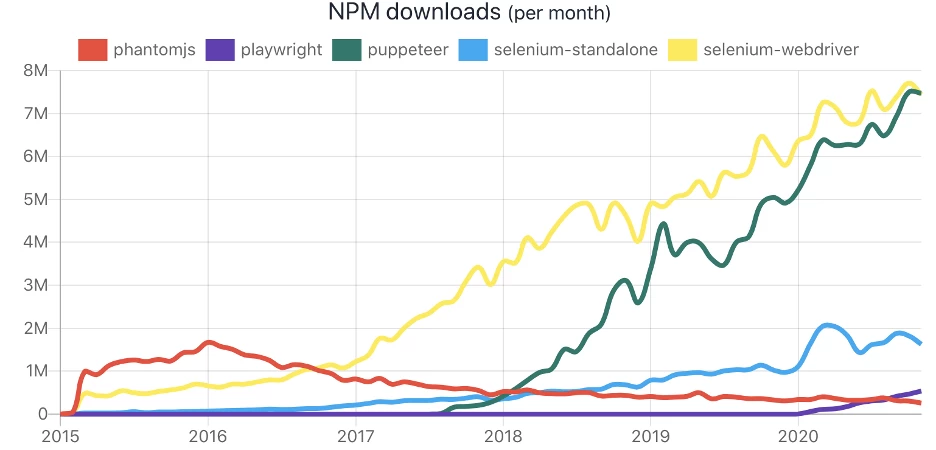
As per the last 1 year data of NPM Trends, Puppeteer has shown a significant rise in its downloads and now has come alongside famous automation testing frameworks like Cypress. Currently Puppeteer sits at 3.3 million downloads.
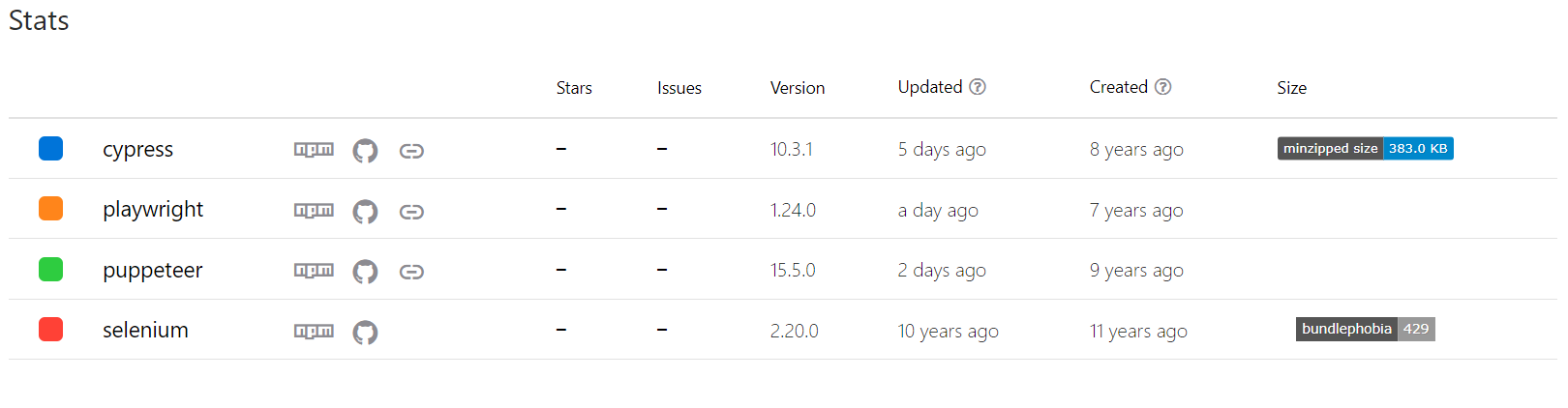
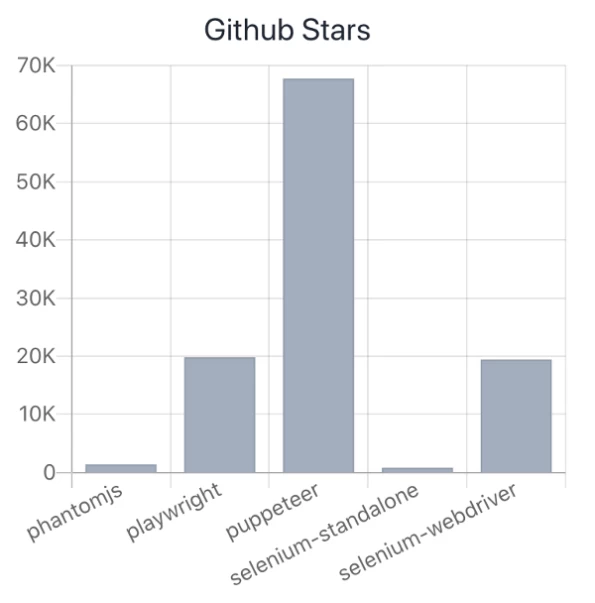
Along with this, the GitHub Stats show that Puppeteer has the highest number of stars i.e., 79,074, among all the top frameworks. This also proves a positive growth for Puppeteer among the developer and tester community.
| Parameters | Selenium | Cypress | Puppeteer | Playwright |
|---|---|---|---|---|
| Cross Browser | Supports all browsers | Supports only Chrome and Firefox | Supports only Chrome and Firefox | Supports Chrome, Safari and Firefox |
| Multi-tabs and Frames | Supported with bad switch API | No real support | Intuitive API | Intuitive API |
| Parallelism, Grids and Infra | Yes | Only in closed source paid could | Users build their own | Users build their own |
| Execution Speed | Fast | Fast | Fast | Fast |
| Self-healing Tests | No | No | No | No |
| Debugging | Debugging remote grids relies on the grid provider | Makes up with DOMs | Writing and debugging JavaScript from your IDE | Writing and debugging JavaScript from your IDE |
| Autonomous Testing | No | No | No | JNo |
| Docs and Resources | Great documentation and resources | Good documentation | Many available tutorials | Outdated docs and tutorials due to changing API |
| Community | Very large community with many testers | Small community | Small community | Small community |
How to use Puppeteer for automation
Puppeteer is a Node.js package for automating Chrome or Chromium browsers. It's used for web testing, allowing control over headless Chrome or Chromium, and can also run full browser versions.
TestMu AI supports Puppeteer testing on over 40 real browser and OS combinations. To get started, clone the TestMu AI-Puppeteer repository, install npm dependencies, and configure your TestMu AI credentials.
- Setting Up:
- Clone the TestMu AI-Puppeteer repository:
- Install npm dependencies.
git clone https://github.com/LambdaTest/puppeteer-sample.git cd puppeteer-sample - Add the
browserWSEndpointin your test script:wss://cdp.lambdatest.com/puppeteer?capabilities=${encodeURIComponent(JSON.stringify(capabilities))} - Set your TestMu AI username and access key in the environment variables.
- Executing Tests:
- Example test script:
'use strict'; const puppeteer = require('puppeteer'); (async () => { const capabilities = { 'browserName': 'Chrome', 'browserVersion': 'latest', 'LT:Options': { 'platform': 'Windows 10', 'build': 'puppeteer-build-1', 'name': 'My first Puppeteer test', 'resolution':'1366x768', 'user': process.env.LT_USERNAME || "Your Username", 'accessKey': process.env.LT_ACCESS_KEY || "Your Access Key", 'network': true } }; try { const browser = await puppeteer.connect({ browserWSEndpoint: `wss://cdp.lambdatest.com/puppeteer?capabilities=${encodeURIComponent(JSON.stringify(capabilities))}`, }); const page = await browser.newPage(); await page.setViewport({ width: 1024, height: 768, deviceScaleFactor: 1, }); console.log("Navigating to LambdaTest"); await page.goto('https://www.testmuai.com/'); console.log("Navigating to Pricing"); await page.goto('https://www.testmuai.com/pricing'); console.log("Navigating to Automation"); await page.goto('https://www.testmuai.com/automation-testing'); console.log("Closing browser"); await browser.close(); } catch (e) { console.log("Error - ", e); } })(); - Viewing Test Results:
- After running your tests, you can view the results on the TestMu AI Automation Dashboard, which shows detailed information about the test sessions.
Best practices for optimizing your tests with Puppeteer
- Understand Puppeteer's Capabilities: Before we jump into test optimization, let's go over what Puppeteer really is and what it can do. Puppeteer is a tool that automates and simulates user interactions in the browser. You'll need to familiarize yourself with Puppeteer's API and features such as headless browsing, network interception, and screenshot capture to get the most out of it.
- Use Headless Mode for Faster Execution: In headless mode, Puppeteer runs in a GUI-free environment. This is especially useful in CI/CD pipelines where there is no need for visual rendering. This mode reduces the resource consumption and increases the test execution time.
- Manage resources efficiently:Each test, Puppeteer builds a new instance of the browser. This can consume a lot of resources. Optimize by reusing the browser instance or pages whenever possible. Make sure to close the pages and the browsers after the tests are finished.
- Optimize Page Interactions:Focus on essential interactions when automating tasks. Avoid unnecessary page navigation, and use features such as waitForSelector, which loads elements before interactions. This minimizes flaky tests and enhances reliability.
- Parallel Tests: Running tests in parallel can significantly decrease the overall execution time. With Puppeteer, you can run multiple browser instances at the same time. However, be aware of the system's limits to avoid performance issues.
- Use error handling and logging: Strong error handling and logging is essential for troubleshooting in automated tests. Use try-catch blocks for handling exceptions smoothly and log errors for troubleshooting. This practice helps you to quickly find and fix your Puppeteer script issues.
By following these best practices, you can optimize your Puppeteer tests for better performance, reliability, and maintainability. Understanding what Puppeteer is and how to effectively utilize its features is key to successful test automation.
Browsers Supported by Puppeteer
Puppeteer 3.0, a Node.js library that provides a high-level API to control headless Chrome or Chromium over the DevTools Protocol, now supports Firefox in addition to Chrome. The new version also updated support to the latest Chrome 81 and removed support for Node 8.
About TestMu AI
TestMu AI is a leading test execution and orchestration platform that is fast, reliable, scalable, and secure. It allows users to run both manual and automated testing of web and mobile apps across 3000+ different browsers, operating systems, and real device combinations. Using TestMu AI, businesses can ensure quicker developer feedback and hence achieve faster go to market. Over 500 enterprises and 2 Million + users across 130+ countries rely on TestMu AI for their testing needs.
What does TestMu AI offer?
- Run Selenium, Cypress, Puppeteer, Playwright, and Appium automation tests across 3000+ real desktop and mobile environments.
- Live interactive cross browser testing in different environments.
- Perform Mobile App testing on Real Device cloud.
- Perform 70% faster test execution with HyperExecute.
- Mitigate test flakiness, shorten job times and get faster feedback on code changes with TAS (Test At Scale).
- Smart Visual Regression Testing on cloud.
- LT Browser - for responsive testing across 50+ pre-installed mobile, tablets, desktop, and laptop viewports.
- Capture full page automated screenshot across multiple browsers in a single click.
- Test your locally hosted web and mobile apps with TestMu AI tunnel.
- Test for online Accessibility testing.
- Test across multiple geographies with Geolocation testing feature.
- 120+ third-party integrations with your favorite tool for CI/CD, Project Management, Codeless Automation, and more.
How To Run Puppeteer Tests on TestMu AI?
Puppeteer cloud grids like TestMu AI allow you to perform Puppeteer testing at scale. TestMu AI allows you to perform automated cross browser testing on an online browser farm of 40+ browsers and operating systems to expedite the test execution in a scalable way. Moreover, it increases the test coverage with better product quality.
To run your first Puppeteer automation testing script online, refer to our GitHub repository. No need to worry about the challenges with Puppeteer infrastructure. Want to know a fun fact? Your first 100 Puppeteer automation testing minutes are on us with just a free sign-up. You can also avail benefits of manual cross-browser testing, responsive testing, and more with a lifetime of free access to LambdaTest, the world's fastest-growing cloud Puppeteer Grid.
Our Puppeteer tutorials will help you develop a better functional understanding of the Puppeteer framework. Finally, kick-start your Puppeteer automation journey by running your first Puppeteer test script on the TestMu AI cloud.
Author

Devansh Bhardwaj
Blogs: 80


Devansh Bhardwaj is a Community Evangelist at TestMu AI with 4+ years of experience in the tech industry. He has authored 30+ technical blogs on web development and automation testing and holds certifications in Automation Testing, KaneAI, Selenium, Appium, Playwright, and Cypress. Devansh has contributed to end-to-end testing of a major banking application, spanning UI, API, mobile, visual, and cross-browser testing, demonstrating hands-on expertise across modern testing workflows.
On This Page
- Overview
- What is Puppeteer?
- The Rise of Puppeteer Framework
- Why Puppeteer?
- Features of Puppeteer Testing
- Puppeteer Testing Drawbacks
- Puppeteer Architecture
- History of Puppeteer
- Playwright vs Puppeteer vs Cypress vs Selenium
- How to use Puppeteer for automation
- Best practices for optimizing your tests with Puppeteer
- Browsers Supported by Puppeteer
- About TestMu AI
- How to Run Puppeteer Tests on TestMu AI?
- Frequently Asked Questions
Frequently asked questions
Did you find this page helpful?
More Related Learning Hubs
TestMu AI forEnterprise
Get access to solutions built on Enterprise
grade security, privacy, & compliance
- Advanced access controls
- Advanced data retention rules
- Advanced Local Testing
- Premium Support options
- Early access to beta features
- Private Slack Channel
- Unlimited Manual Accessibility DevTools Tests