

Power Your Software Testing with AI Agents and Cloud
The Native AI-Agentic Cloud Platform to Supercharge Quality Engineering. Test Intelligently and Ship Faster.


- TestMu AI (Formerly LambdaTest)
- /
- Learning Hub
- /
- What is Test Authoring
What is Test Authoring? Guide to Test Case Design & Best Practices
Test authoring is the process of creating and designing test cases. AI agents automate, optimize, and maintain tests for faster, reliable QA.
Last Updated on:
Test authoring is a fundamental component of software development, involving the creation and design of test cases that validate various aspects of a software application, from functionality to performance and reliability.
The practice has moved from manual spreadsheets to AI-agentic workflows that generate end-to-end tests automatically, closing coverage gaps human authors often miss.
Overview
Test authoring is the process of designing, creating, and documenting repeatable test cases that translate requirements into software validations. Teams can streamline this process using code-based frameworks like Playwright or leverage TestMu AI to automatically generate and execute tests using natural language.
Types of Test Authoring
- Unit testing: Unit testing is a process where developers validate individual functions or components in isolation to ensure they work correctly before integration.
- Integration testing: Integration testing verifies the interactions, data flow, and dependencies between different services, APIs, or modules within an application.
- System testing: System testing covers end-to-end user workflows across the entire application stack, requiring realistic environments and test data to validate behavior.
- Acceptance testing: Acceptance testing confirms that the system meets business requirements and is often written collaboratively using behavior-driven development tools.
Best Practices for Test Authoring
- Atomic tests: Writing atomic, independent tests ensures reliability and enables parallel execution, which prevents test failures from cascading across the suite.
- Modular components: Reusing modular components like page objects simplifies test maintenance and reduces the effort required to update tests when the UI changes.
- Data separation: Separating test logic from test data allows teams to expand coverage across multiple inputs without duplicating test scripts.
- Risk-based prioritization: Prioritizing tests based on business impact and failure risk optimizes QA resources and ensures critical paths are verified first.
Test Authoring Tools
- Best for autonomous AI testing: TestMu AI uses natural language and autonomous agents to generate, execute, and self-heal tests, reducing creation time by up to 60%.
- Best for code-based web testing: Playwright is a free, open-source, code-based framework that offers limited AI support through Copilot for web test authoring.
- Best for open-source browser automation: Selenium is a free, open-source, code-based framework that relies on community plugins for AI capabilities during test authoring.
- Best for developer unit testing: JUnit is a unit testing framework used by developers to author fast, independent, and highly specific tests in isolation.
- Best for isolated unit testing: pytest is a unit testing framework used by developers to write fast, isolated, and highly specific tests in isolation.
- Best for component unit testing: Jest is a unit testing framework used by developers to author fast, independent, and highly specific tests in isolation.
- Best for collaborative BDD: Cucumber is a BDD testing tool used to collaboratively write acceptance tests derived from user stories to confirm business requirements.
- Best for BDD acceptance tests: SpecFlow is a BDD testing tool used to collaboratively write acceptance tests derived from user stories to confirm business requirements.
- Best for load testing: k6 is a performance testing tool used to define load, concurrency, and response time scenarios during test authoring.
- Best for concurrency testing: JMeter is a performance testing tool used to define load, concurrency, and response time scenarios during test authoring.
- Best for response time testing: Gatling is a performance testing tool used to define load, concurrency, and response time scenarios during test authoring.
By Testing Level
- Unit Test Authoring: Tests individual functions or components in isolation. Written by developers using frameworks like JUnit, pytest, or Jest. These tests are fast, independent, and highly specific.
- Integration Test Authoring: Validates interactions between services or modules, focusing on APIs, data flow, and dependencies. More complex due to configurations and timing issues.
- System Test Authoring: Covers end-to-end user workflows across the entire application stack, requiring realistic environments and test data.
- Acceptance Test Authoring: Ensures the system meets business requirements. Derived from user stories and often written collaboratively using BDD testing tools like Cucumber or SpecFlow.
By Testing Technique
- Functional Test Authoring: Verifies features work as specified by validating inputs and expected outputs.
- Performance Test Authoring: Defines load, concurrency, and response time scenarios using tools like k6, JMeter, or Gatling.
- Security Test Authoring: Identifies vulnerabilities such as SQL injection, XSS, and auth bypass, often guided by OWASP frameworks.
- Accessibility Test Authoring: Ensures compliance with WCAG and regulations by testing screen readers, keyboard navigation, and color contrast.
- Visual Regression Test Authoring: Compares UI screenshots across runs to detect unintended layout or design changes.
1. Requirement Analysis
Begin by reviewing requirements documents, user stories, acceptance criteria, and design specifications. AI tools can assist by automatically extracting key testing aspects and identifying ambiguities.
AI can also suggest additional test scenarios to ensure comprehensive coverage from the start.
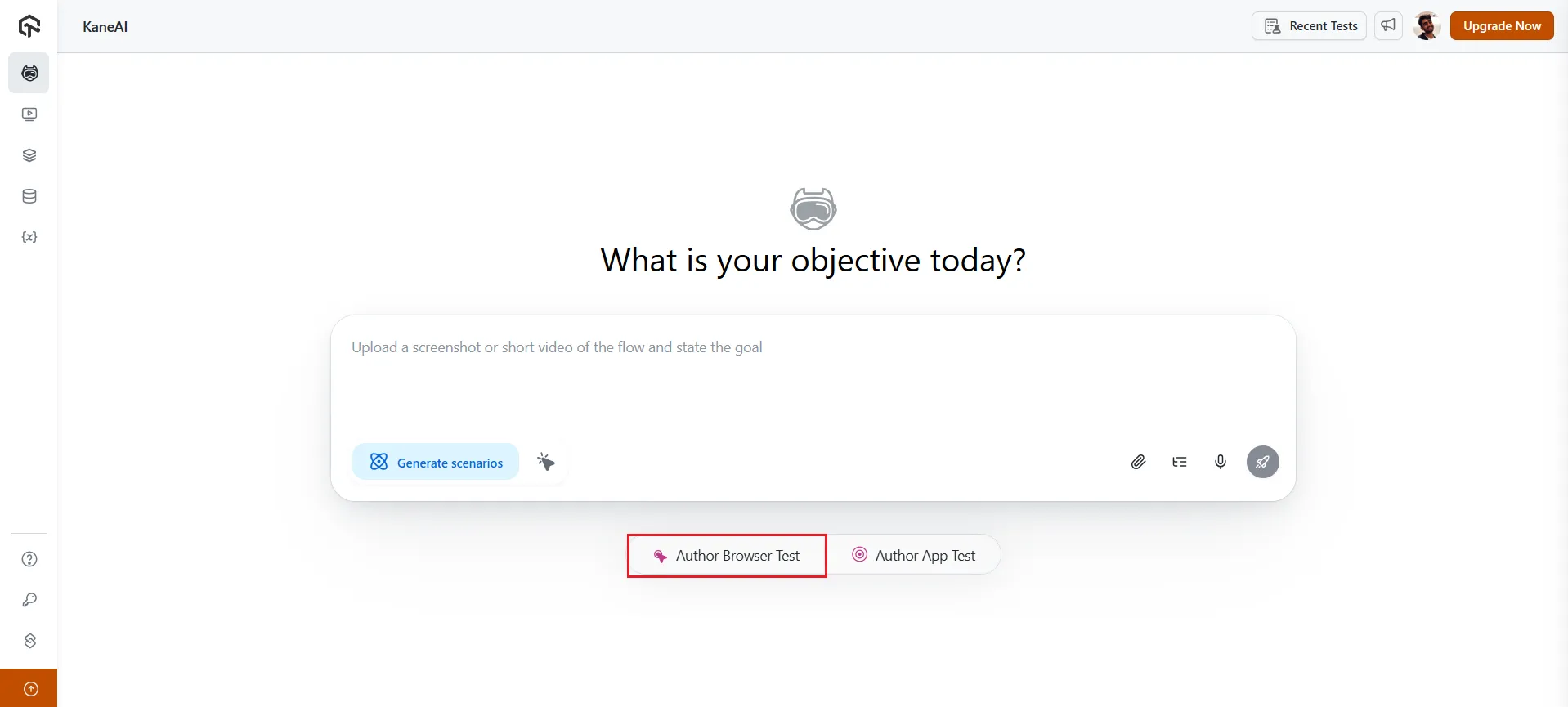
With an AI agent, this step is accelerated further. AI interprets requirements from PRDs, PDFs, audio, and Jira, translating them into clear, actionable test flows in natural language, making it easier to convert complex requirements into executable test cases.
2. Test Scenario Identification
Next, break down the requirements into testable scenarios. AI agents analyze the application’s codebase, user behavior patterns, and requirement documents to automatically suggest test scenarios, including edge cases and risk areas that might be overlooked by human testers.
This ensures comprehensive coverage across various user scenarios.
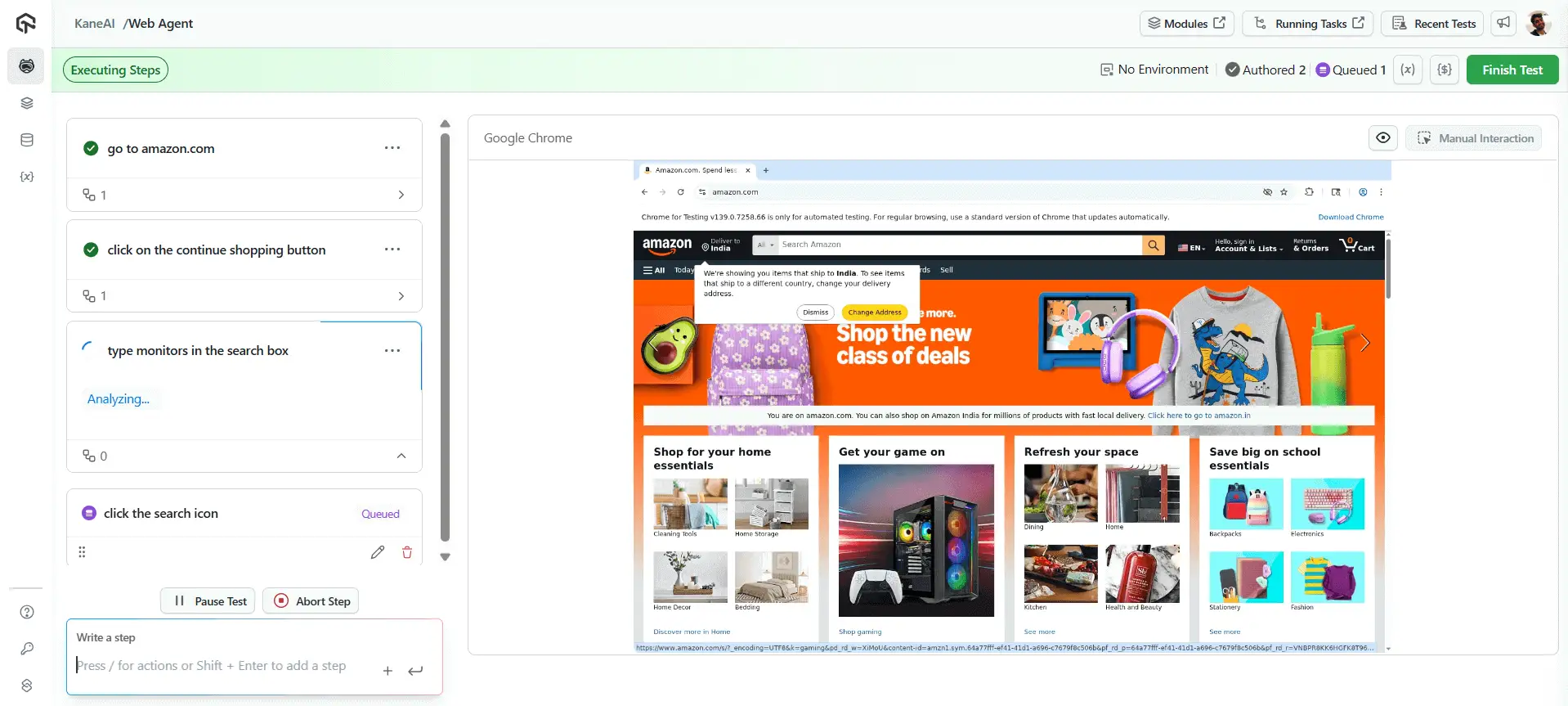
For example, a product search flow can be tested across steps like navigating to amazon.com, clicking “Continue Shopping,” typing “monitors” in the search box, and selecting the search icon, all generated and executed by the AI Agent with minimal input.
3. Test Case Design
Once scenarios are identified, define the test case ID, title, preconditions, steps, test data, and expected results to ensure clarity and consistency.
With an AI agent, you can describe a scenario like “Search for monitors on Amazon and verify results,” and it will automatically generate the complete test flow, including navigation, search actions, and result validation.
4. Review and Validation
This phase acts as a human-in-the-loop checkpoint, where teams review and refine test cases to ensure completeness, accuracy, and alignment with real user behavior and business requirements.
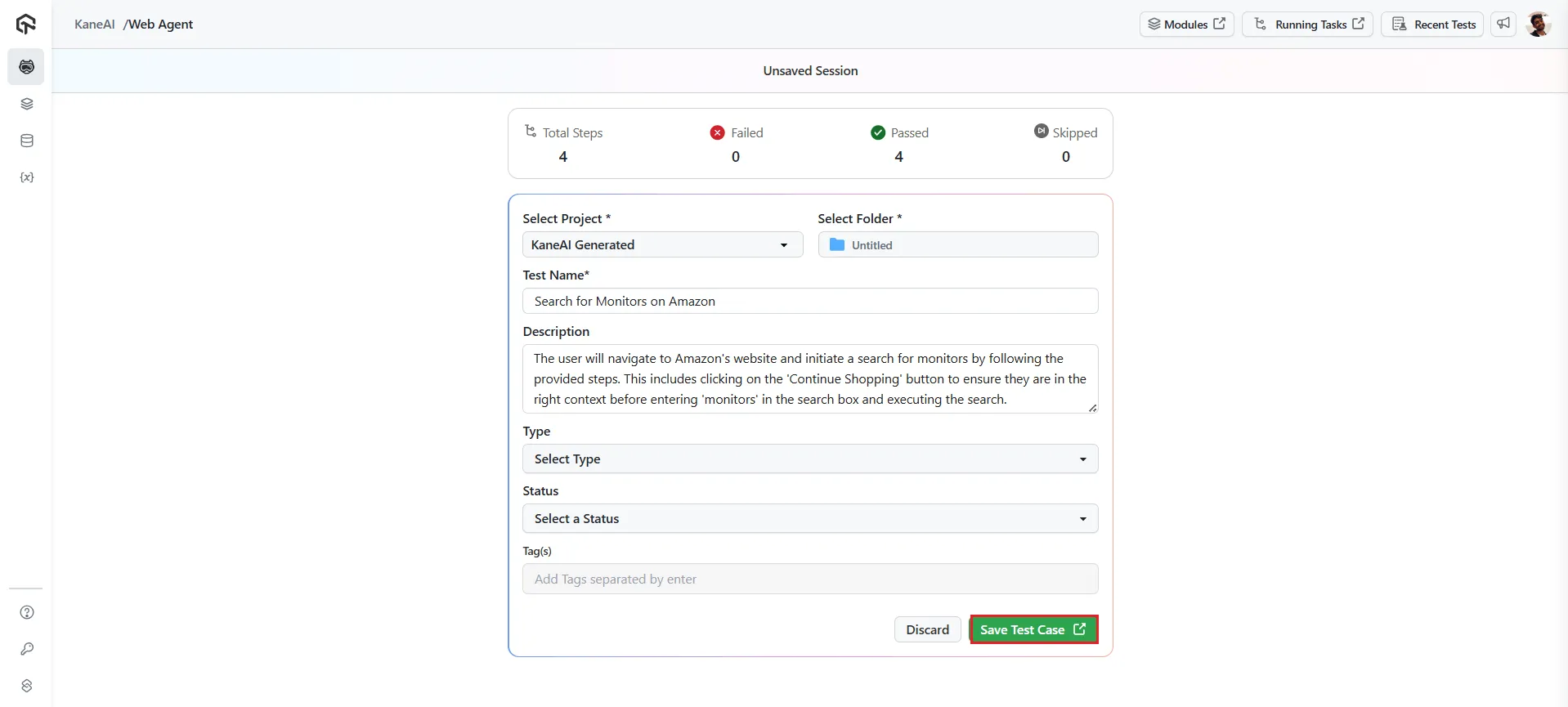
Stakeholders validate that scenarios reflect actual workflows and expectations. Address feedback before moving to execution or automation.
5. Maintenance and Evolution
As software evolves, test cases must be updated to stay relevant. UI changes, code refactors, and new features can break existing tests, making maintenance an ongoing effort.
Self-healing mechanisms help keep tests stable by adapting to UI and locator changes. AI automatically adjusts test scripts when minor UI changes occur, ensuring tests remain functional and accurate with minimal manual effort.
This reduces maintenance overhead and keeps test coverage aligned with the evolving application. Where the agent rewrites an authored step rather than re-resolving a locator, the change is saved as a new test version that a reviewer approves, so the authored test is never edited unattended.

Accelerate Test Authoring with KaneAI:
KaneAI is TestMu’s AI-native test agent that lets QA teams describe test goals in natural language and automatically generates complete, executable test flows.
What sets it apart:
- Natural language to test conversion: Describe a scenario like “Add product, apply SAVE20, verify discount,” and the AI agent generates complete steps, assertions, and test data automatically.
- Multi-step planning: It understands complex workflows and plans the complete test path, including navigation, data entry, validations, and cleanup steps.
- Cross-platform execution: Run generated tests across 10,000+ real devices and browser combinations on a high-performance agentic test cloud for complete cross-browser coverage.
- Self-healing locators: Auto-Heal re-resolves a lookup at run time when UI elements change, so a renamed or moved element does not stop the run.
- Adaptive Heal and Dynamic Test: When a step has to change rather than a locator, Adaptive Heal re-authors the objective that failed and every one after it, while Dynamic Test authors every objective from its goal on each run. Both are off by default, and a re-authored test waits in Version History until you approve it, as the Adaptive Heal and Dynamic Test guide explains.
- CI/CD integration: Plug generated tests directly into your Jenkins, GitHub Actions, or Azure DevOps pipeline for continuous testing.
Teams using the AI agent for test authoring report up to 60% reduction in test creation time and 50% reduction in test maintenance effort, enabling QA to keep pace with accelerating release cycles.

Conclusion
Test authoring is the foundation that determines whether your entire QA strategy succeeds or fails. Every automated test suite, every regression cycle, and every release gate depends on the quality of the test cases underneath.
Embrace AI as an accelerator: tool like KaneAI are not replacing QA engineers but empowering them to focus on test strategy while AI handles the repetitive mechanics of test creation, maintenance, and prioritization.
Author

Bhavya Hada
Blogs: 29


Bhavya Hada is a Community Contributor at TestMu AI with over three years of experience in software testing and quality assurance. She has authored 20+ articles on software testing, test automation, QA, and other tech topics. She holds certifications in Automation Testing, KaneAI, Selenium, Appium, Playwright, and Cypress. At TestMu AI, Bhavya leads marketing initiatives around AI-driven test automation and develops technical content across blogs, social media, newsletters, and community forums. On LinkedIn, she is followed by 4,000+ QA engineers, testers, and tech professionals.


Frequently asked questions
Did you find this page helpful?
More Related Learning Hubs
TestMu AI forEnterprise
Get access to solutions built on Enterprise
grade security, privacy, & compliance
- Advanced access controls
- Advanced data retention rules
- Advanced Local Testing
- Premium Support options
- Early access to beta features
- Private Slack Channel
- Unlimited Manual Accessibility DevTools Tests