
Power Your Software Testing with AI Agents and Cloud
The Native AI-Agentic Cloud Platform to Supercharge Quality Engineering. Test Intelligently and Ship Faster.


- TestMu AI (Formerly LambdaTest)
- /
- Learning Hub
- /
- What Is Sanity Testing? Examples, Checklist & vs Smoke
What Is Sanity Testing? Examples, Checklist & vs Smoke
Learn what sanity testing is in software testing, with examples, entry and exit criteria, a reusable checklist, and how to automate sanity checks in CI/CD.
Last Updated on:
Sanity testing is a narrow, unscripted subset of regression testing that verifies whether a specific change, bug fix, or new feature works correctly in a new build. The tester gives a quick pass or fail verdict on the changed area before any full regression run begins.
It checks only the modified modules and their direct dependencies, answering one question before regression starts: is this build stable enough to spend full regression time on?
In software testing, that gate matters because every build carries the risk of breaking something that worked yesterday.
Running a sanity test first means a broken build is rejected within the hour, rather than after hours of regression effort.
This guide covers what sanity testing is, when and how to run it, its entry and exit criteria, a reusable checklist, how it differs from smoke and regression testing, and CI/CD automation.
TL;DR
Sanity testing is a quick, targeted check that a specific change works in a new build, and it decides whether the build deserves full regression time.
- Scope - It checks only the modified modules and their direct dependencies, is usually unscripted, and ends in a clean pass or fail verdict.
- When to run it - Run it once per changed build, such as after bug fixes, after new features land, and before production deployment.
- Process - Identification, evaluation, and testing form the three steps, and runs are more often manual than automated, with automation paying off in CI/CD.
- Smoke vs sanity - ISTQB lists a sanity test as a synonym of a smoke test, but most QA teams run smoke first and wide, then sanity narrow, so define the term in your test plan.
- Limits - It takes about 30 to 60 minutes manually and does not replace regression testing; a check that stretches across a day has drifted into regression.
What Is Sanity Testing
Sanity testing is a narrow subset of regression testing that verifies a specific change or bug fix works correctly in a new build. It checks only the modified modules and their direct dependencies.
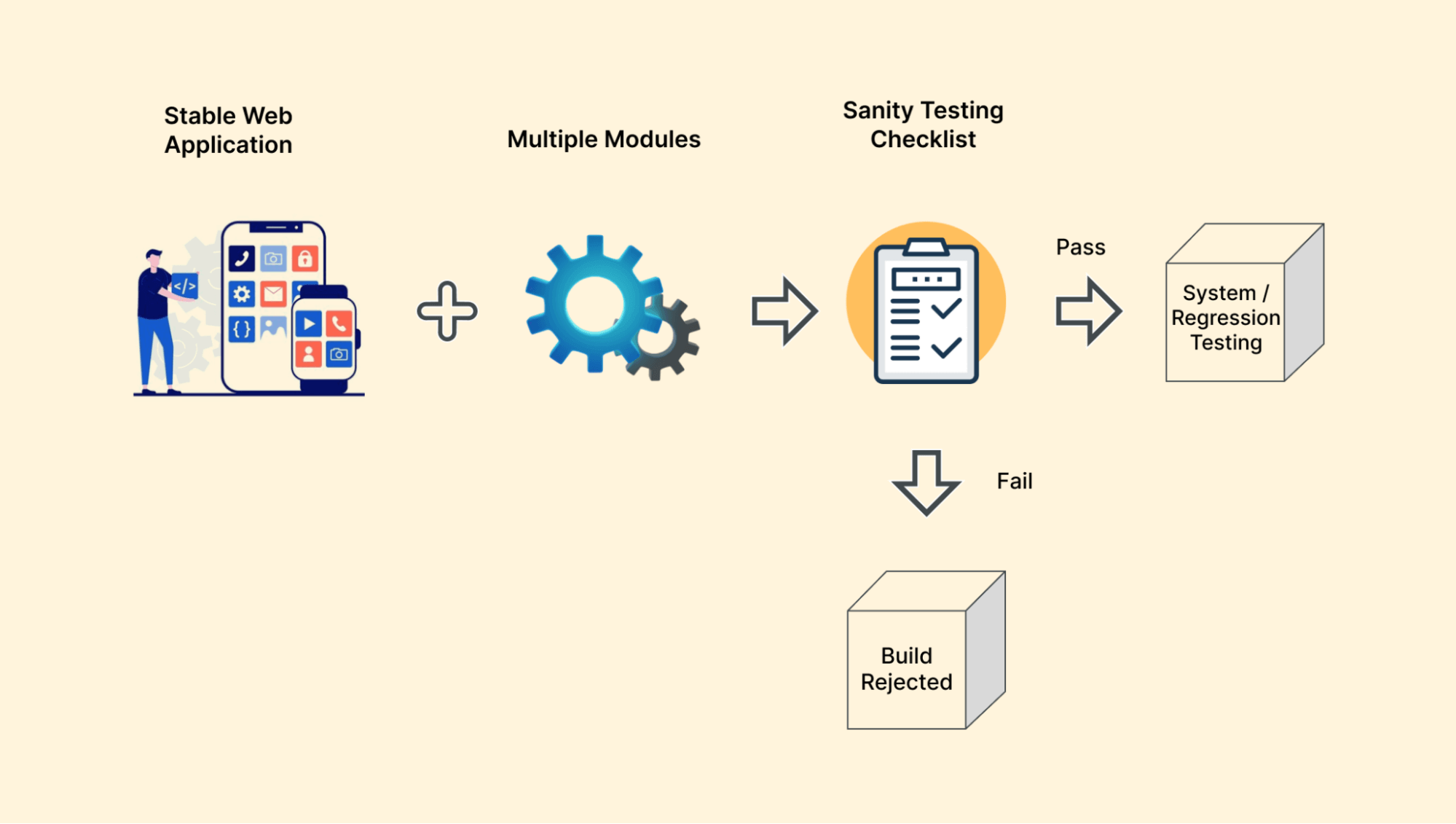
Put another way, it is a fast and targeted quality check that verifies only the areas a change actually touched. Six traits define what that looks like in practice:
- Verifies basic commands and functions: Confirms that the primary actions or features in the updated area work as expected after changes.
- Performed when testing time is limited: Ideal for situations where deadlines are tight, allowing testers to check only the most important functionality.
- Usually non-scripted and quick: Carried out using the tester’s knowledge and intuition rather than detailed test cases, which speeds up the process.
- Ensures changes meet user expectations: Checks whether updates or fixes deliver the intended improvements for the end user.
- Checks minor bug fixes and essential functionality: Validates that small issues are resolved without affecting other dependent features.
- Performed after small, well-scoped changes: Large or architectural changes need full regression instead, because a narrow check cannot cover their reach.
Is Sanity Testing an Official Term
Worth knowing before you use the term in a test plan: the distinction drawn above is an industry convention, not a standards definition.
The ISTQB glossary has no entry for sanity testing. Older editions, such as glossary v2.3, listed "sanity test" as a synonym of smoke test, alongside "confidence test" and "intake test".
The current glossary defines smoke testing as "a test type to gain sufficient confidence that a test object is ready for planned testing."
In everyday practice, though, many QA teams separate the two: smoke first and wide, sanity second and narrow. Both usages are defensible, which is precisely the problem.
I have sat in a release review where the QA lead and the delivery manager each said "sanity passed" and meant different checks. It cost the team a day.
Define which one your team means in the test plan rather than assume it is shared. The comparison table below reflects common industry usage, not the ISTQB glossary.
Why Is Sanity Testing Important
Sanity testing matters because it decides whether a build deserves further testing effort at all. Catching a broken fix early stops a bad build from consuming a full regression cycle.
Skipping it is a false economy, and these are the six reasons why:
- Saves time: A failed sanity test sends defects straight to developers, with no regression or end-to-end testing spent first.
- Quick evaluation: Focuses only on the impacted features, using an intuitive, non-scripted approach for faster results.
- Reduces effort: Helps decide if further testing is necessary, avoiding wasted resources.
- Improves regression testing: Detects critical issues early, so the regression suite only ever runs against builds worth testing.
- Finds build and deployment issues: Quickly identifies missing resources, compilation errors, or environment problems.
- Gives release readiness status: Provides a quick health check on the release, guiding next steps in testing and development.
All of that value depends on keeping the check deliberately narrow. Two priorities govern which test cases make the cut:
- Pick paths a real user hits first. If the discount engine broke, test a valid code at checkout, not an edge case.
- Draw cases from the existing regression suite rather than writing new ones, keeping the check anchored to the Software Requirement Specification (SRS).
What Are the Key Characteristics of Sanity Testing
A sanity test is recognisable by how narrow and informal it is. Those traits are what keep the exercise short, and what stop it quietly expanding into an unplanned full regression run.
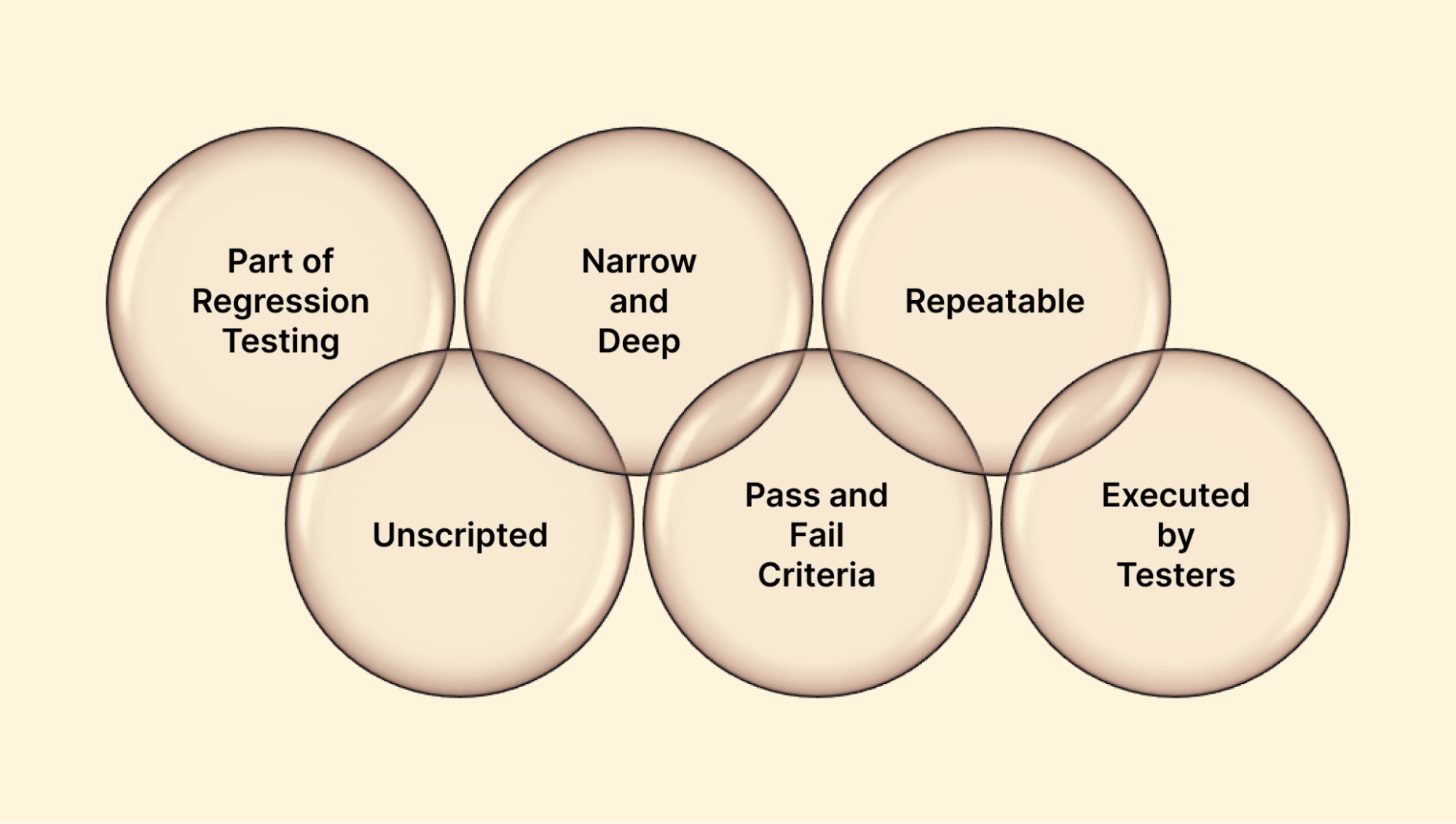
These seven traits set it apart from every other check in the pipeline:
- Part of regression testing: Sanity testing checks small but critical components after changes are made, ensuring they work before running a full regression test. It focuses only on key features affected by updates, making it a subset of regression testing.
- Unscripted: No predefined scripts. Testers rely on experience to validate the functions a recent change touched, which keeps the process flexible.
- Narrow and deep: It covers a small set of crucial functions, but tests each of them thoroughly rather than superficially.
- Minimal setup: Execution of the sanity test only requires basic data set-up and configuration.
- Binary verdict: The outcome is a clean pass or fail, with no partial credit and no lengthy triage to interpret it.
- Repeatable: Re-running the same checks on the same build gives the same verdict, which is what makes the checks that recur on every build worth automating.
- Executed mainly by testers: Developers often check their own fix first, but the verdict usually comes from QA, because the value lies in someone other than the author checking the change.
To practically implement the features mentioned above, sanity tests are required in various test environments to ensure the software application functions correctly.
What Aspects Does a Sanity Test Cover
Within its narrow scope, a sanity test is not limited to clicking through a feature. These are the aspects it verifies on the modules touched by the change:
- Basic function: Primary actions in the changed area still work as expected, for example that key buttons and navigation respond.
- Data integrity: Testers verify the provided data's accuracy and retrieval in the software application.
- Authentication paths: If the change touched login, roles, or permissions, a user can still sign in and sees only what they should.
- Compatibility: Sanity tests also check for the compatibility of the software application across different browsers, devices, and OS configurations.
- Obvious performance regressions: Not a load test, but a tester notices if the changed screen now takes ten seconds to render.
- Error handling: The application still fails gracefully, checked by deliberately triggering an error and confirming it is caught rather than crashing.
- Install and uninstall: The application still installs cleanly and runs correctly afterwards, with removal leaving nothing broken behind.
When Should You Perform Sanity Testing
Run a sanity test whenever a change lands rather than on a predetermined schedule. Any build carrying a bug fix, a minor edit, or a new feature earns one before it progresses further.
Six situations should prompt a sanity test:
- In a situation when small changes in the application’s code are made.
- When new features are added and ready to integrate into the software application.
- When a new build arrives carrying a fix, before its regression cycle starts.
- Post bug fixes.
- Prior to production deployment.
- Before integrating features in the software application.
How Often Should You Run a Sanity Test
Frequency is driven by change, not by the calendar. The rule is simple: run a sanity test once per changed build.
If three hotfixes land in a day, that is three sanity tests, each scoped only to what its own fix touched.
Early in development, when code churn is high and builds are unstable, this means running it several times a day. As the application stabilises and changes become rarer, the cadence naturally drops.
Three factors set the frequency in practice: how often the build changes, how critical the modified module is, and how close the release date is.
The shortcut I settled on is to ask what breaks if this specific change is wrong. A payment hotfix a week before release warrants one on every rebuild; a static copy edit does not.
Where Does Sanity Testing Sit in the SDLC
Sanity testing sits in the testing phase of the Software Development Life Cycle, immediately after a build is deployed.
Within that phase it is a form of functional testing, executed once minor changes or bug fixes reach the build.
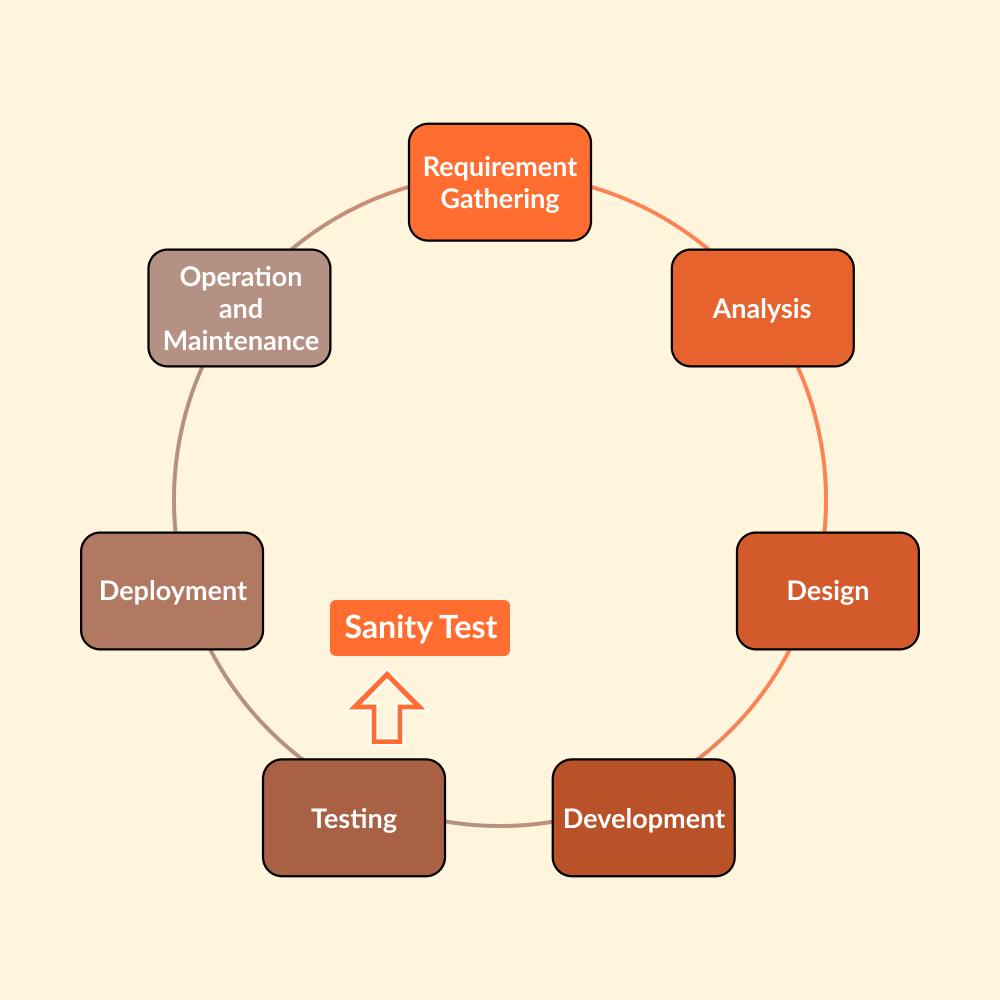
It runs after unit, integration, and system testing have established a baseline, and after the smoke test has confirmed the build launches at all.
Its job at that point is narrow: validate that the latest changes or fixes introduced no new defects.
Once the sanity test passes, the build moves on to the full regression suite and then to acceptance testing, where the end user verifies it against the Software Requirement Specification (SRS).
How Do You Perform Sanity Testing
Performing a sanity test means scoping the change, checking it against the requirement, then testing the affected area in depth. The same sequence applies whether you run it manually or automated.
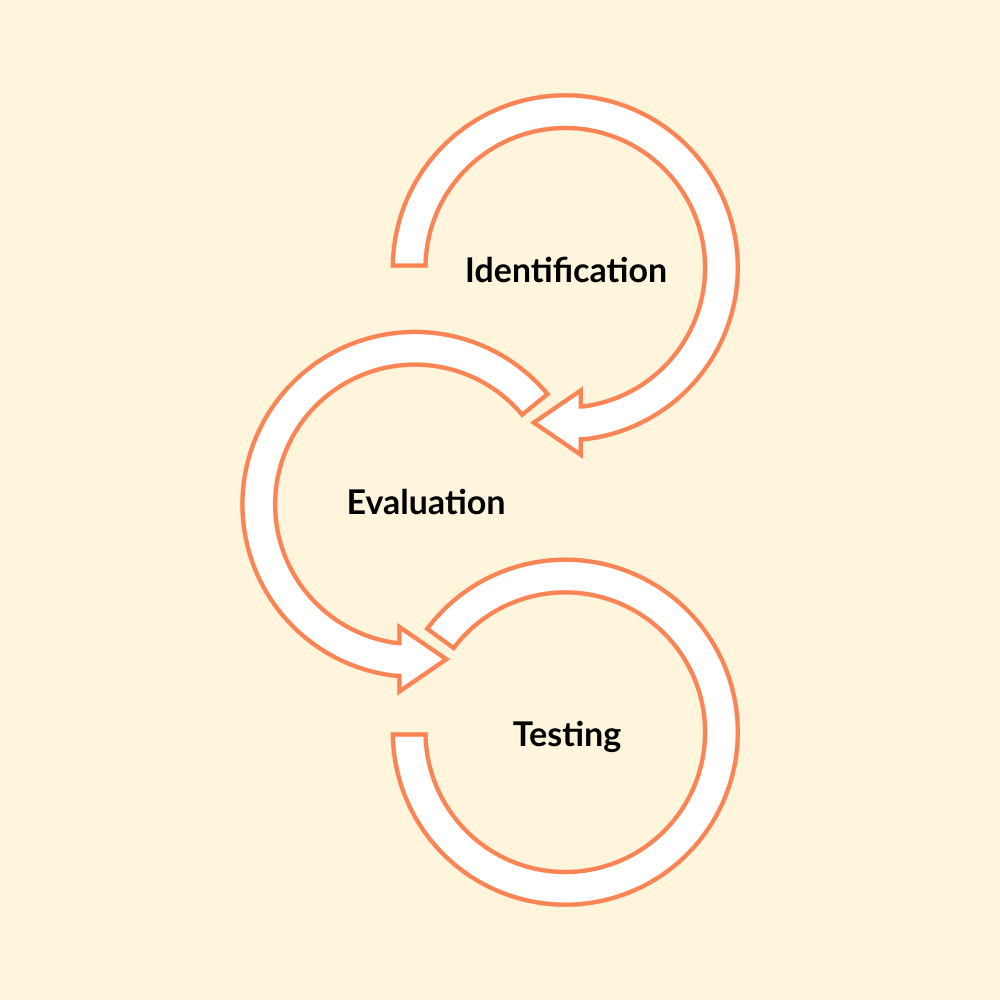
The process breaks into three steps:
- Identification: Determine what the change touched, from new features to code modified during a bug fix. This sets the test scope.
- Evaluation: Check the new or modified components against the Software Requirements Specification (SRS) to confirm they behave as specified.
- Testing: The final step is testing, where a small part of the newly associated components of the application is tested in-depth.
Those three steps can be executed two ways, by hand or through an automated suite. Which one you choose depends on how often the build changes and how large the affected area is.
The manual route borrows directly from manual testing practice.
Each approach has its own trade-offs, so it is worth looking at both in turn.
Manual Sanity Testing
In manual sanity testing, critical test cases are executed to validate the software’s stability and functionality. Such an approach is helpful in case of limited resources and time for testing, and changes done are minor.
How to Perform Manual Sanity Testing
A manual run breaks down into five steps:
- Analyze the test cases to ensure the expected working of the software application.
- Create test cases that cover crucial functionality of the software to be tested.
- Evaluate the results. A failure marks the build unstable and sends it back, rather than triggering more testing.
- The result is then shared with the development team to address the identified bug or error during the testing.
- On fixing the error or bug, a re-test of the application is done to ensure its stability.
Manual runs lean heavily on the tester's judgement, since there is no script to fall back on.
The software testing skills that matter most are product knowledge and knowing which dependencies a change is likely to touch.
Automated Sanity Testing
Automated sanity tests use automated testing tools and frameworks to verify the application's basic functions.
That means building test cases which run on their own every time a new build or release is produced.
Automation earns its place on complex applications where the same critical paths need re-checking on every build.
One caveat worth stating plainly, because plenty of guides get it backwards: sanity tests are more often run manually than automated.
The check is narrow, unscripted, and usually needed once, so scripting it for a one-off hotfix costs more than simply executing it.
Automation pays off only when the same validations repeat, which is exactly the CI/CD case covered further down.
How to Perform Automated Sanity Testing
An automated run adds setup and reporting around the same core, which works out to eight steps:
- Define the software application's functionalities, which require testing.
- Now, create test cases that include the defined functionality of the software application.
- Select a test execution tool for those cases. Common choices are Selenium and Playwright for web, Appium for mobile.
- Set up the test environment, ensuring the software, hardware, and network resources the suite needs are all available.
- Run the sanity test and observe the test results. If the test fails, analyze its actual cause and fix the issue.
- On completion of the test run, evaluate the test result to find any bugs.
- Report the identified bugs to developers, attaching screenshots and test log files rather than a bare summary.
- You can repeat the process to re-check the stability of the software application.

Note: An automated sanity suite is only as trustworthy as the environments it runs on. TestMu AI executes the same suite across 3,000+ browsers and OS combinations in parallel, so a pass means the fix holds everywhere your users are. Try TestMu AI free!
What Are the Entry and Exit Criteria for Sanity Testing
Entry criteria confirm the build deployed cleanly, smoke passed, and the change is documented. Exit criteria are binary: a pass sends the build to regression, a fail rejects it to development.
All four of these must hold before the sanity test begins:
- The build has deployed successfully to the test environment with no installation or compilation failures.
- The smoke test has passed, confirming the application launches and its core paths respond.
- The change is documented: the bug fix, hotfix, or minor code change is listed with the modules it touches.
- Required test data and environment configuration for the affected area are in place.
Exit criteria (any one ends the sanity test):
- Pass: all modified features work correctly, adjacent dependent features are unaffected, and the build is cleared for the full regression suite.
- Fail: a critical blocker is found in the changed area, so the build returns to development immediately with no further testing spent.
- In both cases the verdict and evidence (screenshots, logs) are recorded and shared with the team.
How Do You Write a Sanity Test Case
A sanity test case stays deliberately lightweight, because the check is unscripted and often needed only once. A short fixed structure is what keeps it consistent from one tester to the next.
Five fields are enough, and the structure below is the one covered in how to write test cases, stripped down:
- Objective: the specific change under verification, stated in one line (for example, "discount code SAVE10 applies at checkout after hotfix #4521").
- Precondition: the build number and environment the entry criteria were met on.
- Steps: the shortest user path through the changed functionality, typically 3 to 6 steps.
- Expected result: the observable behavior that proves the fix works.
- Verdict: pass or fail, with a screenshot or log attached as evidence.
Keeping that to five fields is deliberate. Every extra field I have seen added to a sanity template got skipped within two sprints.
The checklist below is its companion, run against every changed build:
- Identify the modules impacted by the change from the commit or release notes.
- Verify the reported issue the hotfix targets is actually resolved.
- Check adjacent dependencies: features that consume or feed data to the changed module.
- Walk the critical path once (log in, perform the core action, log out).
- Watch for new console or server errors while executing the steps.
- Record the verdict and evidence, then apply the exit criteria: pass to regression, or fail back to development.
What Is an Example of Sanity Testing
Sanity testing quickly evaluates the quality of a changed build and decides whether deeper testing is worth running. Two concrete scenarios show exactly what a sanity test does and does not cover:
- E-commerce discount code fix: Users report that a valid discount code fails at checkout. Developers ship a hotfix, and the sanity test verifies exactly three things: the previously failing code now applies correctly, the order total recalculates with the discount, and an invalid code is still rejected. The tester does not re-test search, product pages, or shipping, since those modules were untouched.
- Profile image upload fix: The test uploads an image, confirms it renders, then checks the header thumbnail and the default avatar reset.
Both examples follow the same pattern: verify the fix itself, verify its immediate neighbours, and stop.
A sanity test only checks the modified components and their direct dependencies. It does not check end-to-end functions.

Sanity Testing vs Smoke Testing vs Regression Testing
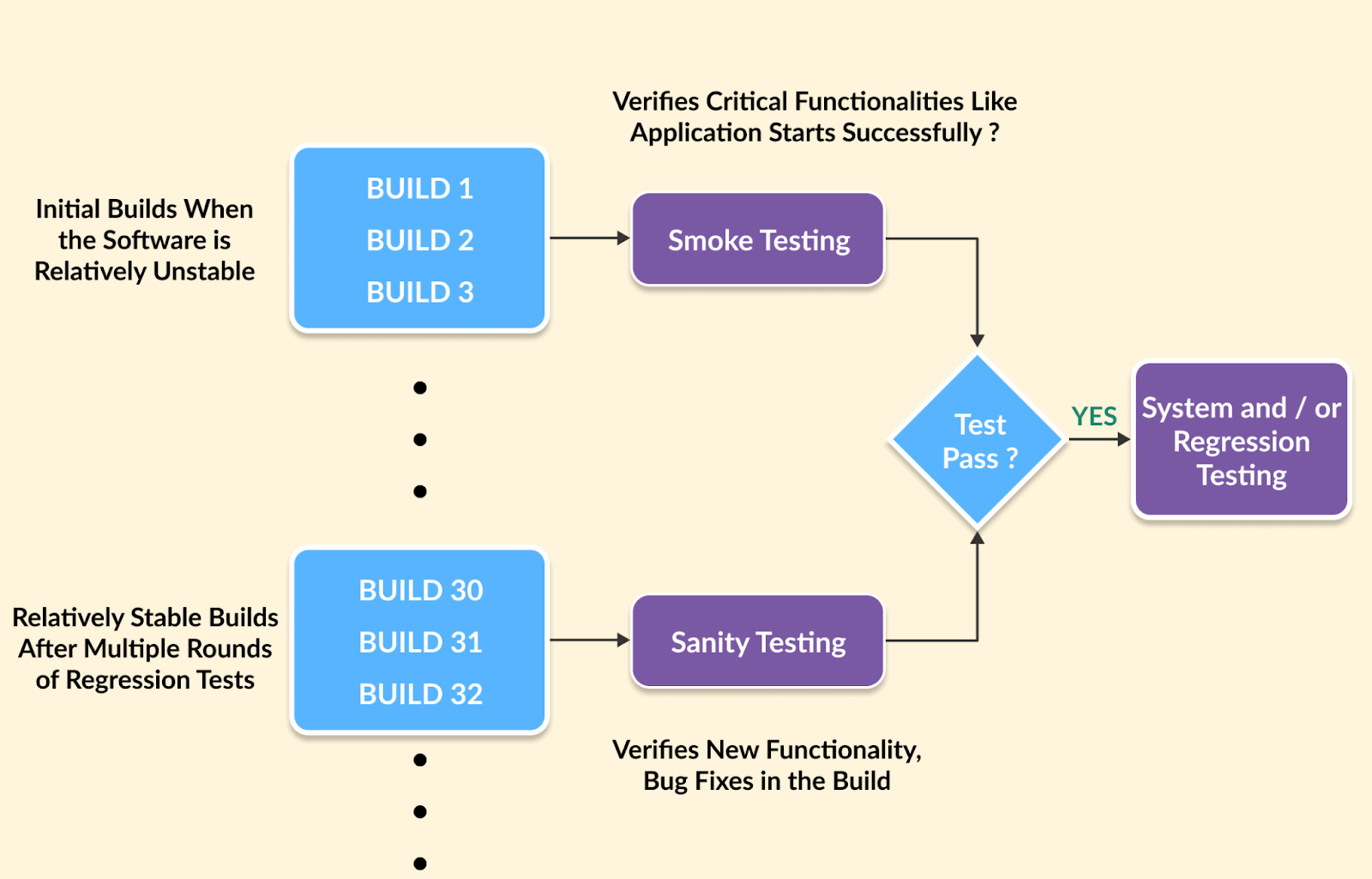
Smoke asks whether the build runs, sanity asks whether the change worked, and regression asks whether anything else broke. The three run in that sequence, and each one gates the next.
The table below sets the three side by side across the factors that actually change how you run them within the Software Testing Life Cycle.
| Factor | Smoke testing | Sanity testing | Regression testing |
|---|---|---|---|
| Purpose | Confirm a new build is stable enough to test: its critical paths complete end to end. | Confirm a specific change or bug fix works and did not break the modules around it. | Confirm changes did not break unchanged areas of the application. |
| Scope | Wide and shallow: the critical paths across the whole application. | Narrow and deep: the modified modules and their direct dependencies. | Broad and deep: the full maintained suite across the application. |
| When it runs | First, as soon as a new build reaches a test environment. | After smoke passes, on a build that carries a bug fix or small change. | After sanity passes, before releases and major cycles. |
| Relationship to other testing | A build verification step that runs before planned testing begins. | Commonly treated as a subset of regression testing. | A type of change-related testing in its own right. |
| Who executes | Developers or testers, usually through the CI/CD pipeline. | Mainly testers; developers often check their own fix first. | Testers, usually via an automated suite. |
| Scripting | Scripted, documented, and usually automated. | Usually unscripted and manual; checks that repeat on every build can be automated. | Fully scripted, maintained, and usually automated. |
| Execution time | 5 to 15 minutes for a 20 to 50 case suite. | Typically 30 to 60 minutes by hand, a few minutes when automated. | Hours, often parallelised to compress. |
| Outcome | Build accepted for testing, or rejected back to development. | Build proceeds to regression, or is rejected back to development. | Release decision: ship or fix. |
These three run as a sequence, not alternatives. Smoke asks "does this build run?", sanity asks "did this change work?", and regression asks "did anything else break?"
A failed sanity test rejects the build before any regression time is spent, and a passed one is the entry ticket to the regression suite.
Which check should you run? Use this decision flow on any new build:
- Did the build just arrive from development? Run the smoke test. If it fails, reject the build; nothing else is worth running.
- Did smoke pass, and does the build carry a fix? Run the sanity test on the changed modules and their dependencies.
- Did sanity fail? Send the build back to development immediately. Do not start regression.
- Did sanity pass, and is a release approaching? Run the full regression suite.
- Is the build unchanged since the last full pass? None of the three is needed unless the environment or dependencies changed.
For a deeper treatment of either pairing, see Smoke Testing vs Sanity Testing and Sanity Testing vs Regression Testing.
Sanity Testing Tools
Running sanity tests through automated test tools lowers the load on testers and shortens release time.
Here are some popular automation testing tools used to perform sanity tests:
- Selenium: Open-source web automation supporting Java, JavaScript, Python and more. It remains the most widely used option for browser-based sanity suites.
- Cypress: Open-source JavaScript automation testing built on Mocha JS testing, using its own DOM manipulation approach.
- Playwright: It is a Node.js library for web automation. It is used to automate Firefox, Webkit, and Chromium with a single API.
The list of sanity testing tools above is just a few examples of many other options in automation tools. You should evaluate different options based on the specific needs of the applications.
If the change you are verifying sits in a mobile app rather than a web app, the equivalent sanity suite runs through Appium mobile testing on cloud instead.
Automation tools carry limitations that create hurdles of their own. Their scope is bounded by whatever they were programmed to check.
Maintenance overhead and licensing cost are the other two, and together they push most teams to look for alternatives.
This is why automated sanity suites often run on a cloud platform rather than local machines.
Cloud-based platforms like TestMu AI remove the grid maintenance overhead and run the suite in parallel, which is what keeps a sanity gate down to minutes.
The two sections that follow cover exactly that: first how to wire the suite into a CI/CD pipeline, then how to run it on the cloud, as set out in this cloud testing tutorial.
How Do You Integrate Sanity Testing Into Agile and CI/CD
Automate the sanity checks that repeat on every build and run them as a quality gate that triggers on deploy, blocks promotion on failure, and queues regression on success. One-off checks for a new fix stay manual.
The pattern looks the same in Jenkins, GitHub Actions, or any CI tool:
- A hotfix or feature branch deploys to the test environment, triggering the pipeline stage.
- The automated sanity suite runs: a small set of critical-path tests scoped to minutes, not the full regression suite.
- On failure, the gate blocks promotion to staging and notifies the team, so a broken build never travels further down the pipeline.
- On success, the build is marked sane and the longer regression suite is queued.
Keep the gate fast by running the sanity suite on a cloud grid in parallel, rather than sequentially on the CI runner.
For Jenkins, routing tests to the cloud is covered in the Jenkins pipeline integration docs. The same suite definition then serves every hotfix.
Note: A sanity gate only survives if it finishes fast, otherwise teams quietly skip it. HyperExecute runs the suite as one gated step and returns a single pass or fail exit code your CI can branch on.
How Do You Perform Sanity Testing on the Cloud
Cloud platforms run sanity tests on real browsers and devices with no local grid to maintain. That removes the infrastructure cost and executes the suite in parallel, keeping the gate to minutes.
Platforms such as TestMu AI let you run manual and automated web and mobile app testing across 3,000+ browsers and OS combinations and 50,000+ real devices.
With it you can automate your test suites using frameworks such as Selenium, Cypress, Playwright, Appium, Espresso, and XCUITest.
Follow the below-given steps to conduct a sanity test using TestMu AI.
Manual Testing With TestMu AI
You can execute web and mobile application tests through the Real Time Testing feature of TestMu AI.
Follow the steps below, or see the desktop browser real time testing documentation for the full configuration reference.
Here is how you perform real-time testing for your website or web application:
- Register for free and sign in to your TestMu AI account.
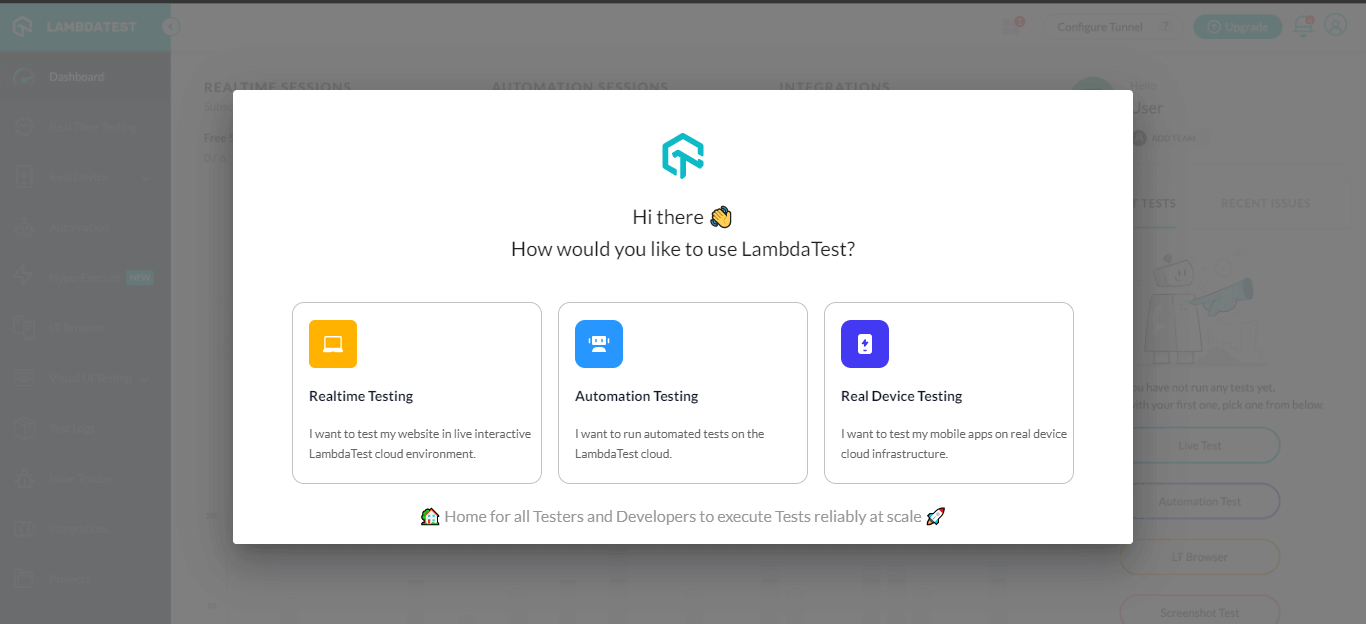
- From the modal box, click the Realtime Testing card.
- Enter the test URL, choose Web or Mobile tab, and select browser VERSION, OS, and RESOLUTION. Then click START.
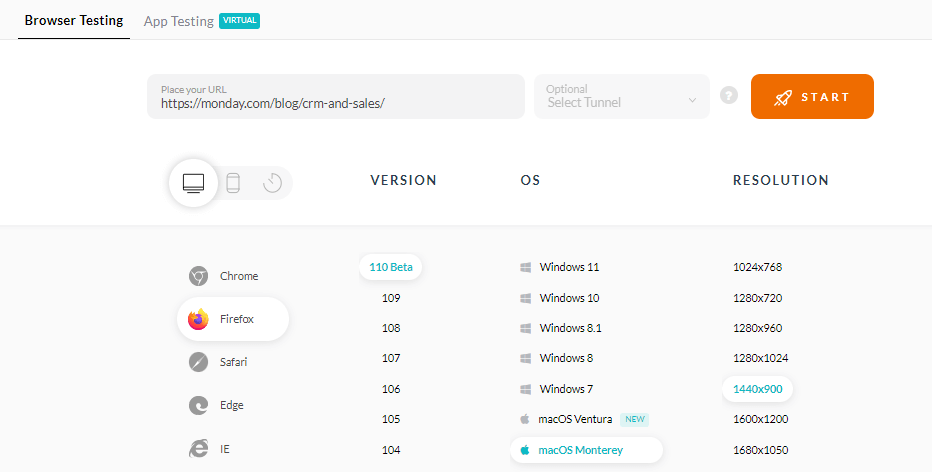
A cloud-based machine will be launched running real browsers and operating systems where you can perform sanity tests while leveraging features like one-click bug logging, video recording, capturing screenshots, etc.
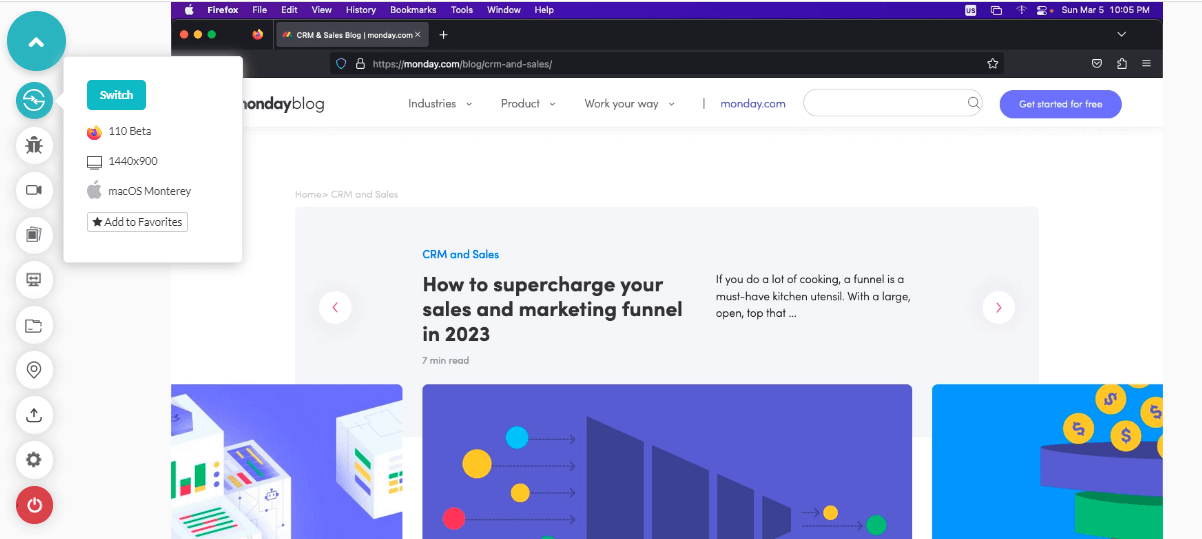
Similarly, you can test mobile web and native applications on Android emulator online, iOS simulator online, and real device browser testing documentation.
Automation Testing With TestMu AI
TestMu AI gives access to 3,000+ browsers and OS combinations to run automated tests using different best test automation frameworks. To perform an automated sanity test, you can follow these steps.
- Register and sign in to your TestMu AI account.
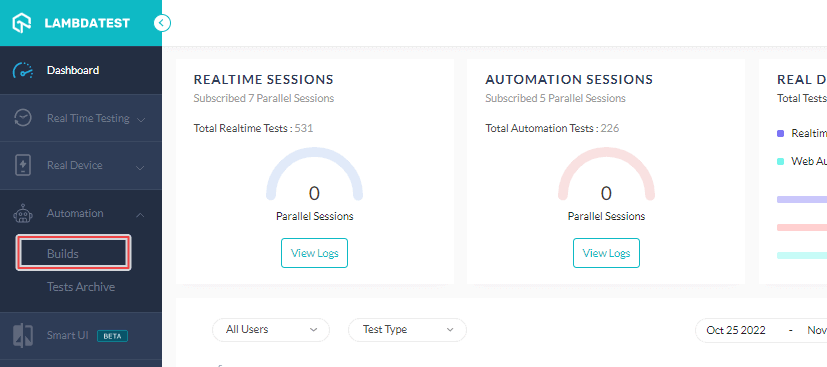
- Go to Automation > Builds from the left menu bar.
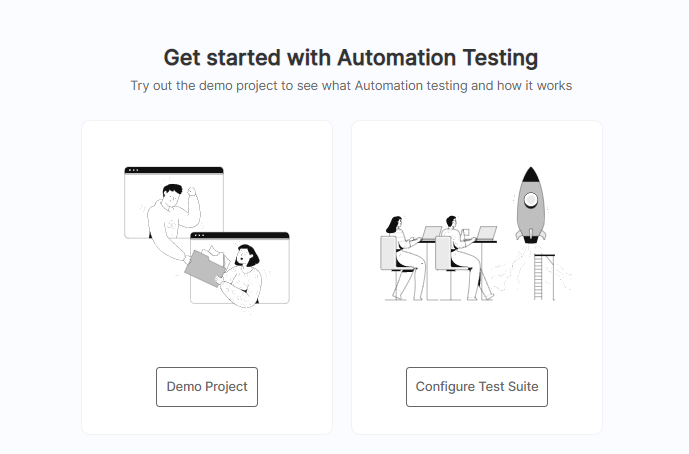
- You will get two options: Demo Project or Configure Test Suite.
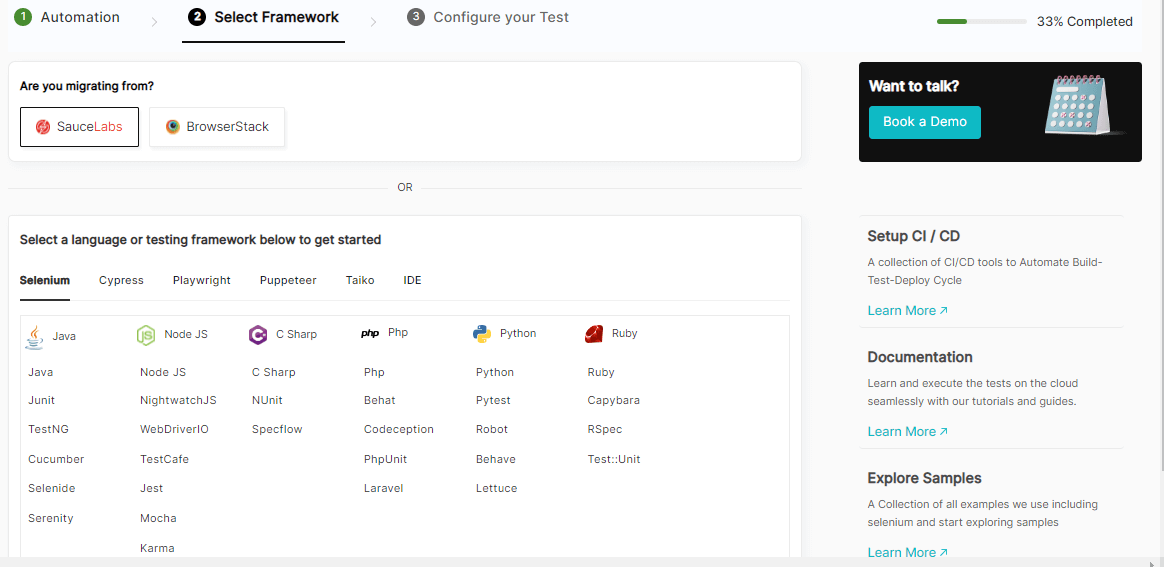
- To run the sanity test, select configure Test Suite and choose the preferred automation testing framework.
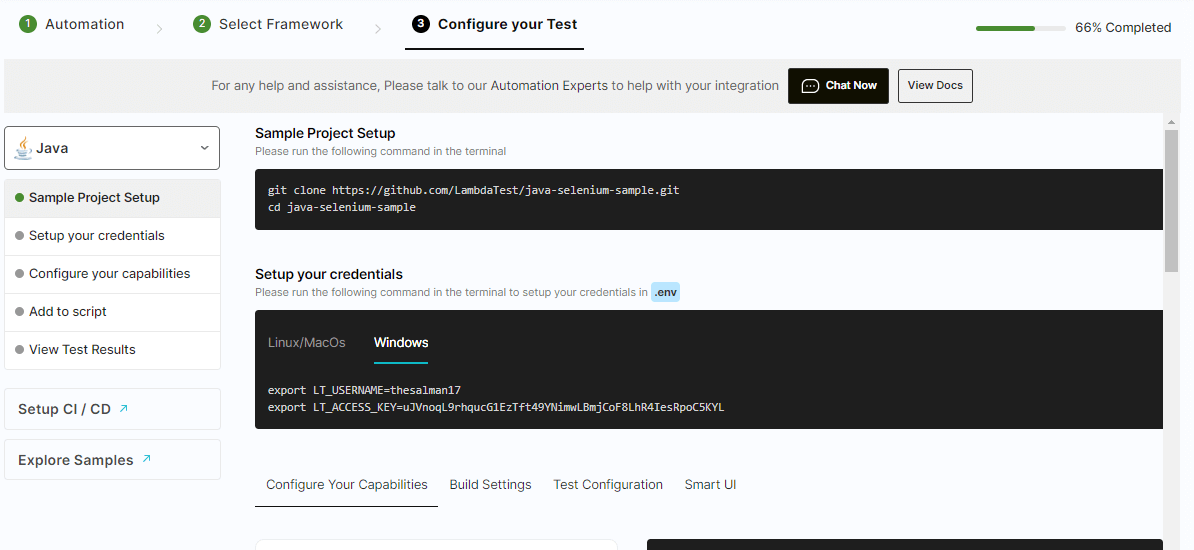
- Now, you can configure your tests and initiate a sanity test.
On a similar note, you also perform app test automation using frameworks like Appium, Espresso, and XCUITest.
Watch the below to learn more about performing app automation using TestMu AI.

You can also subscribe to the TestMu AI YouTube Channel for tutorials on Selenium, Cypress, and more.
When the sanity suite outgrows a local grid, it can run at scale on the Selenium automation platform.
What Are the Common Sanity Testing Challenges
The speed that makes a sanity test useful is exactly what limits it. Its constraints are structural rather than fixable, so each one needs a deliberate counter-practice built into how you run it.
Four constraints come with the technique, and each has a practical counter:
- Limited scope: A pass says the changed module works, not the product. Treat it as a gate into regression, never a substitute.
- Blind spots in dependencies: A change can break a module nobody checked. Read the commit diff first and test what it touches.
- Deadline pressure: Sanity tests run when everyone wants the build shipped. A written checklist stops the check shrinking under pressure.
- Environment drift: A test environment that no longer matches production produces meaningless passes. This one has burned me most often.
Beyond the per-challenge fixes above, three habits keep the technique honest:
- Prepare a clear test plan and review the Software Requirement Specification (SRS) before starting.
- Combine sanity testing with regression or other rigorous tests for better accuracy.
- Document the process and promptly share issues with the development team.
Best Practices of Sanity Testing
Seven practices separate a sanity test that protects a release from one that just adds a step to the pipeline:
- Define objectives: Identify what needs testing and why, so scope stays on the features a recent change actually affected.
- Automate what repeats, not what is new: Scripting a one-off hotfix costs more than running it. Automate only paths re-verified every build.
- Use a standard environment: Keep software versions, hardware, and network settings consistent, so results stay comparable across test cycles.
- Prioritize test cases: Rank by risk and criticality, so the most impactful areas are verified before time runs out.
- Document outcomes: Record results, issues found, and corrective actions. This supports audits and shows where the process needs improving.
- Test regularly: Run a sanity test after every significant code change or build update, so defects surface while they are cheap.
- Pre-load test checks: Run a sanity test before heavy load or performance runs, so an unstable build does not waste that time.

Is "Sanity Check" Still the Right Term
It remains the dominant industry term, though plenty of teams now prefer a neutral alternative such as confidence check, because sanity frames correctness in mental-health language.
Common replacements, all describing exactly the same quick verification:
- Confidence check: the most widely adopted alternative in engineering teams.
- Quick verification: plain-language, common in process documents.
- Rationality check / coherence check: used where the check validates that outputs are plausible rather than exact.
Is it okay to still say "sanity check"? It remains the dominant industry term and appears throughout tooling and documentation, so you will keep encountering it.
If your team or client prefers inclusive language, "confidence check" carries the same intent, and nothing about how the test is performed changes.
Conclusion
Sanity testing earns its place for one reason: it is the cheapest point in the pipeline at which you can reject a bad build.
An hour or less confirming a hotfix worked, and did not break its neighbours, saves hours of regression on a build that was never going to ship.
If you take one thing from this guide, make it the sequence: smoke asks whether the build runs, sanity asks whether the change worked, regression asks whether anything else broke.
They are not competing options. Skipping the middle one turns a quick rejection into a half-day investigation.
The practical starting point is small: write the five-part test case, keep the checklist to one screen, and agree entry and exit criteria with your team.
Wire the repeatable parts into CI so the gate runs itself. Get that much in place and the rest of the technique follows.
Tracking tests across tools and teams? TestMu AI's Test Manager keeps test cases, runs and results in one place.
Author

Nazneen Ahmad
Blogs: 37


Nazneen Ahmad is a freelance Technical Content SEO Writer with over 6 years of experience in crafting high ranking content on software testing, web development, and medical case studies. She has written 60+ technical blogs, including 50+ top-ranking articles focused on software testing and web development. Certified in Automation Basic and Advanced Training - XO 10, she blends subject knowledge with SEO strategies to create user focused, authoritative content. Over time, she has shifted from quick, keyword-heavy drafts to producing content that prioritizes user intent, readability, and topical authority to deliver lasting value.
Reviewer

Shahzeb Hoda
Reviewer
Shahzeb Hoda is the Associate Director of Marketing and a Community Contributor at TestMu AI, leading strategic initiatives in developer marketing, content, and community growth. With 10+ years of experience in quality engineering, software testing, automation testing, and e-learning, he has authored and reviewed 70+ technical articles on software testing and automation. Shahzeb holds an M.Tech in Computer Science from BIT, Mesra, and is certified in Selenium, Cypress, Playwright, Appium, and KaneAI. He brings deep expertise in CI/CD pipeline automation, cross-browser testing, AI-driven testing practices, and framework documentation. On LinkedIn, he is followed by 3,700+ engineers, developers, DevOps professionals, tech leaders, and enthusiasts.
On This Page
- What Is Sanity Testing
- Why Sanity Testing Is Important
- Key Characteristics of Sanity Testing
- When to Perform Sanity Testing
- How to Perform Sanity Testing
- Entry and Exit Criteria
- Writing a Sanity Test Case
- Example of Sanity Testing
- Sanity vs Smoke vs Regression Testing
- Sanity Testing Tools
- Sanity Testing in CI/CD
- How to Perform Sanity Testing on the Cloud
- Challenges and Solutions
- Best Practices of Sanity Testing
- Is 'Sanity Check' the Right Term
- Conclusion
Sanity Testing FAQs
Did you find this page helpful?
More Related Learning Hubs

TestMu AI forEnterprise
Get access to solutions built on Enterprise
grade security, privacy, & compliance
- Advanced access controls
- Advanced data retention rules
- Advanced Local Testing
- Premium Support options
- Early access to beta features
- Private Slack Channel
- Unlimited Manual Accessibility DevTools Tests