

Power Your Software Testing with AI Agents and Cloud
The Native AI-Agentic Cloud Platform to Supercharge Quality Engineering. Test Intelligently and Ship Faster.


- TestMu AI (Formerly LambdaTest)
- /
- Learning Hub
- /
- Mobile App Testing: Types, Tools & Process (2026 Guide)
Mobile App Testing: Types, Tools & Process (2026 Guide)
Mobile app testing explained: the 9-step process, manual and automated testing, a device matrix, a release checklist, and the tools teams use.
Last Updated on:
On This Page
- What Is Mobile App Testing?
- Types of Mobile Apps
- Mobile vs Web App Testing
- Emulator vs Real Device
- Choosing Test Devices
- Benefits
- Challenges
- Types of Testing
- Testing Checklist
- Testing Hard Features
- Manual vs Automated
- Manual Mobile App Testing
- Top Testing Tools
- Testing Frameworks
- Why Tests Fail in CI
- Testing Process: 9 Steps
- Common Mistakes
- Best Practices
- Kane CLI by TestMu AI
Mobile app testing is the practice of checking that an Android or iOS app installs, works, and performs on the devices, OS versions, and networks your users actually have. It covers functional checks, such as sign-in and checkout, and non-functional ones, such as speed, battery, security, and accessibility.
The hard part is coverage. Thousands of Android models, two live iOS versions, and connections that drop mid-request mean a build that passes on your desk can still fail in a user's hand, so most of the work below is about choosing what to test and where to run it.
TL;DR
Mobile app testing checks that an Android or iOS app installs, works, and performs across the devices, OS versions, and networks your users actually have. Build a device matrix from your analytics, run every commit on emulators and simulators, gate releases on real devices, and automate flows once they stop changing.
- Device matrix: Start from your own install-base analytics, cover the devices most of your users run, then add a low-RAM handset, a tablet or foldable, and one vendor skin, and review the list every quarter.
- Emulators vs real devices: Emulators and simulators are fast enough for layout and flow checks on every commit, but battery drain, sensors, biometrics, and real network behaviour only show up on physical hardware.
- Manual vs automated: Test a new feature by hand with exploratory sessions first, then automate the stable, repeatable flows with Appium, Espresso, or XCUITest and run them in parallel across the matrix.
- Release checklist: Before each release, check install and update, interruptions such as calls and backgrounding, throttled and offline networks, denied permissions, and screen reader support on a real device.
- Kane CLI: TestMu AI's terminal testing agent drafts scenarios and test cases from a plain-English description and, on an Apple Silicon Mac, runs them against a native app on a local Android emulator or iOS simulator.
What is Mobile App Testing?
Mobile app testing verifies that an application works correctly across devices, operating systems, and network conditions before release, covering both functional and non-functional quality.
That scope includes usability, performance, security, and compatibility. A well-tested app behaves the same on a budget Android device with a weak connection as on the latest iPhone on 5G.
Android holds 69.17% of worldwide mobile OS market share against iOS at 30.81% in StatCounter's September 2026 data. The two platforms also update on completely different curves.
Apple reports that 79% of all iPhones run iOS 26, rising to 86% of iPhones introduced in the last four years, as measured by devices that transacted on the App Store on 7 June 2026.
A further 14% are still on iOS 18, so two releases account for 93% of every iPhone in use. Android upgrades roll out far more slowly across thousands of manufacturer builds.
That gap is the whole problem. On iOS you test a handful of OS versions on a known device list; on Android you test a long tail of chipsets, screen sizes, and vendor skins that no emulator reproduces exactly. Ship a broken build on either platform and users don't report bugs, they uninstall.
Mobile App Testing vs Mobile Application Testing vs Mobile Testing
Mobile app testing and mobile application testing are the same discipline under two names; mobile testing is the wider term, covering mobile websites and device behaviour as well as installed apps.
"Mobile application testing" is the formal register, common in enterprise QA plans, RFPs, and compliance documents; "mobile app testing" is what engineers say day to day. Neither name changes the work: install and launch checks, core flows, interruptions, network conditions, performance, security, and accessibility, run across a device matrix.
Mobile testing is broader. It includes everything above, plus responsive sites opened in Chrome and Safari on a handset, and the hardware itself: battery drain, thermal throttling, sensors, and carrier network behaviour.
A team that ships only a native app is doing mobile app testing; a team that ships a native app and a mobile web experience is doing mobile testing, and needs browsers in the matrix alongside devices.

Note: Test the builds you ship on 10,000+ real Android and iOS devices with TestMu AI, starting with five free real device sessions a month. Try TestMu AI Today!
Types of Mobile Apps: Native, Hybrid, and Web
Mobile apps come in three types: native apps built for a single platform, web apps opened in a mobile browser, and hybrid apps wrapping web code inside a native shell. Each needs a different matrix.
Which one you are shipping changes what you have to test:
- Native apps - Built in Kotlin, Java, Swift, or Objective-C for one platform. Test install, OS permissions, sensors, and the upgrade path, and automate with Espresso, XCUITest, or Appium.
- Web apps - Websites opened in Chrome or Safari on a phone. Nothing installs, so the matrix is browsers and viewport sizes, and Selenium or Playwright drive the tests.
- Hybrid apps - Web code inside a native shell, one codebase for both platforms. Tests have to switch between the native context and the WebView, which Appium handles and Espresso Web covers on Android.
For the build-side trade-offs behind that choice, see this comparison of web vs hybrid vs native apps.

Mobile App Testing vs Web App Testing
Both share the same goal, but mobile testing adds device fragmentation, sensors, battery, interruptions, and network variability that browser-based web application testing never faces.
| Aspect | Mobile App Testing | Web App Testing |
|---|---|---|
| Test environment | A matrix of device models, OS versions, and vendor skins, on emulators, simulators, and real hardware | A matrix of browsers, browser versions, and desktop operating systems |
| Screen and input | Small touch screens, orientation changes, foldables, gestures, and the system back gesture | Resizable windows, mouse, keyboard, and hover states |
| Installation and updates | Install, store update, and data migration from the previous version all need testing | No install; every visit loads the latest deployed version |
| Interruptions | Calls, notifications, backgrounding, and permission prompts arrive mid-session | A browser tab rarely loses state to an outside event |
| Network and battery | Throttled 3G, connection drops, offline mode, battery drain, and thermal throttling | Usually a stable connection and mains power |
| Hardware access | Camera, GPS, biometrics, NFC, and sensors, which emulators only partly reproduce | Limited to browser APIs such as camera and geolocation permissions |
| Common tools | Appium, Espresso, XCUITest, Maestro, Detox | Selenium, Playwright, Cypress |
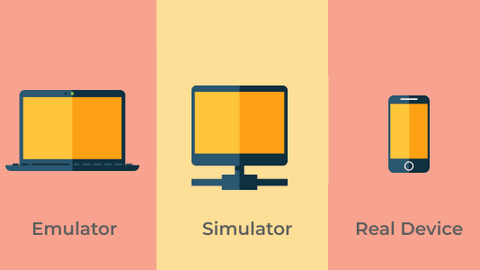
What Is the Difference Between an Emulator, Simulator, and Real Device?
An emulator imitates Android hardware, a simulator imitates the iOS environment, and a real device is physical hardware. Only real devices expose battery, sensor, and thermal behaviour.
Emulator-based app testing
An emulator is a virtual platform that duplicates an Android handset on your computer. You can test APK files without physical hardware using an apk emulator online.
Simulator-based app testing
A simulator reproduces the iOS environment on your machine and runs the app against a chosen Apple device profile, with no physical hardware required.
Because it borrows the host operating system rather than emulating silicon, it starts fast. That speed is what makes iOS app testing practical during development.
Real device-based app testing
Real devices run your app on the same hardware your users hold. They surface defects that virtual environments hide, including thermal throttling, battery drain, and sensor drift.
I have watched a suite go fully green on simulators and still ship a crash that only appeared on a three-year-old handset with 3 GB of RAM.
| Parameter | Emulator or simulator | Real device |
|---|---|---|
| User interface and layout | Good enough for layout, screen sizes, and basic visuals | Needed for final rendering checks on vendor skins and real displays |
| Network conditions | Simulates bandwidth limits, but misses real latency and radio behaviour | Shows true latency, handoffs between WiFi and mobile data, and drops |
| Sensors and biometrics | Partial: synthetic camera feed and simulated fingerprint or face match | Real camera, GPS, NFC, fingerprint, and Face ID hardware |
| Performance | Reflects the host computer, not the phone | Accurate launch time, frame rate, and memory on the target hardware |
| Battery and CPU | Not measurable in a meaningful way | Measures drain, heat, and throttling under real background load |
| Cost | Free with Android Studio and Xcode | Hardware purchase and refresh, or a cloud device subscription |
| Maintenance | Create or delete an image in minutes | Procurement, charging, OS updates, and replacement cycles |
The rule that follows from the table: anything that touches physical hardware, battery, or the real network needs a real device before release.
How Do You Choose Which Devices to Test On?
Build a device matrix from your own install-base analytics: cover the devices that make up the bulk of your installs, then add a low-end handset, a tablet, and one vendor skin. Review it quarterly.
You cannot test every device, and you do not need to. What you need is a short, defensible list covering most real users and the riskiest edges.
Start from your analytics, never a generic "top phones" list. Your install base is the only data that says which devices actually matter.
Build the Matrix in Four Passes
Each pass adds a different layer of coverage:
- Pass 1, coverage - Sort active devices by user count, taking models from the top until you reach 80% of installs.
- Pass 2, OS spread - Add the current and previous iOS version. Android needs the newest release plus two or three before it.
- Pass 3, risk edges - Add a low-RAM Android device, a foldable or large screen, and one tablet.
- Pass 4, vendor skins - Add a One UI, HyperOS, or ColorOS device beside stock Android. Permission and background limits differ.
On Apple's adoption figures above, the current and previous iOS release cover almost every iPhone user. Android fragments far wider, so it needs the extra spread.
For most teams this lands between 8 and 15 combinations per release, with a wider matrix reserved for major launches.
Every team I have sat with expected that number to be much larger before they actually pulled their analytics.
A Worked Example
Here is a matrix for a consumer app with an even Android and iOS split. Swap the models for whatever your analytics show.
| Tier | What it represents | Run it on |
|---|---|---|
| Tier 1: every build | Your two highest-usage devices, one Android and one iPhone, on the current OS | Real devices, automated smoke suite |
| Tier 2: every release | The rest of your 80% coverage list, plus the previous major OS version on each platform | Real devices, full regression in parallel |
| Tier 3: risk edges | Low-RAM Android, foldable, tablet, one vendor skin | Real devices, targeted layout and memory checks |
| Tier 4: early dev | Screen sizes and OS versions you only need to eyeball | Emulators and simulators |
Review the matrix once a quarter. Device usage shifts, and a list built two years ago stops matching your users.
When you need broader coverage than an in-house lab can hold, a real device cloud gives you the same devices on demand without procurement.
5 Benefits of Mobile App Testing
Testing protects store visibility, confirms features work on every device in your matrix, catches security holes before attackers do, keeps users from uninstalling, and moves defect fixes to the cheapest point in the cycle.
- Protects store visibility - Google Play sets Android vitals bad behaviour thresholds of a 1.09% user-perceived crash rate and a 0.47% ANR rate, and may reduce the visibility of an app that exceeds them. Crash and ANR checks on low-end devices keep you under that line.
- Confirms features work everywhere - Functional coverage proves users can install on every target device, sign in, and complete the core task, and that the app talks to its backend correctly.
- Validates usability - A mobile tester checks navigation and gestures across screen sizes, which turns an opinion about the UI into a repeatable verdict.
- Surfaces security vulnerabilities - Checks on token storage, session handling, and API calls expose data leaks before release, when the fix is a code change rather than an incident.
- Lowers the cost of defects - A bug caught on a release candidate is fixed in the same sprint; the same bug in production needs a hotfix, a store review, and users who may already have uninstalled.
What Are the Biggest Challenges in Mobile App Testing?
Device and OS fragmentation, unpredictable network conditions, hardware sensors that emulators cannot reproduce, mid-session interruptions, and the ongoing maintenance cost of brittle test scripts.
The conditions a mobile app runs in are far more varied than a desktop app's. These make coverage difficult:
- Device fragmentation - Thousands of Android models ship with vendor skins like One UI, HyperOS, and ColorOS. Pixel-correct layouts break on them.
- OS version fragmentation - Annual releases change permission models, rendering, and API behavior. Apps fine on the newest OS regress on older ones.
- Network conditions - Blocking network calls freeze the app on 3G, and that failure stays invisible without throttled testing.
- Hardware and sensors - Camera, GPS, biometrics, and NFC cannot be reproduced on emulators. Fingerprint login and QR scanning need real hardware.
- Interruptions and resource limits - Calls, notifications, low battery, and memory pressure break apps mid-session. State restoration under interruption is easy to overlook.
- Test maintenance - Frequent UI changes break brittle scripts, so teams repair tests instead of finding bugs. Self-healing tests reduce that load.
For a deeper list of issues and how to solve them, see our guide to mobile app testing challenges.
Types of Mobile App Testing
Ten types of mobile app testing matter: functional, performance, compatibility, security, usability, interrupt, network condition, localization, regression, and accessibility testing. They run at different cadences: functional and regression checks on every build, compatibility and performance against the device matrix each release, and security, localization, and accessibility audits once per milestone.
Functional Testing
Functional testing verifies that every feature behaves the way its specification says it should, covering user interactions, navigation flows, form inputs, API responses, and data processing.
It catches broken buttons, validation that accepts bad input, logins that fail after a token refresh, and checkouts that stall mid-payment.
Most teams script the critical paths, install, sign up, search, and pay, then run them on every build and keep exploratory functional testing for the edge cases a script never reaches.
Performance Testing
Performance testing measures how fast the app launches, how smoothly it responds under load, and how stable it stays when memory, CPU, and battery are constrained.
It catches cold starts that creep past a couple of seconds, list scrolling that drops frames, memory leaks that crash long sessions, and background work that drains the battery.
Run it on real hardware and on low-end handsets as well as flagships, because mobile performance testing figures from an emulator describe the host machine, not the phone.
Compatibility Testing
Compatibility testing confirms the app looks and behaves consistently across device models, screen sizes, OS versions, and vendor skins. It catches layouts that break on a foldable, permission prompts that changed between OS releases, and translated labels that overflow a button on a small screen.
Coverage is a matrix problem rather than a device count: a team that owns ten handsets tests a fraction of the models and OS versions its users run, which is where a cloud of real devices fills the gap.
The basics of compatibility testing apply here.
Security Testing
Security testing finds the weaknesses that expose user data: weak or missing encryption, tokens stored in plain text, sessions that survive logout, unprotected API endpoints, and permissions the app never needed.
It also covers what regulation demands, including GDPR and HIPAA obligations around data handling and consent. Run static analysis on every build and a deeper penetration pass each release.
The security testing findings that matter most usually sit in the network and storage layers rather than in the UI.
Usability Testing
Usability testing evaluates whether a real person can finish the app's core tasks without being taught how, covering navigation logic, information hierarchy, gesture support, and error recovery.
It catches the problems no assertion can express: a checkout step nobody finds, a swipe that fights the operating system's own back gesture, an error message that quotes a code instead of a fix.
Run moderated sessions on real devices with a handful of participants per round and repeat after each redesign, because usability testing findings expire as soon as the flow changes.
Interrupt Testing
Interrupt testing checks how the app survives events that arrive mid-session: an incoming call, a push notification, an alarm, a low-battery warning, a network switch, or the user backgrounding the app and returning an hour later.
What it catches is lost state, a half-filled form wiped, an upload abandoned silently, a crash on resume. Fire each interruption at the least convenient moment, mid-transaction rather than on an idle screen, and confirm the app returns the user exactly where they left off.
Network Condition Testing
Network condition testing validates behaviour across 5G, 4G, 3G, congested public WiFi, and full offline mode, including recovery when the connection drops mid-request.
It catches blocking calls that freeze the interface on a slow link, retries that duplicate a payment, caches that serve stale data, and error screens with no way back.
Throttle deliberately instead of waiting for a bad day: run the critical flows on a simulated 3G profile and in airplane mode, and confirm queued actions resend once the connection returns.
Localization Testing
Localization testing confirms the app adapts correctly to other languages and regions, covering translated strings, date and number formats, currency, time zones, and right-to-left layouts for languages such as Arabic and Hebrew.
It catches text that overflows its button once translated into German, dates that read as the wrong month, and hard-coded strings that never reached the translator. Set the device locale rather than relying on an in-app language switch alone.
Our guide on how to perform localization testing covers formats and right-to-left support.
Regression Testing
Regression testing verifies that new code has not broken functionality that already worked, re-running a stable suite against each build so a fix in one flow does not break another.
It catches what a release cycle reintroduces: a permission prompt that reappears, a payment path that breaks after an SDK upgrade, a screen that stops rendering on an older OS version.
Automate the suite and prune it without sentiment, because a regression testing pack nobody trusts is a pack everybody skips.
Accessibility Testing
Accessibility testing checks the app against WCAG criteria and the platform accessibility APIs, which matters both for ADA compliance and for users who navigate without sight or fine touch precision.
It catches unlabelled icons, focus order that jumps around the screen, contrast below threshold, and tap targets too small to hit reliably.
Run it with TalkBack on Android and VoiceOver on iOS, then verify every interactive element is announced, that focus order follows the visual order, and that tap targets stay usable at the largest system font size.
Note: Describe an interrupt or offline flow in plain English, and Kane CLI by TestMu AI drafts the scenarios and test cases from your terminal. Get started with Kane CLI
Mobile App Testing Checklist for 2026
A mobile app testing checklist is the pre-release pass a team runs on every build, covering install and update, core flows, interruptions, network conditions, performance, security, and accessibility. Run it on a real device from your matrix, then automate the items that repeat every release.
The line I add to every checklist is the permission-denied path, because apps that assume a granted permission fail silently.
- Install the signed release build with almost no free storage left, then uninstall and reinstall it.
- Cold-start a first launch on a throttled connection and confirm the splash screen resolves.
- Update from the currently published store version and confirm data, sessions, and settings survive.
- Complete signup, login, logout, password reset, and every social or SSO provider.
- Submit each form empty, at maximum length, and with special characters and emoji.
- Run purchase flows in Apple's StoreKit sandbox and Google Play's licence testing track, including refunds and renewals.
- Open every deep link and push notification with the app running, closed, and uninstalled.
- Press the Android system back gesture on every screen and confirm no path dead-ends.
- Fire a call, an alarm, and a notification mid-flow and confirm entered data survives.
- Background the app for five minutes and confirm the screen and session are restored.
- Rotate, split-screen, and raise the system font to its largest setting on every screen.
- Deny camera, location, and notification permissions, then grant them, and check both directions.
- Run the app under low battery, low memory, and battery-saver mode.
- Throttle the connection to 3G and confirm every screen shows a loading state.
- Drop to airplane mode mid-request and confirm a clear error and a retry path.
- Switch between WiFi and mobile data mid-session, and confirm offline mode, where supported, syncs queued actions on reconnect.
- Measure cold start on a low-end device against the previous release, and watch memory through extended scrolling.
- Confirm tokens live in Keychain or Keystore, all traffic uses HTTPS, and invalid certificates are rejected.
- Walk the app with VoiceOver and TalkBack and confirm every interactive element is announced.
- Disable animations on all test devices and emulators before an automated run.
For a fuller set of scenarios to turn into test cases, use this mobile development test case template.
How Do You Test the Hard Mobile Features?
Biometrics, camera, deep links, push notifications, and in-app purchases all need platform sandboxes or real hardware. Scripted UI tests on their own cannot reach any of them reliably.
Teams skip these features more than any others, and each has a specific way in:
Biometrics
Both platforms can simulate a fingerprint or face match on a virtual device, which covers the happy path. Enrolment, lockout after repeated failures, and fallback to passcode need real hardware.
Test the failure branch first. An app that grants access when biometric auth errors is a security defect, not a UX one.
Camera and QR Scanning
Emulators feed a synthetic image, so they prove the code path but not the experience. Focus speed, low light, and glare only show up on real devices.
Keep a printed test QR code at your desk. It reproduces scanning defects faster than any automated harness.
Deep Links
Android App Links and iOS Universal Links both depend on a verification file hosted on your domain, so they fail in staging while working in production, or the reverse.
Test three states for every link: app installed and running, app installed but closed, and app not installed at all. The third should route to the store, not a dead page.
Push Notifications
Operating system behaviour changes with app state, so test foreground, backgrounded, and fully closed separately. Verify the banner renders and the tap deep-links to the right screen.
The case most teams skip is permission denied. Confirm the app still functions and does not block a core flow waiting for a notification that will never arrive.
In-App Purchases
Use the platform sandboxes rather than live payment rails: StoreKit testing in Xcode for iOS, and licence testing on Google Play for Android.
Cover the whole lifecycle, not the purchase alone. Restore purchases, declined and cancelled transactions, subscription renewal, and revoking access after a refund all need explicit cases.
Manual vs Automated Mobile App Testing
Manual and automated mobile app testing cover different halves of the same matrix. Manual testing owns judgment work: exploratory sessions, usability, visual polish, and bug reproduction on a feature that is still changing.
Automated mobile app testing replays fixed flows with Appium, Espresso, XCUITest, or Detox, so it owns regression, cross-device compatibility, and every check that runs on each build.
A test that repeats often, spans many devices, and covers a settled flow belongs in automation; a one-off check on a moving flow stays manual.
| Criteria | Manual Testing | Automated Testing |
|---|---|---|
| Best for | Exploratory, usability, ad-hoc bug reproduction, gesture and biometric flows | Regression, cross-device compatibility, repeated checks in CI/CD |
| Speed at scale | Slow across many devices; each run is hands-on | Fast; the same suite runs in parallel across devices |
| Upfront effort | Low; no scripts to write | Higher; tests must be written and maintained |
| Cost over time | Rises with every release cycle | Falls as the suite is reused across releases |
A practical rule follows from that split: start a new feature with manual exploratory testing on real devices, then automate the stable paths once they stop changing.
Because both approaches run against the same real hardware, a bug found by hand can be handed straight to automation as a regression test once the behaviour is understood.
Splitting the work between the two approaches is only part of it, because the tests still have to be authored, evidenced, and maintained.
In this TestMu Conf 2026 session, Shravan Mahajan runs that whole loop end to end with kane-cli in The Full Agentic QA Loop for Mobile Applications: Author, Evidence, Assure, Maintain, covering how you author coverage, capture what actually happened, assure it against intent, and keep it from rotting as the product changes.

Generating and Running Mobile Tests With Kane CLI
Someone still has to write the automated cases. Kane CLI is TestMu AI's testing agent for the terminal: you describe a flow in plain English, and it drafts scenarios and test cases or runs the objective directly. The CLI is free to install, and local runs are free.
Given one sentence about a banking app's login flow, kane-cli generate returned 4 scenarios and 12 test cases, each with numbered steps and expected results, in under a minute. Here is the command and the final line of its NDJSON output:
$ kane-cli generate "Login flow of a native Android banking app: email and password sign-in, biometric fallback to PIN, session restore after the app is backgrounded, and offline error handling" --agent --scenario-limit 4 --per-scenario-limit 3

{"type":"generate_done","request_id":"40889","status":"completed","scenario_count":4,"case_count":12,"refine_hint":"kane-cli generate \"<refinement>\" --refine --req 40889","save_hint":"kane-cli generate --save --req 40889"}
The scenarios it drafted line up with the interruption and network items on the checklist above:
- Email and password sign-in - a valid login, a wrong password that keeps the user on the login screen, and session restore after backgrounding.
- Biometric login with PIN fallback - fingerprint success, the correct PIN after biometrics fail, and a wrong PIN after the prompt is cancelled.
- Session restore after backgrounding - a short background, a forced re-login after a long one, and form state kept mid-transaction.
- Login during a network outage - a clear error when offline, a successful login after reconnecting, and an offline indicator at launch.
To run a case against the app itself, point the objective at a build.
On macOS with Apple Silicon, kane-cli run "Sign in and open the account tab" --target simulator --app ./builds/MyApp.zip drives a local iOS simulator, and --target emulator with an .apk drives an Android emulator, with no Appium server or driver to set up.
Setup is kane-cli login followed by kane-cli doctor --install.
The Kane CLI mobile testing docs list the Xcode 16 and arm64 emulator image requirements. Local mobile runs are not available on Windows, Linux, or Intel Macs, so on those machines use Kane CLI for authoring and run the native suite on real devices.
Manual Mobile App Testing
Manual mobile app testing is a tester using the app on a real handset the way a customer would, judging what happens instead of asserting fixed values.
It wins wherever the verdict is a judgment call, such as whether a screen reads clearly or an error message tells the user what to do next, and on flows scripts drive badly: biometric prompts, camera capture, multi-finger gestures, and a call arriving mid-payment.
How Do You Do Manual Mobile App Testing?
Manual mobile testing follows the same loop on every device. Install the release-candidate build, work through the test cases by hand, and record what the app actually did rather than what it should have done.
- Install the signed build on a device from your matrix, not a debug build on a spare handset.
- Run the core flows first, covering launch, sign-in, the primary task, sign-out, and uninstall.
- Rotate, background, and interrupt the app on each screen to check state restoration.
- Throttle the network to 3G and to no connection, then confirm the error and retry states.
- Finish with an exploratory session that follows the app rather than the script, and log it.
- Attach a device log and a screen recording to every defect, so it can be reproduced.
For Android app manual testing, keep a terminal open next to the device. ADB commands install builds, clear app data between runs, and stream logcat while you tap.
On iOS the equivalent evidence comes from Xcode Instruments and the device console. Either way, capture the log at the moment of failure, because a defect without one goes back to QA.
Manual Mobile App Testing on a Device Cloud
In-house device labs run out of room long before the matrix does, which is where a cloud grid takes over. Mobile app testing on TestMu AI streams 10,000+ real Android and iOS devices into the browser for hands-on sessions as well as automated runs.
A tester can reproduce a customer report on the exact handset and OS version it came from, capture the log there, and close the defect without waiting on a procurement cycle.
Top Mobile App Testing Tools
The mobile app testing tools teams shortlist most often are TestMu AI, Appium, Espresso, XCUITest, Maestro, Detox, Firebase Test Lab, and AWS Device Farm.
Appium, Espresso, XCUITest, Maestro, and Detox are frameworks you write tests in; TestMu AI, Firebase Test Lab, and AWS Device Farm are infrastructure you run them on.
Choose the framework first, based on your platforms and languages, then the infrastructure that runs it on the handsets your users carry.
TestMu AI
TestMu AI is a cloud testing platform that runs your mobile suites on real Android and iOS devices you do not own. It runs Appium, Espresso, XCUITest, and Detox suites across 10,000+ real devices, from Android 9 and iOS 13 through the current releases.
Pick it when your matrix outgrows the handsets on your desk, or when you want AI app testing with plain-English authoring through KaneAI. The free tier gives five real device sessions a month, two minutes each.
Appium
Appium is the open-source, cross-platform framework for mobile automation, and the default choice when one suite has to cover both platforms.
It drives native, hybrid, and mobile web apps through the WebDriver protocol, in Java, Python, JavaScript, Ruby, C#, or PHP, delegating to UiAutomator2 on Android and XCUITest on iOS. Pick it when you ship on Android and iOS and cannot maintain two test suites.
It brings no devices of its own, so Appium mobile testing runs against an emulator, a local handset, or a cloud grid.
Espresso
Espresso is Google's native UI testing framework for Android, and Android only. It runs in the same process as the app under test, so it synchronises with the UI thread and is the fastest and least flaky option on the platform.
Tests are written in Kotlin or Java and ship as a second APK beside the app. Pick Espresso when the Android app is the product rather than half of a cross-platform build, and budget separately for iOS.
Espresso automation testing needs an Android emulator or a real Android device.
XCUITest
XCUITest is Apple's UI automation framework, built on XCTest and shipped inside Xcode. It is iOS-only, written in Swift or Objective-C, and drives the app as a black box through the accessibility layer.
Being first-party, it tracks each new iOS release immediately and is the most stable choice for an iPhone or iPad app. Pick it when iOS is where your users are and someone on the team can maintain a Swift test target.
It runs on simulators, and XCUITest on real devices covers the hardware behaviour simulators cannot.
Maestro
Maestro is an open-source mobile UI framework in which flows are declared in YAML instead of written in code.
It waits for the interface on its own rather than asking you to insert sleeps, which removes the most common source of flakiness, and a flow stays readable to anyone on the team. It drives Android and iOS, including React Native and Flutter builds.
Pick Maestro when manual QA is moving into automation, or when you want smoke tests a product manager can review without reading Java.
Detox
Detox is a grey-box end-to-end framework built for React Native. It hooks into the app's internals to know when the interface is idle, so tests wait on the app rather than on a timer.
Its platform scope is the thing to confirm before adopting it: Detox runs on Android emulators and real Android devices, but on iOS it runs on simulators only, with no real-iPhone support.
Pick it for a React Native codebase where deterministic JavaScript-side waiting matters more than iOS hardware coverage.
Firebase Test Lab
Firebase Test Lab is Google's device cloud, driven from the Firebase console, the gcloud CLI, or a CI job.
It runs Espresso and XCUITest suites, plus its own Android-only Robo crawler, which explores the app automatically and needs no test code at all, and it returns logs, screenshots, and video for every device in the run.
Pick it when your app already lives in Firebase, or when a zero-code Robo sweep on each build is enough to catch launch and navigation failures early.
AWS Device Farm
AWS Device Farm is Amazon's device cloud, billed and secured through the same AWS account as the rest of your infrastructure.
It runs Appium, Espresso, and XCUITest suites on real phones and tablets in AWS data centres, and offers a remote access mode for manual sessions on the same hardware.
Pick it when procurement and IAM are already standardised on AWS and a separate vendor is the harder internal sell; otherwise compare its device list against grids built specifically for mobile QA.
| Tool | Type | Best for | Real devices |
|---|---|---|---|
| TestMu AI | Cloud platform | Running Appium, Espresso, and XCUITest suites in parallel across a wide device matrix, plus plain-English authoring with KaneAI | Yes, 10,000+ real devices |
| AWS Device Farm | Cloud device farm | Teams already standardised on AWS billing and IAM | Yes |
| Appium 2 | Open-source framework | One suite across Android and iOS, written in Java, Python, JavaScript, or C# | Bring your own |
| Espresso / XCUITest | Native frameworks | Single-platform apps that need the fastest, least flaky runs | Bring your own |
| Maestro | Open-source framework | Manual QA teams moving into automation without writing code | Bring your own |
| Detox | Open-source framework | React Native apps that need grey-box waiting instead of sleeps | Android only |
| Firebase Test Lab | Cloud device farm | Espresso, XCUITest, and zero-code Robo runs on Google-hosted devices | Yes |
Emulators and simulators sit outside this table because they replace neither group. They give fast, low-cost feedback during development.
What they cannot reproduce is battery drain, sensor behaviour, biometrics, or real network latency.
How to Choose a Mobile App Testing Tool
Match the tool to your platforms, your team's languages, and the device coverage you need, and score candidates on language support, OS coverage, codeless authoring, and reporting depth.
Single-platform apps should start with the native framework, Espresso or XCUITest, because nothing else is as fast or as stable. Cross-platform apps should start with Appium, or Maestro if nobody wants to write code.
Once the framework is settled, the infrastructure question is only how many real devices you need and who pays for them. Configure the test environment before the first script is written.
Use this checklist when comparing candidates:
- Support for the programming languages your team already writes tests in.
- Codeless authoring for scenarios that repeat every release, which cuts the time spent rewriting them.
- Coverage of every operating system you ship on, including the older Android and iOS versions still in your install base.
- The ability to detect, record, play back, and automate every action in a test scenario.
- Reporting that logs a plan description, screenshots, and defect points for every run.
For a full breakdown with pricing, supported frameworks, and selection criteria, see our roundup of the best mobile app testing tools.
Mobile App Testing Frameworks
A framework is what you write tests in. The choice comes down to one question: are you shipping on one platform or two?
Native frameworks win on speed and stability. Cross-platform frameworks win when you cannot maintain two separate suites.
For a deeper, side-by-side comparison, this roundup of the best mobile app testing frameworks covers Espresso, UIAutomator2, XCUITest, Appium, Maestro, Detox, and Flutter's integration_test and Patrol across gray-box versus black-box tradeoffs.
Android Testing Frameworks
Android teams pick from these:
- Espresso - Google's native Android framework. It runs inside the app process, syncing with the UI thread and producing far less flakiness.
- UIAutomator2 - Handles cross-app and system-level interactions such as the notification shade and permission dialogs. Espresso cannot leave your app; this can.
- Compose UI Test - The testing API for Jetpack Compose screens, used instead of Espresso view matchers once you migrate off XML layouts.
An Espresso test for a login flow is short, and it reads like the steps a manual tester would follow:
@RunWith(AndroidJUnit4::class)
class LoginTest {

    @get:Rule
    val activityRule = ActivityScenarioRule(LoginActivity::class.java)

    @Test
    fun validCredentials_navigateToHome() {
        onView(withId(R.id.email))
            .perform(typeText("qa@example.com"), closeSoftKeyboard())

        onView(withId(R.id.password))
            .perform(typeText("secret"), closeSoftKeyboard())

        onView(withId(R.id.login_button)).perform(click())

        onView(withId(R.id.home_title))
            .check(matches(isDisplayed()))
    }
}
iOS Testing Frameworks
Apple's frameworks ship with Xcode:
- XCUITest - Apple's native framework, built into Xcode. Tests run in Swift or Objective-C, with parallel execution across destinations.
- XCTest - The framework XCUITest builds on. Use it for unit tests, integration tests, and performance measurement with measure blocks.
- Swift Testing - Apple's macro-based library. It runs alongside XCTest, so new unit tests adopt it while UI tests stay on XCUITest.
Cross-Platform Testing Frameworks
Reach for these when one suite has to drive both platforms:
- Appium 2 - The most widely used cross-platform option. Drivers and plugins version independently, so you upgrade one without a full release.
- Maestro - Declarative YAML flows with built-in waiting that removes most timing flakiness. Supports Android, iOS, React Native, and Flutter.
- Detox - Built for React Native. It detects app idle state, so tests wait on the app rather than fixed sleeps.
- Flutter integration_test and Patrol - integration_test covers in-app widget flows; Patrol extends it to native permission dialogs Flutter cannot reach.
The same login flow in Appium 2, driving a real Android device through UiAutomator2:
import io.appium.java_client.android.AndroidDriver;
import io.appium.java_client.android.options.UiAutomator2Options;
import org.openqa.selenium.By;
import java.net.URL;

public class LoginTest {

    public static void main(String[] args) throws Exception {

        UiAutomator2Options options = new UiAutomator2Options()
                .setPlatformName("Android")
                .setPlatformVersion("15")
                .setDeviceName("Pixel 9")
                .setApp("/path/to/app.apk");

        AndroidDriver driver = new AndroidDriver(
                new URL("http://127.0.0.1:4723"), options);

        driver.findElement(By.id("com.example.app:id/email")).sendKeys("qa@example.com");
        driver.findElement(By.id("com.example.app:id/password")).sendKeys("secret");
        driver.findElement(By.id("com.example.app:id/login_button")).click();

        String heading = driver.findElement(By.id("com.example.app:id/home_title")).getText();
        System.out.println("Logged in screen: " + heading);

        driver.quit();
    }
}
Point the same script at a cloud grid instead of 127.0.0.1 and it runs across your whole device matrix in parallel rather than one device at a time.
When a test turns flaky, the question worth asking first is whether it ever needed to leave the app process. That one check has fixed more flakiness for me than any retry setting.
Frameworks to avoid starting new projects on
Several frameworks still appear in older tutorials but are no longer maintained. You may inherit them in a legacy suite; do not pick them for new work.
- monkeyrunner - Google's own documentation states that the monkeyrunner API is unmaintained and recommends UI Automator instead.
- Calabash - Microsoft discontinued its contributions, and the calabash-android repository states the project is looking for a maintainer.
- EarlGrey 1.0 - The EarlGrey repository marks 1.0 deprecated in favour of 2.0, unmaintained internally since iOS 13.
- Robotium and Selendroid - Both predate and are superseded by Espresso and Appium 2, which cover the same Android UI cases.
Why Do Mobile Tests Pass Locally but Fail in CI?
Because the CI environment is not your machine. System animations, missing Play Services, no GPU acceleration, a different locale, and slower runners each break assumptions your local device hides.
This is the single most common complaint I hear about mobile suites, and it is almost never the test logic that is wrong. It is an environment difference nobody wrote down.
Work through these causes in order before touching the test code:
| Cause | What it looks like | Fix |
|---|---|---|
| System animations left on | Random timing failures on taps and transitions, different tests each run | Android's docs tell you to disable window animation scale, transition animation scale, and animator duration scale |
| No hardware acceleration on the runner | Emulator boots slowly, tests time out before the app renders | Use a runner that supports nested virtualization, or run on real devices instead |
| Missing Google Play Services | Maps, push, sign-in, and billing flows fail only in CI | Pick a system image that includes Play Services, not a bare AOSP image |
| Different locale or timezone | Date, currency, and sorting assertions fail on an otherwise identical build | Pin locale and timezone explicitly in the CI job rather than inheriting defaults |
| Clean state every run | Tests that depend on a logged-in session or cached data fail first | Seed state in setup instead of relying on a device you already used locally |
On the first row, Android's Espresso setup guide is explicit: it recommends turning off system animations on any device used for testing, naming those exact three settings.
The pattern behind all five is the same. A local device accumulates state and configuration you stopped noticing, and CI starts from nothing every time.

Mobile App Testing Process: 9 Steps
The mobile app testing process runs in nine steps: plan, choose the test type, write test cases, test manually, then automate, run usability and beta, and finish with performance, security, and end-to-end validation.
The order matters more than the names. Steps 1 to 3 are planning work that happens before any device is touched, and skipping them is why suites end up covering whatever was easiest to script.
Steps 4 and 5 split execution: exploratory, judgment-led checks by hand, and stable, repeatable paths automated and run in parallel. Steps 6 to 9 are release gates, and each fails for a different reason, so they cannot be collapsed into one regression run.
The full sequence, before the detail on each step:
- Create the test plan and agree the device matrix.
- Decide which flows run manually and which get automated.
- Write functional and non-functional test cases.
- Run manual and exploratory passes on real devices.
- Automate the stable paths and run them in parallel.
- Run usability and beta testing with real users.
- Measure performance under load and on constrained devices.
- Run security testing against your compliance standards.
- Validate end to end, fix, and repeat until the build ships.
The final pass is end to end testing, which confirms the app works correctly from start to finish across the whole stack.
Step 1: Create test plan
Prepare a clear outline of what will be executed, listing the use cases in scope. Decide the expected outcome for the sprint before anyone touches a device.
Step 2: Choosing test type
With a plan in hand, decide which flows run manually and which get automated. Automate a flow when it has these properties:
- Known expected outcome - Conditional checks where the result is already defined automate cleanly.
- High run frequency - Routine checks on core functions that repeat every build belong in a suite.
- Wide device coverage - Verifying many screen sizes by hand is too slow to sustain per release.
Small, self-contained components are the most efficient units to automate. Keep manual effort for flows where a person's judgment is the point.
Step 3: Preparing test cases
With the approach settled, write the cases. Pick a method that suits the feature: requirement-based testing or business-scenario-based testing.
Agentic AI testing changes where those cases come from. KaneAI on TestMu AI is a GenAI-native testing agent that reads the artifacts you already have, including PRDs, Jira tickets, spreadsheets, and recorded video, and turns them into executable mobile tests.
The generated tests export to Appium, Selenium, Playwright, or Cypress, so the output lands in the framework your suite already uses.
What you write depends on what you are validating. Mobile apps fall into two broad categories:
- Functional testing - It includes unit testing, system testing, acceptance testing, regression testing, etc.
- Non-functional testing - It includes security testing, volume testing, performance testing, load testing, compliance testing, etc.
Step 4: Manual testing
Under an agile testing model, manual and automated work run together. Every sprint should still open with exploratory testing.
Exploratory work needs no upfront investment, which is why it comes first. Log each session so findings survive past the person who found them.
Manual testing happens in two places:
- App testing on emulator simulator - Virtual devices running on your machine, useful for fast layout and flow checks.
- Testing on real devices - Physical hardware, the only place battery, sensor, and thermal behaviour can be observed accurately.
Step 5: Automated testing
Verifying every function by hand does not scale across a release cycle. Automate the regular, predictable checks and keep humans on the rest.
Automation covers load, performance, spike, and stress testing. Choose the tool against your actual requirements, using the checklist above.
The walkthrough below runs an automated suite against real devices end to end, which is the step most teams get wrong on their first attempt.
Step 6: Usability and beta testing
Usability and beta testing surface critical defects before release. Start usability testing during design, while feedback from real users can still change the product.
Beta testing runs once the app is feature-complete and the team is ready to take outside feedback.
Step 7: Performance testing
Individual features are tested by now; this step measures the whole application. It exposes scalability, speed, and stability under heavy end-user traffic.
Step 8: Security testing
Security testing verifies the app against data protection standards such as HIPAA, PCI DSS, and FFIEC before it reaches the stores.
It quantifies the risk from malware, attackers, and unauthorised access to sensitive user data.
Step 9: End-to-end testing
With every other test complete, run a full end-to-end sprint. This confirms the app behaves as expected at the server and backend layers.
Any defects found here are fixed and the sprint repeats. When nothing major remains, the build ships to the app stores.
What Are the Most Common Mobile App Testing Mistakes?
Testing only flagship devices, trusting emulators for hardware behaviour, testing on fast WiFi alone, skipping the upgrade path, ignoring interruptions, and automating a UI that has not settled yet.
Most escaped bugs are not exotic. They come from habits that look reasonable until something ships broken.
- Testing only on flagship devices - Out-of-memory crashes appear first on low-RAM handsets, which is exactly where nobody is looking.
- Treating emulators as sufficient - A suite green only on emulators has not tested battery drain, thermal throttling, biometrics, or camera behaviour.
- Testing only on fast WiFi - Office broadband hides blocking network calls that freeze the same screen for fifteen seconds on 3G.
- Skipping the upgrade path - Real users upgrade over an existing install, which is where migration bugs and lost sessions appear.
- Ignoring interruptions - State restoration is rarely covered by scripted happy-path tests, so it fails in production instead.
- Automating too early - Scripts written against a changing UI spend their life being repaired. Automate flows once they stabilise.
- Letting flaky tests stay green-ish - A suite that fails randomly gets ignored, and an ignored suite catches nothing. Quarantine and fix.
- Never revisiting the device matrix - A list built two years ago stops matching your install base. Review it quarterly.
The upgrade path is the one I see skipped most often, and it is where the ugliest defects live. A clean install hides every migration bug you have.
Mobile App Testing Best Practices
Mobile app testing best practices come down to four things: match the device matrix to your real install base, use emulators and simulators only for the checks they can actually prove, automate the paths that have stopped changing, and test the conditions the app runs in rather than the ones it was built in.
1. Address Device Fragmentation
Your device matrix decides coverage, so it has to track the install base rather than the hardware the team happens to own. Two habits keep it honest as the market moves:
- Prioritize platforms - Cover the current and previous iOS versions. On Android, test flagship and budget hardware to expose performance differences.
- Use data - Read usage metrics to find the devices and OS versions your customers actually run, then prioritise those.
2. Use Virtual Devices for the Right Checks
You do not need a physical library of every phone. Split the work by what each environment can actually prove:
- Simulators and emulators - Android Studio and Xcode run virtual devices, fast for checking screen resolutions and OS versions.
- Cloud device labs - Remote access to physical hardware, more reliable than emulation for hardware-specific defects.
3. Implement Automation Strategically
Automation complements manual testing, supplying release speed without losing the human judgment that UX work needs.
- Pick by platform count - Espresso and XCUITest for single-platform apps, Appium 2 or Maestro when one suite must drive both.
- Automate what is stable - Scripts written against a settled UI survive; scripts written against a moving one become maintenance work.
- Run in parallel - Executing the suite across the device matrix at once is what keeps regression time flat as coverage grows.
4. Test Environmental Factors
Mobile apps behave differently based on the user's surroundings. Ensure you test:
- Connectivity - Switch between WiFi, 4G, and 3G to see how the app handles low bandwidth or connection drops.
- Permissions - Verify how the app behaves when users deny or grant permissions (camera, location, etc.).
- Hardware interactions - Test multiple taps, gestures, and how the app handles system interruptions like phone calls.
Run Mobile App Testing at Scale With Kane CLI by TestMu AI
Start with one flow your team re-tests every release, such as sign-in, and hand it to Kane CLI. Install it with npm install -g @testmuai/kane-cli, describe the flow in plain English, and kane-cli generate drafts the scenarios and test cases.
The CLI is free to install, and local runs are free.
- Plain-English authoring - Describe a flow once and Kane CLI drafts scenarios with step-by-step cases; refine them with --refine instead of rewriting.
- Native app runs without Appium setup - On macOS with Apple Silicon, --target emulator or --target simulator runs the objective against your .apk or iOS .zip build on a local Android emulator or iOS simulator.
- Built for CI and coding agents - The --agent flag emits NDJSON that a pipeline or an AI coding agent can parse for a pass or fail result.
- Real devices for the release gate - Run the release candidate on TestMu AI's 10,000+ real Android and iOS devices, with video, device logs, and network logs from every session.
- Security - TestMu AI is SOC 2 Type II and ISO 27001:2022 certified, with TLS 1.2 or higher in transit and AES-256 at rest, which matters because a signed .apk or .ipa is production code leaving your perimeter.
Setup steps are in the Kane CLI installation guide, and the app testing on real devices documentation covers the device cloud side.
Real device testing starts with five free sessions of two minutes each a month, and paid plans are on the TestMu AI pricing page.
Author

Sai Krishna
Blogs: 24

Sai Krishna is Director of Engineering at TestMu AI (formerly LambdaTest), where he leads agentic AI for quality engineering, building AI agents that autonomously drive mobile and conversational test automation. His current focus is Agent Testing and Model Context Protocol (MCP) support for mobile. He is a core contributor and member of the Appium open-source project and the creator of AppiumTestDistribution and appium-device-farm. With over 14 years of experience including more than 9 years at Thoughtworks as a Principal Consultant, he holds a BSc in Electronics and speaks regularly at TestMu and Appium Conf on Appium, mobile automation, and agentic AI in testing.
Reviewer

Srinivasan Sekar
Reviewer
Srinivasan Sekar is Director of Engineering at TestMu AI (formerly LambdaTest), where he leads engineering and open-source initiatives behind the Selenium and Appium automation grid and owns TestMu AI's MCP Server. A committer to Appium and a contributor to Selenium, WebdriverIO, Taiko, and AppiumTestDistribution, he brings over 15 years of experience in quality engineering and open-source technologies. He is the author of the Apress book 'The MCP Standard: A Developer's Guide to Building Universal AI Tools with the Model Context Protocol,' a Certified Kubernetes and Cloud Native Associate, and an international conference speaker. Before TestMu AI he spent over eight years at Thoughtworks as a Principal Consultant and Quality Architect. Srinivasan holds a B.Tech in Information Technology from Anna University.


Mobile App Testing FAQs
Did you find this page helpful?
More Related Learning Hubs
TestMu AI forEnterprise
Get access to solutions built on Enterprise
grade security, privacy, & compliance
- Advanced access controls
- Advanced data retention rules
- Advanced Local Testing
- Premium Support options
- Early access to beta features
- Private Slack Channel
- Unlimited Manual Accessibility DevTools Tests