

Power Your Software Testing with AI Agents and Cloud
The Native AI-Agentic Cloud Platform to Supercharge Quality Engineering. Test Intelligently and Ship Faster.


- TestMu AI (Formerly LambdaTest)
- /
- Learning Hub
- /
- What Is a Test Case? How to Write Test Cases With Examples
What Is a Test Case? How to Write Test Cases With Examples
A test case defines the steps, data, and expected result that verify one feature. Learn how to write test cases, with a login example, types, and tips.
Last Updated on:
On This Page
- What Is a Test Case?
- Why Are Test Cases Important?
- What Is a Precondition in a Test Case?
- How to Write Test Cases?
- How TestMu AI Test Management Simplifies Writing Test Cases?
- What Does a Test Case Example Look Like?
- What Are the Types of Test Cases?
- How Do Manual and Automated Test Cases Differ?
- How Is AI Changing How Test Cases Are Written?
- What Are the Best Practices for Writing Test Cases?
- What Is the Difference Between a Test Case, Test Scenario, Test Suite, and Test Script?
- Where Should You Start With Writing Test Cases?
- Which Sources Does This Test Case Guide Cite?
A test case is a documented set of conditions for validating a specific feature or functionality of a software application. It outlines the preconditions, postconditions and processes needed to verify the functionality of software applications.
Test case development is an important part of the Software Testing Life Cycle (STLC). It focuses on writing test cases that explain what to test, how to test it, and what the expected result is. This makes sure the software works as expected and meets the requirements outlined in the Software Requirement Specification (SRS).
Overview
To write a test case, define clear preconditions, step-by-step actions, and expected results to verify a software feature. You can also use TestMu AI for automated test case generation and KaneAI to convert those test cases into executable scripts using natural language.
Importance of Writing Test Cases
- Early defect detection: Test cases provide a clear framework to verify software functionality, catch bugs early in the Software Testing Life Cycle, and maintain consistency across manual and automated testing.
- Improved collaboration: Well-documented test cases improve communication among team members, guide daily testing efforts, and facilitate onboarding for new team members.
Steps to Write Test Cases
- Test Case ID: A unique numeric or alphanumeric identifier is assigned to each test case to group them into test suites.
- Test Description: A clear statement describes what the test case will verify, including relevant details like the module, priority, and environment.
- Pre-Conditions: Specific system configurations, necessary data setups, or system states must be met before executing the test case.
- Test Steps: Step-by-step instructions detail how to navigate to the feature, enter input data, and execute the test case.
- Test Data: Specific input values or setup information are documented to ensure the test case can be accurately reproduced.
- Expected Result: The correct or desired outcome is described to indicate if the software application is working correctly during testing.
- Actual Result: The real outcome observed during execution is recorded to document differences or confirm the expected test case result.
- Status: The current state of execution, such as pass, fail, in-progress, or not executed, is documented for each test case.
- Pass/Fail Criteria: The defined rules determine whether the actual result successfully matches the expected result or meets specific conditions.
- Post-Conditions: The state of the software system after test execution finishes is described to ensure stability for subsequent tests.
Recommended Tools for Test Case Management
- TestMu AI: Streamlines test case management end to end, from creation through execution and reporting, allowing users to write test cases manually or generate them using natural language.
- KaneAI: A GenAI-native QA Agent-as-a-Service platform that converts created test cases into executable test scripts using natural language, eliminating manual script writing.
- Jira: Integrates directly with TestMu AI to enable real-time bug tracking and collaboration across teams during the software testing process.
What Is a Test Case?
A test case is the set of actions executed on a software application as part of the testing process to validate its features and functionalities. In other words, it is a detailed description of a specific test that helps to execute a test successfully. Writing cases is one activity inside test management, which also covers planning, execution, and reporting.
It includes:
- Test Case ID: It is a unique numeric and alphanumeric identifier to group test cases into test suites.
- Test Name: It is the short descriptive title of the test case.
- Module: It is the name of the module or feature under test.
- Test Scenario: It is a high-level overview of what the test case aims to check.
- Test Priority: It defines the priority level of the test (low, medium, or high).
- Test Environment: It specifies the name and characteristics of the environment for testing.
- Pre-Conditions: These are the conditions that must be met before running the test case.
- Test Steps: These are the step-by-step instructions to run the test case.
- Test Data: It is the input or data values required to execute the tests.
- Expected Result: It is the expected output of the test based on requirements.
- Actual Result: It is the actual output after running the tests.
- Status: It indicates whether the test has passed or failed.
- Post-Conditions: It specifies the expected state of the software after the test is executed successfully.
Why Are Test Cases Important?
Test cases matter because they prove software meets its requirements, catch bugs early when fixes are cheaper, and make testing repeatable across testers and releases.
As part of the STLC, test cases help validate that software meets the functional and business requirements and support early detection of bugs, reducing the cost and impact of issues found later in the development process.
Benefits: Most teams pass this threshold within a release or two, which is when the test management tools comparison becomes worth reading. Teams without a budget can start with a free test case management tool instead.
- Verify Features and Functionalities: Ensure key features or functionalities work as intended under various conditions.
- Guide Testing Efforts: Provide step-by-step guidance to help testers carry out their daily activities and plan upcoming testing tasks effectively.
- Detect Issues Early: Identify potential issues during the software development process.
- Enable Traceability: Maintain a record of completed steps for review and error analysis.
- Facilitate Onboarding: Help new team members quickly understand and contribute to testing efforts.

Note: Generate test cases with AI-native Test Manager. Try TestMu AI Now!
What Is a Precondition in a Test Case?
A precondition is the system state a test case needs before step one, such as data that must exist, a signed-in or signed-out user, and specific settings or feature flags.
A precondition in a test case is the state the system must already be in before step one runs: the data that must exist, the account that must be signed in or signed out, the configuration that must be set. A postcondition is the state the system is left in once the case finishes. Preconditions decide whether a test can run honestly; postconditions decide whether the next one can.
The difference between a weak precondition and a usable one is whether a second person can act on it without asking you a question.
| Weak | Usable |
|---|---|
| User is logged in. | User acme_qa@example.com is signed in with the Editor role, and the Projects list contains at least one archived project. |
| Test data is set up. | Order #10432 exists with status Shipped and exactly two line items, one of which is out of stock. |
Preconditions are also routinely confused with the three fields next to them. They are not interchangeable, and the failure each one causes is different.
| Field | What it is | When it applies | Failure mode if it is wrong |
|---|---|---|---|
| Precondition | Required system state before execution starts | Before step one | The case passes or fails for a reason unrelated to the feature |
| Postcondition | The state the system is left in afterwards | After the final step | The next case inherits dirty state and fails intermittently |
| Test data | The specific values fed into the steps | During execution | The case runs but exercises the wrong input |
| Assumption | Something believed true but never stated or checked | Nowhere, which is the problem | Silent false passes that nobody can reproduce |
That last row is where preconditions do their real work. A precondition is only worth writing if someone verifies it, and negative tests are where an unverified one does the most damage. Take a password reset case that checks an unregistered email is rejected, with these preconditions:
- User is on the password reset page
- notregistered@example.com does not exist in the system database
- User is signed out
- No prior reset request made in this test run
The second one is critical, and it requires you to verify a database state rather than assume it. If an earlier test run accidentally created that account, the case still reports a pass, but it passed for the wrong reason and the bug it was written to catch is now invisible. Writing "confirm this address is not in the database" as an explicit pre-execution check is what turns that assumption back into a precondition.
What a precondition looks like in practice depends on the feature under test. These are the ones worth writing for the flows most teams cover first.
| Feature under test | Preconditions to state |
|---|---|
| Login with valid credentials | A registered account exists with a known username and password; the account is active and not locked; the user starts signed out on the login page. |
| Password reset for an unknown email | The address is confirmed absent from the database; the user is signed out; no reset was requested earlier in this run; mail delivery is active in the environment. |
| Checkout and payment | The cart holds at least one in-stock item; a valid test payment method is saved; the payment gateway is in sandbox mode; a shipping address is set. |
| Search results | At least three products exist in the Electronics category, one of them out of stock; the search index has been rebuilt since the last data change. |
| Role-based access | Two accounts exist, one Admin and one Viewer; the restricted record exists and is owned by the Admin; the Viewer is signed in. |
| Report export | The reporting period contains at least one completed transaction; the user has export permission; no export job is already queued for that period. |
Notice what each row has in common: a count, a named state, or a specific record. "The cart has items" is not a precondition, but "the cart holds at least one in-stock item" is, because a tester can confirm it before starting and a reviewer can tell whether it was met.
Preconditions also repeat across a suite, so write them once and reference them. A shared "Viewer is signed in with one restricted record" precondition attached to thirty cases updates in one place when the role model changes, where thirty copies pasted into thirty cases will not. In TestMu AI Test Management, AI generation fills in preconditions alongside steps and expected results when a case is created from a requirement, and reusable modules let one setup block back many cases.
How to Write Test Cases?
Write a test case by giving it an ID and a one-line objective, listing preconditions and test data, writing numbered steps, and stating the expected result.
The process of writing a testing case involves many different steps, each of which is important to ensure the software quality.
- Test Case ID: Give each test case a unique ID.
- Test Description: Provide a clear and concise description of what the test is intended to verify, including details such as the test case ID, test name, module, test scenario, test priority, and test environment.
- Pre-Conditions: Note down any conditions that must be met before running the test. These could be specific system configurations, necessary data setups, or particular system states required for the test.
- Test Steps: Outline the steps to run the test. Explain how to navigate to the feature or functionality under test, what input data to enter, and what actions the tester should take.
- Test Data: Include any data used in the test, such as input values or setup information, so that the test can be accurately reproduced.
- Expected Result: Describe the expected outcome. It should clearly state what indicates the software application is working correctly, giving testers a benchmark to compare against.
- Actual Result: Record the actual outcome observed during testing and document differences or confirm the expected result.
- Status: Write the current status of the test case execution such as in-progress, pass, fail, not executed or any other relevant status.
- Pass/Fail Criteria: Define what counts as a pass or fail. Usually, this depends on whether the actual result matches the expected result or meets specific conditions.
- Post-Conditions: Describe the software’s state after the test execution finishes. This helps ensure the software remains stable for further testing.
Pro Tip: You can also use test case templates that provide a framework for capturing all necessary information about a test scenario. Using templates not only speeds up the process of writing test cases but also improves clarity and makes it easier for teams to review test cases, run them and document test results more effectively.
How TestMu AI Test Management Simplifies Writing Test Cases?
TestMu AI is an AI-native test management platform that streamlines test creation, management, execution, and reporting in one unified platform. It allows you to write test cases manually or generate them effortlessly using AI, simplifying and accelerating your testing process.
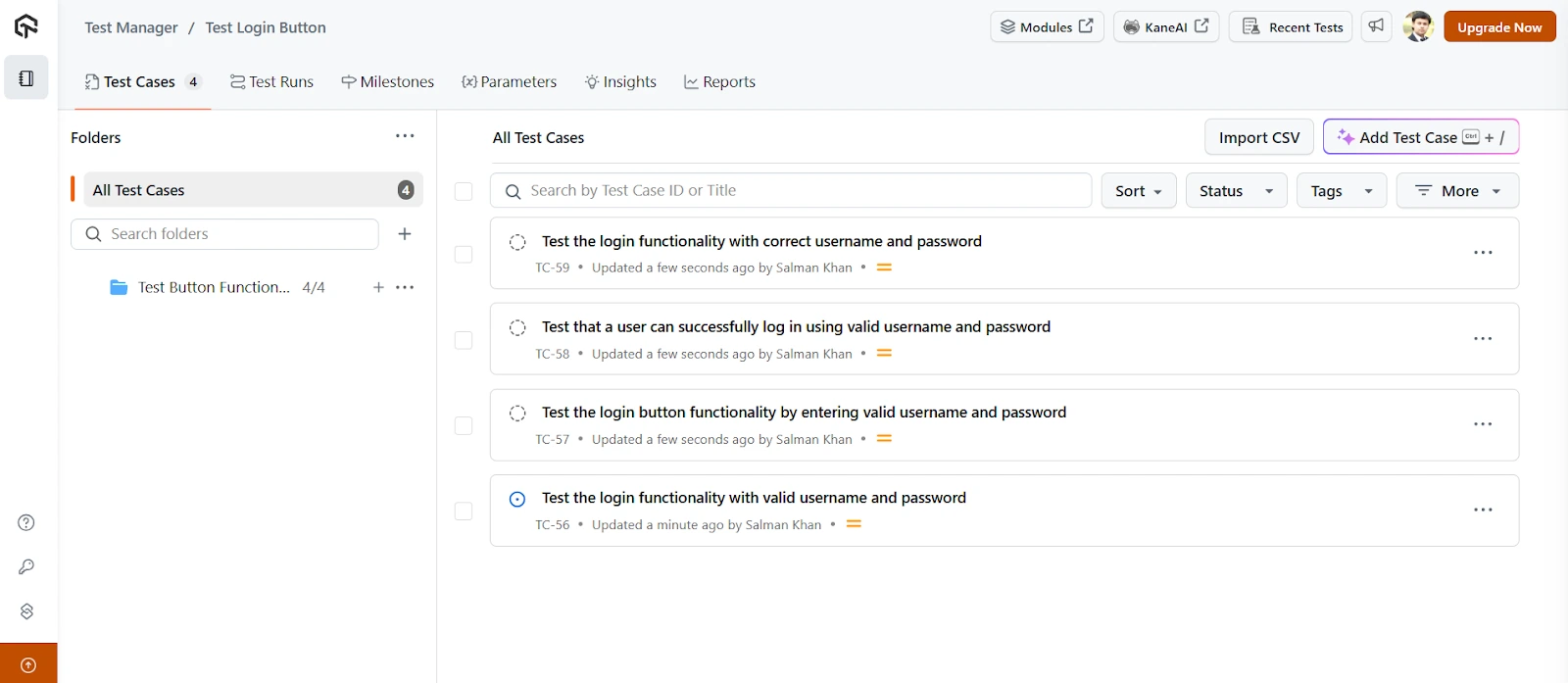
Features:
- Test Plan and Test Case Generation: Creates test plans and test cases using natural language for easy organization.
- Easy Import: Allows importing test cases via CSV or API with automatic mapping to fields.
- Keyboard Shortcuts: Supports shortcuts like the Tab key to auto-generate test cases faster.
- Effortless Migration: Enables seamless migration from other tools, such as TestRail, without hassle.
- Modules: Allows you to reuse pre-existing test steps across multiple test cases.
- Jira Integration: Provides integration with Jira for real-time bug tracking and collaboration.
To get started, create your first project in Test Manager, then check out the TestMu AI's Test Manager documentation.
In addition, TestMu AI Test Management lets you effortlessly generate tests from your created test cases using KaneAI.
KaneAI is a GenAI-native QA Agent-as-a-Service platform that enables test creation, evolution, and debugging through natural language. With this, you can convert test cases into executable test scripts, eliminating the need for writing test scripts and accelerating your overall testing process.

What Does a Test Case Example Look Like?
A login test case example states one objective, such as signing in with valid credentials, then lists preconditions, test data, steps, and the expected result.
| Field | Value |
|---|---|
| Test case ID | TC_LOGIN_001 |
| Objective | Verify that a registered user can sign in with a valid email and password |
| Preconditions | The account exists and is active, the user is signed out, and the browser cache is cleared |
| Test data | Email: qa.user@example.com, Password: Valid@123 |
| Steps | 1. Open the login page. 2. Enter the email. 3. Enter the password. 4. Click Sign in. |
| Expected result | The dashboard loads and shows the user's name in the header |
| Postconditions | The session is active; sign out to reset the state for the next case |
Pair it with negative cases that reuse the same template: TC_LOGIN_002 for a wrong password that should show an error, TC_LOGIN_003 for a locked account, and TC_LOGIN_004 for empty fields, so each expected behavior has its own case.
What Are the Types of Test Cases?
The main types of test cases are functional, UI, performance, integration, usability, database, security, and user acceptance test cases, each checking a different quality of the software.
In software testing, understanding the different types of test cases is essential for selecting the right one that aligns with the objectives of the testing process and the nature of the software being tested.
- Functional Test Case: Verifies that the software application performs its intended functions according to the specified requirements.
- User Interface (UI) Test Case: Tests the visual elements and interactive components of the software application to ensure they function correctly and maintain a consistent appearance.
- Performance Test Case: Evaluates the software application's responsiveness, stability, and scalability under various load conditions.
- Integration Test Case: Validates how different components or modules within the software interact to ensure they work together as expected.
- Usability Test Case: Assesses how intuitive and user-friendly the software application is by simulating real-world user interactions.
- Database Test Case: Checks the integrity, reliability, performance, and security of database operations of the software application.
- Security Test Case: Identifies vulnerabilities and ensures the software protects against unauthorized access and security threats.
- User Acceptance Test (UAT) Case: Ensures that the software meets business requirements and end-user expectations before it is released.
How Do Manual and Automated Test Cases Differ?
Manual test cases are written for a person to follow and judge, while automated test cases become scripts with exact locators, data, and assertions that a tool runs unattended.
Write manual cases for exploratory, usability, and one-off checks, and automate stable, repetitive cases such as regression testing and smoke checks. Keep each automated script traceable to its manual case ID, so a failure report points back to the requirement it covers.
How Is AI Changing How Test Cases Are Written?
AI now drafts test cases from requirements and user stories, but a tester still checks that each generated case targets the right behavior and has a verifiable expected result.
Most AI test case generation tools turn a requirement or user story into a first set of positive, negative, and edge cases in seconds. The limits are well documented: GitHub's Copilot documentation warns that generated tests may not cover all scenarios and should always be reviewed.
Review AI-drafted cases the way you would a new tester's work: merge near-duplicates, confirm each case has one objective and a checkable expected result, and map it to a requirement ID before it enters the suite.
What Are the Best Practices for Writing Test Cases?
Test case best practices are writing clearly, mapping each case to a user need, keeping steps minimal, cleaning up test data, covering critical features, reusing steps, and keeping cases independent.
To ensure your test cases are effective, it is important to follow certain best practices to write clear, efficient, and reusable test cases that save time and improve the quality of testing.
- Ensure Clarity and Transparency: Write test cases that are clear, concise, and direct. It should help your team know exactly what actions to take and what results to expect.
- Map Test Cases to User Needs: Use the SRS and requirements documentation to ensure your test cases reflect the actual end-user journey and cover critical functionalities.
- Keep Test Steps Minimal: Limit each test step within a test case to logical steps when possible. Fewer steps reduce complexity and the likelihood of error during test execution.
- Write Self-Cleaning Test Cases: Each test case should reset the environment back to its original state after test execution. It supports clean re-runs and maintains test integrity.
- Ensure High Test Coverage for Critical Features: Write test cases to maximize test coverage, especially for high-priority features and edge cases, even if full test coverage isn't realistic.
- Reuse and Reference: Avoid duplicating effort. If a test scenario already exists, reference the existing Test Case ID instead of rewriting test cases.
- Ensure Independence and Repeatability: Good test cases are self-contained and produce the same test results regardless of who runs them. Eliminate inter-test dependencies to maintain reliability.
What Is the Difference Between a Test Case, Test Scenario, Test Suite, and Test Script?
A test scenario names what to verify, a test case details the steps and expected result, a test suite groups related cases, and a test script automates a case.
Test case, test scenario, test suite, and test script are all important terms used in software testing. While they are closely related, each has a different role.
Let’s look at how a test case differs from the others:
| Parameter | Test Case | Test Scenario | Test Suite | Test Script |
|---|---|---|---|---|
| Definition | Detailed set of steps, inputs, and expected results based on a scenario. | High-level functionality or feature to be tested. | A collection of related test cases grouped together. | A set of instructions written in a programming language that executes the test steps. |
| Focus | What and how to test. | What to test. | Organized test execution. | Actual test execution. |
| Example | Steps to test login with valid credentials. | Verify login functionality. | A suite including login, logout, and password reset tests. | Selenium with Java code to automate the login functionality. |
Where Should You Start With Writing Test Cases?
Start with the requirements for your most critical feature, write one test case per expected behavior using a consistent template, and review each case with a second tester before execution.
Writing effective test cases is a fundamental part of the software testing process. It not only helps ensure that the software application behaves as expected but also makes it easier to identify defects early.
A good test case provides clarity to all stakeholders and supports better collaboration among team members. To write effective test cases, it's important to maintain a consistent format, clearly define test objectives, include detailed steps with expected outcomes, and account for both positive and negative scenarios.
Furthermore, you can generate test cases with AI to expedite the test case creation process.
Which Sources Does This Test Case Guide Cite?
This test case guide draws on the research paper listed below, which revisits how the software test case concept is defined and used.
What Is a Test Case? Revisiting the Software Test Case Concept: https://www.researchgate.net/publication/221045985
Author

Nazneen Ahmad
Blogs: 39


Nazneen Ahmad is a freelance Technical Content SEO Writer with over 6 years of experience in crafting high ranking content on software testing, web development, and medical case studies. She has written 60+ technical blogs, including 50+ top-ranking articles focused on software testing and web development. Certified in Automation Basic and Advanced Training - XO 10, she blends subject knowledge with SEO strategies to create user focused, authoritative content. Over time, she has shifted from quick, keyword-heavy drafts to producing content that prioritizes user intent, readability, and topical authority to deliver lasting value.
Reviewer

Abhishek Mishra
Reviewer
Abhishek Mishra is a Technical Product Manager at TestMu AI, where he owns Test Manager, the test management product. He has over 8 years of experience in product management and market analysis. His expertise spans across AI-native software testing, product strategy, and analytics. Previously, Abhishek served as the Product Lead at IndiaClan and co-founded Gartley618 Technologies, where he led innovative projects in quantitative trading and blockchain. He holds a B.Tech degree.


Test Case FAQs
Did you find this page helpful?
More Related Learning Hubs
TestMu AI forEnterprise
Get access to solutions built on Enterprise
grade security, privacy, & compliance
- Advanced access controls
- Advanced data retention rules
- Advanced Local Testing
- Premium Support options
- Early access to beta features
- Private Slack Channel
- Unlimited Manual Accessibility DevTools Tests