
Test Your Website on Real Desktop and Mobile Browsers
Run live and automated cross browser tests on Chrome, Safari, Firefox, and Edge across 3,000+ browser-OS combinations. No setup, no device lab.

- TestMu AI (Formerly LambdaTest)
- /
- Learning Hub
- /
- Usability Testing: Methods, Metrics, and Examples
Usability Testing: Methods, Metrics, and Examples
Usability testing shows how real users complete tasks in your product. Learn the methods, metrics, tools, examples, and common mistakes to avoid.
Last Updated on:
On This Page
- TL;DR
- What Is Usability Testing?
- Why Perform Usability Testing?
- Who Does Usability Testing?
- What Are the Types and Methods of Usability Testing?
- How Do You Perform Usability Testing?
- Which Usability Testing Metrics Should You Track?
- How Does Usability Testing Differ From User Testing?
- How Does Usability Testing Differ From Accessibility Testing?
- Which Tools Are Used for Usability Testing?
- What Are Real-World Usability Testing Examples?
- What Are the Common Mistakes and Challenges in Usability Testing?
- What Are the Best Practices for Usability Testing?
- How Is AI Changing Usability Testing?
- Why Should You Run Usability Testing Regularly?
At some point in every product's life, someone watches a real user interact with it for the first time. Sometimes it goes exactly as expected. More often, the user does something nobody anticipated, and it makes the team realize they have been looking at the product for too long to see it clearly.
Usability testing is a way to build that outside perspective into your process, before it catches you off guard. Instead of waiting for a support ticket or a frustrated customer to tell you something is confusing, you create the conditions to find it yourself. You bring in real users, give them real tasks, and watch what happens without steering them. What you learn tends to be more useful than any internal review or design critique.
TL;DR
Usability testing is a qualitative research method where real users perform tasks on an application to identify where they struggle. Conducted by QA and UX teams using techniques like remote testing, it evaluates a product's user-friendliness across engagement, effectiveness, efficiency, error tolerance, and ease of learning.
Key Concepts in Usability Testing
- The 5 E's: The framework that defines what a usability test measures, covering engagement, effectiveness, efficiency, error tolerance, and ease of learning. Each dimension maps to a different kind of friction a user can hit.
- The rule of five: Jakob Nielsen's finding that five participants surface roughly 85% of a design's usability problems, which is why three small studies beat one large one on the same budget.
- System Usability Scale: A ten-item questionnaire scored from 0 to 100 that turns subjective impressions into a comparable number. Across 500 evaluations the mean score is 68, so 68 is the benchmark to beat.
- Moderated and unmoderated testing: The two delivery modes. Moderated sessions allow follow-up questions and deeper insight, while unmoderated sessions run cheaper, faster, and on the participant's own device.
Usability Testing vs Accessibility Testing
Usability testing asks whether a product is easy to use for its target audience and is judged by observation. Accessibility testing asks whether it is usable by people with disabilities and is judged against WCAG success criteria. They overlap, but neither one substitutes for the other.
What Is Usability Testing?
Usability testing is a qualitative research method that gives teams direct insight into how real users interact with a software application. It identifies friction points and assesses whether a product is user-friendly or has a modern web design that supports task completion naturally.
The primary goal is to find out whether the application is easy to use and to uncover opportunities to improve interaction design. Tests are conducted with real users on prototypes or live products, capturing authentic behavior that internal reviews rarely surface.
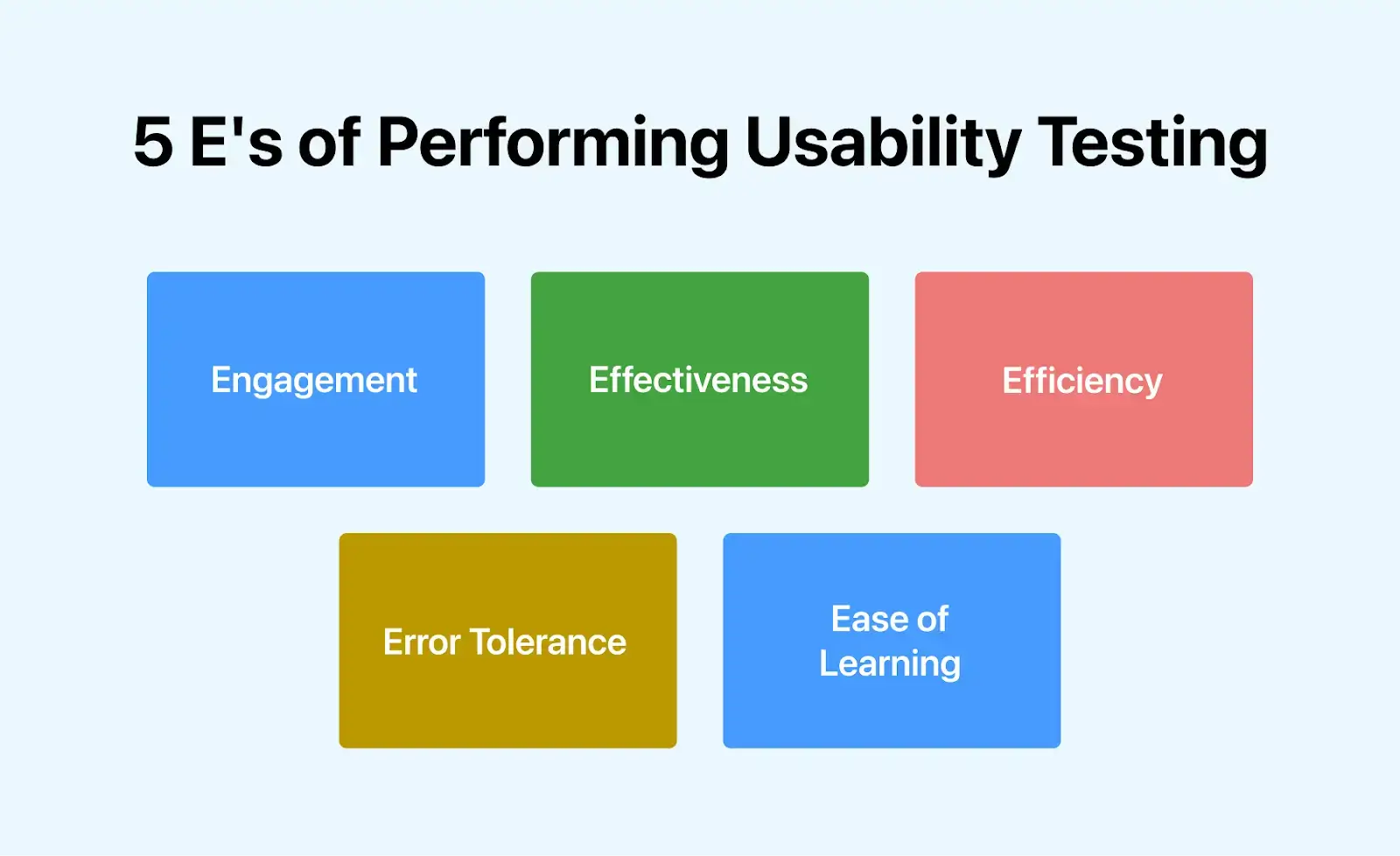
Every usability test is evaluated across five dimensions, known as the 5 E's:
- Engagement: How captivating the application is and whether users want to keep using it.
- Effectiveness: Whether the application does what it promises and core features work as intended.
- Efficiency: How quickly users reach their goals, measured by navigation speed and number of steps required.
- Error Tolerance: How easily users can recover from mistakes without losing progress or getting stuck.
- Ease of Learning: How quickly new users get up to speed without needing a manual.
Note: According to ISO 9241, usability refers to the degree to which specified users can utilize a product to accomplish particular goals effectively, efficiently, and satisfactorily within a defined context..
Why Perform Usability Testing?
Teams look at their own product every day, which makes it impossible to see it the way a first-time user does. Usability testing is the mechanism for buying back that outside perspective before a support ticket buys it for you.
It serves three purposes that no internal review reliably covers:
- Problem identification. It surfaces the friction points real users hit, including the ones the team stopped noticing months ago.
- Opportunity discovery. Watching someone try to do something your product does not support is the cheapest product research available.
- Behavioural insight. It shows what users actually do, which is regularly different from what they say they do in a survey.
The cost argument runs in one direction. Testing late means finding issues when the fix is a rebuild rather than a design change, so the common failure is not skipping usability testing entirely but scheduling it after the code is written. Alongside web application testing, mobile app testing raises the stakes further, since a confusing onboarding flow on a phone is uninstalled rather than tolerated.
The honest trade-offs: it is a non-functional test that leans on manual testing, so it costs QA time that cannot be automated away. Participants are a small sample rather than your whole user base. And acting on the findings takes judgement, because not every change a participant asks for improves the experience for everyone else.
Who Does Usability Testing?
Usability testing is rarely owned by one role. Five groups contribute, and the sessions work best when more than one of them is watching:
- UX designers own the interface being tested and translate findings back into design decisions.
- Usability engineers and UX researchers design the study, facilitate sessions, and analyse the results without steering participants.
- Product managers decide which findings become work, since not every observed friction point is worth fixing.
- Developers gain the most from simply watching. Seeing a user fail at something you built is more persuasive than reading it in a report.
- QA teams bring the habit of reproducing and documenting, and they already own the environments the sessions run on.

Note: Fix bugs, inconsistencies, and usability issues with better testing infrastructure. Try TestMu AI free!
What Are the Types and Methods of Usability Testing?
Most usability methods are described by three independent choices rather than as a single list. Pick one from each row and you have described your study.
| Choice | Option A | Option B |
|---|---|---|
| Is a facilitator present? | Moderated. A facilitator guides the session, answers questions, and probes on interesting moments. Deeper insight, higher cost, harder to schedule. | Unmoderated. Participants work alone on their own device. Cheaper, faster, scales to more participants, but you cannot ask why. |
| Where does it run? | Remote. Runs anywhere, covers multiple regions and real devices, and lets participants use hardware they already know. You give up control of the test environment. | In person. Controlled setting, easy to swap a device when something breaks, and body language is visible. Expensive and geographically limited. |
| What is the output? | Qualitative. Observations, quotes, and reasons. Answers why users struggle. Five participants is usually enough. | Quantitative. Task success rates, timings, error counts. Answers how much and how often. Needs larger samples to be meaningful. |
Beyond those three axes, a handful of named usability testing methods target specific questions:
- Task-based performance testing is the default method. Participants attempt realistic tasks while you observe. Thinking aloud during the task captures reasoning; probing afterwards avoids disrupting it.
- Card sorting tests information architecture. Participants group labelled cards the way they expect, so navigation matches their mental model rather than your org chart.
- Tree testing is the follow-up to card sorting. Given only the navigation hierarchy, participants are asked where they would go to accomplish a task.
- Five-second test shows a screen for five seconds and then asks what the product does and who it is for. It measures first impressions and nothing else.
- Guerrilla testing recruits informally in public spaces. Low cost, low control, and useful early when any feedback beats none.
- A/B testing compares two live variants on real traffic. It tells you which version performs better without telling you why, so it complements moderated sessions rather than replacing them.
- Eye tracking records where attention lands. It supplements other methods and cannot establish usability on its own.
- Expert review has specialists evaluate against heuristics instead of recruiting users. Fast and cheap, but it predicts problems rather than observing them.
Automated checks belong alongside these rather than inside them. Automation testing can confirm a flow still works after a redesign, which protects the fixes your usability sessions produced, but it cannot tell you whether the flow makes sense.
How Do You Perform Usability Testing?
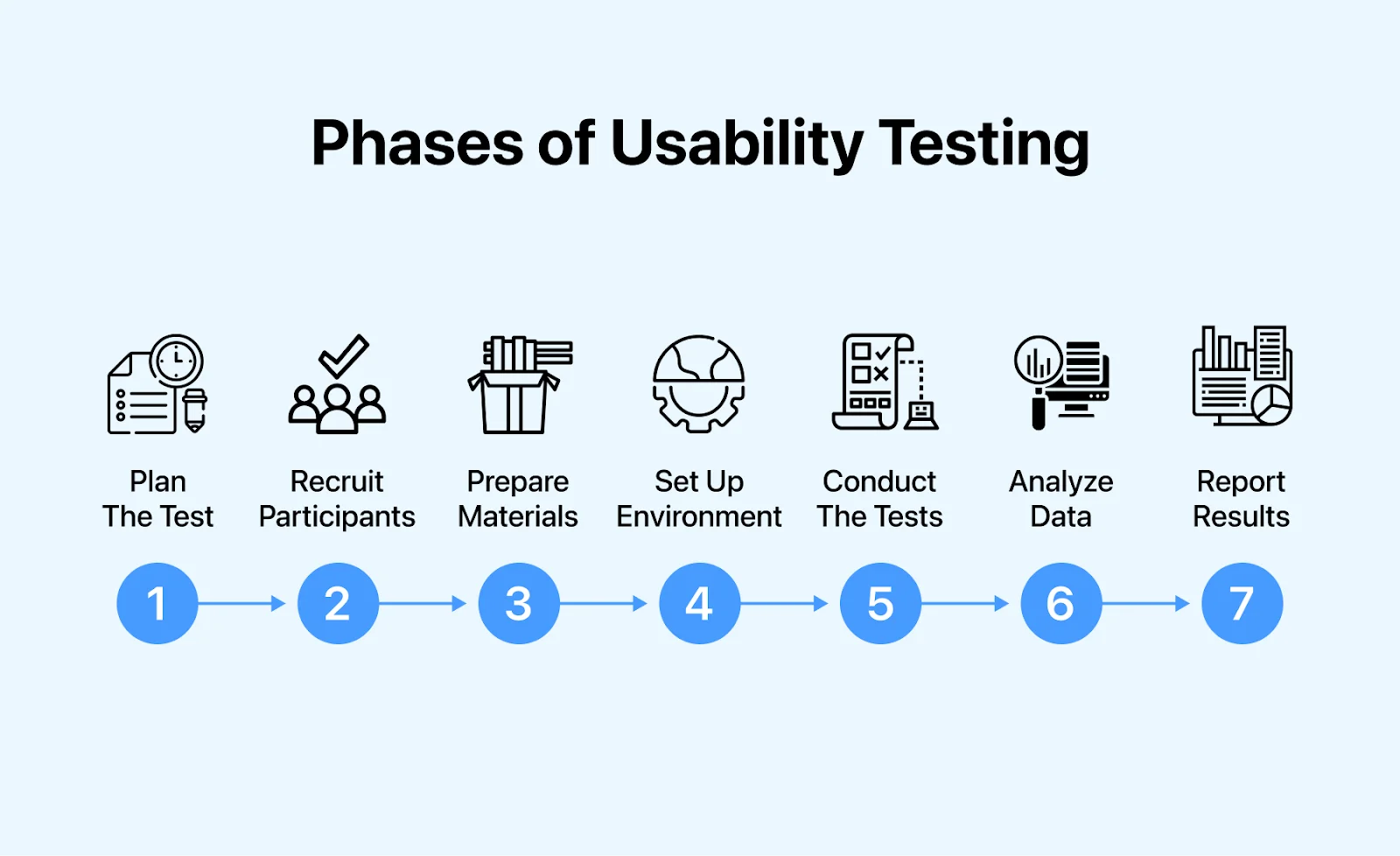
A usability study runs in seven phases. The first three determine whether the rest produces anything useful.
- Plan the test. Write down the specific question you need answered before choosing a method. "Can new users complete checkout without help?" leads somewhere. "Is our UX good?" does not.
- Recruit participants. Screen for people who match your actual audience. Recruiting colleagues or friends is the fastest way to get results that validate what you already believed.
- Prepare materials. Write the tasks as goals rather than instructions. "Buy a winter coat under 100 dollars" tests navigation; "click the Coats menu" tests nothing.
- Set up the environment. Decide on recording, note-taking, and who observes. Use the same script for every session so results stay comparable.
- Run a pilot, then the sessions. One dry run catches broken tasks and setup problems. During real sessions, avoid leading questions and let participants struggle without rescuing them.
- Analyse the data. Group observations into themes rather than listing every incident, and record the metrics covered in the next section so the following round has a baseline to compare against.
- Report and iterate. Present findings with the recommended change and its evidence, then test again once the fix ships.
Running Sessions on a Cloud Platform
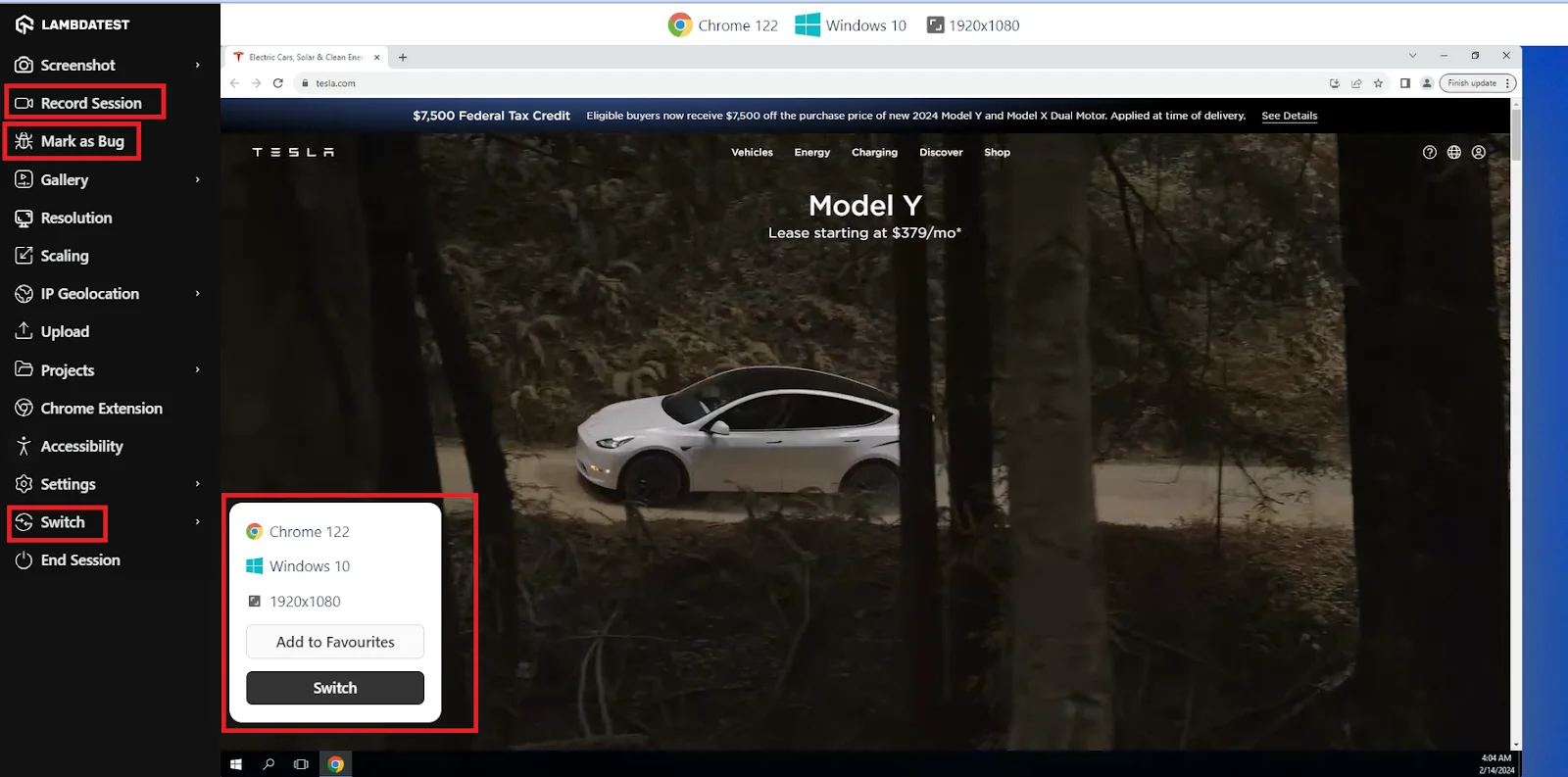
Phase four is where most teams stall, because an in-house device lab is expensive and never covers enough configurations. Running sessions on a cloud platform removes that constraint. On TestMu AI, open Real Time from the dashboard, choose Desktop under Web Browser Testing, enter your URL, pick the operating system, browser, and resolution, then start the session.
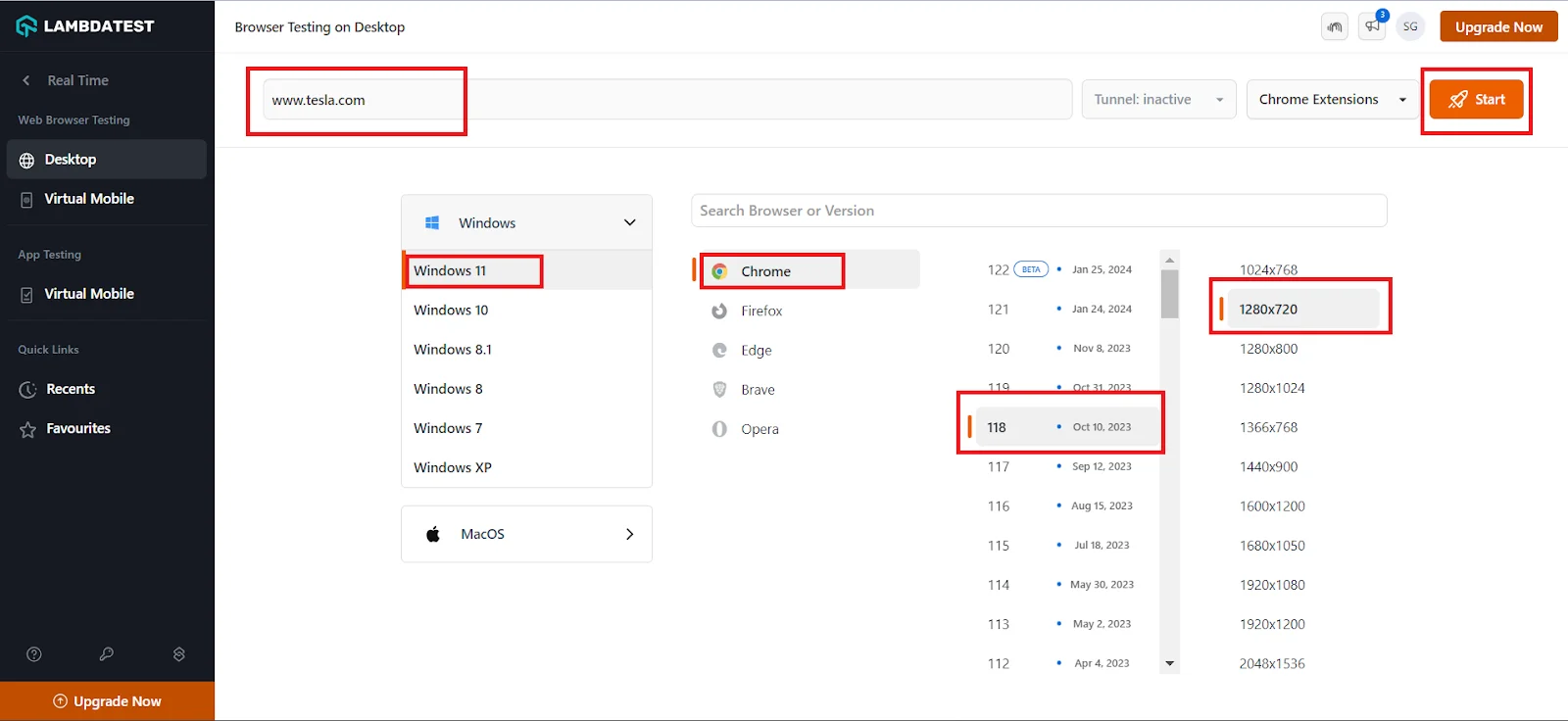
A virtual machine opens in the browser and you drive it like any other session. Mark as Bug captures a finding with the full environment attached and files it to your tracker, Record Session documents the run for teammates who could not attend, and Switch changes browser, version, or resolution mid-session without losing your place.
Which Usability Testing Metrics Should You Track?
Observation tells you what went wrong. Metrics tell you whether the redesign fixed it. Without a number recorded before and after, a usability programme has no way to prove it improved anything, and it becomes the first thing cut when budgets tighten.
Four measures do most of the work:
| Metric | How it is calculated | What it tells you |
|---|---|---|
| Task success rate | Participants who completed the task divided by participants who attempted it | The bluntest measure of whether the product works. The benchmark is 78%, the average across 1,189 tasks measured by MeasuringU, so scoring below that puts you behind the field. |
| Time on task | Median seconds from task start to completion, using median rather than mean so one lost participant does not distort it | Where the flow is slow rather than broken. Useful for comparing two designs that both eventually succeed. |
| Error rate | Total errors divided by total task attempts, counting wrong turns, invalid entries, and abandoned steps | How error tolerant the design is. High error rates with high success rates mean users recover, but the path is unclear. |
| System Usability Scale | A ten-item questionnaire scored 0 to 100, administered immediately after the session | A comparable satisfaction score. Anything above the 68 benchmark is above average for the industry. |
How Many Participants You Actually Need
The most common objection to usability testing is that recruiting enough participants is too expensive. The research says you need fewer than you think. In Jakob Nielsen's 2000 analysis, five participants surface roughly 85% of a design's usability problems, because the same friction points repeat across users.
The practical consequence is about scheduling, not headcount. If your budget covers fifteen participants, Nielsen's recommendation is three studies of five rather than one study of fifteen, since the second and third rounds test whether your fixes worked. One large study finds the same 85% and gives you no chance to verify the redesign.
Reading the System Usability Scale
The System Usability Scale was created by John Brooke in 1986 as a quick post-session questionnaire, and it has outlasted most of what it was designed to measure. Ten statements, five response options each, producing a single score from 0 to 100.
The score is not a percentage. A SUS of 68 does not mean 68% of users were satisfied. It is a point on a scale whose meaning comes entirely from comparison, and the reference point is that the mean across more than 500 evaluations is 68. Scoring 70 puts you slightly above average. Scoring 50 puts you well below it, regardless of how the number reads in isolation.
Record all four measures in the same session and the qualitative findings gain a spine. You can say the checkout redesign lifted task success from 62% to 91% and SUS from 54 to 73, which is a sentence a product review can act on, unlike a list of observations.
How Does Usability Testing Differ From User Testing?
While usability and user testing may appear similar and share a common ultimate objective, they use distinct approaches. Below, we will outline the differences to provide a comprehensive understanding of usability testing and user testing:
| Aspect | Usability Testing | User Testing |
|---|---|---|
| Ultimate Objective | Evaluating users' needs within the context of an existing software application, even during prototype stages of development | Assessing the desirability of a specific software application for users. |
| Focus | More software application-focused | Entirely user-focused |
| Approach | Examines how users interact with and accomplish tasks using an existing software application | Questions about whether users want a specific software application |
| Purpose | Improving the usability and functionality of an existing software application | Identifying the type of software application beneficial for users |
| Observation | Evaluate user interactions and task completion with the software application | Measure user preferences and desires |
| Timing | Applied to existing software applications, including those in prototype stages | Often used for new software application ideas or concepts |
| Emphasis | Software application usability and functionality | Software application desirability |
How Does Usability Testing Differ From Accessibility Testing?
Since we understood usability testing vs user testing, you might also think of accessibility testing as similar to usability testing. However, this is not true. Below are the exact differences between usability testing and accessibility testing:
| Aspects | Usability Testing | Accessibility Testing |
|---|---|---|
| Focus | Ensures the application is easy and intuitive to use | Focuses on making the application accessible to disabled people |
| Purpose | Verifies the user-friendliness of the software application | Measures the extent of accessibility that an application can provide |
| Methodology | Identifies and fixes usability issues for a seamless user experience | Performed the following WCAG (Web Content Accessibility Guidelines) to analyze accessibility strategically |
| Key Considerations | Focuses on flexibility, learnability, functionality, and industrial design | Emphasizes the four WCAG principles: perceivable, operable, understandable, and robust |
| User Involvement | Involves real users completing tasks while observers record where they struggle | Can be run without participants, though testing with assistive technology users catches what audits miss |
| Technical Requirements | Needs facilitation skill and a way to observe sessions, but no code access | Requires reviewing markup against WCAG success criteria, with working knowledge of HTML, CSS, and ARIA |
| Typical Tooling | Crazy Egg, Userlytics, Qualaroo, Lookback, UserFeel | Google Lighthouse, WAVE, the axe browser extension, and screen readers such as NVDA and VoiceOver |
The distinction matters legally as well as practically. Accessibility is measured against a published standard, the Web Content Accessibility Guidelines, and US federal agencies test against it under Section 508. Usability has no equivalent pass mark, which is why it is reported through metrics and observations rather than a conformance verdict.
Running both is the norm on regulated products. A checkout flow can pass every WCAG success criterion and still confuse every participant who tries to use it, and a beautifully usable flow can be entirely unreachable by keyboard. The accessibility testing guide linked above covers the conformance side in depth.
Which Tools Are Used for Usability Testing?
Usability tooling splits into three jobs: providing the environment the session runs in, recording what the participant did, and recruiting participants. Most teams need at least two of the three. A fuller breakdown is in our roundup of usability testing tools.
| Tool | Job it does | Worth knowing |
|---|---|---|
| TestMu AI | Session environment | Runs live interactive sessions across 3,000+ browser, OS, and resolution combinations with recording, in-session bug logging, and geolocation, so no physical lab is needed. |
| Lookback | Moderated and unmoderated recording | Built for teams that already have their own participants. Observers can watch live, comment, and tag colleagues without interrupting the session. |
| UserTesting | Recording plus participant panel | Now also includes UserZoom, which it acquired, so older comparison articles listing the two as separate products are out of date. |
| Userlytics | Unmoderated recording | Records webcam, audio, and screen together, with unlimited annotations and highlight reels for sharing findings. |
| Loop11 | Unmoderated task testing | Mixes tasks and questions in one study to produce qualitative and quantitative results together, with AI-generated summaries and transcripts. |
| Crazy Egg | Behavioural analytics | Heatmaps, scroll tracking, session recordings, and A/B testing on live traffic. Shows where attention goes at scale, not why. |
| Contentsquare | Behavioural analytics | Formerly Clicktale, which no longer exists separately. Adds crash-trend reporting that traces which user actions preceded a failure. |
| Qualaroo | In-product surveys | Prompts live visitors with targeted questions, useful for collecting attitudinal data continuously between studies. |
Mobile studies can run on cloud-based Android emulators and iOS simulators for early rounds, moving to real hardware when touch behaviour or performance is the thing being tested.

What Are Real-World Usability Testing Examples?
Usability testing is critical to evaluate the effectiveness and user-friendliness of software applications. Below are five real-world examples highlighting the diverse applications and benefits:
Usability Testing Example #1: Zara
An illustrative instance of usability testing is demonstrated through Zara, a renowned clothing brand. A user expressing frustration with the Zara app's shopping experience initiated usability studies to identify common challenges and enhance the interface.
Usability Test:
Guerrilla usability testing was chosen as the primary method. The researcher engaged seven regular Zara shoppers at a mall for the test.
Tasks included:
- Search for a winter coat suitable for the recent cold weather.
- Evaluate a coat to determine its suitability.
Outcomes:
The researcher gathered valuable information about users' behavior on the app. They reviewed recordings to pinpoint the application's main usability issues. Utilizing affinity mapping, they categorized problems into groups like search/filter, cart edits, picture carousel, dropdown menu, and others. The prototype underwent testing with seven additional users to ensure no usability issues remained.
Usability Testing Example #2: Quora
The second usability study example is of Quora, a popular Q&A social network. The objectives include identifying usability issues on the Quora website, uncovering improvement opportunities, and gaining insights into user interactions with the platform.
Usability Test:
Rangga Ray Irawan conducted the test during the COVID-19 pandemic, opting for remote usability testing. Five users with diverse backgrounds participated in the testing session.
Participants were initially posed with a few pre-test questions about their use of social media, Quora, opinions, and standard demographic information. The test comprised nine tasks designed to simulate real-life scenarios of users engaging with the platform and testing its key features.
An Example Task Was:
You're a beginner in stock investing and need clarification about suitable stocks for beginners. You decide to ask questions on Quora. Demonstrate how you can ask a question on Quora. Following the test, participants were subjected to post-study interview questions.
Outcomes:
The overall success rate of the test was approximately 71%, with 45 attempts to perform tasks and 10 failures.
Uncovered usability problems included:
- Icons and buttons must be more extensive and easily identified.
- Confusing terms such as "downvote."
- The "find room" button does not meet users' expectations.
Researchers devised solutions to these problems, detailed in the Quora Usability Testing Case Study.
Usability Testing Example #3: McDonald's
In 2016, McDonald's in the UK launched its mobile ordering app and enlisted user testing to uncover issues and evaluate the user-friendliness of their interface. SimpleUsability, a behavioral research company, managed the study.
Usability Test:
A total of 15 usability sessions were conducted, supplemented by a survey completed by 150 participants who interacted with the McDonald's app.
Outcomes:
Using the gathered information, SimpleUsability identified several notable usability issues. These included poorly designed CTAs, communication breakdowns between the app and the restaurant, and a need for more personalized options for specific orders. Recommendations were provided to enhance the application's UI.
The above examples underscore the importance of conducting usability testing during the development process to address issues and gain valuable insights. By analyzing the results and identifying potential usability challenges early on, teams can make informed decisions to improve the user experience before the software is fully built and released.
This proactive approach helps resolve issues promptly and ensures that the final product effectively meets user expectations and requirements.
What Are the Common Mistakes and Challenges in Usability Testing?
Most failed usability studies fail for one of a small number of reasons. These are the common usability testing mistakes worth designing against:
- Testing with the wrong people. Recruiting colleagues or friends because it is faster produces polite, informed feedback from people who already know how the product works. This is the single most common way a study produces nothing.
- Testing too late. Running the study after the build is complete turns every finding into an argument about scope rather than a design change.
- Interrupting the participant. Stepping in when someone struggles destroys the finding you were there to collect. The struggle is the data.
- Leading questions. Asking "was that easy to find?" gets agreement. Asking nothing and watching gets the truth.
- Badly written tasks. Tasks phrased as UI instructions test whether someone can follow instructions. Tasks phrased as goals test the product.
- Running one round only. A single study finds problems and never confirms the fixes worked, which is the half of the loop that changes the product.
- Skipping the pilot. One dry run catches broken tasks and setup issues before they cost you real sessions.
- Deferring to stakeholder opinion. Subject matter experts within the company predict user behaviour poorly, because they cannot un-know how the system works.
The organizational challenge sits underneath all of these. Findings only change a product when someone has the authority to act on them, so a study run without a stakeholder who owns the outcome tends to produce a well-written report and no shipped change.
What Are the Best Practices for Usability Testing?
Seven practices that separate a study that changes the product from one that produces a document:
- Test early and repeatedly. Paper sketches and prototypes are testable. Waiting for a finished build means findings arrive after the decisions are locked.
- Run small rounds inside sprints. Five participants per Agile iteration feeds findings into the next build rather than into a backlog nobody revisits.
- Define success before the session. Decide what a passing task looks like in advance, or you will grade against whatever happened.
- Record a metric every time. Without a before and after number, you cannot show the redesign helped, and the programme becomes the first thing cut.
- Have developers watch at least one session. It is consistently more persuasive than any report, and it costs an hour.
- Respect participants' time. Sessions beyond an hour produce fatigue rather than insight. Fewer tasks answered well beats many answered badly.
- Fix one thing at a time. Changing five things between rounds means you cannot tell which one worked.
How Is AI Changing Usability Testing?
AI is changing usability testing by transcribing and summarizing sessions, tagging moments of confusion, and clustering findings across dozens of participants in minutes.
Some tools now simulate users with AI agents that attempt tasks and report where they get stuck. These synthetic sessions are useful for catching obvious friction early, but they do not feel frustration or bring real-world context the way people do.
Use AI to scale analysis, not to replace participants: keep real users for decisions that affect the design. Pair usability findings with ux testing to cover the full experience.
Why Should You Run Usability Testing Regularly?
Run usability testing regularly because every release can add friction, and a few sessions with real users reveal problems that analytics and automated tests miss.
Performing usability testing is a great way to discover unexpected bugs, find what is unnecessary or unused before going any further to the actual users, and get unbiased opinions from an outsider.
Often considered an expensive and time-consuming process, usability testing is a favorable process before final implementations. You might not implement at a larger scale; an internal team or close group can run tests on different prototypes, from a journey of rough ideas to fully functioning software applications. Also, by the end of the tests, always ask for recommendations (be polite & take feedback positively).
Include your QA team in usability testing. It gives them a fresh perspective on how real users operate the product, and highlights gaps between what the software can do and what users actually try to do. That loop (test, learn, fix, repeat) is what separates products people love from ones they tolerate.
If you are ready to start, TestMu AI's Real-Time Testing lets you run usability sessions across 3,000+ browser, OS, and virtual device configurations without setting up a lab. You can record sessions, log bugs to any of 65+ trackers with the environment detail attached, and switch browser or resolution mid-session. When a study needs physical hardware rather than emulators, the real device cloud provides 50,000+ real devices, and geolocation across 180+ countries covers studies where content varies by region.
Testing web or mobile apps without writing code? KaneAI by TestMu AI turns plain-English instructions into tests.
Author

Nazneen Ahmad
Blogs: 37


Nazneen Ahmad is a freelance Technical Content SEO Writer with over 6 years of experience in crafting high ranking content on software testing, web development, and medical case studies. She has written 60+ technical blogs, including 50+ top-ranking articles focused on software testing and web development. Certified in Automation Basic and Advanced Training - XO 10, she blends subject knowledge with SEO strategies to create user focused, authoritative content. Over time, she has shifted from quick, keyword-heavy drafts to producing content that prioritizes user intent, readability, and topical authority to deliver lasting value.
Reviewer

Rahul Mishra
Reviewer
Rahul Mishra is a Lead Member of Technical Staff at TestMu AI, leading frontend engineering and accessibility testing across the quality engineering platform. He mentors frontend engineers, runs code reviews and sprint planning, optimizes React.js rendering performance, and makes product features accessible to users with disabilities through WCAG and ADA-compliant accessibility audits. He brings 10+ years of experience across React.js, VueJS, TypeScript, Swift, Objective-C, and AWS, with earlier work as a Technical Lead at VectoScalar Technologies. Rahul holds a B.E. in Information Technology.


Usability Testing FAQs
Did you find this page helpful?
More Related Learning Hubs

TestMu AI forEnterprise
Get access to solutions built on Enterprise
grade security, privacy, & compliance
- Advanced access controls
- Advanced data retention rules
- Advanced Local Testing
- Premium Support options
- Early access to beta features
- Private Slack Channel
- Unlimited Manual Accessibility DevTools Tests