

Power Your Software Testing with AI Agents and Cloud
The Native AI-Agentic Cloud Platform to Supercharge Quality Engineering. Test Intelligently and Ship Faster.


- TestMu AI (Formerly LambdaTest)
- /
- Blog
- /
- 15 Types of Software Testing and When to Run Each
15 Types of Software Testing and When to Run Each
The 15 core types of software testing, what each one verifies, when to run it in your pipeline, and which to automate. With a decision guide.
Last Updated on:
Google's engineering teams stopped arguing about what to call a test and started sizing tests by how long they are allowed to run. In the convention Simon Stewart published on the Google Testing Blog, a Small test gets 60 seconds, a Medium test 300 seconds, and a Large test 900 seconds or more, mapping to unit, integration, and end-to-end tests respectively.
That framing is the useful one. The question is rarely how many types of software testing exist. It is which ones your project actually needs, where each runs, and what each costs you in pipeline time.
TL;DR
The 15 core types of software testing fall into four categories: functional, non-functional, structural, and change-related. Functional types check whether the software does the right thing, and non-functional types check how well it does it. Most teams run five to eight of the 15, chosen by defect cost, release frequency, and audience breadth.
What Are the Four Categories of Software Testing?
- Functional testing: Verifies the software does what the requirements say. A failure means the behaviour itself is wrong and the feature cannot ship. Automate: yes.
- Non-functional testing: Measures how well the software behaves rather than what it does, covering speed, security, and accessibility. A failure means it works but will not survive the real world. Automate: partly.
- Structural testing: Exercises internal code paths rather than visible behaviour, which is why it is also called white box testing. Requires source code access: yes. Coverage of branches and statements is the measure.
- Change-related testing: Confirms a fix worked and nothing else broke. Regression testing and sanity testing are its two members, and both run after every change. Automate: yes.
Which Types Should You Automate?
- Always automate: Deterministic types that repeat every release, such as unit and regression testing. The expected result is exact, so a script can assert it without human judgement.
- Never automate: Usability testing, because the finding is human confusion and there is no expected result a script can check. Beta testing sits here for the same reason.
- Partly automate: Security and accessibility testing, where a scanner covers a known baseline but a human still has to judge the remainder.
- Run compatibility testing in parallel: The same check repeats across every browser and operating system your users run, which is what a cloud grid such as TestMu AI is built for.
What Is Software Testing?
Software testing is the practice of checking that an application behaves as intended before users depend on it. It covers finding defects, confirming requirements are met, and measuring qualities such as speed and security that requirements often leave implicit.
Two distinctions do most of the work in this article. Levels describe where you test, from a single function up to the assembled product. Types describe what you are checking for. A related pair worth separating early is verification vs validation: verification asks whether you built the thing correctly, validation asks whether you built the correct thing.
The Four Levels of Software Testing
Levels and types are different axes, and conflating them is the most common source of confusion in test planning. A level is how much of the system is assembled when you test. A type is what you are checking for. You always pick both: a performance test at system level is a different job from a performance test at unit level.
| Level | Scope under test | Who usually owns it | Typical feedback time |
|---|---|---|---|
| Unit | One function or class, fully isolated | The developer writing the code | Milliseconds to seconds |
| Integration | Two or more modules and their contracts | Developers and SDETs | Seconds to minutes |
| System | The complete assembled build | QA engineers | Minutes |
| Acceptance | The build judged against the business need | Product owner or customer | Hours to days |
The ordering matters more than the labels. Each level assumes the one below it passed, so a failure at acceptance level that a unit test could have caught means the cheap layer was skipped, not that the expensive layer worked.
The Four Categories of Software Testing
Every named test type falls into one of four categories. Naming the category first is what stops the list of types from feeling arbitrary, because the category tells you what a failure actually means.
| Category | Question it answers | What a failure tells you |
|---|---|---|
| Functional | Does the software do what it should? | The behaviour is wrong and the feature is not shippable. |
| Non-functional | How well does it do it? | It works, but will not survive real load, attack, or assistive technology. |
| Structural | Are the code paths themselves exercised? | Part of the codebase has never been executed by any test. |
| Change-related | Did the fix hold, and did anything else break? | A change had side effects beyond the area it targeted. |
Functional testing and non-functional testing carry most projects. Structural testing is where black box vs white box testing becomes the deciding distinction, since only white box work can measure code coverage.
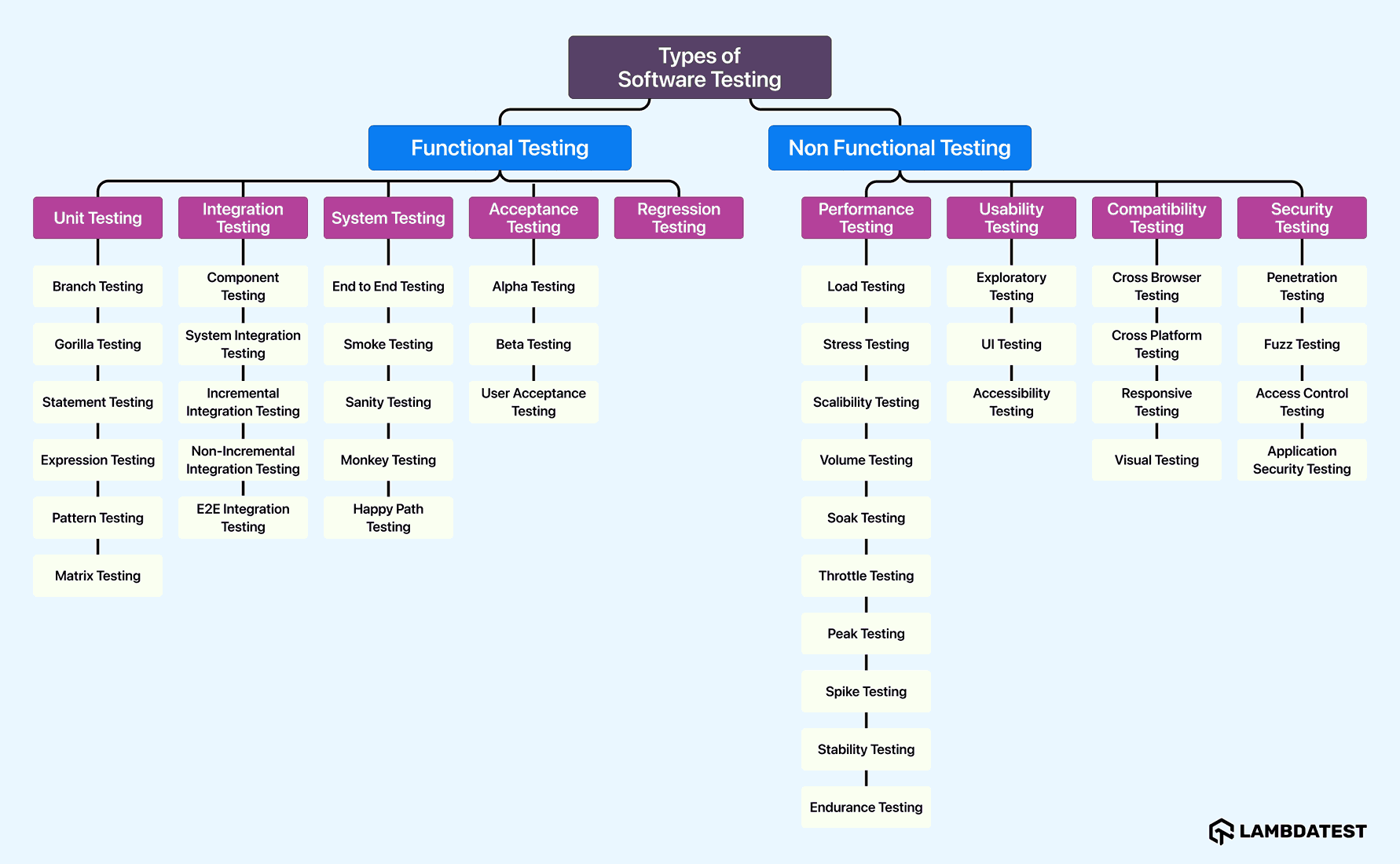
The 15 Core Types of Software Testing
These 15 types cover the overwhelming majority of real projects. The table gives the whole picture at a glance; the sections below define each one and say when it earns its place in your pipeline.
| Type | Category | What it verifies | When to run | Automate? |
|---|---|---|---|---|
| 1. Unit | Functional | One function or class in isolation | Pre-commit, on every save | Yes |
| 2. Integration | Functional | Two or more modules working together | Pull request gate | Yes |
| 3. System | Functional | The fully assembled build against its spec | Merge to main | Yes |
| 4. End-to-end | Functional | A complete user journey across the stack | Nightly and pre-release | Yes |
| 5. Smoke | Functional | Whether the build is stable enough to test | First, on every new build | Yes |
| 6. Sanity | Change-related | That one targeted fix now behaves | After a specific bug fix | Partly |
| 7. Regression | Change-related | That existing behaviour still works | Every release candidate | Yes |
| 8. Acceptance | Functional | That the build meets the business need | Before sign-off | Partly |
| 9. Performance | Non-functional | Speed and responsiveness under load | Nightly or pre-release | Yes |
| 10. Load | Non-functional | Behaviour at expected peak traffic | Before a traffic event | Yes |
| 11. Stress | Non-functional | The breaking point beyond peak | Capacity planning cycles | Yes |
| 12. Security | Non-functional | Resistance to known attack classes | Every release, plus on demand | Partly |
| 13. Usability | Non-functional | Whether real people can complete tasks | Design and pre-launch | No |
| 14. Accessibility | Non-functional | Conformance for users with disabilities | Every release | Partly |
| 15. Compatibility | Non-functional | Correct behaviour across browsers and devices | Every release candidate | Yes |
1. Unit Testing
Unit testing checks the smallest testable piece of code, usually a single function or class, in complete isolation from the database, network, and file system. Because nothing external is involved, unit tests run in milliseconds and pinpoint the exact line that broke.
A unit test states the expected result exactly, which is what makes the failure message useful:
test('applies the standard rate and rejects negative orders', () => {
  expect(calculateTax(100, 0.08)).toBe(8);
  expect(() => calculateTax(-1, 0.08)).toThrow();
});
2. Integration Testing
Integration testing verifies that separately developed modules work correctly once connected. It catches the failures unit tests cannot see: mismatched data contracts, wrong assumptions about a database schema, and services that disagree about a field's format.
Teams assemble modules top-down, bottom-up, or with a sandwich approach that combines both.
3. System Testing
System testing exercises the complete, integrated build against its specification. It is the first level where the software is tested as the thing users will receive, rather than as a collection of parts, and it runs after integration testing and before acceptance.
4. End-to-End Testing
End-to-end testing, often shortened to E2E testing, follows one complete user journey through every layer the journey touches, including third-party services. It is the most realistic test type and the most expensive, which is why a healthy suite keeps a small number of them and pushes detail down to faster levels.
A typical case: register an account, add an item to the cart, pay, and confirm the order email.
5. Smoke Testing
Smoke testing answers one question about a fresh build: is this stable enough to be worth testing further? It is deliberately broad and shallow, touching each major function once, and it runs before any deeper suite so a broken build fails in seconds rather than hours.
6. Sanity Testing
Sanity testing confirms that one specific fix behaves as intended after a targeted change. Where smoke testing is broad and shallow across the whole build, sanity testing is narrow and deep on the area that changed. The two are compared in detail in smoke testing vs sanity testing.
7. Regression Testing
Regression testing re-runs previously passing tests to confirm that a code change did not break existing behaviour. It is the type that grows fastest and costs most over a product's life, and it is the strongest candidate for automation because the same cases run unchanged on every release.

8. Acceptance Testing
Acceptance testing asks whether the finished software solves the business problem it was commissioned for. It is judged against user needs rather than technical specifications, and the sign-off usually belongs to the customer or product owner rather than to engineering.
Alpha testing runs internally, beta testing puts the build in front of real users, and user acceptance testing (UAT) is the final gate before deployment.
9. Performance Testing
Performance testing measures speed, stability, and responsiveness under a defined workload. It is the parent category for load and stress testing, and its value depends entirely on having an agreed pass mark, such as a 95th percentile response time budget, rather than a general sense that the application feels quick.
10. Load Testing
Load testing holds the system at the traffic level you genuinely expect and checks that response times and error rates stay inside budget. It answers whether the current architecture survives a normal busy day, not whether it can be broken.
11. Stress Testing
Stress testing deliberately pushes past expected peak to find the breaking point and observe how the system fails. A graceful failure that sheds load and recovers is a pass; data corruption or a cascade that needs manual restart is not.
12. Security Testing
Security testing probes an application for weaknesses an attacker could exploit, covering authentication, access control, input handling, and data exposure. Give it a published pass mark rather than an opinion, and use a maintained industry list as that baseline.
The OWASP Top 10 is a standard awareness document for web application security risks, and its most current released version is the OWASP Top Ten 2025.
13. Usability Testing
Usability testing watches real people attempt real tasks and records where they hesitate, backtrack, or give up. It is the clearest example of a type that resists automation, because the finding is human confusion and there is no expected result a script can assert against.
14. Accessibility Testing
Accessibility testing checks that people using screen readers, keyboard navigation, or magnification can complete the same tasks as anyone else.
The reference standard is WCAG 2.2, published as a W3C Recommendation on 12 December 2024, which defines three conformance levels named A, AA, and AAA.
Automated scanners catch a meaningful share of issues, but keyboard traps and confusing focus order still need a human pass.
15. Compatibility Testing
Compatibility testing confirms the application behaves correctly across the browsers, operating systems, screen sizes, and devices your users actually have. It is the type most often skipped and most visibly punished, because a layout that breaks only on Safari is invisible in development and obvious to customers.
Functional vs Non-Functional Testing
This is the split that decides how you read a failure. Functional testing tells you the software is wrong. Non-functional testing tells you the software is right but not yet fit for the real world.
| Attribute | Functional testing | Non-functional testing |
|---|---|---|
| Question | Does it do the right thing? | Does it do it well enough? |
| Measured against | Written requirements | Budgets, standards, and thresholds |
| Example types | Unit, integration, system, end-to-end, acceptance | Performance, load, security, accessibility, compatibility |
| Typical pass mark | Expected output matches actual output | A published threshold such as a latency budget or WCAG Level AA |
| Effect of a failure | Blocks the release outright | Usually blocks scale, adoption, or compliance |
Commonly Confused Types of Software Testing
Most arguments in test planning are vocabulary disputes rather than technical ones. These seven pairs cause the majority of them, and each has a one-line rule that settles it.
| Pair | The distinction | Which runs first |
|---|---|---|
| Smoke vs sanity | Smoke is broad and shallow across a whole build; sanity is narrow and deep on one fix. | Smoke, on the new build |
| Integration vs end-to-end | Integration checks that two components agree; end-to-end follows a whole user journey through all of them. | Integration |
| Regression vs retesting | Retesting confirms the one reported defect is fixed; regression confirms nothing else broke while fixing it. | Retesting |
| Load vs stress | Load holds the traffic you expect; stress deliberately exceeds it to find the breaking point. | Load |
| Stress vs soak | Stress raises intensity to find a limit; soak holds normal load for hours to expose leaks. | Stress |
| Verification vs validation | Verification asks whether you built it correctly; validation asks whether you built the correct thing. | Verification |
| Alpha vs beta | Alpha runs internally in a controlled environment; beta puts the build in front of real users. | Alpha |
The smoke and sanity distinction causes the most disagreement of the seven, and it is worked through case by case in the dedicated smoke testing vs sanity testing comparison linked earlier.
Testing Types for Modern Architectures
The 15 core types were defined when software was a single deployable unit. Microservices, distributed systems, and AI features each break an assumption those types rely on, and three newer types exist to cover the gap.
- Contract testing verifies that a service still honours the interface its consumers depend on, without spinning up every service at once. It replaces the slow, brittle full-stack integration run that microservice teams outgrow first.
- Chaos and resilience testing injects real failures such as a killed node, added latency, or a dropped dependency, then checks the system degrades gracefully instead of cascading. It tests the recovery path that normal tests never exercise.
- AI agent evaluation checks non-deterministic behaviour, where the same input legitimately produces a different answer each run. Conventional assertions cannot work here because there is no fixed expected string and no DOM state to assert against.
That last one is the sharpest break with everything above. A Selenium assertion checks that button text equals Submit; an AI agent has no such fixed answer, so evaluation shifts from pass or fail on a string to scoring behaviour across quality dimensions. TestMu AI's Agent Testing platform takes that approach, deploying autonomous testing agents against chat, voice, and phone agents and scoring each scenario on dimensions including hallucination, bias, completeness, and context awareness.
Which Types of Software Testing Should You Automate?
Automate a type when it is deterministic and repeated. Keep it manual when the finding is a human judgement. Applying those two rules to the 15 core types splits them cleanly.
| Criterion | Points to automation | Points to manual |
|---|---|---|
| Repetition | Runs on every commit or release | Runs once per design cycle |
| Expected result | Exact and machine-checkable | A matter of opinion or preference |
| Interface stability | Selectors and contracts rarely change | The design is still moving weekly |
| Volume | Hundreds of data combinations | A handful of exploratory sessions |
| Setup cost | Recovered within a few releases | Higher than the value of automating |
By those criteria, unit, integration, system, smoke, regression, performance, load, stress, and compatibility testing should be automated. Usability and beta testing should stay manual. Sanity, acceptance, security, and accessibility testing are partly automated, with a scripted baseline and a human pass on the parts that need judgement.
How to Choose Which Types of Testing to Run
No team runs all 15 types. These eight factors decide the shortlist, and each one maps to a specific action rather than a general principle.
- Cost of a production defect - if a bug can cost money, data, or safety, security and accessibility testing stop being optional.
- Release frequency - shipping weekly or faster makes automated regression testing the difference between confidence and hope.
- Interface stability - a design still changing every sprint argues for testing below the user interface until it settles.
- Audience breadth - a consumer product needs compatibility testing that an internal tool on one managed browser does not.
- Regulatory exposure - public sector, healthcare, and finance work carries accessibility and security conformance obligations.
- Traffic profile - predictable load needs load testing, while a launch or sale event justifies stress testing as well.
- Existing coverage - measure what is already exercised before adding a type, since duplicate coverage across layers is pure cost.
- Team shape - a team without a performance specialist gets more from a strong automated regression suite than from a shallow load test.
Work through them in order:
- Write down what a production defect actually costs your organisation.
- Take the five types every project needs - unit, integration, end-to-end, regression, and compatibility.
- Add security and accessibility testing if regulation or defect cost demands them.
- Add load or stress testing only if you have a real traffic profile to test against.
- Assign each chosen type to a pipeline stage so it has a trigger, not just an owner.
- Review after two releases and drop any type that has never once caught a defect.
| Project type | Must run | Add when it matters |
|---|---|---|
| API service | Unit, integration, regression, load | Security, stress |
| Consumer web app | Unit, integration, end-to-end, regression, compatibility | Accessibility, performance |
| Mobile app | Unit, integration, end-to-end, compatibility | Usability, performance |
| Regulated fintech | All five core types, plus security and accessibility | Stress, acceptance sign-off |
| Internal tool | Unit, integration, smoke | Usability if adoption is poor |
Test Types in a CI/CD Pipeline
A type without a trigger never runs. Mapping each type to a pipeline stage is what turns a list into a working quality gate, and it is the step most teams skip. The ordering principle is cheapest and most specific first, so the fastest feedback arrives soonest.
| Stage | Types that run | Gate |
|---|---|---|
| Pre-commit | Unit | Blocks the commit |
| Pull request | Unit, integration, smoke | Blocks the merge |
| Merge to main | System, regression | Blocks the build promotion |
| Nightly | End-to-end, compatibility, performance | Raises a ticket |
| Pre-release | Acceptance, security, accessibility | Blocks the release |
| Post-deploy | Smoke against production | Triggers rollback |
Expressed as a pipeline, the same mapping is a handful of jobs separated by trigger:
# Each test type gets its own trigger, cheapest first
jobs:
  unit:
    if: github.event_name == 'push'
    run: npm run test:unit          # Small tests, seconds

  integration-and-smoke:
    if: github.event_name == 'pull_request'
    run: npm run test:integration && npm run test:smoke

  regression:
    if: github.ref == 'refs/heads/main'
    run: npm run test:regression

  e2e-compatibility:
    if: github.event_name == 'schedule'   # nightly
    run: npx playwright test --project=chromium --project=webkit
The stage ordering follows the cost of each type, and the gap is measurable. We ran a smoke check, a functional check, and a compatibility check on the TestMu AI cloud in a single Playwright session against the Selenium Playground, under build 100181973:
PASS     338 ms  smoke: app loads          {"status":200,"title":"Selenium Grid Online | Run Selenium Test On Cloud"}
PASS    1302 ms  functional: form submit   {"echoed":"types of software testing"}
PASS     274 ms  compatibility: mobile     {"width":375}
total 1914 ms
The functional check cost roughly four times the smoke check, because it drives a form and waits on the result rather than asserting the page responded. That ratio is why smoke testing runs first and gates everything else. It also shows why compatibility testing belongs on a cloud grid: the same 274 ms check has to repeat across every browser and operating system your users run, and running those sequentially on one machine is what turns a fast check into an overnight job.
TestMu AI's Automation Cloud runs existing Selenium, Cypress, Playwright, and Puppeteer suites across 3,000+ real browser and OS combinations in parallel, with network logs, console logs, video, screenshots, and command logs captured automatically on every run. Auto Healing recovers from locator changes and SmartWait absorbs timing flakiness, though on Selenium the two are mutually exclusive within a session, so pick the one matching your failure mode. The automation testing documentation covers the grid setup.

Note: Run your regression and compatibility suites across 3,000+ browser and OS combinations in parallel. Try TestMu AI free!
Other Types of Software Testing
Beyond the 15 core types, these are the named variants you are most likely to meet in a test plan or a job description. Each is a specialisation of one of the four categories rather than a separate discipline.
| Type | What it verifies | When you would use it |
|---|---|---|
| API testing | Endpoints directly, without a user interface | Any service with a public or internal API |
| Exploratory testing | Unscripted investigation guided by tester skill | New features with thin specifications |
| Ad hoc testing | Informal probing with no test cases | Quick checks between formal cycles |
| Static testing | Code and documents without executing them | Reviews, linting, and specification checks |
| Dynamic testing | Behaviour while the code actually runs | Every executed test is dynamic testing |
| Visual testing | Rendered appearance against an approved baseline | Design systems and frequent UI changes |
| Responsive testing | Layout adaptation across screen widths | Any site with significant mobile traffic |
| UI testing | Interface elements behave and appear correctly | Component and page level checks |
| Agile testing | Quality built in continuously, not at the end | Iterative delivery teams |
| Data-driven testing | One script against many input sets | Validation rules and calculation engines |
| Keyword-driven testing | Cases expressed as reusable keywords | Teams where non-coders author tests |
| Mutation testing | Whether your tests would catch injected faults | Auditing the quality of a unit suite |
| Negative testing | Correct rejection of invalid input | Forms, APIs, and payment flows |
| Retesting | That a previously failing case now passes | Immediately after a defect fix |
| Pair testing | Two people testing one build together | Knowledge sharing and tricky areas |
| Model-based testing | Cases generated from a behaviour model | Complex state machines and protocols |
| Parallel testing | The same suite across many environments at once | Cutting compatibility run time |
| Geolocation testing | Behaviour from different user locations | Region-specific pricing or content |
| Localization testing | Translation, formats, and local conventions | Any multi-market release |
| Internationalization testing | The product can be localized at all | Before the first translation project |
| Real device testing | Behaviour on physical hardware, not emulators | Mobile releases and hardware features |
| Localhost testing | A locally hosted build before deployment | Pre-staging verification |
| Penetration testing | Real attack simulation against a live target | Periodic security assurance |
| Fuzz testing | Stability under malformed or random input | Parsers, file handlers, and APIs |
| Scalability testing | Behaviour as capacity is added or removed | Growth and infrastructure planning |
| Volume testing | Behaviour with very large data sets | Reporting and data migration work |
| Soak testing | Stability under sustained load over hours | Hunting memory leaks |
| Recovery testing | Return to service after a forced failure | Disaster recovery validation |
| Reliability testing | Error-free operation over a defined period | Systems with uptime commitments |
| Portability testing | Correct behaviour on other platforms | Supporting a new operating system |
| Compliance testing | Adherence to a defined standard or policy | Audited and regulated environments |
| Conformance testing | Implementation matches a specification | Protocols, compilers, and file formats |
| Concurrency testing | Correctness when users act simultaneously | Booking, inventory, and banking flows |
| Destructive testing | Behaviour when inputs or state are broken deliberately | Hardening critical paths |
| Fault injection testing | Handling of forced errors and outages | Resilience work on distributed systems |
| Boundary value testing | Behaviour at the edges of valid ranges | Numeric limits and date handling |
| Equivalence partitioning | One representative case per input class | Reducing case count without losing coverage |
| Pairwise testing | Every pair of input combinations | Configuration-heavy products |
| Path testing | Every executable route through the code | Safety-critical logic |
| Structural testing | Internal structure rather than behaviour | Measuring code coverage |
| Install and uninstall testing | Setup, upgrade, and removal all work | Desktop and mobile distribution |
| Upgrade testing | Existing data survives a version change | Any release with schema changes |
| Globalization testing | Correct handling of international input | Products with a global user base |
| Scenario testing | Realistic end-user stories end to end | Validating workflows before launch |
| Workflow testing | A defined business process start to finish | Enterprise process automation |
| Benchmark testing | Performance against an agreed reference | Tracking regressions release to release |
| Monkey testing | Stability under random input | Crash hunting in mobile apps |
| Security audit | Review against a defined security standard | Certification and procurement |
Definitions for the wider vocabulary live in the software testing glossary. If you are choosing how to derive the cases inside any of these types rather than which type to run, that is a separate decision covered in software testing techniques.

Conclusion
Start by writing down what a production defect costs you, then take the five types every project needs: unit, integration, end-to-end, regression, and compatibility. Add security and accessibility testing where regulation or risk demands them, and give each type a pipeline trigger so it runs without anyone remembering to run it.
The types you skip are a decision whether or not you make it deliberately. Reviewing that shortlist every couple of releases, and dropping any type that has never caught a defect, keeps the suite honest. Teams tracking that across releases usually manage it alongside their cases in a test management workspace, and the sequencing of the surrounding activities is covered in the software testing life cycle.
Citations
- Google Testing Blog, Test Sizes (Simon Stewart, 2010) - the 60, 300, and 900 second budgets for Small, Medium, and Large tests.
- OWASP Foundation, OWASP Top 10 - the 2025 edition is the most current released version.
- W3C, Web Content Accessibility Guidelines (WCAG) 2.2 - W3C Recommendation, 12 December 2024.
- TestMu AI cloud run, build 100181973 - the smoke, functional, and compatibility timings quoted in the pipeline section.
Author

Himanshu Sheth
Blogs: 142


Himanshu Sheth is the Director of Marketing (Technical Content) at TestMu AI, with over 8 years of hands-on experience in Selenium, Cypress, and other test automation frameworks. He has authored more than 130 technical blogs for TestMu AI, covering software testing, automation strategy, and CI/CD. At TestMu AI, he leads the technical content efforts across blogs, YouTube, and social media, while closely collaborating with contributors to enhance content quality and product feedback loops. He has done his graduation with a B.E. in Computer Engineering from Mumbai University. Before TestMu AI, Himanshu led engineering teams in embedded software domains at companies like Samsung Research, Motorola, and NXP Semiconductors. He is a core member of DZone and has been a speaker at several unconferences focused on technical writing and software quality.
Reviewer

Harshit Paul
Reviewer
Harshit Paul is Director of Product Marketing at TestMu AI (formerly LambdaTest), with over 8 years of experience in product and growth marketing for developer and QA tools, leading the Agentic AI in Quality Engineering space. He has authored 80+ technical articles for TestMu AI on software testing and automation, and hosted webinars on Selenium, automation testing, browser compatibility, DevOps, and continuous testing. He has led go-to-market and technical marketing initiatives across software testing products, contributing to SEO, content strategy, and developer marketing. He began his career as a certified Salesforce developer at Wipro Technologies, where he worked for 2 years before moving into marketing. Harshit holds a degree in computer programming from Vivekananda Institute of Professional Studies.


Types of Software Testing FAQs
Did you find this page helpful?
More Related Blogs
TestMu AI forEnterprise
Get access to solutions built on Enterprise
grade security, privacy, & compliance
- Advanced access controls
- Advanced data retention rules
- Advanced Local Testing
- Premium Support options
- Early access to beta features
- Private Slack Channel
- Unlimited Manual Accessibility DevTools Tests