

Power Your Software Testing with AI Agents and Cloud
The Native AI-Agentic Cloud Platform to Supercharge Quality Engineering. Test Intelligently and Ship Faster.


- TestMu AI (Formerly LambdaTest)
- /
- Learning Hub
- /
- What Is a Test Plan? Components, Template, and Example
What Is a Test Plan? Components, Template, and Example
Learn what a test plan is, its 16 components, and how to write one. Includes a copyable one-page test plan template and a full filled-in example for a web app.
Last Updated on:
A test plan is a written document that describes the testing strategy for a software or hardware project. It outlines the scope of testing, the resources needed, the test environment, and the test cases that will be executed.
Its aim is to make testing deliberate rather than improvised, so the product's functionality, reliability, and adherence to requirements are examined systematically instead of by whoever happens to have time.
The quality of the software testing life cycle is directly related to the quality of planning that went into it. Test plans are therefore developed before the development phase, to identify testing needs early, guide development, mitigate risks, and align stakeholder expectations. Planning is the front half of test management, which carries the plan through to runs and results.
This learning hub covers what a test plan is, its components, a copyable one-page template mapped to the international test documentation standard, a step-by-step process for writing one, a filled-in example for a web application, and the types of test plans you will encounter.
Overview
When should a test plan be written?
Before development starts, so testing needs are identified early enough to shape the build. It is then revised each release as scope, schedule, or environment changes.
What documents does a test plan connect to?
A test plan sits at the top of the document chain that testing produces and hands over.
- Test cases: The individual checks derived from the scope and objectives the plan defines.
- Test scripts: Automated equivalents of those cases, run against the environment the plan specifies.
- Traceability matrix: Maps every requirement to the cases covering it, exposing gaps before release.
- Defect reports: Raised during execution and tracked against the exit criteria the plan sets.
- Test execution report: The closing summary that proves the exit criteria were met.
What Is a Test Plan
A test plan is a document that defines the scope, objectives, approach, resources, and schedule for testing a product, plus the exit criteria that must be met before testing can stop.
It acts as the go-to template for conducting software testing activities that are fully monitored and controlled by the testing manager.
Put more plainly, a test plan answers five questions: what will be tested, how it will be tested, who will test it, when testing happens, and what conditions must be met before testing can stop. Developing one involves the contribution of the test lead, the test manager, and the test engineer. Once the plan names its cases, keeping them current becomes test case management.
Why Is a Test Plan Important
A test plan matters because it fixes scope before execution starts, assigns clear responsibility, surfaces risk early, and sets measurable conditions for deciding when testing is done.
Creating one is a crucial step in the software development process. Here are the key reasons why it's important:
- Ensures Comprehensive Testing: A test plan ensures all software functionalities and features are thoroughly tested, leaving no part unexamined.
- Provides Clear Direction: It offers a clear roadmap for the testing process, detailing steps, techniques, and tools, which aligns the team towards common goals.
- Identifies Responsibilities: By detailing roles and responsibilities, a test plan prevents task overlaps and ensures an organized testing process.
- Facilitates Risk Management: It identifies potential risks and outlines mitigation strategies, preparing the team to handle unexpected issues.
- Improves Resource Management: It outlines the necessary resources, ensuring better allocation and utilization, which supports a smooth testing process.
- Supports Quality Assurance: Verifies the software against requirements before release, supporting quality assurance end to end.
- Facilitates Documentation and Traceability: It provides documentation for tracking requirements, test cases, and results, which is essential for compliance and future reference.
- Aids in Schedule Management and Faster Time to Market: A schedule with milestones makes progress trackable and shortens time to market.
- Supports Continuous Improvement: Evaluating test plan outcomes helps identify areas for improvement, refining testing strategies for future projects.

Note: Sixteen components is the full list, not a mandatory checklist. A sprint plan that fills scope, approach, environment, and exit criteria is already a real test plan; the other twelve are situational.
What Are the Components of a Test Plan
A test plan has sixteen standard components: objective, scope, methodology, approach, assumptions, risk, mitigation, roles, schedule, defect tracking, environment, and exit criteria. Which of these a team can maintain at scale usually depends on the test management tools behind the plan.
These components form the backbone of the test plan, guiding testers through the testing lifecycle and coordinating stakeholders.
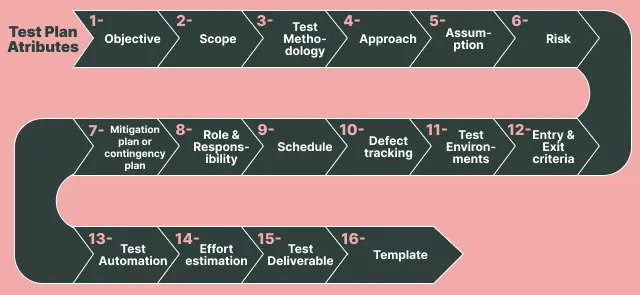
Here are the sixteen standard components of a typical test plan at a glance, followed by a detailed explanation of each.
| Component | What It Defines |
|---|---|
| Objective | What testing is meant to achieve for this product or release. |
| Scope | Which modules are in scope and which are explicitly excluded. |
| Test Methodology | Which testing types apply, such as functional, integration, and system testing. |
| Approach | How the application will be navigated during testing, via scenarios and flow graphs. |
| Assumptions | What is taken as given about resources, technology, and support. |
| Risk | What happens if the assumptions turn out to be wrong. |
| Backup / Mitigation Plan | The fallback response for each identified risk. |
| Role and Responsibility | Who authors, reviews, approves, executes, and supports. |
| Schedule | Start and end dates for every testing activity. |
| Defect Tracking | How defects are captured, prioritized, and communicated. |
| Test Environment | Operating systems, browsers, devices, hardware, and server configuration. |
| Entry and Exit Criteria | The conditions required to start testing and to stop it. |
| Test Automation | Which features will be automated and which stay manual. |
| Effort Estimation | Time and resources forecast per activity. |
| Deliverables | The documents testing produces and hands over. |
| Template | The standard document formats used across the project. |
The diagram below groups those sixteen components into the order a plan usually assembles them.
- Objective
- Identify all the functionalities of your product that need to be tested.
- Set goals and targets for the application based on the app's features.
- Scope
- In-scope: The modules to be rigorously tested or in detail.
- Out-scope: The modules that are not to be tested in detail or so rigorously.
- Test methodology
- Approach
- High-level Scenarios: High-level scenarios are written to test critical features, such as logging in to a website or ordering items. Here, we cover only some possible scenarios as the individual test engineer determines which features to test.
- The Flow Graph: A flow graph is a visual representation of how a program's control is parsed among its various blocks. It can be used to make an unstructured program more efficient by eliminating unnecessary loops. It also makes it easy to combine benefits such as converging and merging.
- Assumptions
- The testing team will receive sufficient support from the development team.
- The tester will get the knowledge needed to perform the job from the development team.
- The company will give the testing department the proper resources to do its job.
- Risk
- Poor managerial skills displayed by the testing manager.
- Not able to meet project deadlines.
- Lack of cooperation.
- Backup/Mitigation Plan
- Each test activity should be assigned a priority.
- Managers shouldn’t lack leadership skills.
- Testers should be granted adequate training sessions.
- Role and Responsibility
- Test Manager: A test manager is essential in developing software, as they manage the project, assign resources, and give the team direction.
- Tester: A tester can save a project time and money by identifying the most appropriate testing technique and verifying the testing approach.
- Schedule
- Defect Tracking
- Information Capture: We begin the process by taking basic information.
- Prioritizing the Tasks: The task is prioritized based on the severity of the problem and its importance to the organization.
- Communicate the Defects: The communication between the identifier and fixer of bugs is essential to the smooth running of any project.
- Test Different Environments: Test your application based on various hardware and software configurations to ensure compatibility with different platforms.
- Test Environment
- Entry and Exit Criteria
- The necessary resources for a project must be available.
- The application must be fully prepared and submitted.
- Your test data should be prepared.
- Completion of white box testing is essential.
- Analyze requirements thoroughly to prepare test documents or when documents are ready.
- Assign modules or features to different test engineers for testing.
- There should be no significant bugs in the program.
- When all required test cases are executed and passed.
- Test Automation
- Effort Estimation
- Deliverables
- Test plan
- Test cases
- Test scripts
- RTM (Requirement Traceability Matrix)
- Defect report
- Test execution report
- Graphs and metrics
- Release notes
- Develop a test-plan document that outlines all aspects of testing.
- The test case document should be created before the testing phase.
- Test design specifications should be listed down.
- Develop test data with the information that testers can use to complete test cases. It can be entered manually or created with a tool.
- Develop test scripts that describe the transactions that must be performed to validate an application or a system. The scripts should list each step taken and the expected result.
- Create a log of your errors that lists mistakes and approaches on how to correct them.
- A test report should be generated.
- A defect report should be generated.
- An installation report should be generated.
- Template
- Test case template
- Bug Report Template
- Test execution Report
- Test case review template
- RTM Template
The aim is to ensure that a software product meets its requirements and provides quality functionality to customers. The overall test objective is to find as many defects as possible and make software bug-free. Test objectives must be divided into components and subcomponents. These activities should be performed for every component.
The test plan scope outlines the specific information to be tested within the application, including project goals and user scenarios. It also defines any limitations or excluded scenarios to clarify the testing boundaries and objectives.
The scope can be divided into two parts:
To understand this better, consider an e-commerce application with user authentication, payment processing, and product catalog features. Suppose a third-party provider has already built and certified the payment processing system.
In that case, the development team integrates that payment system and focuses only on integration testing across user authentication, payment processing, and the product catalog, rather than re-testing the provider's internals.
It encompasses details regarding various testing approaches, including functional testing, integration testing, and system testing, to assess the application's functionality. The appropriate testing types for each feature are determined based on the application's specific requirements.
Consider a standalone application like Adobe Photoshop. In our testing process, we'll systematically execute the following series of tests to verify its reliability.
Smoke Testing → Functional Testing → Integration Testing → System Testing → Ad hoc Testing → Compatibility Testing → Regression Testing → Globalization Testing → Accessibility Testing → Usability Testing → Reliability Testing → Recovery Testing → Installation or Uninstallation Testing.
Since the terms used in testing are not standardized, it is important to define the testing methodologies that all stakeholders, including management, development, and testing teams must clearly understand.
Approach refers to the strategy used to navigate the application during testing, ensuring thorough coverage of features. It varies with the software under test, tailored to each application's characteristics.
The approach has two aspects:
The testing approach is also a reference point for future testing and maintenance, documenting effective troubleshooting and regression testing steps.
When drafting test plans, certain assured assumptions are made concerning resources, technologies, and other relevant factors. It encompasses details regarding potential problems or issues during the testing process.
Certain assumptions are made in this phase are as follows:
If the assumption is wrong, many problems can occur. For example, if the budgeting is off, costs may be overrun. Some reasons for this happening include:
Risk is also the input to prioritization. To weight testing effort by likelihood and impact rather than by feature order, see our learning hub on risk based testing.
A company must have a backup plan if anything goes wrong. The purpose of such a plan is to prevent errors. Some points to consider when formulating a backup plan are:
For the effectiveness of a testing team, every member's role and responsibilities must be clearly defined and recorded. For instance,
In larger projects, the test manager typically crafts the test plan. However, for smaller projects, the test manager delegates each project to individual test leads. Subsequently, each test lead is responsible for drafting their assigned project's test plan.
This procedure will ensure that we record the start and end dates for every testing activity, a crucial part of the testing process. For example, we will record the creation date for a test case and when we finished reviewing it.
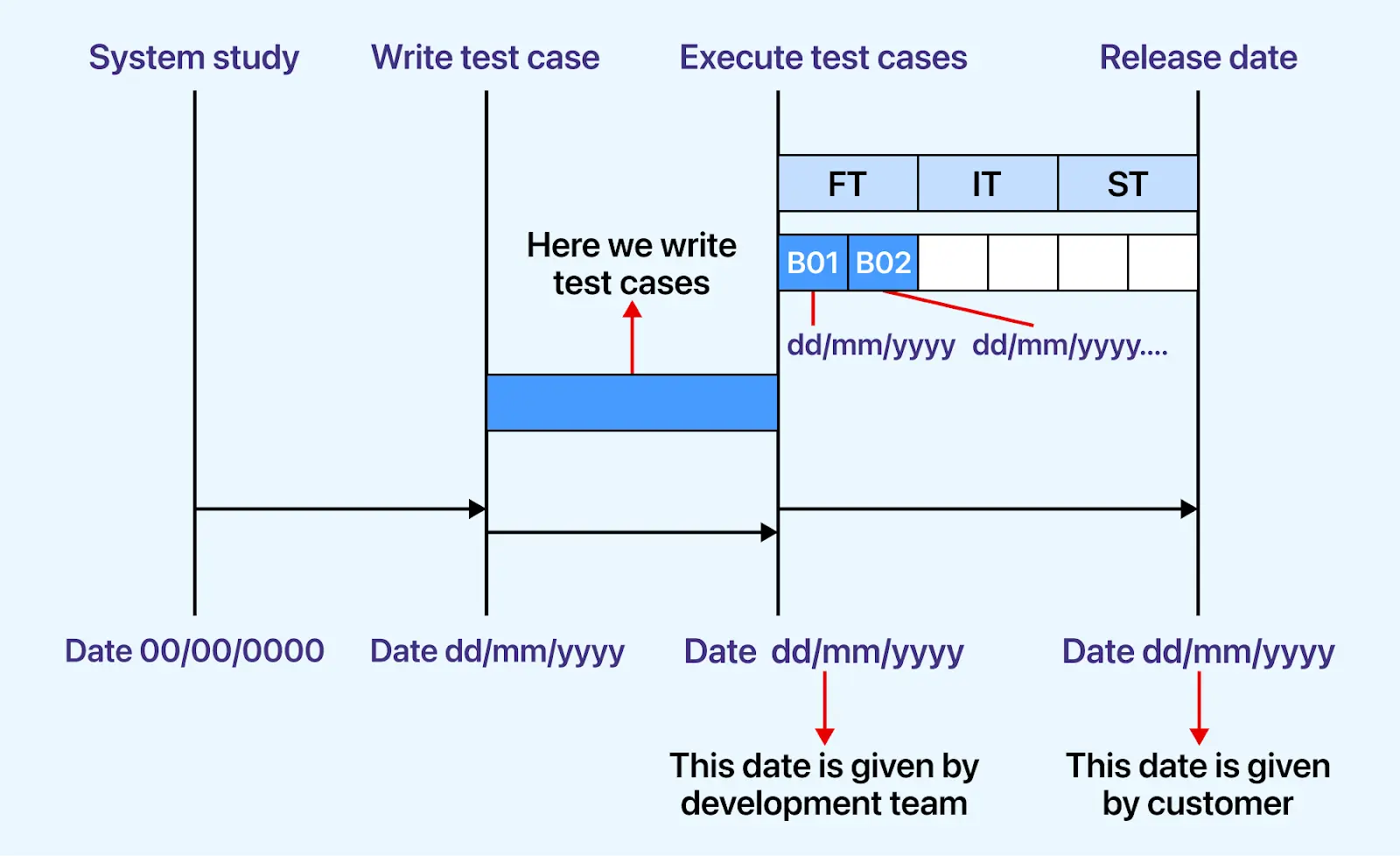
As depicted in the image above, each activity is assigned a distinct start and end date.
Software testing is integral to the software development life cycle, as it helps determine whether a program has flaws. If any defects are discovered during testing, they should be communicated to the programmer. Since we cannot track each defect manually, we usually use tools like Jira, Bugzilla, Mantis, YouTrack, etc.
Here is the process for tracking defects:
To learn more about defect management, its significance, benefits, limitations, effective management strategies, etc, check out our learning hub: What is Defect Management in Software Testing?
The testing team will use a specific environment. The things that are said to be tested are written in this section. This includes the list of hardware and software. Installation of all software will also be checked under this.
For instance, testers would require software configurations on different operating systems, such as Windows, Linux, and Mac, which affect their efficiency. The hardware configuration consists of RAM, ROM, etc.
Specify versions, not families. "Windows, Linux, and Mac" is a category list; "Windows 11, Ubuntu 22.04, macOS 14" is a specification another tester can reproduce.
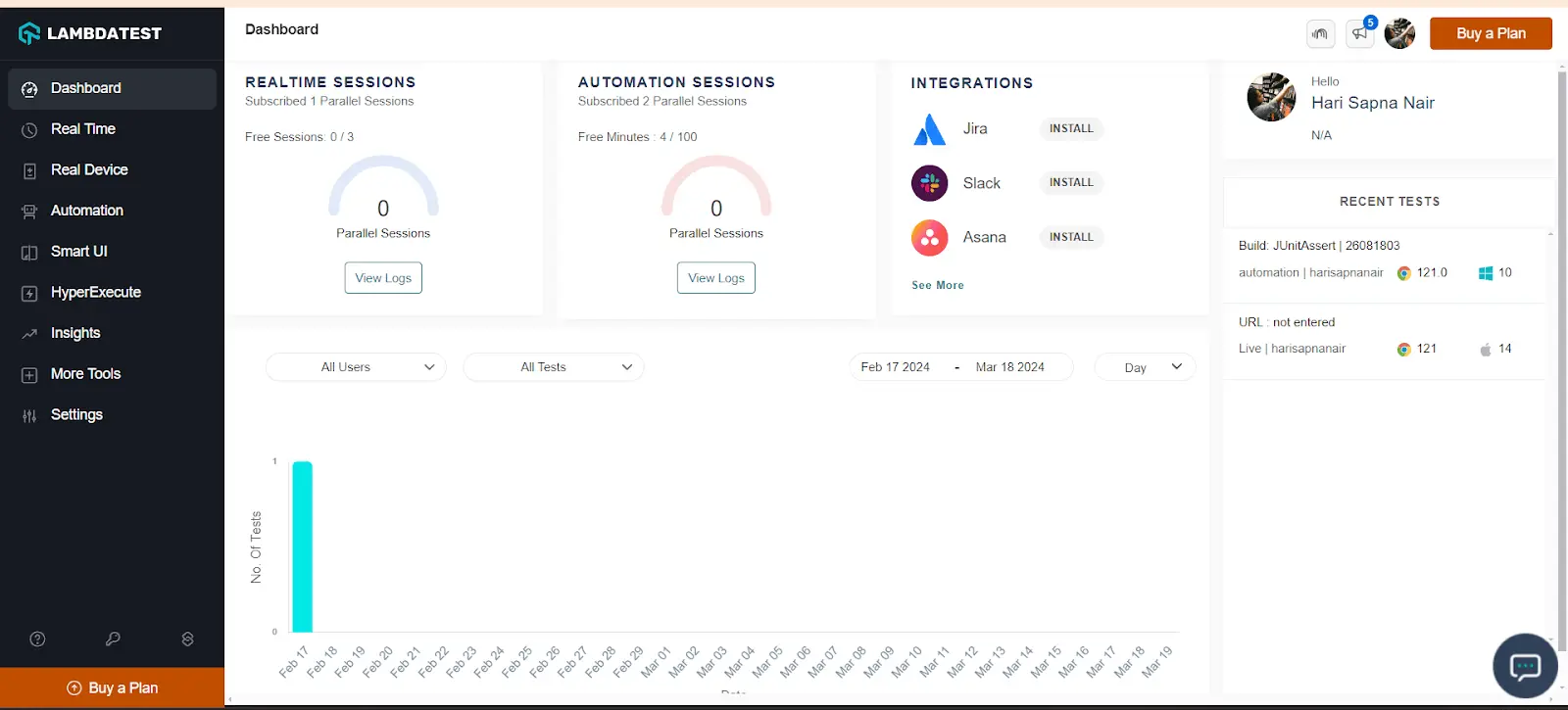
Once the matrix covers more than a handful of combinations, most teams move execution onto a hosted grid instead of maintaining one machine per configuration, because the matrix grows faster than the hardware budget.
The dashboard below shows a browser and OS matrix managed centrally rather than machine by machine.
The conditions that need to be met before any new testing starts or ends are known as entry and exit criteria.
Entry Conditions are as follows:
Exit Conditions are as follows:
The diagram below shows both gates in sequence, with testing blocked until each one is satisfied.
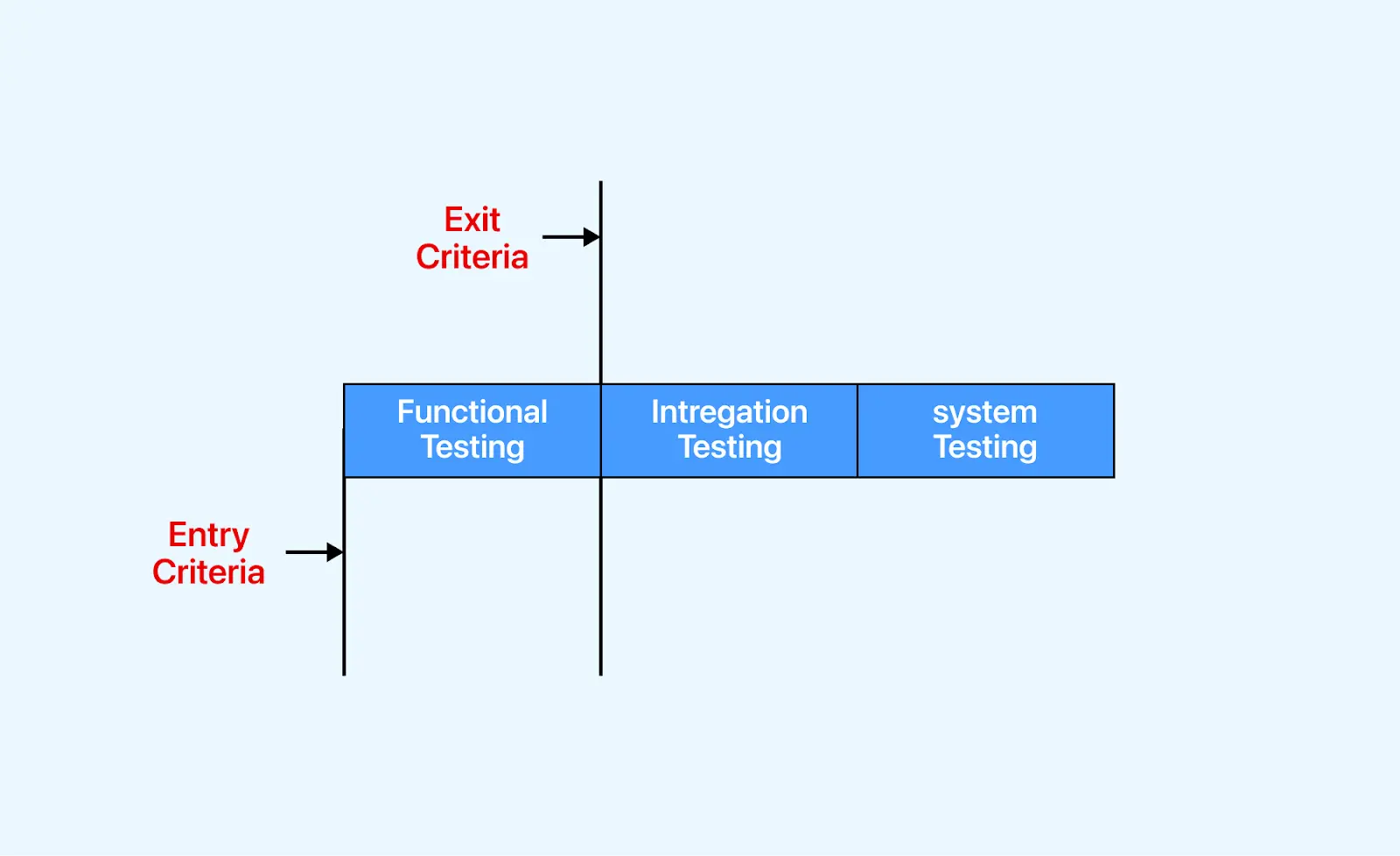
Before initiating functional testing, we must verify that all the entry criteria are fulfilled. Upon completion of functional testing, adherence to the exit criteria is also mandatory before proceeding to integration testing; failure to meet these criteria halts progression to the next phase.
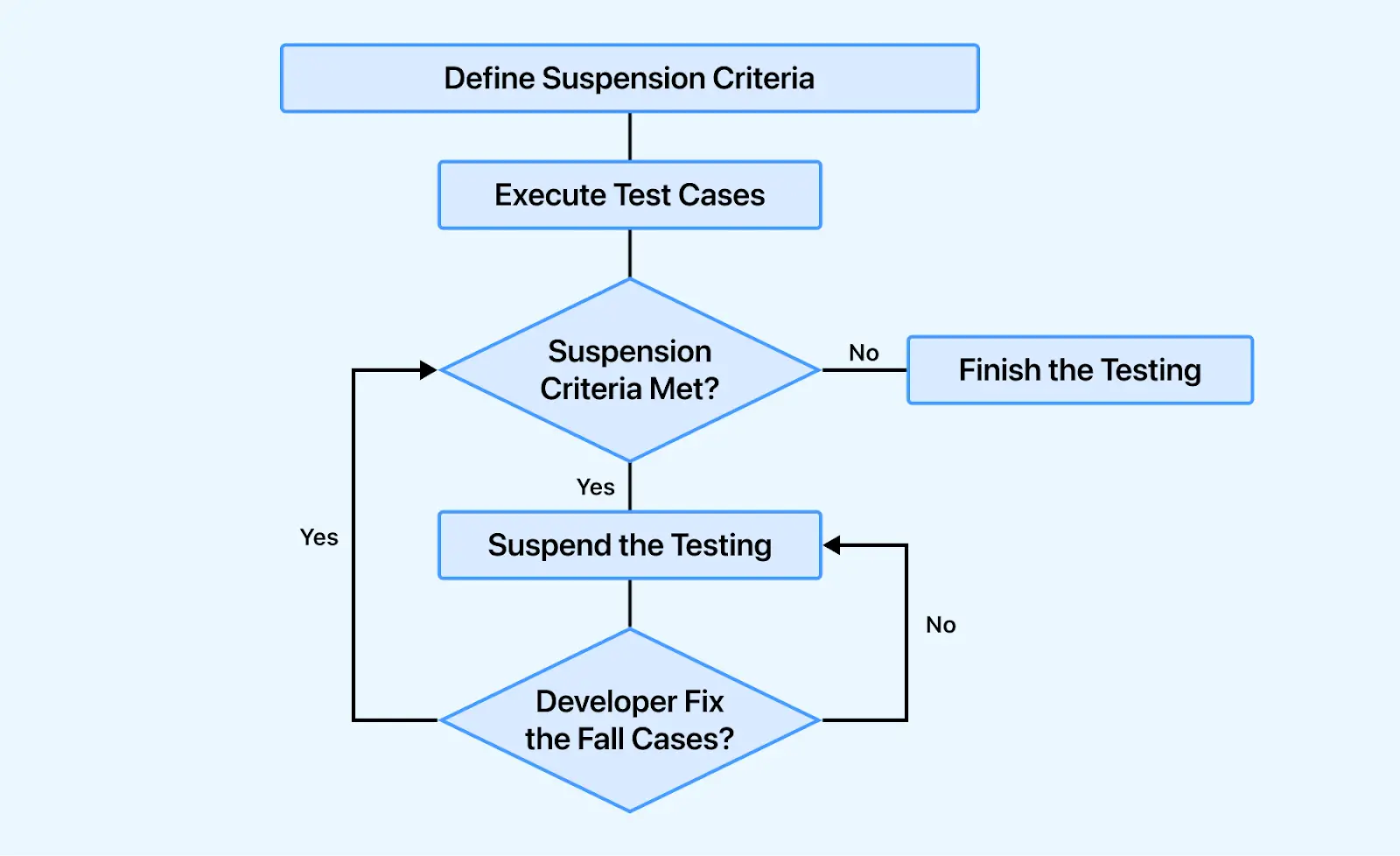
In some instances, if a certain percentage of the test cases fail, testing is suspended until the development team fixes the defects. The image below shows where that suspension sits in the flow.
It acknowledges the features that are to be automated and the features that are not to be automated. Factors like bug density and testing frequency guide the decision to perform manual or automated testing. Features with high bug counts are often manually tested for thorough validation. Conversely, stable features frequently tested benefit from automation to streamline processes.
Note: We can automate the test cases only after the first release.
Effort estimation involves strategically planning the allocation of resources and time required by each team member for project tasks. It involves forecasting the effort necessary to complete various activities and deliverables throughout the project lifecycle.
By considering task complexity, team member skillsets, and potential risks, effort estimation helps project managers allocate resources, set realistic timelines, and optimize project workflows. This enables teams to budget time efficiently, manage stakeholder expectations, and deliver on schedule. For the estimation techniques themselves, see our learning hub on test estimation.
Deliverables are evidence of progress made by the testing team and given to customers at the end of the project. The documents which are generated by the testing team and delivered to the customer along with the product are as follows:-
Before Testing Phase:
During Testing Phase:
After Testing Phase:
The after-testing phase contains a testing plan and defect report, which is used to monitor and control the testing effort, and other components are used to summarize the effort.
This section comprises all the document templates essential for the product, ensuring consistency across the project. All test engineers use these templates exclusively to uphold product coherence and uniformity in documentation.
Here are the different types of the template which are used during the entire testing process:

What Does a Test Plan Template Look Like
A test plan template is a reusable document skeleton listing every section a plan should contain, so teams fill in project detail instead of rebuilding the structure for each release.
The template below fits on one page and works for a single sprint, feature, or release.
Copy the two left-hand columns into your own document and replace the example entries with your project's details. Sections that genuinely do not apply can be dropped, but state that they were considered rather than deleting them silently.
| Section | What Goes In It | Example Entry |
|---|---|---|
| Test Plan ID | A unique identifier so versions can be referenced and tracked. | TP-XYZ-1.0 |
| Introduction | What is being tested, for which release, and why testing is needed. | E-commerce web app XYZ v1.0, build 101, first public release. |
| Scope (In) | Features and modules that will be tested. | Registration, login, search, cart, checkout, notifications. |
| Scope (Out) | Features explicitly excluded, with the reason. | Payment provider internals, owned and certified by the vendor. |
| Test Objectives | Measurable goals rather than general intentions. | 100% of P1 flows executed; defect leakage below 5%. |
| Test Items | The exact builds, modules, and versions under test. | Web app XYZ v1.0, build 101; API v2.3. |
| Test Approach | Which test levels and types apply, and in what order. | Smoke → functional → integration → system → regression. |
| Entry Criteria | Conditions that must hold before testing starts. | Build deployed to staging, test data seeded, smoke suite passing. |
| Exit Criteria | Measurable conditions that allow testing to stop. | All P1 cases executed, zero open critical defects, 95% pass rate. |
| Test Environment | Operating systems, browsers, devices, hardware, and servers. | Windows 11 and macOS; Chrome, Firefox, Safari; AWS staging. |
| Roles and Responsibilities | Who authors, reviews, approves, executes, and signs off. | Test lead authors; engineers execute; test manager approves. |
| Schedule and Milestones | Start and end dates for each testing activity. | Case design 15 to 30 Apr; execution 1 to 12 May; closure 14 May. |
| Test Deliverables | Documents produced before, during, and after execution. | Test cases, scripts, RTM, defect report, execution report. |
| Risks and Mitigation | What could derail testing and the planned fallback. | Staging downtime → shift to cloud grid execution for that day. |
| Effort Estimation | Forecast effort per activity, in person-days. | Design 8 person-days; execution 12 person-days. |
| Approvals | Named sign-off owners and the date of approval. | Test manager and product owner, before execution begins. |
Test Plan Standards: IEEE 829 and ISO/IEC/IEEE 29119-3
Most test plan templates in circulation trace back to IEEE 829, the Standard for Software and System Test Documentation. IEEE 829-2008 has since been superseded by the ISO/IEC/IEEE 29119 series, so a template that cites IEEE 829 as current is working from a withdrawn standard.
The current reference for test documentation is ISO/IEC/IEEE 29119-3, which defines templates and examples for test documentation across organizational, management, and dynamic testing processes. You are not obliged to follow it, and most teams do not follow it literally, but it is the reference auditors and regulated industries will ask about.
Here is how the one-page template above maps onto the documentation both standards expect:
| Standard Concept | What It Covers | Section In the Template Above |
|---|---|---|
| Test plan identifier | Unique reference for the document and its version. | Test Plan ID |
| Context of testing | Project background, scope, and what is being tested. | Introduction, Scope (In), Scope (Out), Test Items |
| Testing communication | Who is involved and how testing is reported. | Roles and Responsibilities, Test Deliverables |
| Risk register | Product and project risks with treatment approaches. | Risks and Mitigation |
| Test strategy | Test levels, types, techniques, and completion criteria. | Test Approach, Test Objectives, Exit Criteria |
| Testing activities and estimates | Activities, effort, and the schedule to deliver them. | Schedule and Milestones, Effort Estimation |
| Staffing and environment needs | People, skills, tools, and the environment required. | Test Environment, Entry Criteria |
| Approvals | Who accepts the plan and when. | Approvals |
Note: Run manual and automated tests across 10,000+ browsers, real devices, and OS configurations. Try TestMu AI Now!
How Do You Write a Test Plan
Writing a test plan is a sequence of decisions, and each one narrows the next. Work through the eight steps below in order, filling the template from the previous section as you go.
1. Analyze the Product Under Test
Read the requirements, walk through the application yourself, and talk to developers and product owners until you can describe what the product does, who uses it, and which flows carry the most business value.
This step is skipped more often than any other, and it is the reason so many plans read as generic. You cannot scope testing for a system you do not understand.
2. Define the Scope and Objectives
List what is in scope and, just as importantly, what is explicitly out of scope with the reason why. The out-of-scope list is what prevents arguments in the week before release.
Then state objectives that can be measured. "Ensure quality" is not an objective. "All P1 user journeys executed and passing, with defect leakage below 5%" is.
3. Identify Risks and Mitigation
Record what could derail testing, how likely it is, what it would cost, and the fallback if it happens. Environment downtime, late builds, unavailable test data, and a shared device pool are the usual suspects.
A risk with no mitigation is just a note. Every risk you list should have a named response and a person attached to it.
4. Design the Test Approach
Decide which test levels and test types apply to each part of the product, and in what order they run. A typical web release runs smoke, then functional testing, then integration, then system, then regression before sign-off.
Tie each test type back to a risk or a requirement. An approach that cannot explain why a given test type is present is a copied approach, not a designed one.
5. Define the Test Deliverables
List what testing will produce, split across before, during, and after execution: test cases and test scripts up front, defect reports and logs during, and test reports plus the traceability matrix at closure.
6. Set Up the Test Environment and Test Data
Specify the operating systems, browsers, devices, hardware, and server configuration testing will run against, and name the versions. "Latest Chrome" is not a specification.
Cover test data in the same place: how it will be created, refreshed between runs, and cleaned up afterwards. Vague environment sections are the single most common cause of defects that cannot be reproduced.
7. Assign Roles and Estimate Effort
Name who authors the plan, who reviews it, who approves it, who executes, and who signs off at the end. Roles left implicit become gaps at exactly the moment the schedule is tightest.
Then estimate effort per activity in person-days, so the schedule is grounded in the capacity you actually have. See our learning hub on test estimation for the techniques.
8. Define Entry and Exit Criteria and the Schedule
State the conditions that must hold before testing starts, and the measurable conditions that allow it to stop. Exit criteria written as numbers are what separates a plan from a wish.
Finally, map every activity to a start and end date, review the plan with the team and stakeholders, and get it approved before execution begins.
Once the plan is approved, the cases it describes have to live somewhere other than a spreadsheet.
TestMu AI's Test Management Tool is an AI-native platform that generates structured test cases from plain English and keeps manual and automated results in one pass/fail view.
It is the planning and traceability layer of a live testing platform, not a repository bolted onto a bug tracker.
- AI test case generation: turns a user story or requirement into ordered steps, expected results, and priority.
- Unified pass/fail view: manual outcomes and CI pipeline results land in the same cycle dashboard.
- Traceability matrix: connects requirements to cases, runs, and defects, so coverage gaps surface before release.
- Two-way JIRA and Azure DevOps sync: results flow in, defects flow out, status syncs back automatically.
- Exportable coverage reports: cycle summaries and requirements coverage for release sign-off evidence.
Documentation: Test Manager docs

Test Plan Example for a Web Application
Below is a filled-in test plan for a website, written the way the document would actually read rather than as a list of section names. It covers a hypothetical e-commerce web application, which is the most common shape of a website test plan.
- Introduction
- Test Items
- Web Application: XYZ, version 1.0
- Build Number: 101
- Backend API: version 2.3
- Features to be tested
- User login and registration
- User profile management
- Search and filtering functionality
- Shopping cart and checkout
- Payment gateway integration
- Email and SMS notifications
- Data export
- Test Environment
- Operating System: Windows 11, macOS 14
- Browser: Chrome 126, Firefox 127, Safari 17 (current and one prior version each)
- Devices: iPhone 14, Pixel 7, iPad Air; viewport widths 360px, 768px, 1440px
- Hardware: Intel i5 processor, 8GB RAM
- Server: AWS staging, refreshed from an anonymised production snapshot weekly
- Test Schedule
- Test Planning: 15 April 2026 to 20 April 2026
- Test Case Development: 21 April 2026 to 8 May 2026
- Test Execution: 11 May 2026 to 29 May 2026
- Regression and Closure: 1 June 2026 to 5 June 2026
- Test Deliverables
- Test cases
- Test scripts
- Test reports
- Defect reports
- Performance test report
- Responsive test report
- Test Responsibilities
- Test Approach
- Manual testing covers exploratory passes on checkout and the full accessibility review.
- Automation testing covers regression across the browser matrix, plus load and performance runs.
- Responsive testing validates the three target viewport widths on real devices.
- Risks and Mitigation
- Entry Criteria
- Build 101 deployed to staging and reachable.
- Smoke suite passing at 100%.
- Test data seeded, including at least 50 catalogue items and 5 test accounts.
- All P1 and P2 test cases reviewed and approved.
- Exit Criteria
- 100% of P1 test cases executed, with a pass rate of at least 95%.
- Zero open critical or high-severity defects.
- All test deliverables completed and submitted.
- Performance testing meeting the agreed threshold of 2.5s largest contentful paint on the checkout page.
This test plan (TP-XYZ-1.0) covers the E-Commerce web application XYZ, version 1.0, build 101, ahead of its first public release. The application sells physical goods to consumers in a single market, with roughly 40,000 expected monthly visitors at launch.
The objective of this testing effort is to confirm that all revenue-critical journeys work across the supported browser and device matrix, and that no critical defect reaches production.
Out of scope: the payment provider's internal processing, which is certified by the vendor. Only the integration boundary is tested. Admin reporting is deferred to release 1.1.
| Job | Stakeholders Involved |
|---|---|
| Write Test Plan | Test Lead, Test Manager, Test Engineer |
| Review Test Plan | Test Lead, Test Manager, Test Engineer, Customer, Development Team |
| Approve Test Plan | Customer, Test Manager |
| Write Test Case | Test Lead, Test Engineer |
| Review Test Case | Test Engineer, Test Lead, Customer, Development Team |
| Approve Test Case | Test Manager, Test Lead |
| Execute Test | Test Lead, Test Engineer |
| Maintain Testing Environment | Server Administrator |
| Fix Defects and Provide Support | Developer |
| Risk | Likelihood | Mitigation |
|---|---|---|
| Staging environment unavailable during execution | Medium | Shift affected runs to a cloud grid for the day; notify test manager. |
| Payment sandbox rate-limits the checkout suite | High | Stub the provider for regression; reserve live sandbox for the daily smoke run. |
| Build delivered later than 11 May | Medium | Compress regression to the P1 subset; escalate scope cut to product owner. |
| Shared device pool contention with the mobile team | Low | Book device slots one week ahead; fall back to emulators for non-visual checks. |
This is a sample test plan, and it will vary with the complexity of the application and your organization's process. The structure, though, transfers directly: swap the features, environment, and criteria for your own and the rest of the document holds.
What Are the Types of Test Plans
There are three types of test plan: the master test plan spanning all test levels, the phase test plan covering a single testing phase, and the specific test plan for one test type.
The master test plan provides a comprehensive overview across test levels, the phase test plan delves into specific testing phases, and the specific test plan tailors strategies for specialized areas like performance or security.
Master Test Plan
The master test plan encompasses multiple test strategies and incorporates various testing levels. It covers planning and management of testing activities across different levels, providing a holistic view of crucial decisions and tactics.
Note: This test plan includes required tests, test coverage, the interconnection between test levels, and more.
Phase Test Plan
A phase test plan focuses on a specific phase of the testing process, diving deeper into the details outlined in the master test plan. This type of test plan emphasizes the execution and management of testing activities within a particular testing phase.
Note: It includes additional information such as testing schedules, benchmarks, specific activities, templates, and other relevant details specific to the designated phase.
Specific Test Plan
Specific Test Plans are tailored for distinct types of testing, particularly non-functional testing like performance testing or security testing. It ensures thorough planning and execution of non-functional testing activities, enhancing the overall quality and reliability of the software product.
Note: It includes information about specialized testing areas, outlining specific methodologies, tools, test cases, and metrics relevant to the designated testing type.
Ready to craft a foolproof UI test plan? Read our blog “Devising A UI Test Plan That Works Like A Charm” to create one that delivers flawless results every time!
Test Plan vs. Test Strategy: The Difference
A test plan is project-specific and detailed; a test strategy is organization-level and directional. Check out this detailed comparison between the two.
| Factor | Test Plan | Test Strategy |
|---|---|---|
| Definition | It is a detailed blueprint highlighting software testing efforts' scope, objective, and approach. | It is an important set of decisions determining how testing must be done. |
| Scope | Provides details on how testing will be carried out for a particular project. | Provides a broader perspective on achieving consistent testing across projects, outlining principles, objectives, and methods. |
| Purpose | Describes the testing activities, including what, when, and how they will be conducted. | Provides direction for testing efforts, aligning them with the organization's goals and assisting with testing decisions. |
| Components | It includes the following components: test plan ID, product features, criteria for passing or failing features, testing techniques, tasks, test deliverables, etc. | It includes the following components: team structures, objectives, scope, documentation formats, etc. |
| Dependencies | In accordance with the broader guidelines outlined in the Test Strategy. | In accordance with the organization's policies, best practices, and project-specific requirements. |
| Stakeholder | A testing manager or administrator implements a plan describing how to test, when to test, who will test, and what to test. | A project manager carries out a test strategy that outlines the type of technique to follow and which module to test. |
| Level of Detail | Focuses more on details. | Focuses more on general methodologies. |
| Existence | It exists independently. | It constitutes a small section or part of a test plan. |
| Flexibility | It is less adaptable and more stringent in its approach to the project, offering limited flexibility to accommodate shifts in circumstances. | It provides greater adaptability for accommodating different project requirements, as it avoids delving into specific details. |
| Revision and Updates | Requires more frequent updates, particularly when there are alterations in project scope or requirements. | Remains relatively unchanged and furnishes a consistent framework for testing endeavors across various projects. |
| Use case | It is used at a project level. | It is used for organization-level projects. |
For a fuller side-by-side treatment, read our blog on test plan vs test strategy.
Who Needs Test Planning
Test planning serves developers, QA engineers, product managers, business analysts, compliance teams, and support teams, giving each group one shared reference for scope and progress.
The various stakeholders involved in the development of the test plan are as follows:
- Developers: It helps them to gain valuable insights into testing scope and requirements, allowing them to anticipate tests on their code and understand testing success criteria.
- Quality Analysts (QAs): It helps them establish testing strategies, allocate resources, and monitor testing progress. It also serves as a roadmap for executing test cases, ensuring thorough coverage and bug documentation.
- Product Managers: It helps them use test plans to make informed decisions regarding release timelines, resource allocation, and overall product quality. It facilitates coordination of release activities and enables assessment of customer impact, fostering effective collaboration between development and testing teams.
- Business Analysts: It helps them align test cases with business requirements and specifications at each stage and prioritize users' interests. Test planning also clarifies the relevance of test cases to current user requirements.
- Compliance Teams: It helps them verify adherence to predefined standards and regulatory demands, ensuring that testing procedures comply with necessary regulations.
- Support Teams: It helps them anticipate potential issues or bugs identified during testing, allowing for timely solutions and guidance on workarounds to assist users. It also aids in identifying known issues and their resolutions, enhancing user support efforts.
What Are Test Plan Best Practices
A test plan earns its keep when the team actually uses it during execution. The practices below separate a living document from one that is approved, filed, and never opened again.
Best Practices
- Write for the reader: developers, product managers, and auditors read it differently. Keep scope and exit criteria readable by all three.
- Size the plan to the project: a two-week sprint needs one page; a regulated release needs the full document.
- Make exit criteria numeric: "acceptable quality" cannot be verified. "Zero open critical defects, 95% P1 pass rate" can.
- Name owners, not teams: "QA will verify" leaves the task unassigned. A person's name does not.
- Write the out-of-scope list deliberately: it is the section that settles disputes in the last week before release.
- Review it with development, not just testing: assumptions about builds, environments, and data are usually wrong until a developer reads them.
- Version the document: a plan without a version history cannot explain why the scope changed.
Common Mistakes to Avoid
- Copying a template without adapting it: a plan that would apply to any product describes no product.
- Leaving scope open-ended: without an out-of-scope list, scope expands quietly until the schedule breaks.
- Vague environment specifications: "latest browsers" is the most common root cause of defects that cannot be reproduced.
- Listing risks with no mitigation: an unmitigated risk register is documentation, not planning.
- Estimating by deadline rather than capacity: working backwards from the release date produces a schedule nobody can meet.
- Treating the plan as final: a document that is never revised after approval stops matching reality within a sprint or two.
When to Update a Test Plan
Update the plan on events, not on a calendar. The triggers that matter are a change in scope, a change in the schedule, a change to the environment or device matrix, and a risk moving from theoretical to actual.
In agile testing, this usually means a light revision at the start of each sprint rather than a rewrite. Record what changed and why in the version history, so the plan explains its own history at release review.
Conclusion
A test plan is what turns testing from an activity into a decision. It fixes scope before execution starts, makes the exit conditions explicit, and gives the team a shared reference for defending a release.
In this learning hub we covered the sixteen components of a test plan, a one-page template mapped to ISO/IEC/IEEE 29119-3, an eight-step process for writing one, a filled-in example for a web application, the three types of test plan, and how a plan differs from a test strategy. Take the template, fill it against your own product, and revise it as the release moves. If you would rather generate that first draft from your requirements than type it, our post on AI-native test planning covers the workflow and the review checks it needs.
Author

Devansh Bhardwaj
Blogs: 80


Devansh Bhardwaj is a Community Evangelist at TestMu AI with 4+ years of experience in the tech industry. He has authored 30+ technical blogs on web development and automation testing and holds certifications in Automation Testing, KaneAI, Selenium, Appium, Playwright, and Cypress. Devansh has contributed to end-to-end testing of a major banking application, spanning UI, API, mobile, visual, and cross-browser testing, demonstrating hands-on expertise across modern testing workflows.
Reviewer

Abhishek Mishra
Reviewer
Abhishek Mishra is a Technical Product Manager at TestMu AI, where he owns Test Manager, the test management product. He has over 8 years of experience in product management and market analysis. His expertise spans across AI-native software testing, product strategy, and analytics. Previously, Abhishek served as the Product Lead at IndiaClan and co-founded Gartley618 Technologies, where he led innovative projects in quantitative trading and blockchain. He holds a B.Tech degree.


Test Plan FAQs
Did you find this page helpful?
More Related Learning Hubs
TestMu AI forEnterprise
Get access to solutions built on Enterprise
grade security, privacy, & compliance
- Advanced access controls
- Advanced data retention rules
- Advanced Local Testing
- Premium Support options
- Early access to beta features
- Private Slack Channel
- Unlimited Manual Accessibility DevTools Tests