
Assure your AI deployment - across enterprise and real world
We assure that your AI works as intended. Safely and securely.

What Is System Testing? Definition, Types, Process [2026]
System testing checks a fully integrated application against its requirements. Learn its definition, types, process, and how it differs from E2E testing.
Last Updated on:
On This Page
- Overview
- What is system testing
- When to perform it
- What to verify
- Types of system testing
- System testing process
- System vs integration, E2E & acceptance
- Black box or white box?
- System testing tools
- System test case example
- System testing on TestMu AI
- Advantages
- Limitations
- Best practices
- Frequently Asked Questions (FAQs)
System testing verifies functionality, reliability, and performance of the assembled application as a whole rather than component by component, a definition formalized by both the ISTQB glossary and ISO/IEC/IEEE 29119-1:2022. It is the last point in the software development life cycle where a defect is still cheap to fix, before real users become the testers.
This guide covers what system testing verifies, when to run it, its functional and non-functional types, the process step by step, a worked e-commerce test case table, and how it differs from integration, end-to-end, and acceptance testing.
What Is System Testing?
System testing evaluates the complete, integrated software system to verify it meets its specified requirements. It checks functionality, reliability, and performance as a whole, not per component.
The ISTQB glossary defines it as a test level that focuses on verifying that a system as a whole meets its specified requirements. The same test level is formalised in ISO/IEC/IEEE 29119-1:2022, the international standard for software testing concepts.
It is performed by a team independent of the developers, so quality is measured objectively. It also runs in an environment that mirrors production, so the results predict real user experience.
Independence is the part teams drop first when a release slips, and it is the one I would protect hardest.
System testing is the third of four test levels in the software development life cycle, and each level assumes the one before it has passed.
- Unit testing - During development, each module or block of code is subjected to unit testing. Most of the time, the programmer who writes the code is responsible for unit testing.
- Integration testing - Checks that modules, often built by different developers, exchange data correctly once they are combined into the main software package.
- System testing - A high-skilled software tester performs system testing on the entire software application before it is released to the general public.
- Acceptance testing - User acceptance testing and beta testing of a software application are performed by real end users.
When Should You Perform System Testing?
Perform system testing once integration testing has exited and the complete build is deployed to a production-like environment, and finish it before acceptance testing starts. After the first full cycle, re-run the system regression suite before every release and after any change that touches shared components such as payments, authentication, or the database schema.
Entry and exit criteria decide when the level starts and when it closes.
Entry Criteria for System Testing
Integration testing must have exited cleanly, with no open critical or priority bugs. Before the first system test runs, check that:
- The test plan is approved and signed off.
- Test scenarios and test cases are written, reviewed, and traced to the requirements they cover.
- Every non-functional requirement, such as a response time or a concurrent user count, has at least one test case.
- Test data is prepared and the test environment is configured to match production.
- Automated test scripts, where used, follow the agreed framework and implementation strategy.
Exit Criteria for System Testing
The level closes when every planned case has run and no serious defect is still open. Of the conditions below, the exit report is the one I have seen skipped most often, and the one auditors ask for first.
- Every planned test case has been executed and its result recorded.
- No critical, priority, or security-related defects remain open.
- Open medium- or low-priority defects are either fixed or deferred with the customer's consent.
- The tester submits the exit report, which keeps a record of results for the release.
What Do You Verify in System Testing?
System testing verifies the assembled product against the Software Requirements Specification (SRS). Use this checklist to confirm a system test plan covers the areas that matter:
- Business flows - complete user journeys behave as the requirements describe, including error paths.
- Integrated components - modules, databases, and third-party services work together once deployed.
- Data handling - data is stored, transformed, and reported correctly across the system.
- Non-functional targets - response times, concurrent load, and security controls meet the figures set in the SRS.
- Supported environments - the build runs on every browser, operating system, and device listed as supported.
- Installation and documentation - the product installs as its guide says, and the user guide and policy documents are present.
What Are the Types of System Testing?
The types of system testing fall into two groups. Functional types check what the system does against its requirements. Non-functional types check how well it does it, covering speed, security, usability, and resilience.
Because the assembled system must satisfy every requirement at once, a system test plan draws on both groups. Which types you run depends on the product and its risk profile.
Functional System Testing Types
- Functional testing - confirms each feature behaves as the requirements specify, using techniques such as boundary value analysis, equivalence partitioning, and decision tables. In an online store, it checks that a discount code applies the right amount and that an expired code is rejected with a clear message.
- Regression testing - re-runs existing system tests after a change to confirm that behaviour which worked before still works. It is usually the most automated type at this level, because the same suite repeats on every build, and it is where a late fix most often breaks something unrelated.
- Smoke and sanity testing - a smoke test is a short run of critical paths (log in, search, check out) that decides whether a new build is stable enough for full system testing. A sanity test is a narrow check that a specific fix works before deeper testing resumes.
- Interface and API testing - verifies the contracts between the system and the services it calls, such as payment gateways, shipping APIs, and identity providers. It checks request and response formats, status codes, timeouts, and what the user sees when a dependency returns an error.
- End-to-end scenario testing - runs complete business workflows inside the system boundary, such as register, browse, pay, and receive an order confirmation. It proves the modules hand data to each other correctly across the whole journey, and it overlaps with end-to-end testing, compared in the table further down.
Non-Functional System Testing Types
- Performance and load testing - performance testing measures response time and throughput as concurrent users ramp up to the load set in the requirements, for example a checkout page that must respond within two seconds with 500 users active. Load testing confirms the system holds that target at expected peak traffic.
- Stress testing - pushes the system past its expected peak, with more users, larger data volumes, or fewer resources, to find where it breaks and how. The goal is a predictable failure, with clear error messages and no lost or corrupted data, instead of a crash that takes orders down with it.
- Security testing - checks authentication, authorisation, session handling, input validation, and data protection across the wired-together components. At system level it covers what unit tests cannot see, such as a user reaching another customer's order history by changing an ID in the URL.
- Usability testing - puts real tasks in front of representative users to see whether they can operate the system unaided. Testers record where people hesitate, make errors, or abandon a task, for example a checkout form that hides its required fields until the user submits it.
- Accessibility testing - verifies that people using screen readers, keyboard-only navigation, or magnification can complete the same tasks as everyone else. Teams usually test against the Web Content Accessibility Guidelines (WCAG) success criteria, combining automated scans with manual checks that tools cannot make.
- Compatibility testing - confirms the system works across every supported browser, operating system, device, and screen size. A layout that renders correctly in desktop Chrome can still break in Safari on iOS, so the supported environment list in the requirements decides the test matrix.
- Recovery testing - forces failures such as a server crash, a dropped network connection, or a database restart, then verifies the system recovers cleanly. It checks that in-progress transactions are rolled back or completed, no data is corrupted, and service resumes within the recovery time the requirements set.
- Installation testing - checks that the product installs, upgrades, and uninstalls as its documentation describes on each supported platform. It catches missing dependencies, failed database migrations, and configuration files that an upgrade overwrites, problems that rarely show up on a developer's own machine.
Embedded products add hardware/software (HW/SW) testing, which exercises wiring, power supply, and input/output devices alongside the software driving them, so it checks both groups on the real hardware. The table below summarises the types.
| Type of system testing | Group | What it verifies |
|---|---|---|
| Functional testing | Functional | Each feature behaves as the requirements specify |
| Regression testing | Functional | Recent changes have not broken behaviour that worked before |
| Smoke and sanity testing | Functional | A build is stable enough, or a fix works, before deeper testing |
| Interface and API testing | Functional | Contracts and error handling with external services |
| End-to-end scenario testing | Functional | Complete business workflows across modules |
| Performance and load testing | Non-functional | Response time and throughput at expected peak load |
| Stress testing | Non-functional | Breaking point and failure behaviour beyond peak load |
| Security testing | Non-functional | Authentication, authorisation, sessions, and data protection |
| Usability testing | Non-functional | Representative users can complete tasks unaided |
| Accessibility testing | Non-functional | Tasks work with assistive technology, measured against WCAG |
| Compatibility testing | Non-functional | Every supported browser, operating system, and device |
| Recovery testing | Non-functional | Clean recovery from crashes and lost connections, without data loss |
| Installation testing | Non-functional | Install, upgrade, and uninstall on each supported platform |
What Is the System Testing Process?
System testing goes better when the requirement document is current and unambiguous, because every test case is measured against it. Vague requirements are why tests pass and products still fail.
The flowchart below shows the phases of a typical system test cycle, each scoped by an agreed test plan.
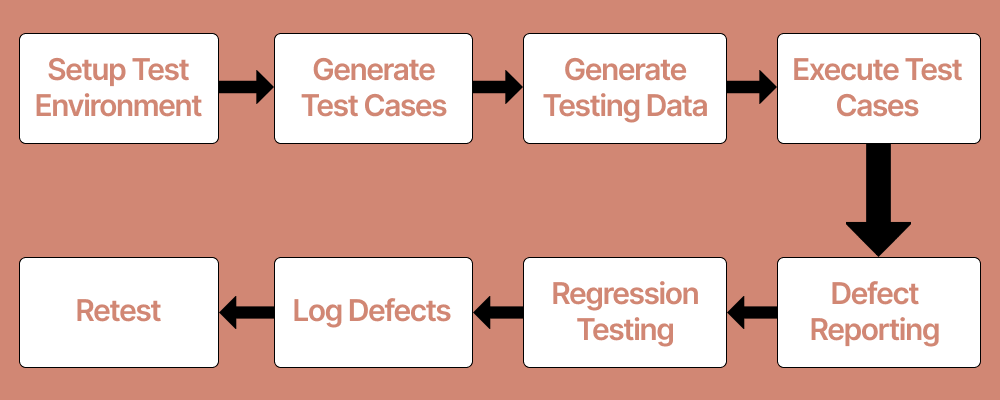
- Set up the test environment - identify the frameworks, languages, tools, dependencies, and configuration the environment needs, and match it to production.
- Create test cases - document what to test, how to run it, and what counts as pass or fail. The e-commerce table later in this guide shows the format.
- Build test data - prepare positive and negative inputs, covering every required field.
- Execute test cases - run them and record the output that determines pass or fail.
- Report defects - capture how the system responded, with steps a developer can reproduce.
- Run regression tests - re-run the suite so a late fix does not break working functionality.
- Fix defects - triage and resolve, accepting that not every fault can be closed before release.
- Retest - confirm each fix behaves as intended before the cycle closes.

Note: System testing is the last point where a requirement gap is still cheap to close. TestMu AI KaneAI turns those requirements into web, mobile, and API tests written in plain English. Try TestMu AI free.
How Is System Testing Different From Integration, E2E, and Acceptance Testing?
These four levels are routinely confused because they overlap in time and all exercise more than one component. The difference is what each one is measured against, and who signs it off.
| Aspect | Integration testing | System testing | End-to-end testing | Acceptance testing |
|---|---|---|---|---|
| What is tested | Interfaces between two or more modules | The complete assembled system | A full user journey across systems | The finished product against business needs |
| Scope | Component boundaries only | Everything inside the system boundary | Crosses the boundary into third-party services | The delivered release |
| Verified against | Interface and design specifications | Software Requirements Specification (SRS) | Real user workflows | Business and user requirements |
| Performed by | Developers and testers | An independent QA team | QA team | Users, clients, and stakeholders |
| Technique | White box or grey box | Black box | Black box | Black box |
| Covers non-functional requirements | Rarely | Yes, including performance, security, and recovery | Sometimes | Rarely |
| When it runs | Before system testing | After integration, before acceptance | Within or alongside system testing | Last, immediately before release |
The shortest way to keep them apart: integration testing asks whether the parts talk to each other. System testing asks whether the assembled product matches the specification.
End to end testing asks whether a real journey completes. Acceptance testing asks whether the customer will take it.
Is System Testing Black Box or White Box?
System testing comes under the classification of the black-box test method. Although the white box technique requires internal code knowledge, the black box testing technique does not.
Components that passed integration testing become the input here, and are exercised through the black-box methodology. Functional, security, and performance cases all run at this level.
What Tools Are Used for System Testing?
No single tool covers system testing end to end, so most teams combine a driver for functional flows, a load generator for performance work, and a cloud grid for browser and OS coverage.
The tools below cover those jobs between them.
- Robot Framework - keyword-driven and application-independent. Version 7 runs on Python 3.8 or newer.
- Galen Framework - open-source layout and responsive-design testing, built on Selenium WebDriver.
- Selenium - open-source automation for web tests across browsers, and one of the best test automation frameworks.
- JMeter - simulates load against a server to measure durability and performance under different traffic patterns.
- TestMu AI - runs cross browser testing across 50,000+ real devices and 3,000+ browser and OS combinations.
Setup steps are in the getting started with TestMu automation documentation.
Note: Covering every browser and OS combination is where in-house labs stall. TestMu AI runs system tests on 50,000+ real devices and 3,000+ browser and OS combinations on demand. Start testing for free.
What Does a System Test Case Look Like?
A system test case reads as a user-facing scenario with an ID, preconditions, steps, and an expected result, rather than a code assertion. The table below applies that format to an e-commerce build, with each case tagged by the type of system testing it exercises.
| ID | Scenario | Preconditions | Steps | Expected result | Type |
|---|---|---|---|---|---|
| ST-01 | New user registers and logs in | Build deployed to staging; email service connected | Register with a valid email, open the confirmation link, log in | Account is created, the confirmation email arrives, and the user lands on the account page | Functional |
| ST-02 | Guest buys an in-stock item | Product in stock; test card set up in the payment sandbox | Search, filter by price, add to cart, check out as a guest, pay | Order is placed, stock drops by one, and the confirmation page and email show the order number | End-to-end scenario |
| ST-03 | Payment is declined | Sandbox card set to decline | Add an item to the cart, pay with the declining card | A clear decline message appears, no order is created, and the cart keeps its items | Functional (negative) |
| ST-04 | Checkout at peak load | Load profile from the SRS, for example 500 concurrent users | Ramp virtual users through browse, cart, and checkout for 30 minutes | Response times stay within the SRS target and errors stay below the agreed threshold | Performance and load |
| ST-05 | Session expires after inactivity | Logged-in user; timeout value set in the SRS | Leave the session idle past the timeout, then open the cart | The user is asked to log in again and the cart is restored after login | Security |
| ST-06 | Checkout on supported browsers | Supported browser, OS, and device list from the SRS | Run ST-02 on each supported browser, OS, and mobile device | Layout and checkout behave the same on every configuration | Compatibility |
| ST-07 | Payment service fails mid-checkout | Payment sandbox can be stopped and restarted | Submit payment, stop the payment service, restart it, retry | No duplicate charge or order, and the user can retry and complete the purchase | Recovery |
| ST-08 | Keyboard-only checkout with a screen reader | Screen reader running; no mouse | Complete ST-02 using only the keyboard | Every field and button is reachable, labelled, and announced | Accessibility |
Trace each row to a requirement in the SRS, so a failed case points to the exact requirement the build misses. The same structure applies to any test case, with the steps written from the user's side of the screen.
Running System Tests on TestMu AI
Manual cases such as ST-02 and ST-06 run in Real Time Testing on TestMu AI, across 3,000+ browser and OS combinations with no local lab to maintain.
- Sign in, open Real Time Testing, and select Desktop under Web Browser Testing.
- Enter the staging URL, choose the OS, browser, browser version, and resolution, then click Start.
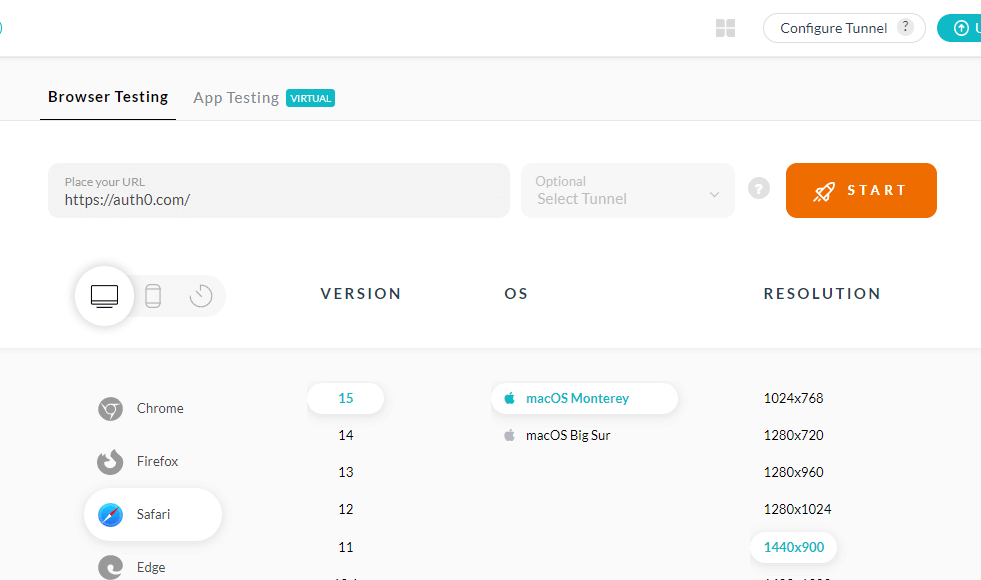
- Walk through the test case. When a step fails, Mark as Bug sends an annotated screenshot to Jira or another tracker with the browser, OS, resolution, and session recording link attached.
A staging build that is not public connects through LT Tunnel. Physical hardware runs on the real device cloud, and KaneAI lets you author the repeatable regression suite in plain English. Setup details are in the getting started with desktop browser real time testing documentation.
What Are the Advantages of System Testing?
System testing is the first level that judges the product the way a customer will, and most of its advantages come from that.
- Requirement coverage - every functional and non-functional requirement in the SRS is checked against the assembled build instead of being inferred from component results.
- Defects between components - it catches failures that only appear when modules, data, and external services run together.
- Production-like results - a mirrored environment exposes configuration, data volume, and integration problems before users meet them.
- Independent verification - testers who did not write the code check it against the specification, so the developer's assumptions are tested too.
- Release evidence - the exit report gives stakeholders a record to base the go or no-go decision on before acceptance testing.
What Are the Limitations of System Testing?
System testing carries real costs, and pricing them in upfront is what keeps a release schedule honest. The limitations below come up on almost every project I have worked on so far.
- Cost - skilled testers, debugging tools, and a production-like environment are all chargeable line items.
- Duration - exercising the whole system takes longer than any narrower level, and it sits on the critical path.
- No completeness guarantee - full path coverage still misses defects that only appear under real usage patterns.
- Late feedback - defects surface after integration, when a fix is more disruptive than it would have been earlier.
What Are the Best Practices for System Testing?
Most system test failures trace back to the QA process rather than the tooling itself. The practices below address the failures that recur across projects, whatever the stack in use.
- Simulate real conditions - install and configure the build exactly as the documentation instructs, then use it as a customer would.
- Hold the environment constant - identical conditions across runs keep outside interference from being mistaken for a defect.
- Involve multiple disciplines - analysts, developers, testers, and customers each catch a different class of problem.
- Re-run after every fix - a one-line bug fix can introduce a worse defect, so regression coverage belongs inside the cycle.
- Log defects usefully - record the steps, the expected result, and the actual result, then track through to a verified retest.
Next Steps for Running System Testing
System testing is the point where the product is judged as a whole rather than in pieces, and it is the last review that happens before users become the testers.
Start from the requirement specification, build test cases against it, and run them in an environment that mirrors production. That sequence is what makes the results trustworthy.
If you are deciding where to spend limited time, read non functional testing next. It is where most escaped system defects originate.
Testing web or mobile apps without writing code? KaneAI by TestMu AI turns plain-English instructions into tests.
Author

Sai Krishna
Blogs: 35

Sai Krishna is Director of Engineering at TestMu AI, where he leads agentic AI for quality engineering, building AI agents that autonomously drive mobile and conversational test automation. His current focus is Agent Testing and Model Context Protocol (MCP) support for mobile. He is a core contributor and member of the Appium open-source project and the creator of AppiumTestDistribution and appium-device-farm. With over 14 years of experience including more than 9 years at Thoughtworks as a Principal Consultant, he holds a BSc in Electronics and speaks regularly at TestMu and Appium Conf on Appium, mobile automation, and agentic AI in testing.
Reviewer

Srinivasan Sekar
Reviewer
Srinivasan Sekar is Director of Engineering at TestMu AI, where he leads engineering and open-source initiatives behind the Selenium and Appium automation grid and owns TestMu AI's MCP Server. A committer to Appium and a contributor to Selenium, WebdriverIO, Taiko, and AppiumTestDistribution, he brings over 15 years of experience in quality engineering and open-source technologies. He is the author of the Apress book 'The MCP Standard: A Developer's Guide to Building Universal AI Tools with the Model Context Protocol,' a Certified Kubernetes and Cloud Native Associate, and an international conference speaker. Before TestMu AI he spent over eight years at Thoughtworks as a Principal Consultant and Quality Architect. Srinivasan holds a B.Tech in Information Technology from Anna University.


System Testing FAQs
Did you find this page helpful?
More Related Learning Hubs

TestMu AI forEnterprise
Get access to solutions built on Enterprise
grade security, privacy, & compliance
- Advanced access controls
- Advanced data retention rules
- Advanced Local Testing
- Premium Support options
- Early access to beta features
- Private Slack Channel
- Unlimited Manual Accessibility DevTools Tests