

Power Your Software Testing with AI Agents and Cloud
The Native AI-Agentic Cloud Platform to Supercharge Quality Engineering. Test Intelligently and Ship Faster.


- TestMu AI (Formerly LambdaTest)
- /
- Learning Hub
- /
- QA Process: Models, Stages, Steps, and Best Practices
QA Process: Models, Stages, Steps, and Best Practices
The QA process defines how teams plan, test, and improve software quality. Learn QA process models, stages, setup steps, metrics, and best practices.
Last Updated on:
On This Page
- What Is the QA Process?
- Why Do You Need a QA Process?
- What Are the Benefits of the QA Process?
- How Does the QA Process Fit the Software Development Life Cycle?
- How Does the QA Process Work in Agile Development?
- How Does the QA Process Differ From Quality Control?
- How Does QA Differ From Software Testing?
- What Are the QA Process Models?
- What Are the TMMi Maturity Levels for a QA Process?
- Which Tests Are Involved in the QA Process?
- Which Methodologies Does the QA Process Use?
- What Are the Stages of the QA Process?
- How Do You Set Up a QA Process From Scratch?
- What Do QA Processes Look Like in Different Industries?
- How Do TQM, SPC, and CMMI Relate to the QA Process?
- How Do You Measure the Effectiveness of the QA Process?
- What Are the Approaches to the QA Process?
- Which Tools Support the QA Process?
- How Do You Streamline Your QA Process Using TestMu AI?
- What Are the Challenges in the QA Process?
- What Are the Best Practices for the QA Process?
- How Is AI Changing the QA Process?
- How Do You Build a QA Process That Lasts?
OVERVIEW
The QA process is a systematic approach to testing that ensures software meets specified requirements and satisfies users. It covers scope definition, planning, design, coding, and test execution.
It also involves defect management, ongoing reporting, and test planning to sustain a continuous improvement cycle. In a competitive market, functional, high-quality, bug-free applications are essential.
According to Statista, the application development software market is set to grow 7.04% from 2023 to 2028, reaching US$234.70 billion. At that scale, low-quality releases risk major financial loss.
Per the Consortium for Information and Software Quality, inadequate software quality costs US organizations over $2.08 trillion a year.
Those costs stem from operational failures, failed projects, and errors in legacy systems. A strong QA process mitigates such risk, lifts user satisfaction, and drives project success.

Note: Run manual and automated tests for your QA process in one place. Start Testing on TestMu AI
What Is the QA Process?
The QA process is a systematic set of activities that verifies software meets its requirements before release. It spans planning, test design, execution, defect management, and improvement.
Quality Assurance (QA) ensures the delivery of reliable software to end users. "Quality" means the product is fit for use, and "Assurance" is a positive declaration that it works as required.
In practice, QA identifies defects across the layers of an application. It tests intentionally to uncover vulnerabilities and check alignment with business requirements, security standards, and technical specifications.
Coordination matters here, so QA also involves project management. A dedicated team runs it, including QA Engineers, a Test Lead, and a Test Manager.
The quality assurance process typically involves:
- Identifying and addressing errors, bugs, and redundancies.
- Verifying logical flow.
- Ensuring a consistent User Interface (UI) and User Experience (UX).
- Anticipating and rectifying unforeseen software flaws.
- Verifying developers' compliance with customer requirements and expectations.
Here are the following objectives of the QA process:
- Establishing and maintaining set requirements for developing reliable software applications.
- Verifying the software application's functioning and ensuring each component's perfection.
- Increasing user confidence, enhancing an organization’s credibility, refining work processes and efficiency, and enabling competitive strength.
- Identifying and rectifying defects and ensuring the software applications meet specified requirements and user expectations.
- Improving the quality and efficiency of the software development process.
- Ensuring that professionals or software development entities deliver software applications that align with the highest industry quality benchmarks.
Now let us learn why we need a QA process in software development.
Why Do You Need a QA Process?
A QA process is needed to catch defects early, before they reach production and damage reliability or reputation. It builds quality into every phase of development rather than testing only at the end.
Knowing where QA fits in the Software Development Life Cycle (SDLC) clarifies the concept. Take the example of building an eCommerce application.
Its development integrates many components, from the user interface and payment processing to inventory and order fulfillment. Each must be tested so bugs are reported and fixed. That is where a QA process is needed.
Without QA, a bug often goes undetected and causes glitches after release. This hurts platform reliability and the reputation of the business. Integrating QA into development allows early detection before issues grow complex.
QA also ensures each line of code is tested for functional correctness alongside performance, security, and scalability. Clear requirements and a shared blueprint let teams catch defects early, saving time, cost, and user trust.
A process that exists on paper can still run slowly in practice, usually because one stage is quietly capping the rest. Our guide to the most common QA bottlenecks covers how to measure which stage is actually the constraint before changing the process around it.

What Are the Benefits of the QA Process?
Establishing an effective quality assurance process demands time and effort, but the resulting software quality justifies these investments. Here are the key benefits of a strong quality assurance process:
- Reduced Software Defects: Requirements analysis, regular code reviews, and unit testing catch severe defects early.
- Quicker time-to-market: Shift-left practices and a practical test automation architecture cut testing time and ensure timely delivery.
- Improved user experience: A thoroughly tested application free of critical and minor defects leaves end users satisfied.
- Reducing maintenance costs: Thorough testing detects bugs fast, and a clear test plan gives developers repeatable steps to resolve them.
- Building and maintaining brand reputation: QA upholds a positive brand reputation. Consistent high-quality releases position an organization as reliable and trustworthy.
How Does the QA Process Fit the Software Development Life Cycle?
In the Software Development Life Cycle, the QA process ensures the application meets the Software Requirement Specification (SRS) before it reaches end users. Traditional SDLC ran QA only after development finished.
That approach has drawbacks, since a bug found late is costlier to fix. QA should not follow development; it should support it throughout.
In contemporary SDLC, QA runs parallel to development. Code is tested whenever it lands in the repository, not after the whole app is built. QA spans the SDLC as a continuous process.
QA starts by collaborating with stakeholders to verify requirements and review design. It performs static testing before code runs, conducts unit, integration, and system testing, and joins the final release checks.
Put differently, the quality assurance process adopts Agile practices: QA is integrated into each development phase rather than run only at the end.
How Does the QA Process Work in Agile Development?
An Agile development environment is flexible and dynamic. Frequent code changes require testers and developers to work closely and give quick feedback.
With so many changes, the QA process keeps behavior from drifting. That means integrating QA across the Agile workflow, focused on early continuous testing.
In Agile, QA is central to Continuous Integration and Continuous Deployment pipelines. The Quality Analyst takes part at each development stage, catching issues early and preventing defects from accumulating.
Agile methodologies prioritize delivering valuable software to users often. The Quality Analyst checks that each increment meets user expectations and business requirements, so teams ship reliably and improve continuously.
Quality Gates
A quality gate is a set of automated checks a code change must pass before advancing. On each commit, the CI server runs unit tests, static analysis, security scans, and coverage checks.
If any check fails, the build is blocked and the change cannot merge or deploy. This keeps bad code off the main branch and enforces standards automatically, giving teams consistent feedback on every change.
Now that the QA process is clearer, some still treat quality control and quality assurance as the same. They are not; the next section explains the difference.
How Does the QA Process Differ From Quality Control?
Quality assurance (QA) and quality control (QC) have distinct roles despite some similarities.
| Aspect | Quality Assurance (QA) | Quality Control (QC) |
|---|---|---|
| Scope | Provides overall guidelines for various processes. | Production-focused process, emphasizing validations. |
| Purpose | Ensures the systematic adherence to specified requirements. | Addresses issues like software bugs or defects. |
| Timing | Implemented throughout the entire Software Development Life Cycle. | Executed during or after the development of software applications. |
| Focus | Preventive in nature, aiming to avoid issues before they occur. | Reactive in nature, addressing issues after they occur. |
| Responsibility | Shared responsibility across the organization. | Often, the responsibility of a specific team or department. |
| Activities | Includes process audits, management system standards, and planning. | Involves inspections, testing, and defect identification. |
| Goal | Ensures that the process itself is efficient and effective. | Verifies that the end product meets specified quality standards. |
| Feedback Loop | Continuous improvement is based on ongoing evaluation and feedback. | Feedback loop is primarily based on identified defects. |
On a similar note, the quality assurance process is different from software testing. Learn the key difference in the below section.
How Does QA Differ From Software Testing?
Quality Assurance (QA) is distinct from software testing, with QA focusing on processes and procedures. In contrast, testing is dedicated to practically evaluating and verifying a software application to uncover defects.
| Aspect | Quality Assurance (QA) | Software Testing |
|---|---|---|
| Focus | Centers around processes and procedures. | Focus on the practical examination of a product. |
| Purpose | Establishes standards for testing to meet business requirements. | Validates software application functionality and identifies issues. |
| Approach | Strategic, ensuring overall process efficiency and effectiveness. | Tactical, directly involved in validating product functions. |
| Scope | Includes the entire development process. | Concentrated on evaluating specific product functionalities. |
| Responsibility | Shared across the organization as a comprehensive approach. | Often delegated to specialized testing teams or individuals. |
| Outcome | Ensures adherence to defined quality standards and processes. | Identifies and reports defects, ensuring product reliability. |
| Involvement Timing | Involved throughout the development life cycle. | Primarily concentrated during specific testing phases. |
What Are the QA Process Models?
The software quality assurance process follows a systematic method guided by specific development models. The prominent ones are the Waterfall and Agile models, along with DevOps integration.
- Waterfall Model: A linear approach where each phase builds on the last. It relies on documentation but tests late, delaying defect detection.
- In requirements analysis, build a comprehensive QA plan outlining the testing strategy and resource allocation.
- In system design, develop detailed test plans based on the system design documents.
- During implementation, run unit testing on each module and perform static code analysis and reviews before dynamic testing follows.
- Verify component integration by executing test cases for integrated modules, using unit, system, and user acceptance testing.
- When code changes, execute regression testing and retesting as a QA best practice.
- Agile Model: An iterative approach built on adaptability and continuous improvement. Short sprints let teams adjust quickly to evolving requirements.
- Scrum divides development into time-boxed sprints, improving focus and adaptability.
- Kanban emphasizes continuous flow, delivering features as soon as they are ready.
- XP encourages pair programming, raising code quality and knowledge sharing.
- In Scrum, QA runs in every sprint, with analysts writing tests before code so it aligns with specifications.
- In Kanban, QA runs continuously as work items move across the board, so issues surface quickly.
- In XP, pair testing mirrors pair programming, with analysts testing together and sharing insights.
- DevOps Integration: DevOps unites development and operations to improve communication. It promotes automated testing across the pipeline for rapid, reliable feedback.
- QA relies on automation to verify each code change, so a test suite covers unit, integration, and end-to-end tests.
- QA shifts to the early stage of the life cycle, so bugs are found sooner.
- QA verifies functionality in a staging environment that mimics production, easing the move to release.
Here are the QA activities you can undertake in each phase of the Waterfall model:
These steps keep QA thorough and systematic in the Waterfall model, helping deliver high-quality applications.
The most popular methodologies in the Agile model include Scrum, Kanban, and Extreme Programming (XP).
The QA process integrates closely with each of these methodologies; here is how:
Here's how the QA process is integrated into DevOps:
What Are the TMMi Maturity Levels for a QA Process?
A mature QA process is a standard every organization should aim for. Software development has the Capability Maturity Model Integration (CMMI), which QA professionals adapted into TMMi, the Test Maturity Model Integration.
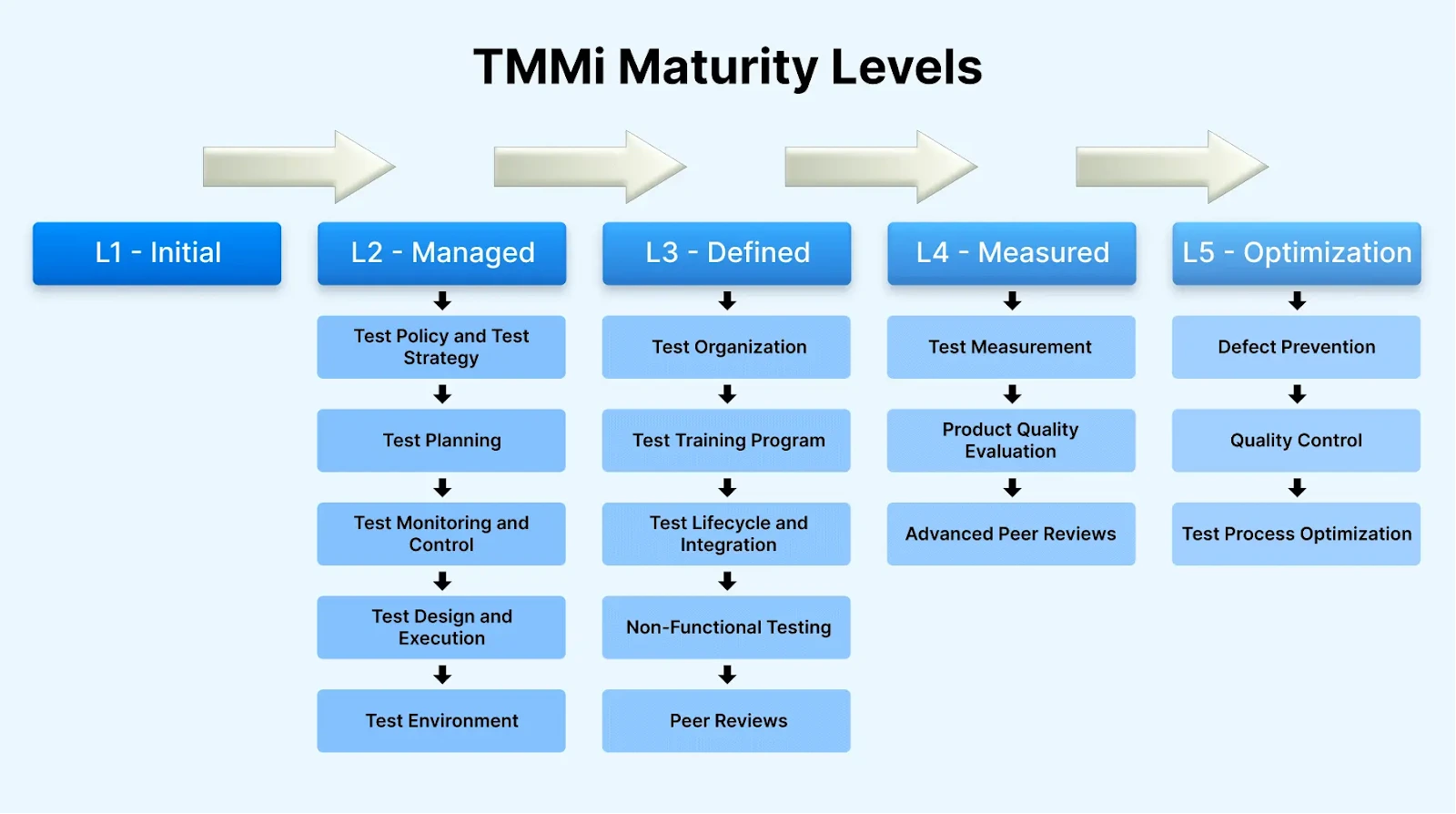
There are five levels of QA process maturity:
- Level 1: Initial: QA is immature and unpredictable. It is common in new setups but can persist even in long-established teams.
- Level 2: Managed: The basics are established: test planning, design, execution, monitoring, and environments. Yet QA remains reactive.
- Level 3: Defined: QA is integrated into development from the start, with training in place. Procedures are well-organized and proactive.
- Level 4: Measured: QA processes are measured and controlled, with regular reviews at each project development stage.
- Level 5: Optimization: Focused on process improvement. Activities, tools, and methods are evaluated and analyzed to be optimized.
Which Tests Are Involved in the QA Process?
Testing critically evaluates and verifies an application before release. The QA process applies many testing types to different parts of the application, all aimed at finding and fixing bugs. Let us go through them briefly.
There are two primary test categories: functional and non-functional.
- Functional Testing: Analysts verify the application behaves as required by comparing actual output to the expected result. Its main types are:
- Unit Testing: Validates individual units or components, focusing on the functional aspects of code.
- Integration Testing: Tests the interaction between components, checking data flow and interfaces across interconnected modules.
- System Testing: Evaluates the whole application's functional behavior against specified requirements, verifying the complete system.
- Acceptance Testing: Validates the application against business requirements and user expectations from a functional standpoint.
- Non-Functional Testing: Analysts verify performance under varied conditions, running load, security, stress, and usability tests. Its main types are:
- Performance Testing: Evaluates responsiveness, speed, and scalability, measuring aspects like response time and throughput.
- Security Testing: Identifies vulnerabilities in security features through penetration testing, code analysis, and other checks.
- Usability Testing: Evaluates user-friendliness and experience, focusing on interface design, navigation, and ease of use.
- Compatibility Testing: This ensures the software applications function correctly across different platforms, browsers, and devices.
- White Box Testing: Tests the internal structure, design, and code to validate input-output flow, usability, and security.
- Black Box Testing: Evaluates functionality without inspecting internal structure or code, focusing on requirements specifications.
- Grey Box Testing: Combines white and black box approaches when testers have limited knowledge of the internal structure.
- Smoke Testing: Quickly verifies fundamental functionality, confirming the system's primary features work.
- Regression Testing: Confirms the application still works as intended after changes such as bug fixes.
- Load Testing: Evaluates behavior under both average and peak load conditions.
- Cross Browser Testing: Analyzes functionality across different browser and platform environments.
Other testing types:
Additional testing types you might encounter during the QA process include:
Which Methodologies Does the QA Process Use?
Different testing methodologies play a key role in the robustness and accuracy of an application. Knowing them helps you improve code quality.
Test-Driven Development (TDD)
Test-Driven Development (TDD) is an iterative method that writes automated tests before production code. You start with a failing test, write the minimum code to pass it, then refactor and repeat.
Key benefits include:
- Design Improvement: TDD promotes modular, loosely coupled, testable code, improving overall design and maintainability.
- Faster Feedback Loop: Immediate feedback on changes surfaces bugs early, so developers fix them at the start of development.
- Reduced Debugging Time: Early detection isolates bugs to recent changes, making them easier to identify and fix.
QA and Crowdtesting
Crowdtesting is a valuable addition to the QA landscape, offering significant time savings and expanding testing possibilities. This approach involves engaging a large number of QA testers across diverse devices, operating systems, and networks.
Key advantages include:
- Scale and Efficiency: Thousands of QA testers cover various scenarios, detect more bugs, and complete tests rapidly.
- Comprehensive Testing: Crowdtesting enables broad-scale coverage, ensuring a more thorough evaluation of your application.
Your QA methodology should align with the application under development. Rethink workflows, adopt Agile, and integrate CI/CD. Combine methods like automated testing and crowdtesting for stronger coverage.
Tip: The chosen methodology informs design and development teams and shapes quality. Software quality comes not just from testing but from how QA results are used. Adapt your approach to your application.
Two-Tier Approach to Test Automation
Major changes, such as a key developer moving to another project, can delay work when the QA team lacks context on the testing tools and processes involved.
A two-tier automation approach addresses this. Tier one validates every codebase contribution quickly through sanity and ad-hoc testing.
Tier two runs broader regression coverage overnight. Deciding which tier owns each testing type can be challenging.
Exploratory and Ad-hoc Testing
Exploratory testing combines learning, test design, and execution at once, relying on tester expertise. Tests run on the spot, informing future planning. Ad-hoc testing runs randomly, without a plan or documentation.
Risk-Based Testing
Risk-based testing is core to Agile, identifying and prioritizing risks during test execution. You list and rank risks, then focus testing on those most likely to affect performance.
Integrating this strategy early lets the QA team streamline architecture and simplify testing. Focusing on likely issues reduces the scope of testing operations.
What Are the Stages of the QA Process?
The QA process stages are requirement analysis, test planning, test case design, environment setup, test execution, defect reporting, and test closure.
The QA process moves through the stages below.

- Requirements Analysis: The Quality Analyst reviews functional and non-functional requirements to grasp scope and map an effective QA process.
- Work closely with stakeholders to establish precise, comprehensive requirements.
- Record requirements so the whole team can access them. A Smart Test Management tool reuses cases across projects via data parameterization.
- Verify requirements are measurable and testable, laying the groundwork for test cases later.
- Plan the Tests: The analyst builds a strategy during test planning, covering scope, budget, deadlines, and required test types and tools.
- Determine the most suitable testing methodology: manual, automated, or hybrid.
- Select tools and frameworks aligned with the stack. Assess whether an AI/ML tool with self-healing and smart waits is needed.
- Define roles for QA members, including test engineers, test leads, and QA managers.
- Establish a test environment that closely mirrors production.
- Design the Test Cases: QA teams develop test cases and checklists covering the requirements, each with a pass or fail outcome.
- Generate a clear, concise test case for each requirement with expected outcomes.
- Outline step-by-step procedures per sequence, with checklists for manual and automated methods.
- Start with exploratory testing to learn the software before designing cases.
- Prioritize test cases by risk, criticality, and project timelines.
- Review and validate plans and cases with stakeholders to confirm alignment.
- Create Test Environments: A dependable test environment mirrors production for accurate results, requiring planning with development and operations teams.
- Mirror production hardware, software, and configurations in the test environment.
- Automate deployment and configuration to reduce setup time.
- Version-control test data and configs for consistency across phases.
- Isolate test environments from production to prevent side effects.
- Run Tests and Report Defects: With plans, cases, and an environment ready, run tests, document results, and pinpoint defects methodically.
- Regression Testing: Across iterative cycles, regression testing confirms new changes do not introduce defects or break existing functionality, upholding overall quality.
- Automate regression suites to validate existing functionality after each code change.
- Identify critical paths and features that need regular regression testing.
- Maintain a regression suite covering representative test cases.
- Integrate regression testing into the CI/CD pipeline for faster feedback.
- Monitor and Report Test Progress: Keep stakeholders updated on progress, defect status, and quality. Transparent reporting aids decisions.
- Conduct Release Tests: On a release notification, the QA team identifies affected functionality and builds modified suites for the new build.
- Continuous Improvement: QA is ongoing. After each cycle, reflect on wins and gaps, then use data to refine it.
- Perform retrospective meetings with the QA team to collect feedback and identify areas for enhancement.
- Implement best practices and lessons learned from prior projects.
- Stay ahead of the latest testing methodologies, tools, and industry trends.
- Promote knowledge sharing and training within the QA team to augment skills and expertise.
Where a process already exists, the analyst evaluates its maturity, identifies flaws in planning, scheduling, and management, and proposes a roadmap to improve it. Consider these points at this stage:
Once the plan is finalized, the test manager delegates responsibilities to individual testers. Key considerations during planning:
Each test case defines conditions, data, and steps to validate a functionality, plus an expected result to compare against actuals. Key points when creating test cases:
Key considerations:
Testing begins at the unit level, then the QA team runs API and UI tests. Manual tests follow the designed cases, and bugs are logged in a defect tracking system, where each one takes on a status from the defect life cycle so ownership is never ambiguous.
Key considerations:
Running smoke tests to confirm build stability is essential. If they pass, the modified suites run and a full report is generated.
Key practices for continuous improvement:
Note: Automate your QA process across browsers and devices on the cloud. Try TestMu AI Now
How Do You Set Up a QA Process From Scratch?
If you are a QA lead starting with no process in place, work through these steps to build a foundation your team can scale:
- Define quality gates: Decide the checks a build must pass, such as unit tests, a coverage threshold, and a clean security scan.
- Establish test environments: Stand up isolated staging environments that mirror production hardware, configuration, and data so results stay reliable.
- Pick initial automation candidates: Automate stable, repetitive flows first, such as smoke tests and core regression paths, leaving exploratory work manual.
- Set entry and exit criteria: Agree when testing begins (requirements frozen) and when it ends (no open critical defects, coverage met).
- Add reporting: Track defect density, pass rate, and coverage on a shared dashboard so stakeholders see quality at a glance.
In Agile, these steps form a loop: grooming clarifies acceptance criteria, planning assigns test scope, CI checks every commit, automated regression confirms existing behavior holds, and a release gate blocks deployment until all criteria pass.
To keep automated regression fast as your suite grows, you can offload it to a automation cloud like TestMu AI and run tests in parallel across browsers and devices.
What Do QA Processes Look Like in Different Industries?
The QA process adapts to the risks of each domain. Here is how it looks in practice across three industries:
- Financial Services (trading platforms): QA prioritizes accuracy under load and low latency, simulating peak volume, validating order-matching logic, and enforcing audit trails.
- Healthcare (Electronic Health Records): QA centers on data integrity and privacy, confirming records stay consistent and checking HIPAA and HL7 compliance.
- Retail (e-commerce checkout flows): QA focuses on conversion paths, testing cart, payment, and inventory across devices, and load testing for sale-day spikes.
How Do TQM, SPC, and CMMI Relate to the QA Process?
Modern software QA borrows from established quality management frameworks. Three of the most influential are:
- Total Quality Management (TQM): An organization-wide philosophy making quality everyone's responsibility, emphasizing customer focus, continuous improvement, and process ownership across teams.
- Statistical Process Control (SPC): Uses control charts to monitor a process, detect variation early, and keep output within limits.
- Capability Maturity Model Integration (CMMI): Rates process discipline across five levels, from ad-hoc to optimizing, the model TMMi adapted for testing.
How Do You Measure the Effectiveness of the QA Process?
The QA stages above drive continuous improvement, identifying weak areas and refining application quality over time.
So how do you measure that effectiveness and spot areas to improve? The answer is QA metrics, which evaluate and monitor the development process. First, let us understand what a QA metric is.
QA Metrics
QA metrics are numerical values that measure the quality, functionality, and performance of an application. These indicators are monitored and improved to ensure quality development.
They apply across every phase of the Software Development Life Cycle, from requirements gathering and design to coding, testing, and maintenance.
Some fundamental QA metrics include:
- Total Number of Test Cases: Counts all test cases created to evaluate an application's functionalities.
- Defect Density: Defects per unit, such as lines of code or function points. For 100,000 lines with 1,000 defects, density is 1%.
- Test Execution Coverage: Compares test cases executed against those planned, showing testing progress.
- Test Effectiveness (Defect Containment Efficiency): The ratio of defects found before release to all defects found before and after. Calculated as follows:
- Test Design Efficiency: Measures the number of test cases designed per unit of time.
Calculation: Total number of test cases = (number of functional requirements) x (number of test cases per requirement).
CalculationDefect Density = Total number of defects / Size of the software or application area
Calculation:Test Execution Coverage = (Total number of executed test cases or scripts / Total number of test cases or scripts planned to be executed) x 100
Calculation: Test Effectiveness = (Bugs detected in 1 test / Total number of bugs found in tests + bugs found after release)
Calculation:Test Design Efficiency = Total number of tests designed / Total time taken.
How QA Metrics Help
Once metrics are defined, using them for continuous improvement becomes central to the QA process. Here is how they contribute:
- Metrics reveal trends and patterns that help the team address bugs early.
- They form the basis for root cause analysis, clarifying the underlying issues behind a defect.
- Metrics guide testing strategy by highlighting areas of low coverage.
- They aid resource allocation by exposing bottlenecks, inefficiencies, and high defect-density areas.
What Are the Approaches to the QA Process?
There are two main approaches to the QA process during the SDLC:
- Manual testing approach: Manual testing has human testers run cases and generate reports, suiting smaller projects and needing no scripting knowledge.
- Automation testing approach: Analyst-written scripts evaluate the app. Reusable scripts suit large projects but may miss errors outside their code.
On larger projects, though, manual testing grows time-consuming, and the potential for human error is always present.
Analysts choose between manual and automated testing based on each project's needs. Next, let us look at the tools used for automation testing in the QA process.
Which Tools Support the QA Process?
With the process, test types, and approaches covered, here are the tools analysts use. A testing tool is anything that supports test activities. This curated list covers common, popular options.
- TestMu AI: An AI-Native test orchestration platform for manual and automated tests across 10,000+ real devices, browsers, and OS combinations.
- Access to 10,000+ browsers and operating systems for comprehensive testing across devices.
- Parallel testing to run multiple tests at once across browsers and devices.
- Integrations with leading test automation frameworks for a quick start.
- Debugging tools such as video recording, network, and console logs for fast bug resolution.
- A scalable mobile device lab with real Android and iOS devices.
- An AI-Native Test Intelligence platform for fast root cause analysis and error detection.
- Selenium: An open-source framework for automating web browsers, with libraries for cross-browser testing. Scripts run in Java, Python, C#, and Ruby.
- Playwright: An open-source automation framework from Microsoft, with APIs to drive Chrome, Firefox, and WebKit. Scripts run in JavaScript, Python, and Java.
- Cypress: A front-end framework for end-to-end, component, integration, and unit testing. It captures snapshots and auto-waits for assertions.
- Appium: An open-source framework for native, hybrid, and mobile web apps on Android and iOS. Tests run in Java, Python, or JavaScript.
It runs QA across browsers and operating systems without intricate setups, automating repetitive tasks to save time. Key features include:
The right tools are crucial for an effective QA process. They help automate testing, manage defects, and enforce quality standards across the development life cycle.
One such tool is KaneAI by TestMu AI, a GenAI-native QA Agent-as-a-Service platform. It lets teams generate test scripts in plain English, simplifying test case creation and management.
Its precise test generation and error analysis make it a strong addition to any QA toolkit. Integrating KaneAI streamlines testing, improves accuracy, and keeps QA practices efficient.

How Do You Streamline Your QA Process Using TestMu AI?
Software testing is core to the QA process, verifying reliability before deployment. Running it on the cloud helps. Cloud testing speeds up the process and gives teams a cost-effective, flexible option.
Cloud-based testing adds the flexibility to test across diverse browsers, devices, and operating systems without local coverage limits.
For web and mobile testing, AI-powered platforms like TestMu AI offer a full solution. Real-time testing lets you test manually, and automation runs across browsers, versions, devices, and operating systems.

Let’s see how to perform real-time testing and automation testing using TestMu AI.
Real Time Testing
- Sign up on TestMu AI and log into your account.
- In the user Dashboard, go to Real Time from the left menu.
- It will take you to the Browser Testing on Desktop console.
- Enter the URL that you need to test. Select your desired browsers, versions, OS, and resolutions. Then click on Start.
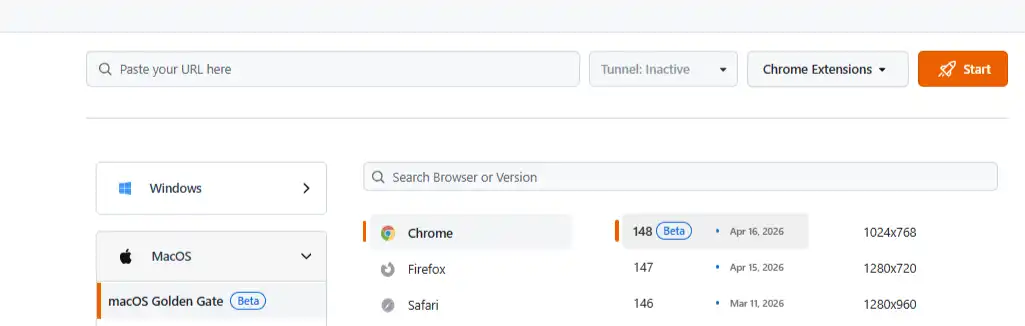
It will launch a cloud-based real machine based on your specified test configuration for website testing.
Automation Testing
TestMu AI provides an online Selenium grid to run automated suites across a wide range of desktop environments. You can use frameworks like Selenium, Cypress, and Playwright.
- Follow the same login process mentioned above in the Real Time Testing section.
- Go to Automation > Web Automation, which offers two options: Demo Project and Configure Test Suite.
- For this demo, choose Configure Test Suite. It lets you set up and run tests with your preferred framework.
- Configure your test settings per the screen's instructions and start the automation testing process.
What Are the Challenges in the QA Process?
QA analysts hit several challenges during the process. Knowing them upfront helps teams plan better solutions. The common ones are listed below.
- Unclear Requirements: Speed and Continuous Delivery drive frequent changes. Keeping requirements current within tight timelines forces constant last-minute rework.
- Last-Minute Changes to Requirements: Requirements often shift mid-sprint. Even minor code changes may require redoing the test scope.
- Finding Defects Early: Smoke testing catches blockers, but serious logic and integration issues often surface only in detailed testing under tight timelines.
- Unreliable Environment: Testing needs a stable setup, yet server issues during load testing force restarts. An unstable environment hampers accurate testing.
- Strict Deadlines: QA automation struggles with last-minute requests. Tight deadlines and reduced testing time leave QA little room for verification and validation.
- Inadequate Information on User Stories: Effective test cases need detailed user journeys. When product owners lack clarity, QA coverage suffers.
- Meagre Collaboration between Tester and Developer: When developers underestimate testing effort, tensions arise. Aligning timelines is key to good relationships.
What Are the Best Practices for the QA Process?
Here are some of the best practices of the QA process using which you can improve the testing approach of software applications:
- Define Clear Requirements: Poor requirements cause delivery issues. Have stakeholders approve requirements early and set clear acceptance criteria.
- Promote Quality Code Production: Strong coding practices reduce initial bugs. Add peer reviews and developer testing when fixing bugs or adding features.
- Implement a Diverse Testing Strategy: Do not limit testing to one or two types. Combine approaches, like unit tests plus smoke testing.
- Conduct Reviews: Let testers give feedback after each test. Also have an external expert review the code for structure, dependencies, and speed.
- Use Both Automated and Manual Testing: Choose the right mix per phase. Manual gathers UX feedback; automation covers repetitive runs.
- Monitor and Report Test Progress: Keep stakeholders updated on progress, defect status, and quality. Transparent reporting aids decisions.
- Enhance Continuous Improvement: QA is ongoing. After each cycle, reflect on wins and gaps, then use data to refine the process.
- Utilize Analytics: Use predictive analytics on past test data to anticipate bug locations, guiding new tests and metric choices.
- Shift-Left Testing: Move testing closer to the start. Unlike traditional late testing, shift-left emphasizes early runs for timely defect notifications.
An internal QA process within the development team catches errors during development, not just before or after launch.
Manual testing then evaluates the app from a user's view. Add regression testing after changes and acceptance testing before stakeholder review to confirm business alignment.
How Is AI Changing the QA Process?
AI is changing the QA process at every stage: it drafts test cases from requirements, writes and heals automation scripts, prioritizes tests by risk, and triages failures after each run. In AI app testing, an agent authors, runs, and self-heals web and mobile app tests from natural-language steps.
The QA role shifts from writing and running tests toward reviewing what AI produced, setting quality gates, and deciding which risks matter. Teams that skip that review step often end up with large suites that pass while missing real defects.
Start by adding AI where the process is slowest, such as test design or failure analysis, and measure the effect with the same metrics you already track. Our guide to ai in test automation covers where AI fits best.
How Do You Build a QA Process That Lasts?
Build a QA process that lasts by starting small, automating repeatable checks early, measuring defect trends, and reviewing the process after every release cycle.
This tutorial covered the QA process and its concepts. A strong process aims to deliver functional, bug-free applications before release.
An established QA process makes high quality and a better user experience easier to reach. To get there, adopt structured standards and commit to ongoing improvement.
Understanding requirements, building a solid strategy, writing thorough test plans and cases, setting up reliable environments, and testing systematically are all essential to QA success.
Continuous improvement and clear stakeholder communication keep the process healthy. Follow these guidelines to build the right QA process for your projects and support your organization's success.
Author

Nazneen Ahmad
Blogs: 39


Nazneen Ahmad is a freelance Technical Content SEO Writer with over 6 years of experience in crafting high ranking content on software testing, web development, and medical case studies. She has written 60+ technical blogs, including 50+ top-ranking articles focused on software testing and web development. Certified in Automation Basic and Advanced Training - XO 10, she blends subject knowledge with SEO strategies to create user focused, authoritative content. Over time, she has shifted from quick, keyword-heavy drafts to producing content that prioritizes user intent, readability, and topical authority to deliver lasting value.
Reviewer

Abhishek Mishra
Reviewer
Abhishek Mishra is a Technical Product Manager at TestMu AI, where he owns Test Manager, the test management product. He has over 8 years of experience in product management and market analysis. His expertise spans across AI-native software testing, product strategy, and analytics. Previously, Abhishek served as the Product Lead at IndiaClan and co-founded Gartley618 Technologies, where he led innovative projects in quantitative trading and blockchain. He holds a B.Tech degree.


QA Process FAQs
Did you find this page helpful?
More Related Learning Hubs
TestMu AI forEnterprise
Get access to solutions built on Enterprise
grade security, privacy, & compliance
- Advanced access controls
- Advanced data retention rules
- Advanced Local Testing
- Premium Support options
- Early access to beta features
- Private Slack Channel
- Unlimited Manual Accessibility DevTools Tests