

Power Your Software Testing with AI Agents and Cloud
The Native AI-Agentic Cloud Platform to Supercharge Quality Engineering. Test Intelligently and Ship Faster.


- TestMu AI (Formerly LambdaTest)
- /
- Blog
- /
- QA Automation: Benefits, Tools and Best Practices
QA Automation: Benefits, Tools and Best Practices
Discover the comprehensive guide to QA automation, covering its benefits, essential tools, and expert tips.
Last Updated on:
On This Page
- What is QA Automation?
- When to Use QA Automation in Testing?
- What Are The Steps to Implement QA Automation?
- Differences Between Manual and Automated QA Testing
- Benefits of QA Automation Over Manual Testing
- Different Types of QA Automation Testing
- Best QA Automation Tools for Mobile And Web Applications
- What is The Role of a QA Automation Engineer?
- QA Automation Best Practices
- How Cloud-based Tools Help Implement Best Practices in QA Automation
- AI Agents in QA Automation
QA automation uses automation tools and pre-written scripts to run test cases without a tester repeating each step manually. A single automation script can execute the same test case across dozens of browser and OS combinations in the time a manual tester needs for one run. This guide covers when to use QA automation, how it differs from manual testing, its benefits, testing types, tools, the QA automation engineer role, and best practices.
Key Takeaways
- QA automation runs pre-written test scripts through automation tools instead of a tester repeating each step by hand.
- Regression testing and smoke testing give the fastest return on QA automation, since the same test cases run unchanged on every build.
- Manual testing still suits exploratory testing, where a fixed script cannot adapt to what a tester notices on screen.
- Selenium, Cypress, Playwright, Appium, and Puppeteer remain the most widely used open-source automation frameworks for web and mobile applications.
- A QA automation engineer designs the automation strategy, writes test scripts, and reports on results, combining coding skill with testing knowledge.
- Cloud-based test execution platforms let teams run automated tests in parallel across many browser, OS, and device combinations at once.
What is QA Automation?
QA Automation, or Automation Testing, involves using software tools to execute pre-written test scripts against a software application, automating the repetitive and manual testing tasks. This process enhances testing efficiency, accuracy, and coverage, allowing for more consistent and thorough validation of software quality.
QA automation increases test coverage and accuracy by eliminating the chance of human-prone errors. Thus, it empowers us to deliver more reliable and robust software to end-users more effectively.
When to Use QA Automation in Testing?
QA automation primarily automates repetitive (or manual) testing tasks previously executed by a human tester. Doing so increases testing speed and increases test efficiency. Listed below are some scenarios where QA automation fits best.
- Repetitive Testing
Scenarios, where the same test needs to be executed again and again without much modifications, are time-consuming and hectic tasks for testers. QA automation would likely be much more effective and reliable in that case. As same test script can be executed multiple times. It saves the testing team valuable time and usually leads to more accurate results.
- Regression Testing
Regression testing helps testers ensure that the software doesn’t produce any error or bug when new functionalities are implemented. These tests have pre-defined test cases that testers must test after every defect fix cycle. QA automation helps testers perform regression testing faster and more accurately. Automated regression testing automatically runs on every software update and provides a proper report.
- Smoke Testing
Smoke testing is performed at the beginning of each test cycle to ensure that the basic components of the application are working as expected. QA automation is the perfect method to perform smoke testing because:
- In smoke testing, test cases rarely change; hence, the automation script requires less modification.
- Smoke tests generally have many test cases that QA automation can execute faster and more accurately.
- Smoke test cases must run repeatedly whenever a new functionality is implemented.
- Data-Driven Testing
Testers must run each test case with numerous data sets in some software. This is common in software where testing data is extracted from an external source (like Excel, CSV, JSON, etc.) for each test case.
- Simultaneous Running Test Cases
If the testing procedures require running the same set of test cases simultaneously, then QA automation is a must. Because manual testing doesn’t allow testers to configure the same test cases and run them simultaneously on several machines. However, QA automation enables testers to schedule test scripts, making it more straightforward to configure and execute similar test cases simultaneously.
- Cross Browser Testing
In today’s world, the availability of multiple popular browsers and OSs makes it impossible to test the software on each of them manually. Implementing QA automation in such scenarios makes it possible to test our software on various Browsers + Versions + OS combinations. Automated cross browser testing ensures software is reliable and scalable.
- Testing Responsiveness of User Interface
QA automation testing platforms are useful for testing the responsiveness of UI components. Automated test scripts test the software by measuring the distance between design elements, images, texts, and as well as the relative alignment of these elements with each other.
By implementing QA automation, testers get access to data driven automation testing frameworks allowing them to reduce the time and effort consumed in testing. It guarantees larger data coverage even if we only have one test case. However, in the same scenario, manual testers will likely get tired of repeatedly testing the same functionality and are prone to missing some data sets.
What Are The Steps to Implement QA Automation?
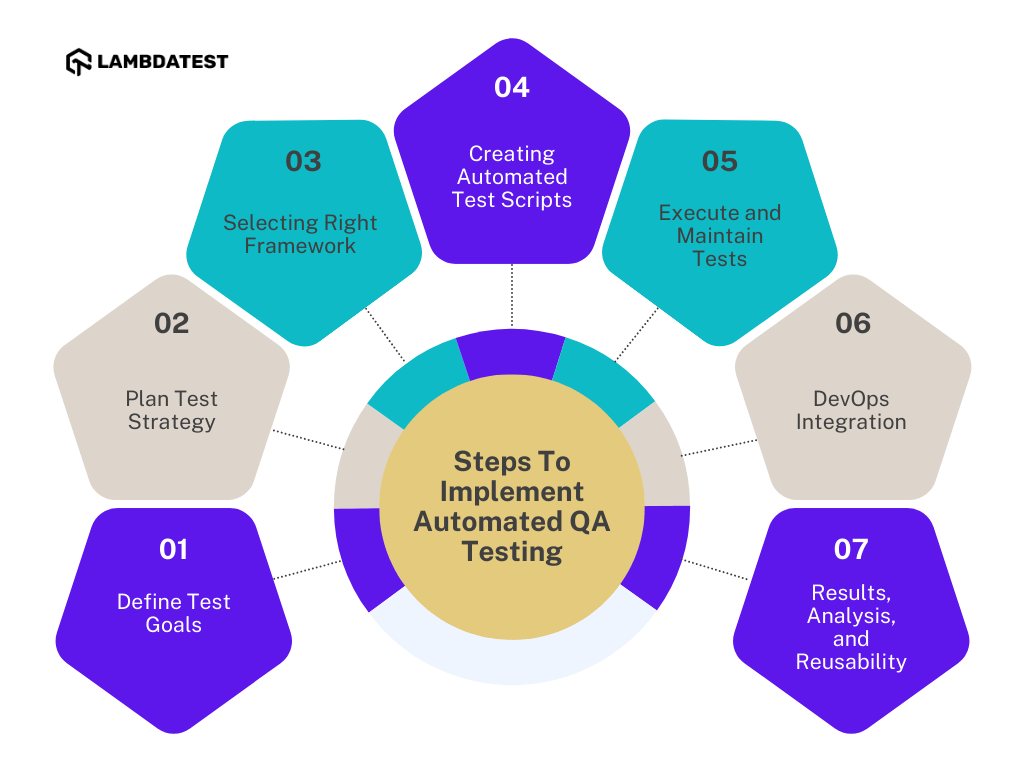
Implementing QA automation in the organization’s software testing life cycle involves proper planning and execution. It mainly involves defining test goals and approaches, selecting the proper testing framework, and creating test scripts. Let’s have a step-by-step look at how to perform QA automation.
- Define Test Goals: The first step in implementing QA automation is to be clear about the short-term and long-term goals of automated testing. Planning and designing a proper roadmap for all long-term and short-term would be most efficient.
- Plan Test Strategy: The next step is to plan a solid test strategy for effective test management. Testing teams should define the testing priorities and the scope of automation.
- Selecting Right Framework: Once the testing goal and strategy are decided, testers must pick the correct testing tools and framework as it is a critical step. There are plenty of testing frameworks available in the market. Discuss the pros and cons of the framework properly before selecting it.
- Creating Automated Test Scripts: The most crucial step for QA automation is to create automation testing scripts to run test cases. Automated testing frameworks use these scripts to perform tests based on the instructions provided in the script.
- Execute and Maintain Tests: Now is the time to execute the automated tests. Testers can use a scheduling tool or pipeline orchestrator to execute automated tests. Using these tools also allows testers to schedule tests simultaneously for parallel testing.
- DevOps Integration: With QA automation, testers can integrate testing in their DevOps pipeline. DevOps integration reduces the dependence of the testing team; thus even developers can execute and get the test report.
- Results, Analysis, and Reusability: QA automation enables testers and developers to get detailed testing results immediately. It also analyzes any failed test cases, the overall outcome of testing, and the usability of tests.
Differences Between Manual and Automated QA Testing
The difference between manual QA testing and automated QA testing is that in manual testing, testers perform the tests step by step manually without the help of tools, whereas in QA automation, tests are executed automatically utilizing automation testing tools and frameworks.
| Criteria | Manual Testing | Automated QA testing |
|---|---|---|
| Speed | Manual testing requires human effort and is often time consuming. | QA automation reduces the human effort required and is faster in executing tests. |
| Cost | Manual testing requires less initial investment. | The setup cost is higher in implementing QA automation is higher. However, the running cost is lower. |
| Test Accuracy | Manual testing cannot be always accurate as it is more prone to human errors. | QA automation is free from human-prone errors and is considered more accurate and reliable. |
| Exploratory Testing | It is possible in the case of manual testing | Automated QA testing will not permit any random testing. |
| Test Reports | In manual testing, test reports are generated manually in Excel/Word files and are not detailed. | In QA automation, test reports are generated automatically after every test and are very detailed. |
| Performance Testing | Manual testing is not very suitable to test the performance of the software because of resource limitations. | QA automation permits performance testing, like stress testing, load testing, spike testing, etc., with the help of testing tools. |
Both manual and automated QA testing approaches have a significant place in the software testing life cycle. The choice between them depends on numerous factors like project requirements, budget, time constraints, application complexity, and the testing team’s expertise and skills. To make your choice better we have listed down a comparison table.
Benefits of QA Automation Over Manual Testing
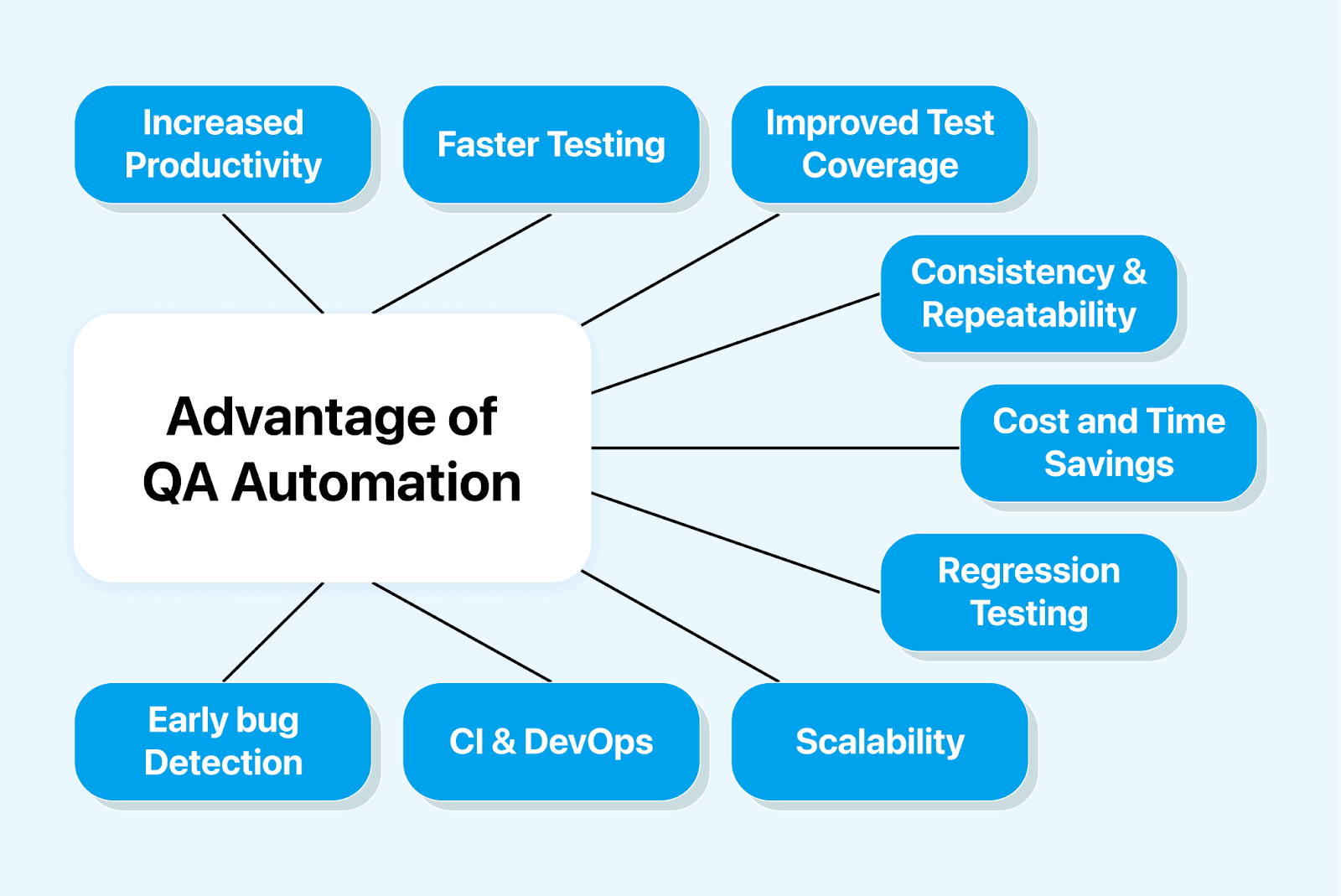
In today’s era of fast-paced software development, QA automation has become a crucial tool for testing. Also, the complexities of software are increasing daily, along with the increased demand for faster delivery. Hence manual testing itself is not enough. We can use automated QA testing to overcome this scenario, which offers many advantages over manual testing of software applications or mobile apps. Listed below are the key benefits of automated QA testing:
- Faster & efficient testing: when used correctly, QA Automation can execute test cases much faster than humans without human error. This reduces the total time required for software testing. Automated QA testing allows us to write feedback and report quickly on software quality. Also, automated testing can execute more reliable and efficient testing because it has lesser human intervention leading to fewer human errors.
- Improved test coverage: We can run advanced tests like “parallel testing” with automated QA testing. You may read about it in our blog on parallel testing. With the help of this feature, we can ensure comprehensive coverage of test cases across different situations, edge cases, and data combinations.
- Consistency and repeatability: In automated QA testing, the tests follow predefined automated scripts without human interference. Hence the chances of human errors are eliminated during the execution of the tests. This ensures consistent execution of tests for reliable and reproducible results.
- Cost and time savings: Several test cases consume a lot of time for proper execution if done by human testers. With automated QA testing, we can automate these time-consuming manual test cases. Hence we can save significant costs and time in the long run.
- Regression testing: Software testing aims to find and fix various bugs. However, when one bug is fixed, other bugs often ensue. It is when regression testing comes into play. Regression testing ensures that no additional problems arise after a bug is fixed or a code is changed. With Automated QA testing, we can implement regression testing on our software applications or mobile apps.
- Scalability: When any new feature is introduced in software, it needs to be tested thoroughly; hence, newer test cases are introduced. So, with the introduction of newer features, the number of test cases also increases. Manual testing itself cannot handle a large number of test cases, and thus QA automation is required. Automated QA testing can be easily scaled to handle many test cases. It also allows for seamless testing across multiple operating systems, browsers, and platforms.
- Continuous Integration and DevOps: Manual testing makes it difficult to manage the software’s code base as it becomes more complex. QA automation can solve this problem by integrating seamlessly with continuous integration and DevOps tools. This enables faster feedback loops, releases, and improved team collaboration.
- Early bug detection. Manual testing makes early bud detection difficult; it can only find a bug after proper testing. But with the automated QA testing, we can find the bugs in the application earlier because of the predefined automated script. It is faster than manual testing for bug detection.
- Increased productivity. With QA automation, we can automate repetitive and time taking tasks. Hence, QA testers in the team can focus on more critical aspects of testing, like test strategy planning, analysis, and exploratory testing.
Different Types of QA Automation Testing
QA automation testing can be carried out in many different ways. Listed below are some of the common types of QA automation testing.
- Unit Testing
Unit testing is a type of automated software testing where individual components of software are tested individually to ensure their functionality. This method focuses on testing the smallest code units, like individual functions or methods, to identify and fix bugs early.
- Functional Testing
As the name signifies, functional testing focuses on testing the functionality of a given application. Functional testing involves providing various inputs capturing the outputs, and validating them with the expected outputs.
- Non-functional Testing
In non-functional testing, all the non-functional elements of the software are tested. It mainly focuses on the security, performance, or data storage aspect of the software.
- Smoke Testing
Smoke testing is a type of automated testing that focuses on testing all the features of the software. Smoke testing is performed at the beginning of each test cycle to ensure that the basic components of the application are working as expected.
- Regression Testing
Testers perform regression testing to validate whether a recent update or code change in the software has caused errors in any existing features or not. Since regression testing is mostly the same and must be partially or fully re-executed, QA automation is the most efficient way to perform it.
Best QA Automation Tools for Mobile And Web Applications
There are hundreds of QA Automation tools available in the market. Here are some best automated QA testing tools.
- TestMu AI
TestMu AI is an AI-powered test orchestration and execution platform that lets you run manual and automated tests at scale with over 10,000+ real devices and 3,000+ browsers and OS combinations. It fastens release speed with high-end test automation on the cloud. It supports all popular frameworks and tools integration for web testing and app test automation, such as Selenium, Appium, Cypress, Puppeteer, Playwright, Taiko, XCUITest, Espresso, etc.
- Selenium
The most popular and widely used testing tool among all automation testing tools listed is Selenium. Selenium is an open-source and free-to-use automation testing suite of automation tools. It is widely used for testing different web applications because of its customizable test automation features. It offers compatibility with various programming languages such as Python, Java, JavaScript, C#, and more. Hence, Selenium allows testers to automate website testing in any programming language.
- Cypress
Cypress is an automation testing tool specially built for front-end developers. Written in JS (JavaScript) and built on top of NodeJS and WebDriver, Cypress tests run in almost all modern browsers. It’s simple to use, fast, and reliable. Cypress is also open-source and free to use.
- Puppeteer
Puppeteer is a Javascript library based on Node.js developed by Google that lets us control headless Chrome through the DevTools Protocol. The DevTools Protocol provides an API for controlling headless Chromium or Chrome. Puppeteer lets us automate the testing of our web applications. With it, we can run tests in the browser to see the testing results in real time on our terminal.
- Playwright
Playwright, built by Microsoft, is a Node.js library that uses an API for automating Firefox, Chromium, and WebKit. It is mainly designed to enable efficient, powerful, and reliable automated browser testing. The playwright can also automate Microsoft Edge as it is built on the open-source Chromium web framework. It shares a similar syntax to Puppeteer, but it has overcome many limitations present in Puppeteer.
- Appium
Appium is popular, open-source, and widely used for automation testing native, hybrid, and mobile web apps. It can run Windows, Android, and iOS apps that use the WebDriver protocol. The main idea behind the screens of Appium is when we test a native app, it should not involve an app recompilation or SDK.
- Cucumber
Cucumber is a popular and widely used testing tool that supports Behavior Driven Development (BDD). With cucumber, we can write more understandable tests with no technical knowledge. As for BDD, business analysts and product owners would write acceptance test cases or test scenarios to check the system behavior from the business perspective. The combination of Selenium Cucumber provides a more reliable and robust framework that allows us to create functional tests easily.
What is The Role of a QA Automation Engineer?
A QA automation engineer is mainly responsible for designing a strategy for automation testing, writing test scripts, managing testing protocols, and reporting on all results.
Strong technical skills like coding and software architecture, framework design, and soft skills like teamwork and communication are necessary to become a QA automation engineer. Additionally, there is a lot of task overlap between software development and testing, which demands a fair amount of flexibility to navigate easily.
Propel your career forward with the free professional Automation Testing Certification from TestMu AI.

QA Automation Best Practices
To maximize the return on investment (ROI) of QA automation, testers need to follow the best practices. Some common best practices used by testers to get the most out of QA automation:
- Decide test cases to be automated
It’s not always efficient to automate every test. Testers must check which test cases are most suitable for automated QA testing before automating. This is generally achieved by sitting with the testing team and prioritizing the test cases that need to be automated.
- Select the right automated testing tool
Even though many automation testing tools and UI automated testing tools are available in the market, not all of them can handle the project requirements. Each of these tools has its pros and cons. Discuss the pros and cons of the automation tool with the testing team properly before selecting it.
- Allocate testing tasks wisely
Knowing the team’s strengths and weaknesses is always best before allocating the tasks. For example, some team members might be good at writing automated test scripts. Some of them might perform well while writing test cases. A few of them may excel at writing and analyzing test reports. Hence it’s always a good practice to know what the team is good at.

- Creating high-quality test data is mandatory
Creating high-quality test data is extremely crucial to execute data driven testing. Data used in this testing can be externally stored in XML files, Excel sheets, CSV files, JSON files, etc. These external data sources make the tests reusable, scalable, and maintainable.
How Cloud-based Tools Help Implement Best Practices in QA Automation
The cloud based testing platform helps streamline QA automation processes by enhancing overall testing efficiency. TestMu AI is a cloud-based testing platform that allows testing on 10,000+ real devices. Here’s how TestMu AI helps us implement best practices in QA automation:
- Comprehensive Browser and Device Testing: With TestMu AI, you can perform cross-browser testing on various platforms effortlessly. This ensures compatibility, scalability, and a seamless user experience with the product.
- Parallel Test Execution: Here, testers can simultaneously execute automated tests across multiple browsers and devices. It reduces test execution time and accelerates the overall testing process.
- Test Case Analytics: TestMu AI offers advanced test case analytics that allows testers to track the tests conducted on the platform. It provides testers with deep-level insights along with numerous widgets.
- Easier Integration with Automation Frameworks: Testers can integrate it with all popular automation frameworks like Selenium, TestNG, and Appium.
- Scalability and Flexibility: Scale automation tests effortlessly on TestMu AI’s scalable cloud infrastructure, handling projects of any size without compromising performance. Flexible plans cater to specific requirements and budgets.
Incorporating TestMu AI into your QA automation strategy can enhance testing efficiency, improve software quality, and achieve faster time-to-market. Leverage TestMu AI’s features and capabilities to optimize QA automation efforts and ensure a seamless user experience across all browsers and devices.
How Do AI Agents Change QA Automation Testing?
AI agents now write test scripts from a plain-language description, repair a broken locator automatically after a UI change, and let a large language model drive a real browser without a pre-written script at all.
- AI-generated test scripts: Tools such as GitHub Copilot and Claude Code turn a plain-language feature description into a runnable Selenium or Playwright test, cutting the time needed to write repetitive test cases.
- Self-healing locators: AI-assisted frameworks re-resolve a selector after a DOM change instead of failing the test run, so a renamed button does not break a whole suite.
- Agentic browser testing: Agents built on the Model Context Protocol let an LLM control a real browser directly, reading the page and deciding the next test step without a pre-written script.
- AI failure triage: Machine-learning models scan failed-test screenshots and logs to separate a genuine regression from a flaky failure, so testers review fewer false alarms.
These agentic capabilities extend QA automation beyond fixed scripts, but a tester still has to verify that an AI-generated test checks the right behavior before it runs in a pipeline.
Conclusion
In conclusion, the ever-increasing range of software and devices has made automated QA testing more important than ever. This blog covered essential topics like what is QA automation, when to use it, how to perform it, its benefits, and best practices. We also explored how TestMu AI, a powerful cloud-based testing platform, can help us with automated QA testing.
By incorporating TestMu AI into our QA automation strategy, we can optimize our testing efforts, enhance software quality, and accelerate time-to-market. Embrace the best practices in QA automation, overcome the challenges, and leverage the power of TestMu AI to achieve seamless testing experiences across browsers and devices.
Author

Tanay Kumar Deo
Blogs: 13


Tanay kumar deo is a skilled software developer with expertise in Android and web development, he is always eager to expand his skill set and take on new challenges. Whether developing software or sharing his knowledge with others, he is driven by a desire to make a positive impact on the world around him. In addition to his technical abilities, Tanay also possesses excellent blogging and writing skills, which allow him to effectively communicate his ideas and insights to a wider audience.


QA Automation FAQs
Did you find this page helpful?
More Related Blogs
TestMu AI forEnterprise
Get access to solutions built on Enterprise
grade security, privacy, & compliance
- Advanced access controls
- Advanced data retention rules
- Advanced Local Testing
- Premium Support options
- Early access to beta features
- Private Slack Channel
- Unlimited Manual Accessibility DevTools Tests