
Run Tests Up to 70% Faster than Traditional Test Grids
HyperExecute Is an AI-Native Test Orchestration Platform to Run Your Automation Test Suites with Blazing Fast Speed.

What Is Parallel Testing? How to Run Tests in Parallel
Parallel testing runs tests at once instead of in sequence. See how to cut CI time with workers, Playwright shards, Selenium Grid, pytest-xdist and TestNG.
Last Updated on:
Parallel testing is a software testing practice that runs multiple test cases at the same time, across browsers, devices, operating systems, or CI machines, instead of one after another. Its core technique, test parallelization, splits one suite into independent slices that separate workers, CI jobs, or grid sessions execute simultaneously, so the suite finishes sooner without cutting coverage.
To run Selenium and Playwright tests in parallel and cut CI time, turn on workers in the test runner, shard Playwright suites across CI jobs, and run Selenium sessions on a grid with enough browsers. With parallel testing, a suite takes roughly as long as its longest slice instead of the sum of its tests. TestMu AI's HyperExecute can take over the orchestration for larger suites.
TL;DR
Parallel testing runs test cases at the same time across browsers, devices, and OS configurations instead of one after another. Test parallelization splits the suite across workers, CI jobs, or grid sessions, so a suite takes roughly as long as its longest slice instead of the sum of its tests.
- Independent tests: Parallel testing only works when every test is self-contained. Tests that share state or depend on another test's output produce false failures the moment they run concurrently.
- How to run parallel tests in pytest: pytest runs tests one at a time unless the pytest-xdist plugin is installed. With pytest-xdist, pytest -n 4 spreads the suite across four worker processes on one machine, and pytest -n auto starts one worker per physical CPU core. pytest-xdist splits across CI jobs: No.
- How to run parallel tests in Playwright: Playwright runs test files in parallel workers by default, and its --shard option splits one suite across several CI jobs, so npx playwright test --shard=1/4 runs the first of four slices. Splits across CI jobs: Yes.
- Isolated test data: Two parallel test workers competing for the same records is a frequent cause of flaky parallel runs. Give each worker its own dataset, or create and tear down data inside each test.
- Speedup example: Adding parallel workers cuts suite runtime, but not in proportion. Two pytest-xdist workers took a two-test Selenium suite from 16.23 seconds to 9.05 seconds, not half, because each worker starts up on its own and the run ends with the slower test.
- Entry criteria: Before the first parallel run, give every worker an identical environment, record a sequential baseline time, and confirm the framework supports concurrent execution.
- Cloud execution: TestMu AI's automation cloud runs Selenium, Cypress, and Playwright suites in parallel across 3,000+ browser and OS combinations. Local Selenium Grid required: No. Browser drivers to install: None.
What Is Parallel Testing?
Parallel testing is a software testing technique that uses automation to run multiple test cases or test suites at the same time across environments, real devices, and browser configurations. Sequential testing, the alternative, runs tests one after another, so suite time grows with every test added. Test parallelization is the work of splitting a suite into independent units that can run this way.
Parallel testing is easiest to place next to sequential testing and distributed testing, the two execution models it is most often confused with:
| Aspect | Sequential testing | Parallel testing | Distributed testing |
|---|---|---|---|
| How tests run | One after another, in a single process | At the same time, on several workers, threads, or browser sessions | Split across several machines or nodes, each running part of the suite |
| Suite time | The sum of every test's duration | Roughly the length of the longest slice | The slowest machine's share, plus setup on each machine |
| What it needs | Nothing beyond the test runner | Independent tests that share no state or test data | Independent tests and an identical environment on every machine |
| Example | pytest without plugins | pytest -n 4 with pytest-xdist, or Playwright workers | Playwright --shard across CI jobs, or a Selenium Grid |
The term has a second meaning in system migrations. Parallel run testing feeds the same input to a legacy system and its replacement and compares the outputs before the old system is retired. This guide covers concurrent test execution and notes where the migration meaning changes the criteria.
To learn more about parallel testing, check out our YouTube video: What Is Parallel Testing In Selenium

How Does Test Parallelization Work?
Test parallelization splits a suite into independent units, such as test methods, classes, or files, and hands them to several workers that run at the same time. A worker can be a thread, a process, a container, or a remote browser session, and the suite finishes when the slowest worker does.
- Unit of parallelization - frameworks split at different levels. TestNG can run methods, classes, or whole test tags on separate threads, pytest-xdist can keep a module or a file on one worker, and Playwright Test runs files in parallel while tests inside a file stay in order unless fully parallel mode is on.
- Workers - TestNG and JUnit Jupiter run tests on threads inside one JVM, while pytest-xdist and Playwright Test start separate worker processes that cannot share state or global variables.
- Sharding - when one machine runs out of CPU or browsers, the suite is split across machines, which is where parallel testing meets distributed testing. Playwright's --shard option and Cypress's --parallel flag both split a run this way.
- Wall-clock time - adding workers shortens a run only until setup costs, the slowest test, or the infrastructure's concurrency limit takes over, so two workers rarely halve a suite's runtime.
TestMu AI HyperExecute applies the same splitting at the infrastructure level. Its Auto-Split strategy takes the list of tests from a discovery command and spreads it across the number of virtual machines set by the concurrency key, while its Matrix strategy runs one task per combination of operating system, browser, and test file.
Why Is Parallel Testing Required?
Take a signup form test that runs on three browsers in sequence: Chrome takes 3 minutes, Firefox 4 minutes, and Edge 5 minutes, so the sequential run takes 12 minutes.
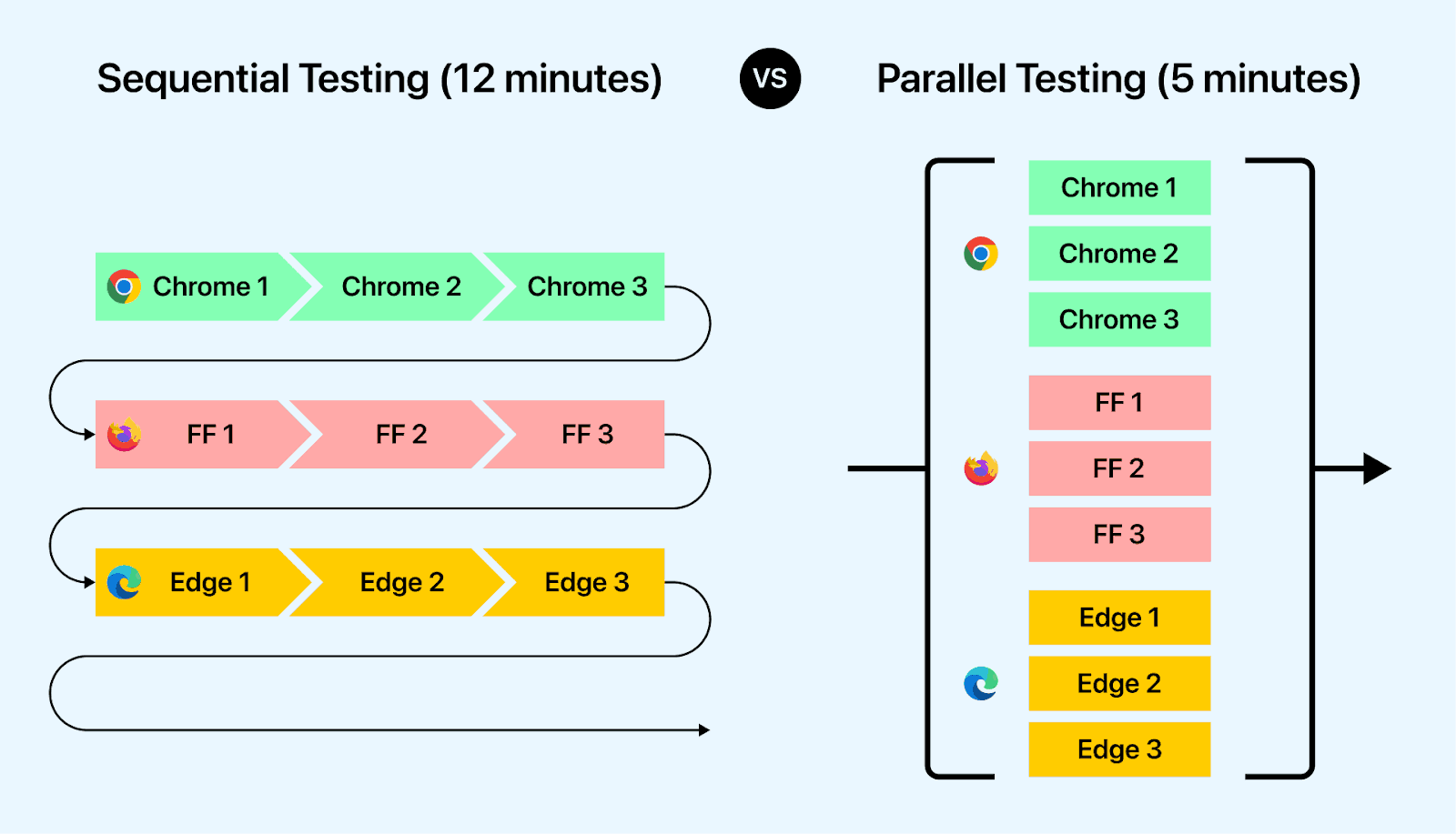
That is a single form. Add the pricing page, the demo scheduling form, and the contact form, and a sequential Selenium run grows with every module.
Run the three browser tests in parallel and the total drops from 12 minutes to 5, the length of the slowest test.
Many teams still run sequentially. In TestMu AI's Future of Quality Assurance survey of 1,615 respondents in 70 countries, run from July to October 2023, around 44.1% of organizations ran at least five parallel sessions, while 32% were not running tests in parallel at all.
Splitting a large suite into smaller independent jobs and running them concurrently also shortens the continuous integration and continuous delivery (CI/CD) feedback loop, so failures and their test reports reach developers while the change is still fresh.
The saving grows with the suite, as long as tests do not interfere with each other. Spreading the same suite across several machines also widens test coverage, because each machine can run a different browser or operating system.
When Should You Use Parallel Testing?
Parallel testing pays off in these situations across the Software Development Life Cycle (SDLC), whether the suite runs on Selenium or another framework:
- Regression runs - regression testing re-runs the same suite on every change, so splitting it across features or modules shortens every cycle.
- Large suites - suites with hundreds of test cases gain the most, because sequential time grows with each test while parallel time tracks the slowest worker.
- Cross-browser and device matrices - the same test across several browsers, versions, or devices is naturally independent, so each combination can run as its own session.
- Pull-request gates - a CI check that has to finish before a merge needs the shortest wall-clock time the suite allows.
- System migrations - when a legacy platform, such as a banking application, is replaced or its data is migrated, parallel run testing compares the old and new versions on the same input.
How to Run Tests in Parallel
To run tests in parallel, break the application into components that can be tested on their own, design each test to stand alone, give every worker an identical environment and its own data, and synchronize only where order matters. Then turn on parallel execution in the framework and add workers until the gain flattens.
Identify Testable Components
Break the application into units that can be tested on their own, such as login, user registration, the shopping cart, and payment processing. Each unit becomes a group of tests that can run on a separate worker without waiting for another.
Design Independent Test Cases
Each test should set up what it needs, run, and clean up without relying on another test's state or order. A test that passes alone but fails next to others is the clearest sign that this step was skipped.
Allocate Test Environments
Every worker needs the same configuration, operating system, browser version, and dependencies, or a failure may come from the environment rather than the code. Containers, machine images, or a cloud grid that provisions identical sessions keep the environments consistent.
Manage Test Data
Two tests that read and write the same record collide when they run at once. Give each worker its own database or schema, or have each test create uniquely named data and remove it afterward.
Implement Test Synchronization
Synchronization is the exception, reserved for the few tests that must run in order, such as a test that consumes another test's output.
Group those tests so they run serially, for example with Playwright's serial mode or TestNG's singleThreaded attribute, or coordinate them with locks or semaphores, while everything else stays free to run in parallel.
Enable Parallel Execution in Your Framework
Most frameworks run tests sequentially until parallel execution is switched on. The commands and settings below come from each framework's own documentation:
| Framework | How to turn it on | What runs in parallel |
|---|---|---|
| pytest with pytest-xdist | pytest -n 4, or -n auto for one process per physical CPU core | Test functions spread across worker processes; --dist loadfile keeps each file on one worker |
| Playwright Test | npx playwright test --workers 4, plus --shard=1/3 to split the suite across machines | Test files by default; tests inside a file as well with fullyParallel: true |
| TestNG | parallel="methods" and thread-count on the suite tag in testng.xml | Methods, classes, test tags, or instances, each on its own thread |
| JUnit Jupiter (JUnit 5 and later) | junit.jupiter.execution.parallel.enabled=true, then junit.jupiter.execution.parallel.mode.default=concurrent or @Execution(CONCURRENT) | Classes and methods marked concurrent; the rest stay on the same thread |
| Cypress | cypress run --record --parallel, which requires recording to Cypress Cloud | Spec files, balanced across machines by their previous run times |
Step-by-step guides cover each setup: parallel testing with pytest and Selenium Grid, Playwright parallel testing with workers and sharding, and parallel test execution in TestNG. Robot Framework suites run in parallel through the Pabot runner, covered in Robot Framework parallel test execution with Pabot. TestMu AI runs Cypress specs in parallel through its own Cypress CLI npm package, covered in Cypress tests in parallel on the TestMu AI cloud. Free options without Cypress Cloud are covered in Cypress parallelization.
How to Cut CI Time With Parallel Workers, Shards and a Grid
CI time falls in layers: parallel workers inside each CI runner, shards that give each CI job a slice of the suite, and a grid that supplies more browsers than one machine can host. The steps below set up each layer for Playwright and Selenium suites with the commands from each tool's own documentation, checked in October 2026.
| Layer | What it cuts | How to turn it on |
|---|---|---|
| Workers on one CI runner | Tests waiting for a single process | Playwright workers with fullyParallel: true; pytest-xdist -n auto; TestNG parallel with thread-count |
| Shards across CI jobs | The limit of one runner's CPU | Playwright --shard=1/4 in a CI matrix; for pytest or TestNG, one test path or testng.xml per matrix job |
| Browsers on a grid | The browsers one machine can host | Selenium Grid 4 nodes, or a cloud grid reached through RemoteWebDriver |
| Orchestration | Uneven shards, queued jobs and blind reruns | Splits by run time and fail-fast in your CI, or HyperExecute's Auto-Split with dynamic allocation |
Step 1: Turn On Parallel Workers Inside Each CI Runner
Playwright runs test files in parallel by default, while the tests inside one file run in order in the same worker process. Set fullyParallel: true to run those tests in parallel too. Playwright's CI guide recommends one worker on CI for stability and sharding across CI jobs for wider parallelization, so raise the worker count only on runners with spare CPU and memory:
// playwright.config.ts
import { defineConfig, devices } from '@playwright/test';

export default defineConfig({
  // run the tests inside each file in parallel too
  fullyParallel: true,
  // 1 on CI, per Playwright's CI guide; locally, the default
  workers: process.env.CI ? 1 : undefined,
  retries: process.env.CI ? 1 : 0,
  // blob reports can be merged across shards
  reporter: process.env.CI ? 'blob' : 'html',
  projects: [
    { name: 'chromium', use: { ...devices['Desktop Chrome'] } },
  ],
});
Without a workers setting, Playwright starts half as many workers as the machine has logical CPU cores. Override it for one run with npx playwright test --workers 4, or turn parallelism off while debugging with npx playwright test --workers=1.
For pytest, the pytest-xdist plugin runs tests in worker processes. Its -n auto option starts one worker per physical CPU core, --maxprocesses caps that number, and --dist decides how tests are handed out, as the pytest-xdist distribution docs describe:
pip install pytest-xdist
pytest -n auto --maxprocesses 4   # one worker per core, at most 4
pytest -n 4 --dist loadfile       # keep each file on one worker
pytest -n 4 --dist worksteal      # idle workers take queued tests
For Java suites, TestNG reads the parallel and thread-count attributes on the <suite> tag of testng.xml, and parallel accepts methods, tests, classes or instances (section 3.11.2 of the TestNG documentation):
<!-- testng.xml -->
<suite name="e2e" parallel="methods" thread-count="4">
  <test name="chrome">
    <classes>
      <class name="com.example.CheckoutTests"/>
      <class name="com.example.SearchTests"/>
    </classes>
  </test>
</suite>
Parallel data providers run from an XML file use their own pool of 10 threads by default; set data-provider-thread-count on the suite tag to change it.
Step 2: Give Each Worker Its Own Account and Test Data
Workers that share a login or a database record overwrite each other. Playwright gives every worker process a workerIndex and a parallelIndex, and its documentation keys per-worker data on the worker index in a worker-scoped fixture:
// playwright/fixtures.ts
import { test as baseTest } from '@playwright/test';
import { createUserInTestDatabase, deleteUserFromTestDatabase } from './my-db-utils';

export * from '@playwright/test';
export const test = baseTest.extend<{}, { dbUserName: string }>({
  // a database user unique to this worker
  dbUserName: [async ({ }, use) => {
    const userName = `user-${test.info().workerIndex}`;
    await createUserInTestDatabase(userName);
    await use(userName);
    await deleteUserFromTestDatabase(userName);
  }, { scope: 'worker' }],
});
For a fixed pool of accounts created ahead of time, pick the account by parallelIndex, which runs from 0 to workers - 1. When a worker restarts after a failure, the new process keeps the same parallelIndex and gets a new workerIndex, and both values are also in the TEST_PARALLEL_INDEX and TEST_WORKER_INDEX environment variables. The guide to Playwright fixtures shows a worker-scoped sign-in keyed on parallelIndex.
In pytest-xdist, tests that must share one account can stay on one worker with the xdist_group mark and --dist loadgroup:
import pytest

@pytest.mark.xdist_group(name="admin_account")
def test_change_settings(driver): ...

@pytest.mark.xdist_group(name="admin_account")
def test_reset_settings(driver): ...

# run with: pytest -n 4 --dist loadgroup
In TestNG, keep one WebDriver per thread, for example in a ThreadLocal<WebDriver>, and mark a class that is not thread-safe with @Test(singleThreaded = true) so all its methods run on one thread. For every runner, give each worker its own temporary directory, download folder and local port, and keep tests from changing a shared setting, such as a feature flag, while other tests run.
Step 4: Run Selenium Browser Sessions on Grid Nodes
Selenium Grid 4 routes WebDriver sessions to browsers on one or many machines: the test runner from Step 1 opens the parallel sessions, and the Grid supplies the browsers. It needs Java 11 or higher and starts as one process, or as a hub with nodes, as the Selenium Grid getting started guide shows:
# one process, listening on http://localhost:4444
java -jar selenium-server-<version>.jar standalone

# or a hub, plus a node on each machine
java -jar selenium-server-<version>.jar hub
java -jar selenium-server-<version>.jar node --hub http://<hub-ip>:4444
Point the tests at the Grid with RemoteWebDriver:
WebDriver driver = new RemoteWebDriver(
    new URL("http://localhost:4444"), new ChromeOptions());
By default a node runs as many concurrent sessions as it has processors, so a node with 8 CPUs runs up to 8 browsers, and Safari is always limited to one. Setting --max-sessions 12 with --override-max-sessions true raises the limit, but Selenium's command-line reference warns: "Session stability and reliability might suffer as the host could run out of resources." The --session-timeout option, 300 seconds by default, ends a session that has been idle that long and frees its slot.
The Grid's components and modes are covered in the Selenium Grid 4 tutorial. To use TestMu AI's cloud grid instead of your own nodes, see run parallel tests with Selenium on TestMu AI.
Step 5: Balance Shards by Run Time and Merge the Reports
A CI run ends only when its slowest shard does, so split by recorded run time rather than by file count.
- Playwright - fullyParallel: true balances shards at the test level, and tests skipped statically with test.skip() or test.fixme() are not counted when shards are balanced.
- pytest-xdist - --dist worksteal starts with an even split, then moves queued tests from busy workers to idle ones.
- pytest and TestNG matrices - keep each test's run time from earlier runs, give every job a similar total, and start the slowest tests first so they do not become the tail.
- Growing suites - re-balance regularly, because a split tuned months ago drifts as tests are added.
- One report - merge Playwright blob reports with npx playwright merge-reports, and collect the JUnit XML each pytest job writes with --junit-xml=results.xml.
- Early stop - npx playwright test --max-failures=10 and pytest --maxfail=10 end the run after ten failures, so a broken build stops using CI minutes.
Step 6: Retry Failed Tests Once and Track Every Retry
Running tests at the same time exposes timing problems and shared state that a sequential run hides. Retry a failed test once so one slow response does not block a build, then count the retries and fix their causes.
npx playwright test --retries=1   # Playwright
pip install pytest-rerunfailures
pytest -n auto --reruns 1         # pytest with pytest-rerunfailures
In TestNG, implement IRetryAnalyzer and attach your class with @Test(retryAnalyzer = RetryOnce.class); after each run TestNG also writes testng-failed.xml, which reruns only the failed methods. Playwright reports a test that fails first and passes on retry as flaky, so retries stay visible. It also discards a worker after a failure and starts a new one, which is why a new workerIndex appears after a failed test.
Then fix the usual causes: fixed sleeps instead of waiting for a condition, shared test data, tests that depend on order, and runners with too little CPU or memory for the worker count. A test that passes with --workers=1 and fails with four points to shared state or an overloaded runner. Move a test that keeps failing into a non-blocking job with a named owner and a date for the fix.
Parallel Testing Entry and Exit Criteria
Entry criteria decide whether a suite is ready to run in parallel, and exit criteria decide whether the parallel run produced results you can trust.
Entry-Level Criteria
Confirm these before the first parallel run:
- Every test passes when run alone and in a shuffled order, so none depends on another test's state.
- Each worker has its own test data, or tests create and remove uniquely named data.
- Environments are identical across workers, with pre-conditions and test scenarios defined.
- The framework or runner supports concurrent execution, and parallel mode is configured.
- The infrastructure's concurrency limit is known, so the worker count stays within it. On TestMu AI, the Get organisation concurrency endpoint of the Selenium Automation API fetches that limit for your organisation.
- A sequential baseline time is recorded to measure the gain against.
Exit-Level Criteria
Treat the parallel run as complete when:
- All workers or shards finished and their results merged into one report.
- Every failure was rerun alone, and a test that passes alone but fails in parallel was logged as a parallel-safety bug rather than a product bug.
- Logs show no conflicts over shared resources such as accounts, files, or database rows.
- Wall-clock time was compared with the sequential baseline to confirm the expected gain.
- Real defects were reported to the development team.
For parallel run testing during a migration, the exit criteria differ: the old and new systems receive the same input, their outputs are compared, and every difference is explained and reported before the old system is retired.
Code Example of Parallel Testing in Python
The example below measures the gain directly: two Selenium tests check a web page's title and its length, first sequentially and then in parallel.
The parallel run uses pytest-xdist, a pytest plugin that sends tests to multiple CPU cores as separate worker processes. Install both pytest and pytest-xdist.
Use the following command to install pytest
pip3 install pytest
Use the following command to install pytest-xdist library
pip3 install pytest-xdist
To learn more about pytest and its installation process, check out our blog on Selenium Python Tutorial: Getting Started With Pytest.
Save the following as parallel_testing.py. Its get_title() and get_title_length() functions open the Ecommerce Playground and return the page title and its length.
# Import the required packages
from selenium import webdriver


# Function to retrieve the title of the web page
def get_title():
    # Configure Chrome WebDriver options
    options = webdriver.ChromeOptions()
    options.add_experimental_option('excludeSwitches', ['enable-logging'])

    # Initialize Chrome WebDriver
    driver = webdriver.Chrome(options=options)

    # Open the specified URL
    driver.get("https://ecommerce-playground.lambdatest.io/")

    # Return the title of the web page
    return driver.title


# Function to retrieve the length of the title of the web page
def get_title_length():
    # Configure Chrome WebDriver options
    options = webdriver.ChromeOptions()
    options.add_experimental_option('excludeSwitches', ['enable-logging'])

    # Initialize Chrome WebDriver
    driver = webdriver.Chrome(options=options)

    # Open the specified URL
    driver.get("https://ecommerce-playground.lambdatest.io/")

    # Return the length of the title of the web page
    return len(driver.title)
To test these functions with pytest, create a file called test.py that imports them from parallel_testing.py.
# Import the functions for retrieving the title and its length from parallel_testing file
from parallel_testing import get_title, get_title_length


# Test function to verify the web page title retrieved from browser
def test_title():
    title = get_title()
    assert title == "Your Store", "Test not passed for title"


# Test function to verify the length of the web page title retrieved from browser
def test_title_length():
    title_length = get_title_length()
    assert title_length == 10, "Test not passed for title length"
The above code imports functions get_title() and get_title_length() from the parallel_testing file to retrieve the web page title and its length. The two test functions, test_title() and test_title_length(), are defined to verify the correctness of the title and its length retrieved from the browser, respectively, using the assert statements with custom error messages.
Use the following command to run the test code using pytest.
python -m pytest test.py
Output
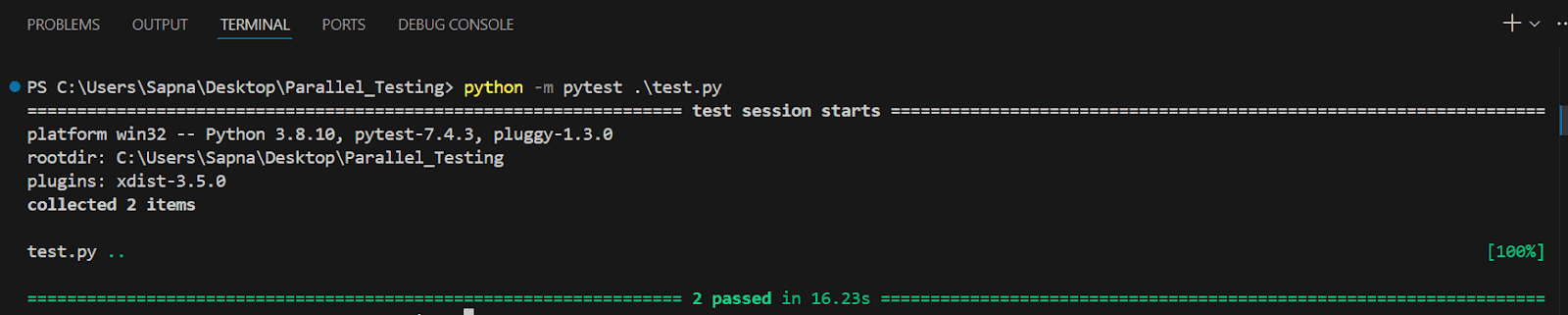
The sequential run took 16.23 seconds, with the two browser windows opening one after the other.
Run the test again using the following pytest command
python -m pytest test.py -n 2
Here, -n 2 starts two worker processes, so both tests run at the same time.
Output

The parallel run took 9.05 seconds, with both browser windows opening at once. Two workers did not halve the time, because each pytest-xdist worker has to start up and collect the tests before running one, the two Chrome instances compete for the same machine, and the run ends only when the slower test finishes.
Both files are in the Parallel_Testing repository on GitHub. If your suite uses Python's built-in unittest module rather than pytest, see parallel testing with Python unittest.
A laptop runs only a handful of browsers, so covering more combinations takes a grid. TestMu AI's cloud grid opens one session per browser and OS combination and records network logs, console logs, video, and screenshots for each, so a failure on one worker can be debugged without rerunning the suite. BrowserStack pricing shows how one cloud grid charges for parallel tests, plan by plan.
To learn how to use the TestMu AI cloud Selenium Grid for parallel automation testing, check out our blog: Selenium Grid Tutorial: Parallel Testing Guide with Examples.

Note: Split your suite across parallel sessions on TestMu AI without maintaining a Selenium Grid. To try it, start free.
When Does Running Your Own Test Grid Stop Paying Off?
Running your own grid stops paying off when the team spends more time on nodes, browser versions and shard balancing than on tests, or when a release needs browsers and real devices the grid does not have. Watch for these signs:
- CI jobs wait in a queue for free browser sessions.
- Shards finish minutes apart, and every pipeline waits for the last one.
- Browser and driver updates break nodes, and tests wait until someone repairs them.
- Releases need Safari, older browser versions or real phones that the grid cannot host.
At that point the work shifts to deciding what runs where, in what order, and what reruns, which is test orchestration. A cloud grid takes over the nodes and browsers first: Transavia reports 70% faster test execution after moving its web and mobile automation to TestMu AI's cloud with multiple parallel sessions, as its Transavia customer story describes.
HyperExecute, the AI-based test orchestration platform from TestMu AI, does that work: you add one YAML file to an existing Selenium, Playwright, Cypress or Appium suite and run it from the CI you already use.
TestMu AI's HyperExecute product page claims that suites run up to 70% faster than on a traditional grid, because the test script and the browser run on one machine instead of sending every command through a hub to a remote node; the docs page on HyperExecute vs traditional test grids explains that architecture. Read the figure as an upper bound. Dashlane, which retired its in-house test infrastructure for HyperExecute, reports 50% faster test execution time and a 99.9% cut in flaky tests in its Dashlane customer story.
For your own number, run the same suite at the same concurrency on your current CI and on HyperExecute, and compare the wall-clock time. If a suite finishes in a few minutes on two or three CI runners, Playwright sharding and pytest-xdist need nothing beyond those runners.
If you test on one browser and need no real devices, a cloud grid adds cost without cutting much time. Open-source projects can ask TestMu AI for 10 free parallel sessions of HyperExecute.
Tools for Parallel Testing
Parallel testing tools work at two layers: a cloud grid or orchestrator supplies the browsers and machines, and the test framework decides how the suite is split.
TestMu AI
TestMu AI is an AI-powered test orchestration and execution platform that lets you run manual and automated tests at scale across 3,000+ browser and OS combinations and 50,000+ real devices. Because concurrency is pooled, teams can keep an eye on their shared cloud usage across TestMu AI to see how many parallel sessions each project is consuming and rebalance workers before a queue forms.
Features:
- Parallel sessions on a cloud grid - Selenium, Cypress, Playwright, and Puppeteer scripts run concurrently, one session per browser and OS combination, for cross-browser testing without a local grid.
- Selenium Grid compatibility - existing suites point their RemoteWebDriver at the cloud hub instead of a self-hosted Selenium Grid.
- Test splitting with HyperExecute - Matrix, Auto-Split, and Hybrid strategies turn one suite into many parallel tasks, each in a fresh virtual machine, with retries scoped to real failures and a fail-fast option that aborts the job after a set number of consecutive failures.
- Job ordering and dynamic allocation - a jobLabel of high, medium or low sends release-critical jobs to the front of the queue, and with local test discovery, dynamicAllocation hands tests to virtual machines at run time so a slow test does not hold up the run.
- Failure triage and evidence - HyperExecute names the root cause of a failed test, detects flaky Selenium tests from their status history (Playwright through a reporter integration), can heal broken locators at run time, mutes a test after five failures in a row by default, and keeps each test's video, screenshots, and command, network and console logs in one archive you can download.
- Real devices in parallel - mobile suites run concurrently on Android and iOS hardware in the real device cloud.
TestNG
TestNG has parallel execution built in: the parallel attribute in testng.xml runs methods, classes, test tags, or instances on separate threads, and thread-count sets the size of the thread pool. It does not make the test code thread-safe, so classes that share state should be marked singleThreaded or, with parallel="tests", grouped in one test tag to keep them on one thread.
Features:
- Allows testers to specify parallel execution at different levels, including methods, classes, and test suites.
- Keeps classes that are not thread-safe on one thread through the singleThreaded attribute.
- Enables customization of the thread pool size.
To perform parallel testing using TestNG, check out our blog: Create TestNG XML File & Execute Parallel Testing,
Appium
Appium runs automated tests concurrently across multiple devices and platforms, with each session driving its own device, emulator, or simulator. Several Appium servers can also sit behind a Selenium Grid to spread a suite across more devices, and iOS tests run in parallel on multiple simulators or real devices, with Xcode installed on the Mac that hosts them.
Features:
- Allows testing of native, hybrid, and mobile web applications across various platforms such as iOS, Android, and Windows.
- Provides native automation APIs for each platform.
- Supports testing on real devices as well as emulators and simulators.
- Offers integration with cloud-based testing platforms.
Learn to perform parallel testing using Appium with examples with the help of our blog: Complete Tutorial On Appium Parallel Testing [With Examples].
JUnit
JUnit supports concurrent execution, though how depends on the version. JUnit 4 ships an experimental ParallelComputer runner that runs test classes or methods on multiple threads. JUnit Jupiter, the engine in JUnit 5 and JUnit 6, runs tests sequentially by default; setting junit.jupiter.execution.parallel.enabled=true turns parallel execution on, the @Execution annotation marks classes or methods CONCURRENT or SAME_THREAD, and parameterized tests can run their invocations concurrently as well.
Features:
- Supports parameterized testing, allowing the same test case to be executed with different input values.
- Offers various execution modes for parallel testing and provides flexibility in distributing test cases.
- Manages the lifecycle of test methods and provides hooks to execute setup and teardown operations.
- Supports various test runners, including IDE integrations, Maven, Gradle, etc.
Consider checking our blog on Parallel Testing With JUnit 5 And Selenium [Tutorial] to learn how to perform parallel testing using JUnit.
Limitations of Parallel Testing
Parallel testing speeds up a suite only when these limits are handled:
Inter-dependent Tests
A test that depends on another test's outcome cannot run at the same time as it. Either remove the dependency or run that group serially, and keep the rest of the suite parallel.
Data Dependencies
Tests that read and write the same data collide when they run together. Isolate data per worker, or clone a fresh dataset for each test.
Infrastructure Limitations
Each worker needs CPU, memory, and a browser. Running more workers than the machine or grid supports produces timeouts that look like product failures, so cap the worker count at the available concurrency.
Multiple-browser Issues
One machine can only run the browsers installed on it, so parallel cross-browser compatibility testing needs several machines or a cloud grid to cover more browsers and versions.
Test Synchronization
Tests that require a specific sequence break when they run concurrently. Mark them serial or coordinate them with locks or semaphores, and keep that set as small as possible.
Resource Utilization and Scalability
Large suites need capacity that scales with demand. Load balancers, resource managers, or cloud infrastructure that adds sessions on demand keep workers busy without overloading a fixed pool.
Intermittent Failures
Interactions between parallel tests cause failures that are hard to reproduce. Capture detailed logs per worker and run the suite in a randomized order to expose hidden dependencies; a failure that passes on rerun belongs on the flaky test list.
Test Environment Consistency
Every worker needs the same configuration, dependencies, and software versions, or results differ for reasons unrelated to the code. Uniformity is hardest when workers run on machines set up at different times.
Best Practices for Parallel Testing
How the suite is written decides whether it runs safely in parallel, so the structure of the automation testing framework matters as much as the worker count.
Generate Independent Test Cases
Self-contained tests can run in any order, which is what lets a runner hand them to any free worker.
A test that passes on one run and fails on the next without a code change is flaky, and shared state between parallel tests is a frequent cause. Independent tests also contain failures, so one broken test does not block the rest of the suite.
Parallel Testing Using Cloud-Based Selenium Grid
A self-hosted Selenium Grid has to be set up, patched, and scaled by the team, and it rarely covers every major browser, version, and operating system.
A cloud grid removes that work, because the provider keeps the browsers, versions, and nodes current while the team writes tests.
Avoid Hard-Coded Values
Hard-coded values, such as a fixed username or order ID, force tests into a particular order, because two tests using the same value collide.
Generate values at runtime or pass them in through a data-driven setup so each of the Selenium scripts stays independent.
Prevent Dependencies Between Selenium Test Automation Cases
Dependent tests must run in a fixed order, which undoes the parallel strategy. Write atomic tests that each verify one behavior and set up their own preconditions.
Manage Test Data Efficiently
Parallel Selenium automation needs a strategy that creates test data when a test needs it and cleans it up afterward. Common approaches:
- Refreshing the data source - resets the database or fixture data between runs so every run starts from a known state.
- Creating data through an API - each test calls a REST API to create the records it needs and delete them afterward.
- Selfish data generation - each test creates uniquely named data that no other test touches, which avoids collisions but leaves cleanup to a separate job.
Combining two of them, such as API-created data with a nightly refresh, covers both setup and cleanup.
Create Tests That Can Run In Parallel Effectively
Design new Selenium tests for parallel execution from the start; retrofitting a suite that assumes a fixed order usually means rewriting its setup and data.
Tests written this way can also move to more browser and OS combinations through capability changes rather than test code changes.
Be Strategic And Prioritize
Run critical and high-risk tests first, and put fast tests that signal build health at the front of the queue. Reassess the order as the suite and its failure history change.
Prioritization still matters with parallel testing, because concurrency is finite and the queue fills once the suite outgrows it.
Conclusion
Start by auditing one existing suite for shared state: any test that reads data another test writes has to be isolated before parallelization gives you a reliable result rather than a faster wrong answer. Once the suite is independent, add workers incrementally and measure wall-clock time at each step, because the gain flattens as soon as you exceed the concurrency your infrastructure supports.
To run those workers without maintaining nodes or browser drivers yourself, point the suite at the TestMu AI cloud grid and parameterize the browser and OS matrix through desired capabilities. The getting started with Selenium testing guide covers the endpoint and credential setup, and HyperExecute handles test splitting and auto-retry for suites large enough that raw parallel sessions stop being the bottleneck.
If the wall-clock gain flattens sooner than the worker count suggests it should, the cause is usually setup rather than execution. The use case on cutting test execution time separates the six segments of a run and shows which of them more machines can and cannot compress.
Testing from the terminal? Kane CLI by TestMu AI lets SDETs and developers plan, write, run and debug tests from the command line.
Author

Hari Sapna Nair
Blogs: 8


Hari Sapna Nair is a Community Contributor with experience spanning software development, technical writing, and open-source collaboration. A former Technical Content Writer at TestMu AI, she has authored guides and tutorials on Selenium, testing, microservices, and emerging technologies. Sapna has contributed 60+ technical blogs for platforms like Coding Ninjas and has been an active open-source contributor in programs such as GirlScript Summer of Code and HakinCodes, securing top contributor ranks. A GHC Scholar and an engineer turned management student at IIM Indore.
Reviewer

Himanshu Sheth
Reviewer
Himanshu Sheth is the Director of Marketing (Technical Content) at TestMu AI, with over 8 years of hands-on experience in Selenium, Cypress, and other test automation frameworks. He has authored more than 130 technical blogs for TestMu AI, covering software testing, automation strategy, and CI/CD. At TestMu AI, he leads the technical content efforts across blogs, YouTube, and social media, while closely collaborating with contributors to enhance content quality and product feedback loops. He has done his graduation with a B.E. in Computer Engineering from Mumbai University. Before TestMu AI, Himanshu led engineering teams in embedded software domains at companies like Samsung Research, Motorola, and NXP Semiconductors. He is a core member of DZone and has been a speaker at several unconferences focused on technical writing and software quality.


Parallel Testing FAQs
Did you find this page helpful?
More Related Blogs



TestMu AI forEnterprise
Get access to solutions built on Enterprise
grade security, privacy, & compliance
- Advanced access controls
- Advanced data retention rules
- Advanced Local Testing
- Premium Support options
- Early access to beta features
- Private Slack Channel
- Unlimited Manual Accessibility DevTools Tests