

Power Your Software Testing with AI Agents and Cloud
The Native AI-Agentic Cloud Platform to Supercharge Quality Engineering. Test Intelligently and Ship Faster.


- TestMu AI (Formerly LambdaTest)
- /
- Learning Hub
- /
- Continuous Testing: How It Works and How to Adopt It
Continuous Testing: How It Works and How to Adopt It
Continuous testing explained: how it fits into CI/CD and DevOps, how it differs from automated testing, the frameworks teams use, and a staged path to adopt it.
Last Updated on:
Continuous testing runs automated tests at every stage of development, so quality is assessed as code moves through the pipeline rather than after it stops. Built into the CI/CD process, it shortens developer feedback time and surfaces release risk while a change is still cheap to fix.
That became possible once DevOps replaced the hand-off between siloed development and QA teams with shared responsibility, and teams adopted automation testing as the layer everything continuous is built on.
TL;DR
Continuous testing runs automated tests at every stage of the delivery pipeline so a release candidate is assessed for business risk as it moves, rather than in a QA phase at the end. It depends on test automation but is not the same thing: automation is the mechanism, continuous testing is when and why it runs.
- Continuous testing is the same as automated testing: No - Automated testing executes repetitive checks; continuous testing decides that they run on every change and reports business risk from the result. Either can be adopted without the other.
- Test automation required for continuous testing: Yes - Continuous testing cannot be implemented successfully without it, which is why teams starting from manual processes sequence automation first and continuous execution second.
- Developer feedback target: under 10 minutes - DORA's test automation guidance sets that bar for feedback both locally and from CI. Past it, developers have moved on and the result arrives too late to act on cheaply.
- Shift-left and shift-right in continuous testing - Shift-left moves testing earlier in the lifecycle to catch defects before they compound; shift-right tests in production with real users. Continuous testing uses both.
- Four blockers to continuous testing - Legacy products without testability support, in-house tools with no documentation, under-provisioned test environments, and frameworks that do not scale as suites grow.
- TestMu AI HyperExecute - When suite execution is the bottleneck, it collapses the hub-and-node hops into one isolated environment per task, benchmarked at up to 70% faster than traditional grids.
What Is Continuous Testing?
Continuous testing is a vital part of the software delivery pipeline that provides feedback on business risks as soon as possible before releasing a new product. It provides organizations with a more automated and secure way to ensure that applications remain secure and effective in a complex, fast-paced environment.
Traditional testing methods involve a project handed off between teams, with a clearly defined development and quality assurance (QA) phase. The QA team would have ample time to ensure the highest quality, which would mean sacrificing project deadlines.
There is a concrete bar for how fast that feedback has to arrive. DORA's test automation guidance states that developers should receive test feedback "in less than ten minutes" both on local workstations and from the continuous integration system.
That ten-minute number is the practical dividing line. Past it, developers context-switch to the next task, and the feedback arrives after the code has left their head.
Today's businesses, however, require faster development and delivery of software to end users. The new software is more marketable than older versions and, therefore, more likely to offer companies an opportunity for improved revenues. In a continuous DevOps process, a release candidate (software change) continually moves from development to testing to deployment.
Continuous testing requires collaboration between many stakeholders, including the development team, DevOps staff, QA personnel and technical support staff.
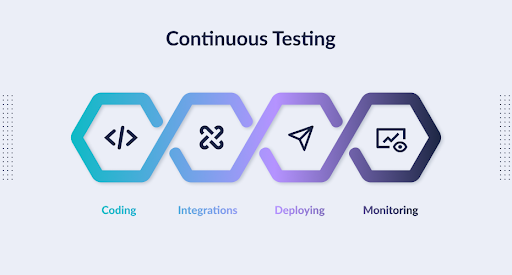
Learn out how to implement continuous testing in DevOps like a pro!
How Is Continuous Testing Different?
In the past, testing was done by handing off the software from one team to another. The Development phase would end, and then QA would begin. The QA teams always wanted more time and were slow in their testing because they wanted to ensure quality.
Continuous testing refers to a software testing cycle that is continuous or uninterrupted. A software change (release candidate) is delivered, tested, and deployed without interruption in a continuous DevOps process. In other words, software code is developed, tested, and deployed continuously.
As an example, whenever a developer checks in code to a source code repository like Jenkins, automated unit tests are run against it. Builds that fail testing are rejected, and the developers are notified. Builds that pass testing is deployed to performance and quality assurance (QA) servers for parallel exhaustive functional and load testing. If these tests pass, the software is deployed into production.
Continuous Testing is a necessary part of the Continuous Development, Integration and Deployment Cycle.

Adoption Drivers for Continuous Testing
As software has become a key business differentiator in recent years, organizations expect faster delivery of new capabilities. Development teams have turned to lean approaches like Agile and DevOps to meet these demands to shorten delivery cycles. Still, after accelerating other aspects of the delivery pipeline, they often find that their testing process prevents them from achieving the expected benefits of their SDLC acceleration initiative. Here are some of the reasons:
- Agile, DevOps, and Continuous Delivery have brought about a change in the testing process. The old methods of testing, which rely heavily on manual testing and automated GUI tests that require frequent updating, cannot keep pace with these new development cycles. While these more recent approaches to software development can speed up the iteration cycle, many organizations recognize the need to extend their test automation strategies.
- Although the role of automated testing in continuous delivery is important, managers lack adequate insight into the risk level of applications at any given time. To ensure that you are communicating effectively with your business stakeholders about acceptable levels of risk, you must design your tests based on their tolerance for vulnerabilities such as security flaws and performance issues. This can lead to a release candidate who passes all the available tests, but the business leaders would not consider ready for release.
- Without a coordinated end-to-end testing quality process, teams will find it difficult to satisfy business expectations within today's compressed delivery cycles. Defect prevention strategies such as development testing can help ensure quality is built into the product, making it faster and less resource-intensive to remove risks at the end of each iteration.
Organizations adopt continuous testing because they recognize problems caused by their traditional testing approaches. They recognize the growing importance of software and see that they can't afford to make a tradeoff between time, scope, and quality because of the rising cost of software failure.
Continuous Testing & Testing Automation
Automated testing increases the speed at which you can perform tasks and provides consistency throughout your testing. It allows developers to focus on more complicated, creative projects and frees up time for testing. It also allows you to do many more tests than you could manually, saving you a lot of time and effort.
On the other hand, Continuous testing is an approach to quality assurance that improves the quality of a product by using feedback to test throughout the development process. This approach can employ many practices and tools, including automation and monitoring. Continuous testing is about veracity, so don't mistake data for quality just because you have massive amounts of it; you need clean, consolidated, and consistent data to take action to mitigate risk.
Continuous Testing vs Automated Testing
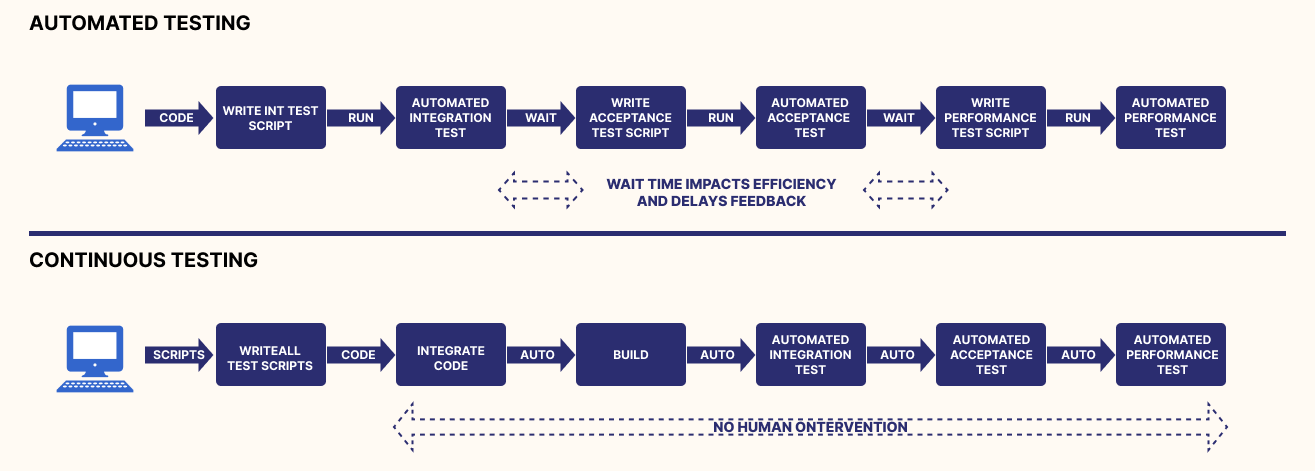
In the software development world, automated testing and continuous testing are two concepts that people often confuse because they are used so frequently together. However, they have very different roles to play in DevOps and Continuous Delivery.
Both automated testing and continuous testing have a monumental impact on DevOps and Continuous Delivery, but neither is a prerequisite nor post requisite for the other. Regardless of your role, you can choose to perform automated testing or continuous testing on its own.
Check out this table for better understanding:
| Parameters | Continuous Testing | Automated Testing |
|---|---|---|
| Definition | Continuous testing is a software testing process that helps you continually improve the quality of your products. | Automated testing is a process that involves the use of tools or software to perform repetitive tasks. |
| Purpose | A continual testing process can help you find risks early in the development of a product and address them before the product is released. | Performs a set of repititve tasks that can reduce the time to run tests from days to hours. |
| Prerequisite | Continuous testing can not be implemented successfully without test automation. | Integrating continuous testing into your automated testing framework is an important step towards a more efficient and effective automated testing process. |
| Time | Software may be released weekly, hourly or even more often. | Software release can take a long time. |
| Feedback | The feedback at each stage of a project needs to be immediate. | Regular feedback from testing each release will help us improve the software. |
Continuous Test-Driven Development
Test-driven development has been used to give programmers rapid feedback on whether the code they write works correctly.
- Functioned properly and
- Unintentionally changed or broke existing functionality. Automated testing is a process that involves running unit tests and acceptance or smoke tests on an application as part of an automated build.
Tests are written before the implementation of a project. Passing these tests proves that the implementation was successful.
Continuous test-driven development (CTDD) is a software development practice that provides the benefits of TDD and allows for the automatic execution of tests, providing testers with continuous feedback on whether their code works.
Along with this, one of the bottlenecks of Test-driven development or TDD was slow developer feedback and overall slow software development rate. To overcome this, continuous Test-driven developement was introduced as it provides faster developer feedback and ensures a fast software development process.
Continuous Testing, Continuous Integration, Continuous Delivery & DevOps
In a competitive environment, enterprises can no longer afford to prioritize either speed or quality when delivering software. Both are critical to success. Now that organizations have matured in adopting agile practices and DevOps initiatives, for enabling quality at speed, Continuous Integration (CI), Continuous Testing, and Continuous Delivery (CD) have emerged as key catalysts. Among these three, Continuous Testing is by far the most challenging.
Continuous Testing is a cross-functional activity that involves teams of people using tools, individuals using their testing tools, and services such as automated regression testing that work in conjunction with the other elements. While Continuous Integration is primarily a tool-driven process, and Continuous Delivery is both tool-driven and team-driven, Continuous Testing relies on a combination of tools, teams, individuals, and services.
While building and integrating code changes are essential to the software development process, the automated delivery process must also identify how these changes impact business risk or disrupt the end-user experience. Otherwise, increased frequency and speed of Continuous Integration and Continuous Delivery can become more of a liability than an asset.
When done correctly, Continuous Testing became the centerpiece of the delivery pipeline. It is essential for controlling business risk given the increased complexity and pace of modern application delivery. Automated tests are part of the software delivery pipeline, providing risk-based feedback as rapidly as possible.
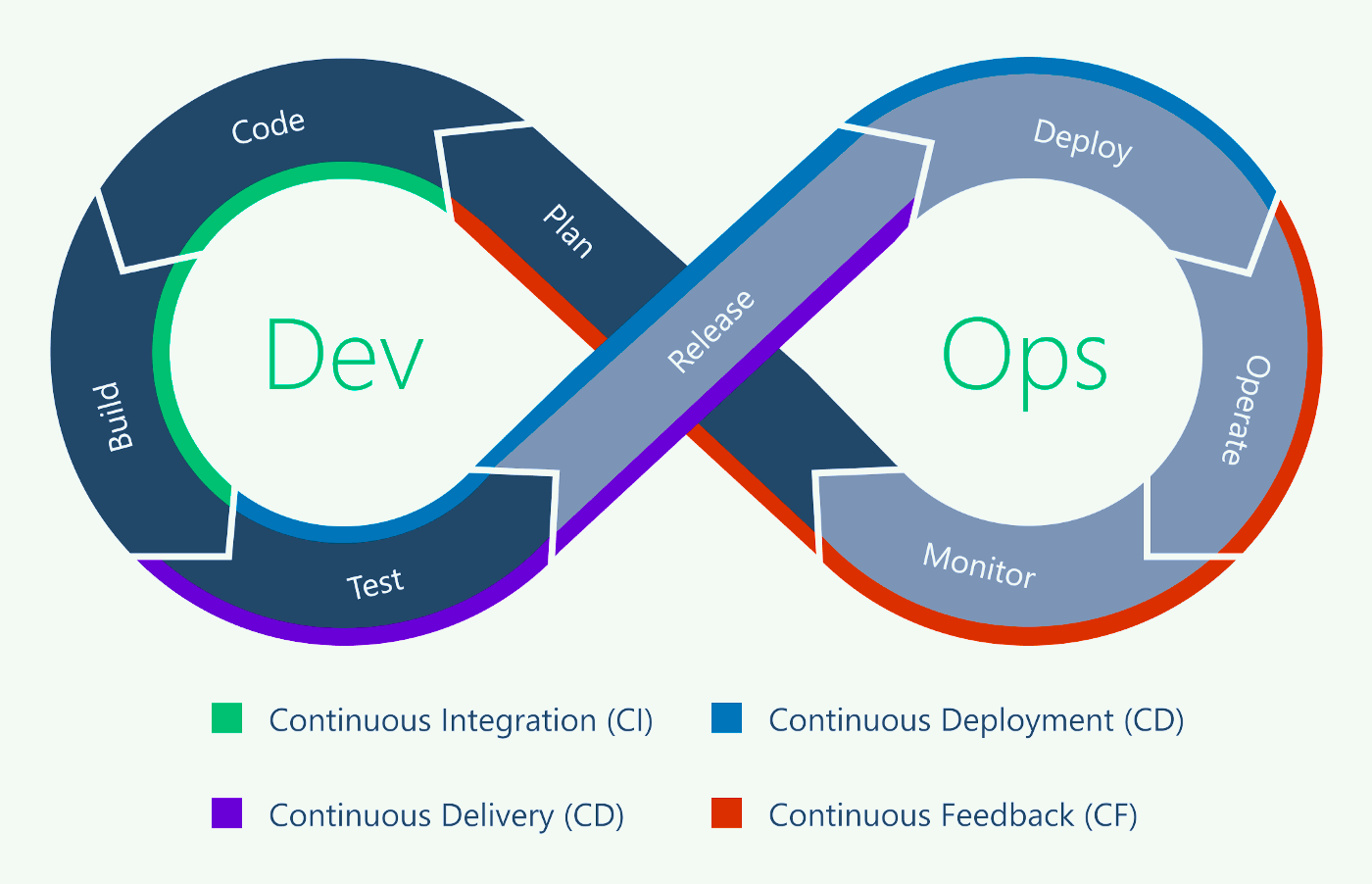
How Does Continuous Testing Work Within DevOps and DevSecOps?
In this fast-paced development environment, software release cycles are getting shorter, so organizations need to adjust their practices to keep up. DevOps practices and tools should be in place for continuous testing to ensure the product's quality is high.
DevOps and DevSecOps are based on speeding up all development activities by performing security testing as soon as possible. Continuous testing is critical to speeding up the DevOps pipeline. It allows security testing to be performed early and continuously across all stages of the SDLC, from development to deployment.
By implementing continuous testing, you can ensure that your software releases are of the highest quality and that development moves forward unhindered.
Benefits of Continuous Testing
Continuous testing involves many benefits to ensure that QAs and testers get the best out of it. Here are some:
Risk-Based Feedback:
Using continuous testing, you can find bugs in your code and fix them before you ship. Actionable feedback from automated tools makes this possible. This is more effective than manual testing, which is time-intensive and misses essential defects. Risk-based insights from automated tools help you strengthen your coverage of business risk factors by finding as many problems as possible in advance.
Instant feedback helps developers make better design decisions, giving managers all the data they need to assess a release.
Smarter Release Decisions:
The adoption of Agile, DevOps, and Continuous Delivery has shortened the timeline for design, development, and delivery of software updates. These methods allow for regular releases to occur as quickly as every two weeks to thousands of times per day.
Business risk is increasing, and the only way to keep up with the accelerated release schedules of modern software companies is by using automated testing. A thorough understanding of business risk is essential before release candidates are deployed.
Continuous testing using a risk-based feedback approach can help software developers decide when and how to release changes. Companies that rely on automated tools to find opportunities for increasing code quality are finding that more time is spent looking at code complexity than looking for code defects.
More Efficient Testing:
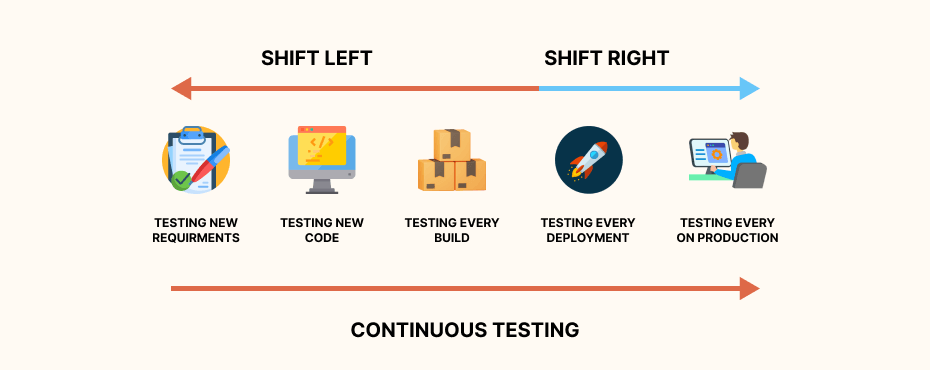
Continuous testing helps developers and managers determine whether a shift left testing or a shift right is necessary in their delivery pipeline.
End-to-end testing with automated tools helps eliminate false positives and timeouts. Such testing at each stage of software development allows developers to be confident that they're building a secure, highly-flexible framework.
Software companies can avoid redundancy and save valuable time by continually testing their applications. This ensures that they have the strongest architecture in place for the future expansion of their programs - especially as users demand new features.
More Stable User Experience:
The most important aspect of continuous testing is to ensure that faulty code doesn't reach users and disrupt their experience. A balance between delivering new features users want and not disrupting the experience they've grown to love must be found.
Because businesses rely on software to communicate with customers, a poor user experience is detrimental to the business's success. In-depth testing ensures that every element of the user experience is accounted for and preserved, which helps maintain a vendor's brand and reputation once their software is ready for primetime.
Integrated Teams:
Continuous testing creates a more efficient development pipeline, ensuring that each team member works together effectively. Modern software development is a collaborative process, and long gone are the days of handing off production-ready code to siloed QA testers.
By integrating quality assurance into all phases of the software development cycle, teams are more aware of each step in the pipeline and better able to deliver high-quality code from the very beginning. Continuous testing ensures that high-quality code is being built from the moment development teams start to code.
Methodologies of Continuous Testing
Continuous testing involves a range of tests to ensure the reliability, security, and usability of an application. These tests include:
- Shift-Left Testing: By prioritizing software and system testing early in the software development life cycle (SDLC), companies can help reduce or prevent significant debugging problems down the road. Shifting-left is a software testing approach that means acting earlier within a process. For example, shifting-left testing means testing your software and moving it to the left in the delivery pipeline - or testing your software earlier in the development lifecycle than is historically typical.
- Shift-Right Testing: Shift-right is a software development methodology in which testing, quality control, and performance evaluation are performed by developers closest to the code. Shift-right is the movement toward testing an application in production with real users. This ensures that applications running in production have been tested and that the same high levels of quality are maintained.
- Smoke Tests: Smoke testing is a process used to determine whether the software build you have deployed is stable or not. It is a confirmation that the quality assurance (QA) team will proceed with further testing on the build. Smoke testing consists of a minimal set of tests run on each build to test software functionalities. The name "smoke testing" comes from the idea that if a single piece of software works, then it can be assumed that everything else will also work.
- Unit Testing: Unit testing is a software-development process that ensures each component of an application works as expected. By isolating and verifying individual functions, methods, procedures, and objects, unit testing allows developers to find and fix bugs early in the development process.
- Integration and Messaging Testing: Integration and messaging tests ensure that all of the software modules, when working together, are error-free. Virtualization of missing dependencies allows teams to test how well the end-to-end processes and scenarios perform collectively. Composite code is used to test whether they perform as expected when compiled and executed at run time.
- Performance Testing: When you test application software in a lab that uses different hardware and middleware from what will be used in the final production environment, the results may not accurately predict the solution's performance. To effectively assess the overall performance of a solution, integrated testing is required.
- Functional Testing: Functional testing checks whether the software is ready to deliver the customer experience. For example, supply-chain software should be able to alert trucks to arrive at factories when inventory is available for shipping. (In contrast, non-functional testing focuses on performance, usability, and reliability and gauges the readiness of the software.)
- Regression Testing: Regression testing enables you to check whether there are any changes in performance, functionality, or dependencies after correcting errors in any dependent software.
Frameworks Used for Continuous Testing
A continuous testing pipeline usually combines three kinds of tool: a framework that drives the browser or device, a CI server that decides when tests run, and infrastructure that executes them at scale. The four below are the ones teams meet first.
This is an orientation rather than a survey. For a wider comparison of what each option covers and where it fits, see our roundup of the top continuous testing tools.
Selenium:
Selenium is a software framework that developers with extensive programming skills can use for QA testing. To implement Selenium, it's vital to understand how frameworks work. In addition, Selenium supports a wide range of popular operating systems (Windows, macOS, Linux) and browsers (Chrome, Firefox, Safari), making it ideal for cross-environment testing.
However, there are several hurdles when Selenium is used in conjunction with other tools in the CI/CD pipeline. The greatest hindrance is finding an infrastructure that supports your desired tools and plugins and allows you to run Selenium test scripts at scale.
Cloud testing ensures that Selenium tests can be run at scale on a secure, scalable Selenium Grid. TestMu AI is such a platform that provides a Selenium grid that lets you run Selenium tests on various browser and platform combinations. In addition, continuous testing can be done in an organization's CI/CD Pipeline by integrating with the best CI/CD tools already used by organizations.
Here's a glimpse of TestMu AI cloud Selenium Grid:

The same grid runs Selenium testing and Cypress E2E testing suites, so a pipeline can standardise on one execution layer instead of maintaining separate infrastructure per framework.
Jenkins:
Jenkins remains one of the most widely deployed CI servers, largely because its plugin ecosystem connects to almost any toolchain. Once the Jenkins server is set up, it runs a series of automated tests and builds on each change, so only stable and tested code reaches production.
Using a tool like Jenkins can simplify the process of assuring high code quality and successful builds. It's beneficial when working on a single project with a large development team, as traditional approaches might result in much conflicting code commits that may require a lot of troubleshooting.
Appium:
Appium is an open-source test automation framework for mobile web apps. It allows you to create cross-browser tests for both desktop and mobile devices. Many cloud device providers now offer Appium-based testing services.
Appium is a tool for developing, uploading, executing, and examining test results directly in the cloud. Not only does Appium allow you to automate tests on both physical devices and simulators or emulators but it also allows you to do so without recompiling your app. Appium uses a JSON wire protocol to communicate with the application being tested.
Eggplant:
Eggplant is a continuous testing tool that provides a one-of-a-kind approach to testing: an image-based solution. Rather than presenting raw test scripts, Eggplant interacts with the Application Under Test (AUT) that simulates users' points of view.
Eggplant provides a test lab that gives you 24/7 access to continuous testing and deployment. It integrates with other CI/CD tools like Jenkins and Bamboo. This integration allows Eggplant users to perform full-stack testing, including unit, functional, and performance tests. If you are looking for an alternative, here is the Eggplant Alternative .
Challenges of Continuous Testing
Continuous testing allows for faster continuous delivery (CD). However, there are challenges that must be overcome:
- Lack of Test Support in Software: Continuous testing becomes more difficult to achieve when testability support is not built into legacy products. Implementing testability features in these products is expensive and hinders the success of continuous testing.
- Absence of Standard Tools: Although there are no standard tools for continuous testing of many different products, teams usually use in-house automation tools or frameworks that lack proper documentation and maintenance. This adds to the problems of the testing team, which will now have to struggle with issues related to the tool/framework.
- Insufficient Testing Infrastructure: Continuous testing requires an investment in additional test environments, which must be maintained, kept up to date, and running around the clock. Advanced tools can help teams implement faster feedback loops, but these costs aren't high compared to the price incurred due to the poor quality of the product. There is a need for organizational commitment to continuous testing instead of a halfway journey without adequate infrastructure, only adding to the problems your testers face.
- Scaling: All testing frameworks/tools do not scale equally. Slow test execution and lack of support for large test suites can become severe blockers to the dream of achieving continuous testing. These problems are not always apparent at first; they become visible only after many tests have been added to the system and the test system starts to get highly loaded.
- Test Maintenance: A suite that runs on every commit also breaks on every commit. Renamed elements, changed selectors, and shifting layouts turn a pipeline red for reasons unrelated to the code under test, and the repair work grows with the size of the suite.

Note: Scaling is the blocker teams hit last and hardest. TestMu AI runs your suite on just-in-time infrastructure so a growing test count does not become a growing wait. Try it free!
How to Adopt Continuous Testing?
Embedding quality in applications can be achieved by adding modern testing practices, such as small quality checks performed throughout the application pipeline. This enables small sections of code to be tested continuously. It's not always the case that test automation is the first thing to be tackled. For example, even after API and GUI tests have been automated and integrated into a Continuous Integration agent, those tests have dependencies - test data, interfaces, and environments - that must be satisfied before they can be executed.
Virtualized Environments:
Continuous testing is a process of frequently testing your code. To try more often, you must hit multiple environments more regularly. Virtualizing those environments allows you to test code without worrying about things that aren't changing (i.e., other systems and environments).
API Testing:
The testing pyramid is a concept that promotes the proper use of software testing in an organization. As per the concept, organizations should test as much as possible at the unit and API levels and minimize their reliance on UI testing. To adopt continuous testing, you need to embrace this concept and strengthen your unit and API testing; you should also reduce your dependence on UI testing.
Test Data Management:
To achieve continuous testing, you need the right data and the appropriate diversity of data for positive and negative scenarios. Diversity in production is difficult to achieve, and that is critical. You cannot bring data from production into an application pipeline at speed it requires. Synthetic data generation allows continuous testing with the highest confidence levels because no personally identifiable information is at risk in the data.
Test Automation:
In a continuous testing environment, today's scripts fail due to things unrelated to the application code, and no one trusts the results. To achieve reliable test automation, you must adopt continuous testing.
Pipeline Orchestration:
A dependable continuous testing pipeline requires a solid, integrated automation suite tied to the backbone of your application. Knowing how it works and how to interpret results will make you more efficient and scalable. You must ensure that it's transparent and that everyone has complete visibility into what's running through the pipeline. It is an automated workflow tool that runs all the tests in the pipeline and fully integrates with code deployment activities. As part of any DevOps adoption initiative, it is unrealistic to expect to get to continuous testing without a standardized and automated pipeline.
Acceptance of TDD and BDD:
Ensure that acceptance criteria are met by developing tests that check each criteria. This keeps testing focused within the sprints, ensuring developers develop what the business expects. Over time, teams will define much more detailed acceptance criteria, which requires tests also to cover more ground.
Feedback Loops:
To be successful, continuous testing must be automated and provide real-time data within dashboards that enable the whole team to have access. Along with this, feedback loops are critical across the entire SDLC, not just production, as a compass for navigating continuous testing transformation.

Austin Siewert
Co-Founder, Steadfast Systems
Discovered @TestMu AI yesterday. Best browser testing tool I've found for my use case. Great pricing model for the limited testing I do 👏
2M+ Devs and QAs rely on TestMu AI
Deliver immersive digital experiences with Next-Generation Mobile Apps and Cross Browser Testing Cloud

Common Practices for Continuous Testing
Continuous testing is an effective strategy because it encourages testing early and often. Here are a few best practices to get the best out of continuous testing:
Adopt More Test Automation:
While continuous testing is still achievable with manual testing, automation increases the speed and error coverage at which testing can function. Automating as much as possible in the development lifecycle will help you achieve faster releases. Keep in mind that if you are shifting from a manual testing process, it will take time to set up automation. However, once you do, customers will see the time-saving benefits, and your team will be able to get new features out faster than ever before.
Tool Integration:
Continuous testing is not just about automation. It's about using the right tools to make testing more accessible, faster, broader, and more effective. Tools that work with your dev toolchain to remove manual overhead (where possible) and tools that remove/reduce mundane operations for testers by automating them so testers can focus on what is essential, i.e., testing.
Tracking Metrics:
Quantifiable metrics can let you know how well your testing is going. Continuous testing provides immediate results to see if the software works as expected. Complex data help measure progress, quality outputs, and your business value ROI. Monitoring how many bugs are found and corrected offers continuous validation for your business value.
Save Time With Headless Execution:
Headless execution is a method of running automated tests that do not use the head (i.e., no browser UI or GUI). The process reduces the number of unnecessary caches, cookies, or resources that are sifted through to obtain results that matter: does the application run as expected.
Integrate Performance Testing into Delivery Cycle:
Performance testing is beneficial because it checks your application's speed, responsiveness, and stability. It's an investigative process that observes how the system runs and finds solutions to overcome those observations. As such, performance testing should be an integral part of continuous testing.
Let Agents Absorb the Repetitive Work:
The maintenance problem above is what agentic testing is aimed at. Rather than executing a fixed script on every commit, an agent is given the goal, works out the steps against the application as it currently stands, and repairs a step that no longer matches instead of failing the build.
For a pipeline, the practical difference is which failures reach a human. A brittle suite reports every drifted selector as a defect, so engineers triage noise; an agent-run suite escalates the cases it could not resolve, which is a far shorter list. The tradeoff is that agent output is non-deterministic, so it needs review gates rather than blind trust. The mechanics of that loop are covered in this guide to agentic AI.
Continuous Testing With TestMu AI
The practices above assume three things exist: tests that run fast enough to gate a merge, dashboards that make the result legible, and authoring that keeps pace with how often the pipeline fires. Those map to three parts of the TestMu AI platform.
Execution that fits inside the feedback window
TestMu AI's HyperExecute keeps the test script and its execution components in a single isolated environment rather than moving them between a hub and its nodes, which is where traditional grids lose time on every hop. Suites are split across just-in-time machines using Matrix, Auto-Split or Hybrid strategies, and TestMu AI benchmarks the result at up to 70% faster than traditional grids.
That speed is what makes the ten-minute feedback bar reachable on a suite that has outgrown a single machine.
Feedback loops and metrics that survive scale
Tracking metrics and feedback loops are the two practices teams describe as essential and implement last, because a per-run report cannot answer them. Test Insights is the read side of the platform: it aggregates execution records across builds, time, browsers, devices and teams, then surfaces pass/fail and duration trends, flakiness and stability signal, and error categorization. Its agentic root cause analysis correlates network, console and framework logs into a likely cause, which is a lead to verify rather than a verdict to act on blindly.
The distinction matters for continuous testing specifically. A single job report tells you whether one run passed; the questions that decide a release, such as which tests are chronically flaky and whether quality is trending down, only appear when you look across runs. The Insights dashboard documentation covers the available widgets.
Authoring that keeps up with the pipeline
Coverage gaps in continuous testing are usually an authoring bottleneck rather than an execution one, because writing and maintaining tests is slower than shipping the code they cover. KaneAI generates tests from plain-English descriptions and re-anchors steps when the interface changes, which shifts the maintenance cost that normally follows every release.
Conclusion
Start by timing your current suite against the ten-minute bar. Run it once, record the wall-clock time from commit to result, and you will know immediately whether the problem is coverage, flakiness, or execution speed. Each of those has a different fix, and teams routinely rebuild the wrong one.
If the answer is execution speed, orchestration is the lever rather than more parallel nodes, and HyperExecute configuration lives in a single hyperexecute.yaml in your project root, so the pipeline change is one file rather than a migration. The HyperExecute getting started documentation walks through the first run end to end.
Author

Devansh Bhardwaj
Blogs: 80


Devansh Bhardwaj is a Community Evangelist at TestMu AI with 4+ years of experience in the tech industry. He has authored 30+ technical blogs on web development and automation testing and holds certifications in Automation Testing, KaneAI, Selenium, Appium, Playwright, and Cypress. Devansh has contributed to end-to-end testing of a major banking application, spanning UI, API, mobile, visual, and cross-browser testing, demonstrating hands-on expertise across modern testing workflows.
Reviewer

Japneet Singh Chawla
Reviewer
Japneet Singh Chawla is an Engineering Manager at TestMu AI (formerly LambdaTest), where he leads a team driving HyperExecute, the AI-native Test Orchestration Cloud Platform, and integrations with Cypress, Provar, Tosca, and Selenium, improving test execution efficiency and driving adoption across 500+ enterprise clients. He also spearheaded zero-downtime deployments that cut release-related downtime by 90%, and mentors new engineers into productive contributors. He brings 9+ years of experience building and scaling distributed systems, SaaS platforms, and developer tools, with deep hands-on backend engineering across Golang, Python, Node.js, Kafka, and Redis. Earlier at Sumo Logic he built award-winning developer tools, including a VS Code Parser Linter, and at Indus Valley Partners he was a founding member of the Sentiment Analyzer team, building ML-powered solutions for financial clients. Japneet holds an MCA in Computer Science from GGSIPU.


Continuous Testing FAQs
Did you find this page helpful?
More Related Learning Hubs
TestMu AI forEnterprise
Get access to solutions built on Enterprise
grade security, privacy, & compliance
- Advanced access controls
- Advanced data retention rules
- Advanced Local Testing
- Premium Support options
- Early access to beta features
- Private Slack Channel
- Unlimited Manual Accessibility DevTools Tests