
Power Your Software Testing with AI Agents and Cloud
The Native AI-Agentic Cloud Platform to Supercharge Quality Engineering. Test Intelligently and Ship Faster.


- TestMu AI (Formerly LambdaTest)
- /
- Learning Hub
- /
- What Is Requirement Analysis: Best Practices and Examples
What Is Requirement Analysis: Best Practices and Examples
Learn the importance of requirement analysis in software development. Explore best practices, processes, and tools for project success.
Last Updated on:
On This Page
- What is Requirement Analysis?
- Requirement Analysis in Software Development Life Cycle
- Structure of Software Requirement
- Assumptions of Requirement Analysis
- Stakeholders Involved in Requirement Analysis
- Significance of Communication in Requirement Analysis
- Process of Requirement Analysis
- Techniques of Requirement Analysis
- Advanced Requirement Types
- Requirement Analysis Example
- JRD and Prototyping
- Requirement Analysis Tools
- Conclusion
Requirement analysis defines software requirements, the essential needs a product must meet to deliver its intended quality and the capabilities end users need to reach their goals. It requires developers, end users, software managers, and customer managers to reach mutual agreement on the envisioned product, preventing undesirable surprises once the software is delivered.
TL;DR
- Requirement analysis defines what a system must do before any design or code work begins.
- Functional requirements describe what the system does, while non-functional requirements cover speed, security and availability.
- Interviews, questionnaires, prototyping and use cases are the standard techniques for gathering requirements.
- Defects traced to unclear requirements cost far more to fix after release than during analysis.
- Every requirement should be testable, so an ambiguous statement is a defect in the requirement itself.
What is Requirement Analysis?
Software requirements refer to the essential needs that the software must meet to deliver the product's quality. In other terms, software requirements are the capability that the end users would need to achieve the goal of software applications.
These requirements typically represent users' expectations from the software, which are crucial and must be fulfilled by the software. Analysis, on the other hand, involves a systematic and detailed examination of something to gain comprehensive insights into it.
Consequently, software requirement analysis means a thorough study, review, and description of software requirements, ensuring that genuine and necessary requirements are met to address the problem. This process involves various activities, some of which are as follows:
- Problem recognition
- Evaluation and synthesis
- Modeling
- Specification
- Review
After all, the main objective is to develop high-performing and functional software applications that address the users' needs within a specified schedule and budget.
For this purpose, it is essential for all project stakeholders, including developers, end users, software managers, and customer managers, to reach a mutual agreement on the envisioned product. This prevents any undesirable surprises upon delivery.

Note: Run cross browser tests across 3,000+ real browsers, devices, and OS combinations with TestMu AI. Try TestMu AI Now!
Purpose and Prioritization of Requirement Analysis
From the above explanation, it must be clear that the primary purpose of the requirement analysis is to gather, evaluate, and document the requirements of the software application. This, in turn, ensures that the developed software applications successfully meet the desired expectations and satisfy the needs of the end users.
However, not all software requirements carry equal weight. Some requirements have a more significant impact than others on the quality of the software you ship. You can understand this better with an example like one of the top priorities for a mobile banking app would be ensuring the security of user data and transactions.
You can follow steps like gathering requirements, understanding business objectives, categorizing, defining criteria, evaluating, assigning priority levels, reviewing, adjusting as needed, communicating priorities, and monitoring and reassessing throughout the software project. These steps will help you work on the significant aspects of the software applications and deliver its core functionalities.
Requirement Analysis in Software Development Life Cycle
Requirement analysis is the first phase in the Software Development Life Cycle (SDLC). This is one of the most important phases, as having clear requirements is necessary to proceed further in the SDLC. This phase involves identifying, analyzing, and documenting the expectations of the stakeholders and end users.
Having in hand the software requirement, you get a direction on the development project, which also helps you guide on different stages like design, development, testing, and deployment. You may ask, what are other significance of positioning requirement analysis early in SDLC? You can identify potential issues and misunderstandings related to software application development and resolve them before significant resources are invested in the development process.
Importance of Requirement Analysis in SDLC
In software development, requirement analysis accomplishes the following:
- Clearly defines the necessary features and overall product vision.
- Identifying and clarifying stakeholder expectations for the product.
- Having requirements in place helps avoid disagreements and misunderstandings during the development and testing stages of the project.
- Ensures the final software product adheres to the specified requirements, thus avoiding scope creep.
- It helps in minimizing rework and optimizing resources.
- Identifies potential risks and enables risk mitigation.
- Focusing on client needs ensures client satisfaction and project success.
Structure of Software Requirement
Requirement analysis results in a well-organized document containing all the crucial details required to create top-notch software applications. The requirement document follows the below format with different sections:
- Introduction: This includes information on a brief overview of the software projects, like the project name, document creation date, version number, etc. It also details the description and scope of the software project, having pertinent context.
- Purpose and scope: The software application's purpose and range to be developed are crucial. It briefs about the software application's intended use, essential features, and functionalities.
- Functional requirement: You give brief information on the functionalities of the software here. For example, it may include details on the inputs, outputs, and any other constraints. You can also have information on the use cases, user stories, or scenarios illustrating how each requirement should work.
- Non-functional: When developing software requirements, having information on non-functional software requirements like performance, security, reliability, compatibility with different devices, browsers, or operating systems, usability, and scalability is essential. You must state each of the non-functional requirements of the software applications, along with its criteria for critical evaluation.
- User requirement: This section of the software requirement document focuses on the needs and expectations of the end-users. It must have information on the user interface, user experience requirements, and user interactions.
- System architecture: It includes different relevant diagrams and descriptions of the components or units of the software applications and their interactions. In other words, this section will detail information on the high-level system architecture and its design.
- Data requirement: Here, the document specifies the data needed by the software application, including data formats, storage, and data handling rules.
- Assumptions and constraints: The documents give details on any assumptions made during the requirement analysis process or conditions that may affect the project are documented in this section. In later sections, we will further discuss the different assumptions made by stakeholders and others.
- Dependencies: Here, you discuss the need for the external system, software, and hardware that requires integration with the software application.
- Risk and mitigations: The software requirement document has information on any potential risk associated with the software application to be developed. Based on the identified risk, mitigation strategies are developed.
- Traceability matrix: A requirements traceability matrix maps each source to the requirement document (e.g., stakeholder, business objective) and may also link details to design and testing artifacts.
- Approval and sign-off: The software requirement document also has a section for stakeholders to approve and sign off. This section is crucial as it shows the acceptance of the documented scope and objective.
When creating software applications, handling functional and non-functional aspects, such as scalability and compatibility with various devices, browsers, and operating systems is crucial. Managing scalability and compatibility with different devices, browsers, or operating systems can be challenging. One solution is to leverage cross browser testing platforms like TestMu AI.
TestMu AI is an AI-native test orchestration and execution platform that lets you run manual and automated tests on 3,000+ real browsers, devices, and OS combinations.

Subscribe to the TestMu AI YouTube Channel and stay updated with the latest tutorials around Selenium testing, Cypress testing, and more.
The structured format of the software requirement document confirms that all the required and essential information is captured in an organized manner. It guides the development team and is a reference throughout the software development process.

Assumptions of Requirement Analysis
In software requirement analysis, stakeholders make certain assumptions to better understand the software development process, describing and verifying the software requirement. Using assumptions, you can simplify the analysis and decision-making process in software application development. Here are some of the common assumptions made:
- Stable requirement: It is assumed that the initial set of requirements provided by stakeholders represents a regular and comprehensive understanding of their needs. However, it's essential to acknowledge that requirements can evolve and change over time.
- Clear communication: In requirement analysis, it is assumed that communication between the business analyst, development and testers team, and other stakeholders is clear.
- Consistent terminology: The terminology used in the requirement analysis for better descriptions is even and constant throughout the documentation.
- Feasibility: The software requirement is feasible even with the time, resources, and technology involved in developing software applications.
- User representative: The sample of users or user representatives involved in requirement analysis adequately represents the broader user base.
- Budget and schedule: The budget and schedule of the software application are clearly defined and appropriate to meet the requirements of the end-users.
- Stakeholder availability: Assumptions are made that all the stakeholders involved in structuring and analyzing software requirements are available to give their valuable inputs.
- Regulatory compliance: It is assumed that the software applications follow the regulatory standards of the software industry.
- Non-functional requirement clarity: It is assumed that stakeholders clearly understand the non-functional requirements of the software applications.
- Prioritization: Assumed that requirements prioritization accurately shows their importance to the software project's success.
- Scope boundaries: The boundaries and scope of the software requirements are nicely defined and agreed upon by all stakeholders.
- User involvement: The users involved in the software requirement analysis actively associate and give their feedback to check if the requirement meets their exact needs and expectations.
Stakeholders Involved in Requirement Analysis
During the process of making the software requirement analysis, different stakeholders are involved, and each plays a vital role in gathering, defining, and validating the software requirements. The main stakeholders are
- Clients/Customers: They are the most crucial stakeholders in analyzing the requirements of the software. The clients or customers can be individuals or organizations who own the software application. They have specific software application needs or want their application to solve particular problems. Hence, the client or customer provides an initial overview of the software application to be developed and its high-level requirements.
- Users: In requirement analysis, addressing the factors impacting the user experience is essential. Here, the users are the individuals or groups who will directly interact with the developed software. Understanding their needs and expectations is essential to address functional and non-functional requirements effectively.
- Business Analysts: They are the interactive body between clients and development teams. Business analysts are responsible for eliciting, analyzing, and documenting requirements.
- Domain Experts: Domain experts have good knowledge about industry practices, business processes, or specific domains where the software applications will be used. Their valuable insights ensure that requirements align with real-world needs.
- Project Managers: Project managers are responsible for requirement analysis as they handle and manage all aspects of software development, including requirement analysis. They also ensure project progress, meet deadlines, and adhere to allocated budgets.
- Software Architects: Software architects have a crucial role in requirement analysis as they contribute by designing the complete structure and components/units of the software applications. They also address the feasibility and scalability during requirement analysis.
- Developers/Programmers: Developers play a crucial role in creating software applications by engaging in software requirement analysis. Their deep understanding of these requirements is vital for the project's success.
- Quality Assurance (QA) Team: The QA team or the software testers are the individuals who test the developed software application to identify and fix the bugs. They ensure that both specified requirements and quality standards are met during the validation and verification stages.
- Regulatory/Compliance Officers: In developing software applications, specific standards or legal regulations must be applied. For this, regulatory/compliance officers ensure adherence to such guidelines when defining software requirements.
- Marketing/Sales Representatives: In some cases, marketing/sales representatives may gather valuable market insights and identify end-user needs that can impact software requirements and their analysis.
- End Users' Representatives: For large-scale projects or software applications serving many end users, representatives may act as voices for the collective user base.
Effectively engaging and communicating with these stakeholders is crucial to accurately capture software requirements that align with the project's overall goals. While establishing software requirements, we require methods that accurately capture, interpret and communicate with customers' preferences. Let us see the significance of communication during the requirement analysis.
Significance of Communication in Requirement Analysis
In the requirement analysis process, the project team comes together to understand project objectives, elucidate anticipations, and record the necessary specifications and attributes of the product. Accomplishing all of this hinges on lucid and unequivocal communication among team participants.
In gathering requisites, the project team must dialogue with other invested parties, including the owner and end users. This interaction serves the purpose of ascertaining their anticipatory outlooks with respect to distinct functionalities.
Commencing early and frequent exchanges among these entities is a deterrent against any vagueness. It guarantees alignment of the final product with the end user's or client's requisites and averts users' need to recalibrate their expectations.
Process of Requirement Analysis
The process of requirement analysis involves several steps as follows:
- Identify Key Stakeholders and End Users
- Understand the Project Goal
- Gather Requirements
- Categorize Requirements
- Functional requirement
- Technical requirement
- Transitional requirement
- Operational requirement
- Analyze the Requirements
- Defining all necessary software functions.
- Describing all externally present and observable data objects.
- Evaluating the flow of data for its significance.
- Understanding the overall behavior and functioning of the system.
- Identifying and discovering designed constraints.
- Defining and establishing the system interface characteristics to understand its interactions with multiple components or each other.
- Unique
- Necessary
- Consistent
- Clear and concise
- Able to be validated
- Complete
- Technically feasible
- Traceable
- Verifiable
- Quantifiable
- Operationally effective
- Improve the Requirements Quality
- Visualization: Use visualization and simulation tools to help stakeholders better understand the desired end product.
- Document Dependencies: Record the relationships and dependencies among requirements and any underlying assumptions.
- Consistent Use of Templates: Create and use consistent templates and models to document the requirements effectively.
- Model the Requirement
- Specification
- Document and review the requirements
- Finalize SRS and Obtain the Requirement
Identifying the key stakeholders, including end users, is crucial in any project as they have the final say in the project scope. The project team should involve them early on in the requirements-gathering process.
To capture all requirements, the project team must first comprehend the project's objective. Understanding the business need driving the project, and the problem the product aims to solve allows for more productive discussions during requirements gathering.
At this stage, relevant stakeholders provide their requirements. This can be achieved through one-on-one discussions, focus groups, or consideration of use cases. Stakeholder feedback is incorporated into the requirements.
Categorizing requirements helps with prioritization, impact analysis, feasibility assessment, and conflict resolution. The four common requirements categories are as follows:
During this phase, the main focus is evaluating the system feasibility requirements and ensuring testability. The development team collaborates with the quality assurance team to confirm the achievability and clarity of the requirements. The objective is to identify and resolve any contradictions, ambiguities, incompleteness, or unclear aspects of the listed requirements. In the context of software requirements, important tasks for evaluation and synthesis include:
Attributes of Good Requirements: To effectively study and define the requirements, consider the following attributes:
To enhance the quality of the requirements, you can employ the following methods:
During this phase, graphical representations of functions, data entities, external entities, and their interrelationships are created. The visual perspective aids in uncovering inaccuracies, inconsistencies, missing elements, or excessive requirements. This category includes data flow diagrams, entity-relationship diagrams, data dictionaries, state-transition diagrams, and other models.
Following the requirements modeling phase, we better understand the system's behavior. Inconsistencies and ambiguities have been identified and resolved. The data flow between modules has been analyzed. The process of elicitation and analysis has led to a comprehensive understanding of the system. Having completed the needs analysis in previous steps, we now document these requirements in the Software Requirement Specification (SRS) document
Lastly, record the requirements in a format developers and users can easily comprehend. Note the changes made to the requirement analysis document during the process. Structures such as Software Requirement Specification (SRS), user cases, natural-language documents, user stories, and process specifications can be used for documentation. Review previous versions of the requirement analysis and align objectives with actions to improve the process continually.
The SRS is shared with key stakeholders for sign-off to ensure agreement with the requirements. Preventing conflicts or disagreements later can be achieved through this approach. Any feedback is incorporated, and once finalized, the SRS serves as the foundation for the project's scope, guiding subsequent steps in the software development lifecycle (SDLC), including development and testing.
Techniques of Requirement Analysis
To analyze and finalize the requirement analysis, the stakeholders use many different techniques. Here are some of those techniques:
- Gap Analysis
- Business Process Modeling Notation
- Flowchart Technique
- Unified Modeling Language (UML)
- Role Activity Diagrams
- Integrated definition for function modeling
- Gantt Charts
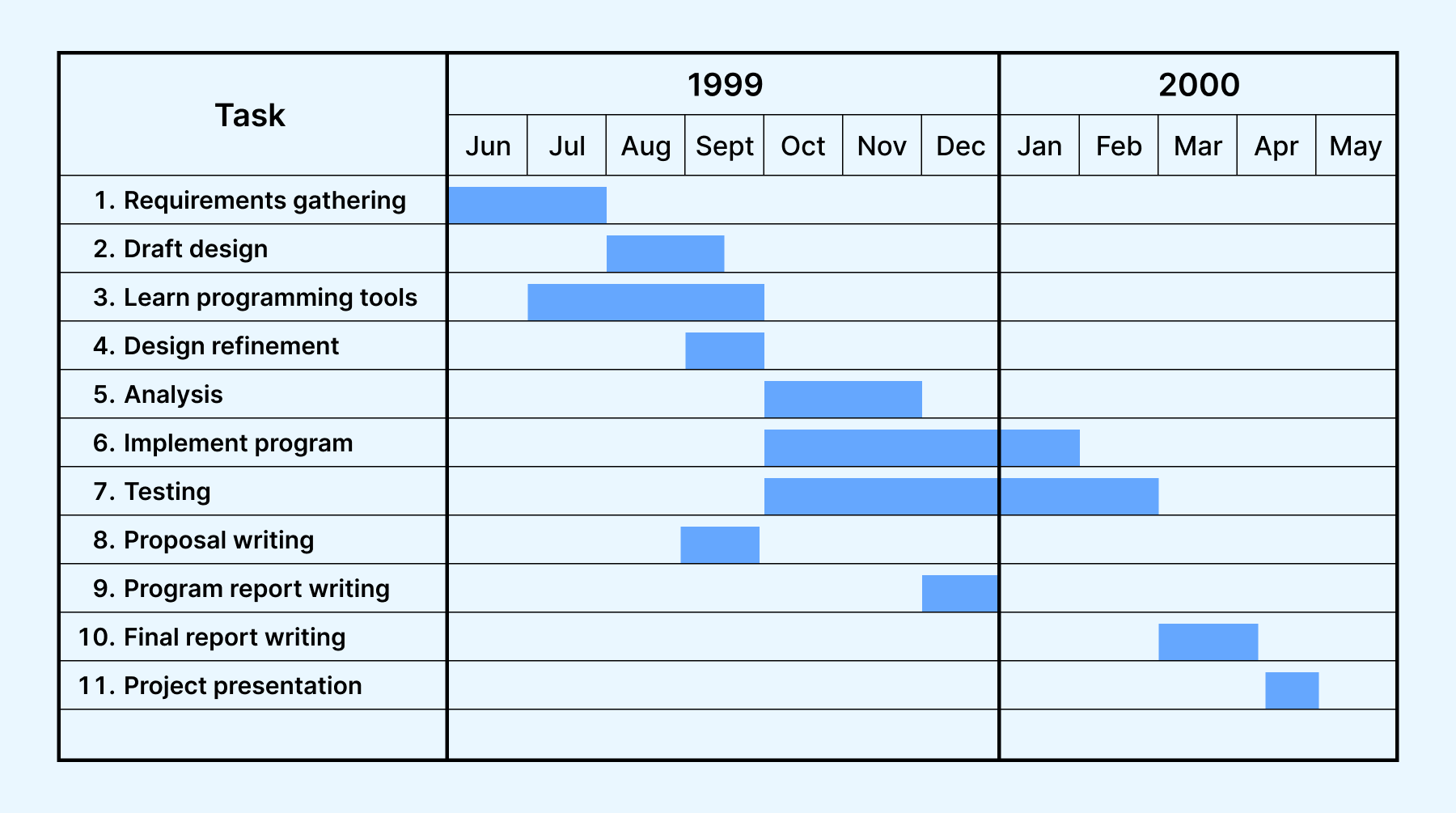
- Various activities in the project.
- Start and end dates of each activity.
- Duration of each activity.
- Overlapping activities and their positions.
- Project start and finish dates.
- Data flow diagram
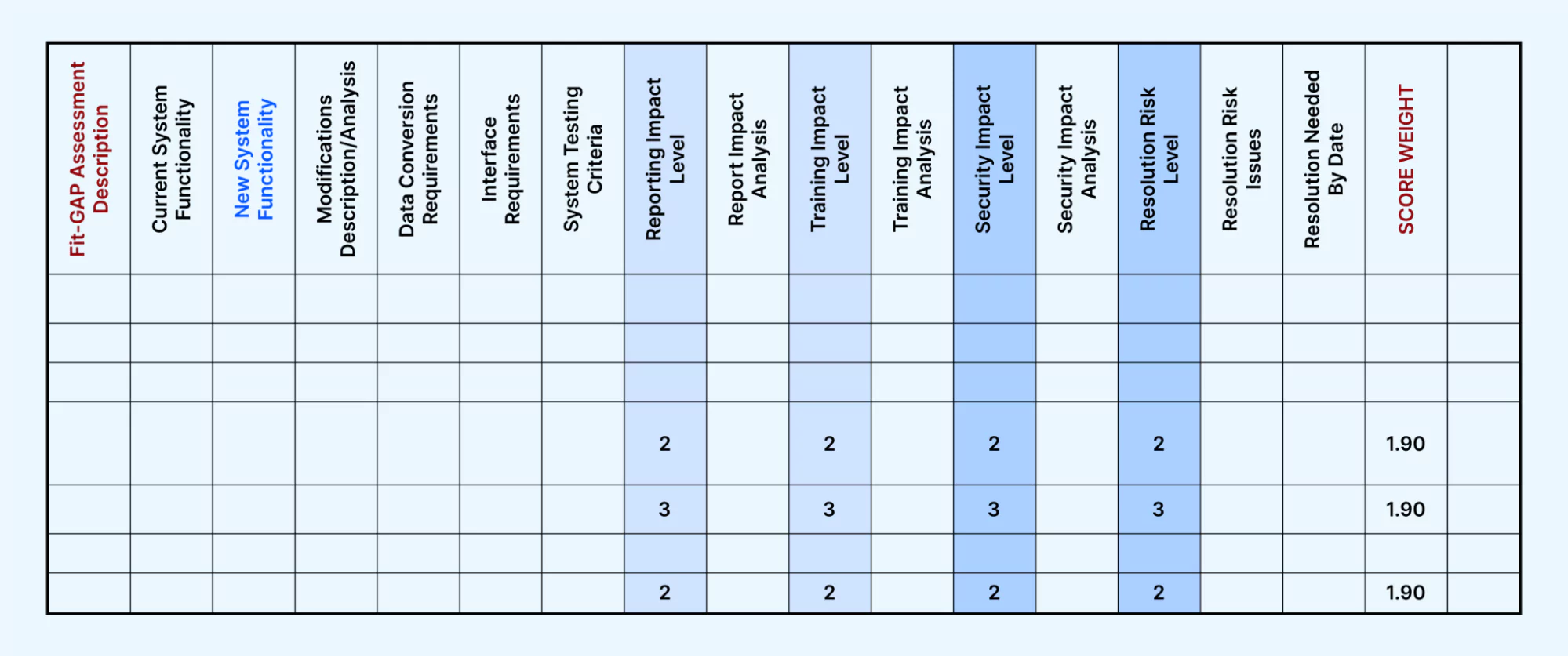
Gap Analysis techniques test the performance gaps in software applications to assess whether the requirements are met. With this technique, you can find a software application's current and target states. Using the gap analysis involves comparing the baseline and target business scenarios to bridge the gap between them. With this, you can identify areas for improvement in the performance of the software applications, thus providing valuable insights for the company's growth and optimization.
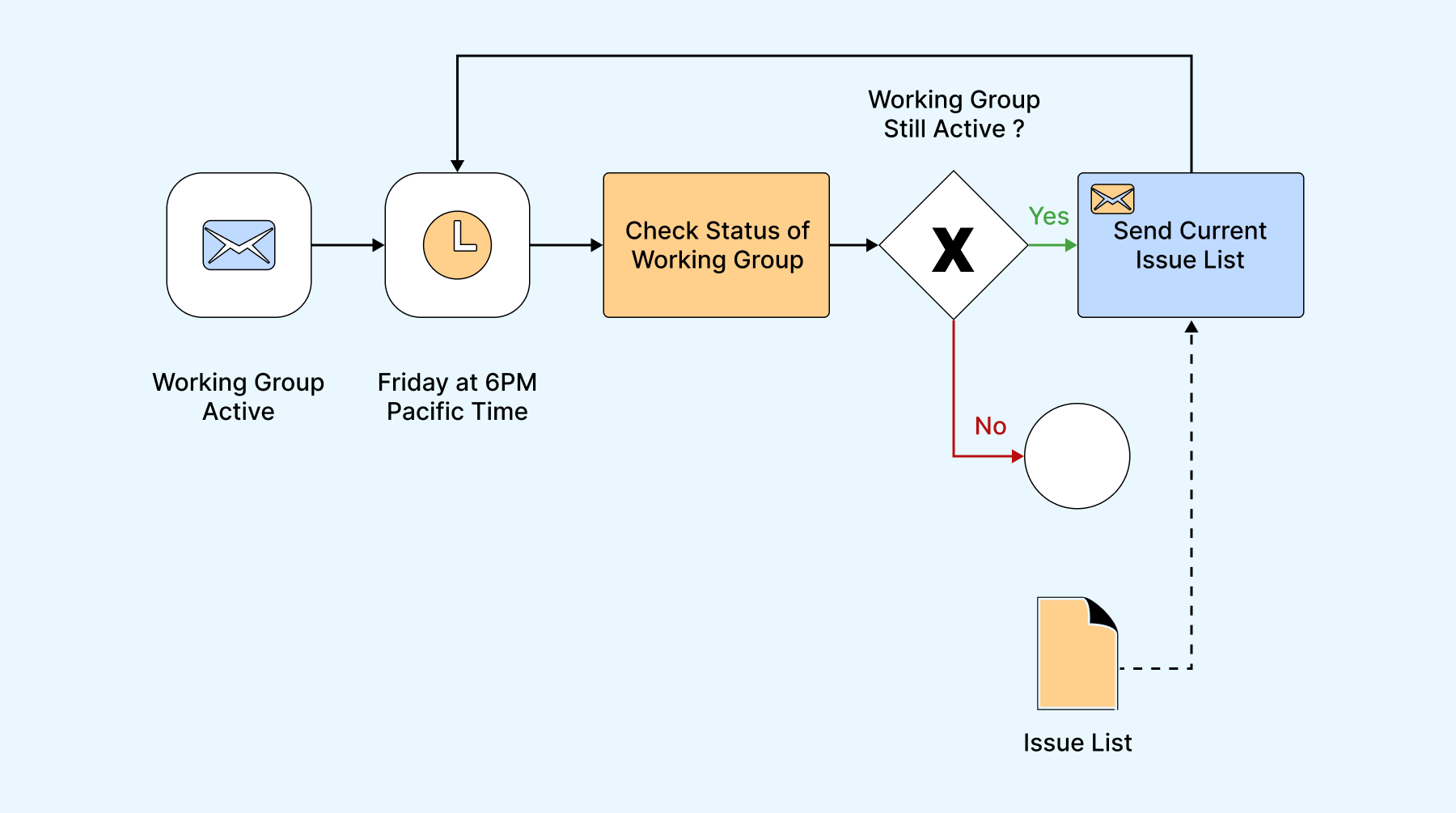
The Business Process Model and Notation (BPMN) is the requirement analysis technique used to develop graphs that facilitate understanding of business processes. It is one of the standard techniques business analysts use to coordinate messages among various team members in a linked set of activities.
In simple terms, you can understand BPMN, which allows project teams to develop a standardized graphical representation of processes and facilitate communication among members involved in those processes.
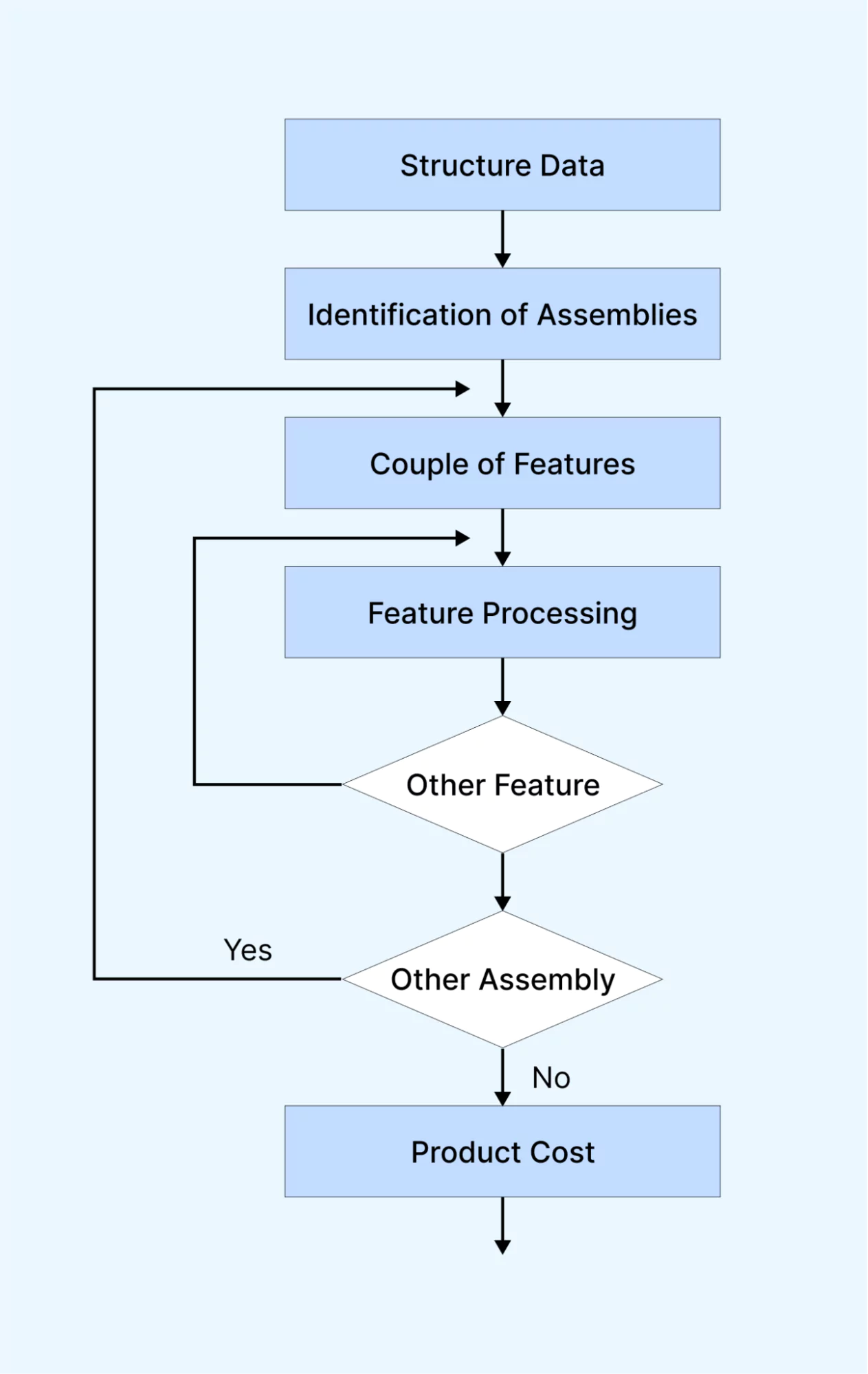
Flowchart techniques represent processes, systems, or computer algorithms through graphical diagrams. You can use this requirement analysis technique to document, evaluate, plan, improve, and communicate complex processes in clear and simple visualizations.
Flowcharts use shapes like rectangles, ovals, diamonds, and arrows to indicate different steps and their connections. They range from simple hand-drawn charts to detailed computer-generated diagrams, presenting numerous processes and pathways.
Flowcharts are highly popular worldwide and used by technical and non-technical professionals across various industries.
The Unified Modeling Language is a set of diagrams that helps the teams visualize, specify, build, and document the characteristics of a software system. UML gives you a standardized approach to represent a system's design. It uses diagrams to illustrate data, including structural information, behaviors, and interactions within the software. This technique of requirement analysis is valuable in validating architectural software design.
Role Activity Diagrams are modeling techniques that depict the roles individuals play in each step of the development process. These diagrams capture an organization's structure and dynamics, organizing software development activities based on the tasks performed by each role.
Integrated Definition for Function Modeling (IDEF) uses boxes to represent process functions and shows how parent and child systems are connected. IDEF produces a blueprint that aids stakeholders in understanding the organization's strategy.
Gantt chart techniques are widely employed in project management to display activities (tasks or events) against time. The chart lists activities on the left and a time scale along the top. Each activity is represented as a bar, reflecting its start, duration, and end dates. Gantt chart software provides essential information such as:
A Data flow diagram (DFD) is a visual technique used to illustrate processes and systems that are difficult to explain in words. It represents the flow of information within a system or method, displaying the relationships between tasks or items using symbols and notations. Visualizing all the elements in the system helps teams identify possible deficiencies more effectively.
Advanced Classifications of Software Requirements
Functional and non-functional are the two categories most teams start with, but larger systems classify requirements more precisely so each one can be traced to a part of the design. The table below covers four types that show up in system and architecture work.
| Requirement Type | What It Defines | E-Commerce Example |
|---|---|---|
| Architectural | The high-level structure and technical constraints the system must follow, such as services, data stores, and integration boundaries. | Checkout talks to payments through a gateway-agnostic service layer. |
| Behavioral | How the system responds to specific inputs, events, and states over time. | If a payment times out, the cart is preserved and the user sees a retry prompt. |
| Derived | Requirements not stated directly by stakeholders but implied by higher-level requirements or a design decision. | Supporting saved cards implies a secure token vault and PCI DSS handling. |
| Allocated | A higher-level requirement apportioned down to the specific subsystem or component that will satisfy it. | The "confirm order in under 3 seconds" target is allocated to the checkout API and the payment service. |
These classifications are formalized in requirement-engineering standards. The classic IEEE 830 recommended practice for software requirements specifications has been superseded by ISO/IEC/IEEE 29148, which defines how to document functional, non-functional, and derived requirements in an SRS. Analysts model the relationships between them using UML use case diagrams and data flow diagrams (DFD), so behavior and data movement are visible before build.
Step-by-Step Requirement Analysis Example (E-Commerce Checkout)
A concrete example makes the process click. Start with one raw business requirement from a stakeholder and break it down the way an analyst would.
Raw business requirement: "Allow users to pay with multiple methods at checkout."
- Clarify the business goal. Why multiple methods? To cut cart abandonment by letting shoppers pay the way they prefer.
- Elicit details from stakeholders. Which methods, which regions and currencies, and what happens when a payment fails?
- Break the requirement into functional, non-functional, architectural, and derived requirements.
- Model and document each one in the SRS and a requirement analysis matrix with clear acceptance criteria.
The output is the requirement analysis matrix below. It is the reusable artifact of this phase, so copy it, swap in your own raw requirement, and fill every row before a line of code is written.
| Refined Requirement | Type | Acceptance Criteria (how QA verifies it) |
|---|---|---|
| Shoppers can pay by credit or debit card, UPI, and digital wallet. | Functional | Each payment method completes a test order end to end. |
| The checkout confirms payment in under 3 seconds on a 4G connection. | Non-functional (Performance) | p95 checkout latency stays under 3 seconds across devices. |
| Card and payment data is transmitted and stored per PCI DSS. | Non-functional (Security) | No raw card number appears in logs and a security scan passes. |
| Payments run through a gateway-agnostic service so a new provider can be added without touching the checkout UI. | Architectural | A new provider is added in a spike with no UI change. |
| A failed or timed-out payment rolls back the order and releases reserved stock. | Derived | A simulated gateway failure leaves no orphaned order or held inventory. |
Every row in that matrix becomes one or more test cases, which is where requirement analysis hands off to QA. A test management tool keeps the matrix live so each requirement stays linked to its tests, runs, and defects as the product changes.
Joint Requirements Development (JRD) and Prototyping
Two collaboration techniques speed up analysis and cut rework: running joint sessions to agree on requirements, and prototyping to validate them before code.
Joint Requirements Development (JRD) Sessions
JRD, also called Joint Application Development, brings cross-functional stakeholders (business owners, developers, QA, and design) into structured, facilitated sessions to elicit and reconcile requirements in real time. Conflicts between what different stakeholders want get resolved in the room instead of across weeks of email, which shortens the analysis cycle and produces a shared, agreed set of requirements.
Prototyping During Analysis
Rapid prototypes, from wireframes to clickable mockups, let stakeholders react to a working model of the interface before any code exists. A misread requirement caught in a prototype costs far less to fix than the same gap found after development, which is why prototyping pairs naturally with the validation step of requirement analysis.
Tools for Requirement Analysis and Management
Beyond diagrams, teams manage requirements in dedicated tools that capture, version, and trace them across the project. The most widely used options are below.
| Tool | Where It Fits |
|---|---|
| Jira | Tracks requirements as epics and stories inside agile workflows. |
| Azure DevOps | Manages requirements as work items linked to boards, repos, and pipelines. |
| IBM DOORS | Handles large-scale, regulated requirement sets with formal traceability. |
| Jama Connect | Focuses on requirements, risk, and test traceability for complex products. |
Where requirement analysis meets testing, TestMu AI's Test Management closes the loop. It generates structured test cases directly from a requirement or user story, then links every requirement to its test cases, runs, and defects in a single traceability matrix, with two-way Jira and Azure DevOps integration so status syncs both ways. That makes coverage gaps visible before a release instead of after. When an app has no written requirements at all, Kane CLI Exploration maps its screens and flows so test cases can start from how the app behaves.
Conclusion
Requirement analysis, also called requirements engineering, is a process used to ascertain the demands and anticipations of a new product. This procedure encompasses several sequential stages: identification of the issue, assessment, and amalgamation of requisites, formation of requirement models, specification within the Software Requirement Specification (SRS) document, and culminating in an exhaustive document appraisal.
Numerous tools and methodologies, such as Business Process Model and Notation (BPMN), Gantt charts, Flowcharts, and Gap analysis, among others, can be deployed to facilitate requirement analysis. These aids assist in effectively collecting and organizing pivotal data, streamlining the developmental trajectory.
The study of requirements assumes paramount importance in determining the function of a system or software project. Requisites must be meticulously documented, executable, quantifiable, validated, traceable, pertinent to identified business prerequisites or prospects, and sufficiently comprehensive to guide system design accurately. A proficient requirement analysis is the cornerstone for successful software application development.

Austin Siewert
Co-Founder, Steadfast Systems
Discovered @TestMu AI yesterday. Best browser testing tool I've found for my use case. Great pricing model for the limited testing I do 👏
3M+ Devs and QAs rely on TestMu AI
Deliver immersive digital experiences with Next-Generation Mobile Apps and Cross Browser Testing Cloud

Author

Nazneen Ahmad
Blogs: 37


Nazneen Ahmad is a freelance Technical Content SEO Writer with over 6 years of experience in crafting high ranking content on software testing, web development, and medical case studies. She has written 60+ technical blogs, including 50+ top-ranking articles focused on software testing and web development. Certified in Automation Basic and Advanced Training - XO 10, she blends subject knowledge with SEO strategies to create user focused, authoritative content. Over time, she has shifted from quick, keyword-heavy drafts to producing content that prioritizes user intent, readability, and topical authority to deliver lasting value.
Reviewer

Shahzeb Hoda
Reviewer
Shahzeb Hoda is the Associate Director of Marketing and a Community Contributor at TestMu AI, leading strategic initiatives in developer marketing, content, and community growth. With 10+ years of experience in quality engineering, software testing, automation testing, and e-learning, he has authored and reviewed 70+ technical articles on software testing and automation. Shahzeb holds an M.Tech in Computer Science from BIT, Mesra, and is certified in Selenium, Cypress, Playwright, Appium, and KaneAI. He brings deep expertise in CI/CD pipeline automation, cross-browser testing, AI-driven testing practices, and framework documentation. On LinkedIn, he is followed by 3,700+ engineers, developers, DevOps professionals, tech leaders, and enthusiasts.


Requirement Analysis FAQs
Did you find this page helpful?
More Related Learning Hubs

TestMu AI forEnterprise
Get access to solutions built on Enterprise
grade security, privacy, & compliance
- Advanced access controls
- Advanced data retention rules
- Advanced Local Testing
- Premium Support options
- Early access to beta features
- Private Slack Channel
- Unlimited Manual Accessibility DevTools Tests