

Power Your Software Testing with AI Agents and Cloud
The Native AI-Agentic Cloud Platform to Supercharge Quality Engineering. Test Intelligently and Ship Faster.


- TestMu AI (Formerly LambdaTest)
- /
- Learning Hub
- /
- Bug Life Cycle: 9 Stages Explained
What Is the Bug Life Cycle? A Step-by-Step Guide for QA Teams
Master the bug life cycle stage by stage. Learn severity vs priority, P1-P3 classification, bug report templates, and how cloud testing shortens fix time.
Last Updated on:
On This Page
- What Is a Bug?
- What Is a Bug Life Cycle?
- Bug Life Cycle vs Tracking
- Stages of Bug Life Cycle
- Real-World Bug Example
- Severity vs Priority
- Common Challenges
- Best Practices
- What Makes a Bug Critical
- Continuous Improvement
- Bug-Tracking Tools
- Bug Life Cycle in Jira
- Manual Testing Defect Cycle
- Mobile App Bug Lifecycle
- AI Agent and Chatbot Bugs
- Capturing Bug Evidence
- Putting the Cycle to Work
The bug life cycle in software testing is the path a defect takes from log to close. Each state has one owner and one next step. Without that structure, bugs sit in the backlog until a customer hits them in production.
TL;DR
The bug life cycle, also called the defect life cycle, is the workflow a defect follows from discovery to closure, moving through nine main stages from New to Closed. QA teams use this structured path so every logged issue has a clear owner and is verified before it is resolved.
- Nine core stages: A defect moves through New, Assigned, Open, Fixed, Pending Retest, Retest, Reopened, Verified, and Closed, alongside seven alternate states such as Deferred, Duplicate, and Rejected that handle edge cases.
- Status, severity, and priority: Status tracks a bug's position in the life cycle, severity measures its functional impact on the system, and priority dictates its urgency relative to the release schedule. The three are set by different people.
- P1 to P3 classification: Teams should define priority levels in their charter, where P1 bugs block releases, P2 bugs are scheduled for the next sprint, and P3 bugs remain in the backlog.
- Bug reports that do not bounce: To prevent reports from returning as Need More Information, testers must include reproduction steps, expected versus actual results, environment details, and a visual attachment.
- Automatic evidence capture: Running tests on a cloud grid attaches session video, console logs, network traffic, and device metadata to each ticket at log time, which is what removes most Non-Reproducible bounces. TestMu AI pushes that context into Jira, Linear, Azure DevOps, and 20+ trackers in total in one click.
- AI agents break the model: A chatbot or AI agent returns a different answer on every run, so Non-Reproducible stops being a rejection reason. Those defects are tracked as scored evaluation runs carrying a metric, a risk level, and a confidence score instead of a binary status.
What Is a Bug in Software Testing?
A bug is software behaving in a way it was not designed to, caused by anything from a misread requirement to a missing line of code. QA teams also call bugs "defects", and this guide uses the terms interchangeably.
Bugs can enter at any point in the Software Development Life Cycle, and dynamic testing only catches the ones that fail at runtime.
What Is a Bug Life Cycle?
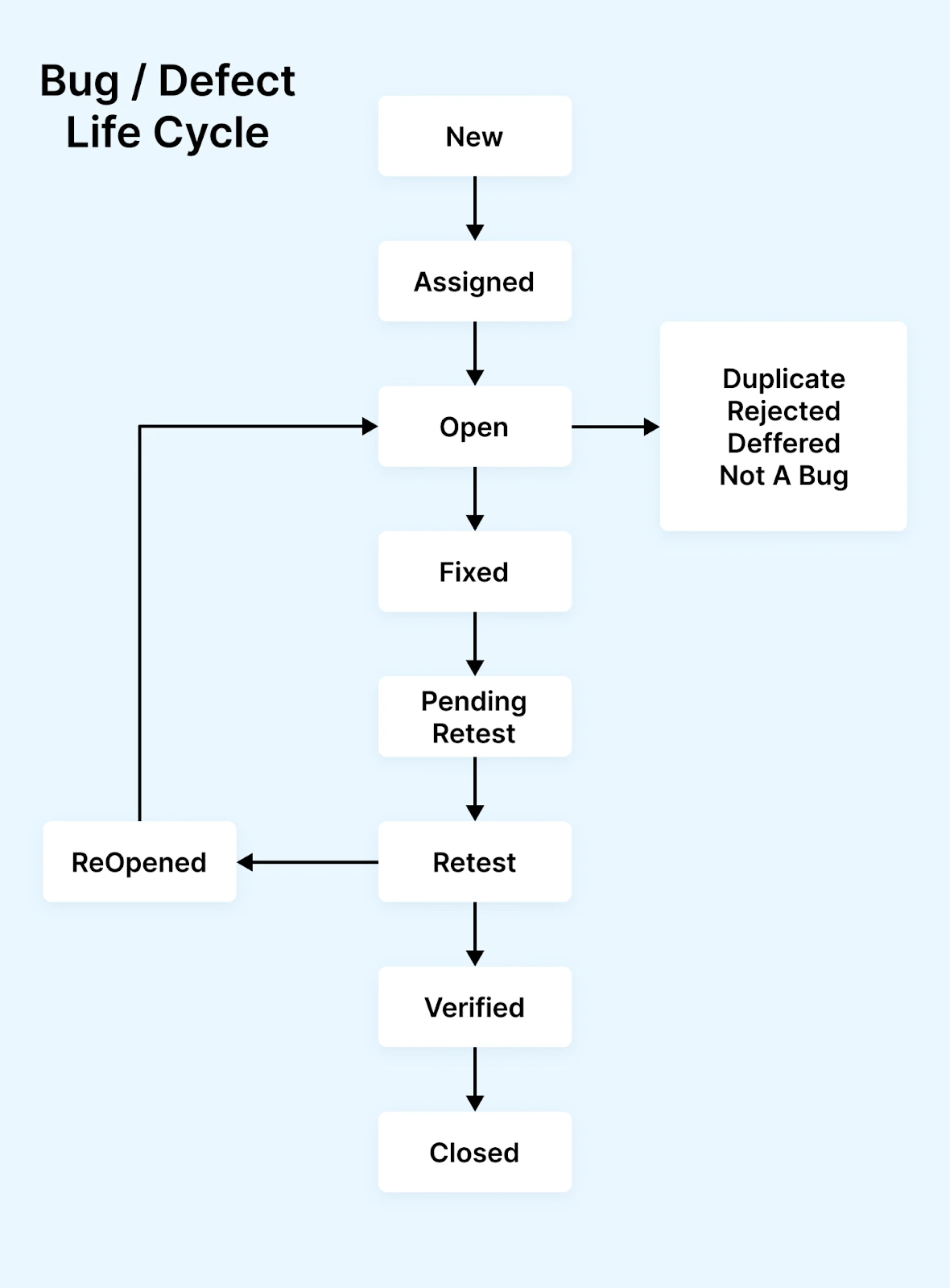
The bug life cycle, also called the defect life cycle, is the workflow a defect follows from discovery to closure. It starts the moment a tester logs the issue and ends only when a verifier confirms the fix and the defect cannot reproduce. Each state has a specific owner, a defined entry condition, and a defined exit condition, which is what makes the cycle auditable.
What Is the Difference Between the Bug Life Cycle and the Bug Tracking Life Cycle?
The bug life cycle is the workflow one defect moves through. The bug tracking life cycle is the tooling pipeline that runs that workflow across every defect. The bug report life cycle is the ticket itself as a record. Three different scopes, three different owners.
- Bug life cycle (or defect life cycle) - the workflow states a single defect moves through, from New to Closed. Scope is one bug, owned by tester and developer, governed by a state machine.
- Bug tracking life cycle - the tooling-level pipeline that surrounds the bug life cycle: how bugs are logged into a tracker, how triage filters the queue, how reports surface aging bugs, how analytics roll up trends, and how closed bugs are archived for compliance. Scope is the bug tracker as a system, owned by QA leadership.
- Bug report life cycle - the lifecycle of the report itself as a document, from draft to enriched (with logs, video, screenshots) to closed and audited. Scope is one ticket as a record, owned by the tester.
What Are the 9 Stages of the Bug Life Cycle?
The 9 stages are New, Assigned, Open, Fixed, Pending Retest, Retest, Reopened, Verified, and Closed. Seven additional states (Rejected, Duplicate, Deferred, Not a Bug, Non-Reproducible, Cannot Be Fixed, Need More Information) handle defects that leave the happy path.
Tool conventions vary. Jira calls "Open" "In Progress", and some teams collapse Pending Retest into Retest, but the workflow logic is the same. The lifecycle of a testing bug walks the same path in a shorter, example-led format.
Phases vs Stages
Some teams describe the bug life cycle in phases, others in stages; the terms are used interchangeably. A common grouping bundles the 9 stages into 3 phases:
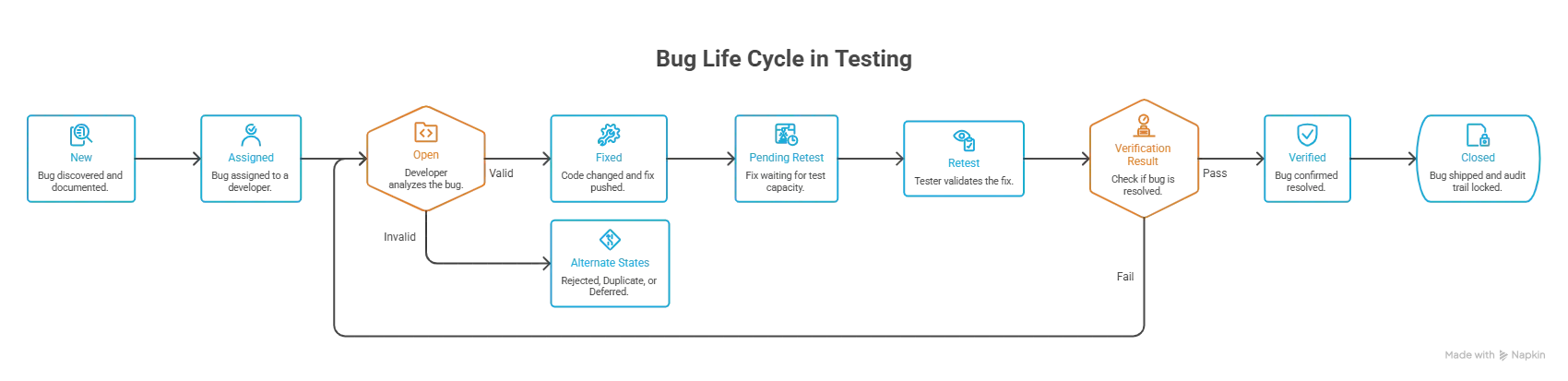
- Detection phase - New, Assigned (the defect is captured and routed).
- Resolution phase - Open, Fixed, Pending Retest (the developer owns the work and ships a fix).
- Verification phase - Retest, Reopened, Verified, Closed (QA confirms the fix and the regression check is clean).
Phases are useful for high-level reporting ("how many bugs are in the resolution phase this sprint?"); stages are what the tracker actually transitions through.
1. New
The first state in the cycle. The tester finds an issue during software testing, captures reproduction steps, environment details, and severity, and logs the report. New means "discovered and documented, but no developer has looked at it yet."
2. Assigned
The test lead or triage committee approves the report and assigns it to a developer or development team. The bug now has a named owner and a target sprint.
3. Open
The developer accepts the bug, reproduces it locally, and begins root-cause analysis. If during this stage the developer determines the report is invalid, a duplicate, or not worth fixing now, the bug moves to one of the alternate states (Rejected, Duplicate, Deferred) instead of progressing.
4. Fixed
The developer has changed the code, run unit tests, and pushed the fix to a build the tester can validate. Fixed is a developer-side state; the QA team has not yet confirmed the resolution.
5. Pending Retest
The fix is ready but the tester has not yet started validating it. Common reason: the build is queued behind other regression work. Tracking this state separately is useful because it surfaces fixes that are stuck waiting on test capacity, not on code.
6. Retest
The tester runs the original reproduction steps against the new build. The job is twofold: confirm the original bug no longer reproduces, and confirm the fix did not break adjacent functionality. Retesting and regression testing are different passes and should both run before close.
7. Reopened
During Retest the tester finds the bug still reproduces, or a new bug surfaced because of the fix. The bug returns to Open and the cycle repeats. Repeated Reopens for the same bug are a strong signal that the root cause is not yet understood; consider a code review with senior engineers before the next attempt.
8. Verified
Retest passed. The tester confirms the bug is resolved on the target build and the regression check is clean. For a defect that first surfaced in a specific browser, that confirmation should cover every affected browser, not only the one the fix was coded in, which is where confirmation testing across browsers comes in.
9. Closed
The release or project manager marks the bug Closed once it has shipped in a release or is confirmed resolved in production. Closed is the only terminal state for a successful fix; it locks the audit trail and removes the bug from the active queue.
Additional States
Defects do not always follow the happy path. Seven additional states handle the edge cases:
- Rejected - The developer (or triage) determined the report is invalid. The behavior is by design, the reporter misread the spec, or the report lacks reproduction steps.
- Duplicate - The bug already exists in the tracker as another open ticket. The duplicate is linked to the original and closed.
- Deferred - Valid bug but fixing it costs more than the business impact, or it depends on work scheduled for a later release. Kept in the backlog, not closed.
- Not a Bug - The behavior matches the specification. The reporter expected something different; the spec, not the code, is the source of confusion.
- Non-Reproducible - Developer cannot reproduce the issue with the steps provided. Common causes: environment mismatch, missing data, or a race condition the reporter encountered once.
- Cannot Be Fixed - The defect is real but is blocked by a third-party dependency, a hardware limitation, or a fundamental architecture constraint. Tracked separately so it surfaces in long-term planning.
- Need More Information - The developer cannot proceed because the report is missing logs, screenshots, build numbers, or steps. The bug bounces back to the tester until the gap is filled.
Workflow Participants
The cycle is owned by two main roles, the tester and the developer, but a healthy workflow names four to six participants so handoffs are unambiguous:
- Tester or QA Engineer - Discovers the bug, writes the report, assigns initial severity, and verifies the fix at Retest.
- Test Lead - Reviews logged bugs for accuracy, adjusts severity, and feeds the triage queue.
- Triage Committee - Usually a Test Lead, a Dev Lead, and a Product Owner. Sets priority, decides Defer vs Fix, and schedules the work.
- Developer - Reproduces the bug, fixes the code, runs unit tests, and moves the bug to Fixed.
- Dev Lead - Assigns bugs to specific developers, reviews the fix, and ensures the regression risk is low.
- Project Manager or Release Manager - Owns the closure gate. Tracks open P1/P2 counts against the release date and surfaces blockers to leadership.
In larger organizations, a Department Head or CTO joins the triage call for P1 defects that touch compliance, security, or customer-impact thresholds. The principle stays the same: every state transition has a named owner, and the tool enforces the handoff. Defect management and bug triaging guides cover the responsibilities in more depth.

How Does a Real Bug Move Through the Life Cycle?
A defect changes owner five times on its way to Closed. The tester owns New, Retest, and Verified. Triage owns Assigned. The developer owns Open and Fixed. The release manager owns the build promotion, and the project manager owns closure. Every transition is a handoff between two named people.
Trace one concrete defect through all nine stages: "Checkout button unresponsive on iOS Safari." The owner column is the part most teams leave undefined.
| Stage | Owner | What happens to the checkout bug |
|---|---|---|
| 1. New | QA Engineer | Tester finds the button does nothing on iOS Safari, logs it with a session video and console error. |
| 2. Assigned | Dev Lead | Triage sets it S1/P1 (blocks purchases) and assigns it to a front-end developer. |
| 3. Open | Developer | Developer reproduces it and traces it to a touch-event handler that fails on WebKit. |
| 4. Fixed | Developer | Handler is patched, unit tests pass, and the bug is moved to Fixed with the commit linked. |
| 5. Pending Retest | Release Manager | The fix is promoted to the QA build, and the bug waits for a tester to verify it. |
| 6. Retest | QA Engineer | Tester re-runs the checkout flow on real iOS Safari and confirms the button now responds. |
| 7. Verified | QA Engineer | Behavior matches the expected result across the affected devices, so the bug is marked Verified. |
| 8. Reopened (if needed) | QA Engineer | If the button broke again on an older iOS version, the tester would Reopen and send it back to Assigned. |
| 9. Closed | Project Manager | With the fix verified and no regression, the ticket is Closed and folded into the regression suite. |
The single hardest transition here is stage 3: reproducing an iOS-Safari-only bug on a developer machine. Running the checkout flow on real iOS devices removes that friction, which is exactly why teams verify browser-specific defects on a real device cloud rather than a simulator.
What Is the Difference Between Severity, Priority, and Status?
Status is where the bug sits in the life cycle. Severity measures how badly the defect breaks the application, and the tester sets it at log time. Priority measures how urgently it must be fixed, and triage sets it. Severity and priority are independent scales that frequently disagree.
A login outage on production is High severity and P1 priority. A typo in a footer is Low severity but can still be P1 priority if it is the company name on the homepage.
| Label | What it measures | Who decides | Typical values |
|---|---|---|---|
| Status | Position in the life cycle workflow | Tracking tool transitions | New, Assigned, Open, Fixed, Retest, Verified, Closed |
| Severity | Functional impact on the user or system | QA or test lead | Critical (S1), Major (S2), Minor (S3), Cosmetic (S4) |
| Priority | Urgency to fix relative to release schedule | Product owner or triage committee | P1 (immediate), P2 (next sprint), P3 (backlog) |
The two scales decouple because the business impact of a defect is not always proportional to its technical impact. A crash that affects 0.1% of users may be S1 severity but only P2 priority because the fix carries high regression risk. Triage assigns priority; the tester assigns severity at log time.
P1, P2, P3 Classification
- P1 (Critical or Blocker) - Stops core functionality, blocks release, or causes data loss. Examples: checkout fails for all users, login page returns 500, payment double-charges. Fix before next deploy, no exceptions.
- P2 (High) - Major feature impaired but a workaround exists. Examples: search returns wrong results on Safari but works on Chrome, password reset email delayed by 10 minutes. Fix in the current sprint.
- P3 (Medium or Low) - Cosmetic issues, edge-case bugs, low-traffic browser quirks, minor UX inconsistencies. Schedule in a future sprint or mark as Deferred if the cost of the fix exceeds the value.
Some teams add P0 (production-down, all-hands incident) above P1. Whichever scheme you use, the rule is to write the definitions into the team's testing charter so every triager applies them the same way.
The Severity-Priority Matrix: 4 Classic Combinations
Because severity and priority are independent scales, every bug lands in one of four quadrants. Each quadrant has a distinct real-world signature:
| Combination | Meaning | Real-world example |
|---|---|---|
| High Severity + High Priority | Critical failure users hit right now; fix immediately. | Payment gateway fails at checkout for all users. |
| High Severity + Low Priority | Serious break, but in a rarely used path; schedule the fix. | App crashes on a legacy OS version used by a tiny fraction of users. |
| Low Severity + High Priority | Minor technically, but highly visible; fix fast. | Company name misspelled in the homepage header. |
| Low Severity + Low Priority | Cosmetic and non-urgent; backlog it. | Slight padding misalignment on a settings page rarely visited. |
The two diagonal cases, where severity and priority disagree, are the ones that trip up new testers. Anchoring each bug to a quadrant during triage keeps those judgment calls consistent.
What Are the Most Common Bug Life Cycle Challenges?
The six recurring failures are stalled handoffs at Pending Retest, inconsistent priority labels, workflow rigidity, flaky tests flooding the New queue, no visibility into status trends, and environment mismatches that trap bugs between Non-Reproducible and Need More Information.
- Stalled handoffs - Bugs sit in Pending Retest for days because no one owns the build promotion. The result: critical fixes age while waiting on test capacity, not on engineering work.
- Inconsistent priority labels - Without a written P1-P3 definition every triager applies a different bar, and the queue drifts. One person's P2 is another's P1, and the release-blocker conversation gets noisy.
- Workflow rigidity - A heavyweight workflow forces a 5-person team to act like a 50-person team. Mandatory Pending Retest and dual-approval Closed transitions create overhead that does not pay back in small teams.
- Flaky tests masquerading as bugs - Tests that fail intermittently flood the New queue and crowd out real defects. QA wastes hours triaging false positives while genuine bugs age in the backlog.
- Limited visibility into status trends - Without dashboards the team only knows the open count, not whether it is growing or shrinking. By the time leadership notices the trend, the release is already off track.
- Environment mismatch in non-reproducible bugs - A bug reported on a tester's machine cannot be reproduced on the developer's, and the report bounces between Non-Reproducible and Need More Information. The bug is real but never fixed because the environment is never shared.
What Are the Best Practices for Defect Life Cycle Management?
Document every state with an owner and entry-exit condition, reject reports missing reproduction steps before Assigned, attach session artifacts at log time, run regression inside Retest rather than after Verified, review bugs older than 30 days monthly, and link the catching test case to the ticket.
- Document the workflow in a shared playbook. Every state has a definition, an owner, and an entry-exit condition. New hires onboard from the playbook, not from word of mouth.
- Enforce reproduction steps before Assigned. The triage queue rejects reports missing the steps, environment, expected-vs-actual, or a visual attachment (screenshot or session video). This pushes quality back to the source. See our advanced guide on writing a bug report for the full template.
- Attach session artifacts at log time, not after. Video and console logs can be captured in the session with one click, but recreating them afterwards means reproducing the defect first, which is the step that fails. Cloud test platforms attach them automatically.
- Run regression as part of Retest, not after Verified. The fix is most likely to break something in the same commit that introduced it; check before, not after, close.
- Review long-lived bugs monthly. Anything older than 30 days in Open is either misclassified, blocked, or should be Deferred. Stale bugs cost cognitive overhead without value.
- Tie test cases to bugs. When Verified, link the test case that caught the bug to the bug ticket. Future regression of the same area becomes a one-click rerun.
What Makes a Bug Critical?
A bug is critical when it blocks a core user action, loses or corrupts data, exposes a compliance or security gap, breaks the revenue path, regresses across multiple customers, or blocks a fixed deadline. Reproducibility decides how fast it can be triaged as critical.
Not every bug deserves a P1 ticket and an all-hands page. The criteria below are in rough order of weight.
- Customer-blocking impact - The bug prevents a user from completing a core action (login, checkout, file save, message send). If even a small percentage of users hit it, it is critical.
- Data loss or corruption - A bug that loses, duplicates, or silently corrupts user data is always critical, even if only one user is affected. The trust cost outweighs the volume.
- Compliance or security exposure - PII leaks, OWASP Top 10 vulnerabilities, SOC 2 control failures, accessibility regressions on WCAG-required flows. These bugs carry regulatory or legal consequences beyond the user experience.
- Revenue-path failure - Checkout flow, subscription renewal, billing API, ad-serving pipeline. If the bug stops money from moving, it is critical until proven otherwise.
- Cross-customer regression - A single fix that breaks the same flow for multiple tenants. The blast radius is the deciding factor, not the severity of any one report.
- Time-sensitive event - A release ships in 24 hours, a customer demo is tomorrow, a marketing launch is tied to a feature. Bugs that block a fixed deadline get critical treatment even if their underlying severity is lower.
- Reproducibility - A bug that reproduces every time on a known scenario is easier to prioritize as critical than an intermittent one. Intermittent bugs without a clear pattern usually start at P2 pending root cause analysis.
Document these criteria in the team's testing charter and review them every quarter. Without a written bar, "critical" drifts to mean whatever the loudest stakeholder says it means, and the bug life cycle loses its prioritization signal.
How Do You Continuously Improve the Bug Life Cycle?
Three practices drive most of the gains: define bug categories so triage routes automatically and metrics aggregate cleanly, log a root cause on every closed P1 to build a pattern library, and run the regression suite on every pull request so defects are caught before they reach the New state.
- Clear taxonomies - Define bug categories (UI, API, data, performance, accessibility, security) so triage routes faster and metrics aggregate cleanly. A bug tagged as "UI" routes to a different team than a bug tagged as "data," and the report dashboards become useful only when the categories are consistent. Defects raised by non-functional testing need their own categories, because a performance or security finding is triaged against a threshold rather than a pass-fail assertion.
- Root cause analysis on every P1 - After close, log the root cause (logic error, missing validation, integration mismatch, flaky dependency, environment drift) and feed the taxonomy. Three months of RCA data reveals the patterns that prevent future bugs, not just the symptoms.
- CI/CD integration - Run the regression suite on every pull request. Cloud test grids can execute 100+ browser and device combinations in parallel, so the bug life cycle starts catching defects before they ever reach the New state. Test Intelligence on TestMu AI separates flaky test runs from genuine defects automatically, so the New queue stays signal-rich.
The other half of continuous improvement is the tooling you run the cycle on. The right tracker enforces the workflow, surfaces aging bugs, and integrates with the test runner so logging a defect takes a single click.
Which Bug-Tracking Tools Run the Bug Life Cycle?
Jira is the default for agile and enterprise teams that need custom workflows. Bugzilla and MantisBT suit self-hosted open-source projects, GitHub Issues suits dev-led teams that want tickets next to code, Redmine adds planning, and Zoho BugTracker fits small teams already inside the Zoho suite.
| Tool | Best for | Notable strength |
|---|---|---|
| Jira | Agile teams, enterprise workflows | Custom workflows per project; deep integrations with CI/CD and source control |
| Bugzilla | Open-source projects, self-hosting | Free, mature, configurable email notifications and dependency tracking |
| Zoho BugTracker | Small to mid teams using Zoho suite | Custom fields, built-in analytics, low-friction setup |
| GitHub Issues | Open-source and dev-led teams | Tight code linkage, free for public repos, low overhead |
| MantisBT | Teams wanting a lightweight self-hosted tracker | Simple UI, free and open-source, easy email and RSS notifications |
| Redmine | Project-driven teams needing issues plus planning | Combines bug tracking with Gantt charts, wikis, and time tracking |
Whichever tracker you pick, the test runner should push bug context into it automatically, which is what the tracker integrations are for. Manual copy-paste of session details is where bug-handling time leaks. The test tool guide goes deeper on tracker selection criteria, and defect tracking covers how the queue is managed once tickets land.
How Does the Bug Life Cycle Work in Jira?
Jira's default workflow carries fewer statuses than the 9-stage model, so teams map the canonical stages onto custom Bug statuses: New becomes To Do, Assigned becomes Selected for Development, Open becomes In Progress, Fixed and Pending Retest become In Review, Retest becomes QA Testing, and Verified and Closed become Done.
This is the same customization approach Jira test management uses to model test cases.
| Canonical stage | Jira status | Transition trigger |
|---|---|---|
| New | To Do | Tester creates issue with Bug type |
| Assigned | Selected for Development | Triage sets Assignee and Priority |
| Open | In Progress | Developer starts the fix |
| Fixed / Pending Retest | In Review | Pull request linked, awaiting QA |
| Retest | QA Testing | Tester picks up the build |
| Reopened | Reopened | Retest failed, routes back to In Progress |
| Verified / Closed | Done | QA verifies + release manager closes |
Two Jira features make this workflow run cleanly:
- JQL for stuck bugs - A filter like
status = "In Review" AND updated < -3d AND priority in (P1, P2)surfaces bugs waiting on QA for more than 3 days, which is the most common stall point. - Automation rules for SLA - Trigger a Slack notification when a P1 bug sits in any status for more than 24 hours, or auto-escalate to the release manager when a P1 misses the sprint cut-off.
Pair the Jira workflow with cloud test sessions and the bug ticket arrives pre-filled with reproduction video, console logs, network HAR, and device metadata. The bug-tracking integrations docs walk through the one-click setup for Jira specifically.
How Does the Defect Life Cycle Work in Manual Testing?
The states are identical to automation. What changes is the evidence trail: there is no auto-generated session video, no console dump, and no network HAR unless the tester captures them deliberately. That puts the whole burden of reproducibility on the written report.
Two stages carry different obligations than they do in automation, capture and retest:
- Exploratory or scripted execution - Tester follows a charter or test case, finds a defect, and pauses to capture state (screenshot, screen recording, browser console open).
- Log as New - Report goes into the tracker with reproduction steps, environment (device, OS, browser version, build), expected vs actual, and the captured artifacts attached.
- Triage and Assigned - Triage assigns severity and priority. Without auto-attached logs the developer may need more context, so a manual-testing report should over-document rather than under-document.
- Developer fix - Same as automation, Open then Fixed.
- Retest on the same device - The tester must re-run the original scenario on the same device and OS version where the bug was found. Manual testers rotate through devices, so retest on a different device can falsely pass.
- Verified and Closed - Confirmed fix, closed in the build.
The biggest manual-testing failure mode is the Reopened-Closed-Reopened thrash: a bug is fixed, retested as Verified on an emulator, closed in the build, then a customer hits it on a real device. Running manual exploratory sessions on a real device cloud avoids the emulator-vs-real-device gap and pairs each manual session with capture artifacts automatically, so the manual report carries the same evidence quality as an automation run.
How Is the Mobile App Bug Lifecycle Different?
The 9 stages are unchanged, but three mobile-specific factors push fix-time up: OS and device fragmentation means a bug is version-specific, the crash log replaces the browser console as the primary artifact, and store-review rejections carry an hours-long SLA that skips normal triage.
- OS and device fragmentation - A bug that does not reproduce on iOS 18 may be P1 on iOS 16 because of a deprecated API path, and iOS version fragmentation only widens as Apple ships new OS releases. Android fragmentation is even wider; the same APK can crash on a 3-year-old Samsung mid-tier and pass on a current Pixel. Mobile bug reports must name the exact OS version, device model, and app build, or the developer cannot reproduce.
- Crash logs are the primary artifact - Where web bugs live in the console, mobile bugs live in the system crash log (iOS .ips, Android logcat). The Retest stage depends on the tester capturing the crash log on the same device class. A screenshot is not enough.
- Store-review rejection bugs - A defect that ships through the cycle and gets caught by Apple App Review or Google Play pre-launch testing has its own SLA, the team has hours, not days, to push a fix. These bugs jump the priority queue automatically and often skip Triage.
Two stages need extra attention for mobile apps:
- Open (root cause) - Mobile reproduction failures are usually environment, not code. The developer needs the same device OS and app build the tester used. Without that pairing, bugs bounce to Non-Reproducible.
- Retest - Must run on the same device class. Emulators hide bugs that depend on hardware features (Bluetooth, GPS, camera permissions, battery state). A Verified status from an emulator-only retest is unreliable.
TestMu AI runs Appium, Espresso, and XCUITest suites on 10,000+ real iOS and Android devices in the cloud, automatically capturing crash logs, device logs, video, and network traffic for every session. Bugs logged from these sessions arrive in Jira or your tracker of choice with all the artifacts a mobile developer needs to reproduce on the first attempt, which eliminates most Non-Reproducible bounces.
How Do You Track Bugs in AI Agents and Chatbots Deployed in Production?
You track them as scored evaluation runs, not single tickets. An AI agent returns a different answer to the same input on every run, so Non-Reproducible stops being a rejection reason and becomes the normal condition. Each failure carries a quality metric, a risk level, and a confidence score instead of a binary status.
Three assumptions in the 9-stage model break the moment the system under test is a chatbot, a voice assistant, or an autonomous agent:
- Reproduction steps stop being deterministic - the classic report assumes the same steps produce the same failure. A model that samples its output does not guarantee that, so a developer following the steps exactly may see correct behavior and close the ticket as Not a Bug when the defect is real but probabilistic.
- There is no stack trace to attach - a hallucinated refund policy throws no exception and logs no error. The agent returns a fluent, confident, wrong answer with a 200 response. Nothing in the console marks it as a defect, so conventional monitoring never fires.
- Closed is not a terminal state - a fix that passes today can regress when the underlying model is updated upstream, without a single line of your own code changing. The defect returns without a deploy to blame it on.
Mapping the Classic Stages to AI Agent Defects
| Classic stage | AI agent equivalent | What changes |
|---|---|---|
| New | Failing scenario in an evaluation run | The unit of work is a scenario across many turns, not a single click path. |
| Severity | Risk level (Critical, High, Medium, Low) | Critical covers PII exposure and fabricated disclosures; Low covers tone drift. |
| Non-Reproducible | Confidence level (High, Medium, Low) | Instead of rejecting the report, you record how reliably it recurs across scenario volume. |
| Retest | Re-run the scenario set after the prompt or model change | Verification is statistical across a scenario set, not a single pass or fail. |
| Verified / Closed | Green, Yellow, or Red readiness verdict | Yellow means specific identified fixes are required, not "almost ready". |
| Regression suite | Scheduled re-scoring of production transcripts | Drift is caught on a schedule because the model changes without your deploy. |
What AI Observability Tracks Instead of Error Rates
Conventional observability watches latency, error codes, and throughput, all of which stay green while an agent invents a policy. Agent observability scores the content of the conversation. TestMu AI's Agent Testing platform grades chat and voice agents on nine quality dimensions: hallucination detection, bias detection, completeness, context awareness, response quality, conversation flow, tone consistency, positive user outcome, and root-cause understanding. Phone agents add 30+ call metrics including first call resolution, containment rate, and intent recognition accuracy.
Rather than one reviewer reading transcripts, 15+ specialized evaluator agents run the scenarios in parallel, each probing one failure mode. A Hallucination Hunter looks for invented facts, a Bias Detector looks for differential treatment across demographics, and a Security Researcher probes for prompt injection and data exfiltration. Every verdict ships with the conversation turn that produced it, which is the evidence a triage call needs to assign a risk level.
The security half of this maps to a published standard. The OWASP 2025 Top 10 Risk and Mitigations for LLMs and Gen AI Apps ranks Prompt Injection as LLM01:2025 and Sensitive Information Disclosure as LLM02:2025, which is what a red-team pass over prompt injection, jailbreak, data exfiltration, and PII leakage is testing for. Misinformation sits separately at LLM09:2025 and is caught by the hallucination metric rather than by red teaming. For the governance wrapper around all of it, the NIST AI Risk Management Framework (AI RMF 1.0), released in January 2023, organizes the work into its Govern, Map, Measure, and Manage functions.
Gating the Pipeline on Agent Quality
The practical equivalent of "no P1 bugs open at release" is a CI gate that fails the build when a quality metric drops below threshold. The testmu-a2a-cli package runs an evaluation from any pipeline and exits non-zero on failure, so the gate wires into an existing job without a plugin:
pip install testmu-a2a-cli

# Fail the build if the agent drops below the 0.80 quality threshold
testmu-a2a test \
  --agent https://my-bot.example.com/api/chat \
  --spec "Customer support bot that handles billing and account issues" \
  --count 30 \
  --threshold 0.80 \
  --format junit \
  --output results.xml

# Red-team the same endpoint against OWASP LLM01 and LLM02
testmu-a2a redteam \
  --agent https://my-bot.example.com/api/chat \
  --categories prompt-injection,jailbreak,pii-leakage
Gate on the exit code the way you gate on a failing regression suite: a full evaluation on any agent prompt or model change, a reduced scenario count on infrastructure-only changes. Because the JUnit output is standard, the failures surface in the same CI report as the rest of the suite, and a Green to Yellow verdict change can page the on-call the same way a P1 does.

Note: Evaluate a chatbot, voice, or phone agent against hallucination, bias, and context-awareness metrics before it reaches production. Try TestMu AI free!
How Do You Capture Bug Evidence Automatically?
Run the test on a cloud grid that records the session, then log the bug from inside that session. The ticket arrives carrying video, console output, network traffic, and device metadata, so the developer never has to ask for the environment. This is what collapses the Non-Reproducible and Need More Information states.
TestMu AI runs manual and automation testing of websites and mobile apps on 10,000+ real devices across every major OS and browser combination. Four capabilities attack the stages where defects actually lose time:
- One-click bug logging (New) - push a defect straight from the live session into Jira, Linear, Azure DevOps, Bugzilla, Mantis, ServiceNow, YouTrack, and 20+ trackers in total. The ticket carries session video, console output, network traffic, and device metadata, so it never bounces back as Need More Information.
- Agentic root cause analysis (Open) - Test Insights correlates network, console, and framework logs to localize the likely cause of a failure before anyone starts reading stack traces. Treat the output as a strong lead to verify, not a verdict, and it still removes most of the log-digging that makes the Open stage the longest one on the board.
- Faster retest cycles (Pending Retest) - HyperExecute orchestrates suites up to 70% faster than a traditional grid by collapsing execution into a single isolated environment. When the regression run finishes in minutes, fixes stop aging in the queue waiting on test capacity.
- Turning the bug into a regression test (Closed) - KaneAI ingests the Jira ticket or a recording of the reproduction and generates an executable test from it in natural language, then exports to Selenium, Playwright, Cypress, or Appium. This is what makes the "tie test cases to bugs" practice above real work rather than an intention.
Test Insights also flags chronically failing tests by failure frequency, which is how the flaky runs stop entering the New queue as if they were real defects. To wire one-click logging into automation runs, see the Mark as Bug in Automation Testing doc.

How Do You Put the Bug Life Cycle Into Practice?
Assign a named person to every state, write the P1 to P3 definitions into the team charter, wire the tracker so reports arrive with evidence already attached, and set the metric thresholds that block an AI agent release. Those four changes fix the stalls described above.
Open your tracker and audit these four this week:
- Assign owners to every state - pick three states in your workflow that have no written owner and assign each to a person, not a team.
- Write P1-P3 into the charter - without a written priority scale, every triager applies a different bar and the queue drifts.
- Make evidence automatic - wire the tracker so bug reports arrive with video, console logs, and device metadata already attached.
- Decide who owns agent defects - if you ship a chatbot or voice agent, name the metric thresholds that block a release before the first hallucination reaches a customer.
When every state has a name, an owner, and an SLA, bugs stop leaking into production. To close the loop between the test that caught the defect and the ticket that tracks it, TestMu AI's Test Manager keeps cases, cycles, and requirement-to-defect traceability in one workspace, so a Verified bug links back to the case that will catch its regression. For the batch of defects a release-time team hunt produces, and how to triage them before everyone leaves the room, see how to run a bug bash.
Author

Nazneen Ahmad
Blogs: 39


Nazneen Ahmad is a freelance Technical Content SEO Writer with over 6 years of experience in crafting high ranking content on software testing, web development, and medical case studies. She has written 60+ technical blogs, including 50+ top-ranking articles focused on software testing and web development. Certified in Automation Basic and Advanced Training - XO 10, she blends subject knowledge with SEO strategies to create user focused, authoritative content. Over time, she has shifted from quick, keyword-heavy drafts to producing content that prioritizes user intent, readability, and topical authority to deliver lasting value.
Reviewer

Harish Rajora
Reviewer
Harish Rajora is a software developer at TestMu AI with over 6 years of hands-on experience in Python and cross-platform application development across Windows, macOS, and Linux. He has authored 800+ technical articles and worked on large-scale projects, including GenAI applications and core engineering features used by millions. Harish has led DevOps initiatives building CI/CD pipelines with Jenkins, AWS, GitLab, and GitHub, and holds an M.Tech in Software Engineering from IIIT Allahabad.


Bug Life Cycle FAQs
Did you find this page helpful?
More Related Learning Hubs
TestMu AI forEnterprise
Get access to solutions built on Enterprise
grade security, privacy, & compliance
- Advanced access controls
- Advanced data retention rules
- Advanced Local Testing
- Premium Support options
- Early access to beta features
- Private Slack Channel
- Unlimited Manual Accessibility DevTools Tests