

Power Your Software Testing with AI Agents and Cloud
The Native AI-Agentic Cloud Platform to Supercharge Quality Engineering. Test Intelligently and Ship Faster.


- TestMu AI (Formerly LambdaTest)
- /
- Blog
- /
- AI in Test Automation: Use Cases and Best Practices
AI in Test Automation: Use Cases and Best Practices
Explore how to use AI in test automation, from its importance to best practices. Boost efficiency and accuracy in your testing processes.
Last Updated on:
AI test automation adds machine learning, natural language processing, and computer vision to conventional automation testing, so a Selenium, Playwright, or Cypress suite can generate its own test cases, self-heal broken locators, and rank tests by risk. 77.7% of organizations already use or plan to use artificial intelligence in quality assurance, where test data creation (50.6%) and test case formulation (46%) are the leading uses.[1]
This guide covers what AI test automation is, a step-by-step tutorial for using it, why teams adopt it, its core components, real use cases, the challenges it brings, and best practices.
Key Takeaways
- Self-healing locators: AI repairs a broken selector after a UI change, which cuts a major share of test maintenance. Gate every heal behind review, or the suite hides real regressions.
- Natural-language authoring: Describing a test in plain English and letting a model draft the script cuts authoring time, but every generated assertion needs a human check before merge.
- Risk-based test selection: Machine learning ranks test cases by code-change risk and failure history, so the pipeline runs the tests most likely to catch the current defect first.
- Flaky-test detection: Comparing results for the same test across many runs separates genuine failures from flaky ones, which is what stops a team ignoring a red pipeline.
- Biased training data: A model trained on skewed or thin defect data produces false positives and false negatives that erode trust in the whole suite.
- Model version pinning: Pin the model version used for test generation, so a provider-side update cannot silently change what your suite asserts.
What Is AI in Test Automation?
AI in test automation refers to applying artificial intelligence to make software testing faster and more reliable. It plugs into the automation frameworks teams already use, like Selenium, Appium, and Playwright, and layers AI-driven insights on top to strengthen unit, regression, and end-to-end (E2E) testing.
Creating test scripts on the basis of natural language processing is the simplest example of AI test automation. Here, you can use plain language like English to give prompt inputs using various prompting techniques, and based on that, AI will generate test scripts for you. How dependable that generated script is depends on the way the runner resolves elements, which our guide to natural language test automation breaks down. Not only does AI enhance test automation, but it also helps run tests, detect future bugs, and retrieve data to further enhance the testing life cycle.

How Do You Use AI in Test Automation?
To use AI in test automation, baseline one pilot suite, record a real user journey with a code generator, refactor the recording into Page Objects with an AI assistant, add stable test IDs, enable self-healing behind a review gate, then run the suite in continuous integration and compare the numbers.
The six steps below apply to any existing automation testing suite running Selenium, Playwright, or Cypress. Order matters more than tooling: enabling self-healing before stable selectors exist produces a suite that hides regressions.
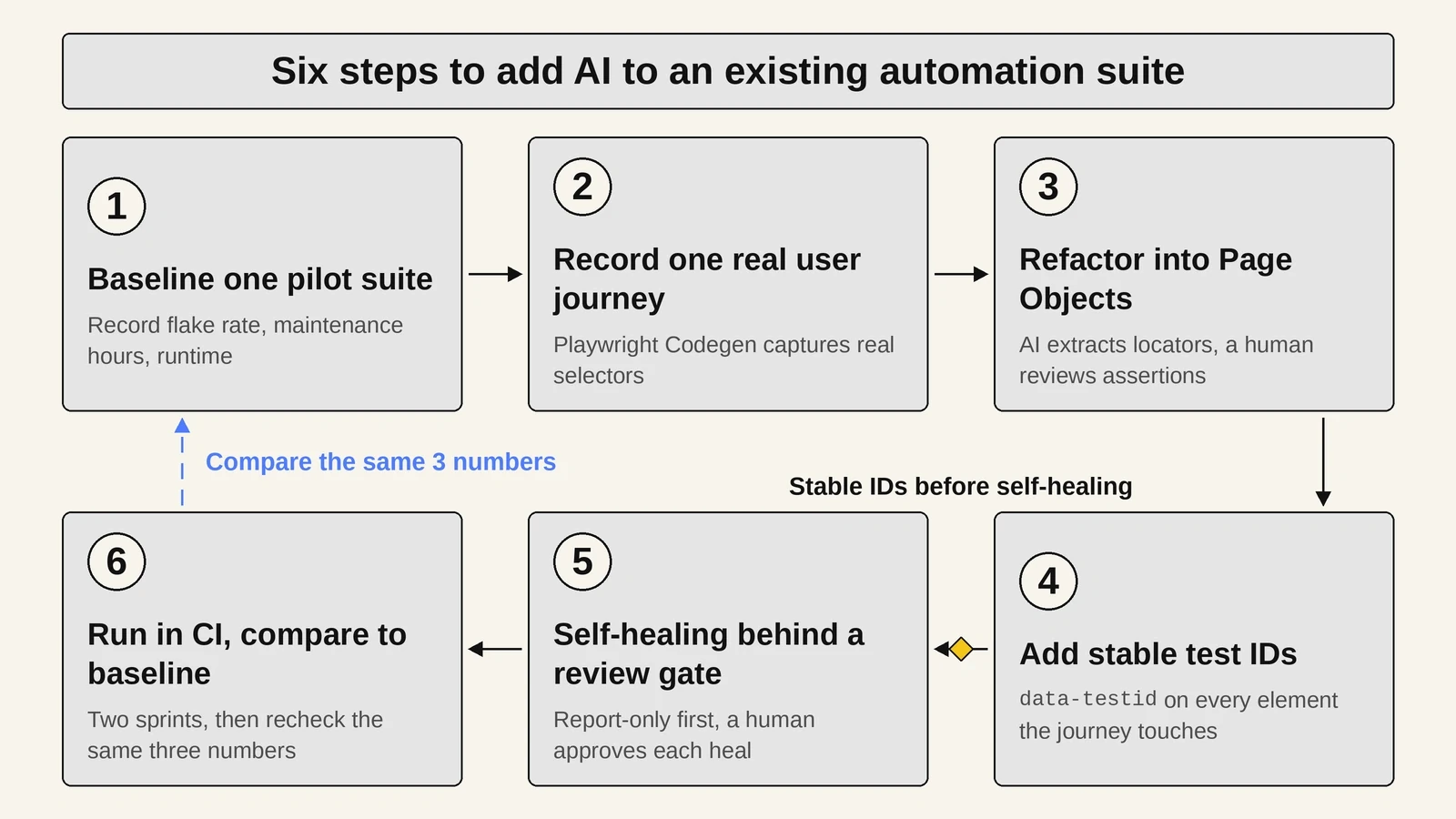
1. Baseline One Pilot Suite Before Adding Any AI
Record three numbers before any model touches the suite: the flake rate, the maintenance hours per sprint, and the total runtime. Choose the suite that fails most often, because that is where a regression is easiest to spot.
Without those numbers, nobody can later tell whether the AI improved the suite or simply changed it.
2. Record One Real User Journey With a Code Generator
Playwright Codegen writes a runnable script while a tester clicks through the application, capturing the selectors the page actually uses rather than the ones a developer assumes it uses. Point it at a live target and walk one critical journey:
npx playwright codegen https://www.testmuai.com/selenium-playground/A recorder captures actions, not intent. Playwright Codegen records that a button was clicked; it never records what that click was supposed to prove.
3. Refactor the Recording Into Page Objects With an AI Assistant
Give the recorded script to an AI coding assistant and ask it to extract locators and literal strings into a Page Object class. This is where AI saves the most time, because restructuring a flat recording is mechanical work.
Review every assertion the assistant adds. A recording arrives with no checks, and a model filling that gap writes assertions that pass whether or not the feature works.
4. Add Stable Test IDs So Self-Healing Has an Anchor
Add a data-testid attribute to every element the journey touches, then point the Page Object at those attributes instead of CSS or XPath paths. AI locator repair works far more reliably when a stable identifier already exists.
// Brittle: breaks when a wrapper div is added
await page.click('div.container > form > div:nth-child(3) > button');

// Stable: survives markup changes, and gives self-healing an anchor
await page.click('[data-testid="checkout-submit"]');
5. Turn On Self-Healing Behind a Review Gate
Enable AI locator repair in report-only mode first, so every proposed heal is logged for a human to approve rather than applied silently. Treat an approved heal like any other code change and merge it through a pull request.
Unsupervised self-healing hides real regressions. If a developer deletes a button and the model re-points the test at a similar control, the suite stays green while the feature is broken.
6. Run It in CI and Compare Against the Baseline
Run the pilot suite in the pipeline for two sprints, then compare its flake rate, maintenance hours, and runtime against the numbers recorded in step 1. Keep the AI where the numbers improved and revert it where they did not. Two sprints is the shortest window that separates a genuine improvement from a quiet week.
To practice AI test automation without touching production code, run the sequence against the Selenium Playground, which exposes forms, dropdowns, sliders, modals, and dynamic tables built for automation practice.
Why Use AI in Test Automation?
AI in test automation enhances the testing life cycle by combining artificial intelligence technologies to address the complex challenges testers face in their daily workflows. The benefits show up in three areas: smarter prioritization, more reliable releases, and AI built directly into the frameworks teams already use.
Running these AI-assisted tests on a cloud-based test automation platform lets teams scale that coverage across real browsers and devices. Before you invest, you can estimate the payback of moving from manual to automated testing with this test automation ROI calculator.
The table below compares the three approaches across the work a QA team actually does, including the failure mode each one introduces, and our guide to Agentic QA covers the agentic approach in more depth.
| Capability | Scripted automation | AI-assisted automation | Agentic automation |
|---|---|---|---|
| Test creation | An engineer writes every step and assertion by hand. | An engineer describes the intent and the model drafts the script. | An agent reads a requirement and produces the suite end to end. |
| Locator maintenance | Any user interface change breaks the selector until someone fixes it. | The model proposes a repaired selector and a human approves it. | The agent repairs the locator and re-runs without being asked. |
| Test selection | The full suite runs, or a hand-maintained tag set does. | The model ranks cases by code-change risk and failure history. | The agent chooses the scope per commit. |
| Failure triage | An engineer reads the logs and reproduces the failure manually. | The model clusters related failures and suggests a root cause. | The agent reproduces the failure, isolates it, and files the defect. |
| Human oversight | Full control and full effort sit with the engineer. | Review happens at the pull request, the same as any code change. | Approval gates and an audit trail become mandatory. |
| Main failure mode | Brittleness. A cosmetic markup change fails a passing test. | Empty assertions. The script runs green while verifying nothing. | Non-determinism. The same input produces a different run. |
Smarter Prioritization and Lower Maintenance
AI improves testing efficiency by analyzing historical test data and code changes to prioritize critical test cases and optimize regression testing.
Beyond just machine learning, AI incorporates natural language processing to convert requirements into test cases or test scripts, visual AI (computer vision) to detect UI discrepancies, and self-healing capabilities to adapt test scripts to software updates. These features minimize manual effort, reduce downtime, and ensure stability in test automation.
Reliable CI/CD Releases
AI can also be integrated with CI/CD pipelines, which offer intelligent test execution and deliver actionable insights through advanced analytics. By detecting anomalies, predicting defects, and addressing flaky tests, the AI test automation approach ensures reliable and high-quality software releases.
AI Inside Modern Frameworks
A production example of these capabilities in a single framework is Cypress AI, which combines cy.prompt() for natural-language test authoring, continuous self-healing for selectors, Cloud MCP access to live CI run data, and UI Coverage Test Generation that scaffolds tests from untested pages and components.
For teams weighing how much of the suite to hand over to AI, this guide to AI-augmented software testing covers the practical middle ground, where AI accelerates test creation, maintenance, and triage while engineers stay in control of strategy, risk decisions, and edge-case judgment.

Note: Run your automated tests with AI and cloud. Try TestMu AI Today!
Components of AI in Test Automation
Here are the different components of AI in automation testing:
- Machine Learning: It is the backbone of AI test automation that enables models to recognize patterns, analyze historical data, and make appropriate predictions. ML-powered tools can analyze all past test cases and results to prioritize defect-prone areas and predict potential points of failure in test scripts.
For instance, certain components of software applications tend to fail after code updates, but ML can identify them and suggest areas to fix errors. It accelerates the defect detection process while minimizing the usage of different resources.
- Natural Language Processing: In this technique, testers can write test steps or scenarios using any natural language, eliminating the need to write them themselves.
NLP also improves collaboration between non-technical and technical stakeholders by translating complex business requirements into simple and actionable test cases or test scripts.
- Data Analytics: It helps teams sift through enormous chunks of test data to recognize anomalies and identify trends and patterns. AI-powered tools help testers identify any underlying root cause or detect recurring issues that are bound to go unnoticed. They can also monitor performance trends, which helps them identify any bottlenecks beforehand.
- Robotic Process Automation: It handles repetitive, rule-based tasks by working alongside AI to reduce human error and overall manual effort. In the testing life cycle, robotic process automation can help automate tasks like data population and environment configuration. It also facilitates the generation of detailed test reports and their distribution after test execution.
Use Cases of AI in Test Automation
Uses of AI in software testing for automation reach well beyond the user interface. Key applications run from test case generation and self-healing to defect prediction and anomaly detection, and they sit inside a broader set of AI agent use cases across other industries.
- Test Case Generation: AI analyzes user stories, requirements, code, and design documents to generate comprehensive test cases, ensuring thorough coverage and identifying potential edge cases that manual testing might overlook.
- Test Script Generation: AI dynamically creates test scripts, keeping automation aligned with evolving software and reducing manual maintenance efforts.
- Test Data Generation: AI generates realistic and diverse test data, covering various scenarios to ensure software applications behave correctly across different inputs, which makes test automation more reliable.
- Test Optimization: AI evaluates historical test data and code changes, prioritizes and optimizes test cases and test scripts and focuses on high-risk areas to improve test automation efficiency.
- Visual Testing: AI-powered visual testing tools detect UI inconsistencies across different environments, ensuring a consistent user experience by comparing visual elements against expected outcomes.
- Self-Healing Mechanism: AI-driven self-healing mechanisms automatically adjust test scripts in response to changes in the UI or underlying code, reducing maintenance efforts and minimizing test failures due to code updates.
- Defect Prediction: AI analyzes code changes and historical defect data to predict potential areas of failure. It enables proactive testing and early issue resolution to maintain software quality.
- Anomaly Detection: AI identifies unexpected patterns or behaviors during test automation, detecting anomalies that may indicate defects or performance issues. This enhances the reliability of software applications.
- Flaky Test Detection: AI flags tests that pass and fail across runs with no code change, separating genuine failures from noise so teams stop ignoring a red pipeline.
- Root Cause Analysis: AI clusters failures sharing a stack trace, network error, or element, then names the likely cause. Engineers read one grouped cause instead of fifty failures.
- Test Maintenance: AI updates locators, test data, and assertions as the application changes. Maintenance, not authoring, is the cost that kills most automation programs.
- Test Reporting and Analysis: AI generates detailed test reports and analytics, providing actionable insights into test results, code quality, and potential areas of improvement, facilitating informed decision-making.
How QA Teams Use AI Test Automation in Their Workflows
AI also handles the paperwork around a release, not just the tests themselves:
- Automating release paperwork: Senior QAs connect Model Context Protocol (MCP) servers to Jira and test management platforms, then auto-draft release notes and risk assessments from ticket details and code changes in one prompt.
Across all of these areas, Generative AI tools are playing an increasingly central role, enabling teams to move from manual scripting to intelligent, adaptive test automation at scale.
While these use cases focus on how AI enhances test automation, the AI-powered systems themselves also require validation. Our guide on testing AI applications covers the strategies needed to verify model accuracy, detect hallucinations, and ensure fairness in AI outputs.
Open-Source vs Paid AI Testing Tools
The core tooling decision is whether to assemble your own stack from open-source parts or buy an all-in-one platform.
- The code-you-own ecosystem: Avoiding vendor lock-in means pairing open-source frameworks like Playwright or Cypress with AI-driven IDEs such as Cursor or GitHub Copilot.
- The black-box dilemma: Low-code and no-code AI platforms lower the entry barrier and absorb flakiness, but the scripts they generate cannot be edited or versioned in your own Git repository.
KaneAI by TestMu AI splits the difference: it offers the natural-language authoring of a managed platform but exports editable code to Playwright, Selenium, Cypress, or Appium, so tests live in your repository. See the AI testing tools roundup for a wider comparison.
What Are the Challenges of Using AI in Test Automation?
Eight problems account for most failed adoptions of AI testing in automation:
- Integration Bottlenecks: Connecting an AI tool to existing third-party systems is often the hardest part, because neither side was designed for the other.
- Training Dataset: A model trained on biased or thin data produces false positives and false negatives that erode trust in the whole suite.
- Unpredictability: Reinforcement learning and neural networks are trained with stochastic methods, so the same input can produce different outputs.
- Verification Difficulty: Judging a model requires metrics such as precision, recall, or F1 score, not a simple expected-versus-actual comparison.
- The pass-rate trap: Teams that adopt AI without engineering guardrails generate large, unmaintainable suites. A suite can report a high pass rate made up of tests that cannot actually fail, because their assertions are too loose to reject anything.
- Unreviewed generated code: Running AI coding tools one-shot without review produces flaky, duplicated, unmaintainable test code.
- Self-healing that masks regressions: A model that silently re-points a test at a similar element keeps the suite green after a developer removes the original control. The healed test now verifies the wrong thing, and the broken feature ships.
- Non-determinism the AI itself introduces: A model asked the same question twice can answer differently, so a suite driven by natural language can pass one run and fail the next without any code change. Teams adopt AI to escape flakiness and can import a new source of it.
What Are the Best Practices for AI Test Automation?
Seven practices separate teams that get value from AI-assisted testing from teams that inherit a bigger maintenance problem:
- Retrain Models Regularly: Feed models the latest defect data and recent development cycles, so predictions track the application as it changes rather than the version it was trained on.
- Validate Every Flagged Result: Check AI-generated insights against real outcomes before acting on them, or teams spend sprints reworking issues the model invented.
- Keep Training Data Clean: Verify the data that feeds the model is free of errors and bias, because performance data that misrepresents real load conditions produces confidently wrong predictions.
- Test the Algorithm First: Check an algorithm against your own project requirements before adopting it. External benchmarks rarely match your stack.
- Close Security Gaps: Send test data over secure transport only, and involve security engineers when a model processes production-like data.
- Enforce strict project rules: AI tools perform best when you give them explicit rules for your project structure, coding patterns (such as KISS and the Page Object Model), and semantic selector requirements; left unguided, they default to fragile XPath locators that break on the next markup change.
- Establish human approval gates: Treat AI as a suggestion engine for generating code and updating locators, and merge nothing into CI/CD pipelines without a mandatory human code review to confirm intent and quality.
What Is the Future of AI in Test Automation?
AI-assisted testing is moving toward running unattended. Three shifts are accelerating:
- From AI-assisted to agentic testing: Current tools help humans write tests faster. The next wave uses LLMs to read application context and build, run, and maintain whole suites from requirements with minimal human input.
- MCP-based orchestration: The pairing of MCP and AI agents connects testing tools, CI/CD systems, and observability platforms directly, creating unified AI automation pipelines that span the entire SDLC.
- From script maintenance to outcome validation: Instead of maintaining thousands of brittle scripts, teams will state expected outcomes in natural language and let AI find the path to verify them.
How Does KaneAI Help With AI Test Automation?
KaneAI by TestMu AI helps with AI test automation by turning PRDs, Jira tickets, images, and spreadsheets into structured test cases. KaneAI then self-heals those tests as the application changes and exports them to Playwright, Selenium, Cypress, or Appium. Authoring tests and keeping them working are the two costs that decide whether an automation program survives.
In a TestMu AI customer pilot, an education technology company automated 400 SAP test cases in 3.5 months, cutting manual testing time 60% and increasing test coverage 50%, which lifted deployment velocity 35%. Teams running SAP testing at scale can pair KaneAI with the TestMu AI cloud grid for parallel execution across SAP modules.
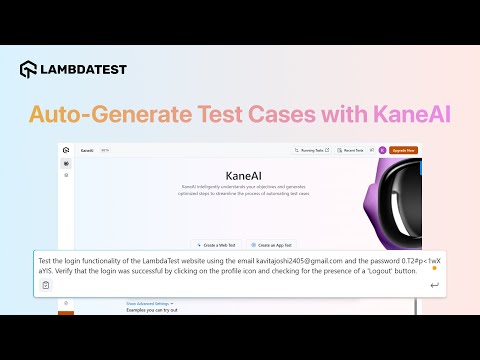
The capabilities that map to those two costs, plus the export path that avoids lock-in:
- Test Creation: Creates and evolves tests using natural language instructions, making test automation accessible to all skill levels.
- Self-Healing: When the UI shifts, KaneAI's smart element detection re-anchors steps instead of failing on a brittle selector, which turns maintenance from rewriting a test into reviewing a heal.
- Multi-Language Code Export: Converts your tests into all major programming languages and frameworks for flexible automation.

Steps to Automate a Test With KaneAI
Note: Sign in to your TestMu AI account to follow along with these steps.
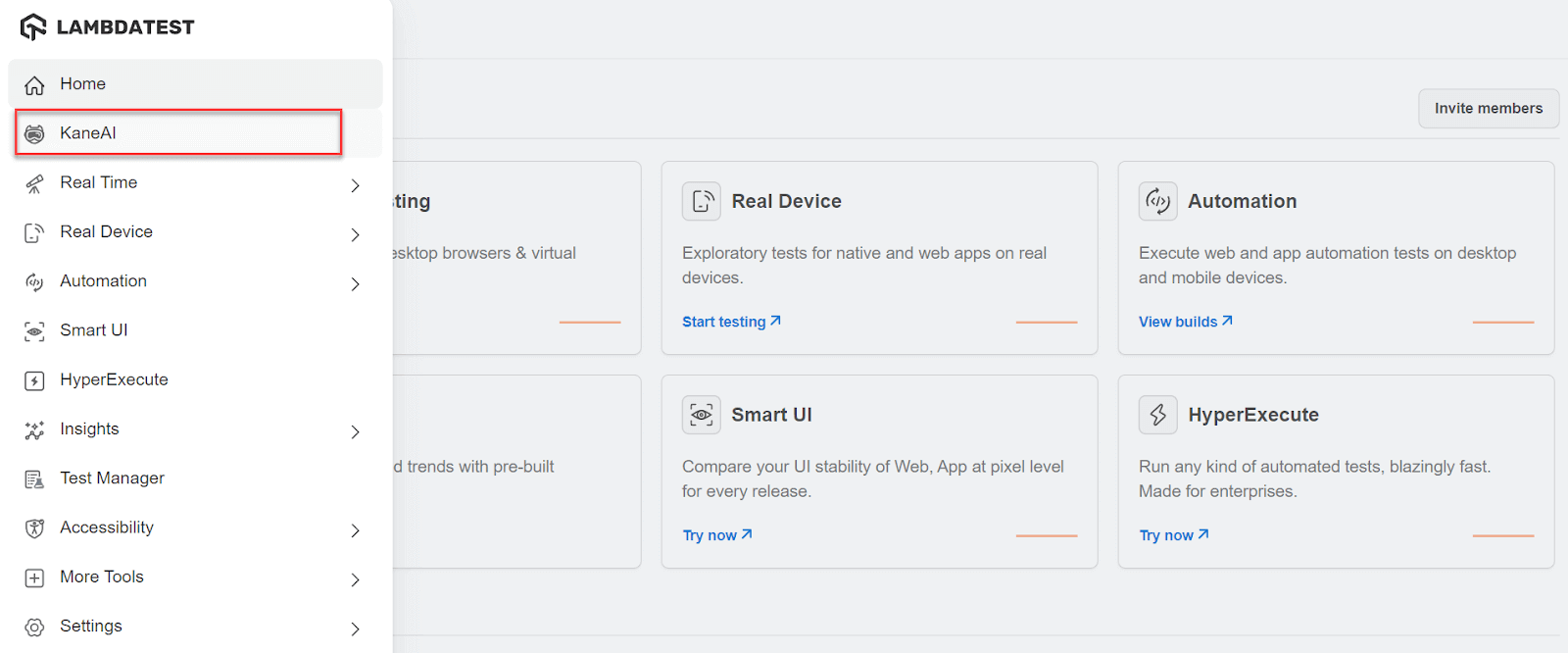
- From the TestMu AI dashboard, click the KaneAI option.
- Select the Create a Web Test button, which opens the browser and a side panel for writing test cases.
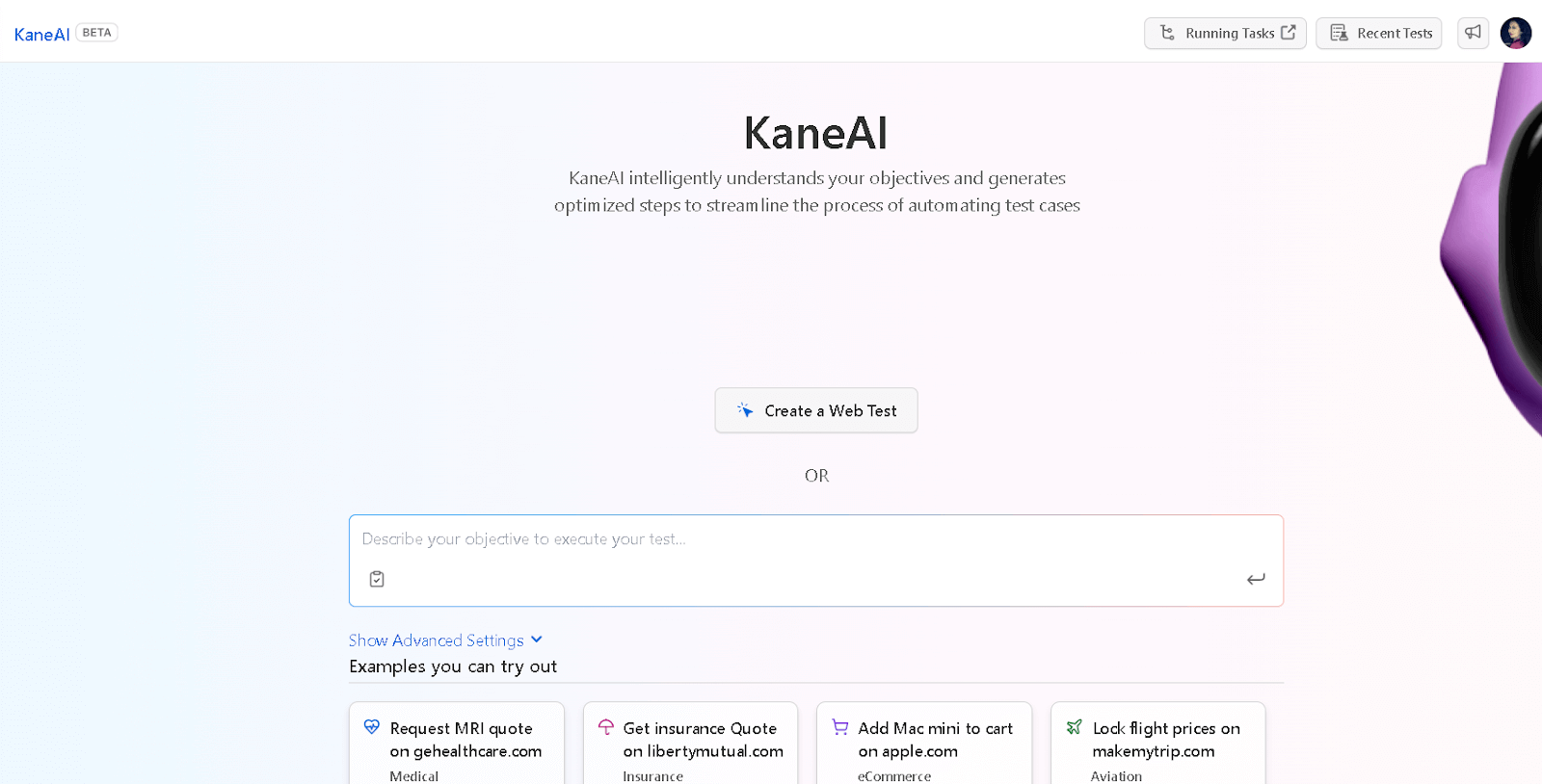
- Write the steps using a Write a step textarea for the test.
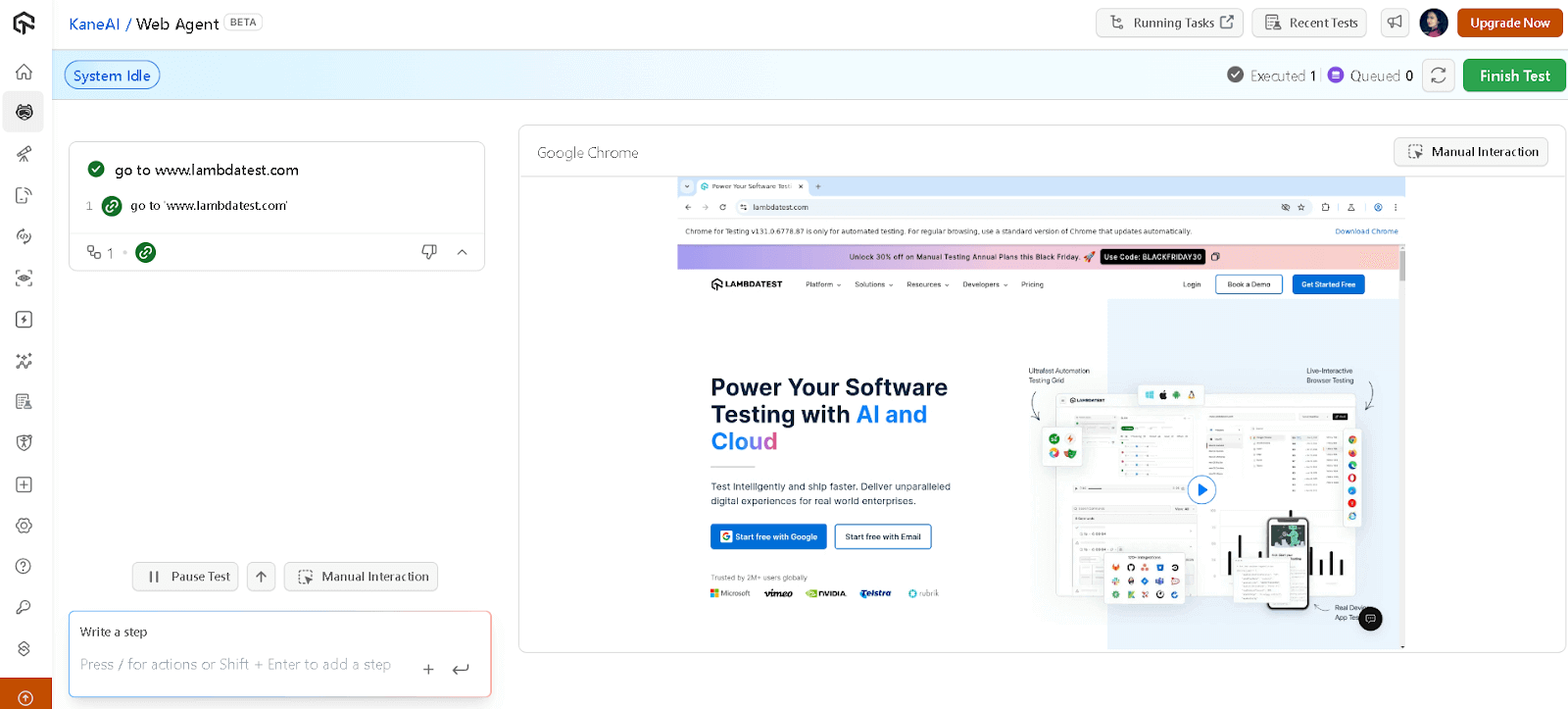
KaneAI records each test step when you press enter, and the target website loads in the browser alongside the panel. You can update or reuse any recorded step.
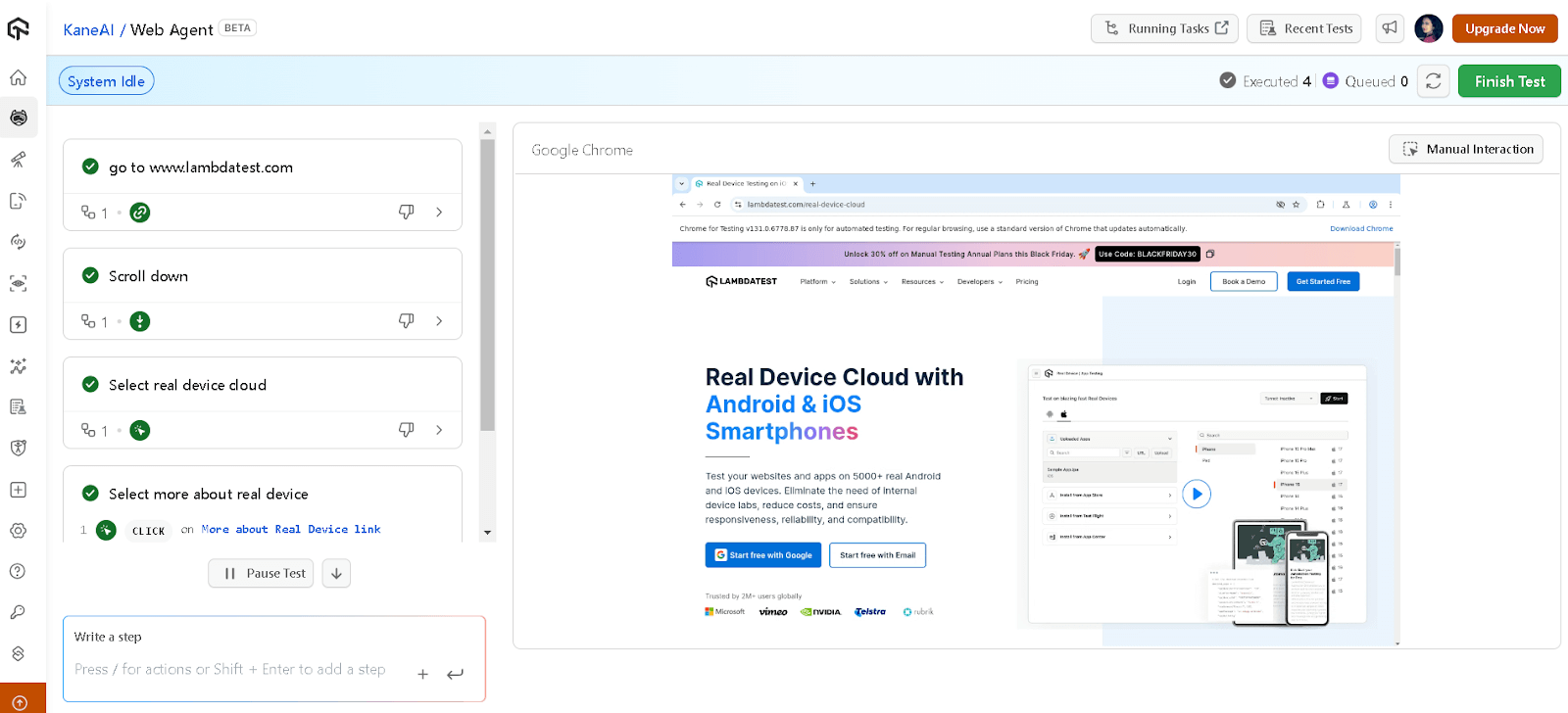
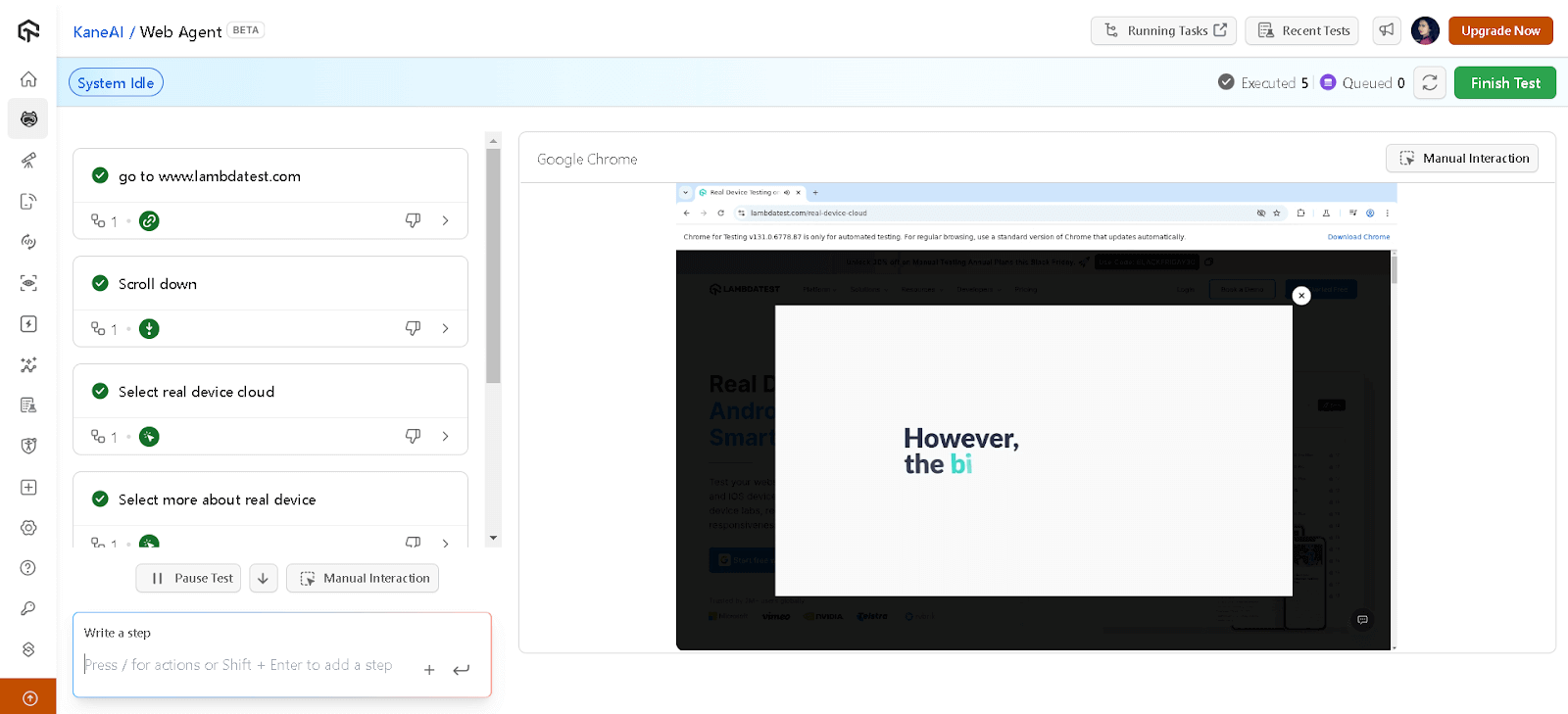
- Click the Finish Test button at the top right to end the testing session.
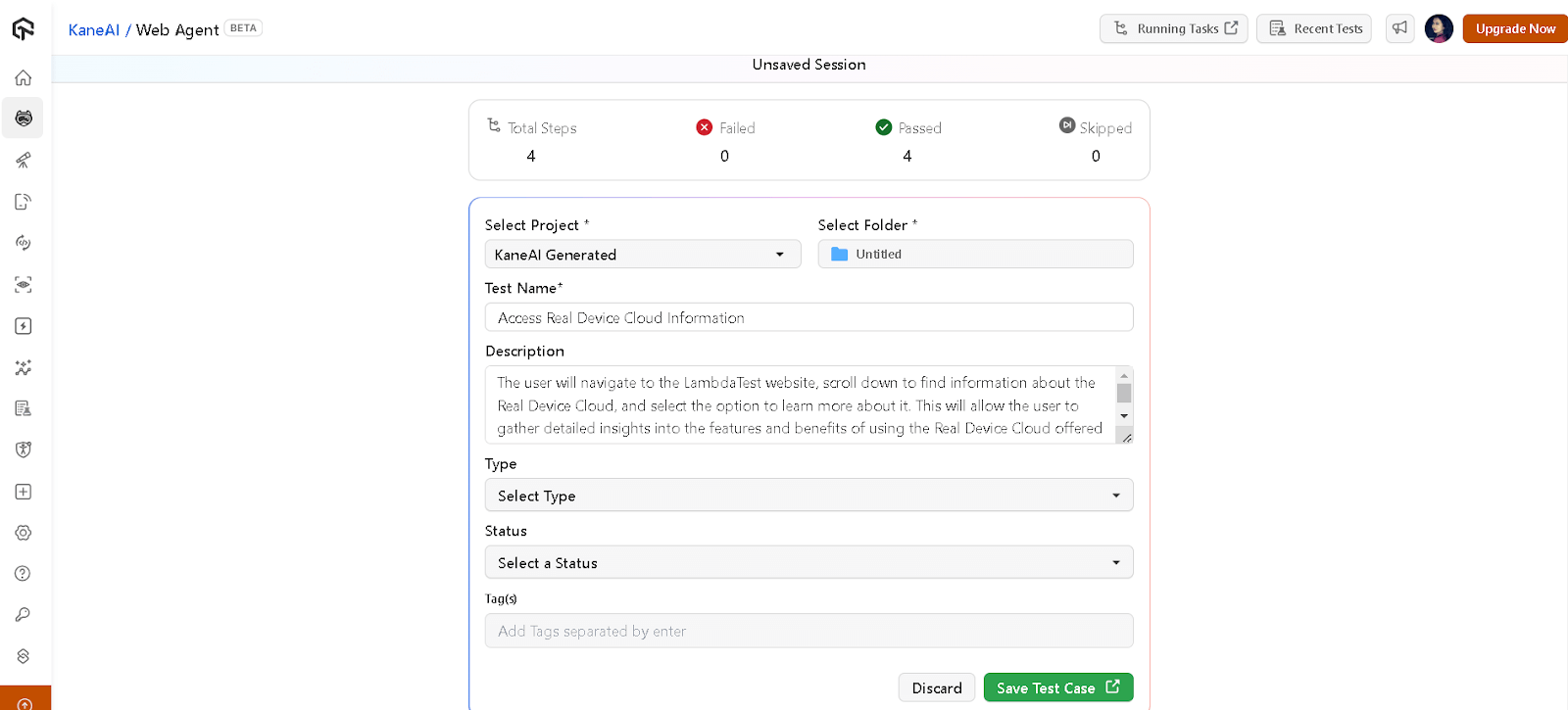
Select the Folder where the test should be saved, choose its Type and Status, adjust any remaining details, then click Save Test Case.
To get started, refer to this KaneAI documentation.
The same natural-language pattern shows up across frameworks. Vibe testing with Playwright MCP turns plain-language descriptions into live browser automation, while vibe testing with Selenium pairs an AI coding assistant with the MCP Selenium server.
For a wider view of the Selenium stack, the Selenium AI guide covers self-healing locators and visual regression, while the walkthrough on building an AI agent to generate Selenium Java tests emits Page Object classes into a Maven project.
Conclusion
Pick one use case from this guide and implement it this sprint. If you are new to AI testing, start with self-healing locators on your flakiest suite, and baseline that suite before you change anything.
To build the skills in order, follow this AI roadmap for software testers, a phase-by-phase path from automation to AI-driven testing. For hands-on validation, the KaneAI Certification proves those skills to employers.
Sources and References Used
- [1] QA Trends Report 2026: Key QA and AI Testing Shifts and Market Insights - ThinkSys (2026)
Note: Salman Khan, Community Contributor at TestMu AI with expertise in Automation Testing and Selenium, reviewed, fact-checked, and approved this article, which was researched and drafted with AI assistance. Our editorial process and AI use policy describes how every claim is verified before publication.
Author

Salman Khan
Blogs: 147


Salman is a Test Automation Evangelist and Community Contributor at TestMu AI, with over 6 years of hands-on experience in software testing and automation. He has completed his Master of Technology in Computer Science and Engineering, demonstrating strong technical expertise in software development, testing, AI agents and LLMs. He is certified in KaneAI, Automation Testing, Selenium, Cypress, Playwright, and Appium, with deep experience in CI/CD pipelines, cross-browser testing, AI in testing, and mobile automation. Salman works closely with engineering teams to convert complex testing concepts into actionable, developer-first content. Salman has authored 120+ technical tutorials, guides, and documentation on test automation, web development, and related domains, making him a strong voice in the QA and testing community.
Reviewer

Sirajuddin Khan
Reviewer
Sirajuddin Khan is Vice President of Product Management at TestMu AI (formerly LambdaTest), where he drives the company's agentic AI product strategy, building a suite of autonomous agents that includes Agentic Browsers and Agentic Visual Testing and shifting the unit of work from test execution to autonomous outcomes. One of the company's earliest product leaders, he has owned the roadmap for the high-performance execution cloud and grew the cross-browser testing products from early adoption to market leadership. He brings over a decade of experience across SaaS, B2B, and eCommerce, with earlier product roles at Wydr and ShopClues, where his catalog and search work cut delivery SLAs and lifted seller activity. Sirajuddin holds an MBA in Information Technology from Sikkim Manipal University and a B.Tech in Computer Science Engineering from Maharshi Dayanand University.


Frequently Asked Questions on AI in Test Automation
Did you find this page helpful?
More Related Blogs
TestMu AI forEnterprise
Get access to solutions built on Enterprise
grade security, privacy, & compliance
- Advanced access controls
- Advanced data retention rules
- Advanced Local Testing
- Premium Support options
- Early access to beta features
- Private Slack Channel
- Unlimited Manual Accessibility DevTools Tests