
Power Your Software Testing with AI Agents and Cloud
The Native AI-Agentic Cloud Platform to Supercharge Quality Engineering. Test Intelligently and Ship Faster.


- TestMu AI (Formerly LambdaTest)
- /
- Blog
- /
- Playwright Wait for Page to Load, Navigation, and Elements
Playwright Wait for Page to Load, Navigation, and Elements
Learn how to wait for page load, navigation, and elements in Playwright, which wait methods are now deprecated, and how to fix waits that still time out.
Last Updated on:
Three of the wait methods that Playwright tutorials still recommend are now labelled Deprecated or Discouraged in the Playwright Python API reference: page.expect_navigation(), page.wait_for_selector(), and page.wait_for_timeout(). If your suite leans on any of them, you are writing waits the framework authors have already moved away from.
This guide covers the wait methods that are still current, what Playwright already waits for on your behalf, and what to do when a wait times out anyway. Every timing figure below came from a run on real cloud browsers, not from an estimate. For the framework basics first, read the Playwright tutorial.
TL;DR
- page.expect_navigation() is Deprecated, and the Playwright docs call it inherently racy. Replace it by clicking first, then awaiting page.wait_for_url() on the pattern you expect.
- page.wait_for_selector() and page.wait_for_timeout() are both Discouraged. Use locator.wait_for() or an auto-retrying assertion, and keep fixed sleeps for debugging only.
- Auto-waiting covers the element you act on, not the navigation that action triggers. That gap is why a click still needs an explicit URL wait.
- Page load states and element states are separate enums. Load takes load, domcontentloaded, or networkidle; elements take attached, detached, visible, or hidden.
- networkidle carries its own DISCOURAGED tag for testing. On one cloud run it cost 2,395 ms on a page that was already rendered, against 54 ms for an auto-waited fill.
- Optional wait timeouts default to 30000 ms and treat 0 as no timeout. page.set_default_timeout() moves that for every wait, while page.set_default_navigation_timeout() covers the navigation methods it enumerates, including goto(), reload(), and wait_for_url().
- Waits that pass locally and fail in CI are usually a browser-version difference, so reproduce them on the same build the pipeline runs rather than on a warm laptop.
How Do You Wait for a Page to Load in Playwright?
Call page.wait_for_load_state() with the state you need: domcontentloaded for parsed HTML, or load for images and stylesheets. After a click that triggers navigation, use page.wait_for_url() instead. Playwright auto-waits for elements before most actions, so many tests need no explicit load wait at all.
The load state you pass decides how much of the page has to finish before your next line runs. The Playwright API reference documents three values for wait_for_load_state(), with load as the default.
| Load state | Resolves when | Use it for | Measured on cloud Chrome |
|---|---|---|---|
| domcontentloaded | The DOMContentLoaded event fires, so the HTML is parsed and the DOM is built. | Scraping text or asserting on markup that does not depend on images or fonts. | 2 ms when the state was already reached |
| load (default) | The load event fires, once dependent resources such as stylesheets, scripts, iframes, and images finish. | Visual checks and any assertion that depends on layout being settled. | 3,496 ms as part of page.goto() |
| networkidle | No network connections for at least 500 ms. Tagged DISCOURAGED in the API reference. | Little in a test suite. Pages with polling, websockets, or analytics beacons may never go idle. | 2,395 ms on a page already fully rendered |
The timings come from a single run on TestMu AI cloud Chrome against the TestMu AI eCommerce Playground. The pattern they show matters more than the exact numbers. The domcontentloaded call returned almost instantly because the state had already been reached, while networkidle spent over two seconds confirming something the test already knew.
That is the cost of networkidle on a cooperative page. Put a widget on it that polls more often than every 500 ms and the call stops resolving altogether, which is why the API reference tells you to rely on web assertions to assess readiness instead.
A fourth value, commit, exists on navigation methods such as page.wait_for_url() and resolves as soon as the response is received and the document starts loading. It is not accepted by wait_for_load_state().
Does Playwright Wait Automatically?
Yes, for elements, and for most actions. Playwright runs a set of actionability checks before it acts and only proceeds once the checks that apply to that action pass, which the Playwright auto-waiting documentation describes as auto-waiting for all the relevant checks to pass. If they do not pass within the timeout, the action fails with a TimeoutError. Which checks apply varies by action, and a handful of actions run none at all.
There are five checks, and different actions run different subsets of them.
| Check | What Playwright verifies | Runs on |
|---|---|---|
| Visible | Non-empty bounding box and no visibility:hidden. Note that opacity:0 still counts as visible, while display:none does not. | click, fill, check, hover, screenshot, select_option |
| Stable | The same bounding box for at least two consecutive animation frames, so the element is not mid-animation. | click, hover, screenshot, drag_to |
| Receives Events | The element is the hit target at the action point, so no overlay or cookie banner captures the click. | click, hover, drag_to |
| Enabled | Not disabled. The [disabled] attribute and disabled fieldset rules cover form controls such as button, select, input, and textarea; an [aria-disabled=true] ancestor disables any element. | click, fill, check, select_option |
| Editable | Enabled and not readonly, either through a [readonly] attribute or [aria-readonly=true]. | fill, clear |
The practical payoff is that a well-written action needs no wait wrapped around it. In the cloud run above, locator.fill() on the playground search box completed in 54 ms with no explicit wait of any kind, against 2,395 ms for the networkidle call that was supposed to make the page safe to touch.
Two limits are worth knowing. Some actions run no checks at all, including press(), focus(), and dispatch_event(), so those can fire against an element that is not ready. And auto-waiting applies to the element you act on, not to a navigation that the action triggers afterwards, which is the gap the next sections close.

Note: Flaky waits usually show up on browser versions you do not test locally. Run Playwright across 3,000+ real browser and OS combinations with video, console, and network logs captured on every run. Try TestMu AI for free!
Which Playwright Wait Method Should You Use?
Playwright documents wait methods at three different status levels, and most tutorials treat them as interchangeable. The table below maps each method to its current status in the Playwright Python API reference and to the situation it actually fits.
| Method | Status in the docs | Reach for it when |
|---|---|---|
| page.wait_for_url() | Current, added in v1.11 | A click or redirect should land on a known URL pattern. This is the documented replacement for expect_navigation(). |
| page.wait_for_load_state() | Current, with a note that it is usually not needed because Playwright auto-waits | You need a load milestone rather than one element, for example before a full-page screenshot. |
| locator.wait_for() | Current, added in v1.16 | One element must reach a specific state before you read from it rather than act on it. |
| page.wait_for_function() | Current, no advisory | The condition lives in page JavaScript, such as an app-ready flag, and no built-in wait expresses it. |
| page.wait_for_event() | Current, but the docs steer you to page.expect_event() | Rarely. The context-manager form arms the listener before the action, so it cannot miss an event that fires early. |
| page.wait_for_selector() | Discouraged | Never in new code. The docs point to web assertions or locator.wait_for() instead. |
| page.expect_navigation() | Deprecated | Never. The docs call it inherently racy and name wait_for_url() as the replacement. |
| page.wait_for_timeout() | Discouraged | Debugging only. The docs state that tests which wait for time are inherently flaky. |
Timeouts follow one rule almost everywhere in the table. Where the timeout argument is optional it is in milliseconds, defaults to 30000 ms, and treats 0 as no timeout. The exception is page.wait_for_timeout(), whose argument is the sleep duration itself and has no default. Raise or lower it globally with page.set_default_timeout(), and use page.set_default_navigation_timeout() for the navigation-flavoured waits. For a fuller treatment of timeout layering, see the guide to Playwright timeouts.
Is page.waitForNavigation() Deprecated?
Yes. In the Python API the method is page.expect_navigation(), and the reference marks it Deprecated with the note that this method is inherently racy and that you should use page.wait_for_url() instead. The JavaScript equivalent, page.waitForNavigation(), carries the same deprecation.
The docs do not expand on the race, but the shape of the API accounts for it. expect_navigation() waits for whichever main-frame navigation happens next, without stating which one it expects. A click that fires a redirect chain can therefore satisfy the call on an intermediate hop, and the test carries on against a page that is still moving.
The replacement removes the ambiguity by naming the destination. Note that the deprecation is about the method, not about the surrounding syntax: the context manager below is the correct way to use it, and it is still the call that has to go.
# Deprecated: resolves on whichever navigation happens next
with page.expect_navigation():
    page.get_by_role("link", name="Blog", exact=True).first.click()

# Current: name the URL you are actually waiting for
page.get_by_role("link", name="Blog", exact=True).first.click()
page.wait_for_url("**/blog/home")
The deprecation notice itself lives in the API reference linked above. Separately, the Playwright navigation guide arrives at the same call from the other direction, recommending that when a click could trigger multiple navigations you explicitly wait for a specific URL. One call covers both cases.

How Do You Wait for an Element in Playwright?
Waiting for an element and waiting for a page are different problems with different APIs, and mixing them up is a common source of timeouts. Element waits take a state from a set of four, which is a separate enum from the page load states above.
| State | Waits until the element | Typical use |
|---|---|---|
| visible (default) | Has a non-empty bounding box and no visibility:hidden. | A result panel or modal that renders after an async call. |
| attached | Is present in the DOM, whether or not it is painted. | Reading a data attribute from a node that stays hidden. |
| hidden | Is detached, or has an empty bounding box or visibility:hidden. | A loading spinner that must disappear before you continue. |
| detached | Is no longer present in the DOM at all. | A toast or row that a delete action removes. |
Use locator.wait_for() when you need the element in hand before reading from it. In the cloud run, waiting for the playground search box to become visible took 325 ms.
# Wait for one element to reach a state
search_box = page.get_by_role("textbox", name="Search For Products").first
search_box.wait_for(state="visible", timeout=15000)

# Wait for a spinner to clear before reading results
page.locator(".loading-spinner").wait_for(state="hidden")
When the goal is an assertion rather than a handle, reach for an auto-retrying web assertion instead. These poll until the condition holds, so they carry the wait for you and fail with a clearer message when it never does.
import re

from playwright.sync_api import expect

# Auto-retrying: no separate wait call needed
expect(page.get_by_role("heading", name="Cameras")).to_be_visible()
expect(page).to_have_url(re.compile(r".*/blog/home$"))
The older page.wait_for_selector() is marked Discouraged, and the docs direct you to exactly these two options: web assertions that assert visibility, or a locator-based locator.wait_for(). The full set of retrying matchers is covered in the guide to Playwright assertions, and choosing a selector that survives a re-render is covered in Playwright locators.
How Do You Use Playwright Wait Methods in Practice?
The examples below run against the TestMu AI eCommerce Playground with pytest and the Playwright Python sync API. Each one uses a current method, so nothing here needs rewriting when the deprecated calls are finally removed.
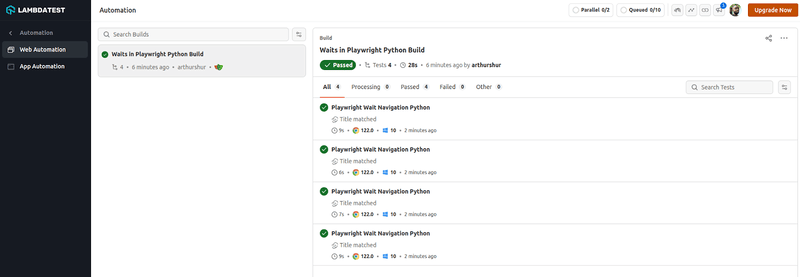
Each test module starts with import re and from playwright.sync_api import expect, and pulls the page and set_test_status fixtures from the conftest.py file created below.
Prerequisites
Create a project folder, then set up a virtual environment inside it using Python's built-in venv module.
mkdir waits_in_playwright
cd waits_in_playwright
python3 -m venv .venv
source .venv/bin/activate
Install the Playwright pytest plugin and the browser binaries needed for local runs.
pip3 install pytest-playwright python-dotenv
playwright install
Confirm the versions are in place before writing any test.
- Python, with
python3 --version - Playwright, with
playwright --version - pytest, with
pytest --version
To run the same tests across browsers you do not have installed locally, point the session at TestMu AI, an AI-native test execution platform that runs manual and automated tests at scale. Get your username and access key from your profile avatar, then Account Settings, and copy them from the Password & Security tab.
Store them in a .env file at the project root so they stay out of your test code and out of version control.
LT_USERNAME=your_username
LT_ACCESS_KEY=your_access_key
Use the TestMu AI Capabilities Generator to build the capability block for the browser and operating system you want, then create a file called conftest.py with the configuration below.
import json
import os
import subprocess
import urllib.parse

import pytest
from dotenv import load_dotenv
from playwright.sync_api import sync_playwright

load_dotenv(".env", override=True)

capabilities = {
    "browserName": "Chrome",  # Chrome, MicrosoftEdge, pw-chromium, pw-firefox, pw-webkit
    "browserVersion": "latest",
    "LT:Options": {
        "platform": "Windows 11",
        "build": "Waits in Playwright Python Build",
        "name": "Playwright Wait Methods",
        "user": os.getenv("LT_USERNAME"),
        "accessKey": os.getenv("LT_ACCESS_KEY"),
        "network": True,
        "video": True,
        "console": True,
        "tunnel": False,  # set True to test a locally hosted page
    },
}


@pytest.fixture(name="browser", autouse=True, scope="module")
def browser():
    with sync_playwright() as playwright:
        playwright_version = (
            str(subprocess.getoutput("playwright --version")).strip().split(" ")[1]
        )
        capabilities["LT:Options"]["playwrightClientVersion"] = playwright_version
        lt_cdp_url = (
            "wss://cdp.lambdatest.com/playwright?capabilities="
            + urllib.parse.quote(json.dumps(capabilities))
        )
        browser = playwright.chromium.connect(lt_cdp_url, timeout=30000)
        yield browser
        browser.close()


@pytest.fixture
def page(browser):
    page = browser.new_page()
    yield page
    page.close()


@pytest.fixture
def set_test_status(page):
    def _set_test_status(status, remark):
        page.evaluate(
            "_ => {}",
            'lambdatest_action: {"action": "setTestStatus", "arguments": {"status":"'
            + status
            + '", "remark": "'
            + remark
            + '"}}',
        )

    yield _set_test_status
Code walkthrough:
- load_dotenv reads the TestMu AI username (LT_USERNAME) and access key (LT_ACCESS_KEY) from your .env file, keeping credentials out of the test code.
- playwright_version is read from the CLI and sent as playwrightClientVersion so the cloud grid matches your local client.
- lt_cdp_url carries the URL-encoded capabilities, and playwright.chromium.connect() opens the remote browser over CDP.
- The page fixture yields a fresh page per test and closes it afterwards, so no wait state leaks between tests.
- set_test_status marks each run passed or failed in the dashboard, which is what makes a failed wait easy to find later.
Setting the capabilities up once per suite is covered in the Python with Playwright documentation. For how page, context, and browser fixtures relate to each other, see Playwright fixtures, or the walkthrough on the TestMu AI YouTube Channel.

Using page.wait_for_load_state()
This method resolves once the page reaches the requested load milestone, and returns immediately if the milestone has already passed. The navigation must have been committed before you call it.
Test scenario: open the playground home page, wait for the default load state, and assert the title.
def test_wait_state_navigation(page, set_test_status):
    page.goto("https://ecommerce-playground.lambdatest.io/")
    # 'load' is the default state
    page.wait_for_load_state()
    title = page.title()
    if "Your Store" in title:
        set_test_status(status="passed", remark="Title matched")
    else:
        set_test_status(status="failed", remark="Title did not match")
    expect(page).to_have_title("Your Store")
Run it with pytest test_wait_state_navigation.py. Because page.goto() already waits for the load event, this call is usually redundant, which is exactly what the API reference note warns about. Keep it only where you genuinely need a later milestone than the one goto gave you.
Using page.wait_for_url()
This is the method to reach for after any click that navigates. It accepts a glob pattern, a regular expression, or a predicate, and takes a wait_until argument that also allows commit.
Test scenario: click the Blog link, wait for the blog URL, and assert on the final address.
def test_wait_url_navigation(page, set_test_status):
    page.goto("https://ecommerce-playground.lambdatest.io/")
    page.get_by_role("link", name="Blog", exact=True).first.click()
    # waits until the main frame URL matches the pattern
    page.wait_for_url("**/blog/home")
    title = page.title()
    if "Blog - Poco theme" in title:
        set_test_status(status="passed", remark="Title matched")
    else:
        set_test_status(status="failed", remark="Title did not match")
    expect(page).to_have_url(re.compile(r".*/blog/home$"))
This exact flow ran on TestMu AI cloud Chrome while this article was written. The click plus URL wait completed in 2,005 ms, landing on https://ecommerce-playground.lambdatest.io/index.php?route=extension/maza/blog/home with the page title Blog - Poco theme. The assertion above checks the URL; the title is what the dashboard status line records.
Using page.wait_for_function()
Use this when the condition you care about lives in page JavaScript and no built-in wait expresses it. The expression must be a single JavaScript expression that evaluates to a truthy value, and any value you compare against is passed through the arg parameter rather than declared inline.
Test scenario: click through to an author page and wait until the document title matches.
def test_wait_function_navigation(page, set_test_status):
    page.goto("https://ecommerce-playground.lambdatest.io/")
    page.get_by_role("link", name="Jolio Balia", exact=True).nth(1).click()
    # arg is passed in, not declared inside the expression
    page.wait_for_function(
        "expected => document.title.includes(expected)",
        arg="Jolio Balia",
    )
    title = page.title()
    if "Jolio Balia" in title:
        set_test_status(status="passed", remark="Title matched")
    else:
        set_test_status(status="failed", remark="Title did not match")
    expect(page).to_have_title("Jolio Balia")
The polling interval defaults to raf, meaning the expression is re-evaluated on every animation frame. Pass a number instead to poll on a fixed millisecond interval when the condition is expensive to compute.
Using page.expect_event()
The API reference note on page.wait_for_event() says that in most cases you should use page.expect_event(). The reason is ordering: the context manager arms the listener before the block runs, so an event that fires quickly cannot slip past.
Test scenario: open a product category and catch the domcontentloaded event that the navigation fires.
def test_expect_event_navigation(page, set_test_status):
    page.goto("https://ecommerce-playground.lambdatest.io/")
    page.get_by_role("button", name="Shop by Category").first.click()
    # listener is armed before the click inside the block
    with page.expect_event("domcontentloaded"):
        page.get_by_role("link", name="Cameras", exact=True).first.click()
    title = page.title()
    if "Cameras" in title:
        set_test_status(status="passed", remark="Title matched")
    else:
        set_test_status(status="failed", remark="Title did not match")
    expect(page).to_have_title("Cameras")
Calling page.wait_for_event("domcontentloaded") after the click instead is the same race that got expect_navigation() deprecated. When the next step depends on a specific API call rather than a page event, Playwright waitForResponse resolves the moment a matching network response arrives.
To run the whole file in parallel, install pytest-xdist with pip install pytest-xdist and run pytest -n 4. On TestMu AI each test is recorded with video, console, and network logs, so a wait that fails on one browser version can be replayed rather than guessed at.
Note: Auto Healing works with Playwright on TestMu AI. Enable it with autoHeal in your capabilities and locators that shift between releases keep resolving instead of failing the run. Read the Auto Healing docs
Why Does a Playwright Wait Still Fail?
A TimeoutError names the method that gave up, not the reason it did. These are the causes worth checking first, in the order they usually turn out to be the culprit.
| Symptom | Likely cause | Fix |
|---|---|---|
| A navigation wait hangs the full 30 seconds even though the page clearly loaded | The wait was armed after the navigation completed, so it is waiting for an event that already fired. | Click first, then wait_for_url() on the expected pattern, or wrap the action in expect_event(). |
| networkidle hangs on one particular page but works everywhere else | A polling request, websocket, or analytics beacon keeps the connection count above zero. | Drop networkidle and assert on the element you actually need with an auto-retrying assertion. |
| The click reports success but nothing happens on the page | Poor hydration. The control is enabled but its event listeners are not attached yet, so the click lands on nothing. | Disable interactive controls until hydration completes, which is the fix the Playwright docs recommend. |
| Strict mode violation instead of a timeout | The locator matched more than one element, and Playwright refuses to guess which one you meant. | Narrow the locator, or add .first when matching several is genuinely expected. |
| The wait passes locally and fails in CI | Slower machines and cold caches push the real load past a timeout that was tuned on a warm laptop. | Raise the timeout with set_default_navigation_timeout(), and reproduce on the same browser version the pipeline uses. |
| page.go_back() times out and every later step fails | A back or forward cache restore bypasses Playwright lifecycle tracking, desynchronising the Page object. | Navigate forward to the URL you want rather than relying on history restoration. |
The last two are the ones that eat afternoons, because both depend on the browser build rather than on the test. Reproducing them means running the same spec on the exact browser and operating system version the failure appeared on, which is where a cloud grid earns its place over a local install.
How Is AI Changing Playwright Waits?
AI agents now write and repair Playwright waits: they generate tests with web-first assertions and patch timeouts by reading the failure trace instead of adding fixed sleeps.
Playwright ships test agents, a planner, a generator, and a healer. The healer replays a failing test, inspects the page, and proposes a fix such as a better locator or a wait on the right URL. Our guide to playwright agents walks through the setup.
Review every wait an agent adds. A healer that swaps a failing wait for wait_for_timeout() or networkidle hides a race rather than fixing it, which is the same trap this guide warns against.
Which Playwright Waits Should You Replace First?
Start by grepping your suite for expect_navigation, wait_for_selector, and wait_for_timeout. Every hit is a wait the Playwright team has already moved away from, and each has a one-line replacement: wait_for_url(), locator.wait_for() or a web assertion, and in most cases nothing at all.
Then delete the waits that auto-waiting already covers. In the single cloud run behind this article, an auto-waited fill took 54 ms while the networkidle call meant to make the page safe took 2,395 ms. One run is not a benchmark, but it is worth measuring your own suite before keeping a wait you inherited.
Once the suite is clean, run it somewhere the timing differences show up. TestMu AI captures video, console, and network logs on every Playwright testing run, so a wait that failed on one browser version can be replayed rather than reproduced by hand. The Playwright capabilities documentation covers the full option set to get a first run going.
Author

Ini Arthur
Blogs: 4

Iniubong Arthur is a Software Engineer and Technical Writer with 5+ years of experience in software engineering, web development, and content creation. Skilled in Django, Flutter, and React, he focuses on building practical solutions that address real-world problems. He has served as Editor-in-Chief at NaijaMusicDotComDotNG, Freelance Technical Writer at SitePoint, and Software Engineer at Semicolon, and developed content for Jaguda.com. Proficient in JavaScript, Python, SQL, Java, and Dart, he blends technical expertise with strong documentation skills. On TestMu AI, he has authored software testing and automation tutorials covering Puppeteer, Playwright, and Python testing.
Reviewer

Harshit Paul
Reviewer
Harshit Paul is Director of Product Marketing at TestMu AI, with over 8 years of experience in product and growth marketing for developer and QA tools, leading the Agentic AI in Quality Engineering space. He has authored 80+ technical articles for TestMu AI on software testing and automation, and hosted webinars on Selenium, automation testing, browser compatibility, DevOps, and continuous testing. He has led go-to-market and technical marketing initiatives across software testing products, contributing to SEO, content strategy, and developer marketing. He began his career as a certified Salesforce developer at Wipro Technologies, where he worked for 2 years before moving into marketing. Harshit holds a degree in computer programming from Vivekananda Institute of Professional Studies.
On This Page
- How Do You Wait for a Page to Load in Playwright?
- Does Playwright Wait Automatically?
- Which Playwright Wait Method Should You Use?
- Is page.waitForNavigation() Deprecated?
- How Do You Wait for an Element in Playwright?
- How Do You Use Playwright Wait Methods in Practice?
- Why Does a Playwright Wait Still Fail?
- How Is AI Changing Playwright Waits?
- Which Playwright Waits Should You Replace First?
Playwright Waits FAQs
Did you find this page helpful?
More Related Blogs

TestMu AI forEnterprise
Get access to solutions built on Enterprise
grade security, privacy, & compliance
- Advanced access controls
- Advanced data retention rules
- Advanced Local Testing
- Premium Support options
- Early access to beta features
- Private Slack Channel
- Unlimited Manual Accessibility DevTools Tests