

Power Your Software Testing with AI Agents and Cloud
The Native AI-Agentic Cloud Platform to Supercharge Quality Engineering. Test Intelligently and Ship Faster.


- TestMu AI (Formerly LambdaTest)
- /
- Blog
- /
- Vibe Testing with Selenium: Evaluating Real User Experience
Vibe Testing with Selenium: Evaluating Real User Experience
Explore vibe testing with Selenium using Cursor AI to generate, execute, and validate real user experience through AI-assisted test automation.
Last Updated on:
Vibe testing with Selenium goes beyond traditional functional validation to evaluate how an application actually feels to real users. Instead of focusing only on functional checks, it examines flow, responsiveness, visual stability, and overall user experience during automated runs. With this approach, teams ensure the application doesn't just pass tests; it delivers a simple and pleasant experience.
Much like vibe coding, where developers describe intent in plain English and let AI generate the implementation, vibe testing shifts the focus from writing scripts to expressing what the user should experience.
Overview
To evaluate real user experience, use vibe testing with Selenium to assess application flow, responsiveness, and layout consistency. By pairing the Cursor AI Editor for rapid natural-language test generation with TestMu AI for cloud-based execution, teams can validate authentic user behavior across production-like environments instead of relying on static local setups.
- Best for reducing manual automation effort: AI-elevated Selenium - AI enhances traditional Selenium suites by translating plain-language prompts into runnable scripts, repairing brittle locators automatically, detecting visual and accessibility regressions, and identifying the root causes of test failures.
- Best for validating user experience: Vibe testing - This methodology evaluates how an application feels to use by examining navigation clarity, layout consistency, and responsiveness, ensuring that AI-driven scripts validate the lived user experience rather than just pass-or-fail functional assertions.
- Best for rapid project scaffolding: Cursor AI Editor - This editor brings project-aware intelligence directly to testers, allowing them to describe test scenarios in natural language and receive a complete, scaffolded Selenium project with build files and driver setups in minutes.
- Best for executing realistic user interactions at scale: TestMu AI - This cloud grid pairs with Cursor to convert natural-language prompts into Selenium scripts that run on production-like browsers and operating systems, enabling teams to validate authentic user behavior beyond static local setups.
- Best for modern web applications requiring built-in waiting: Playwright - This modern framework offers built-in auto-waiting, a more modern API, and tight integration with browser DevTools, serving as a framework-agnostic alternative to Selenium depending on a team's existing stack and browser coverage needs.
AI + Selenium: The Future of Intelligent Test Automation
The Selenium ecosystem has long supported a record-and-playback tool, i.e., Selenium IDE, that simplifies test creation by capturing browser interactions and converting them into reusable test steps.
This approach makes it easier to get started with automation testing and quickly generate baseline test scenarios.
With the advancement of AI, combining AI capabilities with Selenium opens new possibilities for smarter and more adaptive test automation. AI has the potential to enhance Selenium by assisting in test generation, improving reliability, and reducing maintenance effort.
For a deeper look at how these capabilities come together, this complete guide to Selenium AI covers self-healing locators, AI-driven script generation, visual regression, and the tooling landscape that makes AI-powered Selenium practical for production suites.
This is part of a broader shift toward AI-augmented testing, where human testers collaborate with AI to improve speed, coverage, and test quality.
However, writing effective tests always requires a clear understanding of the application under test. In the past, providing application context to AI systems was challenging.
With the introduction of the Model Context Protocol (MCP) and community-built Selenium MCP servers such as @angiejones/mcp-selenium, it is now possible to provide clear, concise context to AI models, enabling them to generate more application-aware tests. MCP and AI Agents working together represent one of the most promising directions in modern test automation, enabling context-aware, self-healing, and intent-driven testing pipelines.
To begin implementing Selenium automation with MCP, refer to this detailed setup guide on MCP for automation testing.

How Can AI Enhance Selenium Testing?
When AI capabilities are integrated with Selenium automation, testing moves beyond simple script execution and becomes more intelligent and adaptive.
- Auto-generating test scripts from plain English text: AI can convert simple prompts into executable Selenium test scripts, reducing the need to write scripts manually.
- Auto-healing locators: When element attributes change and tests fail, AI can identify alternative matching properties and update locators automatically, reducing maintenance effort in Selenium automation suites.
- Visual Regression: AI can compare screenshots across builds to detect layout shifts, missing elements, or UI inconsistencies that functional checks may not capture. This is especially useful for cross-browser testing, where the same UI must look consistent across Chrome, Firefox, Safari, and Edge.
- Accessibility Testing: AI-powered tools can analyze web pages during Selenium test execution to detect accessibility issues related to WCAG compliance. This helps identify usability problems early in the development lifecycle.
- Automatic AI RCA: AI can analyze logs, screenshots, and execution history to suggest the probable root cause of a failure, helping teams debug faster.
- Automatic Failure Analysis: By analyzing historical test results and patterns, AI can classify failures, for example, distinguishing between environment issues and product defects, and provide actionable insights to reduce flaky tests.
What Is Vibe Testing with Selenium?
Vibe Testing is a UX-centric evaluation approach that focuses on the overall feeling of using a product, such as intuitiveness, flow, and responsiveness, rather than just verifying the functional requirements.
Instead of manually writing locators and complex code, the AI agent understands user intent and translates it into working automation. It can also smartly evaluate user experience aspects, such as visibility, flow, and accessibility, making tests more aligned with real user behavior rather than just functional checks.
For Java-centric teams that want a code-generation workflow rather than a live MCP loop, this guide to building an AI agent to generate Selenium Java tests covers a Python agent that converts plain English scenarios into Page Object classes, a TestNG test class, and testng.xml that drop straight into a Maven project.
Instead of simply verifying whether the application works as expected, vibe testing focuses on the overall experience from the user's perspective. It focuses on experience-driven questions such as:
- Are forms simple to fill out, with helpful validations and error messages?
- Is the navigation through pages, buttons, and menus clear and intuitive?
- Is the layout consistent across different screens and devices?
- Do pages load smoothly without noticeable lag or flickering?
Instead of just focusing on interacting with the elements, the vibe testing approach looks at the overall usability, smooth flow, and user experience. Similar principles apply in Vibe Testing with Playwright, where AI-assisted prompts drive end-to-end test generation across modern web applications.
Key Benefits of Vibe Testing with Selenium
Vibe testing with Selenium brings practical advantages that go beyond traditional automation testing. It not only speeds up test creation but also improves reliability and overall quality. Here's how:
- Faster Test Creation Using AI Prompts: Test scenarios can be described in plain English, allowing teams to generate test cases with AI and automatically convert them into Selenium test scripts. This reduces the time spent writing scripts and locating elements manually.
- Improved Test Stability: AI agents can intelligently identify elements using context rather than relying on fragile locators. This makes tests more adaptable to minor UI changes.
- Better User Experience Validation: Tests go beyond functional verification and evaluate flow, usability, and smooth navigation. This ensures the application feels intuitive and user-friendly.
- Support for Test Data Generation: AI agents can intelligently generate realistic test data, enabling teams to validate a wider range of scenarios with minimal manual effort.
- AI-assisted Testing Support: From recommending relevant test cases to identifying gaps in test coverage, AI agents act as an intelligent assistant throughout both test design and execution. By providing data-driven insights and proactive suggestions, it enhances tester productivity and decision-making.
- Reduced Flaky Tests: By analyzing patterns in failures and adapting to dynamic elements, AI agents help minimize inconsistent test results. This leads to more reliable automation suites.
These benefits also make vibe testing a natural fit for CI/CD automation testing pipelines, where fast feedback, stable results, and minimal maintenance overhead are essential for continuous delivery.
Vibe Testing with Selenium Using Cursor AI Editor
Several AI-powered editors and assistants can help us write and manage test scripts more intuitively, for example, GitHub Copilot, ChatGPT, and Claude. Each of these tools offers ways to generate code, suggest improvements, or automate repetitive tasks based on natural language prompts.
For vibe testing with Selenium, we'll use the Cursor AI Editor, as it provides a few advantages compared to other AI agents.
Cursor stands out with its in-editor intelligence, deeper context awareness of your project files, and smoother interactive experience, making it easier to generate, refine, and execute Selenium tests directly from plain English descriptions.
Installation and Setup
Depending on the Operating System, download and install the Cursor Editor from Cursor · Download
Once the installation and setup are complete, we are all set to start vibe testing.
Auto-Generating a Selenium Project from Scratch
Let's start vibe testing by asking Cursor to create a new Selenium Java project from scratch by following these steps below:
- Open Cursor
- Type "Create a Selenium Java project" in the "New Chat" window.
Cursor will quickly begin working on the prompt and generate a Selenium Java project from scratch. It creates the Selenium Java project with JUnit 5, WebDriverManager, and includes a sample UI test, a small driver factory (Chrome/Firefox + headless toggle), and a README with run commands.


Let's refine the prompt and ask Cursor to generate the project with TestNG. On receiving the prompt, Cursor updates the project and adds the following files, as shown in the image below:

Let's review the files generated by Cursor, one by one.
Cursor switched the project from JUnit 5 to TestNG and made the required changes in the pom.xml file, as shown below:
<project xmlns="http://maven.apache.org/POM/4.0.0"
        xmlns:xsi="http://www.w3.org/2001/XMLSchema-instance"
        xsi:schemaLocation="http://maven.apache.org/POM/4.0.0 https://maven.apache.org/xsd/maven-4.0.0.xsd">
 <modelVersion>4.0.0</modelVersion>

 <groupId>com.example</groupId>
 <artifactId>selenium-java-project</artifactId>
 <version>1.0.0-SNAPSHOT</version>
 <name>selenium-java-project</name>

 <properties>
   <project.build.sourceEncoding>UTF-8</project.build.sourceEncoding>
   <maven.compiler.release>17</maven.compiler.release>

   <selenium.version>4.28.1</selenium.version>
   <testng.version>7.10.2</testng.version>
   <webdrivermanager.version>5.9.3</webdrivermanager.version>
   <slf4j.version>2.0.16</slf4j.version>
 </properties>

 <dependencies>
   <dependency>
     <groupId>org.seleniumhq.selenium</groupId>
     <artifactId>selenium-java</artifactId>
     <version>{${selenium.version}}</version>
     <scope>test</scope>
   </dependency>

   <dependency>
     <groupId>org.testng</groupId>
     <artifactId>testng</artifactId>
     <version>{${testng.version}}</version>
     <scope>test</scope>
   </dependency>

   <dependency>
     <groupId>io.github.bonigarcia</groupId>
     <artifactId>webdrivermanager</artifactId>
     <version>{${webdrivermanager.version}}</version>
     <scope>test</scope>
   </dependency>

   <dependency>
     <groupId>org.slf4j</groupId>
     <artifactId>slf4j-simple</artifactId>
     <version>{${slf4j.version}}</version>
     <scope>test</scope>
   </dependency>
 </dependencies>

 <build>
   <plugins>
     <plugin>
       <groupId>org.apache.maven.plugins</groupId>
       <artifactId>maven-surefire-plugin</artifactId>
       <version>3.5.2</version>
       <configuration>
         <useModulePath>false</useModulePath>
         <suiteXmlFiles>
           <suiteXmlFile>src/test/resources/testng.xml</suiteXmlFile>
         </suiteXmlFiles>
       </configuration>
     </plugin>
   </plugins>
 </build>
</project>
It can be observed that the versions of Selenium, TestNG, and WebDriverManager updated by Cursor are not the most recent. At the time of writing, the latest available versions were Selenium 4.41.0, TestNG 7.12.0, and WebDriverManager 6.3.3.
Note: Verified as of March 2026:
- Selenium 4.41.0, released on Feb 20, 2026
- TestNG 7.12.0, released on Jan 22, 2026
- WebDriverManager 6.3.3, released on Nov 08, 2025
Even when AI generates the project, it is essential to ensure that all dependencies are updated to the latest version to take advantage of the latest features, security improvements, and bug fixes.
Config.properties file:
browser=chrome
headless=true
TestConfig.java
package com.example.core;

import java.io.IOException;
import java.io.InputStream;
import java.util.Locale;
import java.util.Properties;

public final class TestConfig {
 private static final Properties PROPS = load();

 private TestConfig() {}

 public static String browser() {
   return get("browser", "chrome").toLowerCase(Locale.ROOT);
 }

 public static boolean headless() {
   return Boolean.parseBoolean(get("headless", "true"));
 }

 private static String get(String key, String defaultValue) {
   String sys = System.getProperty(key);
   if (sys != null && !sys.isBlank()) {
     return sys.trim();
   }
   String fromFile = PROPS.getProperty(key);
   if (fromFile != null && !fromFile.isBlank()) {
     return fromFile.trim();
   }
   return defaultValue;
 }

 private static Properties load() {
   Properties p = new Properties();
   try (InputStream is = TestConfig.class.getClassLoader().getResourceAsStream("config.properties")) {
     if (is != null) {
       p.load(is);
     }
   } catch (IOException e) {
     throw new RuntimeException("Failed to load config.properties", e);
   }
   return p;
 }
}
The TestConfig class is a utility class that loads configuration values from a config.properties file and allows them to be overridden using system properties. It provides browser() and headless() methods that fetch configuration values, giving priority to system properties, then the properties file, and finally default values if neither is set.
DriverFactory.java
package com.example.core;

import io.github.bonigarcia.wdm.WebDriverManager;
import java.time.Duration;
import org.openqa.selenium.WebDriver;
import org.openqa.selenium.chrome.ChromeDriver;
import org.openqa.selenium.chrome.ChromeOptions;
import org.openqa.selenium.firefox.FirefoxDriver;
import org.openqa.selenium.firefox.FirefoxOptions;

public final class DriverFactory {
 private DriverFactory() {}

 public static WebDriver create() {
   String browser = TestConfig.browser();
   boolean headless = TestConfig.headless();

   WebDriver driver;
   switch (browser) {
     case "firefox":
       WebDriverManager.firefoxdriver().setup();
       FirefoxOptions ff = new FirefoxOptions();
       if (headless) {
         ff.addArguments("-headless");
       }
       driver = new FirefoxDriver(ff);
       break;
     case "chrome":
     default:
       WebDriverManager.chromedriver().setup();
       ChromeOptions ch = new ChromeOptions();
       if (headless) {
         ch.addArguments("--headless=new");
       }
       ch.addArguments("--window-size=1400,900");
       driver = new ChromeDriver(ch);
       break;
   }

   driver.manage().timeouts().implicitlyWait(Duration.ofSeconds(2));
   return driver;
 }
}
The DriverFactory class is responsible for creating and configuring a WebDriver instance based on the browser and headless settings provided by TestConfig.
It supports Chrome and Firefox browsers, uses WebDriverManager to automatically set up the required driver binaries, and applies browser-specific options such as headless mode and window size.
After initializing the driver, it sets a 2-second implicit wait before returning the configured WebDriver instance.
It can be observed that Cursor AI has used WebDriverManager for browser management, although this is no longer required. Starting from Selenium version 4.11.0, browser and driver management are handled automatically by Selenium Manager within Selenium WebDriver itself. So, using WebDriverManager is not required.
BaseTest.java
package com.example.tests;

import com.example.core.DriverFactory;
import org.openqa.selenium.WebDriver;
import org.testng.annotations.AfterMethod;
import org.testng.annotations.BeforeMethod;

public abstract class BaseTest {
 protected WebDriver driver;

 @BeforeMethod(alwaysRun = true)
 public void setUp() {
   driver = DriverFactory.create();
 }

 @AfterMethod(alwaysRun = true)
 public void tearDown() {
   if (driver != null) {
     driver.quit();
   }
 }
}
The BaseTest class uses DriverFactory to create the WebDriver instance and serves as a common setup by initializing WebDriver before each test method and quitting it afterward.
ExampleLocalPageTest.java
package com.example.tests;

import java.nio.file.Path;
import java.time.Duration;
import org.openqa.selenium.By;
import org.openqa.selenium.support.ui.ExpectedConditions;
import org.openqa.selenium.support.ui.WebDriverWait;
import org.testng.Assert;
import org.testng.annotations.Test;

public class ExampleLocalPageTest extends BaseTest {

 @Test
 public void canOpenLocalPageAndClickButton() {
   String url =
       Path.of("src/test/resources/site/example.html").toAbsolutePath().toUri().toString();

   driver.get(url);

   Assert.assertEquals(driver.findElement(By.id("title")).getText(), "Selenium is working");

   driver.findElement(By.id("btn")).click();

   WebDriverWait wait = new WebDriverWait(driver, Duration.ofSeconds(5));
   wait.until(ExpectedConditions.textToBe(By.id("result"), "Clicked!"));

   Assert.assertEquals(driver.findElement(By.id("result")).getText(), "Clicked!");
 }
}
As we have not provided any input regarding the test scenario, Cursor generated an example.html file and wrote the test based on it.
The ExampleLocalPageTest class runs a Selenium test that opens a local web page, interacts with a button, and verifies the expected behavior. It validates that the page loads correctly and that clicking the button updates the UI as expected.
Example.html
<!doctype html>
<html lang="en">
 <head>
   <meta charset="utf-8" />
   <meta name="viewport" content="width=device-width, initial-scale=1" />
   <style>
     body { font-family: system-ui, -apple-system, Segoe UI, Roboto, sans-serif; padding: 2rem; }
     .card { max-width: 720px; padding: 1.5rem; border: 1px solid #ddd; border-radius: 12px; }
     code { background: #f6f8fa; padding: 0.1rem 0.3rem; border-radius: 6px; }
   </style>
 </head>
 <body>
   <div class="card">
     <h1 id="title">Selenium is working</h1>
     <p>This is a local test page loaded from <code>src/test/resources</code>.</p>
     <button id="btn" type="button" onclick="document.getElementById('result').textContent='Clicked!'">Click me</button>
     <p id="result"></p>
   </div>
 </body>
</html>
Cursor asks for permission to execute the tests after the project has been generated.

Let's run the commands provided by Cursor and check the results.

The following is the screenshot of the test execution performed by Cursor on running the command mvn test:

Cursor created the Selenium Java project from scratch, added DriverFactory, TestConfig, and BaseTest classes. It included an example.html file and generated sample Selenium tests based on it. It even provided the exact command to execute the tests, all within minutes, without writing a single line of code manually.
Ultimately, vibe testing shifts the focus from scripting to validating intent. Instead of spending time setting up frameworks and boilerplate code, testers can concentrate on verifying user journeys, business logic, and real application behavior while the AI handles the heavy lifting of project setup and test scaffolding.
Similar to how Playwright AI enhances modern testing workflows with intelligent automation, Selenium AI leverages such platforms to bring realism and scale to test execution.
Auto-Generating Test Scripts for Realistic User Interactions
To perform vibe testing effectively with Selenium, we will use a cloud-based platform like TestMu AI. It helps streamline Selenium testing by combining AI capabilities with scalable infrastructure, making it easier to design, execute, and analyze tests in real-world environments.
Meet TestMu AI, the New LambdaTest — your trusted testing platform, now reimagined for the AI era.
TestMu AI (formerly LambdaTest) is a full stack agentic AI quality engineering platform that enables teams to test intelligently and deliver faster. It supports Selenium AI workflows by providing end-to-end capabilities to plan, create, run, and analyze tests. The platform is built to handle Selenium testing across web, mobile, and enterprise applications at scale, using real devices, real browsers, and production-like environments.
Now, let's ask Cursor to update the project with the following:
- Remove the
WebDriverManagerlibrary and use Selenium WebDriver's built-in driver management instead. - Update the
DriverFactoryto include the required capabilities to execute tests on the TestMu AI platform using Windows 11 and the latest version of Chrome. The TestMu AI username and access key should be read from an environment variable. - Delete the example.html file and its corresponding test class.
Use the following test scenario to run the Selenium test:
|

Cursor performs the changes as provided in the prompt and provides us with the summary of changes it has made to the project, which can be verified in the screenshot below.


Let's analyze the changes one by one, starting with the pom.xml:
<dependencies>
   <dependency>
     <groupId>org.seleniumhq.selenium</groupId>
     <artifactId>selenium-java</artifactId>
     <version>${selenium.version}</version>
     <scope>test</scope>
   </dependency>

   <dependency>
     <groupId>org.testng</groupId>
     <artifactId>testng</artifactId>
     <version>${testng.version}</version>
     <scope>test</scope>
   </dependency>
 </dependencies>
The pom.xml file has been updated, and the WebDriverManager dependency has been removed.
DriverFactory class:
/**
 * Creates a WebDriver instance. When TestMu AI username and access key are set via environment
 * variables, returns a RemoteWebDriver for TestMu AI (Windows 11, latest Chrome). Otherwise
 * returns a local Chrome driver using Selenium's built-in driver management.
 */
public final class DriverFactory {
 private static final String LT_USERNAME = "LT_USERNAME";
 private static final String LT_ACCESS_KEY = "LT_ACCESS_KEY";
 private static final String LT_GRID_URL = "https://hub.lambdatest.com/wd/hub";

 private DriverFactory() {}

 public static WebDriver create() {
   String username = System.getenv(LT_USERNAME);
   String accessKey = System.getenv(LT_ACCESS_KEY);

   if (username != null && !username.isBlank() && accessKey != null && !accessKey.isBlank()) {
     return createTestMuDriver(username.trim(), accessKey.trim());
   }
   return createLocalChromeDriver();
 }

 /**
  * Remote WebDriver for TestMu AI: Windows 11, latest Chrome. Credentials from environment
  * variables LT_USERNAME and LT_ACCESS_KEY.
  */
 private static WebDriver createTestMuDriver(String username, String accessKey) {
   MutableCapabilities capabilities = new MutableCapabilities();
   capabilities.setCapability("browserName", "Chrome");
   capabilities.setCapability("browserVersion", "latest");
   capabilities.setCapability("platformName", "Windows 11");
   capabilities.setCapability("user", username);
   capabilities.setCapability("accessKey", accessKey);

   URL gridUrl;
   try {
     gridUrl = new URL(TESTMU_GRID_URL);
   } catch (MalformedURLException e) {
     throw new RuntimeException("Invalid TestMu grid URL: " + TESTMU_GRID_URL, e);
   }

   WebDriver driver = new RemoteWebDriver(gridUrl, capabilities);
   driver.manage().timeouts().implicitlyWait(Duration.ofSeconds(10));
   return driver;
 }

 /** Local Chrome using Selenium's built-in driver management (no WebDriverManager). */
 private static WebDriver createLocalChromeDriver() {
   ChromeOptions options = new ChromeOptions();
   options.addArguments("--window-size=1400,900");
   WebDriver driver = new ChromeDriver(options);
   driver.manage().timeouts().implicitlyWait(Duration.ofSeconds(10));
   return driver;
 }
}
The earlier implementation that relied on WebDriverManager has been removed. The DriverFactory class has now been updated to include two methods: createTestMuDriver(), which defines the necessary capabilities to execute tests on the TestMu AI platform, and createLocalChromeDriver(), which enables test execution on the Chrome browser in a local environment.
Cursor added the following ECommerceSearchTest.java that implements the Search product test scenario:
/**
 * Runs on LambdaTest E-Commerce demo playground: search for "Macbook Air", submit, and verify
 * results show Macbook Air products.
 */
public class ECommerceSearchTest extends BaseTest {

 private static final String BASE_URL = "https://ecommerce-playground.lambdatest.io/";
 private static final String SEARCH_TERM = "Macbook Air";

 @Test
 public void searchMacbookAirAndVerifyResults() {
   driver.get(BASE_URL);

   WebElement searchInput =
       new WebDriverWait(driver, Duration.ofSeconds(15))
           .until(ExpectedConditions.visibilityOfElementLocated(By.name("search")));
   searchInput.clear();
   searchInput.sendKeys(SEARCH_TERM);

   WebElement submitButton =
       driver.findElement(By.cssSelector("button[type='submit']"));
   submitButton.click();

   new WebDriverWait(driver, Duration.ofSeconds(15))
       .until(
           ExpectedConditions.or(
               ExpectedConditions.urlContains("search"),
               ExpectedConditions.presenceOfElementLocated(By.cssSelector(".product-layout, .product-thumb"))));

   List<WebElement> productTitles =
       driver.findElements(By.cssSelector(".product-layout h4 a, .product-thumb h4 a"));
   boolean foundMacbookAir = false;
   for (WebElement el : productTitles) {
     if (el.getText().toLowerCase().contains(SEARCH_TERM.toLowerCase())) {
       foundMacbookAir = true;
       break;
     }
   }
   Assert.assertTrue(
       foundMacbookAir
           || driver.findElement(By.tagName("body")).getText().toLowerCase().contains(SEARCH_TERM.toLowerCase()),
       "Search results page should show '" + SEARCH_TERM + "' products");
 }
}
The ECommerceSearchTest class navigates to the TestMu AI ECommerce demo playground website, searches for a "MacBook Air" product, and verifies that the product is displayed on the results page.
Accordingly, it has updated the testng.xml and Readme.md files. There is no change in the TestConfig.java and BaseTest.java files. The example.html and its related test have been removed from the project.
Test Execution
Let's update the Username and Access Key of TestMu AI in the environment variable and run the test.
On executing the tests, the following error log is generated with failures:

Ask Cursor to update the capabilities as per the W3C Syntax and provide it with these error details. Also, let's provide it with the TestMu AI capabilities generator page link so it can easily generate the capabilities.
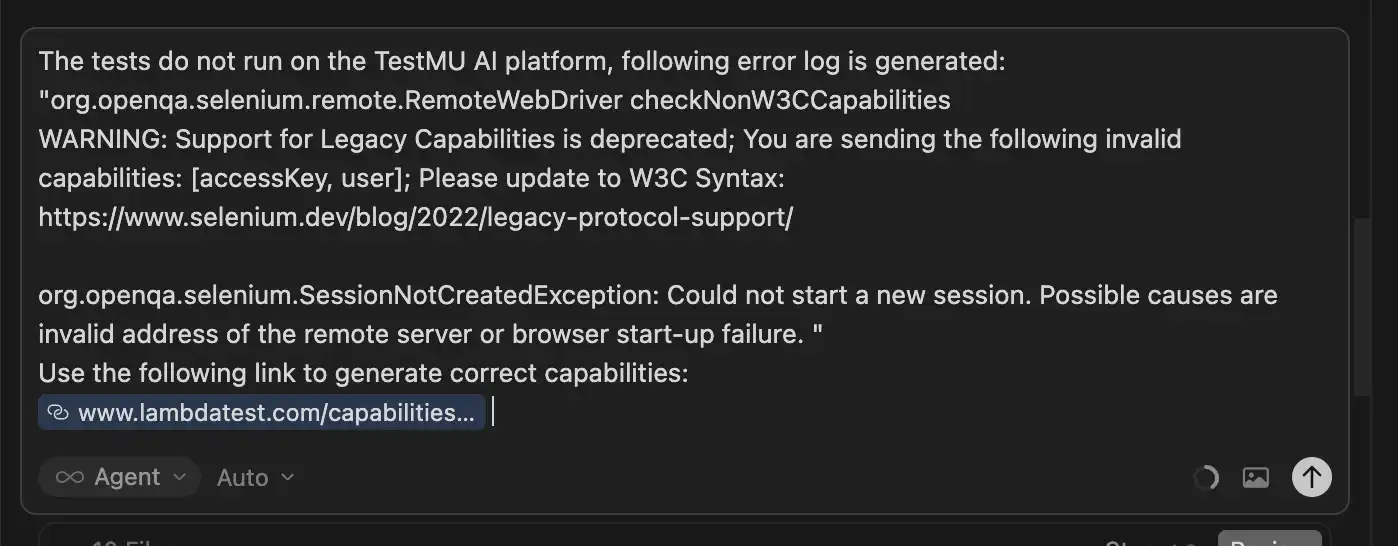
After running the above prompt, Cursor fixes the DriverFactory.java class and uses the correct capabilities to run the test on the TestMu AI platform.
/**
 * Creates a WebDriver instance. When TestMu AI username and access key are set via environment
 * variables, returns a RemoteWebDriver for TestMu AI (Windows 11, latest Chrome). Otherwise
 * returns a local Chrome driver using Selenium's built-in driver management.
 */
public final class DriverFactory {
 private static final String LT_USERNAME   = "LT_USERNAME";
 private static final String LT_ACCESS_KEY = "LT_ACCESS_KEY";
 private static final String LT_GRID_URL   = "https://hub.lambdatest.com/wd/hub";

 private DriverFactory() {}

 public static WebDriver create() {
   String username = System.getenv(LT_USERNAME);
   String accessKey = System.getenv(LT_ACCESS_KEY);

   if (username != null && !username.isBlank() && accessKey != null && !accessKey.isBlank()) {
     return createTestMuDriver(username.trim(), accessKey.trim());
   }
   return createLocalChromeDriver();
 }

 /**
  * Remote WebDriver for TestMu AI: Windows 11, latest Chrome. Credentials from environment
  * variables LT_USERNAME and LT_ACCESS_KEY.
  */
 private static WebDriver createTestMuDriver(String username, String accessKey) {
   // W3C-compliant capabilities for LambdaTest/TestMu AI:
   // put auth + vendor options under "LT:Options" (not top-level), per the capabilities generator.
   ChromeOptions browserOptions = new ChromeOptions();
   browserOptions.setPlatformName("Windows 11");
   browserOptions.setBrowserVersion("latest");

   Map<String, Object> ltOptions = new HashMap<>();
   ltOptions.put("username", username);
   ltOptions.put("accessKey", accessKey);
   ltOptions.put("project", "selenium-java-project");
   ltOptions.put("build", "testng-suite");
   ltOptions.put("name", "E-Commerce search: Macbook Air");
   ltOptions.put("selenium_version", "latest");
   ltOptions.put("w3c", true);
   browserOptions.setCapability("LT:Options", ltOptions);

   URL gridUrl;
   try {
     gridUrl = new URL(LT_GRID_URL);
   } catch (MalformedURLException e) {
     throw new RuntimeException("Invalid LT grid URL: " + LT_GRID_URL, e);
   }

   WebDriver driver = new RemoteWebDriver(gridUrl, browserOptions);
   driver.manage().timeouts().implicitlyWait(Duration.ofSeconds(10));
   return driver;
 }

 /** Local Chrome using Selenium's built-in driver management (no WebDriverManager). */
 private static WebDriver createLocalChromeDriver() {
   ChromeOptions options = new ChromeOptions();
   options.addArguments("--window-size=1400,900");
   WebDriver driver = new ChromeDriver(options);
   driver.manage().timeouts().implicitlyWait(Duration.ofSeconds(10));
   return driver;
 }
}
The test now runs successfully, and the test execution details can be verified on the TestMu AI platform, as shown in the screenshot below:

Run your Selenium tests on TestMu AI's cloud grid. To get started, refer to the support documentation on Running Your First Selenium Test, which walks you through executing a sample test using Java and TestNG.
With this setup, vibe testing with Selenium on the TestMu AI platform becomes much more streamlined and efficient. Instead of manually handling every step, you can leverage TestMu AI agent-skills to further simplify how tests are created, executed, and maintained using the Selenium skill.
Use the selenium-skill (repo) that is designed to generate production-grade Selenium WebDriver tests across multiple languages and supports both local execution and cloud-based runs on TestMu AI.
It can intelligently understand requests related to Selenium testing, browser automation, or cross-browser execution and automatically generate reliable test scripts, apply Selenium best practices such as proper wait strategies, and configure execution environments.
This makes it easier to scale Selenium AI testing while maintaining stability and consistency across different test scenarios. To get started with Selenium Skills, refer to this support documentation to run your first Selenium tests using Agent Skills.
How Do You Validate Test Flow Beyond Element Presence?
Traditional Selenium UI automation often stops at checking whether an element exists on the page and performing functional checks. However, real validation goes a step further by ensuring the entire user journey behaves as expected from start to finish.
This is particularly important when testing in production environments or production-like setups, where real traffic patterns and edge cases can expose issues that staged environments miss.
Below are key aspects to consider when validating test flow beyond just element presence:
- Validating Flow Continuity Instead of Just Element Presence: Instead of simply verifying that a button or field is visible, the focus should be on confirming that each action correctly leads to the next logical step in the workflow. This means validating navigation, state transitions, data persistence, and business rules across the complete journey to ensure the application behaves consistently.
- Reviewing Hallucinations: When using AI-assisted or vibe testing approaches, it is important to review whether the AI has made incorrect assumptions about UI behavior or page content. Hallucinations can lead to false positives, so validating outputs against actual application behavior ensures reliability and trust in AI-driven testing.
- Test Execution: Observing how the test executes provides deeper insights into timing issues, unexpected redirects, and conditional flows. Reviewing logs, screenshots, and step-level execution details helps confirm that the test truly reflects real user behavior rather than just passing functional checks.
Conclusion
Vibe Testing with Selenium demonstrates how AI-assisted development can significantly accelerate automation without compromising quality. In the Cursor-generated project, the complete Selenium Java project was created from scratch, including core classes and sample tests, within minutes. Errors were quickly identified and corrected through iterative prompts, and the generated code was carefully reviewed to ensure it aligned with real-world testing standards and best practices.
In my experience, Vibe Testing is not about blindly trusting AI, but about collaborating with it. While Cursor handled the heavy lifting of setup and scaffolding, thoughtful review, validation of test flow, and correction of edge cases ensured the framework remained robust and maintainable. Ultimately, Vibe Testing with Selenium shifts the tester's role from writing boilerplate code to evaluating real user experience and validating application behavior correctly.
Author

Faisal Khatri
Blogs: 41


Mohammad Faisal Khatri is a Software Testing Professional with 17+ years of experience in manual exploratory and automation testing. He currently works as a Senior Testing Specialist at Kafaat Business Solutions and has previously worked with Thoughtworks, HCL Technologies, and CrossAsyst Infotech. He is skilled in tools like Selenium WebDriver, Rest Assured, SuperTest, Playwright, WebDriverIO, Appium, Postman, Docker, Jenkins, GitHub Actions, TestNG, and MySQL. Faisal has led QA teams of 5+ members, managing delivery across onshore and offshore models. He holds a B.Com degree and is ISTQB Foundation Level certified. A passionate content creator, he has authored 100+ blogs on Medium, 40+ on TestMu AI, and built a community of 25K+ followers on LinkedIn. His GitHub repository “Awesome Learning” has earned 1K+ stars.


Frequently asked questions
Did you find this page helpful?
More Related Blogs
TestMu AI forEnterprise
Get access to solutions built on Enterprise
grade security, privacy, & compliance
- Advanced access controls
- Advanced data retention rules
- Advanced Local Testing
- Premium Support options
- Early access to beta features
- Private Slack Channel
- Unlimited Manual Accessibility DevTools Tests