

Power Your Software Testing with AI Agents and Cloud
The Native AI-Agentic Cloud Platform to Supercharge Quality Engineering. Test Intelligently and Ship Faster.


- TestMu AI (Formerly LambdaTest)
- /
- Blog
- /
- How to Generate Tests With AI
How to Generate Tests With AI
Learn how to generate tests with AI using ChatGPT, Claude, IDE assistants and testing agents, then review and refine each generated test before merging.
Last Updated on:
Writing test scripts can be one of the most tedious and time-consuming processes of software testing. When software applications scale or become more complex, it becomes harder to keep up with writing test scripts manually. Relying on traditional testing methods will not give the speed at which modern software needs to be developed and released.
However, by using AI to generate tests, developers and testers can save time and effort, ensuring that all aspects of the software application are covered without constantly rewriting test cases. AI can help generate tests based on how software behaves, find potential issues, and improve overall test coverage, all while reducing human error.
For teams looking to combine AI-generated tests with direct browser execution, vibe testing with Playwright MCP offers a workflow where Claude translates natural language scenarios into Playwright browser actions and generates reusable test scripts on the fly.
For Selenium-based teams, the equivalent workflow is covered in Vibe testing with Selenium, which uses Cursor AI and the MCP Selenium server to translate natural language user journeys into Selenium scripts and validate them against a live browser.
Java-centric teams that want a script-generation flow instead of a live MCP loop can follow this guide to building an AI agent to generate Selenium Java tests, which routes plain English scenarios through OpenAI or Ollama and emits Page Object classes, a TestNG test class, and testng.xml in a single run.
For teams already invested in Cypress, Cypress AI brings the same philosophy natively - cy.prompt() generates test code from plain English or Gherkin steps, caches resolved prompts across CI runs, and pairs with continuous self-healing so AI-generated specs stay stable as the UI evolves.
Overview
You can generate software tests with AI by using TestMu AI Test Case Generator to instantly convert multi-format requirements into structured test cases, or by leveraging TestMu AI KaneAI to author, execute, and debug end-to-end automated tests using natural language prompts.
Why Generate Test Scripts With AI?
- Complex scenarios: AI simplifies testing of complex scenarios like performance analysis, load threshold evaluation, and network latency, allowing testers to easily create and maintain intricate tests.
- Test coverage: AI scans existing test scripts to identify untested areas and automatically generates additional cases to ensure more complete validation.
- Early bug detection: AI acts as an assistant during coding, analyzing logic in real time to predict and highlight potential bugs at the earliest phase.
- Workflow management: AI streamlines the organization, maintenance, and optimization of testing workflows as projects scale and test cases become difficult to manage.
- Accuracy: AI minimizes human error by generating consistent, logic-based test cases that ensure precise results and maintain code reliability over time.
How to Use AI for Generating Tests?
- TestMu AI Test Case Generator: TestMu AI Test Case Generator converts diverse requirement formats, including text, PDFs, images, and Jira tickets, into structured, contextual software test cases with pre-conditions, steps, and expected results.
- TestMu AI KaneAI: TestMu AI KaneAI enables testers to create, execute, and debug end-to-end automated tests using natural language commands, and converts automated tests into frameworks like Selenium and Playwright.
- ChatGPT: ChatGPT helps testers quickly draft detailed test cases, generate automation code snippets, and design test data through conversational prompts, though it requires manual integration and post-script variable replacement.
- Claude: Claude assists in writing structured, comprehensive test cases by interpreting documentation and translating high-level product descriptions into executable test scripts, while detecting and fixing errors in the codebase.
- Playwright MCP: Playwright MCP translates natural language scenarios into Playwright browser actions and generates reusable test scripts on the fly for teams combining AI-generated tests with direct browser execution.
- Cursor AI: Cursor AI uses the MCP Selenium server to translate natural language user journeys into Selenium scripts and validate them against a live browser.
- Cypress AI: Cypress AI uses cy.prompt() to generate test code from plain English or Gherkin steps, caches resolved prompts across CI runs, and provides continuous self-healing.
Why Generate Tests With AI?
Generating tests with AI saves scripting time, raises test coverage, catches bugs earlier and keeps a growing test suite manageable as the application scales.
Incorporating artificial intelligence to generate tests for automation testing can bring a lot of benefits:
- Tackle Complex Scenarios: Complex scenarios, such as analyzing the load threshold or performance metrics, including network latency in various network calls, can easily be done through AI. Testers can also create complex tests without worrying about their maintenance easily.
- Increased Test Coverage: AI is capable of scanning the test script and determining the areas that have not been covered through tests. Then, it can generate tests for those sections specifically and, in the process, increase the test coverage automatically.
- Early Bug Detection: To generate tests with AI is not the only thing a tester can do. AI can also be implemented as an assistant which can assist the entire coding process and predict bugs in the code as a tester is writing them. It facilitates bug detection at the earliest possible phase of testing.
- Ease of Management: As the software scales, it becomes a lot harder to manage every testing process, let alone test case management. Scalability brings its challenges, a lot of which can be eliminated with AI in the process.
- Accuracy: Automated testing is the execution of test scripts written in a programming language (scripted automation) or as instructions (codeless automation). When done manually, all of this requires time and complex logic, which can be flawed more often than we think.
AI helps generate test cases that can target each task as instructed by the tester. Yes, the tests can be complex here as well, but since AI maintains it, it is acceptable.
Generating test cases for automated testing is time-consuming and challenging, which is exactly the problem test case generation with AI solves. Testers must identify locators, initiate drivers, and write complex logic, all while uncertain about test coverage. Achieving 100% coverage manually is not feasible.
How to Generate Tests With AI Tools?
Give an AI tool a written requirement, a recorded browser session or a plain-English prompt, then review the test cases and scripts it returns before you run them.
To demonstrate how AI can help generate tests easily for automated software testing, let’s explore this with three different tools:
- TestMu AI Test Case Generator
- TestMu AI KaneAI
- ChatGPT
- Claude
To explore more ways you can leverage AI effectively in your testing workflows, don’t miss our guide on Using ChatGPT for Test Automation, where we share practical insights tailored for testers.
TestMu AI Test Case Generator
TestMu AI Test Case Generator is an intelligent capability within the TestMu AI Test Management that allows users to instantly convert a wide range of requirement formats, including text, PDFs, images, audio, video, Jira tickets, and more, into structured, contextual software test cases. It dramatically speeds up test case creation while enhancing coverage and consistency. Designed to save time and streamline the test design process, it supports both manual and automated testing workflows with greater efficiency and precision.
Key Features
- Multi-Format Input Support: Accepts diverse input types, including plain text, PDFs, images, audio, video, CSV, Excel, JSON, XML, and direct Jira integrations.
- Contextual Test Case Generation: Converts requirements into structured test scenarios with pre-conditions, test steps, and expected results.
- Smart Grouping & Prioritization: Organizes test cases into high-level scenarios and assigns priority levels based on risk and business impact.
- Fully Editable Framework: Generated test cases are editable, allowing QA teams to refine and customize them to match internal standards.
- Seamless Integration with Test Management: Automatically syncs with the TestMu AI Test Management for execution tracking, test assignments, and collaboration.
- Automation-Ready with TestMu AI KaneAI: Instantly automate the generated test cases using KaneAI, our GenAI-native agent for AI app testing.
- Iterative Refinement: Modify your input and regenerate test cases until the output perfectly aligns with your testing goals.
Generating Tests With TestMu AI KaneAI
KaneAI by TestMu AI is a GenAI native QA Agent-as-a-Service platform designed for high-speed quality engineering teams. It allows you to create, evolve, and debug tests using natural language, functioning as an AI agent for test authoring while integrating seamlessly with TestMu AI’s offerings for test orchestration, execution, and analysis.
Features:
- Create and evolve tests using natural language commands.
- Generate and execute test steps based on high-level objectives.
- Convert automated tests into all major languages and frameworks like Selenium and Playwright.
- Write or paste custom JavaScript code snippets to run tests.
- Perform scrolling actions on WebElements using natural language commands.
- Run tests with advanced configurations such as changing geolocation, testing on localhost servers using TestMu AI Tunnel and testing with a dedicated proxy.

Shown below are steps to generate tests with TestMu AI KaneAI:
Note: Make sure you have access to KaneAI. To get access, please contact sales.
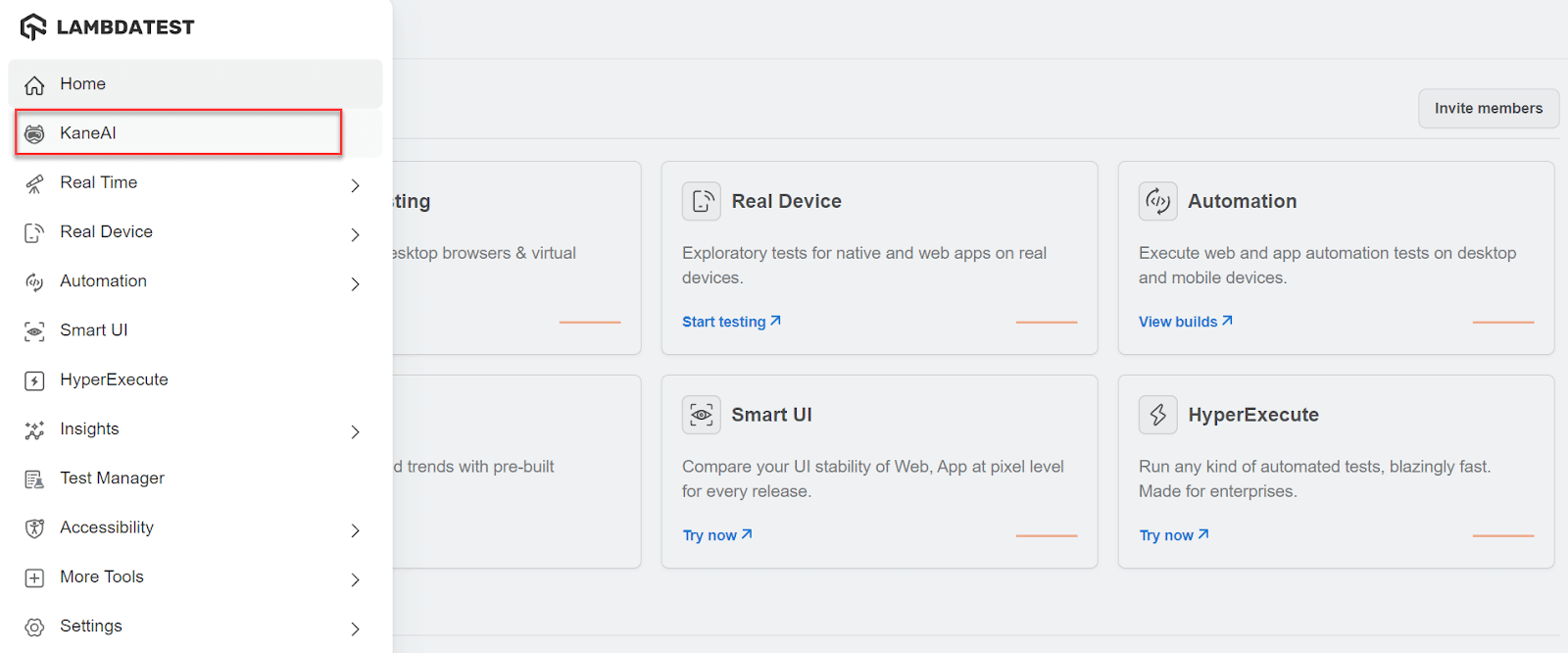
- From the TestMu AI dashboard, click the KaneAI option.
- Click on the Create a Web Test button. It will open up the browser with a side panel available to write test cases.
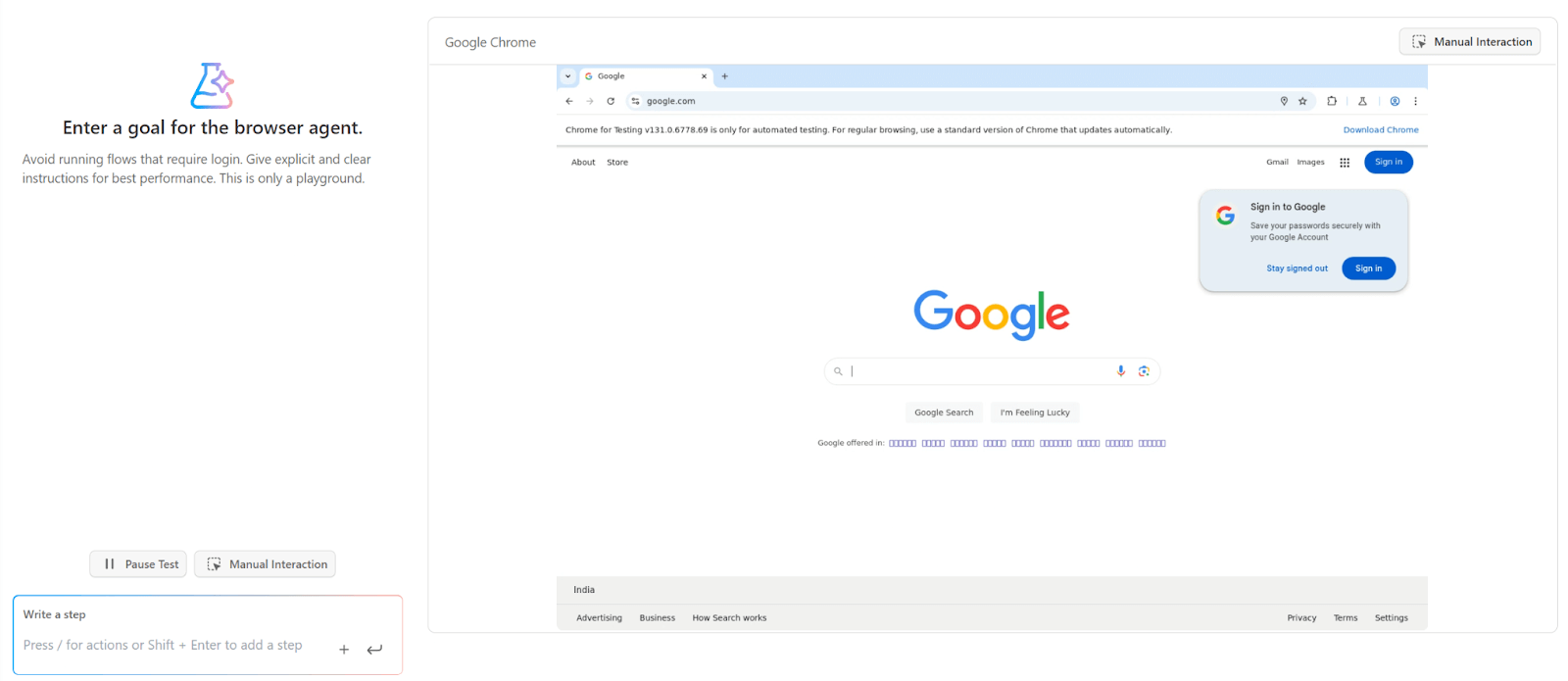
- Click on the Manual Interaction button.
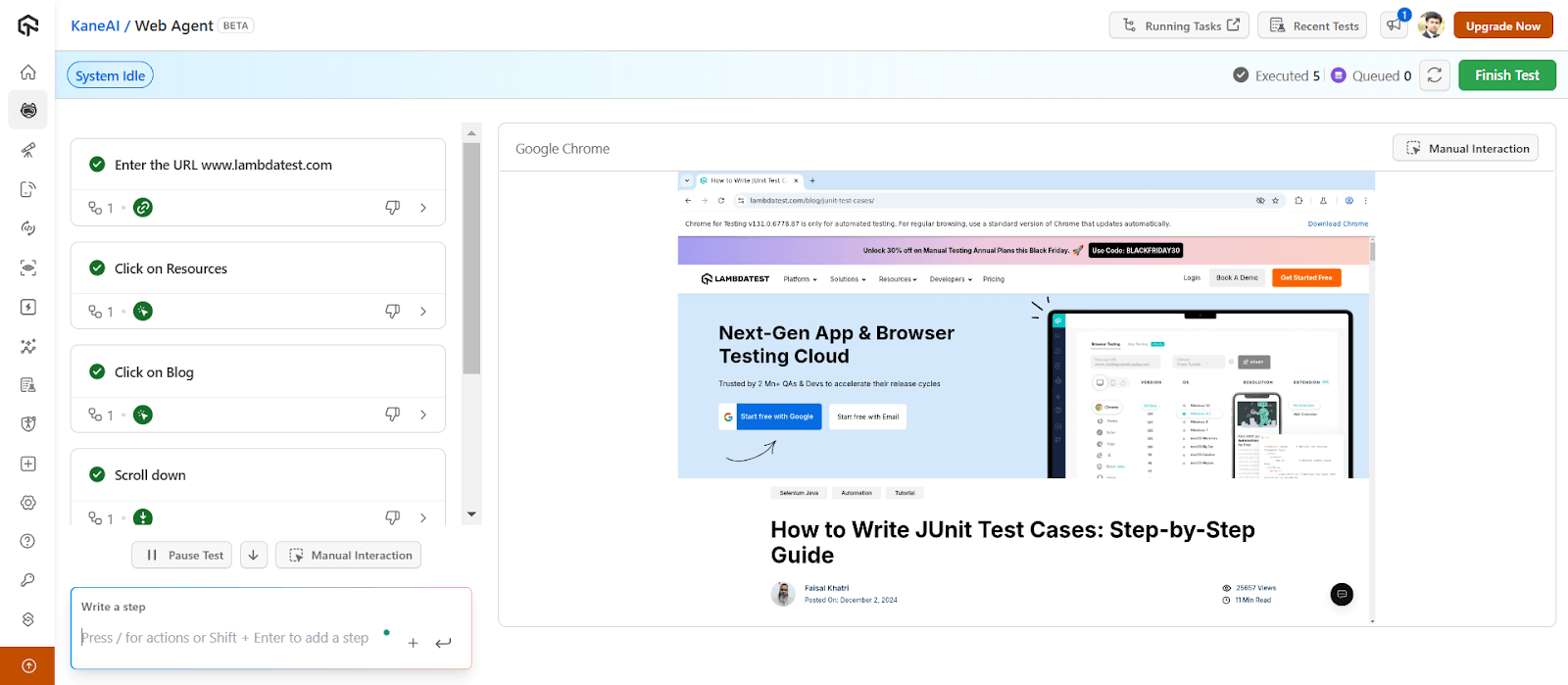
- Now, the tester can interact with the browser agent, and the test will be generated for their actions. For this demo, follow these steps:
- Enter the URL www.testmuai.com
- Click on Resources
- Click on Blog
- Scroll down
- Click on any blog
- Click on the Finish Test button.
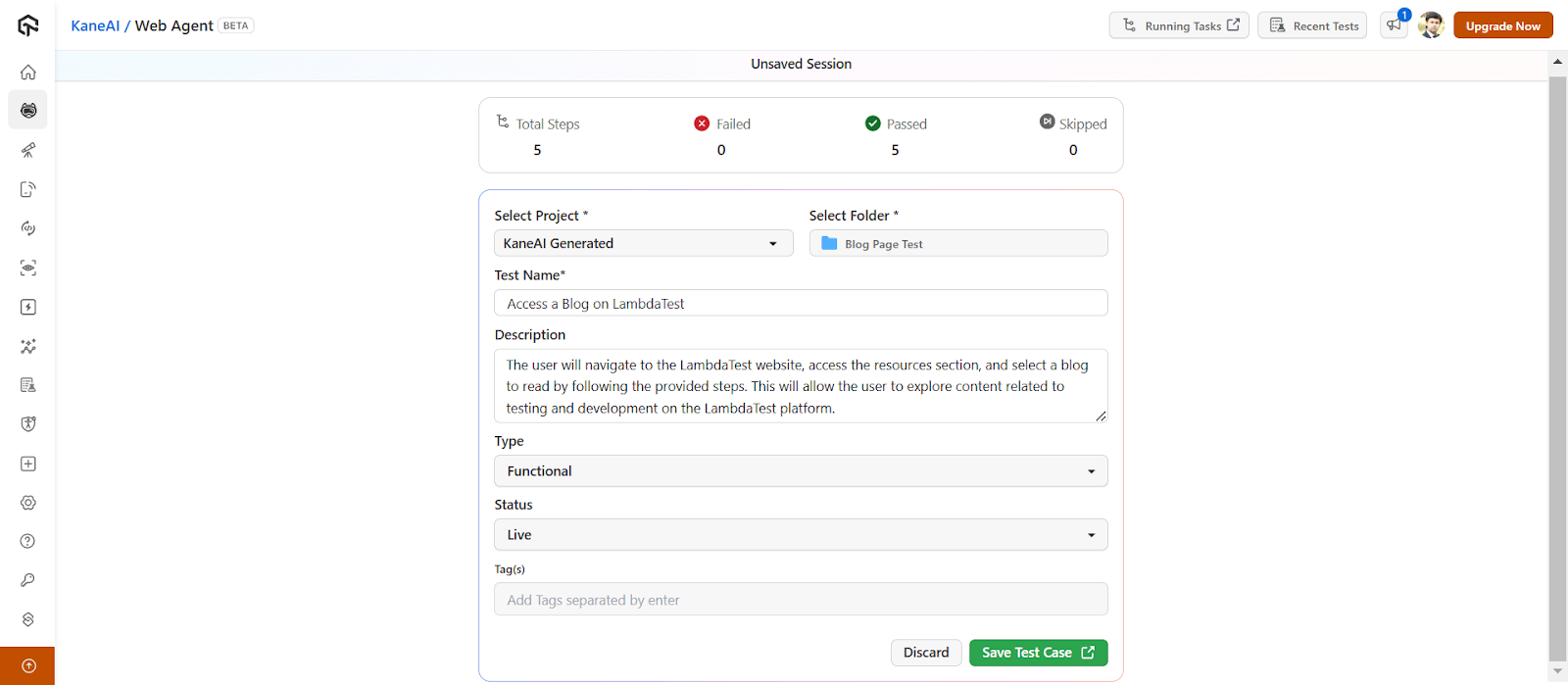
- Select the Folder where you want to save tests and choose Type and Status. You can also modify other details if need be. Then, click on the Save Test Case button.
- To generate your tests for the above test cases, click on the Code tab.
- Generate new Code: Generates new code in a different language or framework for the same test case.
- HyperExecute: Triggers tests on the TestMu AI HyperExecute platform.
- View code: Opens the code in a built-in editor to edit code files and download them.
- Download: Lets you download the entire generated tests (with code files).
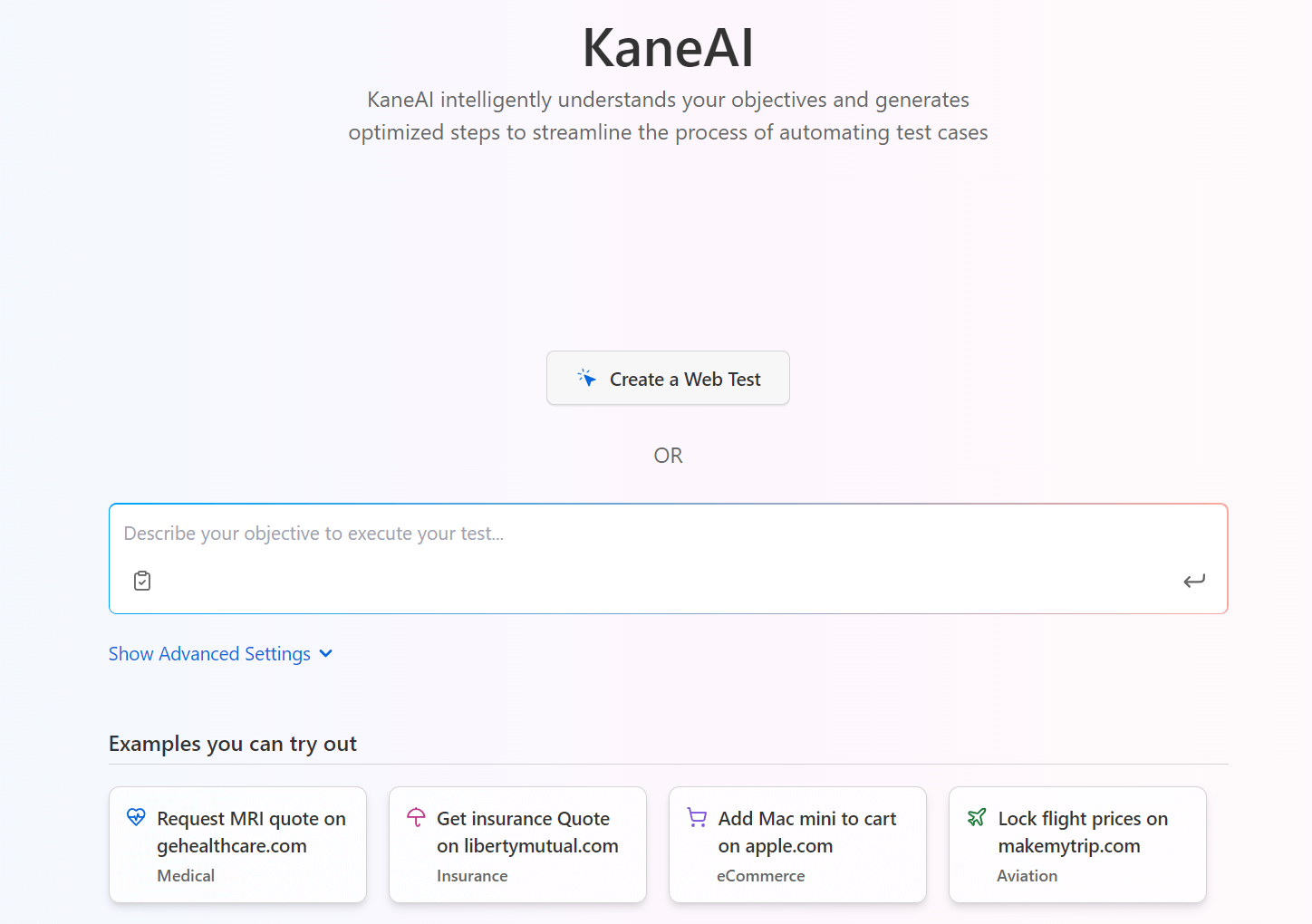
It will initiate the browser agent and provide a separate panel to generate tests. The tester can choose to either write test cases here or interact with the application manually to generate test cases. Since we are discussing the role of artificial intelligence in automated software testing, let’s generate tests through manual mode.
You can see all the above test steps (or actions) are converted to test cases:
As you can notice, AI has filled up all the required fields automatically to save tester time.
It will now redirect you to the TestMu AI Test Management, where you can manage your test cases. You can also view other details like Summary, Code, Runs, Issues, and Version History.
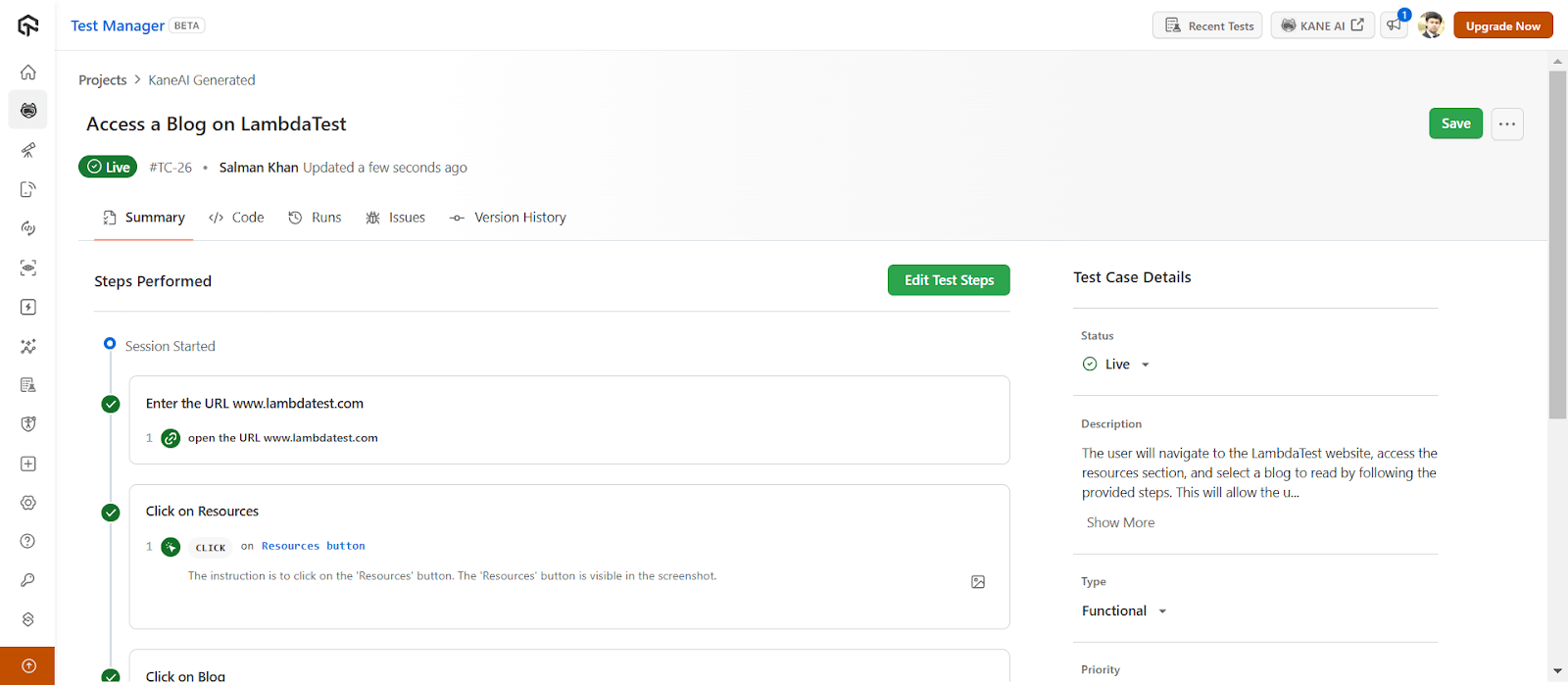
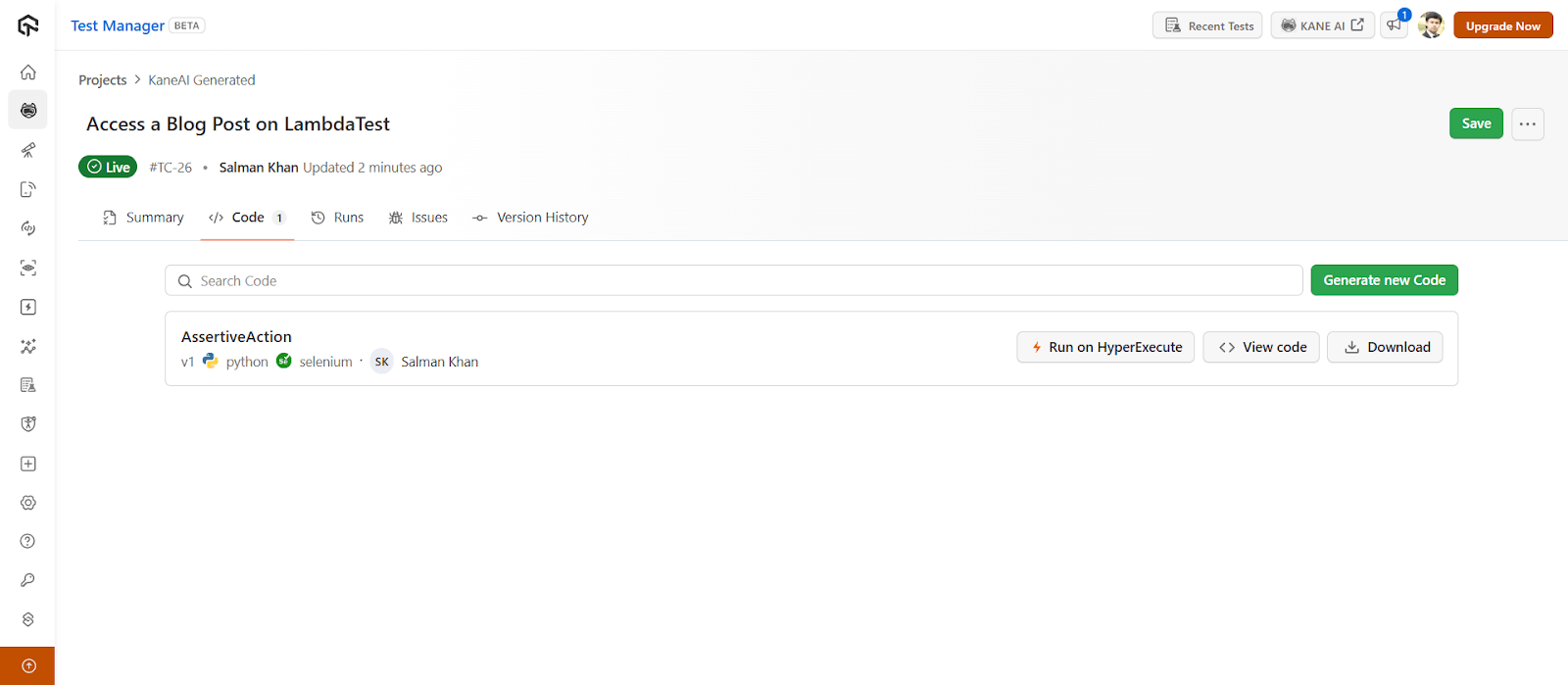
You will notice the following options and go ahead with the one that you need:
To get started, refer to this getting started guide on KaneAI.

With the rise of AI in testing, its crucial to stay competitive by upskilling or polishing your skillsets. The KaneAI Certification proves your hands-on AI testing skills and positions you as a future-ready, high-value QA professional.

Austin Siewert
Co-Founder, Steadfast Systems
Discovered @TestMu AI yesterday. Best browser testing tool I've found for my use case. Great pricing model for the limited testing I do 👏
2M+ Devs and QAs rely on TestMu AI
Deliver immersive digital experiences with Next-Generation Mobile Apps and Cross Browser Testing Cloud

Generating Tests With ChatGPT
ChatGPT is a Generative AI platform that takes a text-based input, analyzes it with natural language processing, and provides an output for the same. It can be used to generate tests with AI by simply asking the tool to generate test scripts directly.
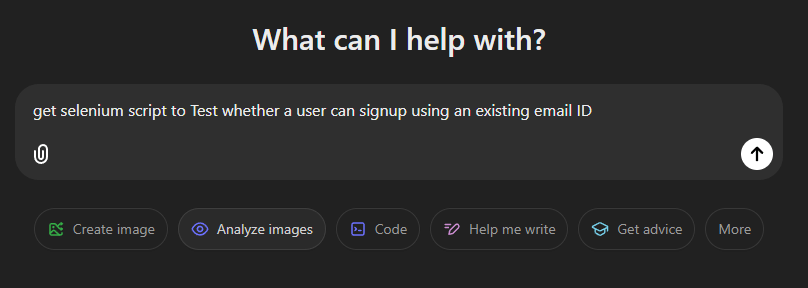
For instance, let’s say you want to test whether a user can sign up using an existing email address.
- Enter the above test scenario directly into the ChatGPT input field:
- Press Enter to get the output. This is a complete test script (with comments) for the test scenario we requested. The whole process took less than 10 seconds which would have otherwise taken at least 15-20 minutes manually.
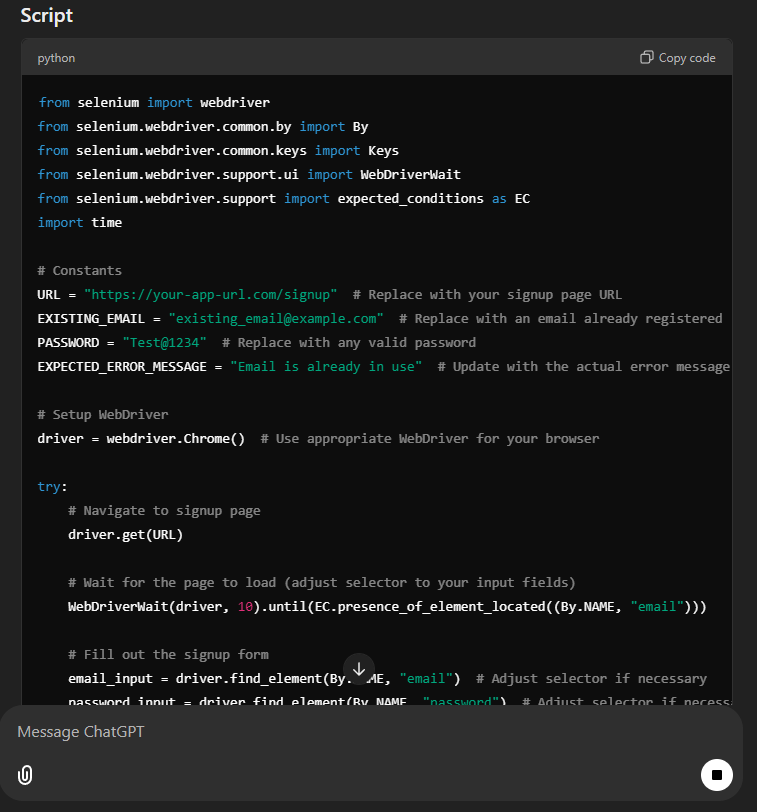
ChatGPT is an excellent way to generate tests with AI. However, the only downside is that the tester has to do some post-script generation work as well. For instance, here, they need to integrate this piece of code with their existing test suite and replace every variable accordingly.
It becomes complex as the suite grows. ChatGPT Work can also carry out plain-language steps on supported websites in a cloud browser that clicks buttons and enters information into forms.
Generating Tests With Claude
Claude is an interesting approach to performing automation testing with the help of AI. It provides an input box, just like ChatGPT, where the tester can put down the scenario to perform, and Claude takes care of the rest.
It loves open-ended conversations, and therefore the tester need not follow a strict instruction-based approach in English. They can write a paragraph about what they want to do, and the tool will analyze, understand, and perform actions on it.
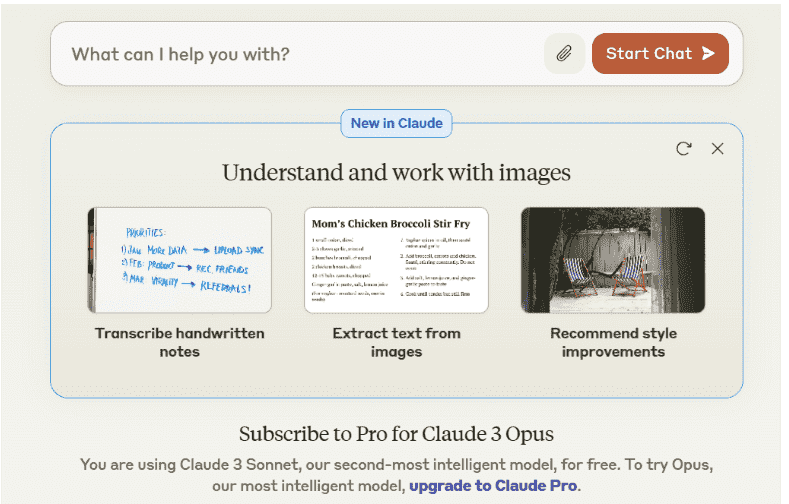
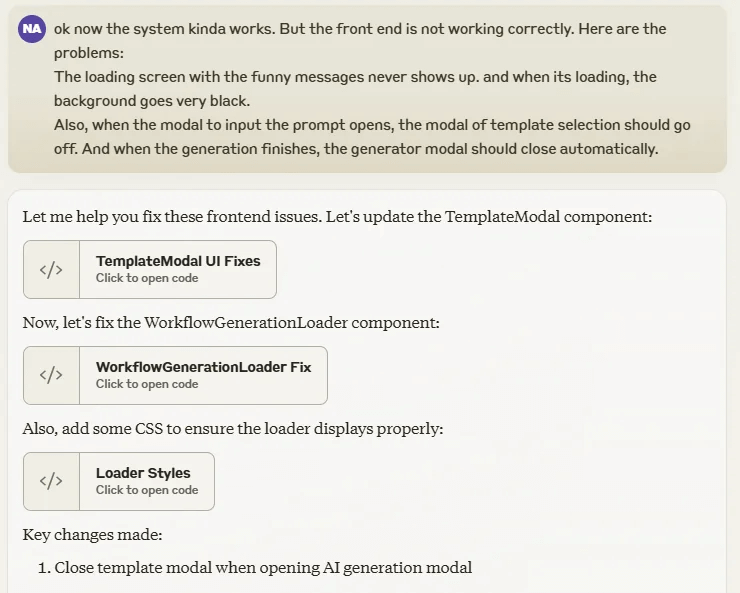
Claude is powerful and focused on transparency and accuracy. It can not only help perform certain automation tasks but can detect bugs and fix the errors in the codebase. All the tester needs to do is tell their query in the input field.
Just like ChatGPT, Claude, too is not limited to just code generation and analysis. You can perform almost any task using Claude, including providing a summary or understanding a piece of code written in any programming language.
Claude in Chrome is generally available on all paid Claude plans, and it clicks, types and fills forms on the page a user is signed in to.
Claude can also operate a computer through computer use. The Claude computer use tool documentation describes the computer_toolset_20260801 toolset. The toolset gives Claude 17 member tools, such as screenshot, left_click and type, and needs no beta header on the Claude API. For tasks that stay inside webpages, the same documentation points to a separate browser use tool.
AI can also support exploratory testing, dynamically interacting with applications to uncover hidden issues. Unlike scripted tests, it can adapt and explore different paths on its own. Watch this video to see exploratory testing with AI in action:

How to Generate Unit Tests With AI?
Give an AI assistant the full source file and name your test framework, then run the unit tests it returns and fix any failures before you commit them.
IDE assistants read the open file and the code around it, while a chat session sees only the code you share with it.
- JetBrains AI Assistant: Place the caret in a class or method, open the context menu, and select AI Actions, then Generate Unit Tests. The JetBrains AI Assistant documentation says the test opens in an AI Diff tab, and Accept all saves it in the project's test module, which AI Assistant creates if the project has none.
- GitHub Copilot Chat: Open the source file in the current editor tab and type the /tests slash command. The GitHub Copilot testing guide recommends opening existing test files in adjacent tabs so Copilot matches your testing framework.
- ChatGPT or Claude chat: Start a new chat session, paste the entire source file, and name the stack, such as Vitest with React Testing Library, in a short prompt. A fresh session keeps context from other files out of the answer.
PyCharm's AI Assistant generates tests for the project's default test runner. The Copilot testing guide covers Visual Studio, Visual Studio Code and JetBrains IDEs.
Can AI Agents Generate and Repair Browser Tests Through MCP?
Yes. Through the Model Context Protocol, an AI agent drives a real browser with Playwright, writes a test plan, generates the test code and repairs tests that fail.
The Model Context Protocol (MCP) is an open-source standard for connecting AI applications to external systems. The Playwright MCP server uses it to let an LLM act on web pages through structured accessibility snapshots instead of screenshots.
Playwright 1.56 introduced three Playwright Test Agents that split AI test generation into planning, writing and repair.
- Planner agent: The planner explores the app from a seed test and saves a Markdown test plan, such as specs/basic-operations.md, with steps and expected results.
- Generator agent: The generator turns the Markdown plan into Playwright test files under tests/ and verifies selectors and assertions live as it performs each scenario.
- Healer agent: The healer replays a failing test, inspects the current UI, patches a locator, wait or data value, and reruns the test until it passes or guardrails stop the loop.
- Agent setup: The npx playwright init-agents command adds the agent definitions for VS Code, Claude Code, Codex or OpenCode. Playwright 1.62 also bundles the MCP server, which runs with npx playwright mcp.
The Playwright MCP README notes that coding agents increasingly prefer the Playwright CLI, because CLI calls avoid loading large tool schemas and accessibility trees into the model context. MCP remains relevant for self-healing tests and long exploratory runs, where a continuous browser context outweighs the token cost.
Agents that learn expected results by exploring the running app can write assertions from its current behavior, so a bug can become the expected result.
The healer also returns a skipped test when it believes a feature is broken. A tester should review every generated assertion and every skipped test before the suite is merged.
How to Review and Refine AI-Generated Tests?
Treat AI-generated tests as first drafts: run them, check every assertion against the requirement, send failures back to the AI and add the cases it missed.
- Run every test: Add the generated file to the project and run it with the usual test command, such as yarn test, before you trust any result.
- Feed errors back: Paste a failing test's error message into the same AI session and ask for a fix, so the AI works from the code and prompt it already has.
- Check common defects: A Vitest walkthrough by Keyhole Software lists three: selectors that guess a data-testid the page does not have, missing act() wrappers around React state updates, and float assertions that need toBeCloseTo.
- Compare with requirements: Read each expected value against the requirement or acceptance criteria, not against what the application does today.
- Fill coverage gaps: Add tests for the scenarios the AI skipped, because GitHub's Copilot documentation warns that generated tests may not cover all scenarios.
- Keep the reviewed file: The same prompt can return a different test file on a later run, so commit the reviewed version instead of regenerating it.
How to Check Results and Coverage of AI-Generated Tests?
Run the generated tests with your usual test command, read the pass and fail report, then run a coverage report to see which statements and branches no test reaches.
- Results report: Some AI API testing tools run the tests they generate from an OpenAPI file right away, then show a report summary and a full HTML report with scores, errors and logs.
- Statement and branch coverage: In the Keyhole Software Vitest walkthrough, the yarn test:coverage command reported 100 percent statement coverage but 50 percent branch coverage for one React component, so read both columns.
- Pull request reports: Pull-request-based test generators post a report that lists what was tested, what was missed and how coverage changed.
- Reruns after API changes: Save the test generation configuration and rerun it after an API update, so each run uses the same settings and the results stay comparable.
How Does TestMu AI Test Management Generate Test Cases?
Testers enter a prompt, user story or requirement document, and AI returns a structured test case with steps, expected results, preconditions and priority to review and save.
Once the tests are generated, they need to be executed and, most importantly, managed regularly. In these situations, teams look for tools that go beyond prompt-based "input-output" features, and this is where TestMu AI's AI-native test management platform comes into the picture.
TestMu AI provides an AI-native unified test management that provides test case creation, management, triggering, and reporting all in one place. With TestMu AI, you can create test cases manually or using AI.
For demonstration, let’s look at how to create test cases with AI:
Note: Ensure you have access, If not, please contact sales.
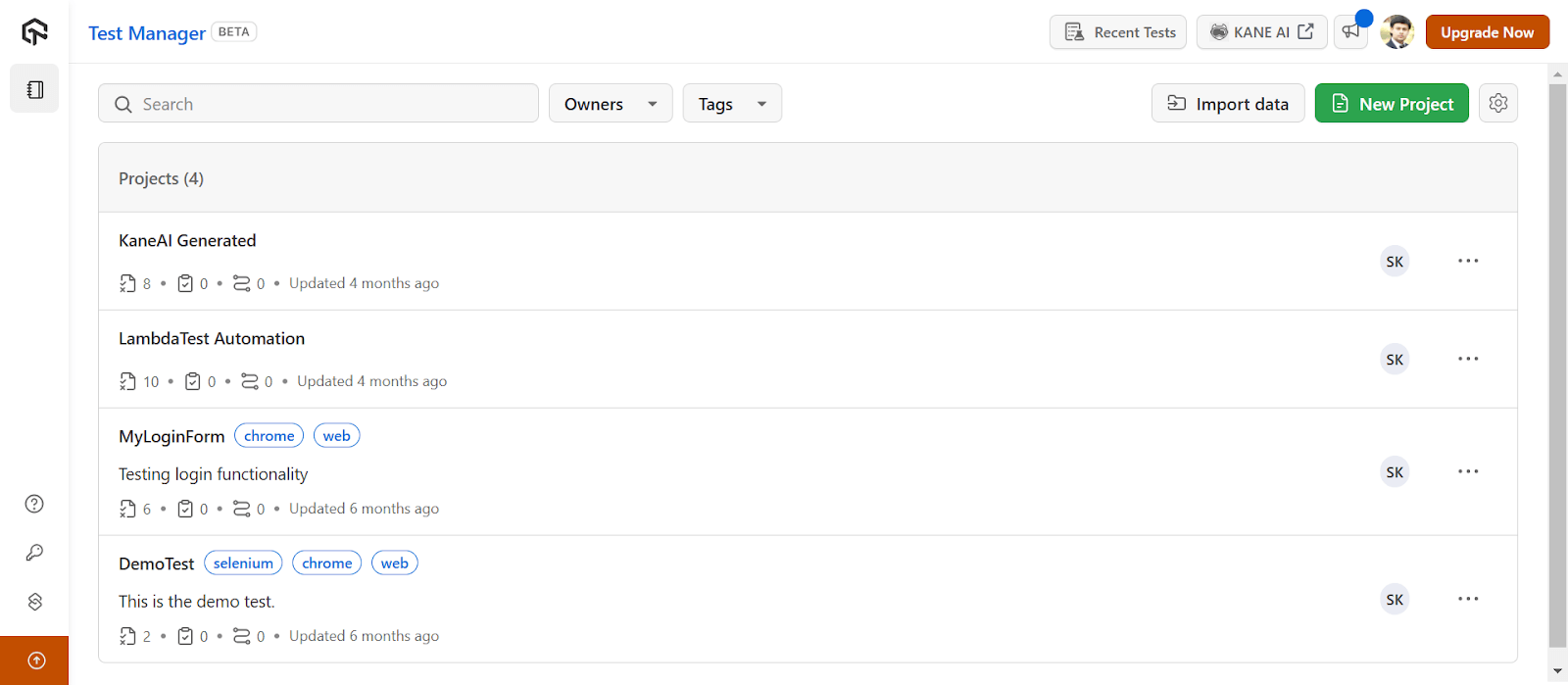
- From the top-right, click on the New Project button.
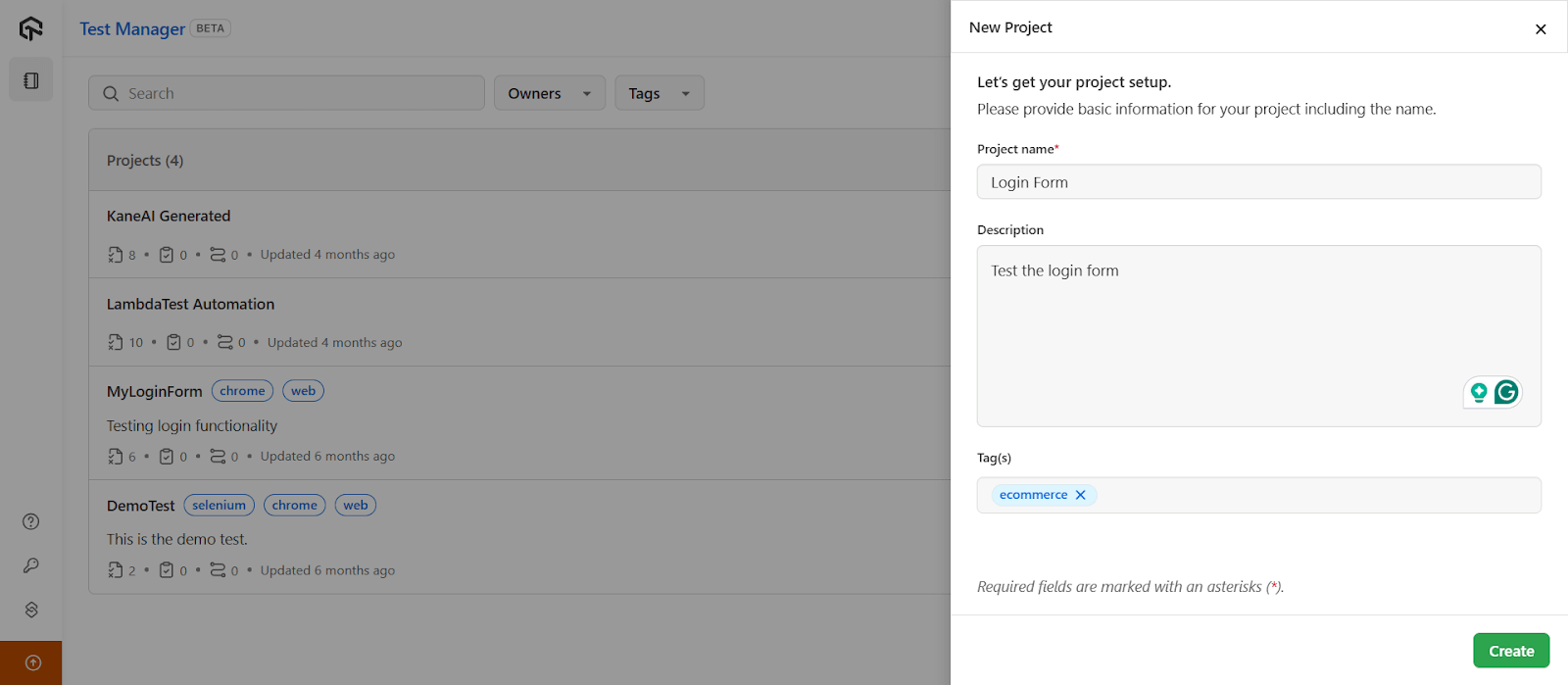
- Enter your Project name, Description and Tag(s) in the respective fields.
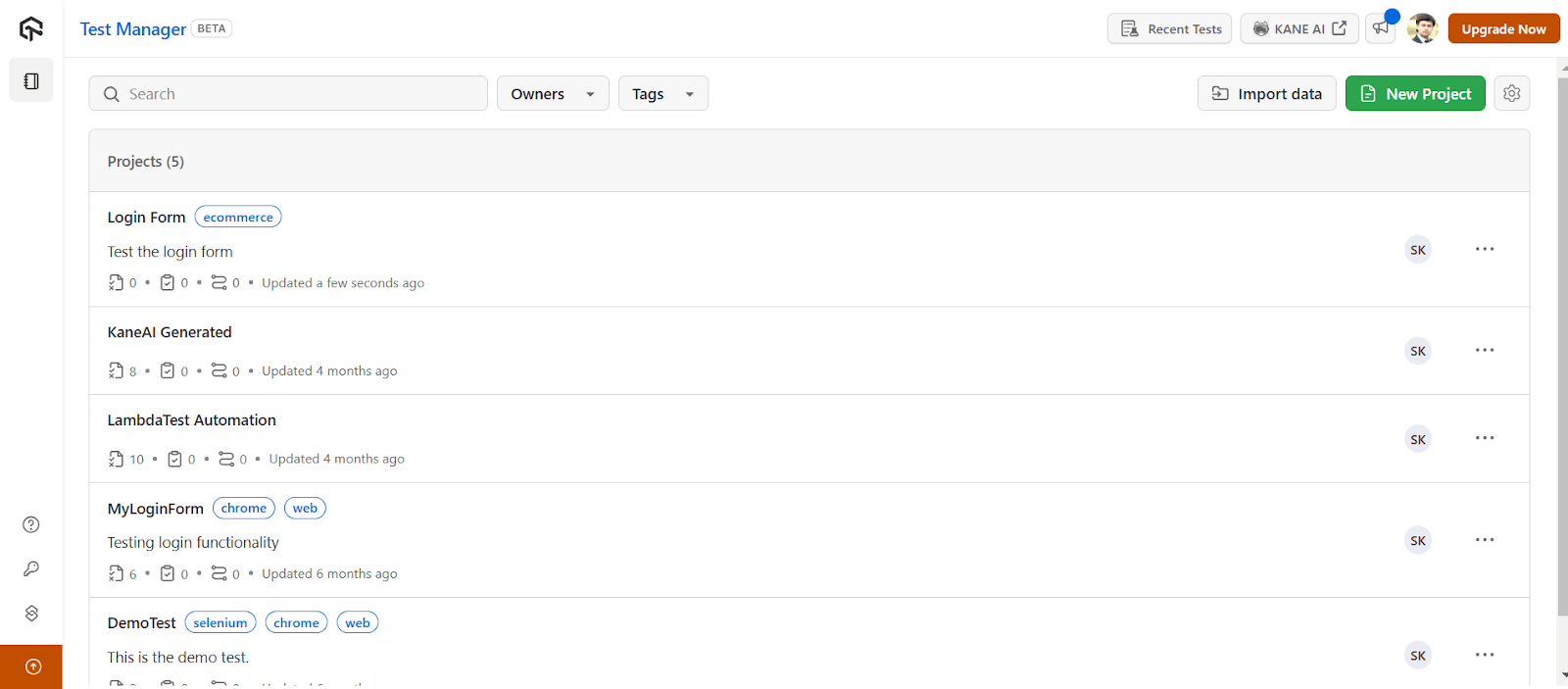
- Click on the Create button, and it takes you to the below screen.
- Click on the project name that you just created, and you will be routed to the Test Cases dashboard.
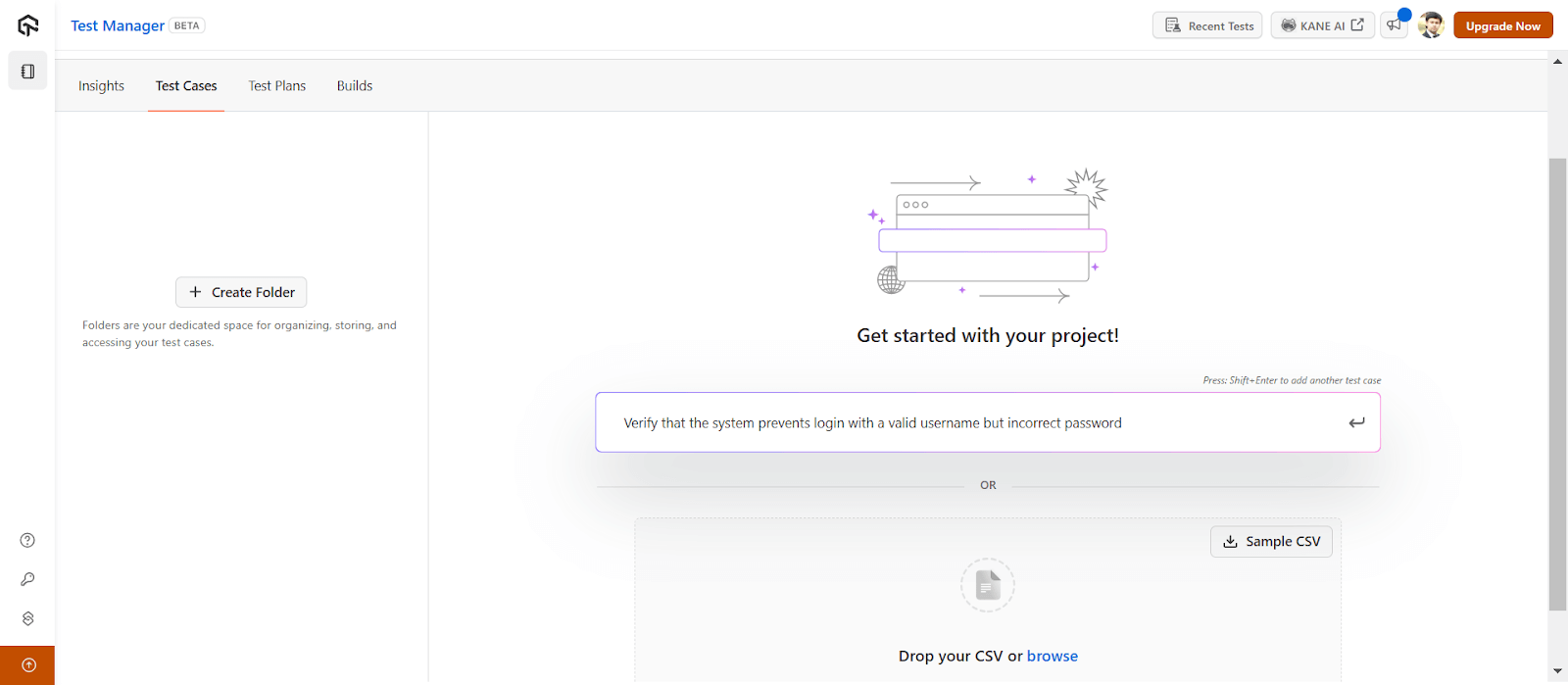
- Navigate to the prompt box and press the Tab key to generate test cases with AI. You can then press the Shift+Enter keys to generate multiple test cases. Once done, press the Enter key.
You can then organize your test cases efficiently by creating folders and subfolders. Additionally, you can copy and move test cases, export test cases and do much more.
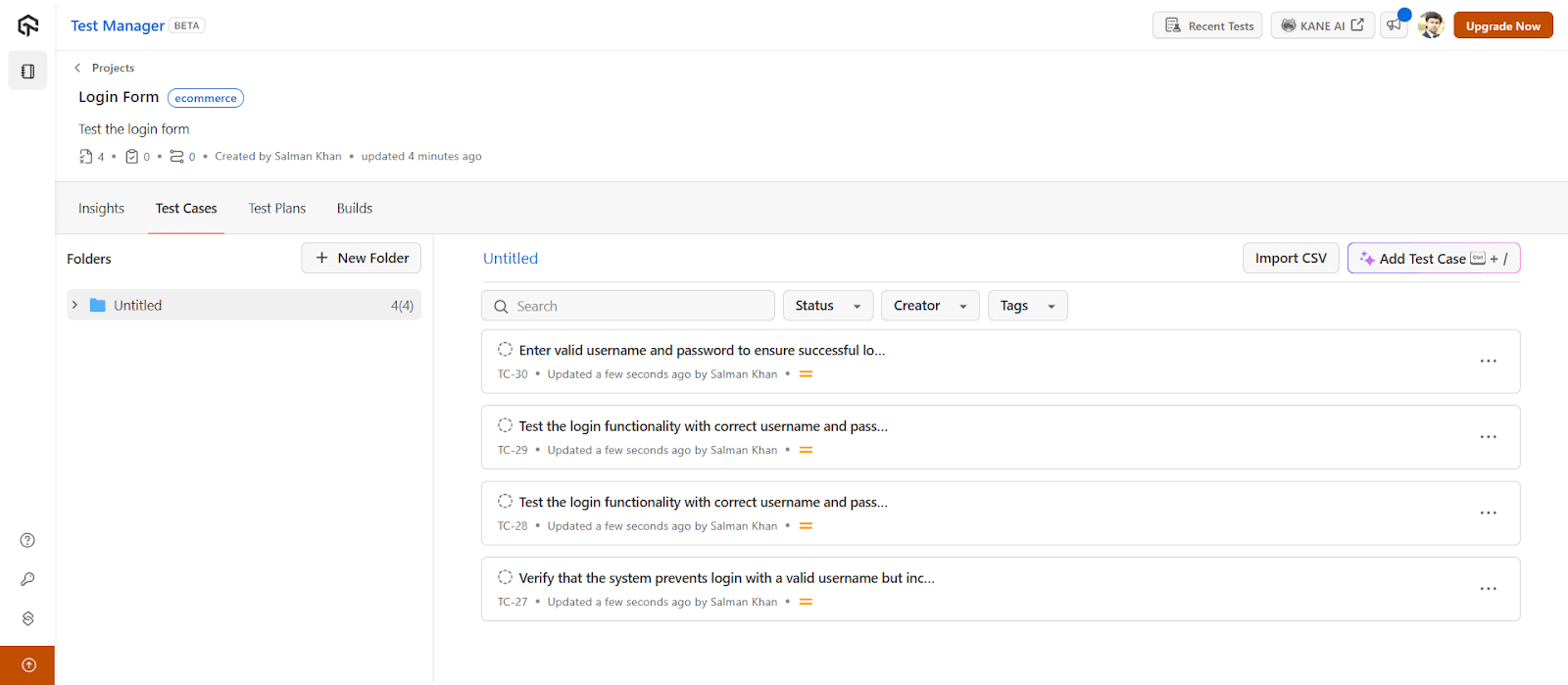
To get started, refer to this documentation on Introduction to Test Manager.

Note: Create and manage test cases with AI-native Test Management. Try TestMu AI Today!
Which AI Test Generation Method Should You Choose?
Choose by the job: AI chatbots such as ChatGPT and Claude draft one-off scripts, IDE assistants write unit tests, and testing agents also run, debug and report on tests.
Authoring tests in software testing is one of the most time-consuming jobs. The tester has to not only make sure the tests are maintainable and readable but also think about the coverage which sometimes can make things a bit complex. This challenge can be avoided by adopting AI in software testing to take care of the tasks that were performed manually.
It can be introduced at multiple levels, performing multiple types of jobs. Some might just be available to generate tests with AI, while some AI testing tools or test assistants like TestMu AI KaneAI can debug, fix errors, and generate test reports on their own.
Whatever method a tester opts for, AI is bound to get fabulous benefits and overcome the challenges of automation testing performed manually. It is a step ahead in getting an autonomous test infrastructure, something that we all aim for in the future.
Sources and References Used
Author

Harish Rajora
Blogs: 100


Harish Rajora is a software developer at TestMu AI with over 6 years of hands-on experience in Python and cross-platform application development across Windows, macOS, and Linux. He has authored 800+ technical articles and worked on large-scale projects, including GenAI applications and core engineering features used by millions. Harish has led DevOps initiatives building CI/CD pipelines with Jenkins, AWS, GitLab, and GitHub, and holds an M.Tech in Software Engineering from IIIT Allahabad.
Reviewer

Saurabh Prakash
Reviewer
Saurabh Prakash is an Engineering Manager at TestMu AI (formerly LambdaTest), where he leads engineering on agentic AI development and scalable system architecture for the quality engineering platform. He has also contributed to Test at Scale, the company's open-source test intelligence platform. He brings over 9 years of experience across Node.js, Java, Spring, MVC, data structures, algorithms, and scalable system design, with earlier roles as SDE 2 at Zomato, Senior Software Engineer at LogicHub, and Software Development Engineer at Directi. Saurabh holds a B.Tech in Computer Science and Engineering from Delhi Technological University.
Frequently Asked Questions on Generating Tests With AI
Did you find this page helpful?
More Related Blogs
TestMu AI forEnterprise
Get access to solutions built on Enterprise
grade security, privacy, & compliance
- Advanced access controls
- Advanced data retention rules
- Advanced Local Testing
- Premium Support options
- Early access to beta features
- Private Slack Channel
- Unlimited Manual Accessibility DevTools Tests