

Power Your Software Testing with AI Agents and Cloud
The Native AI-Agentic Cloud Platform to Supercharge Quality Engineering. Test Intelligently and Ship Faster.


- TestMu AI (Formerly LambdaTest)
- /
- Blog
- /
- Playwright Flaky Tests: How to Find and Fix Them
Playwright Flaky Tests: How to Find and Fix Them
Fix flaky Playwright tests: a signature table mapping error strings to root cause and fix, plus timing, locator, hydration, CI, and cross-browser fixes.
Published on:
If you are reading this, you already have flaky Playwright tests, and I have burned enough CI reruns on mine to know the fix is matching each failure to its cause, not adding a wait.
This guide maps the exact errors Playwright throws to their root cause and fix, then walks the specific flake sources: timing, locators, hydration, isolation, network, and cross-browser. Every snippet is pinned to Playwright 1.62.1.
TL;DR
Flaky Playwright tests come from non-determinism, not bad luck. Match the error string to its cause, reproduce with retries off, then fix the wait, locator, or state that varies between runs.
- Signature table - maps six real Playwright errors to root cause and fix.
- Reproduce first - hunt with --repeat-each and --retries=0; retries hide the bug.
- Fix the cause - web-first assertions, unique locators, and post-hydration waits.
- Isolate the environment - run on clean cloud browsers to kill CI and cross-browser drift.
- Track flake rate - gate CI with --fail-on-flaky-tests and analytics, not blind retries.
Why Do Playwright Tests Go Flaky
Playwright tests go flaky when a test leans on timing, element state, shared data, or environment that changes between runs, so identical code passes on one run and fails on the next.
Playwright removes a whole class of flake with auto-waiting and web-first assertions, which is why it wins many a Playwright vs Selenium vs Cypress debate.
The flake that survives is the interesting kind: it lives in your test design, your app's rendering, or the machine the test runs on.
Almost every case I debug falls into one of these buckets:
- Timing - waiting on the wrong signal, or a hard-coded sleep that is sometimes too short.
- Locators - a selector that matches zero or many elements as the DOM shifts.
- Rendering - hydration and animations that make an element look ready before it is.
- State - tests that share data or order, so one run pollutes the next.
- Environment - headless CI, slower runners, and per-engine rendering differences.
Failure Signatures: Error, Root Cause, Fix
Most flaky runs throw one of a handful of error strings, and each points at a specific cause. The table below maps the six I see most to root cause and fix.
| Error message | Root cause | Fix |
|---|---|---|
| Timeout 30000ms exceeded | A locator or assertion never reached its expected state, so auto-wait ran out the 30s test budget. | Assert the real condition with a web-first assertion; raise the timeout only for genuinely slow flows. |
| strict mode violation: resolved to N elements | The locator matched more than one element, so Playwright refused to guess. | Scope with getByRole and an accessible name, filter(), or a container; avoid nth() as a crutch. |
| element is not stable | The element was still animating or moving when Playwright tried to act on it. | Wait for the end state with toBeVisible, or disable animations in test. Never waitForTimeout. |
| Target page, context or browser has been closed | Code touched a page or context after it was closed, or the browser crashed or ran out of memory. | Use the built-in page and context fixtures, await popups before use, and do not close early. |
| Element is not visible | The element has an empty box, display:none, or is hidden behind another element. | Assert toBeVisible before acting, and scope to the shown instance if duplicates exist. |
| Execution context was destroyed, most likely because of a navigation | JS ran in a document that a navigation replaced, usually via a stored ElementHandle. | Use locators, which re-query on each retry, and prefer waitForURL over waitForNavigation. |
The pattern is consistent: the error names the symptom, and the fix is almost never a longer timeout. The rest of this guide expands each row into a working fix.

Note: Run flaky Playwright specs on clean, isolated cloud browsers. Try TestMu AI Today!
How Do You Reproduce a Flaky Playwright Test
You cannot fix what you cannot reproduce. The first thing I do is turn retries off, because retries hide the exact failure you are hunting, then run the suspect test many times.
# Playwright 1.62.1
# Hammer one test with retries off, single worker for a clean signal
npx playwright test tests/checkout.spec.ts --repeat-each=50 --retries=0 --workers=1

# Add contention back to surface isolation and race bugs
npx playwright test tests/checkout.spec.ts --repeat-each=50 --retries=0 --workers=4
Run once with a single worker for a clean signal, then again with several workers to expose isolation and shared-state races that only appear under parallelism.
In CI, add a gate that fails the build when a test only passed on retry, so masked flake cannot ship green:
# Playwright 1.62.1 - fail the run if any test was flagged flaky
npx playwright test --fail-on-flaky-tests
Keep the trace on for the first failing retry so you can replay the exact run instead of guessing from a stack trace.
How Do You Fix Playwright Timing Issues
Most timing flake is a hard-coded sleep or a wait on the wrong signal. Playwright already auto-waits for actionability, so lean on that instead of guessing.
Replace Hard Waits With Assertions
Drop the fixed sleep and assert the condition you actually care about, which auto-retries to the expect timeout:
// Playwright 1.62.1
// Flaky: a fixed sleep is a guess that is sometimes too short
await page.waitForTimeout(2000);
await page.getByRole('button', { name: 'Save' }).click();

// Stable: assert the real condition, which auto-retries to the expect timeout
await expect(page.getByRole('heading', { name: 'Dashboard' })).toBeVisible();
await page.getByRole('button', { name: 'Save' }).click();
Poll Values That Settle
When a value settles over time, such as a total that updates after a fetch, poll the assertion instead of sleeping. Use expect.poll for a value or toPass to retry a whole block:
// Playwright 1.62.1
// Retry an assertion until the API-backed total is correct
await expect(async () => {
  const total = await page.getByTestId('cart-total').innerText();
  expect(total).toBe('$120.00');
}).toPass({ timeout: 10_000 });
How Do You Fix Flaky Playwright Locators
Locators are strict by design: an action on a locator that matches more than one element throws instead of guessing. The "strict mode violation" error is telling you the selector is ambiguous.
// Playwright 1.62.1
// Flaky: matches every "Delete" on the page as rows render
await page.locator('button:has-text("Delete")').click();

// Stable: a user-facing role and name, scoped to the row
await page
  .getByRole('row', { name: 'Invoice 1043' })
  .getByRole('button', { name: 'Delete' })
  .click();
Reach for getByRole, getByLabel, or getByTestId first, then filter() or a parent locator to disambiguate. Positional nth() and first() are last resorts, since they break the moment the DOM reorders.
Structuring these into a Page Object Model keeps selectors in one place, so a markup change is a one-line fix instead of a suite-wide edit.
Why Do Playwright Clicks Fail on Hydrated Pages
This one cost me a full afternoon. React, Vue, and Next.js ship server-rendered HTML, then attach event handlers during hydration.
The button is visible and enabled, so Playwright clicks it, but the handler is not wired yet and the click does nothing.
Every actionability check passes, the test still fails, and it only reproduces when hydration is slow. The fix is to give Playwright a signal that the control is truly interactive.
// Playwright 1.62.1
// App: keep the control disabled until the component has mounted/hydrated
//   <button disabled={!hydrated} onClick={submit}>Submit</button>

// Test: wait for the enabled (interactive) state, not just visibility
const submit = page.getByRole('button', { name: 'Submit' });
await expect(submit).toBeEnabled();   // waits for post-hydration state
await submit.click();
If you cannot change the app, expose a post-hydration flag and wait on it, so the test never races the framework:
// Playwright 1.62.1
// App sets window.__APP_HYDRATED = true after hydration
await page.waitForFunction(() => window.__APP_HYDRATED === true);
Why Do Parallel Playwright Tests Flake
Playwright runs files in parallel across worker processes, each with its own browser context. Flake shows up when tests quietly share state: the same login, a fixed record ID, or a run order.
The tell is a test that passes with --workers=1 and fails with --workers=4. Give each test its own data and its own context, and stop depending on run order.
// Playwright 1.62.1
// Flaky: a shared account two workers mutate at once
test('updates profile', async ({ page }) => { /* uses shared user@test.com */ });

// Stable: unique data per test, isolated context from the fixture
test('updates profile', async ({ page }, testInfo) => {
  const email = `user+${testInfo.testId}@test.com`;
  await createUser(email);
  // ... assertions scoped to this user only
});
Avoid test.describe.serial unless the tests genuinely form one flow. Serial mode trades isolation for order, and a failure early in the chain fails the rest.
How Do You Fix Network and API Flakiness
Real backends are slow and sometimes wrong, so asserting UI state right after an action races the response. Wait for that response, or mock it when the test is not about the backend.
// Playwright 1.62.1
// Wait for the exact response before asserting the UI it drives
await Promise.all([
  page.waitForResponse(r => r.url().includes('/api/orders') && r.ok()),
  page.getByRole('button', { name: 'Place order' }).click(),
]);
await expect(page.getByText('Order confirmed')).toBeVisible();

// Or remove the network entirely for deterministic UI tests
await page.route('**/api/orders', route =>
  route.fulfill({ json: { id: 'ord_1', status: 'confirmed' } }));
Mock third-party calls you do not own, such as payments or maps. They are the most common source of flake that no amount of waiting will fix.
Why Do Tests Flake in WebKit or Firefox but Not Chromium
Playwright ships patched Firefox and WebKit builds, and they genuinely render and behave differently from Chromium. A test that is rock solid in Chromium can flake in one engine only.
- WebKit - shifts text by sub-pixels between runs, which intermittently breaks screenshot comparisons.
- Firefox and WebKit - render fonts differently from Chromium, so one baseline snapshot fails on the others.
- Firefox and WebKit - occasionally flake on input fill where the same script is stable in Chromium.
For visual tests, keep a separate baseline per browser and platform rather than one shared image. For interaction flake, prefer web-first assertions over raw fill and confirm the engine on a consistent environment.
Why Does a Playwright Test Pass Locally but Fail in CI
"Works on my machine" is the classic Playwright flake. In a continuous integration and continuous delivery (CI/CD) pipeline, tests run headless on shared, slower runners.
Different fonts, viewports, and other jobs competing for CPU shift timing and rendering, so a test that is stable locally breaks in CI.
Reproduce it by matching CI locally: run headless, pin the viewport, and add worker contention. If it only breaks under load, the fix is a resilient wait, not a longer one.
# Playwright 1.62.1 - mimic a busy CI runner locally
npx playwright test --headed=false --workers=4 --repeat-each=20
Running on clean, identical cloud browsers removes the drift entirely, since every run starts from the same isolated environment instead of a shared runner.
Remove Environmental Flake With a Cloud Grid
That clean-environment fix is the one worth leaning into. You can nail every wait and locator in this guide and still lose a morning to flake that only shows up on the CI runner.
When I hit that wall, I stop fighting the environment and standardize it: I run the suite on the Playwright testing cloud from TestMu AI, so every run starts clean and isolated.
Key Features for Addressing Flakiness
On top of the clean environment, it handles the parts I would otherwise do by hand:
- Auto-healing - broken locators self-heal at runtime with autoHeal: true, so a minor DOM change does not fail the run.
- Flaky-test analytics - Test Insights ranks tests by history, so you fix the worst offenders first, not one red build.
- Smart retries - transient network and infra blips get absorbed, while real assertion failures still fail, so a passing run is trustworthy.
- Clean parallel grids - no local drift and no shared-runner contention, so local runs and CI agree.
This two-minute walkthrough shows how the analytics surface and rank flaky groups:
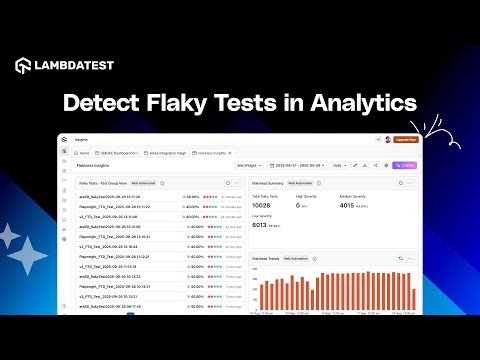
The Playwright auto-healing documentation shows the exact config, and the Test Insights documentation covers the dashboards.
Trying it is cheap: create a free account, point your playwright.config at the grid, and your existing suite runs on clean browsers with no rewrite.

Should You Use Retries for Flaky Tests
When retries are on, a failing test restarts in a fresh worker and browser, and a test that then passes is reported as flaky rather than passed. That distinction is the useful part.
Retries keep CI moving through externalities, but they mask flake, so a bug that shows one run in five still ships green. Hunt with retries off, then reserve them for CI resilience.
The Playwright retries documentation covers the worker-process mechanics in depth.
Track the flaky count over time instead of clearing each red build. A rising flake rate is a signal to fix tests, not to add another retry.
How Do You Prevent Flaky Tests
The cheapest flaky test is the one you never write. I hold new tests to a short checklist before they merge:
- Web-first assertions - assert conditions with expect, never a raw waitForTimeout.
- Role-based locators - target getByRole or getByTestId, not brittle CSS or XPath chains.
- Own your data - create per-test data so nothing is shared across workers.
- Pin the version - keep the whole team on one Playwright version, here 1.62.1.
- Loop before merge - run new tests with --repeat-each=20 in review to catch flake early.
A test that survives twenty back-to-back runs on a clean environment is one you can trust in CI. That is the bar worth holding.
Conclusion
Flaky Playwright tests are not random; they are non-determinism you can name. Match your error to the signature table, reproduce it with retries off, and fix the wait, locator, or state underneath it.
The tests that stay green are built on web-first assertions and run in a clean, consistent environment. Fix the cause once, and a red build starts meaning something again.
Author

Salman Khan
Blogs: 139


Salman is a Test Automation Evangelist and Community Contributor at TestMu AI, with over 6 years of hands-on experience in software testing and automation. He has completed his Master of Technology in Computer Science and Engineering, demonstrating strong technical expertise in software development, testing, AI agents and LLMs. He is certified in KaneAI, Automation Testing, Selenium, Cypress, Playwright, and Appium, with deep experience in CI/CD pipelines, cross-browser testing, AI in testing, and mobile automation. Salman works closely with engineering teams to convert complex testing concepts into actionable, developer-first content. Salman has authored 120+ technical tutorials, guides, and documentation on test automation, web development, and related domains, making him a strong voice in the QA and testing community.
Reviewer

Srinivasan Sekar
Reviewer
Srinivasan Sekar is Director of Engineering at TestMu AI (formerly LambdaTest), where he leads engineering and open-source initiatives behind the Selenium and Appium automation grid and owns TestMu AI's MCP Server. A committer to Appium and a contributor to Selenium, WebdriverIO, Taiko, and AppiumTestDistribution, he brings over 15 years of experience in quality engineering and open-source technologies. He is the author of the Apress book 'The MCP Standard: A Developer's Guide to Building Universal AI Tools with the Model Context Protocol,' a Certified Kubernetes and Cloud Native Associate, and an international conference speaker. Before TestMu AI he spent over eight years at Thoughtworks as a Principal Consultant and Quality Architect. Srinivasan holds a B.Tech in Information Technology from Anna University.


Playwright Flaky Tests FAQs
Did you find this page helpful?
More Related Blogs
TestMu AI forEnterprise
Get access to solutions built on Enterprise
grade security, privacy, & compliance
- Advanced access controls
- Advanced data retention rules
- Advanced Local Testing
- Premium Support options
- Early access to beta features
- Private Slack Channel
- Unlimited Manual Accessibility DevTools Tests