

Power Your Software Testing with AI Agents and Cloud
The Native AI-Agentic Cloud Platform to Supercharge Quality Engineering. Test Intelligently and Ship Faster.


- TestMu AI (Formerly LambdaTest)
- /
- Blog
- /
- Playwright MCP Server: Setup, Tools, and AI Agent Workflows
Playwright MCP Server: Setup, Tools, and AI Agent Workflows
Set up the Playwright MCP server in Claude Code, Cursor, and VS Code, see which browser tools it exposes, and run AI agents that write and self-heal tests.
Last Updated on:
Test automation has a quiet, recurring failure mode: it isn't the application that breaks, it's the description we wrote of it. A renamed CSS class or reordered DOM node can take down dozens of tests overnight, even when the product works fine. Teams respond by hiring more SDETs to chase locators, but that isn't scaling; it's treading water.
This is exactly why AI and Playwright MCP matter right now. Playwright MCP exposes browser automation as tools that an AI agent can call directly, rather than a fixed script. Give the agent a goal, and it decides how to get there, adapting when the UI shifts instead of failing.
This shift from scripted to goal-driven automation is what people mean by Playwright with AI: a fundamentally different relationship between tests and the application they validate.
This approach is also aligned with the idea of vibe testing with Playwright, where engineers describe the testing intent in natural language, and AI agents help translate that intent into executable automation workflows.
TL;DR
Playwright MCP is Microsoft's official Model Context Protocol server for Playwright. It exposes browser automation as callable tools, so an AI agent works from a stated goal instead of a fixed script. It is free, open source, and runs locally.
- Model Context Protocol (MCP): Anthropic's open standard connects language models to external tools, so any compliant client pairs with any compliant server.
- Playwright MCP: Microsoft's official server drives browsers from the accessibility tree, not screenshots. Free, open source, and it needs no filesystem access.
- How to install Playwright MCP: Published to npm as
@playwright/mcp, run withnpx @playwright/mcp@latest. Needs Node.js 18 or newer, no global install. - Available browser tools: Playwright MCP exposes callable
browser_*tools such asbrowser_snapshot,browser_navigate, andbrowser_click, plus opt-in vision, PDF, and network groups. - Playwright CLI: The
@playwright/clipackage is the token-efficient alternative, writing snapshots to disk instead of inline, so it does need filesystem access. - Playwright planner agent: Explores the application through Playwright MCP and turns a high-level goal into a readable Markdown test plan.
- Playwright generator agent: Converts that Markdown plan into executable Playwright test files, validating locators against the live page as it writes.
- Playwright healer agent: Replays a failing test, finds an equivalent element, and repairs the locator, or reports that the feature itself is broken.
- Supported MCP clients: VS Code, Cursor, Claude Code, Claude Desktop, Windsurf, and Codex all connect to Playwright MCP.
- TestMu AI MCP Server: Connects your local AI agent to the test automation cloud to run tests across real browsers and operating systems.
- Playwright MCP is not built for CI. It emits traces and screenshots but no machine-readable test report, so committed specs still run through the Playwright test runner.
- Accessibility snapshots return inline by default, so longer agent sessions consume more context, and reading untrusted pages carries a risk of prompt injection.
Understanding Model Context Protocol (MCP)
The Model Context Protocol, introduced by Anthropic in late 2024, is an open standard that lets large language models communicate with external tools through a structured interface.
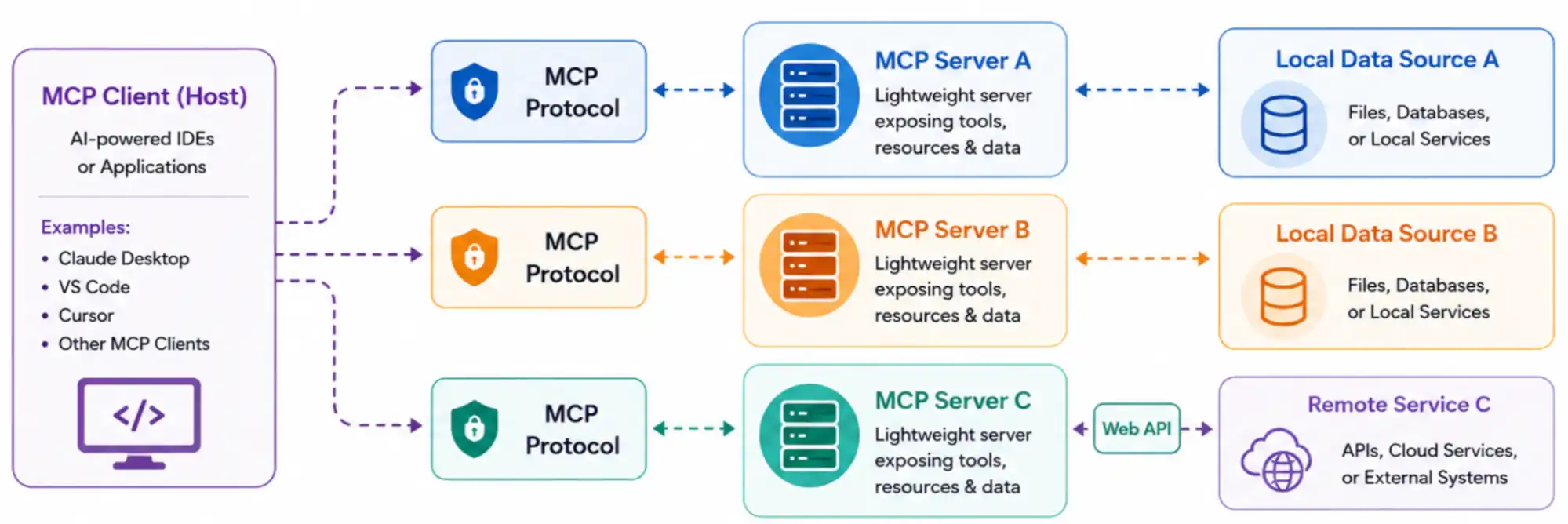
The practical effect is interoperability: any MCP-compliant client (Claude Desktop, Cursor, Claude Code, custom agents) can connect to any MCP-compliant server without a bespoke integration for each pairing.
One thing worth flagging before you wire this into a production pipeline: MCP gives an AI agent real, live control over a browser, which means the usual web security concerns now apply to your test automation too.
Versions of the Microsoft Playwright MCP server before 0.0.40 carried a disclosed DNS rebinding vulnerability, which was patched in that release.
Separately, any MCP server that reads page content carries a risk of prompt injection when the agent is pointed at untrusted pages. Keep the server updated, and treat page content the agent reads as untrusted input, the same way you would treat user input in your application code.
Working of MCP
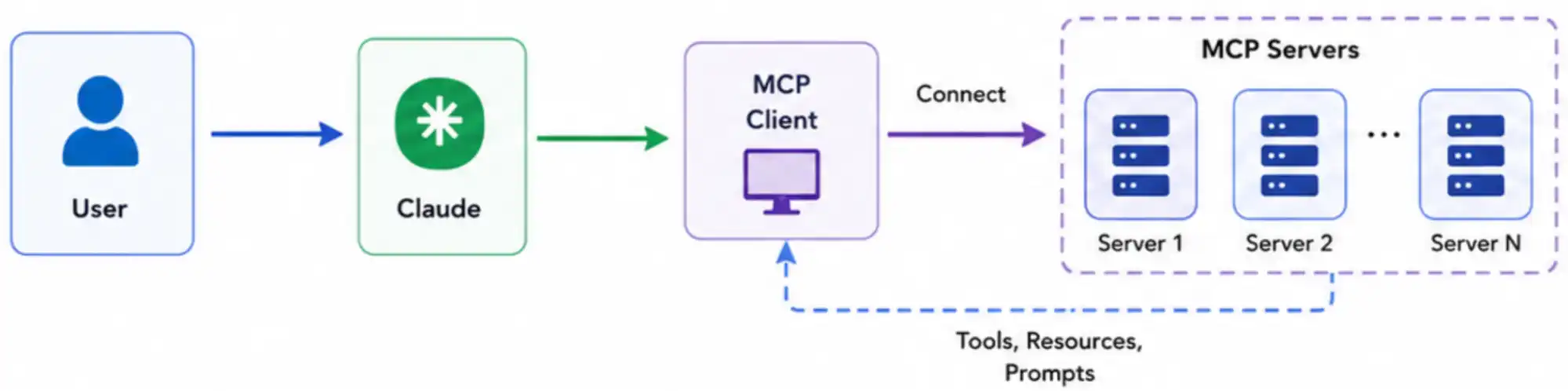
The process starts when the user sends a request to MCP clients/hosts like Claude Desktop, VS Code, and Cursor. MCP clients/hosts communicate with the MCP Client, which uses the MCP Protocol to securely connect and interact with multiple MCP Servers.
The MCP Protocol acts as a standardized communication layer between the client and servers.
MCP Servers expose tools, resources, and prompts that MCP clients/hosts can use to complete the requested task. After discovering the available capabilities, Claude selects the appropriate tool, executes the task, and returns the final response to the user in a secure, structured, and efficient manner.
What Playwright MCP Actually Is?
Playwright MCP is Microsoft's official MCP server wrapping the Playwright automation library, letting an agent pick which Playwright primitives to call from a stated goal, not a fixed script.
Instead of writing await page.locator('#submit').click(), you give the agent a goal, "Log in as a premium user and verify the dashboard loads the correct subscription tier," and the agent decides which Playwright primitives to call, in what order, and how to recover when something deviates.
Playwright MCP does not rely on screenshots and vision models for navigation by default, though a coordinate-based vision mode is available as an opt-in capability. It uses the browser's accessibility tree, a structured, semantic representation of the page that is faster, deterministic, and cheaper to feed to an LLM than raw pixels.
This is a meaningful design choice: it sidesteps the latency and token cost that have historically made vision-based agents impractical for large regression suites. Instead of treating the browser as a black box, MCP exposes the accessibility tree, page state, and Playwright actions to an LLM-powered agent, so it can "see" and interact with the app in real time.
At its core, Playwright MCP is a bridge between:
- An MCP client (usually your IDE or AI shell, like VS Code, Cursor, or Claude Desktop).
- An MCP server (the Playwright MCP server uses Playwright to control and interact with a real browser).
- A set of tools and resources, such as the accessibility tree, Playwright actions, locators and assertions.
When you send a prompt like "Write a test to log in to this page," the agent uses MCP to:
- Launch or attach to a browser launched by Playwright.
- Inspect the current page structure and identify elements using Playwright locators.
- Generate or modify Playwright-style code with the required interactions and validations based on what it observes.
The generated workflow can also include Playwright assertions to validate expected application behavior and confirm that the test scenario passes successfully.
Playwright MCP vs Playwright CLI
Playwright MCP and the Playwright CLI are two ways to hand a coding agent control of the same browser. MCP returns the page snapshot inline in the tool response, while the CLI writes it to disk for the agent to read on demand, which is why Playwright's own documentation rates the CLI's token cost as lower.
Which Playwright CLI Are You Comparing?
Most of the confusion around this question comes from the name. Three separate Playwright packages get called "the CLI", and only one of them is a genuine alternative to MCP.
@playwright/mcpis the MCP server your agent connects to as a set of callable browser tools. It is what the rest of this article sets up.@playwright/cliis the agent-facing command-line interface Microsoft first published to npm in January 2026. This is the real alternative: an agent session uses this or MCP, not both.@playwright/testis the long-standing test runner you invoke asnpx playwright test. It executes the specs your agents produce, so it complements MCP rather than competing with it.
That last distinction matters because it reverses the answer. Against the test runner there is no contest to settle, since the two run at different stages. Against @playwright/cli you are making a real either/or choice for the agent session. The trade-off at the protocol level, independent of Playwright, is covered in MCP vs CLI for AI agents.
Token Cost and Context Handling
Driving a browser through an agent is not free in tokens, and the two interfaces spend them differently. Playwright's CLI and MCP comparison rates MCP's token cost as "Higher" because tool schemas and snapshots sit in the model's context, and the CLI's as "Lower" because it produces concise output with skills loaded on demand.
Playwright's Playwright CLI documentation states that "CLI commands avoid loading large tool schemas and verbose accessibility trees into the model context". The same page shows where the page state goes instead: each snapshot is written to a timestamped YAML file under a .playwright-cli/ folder.
Treat published token-count benchmarks for this comparison with caution. Microsoft has not released per-task token figures for either interface, and the widely repeated numbers circulating on third-party blogs trace back to no primary source and disagree with each other by wide margins. The direction of the difference is documented; the magnitude is not.
| Axis | Playwright MCP | Playwright CLI |
|---|---|---|
| How the agent drives it | The LLM calls MCP tools with structured parameters through a persistent client connection. | The agent runs ordinary shell commands, the same way it runs any other terminal tool. |
| Token cost | Higher, because tool schemas and page snapshots occupy the model's context window. | Lower, because output is concise and agent skills are loaded only when needed. |
| Where the snapshot goes | Returned inline in the tool response by default, so the agent reads it from context. | Written to disk as a timestamped YAML file under the .playwright-cli/ folder. |
| Default browser mode | Headed, so you watch the agent work in a visible browser window. | Headless, which suits unattended runs and coding agents working in a terminal. |
| Filesystem access | Not required for the core loop, since snapshots come back in the response. | Required, because snapshots, traces, and configuration are all written to disk. |
| Best suited to | Specialized agentic loops and exploratory automation, per Playwright's own guidance. | Coding agents such as Claude Code and Copilot working across large codebases. |
Setting Up the Playwright CLI
The CLI installs globally and exposes a playwright-cli binary. Note that this is a different executable from the playwright binary that ships with the test runner, so the two do not collide.
npm install -g @playwright/cli@latest

playwright-cli goto https://www.testmuai.com/selenium-playground/
playwright-cli snapshot
Each command prints a snapshot reference rather than the page itself, pointing the agent at a file such as .playwright-cli/page-2026-02-14T19-22-42-679Z.yml. The agent opens that file only when it needs the detail, which is the whole basis of the token saving.
When to Use Each
- Your agent has no filesystem access, as with a chat-only MCP client, so the CLI path is unavailable and MCP is the only option.
- You are running a long agentic session in Claude Code or Copilot across a large repo, where context is the scarce resource and the CLI's on-demand snapshots pay off.
- You want the agent to reason iteratively over page structure, self-heal a failing locator, or explore an unfamiliar flow, which is the workload Playwright points at MCP.
- You need to execute a whole suite and gate a build on the result, in which case neither is the answer and
npx playwright testis.
Both packages drive a browser on the machine the agent is running on, which caps you at the browsers installed locally. If the constraint you are actually solving is coverage rather than context, a Playwright CLI alternative that runs the same automation against a cloud grid is the better comparison to make.
Can Playwright MCP Run in CI?
Playwright MCP is a tool surface for an agent loop rather than a test runner. Microsoft publishes a headless container image for it, so it can be deployed in a pipeline, but the documentation describes no reporters, no sharding, no retries, and no exit code you could gate a build on.
It does emit traces, video, and screenshots. What it does not produce is a machine-readable test report, so there is nothing for a CI job to pass or fail against.
The practical answer is a handoff. Agents author and repair specs locally through MCP, and those specs are ordinary Playwright test files, which the test runner then executes in CI with JUnit XML, an HTML report, sharding across machines, and a trace.zip per retry, all documented in Playwright's test CLI reference.

Note: Run Playwright tests at scale across 3,000+ browser and OS combinations with TestMu AI. Try TestMu AI now!
How to Install and Set Up the Playwright MCP Server
Install the Playwright MCP server by pointing your MCP client at npx @playwright/mcp@latest. That is a single code --add-mcp command in VS Code, claude mcp add in Claude Code, or an mcpServers block in Cursor, Claude Desktop, and Windsurf.
Prerequisites
- Node.js 18 or newer, which the Playwright MCP README lists as the requirement. Confirm with
node -vbefore you start. - An MCP-compatible client. VS Code, Cursor, Claude Code, Claude Desktop, Windsurf, and Codex all qualify, and the configuration differs slightly per client.
- No separate browser install step. The server downloads the browser it needs on first use, so there is nothing to run ahead of time.
- No global npm install. Running through
npxwith the@latesttag keeps you current, which matters because the package is still pre-1.0 and ships often.
The Configuration Every Client Shares
Most MCP clients read the same JSON shape. Where a client stores it differs, but the server definition itself does not:
{
  "mcpServers": {
    "playwright": {
      "command": "npx",
      "args": ["@playwright/mcp@latest"]
    }
  }
}
Claude Code and Codex add the server from the command line instead of a config file. Codex uses mcp_servers with an underscore in its TOML config, which is a common source of silent failures when copying a JSON example across:
# Claude Code
claude mcp add playwright npx @playwright/mcp@latest

# Codex
codex mcp add playwright npx "@playwright/mcp@latest"
For Cursor, Claude Desktop, and Windsurf, paste the mcpServers block above into the client's MCP configuration file and restart the client. One Windows caveat worth knowing before you copy the VS Code command below: the single-quoted JSON argument works in bash and zsh, but PowerShell and cmd parse quotes differently, so wrap the JSON in double quotes and escape the inner ones when running it there.
Approach 1: Configure the Playwright MCP Server Using Terminal
Pre-Condition: VS Code's code CLI command is installed.
- Run the command below.
code --add-mcp '{"name":"playwright","command":"npx","args":["@playwright/mcp@latest"]}'Once the above command is executed successfully, you will see a message called "Added MCP servers: playwright"

- Go to VS Code, press Ctrl+Shift+P (Windows) or Command+Shift+P (Mac). You will see a screen where you select the "MCP: List Servers" option.
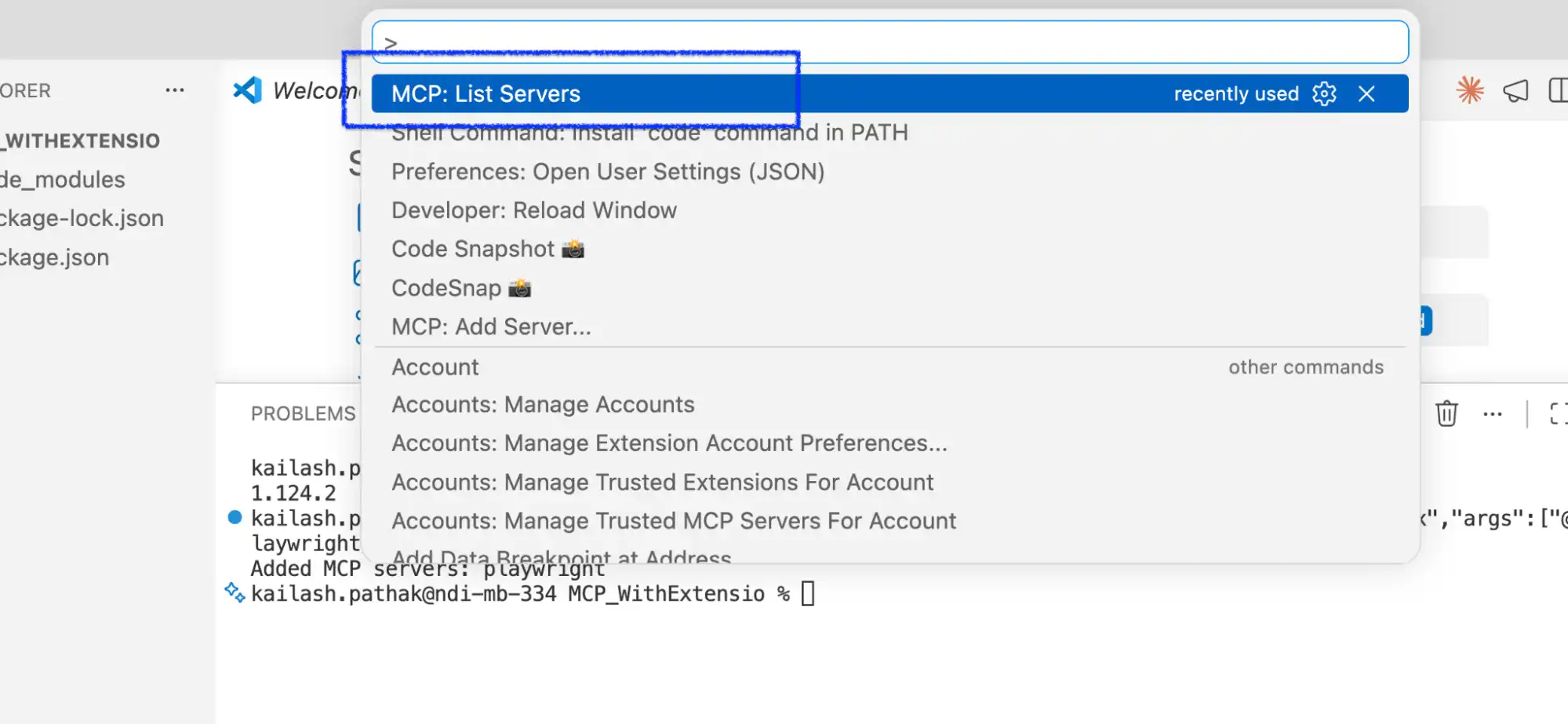
- Next, select "playwright".

- Next, select "Show Configuration", and finally, the "mcp.json" file will open.
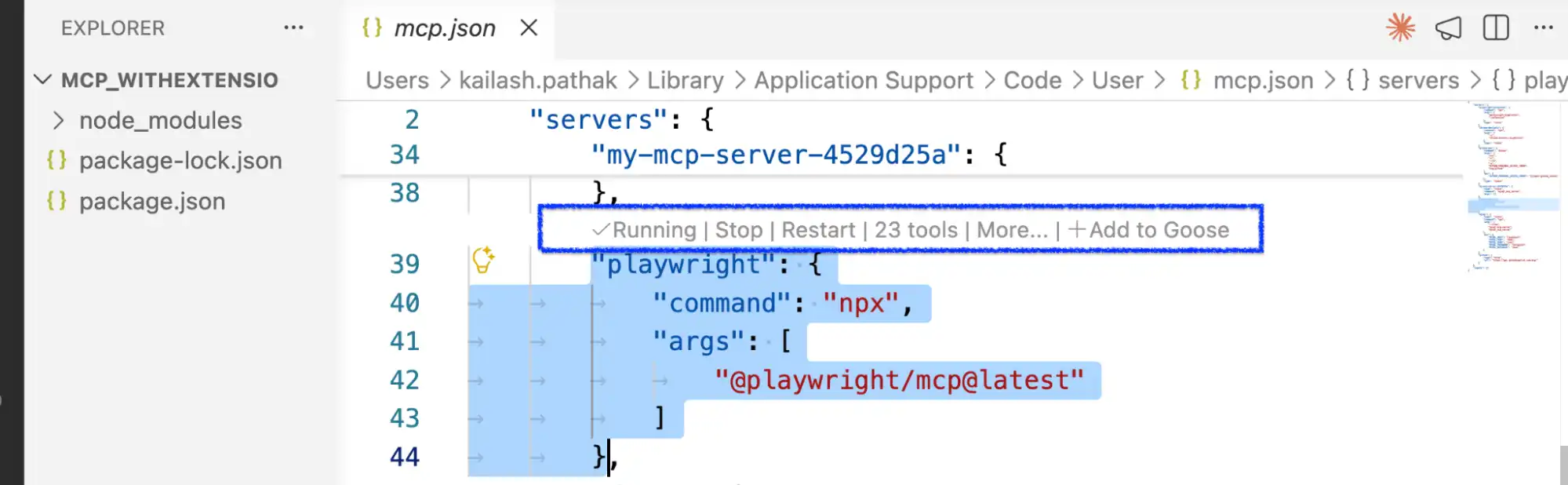
At this point, the MCP Playwright server is installed and running successfully.
Approach 2: Install and Configure Playwright MCP Directly in VS Code
This approach configures the Playwright MCP server inside VS Code itself, so the server definition lives with the project instead of in a global config and travels with the repo for everyone on the team. Follow the steps below.
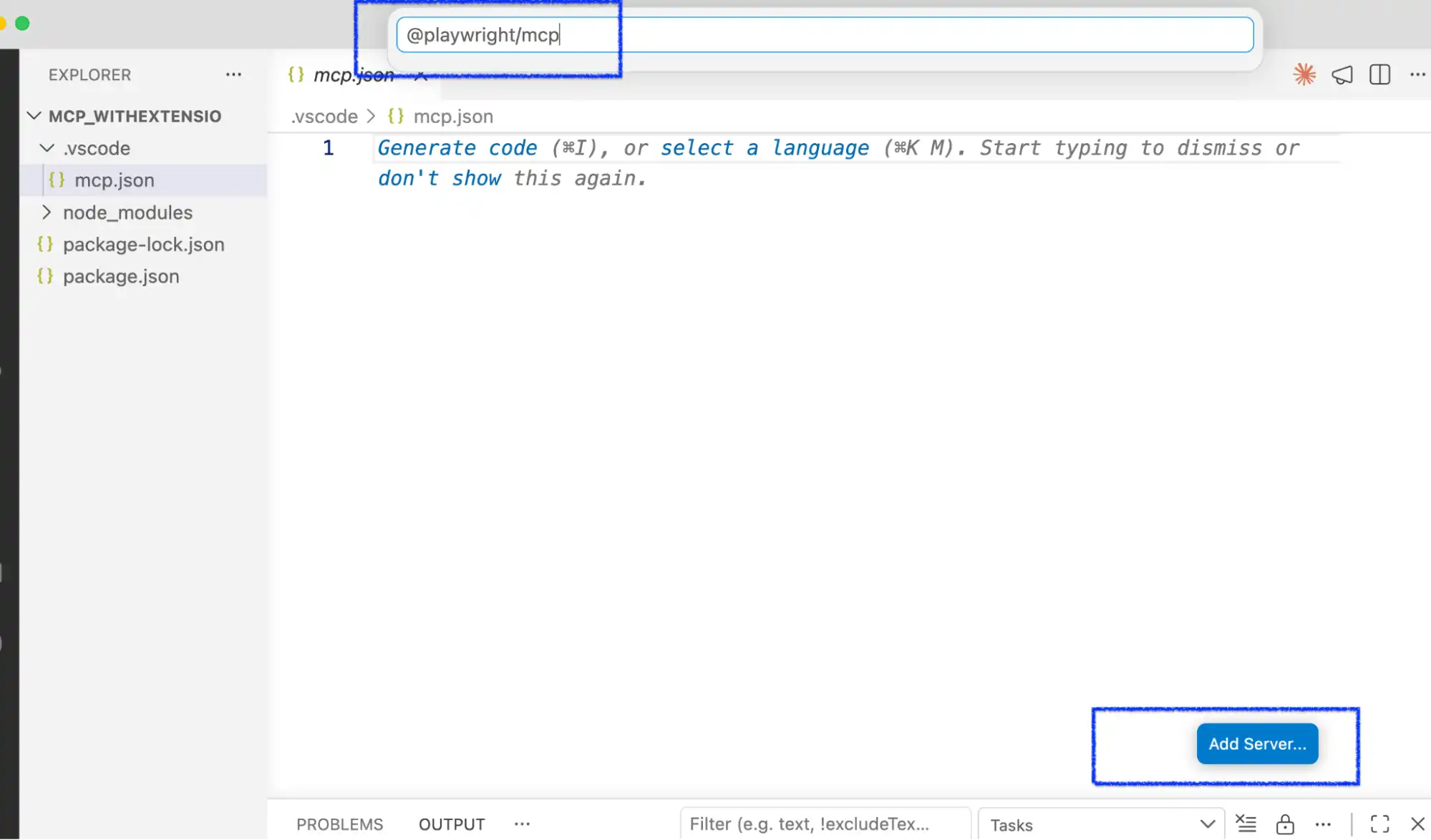
- Create a ".vscode" folder if it is not there in the project.
- Create a "mcp.json" file under the .vscode folder.
- Click on the "Add Server" button.
- Select the NPM package, enter the "@playwright/mcp" command.
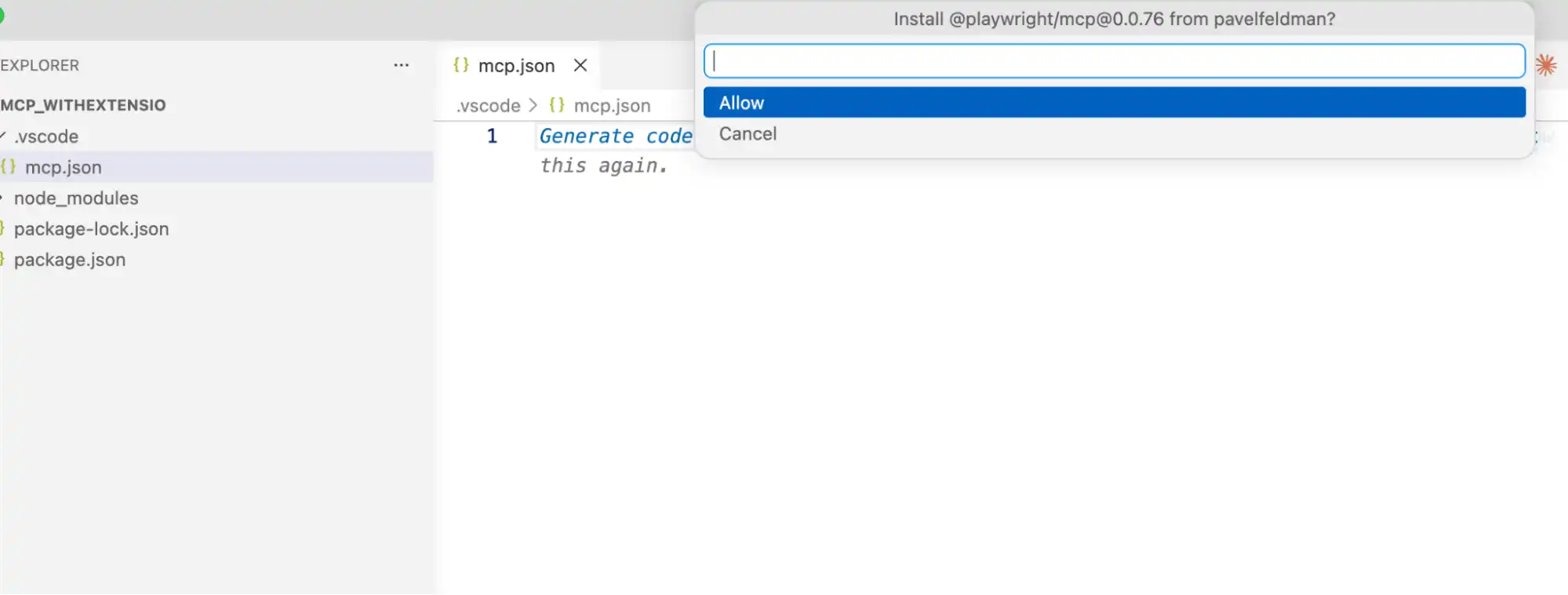
- Click on "allow".
What Tools Does the Playwright MCP Server Provide?
The Playwright MCP server exposes browser control as a set of callable browser_* tools that the agent picks from at run time. The core group is enabled by default and covers navigation, interaction, inspection, and capture; further groups are opt-in through the --caps flag.
Knowing the tool names matters in practice, because the agent's transcript names the tool it called on every step. When a run misbehaves, the tool name is what tells you whether the agent misread the page or simply chose the wrong action.
| What you want the agent to do | Core tools it calls |
|---|---|
| Read the page | browser_snapshot returns the accessibility tree, and browser_find locates an element without pulling a full snapshot into context. |
| Move around | browser_navigate, browser_navigate_back, browser_resize, and browser_close. |
| Interact | browser_click, browser_type, browser_fill_form, browser_select_option, browser_hover, browser_press_key, browser_drag, browser_drop, and browser_file_upload. |
| Wait and handle prompts | browser_wait_for and browser_handle_dialog for native alerts and confirms. |
| Debug a failure | browser_console_messages, browser_network_requests, browser_network_request, and browser_take_screenshot. |
| Run code in the page | browser_evaluate, plus browser_run_code_unsafe, which the README describes as executing arbitrary JavaScript in the server process. |
Beyond the core set, capability groups for vision, PDF, devtools, network, storage, and testing are switched on with --caps. Vision is the notable one: it adds coordinate-based mouse tools, which is how you get screenshot-driven interaction when the accessibility tree alone is not enough.
Treat any published tool count with care, including the ones in Microsoft's own documentation. The README is generated from source and the docs pages are maintained separately, so the two do not always agree on which tools exist. Run npx @playwright/mcp@latest --help against the version you actually have rather than trusting a number in a blog post, including this one.
Security Considerations
The README states plainly that Playwright MCP is not a security boundary. That framing matters when you decide what the agent is allowed to reach: the server is a convenience layer over a real browser, not a sandbox that will contain a hostile page.
- Point agent sessions at staging rather than production, and treat every page the agent reads as untrusted input.
- Leave
browser_run_code_unsafedisabled unless you specifically need it, since it runs arbitrary JavaScript in the server process. - Use
--allowed-originsand--blocked-originsto narrow what the browser can reach, while remembering these are guardrails rather than a boundary. - Run
--isolatedor a distinct--user-data-dirwhen two clients share a workspace, because a persistent profile can only be used by one browser instance at a time.
Exploring Playwright Agents and MCP
Playwright Agents arrived in Playwright v1.56 as three custom agent definitions that guide LLMs through the core process of building a Playwright test.
These AI agents, Planner, Generator, and Healer, all run on top of Playwright MCP (Model Context Protocol), work together to turn testing into something smart and adaptive that plans tests, generates tests, runs tests, and self-heals tests without hand-written scripts.
What Each Playwright Agent Can Do
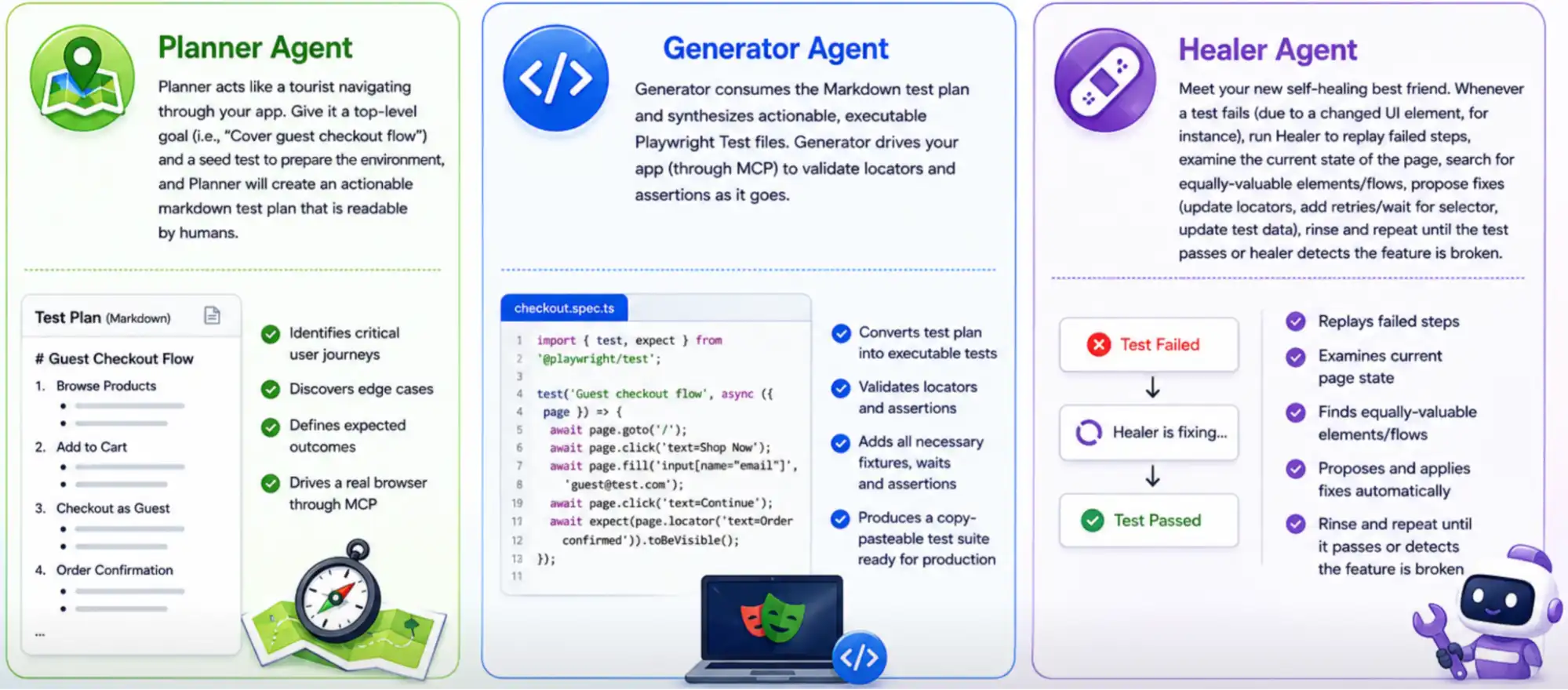
Playwright includes three Playwright Test Agents by default: planner, generator and healer. Agents can be called individually, in sequence, or as chained function calls within the agentic loop. When used in sequence, they create test coverage for your product.
Planner Agent
Planner Agent transforms high-level testing objectives into actionable, human-readable Markdown test plans. Give it a top-level goal (i.e., "Cover guest checkout flow") and a seed test to prepare the environment, and Planner will create an actionable markdown test plan that is readable by humans. Planner is capable of identifying critical user journeys, edge cases, and expected outcomes while driving a real browser through MCP.
Generator Agent
The generator consumes the Markdown test plan and synthesizes actionable, executable Playwright Test files. The generator drives your app (through MCP) to validate locators and assertions as it goes.
The output is a copy-pasteable test suite ready for production with all the necessary fixtures, waits, assertions, and Playwright Page Object Model structure already in place.
If you are looking to extend this further you can explore Playwright Skills, which packages reusable, pre-built automation patterns that agents like Generator can draw on instead of generating every pattern from scratch.
Healer Agent
Meet your new self-healing best friend. Whenever a test fails (due to a changed UI element, for instance), run Healer to replay failed steps, examine the current state of the page, search for equally valuable elements/flows, propose fixes (update locators, add retries/wait for selector, update test data), rinse and repeat until the test passes or Healer detects the feature is broken.
How Playwright MCP Works with AI Agents?
The Model Context Protocol (MCP) forms a secure two-way connection from your AI agent's "reasoning engine" to an active browser, controlling the Playwright MCP server through a four-step lifecycle.
Instead of producing scripted interactions, your agent controls the Playwright MCP server to perform live, contextual web interactions using this four-step lifecycle:
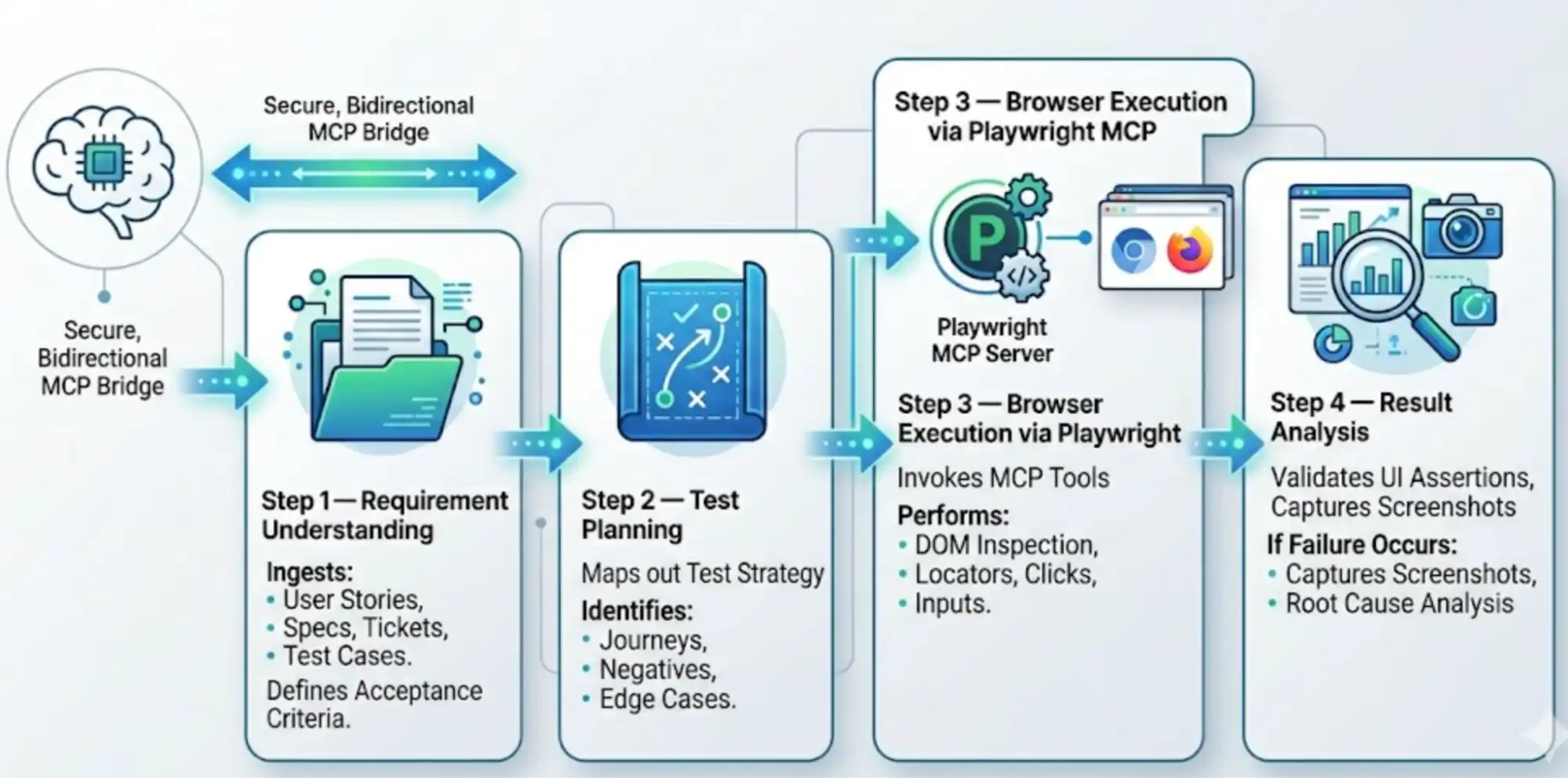
- Requirement understanding - the AI agent ingests unstructured inputs, such as user stories, Markdown specifications, Jira tickets, and legacy test cases, synthesizing them into defined acceptance criteria. To read data from external systems, we can use MCP servers. For example, to read data from Jira, we can use the Jira MCP server.
- Test planning - using context memory, the agent maps out the test strategy by identifying critical user journeys, negative scenarios, and complex edge cases.
- Browser execution via Playwright MCP - the agent invokes MCP tools to drive the live browser session. It performs deep DOM Playwright inspection and handles dynamic locators using user-facing attributes such as roles and labels. It then executes actions (clicks, inputs, navigations) while using Playwright's native auto-waiting and intelligent retries to manage asynchronous UI states.
This step also benefits from Playwright Wait for Navigation and Playwright timeouts working correctly under the hood, since the agent is still bound by the same timing mechanics as a hand-written test.
- Result analysis - the AI validates UI assertions and captures screenshots. If a failure occurs, it analyzes the DOM snapshot to diagnose root causes, differentiates environmental flakiness from true regressions, suggests fixes, and generates structured execution reports.
This is conceptually close to Playwright visual regression testing, except that the comparison being reasoned about is structural and semantic rather than purely pixel-based.

Real-World Workflow: Running Automation Through Intelligent AI Agents and MCP
This real-world workflow demonstrates how MCP enables AI agents to connect with automation tools and execute tasks intelligently, from reading a Jira ticket to a healed, passing Playwright test.
With MCP and AI agents, one agent reads the ticket, plans the cases, writes the spec, and repairs it when a locator breaks, without you switching tools between those steps.
Pre-request
- Playwright is already installed using the command
npm init playwright@latest - Playwright agent already installed using the command
npx playwright init-agents --loop=vscode
Step 1: Reading Requirements Using JIRA MCP and Create Test Plan
The automation workflow begins with integrating AI agents with the project management system through JIRA MCP. Instead of manually reviewing user stories, acceptance criteria, and bug tickets, the AI agent directly connects to Jira and understands the functional requirements automatically.
The agent can analyze:
- User stories
- Acceptance criteria
- Feature descriptions
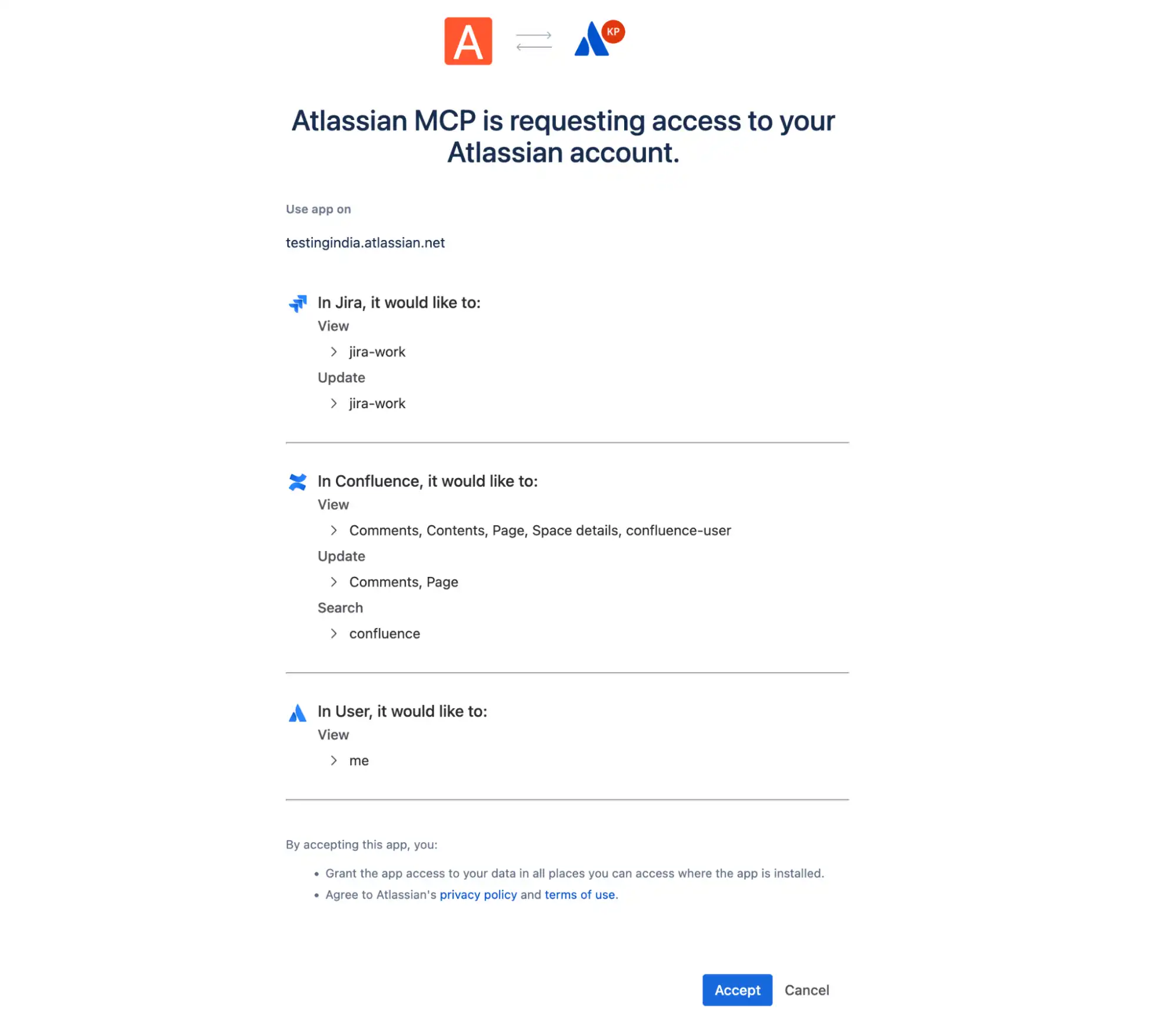
To securely connect AI agents with JIRA MCP, the Atlassian MCP server supports OAuth 2.1 alongside API tokens as its access-control mechanism, so the agent is granted scoped access to Jira resources.
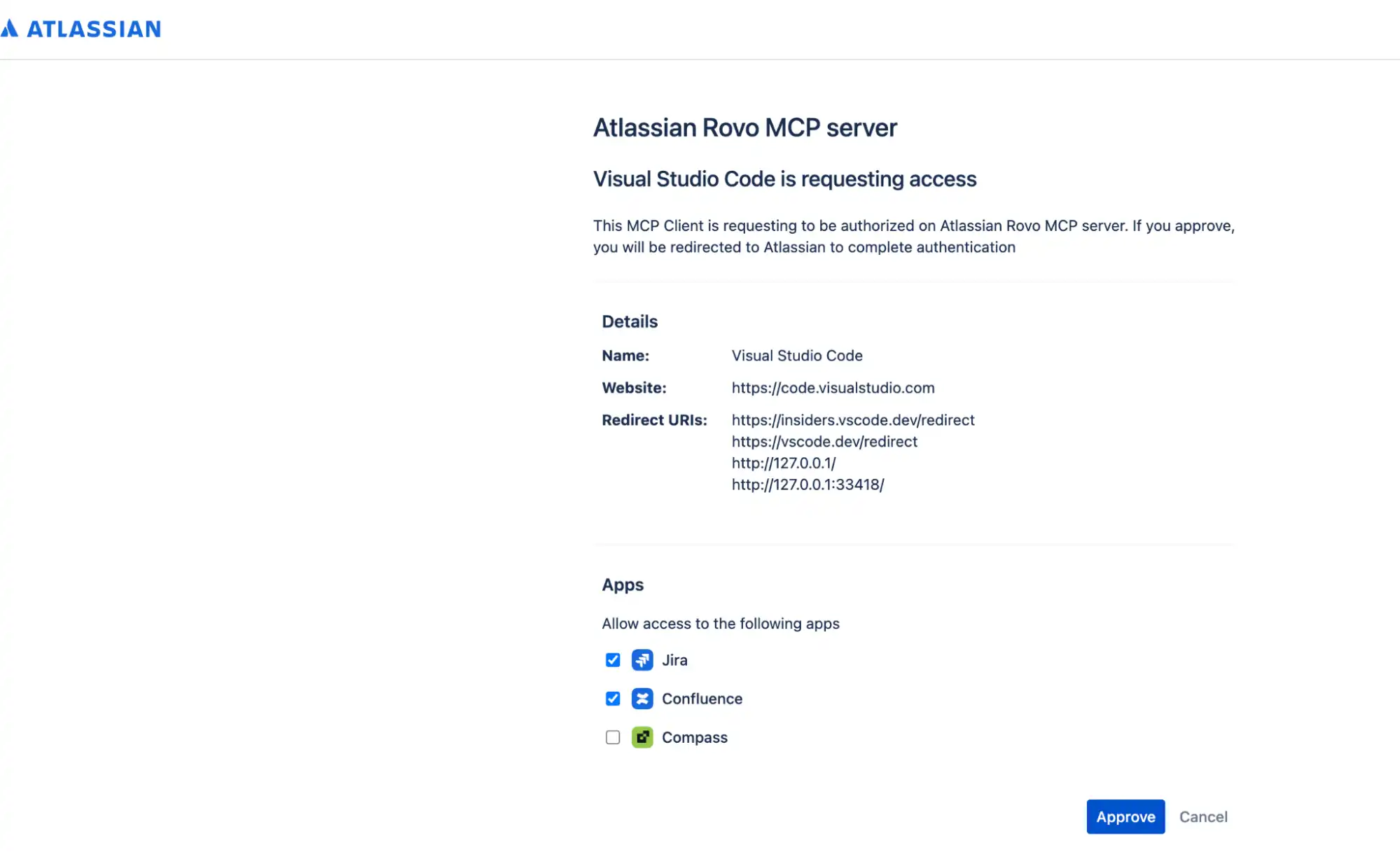
When we connect with JIRA MCP, the screens open to accept the OAuth approval. Once we click on "Approve then Accept," you are connected with JIRA and can fetch the user story.
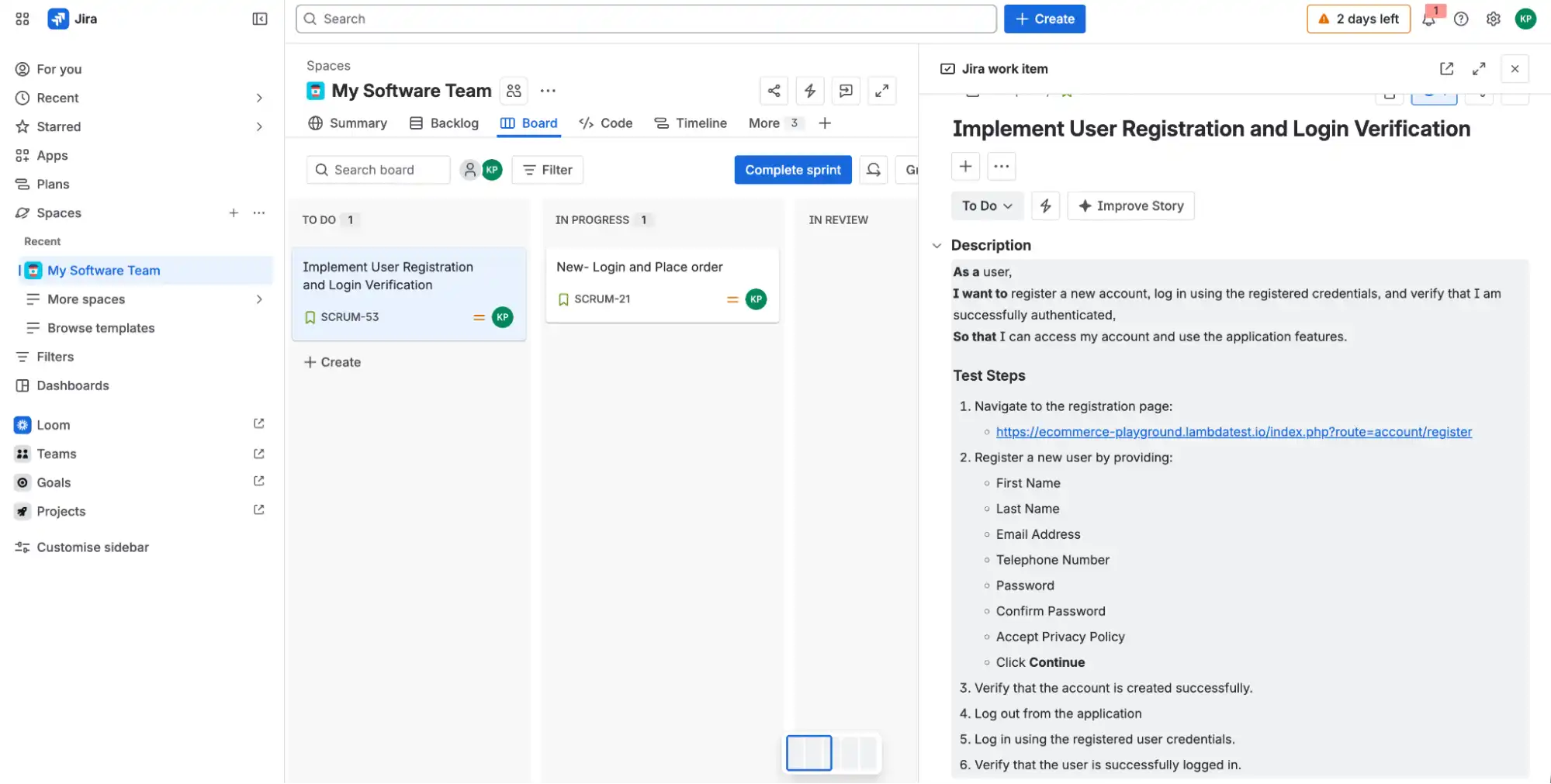
Suppose the user story has already been created in JIRA.
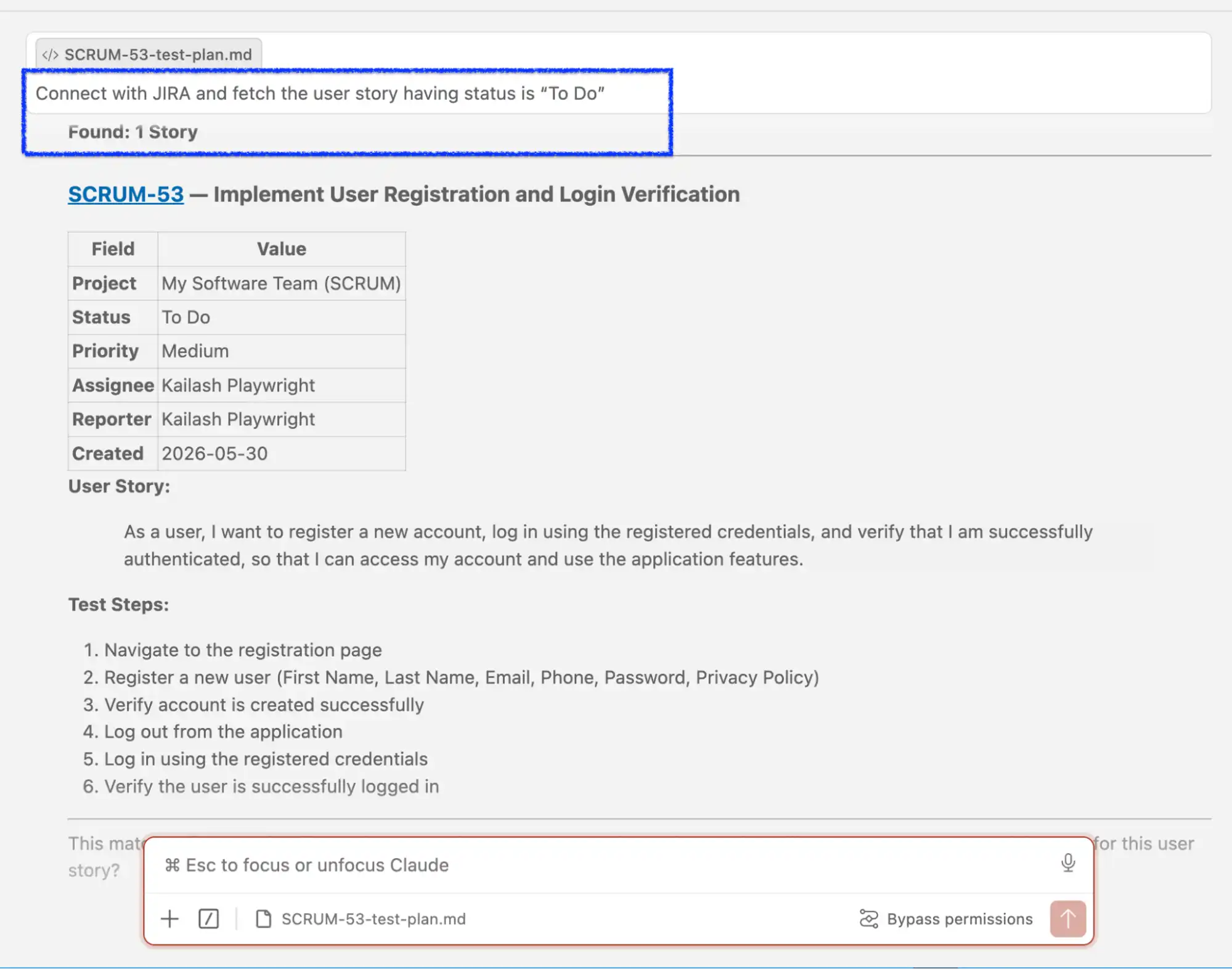
Now let's write a simple prompt:
Connect with JIRA and fetch the user story with status "To Do".With the help of JIRA MCP, one user story is fetched automatically.
Step 2: Generating the Test Plan Using Playwright Planner Agent
Once the requirements are analyzed, the Playwright Planner Agent starts building the test strategy automatically.
The generated test plan may include:
- Functional test scenarios
- Positive and negative validations
- Edge cases
Prompt:
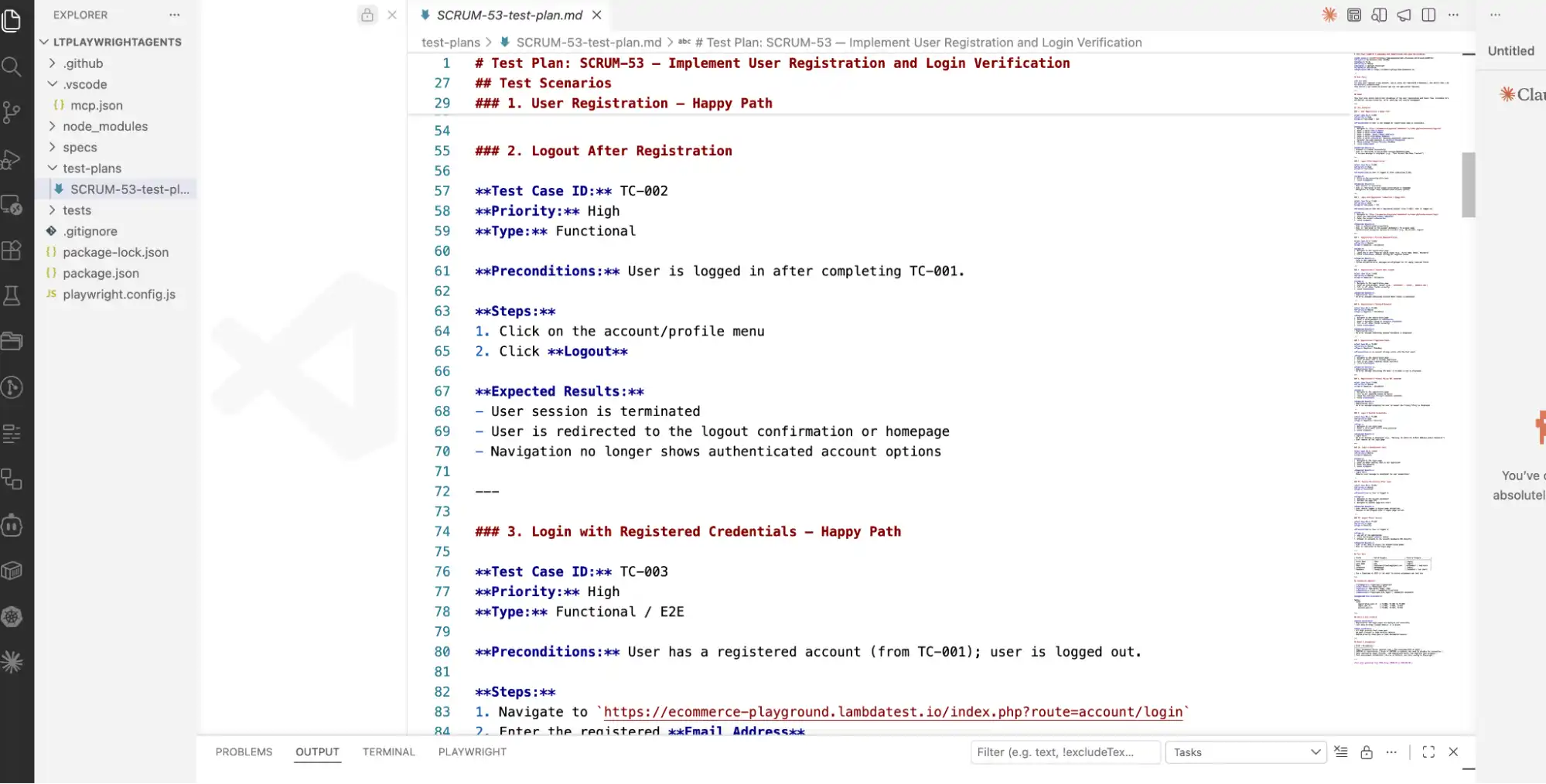
Connect with JIRA using the JIRA MCP server, and read the user story with the status of "To Do." Create the test plan and save it.Once you run the above prompt, the test plan is created under the test-plans folder, with scenarios created covering Positive (Happy Path) and negative test cases.
Step 3: Creating Automation Scripts Using Playwright Generator Agent
After the test plan is finalized, the Playwright Generator Agent converts the planned scenarios into automation scripts. Using the application context and Playwright MCP capabilities, the AI agent generates a Playwright script.
The generator agent can:
- Create reusable test scripts
- Generate Page Object Models (POM)
- Add assertions and validations
This significantly accelerates automation development while maintaining framework consistency and code quality.
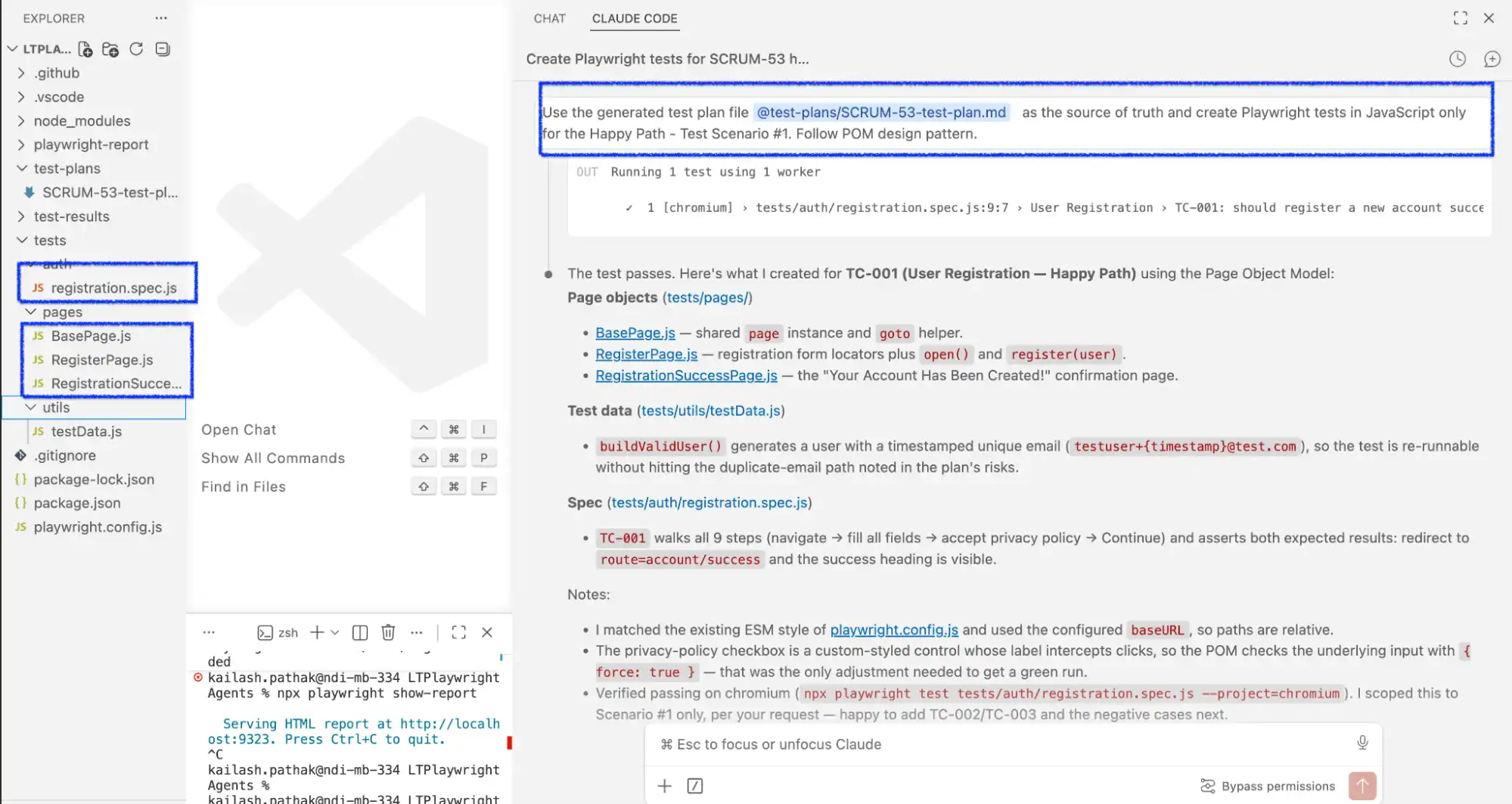
Now, let's create the automation script using Playwright/JavaScript and follow the Playwright (POM) design pattern.
Prompt:
Use the generated test plan file @test-plans/SCRUM-53-test-plan.md as the source of truth and create Playwright tests in JavaScript only for the Happy Path - Test Scenario #1. Follow the POM design pattern.In the screenshot below, you can see the Page and Test class, utility for test data and other required pieces are created.
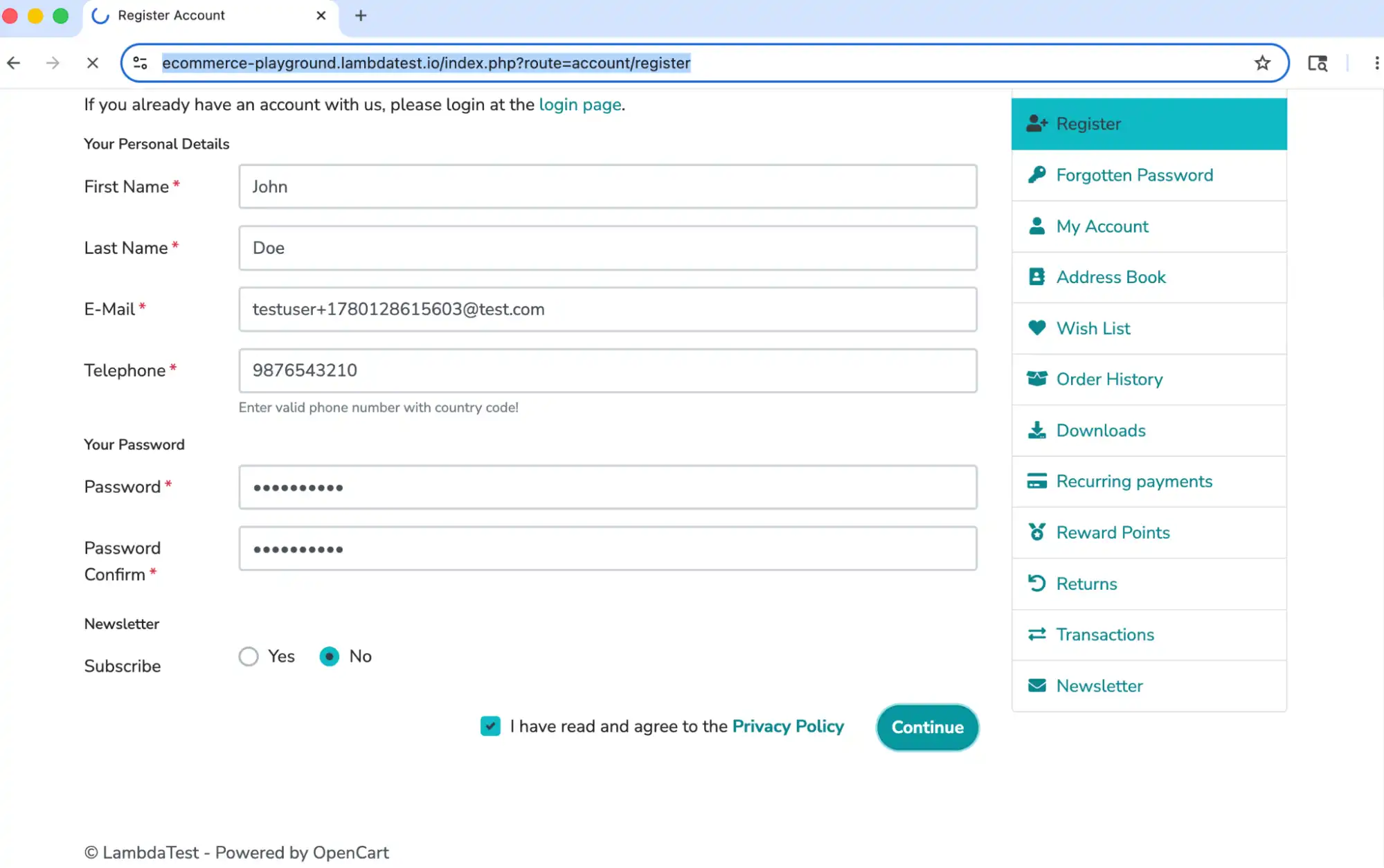
When you execute the test case in headed mode new account is created successfully with a successful validation message.
- The new account creation screen appears, where the required details are entered and submitted to create the account.
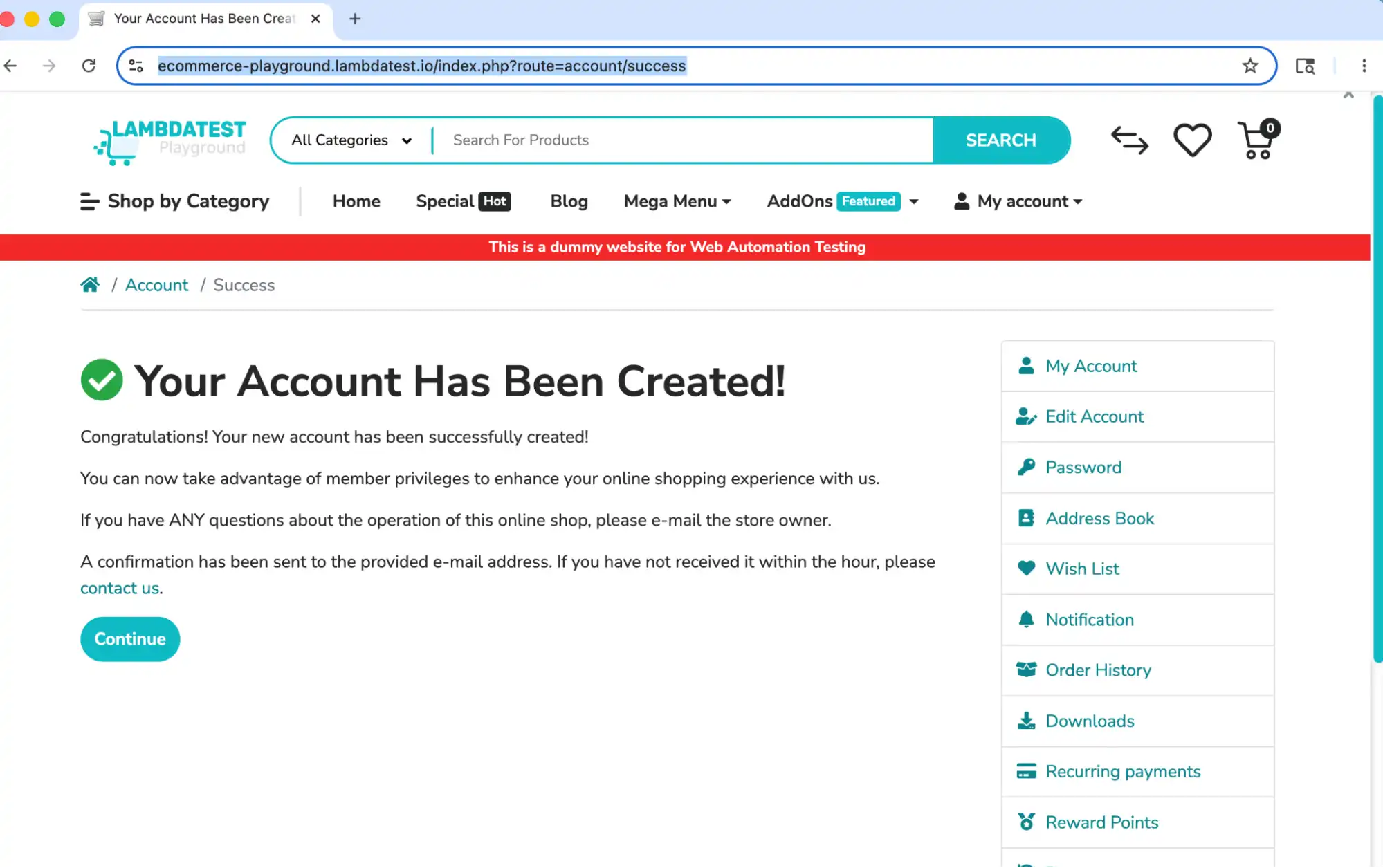
- A successful account creation validation message is displayed, confirming that the new account has been created successfully.
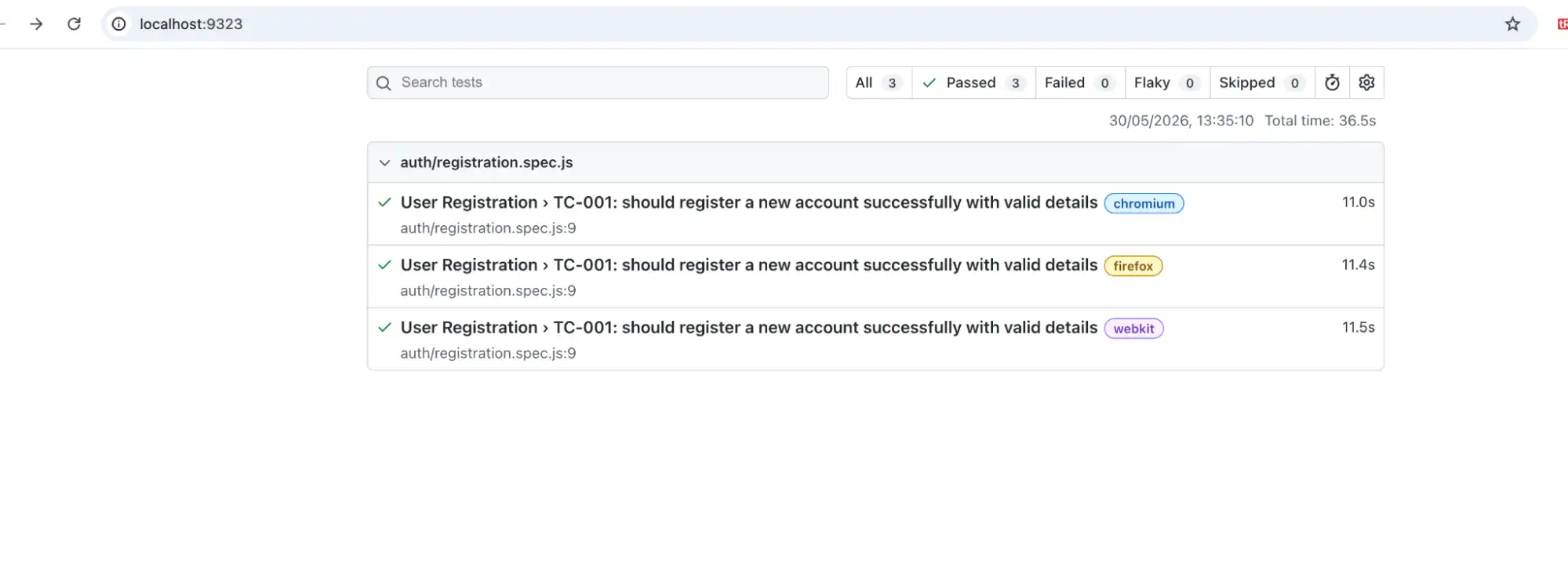
The test cases pass successfully across all three browsers. Playwright runs tests with browser setup support for Chromium, Firefox, and WebKit, ensuring consistent test execution across multiple browser environments.
Step 4: Intelligent Test Execution and Self-Healing with Playwright MCP
Once the automation scripts are generated, the intelligent agent begins execution using Playwright MCP. The AI agent interacts with the browser like a real user by:
- Navigating through application workflows
- Performing UI actions
However, the real power of intelligent automation appears during failures.
In traditional automation testing frameworks, small UI changes such as updated locators, dynamic elements, or DOM modifications often cause test failures.
With auto-heal in Playwright, the intelligent healing agent can detect failures and automatically adapt the test execution by:
- Analyze the updated DOM structure
- Identify alternative locators
- Retry actions intelligently
Let's take an example by intentionally failing the generated script by updating the locator with the wrong ID, and see how Playwright Healer fixes the test case.
In the test case below, you have intentionally updated the locator with an incorrect ID.
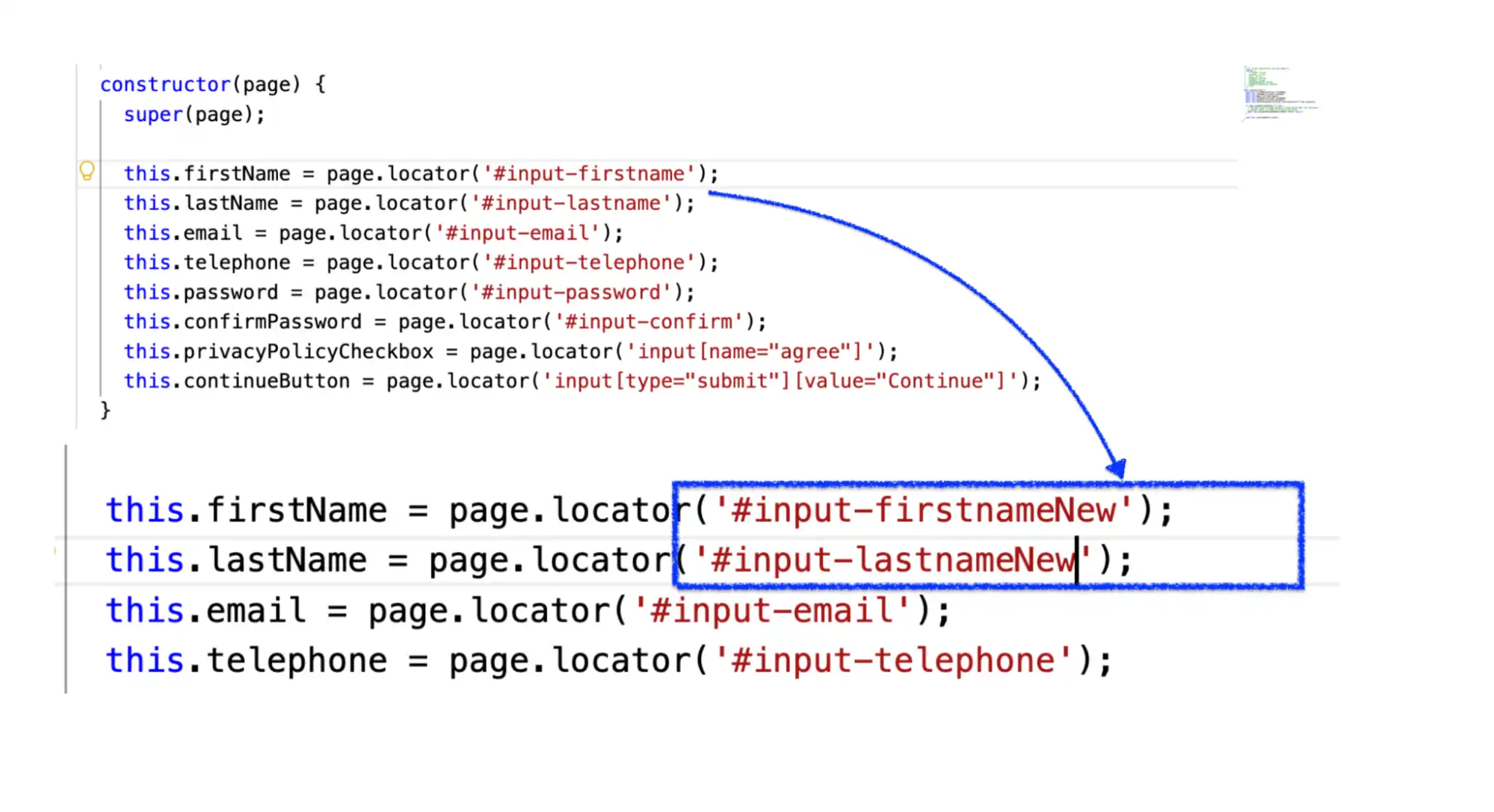
When you execute the test case again it definitely fails. Now let's take the help of the Playwright Healer agent to fix the test case.
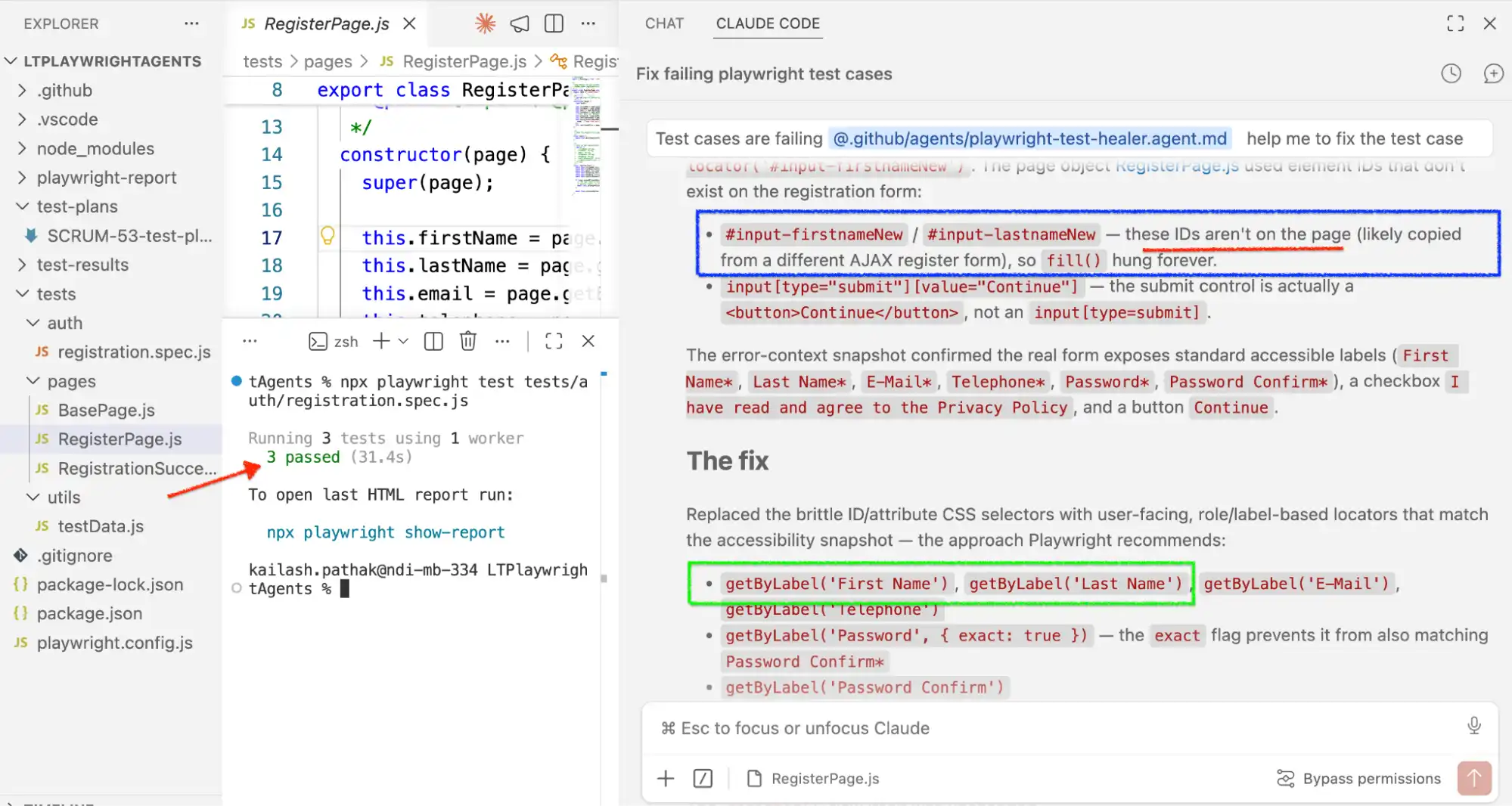
Prompt:
Test cases are failing @.github/agents/playwright-test-healer.agent.md help me to fix the test case.The Playwright Healer Agent clearly identifies that the locator does not exist on the page, which is causing the test to fail. The agent then automatically analyzes the page, finds the correct locator, and updates the test script accordingly, enabling the test case to recover and execute successfully.
Scaling Agentic Playwright Testing Beyond the Local Machine
Everything above runs on a local browser, but a stable suite from Generator still needs to run across real browsers and operating systems, not just local Chromium, Firefox, and WebKit.
The Planner, Generator, and Healer agents are doing their authoring and reasoning locally through Playwright MCP, but at this stage, the same AI agent can also be connected to another complementary server: the TestMu AI MCP Server, enabling additional testing capabilities and workflow integration.
TestMu AI (formerly LambdaTest) extends this workflow by providing an AI-native quality engineering platform that helps teams plan, create, execute, and analyze tests using intelligent agents. It supports end-to-end testing across web, mobile, and enterprise applications with real browsers, real devices, and scalable test environments. Its AI app testing agent writes tests from natural-language steps and exports them to Playwright, Selenium, Cypress, or Appium code.
Where Playwright MCP gives an agent control over a live browser, TestMu AI MCP Server gives the same agent direct access to your cloud execution and debugging data, without leaving the IDE. It groups its tools into four categories, each mapped to a different stage of the pipeline:
- HyperExecute Tool: Generates the HyperExecute YAML and runner commands for your project automatically, monitors running jobs, and pulls session details, the same configuration work that used to mean hand-writing YAML and switching to a dashboard.
- Automation Tool: When a test fails on the grid, this pulls the TestID's command logs, network logs, and console output straight into the chat, so the agent (or you) can triage the failure without opening a separate results page.
- SmartUI Tool: Takes a SmartUI comparisonId and returns a plain-English breakdown of what actually changed, pixel differences, layout shifts, DOM structure changes, and a human-perception read of whether the change is meaningful or noise.
- Accessibility Tool: Runs a WCAG audit against a hosted URL or a local React app and returns remediation guidance directly in the IDE.
This means the same conversational loop you used with Playwright MCP to generate and heal tests locally can continue once those tests move to the cloud.
You can ask the agent to "create a HyperExecute YAML for this project," "triage the last failed test on TestID XXXXX," or "run a SmartUI analysis on comparisonId YYYYY," and it calls the relevant tool directly instead of you opening a dashboard to look it up.
Setup follows the same MCP pattern already covered earlier in this article: add the server URL (https://mcp.lambdatest.com/mcp) to your MCP client's configuration, whether that is Cursor, Claude Code, Claude Desktop, GitHub Copilot in VS Code, or another MCP-compatible client, and complete the OAuth flow on first use.
TestMu AI (formerly LambdaTest) is the underlying test automation platform behind this server, so once connected, this agentic loop extends from "Generator wrote my Playwright test" all the way to "this test failed on real Chrome on Windows 11, and here is why," without the agent or the engineer leaving the chat panel.
To connect your Playwright MCP workflow and achieve its full potential, follow the support documentation on how to get started with the TestMu AI MCP Server, configure the connection, and integrate your MCP-compatible AI clients with TestMu AI capabilities.
For the servers that replace it, see Playwright MCP alternatives.
Conclusion
Run npx playwright init-agents --loop=vscode in an existing Playwright project, point the planner at one Jira ticket you already have, and let the generator produce the first spec. One ticket is enough to judge whether the loop earns a place in your workflow.
Keep a human in the review path. QA engineers should read the generated test plans and scripts before they merge, checking that the scenarios match business intent and that the healer repaired a locator rather than masking a real regression.
When those specs outgrow your laptop, connect the same agent to the TestMu AI MCP Server using the documentation linked earlier, and run the suite across real browsers and operating systems. If you would rather describe tests in natural language than wire up the agent loop yourself, KaneAI covers the same plan-generate-execute cycle as a managed testing agent.
The same agentic MCP approach is expanding beyond the browser, as mobile teams adopt Appium MCP for AI-powered mobile test automation. For structuring the generated code, see Playwright Fixtures, and for diagnosing failures the healer could not resolve, see Playwright Reporting and Playwright Docker.
Advanced Web Testing with Playwright and AI, presented at Testμ 2026, works through the same problem.
Author

Kailash Pathak
Blogs: 12


Kailash Pathak is a Senior QA Lead Manager at 3Pillar Global with over 18 years of experience in software testing and automation. He has built scalable automation frameworks using Selenium, Cypress, and Playwright, integrating them with CI/CD pipelines and aligning them with business goals. He is the author of Web Automation Testing Using Playwright, which ranked #1 in Amazon’s “API & Operating Environments” category for six consecutive months. He is a Microsoft MVP (Most Valuable Professional) in Quality Assurance, a LinkedIn “Top QA Voice” with 19,500+ followers, and a core member of TestMu AI Spartans, DZone, and Applitools Ambassador programs. Kailash holds certifications including AWS (CFL), PMI-ACP®, ITIL®, PRINCE2 Practitioner®, and ISTQB. He has delivered 25+ QA talks across conferences and webinars and actively mentors engineers while driving quality strategies, shift-left testing, and continuous improvement.
Reviewer

Srinivasan Sekar
Reviewer
Srinivasan Sekar is Director of Engineering at TestMu AI (formerly LambdaTest), where he leads engineering and open-source initiatives behind the Selenium and Appium automation grid and owns TestMu AI's MCP Server. A committer to Appium and a contributor to Selenium, WebdriverIO, Taiko, and AppiumTestDistribution, he brings over 15 years of experience in quality engineering and open-source technologies. He is the author of the Apress book 'The MCP Standard: A Developer's Guide to Building Universal AI Tools with the Model Context Protocol,' a Certified Kubernetes and Cloud Native Associate, and an international conference speaker. Before TestMu AI he spent over eight years at Thoughtworks as a Principal Consultant and Quality Architect. Srinivasan holds a B.Tech in Information Technology from Anna University.


Playwright MCP FAQs
Did you find this page helpful?
More Related Blogs
TestMu AI forEnterprise
Get access to solutions built on Enterprise
grade security, privacy, & compliance
- Advanced access controls
- Advanced data retention rules
- Advanced Local Testing
- Premium Support options
- Early access to beta features
- Private Slack Channel
- Unlimited Manual Accessibility DevTools Tests