

Power Your Software Testing with AI Agents and Cloud
The Native AI-Agentic Cloud Platform to Supercharge Quality Engineering. Test Intelligently and Ship Faster.


- TestMu AI (Formerly LambdaTest)
- /
- Learning Hub
- /
- How to Use Auto Heal in Playwright for Self-Healing Tests
How to Use Auto Heal in Playwright for Self-Healing Tests
Learn how playwright self healing tests work: auto heal detects broken selectors, fixes tests automatically, and keeps automation pipelines stable.
Last Updated on:
When you run Playwright tests, changes to element attributes, DOM structure, or selectors can cause tests to fail. However, implementing auto heal in Playwright testing can automatically identify broken locators and update them at runtime. This allows tests to continue executing without interruption, reducing false negatives, minimizing test maintenance, and ensuring that your test suite accurately reflects the functionality of your web application, even if its UI changes.
TL;DR
- Playwright has no single auto heal switch; its semantic locators, auto-waiting retries and chained queries keep tests stable when the UI changes.
- Semantic locators such as getByRole, getByText and getByLabel find elements the way a user would, so they survive layout and ID changes.
- On TestMu AI, setting autoHeal: true in the LT:Options capabilities lets the cloud grid repair broken locators at runtime.
- TestMu AI execution logs show which locators were healed, so teams can review each fix and update the script.
- KaneAI, the TestMu AI testing agent, heals tests by intent, re-finding an element from its natural-language step instead of an old locator.
- Auto healing can hide real regressions, so pair it with strong assertions and keep strict locators on login and checkout flows.
What Is Auto Heal in Playwright?
Auto heal in Playwright testing refers to techniques that allow automated tests to recover from locator failures caused by UI changes. When a test script cannot find an element using its original selector, auto healing strategies attempt alternative ways to locate the element, such as using role-based locators, dynamic selectors, or retry logic.
Playwright does not include a fully built-in auto healing engine. However, you can use features like role-based Playwright locators, retry mechanisms, and dynamic selectors, which help create more reliable and maintainable tests. Per the official Playwright documentation, these locators resolve against the accessibility tree rather than raw DOM structure, which is why they survive most class or ID renames without any healing logic at all.
How Auto Healing in Playwright Works?
Playwright's official documentation describes it as an end-to-end test framework that bundles a test runner, assertions, isolation, and parallelization, and runs the same test across Chromium, WebKit, and Firefox. That shared framework is what lets the locator and retry strategies below work identically across every engine, without browser-specific healing logic.
Playwright enables resilient testing by combining strategies that make test execution more robust than traditional approaches. While it does not include a fully automatic auto healing engine, its features allow tests to adapt to minor UI changes and reduce ongoing maintenance.
- Smart Locator Queries - Playwright provides semantic locators such as getByRole, getByText, and custom attribute-based selectors. These locators are more stable than static IDs or fragile XPath paths and reflect actual user interactions, helping tests remain reliable as the interface evolves.
- Retry Logic and Adaptive Behavior - When an element is temporarily unavailable, Playwright automatically retries actions for a configurable timeout. This approach handles dynamic content, waits for element stabilization, and reduces false failures caused by transient UI changes. Playwright timeouts define how long these retries continue, ensuring tests wait appropriately before failing due to temporary unavailability.
- Chaining Locators and Scoping Queries - You can chain locators and scope queries to specific containers. This makes tests less dependent on the global page structure and more resilient to small DOM changes.
- Contrast With Traditional Tools - Traditional tools often fail immediately when a selector breaks, requiring manual intervention. Playwright's combination of stable locators, retries, and scoped queries reduces maintenance and helps teams maintain reliable test suites.

Note: Run Playwright tests with auto healing across 3,000+ real browser and OS combinations. Try TestMu AI Now!
How to Use Auto Heal in Playwright?
Let's look at Playwright auto heal mechanism to enhance test resilience, leveraging smart locators that adapt to UI changes automatically during execution.
Setting Up the Environment
Install Playwright using the command below:
npm init playwright@latestAfter Playwright installation, you'll have a fully configured project with:
- A playwright.config.js file.
- A tests/ folder with sample test files (that you can delete).
- A tests-examples/ folder with some sample test files (that you can also delete).
- All required dependencies and browser binaries are installed.
Writing the Tests
Let's test a user registration flow on the TestMu AI eCommerce Playground website.
Test Scenario:
- Open the TestMu AI eCommerce Playground registration page.
- Enter user details with a unique generated email.
- Set and ensure a secure account password.
- Select newsletter subscription and accept site terms.
- Submit the form and verify account creation success.
Implementation:
Here is the register.spec.js file optimized with resilience in mind:
import { test, expect } from '@playwright/test';

function generateEmail() {
  const timestamp = Date.now();
  return `user${timestamp}@mail.com`;
}

test('Create new user account with resilient locators', async ({ page }) => {
  await page.goto('https://ecommerce-playground.lambdatest.io/index.php?route=account/register');

  await page.getByLabel('First Name').fill('Maria');
  await page.getByLabel('Last Name').fill('Costa');
  await page.getByLabel('E-Mail').fill(generateEmail());
  await page.getByLabel('Telephone').fill('+351123456789');
  await page.getByLabel('Password', { exact: true }).fill('987654321');
  await page.getByLabel('Password Confirm', { exact: true }).fill('987654321');

  await page.getByText('Yes').click(); // Newsletter opt-in
  await page.getByText('I have read and agree').click(); // Privacy Policy

  await page.getByRole('button', { name: 'Continue' }).click();

  await expect(page).toHaveTitle('Your Account Has Been Created!');
});

test('Create new user account with strategies for handling dynamic components', async ({ page }) => {
  await page.goto('https://ecommerce-playground.lambdatest.io/index.php?route=account/register');

  await expect(page.getByRole('heading', { level: 1 })).toHaveText('Register Account');

  await page.getByLabel('First Name').fill('Maria');
  await page.getByLabel('Last Name').fill('Costa');
  await page.getByLabel('E-Mail').fill(generateEmail());
  await page.getByLabel('Telephone').fill('+351123456789');
  await page.getByLabel('Password', { exact: true }).waitFor({ state: 'visible' });
  await page.getByLabel('Password', { exact: true }).fill('987654321');

  await page.getByLabel('Password Confirm', { exact: true }).fill('987654321');

  await page.getByText('Yes').click(); // Newsletter opt-in
  await page.getByText('I have read and agree').click(); // Privacy Policy

  await page.getByRole('button', { name: 'Continue' }).click();
  await page.waitForURL(/.*account/success/);

  await expect(page).toHaveTitle('Your Account Has Been Created!');
});
Why Is This Implementation "Auto Healing Ready":
Let's break down why the above test script is more resilient than one using static selectors:
- Semantic Locators - Instead of By.ID or hardcoded XPath, we use getByLabel, getByText and getByRole, which are more stable and less affected by layout or ID changes.
- Retry Logic Built-In - Playwright automatically retries actions like .click() or .fill() until the element is ready. You don't need to manually wrap interactions in loops or waits.
- Dynamic Data - We use a function to generate a unique email for every run, preventing failures from duplicate account creation.
Code Walkthrough:
- Imports and Setup - Loads Playwright test and expect, providing testing framework and assertion tools to run and validate browser interactions.
- Dynamic Email Generation - Uses a timestamp to create unique email addresses each run, preventing duplicate account errors during repeated test executions.
- Form Interaction - Navigates to the registration page and fills the first name, last name, email, telephone, and password fields using stable semantic locators.
- Options and Submission - Clicks newsletter subscription, privacy policy, and submits form via role-based Continue button, ensuring resilience against UI changes.
- Validation - Ensures account creation by asserting page title, verifying the workflow completed successfully, and handling potential minor DOM or UI changes.
Test Execution:
To run the above spec file, execute the following command:
npx playwright test tests/register.spec.js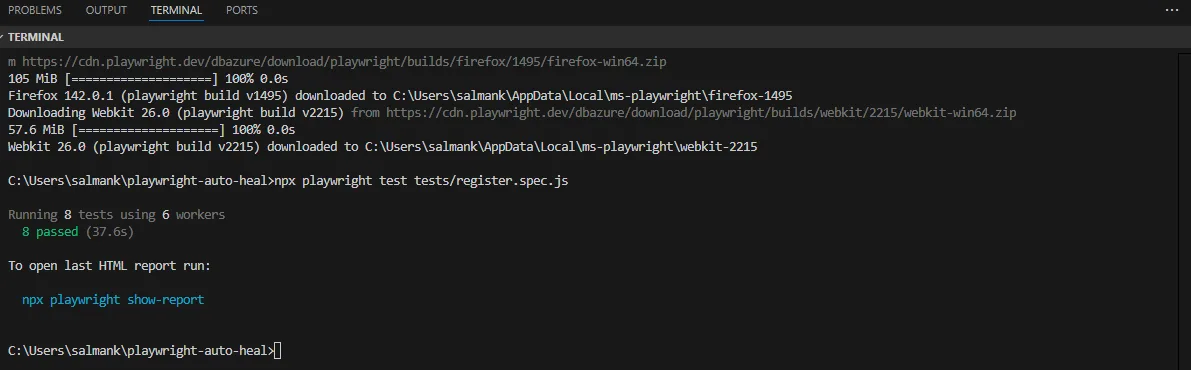
How Does TestMu AI Playwright autoHeal Capability Help?
Cloud testing platforms such as TestMu AI offer a Playwright automation cloud to run your tests at scale across different browsers and operating systems. This platform offers a Playwright autoHeal capability that stores metadata from successful runs and finds alternative selectors when failures occur.
When a test in the future runs into a missing selector, this autoHeal capability compares the current web page with the saved reference data. It then automatically looks for a matching element, and if one is found, the test keeps running without any interruption.
To get started, check out this guide to use Playwright auto healing on TestMu AI.
Enabling the autoHeal Capability
We will run the same test scenario using the autoHeal capability provided by TestMu AI.
The projects array below follows the standard structure documented in Playwright's test configuration reference, so the local Chromium, Firefox, and WebKit projects keep working exactly as before, with the TestMu AI cloud project added alongside them rather than replacing them.
To activate the Playwright autoHeal capability, all you need to do is configure a new project entry inside your playwright.config.js file. There's no need to change your test logic or add any dependencies, as the setup happens entirely through the configuration.
import { defineConfig, devices } from '@playwright/test';

const LT_USERNAME = process.env.LT_USERNAME;
const LT_ACCESS_KEY = process.env.LT_ACCESS_KEY;

const ltCapabilities = {
  browserName: 'Chrome',
  browserVersion: 'latest',
  'LT:Options': {
    platform: 'Windows 10',
    build: 'Playwright Auto Heal Build',
    name: 'Playwright Auto Heal Test',
    autoHeal: true,
    user: LT_USERNAME,
    accessKey: LT_ACCESS_KEY,
  },
};

const ltWsEndpoint = `wss://cdp.lambdatest.com/playwright?capabilities=${encodeURIComponent(JSON.stringify(ltCapabilities))}`;

export default defineConfig({
  testDir: './tests',
  fullyParallel: true,
  forbidOnly: !!process.env.CI,
  retries: process.env.CI ? 2 : 0,
  workers: process.env.CI ? 1 : undefined,
  reporter: 'html',
  use: {
    trace: 'on-first-retry',
  },
  projects: [
    {
      name: 'chromium',
      use: { ...devices['Desktop Chrome'] },
    },
    {
      name: 'firefox',
      use: { ...devices['Desktop Firefox'] },
    },
    {
      name: 'webkit',
      use: { ...devices['Desktop Safari'] },
    },
    {
      name: 'TestMuAI-Chrome-AutoHeal',
      use: {
        connectOptions: {
          wsEndpoint: ltWsEndpoint,
        },
      },
    },
  ],
});
Code Walkthrough:
- Imports and Credentials - Imports Playwright's defineConfig and devices. Retrieves LT_USERNAME and LT_ACCESS_KEY from environment variables for secure TestMu AI authentication.
- TestMu AI Capabilities Setup - Defines ltCapabilities with browser, OS, and metadata like build and test names, controlling execution behavior in the cloud.
- Auto-Heal Activation - Enables autoHeal: true inside LT:Options to automatically recover from broken locators during runtime without manual fixes.
- WebSocket Endpoint Configuration - Builds ltWsEndpoint using TestMu AI's CDP endpoint, embedding encoded capabilities to create a remote WebSocket connection for Playwright sessions.
- Global Playwright Configuration - Configures test directory, parallelization, retries, tracing, and HTML reporting to ensure stable execution and detailed debugging information.
- Project Definitions - Declares projects for Chromium, Firefox, WebKit, and TestMuAI-Chrome-AutoHeal, connecting cloud execution through the configured WebSocket endpoint.
Test Execution:
To run your tests using the Playwright autoHeal capability, simply execute the command below:
npx playwright test --project=TestMuAI-Chrome-AutoHeal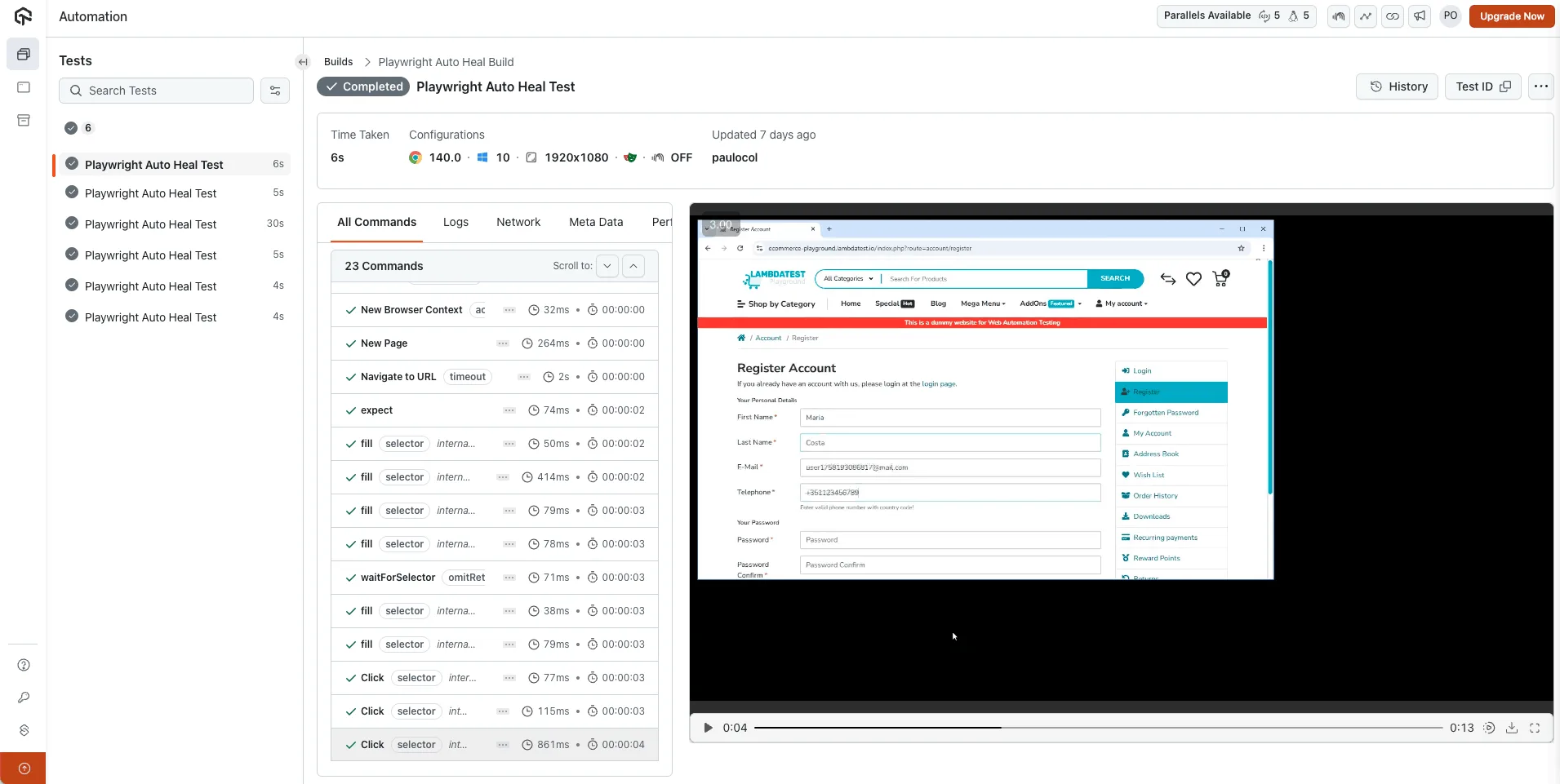
Pro-tip: You can also leverage Generative AI testing agents like TestMu AI KaneAI that enhance automation reliability with its GenAI-native auto heal feature.
Instead of failing immediately when locators break, the auto heal feature dynamically identifies alternative locators at runtime, leveraging the natural language prompts used to generate the test. Because the agent knows what each step is meant to do, such as “click the checkout button”, it can re-find the element by intent rather than by matching a stored copy of the old locator.
Re-finding an element has a ceiling, though. When the step itself no longer matches the application, a separate Self-maintenance setting decides what happens: Adaptive Heal re-authors the objective that failed and every one after it, while Dynamic Test authors every objective from its goal on each run. Both are off by default, and the re-authored test waits in Version History until someone approves it.
To get started, check out this documentation on using auto healing in TestMu AI KaneAI, and this one on healing and dynamic test for the re-authoring strategies.

Limitations and Considerations With Auto Heal
Playwright auto healing capabilities bring flexibility to UI automation, but it is essential to understand where they work and where they have limitations.
For measured evidence of where that boundary sits, and a cost model that compares healing against hand-repairing locators, see self-healing tests vs manual maintenance.
- Produce False Positives - A key challenge with auto healing is false positives. If a button is removed or its behavior changes, Playwright may target a nearby or similarly labeled element.This can let tests pass while the actual user experience is broken. The risk is higher when relying on text- or role-based selectors, as healed interactions may hit visually similar but functionally different elements, giving the test suite a misleading sense of reliability.
- Affects Reliability and Performance - Playwright's retry logic and flexible locators are effective for dynamic applications, but they have limits. Auto heal handles small changes like attribute updates reliably, but it struggles when the DOM structure changes significantly or interactive elements are replaced.Frequent healing attempts also increase execution time, especially in large test suites or pipelines, since retries and alternative locator resolutions add overhead that compounds at scale.
In this TestMu Conf 2026 session, Legacy vs. Autonomous QA Arena - Surviving the AI-Driven Quality Evolution, Athresh Guruprakash runs a live arena on the problem healing exists to solve, test suites that fail more from flaky locators than from actual bugs, and what that costs a QA budget.

Best Practices for Using Auto Healing in Playwright
Auto‑healing can save significant effort in maintaining test suites in applications where the UI frequently changes. To benefit fully without introducing hidden risks, it must be used consciously.
Here are some best practices to balance robustness and correctness when enabling and relying on Playwright's auto‑heal capabilities:
- Treat Healing as a Backup, Not the Primary Mechanism - Let auto healing act as a protection layer rather than the main strategy. Fragile locators that repeatedly trigger healing should be refactored with stable attributes like data-test, data-id, or more reliable label- and role-based selectors.
- Track and Review Every Healing Incident - Record each occurrence of auto healing. Even without built-in logs, you can wrap calls or add custom tracking to distinguish between legitimate recovery and underlying defects.
- Pair Healing With Strong Validations - Locating an element is only half the test. Always validate outcomes after healed actions by asserting navigation, messages, or UI states to confirm correct functionality.
- Limit Auto Healing on Critical Workflows - For login, checkout, or sensitive data submission, rely on strict locators and fail-fast behavior. Use auto heal primarily for maintenance flows, optional features, or non-critical UI elements.
- Use Healing Events to Improve Test Design - Treat healed events as feedback. Review why locators failed, strengthen selectors, adjust UI markup if needed, and gradually reduce reliance on auto healing for long-term test stability.
Conclusion
Auto healing in Playwright helps maintain reliable tests despite frequent UI changes by automatically recovering from minor DOM or attribute modifications. It works through resilient locator strategies, automatic retries, and adaptive behavior, reducing the need for constant manual intervention.
Platforms like TestMu AI enhance this capability by dynamically finding alternative locators during cloud execution. While auto healing improves test stability, it is not a substitute for good test design, making monitoring and validations essential.
Combining auto healing with strategies for handling dynamic components and enforcing strong assertions allows you to build robust, maintainable, and adaptive test suites. For teams exploring AI-driven automation further, Playwright Agents offer autonomous test generation that pairs well with self-healing workflows.
Author

Salman Khan
Blogs: 138


Salman is a Test Automation Evangelist and Community Contributor at TestMu AI, with over 6 years of hands-on experience in software testing and automation. He has completed his Master of Technology in Computer Science and Engineering, demonstrating strong technical expertise in software development, testing, AI agents and LLMs. He is certified in KaneAI, Automation Testing, Selenium, Cypress, Playwright, and Appium, with deep experience in CI/CD pipelines, cross-browser testing, AI in testing, and mobile automation. Salman works closely with engineering teams to convert complex testing concepts into actionable, developer-first content. Salman has authored 120+ technical tutorials, guides, and documentation on test automation, web development, and related domains, making him a strong voice in the QA and testing community.
Reviewer

Srinivasan Sekar
Reviewer
Srinivasan Sekar is Director of Engineering at TestMu AI (formerly LambdaTest), where he leads engineering and open-source initiatives behind the Selenium and Appium automation grid and owns TestMu AI's MCP Server. A committer to Appium and a contributor to Selenium, WebdriverIO, Taiko, and AppiumTestDistribution, he brings over 15 years of experience in quality engineering and open-source technologies. He is the author of the Apress book 'The MCP Standard: A Developer's Guide to Building Universal AI Tools with the Model Context Protocol,' a Certified Kubernetes and Cloud Native Associate, and an international conference speaker. Before TestMu AI he spent over eight years at Thoughtworks as a Principal Consultant and Quality Architect. Srinivasan holds a B.Tech in Information Technology from Anna University.
Playwright Self-Healing Tests FAQs
Did you find this page helpful?
More Related Learning Hubs
TestMu AI forEnterprise
Get access to solutions built on Enterprise
grade security, privacy, & compliance
- Advanced access controls
- Advanced data retention rules
- Advanced Local Testing
- Premium Support options
- Early access to beta features
- Private Slack Channel
- Unlimited Manual Accessibility DevTools Tests