Adaptive Heal and Dynamic Test
A recorded test replays the steps it was authored with. When the application changes, a step can stop matching the page. Auto-Heal recovers the element locator where it can. It runs in every test run and consumes credits when it recovers a locator. What happens to a step Auto-Heal cannot recover depends on Self-maintenance.
Self-maintenance decides whether KaneAI re-authors the test as well. You pick one of three strategies, or leave it off. With it off, a step Auto-Heal cannot recover ends the run.
| Strategy | Replays the recorded steps | When a step fails to replay | Credits |
|---|---|---|---|
| Off (default) | Yes | Nothing is re-authored. Auto-Heal still runs, and a step it cannot recover ends the run | Yes |
| Adaptive Heal | Yes | The failing objective and every objective after it are re-authored | Yes |
| Dynamic Test | No | Not applicable, nothing is replayed | Yes |
| Retry on Failure | Yes | The test fails, then runs again from the start | - |
Adaptive Heal and Dynamic Test apply to a test case only when it uses New Experience and its browser configuration is Chrome. Every other test case replays its recorded steps, whatever is set here.
Adaptive Heal, Dynamic Test and Retry on Failure answer the same question in different ways, so only one can be active. Selecting one clears the others.
Leaving Self-maintenance off is a valid choice and is the default. The recorded steps stay as they are. Auto-Heal still runs, and a step it cannot recover ends the run and is reported.
Adaptive Heal
Adaptive Heal re-authors the test when an objective fails to replay, so the run continues instead of stopping at the failure.
It re-authors the objective that contains the failing step, and every objective after it. Objectives that already ran keep the result they replayed. In a test case with five objectives, a step that fails in the third one leaves the first two as they replayed, and the third, fourth and fifth are re-authored.
The re-authored content is saved as a new version of the test case, and by default that version waits for your approval before it becomes current. The run itself finishes on the re-authored content either way.
Use it when your application changes often enough that a recorded step goes stale, but the test is still describing the right thing.
Re-authoring is authoring work, so it consumes authoring credits. One trigger re-authors a whole objective and every objective after it, not a single step, so the cost of a trigger grows with how much of the test sits after the failure. A run in which nothing fails to replay does not trigger it at all.
Auto-Heal recovers a broken element locator at runtime. It tries the other locators captured for that same element, then rebuilds the locator from the step's original natural language instruction. It changes nothing in your test, creates no version and needs no approval. It runs whatever you select here.
Adaptive Heal re-authors the failing objective and every objective after it, and records the result as a version you can review, approve or decline. The two are separate features.
Dynamic Test
Dynamic Test authors the test from its objectives instead of replaying the recorded steps. It re-authors every objective on every run, whether or not anything fails. It does not wait for a failure, because the recorded steps are never used.
Use it for pages that change so much that a recorded script is a liability.
Every run authors the test again, so every run consumes authoring credits. Replaying a recorded test consumes credits only when Auto-Heal triggers. Turning this on at the organization level commits every eligible run in scope to that cost.
Both re-author the test. They differ in trigger and scope. Adaptive Heal re-authors only on a failure, and only from the failing objective onward. Dynamic Test re-authors every objective on every run.
Retry on Failure
Retry on Failure runs the whole test again from the start after it fails. Nothing about the test is changed, so nothing needs approval.
When it is selected, Maximum Retries sets how many further attempts to make. The maximum is 5.
Retry on Failure is available in a test run only. It is not an organization or project setting.
Retry on Failure re-runs a test case only when its exported code was generated on or after May 10, 2026. For code generated before that date, a retry runs only when the test runner command itself fails.
Auto-approve changes
Adaptive Heal and Dynamic Test both produce a new version of the test case. Auto-approve changes decides what happens to it.
| Auto-approve | What happens to the new version |
|---|---|
| Off (default) | Held in Version History and becomes current only after your approval |
| On | Becomes current immediately, without review |
Auto-approve applies only to Adaptive Heal and Dynamic Test, because those are the only strategies that produce a version. With Retry on Failure selected, the control is disabled: nothing about the test changes, so there is nothing to approve.
A version approved automatically is marked as such in Version History, so the record always shows whether a person reviewed it.
A re-authored objective is sometimes right, because the application moved on and the test needs to follow. Sometimes the step failed because the product genuinely broke, and re-authoring around it turns a real defect into a passing test. Reviewing the change is what keeps the second case visible.
Where to set it
Self-maintenance is set at three levels. Each one is a starting position for the level below it.
| Level | Where | Applies to | Strategies available |
|---|---|---|---|
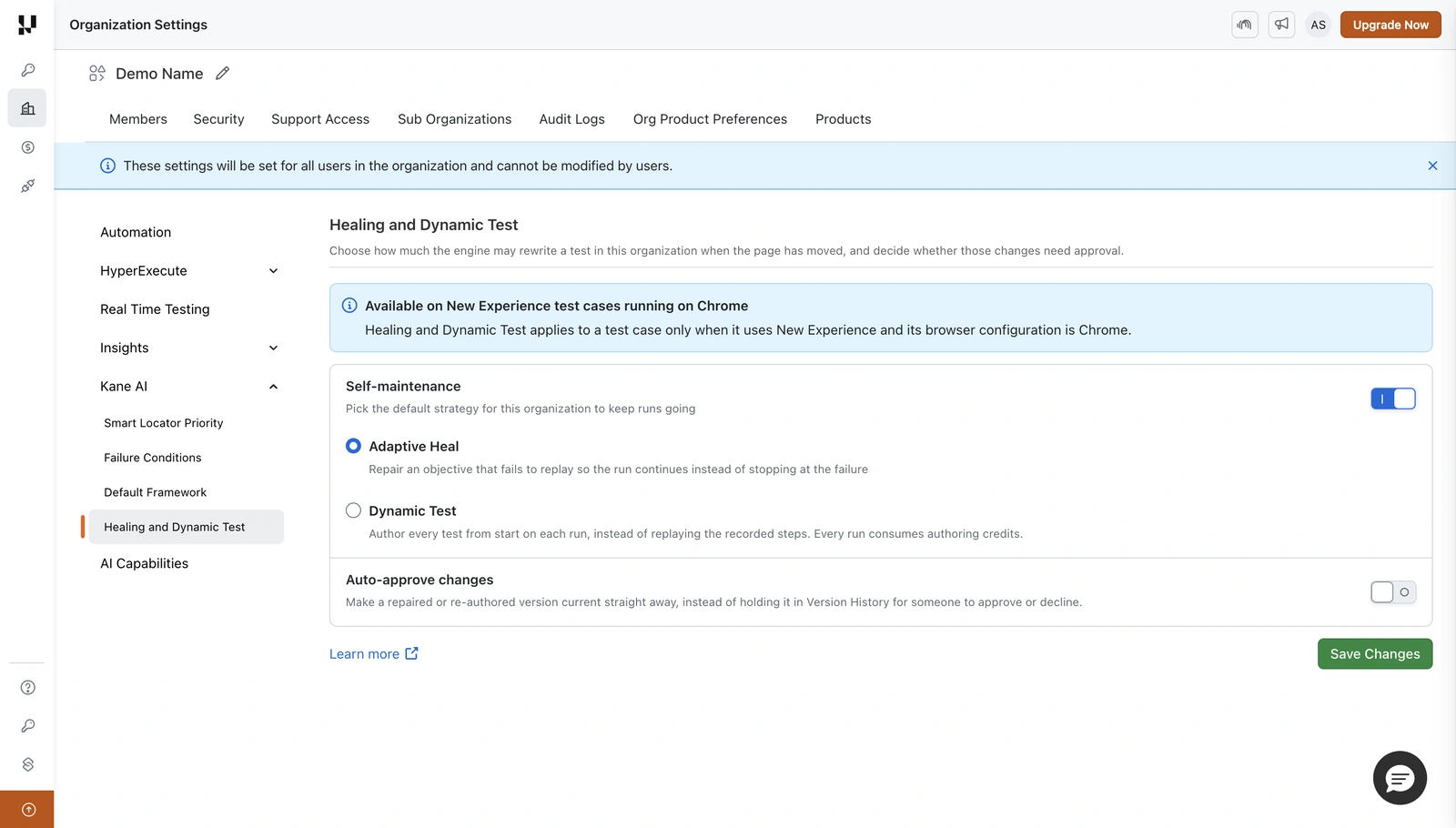
| Organization | Organization Settings → Org Product Preferences → Kane AI → Healing and Dynamic Test | Every project in the organization | Adaptive Heal, Dynamic Test |
| Project | Test Manager → Project Settings → Healing and Dynamic Test | Every run in the project | Adaptive Heal, Dynamic Test |
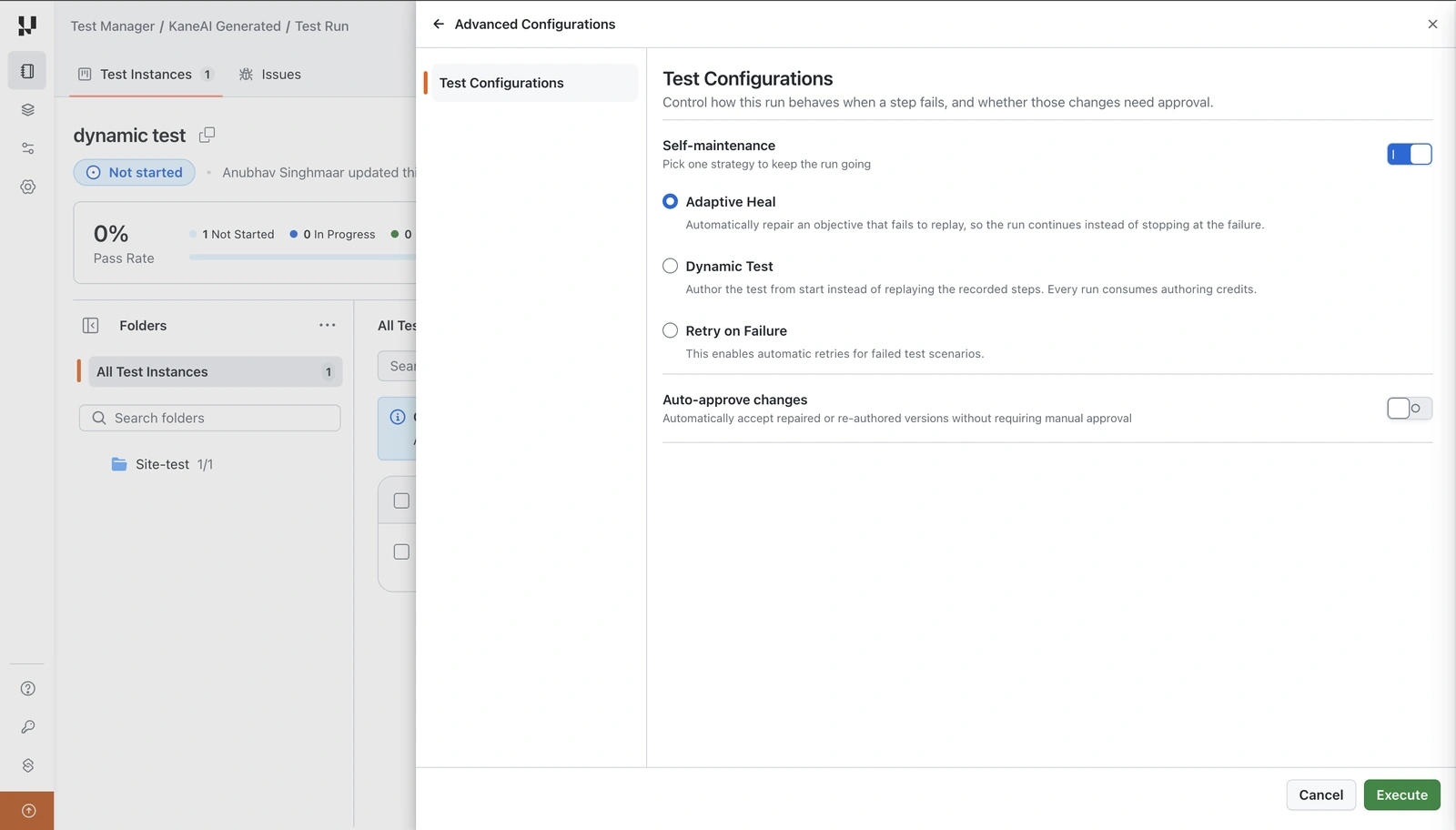
| Test run | Advanced Configurations → Test Configurations | That run only | Adaptive Heal, Dynamic Test, Retry on Failure |
Set the organization default under Organization Settings → Org Product Preferences → Kane AI → Healing and Dynamic Test.
Set the project default under Test Manager → Project Settings → Healing and Dynamic Test.
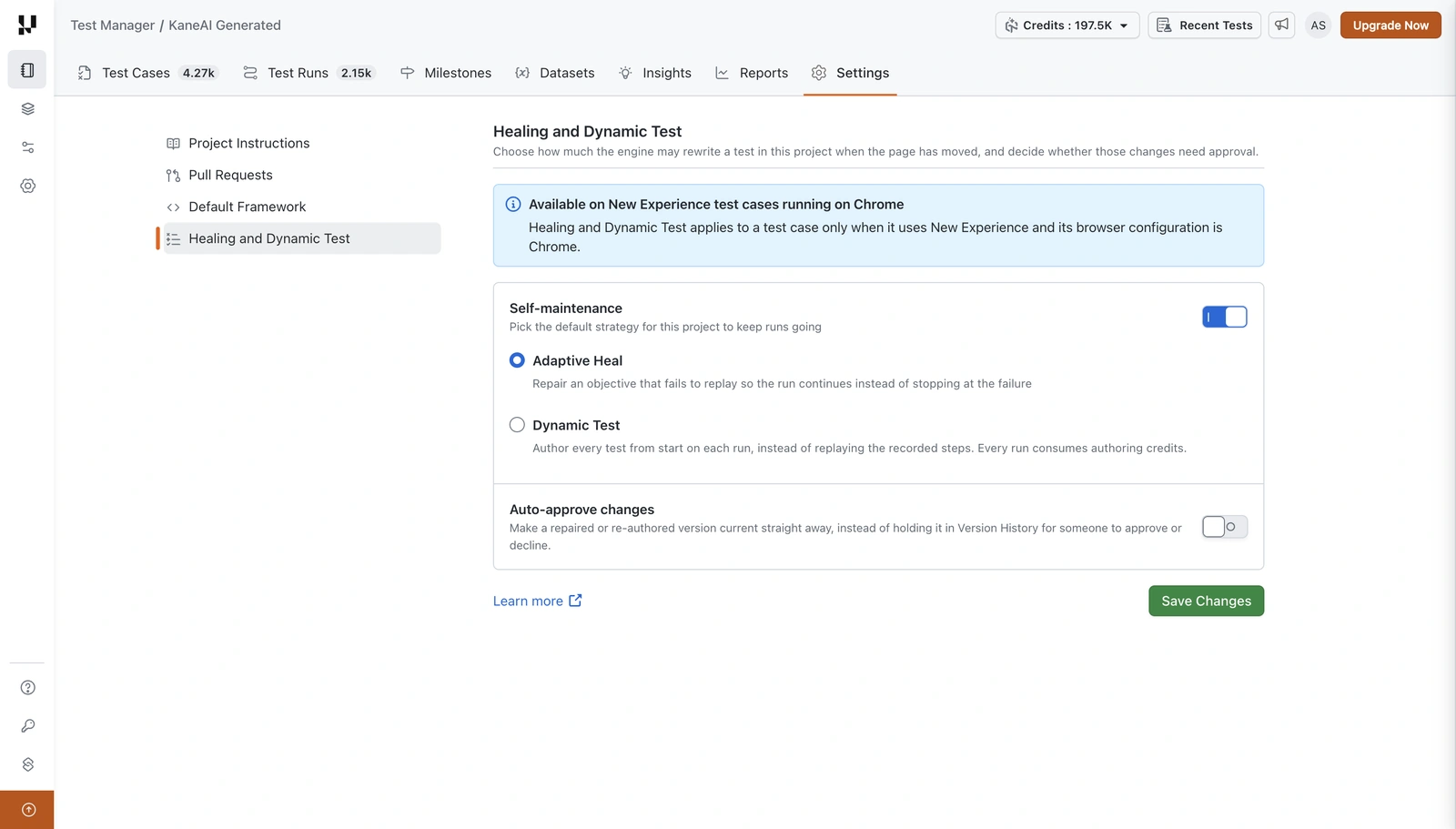
A project follows the organization until someone changes it there. Once changed, the project keeps its own value and later organization changes no longer overwrite it.
A test run starts from the project's value and can override it for that run. Changing it in a run never writes back to the project or the organization.
Turning Self-maintenance on at the organization or project level applies from that point forward. Test runs that already exist are not eligible, and only runs created while the toggle is on use Adaptive Heal or Dynamic Test.
Retry on Failure exists only at the run level, so it is chosen per run.
Set it for a run
- On the test run screen, click Advanced Configurations.
- Turn Self-maintenance on.
- Select Adaptive Heal, Dynamic Test or Retry on Failure.
- For Adaptive Heal or Dynamic Test, set Auto-approve changes. For Retry on Failure, set Maximum Retries.
- Click Execute.
Check the strategy before you execute
The Run with HyperExecute panel carries a strategy tile in its Overview, beside the number of test instances, unique configurations and concurrency. Confirm the strategy in Advanced Configurations before you click Execute, because that is where the organization, project and run-level values resolve for this run.
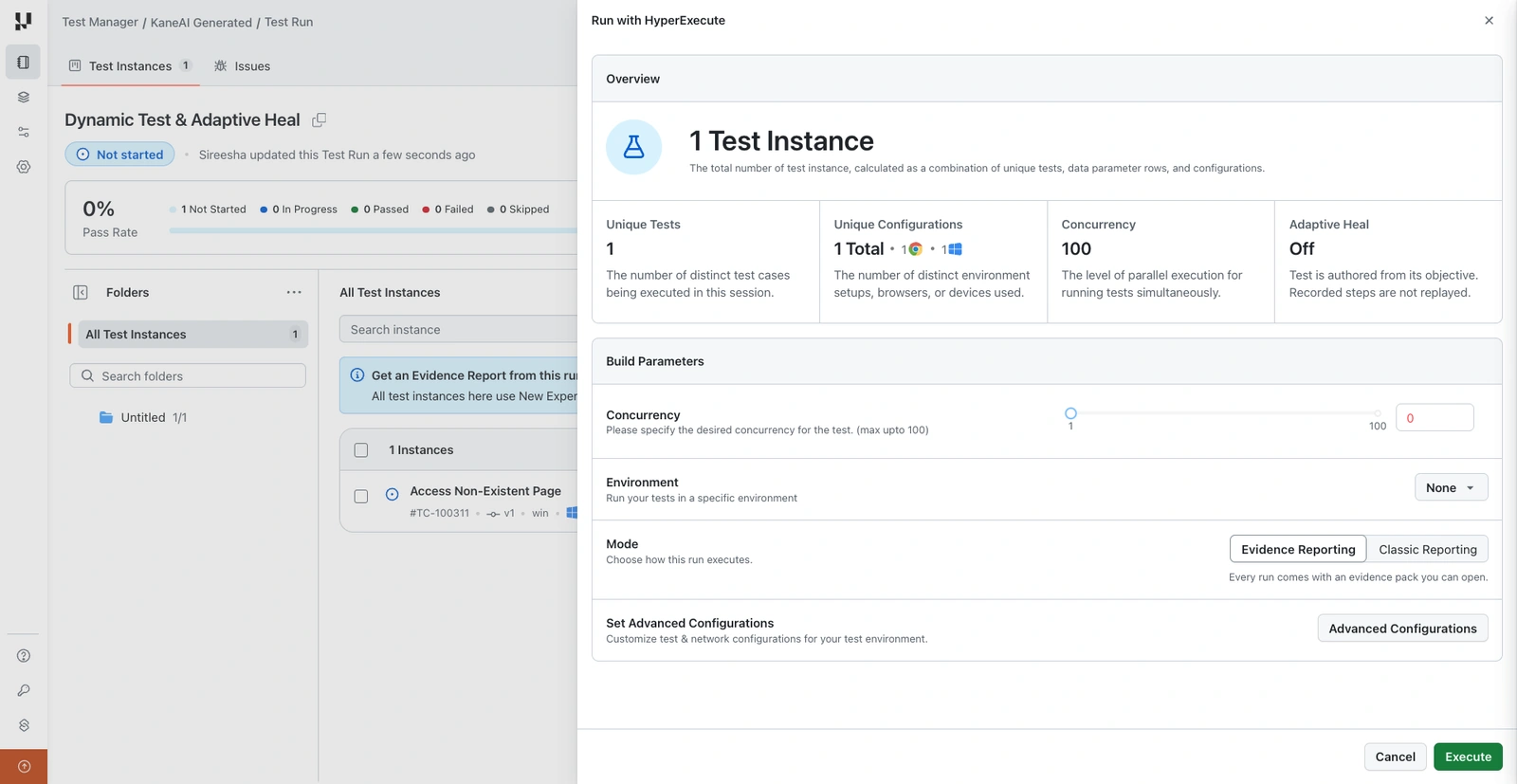
See KaneAI Test Runs for the rest of the Advanced Configurations panel.
Reviewing a change
When Adaptive Heal or Dynamic Test produces a new version and auto-approve is off, the version appears in the test case's Version History marked as a draft, attributed to the strategy that produced it rather than to the person who started the run.
A test run can include the same test case under several configurations, such as more than one Chrome version or more than one operating system. It still produces a single draft, because it is one test case.
From there you can read the proposed steps in full, compare them against the current version, and then Approve or Decline.
- Approve makes it the current version and regenerates the exported code for it.
- Decline discards it and leaves the current version untouched.
A draft cannot be edited while it is waiting for a verdict. Approve or decline it first, then edit the result like any other version.
When these strategies do not apply
A run can be configured in ways that put it outside the scope of Adaptive Heal and Dynamic Test. In those cases the run behaves as it would with Self-maintenance off, whatever is selected.
Test cases outside New Experience or Chrome
Adaptive Heal and Dynamic Test apply to a test case only when it uses New Experience and its browser configuration is Chrome. A test case on any other browser, or one not using New Experience, replays its recorded steps and nothing is re-authored.
Other boundaries
- Only one strategy can be active at a time. Selecting one clears the others.
- Retry on Failure is a run-level setting and has no organization or project equivalent.
Only a test case whose browser configuration is Chrome is eligible for an evidence pack.


 Chat with Us