
Run End-to-End Tests from Your Terminal with Kane CLI
Author and Run Tests Right from the Terminal in Natural Language, with an Evidence-Backed Pass or Fail from a Real Browser.
npm install -g @testmuai/kane-cli
Playwright getByRole: How to Use It and Fix It When It Fails
Part of: Playwright
Playwright getByRole explained: every option, TypeScript and Python examples, and a 4-step check when a role locator finds nothing or too many elements.
Published on:
page.getByRole() finds an element by its ARIA role and accessible name (i.e., the way a screen reader would see the page). page.getByRole('button', { name: 'Submit' }) is the way to go.
Name matching is case-insensitive and partial by default; you can add exact: true to do a whole string match. Playwright's locators guide lists that one as the first of the recommended locators.
Role locators survive refactors that break CSS selectors (a button is still a button even if its class names have changed). Playwright's code generator actually prefers them too.
If you're using Playwright agents to plan, generate and heal your tests, then our guide would recommend that you ask them for getByRole() specifically. It's therefore worth knowing what each of the options does and why a role locator might well come up empty.
This guide covers the options, TypeScript and Python examples, a debugging routine and when another locator would be the better choice. The examples are all run with Playwright Test and have a baseURL defined in playwright.config.
TL;DR
Playwright getByRole() locates an element by its ARIA role and accessible name, the way a screen reader reads the page, as in page.getByRole('button', { name: 'Submit' }). Name matching is case-insensitive and partial unless you add exact: true, and Playwright's locators guide lists getByRole first among its recommended built-in locators.
Which Playwright Get by Role Options Matter Most?
- Playwright accessible name: The name option of Playwright getByRole() matches the accessible name a screen reader announces, built from aria-labelledby, aria-label, a label or alt text, or the element's own text. It never matches the CSS id or the data-testid attribute.
- exact: true: The exact option of Playwright getByRole() switches name and description matching to a whole-string comparison. Case-sensitive: yes, so { name: 'Save' } stops matching a "Save draft" button. Playwright added exact in v1.28 and ignores it when name is a regular expression.
- get_by_role in Playwright Python: Python exposes the same locator as page.get_by_role() with keyword arguments, for example page.get_by_role("button", name="Submit"). The roles and options match the TypeScript getByRole API.
How Do You Fix a getByRole Playwright Locator That Fails?
- Playwright ARIA snapshot: locator.ariaSnapshot() prints the roles and accessible names Playwright computes as YAML, one role "name" line per element, so you can compare the name you passed with the name the page exposes.
- Strict mode: Playwright throws when an action targets a locator that matches more than one element. Scope the getByRole call from a container such as a named dialog, or filter a list item, instead of picking an index with nth().
- Kane CLI: Kane CLI by TestMu AI runs a user flow from a plain-English objective in a real browser, naming targets by their visible labels instead of locators, and exits 0 on a pass and 1 on a fail so CI can gate on it.
What Is getByRole in Playwright?
getByRole() is a Playwright locator that matches elements by their ARIA role (so a button, checkbox or heading, for example) and optionally by their accessible name and states.
It was added in Playwright v1.27 (per the Playwright Page API reference).
The Playwright locators guide lists it as the first option, before getByText(), getByLabel(), getByPlaceholder(), getByAltText(), getByTitle() and getByTestId(). It doesn't recommend CSS or XPath at all, as the DOM can so easily change.
Two things decide a match:
- The role. Most HTML elements have an implicit role, so you very rarely need a role attribute. A
<button>has the role button, an<a href>is a link,<h1>through to<h6>are headings,<ul>/<li>are list/listitem, and a<tr>is a row. MDN's ARIA roles reference has a full list of all the roles with their corresponding native HTML element. - The accessible name. This is what the screen reader will announce. According to the W3C Accessible Name and Description Computation, it's derived from
aria-labelledbyfirst, thenaria-label, then the native label (i.e., the label element itself or the alt attribute), then the element's own text, and only then from a title tooltip.
Playwright's own note on the subject is worth repeating: the role selector does provide early feedback on ARIA usage; it just doesn't in any way replace an accessibility audit.
For a quick visual walkthrough of this concept, watch the video below from TestMu AI.

Subscribe to the TestMu AI YouTube channel for more tutorials on testing and automation.
How Do You Use getByRole in TypeScript and Python?
Start with the role plus the name. The Playwright docs say you should normally pass the accessible name so that the locator ends up on exactly one element.
Given this markup:
<h1>Sign up</h1>
<label>Email <input type="email" /></label>
<label><input type="checkbox" /> Subscribe</label>
<button>Submit</button>
TypeScript (Playwright Test):
import { test, expect } from '@playwright/test';

const signup = { email: 'qa.signup@example.com' }; // test data as a parameter

test('user can subscribe while signing up', async ({ page }) => {
  await page.goto('/signup');
  await expect(page.getByRole('heading', { name: 'Sign up', level: 1 })).toBeVisible();
  await page.getByRole('textbox', { name: 'Email' }).fill(signup.email);
  await page.getByRole('checkbox', { name: 'Subscribe' }).check();
  await page.getByRole('button', { name: /submit/i }).click();
});
Python (pytest-playwright):
import re
from playwright.sync_api import Page, expect

SIGNUP = {"email": "qa.signup@example.com"}  # test data as a parameter

def test_user_can_subscribe(page: Page):
    page.goto("/signup")
    expect(page.get_by_role("heading", name="Sign up", level=1)).to_be_visible()
    page.get_by_role("textbox", name="Email").fill(SIGNUP["email"])
    page.get_by_role("checkbox", name="Subscribe").check()
    page.get_by_role("button", name=re.compile("submit", re.IGNORECASE)).click()
In Python, the method is get_by_role(), and the options are passed in as keyword arguments. Keep the base URL in your test config, not in the test.

Spending more time fixing locators than actually finding the bugs?
Note: Kane CLI from TestMu AI runs a flow from a plain English objective in a real browser (no locators to maintain) and gives you a pass/fail with evidence that your CI can consume.
Which getByRole Options Should You Use?
All options come from the Playwright Page API reference:
| Option | Type | What it matches | Use it when |
|---|---|---|---|
name | string or RegExp | Accessible name; strings are case-insensitive substring matches by default | Almost always: { name: 'Save' } |
exact | boolean (v1.28+) | Makes name and description case-sensitive, whole-string matches; ignored for RegExp | "Save" vs "Save draft" |
level | number | Heading, list item, row or tree item level | getByRole('heading', { level: 2 }) |
checked | boolean | Checked state (aria-checked or a native checkbox) | Assert a toggle is on |
disabled | boolean | Disabled state (aria-disabled or disabled), inherited down the DOM | Find the disabled submit button |
expanded | boolean | aria-expanded state | Menus, accordions |
pressed | boolean | aria-pressed state | Toggle buttons |
selected | boolean | aria-selected state | Tabs, options |
includeHidden | boolean | Also matches elements hidden under ARIA rules (off by default) | Rare; checking hidden content on purpose |
description | string or RegExp (v1.60+) | Accessible description | Two buttons with the same name but different descriptions |
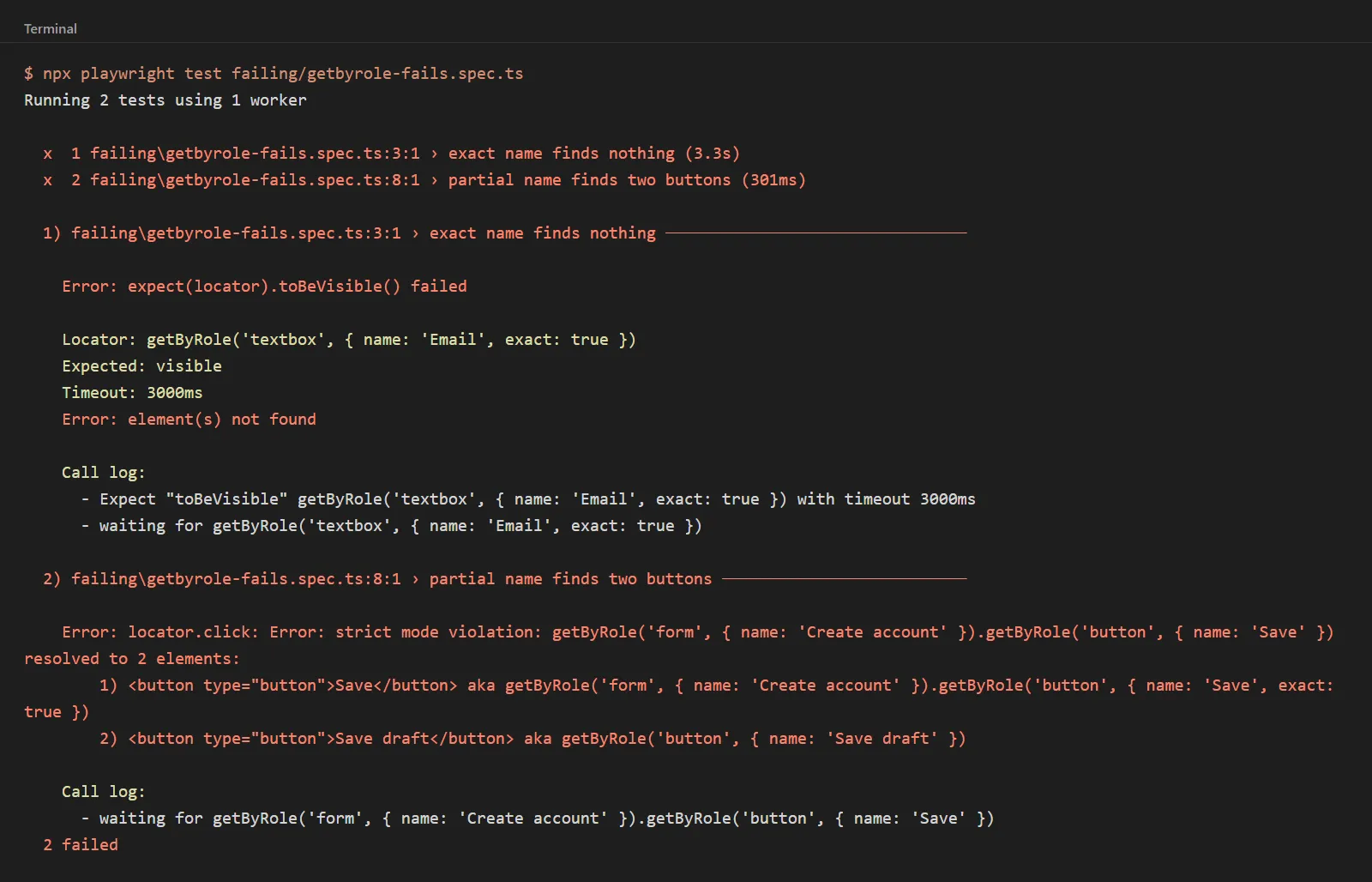
The two that cause the most confusion are name and exact. Without exact, { name: 'Save' } will also match a button called "Save draft", and that can easily become a strict mode violation if both are present on the page.
Why Is My getByRole Locator Not Finding the Element?
Run the ROLE check in order, as it covers pretty much every 'locator resolved to 0 elements' and 'resolved to 2 elements' failure.
- R - Role is real. Is the element actually what you think it is? A
<div>with a click handler has no button role. Fix the markup (MDN recommends a native<button>), or ask the team for a test ID. - O - one match. Locators are very strict in that an action on a locator that matches multiple elements will throw. Scope it by chaining from a container or filter it rather than reaching for
nth(). - L - the label is the accessible name. The name is not the CSS id or the
data-testid. Check what the browser computes (see snapshot below). - E - exact when it matters. Default name matching is case-insensitive and partial. Use
exact: trueor a RegExp with anchors (i.e.^and$) if you have overlapping names.
Common role mismatches. These are the cases where the role you're expecting is not the role that the browser actually exposes (the implicit roles from MDN's HTML and ARIA references).
| Element | Role you expect | Role the browser exposes | Fix |
|---|---|---|---|
<a> without href | link | generic (link only when href is present) | Add href in the app, or locate by text or test id |
<input type="search"> | textbox | searchbox | getByRole('searchbox', { name: 'Search' }) |
<form> with no accessible name | form | Not exposed as a form landmark until it has an accessible name | Give it aria-label or aria-labelledby, or locate the fields inside it |
<section> with no accessible name | region | Not a region until it has an accessible name | Name the section, or scope from a heading |
<select> | listbox | combobox, unless it has multiple or a size greater than 1 (then listbox) | getByRole('combobox', { name: 'Country' }) |
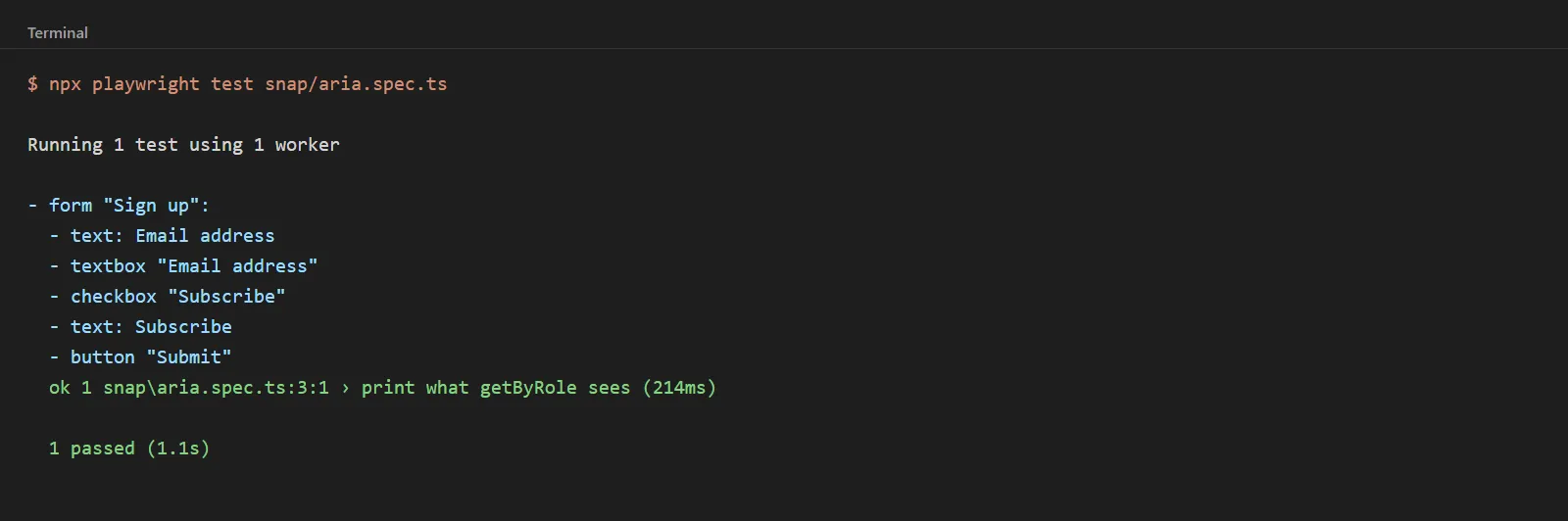
See the page as getByRole does. An ARIA snapshot will print out the roles and accessible names that Playwright computes in YAML format:
console.log(await page.locator('form').ariaSnapshot());Each line is of the form: role "name" [attribute=value]. If your field appears as - textbox "Email address" then { name: 'Email' } will still match (it's a substring), but { name: 'Email', exact: true } will not.
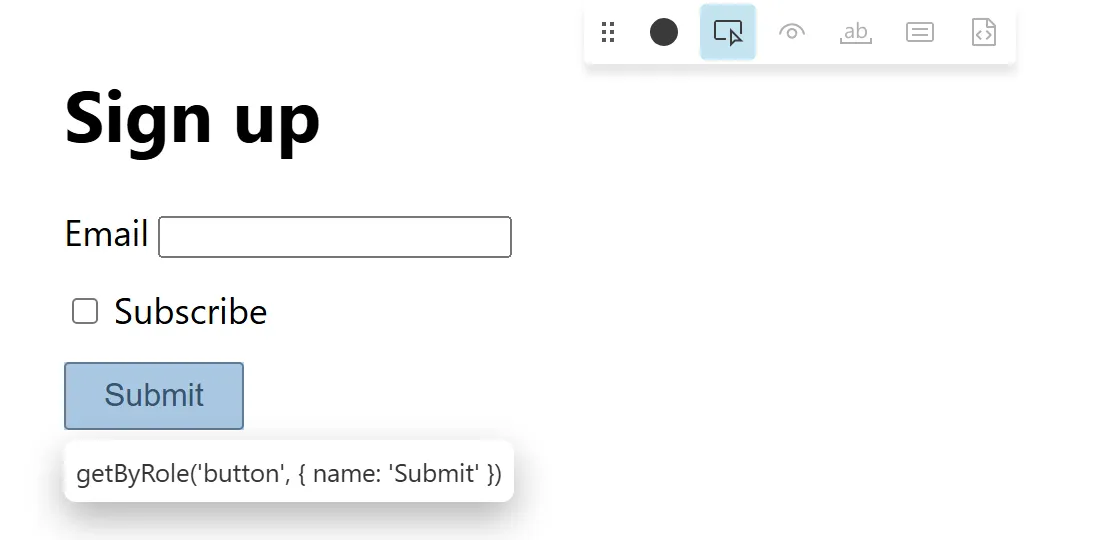
Let Playwright pick the locator. Run npx playwright codegen against your app, stop the recording, click 'Pick Locator', and hover over the element. The codegen docs state that it will prefer role, text, and test id locators and will further refine them until they are unique. The VS Code extension has the same 'Pick locator' button in the Testing sidebar.
Fix "too many matches" by scoping, not by index:
// Scope to the dialog that contains the button
await page.getByRole('dialog', { name: 'Settings' }).getByRole('button', { name: 'Save' }).click();

// Or filter a list down to one item first
await page
  .getByRole('listitem')
  .filter({ hasText: 'Product 2' })
  .getByRole('button', { name: 'Add to cart' })
  .click();
Playwright's docs state that first(), last() and nth() are not recommended, as when your page changes, Playwright may end up clicking on an element you didn't actually intend.
When a test fails in CI, and you can't reproduce it, open the trace. Our Playwright trace viewer guide will show you whether the element was actually there and what it was called at the point of failure.
getByRole vs getByTestId vs CSS: Which Locator Should You Use?
| Locator | Survives CSS and DOM refactors | Survives text changes | Checks accessibility | Needs app changes | Best for |
|---|---|---|---|---|---|
getByRole() | Yes | No, if the name changes | Yes (role + name) | Only if the HTML is not semantic | Buttons, links, inputs, headings |
getByLabel() | Yes | No, if the label changes | Yes | No | Form fields with visible labels |
getByText() | Yes | No | Partly | No | Non-interactive text |
getByTestId() | Yes | Yes | No | Yes, a data-testid per element | Apps with weak semantics, or text that repeats |
| CSS / XPath | No | Yes | No | No | Last resort |
Teams are split on the default, and the trade-off is very real. In a Ministry of Testing thread on the move from Cypress to Playwright, one tester noted that role locators force the development of better HTML. The counter view was to stick with test IDs for an app which has a lot of repeated text and hidden elements.
A sensible compromise really: use getByRole() for anything a user would click on or read and stick with getByTestId() for any element that doesn't have a stable role or name.
For all the locator types with examples (including CSS, XPath and strict mode fixes), see our full guide to Playwright locators.
Is getByRole Slower Than CSS Selectors?
Somewhat in one informal test. A SerpApi blog post from November 2023 did 100 textContent() calls on one button and reported 677ms with getByRole() vs 497ms with a CSS class locator (roughly 1.4x slower in their figures; the headline says 1.5x). They didn't state the Playwright version, and the difference was across 100 calls on a single element.
For most suites, a locator that doesn't break on the next redesign will save you more time than that difference costs.
How Do AI Testing Agents Deal With Locators?
AI agents change who's writing the locator, not whether it matters.
- Code-generating agents write Playwright code. Our Playwright agent instructions would recommend that you explicitly ask for
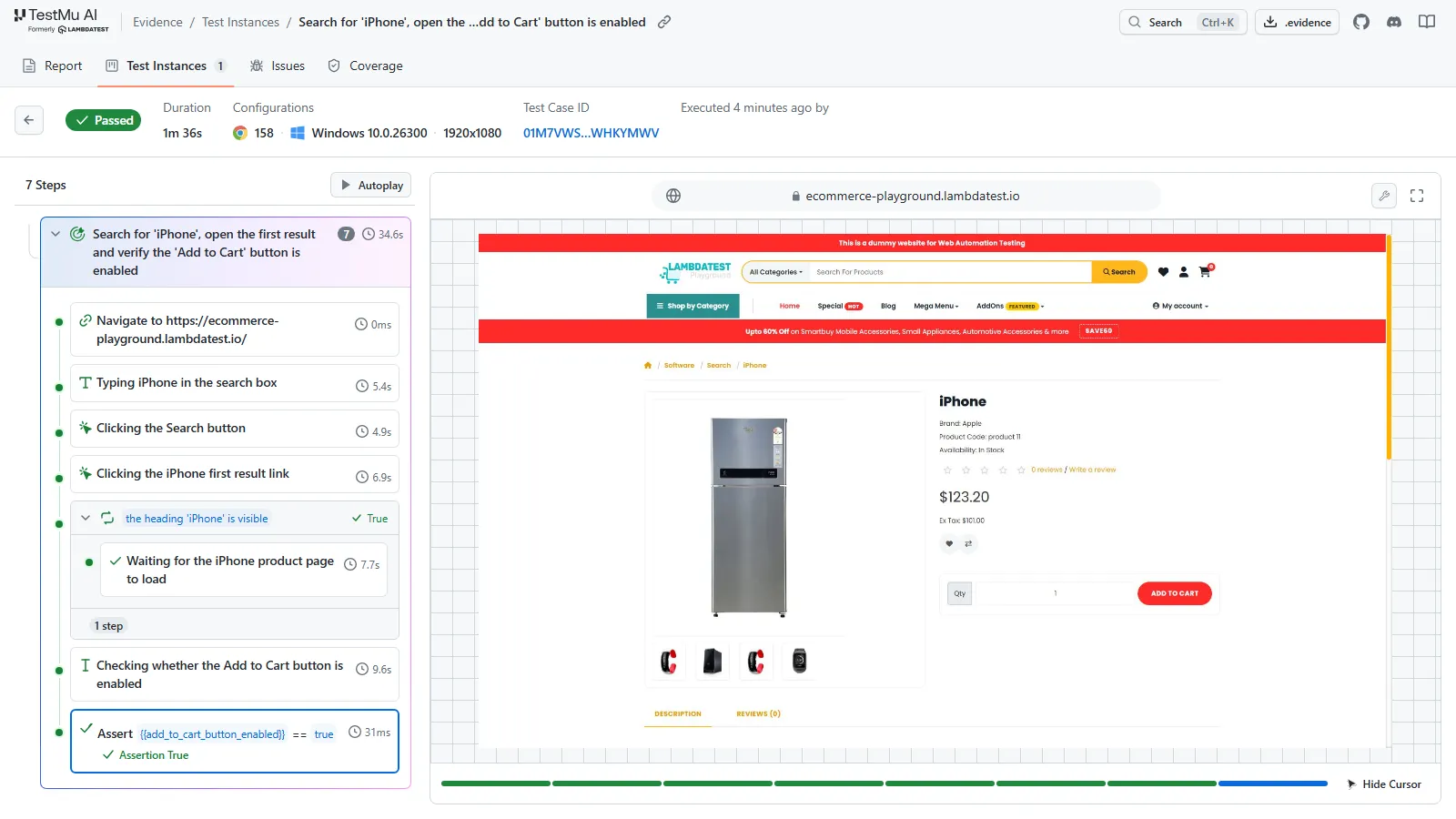
getByRole(),getByLabel()andgetByTestId(). You still end up reviewing and maintaining that code. - Kane CLI takes a plain English objective rather than a script. The objective writing guide in it is very specific, and the examples given name the target by its visible label (e.g., "the 'Add to Cart' button", a field by its label), which is precisely the same information that a role locator would use. Unchanged steps are simply replayed from cache with no LLM cost. If an element has moved, then step-heal will find it again, and a wrong result will be reported as a bug rather than being healed into a pass.
npm install -g @testmuai/kane-cli
kane-cli login
kane-cli run --url https://staging.example.com \
  "Search for 'wireless mouse', open the first result and verify the 'Add to Cart' button is enabled" \
  --headless --agent
Kane CLI exits 0 on a pass, 1 on a fail, 2 on a setup/auth error, and 3 on a timeout or cancellation so CI can gate on it directly. Recorded flows can also be exported as Playwright code. See the Kane CLI introduction for install and setup.
Conclusion
Use getByRole() with a name for anything a user is going to interact with. Use exact: true when there's a name overlap. Scope by container rather than by index.
If getByRole() comes back with nothing, then print an ARIA snapshot before you change the test (the page will usually have a different role/name than you expected). Keep the test IDs for the elements that have no stable role or name.
Testing from the terminal? Kane CLI by TestMu AI lets SDETs and developers plan, write, run and debug tests from the command line.
Author

Sri Harsha
Blogs: 11

Sri Harsha is Engineering Manager of the Open Source Program Office at TestMu AI, where he leads open-source engineering behind the Selenium and Appium automation grid and builds agentic AI systems for quality engineering. He is a member of the Selenium Technical Leadership Committee and a committer to WebdriverIO and Appium, and was recognized with the LambdaTest Delta Award 2023 for Best Contributor in open-source testing. He brings over 10 years of experience in software testing and automation, with earlier roles at EPAM Systems and ZenQ. Sri Harsha holds a B.Tech in Computer Science from Jawaharlal Nehru Technological University.
Reviewer

Mayank Bhola
Reviewer
Mayank Bhola is Co-Founder and Head of Products at TestMu AI, where he leads the entire product portfolio across KaneAI, Kane CLI, HyperExecute, SmartUI, the Real Device Cloud, Accessibility, and other software testing product lines. As an early Lead Architect he designed and built the company's flagship Tunnel technology from scratch, created the React-based automation platform, and architected the data-intensive pipelines and FAAS services that scale it. He brings more than 10 years of experience in software development and product engineering, with earlier roles as Head of Technology at Juggernaut Books and Senior Software Engineer at PressPlay TV and Zomato. Mayank holds a B.Tech in Computer Engineering from JIIT Noida.
Playwright getByRole FAQs
Did you find this page helpful?
More Related Blogs



TestMu AI forEnterprise
Get access to solutions built on Enterprise
grade security, privacy, & compliance
- Advanced access controls
- Advanced data retention rules
- Advanced Local Testing
- Premium Support options
- Early access to beta features
- Private Slack Channel
- Unlimited Manual Accessibility DevTools Tests