

Power Your Software Testing with AI Agents and Cloud
The Native AI-Agentic Cloud Platform to Supercharge Quality Engineering. Test Intelligently and Ship Faster.


- TestMu AI (Formerly LambdaTest)
- /
- Blog
- /
- How to Perform End-to-End Testing From the Command Line
How to Perform End-to-End Testing From the Command Line
Run an end-to-end test from the terminal: start the app, reuse a saved login, drive a real checkout journey, read the trace, then repeat it with Kane CLI in CI.
Published on:
89.1% of teams use CI/CD tools for rapid releases, according to TestMu AI's future of quality assurance survey. End-to-end tests are where that pipeline gets hard, because they need a running app, a logged-in user, and a browser before they can prove anything.
This guide runs one real shopper journey, from registration to a placed order, entirely from the terminal. It covers starting the stack, saving the login, reading the trace when something breaks, and running the same journey as a single plain-English command with Kane CLI on TestMu AI, then saving a checkout journey as a replayable test file that runs in CI.
TL;DR
To run end-to-end tests from the command line, start the app with Playwright's webServer or docker compose up --wait, log in once in a setup project that saves storageState, then run npx playwright test. Keep traces with trace: 'retain-on-failure' and open them with npx playwright show-trace. Let CI gate the merge on the exit code.
- How to start the app for E2E tests: Playwright's webServer runs the start command, waits up to 60 seconds by default for the URL, and stops the server after the run. Requires a config change: Yes.
- How to skip logging in on every test: a Playwright setup project logs in once and writes storageState to a file that every dependent project reuses. Safe to commit the state file: No.
- How to debug a failed E2E test: Playwright's npx playwright show-trace opens the trace.zip, which holds every action, DOM snapshots, network requests, and console output. Needs a rerun: No.
- How to run E2E tests without test code: Kane CLI on TestMu AI runs a plain-English objective in a real Chrome browser and returns pass or fail with extracted values. Writes selectors: No.
- How to replay an E2E journey with Kane CLI: save the journey as one _test.md file with one ## heading per leg; the first kane-cli testmd run records each leg and later runs replay the recording. Unchanged legs re-authored on later runs: No.
What Does End-to-End Test Automation Look Like From the Command Line?
End-to-end test automation from the command line is a four-step lifecycle: start the stack, run the journeys against it, keep evidence for anything that fails, and tear it down. Each step is one command, which is what lets the same run happen on a laptop and in CI.
# 1. Start the stack and wait until it answers
docker compose up --wait            # or Playwright's webServer, or start-server-and-test

# 2. Log in once, run the journeys, keep traces for failures
npx playwright test --project=e2e    # the setup project runs first as a dependency

# 3. Open the evidence for a failure
npx playwright show-trace test-results/<test>/trace.zip

# 4. Tear down
docker compose down| Step | Playwright | Cypress | Kane CLI |
|---|---|---|---|
| Start the app | webServer in the config | start-server-and-test | --url to a running app |
| Log in once | Setup project + storageState | cy.session() | Named Chrome profile or an @import login leg |
| Run the journey | npx playwright test | npx cypress run | kane-cli run "objective" or kane-cli testmd run |
| Evidence | trace.zip + HTML report | Screenshots + video | Sealed .evidence pack |
| CI signal | Exit 1 on failure | Exit = failed test count | Exit 0/1/2/3 + NDJSON |
If you are still deciding what belongs in an E2E suite versus a faster layer, end-to-end testing covers the scope and end-to-end testing vs integration testing draws the line between the two.
How Do You Start the App Before End-to-End Tests Run?
Let the test runner own the app's lifecycle. Playwright's web server option runs your start command, waits for the URL to answer, and stops the process after the run. Its timeout defaults to 60 seconds, which a cold build in CI can exceed.
// playwright.config.ts - Playwright starts the app, waits for the URL, and stops it afterwards
webServer: {
  command: 'npm run start',
  url: 'http://localhost:3000',
  reuseExistingServer: !process.env.CI,   // reuse a running dev server locally, start fresh in CI
  timeout: 120_000,                       // default is 60 seconds
},
When the app needs a database, a queue, or a second service, start the whole stack instead. The docker compose up reference describes --wait as waiting for services to be running or healthy, so the next command never races a container that is still booting.
# Multi-service stack: block until every service is running or healthy
docker compose up --wait --wait-timeout 120
npx playwright test
docker compose down

# Single app without a Playwright config change
npx start-server-and-test start http://localhost:3000 "npx playwright test"- Readiness, not a sleep - webServer treats 2xx, 3xx, and a few 4xx responses (400 to 403) as ready. Point url at a health route rather than a page that redirects to login.
- Several services - webServer also accepts an array, so a frontend and an API can start from one config.
- Deployed environments - against a preview or staging URL, drop webServer and set baseURL instead; the rest of this guide stays the same.
How Do You Handle Login in End-to-End Tests?
Log in once per run, save the session, and start every journey already authenticated. Playwright's authentication guide recommends a setup project that writes storageState to a file and a dependency that makes every test project wait for it.
// playwright.config.ts
export default defineConfig({
  testDir: './tests',
  use: {
    baseURL: 'https://ecommerce-playground.lambdatest.io/',
    trace: 'retain-on-failure',
    connectOptions: { wsEndpoint },          // TestMu AI cloud grid, built from LT_USERNAME / LT_ACCESS_KEY
  },
  projects: [
    { name: 'setup', testMatch: /auth\.setup\.ts/ },
    { name: 'e2e', dependencies: ['setup'], use: { storageState: '.auth/user.json' } },
  ],
});
The setup below registers a brand-new shopper on the TestMu AI e-commerce playground, so each run starts from a clean account instead of a shared one that other runs may have changed:
// tests/auth.setup.ts - register a shopper once and save the logged-in session
import { test as setup, expect } from '@playwright/test';

setup('register a shopper', async ({ page }) => {
  await page.goto('index.php?route=account/register');
  await page.locator('#input-firstname').fill('E2E');
  await page.locator('#input-lastname').fill('Shopper');
  await page.locator('#input-email').fill(`e2e-${Date.now()}@example.com`);
  await page.locator('#input-telephone').fill('5550100');
  await page.locator('#input-password').fill('Checkout#2026');
  await page.locator('#input-confirm').fill('Checkout#2026');
  await page.locator('label[for="input-agree"]').click();
  await page.getByRole('button', { name: 'Continue' }).click();
  await expect(page.getByRole('heading', { name: 'Your Account Has Been Created!' })).toBeVisible();
  await page.context().storageState({ path: '.auth/user.json' });
});- Keep it out of Git - the state file holds session cookies that can impersonate the test account. Add the .auth folder to .gitignore.
- Expiry is on you - Playwright does not refresh a stale file. Regenerating it every run, as the setup project does here, avoids the problem.
What Does a Real End-to-End Test Example Look Like?
A real end-to-end test follows one user goal across every layer. This one searches for a product, adds it to the cart, checks out with a billing address, confirms the order, and then asks the backend directly whether the order exists. It runs on the TestMu AI cloud grid, which gives each session real Chrome on Windows 11 plus video and console logs with no extra setup.
// tests/checkout.spec.ts
import { test, expect } from '@playwright/test';

test('shopper buys an iPhone end to end', { tag: '@e2e' }, async ({ page }) => {
  // 1. Find the product
  await page.goto('');
  await page.getByRole('textbox', { name: 'Search For Products' }).first().fill('iPhone');
  await page.getByRole('button', { name: 'Search' }).first().click();
  await expect(page.getByRole('heading', { name: 'Search - iPhone' })).toBeVisible();

  // 2. Add it to the cart
  await page.getByRole('link', { name: 'iPhone' }).first().click();
  await page.getByRole('button', { name: 'Add to Cart' }).first().click();
  await expect(page.getByText('Success: You have added')).toBeVisible();

  // 3. Check out as the logged-in shopper from auth.setup.ts
  await page.goto('index.php?route=checkout/checkout');
  await page.locator('#input-payment-firstname').fill('E2E');
  await page.locator('#input-payment-lastname').fill('Shopper');
  await page.locator('#input-payment-address-1').fill('1 Test Street');
  await page.locator('#input-payment-city').fill('London');
  await page.locator('#input-payment-postcode').fill('EC1A 1BB');
  await page.locator('#input-payment-country').selectOption({ label: 'United Kingdom' });
  await page.locator('#input-payment-zone').selectOption({ label: 'Greater London' });
  await page.locator('label[for="input-agree"]').click();
  await page.locator('#button-save').click();

  // 4. Confirm and verify the order landed
  await page.getByRole('button', { name: 'Confirm Order' }).click();
  await expect(page.getByRole('heading', { name: 'Your order has been placed!' })).toBeVisible();

  // 5. Same session, no browser: the order history endpoint lists the new order
  const history = await page.request.get('index.php?route=account/order');
  expect(history.ok()).toBeTruthy();
  expect(await history.text()).toContain('Pending');
});
$ npx playwright test
Running 2 tests using 1 worker
ok 1 [setup] › tests/auth.setup.ts:4:6 › register a shopper (13.4s)
ok 2 [e2e] › tests/checkout.spec.ts:3:5 › shopper buys an iPhone end to end @e2e (16.0s)
2 passed (1.0m)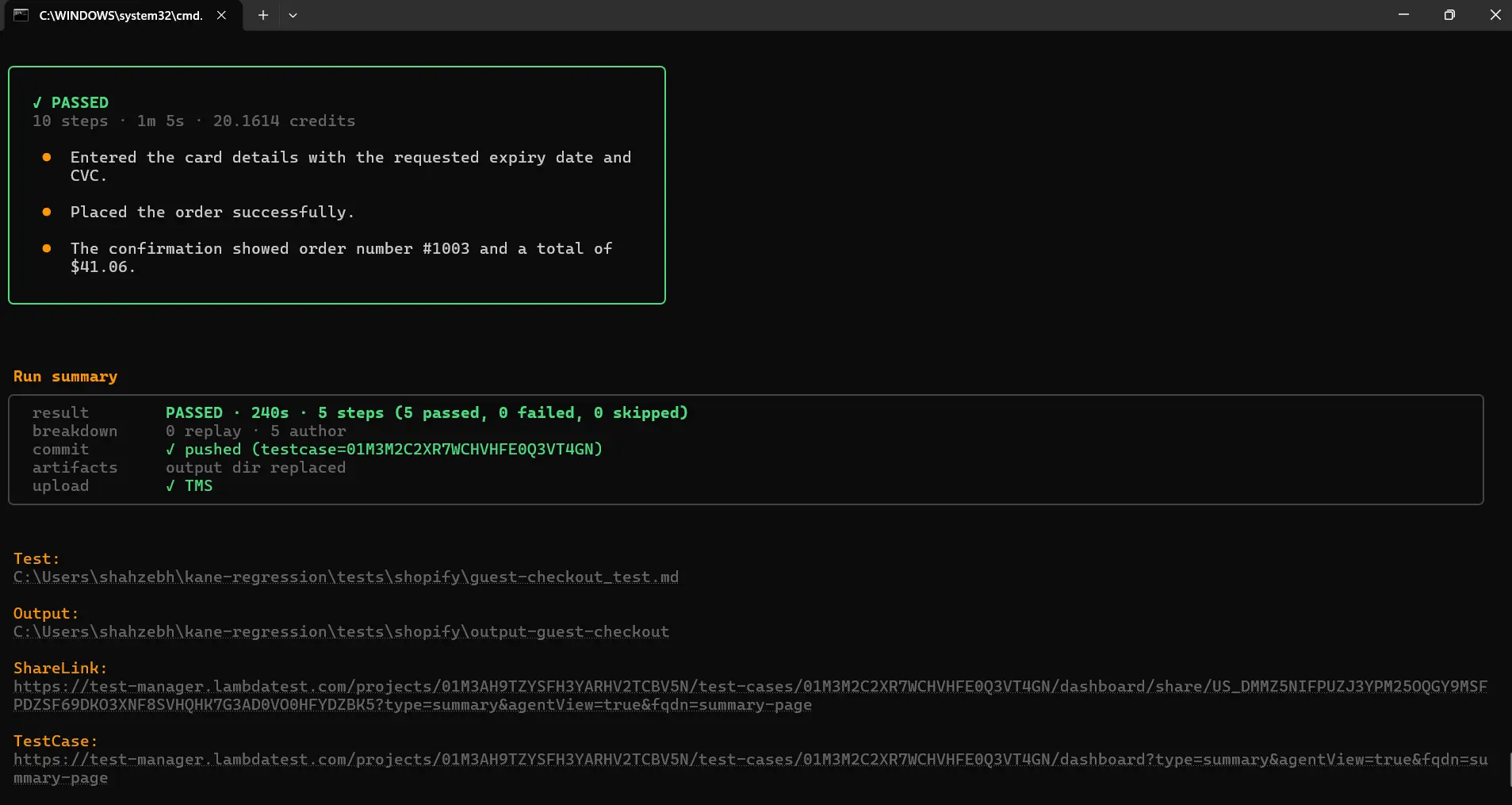
- Assert at every hop - each step ends on a visible outcome (the search heading, the cart message, the confirmation heading), so a failure names the step that broke.
- Check the backend too - page.request shares the browser's cookies, so the order-history call proves the order was stored, not just that a success page rendered.
- Scale the browsers - TestMu AI automation cloud runs the same Playwright project across 3,000+ browser and OS combinations in parallel; only the capabilities in the connection URL change.

Note: Run this checkout journey on your own TestMu AI account: set LT_USERNAME and LT_ACCESS_KEY and point the Playwright config at the cloud grid. Sign up for free.
How Do You Debug a Failed End-to-End Test From the Terminal?
Record a trace and open it, instead of rerunning the test with print statements. The trace viewer docs list five recording modes and recommend on-first-retry for CI; retain-on-failure keeps a trace only for tests that failed.
$ npx playwright test --trace on
  ok 1 [setup] › tests/auth.setup.ts:4:6 › register a shopper (7.9s)
  ok 2 [e2e] › tests/checkout.spec.ts:3:5 › shopper buys an iPhone end to end @e2e (25.6s)
  2 passed (1.0m)

$ ls -la test-results/*/trace.zip
 2852849  test-results/auth.setup.ts-register-a-shopper-setup/trace.zip
 9761744  test-results/checkout-shopper-buys-an-iPhone-end-to-end-e2e/trace.zip

$ npx playwright show-trace test-results/checkout-shopper-buys-an-iPhone-end-to-end-e2e/trace.zip
The checkout trace above weighs 9.8 MB and holds 22 browser actions, 53 DOM snapshots, and 181 network requests, including the order-history API call. That is enough to see which request returned what at the moment a step failed, which is why --trace on belongs on a single debugging run and not on every CI job.
- Open CI traces locally - upload test-results/ as a CI artifact when a job fails, then download it and run npx playwright show-trace on the zip; no rerun, no access to the CI machine.
- Narrow before you rerun - npx playwright test checkout --headed --debug reruns just the failing journey step by step once the trace points at the step.
For separating a real bug from a flaky failure once you have the trace, see debug E2E test failures.
Can You Run an End-to-End Test Without Writing Code?
Yes. Kane CLI takes the journey as a plain-English objective, drives a real Chrome browser through it, and returns a verdict. In agent mode it writes NDJSON, one event per line, with a final run_end event that carries the status, the values it stored, and the exit code a pipeline can gate on: 0 passed, 1 failed, 2 environment error, 3 timeout.
npx @testmuai/kane-cli run \
  "search for iPhone, open the first iPhone result, click Add to Cart, open the shopping cart, assert the cart contains iPhone, and store the cart total as 'total'" \
  --url https://ecommerce-playground.lambdatest.io \
  --agent --headless --timeout 300 > run.ndjson
The cart portion of the journey took 86.1 seconds and eight recorded steps, with no selectors written. The stored values come back in final_state, ready for a script to compare:
{"step":2,"status":"done","remark":"navigate: Navigate to https://ecommerce-playground.lambdatest.io"}
{"step":3,"status":"done","remark":"type: Typing iPhone into product search box"}
{"step":4,"status":"done","remark":"click: Clicking first iPhone search suggestion"}
{"step":5,"status":"done","remark":"click: Clicking add selected iPhone to cart"}
{"step":6,"status":"done","remark":"scroll: Scrolling into view of Edit cart button in shopping cart drawer"}
{"step":7,"status":"done","remark":"click: Clicking open shopping cart"}
{"step":8,"status":"done","remark":"analyze: The cart total is stored as {{total}}."}
{"step":9,"status":"done","remark":"assert: the cart contains iPhone"}
{"type":"run_end","status":"passed","one_liner":"added an iPhone to the cart on LambdaTest E-Commerce Playground",
 "duration":86.1,"final_state":{"cart_contains_iphone":"true","cart_total":"$123.20"},"reason":"Objective completed"}

$ kane-cli evidence validate <run>.evidence
evidence: valid (L1, status finalized)- Evidence you can check later - each run seals an evidence pack with per-step screenshots, a HAR network log, and console output; kane-cli evidence validate confirms the pack is complete.
- Where it fits - use Kane CLI for journeys you want verified without maintaining selectors, and keep Playwright for flows that need precise API checks like the order-history call above.

How to Run End-to-End Tests With Kane CLI?
A one-off kane-cli run proves a journey once. To run it on every change, save it as one _test.md file: each ## heading is a leg of the journey, written in plain English, and each leg ends in something the agent can verify on screen.
There are no selectors, page objects, or waits to maintain; Kane CLI reads the page at each step and carries the journey through up to 50 steps until it is verified.
The walkthrough uses the guest checkout journey from the storefront guest checkout use case. A wrong total at checkout turns into a support ticket and a chargeback, and the number that matters, the order total, is recalculated four times between the cart and the confirmation page. The test walks from product to thank-you page and asserts the total at every stage.
The commands and output shown are from Kane CLI 0.8.18 on Windows 11; they run unchanged on macOS and Linux.
Step 1: Install Kane CLI and Log In
Install the @testmuai/kane-cli package from npm, confirm the version, and log in once. Web runs also need Google Chrome installed; Kane CLI launches and drives it itself. Full setup steps are in the Kane CLI getting started docs.
npm install -g @testmuai/kane-cli
kane-cli --version
kane-cli login0.8.18Step 2: Write the Journey as One Test File
Create a project folder with a tests/shopify/ directory and save the file below as tests/shopify/guest-checkout_test.md. The front matter holds the store URL and the shopper's details as variables, so the same file runs against staging and production, and marks the card number as a secret so it is masked in the logs. The five legs match the published use case.
---
mode: testing
tags: [e2e, checkout]
timeout: 600
variables:
  store_url: "https://my-testing-repo-main.vercel.app/shopify-clone-app"
  shopper_email: "qa+guest@example.com"
  shopper_name: "Riya Sharma"
  shopper_address: "9 Pine Lane"
  shopper_city: "Austin"
  shopper_zip: "78701"
  test_card:
    value: "4242 4242 4242 4242"
    secret: true
---

# Guest checkout

## Add the product to the cart
Open {{store_url}}?reset=true and click Add to cart on the first product. Verify a confirmation that the item was added.

## Check the cart subtotal
Open the cart and verify the subtotal reads $32.00.

## Start checkout as a guest
Click Checkout. Verify the guest checkout option and the contact section are shown.

## Enter shipping details
Enter {{shopper_email}}, {{shopper_name}}, {{shopper_address}}, {{shopper_city}} and {{shopper_zip}}. Verify the order total reads $41.06 after shipping and tax.

## Pay and confirm the order
Enter card number {{test_card}}, expiry 12/30 and CVC 123, then place the order. Verify the Thank you page shows an order number and the total $41.06.- End every leg in a visible assertion - a failure then points at the leg that broke rather than at the end of the run.
- Keep environment values in variables - anything that changes between environments lives in variables, not in the step text.
- Keep the journey in one file - splitting it into five tests would lose the state that makes it end to end.
Confirm Kane CLI discovers it:
kane-cli testmd listStep 3: Run the Journey and Read the Verdict
Run the file. The first run authors every leg: the agent reads each page, performs the objective, and records what it did. Later runs replay the recording.
kane-cli testmd run tests/shopify/guest-checkout_test.md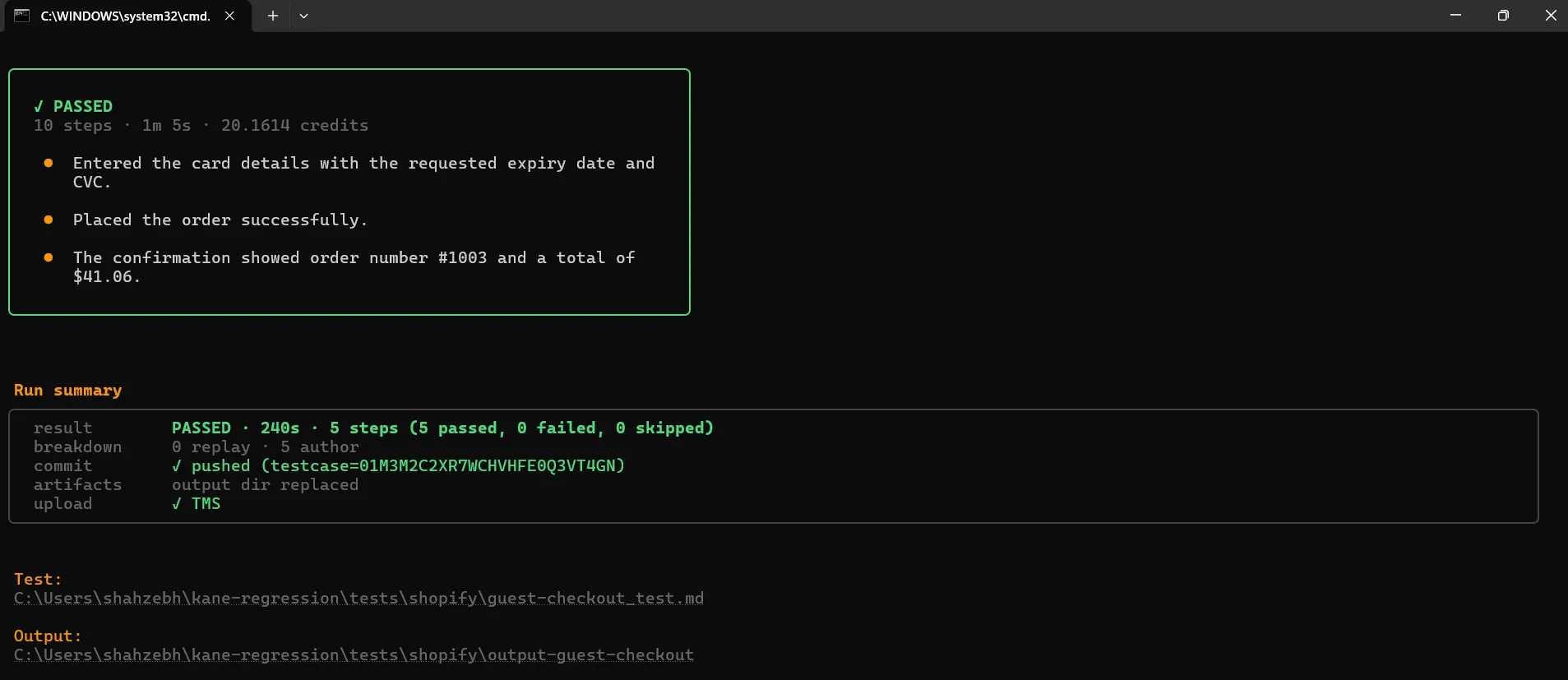
The first run authored all five legs (0 replay, 5 author) and passed in 240 seconds, with the payment leg the longest at 65.1 seconds; the confirmation showed order #1003 at $41.06. The verdict lives in output-guest-checkout/Result.md next to the test file, and the evidence pack in .testmuai/evidence/ holds a screenshot per step, the network log, and the console output, so the $41.06 assertions can be checked against what the page actually showed.
Rerun the same command and the breakdown reads 5 replay, 0 author: each leg replays its recording instead of being authored again, and adaptive heal re-authors only a leg whose recorded path no longer matches the page.
Step 4: What a Broken Journey Looks Like
An end-to-end failure is only useful if it says which leg broke and why. The one-click checkout use case, on a second demo store, shows the shape. The journey has three legs: confirm the 1-Click settings, buy with one click, confirm the order number and charge.
kane-cli testmd run tests/amazon/one-click-checkout_test.md---
test: ../one-click-checkout_test.md
status: failed
duration_s: 123
---
# ShopKart 1.3: One-click checkout - Result
## Confirm the 1-Click settings are shown ✓ passed (44s)
## Buy with one click ✗ failed (77.2s)
Reason: AP determined agent is stuck - no viable actions remain - bug verdict: Buy Now leaves order submission permanently pending after null-reference exception [application_issue/script_error, confidence 0.98]
## Confirm the order number and charge ✓ passed ( - )The first leg passed, so the saved address and payment method rendered correctly; the failure is in the submission itself. The third leg shows no duration because it was never reached.
The verdict names the leg, classifies the cause as an application script error rather than a test problem, and the evidence pack carries the console error and the screenshot of the pending state. The exit code is 1, so a pipeline blocks on it without parsing the report.
Step 5: Reuse the Login Leg and Run in CI
Most journeys start the same way. Put the shared leg in a helper file that does not end in _test.md, and pull it into each journey with @import. A signed-in checkout journey then reuses the login leg without duplicating it:
## Sign in
@import ../helpers/login.md

## Add the product to the cart
Open {{store_url}} and click Add to cart on the first product. Verify a confirmation that the item was added.
In a pipeline, log in with the credentials as flags, run headless, set a timeout, and gate on the exit code, which uses the same 0 to 3 scheme as a one-off run. To run every journey tagged e2e on the HyperExecute grid instead, use kane-cli testrun run --tags e2e --remote; testrun run selects by tag, not by folder.
- name: End-to-end checkout journey
  env:
    LT_USERNAME: ${{ secrets.LT_USERNAME }}
    LT_ACCESS_KEY: ${{ secrets.LT_ACCESS_KEY }}
  run: |
    npm install -g @testmuai/kane-cli
    kane-cli login --username "$LT_USERNAME" --access-key "$LT_ACCESS_KEY"
    kane-cli testmd run tests/shopify/guest-checkout_test.md \
      --headless --agent --timeout 600
--agent produces the same NDJSON stream and final run_end event as a one-off run. A passing journey can also be exported with kane-cli testmd export to Playwright code if the team keeps a code-based suite alongside.
- Critical journeys per pull request - login and checkout on every pull request, the full journey suite nightly. E2E tests in pull requests covers the time budget for that gate.
- Selection and sharding - tag the journeys and split them across jobs with the flags in regression testing command line.
- Generated journeys - to let an agent write and triage the journeys instead, see autonomous testing command line.
The journeys in this section, with their test.md and command, are published as Kane CLI use cases: storefront guest checkout, one-click checkout, and for the payment leg on its own, hosted Checkout session and 3DS challenge. For variables, secrets and imports see Introducing test.md, and for the pipeline side see Kane CLI is CI/CD ready.
Troubleshooting End-to-End Runs From the CLI
Most E2E failures in CI come from the environment rather than the app. The rows below each fail with a clear message or a recognizable symptom.
| Symptom | Likely cause | Fix |
|---|---|---|
| "Timed out waiting 60000ms from config.webServer" | A cold build starts slower in CI than on a laptop | Raise webServer.timeout or build before the test step |
| Tests land on the login page | The saved storageState expired or the setup project did not run | Regenerate state in the setup project each run; check dependencies |
| Setup project skipped in UI mode | UI mode does not run setup projects automatically | Run the setup project by hand first |
| A Cypress job reports exit code 3 | Three tests failed; the code is the failure count | Add --posix-exit-codes if tooling expects 1 |
| CI jobs slow down after enabling traces | trace: 'on' records every passing test too | Use on-first-retry or retain-on-failure in CI |
| Next command fails right after docker compose up | Containers started but were not healthy yet | Add --wait and a healthcheck to each service |
| Kane CLI exits 2 with unresolved_variables before the run starts | A {{name}} in the test file has no value anywhere | Add it under variables: in the front matter or pass --variables |
| Every Kane CLI leg re-authors on each CI run | The output-<name>/ folder holding the recordings was not committed | Commit output-<name>/ next to each _test.md |
Conclusion
Pick the one journey that would cost the most if it broke, usually login or checkout, and make it pass from a single npx playwright test command with a setup project and retain-on-failure traces. Then add it to CI, keep the traces as an artifact when a job fails, and add journeys one at a time. For journeys you would rather not maintain as code, save them as Kane CLI _test.md files and let every later run replay the recording.
The Playwright testing docs show the capabilities for running the same project on other browsers and operating systems, and end-to-end testing tools compares the frameworks if Playwright is not a given.
Author

Srinivasan Sekar
Blogs: 18


Srinivasan Sekar is Director of Engineering at TestMu AI (formerly LambdaTest), where he leads engineering and open-source initiatives behind the Selenium and Appium automation grid and owns TestMu AI's MCP Server. A committer to Appium and a contributor to Selenium, WebdriverIO, Taiko, and AppiumTestDistribution, he brings over 15 years of experience in quality engineering and open-source technologies. He is the author of the Apress book 'The MCP Standard: A Developer's Guide to Building Universal AI Tools with the Model Context Protocol,' a Certified Kubernetes and Cloud Native Associate, and an international conference speaker. Before TestMu AI he spent over eight years at Thoughtworks as a Principal Consultant and Quality Architect. Srinivasan holds a B.Tech in Information Technology from Anna University.
Reviewer

Mayank Bhola
Reviewer
Mayank Bhola is Co-Founder and Head of Products at TestMu AI (formerly LambdaTest), where he leads the entire product portfolio across KaneAI, Kane CLI, HyperExecute, SmartUI, the Real Device Cloud, Accessibility, and other software testing product lines. As an early Lead Architect he designed and built the company's flagship Tunnel technology from scratch, created the React-based automation platform, and architected the data-intensive pipelines and FAAS services that scale it. He brings more than 10 years of experience in software development and product engineering, with earlier roles as Head of Technology at Juggernaut Books and Senior Software Engineer at PressPlay TV and Zomato. Mayank holds a B.Tech in Computer Engineering from JIIT Noida.


End-to-End Testing CLI FAQs
Did you find this page helpful?
More Related Blogs
TestMu AI forEnterprise
Get access to solutions built on Enterprise
grade security, privacy, & compliance
- Advanced access controls
- Advanced data retention rules
- Advanced Local Testing
- Premium Support options
- Early access to beta features
- Private Slack Channel
- Unlimited Manual Accessibility DevTools Tests