
Run End-to-End Tests from Your Terminal with Kane CLI
Author and Run Tests Right from the Terminal in Natural Language, with an Evidence-Backed Pass or Fail from a Real Browser.
npm install -g @testmuai/kane-cli
Playwright Config: How to Set Up playwright.config.ts for Local and CI Runs
Part of: Playwright
Playwright config explained: a full playwright.config.ts for local and CI runs, with retries, workers, env vars, webServer, setup projects and fixes.
The Playwright config is the playwright.config.ts file at your project root. Playwright Test reads that on every run. It tells it where the tests are, how many workers to run, how many times to retry on failure, what gets recorded and which browsers to run. Most CI problems come down to a very small number of config options: retries, workers, forbidOnly, use.trace and webServer.
A new Playwright project comes with a working config, and most teams just leave it alone until CI starts to become slow or unreliable. That's when the questions begin.
Why does CI use one worker? Why has a test.only crept into main? Why is there no trace of the test that failed? This guide goes through the config in detail, option by option, showing you the defaults that Playwright provides.
TL;DR
Playwright config is the playwright.config.ts file that Playwright Test reads on every run to decide where tests live, how many workers run them, how often failures retry and what gets recorded. For CI, read process.env.CI once and set forbidOnly, retries, workers, trace and webServer from it.
Which Playwright Config Settings Change Between Local and CI Runs?
- Playwright retries: Playwright Test does not retry a failed test by default. Set
retriesto 2 whenprocess.env.CIis set and 0 locally, so CI separates flaky tests from broken ones while a local run stops at the first failure. - Playwright workers: Playwright workers default to half the logical CPU cores. A percentage string such as
'50%'or a fixed number keeps a small CI runner from timing out, andworkers: 1turns parallelism off. - forbidOnly: The
forbidOnlyoption fails the whole run when atest.onlyortest.describe.onlyis committed. Set it to!!process.env.CIso a forgotten focus marker cannot silently skip the rest of the suite in CI. - Trace on first retry:
trace: 'on-first-retry'records a Playwright trace only when a test is retried, so it needs retries above 0. Upload theoutputDirfolder,test-resultsby default, as a CI artifact to keep it.
How Do You Keep the Config Safe and Easy to Debug?
- Playwright environment variables: Load
.envwith dotenv at the top ofplaywright.config.tsfor local runs, set the same variables in the CI job environment, and throw at load time when a required one such asBASE_URLis missing. - webServer: The
webServeroption starts your app, waits for its URL to answer and stops it after the run. SetreuseExistingServerto!process.env.CIso local runs reuse a running dev server and CI starts a fresh one. - Setup project: A setup project signs in once and saves
storageState, and browser projects list it independencies. Playwright's global setup docs recommend it overglobalSetupbecause it appears in the HTML report, records traces and can use fixtures. - Kane CLI: Kane CLI by TestMu AI runs a plain-English browser check after
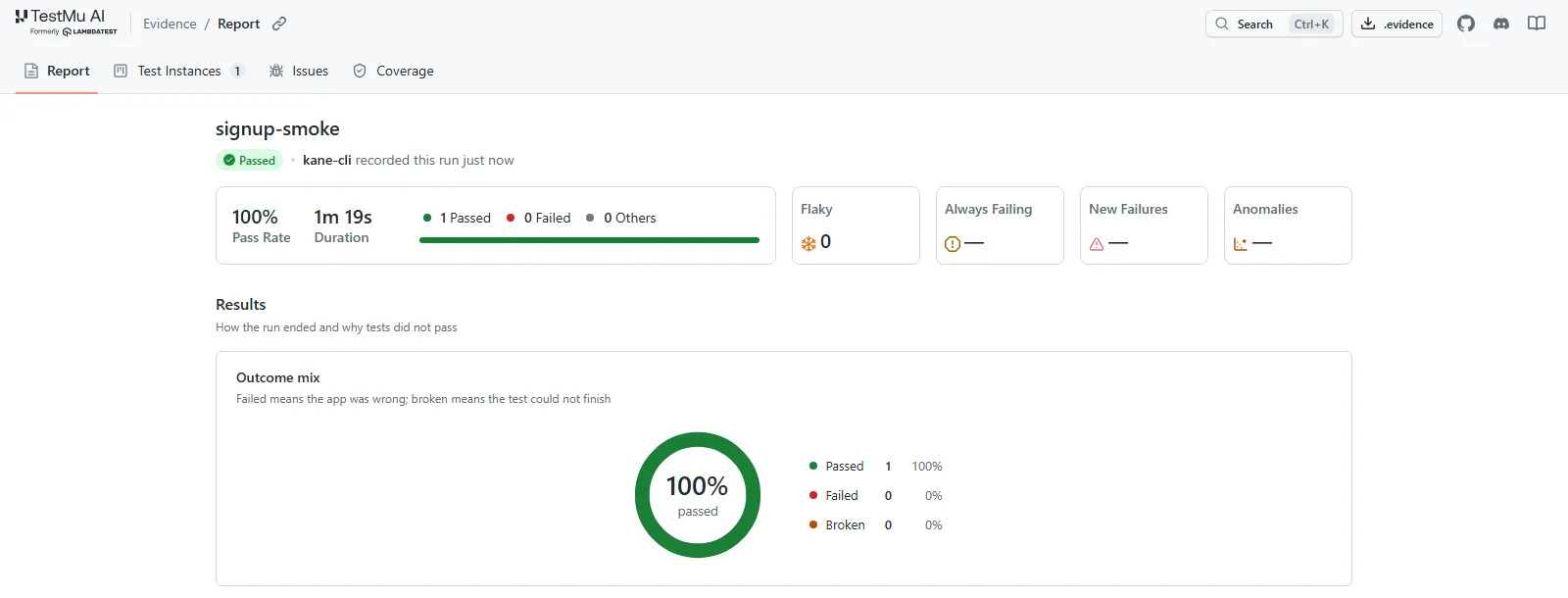
npx playwright testin the same CI job, exits 0, 1, 2 or 3, and copies a sealed evidence pack into.testmuai/evidence/when the run has a--name.
What Is the Playwright Config File?
The Playwright config file is a TypeScript or JavaScript module that exports defineConfig({...}). Playwright Test (the test runner that comes with the @playwright/test package) reads it every time you run npx playwright test.
Playwright looks for playwright.config.ts or playwright.config.js in the current directory. If you want to use a different file or a directory that contains one, you can pass -c / --config as per the Playwright CLI docs.
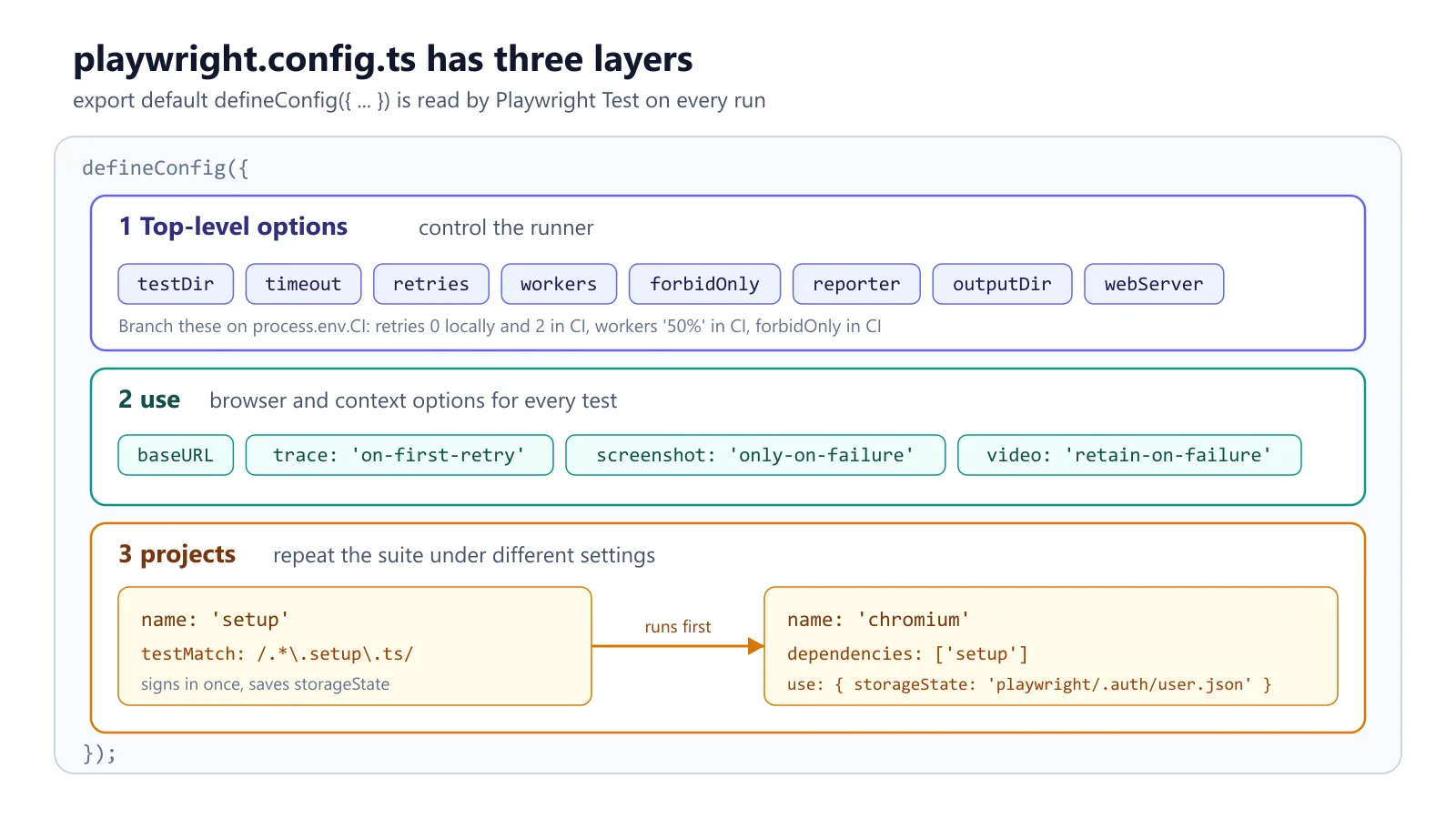
The file has three layers:
- Top level options control the runner:
testDir,timeout,retries,workers,reporter,webServer. usesets browser and context options for every test:baseURL,trace,screenshot,video,viewport.projectsrepeat the suite under different settings (one browser per project, for example).
The same file is relevant when AI is writing your tests. The Playwright agents will run a seed test, and the Playwright docs state that run covers global setup, project dependencies, fixtures and hooks. The setup that the agents are relying on is all in this config.
For a quick visual walkthrough of this concept, watch the video below from TestMu AI.
Subscribe to the TestMu AI YouTube channel for more tutorials on testing and automation.
What Does a CI-Ready playwright.config.ts Look Like?
Here's a complete config for a web app that runs against a local dev server on a laptop and against the same server in CI.
All the options are documented on playwright.dev. The sections below explain the rationale for each.
The sample loads a .env file with dotenv, which is not installed with Playwright. Add it first:
npm install --save-dev dotenvThe sample also uses __dirname (which works in CommonJS projects). Node's docs state that __dirname is not available in ES modules, so if you have "type": "module" in your package.json, then you should be using import.meta.dirname (Node 20.11+ and 21.2+) instead.
// playwright.config.ts
import { defineConfig, devices } from '@playwright/test';
import dotenv from 'dotenv';
import path from 'path';

// Load .env for local runs. In CI, set the same variables in the job environment.
dotenv.config({ path: path.resolve(__dirname, '.env') });

const isCI = !!process.env.CI;

// Fail fast if a required variable is missing, instead of letting
// every test fail subsequently with a rather confusing navigation error.
const baseURL = process.env.BASE_URL;
if (!baseURL) {
  throw new Error('BASE_URL is not set. Add it to .env or to the CI job environment.');
}

// Only start a local server when the tests are pointing at localhost.
const startLocalServer = baseURL.startsWith('http://localhost');

export default defineConfig({
  testDir: './tests',
  outputDir: 'test-results',
  timeout: 30_000,
  expect: { timeout: 5_000 },
  fullyParallel: true,
  forbidOnly: isCI,
  retries: isCI ? 2 : 0,
  workers: isCI ? '50%' : undefined,
  maxFailures: isCI ? 10 : undefined,
  reporter: isCI ? [['dot'], ['html']] : 'list',
  use: {
    baseURL,
    trace: 'on-first-retry',
    screenshot: 'only-on-failure',
    video: 'retain-on-failure',
  },
  projects: [
    { name: 'setup', testMatch: /.*\.setup\.ts/ },
    {
      name: 'chromium',
      use: {
        ...devices['Desktop Chrome'],
        storageState: 'playwright/.auth/user.json',
      },
      dependencies: ['setup'],
    },
  ],
  webServer: startLocalServer
    ? {
        command: 'npm run start',
        url: baseURL,
        reuseExistingServer: !isCI,
        timeout: 120_000,
      }
    : undefined,
});
Two things in that file are intentional. The BASE_URL check fails at load time, so if that variable is missing, you just get a one-line failure rather than 200 red tests.
Nothing secret is in the file at all. Credentials come from the environment, and the saved login state is written to a folder that's git ignored.

Note: Want checks that don't require any config at all? Kane CLI from TestMu AI will run a plain English test from your terminal or CI and return pass/fail along with an evidence pack. Install it via npm install -g @testmuai/kane-cli.
Which Playwright Config Options Matter Most?
These are the options you'll use most at the top level.
The defaults are taken from Playwright's TestConfig reference.
| Option | Default | What it does | CI value |
|---|---|---|---|
testDir | Directory of the config file | Folder scanned recursively for tests | './tests' |
timeout | 30,000 ms | Time limit for each test | Keep the default; raise per test if needed |
expect.timeout | 5,000 ms | How long web-first assertions retry | Keep the default |
retries | 0 | Maximum retries for a failed test | 2 |
workers | Half the logical CPU cores | Parallel worker processes | '50%' or a fixed number |
fullyParallel | Off (files run in parallel, tests in a file run in order) | Runs tests inside one file in parallel too | true if tests don't share state |
forbidOnly | Off | Fails the run if test.only is present | true |
maxFailures | 0 (disabled) | Stops the run after N failures | 10 |
reporter | 'dot' on CI, 'list' locally | Output format | [['dot'], ['html']] |
outputDir | test-results next to package.json | Where traces, screenshots and videos go; cleaned at the start of each run | Upload as a CI artifact |
globalTimeout | 0 (disabled) | Time limit for the whole run | Set it to stop a hung job |
testMatch / testIgnore | **/*.@(spec|test).?(c|m)[jt]s?(x) | Which files count as tests | Leave default unless you need to exclude fixtures |
outputDir is cleaned at the start of each run. If CI runs Playwright twice in a single job, then the second run will delete the traces of the first.
How Do You Set Retries and Workers Differently in CI?
Read process.env.CI once and branch on it. CI runners have far fewer cores and noisier networks than a typical laptop, so they need different values.
| Option | Local | CI | Why |
|---|---|---|---|
retries | 0 | 2 | Locally you want the first failure. In CI, a retry separates flaky tests from broken ones |
workers | undefined (half the cores) | '50%' or a fixed number | Too many workers on a small runner causes timeouts |
forbidOnly | false | true | Stops a forgotten test.only from silently skipping the suite |
maxFailures | undefined | 10 | A broken deploy fails in minutes, not after the full suite |
trace | 'on-first-retry' | 'on-first-retry' | You get a trace for exactly the tests that failed once |
reporter | 'list' | [['dot'], ['html']] | Compact logs plus a report you can download |
workers accepts a percentage string, such as '50%', as well as a number. Setting workers: 1 turns parallelism off. You can override any of these for one run from the command line with --workers 4, --retries 0 or --max-failures=1, as Playwright's CLI docs show.
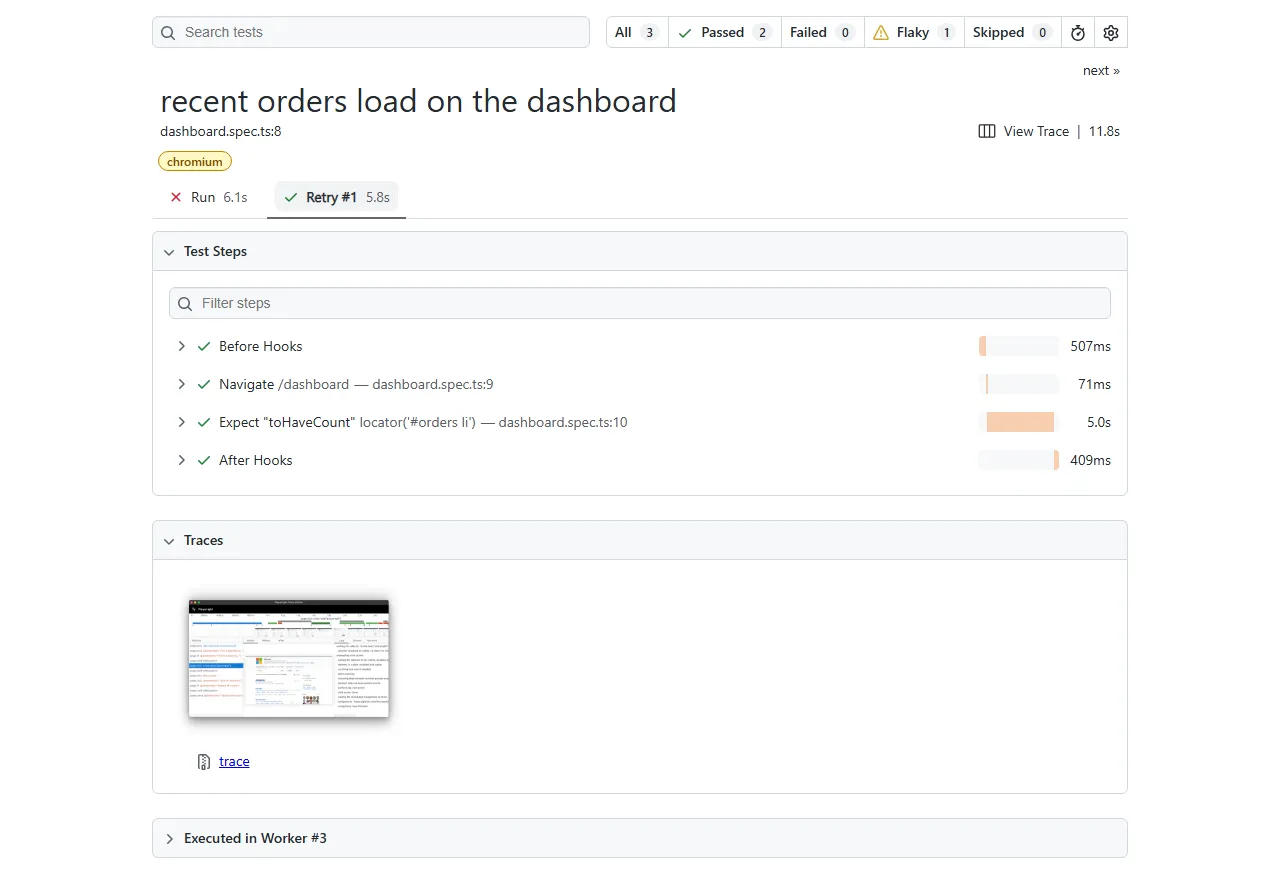
One caveat on retries: a test that only passes on retry is still a bug to fix (even if the build goes green). Use the trace from the retry to see what's changed. Our Playwright trace viewer guide has all the info on how to read one of those.
How Do You Load Environment Variables Into Your Playwright Config?
Playwright Test reads process.env just like any Node process. You can pass the variables in on the command line (BASE_URL=http://localhost:3000 npx playwright test) or load a .env file via the dotenv package at the top of your config (the pattern that Playwright's parameterize docs show).
Three rules keep this safe:
- Load first, read second. Call
dotenv.config()before any line that readsprocess.env, or the value will beundefinedwhendefineConfigruns. - Check the required variables. Throw a clear error if a required variable is missing (the sample config does this for
BASE_URL). - Keep secrets out of the file and out of the repo. Store passwords and tokens in
.env(git-ignored) locally and in the CI secret store in the pipelines. Read them in your tests or setup files; don't hard-code them in the config.
A login setup file that follows those rules:
// tests/auth.setup.ts
import { test as setup, expect } from '@playwright/test';
import path from 'path';

const authFile = path.join(__dirname, '../playwright/.auth/user.json');

setup('sign in once', async ({ page }) => {
  const email = process.env.TEST_USER_EMAIL;
  const password = process.env.TEST_USER_PASSWORD;
  if (!email || !password) {
    throw new Error('TEST_USER_EMAIL and TEST_USER_PASSWORD must be set.');
  }

  await page.goto('/login');
  await page.getByLabel('Email').fill(email);
  await page.getByLabel('Password').fill(password);
  await page.getByRole('button', { name: 'Sign in' }).click();

  // Change this to a URL that your app only displays after a successful login.
  await expect(page).toHaveURL(/\/dashboard/);

  await page.context().storageState({ path: authFile });
});
The labels, button name and dashboard URL are all examples. Replace them with your app's.
The toHaveURL check is what causes the setup to fail if login fails. Without it, all the subsequent tests will run as a signed-out user and fail for the wrong reason.
The Playwright authentication docs recommend adding playwright/.auth to .gitignore as the saved state can contain session cookies.
What Do the Trace, Screenshot and Video Options Do?
The recording options are under use and determine what you have to debug with after a failure (Playwright use options).
| Option | Modes | Recommended | Cost |
|---|---|---|---|
trace | 'off', 'on', 'retain-on-failure', 'on-first-retry' (plus more retry variants) | 'on-first-retry' in CI | Low: recorded only when a test is retried |
screenshot | 'off', 'on', 'only-on-failure', 'on-first-failure' | 'only-on-failure' | Low |
video | Same modes as trace | 'retain-on-failure' or 'on-first-retry' | Higher than trace; limit it to failures or retries |
The trace is normally all you need to debug a failure. Video is useful for animations and for showing a bug to someone who simply won't open a trace.
How Does webServer Start Your App Before the Tests?
webServer starts your app, waits until a URL responds, runs the tests and then stops the process (Playwright webServer docs).
| Option | Default | What it does |
|---|---|---|
command | - | Shell command that starts the app, such as npm run start |
url | - | Playwright waits for a 2xx, 3xx, 400, 401, 402 or 403 response here. Prefer it over the deprecated port |
reuseExistingServer | - | !process.env.CI reuses your running dev server locally and starts a fresh one in CI |
timeout | 60,000 ms | Raise it for slow builds |
stdout / stderr | 'ignore' / 'pipe' | Set stdout: 'pipe' while debugging a server that won't start |
env | Inherits process.env plus PLAYWRIGHT_TEST=1 | Your app can check PLAYWRIGHT_TEST to switch on test-only behaviour |
wait | - | Treat the server as started when a log line matches a regex |
webServer will also accept an array so an API and a front end can get going together. Give each entry a name so that their logs are easily distinguishable.
Should You Use globalSetup or a Setup Project?
Playwright supports two ways of running code once prior to all the tests, and the global setup docs in the project dependencies section recommend project dependencies.
| Feature | Setup project | globalSetup |
|---|---|---|
| Appears in the HTML report | Yes | No |
| Trace recorded | Yes | No |
Can use fixtures (page, request) | Yes | No |
| Written as | A normal test() in a *.setup.ts file | A file that exports one function |
| Best for | Login, seeding data through the UI or API | Work that has nothing to do with the browser |
The sample config uses a setup project. The chromium project lists dependencies: ['setup'], so login runs first, and every test starts with the saved storageState.
How Do the Projects Fit Into the Config?
projects is an array in the same file. Each project gets a name, its own use options and, optionally, dependencies and testMatch. Use projects for multiple browsers, multiple environments or a setup step.
Our Playwright projects guide covers browser and environment projects, dependencies, teardown and filtering in depth. Run one project with npx playwright test --project=chromium.
Where Do Timeouts Go in the Playwright Config?
Timeouts are in three places: timeout (per test, 30 seconds by default), expect.timeout (per assertion, 5 seconds) and globalTimeout (for the whole run, off by default). You can also set actionTimeout and navigationTimeout within use (both are 0 by default, i.e. no limit). For when to change each one and how to deal with timeout errors, see how to handle Playwright timeouts.
Why Is My Playwright Config Not Being Picked Up?
| Symptom | Cause | Fix |
|---|---|---|
| "No tests found" | Running from a different directory, or testDir points elsewhere | Run from the project root or pass -c path/to/playwright.config.ts. testDir is relative to the config file |
baseURL is undefined in CI | .env isn't in the CI workspace | Set the variable in the CI job environment. .env is for local runs |
page.goto('/login') fails with an invalid URL | use.baseURL is not set | Set baseURL; relative paths resolve against it |
| CI fails with "is already used" | reuseExistingServer: false and something is already on the port | Use reuseExistingServer: !process.env.CI, or stop the other process |
| CI is green, but only one or two tests ran | A test.only was committed | Set forbidOnly: !!process.env.CI |
| No trace for a failed test | trace: 'on-first-retry' with retries: 0 | Turn on retries in CI or use 'retain-on-failure' |
| Traces from the first run disappeared | outputDir is cleaned at the start of each run | Upload artifacts between runs or use separate output folders |
How Do You Run Your Plain English Checks in Parallel With Your Playwright Suite?
Some checks are quite slow to write as code (a full checkout, for example, or a multi-step sign-up across environments). Kane CLI can run those from a single sentence. It maintains its own settings in ~/.testmuai/kaneai/tui-config.json and accepts per-run flags so it's configured separately from Playwright (Kane CLI configuration docs).
In CI, Kane CLI reads the credentials from the secrets that you pass as flags. The TestMu Kane CLI CI/CD docs explicitly state that you should not call kane-cli login on a runner, as that will open a browser.
# Run after `npx playwright test` in the same job.
# LT_USERNAME and LT_ACCESS_KEY come from the CI secret store.
: "${LT_USERNAME:?LT_USERNAME is not set}"
: "${LT_ACCESS_KEY:?LT_ACCESS_KEY is not set}"
: "${STAGING_URL:?STAGING_URL is not set}"

kane-cli run "Sign up with a new email and verify the welcome screen appears" \
  --url "$STAGING_URL" \
  --username "$LT_USERNAME" \
  --access-key "$LT_ACCESS_KEY" \
  --name signup-smoke \
  --headless --agent --timeout 300
Kane CLI exits with 0 for pass, 1 when the run finished without passing or the upload failed, 2 when the run could not start (for example, sign-in or a missing start URL) and 3 for a timeout or cancellation. Any non-zero code fails the CI step.
With --name, the sealed evidence pack is copied to .testmuai/evidence/ in the workspace, next to Playwright's test-results/. For GitHub, the docs list an official action, LambdaTest/kane-cli/integrations/github-action/kane-cli-browser-run@main. Kane CLI's configuration docs describe --code-export with --code-language python or javascript, which turns a successful run into runnable code after a Test Manager upload.
To run your existing Playwright tests on cloud browsers rather than on your local machines, have a look at TestMu AI's Playwright testing documentation.
The CI-Ready Config Checklist
Before you merge a config change, check these eight items:
forbidOnly: !!process.env.CIis set.retriesis 0 locally and 1-2 in CI.workersis set for CI as a number or a percentage that fits the runner.use.tracerecords on retry or on failure, andoutputDiris uploaded as an artifact.- Required environment variables are checked at load time and will generate a clear error.
- There's no password, token or API key in the config or in the repo.
webServer.reuseExistingServeris!process.env.CI.- Login runs once in a setup project, and
playwright/.authis git ignored.
Watch: Playwright and Kane CLI From TestMu AI
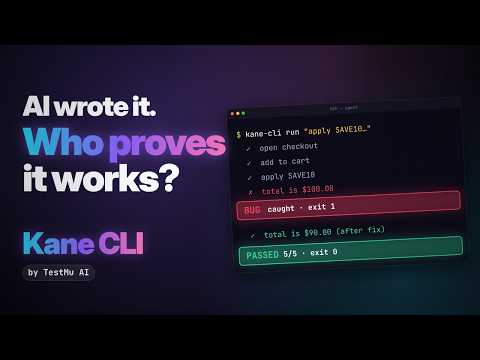
In the first video, skip to the "Understanding Configurations" section (5:21) of TestMu AI's Playwright JavaScript tutorial. The second video shows the Kane CLI looking at code that's been generated by an AI coding agent.

Conclusion
A good playwright config is really all about reading process.env.CI once and then making five decisions: how many retries, how many workers, whether to forbidOnly, what to record and how the app starts. Check for required vars at load time and keep your secrets in the environment.
Use a setup project for login. Once you've got that in place, a red CI run will come with a trace and a clear cause.
Add plain English end-to-end checks to the same pipeline. The Kane CLI runs a sentence as a real browser test, returns standard exit codes and saves an evidence pack for every run. Start with npm install -g @testmuai/kane-cli.
Testing from the terminal? Kane CLI by TestMu AI lets SDETs and developers plan, write, run and debug tests from the command line.
Was this helpful?
Authors

Japneet Singh Chawla
Author · 15 posts
Japneet Singh Chawla is an Engineering Manager at TestMu AI, where he leads a team driving HyperExecute, the AI-native Test Orchestration Cloud Platform, and integrations with Cypress, Provar, Tosca, and Selenium, improving test execution efficiency and driving adoption across 500+ enterprise clients. He also spearheaded zero-downtime deployments that cut release-related downtime by 90%, and mentors new engineers into productive contributors. He brings 9+ years of experience building and scaling distributed systems, SaaS platforms, and developer tools, with deep hands-on backend engineering across Golang, Python, Node.js, Kafka, and Redis. Earlier at Sumo Logic he built award-winning developer tools, including a VS Code Parser Linter, and at Indus Valley Partners he was a founding member of the Sentiment Analyzer team, building ML-powered solutions for financial clients. Japneet holds an MCA in Computer Science from GGSIPU.


Mayank Bhola
Reviewer
Mayank Bhola is Co-Founder and Head of Products at TestMu AI, where he leads the entire product portfolio across KaneAI, Kane CLI, HyperExecute, SmartUI, the Real Device Cloud, Accessibility, and other software testing product lines. As an early Lead Architect he designed and built the company's flagship Tunnel technology from scratch, created the React-based automation platform, and architected the data-intensive pipelines and FAAS services that scale it. He brings more than 10 years of experience in software development and product engineering, with earlier roles as Head of Technology at Juggernaut Books and Senior Software Engineer at PressPlay TV and Zomato. Mayank holds a B.Tech in Computer Engineering from JIIT Noida.
Playwright Config FAQs

TestMu AI forEnterprise
Get access to solutions built on Enterprise
grade security, privacy, & compliance
- Advanced access controls
- Advanced data retention rules
- Advanced Local Testing
- Premium Support options
- Early access to beta features
- Private Slack Channel
- Unlimited Manual Accessibility DevTools Tests