
Browser Infrastructure for AI Agents with Browser Cloud
Give Your AI Agents Real Cloud Browsers with Session Persistence, a Localhost Tunnel, and Session Replay.

Playwright Stealth: How to Set It Up and What It Can't Hide
Playwright stealth explained: set up playwright-stealth in Python and playwright-extra in Node, test it, and see which bot signals it can't hide.
Published on:
Playwright stealth is not a built-in Playwright mode. It's a set of community packages that patch the browser signals that bot detectors check first (e.g., navigator.webdriver, the HeadlessChrome user agent).
In Python, you'd use playwright-stealth; in Node, you'd use playwright-extra with the puppeteer-extra-plugin-stealth. Neither of these hides your IP, your TLS fingerprint, or your behavior.
TL;DR
Playwright stealth is not a built-in mode; it is community code that patches automation signals such as navigator.webdriver before a page's scripts run. In Python you install playwright-stealth, and in Node.js you load the stealth plugin through playwright-extra. Neither package hides your IP address, TLS fingerprint, click timing or CAPTCHAs.
Playwright Stealth Plugin Options
- playwright-stealth (Python): The usual playwright stealth Python setup wraps Playwright in the Stealth class, for example Stealth().use_async(async_playwright()), so every page opened in that block gets the patches. Version 2.x removed the old stealth_sync and stealth_async functions. Language: Python 3.9+.
- playwright-extra (Node.js): playwright-extra loads puppeteer-extra-plugin-stealth through chromium.use(StealthPlugin()), and the rest of your Playwright code stays the same. Both packages last shipped on March 1, 2023, so pin their versions in your lockfile. Language: Node.js; optimized for Chromium.
- Patchright: Patchright patches the Playwright driver layer instead of injecting page scripts. It can be used from Python and Node.js. Chromium only: Yes.
- Browser Cloud Stealth Mode: TestMu AI Browser Cloud applies init-script patches, user-agent and viewport randomization and optional human-like delays when you pass a stealthConfig object while creating a Playwright or Puppeteer session. TestMu AI calls it best-effort. Selenium support: No.
Playwright Bot Detection Signals Stealth Can't Change
- Network layer: Playwright stealth can't hide the TLS fingerprint, which is fixed during the handshake, before any init script runs, and a datacenter IP keeps its poor reputation score however clean the patched JavaScript environment looks.
- Behavior and challenges: Mouse paths, scroll rhythm and typing cadence are scored over a session, and CAPTCHAs or JavaScript challenges appear when the risk score rises. Playwright stealth packages simulate none of that behavior.
- Testing your own site: When Playwright tests run against your own staging or test environment, ask the team that runs bot protection to allowlist test traffic by IP, header or test account, so your tests exercise the product instead of the bot vendor.
What Is Playwright Stealth?
Playwright stealth is the common term for third-party code that makes an automated Playwright browser appear less automated. Playwright itself doesn't come with a stealth switch. The patches run as init scripts prior to any page JavaScript, so a site's detection script will see the patched values rather than the defaults.
Two packages cover most setups as of Nov 2026:
- Python: playwright-stealth 2.0.3 (released 4th April 2026, MIT license, Python 3.9+). The README describes it as "a proof of concept starting point".
- Node.js: playwright-extra plus puppeteer-extra-plugin-stealth (the puppeteer-extra stealth plugin, which playwright-extra loads as a compatible plugin). The README states that the stealth plugin is optimized for Chromium-based browsers.
Both of them use the same Playwright primitive. addInitScript evaluates a script "after the document was created but before any of its scripts were run" in every page and in every child frame of the context.
If you're in the position of having to decide where these sessions should run, then TestMu AI does a Browserbase vs TestMu Browser Cloud comparison that looks at stealth, CAPTCHA handling, pricing, and session limits all in one place.
How Do Websites Detect Headless Playwright?
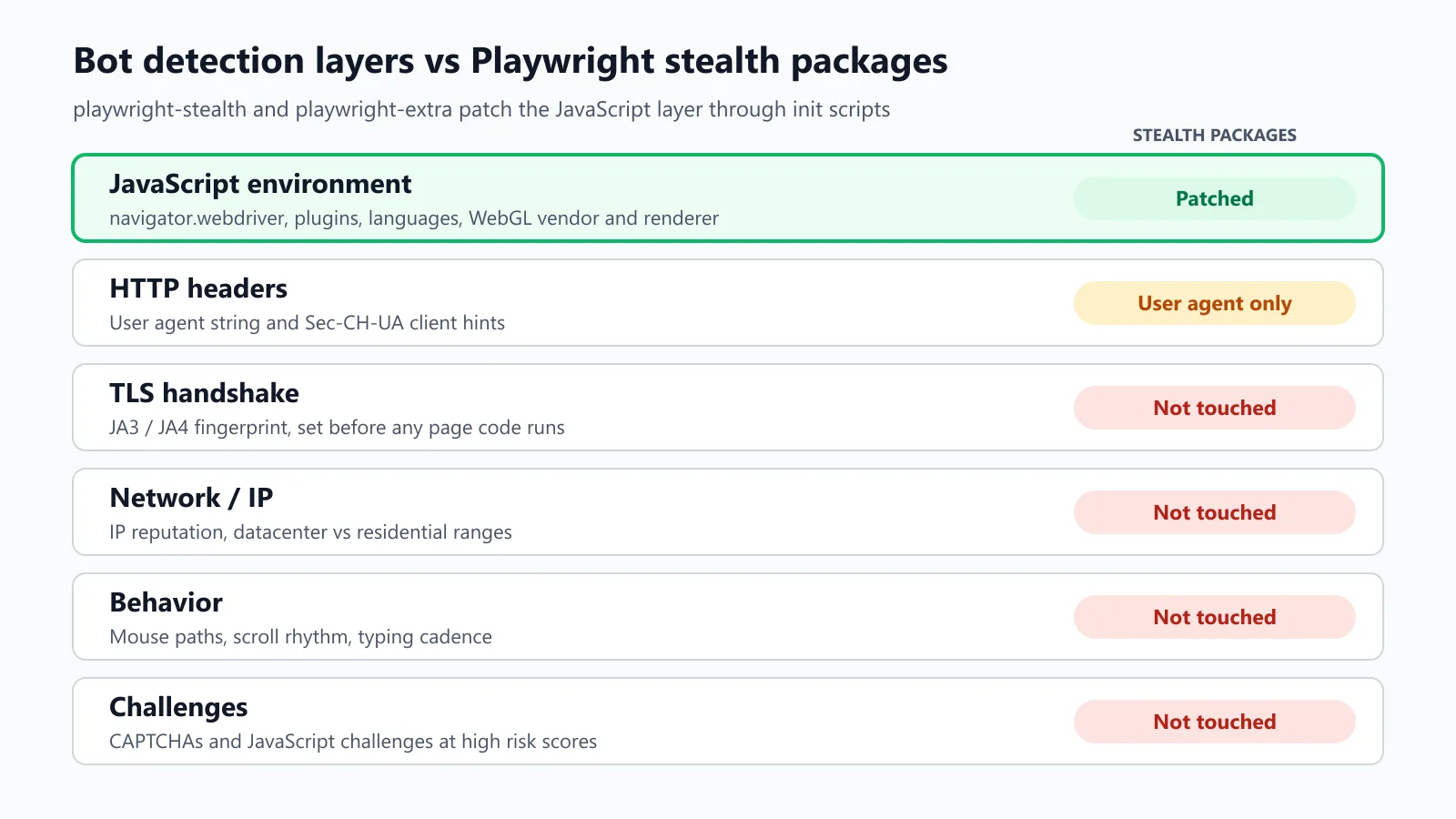
Websites can detect headless Playwright by reading the values that the default automated Chromium exposes and a normal desktop Chrome doesn't. It's a multi-layered detection process, and the stealth packages only go as far as the JS layer.
| Signal | Playwright's bundled headless build | Patched by stealth packages? |
|---|---|---|
navigator.webdriver | true | Yes |
| User agent and Sec-CH-UA headers | Contain HeadlessChrome in headless mode | Yes (user agent); headers must stay consistent with it |
navigator.plugins | Empty in the default headless build | Yes (fake plugin list) |
navigator.languages, platform | Can disagree with headers | Yes, configurable |
| WebGL vendor and renderer | Reveal a software renderer | Partly; hardware-level GL fingerprinting stays a weak point |
| TLS fingerprint (JA3/JA4) | Set before any page code runs | No |
| IP reputation | Datacenter IPs score poorly | No |
| Mouse, scroll and typing timing | Instant, uniform | No |
| CAPTCHA and JavaScript challenges | Served when risk scores are high | No |
The final four rows are why a script can pass a fingerprint test page and still get blocked on a real site.
How Do You Set Up playwright-stealth in Python?
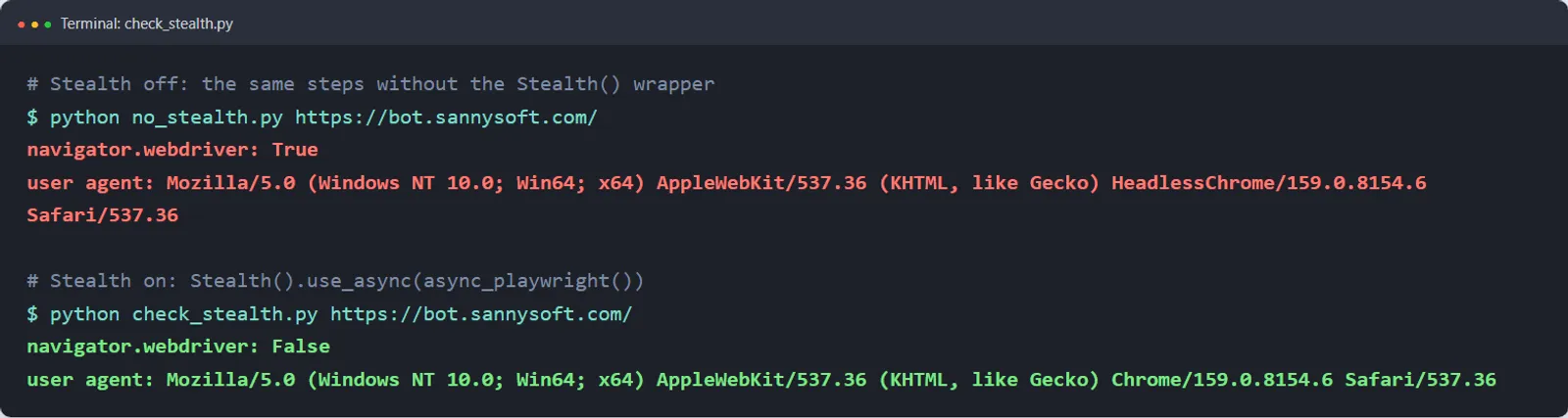
You set up playwright-stealth in Python by installing it alongside Playwright and then wrapping the Playwright context manager with Stealth().use_async(...). Every page that gets created inside that block will have the patches applied.
pip install playwright playwright-stealth
playwright install chromium
# check_stealth.py - usage: python check_stealth.py https://your-staging-site.example
import asyncio
import sys
from playwright.async_api import async_playwright
from playwright_stealth import Stealth
async def main(target_url: str) -> None:
async with Stealth().use_async(async_playwright()) as p:
browser = await p.chromium.launch()
page = await browser.new_page()
await page.goto(target_url)
print("navigator.webdriver:", await page.evaluate("navigator.webdriver"))
print("user agent:", await page.evaluate("navigator.userAgent"))
await browser.close()
if __name__ == "__main__":
asyncio.run(main(sys.argv[1]))Pass the target URL in as an argument rather than hard-coding it so the same script will check staging, a fingerprint test page and production.
Apply stealth to just one context. If you need stealth in some contexts and not others, then build a Stealth object and call apply_stealth_async(context):
from playwright_stealth import Stealth

stealth = Stealth(navigator_languages_override=("en-US", "en"), init_scripts_only=True)

async def stealth_context(browser):
    context = await browser.new_context()
    await stealth.apply_stealth_async(context)
    return context
Turn on evasions one at a time. The package exports ALL_EVASIONS_DISABLED_KWARGS. Start from that and re-enable one evasion at a time to see which patch a site is reacting to:
from playwright_stealth import Stealth, ALL_EVASIONS_DISABLED_KWARGS

only_webdriver = Stealth(**{**ALL_EVASIONS_DISABLED_KWARGS, "navigator_webdriver": True})
Fix the old import error. Version 2.x got rid of the 1.x stealth_sync(page) and stealth_async(page) functions. Code copied from the older tutorials will fail on import.
Switch to the Stealth class as shown above. There's also a use_sync (synchronous) variant in 2.x.
Known gap. The 2.0.3 README has making the package work with launch_persistent_context as an open to-do, as user-agent detection is quite difficult once a persistent context has launched. In that mode, you'll need to check navigator.webdriver and the user agent yourself prior to relying on stealth.

Note: Running stealth sessions for an AI agent or a test suite? Start free on TestMu AI Browser Cloud. The Free plan is $0, and the Browser Cloud plan is listed at $29/month billed annually (as of Nov 2026). Stealth Mode, tunnels to localhost, and session recordings come with the same SDK.
How Do You Use Playwright Stealth in Node.js?
You use Playwright stealth in Node.js by importing chromium from playwright-extra rather than playwright and then registering the stealth plugin once. The rest of your Playwright code is unchanged.
npm install playwright playwright-extra puppeteer-extra-plugin-stealth// check-stealth.ts - usage: TARGET_URL=https://your-staging-site.example npx tsx check-stealth.ts
import { chromium } from 'playwright-extra';
import StealthPlugin from 'puppeteer-extra-plugin-stealth';
chromium.use(StealthPlugin());
async function main(targetUrl: string) {
const browser = await chromium.launch();
const page = await browser.newPage();
await page.goto(targetUrl);
console.log('navigator.webdriver:', await page.evaluate(() => navigator.webdriver));
await browser.close();
}
const targetUrl = process.env.TARGET_URL;
if (!targetUrl) throw new Error('Set TARGET_URL');
main(targetUrl);Check that it's maintained before you go and rely on it. As per the npm registry, as of Nov 2026, the last releases of playwright-extra (4.3.6) and puppeteer-extra-plugin-stealth (2.11.2) are both from March 1st 2023.
How Do You Test That Playwright Stealth Is Actually Working?
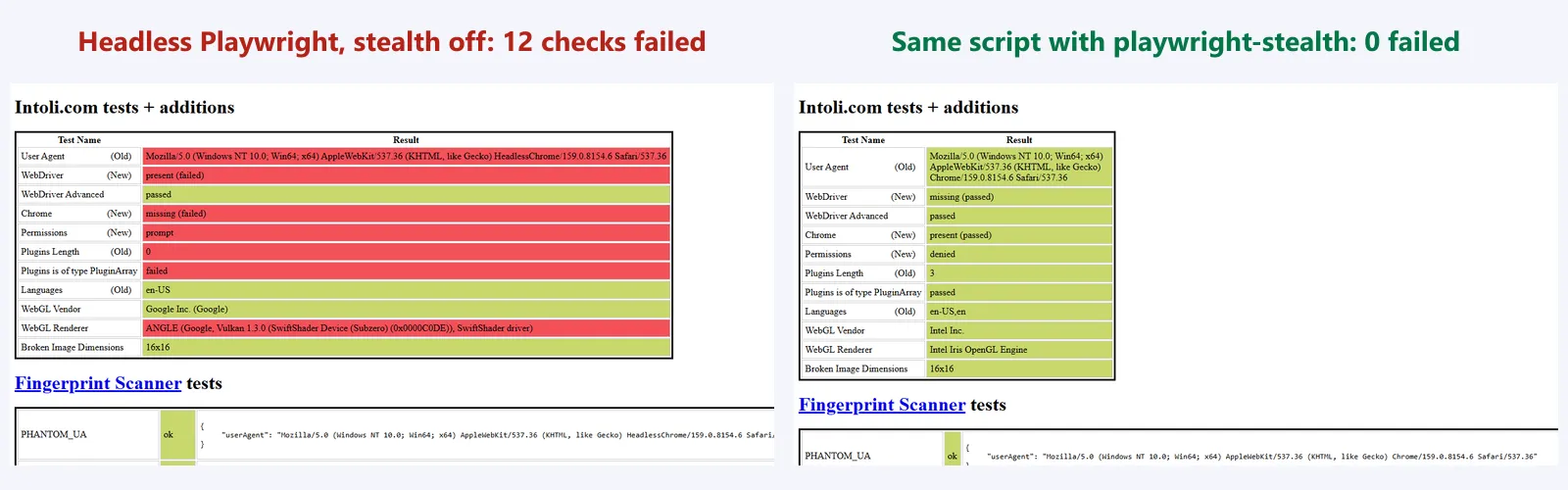
You test Playwright stealth by running the same script against a fingerprint test page with stealth off and with stealth on. A passing fingerprint test page confirms that the JS patches have loaded. It doesn't in any way prove that the real site will let you through.
Use the SIGNAL check before trusting a stealth setup:
- S - Script order. Confirm patches load before page scripts:
navigator.webdrivermust be false or undefined on the first navigation (not after a reload). - I - Identity consistency. The user agent, Sec-CH-UA headers,
navigator.platformandnavigator.languagesmust all describe the same browser and OS. - G - Graphics. Look at the WebGL vendor and renderer. A software renderer next to a desktop UA is a mismatch.
- N - Network. Note the egress IP type (datacentre or residential) and the region. Stealth packages don't alter that.
- A - Actions. Check the timing. Instant clicks and fills look a bit too scripted. Introduce some realistic delays where the flow of the action allows.
- L - Long sessions. Re-run the check in persistent contexts as well as new contexts (not just the first page), as coverage varies by API.
A screenshot of a test page (e.g. bot.sannysoft.com) with stealth off and on is by far the quickest thing to attach to a PR. Browser Cloud's own stealth test uses that very same page.
Why Does Playwright Still Get Blocked When Stealth Is Enabled?
Playwright is still getting blocked when stealth is enabled, as modern bot protection checks signals that init scripts can't reach. Three reasons account for the majority of the blocks.
- Network layer. TLS fingerprints are set during the handshake prior to any page code even running. A data center IP will be flagged for poor reputation regardless of how clean the JS is.
- Behaviour. Mouse paths, scroll rhythm and typing cadence are all scored over time. Stealth packages don't simulate any of that.
- Challenges. CAPTCHAs and JS challenges are served when the risk score is high. Stealth packages don't deal with them.
When you own the site, don't go out of your way to avoid your own protection in the tests. For staging and test environments, you should ask the team that runs the bot protection to allowlist test traffic by IP, header, or test account.
Your tests are then effectively testing the product rather than the bot vendor. Use stealth on third-party sites that your agent is allowed to use and, of course, abide by each site's terms of service.
Which Playwright Stealth Option Should You Use?
The correct option is down to your language, how much maintenance you're prepared to take on, and whether you want to be running the browsers yourself. All the facts below are as of Nov 2026.
| Option | Language | How it works | Limits |
|---|---|---|---|
| playwright-stealth | Python | Init-script evasions via the Stealth class | Self-described proof of concept; launch_persistent_context support is an open to-do |
| playwright-extra + stealth plugin | Node.js | Puppeteer stealth evasions ported to Playwright | Last npm release March 1, 2023; Chromium-optimised |
| Patchright | Python, Node.js | Patches the Playwright driver layer instead of page scripts | Chromium only |
| Your own addInitScript patches | Any Playwright binding | You write and maintain each override | Every Chrome release can break a patch |
| TestMu AI Browser Cloud Stealth Mode | Node.js SDK (Puppeteer, Playwright) | stealthConfig on the session: init-script patches, user-agent and viewport randomisation, optional human-like delays | Best-effort, not undetectable; not available for Selenium |
How Do You Turn On Stealth Mode in the TestMu AI Browser Cloud?
You enable stealth in TestMu AI Browser Cloud by adding a stealthConfig object when you create your session. For Playwright sessions, Browser Cloud injects its patches via page.addInitScript() with: navigator.webdriver = false, a fake chrome.runtime, three fake plugins, navigator.languages set to English, a permissions.query override for notifications and a fake Intel WebGL vendor and renderer.
// browser-cloud-stealth.ts - usage: TARGET_URL=https://your-staging-site.example npx tsx browser-cloud-stealth.ts
import { Browser } from '@testmuai/browser-cloud';

async function main(targetUrl: string) {
  const client = new Browser();
  const session = await client.sessions.create({
    adapter: 'playwright',
    stealthConfig: {
      humanizeInteractions: true, // 50-150 ms click delay, 30-130 ms per typed character
      randomizeUserAgent: true,   // one of 7 user agents, fixed for the session
      randomizeViewport: true,    // ±20 px viewport jitter
    },
    lambdatestOptions: {
      build: 'stealth-check',
      name: 'playwright-stealth',
      'LT:Options': {
        username: process.env.LT_USERNAME,
        accessKey: process.env.LT_ACCESS_KEY,
      },
    },
  });

  try {
    const { browser, page } = await client.playwright.connect(session);
    await page.goto(targetUrl);
    console.log('navigator.webdriver:', await page.evaluate(() => navigator.webdriver));
    await browser.close();
  } finally {
    await client.sessions.release(session.id);
  }
}

const targetUrl = process.env.TARGET_URL;
if (!targetUrl) throw new Error('Set TARGET_URL');
main(targetUrl);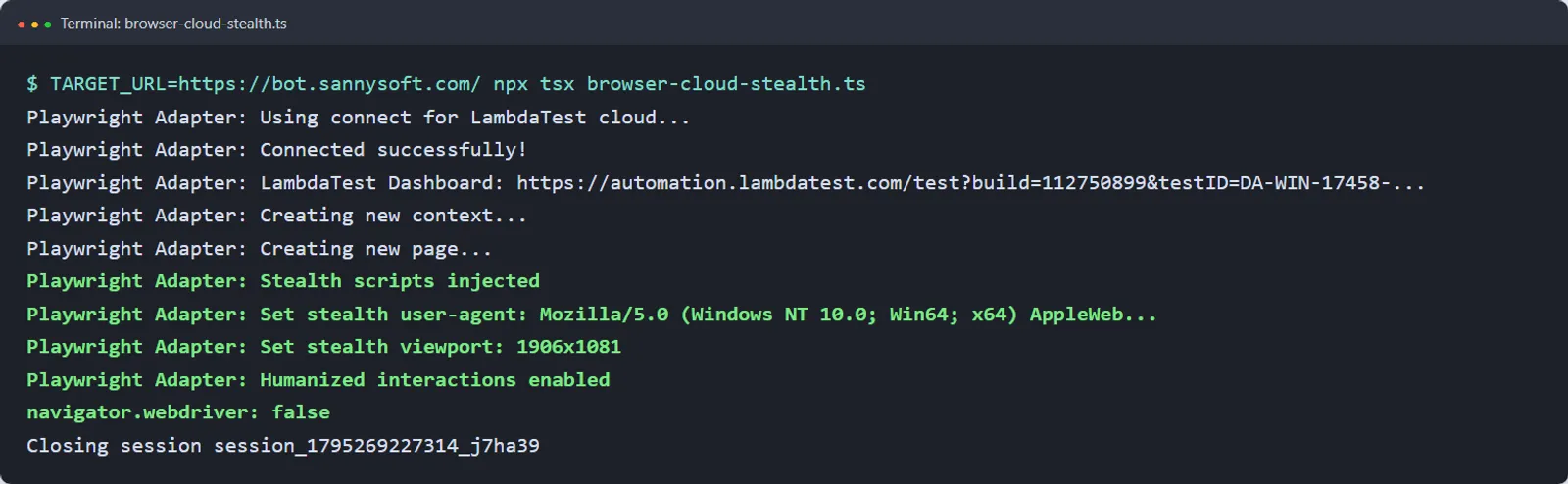
Install the SDK with npm install @testmuai/browser-cloud. Credentials come from LT_USERNAME and LT_ACCESS_KEY, never from the URL. Always release the session: the connect-to-session docs warn that sessions stay active until released or timed out.
The full option reference (including skipFingerprintInjection (Puppeteer only) and how to disable stealth) is in the Browser Cloud stealth docs. TestMu AI refers to this as 'best-effort stealth', and the stealth browser alternative page details what it does and what it doesn't do.
If you're on a Selenium stack, then stealth works differently altogether; see the Selenium stealth mode guide.
What Should You Check Before Shipping a Stealth Setup?
Check four things before a stealth setup goes into an agent or a CI job:
- Pin the versions. Lock playwright-stealth, playwright-extra, and the plugin in your lockfile. A browser upgrade without a package upgrade is the most common silent break.
- Keep a before/after artifact. Have the stealth off and stealth on screenshots of the same test page saved per release.
- Log the block, not just the failure. Log the HTTP status and page title on a failed run so you can tell the difference between a 403/challenge page and a real product bug.
- Decide who owns it. If it's your site, then allowlist the test traffic. If it's not your site, then confirm that your use is indeed permitted.
For agents that are driving a browser through a model loop, the OpenAI computer use on a cloud browser walkthrough is the same Browser Cloud session flow with a computer use agent on top.
Watch: What Playwright Stealth Hides and What It Can't
For a quick visual walkthrough of this concept, watch the video below from TestMu AI.
Subscribe to the TestMu AI YouTube channel for more tutorials on testing and automation.
Conclusion
Playwright stealth patches the JavaScript signals that would otherwise give an automated browser away and nothing more. Use playwright-stealth in Python or playwright-extra in Node, verify that the patches have loaded via the SIGNAL check, and you're then looking at IP reputation, TLS fingerprints, behavior scoring and CAPTCHAs. If you'd rather not be managing the patches and browsers yourself, then just run the same Playwright code on Browser Cloud with Stealth Mode enabled.
Giving an AI agent a browser? TestMu AI's Browser Cloud runs each task in a real, isolated Chrome session in the cloud, so the browser stays off your laptop.
Author

Sri Harsha
Blogs: 11

Sri Harsha is Engineering Manager of the Open Source Program Office at TestMu AI, where he leads open-source engineering behind the Selenium and Appium automation grid and builds agentic AI systems for quality engineering. He is a member of the Selenium Technical Leadership Committee and a committer to WebdriverIO and Appium, and was recognized with the LambdaTest Delta Award 2023 for Best Contributor in open-source testing. He brings over 10 years of experience in software testing and automation, with earlier roles at EPAM Systems and ZenQ. Sri Harsha holds a B.Tech in Computer Science from Jawaharlal Nehru Technological University.
Reviewer

Mayank Bhola
Reviewer
Mayank Bhola is Co-Founder and Head of Products at TestMu AI, where he leads the entire product portfolio across KaneAI, Kane CLI, HyperExecute, SmartUI, the Real Device Cloud, Accessibility, and other software testing product lines. As an early Lead Architect he designed and built the company's flagship Tunnel technology from scratch, created the React-based automation platform, and architected the data-intensive pipelines and FAAS services that scale it. He brings more than 10 years of experience in software development and product engineering, with earlier roles as Head of Technology at Juggernaut Books and Senior Software Engineer at PressPlay TV and Zomato. Mayank holds a B.Tech in Computer Engineering from JIIT Noida.


Playwright Stealth FAQs
Did you find this page helpful?
More Related Blogs



TestMu AI forEnterprise
Get access to solutions built on Enterprise
grade security, privacy, & compliance
- Advanced access controls
- Advanced data retention rules
- Advanced Local Testing
- Premium Support options
- Early access to beta features
- Private Slack Channel
- Unlimited Manual Accessibility DevTools Tests