
Run Web Automation Tests at Scale with Agentic AI
Generate tests with AI agents or automate test suites with Selenium, Playwright and other frameworks. Run tests in parallel on TestMu AI scalable cloud grid.

- TestMu AI (Formerly LambdaTest)
- /
- Blog
- /
- Playwright 1.65: Bun Support, Failure-Only Reports and What to Check Before Upgrading
Playwright 1.65: Bun Support, Failure-Only Reports and What to Check Before Upgrading
Playwright 1.65.0 runs tests under Bun, adds onlyFailures reports and drops Node.js 20. The 10 breaking changes, known bugs, upgrade checklist and rollback.
Published on:
On This Page
- 1.65 at a Glance
- Run Tests Under Bun
- Bun Limitations
- Failure-Only Reports
- onlyFailures and Totals
- Sharded Blob Reports
- Page Object Errors
- Other Breaking Changes
- Screenshot Baselines
- Node.js and Docker
- Known 1.65.0 Bugs
- Upgrade Checklist
- Upgrade a CI Suite
- Roll Back to 1.64.1
- GitHub Actions Workflow
- Real Browser Checks
- Should You Upgrade Now?
- Conclusion
Playwright 1.65.0 (released 5th November 2026) can run the test runner under Bun via bunx --bun playwright test. It has a new failures terminal reporter and an onlyFailures option for the HTML, JSON and JUnit reports. It no longer tests on Node.js 20, and there are 10 breaking changes.
The one that's most likely to break your suite is that page objects with class fields that read this.page will now throw at runtime. Before you upgrade, run tsc --noEmit, regenerate your screenshot baselines in the 1.65 Docker image, and ensure your dashboards aren't reading the pass counts from the report you want to filter on.
If you're coming from 1.63, read the Playwright 1.64 breaking changes first, as the screen emulation, JSX compilation and --update-snapshots=missing changes from 1.64 are still in force.
TL;DR
Playwright 1.65.0 is the November 5, 2026 release of Microsoft's Playwright test framework. The Playwright 1.65 release runs the test runner under Bun, adds failure-only reports, stops testing on Node.js 20 and ships 10 breaking changes, so plan the Playwright 1.65 upgrade as a reviewed change with new baselines.
- Playwright Bun support: Opt in with bunx --bun playwright test. Playwright's CI covers Bun 1.4.3 on Linux, and watch mode, --tsconfig and custom ESM loaders do not work under Bun.
- Playwright failures reporter: The --reporter=failures option prints failures and successful retries as they happen, then a summary, with no progress output, so long CI logs get shorter.
- Playwright HTML report only failures: Set the Playwright onlyFailures option to true on the html, json or junit reporter. Passing tests also leave the report totals, so keep one unfiltered file for dashboards and quality gates.
- Playwright 1.65 breaking changes: Page objects that read this.page in a class field now throw, a result of the Playwright useDefineForClassFields change. Running tsc --noEmit lists each one as a TS2729 error.
- Playwright 1.65 Docker image: Use mcr.microsoft.com/playwright:v1.65.0-noble, which ships Node.js 26. Refresh baselines inside it and review each Playwright screenshot comparison diff in a separate commit.
- Upgrade triage: Sort each failure into class fields, inert actionability, baseline drift or empty shards, then re-run the rest on 1.64.1 to separate upgrade breakage from existing Playwright flaky tests.
- Sharded reports: For Playwright parallel testing across shards, keep blob reports unfiltered and set onlyFailures in the merge-reports config instead.
- Cloud coverage: TestMu AI runs a Playwright 1.65 suite across 3,000+ browser and OS combinations, which covers the branded Chrome and Edge builds that a Linux container run skips.
Playwright 1.65 at a Glance
| Change | Command or option | Who it affects |
|---|---|---|
| Test runner runs under Bun | bunx --bun playwright test | Teams already on Bun; opt-in |
| Failure-only terminal output | --reporter=failures | Anyone with long CI logs |
| Failure-only report files | onlyFailures: true on html, json, junit; env PLAYWRIGHT_HTML_ONLY_FAILURES etc. | Large suites, artifact storage |
| Exclusive test lock | { lock: '-exclusive-' } | Tests that must run alone (restarts, perf) |
| Description-only skips | test.skip('reason'), also fixme, fail, slow | Everyone (cosmetic) |
| Transpile cache location | PLAYWRIGHT_TRANSFORM_CACHE_DIR | Shared Linux CI machines |
| CDP timeouts | cdpSession.send(method, params, { timeout, signal }) | CDP users |
Class fields follow useDefineForClassFields | tsconfig.json | Page objects. Most likely breakage |
| Actions wait for non-inert elements | click, check, tap, fill, clear, selectOption | Modal and drawer tests |
| Node.js 20 dropped from testing | Use 22, 24 or 26 | CI images on Node 20 |
| Docker images ship Node.js 26 | mcr.microsoft.com/playwright:v1.65.0-noble | Containerised CI |
| Browsers | Chromium 158.0.8127.18, Firefox 159.0, WebKit 27.2 | Visual baselines |
From 1.64.1, you go two Chromium majors (156 to 158) and two Firefox majors (157 to 159). WebKit is at 27.2. On macOS 14, Playwright installs an older, pinned WebKit build (revision 2251 rather than 2388 as per browsers.json), so the WebKit results on macOS 14 and Linux can be different.
How Do You Run Playwright Tests Under Bun?
Run bunx --bun playwright test. The --bun flag is required. If you omit it, then bunx playwright test will run the test runner on Node.js as it did before. We checked process.versions inside a test: with the --bun flag, it reported Bun 1.4.4, and without it, it reported Node 22.
bun add -d @playwright/test@1.65.0
bunx playwright install --with-deps chromium   # installer, runs on Node.js
bunx --bun playwright test                     # test runner, runs on Bun
Under Bun, Bun transpiles your TypeScript test files itself. Playwright makes no use of Babel or its compilation cache.
The Playwright CI that runs the test-runner tests does so under Bun 1.4.3 on Linux. The release notes provide no minimum Bun version and say absolutely nothing about macOS or Windows, so pin Bun 1.4.3 or later and treat the other platforms as untested.
The notes also give no indication as to whether the playwright install should be run under Bun. Running it on Node as described above is the safe default.
What Breaks When Playwright Runs on Bun?
Watch mode, --tsconfig, tsconfig JSX options, custom ESM loaders, async stack frames and console capture in traces all work differently. The following table lists what the 1.65 notes document, plus two things we've observed:
| Capability | Node.js (npx playwright test) | Bun (bunx --bun playwright test) |
|---|---|---|
| TypeScript transpilation | Playwright (Babel) + compilation cache | Bun's transpiler, no Playwright cache |
| UI mode re-run on file change / watch | Yes | No |
--only-changed | Follows imports | Changed files only, ignores imports |
--tsconfig, tsconfig JSX options | Honoured | No effect |
| Custom ESM loaders | Supported | Not supported |
| Async frames in stack traces | Yes | No |
| API names in step titles and errors | locator.click | click |
| Test console output in trace and UI mode | Captured | Not captured |
useDefineForClassFields | Honoured | Honoured (we tested: false in tsconfig fixed the page-object error under Bun too) |
| Reported test location | a.spec.ts:3:1 | a.spec.ts:3:2 in our run (column differs) |
What this means for CI:
- Step title dashboards have changed. We saw a
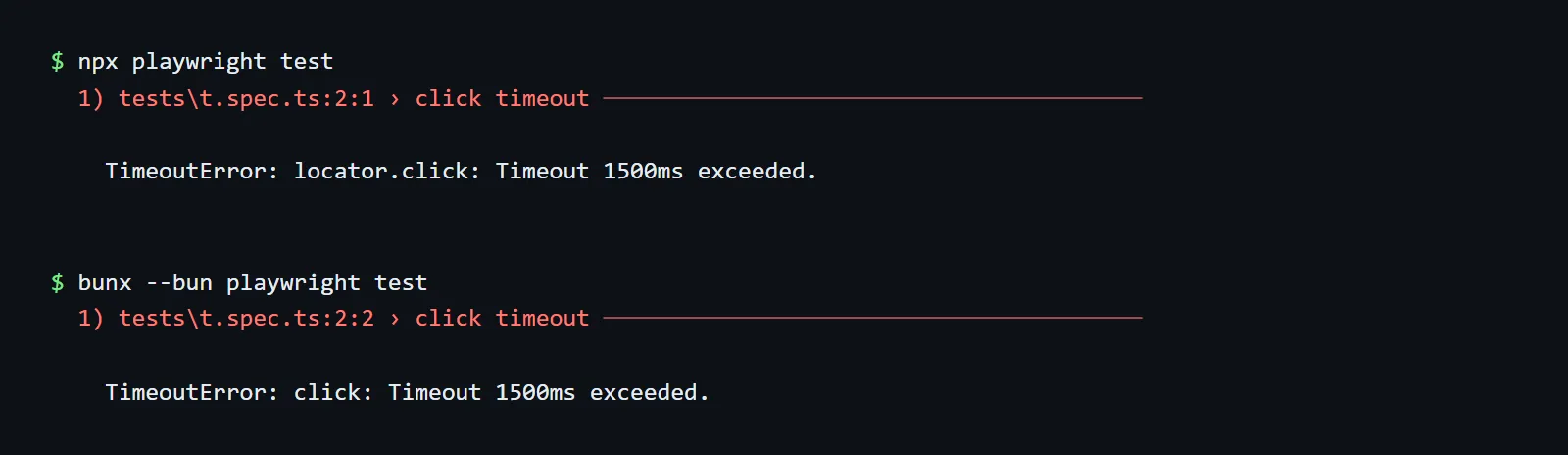
TimeoutError: locator.click: ...under Node become aTimeoutError: click: ...under Bun. Keep the Bun and Node results in separate trend lines. - Debug on Node. If you're debugging a flaky test, you'll be reaching for the UI mode re-runs, the async stack frames and the trace console output, and Bun gives you absolutely nothing in that respect.
--only-changedPR gates run fewer tests under Bun. A change to a shared helper won't select the specs that import it.
How Do You Get a Playwright Report With Just the Failed Tests?
Use the new failures reporter for terminal output and onlyFailures: true for the HTML, JSON or JUnit file. There's no CLI flag for onlyFailures (a --reporter-only-failures flag was added during 1.65 dev and subsequently removed prior to release in #43805). Set it in your config or via an environment variable.
The failures reporter prints failures and successful retries as they happen, then a summary, and no progress output:
npx playwright test --reporter=failures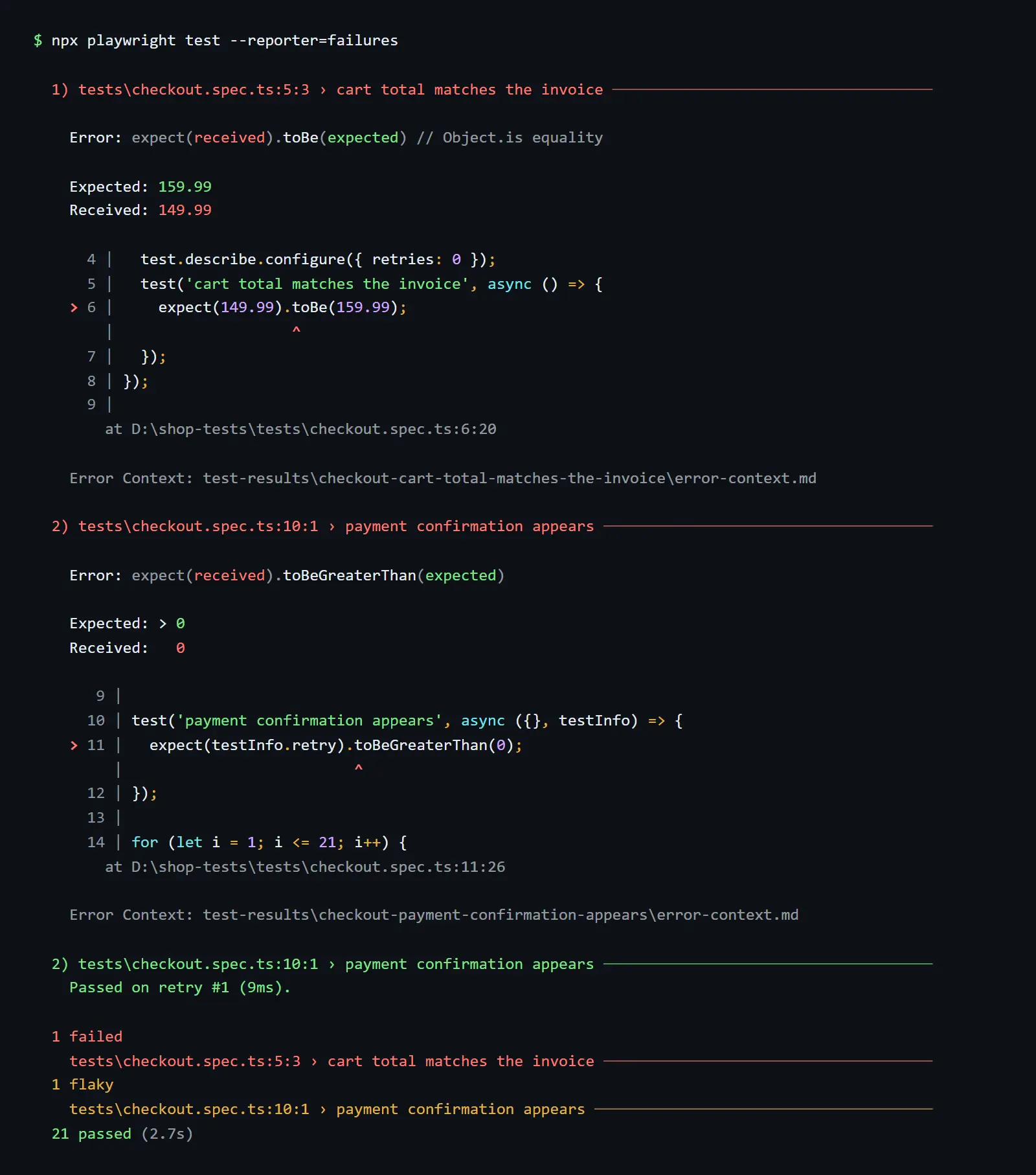
Options: omitTags (PLAYWRIGHT_FAILURES_OMIT_TAGS), plus PLAYWRIGHT_FORCE_TTY, FORCE_COLOR and NO_COLOR. Set quiet in the test config to suppress test stdout and stderr.
onlyFailures keeps the tests with unexpected results (including the ones with unexpected passes), the flaky tests and the tests that were interrupted. A flaky test is kept even if it passed on retry, along with all the attempts.
// playwright.config.ts
import { defineConfig } from '@playwright/test';

export default defineConfig({
  retries: process.env.CI ? 2 : 0,
  reporter: process.env.CI
    ? [
        ['failures'],                                        // short CI log
        ['html', { onlyFailures: true, open: 'never' }],     // small artifact for humans
        ['json', { outputFile: 'results/full.json' }],       // full data for dashboards
      ]
    : [['list'], ['html']],
});
Env vars: PLAYWRIGHT_HTML_ONLY_FAILURES, PLAYWRIGHT_JSON_ONLY_FAILURES, PLAYWRIGHT_JUNIT_ONLY_FAILURES. We've confirmed both 1 and true work. Multiple reporters can be specified on the command line as a comma-separated list (e.g., --reporter=failures,blob).
Does onlyFailures Change Your Test Totals?
Yes, a filtered report doesn't just drop the passing tests; it drops them from the totals as well. We ran the same 24-test suite (21 passed, 2 failed, 1 flaky) both ways:
| Output | Without onlyFailures | With onlyFailures: true |
|---|---|---|
JSON stats.expected | 21 | 0 |
JUnit testsuites tests= | 24 | 3 |
JUnit retry elements (rerunFailure, flakyFailure) | 0 (default includeRetries) | 5 (kept regardless of includeRetries) |
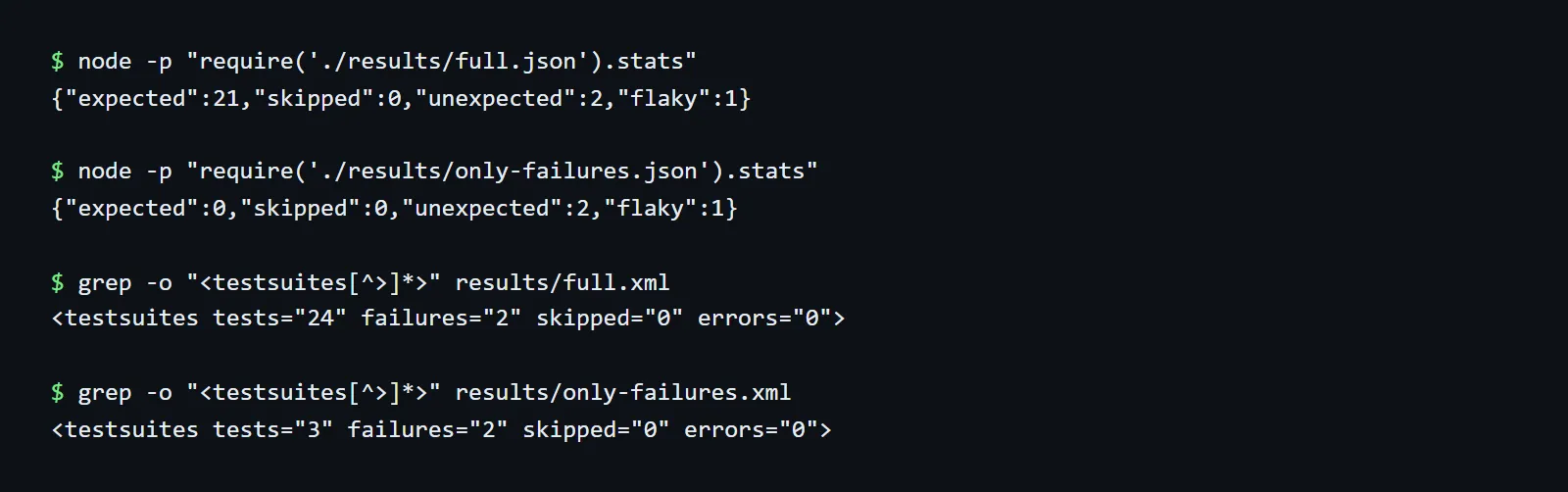
Anything that's going to work out a pass rate, a test count or 'tests added this week' from a filtered file is going to be complete and utter nonsense. The test management imports will think that 21 tests have disappeared. Have one unfiltered, machine-readable report (JSON or JUnit) for the dashboards and quality gates, and use onlyFailures for the HTML report that people actually look at.
Why Do Page Objects Throw 'Cannot Read Properties of Undefined' in Playwright 1.65?
Playwright 1.65 now compiles TypeScript class fields in accordance with useDefineForClassFields, just like tsc does. That setting is on for ES2022+ targets and when the target is unset (which covers projects with no tsconfig.json at all; we've tested that). Field initializers now run prior to the constructor assigning the parameter properties:
class LoginPage {
  // 1.65: TypeError: Cannot read properties of undefined (reading 'getByRole')
  readonly submit = this.page.getByRole('button', { name: 'Submit' });
  constructor(private readonly page: Page) {}
}
Find every case with the compiler rather than grep. With target ES2022 or unset, tsc reports these lines precisely as TS2729: Property 'page' is used before its initialization:
npx tsc --noEmit -p . 2>&1 | grep TS2729If you've got no tsconfig, then just run npx tsc --noEmit --target es2022 --skipLibCheck <files> or add a minimal tsconfig. If you're doing a grep, you need to cover the modifiers and the type annotations. A pattern that only matches readonly x = this.page will completely miss private readonly x: Locator = this.page...
rg -n --type ts '^\s*(?:(?:public|private|protected|readonly|static|override)\s+)*#?\w+\??!?\s*(?::[^=]+)?=\s*this\.'Fix: move the initializers into the constructor, or set "useDefineForClassFields": false in tsconfig.json.
If you're using decorated classes with static fields, then false currently breaks loading. See #43936 under known bugs.
Which Other Playwright 1.65 Breaking Changes Got Picked Up by CI?
Nine more, ordered by how often we expect them in a typical suite:
- Actions wait for elements to be non-inert.
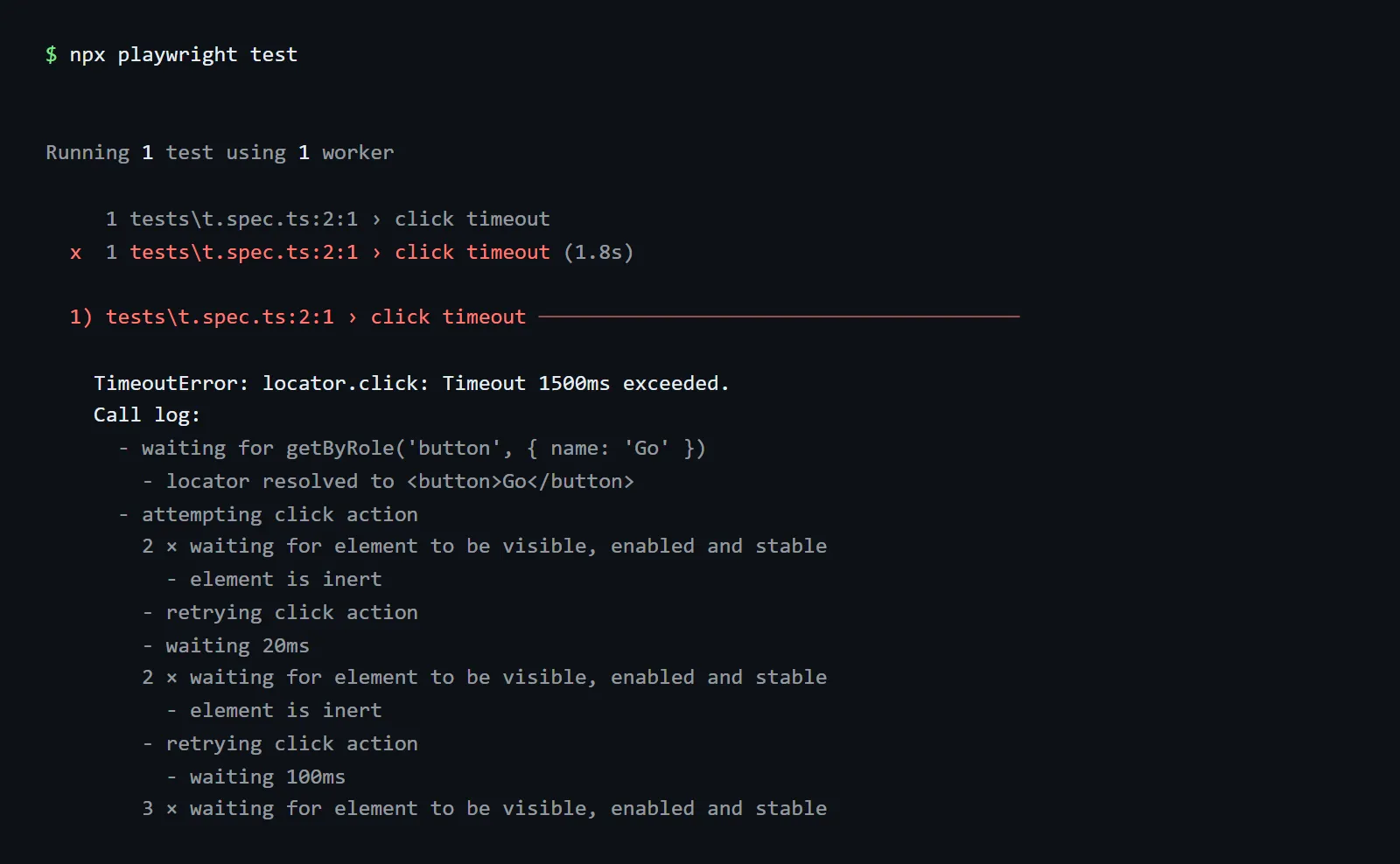
click,check,tap,fill,clear, andselectOptionall time out on an element that has theinertattribute or is inside one. The call log will simply state that the element is inert, so grep the logs for that string. The usual culprit is a test that has clicked behind an open modal or drawer. - An empty sharded run will fail with "No tests found". If no tests match across all the shards, then the run will fail. A single empty shard will still pass if the other shards have tests. If you're deliberately running with an empty
--grep, then you should add--pass-with-no-tests. - Aria names skip unrendered text. Text that isn't assigned to a slot, or which is directly within a closed
<details>, no longer counts. This will affectgetByRole({ name }),ariaSnapshot()andtoMatchAriaSnapshot(). - Cookie matching is per RFC 6265.
browserContext.cookies(url)andapiRequestContext.cookies(url)no longer return host-only cookies for subdomains orPath=/apicookies for/apiv2. APath=/foo/cookie no longer matches/foo. Nameless cookies are now sent asCookie: xrather thanCookie: =x. - APIRequestContext params append. String and
URLSearchParamsvalues are appended to the URL's existing query string rather than replacing it. - Proxy credentials only deal with proxy challenges. This is a security fix, as the
launch({ proxy })username and password were being sent to any site that asked for authentication. For site logins, usehttpCredentialson the context. .css,.lessand.scssimports load as empty modules rather than being stripped; the file must exist.- The blob reporter clears out its output directory (as per above).
- CommonJS test locations point to the callee start (e.g.
a.spec.ts:3:7rather than3:11), which is in keeping with ESM. That's going to matter if you're usingfile:line:colas a key in your history.
One thing is missing from the release notes. APIRequestContext now JSON-encodes string data for content types such as application/json;charset=UTF-8 and Application/JSON. Previously, only the exact string application/json was encoded. See #43937.
Will Playwright 1.65 Change Your Screenshot Baselines?
Expect some drift in all three engines if you use toHaveScreenshot(). The first public upgrade PRs show it:
- beaket/ui 1.64.1 to 1.65.0: visual suite failed 37 of 288 screenshots at mobile, tablet and desktop widths (issue #1234). The author thinks it's down to Chromium 158 text rendering but hasn't verified this yet.
- vaadin/web-components: the 1.65.0 upgrade PR required a follow-up commit, "fix Firefox and WebKit failures after Playwright 1.65 update" before it could be merged (PR #13362).
- primer/react refreshed 162 baselines, but that PR goes from 1.60 to 1.65 (Chromium 148 to 158) and is still open, so it overstates the 1.64 to 1.65 upgrade (PR #8690).
Regenerate the baselines within the Docker image for the same version (mcr.microsoft.com/playwright:v1.65.0-noble) in a separate commit and have a human have a look at the diff images. The baselines are regenerated in a separate commit so that you can revert the baselines without having to revert the code fixes.
There's one plus for Firefox users. 1.64 Firefox couldn't move focus from an iframe back to the parent (issue #43280, labeled v1.65 and closed 16th Oct). Some teams were actually still on 1.63 for that very reason (mittwald/flow#3607).
Which Version of Node.js and Which Docker Image Does Playwright 1.65 Require?
Node.js 22, 24, or 26 (latest patch of each). Playwright no longer tests on Node.js 20. The "engines" field in the 1.65.0 package still says "node": ">=20", so npm will install on Node 20 without a warning. You'll need to enforce this yourself.
// package.json
{ "engines": { "node": ">=22" } }

# .npmrc
engine-strict=true
Docker images now come with Node.js 26 (was 24). If you have any native modules in your app that were built against Node 24, you'll need to re-build those. 1.65.0 tags:
| Tag | Base |
|---|---|
mcr.microsoft.com/playwright:v1.65.0 and :v1.65.0-noble | Ubuntu 24.04 |
mcr.microsoft.com/playwright:v1.65.0-jammy | Ubuntu 22.04 |
mcr.microsoft.com/playwright:v1.65.0-resolute | Ubuntu 26.04 |
The images contain Node.js, not Bun. The image tag must match your @playwright/test version; otherwise, Playwright won't be able to find its browsers. Supported hosts: Windows 11+, Server 2019+, WSL, macOS 14+, Debian 12/13, Ubuntu 22.04/24.04/26.04.
Known Playwright 1.65.0 Bugs (as of November 6, 2026)
No 1.65.1 has shipped yet. Three reports from the first day:
| Issue | What breaks | Status | Workaround |
|---|---|---|---|
| #43936 | Decorated class with a static field fails to load (_initClass is not a function, "0 tests in 0 files") with useDefineForClassFields: false | Closed Nov 5 via PR #43940; fix not yet in a release | Stay on 1.64.1, or test @playwright/test@beta |
| #43937 | String data with application/json;charset=... is JSON-encoded. Breaks deliberately malformed-JSON tests and HMAC-signed bodies | Open; PR #43945 is docs-only, so the behaviour stays | Pass data: Buffer.from(body) |
| #43947 | clock.fastForward() / runFor() never return while the page has a zero-delay setInterval() | Open; draft PR #43948 | Use setInterval(fn, 1) in test fixtures. Not confirmed as a 1.64 regression |
Playwright 1.65 Upgrade Checklist
Paste this into the upgrade PR:
- Node.js: CI and Dockerfiles on 22, 24 or 26;
enginesraised to>=22. - One Playwright version:
npm ls @playwright/test playwright playwright-coreshows only 1.65.0 (monorepos will invariably have a spare copy somewhere). - Browsers:
npx playwright install --listgives us chromium-1254, firefox-1572 and webkit-2388 (webkit-2251 on macOS 14). - Browser cache: if you do cache
~/.cache/ms-playwright(the docs actually advise against this) then key it on the Playwright version. - Docker tags:
rg -n "playwright:v1\.[0-9]+\.[0-9]+"finds no old tag. Primer's first pass missed five containers. - Class fields:
tsc --noEmithas no TS2729 errors, oruseDefineForClassFields: falseis set on purpose. - Decorators: no decorated classes with static fields plus
useDefineForClassFields: false(#43936) - Inert: no failures containing
element is inert, or each one fixed in the test. - Baselines: regenerated in the v1.65.0 image, separate commit, diffs reviewed.
- Aria snapshots:
toMatchAriaSnapshot()specs re-run and reviewed. - Reports: dashboards and quality gates read the unfiltered report (not the
onlyFailuresone). - Blob reporter: one output directory or file name per invocation.
- Sharding: intentionally empty runs pass
--pass-with-no-tests. - API tests: string bodies with
application/json;charset=...(#43937),paramson URLs that already have a query, cookie assertions by URL. - Auth: no site login via proxy credentials.
- Remote browsers: your grid or
connect()server is running Playwright 1.65.x.browserType.connect()requires the client and server to match on major.minor.
How to Upgrade a CI Suite to Playwright 1.65, Step by Step
Approx. 15 minutes hands-on, plus two runs of your suite.
1. Branch and Bump
git switch -c chore/playwright-1.65
npm install -D --save-exact @playwright/test@1.65.0
npx playwright install --with-deps
npx playwright --version   # Version 1.65.0
2. Static Checks (Catches Most Breakage Without Running a Browser)
npx tsc --noEmit 2>&1 | grep TS2729            # class-field breakage
npx playwright test --list > /dev/null         # load errors, e.g. #43936
rg -n "playwright:v1\.[0-9]+\.[0-9]+" .        # Docker tags to bump
3. Run the Suite in the CI Image
docker run --rm --ipc=host -v "$PWD":/work -v /work/node_modules -w /work \
  mcr.microsoft.com/playwright:v1.65.0-noble \
  /bin/bash -c "npm ci && npx playwright test --reporter=failures"
The extra -v /work/node_modules ensures that an npm ci doesn't end up replacing your host's node_modules with the Linux builds. The container runs as root, so test-results/ will be root-owned on Linux hosts.
Sort each failure into one bucket:
| Symptom in the output | Bucket |
|---|---|
TS2729, Cannot read properties of undefined in a page object | Class fields |
element is inert in the call log | Inert actionability |
| Screenshot comparison failed, ARIA snapshot mismatch | Baseline drift |
No tests found on a sharded job | Empty shard |
| Fails the same way on 1.64.1 | Existing flake, not the upgrade |
To check the last bucket: switch to your main branch (1.64.1), reinstall, and run npx playwright test --last-failed. The .last-run.json file in test-results/ is usually gitignored, so it'll be there once you've switched to the main branch.
4. Refresh Baselines and Open the PR
docker run --rm --ipc=host -v "$PWD":/work -v /work/node_modules -w /work \
  mcr.microsoft.com/playwright:v1.65.0-noble \
  /bin/bash -c "npm ci && npx playwright test --update-snapshots"
git add -A -- '*-snapshots/*' && git commit -m "test: refresh baselines for Playwright 1.65"
Merge once the full browser matrix has passed. To get a head start on the next release, add a non-blocking nightly job on @playwright/test@next (the daily canary tag).
How to Roll Back From Playwright 1.65 to 1.64.1
Use four commits: (a) version bump and lockfile, (b) code fixes, (c) baselines, (d) 1.65-only config. To roll back, revert (a), (c) and (d). Keep (b) as it contains the constructor initialization, httpCredentials, --pass-with-no-tests and Buffer bodies, all of which work on 1.64.
Commit (d) matters because 1.65 config fails on 1.64 in different ways. We tested each one on 1.64.1:
| 1.65 feature in your config | What 1.64.1 does |
|---|---|
reporter: 'failures' | Crashes: Error: Cannot find module 'failures' |
onlyFailures: true | Silently ignored. You get full reports, and the storage cost comes back |
lock: '-exclusive-' | Silently ignored. The test runs in parallel with others |
test.skip('reason') | Still skips |
Then:
npm install -D --save-exact @playwright/test@1.64.1
npx playwright install --with-deps
Switch the Docker tags back to v1.64.1-noble and revert the Bun CI job back to npx playwright test, as Bun support doesn't start until 1.65.
GitHub Actions Workflow: Playwright 1.65 Under Bun With Sharding
Four shards under Bun, blob reports, then one merged failure-only HTML report and an unfiltered JUnit file.
Action versions are in line with the current Playwright CI docs.
# .github/workflows/playwright-bun.yml
name: Playwright 1.65 (Bun)
on:
  pull_request:
  push:
    branches: [main]

jobs:
  test:
    runs-on: ubuntu-latest
    timeout-minutes: 30
    strategy:
      fail-fast: false
      matrix:
        shardIndex: [1, 2, 3, 4]
        shardTotal: [4]
    steps:
      - uses: actions/checkout@v6
      - uses: oven-sh/setup-bun@v2
        with:
          bun-version: 1.4.3              # the version Playwright's CI uses
      - run: bun install --frozen-lockfile
      - run: bunx playwright install --with-deps   # installer runs on the runner's Node.js
      - name: Run tests under Bun
        run: bunx --bun playwright test --shard=${{ matrix.shardIndex }}/${{ matrix.shardTotal }} --reporter=failures,blob
      - uses: actions/upload-artifact@v5
        if: ${{ !cancelled() }}
        with:
          name: blob-report-${{ matrix.shardIndex }}
          path: blob-report
          retention-days: 2

  report:
    if: ${{ !cancelled() }}
    needs: [test]
    runs-on: ubuntu-latest
    steps:
      - uses: actions/checkout@v6
      - uses: oven-sh/setup-bun@v2
        with:
          bun-version: 1.4.3
      - run: bun install --frozen-lockfile
      - uses: actions/download-artifact@v5
        with:
          path: all-blob-reports
          pattern: blob-report-*
          merge-multiple: true
      - name: Merge into failure-only HTML + full JUnit
        run: bunx playwright merge-reports --config=merge.config.ts ./all-blob-reports
      - uses: actions/upload-artifact@v5
        with:
          name: playwright-report-${{ github.run_attempt }}
          path: |
            playwright-report
            results/junit.xml
          retention-days: 14
merge.config.ts is the file from the sharding section. To stay on Node.js, replace setup-bun with actions/setup-node@v6 (node-version: 24), replace bun install --frozen-lockfile with npm ci, and replace bunx --bun with npx.
Checking Playwright 1.65 on Real Browsers Before You Merge
The container run does a check of the Playwright bundled browser builds on one Linux image. Your users will be running their branded Chrome and Edge, Safari on macOS and iOS, and Chrome on Android.
1.65 was tested against Chrome 157 and Edge 156 stable (not the same builds as the bundled Chromium 158). WebKit on macOS 14 is a different build from WebKit on Linux. A screenshot or focus difference can pass in your container and still fail for a customer.
TestMu AI runs an existing Playwright suite on their cloud across 3,000+ browser and OS combinations as well as real Android and iOS devices. The browser and OS versions are selected on a per-run basis. The Playwright docs will cover the connect() setup.
For sharded suites, HyperExecute will take a single YAML file and shard the tests out across the machines to run the browser x OS matrix. Each test will have its own video, screenshots, and console and network logs, so you're not at all disadvantaged in terms of the evidence from the tests that passed if you're just getting a failure-only HTML report.
If you'd rather just run a flow from the terminal rather than write out a spec first, then the Kane CLI will take a plain English description and give you a pass/fail verdict complete with the steps, screenshots and logs. Recorded flows can be exported as Playwright code.
Should You Upgrade to Playwright 1.65.0 Right Now?
Yes, if tsc shows no TS2729 errors and you can refresh baselines in a reviewed commit. The bulk of the breaking changes are one-liners, which also work on 1.64, and Firefox iframe focus is back. If you're using decorated page objects with useDefineForClassFields: false, then you should wait for 1.65.1 (#43936).
Bun is opt-in, so there's no reason to wait or to rush. Just try it in a separate CI job and keep Node.js as your reference run.
Conclusion
Start the Playwright 1.65 upgrade on a branch with tsc --noEmit, which finds the class-field breakage before a browser runs. Then run your suite in the v1.65.0 image, sort each failure into a bucket, and put refreshed baselines in their own commit so you can roll back cleanly.
Testing from the terminal? Kane CLI by TestMu AI lets SDETs and developers plan, write, run and debug tests from the command line.
Author

Ankit Mathur
Blogs: 3

Ankit Mathur is Vice President of Engineering at TestMu AI, leading platform engineering across the testing cloud. He scaled the platform's backend services to handle 60M+ HTTP requests per day through horizontal scaling, network-layer optimization for faster test execution on the cloud grid, and database and AWS infrastructure tuning. He brings 10+ years in distributed systems engineering, with earlier roles at Sumo Logic and Adobe, where he worked on Adobe Sign and holds a US patent for storing and protecting signatures and images in electronic documents. Ankit holds a postgraduate diploma in advanced computing and a B.Tech in Information Technology.
Reviewer

Sri Harsha
Reviewer
Sri Harsha is Engineering Manager of the Open Source Program Office at TestMu AI, where he leads open-source engineering behind the Selenium and Appium automation grid and builds agentic AI systems for quality engineering. He is a member of the Selenium Technical Leadership Committee and a committer to WebdriverIO and Appium, and was recognized with the LambdaTest Delta Award 2023 for Best Contributor in open-source testing. He brings over 10 years of experience in software testing and automation, with earlier roles at EPAM Systems and ZenQ. Sri Harsha holds a B.Tech in Computer Science from Jawaharlal Nehru Technological University.


Playwright 1.65 FAQs
Did you find this page helpful?
More Related Blogs

TestMu AI forEnterprise
Get access to solutions built on Enterprise
grade security, privacy, & compliance
- Advanced access controls
- Advanced data retention rules
- Advanced Local Testing
- Premium Support options
- Early access to beta features
- Private Slack Channel
- Unlimited Manual Accessibility DevTools Tests